Eisenhower Matrix: How to Prioritize Tasks the Smart Way

Every day, you face a flood of tasks competing for your attention — emails, deadlines, meetings, personal errands, long-term goals you keep postponing. How do you decide what actually deserves your time? The Eisenhower Matrix is one of the most enduring and effective prioritization frameworks ever developed, and it answers that question with a simple 2x2 grid that sorts every task into a clear action: do it, schedule it, delegate it, or eliminate it.
Below is the task prioritization method — how it works, where people go wrong with it, and how to make it a decision-making matrix you actually use beyond the first week.
What Is the Eisenhower Matrix?

The Eisenhower Matrix — also known as the Eisenhower Box, the Eisenhower Decision Matrix, or the Urgent-Important Matrix — is a time management matrix that organizes tasks into a simple 2x2 grid based on two criteria: urgency and importance. By plotting every task against these two dimensions, you get four distinct quadrants, each with a clear action: do it now, schedule it, delegate it, or eliminate it entirely.

Think of it as a sorting machine for your to-do list. Instead of staring at a jumbled list of 20 tasks and guessing where to start, the matrix forces you to evaluate each item through a consistent lens, giving you instant clarity on what matters most — and what doesn't belong on your radar at all.
The Four Quadrants of the Eisenhower Matrix (Explained with Examples)
Here are the various stages of the framework and how they work:
Quadrant 1 — Urgent and Important (Do First)

These are your crisis tasks — items that demand immediate, personal action and carry real consequences if left undone. You can't delegate them, and you can't postpone them. They go to the top of your list, today.
Real-world examples:
- A medical emergency involving you or a family member
- A project deliverable due to a client by 5 p.m. today
- A critical production bug that's causing revenue loss right now
- A last-minute tax filing deadline you nearly forgot
- Your child's school calls because they're sick and need to be picked up
The Q1 warning: Everyone has some Quadrant 1 tasks — that's life. But if you're spending most of your day in Q1, you're in trouble. Chronically living here leads to exhaustion, reactive thinking, and burnout. It often means you've been neglecting Quadrant 2 (planning, prevention, preparation), which is the very quadrant that prevents future crises.
After reading this, audit your last week. If Q1 dominated, that's your signal to rebalance.
Quadrant 2 — Important, Not Urgent (Decide)
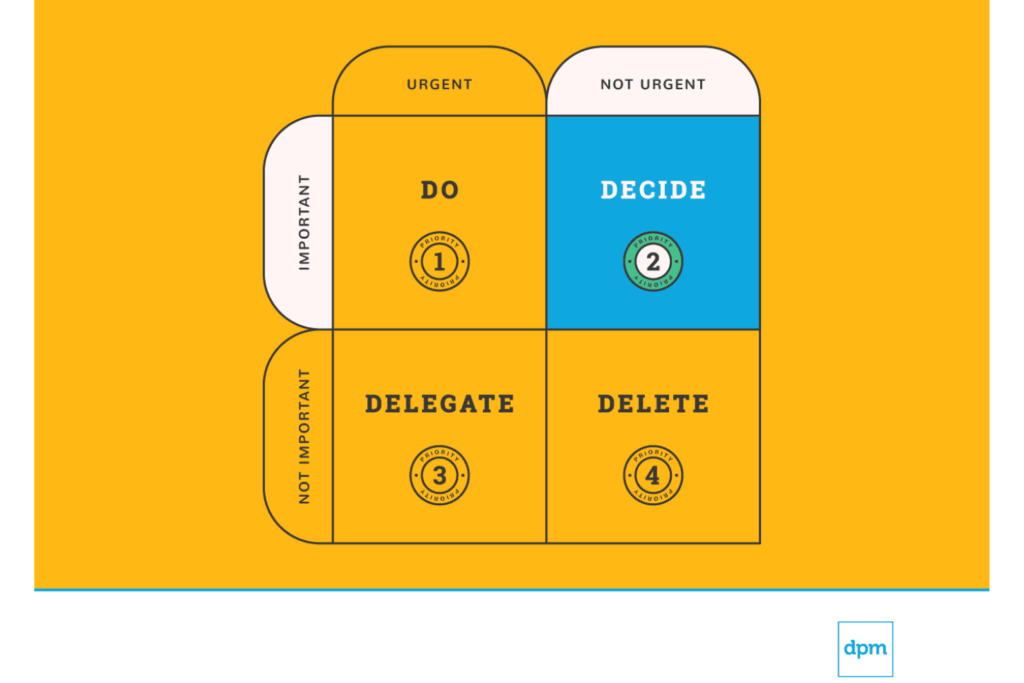
This is the sweet spot — the quadrant where long-term growth, strategic thinking, and meaningful progress happen. Q2 work rarely has a screaming deadline, which means it's the first thing to get pushed aside when the day gets busy. That's a costly mistake.
Real-world examples:
- Building a 90-day marketing strategy for your business
- Taking an online course to learn a new professional skill
- Weekly exercise and meal planning
- Conducting quarterly performance reviews for your team
- Nurturing key professional relationships through regular check-ins
How to protect Q2 time: The best technique is time-blocking. At the start of each week, physically block out dedicated chunks on your calendar for Q2 work — before meetings and reactive tasks fill the gaps. Treat these blocks as non-negotiable appointments with yourself. A one-hour block each morning for strategic work, protected from email and Slack, will compound into extraordinary results over months.
Stephen R. Covey, author of The 7 Habits of Highly Effective People, argued that the most effective people in the world spend the majority of their productive hours in Quadrant 2. He was right — the more time you invest here, the fewer crises pop up in Q1, because you've planned ahead, built skills, and strengthened systems before things break.
But there's a version of Q2 obsession that becomes its own trap: the person who spends so much time planning, strategizing, and "preparing" that they never actually ship anything. If your Q2 list is full of items that have been "scheduled" for months, you don't have a prioritization problem. You have an execution problem. Sometimes the most important thing you can do is take an imperfect Q2 item and force it into Q1 by giving it a hard deadline — even an artificial one. The matrix is a planning tool, not a permission slip for perpetual preparation.
Quadrant 3 — Urgent, Not Important (Delegate)

Q3 is the deception quadrant. These tasks feel urgent — they interrupt you, they have deadlines, other people are waiting — but they don't actually contribute to your goals. They're often someone else's priority wearing the disguise of your problem.
Real-world examples:
- Most email threads that request a quick reply but don't require your expertise
- A colleague asking you to sit in on a meeting "just in case"
- Routine status reports that a team member could compile
- Scheduling logistics for an event someone else is organizing
- A non-critical IT request that the help desk can handle
Delegation guidelines:
- Identify the right person. Ask: "Who else has the skill, context, or authority to do this?" It doesn't have to be a direct report — it could be a peer, a virtual assistant, or an automated system.
- Set clear expectations. When you hand off a task, specify the deliverable, the deadline, and the quality standard. Vague delegation creates more Q1 crises later.
- Follow up without micromanaging. Schedule a single check-in point rather than hovering. Trust the process.

Quadrant 4 — Not Urgent, Not Important (Delete it!)

Finally, project managers can often protect delivery by doing less. Every “yes” adds weight to the plan, whether it’s another stakeholder request, another meeting, another report, or another feature that was never part of the original scope. The more unfiltered work you accept, the harder it becomes to protect timelines, team capacity, and the quality of the final deliverable.
Project management examples of tasks to eliminate or push back on:
- Attending recurring status meetings where no decisions are made, no blockers are removed, and the same updates already exist in the project management tool.
- Creating custom reports for each stakeholder when one shared dashboard could show timeline, ownership, risks, and progress.
- Accepting scope changes without reviewing the impact on budget, resourcing, deadlines, QA, documentation, or dependencies.
- Keeping low-value backlog items alive even though they no longer support the project goal or current business priority.
- Joining technical, design, or operational discussions where the project manager has no decision to make and no blocker to remove.
- Spending time polishing internal slides when the team still lacks clarity on owners, due dates, dependencies, or next steps.
Task elimination checklist for project managers. Cut, defer, or delegate it if:
✂️ It does not move the project closer to delivery.
✂️ It does not reduce risk, remove a blocker, or clarify ownership.
✂️ It duplicates information already available in your project management software.
✂️ It adds reporting work without improving stakeholder decisions.
✂️ It creates scope creep without a clear tradeoff in time, budget, or resources.
✂️ It pulls the team away from approved priorities.
✂️ No one can explain what decision, outcome, or deliverable it supports.
✂️ Removing it would not affect the timeline, customer outcome, stakeholder alignment, or project quality.
Eisenhower Matrix Examples — Putting It into Practice
Theory is useful, but the real skill is sorting — taking a messy list of tasks and placing each one in the right quadrant. Let's walk through a realistic scenario step by step.
Example: A Manager's Sprint Planning Session
Meet Carlos, a software engineering team lead. His team's task backlog includes:
- Fix a critical authentication bug reported by users (live in production)
- Build the onboarding flow for the new feature (roadmap item for Q3)
- Respond to a compliance audit request with documentation by end of week
- Refactor the notification module code that has been accumulating tech debt
- Attend an all-hands meeting about office snack preferences
- Review pull requests from two junior developers
- Write the architecture proposal for the payments integration
- Update the team wiki with new deployment procedures
- Respond to a recruiter's email about sponsoring a meetup
- Reorganize the Jira board labels
Carlos's completed matrix:

Urgent vs. Important — Understanding the Critical Difference
This is the single most important distinction in the entire framework — and the one most people get wrong. If you can't reliably tell the difference between an urgent task and an important one, the matrix won't help you. Let's get crystal clear.
Defining Urgent Tasks
Urgent tasks demand immediate action. They come with a visible deadline, an external pressure, or a consequence that hits you now if you ignore them. Urgency is almost always driven by the clock or by someone else's expectations.
Examples:
- A client calls with a complaint that needs resolution before end of day
- Your website crashes during a product launch
- A same-day submission deadline for a grant proposal
The key characteristic of urgent tasks is that they feel pressing in the moment, regardless of whether they actually contribute to your bigger goals.
Defining Important Tasks
Important tasks contribute to your long-term mission, values, or goals. They are the work that builds your career, deepens your relationships, or strengthens your health. Importance is defined by you, based on what you value — not by external pressure.
Examples:
- Developing a strategic plan for Q3
- Exercising three times a week to maintain your health
- Building a professional network by attending industry events
- Writing the first draft of a book you've been planning for years
Important tasks rarely scream for attention. They sit quietly on your list, easy to postpone — which is exactly why they're so dangerous to ignore.
How to Distinguish Between Them
When you're staring at a task and can't decide, run it through this quick litmus test:
- "What happens if I don't do this today?" — If the answer is serious, immediate consequences (a missed deadline, a lost client, a health emergency), the task is urgent. If nothing blows up today, it probably isn't.
- "Does this task move me meaningfully closer to a long-term goal?" — If yes, it's important. If it's just keeping the gears turning or satisfying someone else's agenda, it may not be.
- "Whose priority is this, really?" — Many tasks feel urgent only because someone else framed them that way. A coworker's "ASAP" email might actually be their Q1, but your Q3.
How to Build Your Eisenhower Matrix — Step by Step
Step 1: Brain Dump Every Task
Open a blank document or grab a sheet of paper. Write down every single task, obligation, and nagging to-do currently occupying your mental bandwidth. Don't filter, don't judge, don't organize. Just get it all out. Aim for at least 15 items — most people are carrying more than they realize.
Step 2: Apply the Urgency and Importance Filters
Go through each task one at a time and ask the two core questions:
- Is this urgent? Is there a real deadline within the next 24 to 48 hours, or an immediate consequence if I ignore it?
- Is this important? Does this directly contribute to a long-term goal, a core responsibility, or a deeply held value?
Be ruthless. Most tasks are less urgent than they feel, and fewer tasks are truly important than you'd like to believe. If you're unsure, default to "not urgent" or "not important" — you can always promote a task later, but the matrix only works if you're honest about what actually deserves priority.
Step 3: Place Each Task in Its Quadrant
Draw the 2x2 grid (on paper, in a spreadsheet, or in whatever tool you prefer) and drop each task into the appropriate box. If you find yourself putting most tasks into Quadrant 1, pause. That usually means you're confusing urgency with importance, or you've waited too long to do this exercise and genuine crises have accumulated. Both are fixable.
Step 4: Assign Actions
- Q1 tasks: Do them today. No negotiation. If there are more Q1 tasks than you can finish in a day, rank them by severity of consequence and start at the top.
- Q2 tasks: Open your calendar right now and block specific time for each one this week. If it doesn't get a time slot, it won't get done.
- Q3 tasks: Identify who can handle each one, write a clear handoff message, and send it before you move on. If you're working solo, batch these into a single daily time window.
- Q4 tasks: Cross them off your list. Not "do them later." Remove them. If a Q4 task keeps reappearing, ask yourself what emotional need it's serving (avoidance, comfort, social pressure) and address that need directly.
Step 5: Rebuild the Matrix Regularly
This is where most people fail. They sort their tasks once, feel a satisfying burst of clarity, and never do it again. The matrix isn't a one-time exercise — it's a recurring discipline.
Recommended cadence:
- Daily (5 minutes): Each morning, sort your top five to seven tasks for the day into the grid. This takes less time than you spend choosing what to watch on a streaming service.
- Weekly (20 minutes): Every Sunday evening or Monday morning, rebuild the full matrix from scratch. Review what moved from Q2 to Q1 during the week (that's a warning sign), what Q3 tasks you absorbed instead of delegating (that's a boundary issue), and what Q4 activities crept back in.
- Monthly (30 minutes): Zoom out and assess the pattern. Which quadrant is consuming the most time? Is your Q2 list growing or shrinking? Are the same tasks appearing week after week without progress?
The matrix is a muscle, not a magic trick. The sorting instinct becomes automatic after about two weeks of daily practice. Before that, it takes deliberate effort. Push through the initial friction.
Origin — Who Invented The Eisenhower Matrix?
The framework traces back to Dwight D. Eisenhower, the 34th President of the United States and a five-star general who led Allied Forces during World War II. Eisenhower was legendary for his ability to sustain extraordinary productivity across decades of high-stakes leadership — from orchestrating the D-Day invasion to launching NASA and the Interstate Highway System.
In a 1954 speech to the Second Assembly of the World Council of Churches, Eisenhower quoted an unnamed university president:
I have two kinds of problems, the urgent and the important. The urgent are not important, and the important are never urgent.
That single insight — that urgency and importance are fundamentally different forces — became the philosophical foundation for the matrix. Eisenhower was relaying someone else's observation, not coining a personal motto. But the principle clearly shaped how he operated, and it's what makes the framework resonate decades later.
More than three decades later, Stephen Covey formalized the concept into the four-quadrant model we know today in his landmark 1989 book, The 7 Habits of Highly Effective People. Covey called it the "Time Management Matrix" and positioned Quadrant 2 (Important, Not Urgent) as the key to personal effectiveness. Thanks to Covey's work, the Eisenhower method went from a presidential principle to a globally adopted prioritization framework used by everyone from Fortune 500 executives to college students planning their semesters.
Purpose and Benefits
Why has this simple grid endured for over 70 years? Because it solves real problems that every busy person faces:
Eliminates busywork — Rather than letting low-value tasks quietly consume your day, you identify and cut them systematically. Most people are shocked by how much of their week falls into the bottom two quadrants when they first do this exercise honestly.
Reduces decision fatigue — Instead of agonizing over what to work on next, you follow a pre-sorted system. The matrix makes the decision for you, which preserves mental energy for the work itself.
Aligns daily actions with long-term goals — By carving out dedicated space for important-but-not-urgent work, you stop drifting and start building toward what actually matters.
Prevents burnout — When you stop treating every task like an emergency, you reduce the chronic stress that comes from living in crisis mode.
What's Next?
If you're in the process of researching productivity apps and tools, connect with a SoftwareSelect advisor for free recommendations.
You fill out a form and have a quick chat where they get into the specifics of your needs. Then you'll get a shortlist of software to review. They'll even support you through the entire buying process, including price negotiations.
FAQs
Here are a few commonly asked questions and answers about the Eisenhower Matrix.
Is the Eisenhower Matrix the same as the time management matrix?
Yes. Stephen Covey called the same framework the “Time Management Matrix” in The 7 Habits of Highly Effective People. The terms are interchangeable. You may also see it referred to as the Urgent-Important Matrix, the Eisenhower Box, or the Eisenhower Decision Matrix. They all describe the same 2×2 grid based on urgency and importance.
How often should I update my Eisenhower Matrix?
For daily task management, spend five minutes each morning sorting your tasks. For broader planning, rebuild the matrix weekly. A monthly review helps you spot patterns — like consistently overloaded Q1 or a growing Q4 habit — that signal deeper issues with how you’re allocating time.
Can I use the Eisenhower Matrix if I have no one to delegate to?
Yes. Quadrant 3’s “delegate” label is the most commonly misunderstood part of the framework. If you work solo, treat Q3 as your “minimize and contain” quadrant. Batch similar low-importance tasks into a single time window each day, automate repetitive items, set boundaries on response times, and practice saying no to requests that don’t serve your priorities. The core principle — stop letting other people’s urgency override your important work — applies whether you have a team or not.
Does the Eisenhower Matrix work for teams, or just individuals?
It works for both. Managers can use the matrix during sprint planning or weekly standups to help a team align on what to tackle first, what to schedule, and what to deprioritize. The shared language of four quadrants makes it easier to push back on low-priority requests without the conversation becoming personal — you can say “that’s a Q3 item” instead of “that’s not important,” which tends to land better.