

Salesforce ile Entegre En İyi 10 Proje Yönetimi Yazılımı

Salesforce ile Entegre Olan En İyi Proje Yönetimi Yazılımları Kısa Listesi


Salesforce'a zahmetsizce bağlanan proje yönetimi yazılımları oyunun kurallarını değiştirebilir. Veri girişi için harcadığınız zamandan tasarruf etmenize, önemli içgörüleri kolayca elde etmenize ve darboğazları sorun hâline gelmeden önce ele almanıza yardımcı olabilir. Ancak piyasada bu kadar çok seçenek varken sizin ve ekibiniz için doğru seçimi bulmak bunaltıcı görünebilir.
Dijital projeleri yönetme ve proje yönetimi araçlarını kullanma konusunda yıllara dayanan deneyimim sayesinde, Salesforce ile gerçekten iyi çalışanları bulmak için çeşitli araçları test ettim. İletişimi kolaylaştıran, verilerin gerçek zamanlı olarak güncellenmesini sağlayan ve ekiplerin daha sorunsuz bir şekilde birlikte çalışmasına yardımcı olan araçları belirledim.
Yazılım Önerilerimize Neden Güvenebilirsiniz?
Ekibimiz 2012’den beri yazılımları test ediyor ve inceliyor. Biz de proje yöneticisi olduğumuz için doğru yazılımı seçmenin ne kadar zor ve önemli olduğunu biliyoruz.
Bu rehber için araçları uygulamalı testler ve bağımsız araştırmalarla değerlendirdik ve seçim kriterlerimize göre puanladık. Ayrıca sektörün fikir önderlerinin ve alanında çalışan proje yönetimi uzmanlarının görüşlerinden de yararlanıyoruz.
İncelemelerimiz bir satış konuşması değil, editör ekibimizin kendi değerlendirmesidir.
Uzman inceleyenler:
Salesforce ile Entegre Proje Yönetimi Yazılımları Karşılaştırma Tablosu
Score legend (out of 5)
- Excellent 4.5–5
- Good 4–4.4
- Average 3–3.9
- Below average 2–2.9
- Poor 1–1.9
| Tool | Starting Price | Website | |||||||
|---|---|---|---|---|---|---|---|---|---|
| Best for robust reporting tools | 3.3 out of 5 | 2 | 3 | 5 | 3 | 3 | 4 | $10/user/month Free plan + 14-day free trial + free demo available | Book Demo |
| Best for visual project management | — | 2 | 2 | 4 | — | 2 | 2 | $8/user/month Free plan + 14-day trial available | Website |
| Best for AI-driven sales-to-delivery handoff | — | 2 | 3 | 4 | — | 3 | 4 | $9/user/month Free plan + 14-day free trial available | Book Demo |
| Best for unified global project oversight | — | 2 | 2 | 4 | — | 2 | 4 | $16/user/month Free trial available | Website |
| Best for portfolio-scale services delivery tracking | 3.2 out of 5 | 2 | 2 | 5 | 2 | 4 | 4 | Pricing upon request Free demo available | Website |
| Best for native Salesforce project delivery | 3.7 out of 5 | 3 | 3 | 5 | 3 | 4 | 4 | $25/user/month Free non-profit licenses | Website |
| Best for end-to-end services delivery financials | 4.0 out of 5 | 3 | 4 | 4 | 4 | 5 | 4 | Pricing upon request Free demo available | Website |
| Best for services delivery inside Salesforce | 3.3 out of 5 | 1 | 3 | 4 | 4 | 4 | 4 | Pricing upon request Free demo available | Website |
| Best for opportunity-to-project scoping by line item | 3.8 out of 5 | 2 | 4 | 5 | 4 | 4 | 4 | $39/user/month 14-day free trial | Website |
| Best for client onboarding tied to CRM deals | 3.8 out of 5 | 3 | 4 | 5 | 2 | 4 | 5 | $49/user/month 14-day free trial + free demo available | Website |


Salesforce ile Entegre Olan En İyi Proje Yönetimi Yazılımları İncelemeleri
Salesforce ile entegre olan proje yönetimi yazılımlarını incelemek, ekibinizin verimliliğini ve iş birliğini önemli ölçüde artırabilir. Burada, proje iş akışlarınızı ve veri yönetiminizi optimize etmek için tasarlanmış ve Salesforce ile sorunsuz bir şekilde birleşen en iyi araçlara ilişkin ayrıntılı genel değerlendirmeler sunuyorum.

Wrike
Best for robust reporting tools
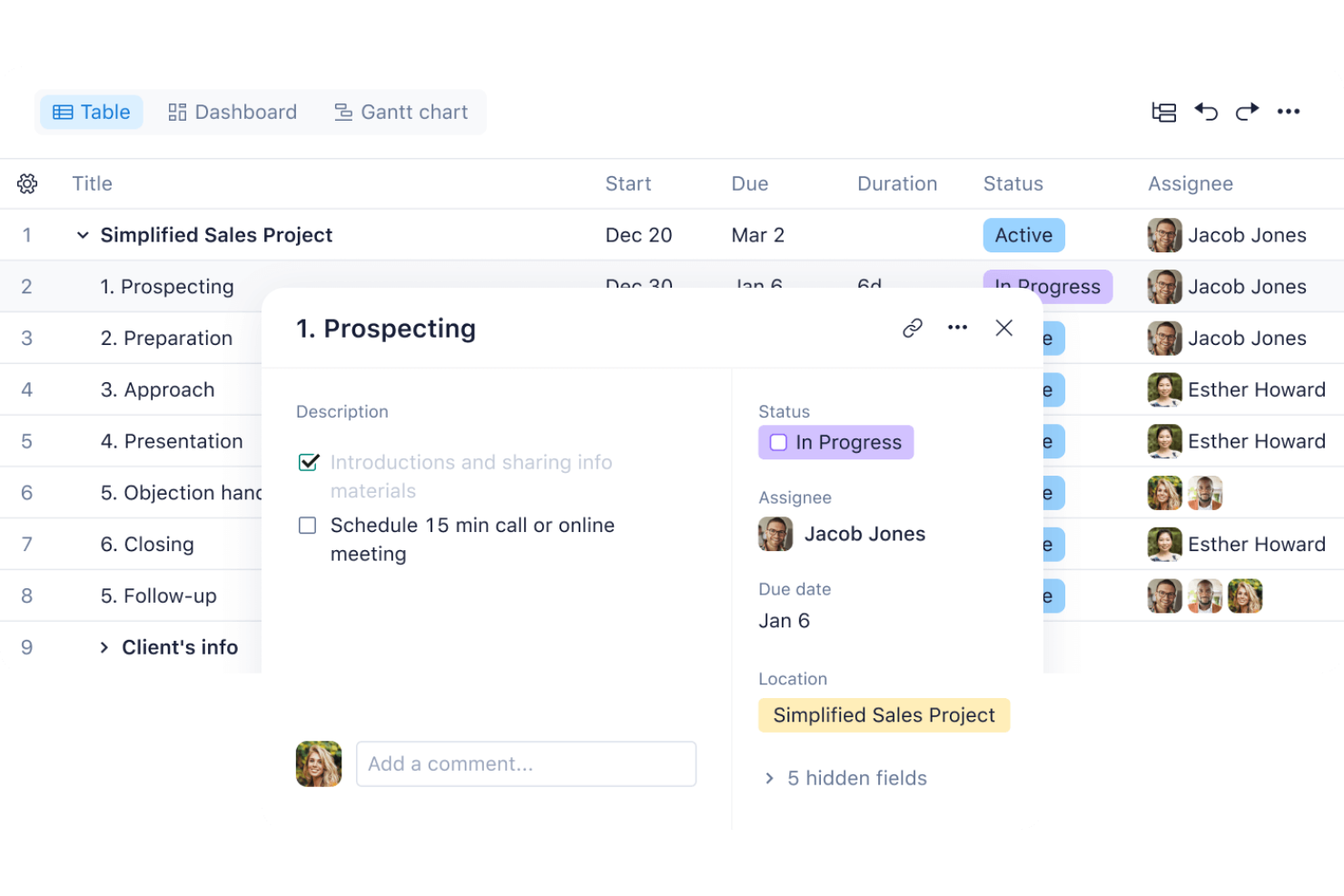
Wrike is a project management platform that connects task tracking, Gantt-based planning, workload management, and reporting with a native Salesforce managed-package integration for linking CRM records directly to project work.
Who Is Wrike Best For?
Wrike is a strong fit for project and program managers at mid-sized companies who need multi-view project tracking, workload visibility, and Salesforce record linking in one platform.
Why I Picked Wrike
I picked Wrike as one of the best because its reporting and dashboard tools give project managers real visibility into work tied to Salesforce records, without having to chase updates across tools. I like that you can build custom dashboards with configurable widgets, run real-time reports on project status, and view workload charts that flag overloaded team members across projects. The Salesforce widget surfaces linked tasks and their statuses directly on Salesforce records, so delivery progress is visible right where deals live.
Wrike Key Features
- Salesforce managed package: Installs directly into Salesforce Classic or Lightning and adds a widget to your record page layouts, showing linked Wrike tasks and statuses without leaving Salesforce.
- Automated project launch on deal close: Triggers associated Wrike tasks when a Salesforce deal closes, using an optional template copied to a new folder tied to that record.
- Multi-view project tracking: Switch between Gantt, board, table, calendar, and chart views to manage tasks, dependencies, and milestones across projects.
- Scrum boards and backlog management: Prioritize and track sprint work using shared Scrum boards and Agile dashboards alongside your standard project views.
Wrike Integrations
Wrike offers 400+ application integrations, including a native Salesforce managed package and marketplace connections with Jira, GitHub, Slack, Microsoft Teams, Google Sheets, Tableau, and Power BI. Its REST API, OAuth 2.0, webhooks, and Unito-powered paid sync support custom or two-way connectivity.
Pros and Cons
Pros:
- Workload charts flag overloaded team members
- Dependencies and Gantt views clarify delivery timelines
- Dashboards surface project status without update chasing
Cons:
- Advanced cross-project reporting may require spreadsheet exports
- Complex workspace setup can confuse new teams
New Product Updates from Wrike

Wrike Adds a Whiteboard Template Gallery
Wrike introduces a Whiteboard Template Gallery with a dedicated templates section, template previews, smart sorting, and usage counters. These features simplify whiteboard creation and template discovery. For more information, visit Wrike’s official site.

Miro
Best for visual project management
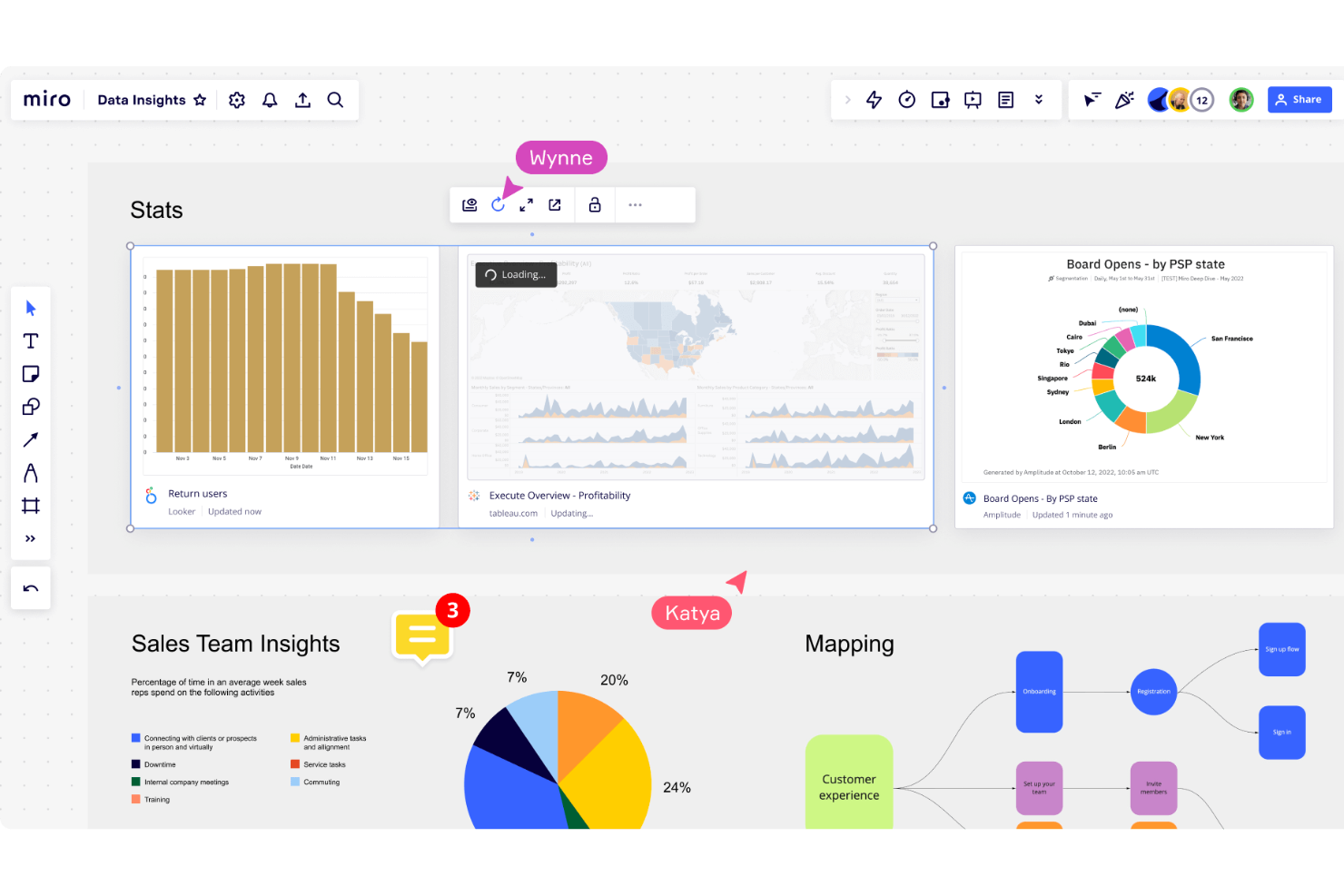
Miro is a visual collaboration platform that combines an infinite canvas with project planning tools, including Kanban boards, timelines, Gantt charts, and tables. Plus a third-party Salesforce integration for importing and updating CRM records directly on the board.
Who Is Miro Best For?
Miro is a strong fit for project managers and cross-functional teams in tech who want a visual workspace for planning, mapping, and tracking work across distributed teams.
Why I Picked Miro
I picked Miro as one of the best because its infinite canvas brings visual project management to life in a way few tools can match. I love how teams can run Kanban boards, Gantt charts, and timelines all in one shared workspace, then pull Salesforce Leads and Contacts directly onto the canvas via the Salesforce for Miro app to keep account context visible alongside project work. It's especially useful when planning sprints or mapping delivery workflows while referencing live CRM records without switching tools.
Miro Key Features
- Infinite canvas: An expandable shared workspace where teams can organize project work, diagrams, and planning artifacts without space limits.
- Real-time board collaboration: Multiple team members can edit, comment, and update boards simultaneously for distributed teams.
- Blocking and blocked-by dependencies: Timeline records can be linked with dependency relationships to surface sequencing constraints across project work.
- Two-way integrations with dev tools: Business plan includes bidirectional sync with Jira, Asana, Linear, ClickUp, and Azure for sprint planning and roadmapping.
Miro Integrations
Miro lists 250+ integrations, including native connections with Jira, Asana, Linear, ClickUp, and Azure DevOps, plus the Salesforce for Miro marketplace app. It also supports Zapier and REST APIs for custom integrations.
Pros and Cons
Pros:
- Templates speed sprint and account planning
- Live collaboration keeps distributed teams aligned
- Visual boards clarify cross-functional project dependencies
Cons:
- Limited capacity planning and utilization reporting
- No project delivery view inside Salesforce
New Product Updates from Miro
Miro Adds Japan Data Residency for Enterprise Customers
Miro has introduced Japan data residency for enterprise customers, offering in-region storage for production data, backups, and metadata, plus in-region compute infrastructure. For more information, visit Miro's official site.
Best for AI-driven sales-to-delivery handoff
monday AI Workspace is an AI-powered work management platform that brings together project planning, task tracking, resource management, workflow automation, and Salesforce integration into a single connected workspace.
Who Is monday AI Workspace Best For?
monday AI Workspace is a strong fit for project and program managers at mid-to-large organizations who need a flexible, AI-assisted workspace to coordinate delivery across multiple teams and workstreams.
Why I Picked monday AI Workspace
I picked monday AI Workspace because it handles the messy transition from a closed-won deal to active delivery better than most tools in its class. Once a Salesforce Opportunity syncs into monday, AI agents can automatically generate project boards from templates, flag deadline risks, and send stakeholder updates without manual setup. I also like that Gantt views, task dependencies, and resource planning all live in the same workspace, so project managers aren't stitching together separate tools to run delivery.
monday AI Workspace Key Features
- AI agent workforce: Deploy pre-built AI agents for PMO tasks, including flagging blockers, tracking task progress, and sending stakeholder updates automatically.
- Portfolio management: Connect multiple project boards into a unified portfolio view showing health, progress, and timeline data across all workstreams.
- Task dependencies: Set Finish-to-Start, Start-to-Start, Finish-to-Finish, and Start-to-Finish relationships between tasks with configurable action modes.
- Salesforce object mapping: Map monday columns to Salesforce standard and custom object fields, including Opportunities, Accounts, Leads, and Contacts, with two-way sync.
monday AI Workspace Integrations
monday AI Workspace documents 850+ integrations and apps, including native Salesforce, HubSpot, QuickBooks, Slack, Microsoft Teams, GitHub, GitLab, Google Calendar, and Outlook integrations. It also provides GraphQL and SDK access for custom integrations.
Pros and Cons
Pros:
- Portfolio resource views surface capacity constraints
- Dependencies and Gantt views expose schedule risk
- Visual boards clarify cross-team delivery status
Cons:
- Financial tracking omits billing and margin controls
- Resource planning requires Enterprise access
New Product Updates from monday AI Workspace
monday AI Workspace Adds Human Approval Routing
monday AI Workspace adds a human-in-the-loop approval block to AI Workflows, sending approval requests and routing workflow paths based on responses. For more information, visit monday AI Workspace's official site.

VOGSY
Best for unified global project oversight
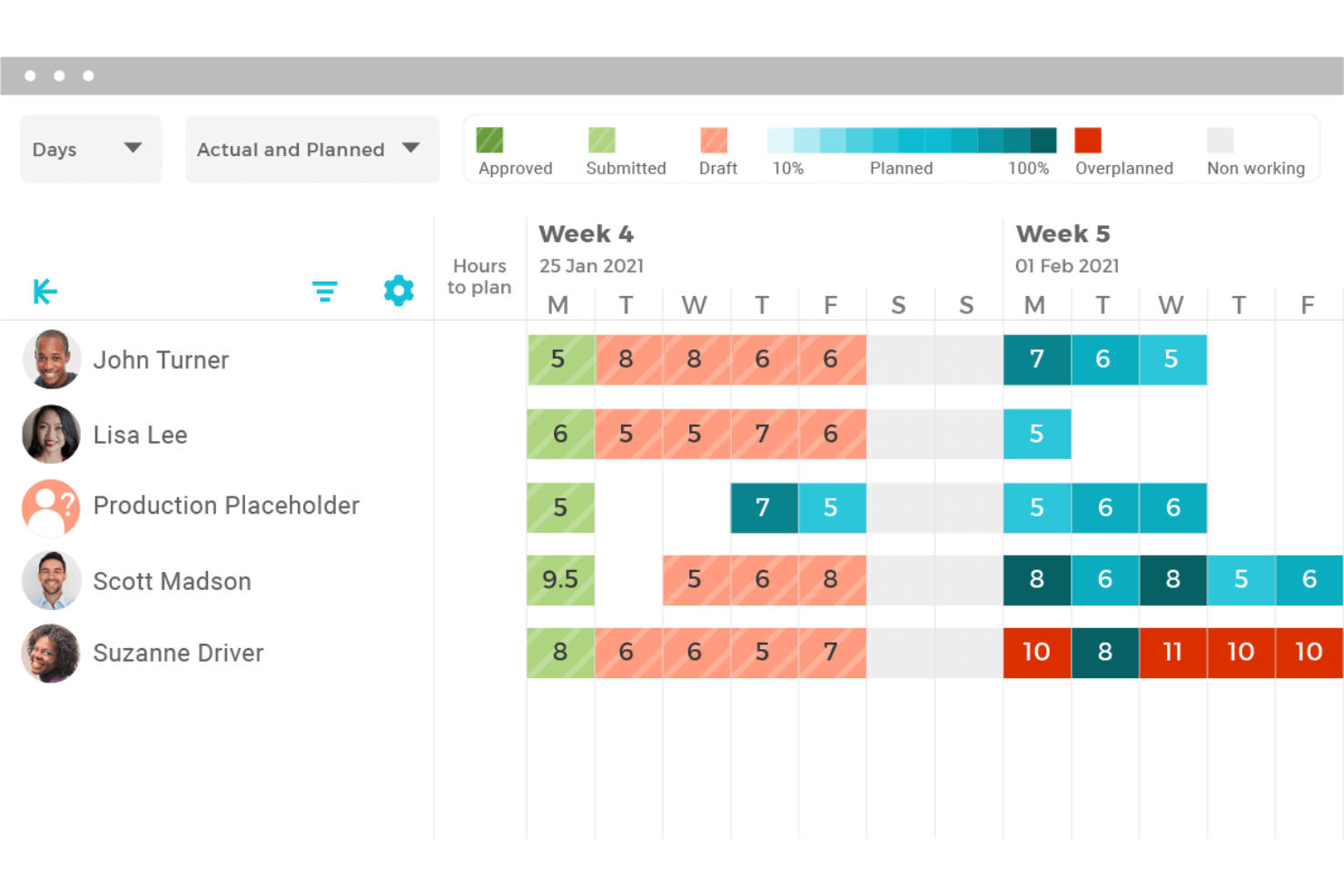
VOGSY is a professional services ERP that connects project management, resource planning, time tracking, invoicing, and CRM synchronization—including with Salesforce—in a single platform built for services-focused teams.
Who Is VOGSY Best For?
VOGSY suits professional services teams managing projects across multiple countries who need resource planning, billing, and financials in one place.
Why I Picked VOGSY
I picked VOGSY as one of the best because it handles the full arc of a professional services engagement—from pipeline to invoice—across multiple countries and currencies in a single platform. When a deal closes in your CRM, VOGSY's sales agent can immediately propose a resourced project plan, complete with deliverables, booked team, hours, and a billing model, ready for approval. I also like how its planning view places opportunity bookings directly alongside live projects, so you can spot capacity conflicts before they become problems.
VOGSY Key Features
- CRM synchronization: Syncs organization, contact, and opportunity data between your CRM and VOGSY, with bidirectional updates for organization records.
- Multi-currency and multi-company support: Manage projects across multiple countries, currencies, and legal entities with consolidated base-currency reporting.
- Flexible billing models: Supports time-and-materials, fixed-price, retainer, subscription, and mixed billing within a single project.
- AI-powered capacity planning: Matches skills to open work, flags overloaded or available staff, and proposes project staffing for review and approval.
VOGSY Integrations
VOGSY offers native integrations with Salesforce, Jira, Trello, Xero, Sage, NetSuite, QuickBooks Online, Google Workspace, and Microsoft 365. Its REST API supports custom connections.
Pros and Cons
Pros:
- Reviewers praise responsive onboarding support
- Margin forecasts connect delivery with finances
- Opportunity bookings appear beside active projects
Cons:
- Sales teams lack embedded delivery visibility
- Project tasks don’t sync into CRM
New Product Updates from VOGSY
VOGSY Adds Velocity Agent Verdicts for Quote Approvals
VOGSY adds Velocity agent verdicts for quote approval requests with risk levels, margin checks, discount analysis, and reasoning. This helps approvers assess quote risk before making a final decision. For more information, visit VOGSY’s official site.
 .
Best for portfolio-scale services delivery tracking
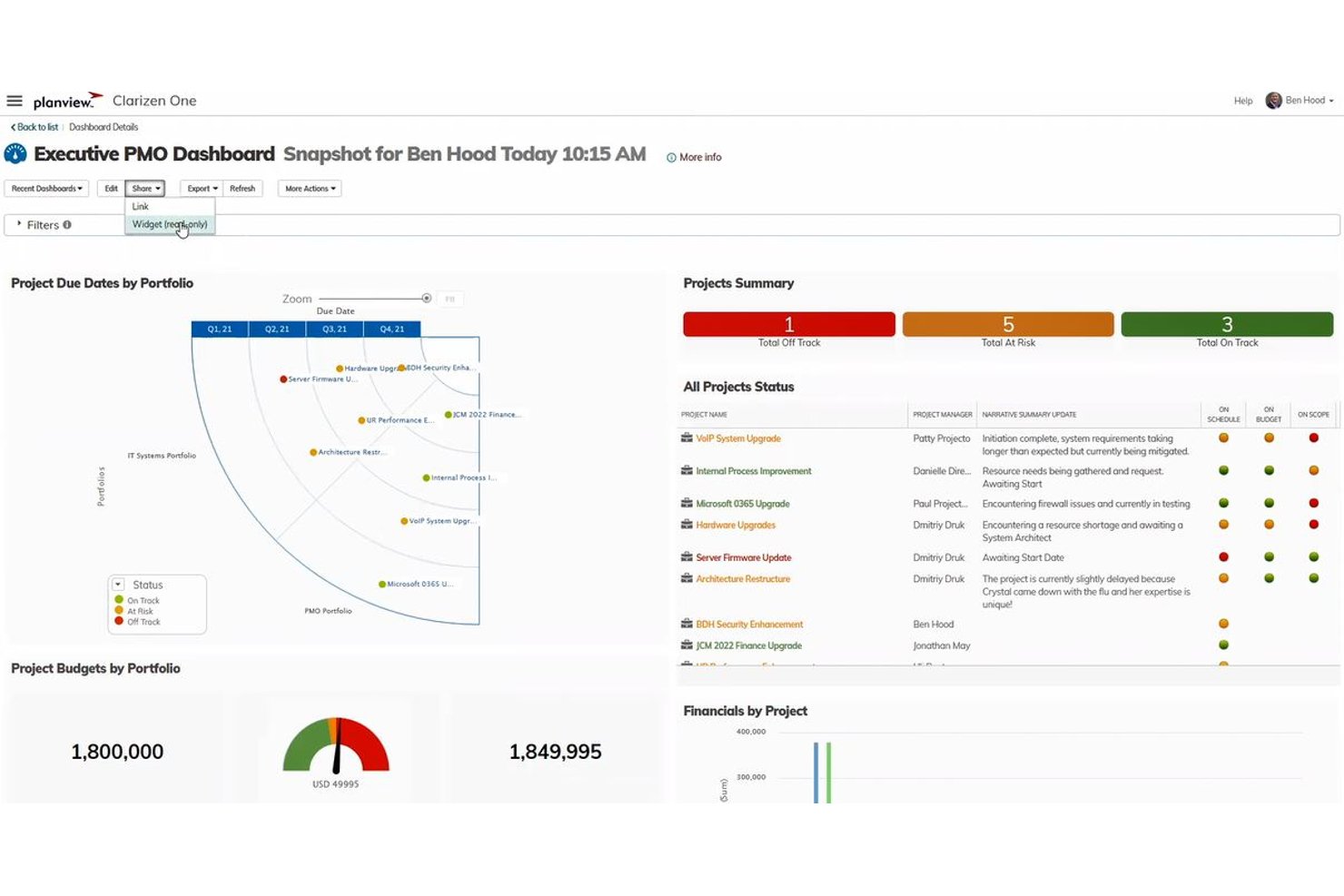
Planview AdaptiveWork is a portfolio and work management platform that connects Salesforce CRM to professional services delivery through project planning, resource management, financial tracking, and bidirectional data sync.
Who Is Planview AdaptiveWork Best For?
Planview AdaptiveWork is a strong fit for professional services teams that need to connect a Salesforce sales pipeline directly to project delivery, resource planning, and financial tracking at the portfolio level.
Why I Picked Planview AdaptiveWork
I picked Planview AdaptiveWork because it's built specifically for professional services teams that need to manage delivery at the portfolio level, not just the project level. Its dedicated Salesforce Edition connects opportunity data directly to project creation, so when a deal moves forward, your delivery team can trigger a full project plan without re-entering CRM context. I also appreciate how the financial tracking layer ties timesheets, rate cards, and revenue forecasting back to Salesforce dashboards showing active backlog and profitability trends by engagement.
Planview AdaptiveWork Key Features
- Hybrid work management: Supports waterfall, agile/Scrum, and hybrid delivery methods within a single workspace, with connections to external tools like Jira.
- AI-powered sentiment analysis: Scans project communications and status updates in real time to flag potential delivery risks before they escalate.
- Rate card configuration: Defines resource billing, cost, and revenue rates by role, user, or project to support accurate client invoicing.
- External collaborator portal: Gives clients or external stakeholders access to projects, files, and conversations without requiring a full platform license.
Planview AdaptiveWork Integrations
Planview AdaptiveWork offers native integrations with Salesforce, Salesforce Chatter, and SharePoint. It also connects with Jira, Microsoft Teams, and Slack, supports Zapier, and provides an API for custom integrations.
Pros and Cons
Pros:
- Budget and time tracking support services profitability
- Resource forecasts expose cross-project capacity constraints
- Portfolio views connect schedules, workload, and financials
Cons:
- Sync can misattribute activity or behave inconsistently
- Large plans make schedule changes cumbersome

Best for native Salesforce project delivery
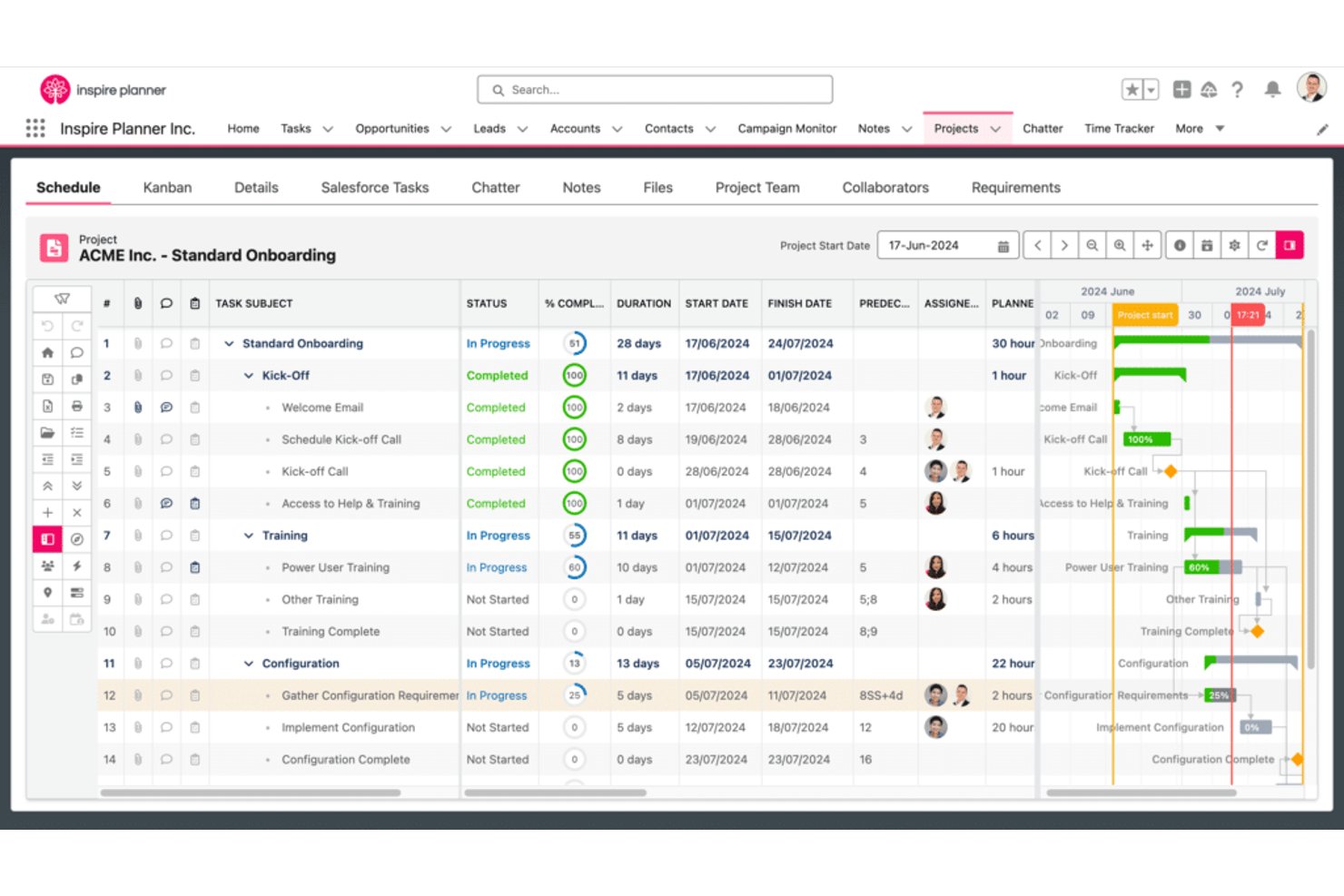
Inspire Planner is a 100% Salesforce-native project management app that supports waterfall and agile delivery, with Gantt, Kanban, and portfolio views, resource management, time tracking, and project financials—all built directly on your Salesforce org.
Who Is Inspire Planner Best For?
Inspire Planner is a strong fit for Salesforce-native teams that manage client delivery directly from their CRM, especially those running implementation or onboarding projects tied to closed deals.
Why I Picked Inspire Planner
I picked Inspire Planner as one of the best because it's the only tool on my list that lives entirely inside Salesforce, with no syncing to an external app. What I love most is the Opportunity-to-project Flow: when a deal closes, a project automatically spins up, linked to the Account and Opportunity, with templates stitched directly from the products on that deal. I also rely on the resource utilization views to track capacity across active projects without ever leaving my Salesforce org.
Inspire Planner Key Features
- Gantt chart with critical path: An interactive Gantt view displays dependencies, milestones, baselines, and critical path mapping across your project schedule.
- Agile backlog and sprint planning: Organize backlog items, create user stories, and group work into prioritized sprints with burnup, burndown, and velocity charts.
- External Project Portal: Share project schedules with external contacts so they can view tasks and update status, effort, and comments without a Salesforce license.
- Project financials tracking: Track budgets, expenses, earned value, and cost variance with automatic cost calculations based on effort and resource rates.
Inspire Planner Integrations
Inspire Planner offers native integrations across Salesforce, including Salesforce Tasks, Opportunities, Chatter, Reports and Dashboards, Flow, Process Builder, and the Salesforce mobile app. It supports custom integrations through the standard Salesforce API.
Pros and Cons
Pros:
- Reviewers praise responsive customer support
- Portfolio views show progress and resource allocation
- Gantt charts clarify task dependencies
Cons:
- Resource load leveling has reported gaps
- No invoicing or portfolio-level cost rollups

Certinia
Best for end-to-end services delivery financials
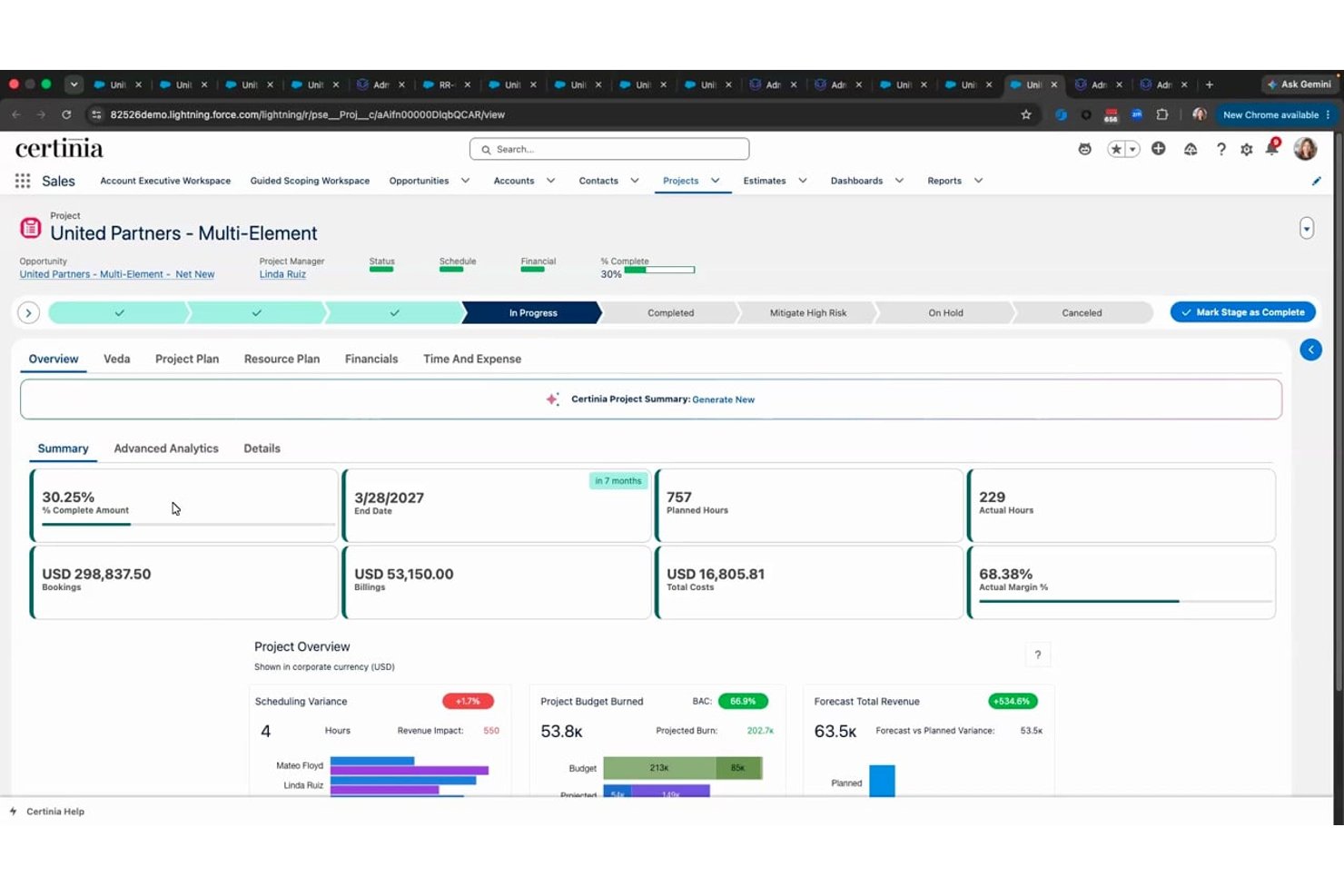
Certinia Professional Services Cloud is a Salesforce-native PSA platform that connects project management, resource scheduling, services estimation, billing, and financial tracking within your existing Salesforce environment.
Who Is Certinia Best For?
Certinia is a strong fit for professional services leaders who need to manage the full delivery lifecycle. From estimation and resourcing to billing and revenue recognition, users can monitor this all without leaving Salesforce.
Why I Picked Certinia
Certinia earns its spot on my shortlist because it's purpose-built to manage the full financial arc of services delivery, from initial estimation through revenue recognition, directly within Salesforce. I particularly like how Services Estimation lets you model resource roles, margins, and expenses before a deal closes, then converts that estimate directly into a project once the opportunity is won. Connected to Services Financials, my team can track bookings, backlog, and rate realization in real time.
Certinia Key Features
- Resource request management: Submit, track, and fulfill resource requests from scoping through project delivery using configurable best-fit assignment criteria.
- Project Gantt component: View and edit project tasks, dependencies, milestones, and assignments directly on a Salesforce project record using a built-in Lightning component.
- Multi-model billing support: Bill clients across time-and-materials, fixed-fee, subscription, and product-sale models within a single billing system.
- Services Communities: Give clients and partners role-based, branded access to project data, timecards, expenses, and invoices through Salesforce Experience Cloud sites.
Certinia Integrations
Certinia Professional Services Cloud is native to Salesforce and lists integrations with Concur (SAP), Docusign, Microsoft Outlook, MuleSoft, Avalara, and Expensify. It also supports REST and SOAP APIs for custom integrations.
Pros and Cons
Pros:
- Billing and forecasting connect project finances
- Resource utilization spans staffing and workloads
- Salesforce-native project tasks update shared records
Cons:
- Performance can slow with large datasets
- Configuration often needs Salesforce administrator expertise

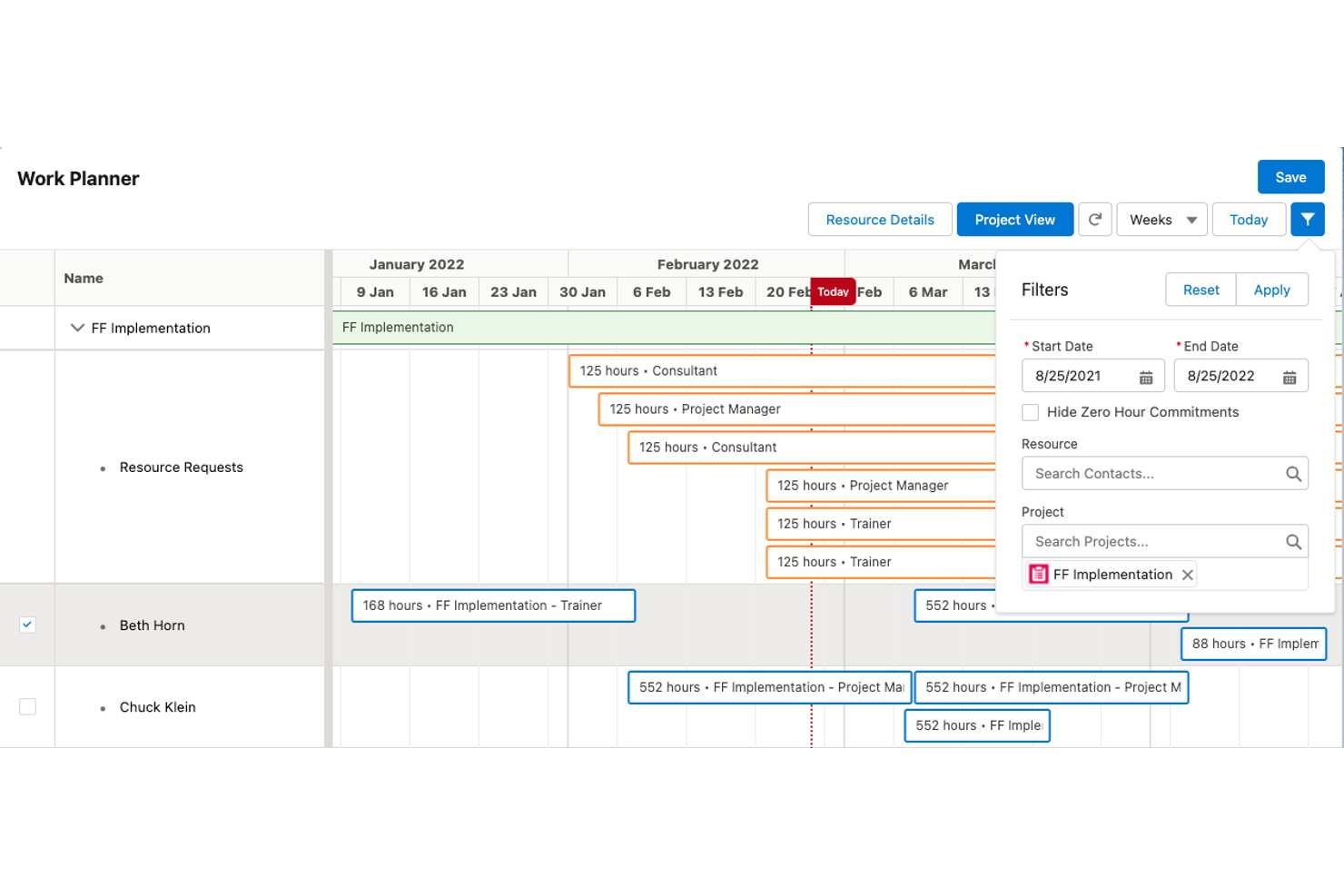
Certinia PS Cloud is a Salesforce-native professional services automation platform that covers project management, resource planning, services estimation, billing, and financial tracking—all within the Salesforce environment.
Who Is Certinia PS Cloud Best For?
Certinia PS Cloud is built for professional services teams that run their entire delivery operation—from resource planning to billing—inside Salesforce.
Why I Picked Certinia PS Cloud
I picked Certinia PS Cloud because it's the only tool on this list that doesn't integrate with Salesforce—it runs entirely inside it, sharing the same records, data model, and UI. I love that project managers can embed a live Gantt directly on a Salesforce project record, tracking task dependencies, milestones, and resource assignments without ever leaving the platform. The Work Planner adds real staffing depth, showing over- and under-allocation across your team so you can drag and reschedule assignments on the spot.
Certinia PS Cloud Key Features
- Services estimation: Model resource roles, seniority, discounts, and expenses to build profit-aligned quotes using best-practice templates and historical data.
- Multiple billing models: Support time-and-materials, fixed-fee, subscription, and product-sales billing from a single centralized invoicing workflow.
- Skills and experience analytics: Use analytics dashboards to view team capabilities and allocate resources based on skills, experience, and availability.
- Shared opportunity pipeline views: Give delivery teams real-time visibility into the sales pipeline so resource planning can begin before a deal closes.
Certinia PS Cloud Integrations
Certinia PS Cloud integrates natively with Salesforce CRM and lists integrations with Avalara, AvidXchange, Concur, DocuSign, Expensify, Microsoft Outlook, and MuleSoft. RESTful APIs and SOAP-based web services support custom integrations.
Pros and Cons
Pros:
- Project financials connect delivery, billing, and margins
- Work Planner exposes allocation gaps and utilization
- Gantt tracks dependencies, milestones, and task status
Cons:
- Reviewers report dated screens and slow performance
- Custom handoffs require Apex development
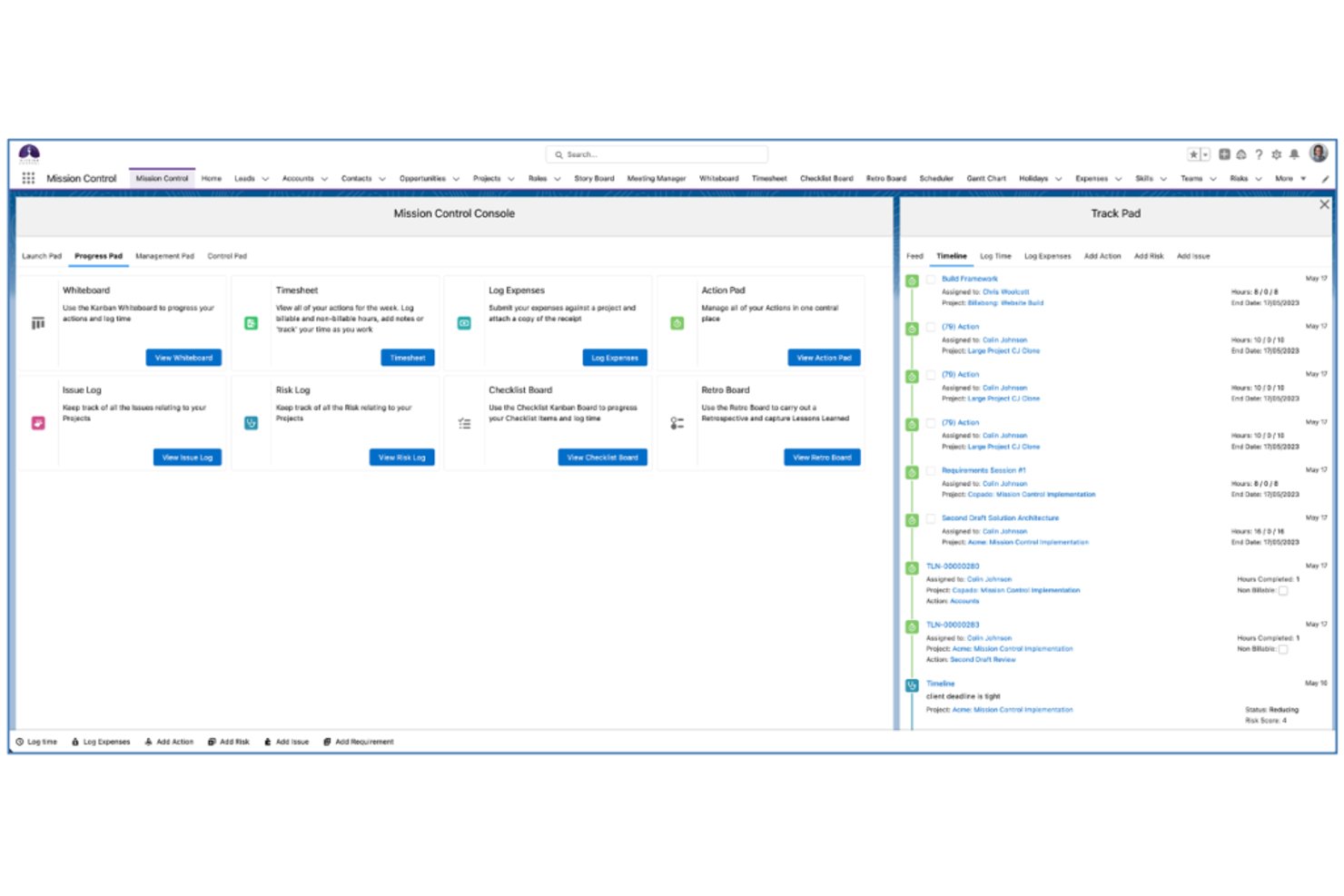
Mission Control is a Salesforce-native project management app built by Aprika that covers project scheduling, resource planning, time and expense tracking, invoicing, and PSA-grade financial oversight—all within your existing Salesforce org.
Who Is Mission Control Best For?
Mission Control is a strong fit for professional services teams running their entire business—from sales to delivery—inside Salesforce.
Why I Picked Mission Control
I picked Mission Control as one of the best because of how it handles opportunity-to-project scoping by line item—something I haven't seen done this cleanly elsewhere. When a deal closes, you can map individual Opportunity Products to milestone templates, so the project that spins up reflects the exact scope your sales team sold. I also like that the Resource Planner can filter allocations by Opportunity Stage and Probability, keeping delivery capacity tied directly to your pipeline.
Mission Control Key Features
- PMO dashboard: Tracks planned value, earned value, actual cost, and cost and schedule performance indexes across all active projects.
- Kanban whiteboard: Displays project actions by status with drag-and-drop cards, inline time logging, and Chatter collaboration.
- Timesheet management: Lets team members log, submit, and get approval on weekly time entries tied to specific project actions.
- Program Planner: Organizes requirements, user stories, and checklist items across a multi-project roadmap in a Kanban-style view.
Mission Control Integrations
Mission Control offers native integrations with Salesforce, Salesforce Chatter, Slack, and Microsoft Teams. It also supports Model Context Protocol (MCP) for conversational project tasks; an API for custom integrations is not stated.
Pros and Cons
Pros:
- Gantt and Kanban views clarify delivery status
- Resource allocation and cost tracking support PSA oversight
- Project and financial data stay in Salesforce
Cons:
- Configuration and project relationships take effort
- Action-linked activity sync isn’t project-wide
Rocketlane
Best for client onboarding tied to CRM deals
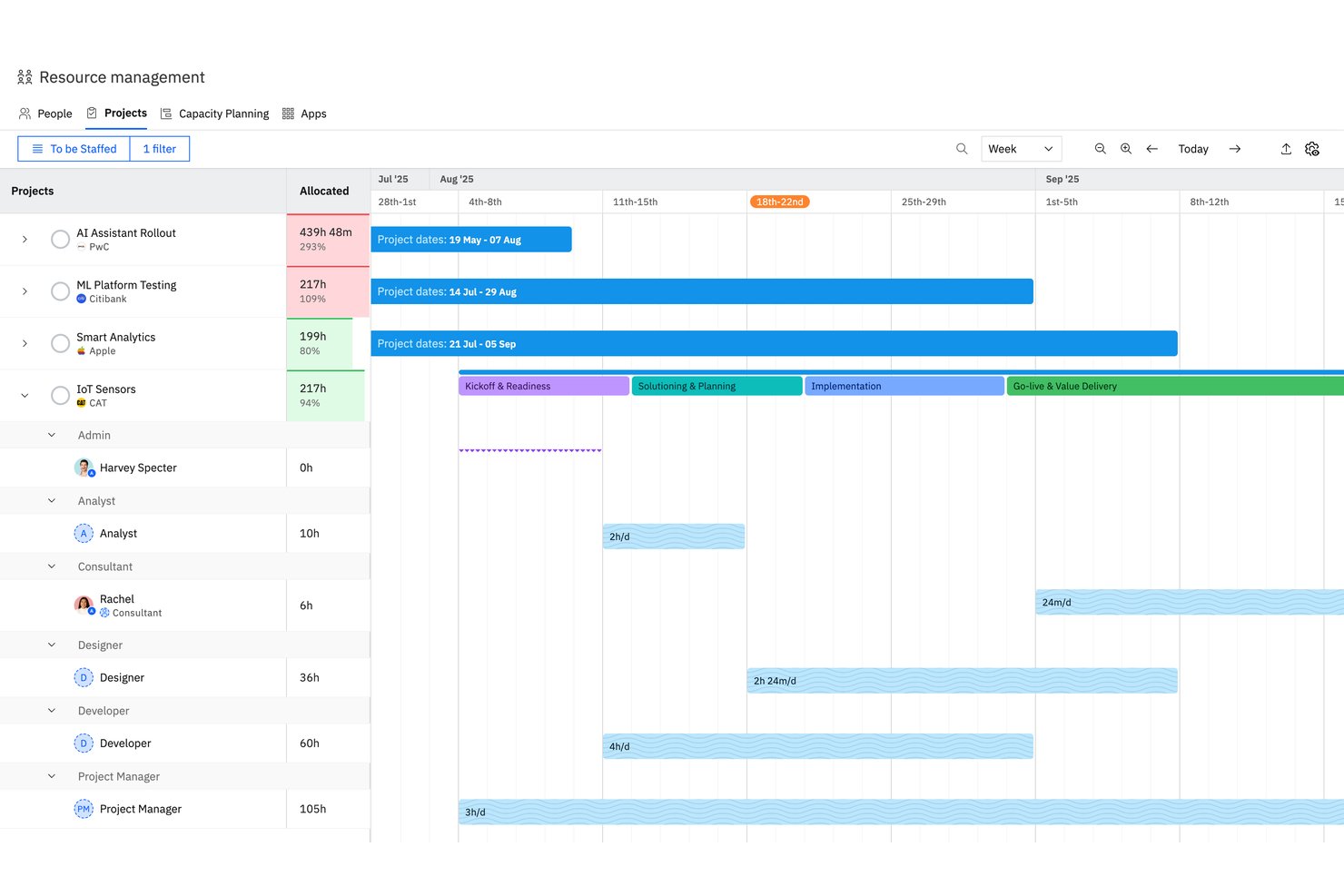
Rocketlane is a professional services automation (PSA) platform that combines project management, resource planning, client portals, and financial tracking—built specifically for services teams that run structured delivery workflows tied to CRM deals.
Who Is Rocketlane Best For?
Rocketlane is a strong fit for professional services teams that need to manage structured client delivery workflows directly connected to their CRM pipeline.
Why I Picked Rocketlane
I picked Rocketlane as one of the best because it's purpose-built for the exact moment a Salesforce deal closes: it automatically spins up a project using deal data, routing it to the right template based on Salesforce fields like SKU, Product Family, or Region. I also love that you can soft-book roles and skills against a deal before it's even won, then convert those soft allocations to hard commitments the moment it closes.
Rocketlane Key Features
- Branded customer portal: Clients can log in via magic link to view project progress, complete approvals, and collaborate directly within a white-labeled portal.
- PSA-grade financial tracking: Teams can manage rate cards, project budgets, margins, revenue recognition, and invoicing from within the same platform.
- Gantt, Kanban, and List views: Project work can be visualized and managed across multiple layout options, with sprint planning, epics, and backlogs included.
- Salesforce sync error notifications: Configurable email alerts notify admins of integration errors, with an in-app log surfacing the last 100 automation error entries.
Rocketlane Integrations
Rocketlane offers native integrations with Salesforce, Jira, Slack, HubSpot, Google Calendar, Outlook Calendar, and Snowflake. It also supports Workato, Zapier, and an API for custom integrations.
Pros and Cons
Pros:
- Customers track progress in branded portals
- Soft-booking helps forecast delivery capacity
- Automates deal-to-project handoffs with templates
Cons:
- Reporting options may not fit team cadence
- Setup can complicate CRM handoffs
Salesforce ile Entegre Olan Diğer Proje Yönetimi Yazılımları
Aşağıda, kısa listeme aldığım Salesforce ile entegre olan ek proje yönetimi yazılımlarının bir listesi yer alıyor. En üst sıralardaki listeye girememiş olsalar da hâlâ değerliler ve daha fazla araştırmaya değerler.
- Kantata
For professional services automation
- TaskRay
With advanced onboarding automation
- Smartsheet
For spreadsheet-style Salesforce project sync
- Scoro
For PSA teams bridging quotes and delivery
- Hive
For Salesforce-triggered project creation
- ClickUp
For all-in-one project management
- Jira
For AI-powered task automation
- Asana
For cross-team task tracking tied to CRM data


How I Evaluate Project Management Tools That Integrate With Salesforce
I split my evaluation into three parts, weighting core functionality most: link projects to Salesforce, sync updates both ways, and show delivery status there. Next, I look for differentiators like opportunity templates or PSA financial tracking. Finally, I consider setup support, Salesforce license fit, and pricing value for handoffs.
Core Functionality (Table Stakes For This List)
When I'm selecting tools for my list, I score each one on a scale from 0 (does not offer the functionality) to 5 (excels in this area) for each core functionality listed below. I then convert the total into a percentage to help assess each tool's overall fit, with extra weight on any functionalities I’ve deemed essential.
- Native Salesforce Integration (Essential): I look for an officially supported Salesforce connection that links delivery work to CRM records, rather than relying only on generic automation.
- Task & Project Tracking (Essential): For a closed-won implementation, I check for assigned tasks, due dates, milestones, and timeline views teams can manage outside Salesforce.
- Bidirectional Data Sync: I assess whether status or date changes made in either system return to the other, reducing duplicate updates during delivery.
- Salesforce Object Mapping: I look for configurable links to Opportunities, Accounts, Cases, and custom objects so each project retains its customer context.
- Salesforce Visibility: I check whether sales can see current project status, tasks, and progress inside Salesforce without switching tools.
- Resource & Workload Management: Across active engagements, I look for team-level workload views that reveal assignments and capacity before new work is committed.
Once I have a list of tools that meet the criteria, I consider what sets each platform apart.
Differentiating Factors (What Sets Vendors Apart)
Here's how I compare and contrast different vendors:
Standout Features
I look for tools built as native Salesforce managed packages, since they inherit org-level security and work inside Lightning without iframe workarounds. Pre-built opportunity templates matter just as much—when a deal closes, a mapped template can spin up a project with the right tasks, contacts, and line items already attached. I also check for client-facing portal access so stakeholders can track progress without needing a license.
Beyond Features
I evaluate how cleanly a tool moves a closed-won deal into an active project—whether contacts, line items, and notes carry over automatically or require manual re-entry. A bad handoff undoes the whole point of connecting your PM tool to Salesforce. I also check Salesforce edition compatibility, since some integrations need Enterprise-level API access that teams on Professional edition won't have. For services teams, I look at whether the vendor is purpose-built for PSA work like billing and utilization tracking, or just generic project management with a connector added on.
Salesforce ile Entegre Olan Proje Yönetimi Yazılımı Nasıl Seçilir?
Kendinize özgü yazılım seçim sürecinizi yürütürken aşağıdaki noktaları göz önünde bulundurun:
- Özelleştirme ve Ölçeklenebilirlik: Yazılım, kuruluşunuzun ihtiyaçlarına göre uyarlanmalı ve işletmenizle birlikte büyümelidir. Özelleştirme, belirli nesnelerin ve alanların eklenmesini içerirken ölçeklenebilirlik, yazılımın zaman içinde daha fazla projeyi ve kullanıcıyı yönetebilmesini sağlar.
- Metodoloji Desteği: Çevik, Şelale veya hibrit fark etmeksizin ekibinizin proje yönetimi metodolojileriyle uyumlu bir yazılım seçin. Gantt çizelgeleri veya Çevik panolar gibi doğru araçlar, ekibinizin tercih ettiği süreçleri desteklemek için hayati önem taşır.
- Kullanıcı Deneyimi ve İş Birliği: Kullanıcı dostu bir arayüzün yanı sıra ekip çalışmasını güçlendiren özellikler de önemlidir. (Tartışma panoları ve belge paylaşımı gibi) Chatter, e-posta, Microsoft Teams veya Slack gibi iş birliği platformlarıyla entegrasyon, iletişimi daha da geliştirebilir ve ekiplerin yolunda ilerlemesini sağlayabilir.
- Raporlama ve Analiz: Proje sağlığını izlemek ve kararları yönlendirmek için gelişmiş raporlama ve analiz önemlidir. Özelleştirilebilir raporlar ve gösterge panoları, proje metrikleri hakkında değerli içgörüler sağlayarak yöneticilerin projeleri proaktif bir şekilde denetlemesine yardımcı olur.
Bu değerlendirmeler; veri yönetimi ve özelleştirmeden metodoloji uyumluluğuna, ekip iş birliğine ve bilinçli karar alma için anlamlı analizlere kadar çeşitli zorlukları ve gereksinimleri ele alır.
Proje yönetimi yazılımları ile Salesforce entegrasyonunun kesişimi gelişmeye devam ederken işletmeler daha yüksek verimlilik ve kolaylaştırılmış operasyonlar görmeyi bekleyebilir. Şirketler bu trendleri benimseyerek daha bilinçli karar almayı teşvik edebilir ve üstün proje sonuçları elde edebilir.
Salesforce'a özgü ve Salesforce entegrasyonu: Fark nedir?
Tüm Salesforce entegrasyonları aynı şekilde çalışmaz. Entegrasyon türü, sistemler arasında verilerin nasıl aktarıldığını, ne kadar kurulum gerektiğini ve ekibinizin projeleri nereden yönettiğini etkileyebilir.
Salesforce'a özgü: Proje yönetimi aracı doğrudan Salesforce platformu üzerine kuruludur ve CRM ile proje verilerini aynı ortamda tutar. Bu seçenek, birbirine sıkı şekilde bağlı satış ve teslimat iş akışları isteyen, Salesforce merkezli ekipler için genellikle en uygunudur.
Yerel Salesforce bağlayıcısı: Proje yönetimi aracı ayrı olarak çalışır ancak Salesforce ile resmi bir entegrasyon sunar. Bağlayıcıya bağlı olarak ekipler fırsatları, hesapları, kişileri, özel alanları ve proje güncellemelerini iki platform arasında senkronize edebilir.
Üçüncü taraf entegrasyonu: Salesforce, Zapier, Make veya Workato gibi bir hizmet aracılığıyla proje yönetimi aracına bağlanır. Bu yöntem basit otomasyonlar için iyi çalışabilir ancak özellikler ve bakım gereksinimleri üçüncü taraf platforma bağlıdır.
Araçları karşılaştırırken yalnızca Salesforce entegrasyonunun mevcut olup olmadığını kontrol etmeyin. Hangi verilerin senkronize edilebildiğine, senkronizasyonun çift yönlü olup olmadığına ve kapanmış bir fırsatı projeye dönüştürmek gibi iş akışlarının otomatikleştirilip otomatikleştirilemeyeceğine bakın.
Salesforce ile entegre olan proje yönetimi yazılımı nedir?
Salesforce ile entegre olan proje yönetimi yazılımı, proje yönetimi araçlarının özelliklerini Salesforce'un kapsamlı müşteri ilişkileri yönetimi (CRM) özellikleriyle birleştirir. Ekipler bu sistemleri birbirine bağlayarak projeleri doğrudan Salesforce üzerinden yönetebilir; müşteri etkileşimleri, satış verileri ve proje ilerlemesine ilişkin birleşik görünümü korurken görevlere, zaman çizelgelerine, kaynaklara ve analizlere erişebilir.
Özellikler
Salesforce ile entegre olan proje yönetimi yazılımlarını karşılaştırırken, satış verilerini proje teslimatıyla birbirine bağlayan ve sistemler arasındaki manuel çalışmayı azaltan özelliklere odaklanın:
- Gerçek Zamanlı Veri Senkronizasyonu: Müşteri, fırsat ve proje bilgilerinin Salesforce ile proje yönetimi aracınız arasında tutarlı kalmasını sağlar.
- İş Akışı Otomasyonu: Bir fırsat Kazanıldı olarak kapatıldı durumuna ulaştığında proje oluşturmak veya bir proje kilometre taşı tamamlandığında Salesforce'u güncellemek gibi sistemler arasındaki işlemleri otomatikleştirir.
- Özel Alan ve Nesne Desteği: Entegrasyonun, özel yapılandırmalar da dahil olmak üzere ekibinizin gerçekten kullandığı Salesforce alanları ve nesneleriyle çalışmasını sağlar.
- Çift Yönlü Senkronizasyon: Bilgilerin Salesforce'a ve Salesforce'dan aktarılmasını sağlar; böylece satış ve teslimat ekipleri güncellemeleri yinelemeden güncel verilerle çalışabilir.
- Proje Şablonları: Tekrarlanabilir proje planlarını yeni müşterilere veya fırsatlara otomatik olarak uygulayarak satıştan teslimata geçişi standartlaştırır.
- Platformlar Arası Raporlama: Müşteri yaşam döngüsü boyunca daha iyi görünürlük sağlamak için Salesforce verilerini proje durumu, kaynak, zaman veya finansal bilgilerle birleştirir.
En önemli özellikler, satış ve proje iş akışlarınızın ne ölçüde birbirine bağlanması gerektiğine bağlı olacaktır. Her iki ekibe de ihtiyaç duydukları bilgilere erişim sağlarken manuel devirleri azaltan entegrasyonlara öncelik verin.
Salesforce ile Entegre Olan Proje Yönetimi Yazılımının Faydaları
Proje yönetimi yazılımını Salesforce ile entegre etmek, işletmenizin satış ve teslimat taraflarını birbirine bağlamaya yardımcı olabilir. Temel faydalar şunlardır:
- Daha Sorunsuz Satıştan Projeye Devirler: Müşteri ve fırsat verilerini otomatik olarak yeni projelere aktararak manuel kurulumu ve bilgi kaybını azaltır.
- Paylaşılan Müşteri Görünürlüğü: Satış, hesap ve proje ekiplerine yaşam döngüsü boyunca ilgili müşteri ve proje bilgilerine erişim sağlar.
- Daha Az Manuel Veri Girişi: Yinelenen güncellemeleri, hataları ve kayıtları korumaya harcanan zamanı azaltmak için sistemler arasındaki bilgileri senkronize eder.
- Daha İyi Proje ve CRM Raporlaması: Müşteri ve proje performansına ilişkin daha net bir görünüm için Salesforce verilerini proje durumu, kaynak, zaman veya finansal bilgilerle birleştirir.
- Daha Tutarlı İş Akışları: Kapanmış fırsatlardan proje oluşturma, iş atama ve projeler ilerledikçe Salesforce'u güncelleme gibi süreçleri otomatikleştirir.
Sonuç olarak entegrasyon, Salesforce'ta iş kazanmak ile bu işi proje yönetimi platformunuz üzerinden teslim etmek arasındaki boşluğu kapatmaya yardımcı olur.
Trendler
Salesforce proje yönetimi entegrasyonları giderek daha otomatik ve bağlantılı hale geliyor. Temel trendler şunlardır:
- Otomatik Satıştan Projeye Devirler: Daha fazla araç, Salesforce fırsatları önemli aşamalara ulaştığında otomatik olarak projeler, görevler ve iş akışları oluşturabiliyor.
- Daha Derin Çift Yönlü Senkronizasyon: Entegrasyonlar, temel kişi senkronizasyonunun ötesine geçerek fırsatların, hesapların, özel alanların ve proje güncellemelerinin platformlar arasında uyumlu kalmasını sağlıyor.
- Yapay Zekâ Destekli İş Akışı Otomasyonu: Yapay zekâ, görevleri otomatikleştirmek, proje etkinliklerini özetlemek ve ilgili CRM ile proje bilgilerini ortaya çıkarmak için giderek daha fazla kullanılıyor.
- Birleştirilmiş Satış ve Teslimat Raporlaması: Ekipler, müşteri, teslimat, kaynak ve finansal performansı birlikte izleyebilmek için CRM ve proje verilerinin birbirine bağlanmasını giderek daha fazla istiyor.
Bu eğilimler, Salesforce için proje yönetimi yazılımı seçerken entegrasyon kapsamını ve otomasyonu daha önemli değerlendirme unsurları hâline getiriyor.
Maliyetler ve Fiyatlandırma
Salesforce ile entegre olan proje yönetimi yazılımını seçerken, yazılım satın alacak kişiler mevcut çeşitli planların ve fiyatlandırma seçeneklerinin farkında olmalıdır. Plan türlerini, ortalama fiyatları ve yaygın özellikleri anlamak, alıcıların işletme gereksinimleri ve bütçe kısıtlarıyla uyumlu, bilinçli bir karar vermesine yardımcı olabilir. Farklı proje yönetimi yazılımlarının ne kadara mal olabileceğine bir göz atalım:
Salesforce ile Entegre Olan Proje Yönetimi Yazılımları için Plan Karşılaştırma Tablosu
| Plan Türü | Ortalama Fiyat | Yaygın Özellikler |
| Ücretsiz Seçenek | $0 | Temel proje takibi, sınırlı entegrasyonlar ve temel iş birliği araçları |
| Başlangıç Düzeyi | $5 - $15/kullanıcı/ay | Görev yönetimi, temel raporlama, Salesforce ile basit entegrasyonlar ve sınırlı destek |
| Orta Seviye | $15 - $35/kullanıcı/ay | Gelişmiş proje takibi, raporlama özellikleri, ek Salesforce entegrasyonları ve öncelikli destek |
| Üst Düzey | $35+/kullanıcı/ay | Gelişmiş proje yönetimi, kapsamlı raporlama, tam Salesforce entegrasyonu ve özel destek |
Bir planı değerlendirirken kuruluşunuz için gereken Salesforce entegrasyon düzeyini ve ihtiyaç duyulan proje yönetimi özelliklerinin karmaşıklığını değerlendirmeniz gerektiğini unutmayın.
Salesforce ile Entegre Olan Proje Yönetimi Yazılımı Hakkında SSS
Salesforce ile entegre olan proje yönetimi yazılımı hakkında sıkça sorulan bazı soruları burada bulabilirsiniz.
Salesforce ile entegre olan proje yönetimi araçlarında zaman ve gider takibi yapabilir miyim?
Evet, Salesforce ile entegre olan birçok proje yönetimi aracı zaman ve gider takibi özellikleri sunar. Bu özellikler, ekiplerin proje görevleriyle doğrudan ilişkili çalışma saatlerini ve giderleri kaydetmesini sağlar; ardından bunlar doğru faturalandırma ve raporlama için Salesforce içinde görüntülenebilir ve yönetilebilir.
Salesforce ile proje yönetimi yazılımı arasındaki entegrasyonu özelleştirmek mümkün mü?
Salesforce ile entegre olan proje yönetimi yazılımlarında özelleştirme çoğu zaman mümkündür. Yazılıma bağlı olarak entegrasyonu, özel alanlar, proje şablonları ve iş süreçlerinizle uyumlu otomatik tetikleyiciler gibi unsurlarla belirli iş akışınıza uygun hale getirebilirsiniz.
Proje yönetimi yazılımını Salesforce ile entegre etmek raporlama olanaklarını nasıl etkiler?
Proje yönetimi yazılımını Salesforce ile entegre etmek, satış ve proje verilerini birleştirerek raporlama olanaklarını geliştirebilir. Bu sayede proje performansı, kaynak tahsisi ve genel işletme durumu hakkında içgörüler sunabilen kapsamlı raporlar oluşturulabilir.
Salesforce'a özgü yerel proje yönetimi çözümleri var mı?
Evet, Salesforce platformu üzerinde yerel olarak oluşturulmuş proje yönetimi çözümleri vardır. Bu çözümler derin entegrasyon sunar ve Salesforce’un mevcut özelliklerinden ve veri yapısından yararlanabilir; böylece daha uyumlu bir deneyim sağlar.
Entegre proje yönetimi ve Salesforce ile veri güvenliği nasıl sağlanır?
Entegre proje yönetimi ve Salesforce sistemlerinde veri güvenliği genellikle kullanıcı izinleri, şifreleme ve sektörel standartlara uyumluluk gibi güçlü güvenlik protokolleriyle yönetilir. Kuruluşunuzun gereksinimlerini karşıladığından emin olmak için proje yönetimi aracının güvenlik önlemlerini incelemek önemlidir.
Salesforce ile entegre proje yönetimi yazılımıyla hareket halindeyken projeleri yönetebilir miyim?
Salesforce ile entegre olan birçok proje yönetimi aracı, ekip üyelerinin mobil cihazlarını kullanarak her yerden ve her zaman projeleri yönetmesine, verilere erişmesine ve iş birliği yapmasına olanak tanıyan mobil uygulamalar veya mobil cihazlara uyumlu arayüzler sunar.
Salesforce'un yerleşik proje yönetimi özelliği var mı?
Salesforce temel görev ve iş akışı özellikleri sunar; ancak ekipler daha gelişmiş planlama, iş birliği ve kaynak yönetimi için genellikle entegre bir proje yönetimi aracı kullanır.
Salesforce ve proje yönetimi yazılımı çift yönlü senkronizasyon yapabilir mi?
Evet, bazı entegrasyonlar çift yönlü senkronizasyonu destekleyerek verilerin ve güncellemelerin Salesforce ile proje yönetimi platformu arasında aktarılmasına olanak tanır.
Salesforce, bir fırsat kapandığında otomatik olarak proje oluşturabilir mi?
Evet. Birçok Salesforce proje yönetimi entegrasyonu, bir fırsat Kazanıldı Olarak Kapatıldı aşamasına ulaştığında otomatik olarak proje oluşturabilir; ancak kesin kurulum kullanılan araca göre değişir.