En İyi 10 ClickUp Rakibi ve Alternatifi: 2026’da İncelendi

10 En İyi ClickUp Alternatifleri Kısa Listesi


En iyi ClickUp alternatifleri daha temiz arayüzler, daha öngörülebilir performans ve daha kolay kurulum sunar; ayrıca ClickUp'ın tüm özellik setine ihtiyaç duymayan ekipler için fiyatlandırmaları genellikle daha iyi ölçeklenir. İster daha hızlı yükleme süreleri, ister daha iyi zaman takibi veya daha sezgisel gösterge panoları arıyor olun, ekibiniz için daha uygun bir seçenek mutlaka vardır.
ClickUp geniş bir özellik yelpazesi sunar, ancak bazı kullanıcılar için karmaşıklık yardımcı olmaktan çok bir engel hâline gelir. Yavaş performansla, dik bir öğrenme eğrisiyle veya ekibinizin kullanmadığı araçlarla karşı karşıyaysanız, daha odaklı bir platforma geçmek üretkenliği artırabilir ve iş akışındaki sürtüşmeyi azaltabilir.
Son birkaç yıldır ClickUp da dâhil olmak üzere proje yönetimi araçlarını ve onlarca rakibini test edip inceliyorum. Bu rehberde, günümüzde kullanılabilen en iyi ClickUp alternatiflerini ayrıntılı olarak ele alıyor; her platformun hangi konularda başarılı olduğunu, hangi yönlerden farklılaştığını ve hangi ekip türleri için en uygun olduğunu vurguluyorum.
Why Trust Our Software Recommendations
Our team has been testing and reviewing software since 2012. As project managers ourselves, we know how difficult—and important—it is to choose the right software.
For this guide, we evaluated tools using hands-on testing and independent research, scoring tools using our selection criteria. We also draw on insights from industry thought leaders and practicing project management experts.
Our reviews reflect our human editorial judgment, not a sales pitch.
Expert reviewers:
ClickUp Alternatifleri Nelerdir?
ClickUp alternatifleri; görev takibi, ekip iş birliği ve iş akışı yönetimi için benzer özellikler sunan proje yönetimi araçlarıdır.
Bu araçlar, farklı fiyatlandırma modelleri, daha basit arayüzler veya ihtiyaçlarına daha iyi uyan belirli özellikler arayan ekipler tarafından kullanılır. Birçok alternatif, özelleştirilebilir görünümler, entegrasyonlar ve otomasyon sunarak işletmelerin projeleri daha verimli yönetmesine ve kolayca ölçeklenmesine yardımcı olur.
ClickUp Alternatifleri Karşılaştırma Tablosu
Az önce genel bakışlarda ele aldığımız araçları karşılaştırabileceğiniz tabloyu burada bulabilirsiniz.
Score legend (out of 5)
- Excellent 4.5–5
- Good 4–4.4
- Average 3–3.9
- Below average 2–2.9
- Poor 1–1.9
| Tool | Starting Price | Website | |||||||
|---|---|---|---|---|---|---|---|---|---|
| Best for agile design and marketing teams | 4.2 out of 5 | 4 | 4 | 4 | 4 | 4 | 5 | $10/user/month Free plan + 14-day trial available | Book Demo |
| Best for quick setup and easy onboarding | 4.3 out of 5 | 5 | 4 | 4 | 4 | 4 | 5 | $9/user/month Free plan + 14-day free trial available | Book Demo |
| Best for enterprise marketing & creative ops | 4.0 out of 5 | 3 | 4 | 5 | 4 | 4 | 4 | Pricing upon request Not available | Book Demo |
| Best for drag-and-drop automation | 3.8 out of 5 | 4 | 3 | 4 | 4 | 4 | 4 | Pricing upon request Free plan + 15-day trial + demo available | Website |
| Best for deeply nested task hierarchies | 3.0 out of 5 | 4 | 3 | 2 | 3 | 2 | 4 | $7.65/user/month Free plan + 30-day free trial available | Website |
| Best for full project lifecycle delivery | 3.5 out of 5 | 4 | 3 | 2 | 4 | 4 | 4 | Pricing upon request Not available | Website |
| Best for flexibility and customization | 2.8 out of 5 | 4 | 4 | 2 | 4 | 1 | 2 | $8/user/month Free plan + 14-day trial available | Website |
| Best for client management tools | 4.2 out of 5 | 4 | 4 | 3 | 4 | 5 | 5 | $10/user/month 14-day free trial | Website |
| Best for agile and large-scale team delivery | 4.3 out of 5 | 5 | 3 | 4 | 5 | 4 | 5 | $8.48/user/month Free plan + 7-day free trial available | Website |
| Best for extensive customization options | 4.2 out of 5 | 5 | 4 | 4 | 3 | 4 | 5 | $4/user/month Free plan available | Website |


Karşılaştırılan En İyi 10 ClickUp Alternatifi
Bu genel bakışta araçların her biri için artıları ve eksileri, fiyatlandırmayı, deneme bilgilerini ve uzman görüşünü ayrıntılı olarak ele alıyoruz. Ayrıca her çözümü ClickUp ile karşılaştırarak ekip üyeleriniz ve belirli proje ihtiyaçlarınız için daha iyi bir seçim olup olmadığını anlamanızı sağlıyoruz.

Wrike
Best for agile design and marketing teams
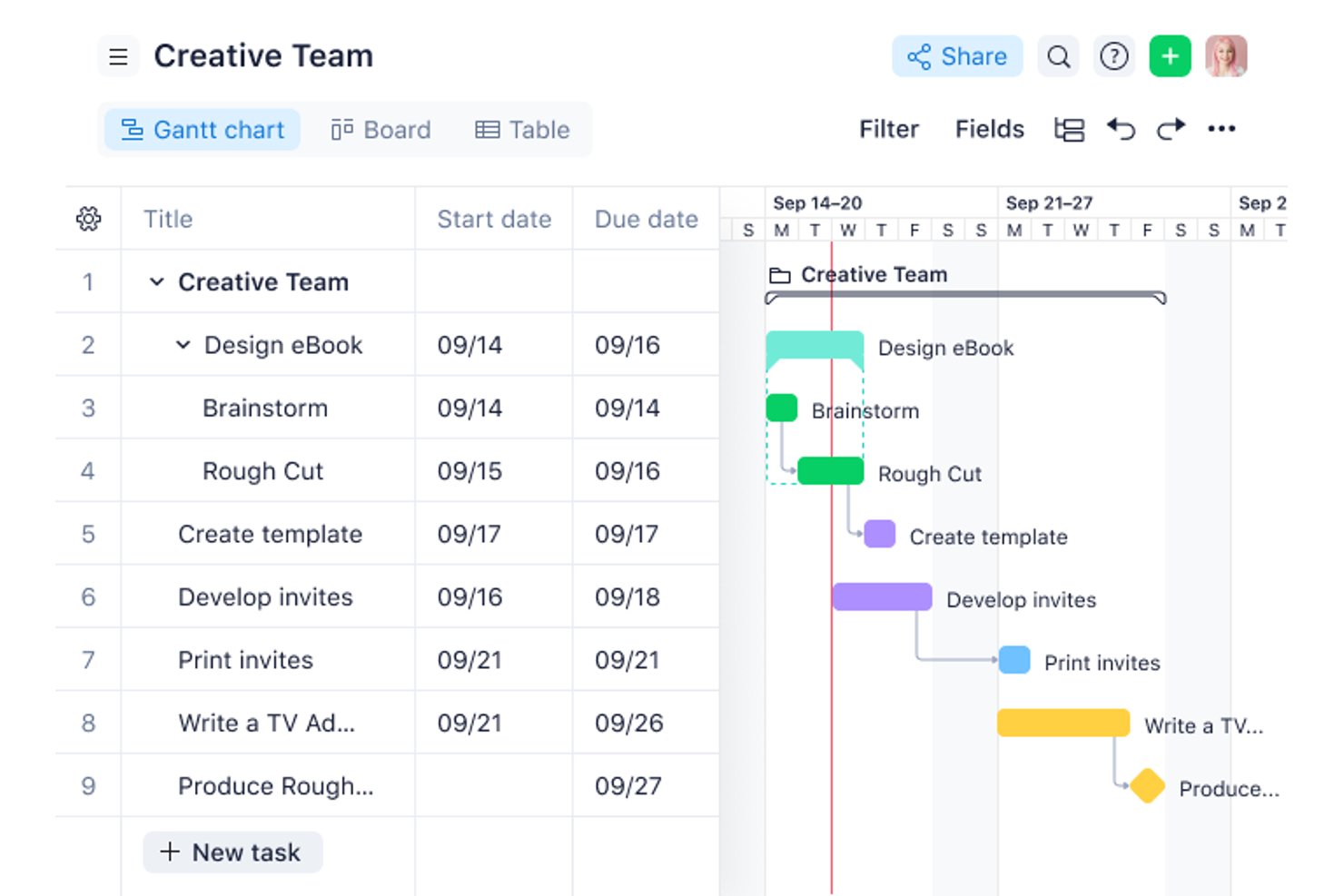
Wrike is project management software that helps product, design, and marketing teams coordinate tasks, manage timelines, and keep cross-functional work visible as priorities shift.
Who Is Wrike Best For?
Wrike is a good fit for design and marketing teams managing iterative campaigns, creative reviews, and frequent changes to delivery plans.
Why I Picked Wrike
I picked Wrike as Best for agile design and marketing teams because proofing lets reviewers annotate creative files and keep feedback tied to the work. Request forms turn campaign briefs into trackable tasks, giving teams a clear path from intake through review.
Wrike Key Features
- Gantt charts: Map project timelines, task dependencies, and milestones on a visual schedule.
- Dashboards: Create views of project tasks, status, and metrics using customizable widgets.
- Workload charts: View team members’ assigned work to assess capacity across projects.
- Time tracking: Log time against tasks and review recorded hours in timesheets.
Wrike Integrations
Wrike’s integrations directory lists 60 options, including Slack, Salesforce, Microsoft Teams, Office 365, Google Sheets, Google Drive, and Miro. It also supports Zapier and offers a REST API for custom integrations.
Pros and Cons
Pros:
- Forms turn briefs into trackable tasks
- Linked task dependencies recalculate downstream dates
- Proofing keeps creative feedback tied to files
Cons:
- Mobile performance can lag on large projects
- Complex permissions make access harder to manage
New Product Updates from Wrike

Wrike Adds Advanced Filters to Chart View
Wrike introduces new default filters in Chart view, including relative dates, exclusion conditions, multiple filters per field, and status group filtering. These updates help teams refine project data and reporting. For more information, visit Wrike’s official site.
Best for quick setup and easy onboarding
monday AI Workspace is a visual work management platform built for cross-functional teams in marketing, operations, and product who need a structured way to plan projects, automate repetitive work, and keep stakeholders aligned without the complexity of heavier tools.
Who Is monday AI Workspace Best For?
It's a strong fit for mid-sized teams in marketing, operations, or project management who need a polished, low-friction platform they can roll out quickly across departments.
Why monday AI Workspace Is the Best ClickUp Alternative
monday AI Workspace earns its spot on my shortlist because its onboarding experience is one of the fastest I've seen in this category. I love how the 200+ pre-built templates let my team deploy a working project board in minutes, covering everything from sprint planning to campaign tracking, without building anything from scratch. The AI Sidekick compounds that by surfacing contextual suggestions directly inside boards, so new users aren't left guessing what to do next.
monday AI Workspace Key Features
- AI Sidekick: Provides contextual task suggestions, draft updates, and automates repetitive work directly in your workspace.
- Integrated docs and whiteboards: Allows your team to create documents and brainstorm visually without leaving the platform.
- Advanced resource management: Displays real-time workload capacity to help balance tasks and avoid team overload.
- Custom automation builder: Lets you automate multi-step workflows dynamically using conditional logic and triggers, all with a no-code interface.
monday AI Workspace Integrations
monday AI Workspace offers hundreds of native integrations through its built-in integrations and marketplace, including Slack, Google Workspace, Microsoft 365, Jira, Dropbox, Zoom, HubSpot, Salesforce, GitHub, and Outlook. It also supports Zapier and provides an API for custom integrations.
Pros and Cons
Pros:
- AI Sidekick automates repetitive task management
- Clean visual boards suit non-technical project managers
- Fast setup with 200+ ready-made templates
Cons:
- Gantt views locked behind higher pricing tiers
- Automation limits apply on lower-tier plans
New Product Updates from monday AI Workspace
monday AI Workspace Adds Human Approval Routing
monday AI Workspace adds a human-in-the-loop approval block to AI Workflows, sending approval requests and routing workflow paths based on responses. For more information, visit monday AI Workspace's official site.

Best for enterprise marketing & creative ops
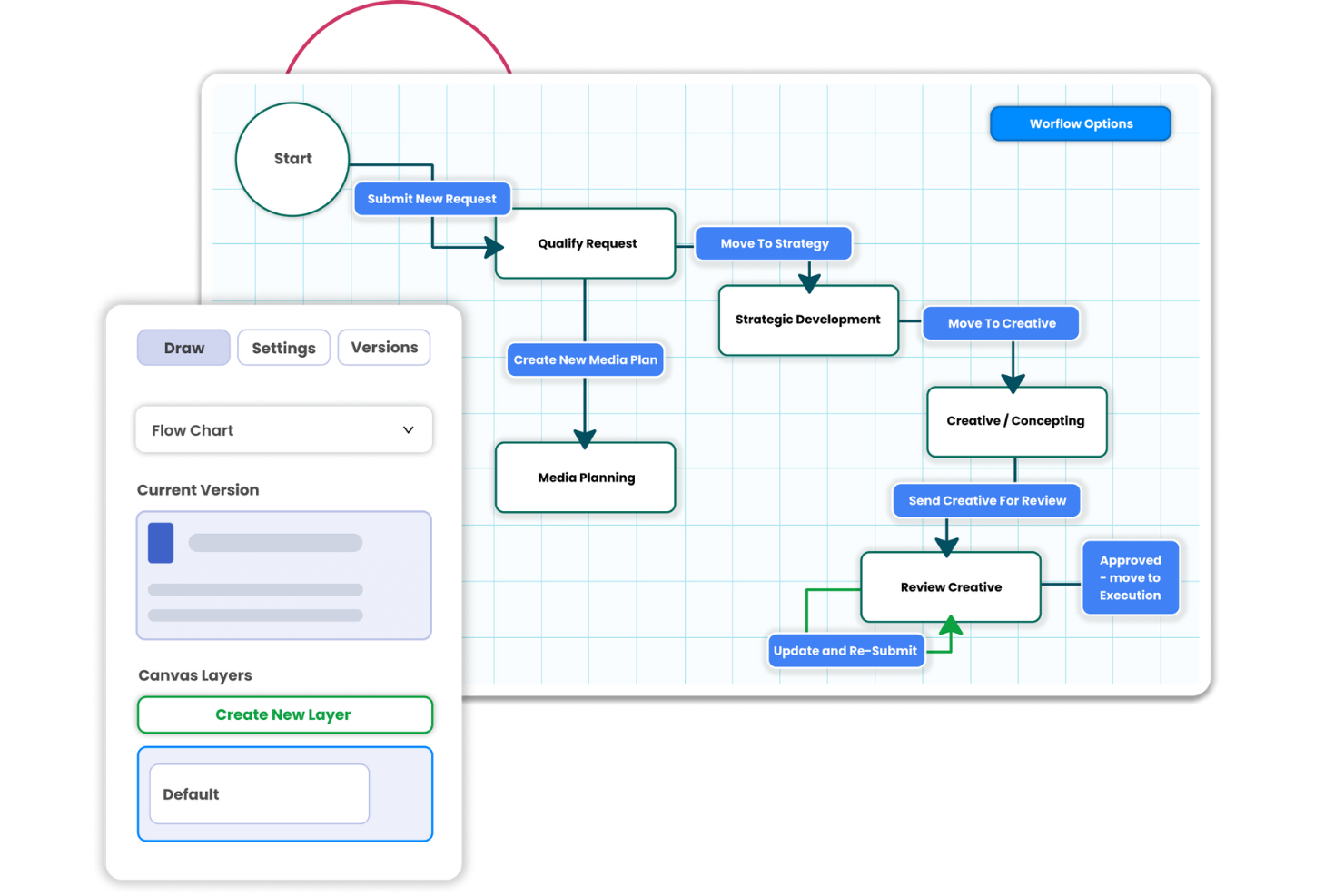
Screendragon is a work management platform that helps marketing and creative teams coordinate campaign projects, manage approvals, and track work across departments.
Who Is Screendragon Best For?
Screendragon fits enterprise marketing and creative operations leaders managing complex campaign production across large, cross-functional teams.
Why I Picked Screendragon
I picked Screendragon as a ClickUp alternative for enterprise marketing & creative ops because its no-code workflow builder routes campaign briefs through conditional stages and sequential or parallel approvals. I like that reviewers can mark up artwork and video, compare versions side by side, and keep decisions attached to each asset, which suits cross-market campaigns with brand or compliance checks.
Screendragon Key Features
- Project views: Track work in Gantt charts, Kanban boards, or list views.
- Resource planning: Assign work by skills and availability, with team capacity snapshots.
- Budget tracking: Link campaign budgets and spend to project plans.
- Analytics dashboards: View timelines, budgets, resource use, and campaign KPIs.
Screendragon Integrations
Screendragon lists pre-built integrations with Aprimo, Google Cloud Storage, Slack, HubSpot, Microsoft Teams, Microsoft Power BI, Amazon S3, Sitecore, Ziflow, and Brandfolder. Its Connection Manager and REST API support custom connections to other systems.
Pros and Cons
Pros:
- Resource and budget views connect plans to delivery
- Asset proofing keeps feedback tied to versions
- Conditional routing handles complex campaign approvals
Cons:
- Large projects can feel slow to navigate
- Workflow setup and configuration take time

Best for drag-and-drop automation
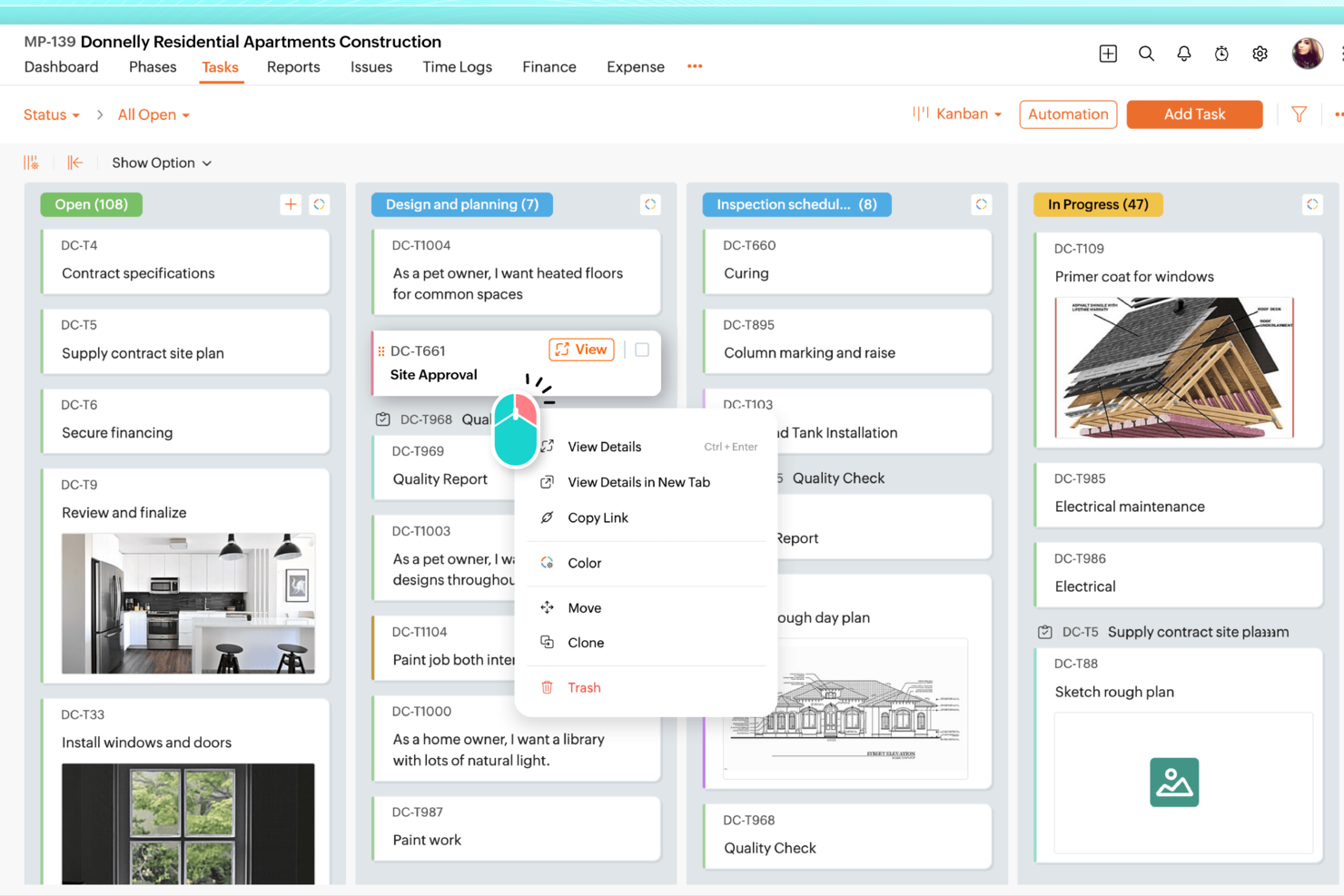
Zoho Projects is a solid ClickUp alternative for teams that want strong project tracking without an overloaded setup. It’s a good fit for enterprises, educational institutions, and teams in industries like construction and software development, especially when you need reliable task management, time tracking, and collaboration features in one platform. Zoho Projects also supports integration with other tools, so it can slot into an existing workflow without requiring a full reset.
Why I Picked Zoho Projects
I picked Zoho Projects as a ClickUp alternative because it gives teams more control over how projects are structured. You can automate repeatable steps using drag-and-drop workflows, which helps reduce manual follow-ups as work moves through different stages. It also includes strong customization options, letting you adjust fields, layouts, and workflows to match your team’s process instead of forcing everyone into the same setup.
Zoho Projects Key Features
Along with automation and customization, Zoho Projects offers:
- Gantt Charts: Visualize project timelines and dependencies to better plan and manage tasks.
- Issue Tracking: Log, track, and resolve project issues quickly, ensuring nothing falls through the cracks.
- Document Management: Organize and share project-related documents within the platform for easy access and collaboration.
- Team Collaboration Tools: Use features like in-app chat, forums, and feeds to facilitate communication and teamwork.
Zoho Projects Integrations
Integrations include Google Drive, Slack, GitHub, Dropbox, Zapier, Microsoft Teams, Zoho CRM, Zoho Books, Zoho Desk, and Zoho Analytics. An API is available for custom integrations.
Pros and Cons
Pros:
- Affordable pricing for growing teams
- Built-in time tracking and billing
- Strong automation and workflow customization
Cons:
- Mobile experience less fully featured
- Interface has steeper learning curve
New Product Updates from Zoho Projects

Zoho Projects Adds QuickBooks Online and Xero Integrations
Zoho Projects now connects with QuickBooks Online and Xero, bringing project work and accounting workflows closer together. Manage project-related billing and financial tasks with fewer app switches. For more information, visit Zoho Projects’ official site.
 .

Quire
Best for deeply nested task hierarchies
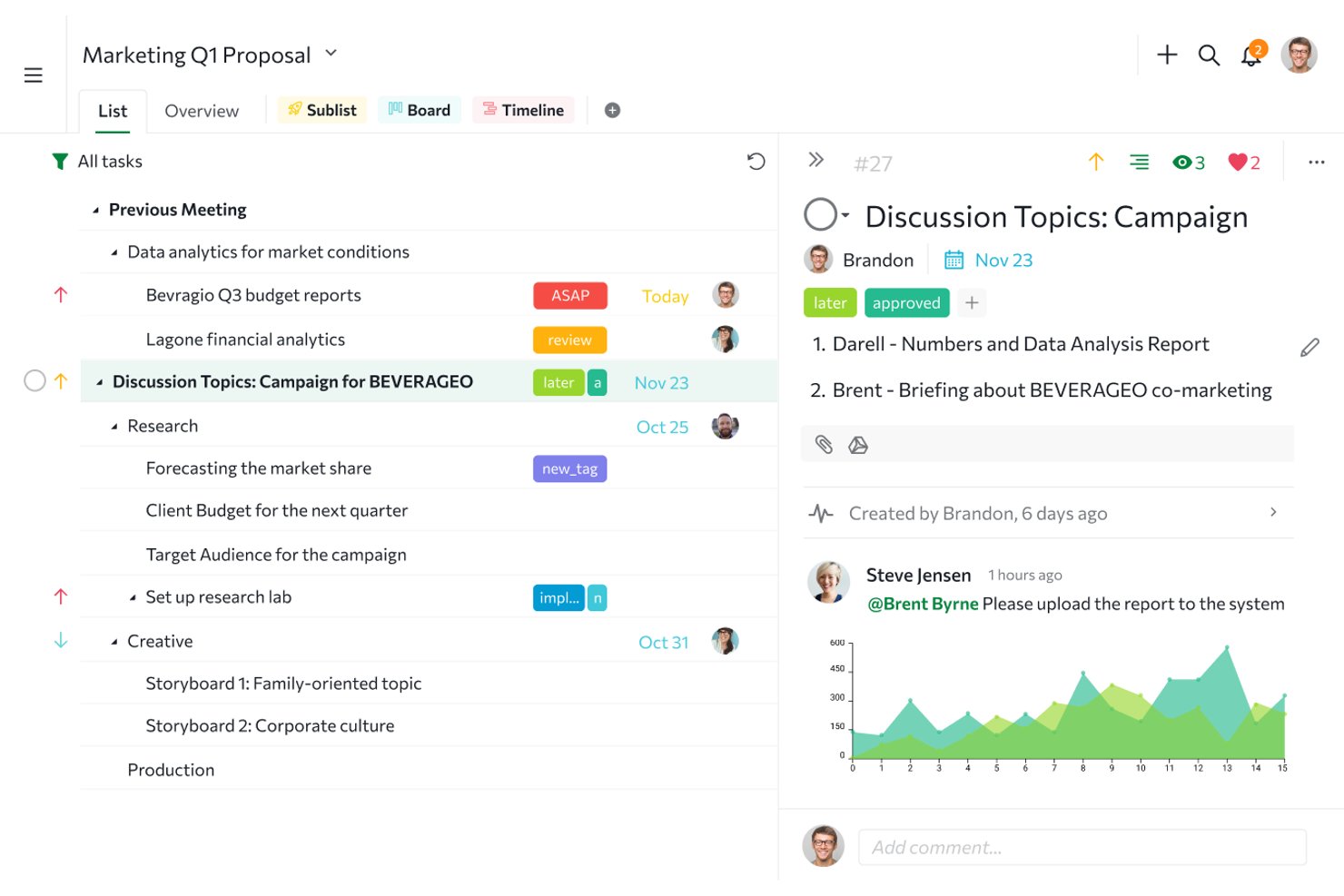
Quire is project management software for cross-functional teams that pairs task planning with Kanban boards, helping you coordinate day-to-day work and track progress across projects.
Who Is Quire Best For?
Quire suits project managers coordinating cross-functional work across product, engineering, and design teams.
Why I Picked Quire
I include Quire as a ClickUp alternative because it’s Best for deeply nested task hierarchies. Tasks can contain subtasks across multiple levels, while Task Bundle keeps child tasks attached to parent cards on the Kanban board. I like this for breaking a product launch into design, engineering, and QA work without losing the parent-child structure.
Quire Key Features
- Timeline view: Visualize task schedules and adjust dates on a Gantt-style timeline.
- Calendar view: See dated tasks and reschedule them by dragging on the calendar.
- Time tracking: Record task time with a stopwatch, Pomodoro timer, or manual entries.
- Smart Folders: Group projects from multiple organizations in one folder.
Quire Integrations
Quire lists integrations with Google Drive, OneDrive, Microsoft Teams, Slack, n8n, GitHub, Google Calendar, Dropbox, and Box; Dropbox and Box are available on paid plans, and it connects with Zapier. Quire also provides an API for custom integrations.
Pros and Cons
Pros:
- Task comments keep project discussions attached
- Switch between outline, Kanban, and timeline
- Deep subtasks preserve parent-child structure
Cons:
- Mobile apps need internet for many actions
- Advanced reporting remains limited for larger teams
New Product Updates from Quire
Quire Adds Read Receipts for Comments
Quire now supports read receipts for comments, helping teams see who has viewed discussion updates and reducing missed responses. For more information, visit Quire's official site.
 .

Kantata
Best for full project lifecycle delivery
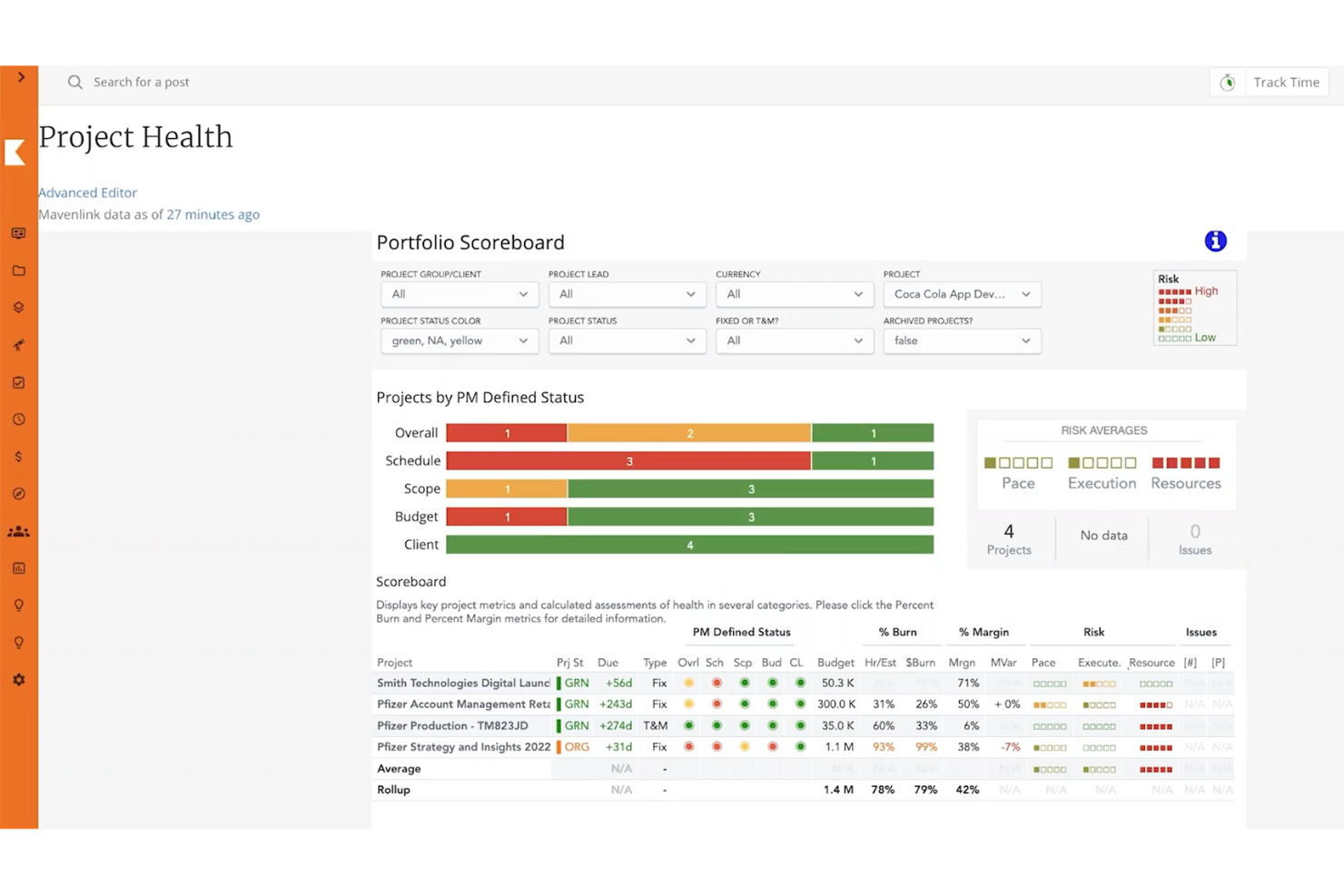
Kantata is a professional services automation platform for consulting and other service teams, connecting project work with resourcing and financial visibility to help managers coordinate delivery and control margins.
Who Is Kantata Best For?
Kantata suits professional services project managers who need to coordinate client delivery, staffing, and financial performance across engagements.
Why I Picked Kantata
I picked Kantata as a ClickUp alternative because it fits “Best for full project lifecycle delivery,” connecting project work with resourcing and financial visibility. I like that managers can coordinate client engagements and monitor margins as staffing or delivery needs shift.
Kantata Key Features
- Project estimation: Use performance data to estimate work and adjust project plans.
- Time tracking: Log hours against clients and projects.
- Expense tracking: Track expenses across client projects.
- Kantata Pulse: Collect client and employee feedback during delivery.
Kantata Integrations
Kantata documents integrations with Salesforce, QuickBooks Online and Desktop, Google Workspace, Jira, Slack, Microsoft Teams, HubSpot, NetSuite, and Sage Intacct, and lists Kantata OX on Zapier. It also offers secure APIs and more than 1,200 prebuilt connectors for connecting systems and building workflows.
Pros and Cons
Pros:
- Centralizes client collaboration and project updates
- Tracks utilization and capacity across engagements
- Connects delivery, staffing, and project margins
Cons:
- Custom reporting takes admin expertise
- Complex setup can overwhelm smaller teams
New Product Updates from Kantata

Kantata Adds Access Group Change History
Kantata adds Access Groups History, letting account administrators track changes to group details, membership, and permissions in Recent History. The update also makes these events available through the Subscribed Events API for broader monitoring. For more information, visit Kantata’s official site.
 .

Miro
Best for flexibility and customization
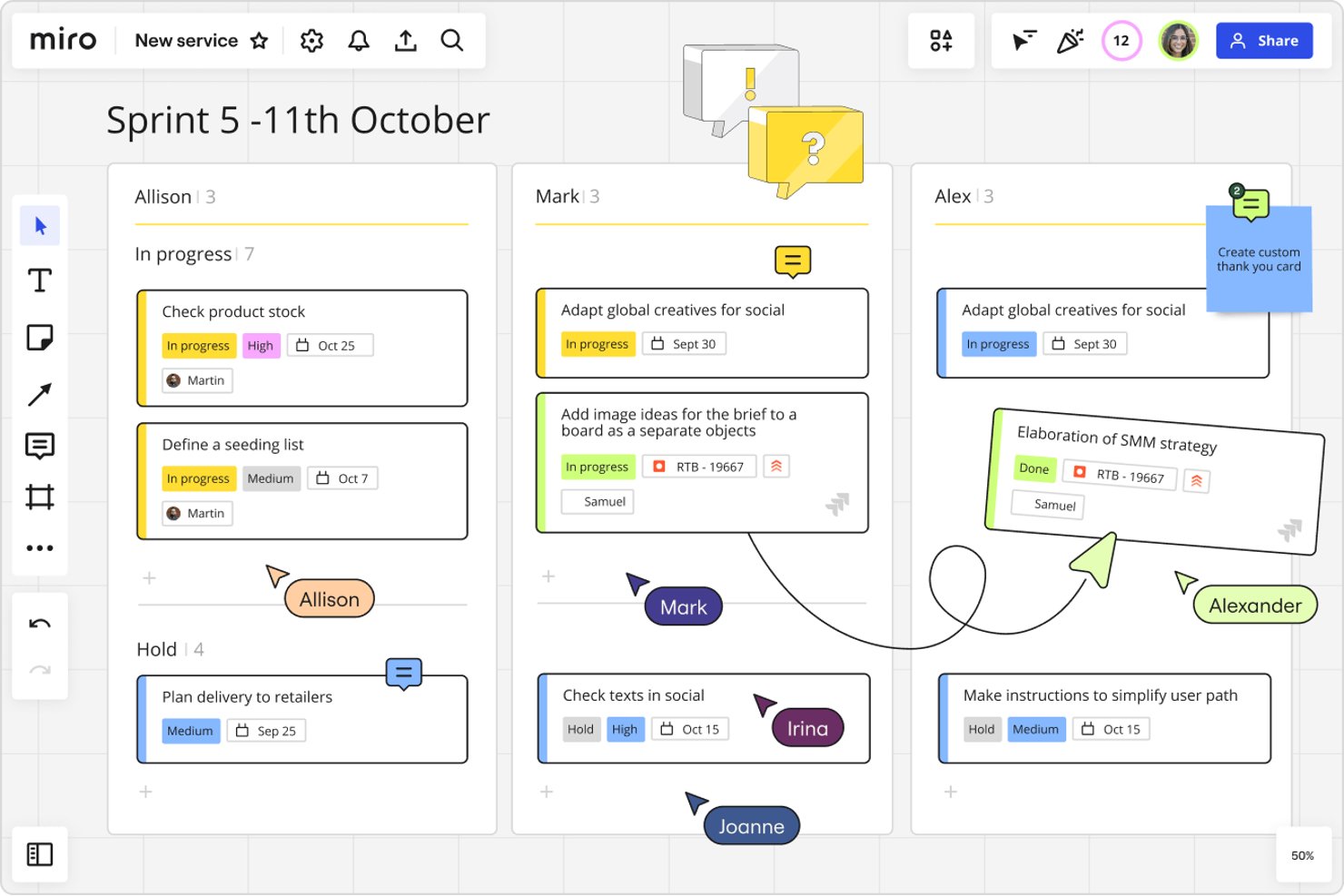
Miro gives product, engineering, and design teams a visual workspace to plan projects, map workflows, and keep cross-functional work aligned as requirements change.
Who Is Miro Best For?
Miro suits project managers at tech organizations that need to tailor workflows and templates to different teams and delivery methods.
Why I Picked Miro
I picked Miro for “Best for flexibility and customization” because its visual canvas lets me shape project workflows around how teams deliver. I use customizable boards and templates to map sprint plans, dependencies, and handoffs, then adjust them as requirements change.
Miro Key Features
- Jira integration: Add Jira cards to boards and view issue details.
- Voting: Let participants vote on ideas or options directly on a board.
- Comments: Attach comments to board content for project discussions and feedback.
- Timer: Set a countdown for workshops, planning sessions, or team exercises.
Miro Integrations
Miro’s Marketplace offers 160+ app integrations, including Jira, Confluence, Slack, Microsoft Teams, Trello, Asana, Google Drive, and Zoom. Miro also supports Zapier and provides an API for custom integrations.
Pros and Cons
Pros:
- Templates speed repeatable planning sessions
- Live cursors and comments aid workshops
- Infinite canvas supports flexible project mapping
Cons:
- Large boards can lag and become cluttered
- Task ownership and reporting remain comparatively limited
New Product Updates from Miro
Miro Adds Japan Data Residency for Enterprise Customers
Miro has introduced Japan data residency for enterprise customers, offering in-region storage for production data, backups, and metadata, plus in-region compute infrastructure. For more information, visit Miro's official site.

Celoxis
Best for client management tools
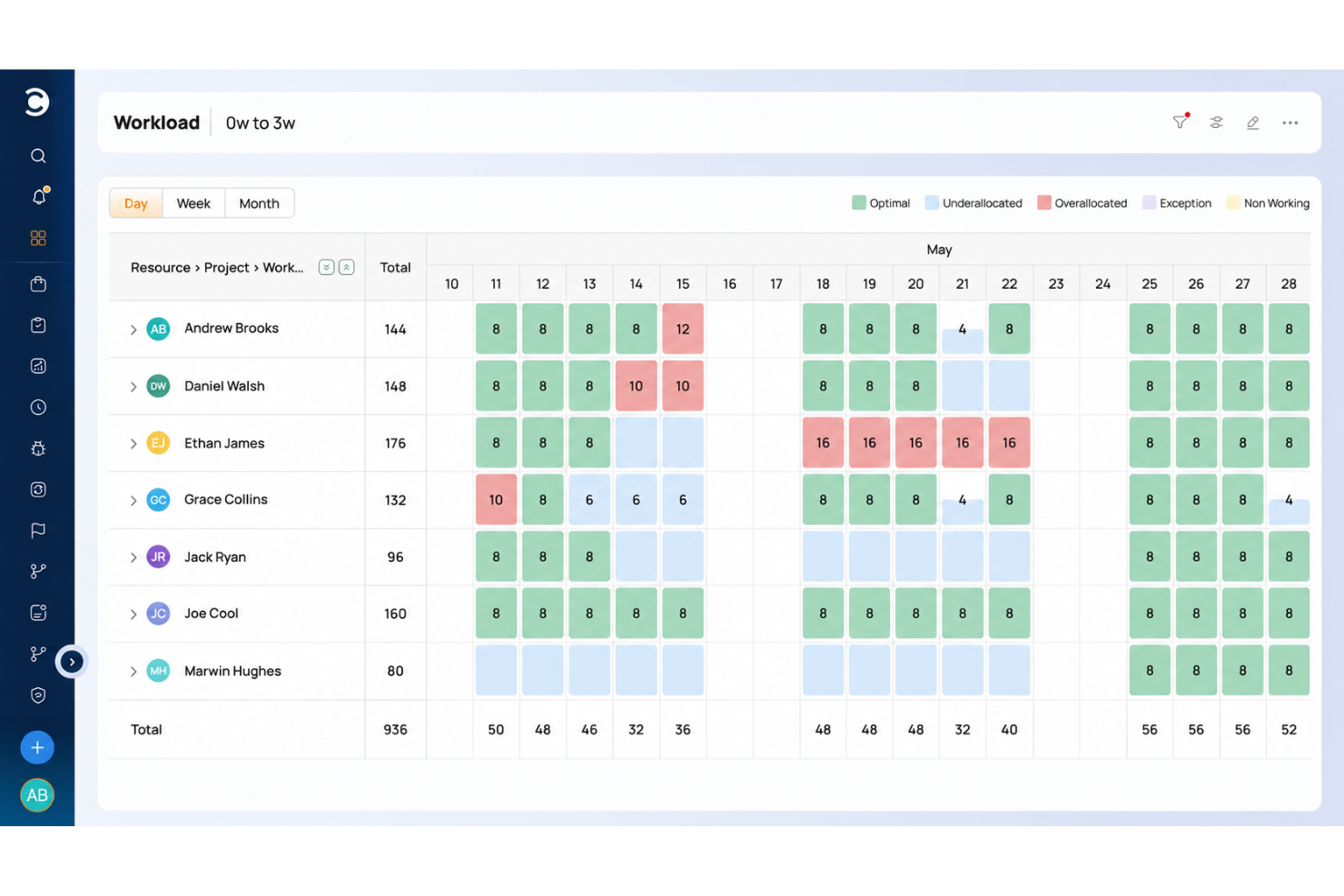
Celoxis is a project management platform for service businesses that need to plan work, allocate resources, track budgets, and coordinate client projects across teams.
Who Is Celoxis Best For?
Celoxis suits project managers at client-facing service businesses who coordinate deliverables, budgets, and resources across client projects.
Why I Picked Celoxis
I picked Celoxis as a ClickUp alternative for client-facing project work. Its customizable, branded client portal lets customers view and collaborate on permitted projects and tasks, with permissions controlling what they can access. I also like that teams can share project progress and turn approved time and expenses into invoices.
Celoxis Key Features
- Gantt scheduling: Plan tasks with dependencies, critical paths, and automatic scheduling.
- Resource capacity planning: Allocate work by availability, demand, and skills across projects.
- Custom workflows: Configure fields, states, routing, and escalation policies for work items.
- Portfolio dashboards: Build report widgets with charts, filters, and drill-downs to records.
Celoxis Integrations
Celoxis offers 21 native integrations, including Jira, GitHub, Azure DevOps, Slack, Salesforce, Microsoft 365 and Outlook, Google Drive, QuickBooks Online, Trello, and Zendesk. It also supports Zapier and a REST API for custom integrations.
Pros and Cons
Pros:
- Cross-project capacity and budget visibility
- Approved time and expenses support billing
- Client portal shares live project updates
Cons:
- Mobile app trails the desktop experience
- Advanced reports require setup and configuration

Jira
Best for agile and large-scale team delivery
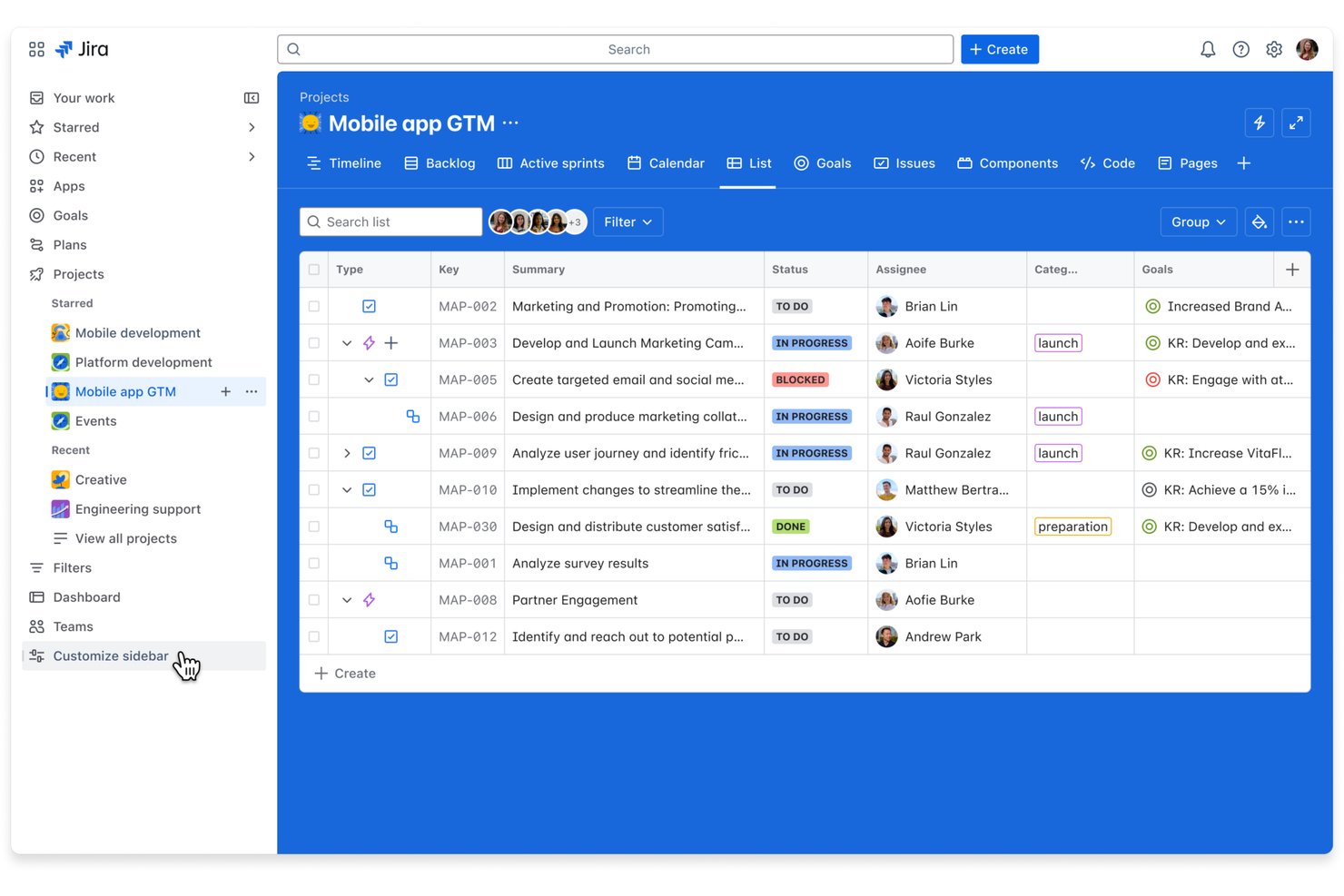
Jira is a project management platform for product and engineering teams that need to plan releases, track work, and manage shifting dependencies, making it best for agile and developer team workflows.
Who Is Jira Best For?
Product owners and engineering leads who run Scrum or Kanban can use Jira to connect team backlogs with day-to-day issue tracking.
Why I Picked Jira
I picked Jira for this ClickUp alternatives list because it’s Best for agile and developer team workflows. Scrum and Kanban boards connect sprint backlogs to issue tracking, while release planning and issue links help engineering leads track dependencies and spot blocked work before a launch.
Jira Key Features
- Custom workflows: Configure statuses and transitions to match your team’s process.
- Automation rules: Trigger actions when issues meet specified conditions.
- Custom fields: Add fields to capture project-specific information on issues.
- Dashboards: Build views with gadgets for tracking project metrics and activity.
Jira Integrations
Jira offers 3,000+ installable Atlassian Marketplace apps and integrations with Slack, Microsoft Teams, GitHub, Bitbucket, and Confluence. It also provides APIs for custom integrations.
Pros and Cons
Pros:
- Dashboards track ownership, priorities, and progress
- Issue links expose blocked release dependencies
- Sprint boards connect backlogs to issues
Cons:
- Dense ticket views clutter large projects
- Workflow setup demands significant admin time

GoodDay
Best for extensive customization options
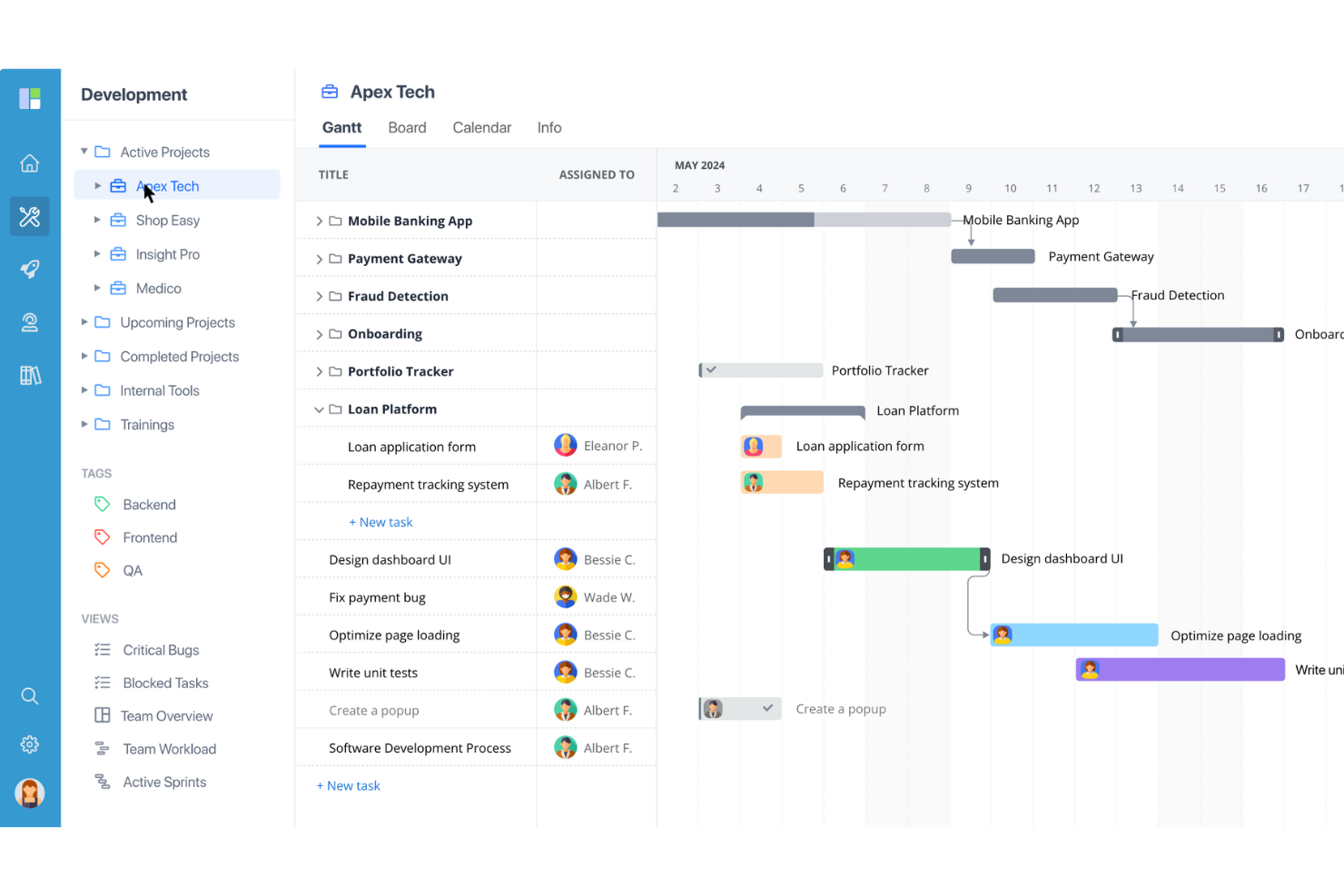
GoodDay is a project management platform for tech and digital teams that brings task planning, project tracking, and collaboration into one workspace, helping teams coordinate dependencies and keep changing work visible.
Who Is GoodDay Best For?
GoodDay suits project managers on tech and digital teams who need to tailor workflows, views, and project structures to different workstreams.
Why I Picked GoodDay
GoodDay is my pick for Best for extensive customization options because I can set task types with distinct workflows and custom fields. I can then track engineering bugs on a board and map launch tasks on a Gantt chart, tailoring project views to each workstream.
GoodDay Key Features
- Time tracking: Log time against tasks and projects.
- Workflow automation: Set rules to trigger actions when work changes.
- Goals and OKRs: Create objectives and track key results.
- Reports and analytics: Generate reports on project and team activity.
GoodDay Integrations
GoodDay offers native integrations with Google Workspace, Slack, Dropbox, Box, GitHub, and GitLab. It also connects with Zapier and provides an API for custom integrations.
Pros and Cons
Pros:
- Built-in time tracking ties effort to tasks
- Gantt, board, and workload views share plans
- Custom task types fit distinct engineering workflows
Cons:
- Reports can’t be emailed from the platform
- Mobile app trails desktop task management
Diğer ClickUp Alternatifleri
İşte kısa listeme giremeyen ancak yine de göz atmaya değer bazı ek ClickUp alternatifleri:
- Asana
For a simple, collaborative to-do list
- Ravetree
For resource management
- Smartsheet
For spreadsheet-style project tracking
- MeisterTask
For Kanban teams moving away from complexity
- Scoro
For KPI dashboards across client work
- Accelo
For client work invoicing and billing
- Productive
For agency time tracking and billing
- Process Street
For recurring process and compliance ops
- Hive
For bringing email and chat into tasks
- Workzone
For non-technical teams needing intake forms


ClickUp Hakkında
ClickUp, ekibinizin tüm projelerini tek bir platformda yönetmek ve tamamlamak için gelişmiş özellikler sunan bir proje yönetimi yazılımıdır. Kullanıcılar merkezi bir çalışma alanında projeleri planlayabilir, özel alanlar kullanabilir, görevleri planlayabilir, görev bağımlılıkları belirleyebilir, otomasyonlar oluşturabilir ve kaynakları yönetebilir; ayrıca ekip üyeleri ve konuklarla iletişim kurup iş birliği yapabilir.
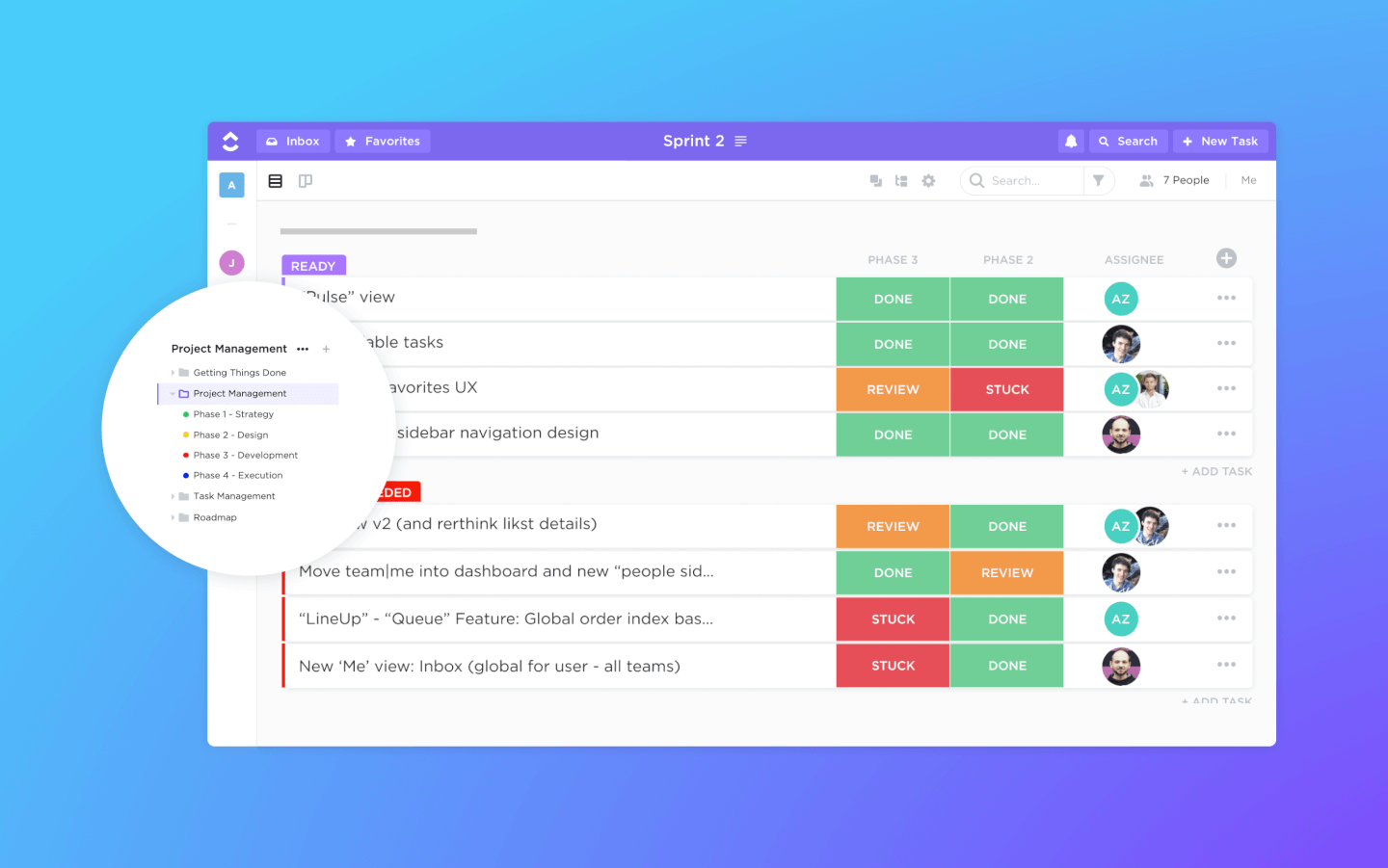
Görev yönetimi özellikleri arasında görev kontrol listeleri, alt görevler ve görev şablonları bulunur. Ayrıca görevleri filtreleyebilir, sıralayabilir, arayabilir, kolayca yeniden düzenleyebilir ve ekip için en uygun şekilde görüntüleyebilirsiniz. Kullanıcılar ayrıca Gantt şemaları oluşturabilir ve takvim görünümlerine, pano görünümlerine ve bilgileri görselleştirmenin 10'dan fazla ek yoluna erişebilir.
ClickUp ayrıca Vikilerde ve çevrimiçi belgelerde dosya paylaşımı ve ortak düzenleme için mükemmel özellikler içerir. Kullanıcılar belgeler ve görevler hakkında yorum yapabilir, ekip arkadaşlarından bahsedebilir ve iletişimi ve iş birliğini artırmak için diğer ekip üyeleriyle sohbet edebilir. Raporlama özellikleri arasında özel panolar oluşturma olanağının yanı sıra ekip raporlaması için yerleşik altı rapor türü bulunur.
ClickUp; Slack, G Suite, Airtable, Basecamp, Dropbox, Jira ve daha birçok araçla yerel entegrasyonların yanı sıra Zapier aracılığıyla 1.000'den fazla entegrasyon sunar.
ClickUp'ın sonsuza kadar ücretsiz planı kapsamlıdır ve tüm temel özellikleri içerir. Ancak bu ücretsiz sürümde kullanım sınırları vardır ve bu sınırlara ulaştığınızda sizi yükseltme yapmaya yönlendirir. Sınırsız plan aylık kullanıcı başına 5 ABD dolarından başlar ve ek işlevler sunar.
How I Evaluate ClickUp Alternatives
I split my evaluation into three parts. Core functionality carries the most weight: a tool must let you create, assign, and track tasks across projects and offer multiple views like boards, lists, and timelines. I also look for standout features like workload visibility and built-in docs, then consider onboarding ease and pricing value.
Core Functionality (Table Stakes For This List)
When I'm selecting tools for my list, I score each one on a scale from 0 (does not offer the functionality) to 5 (excels in this area) for each core functionality listed below. I then convert the total into a percentage to help assess each tool's overall fit, with extra weight on any functionalities I’ve deemed essential.
- Task & Project Tracking (Essential): I look for task assignment, subtasks, status tracking, dependencies, and recurring work across projects with shifting timelines.
- Multiple Views (Essential): I assess how easily you can switch between lists, boards, calendars, and timelines while keeping project details and updates in context.
- Team Collaboration: I check whether comments, mentions, and file sharing stay attached to tasks, so decisions and feedback are easy to follow.
- Workflow Automation: I evaluate triggers for routine work, such as assigning an owner after a status change or notifying reviewers when an approval is due.
- Third-Party Integrations: I look for connections to tools teams use for chat, file storage, and calendars, helping keep project information accessible across systems.
- Reporting & Dashboards: I assess whether dashboards show project progress, task status, and workload across teams, giving leads visibility into delivery risks.
Once I have a list of tools that meet the criteria, I consider what sets each platform apart.
Differentiating Factors (What Sets Vendors Apart)
Here's how I compare and contrast different vendors:
Standout Features
I look for built-in docs and wikis so teams can keep briefs, specs, and decisions next to the tasks they belong to—tools like Notion and ClickUp handle this differently, and the gap matters when you're tired of linking out to a separate doc tool. I also evaluate workload and capacity views, because knowing who's overloaded before a sprint starts beats finding out after a deadline slips. Goal and OKR tracking is another differentiator: I check whether a platform can link daily tasks back to quarterly objectives without a workaround.
Beyond Features
I evaluate how quickly a team can get started without heavy admin setup. Some platforms, like monday.com, offer guided onboarding flows for marketing or agile teams, while others assume you'll build everything from scratch. I also check performance under load—if a board with 500+ tasks lags or crashes, that's a dealbreaker for delivery leads tracking real projects. Pricing transparency matters too: I look for clear per-seat costs and whether essentials like automations or guest access require paid add-ons.
Neden ClickUp Alternatifi Aramalısınız?
ClickUp'ın geniş özellik setini öğrenmek uzun zaman alabilir, bazı ekipler yoğun panolarda gecikme yaşandığını bildirir ve müşteri faturalandırma işlemleri araç dışında gerçekleşir; bu durum ajanslar ve büyüyen ekipler için önemlidir. Başka bir aracın daha uygun olabileceği durumlar şunlardır:
- Ekip üyelerinizin hızla çalışmaya başlamasını istiyorsunuz. Bazı kullanıcılar ClickUp'ı özelliklerle aşırı yüklü bulur; araç, işlerine uyum sağlamadan önce dik bir öğrenme eğrisi ve çok sayıda kurulum gerektirebilir. monday AI Workspace gibi platformlar, sade görsel panolar ve kullanıma hazır geniş bir şablon kitaplığıyla hızlı işe alıştırmaya odaklanır.
- Ekip üyelerinizin hızlı yüklenen panolara ihtiyacı var. Bazı kullanıcılar görev oluştururken gecikme yaşandığını ve büyük projelerde panoların yavaş yüklendiğini bildirir. Bu listedeki çeşitli araçlar da büyük projelerde yavaşlayabilir; bu nedenle deneme süresince en yoğun projelerinizden birini yeniden oluşturun ve tüm ekibinizle test edin.
- Müşterilerinize ekibinizin harcadığı zaman üzerinden fatura kesiyorsunuz. ClickUp fatura düzenlemeye hazır zaman raporları hazırlar, ancak faturanın gönderilmesi bağlı bir muhasebe aracına veya dışa aktarma işlemine dayanır. Zoho Projects gibi seçenekler zaman takibi ve faturalandırmayı içerirken Celoxis, onaylanan zaman ve giderleri doğrudan faturalandırmaya aktarır.
Şu durumda ClickUp hâlâ doğru seçimdir: görevler, hedefler, Gantt grafikleri, panolar ve zaman takibi için her planda yapay zekâ içeren, derinlemesine özelleştirilebilir tek bir çalışma alanı istiyorsanız. Kuruluma yatırım yapmaya istekli ekipler için bu avantajlar, dik öğrenme eğrisinden, yoğun panolardaki gecikmelerden ve ayrı bir araçta faturalandırma gereksiniminden daha ağır basabilir.
ClickUp'ın Temel Özellikleri
Alternatif çözümlerin sunduklarını karşılaştırmanıza yardımcı olmak için ClickUp'ın temel özelliklerinden bazıları şunlardır:
- Entegrasyonlar: İşlevselliği geliştirmek ve farklı uygulamalar arasındaki iş akışlarını kolaylaştırmak için diğer araçlara ve platformlara bağlanın. Görünüşe göre mesajınız boştu. Bir alternatif ararken görev yönetimi özelliğinin sezgisel olduğundan, zengin metin açıklamalarını desteklediğinden ve karmaşık iş akışlarını etkili bir şekilde yönetmek için güçlü görev bağımlılıkları içerdiğinden emin olun.
- Görev yönetimi: Projelerinizi düzenli tutmanıza yardımcı olmak için son teslim tarihleri ve açıklamalar gibi ayrıntılı bilgilerle görevleri kolayca oluşturun, atayın ve takip edin. Bir alternatif, kolayca değiştirilebilen esnek görünümler sunmalı ve farklı tercihlere sahip ekiplerin uyum içinde çalışmasına olanak tanımalıdır. Ayrıca gelişmiş planlama için Gantt çizelgelerini veya zaman çizelgesi görünümlerini desteklediğinden emin olun.
- Birden fazla görev görünümü: Görevleri ekibinizin iş akışına en uygun şekilde yönetmek için liste, pano veya takvim gibi çeşitli görünümler arasından seçim yapın.
- Otomasyonlar: Tekrarlayan görevleri yönetmek için otomasyonlar kurarak zamandan tasarruf edin ve projenin tutarlı bir şekilde yürütülmesini sağlayın. Manuel müdahale ihtiyacını en aza indirmek için iş akışlarınızla sorunsuz bir şekilde bütünleşen, özelleştirilebilir ve kod gerektirmeyen otomasyonlara sahip alternatifleri arayın.
- Özel alanlar: Görevlere belirli bilgiler eklemek için özel alanları kullanın ve aracı ekibinizin benzersiz ihtiyaçlarına göre uyarlayın. Alternatifin çok çeşitli alan türlerine (ör. açılır listeler, tarihler, sayılar) izin verdiğinden ve bunları sorunsuz bir şekilde filtrelemenize, sıralamanıza ve raporlamanıza olanak tanıdığından emin olun.
- Kontrol panelleri: Proje verilerini görselleştirmek ve ilerlemeyi izlemek için kontrol panelleri oluşturarak herkesin aynı hedef doğrultusunda ilerlemesini sağlayacak içgörüler elde edin. Alternatif araçlardaki kontrol panelleri gerçek zamanlı güncellemeleri, özelleştirilebilir bileşenleri ve üst düzey bir genel bakış için birden fazla projeden veri çekme olanağını desteklemelidir.
- Şablonlar: Hızlı bir başlangıç yapmak ve ekibinizin çalışmaları arasında tutarlılığı korumak için görev ve proje şablonlarından yararlanın. İyi bir alternatif, önceden hazırlanmış şablonlardan oluşan bir kitaplık sunmalı ve kendi şablonlarınızı oluşturup kaydetmenize izin vermelidir; böylece çeşitli proje türlerine uyum sağlanabilir.
- Beyaz tahtalar: Etkileşimli bir şekilde beyin fırtınası yapmak ve projeleri planlamak için beyaz tahtaları kullanarak ekip üyeleriyle görsel olarak iş birliği yapın. Alternatiflerdeki beyaz tahta özelliğinin gerçek zamanlı iş birliğine, sürükleyip bırakılabilen öğelere ve fikirleri kolayca uygulanabilir görevlere dönüştürme olanağına izin verip vermediğini kontrol edin.
- Kaynak yönetimi: Mevcut kapasitenin en iyi şekilde kullanılmasını sağlamak için ekibinizin iş yükünü ve kaynaklarını etkili bir şekilde yönetin. Alternatiflerde ayrıntılı iş yükü çizelgeleri ve kaynak tahsisi araçları arayın; bu araçların hem mevcut kapasite hem de gelecekteki planlama hakkında içgörüler sunduğundan emin olun.
- Paylaşılan belgeler: Projeyle ilgili tüm bilgileri erişilebilir tek bir yerde tutmak için platform içinde belgeler oluşturun ve paylaşın.
- Bir alternatif, belgelerin güvenilir bir bilgi kaynağı olarak hizmet verebilmesi için sürüm denetimine ve ortak düzenlemeye sahip zengin metin düzenleyicisi sunmalıdır.
- Entegrasyonlar: İşlevselliği geliştirmek ve farklı uygulamalar arasındaki iş akışlarını kolaylaştırmak için diğer araçlara ve platformlara bağlanın. Alternatifin en sık kullandığınız araçlarla entegrasyonları desteklediğinden veya benzersiz teknoloji yığınınıza uyacak özel bağlantılar için açık bir API sağladığından emin olun.
ClickUp'a bir alternatif ararken esneklik, özelleştirme ve ekibinizin benzersiz ihtiyaçlarıyla uyumlu özellikler sunan bir araca öncelik verin. İster güçlü görev yönetimi, ister sezgisel otomasyon veya sorunsuz entegrasyonlar olsun, doğru alternatif iş akışlarınızı geliştirmeli, iş birliğini teşvik etmeli ve projelerinizle birlikte ölçeklenebilmelidir.
ClickUp Alternatifi Nasıl Seçilir
Uzun özellik listeleri ve karmaşık fiyatlandırma yapıları arasında kaybolmak kolaydır. Benzersiz yazılım seçme sürecinizde ilerlerken odaklanmanıza yardımcı olmak için göz önünde bulundurmanız gereken faktörlerin bir kontrol listesini aşağıda bulabilirsiniz:
| Faktör | Göz önünde bulundurulması gerekenler |
|---|---|
| Ölçeklenebilirlik | Aracın ekibinizle birlikte büyüyebildiğinden ve artan proje ve kullanıcı sayısını karşılayabildiğinden emin olun. |
| Entegrasyonlar | Sorunsuz bir iş akışı için ekibinizin hâlihazırda kullandığı araçlarla uyumluluk arayın. |
| Özelleştirilebilirlik | Özellikleri ve iş akışlarını ihtiyaçlarınıza uyacak şekilde uyarlamanıza olanak tanıyan bir platform seçin. |
| Kullanım kolaylığı | Ekibinizin öğrenme sürecini en aza indirmek için sezgisel bir yazılım tercih edin. |
| Bütçe | Mali kısıtlarınız dahilinde en iyi özellikleri sunan bir çözüm bulun. |
| Güvenlik önlemleri | Verilerinizi korumak için güçlü güvenlik önlemlerine sahip platformlara öncelik verin. |
| İş birliği özellikleri | Araçların etkili ekip iletişimini ve proje iş birliğini desteklediğinden emin olun. |
| Destek ve eğitim | Ekibinize yardımcı olacak müşteri desteği ve eğitim kaynaklarının mevcut olup olmadığını kontrol edin. |
Açıkçası, sindirilmesi gereken çok şey var ve doğru seçimi yapmak üzerinde büyük bir baskı hissedebilirsiniz. Bu nedenle, sizin ve kuruluşunuzun özel ihtiyaçlarına uygun olacak proje yönetimi araçlarını kısa listeye almanıza yardımcı olması için proje yönetimi yazılımı danışmanlığı hizmetimizi kullanmanızı öneririm.