

2026’da Serbest Çalışanlar İçin En İyi 10 Proje Yönetimi Yazılımı

Tek Girişimciler İçin En İyi Proje Yönetimi Yazılımları Kısa Listesi


Tek girişimciler için en iyi proje yönetimi yazılımı, ayrıntıları yönetecek bir ekibe ihtiyaç duymadan düzenli kalmanıza, iş yükünüze öncelik vermenize ve teslim tarihlerini yakalamanıza yardımcı olur. İster müşteri işleriyle, ister şirket içi hedeflerle, ister değişen önceliklerle ilgileniyor olun, bu araçlar bireysel çalışan profesyonellerin odaklanmış ve kontrolü elinde tutması için ihtiyaç duyduğu yapıyı sunar.
Özellikle tek girişimciler, serbest çalışanlar ve bağımsız içerik üreticileri için en iyi proje yönetimi platformlarını test edip inceledim. Kolaylaştırılmış görev yönetimi ve zaman takibinden yerleşik müşteri portallarına ve otomasyona kadar bu kılavuzdaki her araç, daha az kaynakla daha fazlasını yapmanıza yardımcı olmak üzere tasarlanmıştır.
Why Trust Our Software Recommendations
Our team has been testing and reviewing software since 2012. As project managers ourselves, we know how difficult—and important—it is to choose the right software.
For this guide, we evaluated tools using hands-on testing and independent research, scoring tools using our selection criteria. We also draw on insights from industry thought leaders and practicing project management experts.
Our reviews reflect our human editorial judgment, not a sales pitch.
Expert reviewers:
Karşılaştırma Tablosu: Tek Girişimciler İçin Proje Yönetimi Yazılımları
Bu karşılaştırma tablosu, tek girişimciler için en iyi proje yönetimi yazılımı seçimlerimdeki fiyatlandırma ayrıntılarını özetlemektedir:
Score legend (out of 5)
- Excellent 4.5–5
- Good 4–4.4
- Average 3–3.9
- Below average 2–2.9
- Poor 1–1.9
| Tool | Starting Price | Website | |||||||
|---|---|---|---|---|---|---|---|---|---|
| Best for task management with time tracking | 3.5 out of 5 | 4 | 5 | 2 | 4 | 3 | 3 | Pricing upon request Free plan + 15-day trial + demo available | Website |
| Best for integrated CRM features | 3.7 out of 5 | 4 | 4 | 3 | 4 | 3 | 4 | $12/user/month Free plan + 7-day free trial + free demo available | Website |
| Best for project timelines | 4.0 out of 5 | 5 | 5 | 4 | 4 | 4 | 2 | $10/user/month Free plan + 14-day free trial available | Website |
| Best for solo work tracked across five views | 3.7 out of 5 | 5 | 5 | 4 | 4 | 1 | 3 | $10.99/user/month Free plan + trial + demo available | Website |
| Best for team communication tools | 3.7 out of 5 | 5 | 4 | 4 | 4 | 2 | 3 | $45/month 14-day free trial + free demo available | Website |
| Best for client work billing and project proofing | 3.8 out of 5 | 4 | 5 | 4 | 4 | 2 | 4 | $9.99/user/month Free plan + 14-day free trial + free demo available | Website |
| Best for solopreneurs billing clients by the hour | 4.0 out of 5 | 4 | 4 | 4 | 4 | 3 | 5 | $19/month 7-day free trial | Website |
| Best for freelance client billing and projects | 4.3 out of 5 | 4 | 4 | 5 | 4 | 4 | 5 | $10/month Free demo + 14-day free trial available | Website |
| Best for solo time tracking and project planning | 4.0 out of 5 | 5 | 4 | 3 | 5 | 4 | 3 | $9/user/month Free plan available; 30-day free trial; Free demo available | Book Demo |
| Best for customizable views | 4.0 out of 5 | 5 | 5 | 3 | 4 | 4 | 3 | $12/user/month Free plan + free demo available | Book Demo |
Tek Girişimciler İçin En İyi Proje Yönetimi Yazılımları İncelemesi
Kısa listeme giren tek girişimciler için en iyi proje yönetimi yazılımlarının ayrıntılı özetlerini aşağıda bulabilirsiniz. İncelemelerim, size en uygun aracı bulmanıza yardımcı olmak için her aracın temel özelliklerine, avantajlarına & dezavantajlarına, entegrasyonlarına ve ideal kullanım alanlarına ayrıntılı bir bakış sunar.

Best for task management with time tracking

For solopreneurs navigating the complexities of project management, Zoho Projects offers a tailored solution that simplifies task organization and enhances productivity. With its comprehensive suite of tools, Zoho Projects appeals to solopreneurs and small business owners who seek an intuitive platform to manage tasks, track time, and collaborate efficiently. It addresses challenges like time management and project tracking by providing features that streamline operations, making it an ideal choice for those juggling multiple responsibilities.
Why I Picked Zoho Projects
I picked Zoho Projects for its unique ability to cater to the specific needs of solopreneurs with its robust task management and time tracking features. The platform's task automation allows you to set up workflows that reduce manual effort, freeing up time to focus on core business activities. Additionally, the team collaboration tools are perfect for solopreneurs who work with freelancers or clients, ensuring seamless communication and project updates. By integrating these features, Zoho Projects helps you overcome the common hurdle of managing multiple tasks single-handedly.
Zoho Projects Key Features
In addition to its standout task management and collaboration tools, Zoho Projects offers:
- Time Sheets: Allows you to log time spent on tasks and generate detailed reports for better time management.
- Gantt Charts: Provides a visual timeline of your project, helping you track progress and deadlines effectively.
- Customizable Dashboards: Enables you to personalize your project view with widgets, offering quick insights into key metrics.
- Issue Tracking: Helps you identify and resolve project-related issues promptly, ensuring smooth project execution.
Zoho Projects Integrations
Integrations include Slack, Google Drive, Microsoft Teams, Dropbox, GitHub, Bitbucket, Zoho CRM, Zoho Books, Zoho People, and Zoho Invoice.
Pros and Cons
Pros:
- Useful client collaboration tools
- Affordable for solopreneurs
- Strong task and time tracking
Cons:
- Mobile features more limited
- Interface can feel cluttered
New Product Updates from Zoho Projects
Zoho Projects Adds CodeX Scripts for Custom Modules
Zoho Projects now supports CodeX Scripts for custom modules, enabling conditional logic and rules for creating, updating, and deleting records. For more information, visit Zoho Projects' official site.
 .

Flowlu
Best for integrated CRM features

Flowlu is an all-in-one project management platform for solopreneurs and freelancers that combines task tracking, project planning, CRM, time tracking, and invoicing in a single workspace.
Who Is Flowlu Best For?
Flowlu is a strong fit for freelance consultants and solo agency owners who need to manage client relationships, project work, and invoicing from a single platform.
Why I Picked Flowlu
I've included Flowlu in my top picks because its CRM lives inside the same workspace as your projects, tasks, and invoices, so you're never copying client details between tools. I particularly like that you can spin up a new project directly from a won CRM deal and carry all the contact context with you. From there, you can log billable hours against tasks and generate a client invoice from those time records without leaving the platform.
Flowlu Key Features
- Recurring task scheduling: Set tasks to repeat daily, weekly, monthly, or annually, with a custom interval and a defined end condition.
- Agile project tools: Run sprints with backlogs, Kanban boards, and work-in-progress limits inside dedicated agile projects.
- Mind maps: Build and customize visual mind maps for brainstorming and organizing ideas directly within the platform.
- Estimate-to-invoice conversion: Convert an approved client estimate into an invoice, with all estimate details carried over automatically.
Flowlu Integrations
Flowlu integrations include Google Calendar, Gmail, Google Drive, Stripe, PayPal, Slack, and more. It also supports REST API access, webhooks, and OAuth 2.0 for custom integrations.
Pros and Cons
Pros:
- Client portal shares tasks and documents
- Kanban, calendar, and Gantt views organize work
- CRM, projects, and billing stay connected
Cons:
- Project totals may omit tracked hours
- Many modules take time to navigate

Nifty
Best for project timelines

Nifty is a project management tool designed to help teams and solopreneurs manage tasks and timelines efficiently. It offers features that support collaboration, task management, and milestone tracking.
Why I picked Nifty: It excels in managing project timelines, making it ideal for users who need to keep track of deadlines and progress. Nifty's milestone feature lets you set clear goals and visualize your project's path to completion. You can easily create tasks and assign them to team members, ensuring everyone knows their responsibilities. The tool also offers a timeline view, which helps you see how different tasks and milestones align over time.
Standout Features & Integrations:
Features include a comprehensive timeline view that allows you to track project progress and deadlines visually. The task management feature helps you organize and prioritize tasks efficiently. Nifty also offers a collaborative document editor, enabling your team to work together on documents without leaving the platform.
Integrations include Slack, Google Drive, Zoom, Microsoft Teams, Dropbox, Google Calendar, Trello, Asana, GitHub, and Zapier.
Pros and Cons
Pros:
- Easy to track project progress
- Customizable task lists
- Collaborative document editing
- Visual timeline management
- Clear milestone tracking
Cons:
- Some features need manual updates
- May require training to use effectively
- Limited offline access
- Initial setup can be complex
- Can become cluttered with large projects
Asana
Best for solo work tracked across five views
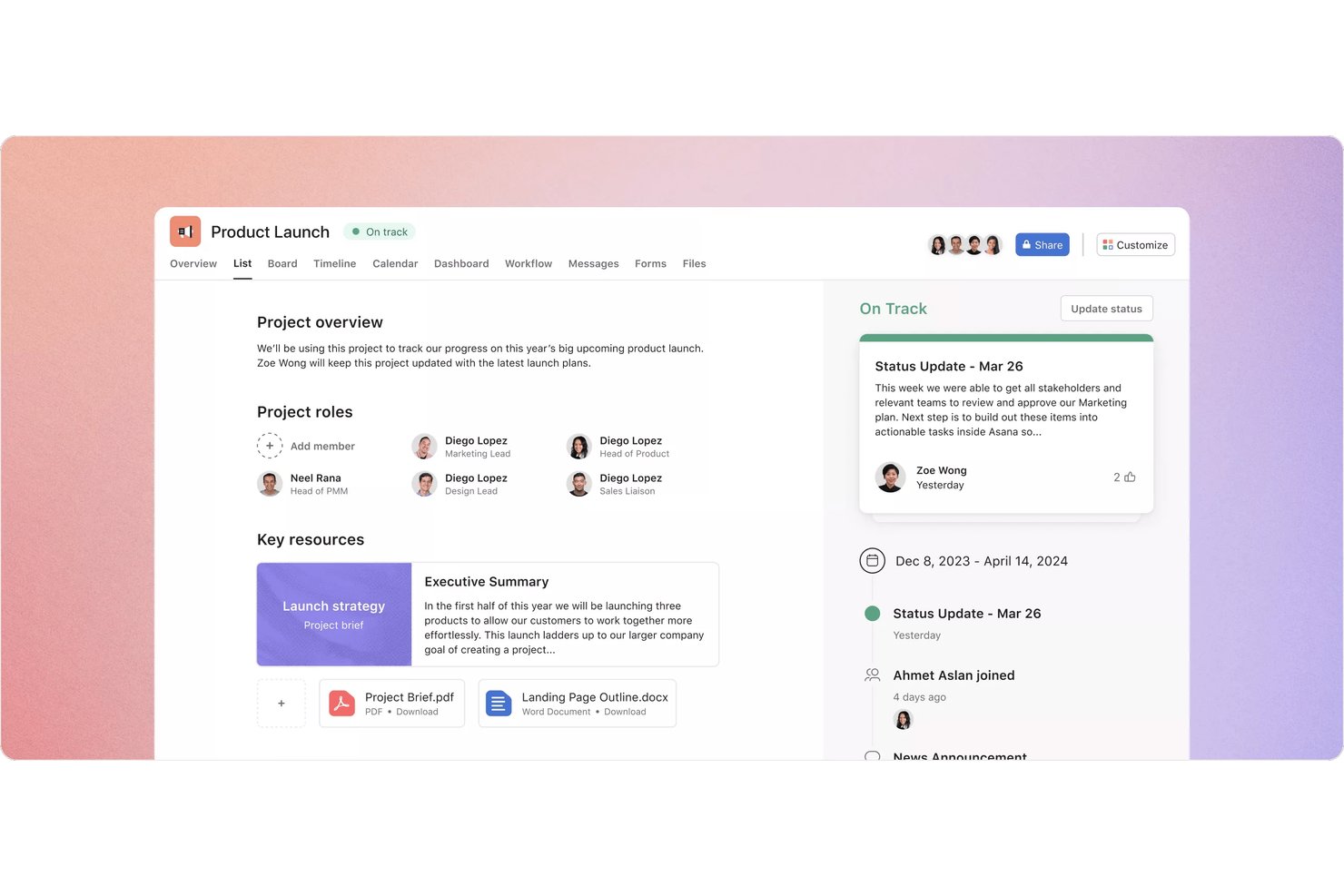
Asana is a project management platform for solopreneurs and small teams that combines task tracking, multiple project views, scheduling, and client collaboration in one workspace.
Who Is Asana Best For?
Asana suits solopreneurs who need to manage multiple client projects across different views without outgrowing a single workspace.
Why I Picked Asana
I picked Asana as one of the best because no other tool on this list gives you five distinct ways to view your work in a single workspace. I love that you can flip between a list, board, calendar, timeline, and Gantt chart depending on what a project demands, and save up to 50 filtered or sorted tabs per project. When I'm juggling multiple client deadlines, the timeline view makes it easy to spot scheduling conflicts before they become real problems.
Asana Key Features
- My Tasks: A personalized view that pulls all your assigned work into one list across every project you're part of.
- Mobile task capture: Create tasks, set due dates, and attach files from your phone, with offline actions that sync when you're back online.
- Reusable project templates: Build templates from existing projects with relative dates, custom fields, and intake forms to standardize repeat work.
- Guest access: Invite clients or contractors to specific tasks or projects so they can comment and complete work without seeing anything else.
Asana Integrations
Asana supports 270+ marketplace integrations, including Slack, Google Drive, Google Calendar, Microsoft Teams, Jira Cloud, Figma, Dropbox, and Zapier. It also offers a REST API, webhooks, SDKs, and an MCP server for custom integrations.
Pros and Cons
Pros:
- Reusable templates simplify repeat client work
- Client feedback stays attached to tasks
- Five views help spot scheduling conflicts
Cons:
- Clients may avoid shared project spaces
- No single-seat paid plan for soloists

ProofHub
Best for team communication tools
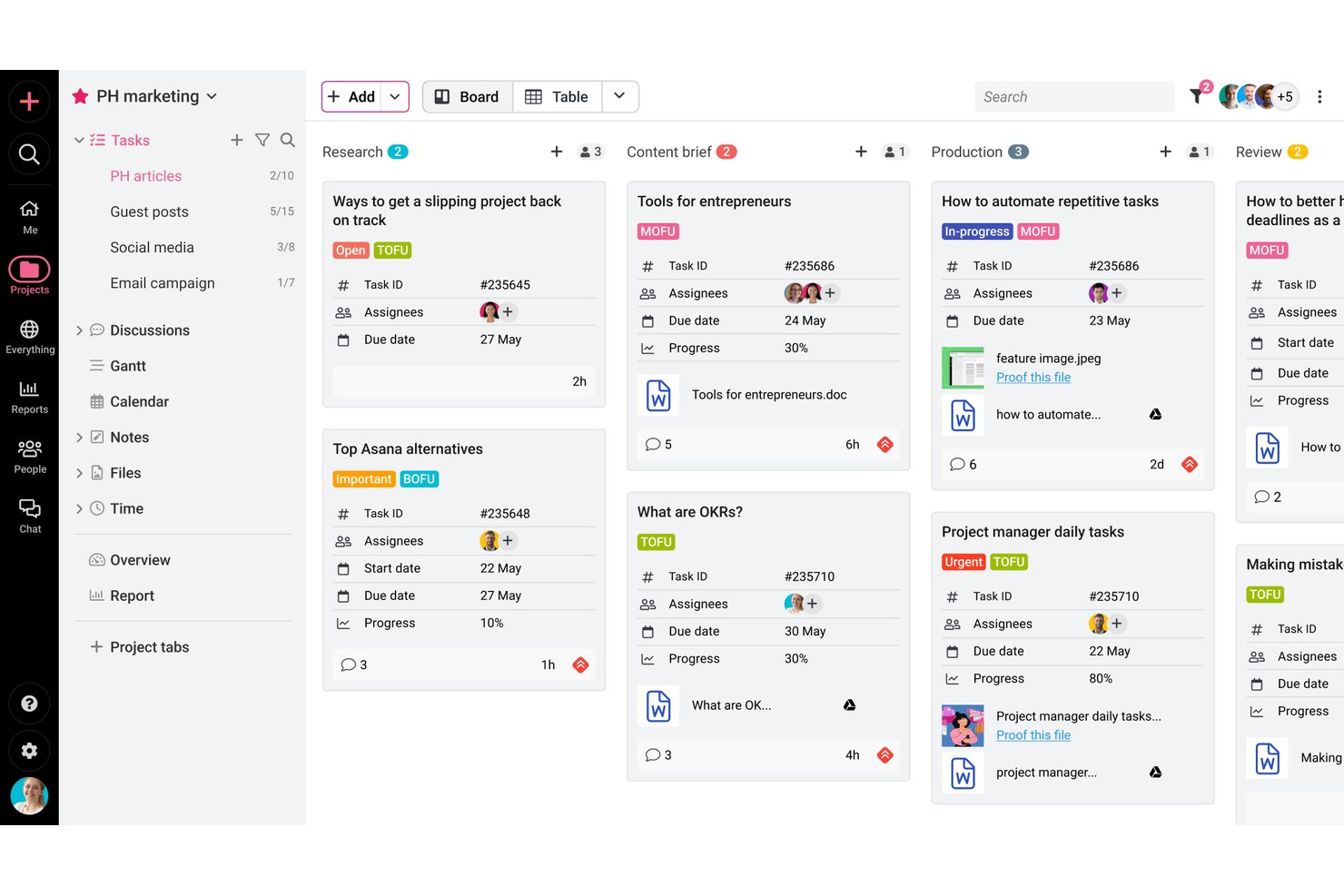
ProofHub is a project management and team collaboration platform that combines task tracking, visual workflow views, built-in proofing and approvals, time tracking, and client-facing communication tools in one place.
Who Is ProofHub Best For?
ProofHub suits independent creative professionals and freelancers who need to manage client reviews, feedback, and approvals alongside their project work.
Why I Picked ProofHub
I picked ProofHub as one of the best because its built-in communication tools genuinely replace the scattered email threads and chat messages that slow down client work. I especially like how clients can leave feedback directly on files using markup tools, and how discussion threads keep conversations tied to specific projects rather than buried in inboxes. Proofing, approvals, and group chat all live alongside your tasks, so nothing falls through the cracks between review cycles.
ProofHub Key Features
- Task dependencies: Link tasks so work can only progress in the right order, keeping project sequencing clear across client deliverables.
- White labeling: Apply your own domain, logo, and brand colors to your ProofHub account for a more professional client-facing experience.
- Time tracking with billable hour filters: Log time manually or with timers, then filter entries by billable or non-billable status before exporting to FreshBooks or QuickBooks.
- Project templates: Save a project as a reusable template—including assignees, dates, and milestones—to spin up similar client projects faster.
ProofHub Integrations
ProofHub offers native integrations with Google Calendar, Dropbox, OneDrive, FreshBooks, FreshBooks Classic, QuickBooks, Slack, Box, and iCal. Its API supports custom integrations.
Pros and Cons
Pros:
- Gantt views clarify dependencies and deadlines
- Separate client projects keep tasks organized
- Client feedback stays tied to project files
Cons:
- Finding specific actions can take time
- Frequent updates can bury important notifications

Best for client work billing and project proofing
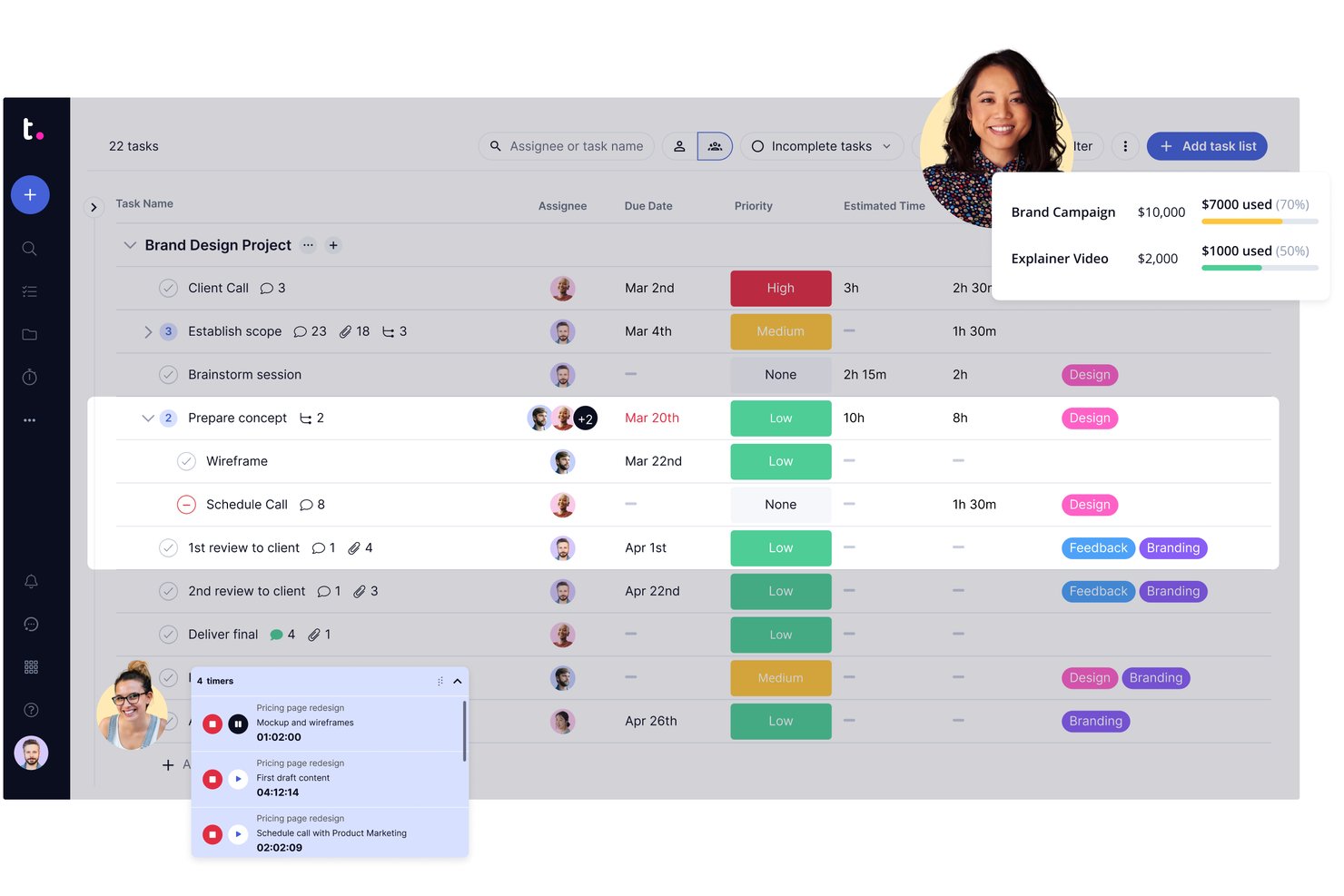
Teamwork.com is a client work project management platform built around billable time tracking, invoicing, proofing workflows, and client collaboration.
Who Is Teamwork.com Best For?
Teamwork.com is a strong fit for freelance consultants, independent creatives, and solo agency owners who manage multiple client projects and need billable time tracking, invoicing, and client proofing in one place.
Why I Picked Teamwork.com
I've included Teamwork.com in my top picks because it's the only tool on this list that combines client proofing workflows with invoicing built directly from logged time. When I'm wrapping up a deliverable, I can send a proof for client review, collect annotated feedback, get sign-off, and generate an invoice from the billable hours logged against that project, all without switching apps. The proofing and billing features together are what make it genuinely suited to freelance consultants and solo creative professionals managing real client work.
Teamwork.com Key Features
- Project templates: Pre-built and custom templates for marketing, project management, and creative work let you spin up new client projects without rebuilding from scratch.
- AI Project Wizard: Turns a written project brief into a structured project with tasks and timelines automatically.
- Workload and capacity planning: Visualizes how work is distributed so you can spot overallocation before it affects a deadline.
- Custom fields: Add formula and custom fields to tasks and projects to capture the specific data points your client work requires.
Teamwork.com Integrations
Teamwork.com lists 150+ integrations, including native connections to QuickBooks Online, Xero Online, HubSpot, Google Calendar, Slack, Harvest, and Google Sheets, plus Zapier. Its API and webhooks support custom integrations.
Pros and Cons
Pros:
- Templates organize repeat client engagements
- Billable hours connect directly to project work
- Client proofing keeps revisions and approvals together
Cons:
- Navigation can make project updates cumbersome
- Paid plans impose minimum user counts

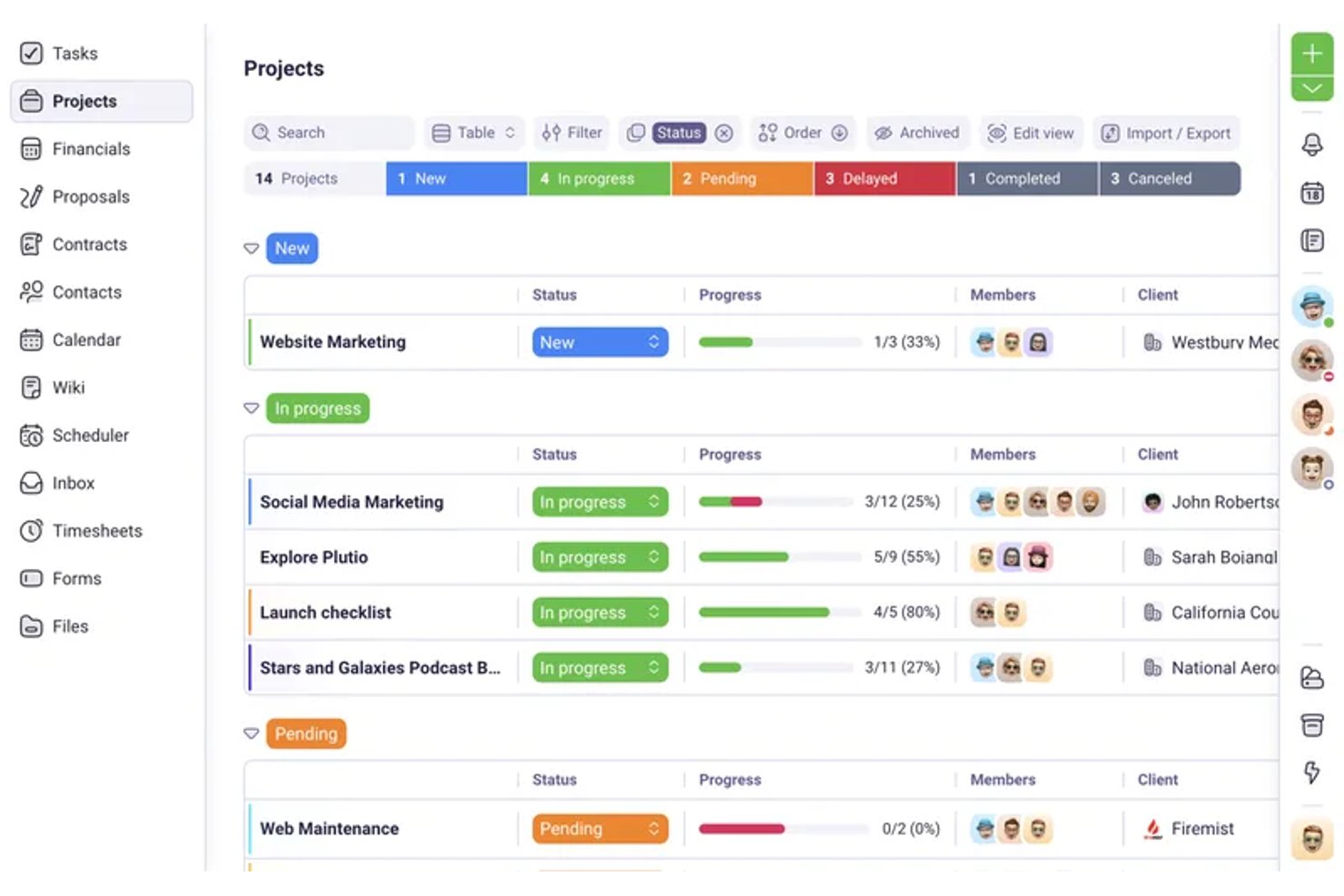
Plutio is an all-in-one business management platform for freelancers and solopreneurs that combines project tracking, client portals, proposals, contracts, time tracking, and invoicing in a single workspace.
Who Is Plutio Best For?
Plutio is a strong fit for freelance consultants, designers, and coaches who bill clients by the hour and need proposals, contracts, and invoicing in one place.
Why I Picked Plutio
I picked Plutio as one of the best because it nails the billing workflow that solopreneurs who charge by the hour live inside daily. You can start a timer directly from a task, mark that time as billable, and convert it into an invoice line item with the hours, rate, and amount already filled in—no spreadsheet in between. That proposal-to-project automation also means a signed proposal can instantly spin up a new project, keeping you moving without the admin lag.
Plutio Key Features
- Client portal access: Give clients a login to view shared projects, invoices, proposals, and files without needing a Plutio subscription.
- Proposal builder: Create proposals with a drag-and-drop editor, optional or required line items, and client e-signature approval.
- Recurring invoices and subscriptions: Set up invoices to send automatically on a schedule, with support for split payments, discounts, and taxes.
- Workflow automation: Trigger actions across projects, invoices, and tasks automatically—such as sending invoice reminders or updating task statuses.
Plutio Integrations
Plutio offers native integrations with Google Calendar, Google Meet, Outlook, Stripe, PayPal, and Square, plus REST API and webhook access for custom integrations. It also connects with 5,000+ apps through Zapier.
Pros and Cons
Pros:
- Reusable boards and templates support repeat work
- Keeps client projects and business records together
- Connects billable hours directly to invoices
Cons:
- Automation may fall short for complex processes
- Reviewers report glitches in client workflows

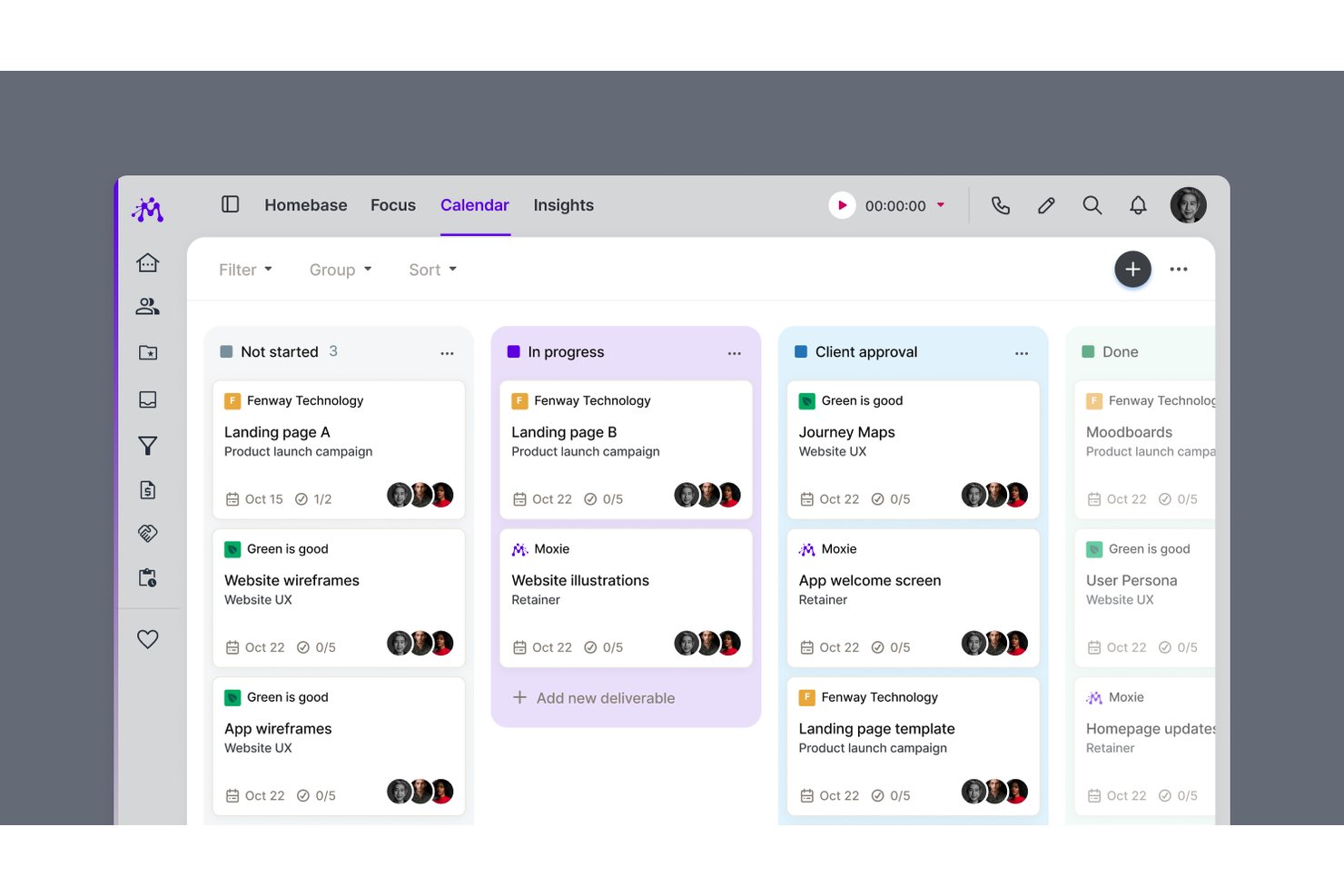
Moxie is an all-in-one freelance business management platform that combines project and task management, time tracking, invoicing, client portals, proposals, contracts, and scheduling in a single workspace.
Who Is Moxie Best For?
Moxie is a strong fit for freelancers and independent service providers—designers, writers, consultants, and coaches—who need client billing and project work managed in one place.
Why I Picked Moxie
I picked Moxie as one of the best because it's the only tool on this list built specifically around the freelance billing cycle, not just project work. I love how tracked time flows directly into invoices from inside the project workspace, so I'm not jumping between apps to reconcile hours. The white-label client portal lets clients sign contracts, approve deliverables, and pay invoices in one place, which cuts down on the back-and-forth that eats into solo working hours.
Moxie Key Features
- Proposal-to-project automation: When a client accepts an agreement, Moxie automatically creates a project, including dates and estimates, based on your configured package.
- Daily Focus digest: Each morning, Moxie surfaces your assigned tasks and upcoming project deadlines in a daily summary you can configure by notification type.
- Sales pipeline: Track leads through customizable stages, set estimated values, and trigger follow-up workflows automatically when a prospect takes action.
- Project templates: Save reusable project structures—including tasks, subtasks, due dates, and pricing defaults—to apply whenever a new project starts.
Moxie Integrations
Moxie offers native integrations with QuickBooks, Stripe, PayPal, Google Calendar, Microsoft Outlook, Zoom, Google Meet, and Gmail. It also supports Make, webhooks, a public API, and Zapier for custom integrations.
Pros and Cons
Pros:
- Project templates reuse tasks and deadlines
- Tracked work feeds directly into invoices
- Client portal cuts invoice follow-ups
Cons:
- Limited task durations and dependencies
- Project planning can feel clunky

Toggl
Best for solo time tracking and project planning
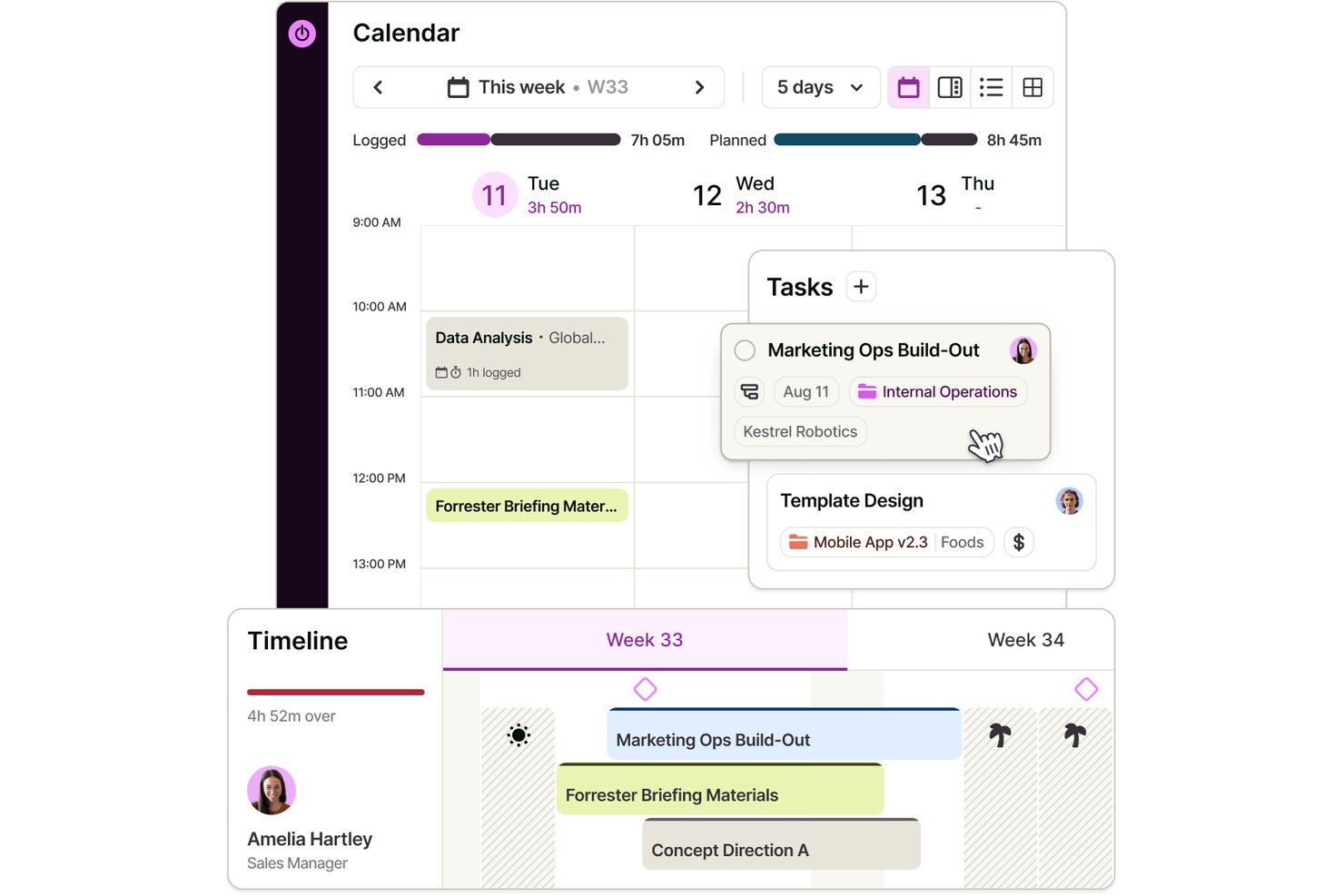
Toggl is a project management and time tracking tool that combines task planning, visual scheduling, and built-in time tracking across board, list, calendar, and timeline views.
Who Is Toggl Best For?
Toggl is a strong fit for solo professionals who need to track time and manage projects in one place without paying for features built around teams.
Why I Picked Toggl
I've included Toggl in my top picks because it's the only tool here that combines project planning and time tracking in one place without requiring you to stitch together separate apps. I particularly like how you can build out a project timeline, drag tasks to reschedule them as priorities shift, and immediately see how your tracked hours compare against your original estimates. That feedback loop between planning and actual time spent is what makes Toggl genuinely useful for solo work, especially when you're billing clients by the hour.
Toggl Key Features
- Recurring tasks and projects: Schedule tasks or entire projects to repeat on a set cadence, from daily to annually, with period-specific milestones and budgets.
- Billable rate tracking: Set billable rates at the workspace, member, or project level to monitor revenue alongside tracked time.
- AI Task Creator: Turn raw notes or briefs into structured tasks using Toggl's built-in AI, without manual setup.
- View-only report sharing: Generate shareable links that let clients or stakeholders view reports without needing a Toggl account.
Toggl Integrations
Toggl offers native integrations with Google Calendar, Outlook Email & Calendar, Asana, Jira, and Slack, plus browser extensions for GitHub, Trello, and Visual Studio. Its REST API and webhooks, support custom integrations.
Pros and Cons
Pros:
- Solo plan covers core planning needs
- Tracked hours expose estimate overruns
- Drag-and-drop timelines make deadline shifts visible
Cons:
- Client collaboration relies on paid access
- No dependencies auto-adjust downstream task dates

ClickUp
Best for customizable views
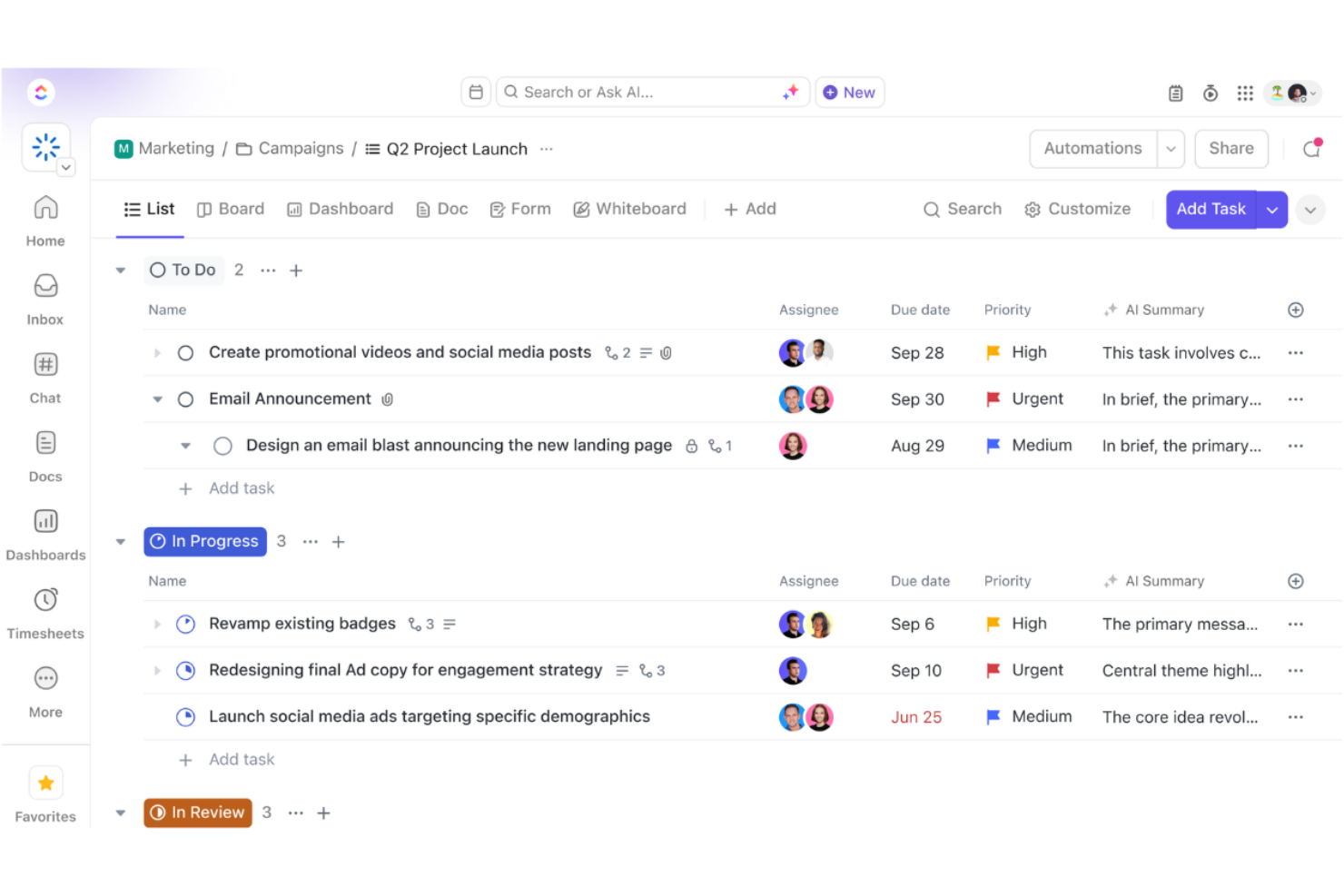
ClickUp is a versatile project management tool designed for teams and solopreneurs who need a flexible workspace to manage tasks, projects, and workflows. It offers a wide range of features that cater to various business needs, including task management and collaboration.
Why I picked ClickUp: It provides customizable views, allowing you to tailor your workspace to fit your specific preferences. You can switch between list, board, and calendar views, making it easy to visualize your work. The tool also offers custom fields, enabling you to track exactly what matters to you. With ClickUp, you have the flexibility to create a workflow that aligns with how you and your team work best.
Standout Features & Integrations:
Features include goal tracking, which helps you set and achieve your objectives by breaking them down into manageable steps. The time tracking feature allows you to monitor how much time you're spending on tasks, helping you optimize your productivity. ClickUp also offers a built-in document editor, so you can create and collaborate on documents directly within the platform.
Integrations include Slack, Google Drive, Dropbox, Microsoft Teams, Zoom, Outlook, Evernote, GitHub, Trello, and Zapier.
Pros and Cons
Pros:
- Supports various project styles
- Goal setting features
- Built-in time tracking
- Flexible task management
- Highly customizable views
Cons:
- Frequent updates may disrupt workflow
- Limited offline functionality
- Some features need manual setup
- Requires time to learn features
- Can be overwhelming for new users
New Product Updates from ClickUp
ClickUp Adds List Automations, Time Off Scheduling, and Org Charts
ClickUp adds template-based List automations, personal time off scheduling, a unified picker, automatic task date syncing, and Org Charts. These updates help teams automate project setup, manage availability, and organize work. For more information, visit ClickUp’s official site.
 .
Tek Girişimciler İçin Diğer Proje Yönetimi Yazılımları
Kısa listeme giremeyen ancak yine de göz atmaya değer bazı ek tek girişimci proje yönetimi yazılımı seçenekleri şunlardır:
- Paymo
For billing clients from your timesheet
- GoodDay
For customizable workflows
- Wrike
For project tracking
- Freedcamp
For solo work with free guest access
- Scoro
For quote-to-project billing in one place
- 17hats
For solopreneurs managing clients end-to-end
- ActiveCollab
For client billing tied to project tasks
- Airtable
For database-style solo project tracking
- Hive
For AI-assisted solo client projects
- Bonsai
For freelancers managing projects and billing


How I Evaluate Project Management Software for Solopreneurs
I split my evaluation into three parts, giving the most weight to core needs: organize projects, track tasks and deadlines, and share progress with clients. Next, I consider mobile task capture and proposal-to-project workflows. Finally, I weigh self-guided onboarding, collaborator costs, and single-user pricing value.
Core Functionality (Table Stakes For This List)
When I'm selecting tools for my list, I score each one on a scale from 0 (does not offer the functionality) to 5 (excels in this area) for each core functionality listed below. I then convert the total into a percentage to help assess each tool's overall fit, with extra weight on any functionalities I’ve deemed essential.
- Task & Project Tracking (Essential): I look for project grouping, clear task statuses, and subtasks that help track deliverables across several client engagements.
- Visual Workflow Views (Essential): I check for useful list, board, or calendar views so you can plan work your way and spot overloaded weeks.
- Deadlines & Scheduling: I look for due dates, reminders, and milestones that help keep approvals and client deliverables on schedule.
- Client Collaboration: I consider how easily you can share project updates, files, or feedback with clients and occasional collaborators.
- Single-User Pricing: I assess whether a free or low-cost solo plan covers core project needs without requiring unused team seats.
- Time & Billing: I look for time logs or invoicing connections that help you track billable work and prepare client charges.
Once I have a list of tools that meet the criteria, I consider what sets each platform apart.
Differentiating Factors (What Sets Vendors Apart)
Here's how I compare and contrast different vendors:
Standout Features
I look for a proposal-to-project flow that converts accepted quotes into live projects—tools like HoneyBook and Dubsado handle this well, and it cuts out the duplicate data entry that eats into billable hours. White-label client portals matter just as much; I check whether the portal can carry your branding and restrict visibility so each client sees only their own project. I also evaluate mobile quick-capture, since logging a task or starting a timer between site visits keeps nothing from slipping through the cracks.
Beyond Features
I evaluate how easily a solo user can self-onboard without dedicated support. Tools like Trello or Notion offer guided tours and community templates that get you productive in minutes, while heavier platforms can stall you for days. I also check whether adding a subcontractor or VA forces a full team-plan upgrade, since most solopreneurs only need a second seat a few times a year. Finally, client-facing surfaces matter—branded portals and polished invoices shape how clients perceive your professionalism, which directly influences repeat work.
Tek Girişimciler İçin Proje Yönetimi Yazılımı Nasıl Seçilir?
Uzun özellik listeleri ve karmaşık fiyatlandırma yapılarına kendinizi kaptırmanız kolaydır. Kendinize özgü yazılım seçimi sürecinizde ilerlerken odaklanmanıza yardımcı olmak için göz önünde bulundurmanız gereken faktörleri içeren bir kontrol listesi hazırladım:
| Faktör | Dikkate Alınması Gerekenler |
|---|---|
| Ölçeklenebilirlik | Yazılım işletmenizle birlikte büyüyecek mi? Aracın artan görev ve kullanıcı sayısını aksama olmadan karşılayıp karşılayamayacağını değerlendirin. Tamamen yenileme gerektirmeden büyümenize uyum sağlayacak esneklik sunan planları arayın. |
| Entegrasyonlar | Zaten kullandığınız araçlarla çalışıyor mu? Sorunsuz iş akışlarını korumak için e-posta, takvimler ve dosya depolama gibi mevcut yazılımlarınızla entegrasyonları desteklediğinden emin olun. |
| Özelleştirilebilirlik | İşleyişinize uyacak şekilde uyarlayabilir misiniz? Katı bir şablonu takip etmek yerine panoları, iş akışlarını ve alanları özel ihtiyaçlarınıza göre ayarlayıp ayarlayamayacağınızı değerlendirin. |
| Kullanım Kolaylığı | Sizin ve ekibinizin kullanması kolay mı? Eğitim süresini en aza indiren ve araca hızla uyum sağlamanıza yardımcı olan sezgisel bir arayüz arayın. |
| Uygulama ve İşe Alıştırma | Ne kadar hızlı kullanmaya başlayabilirsiniz? Sistemi çalışır duruma getirmek için gereken zamanı ve kaynakları göz önünde bulundurun. Videolar ve kılavuzlar gibi mevcut eğitim kaynaklarını kontrol edin. |
| Maliyet | Bütçenize uyuyor mu? Fiyatlandırma planlarını karşılaştırın ve gizli ücretlere dikkat edin. Özelliklerin maliyeti haklı çıkarıp çıkarmadığını ve yıllık faturalandırmada indirim olup olmadığını değerlendirin. |
| Güvenlik Önlemleri | Verileriniz ne kadar güvende? Bilgilerinizi korumak için yazılımın şifreleme, veri yedekleme ve kullanıcı izinleri gibi güçlü güvenlik önlemlerine sahip olduğundan emin olun. |
Tek Girişimciler İçin Proje Yönetimi Yazılımı Nedir?
Soloprenörler için proje yönetimi yazılımları, bireylerin görevleri, teslim tarihlerini ve projeleri bağımsız ve verimli bir şekilde yönetmesine yardımcı olan araçlardır.
Serbest çalışanlar, danışmanlar ve küçük işletme sahipleri tarafından kullanılan bu araçlar; görev takibi, planlama ve zaman yönetimini tek bir yerde birleştirir. İş akışlarını kolaylaştırmaya, odağı artırmaya ve kurumsal düzeydeki platformların karmaşıklığı olmadan solo profesyonellerin düzenli kalmasına yardımcı olurlar.
Soloprenörler için Proje Yönetimi Yazılımlarının Özellikleri
Soloprenörler için proje yönetimi yazılımı seçerken aşağıdaki temel özelliklere dikkat edin:
- Görev yönetimi: Hiçbir şeyin gözden kaçmamasını sağlayarak görevleri düzenlemenize ve önceliklendirmenize yardımcı olur; böylece projeleriniz planlandığı şekilde ilerler.
- İş birliği araçları: Dosyaları ve mesajları kolayca paylaşmanıza olanak tanıyarak tek başınıza çalışıyor olsanız bile iletişimi ve ekip çalışmasını kolaylaştırır.
- Teslim tarihi takibi: Yaklaşan teslim tarihlerinden haberdar olmanızı sağlar; böylece zamanınızı etkili bir şekilde yönetebilir ve müşteri beklentilerini karşılayabilirsiniz.
- Özelleştirilebilir panolar: Çalışma alanınızı özel ihtiyaçlarınıza göre uyarlamanıza olanak tanır ve en önemli konulara odaklanmanızı kolaylaştırır.
- Zaman takibi: Görevlere harcanan zamanı izlemenizi sağlar; böylece verimliliğinizi optimize edebilir ve faturalandırmayı doğru şekilde yönetebilirsiniz.
- Entegrasyon seçenekleri: Hâlihazırda kullandığınız araçlarla uyumluluk sağlayarak kesintisiz iş akışlarını sürdürür.
- Otomasyon özellikleri: Tekrarlayan görevleri otomatikleştirerek manuel çabayı azaltır ve daha önemli işler için zaman kazanmanızı sağlar.
- Dosya paylaşımı: Belgeleri depolamak ve paylaşmak için güvenli bir yöntem sunar; böylece önemli dosyalara her yerden kolayca erişebilirsiniz.
- Raporlama ve analiz: Projenizin ilerleyişi ve performansı hakkında içgörüler sunarak bilinçli kararlar almanıza yardımcı olur.
- Mobil uygulama kullanılabilirliği: Projelerinizi hareket hâlindeyken yönetebilmenizi sağlar ve her şeye akıllı telefonunuzdan veya tabletinizden erişebilmenizi mümkün kılar.
Soloprenörler için Proje Yönetimi Yazılımlarının Faydaları
Soloprenörler için proje yönetimi yazılımı uygulamak, ekibiniz ve işletmeniz açısından çeşitli faydalar sağlar. Yararlanabileceğiniz bazı faydalar şunlardır:
- Gelişmiş düzen: Tüm görevlerinizi, dosyalarınızı ve teslim tarihlerinizi tek bir yerde tutarak iş yükünüzü yönetmenizi ve odağınızı korumanızı kolaylaştırır.
- Artan verimlilik: Otomasyon ve zaman takibi özellikleri, zamanınızı en iyi şekilde değerlendirmenize yardımcı olarak projeleri daha verimli tamamlamanızı sağlar.
- Daha iyi iletişim: İş birliği araçları ve dosya paylaşımı, tek başınıza veya uzaktaki müşterilerle çalışıyor olsanız bile bilgi ve güncellemeleri kolayca paylaşmanızı sağlar.
- Artan sorumluluk bilinci: Teslim tarihi takibi ve raporlama özellikleri, yükümlülüklerinizi takip etmenize yardımcı olarak hedeflerinize ulaşmanızı ve müşteri beklentilerini karşılamanızı sağlar.
- Özelleştirilebilir iş akışları: Çalışma alanınızı özel ihtiyaçlarınıza göre kurmanıza olanak tanır ve size uygun bir şekilde çalışabilmenizi sağlar.
- Bilinçli karar alma: Raporlama ve analiz, projenizin ilerleyişi hakkında içgörüler sunarak veriye dayalı kararlar almanıza yardımcı olur.
- Esneklik: Mobil uygulama kullanılabilirliği, projelerinizi her yerden yönetebilmenizi sağlayarak hareket hâlinde çalışma özgürlüğü sunar.
Soloprenörler için Proje Yönetimi Yazılımlarının Maliyetleri ve Fiyatlandırması
Soloprenörler için proje yönetimi yazılımı seçmek, mevcut çeşitli fiyatlandırma modellerinin ve planların anlaşılmasını gerektirir. Maliyetler özelliklere, ekip büyüklüğüne, eklentilere ve diğer unsurlara göre değişir. Aşağıdaki tabloda, soloprenörler için proje yönetimi yazılımı çözümlerinde yaygın planlar, bunların ortalama fiyatları ve genellikle sundukları özellikler özetlenmiştir:
Soloprenörler için Proje Yönetimi Yazılımlarında Plan Karşılaştırma Tablosu
| Plan Türü | Ortalama Fiyat | Yaygın Özellikler |
|---|---|---|
| Ücretsiz Plan | $0 | Temel görev yönetimi, dosya paylaşımı ve sınırlı entegrasyonlar. |
| Kişisel Plan | $5-$15/kullanıcı/ay | Görev yönetimi, takvim görünümü, sınırlı otomasyon ve temel raporlama. |
| İşletme Planı | $15-$25/kullanıcı/ay | Gelişmiş görev yönetimi, zaman takibi, geliştirilmiş entegrasyonlar ve ekip iş birliği araçları. |
| Kurumsal Plan | $25-$50/kullanıcı/ay | Özelleştirilebilir iş akışları, özel destek, gelişmiş güvenlik özellikleri ve kapsamlı analiz. |
Tek Başına Girişimciler için Proje Yönetimi Yazılımı SSS
Tek başına girişimciler için proje yönetimi yazılımı hakkında sık sorulan soruların bazı yanıtlarını burada bulabilirsiniz:
Asana tek başına girişimciler için iyi mi?
Asana, görevlerini ve projelerini verimli bir şekilde yönetmesi gereken tek başına girişimciler için harika bir seçenektir. Görev listeleri, son teslim tarihleri ve hatırlatıcılar gibi özelliklere sahip kullanıcı dostu bir arayüz sunar. İş yükünüzü düzenleyebilir ve hiçbir şeyin gözden kaçmamasını sağlayabilirsiniz. Öncelikleri ve son teslim tarihlerini takip etmek için özellikle kullanışlıdır.
ClickUp tek başına girişimciler için iyi mi?
ClickUp, çok yönlü bir proje yönetimi aracı arayan tek başına girişimciler için oldukça uygundur. Çalışma alanını ihtiyaçlarınıza göre uyarlamanıza olanak tanıyan özelleştirilebilir görünümler ve şablonlar sunar. Görev takibi, belge yönetimi ve entegrasyon seçenekleri gibi özelliklerle işinizin çeşitli yönlerini tek bir yerden yönetebilirsiniz.
Tek başına girişimciler için en iyi proje yönetimi yazılımını nasıl seçerim?
En iyi yazılımı seçmek için özel ihtiyaçlarınızı, bütçenizi ve size en çok yardımcı olacak özellikleri göz önünde bulundurun. Ölçeklenebilirlik, entegrasyonlar ve kullanım kolaylığı sunan araçları arayın. Sorunsuz bir geçiş sağlamak için işe alıştırma sürecini ve müşteri desteği seçeneklerini değerlendirmek de önemlidir.
Tek başına girişimciler için proje yönetimi yazılımında hangi özellikleri aramalıyım?
Aranması gereken temel özellikler arasında görev yönetimi, iş birliği araçları, son teslim tarihi takibi ve özelleştirilebilir panolar bulunur. Ayrıca iş akışınızı geliştirmek için otomasyon özelliklerini ve entegrasyon seçeneklerini de değerlendirin. Bu özellikler projelerinizi verimli bir şekilde yönetmenize ve her şeyi düzenli tutmanıza yardımcı olur.
Tek başına girişimciler için proje yönetimi yazılımı zaman yönetimine yardımcı olabilir mi?
Evet, birçok proje yönetimi aracı görevlerde ne kadar zaman harcadığınızı izlemenize yardımcı olan zaman takibi özellikleri sunar. Bu, üretkenliğinizi artırabilir ve zamanınızı etkili bir şekilde kullandığınızdan emin olmanızı sağlayabilir. Zaman alan görevleri belirleyerek programınızı ayarlayabilir ve en önemli şeylere odaklanabilirsiniz.
Proje yönetimi yazılımı için ücretli bir plana yatırım yapmaya değer mi?
Gelişmiş özelliklere, daha iyi desteğe veya daha fazla özelleştirme seçeneğine ihtiyacınız varsa ücretli bir plana yatırım yapmak buna değer olabilir. Ücretsiz planlar genellikle sınırlamalarla birlikte gelir; bu nedenle ihtiyaçlarınızı ve ek avantajların maliyeti haklı çıkarıp çıkarmadığını değerlendirin. Sağladığı değeri, üretkenliğinize ve proje yönetiminize katkısını göz önünde bulundurun.