

2026’da Proje Ekipleri İçin En İyi 10 Paymo Alternatifi Aracı

En İyi Paymo Alternatifleri Kısa Listesi


Paymo'nun projeleriniz için doğru araç olmadığını düşünüyorsanız, proje çalışmalarını planlamanıza ve atamanıza, zamanı takip etmenize ve müşterilerinize fatura kesmenize yardımcı olabilecek çok sayıda Paymo alternatifi mevcut.
Paymo, kullanım senaryonuzu karşılayan temel özelliklerden yoksun olabilir. Bu nedenle, bir alternatif bulmanıza yardımcı olmak için proje yöneticisi olarak deneyimimi kullanarak onlarca alternatifi test edip inceledim. Durum ne olursa olsun, en iyi Paymo alternatifleri için en iyi önerilerim burada.
Paymo nedir?
Paymo; serbest çalışanların, girişimlerin ve küçük ve orta ölçekli işletmelerin projeleri başlangıçtan faturalandırmaya kadar yönetmesine yardımcı olmak için tasarlanmış bir proje yönetimi uygulamasıdır. Birleşik bir platform içinde görev atamalarını, zaman takibini ve finansal süreçleri iyileştiren çok işlevli bir araç olarak hizmet verir.
Why Trust Our Software Recommendations
Our team has been testing and reviewing software since 2012. As project managers ourselves, we know how difficult—and important—it is to choose the right software.
For this guide, we evaluated tools using hands-on testing and independent research, scoring tools using our selection criteria. We also draw on insights from industry thought leaders and practicing project management experts.
Our reviews reflect our human editorial judgment, not a sales pitch.
Expert reviewers:
Paymo Alternatifleri Karşılaştırma Tablosu
Bu karşılaştırma tablosu, en iyi Paymo alternatifleri seçimlerim için fiyatlandırma ayrıntılarını özetlemektedir:
Score legend (out of 5)
- Excellent 4.5–5
- Good 4–4.4
- Average 3–3.9
- Below average 2–2.9
- Poor 1–1.9
| Tool | Starting Price | Website | |||||||
|---|---|---|---|---|---|---|---|---|---|
| Best for all-in-one billing and client work | 3.5 out of 5 | 3 | 4 | 4 | 3 | 4 | 3 | $12/user/month Free plan + 7-day free trial + free demo available | Website |
| Best for multi-view task and time tracking | 3.5 out of 5 | 4 | 1 | 5 | 5 | 2 | 4 | $12/user/month Free plan + free trial + free demo available | Website |
| Best for agency billing from tracked time | 3.8 out of 5 | 4 | 4 | 4 | 3 | 4 | 4 | $15/month 14-day free trial | Website |
| Best for service business invoicing automation | 3.8 out of 5 | 4 | 5 | 5 | 3 | 3 | 3 | $11.95/month Free plan + 14-day free trial available | Website |
| Best for billing clients on agency projects | 4.2 out of 5 | 4 | 3 | 5 | 4 | 4 | 5 | $9.99/user/month Free plan + 14-day free trial + free demo available | Website |
| Best for project finances across client accounts | 4.7 out of 5 | 5 | 5 | 5 | 3 | 5 | 5 | Pricing upon request 14-day free trial + demo available | Website |
| Best for agency billing and financials | 4.7 out of 5 | 4 | 5 | 5 | 4 | 5 | 5 | $49/user/month Free demo available | Website |
| Best for agency budget and profit tracking | 4.5 out of 5 | 5 | 4 | 5 | 3 | 5 | 5 | $10/user/month 14-day free trial | Book Demo |
| Best for time tracking tied to payroll and billing | 3.5 out of 5 | 5 | 4 | 3 | 2 | 4 | 3 | Pricing upon request 14-day free trial + demo available | Website |
| Best for Zoho ecosystem project tracking | 3.8 out of 5 | 4 | 2 | 5 | 4 | 4 | 4 | Pricing upon request Free plan + 15-day trial + demo available | Website |
En İyi Paymo Alternatifleri İncelemeleri
Her Paymo alternatifinin ayrıntılı analizini ve genel değerlendirmesini burada bulabilirsiniz. Her araç için avantajları ve dezavantajları, özellikleri ve ideal kullanım senaryolarını ele alıyorum.

Flowlu
Best for all-in-one billing and client work
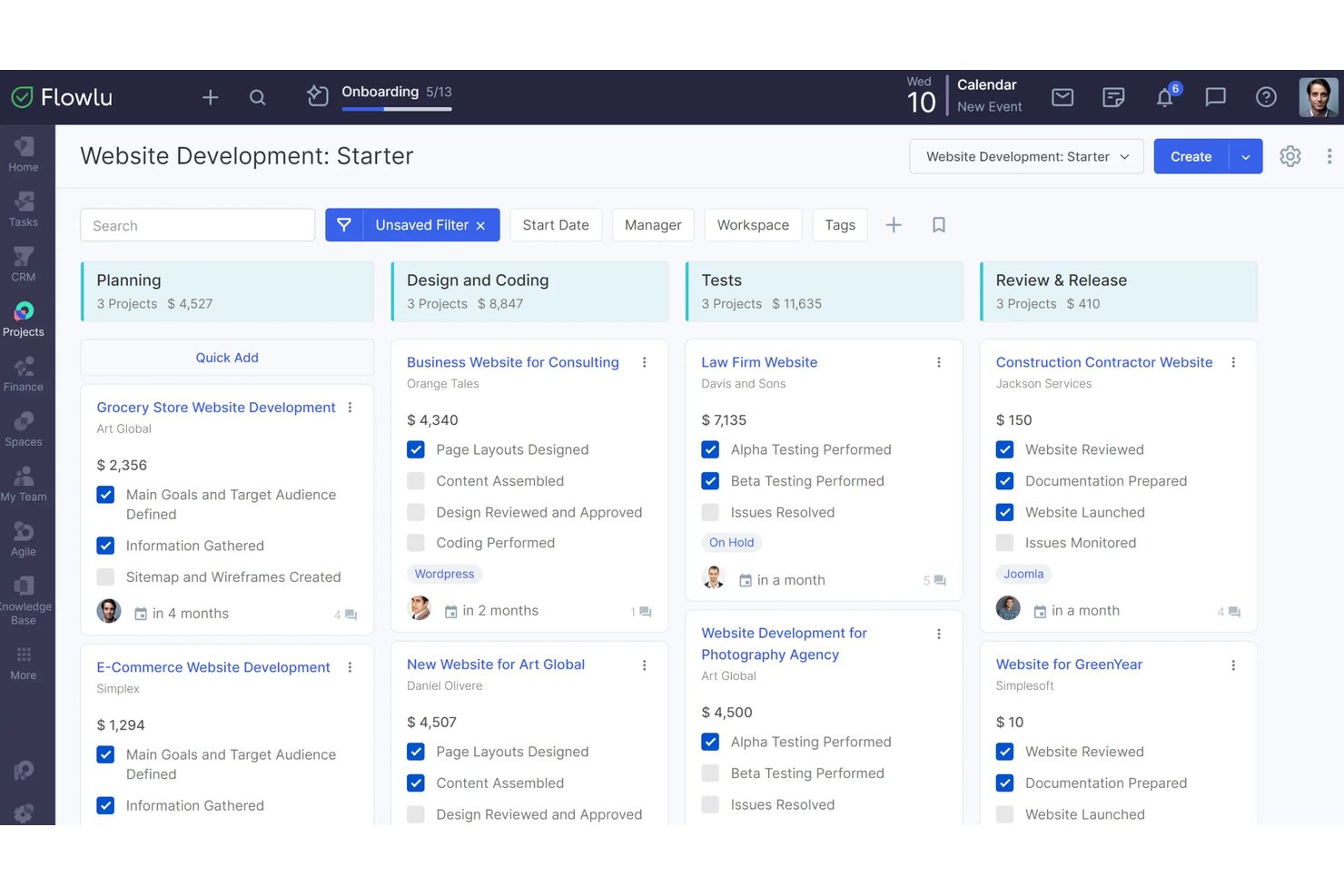
Flowlu is a project management platform for agencies and service teams that helps coordinate client projects, track team tasks, and keep delivery work connected.
Who Is Flowlu Best For?
Flowlu suits agencies and professional services teams that need to manage client projects alongside invoicing and billing.
Why I Picked Flowlu
I picked Flowlu for the “Best for all-in-one billing and client work” use case because it connects project delivery with client billing. Team members log billable hours on project timesheets, which can generate invoices, while clients can review and pay bills through a portal. That’s useful when replacing Paymo means keeping work and billing together.
Flowlu Key Features
- Kanban boards: Move tasks between workflow stages to track their status.
- Gantt charts: Map tasks, milestones, and dependencies on a project timeline.
- Workflow automation: Set rules to assign tasks, update statuses, or notify stakeholders.
- Task templates: Save reusable task setups for recurring work.
Flowlu Integrations
Flowlu lists integrations with Stripe, Square, PayPal, WayForPay, Skrill, Google Calendar, Google Drive, Slack, Jira, and GitLab. It also provides a REST API for custom integrations.
Pros and Cons
Pros:
- Reusable templates reduce recurring project setup
- Time tracking connects project delivery to billing
- Projects, CRM, and billing share one hub
Cons:
- CRM-project gaps can create duplicated work
- Custom reporting and dashboards need more flexibility

ClickUp
Best for multi-view task and time tracking
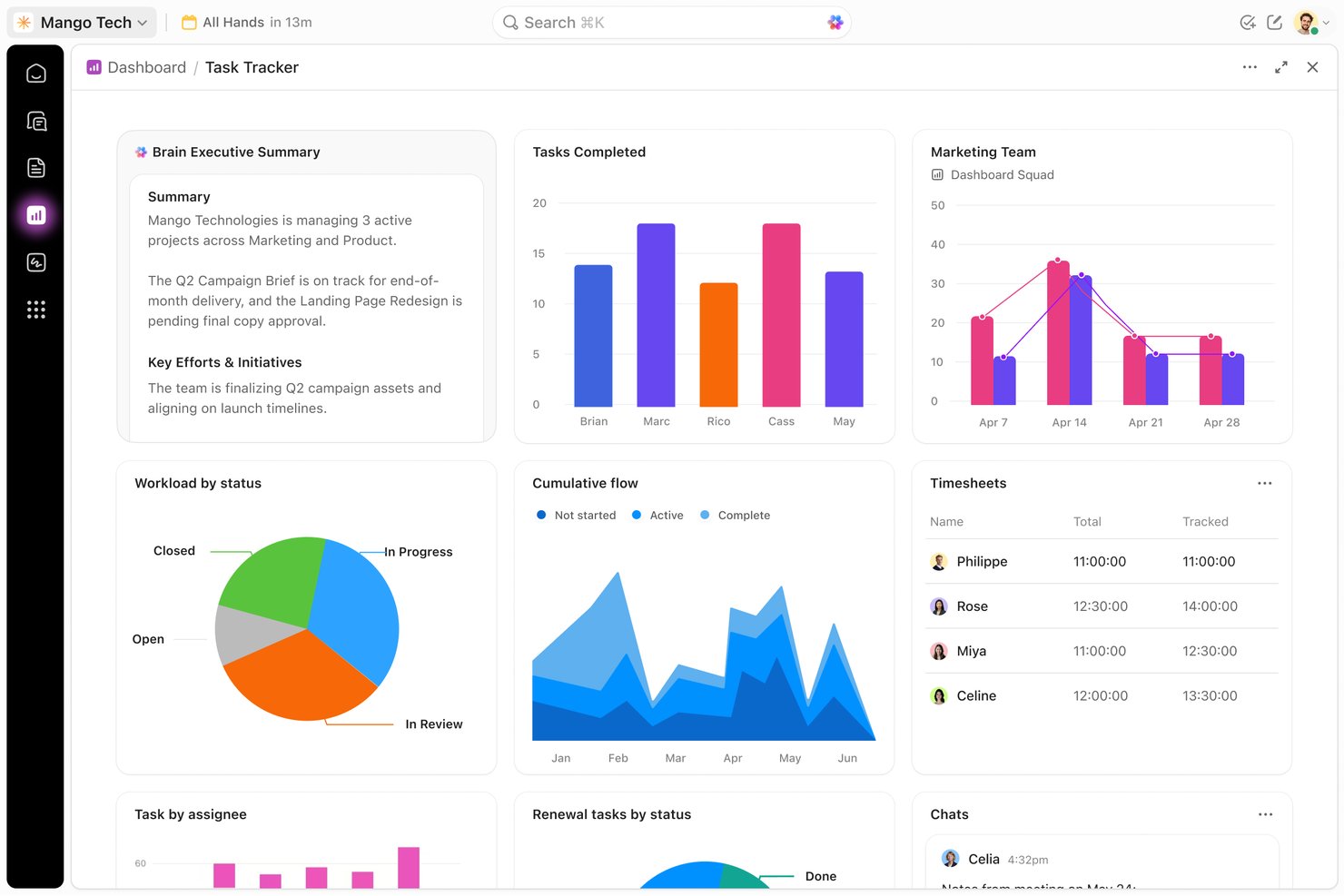
ClickUp is an all-in-one project management platform for digital teams, bringing tasks, docs, and collaboration together to help product and engineering groups coordinate changing requirements and project work.
Who Is ClickUp Best For?
ClickUp suits project managers in tech teams who need to track tasks across multiple views and connect project progress with time spent.
Why I Picked ClickUp
I picked ClickUp as a Best Paymo Alternatives option because its multi-view task and time tracking suits changing project work. I like that I can switch tasks between views such as List and Board, then track time against the work. That helps me compare task progress with the hours logged across a project.
ClickUp Key Features
- ClickUp Docs: Create project briefs, meeting notes, and requirements alongside your work.
- Custom fields: Add structured details such as priority, estimate, or owner to tasks.
- Task dependencies: Mark tasks as waiting on or blocking other tasks.
- Automations: Trigger actions when tasks meet specified conditions or change status.
ClickUp Integrations
ClickUp offers native integrations with Slack, GitHub, GitLab, Bitbucket, Google Drive, Google Calendar, Harvest, Clockify, and HubSpot. It also connects with Zapier and provides a public API for custom integrations.
Pros and Cons
Pros:
- Custom fields expose estimates and task ownership
- Log time directly against project tasks
- Switch tasks between List, Board, and Gantt
Cons:
- Large workspaces can feel slow to navigate
- Time reports offer limited detail

Best for agency billing from tracked time
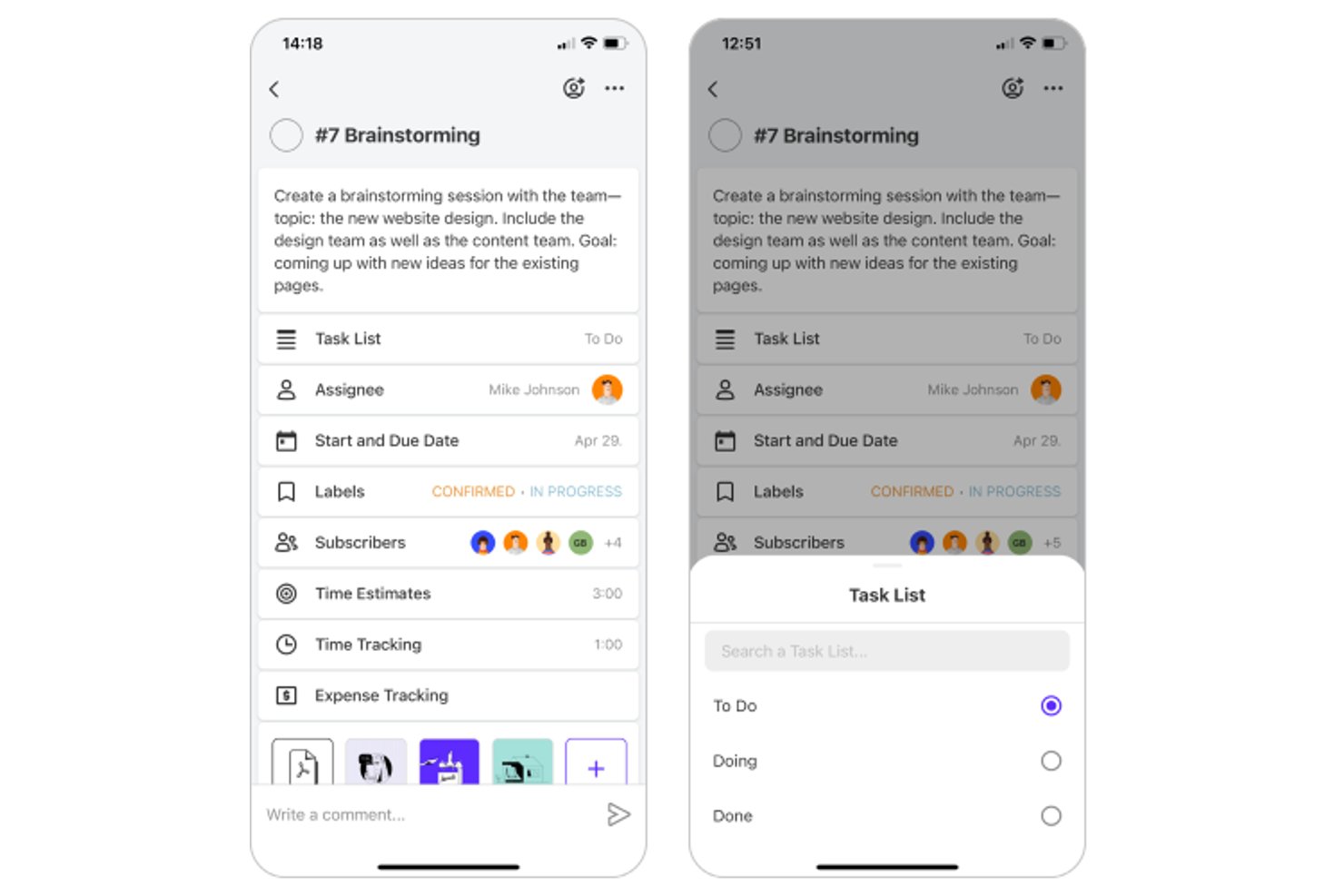
ActiveCollab gives agencies and client-service teams a shared workspace to plan projects, coordinate tasks, and keep conversations and deliverables organized across client work.
Who Is ActiveCollab Best For?
ActiveCollab suits project managers at agencies and client-service teams coordinating billable work across multiple client projects.
Why I Picked ActiveCollab
I picked ActiveCollab as a Paymo alternative for its “Best for agency billing from tracked time” fit. Its task-linked time tracking and billable rates let an agency record hours against client work and use those entries to prepare invoices.
ActiveCollab Key Features
- Project views: Switch between task lists, Kanban boards, and Gantt timelines.
- Task dependencies: Link tasks so schedule changes update dependent task dates.
- Workload view: Review team capacity, availability, and assignments across projects.
- Team chat: Discuss work in chat and turn conversations into tasks.
ActiveCollab Integrations
ActiveCollab offers direct integrations with Google Drive, Dropbox, QuickBooks, and Slack, plus calendar sync with Google Calendar, Outlook, and iCal. It also connects with Zapier and provides an API for custom integrations.
Pros and Cons
Pros:
- Workload views show team capacity across projects
- Client discussions stay attached to project work
- Tracked hours feed estimates and invoices
Cons:
- Search and task relationships frustrate reviewers
- Mobile app trails desktop capabilities
Avaza
Best for service business invoicing automation
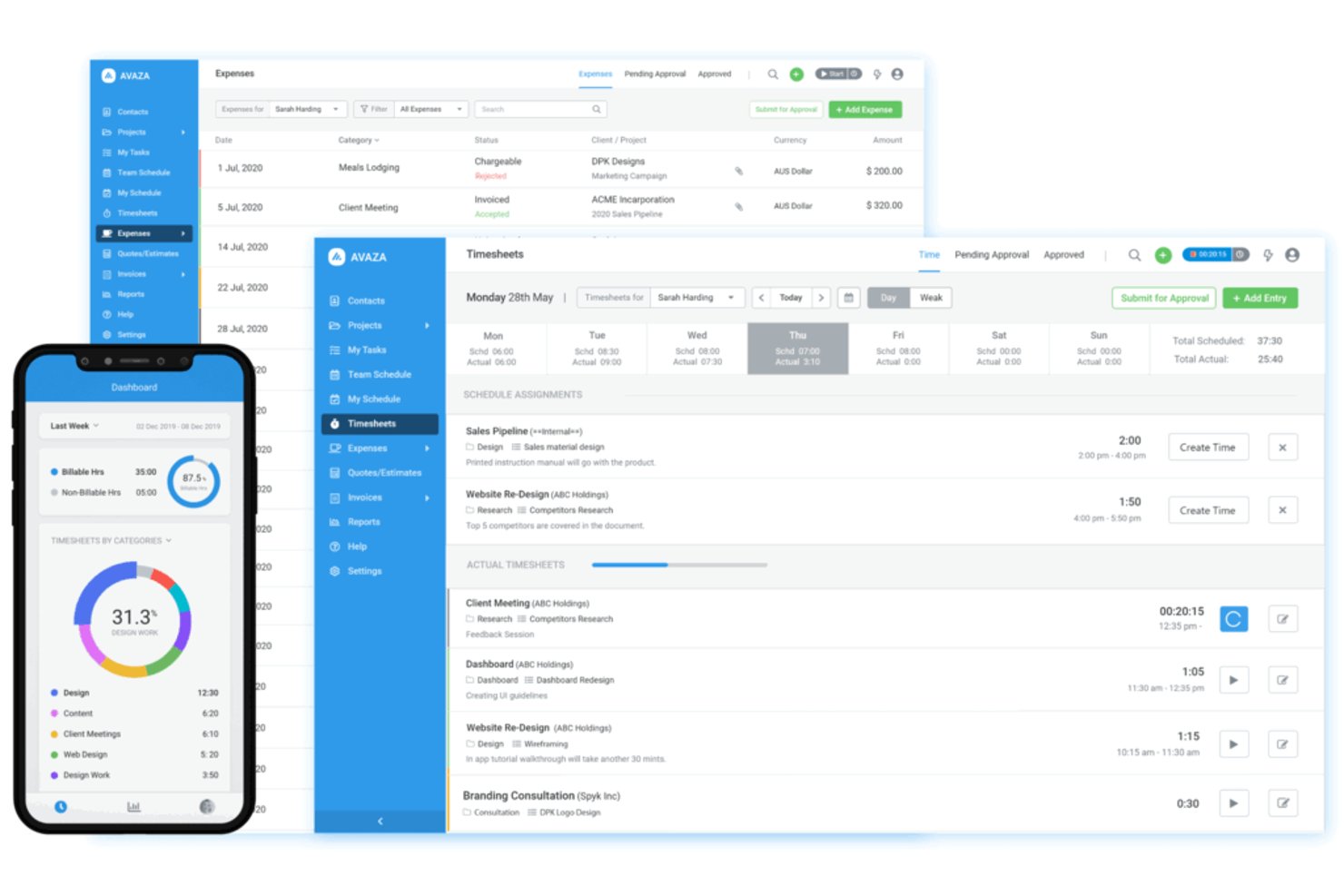
Avaza combines project planning, team collaboration, time tracking, and expense management for service businesses coordinating client work and monitoring delivery across teams.
Who Is Avaza Best For?
Avaza suits service businesses that need to coordinate client projects and turn billable team time and expenses into invoices.
Why I Picked Avaza
I picked Avaza as a Paymo alternative because it fits “Best for service business invoicing automation.” I like how teams can track billable time against projects and record expenses, then use those details to create client invoices. That connects delivery work to billing without re-entering timesheet and expense data.
Avaza Key Features
- Task views: Switch between Kanban, list, and Gantt views to manage project tasks.
- Resource scheduling: View team availability and schedule resources across projects.
- Team chat: Discuss work with teammates through Avaza’s built-in chat.
- Task files and notes: Keep related files and notes attached to individual tasks.
Avaza Integrations
Avaza documents nine native integrations: Xero, QuickBooks Online, GitHub, Google Drive, Dropbox, Stripe, PayPal, Payoneer, and Google sign-in. It also connects with Zapier and provides an API for custom integrations.
Pros and Cons
Pros:
- Recurring invoices support repeat billing
- Detailed reports help prepare client bills
- Project time and expenses feed invoicing
Cons:
- Timesheet controls and report customization are limited
- Resource scheduling can feel clunky
Best for billing clients on agency projects

For agencies and other client-service teams, Teamwork.com helps coordinate tasks, timelines, and collaboration across multiple client projects.
Who Is Teamwork.com Best For?
Teamwork.com suits agency project managers who need to connect client project delivery with billable work and client invoicing.
Why I Picked Teamwork.com
I picked Teamwork.com for billing clients on agency projects because it connects task-level time tracking with project budgets and invoicing. I like that teams can mark logged hours as billable, track budget burn, and convert tracked time into client invoices.
Teamwork.com Key Features
- Workload planner: View team capacity and assign work against availability.
- Client intake forms: Collect project requests through structured forms.
- Proofs: Gather client feedback on project deliverables.
- My calendar: View scheduled work and deadlines in a calendar.
Teamwork.com Integrations
Teamwork.com offers built-in integrations with QuickBooks Online, Xero, HubSpot, Google Drive, Microsoft OneDrive, Slack, and Microsoft Teams. It also connects with Zapier and provides an API for custom integrations.
Pros and Cons
Pros:
- Workload planner exposes team capacity across projects
- Client proofs and intake forms aid handoffs
- Billable time connects directly to project budgets
Cons:
- Reporting filters and dashboard customization feel limited
- Large projects can slow page loading


Scoro is a work management platform for consultancies and other client-service teams that connects project planning, task coordination, and time tracking to keep delivery work organized.
Who Is Scoro Best For?
Scoro suits project and finance leads at consultancies and client-service firms that need to track budgets, costs, and profitability across client accounts.
Why I Picked Scoro
I picked Scoro as a Paymo alternative because it connects project delivery with client-account finances. I like that I can set project budgets, compare them with tracked time and costs, and review profitability across client work. That helps me spot when a project is consuming more of its budget than planned.
Scoro Key Features
- Project templates: Reuse plans with preset tasks and milestones.
- Gantt charts: View project timelines and delivery progress.
- Task dependencies: Link tasks to show their required order.
- Resource planning: Compare team capacity with planned work.
Scoro Integrations
Scoro offers native integrations with Xero, QuickBooks, Sage Intacct, Salesforce, HubSpot, Jira, Slack, and Google Calendar. It also connects with Zapier and provides an API for custom integrations.
Pros and Cons
Pros:
- Capacity forecasts reveal upcoming overbooking
- Client-level dashboards expose project margins
- Project budgets connect delivery with profitability
Cons:
- Task creation can require extra steps
- Time-tracking issues appear in user reviews

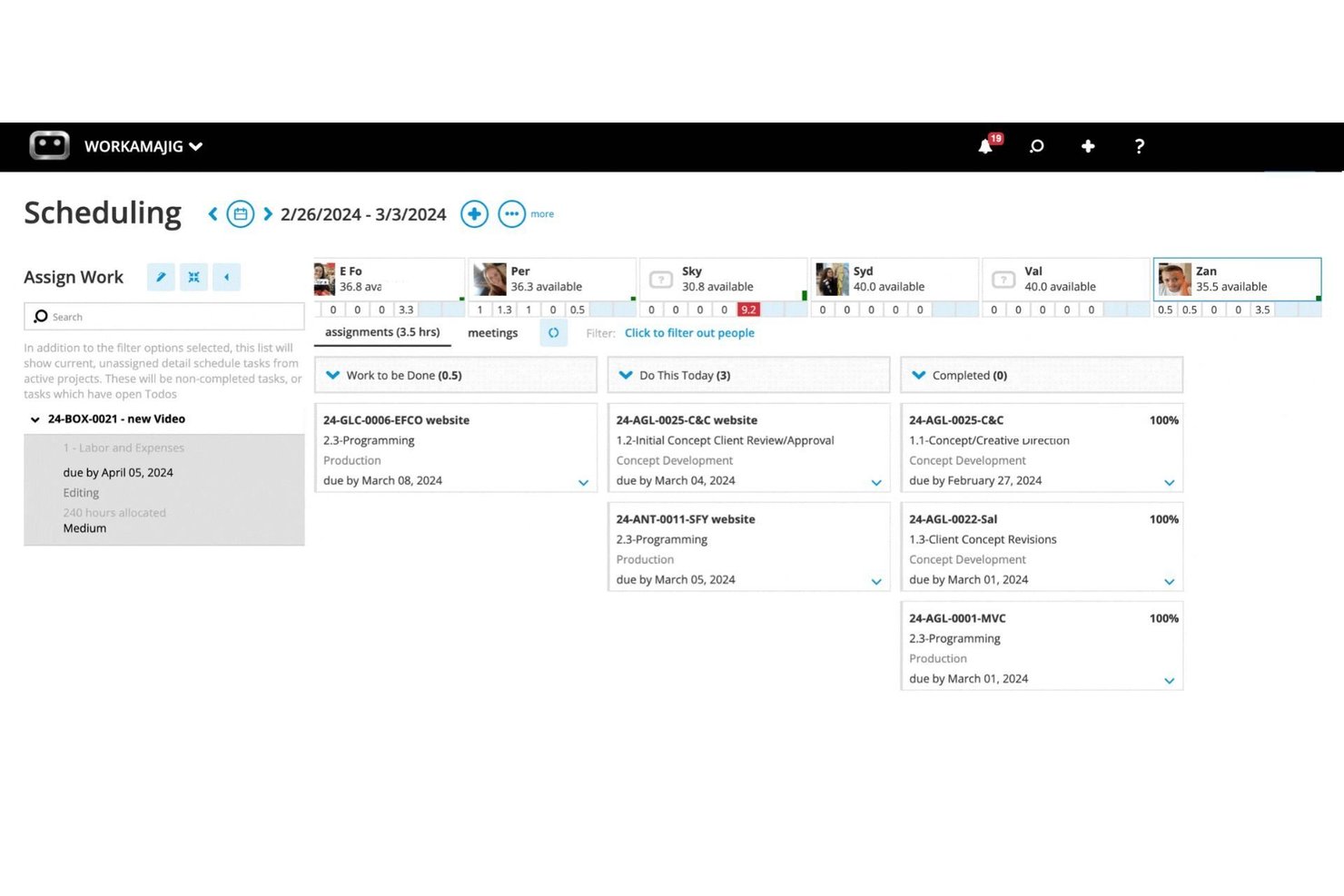
Workamajig is an agency-focused project management platform that helps creative and digital teams coordinate projects, track work across departments, and move client deliverables from brief to completion.
Who Is Workamajig Best For?
Workamajig suits creative and digital agencies that need project managers and finance teams to connect client work with billing and financial tracking.
Why I Picked Workamajig
I like Workamajig as a Paymo alternative for agency billing and financials. Its task and time tracking ties project work to estimates and billing, while client invoicing and financial reports show costs and margins. I can use those figures to spot when a client project is running over budget before the next invoice goes out.
Workamajig Key Features
- Project templates: Create reusable plans with predefined tasks, dates, and dependencies.
- Project views: Track schedules with Gantt, critical-path, or Agile Kanban views.
- Proofing and approvals: Add annotations, compare file versions, and route work for approval.
- Client portals: Give clients a dedicated space to review project files and updates.
Workamajig Integrations
Workamajig documents integrations with Google Calendar, Outlook/Exchange, Slack, Avalara, AvidXchange, Edenred Pay, Strata, Mediaocean, and Bionic, and connects with Zapier. It also offers a REST API for custom integrations.
Pros and Cons
Pros:
- Client proofing keeps approvals in project context
- Estimates and budgets support margin checks
- Project time links to agency financials
Cons:
- Bulk schedule edits feel cumbersome
- Navigation takes too many clicks

Best for agency budget and profit tracking
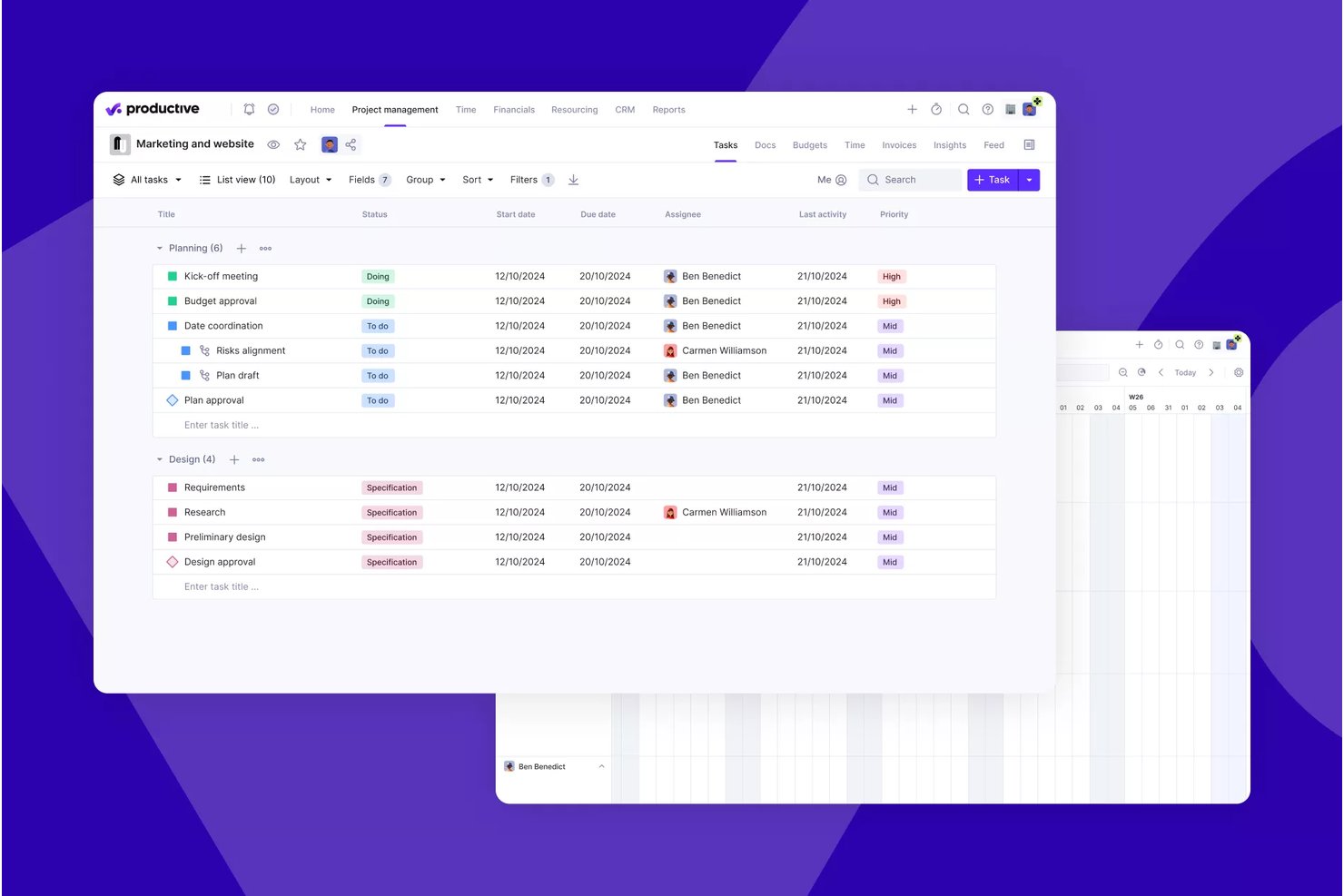
Productive is a project management and professional services automation platform for agencies that need to coordinate client work, team capacity, timelines, and financial operations in one workspace.
Who Is Productive Best For?
Productive suits agency owners and finance or operations leads who need project-level visibility into budgets, costs, and profit margins.
Why I Picked Productive
I picked Productive as a Best Paymo Alternatives option because it’s Best for agency budget and profit tracking. I like that logged time and expenses update budget spend and profit in real time, helping me spot margin changes on client projects and see what remains for invoicing.
Productive Key Features
- Gantt charts: Map project tasks on a timeline and view dependencies.
- Resource planning: Schedule team members and check their availability.
- Docs: Create and organize project documents in the workspace.
- Task dependencies: Link tasks to show what needs to happen first.
Productive Integrations
Productive offers native integrations with Jira, HubSpot, Xero, Google Calendar, Sage, Gmail, Microsoft Outlook, Slack, and QuickBooks. It also connects with Zapier and provides an open API for custom integrations.
Pros and Cons
Pros:
- Capacity planning shows booked versus available hours
- Logged hours connect directly to project budgets
- Live budget and margin visibility
Cons:
- Limited task workflow customization
- Routine actions can require several clicks
New Product Updates from Productive
Productive Adds Email and Calendar Integrations for Agents
Productive adds Gmail, Outlook, Google Calendar, and Outlook Calendar connectors for its AI agents. These integrations let agents manage emails and create calendar events directly within Productive. For more information, visit Productive’s official site.
 .

Hubstaff
Best for time tracking tied to payroll and billing
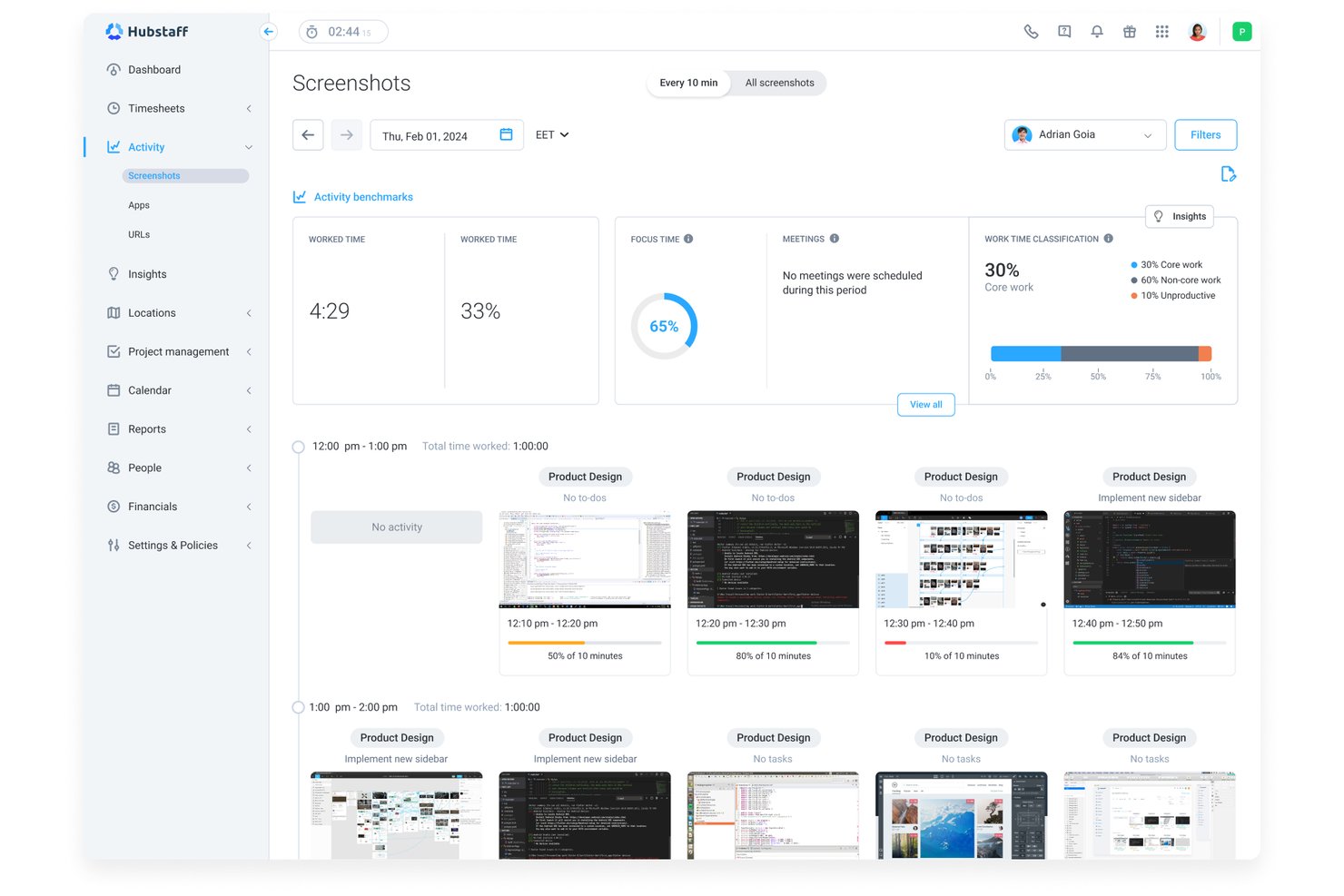
Hubstaff is a work management platform for service businesses and distributed teams that need to coordinate projects, track tasks, and see how work time is spent.
Who Is Hubstaff Best For?
Hubstaff suits service-business operations teams that need employee time records to support payroll processing and client billing.
Why I Picked Hubstaff
I picked Hubstaff as a Paymo alternative because it’s best for time tracking tied to payroll and billing. I like that tracked hours feed timesheets for payroll, while project time reports help teams calculate billable work for client invoices.
Hubstaff Key Features
- Project budgets: Set spending limits for projects and monitor costs against them.
- Team scheduling: Create shifts and manage availability, time off, and attendance.
- App and URL tracking: Record which apps and websites team members use during work.
- Integrations: Connect Hubstaff with external tools through its integration catalog.
Hubstaff Integrations
Hubstaff lists 30+ third-party integrations, including Asana, ClickUp, Jira, Slack, FreshBooks, QuickBooks Online, Gusto, Deel, and BambooHR. Hubstaff identifies BambooHR as a native integration for syncing HR data, and it also connects with Zapier.
Pros and Cons
Pros:
- Project budgets help monitor costs
- Project reports support client billing
- Timesheets connect tracked hours to payroll
Cons:
- Task management trails dedicated project tools
- Screenshot monitoring can feel intrusive

Best for Zoho ecosystem project tracking

Zoho Projects is a project management platform for teams that need to plan work, track tasks and milestones, and coordinate delivery across projects, with connected workflows for businesses already using Zoho apps.
Who Is Zoho Projects Best For?
Zoho Projects suits project managers whose teams already rely on Zoho and need a shared place to coordinate work across departments.
Why I Picked Zoho Projects
I like Zoho Projects as a Paymo alternative for teams already working in Zoho. Task lists, milestones, and Gantt charts help me map delivery plans and dependencies, while Zoho CRM connectivity links project work to customer records. It earns my pick for Best for Zoho ecosystem project tracking.
Zoho Projects Key Features
- Time tracking: Log work hours against projects and review timesheets.
- Issue tracking: Record bugs and other issues, assign owners, and track their status.
- Workflow automation: Set rules to automate actions when specified project conditions are met.
- Project dashboards: View project data through charts and summary widgets.
Zoho Projects Integrations
Zoho Projects integrates with Zoho CRM, Zoho Books, Zoho Desk, Slack, Microsoft Teams, Google Drive, GitHub, Dropbox, and Zendesk, and connects with Zapier.
Pros and Cons
Pros:
- Visual dependencies clarify schedules and handoffs
- Workflow blueprints automate repeatable project transitions
- Built-in issue tracking links bugs to projects
Cons:
- Advanced reporting offers limited customization
- Mobile apps trail desktop responsiveness and features
New Product Updates from Zoho Projects
Zoho Projects Adds CodeX Scripts for Custom Modules
Zoho Projects now supports CodeX Scripts for custom modules, enabling conditional logic and rules for creating, updating, and deleting records. For more information, visit Zoho Projects' official site.
 .
Diğer Paymo Alternatifleri
Kısa listeme aldığım bazı ek Paymo alternatifleri burada. Yukarıda aradığınızı bulamadıysanız bunlara göz atın.
- Accelo
For professional services billing and retainers
- Kantata
For enterprise resource forecasting
- Asana
For flexible project tracking
- Wrike
For complex, multi-project team workflows
- TimeCamp
For automatic time capture and billing
- Clockify
For time tracking that feeds into billing
- Everhour
For time tracking tied to client billing
- Toggl Track
For automatic time tracking across projects
- Harvest
For billing clients by the hour
- monday work management
For scaling projects without billing built in


İlgili Proje Yönetimi Yazılımı İncelemeleri
Burada aradığınızı hâlâ bulamadıysanız, test edip değerlendirdiğimiz diğer ilgili araçlara göz atın:
- Proje Yönetimi Yazılımı
- Kaynak Yönetimi Yazılımı
- İş Akışı Otomasyonu Yazılımı
- Zaman Takibi Yazılımı
- Görev Yönetimi Yazılımı
- İş Birliği Araçları
- Gantt Şeması Oluşturucu
- Verimlilik Araçları
- Proje Takibi Yazılımı
- Proje Zamanlama Yazılımı
How I Evaluate a Paymo Alternative
I split my evaluation into three parts. First, core functionality: the tool must let you manage tasks across projects and log time against specific work—these carry the most weight. Then I look for standout features like client invoicing portals or automatic time capture. Finally, I consider pricing value and onboarding quality.
Core Functionality (Table Stakes For This List)
When I'm selecting tools for my list, I score each one on a scale from 0 (does not offer the functionality) to 5 (excels in this area) for each core functionality listed below. I then convert the total into a percentage to help assess each tool's overall fit, with extra weight on any functionalities I’ve deemed essential.
- Task & Project Management (Essential): I look for tasks, subtasks, and useful project views that keep ownership, milestones, and dependencies clear across client work.
- Time Tracking (Essential): I check whether timers and manual entries tie to specific tasks, distinguish billable time, and support accurate client reporting.
- Invoicing & Billing: I assess how tracked hours, expenses, or milestones flow into customizable client invoices and payment workflows.
- Resource & Workload Management: I look for cross-project capacity views that help teams spot overloaded people and rebalance assignments.
- Budget & Financial Tracking: I check whether teams can compare project budgets with actual time and expenses, then assess costs and profitability.
- Collaboration & File Sharing: I consider whether comments, mentions, and attachments stay connected to the task or project where the team needs them.
Once I have a list of tools that meet the criteria, I consider what sets each platform apart.
Differentiating Factors (What Sets Vendors Apart)
Here's how I compare and contrast different vendors:
Standout Features
I look for a client invoicing portal that lets clients review estimates, approve scope, and pay online—cutting the email chains that slow down agency billing cycles. Automatic time tracking matters too, especially tools like Hubstaff or Toggl Track that detect app usage and suggest entries so consultants aren't reconstructing timesheets at week's end. I also evaluate multi-currency and tax support, since agencies billing across borders need native handling of local rates without manual workarounds.
Beyond Features
I check whether a tool connects to accounting platforms like QuickBooks or Xero, since duplicating invoice data manually invites billing errors on client projects. Pricing structure matters too—per-user costs can surprise a growing agency, so I compare flat-rate and tiered plans against actual team size. I also evaluate onboarding support, looking for import tools or migration guides that cut the time it takes to move active projects out of Paymo.
Neden Bir Paymo Alternatifi Aramalısınız?
Paymo alternatifine ihtiyaç duymanızın bazı yaygın nedenleri şunlardır:
- Daha gelişmiş özellikler arıyorsunuz: Özellikle gelişmiş işlevler gerektiren karmaşık görev ve projeler için Paymo'nun sunmadığı daha gelişmiş proje yönetimi araçlarına ihtiyaç duyabilirsiniz.
- Ekibinizin daha iyi entegrasyonlara ihtiyacı var: İş akışı verimliliğini ve veri senkronizasyonunu iyileştirmek için diğer temel yazılımlarla daha iyi entegrasyonlara ihtiyaç duyabilirsiniz.
- Sınırlı bir bütçeniz olabilir: Maliyetle ilgili değerlendirmeler, daha uygun fiyatlı çözümler veya fiyatlandırma yapıları sunan alternatifler aramanıza neden olabilir.
- Daha sezgisel bir kullanıcı arayüzüne ihtiyaç duyuyorsunuz: Paymo'nun arayüzünü daha az sezgisel veya kullanıcı dostu bulabilir ve daha akıcı, erişilebilir bir kullanıcı deneyimi arayabilirsiniz.
- Belirli işlevlere ihtiyaç duyuyorsunuz: Paymo'nun sunmadığı belirli özelliklere veya yeteneklere duyulan ihtiyaç, sizi özel gereksinimlerinize daha doğrudan yanıt veren diğer proje yönetimi araçlarını keşfetmeye yöneltebilir.
Paymo'nun Temel Özellikleri
Alternatif çözümlerin sunduklarını karşılaştırmanıza yardımcı olmak için Paymo'nun temel özelliklerinden bazılarını burada bulabilirsiniz:
- Görev yönetimi: Ekibinizin iş planına bağlı kalması için öncelikler ve son tarihler belirleyerek görevler oluşturmanıza, atamanıza ve düzenlemenize olanak tanır.
- Zaman takibi: Faturalandırmanın ve analizlerin doğru kalmasını sağlamak için manuel girişler veya zamanlayıcılar aracılığıyla çalışma saatlerini izlemenize yönelik araçlar sunar.
- Faturalandırma ve tahminler: Faturalandırma sürecinizi iyileştirmek ve ödemelerinizi zamanında almanıza yardımcı olmak için tahminler oluşturmanıza ve bunları faturalara dönüştürmenize olanak tanır.
- Ekip iş birliği: Ekibinizin platform içinde etkili bir şekilde iletişim kurabilmesi için görev yorumları ve dosya paylaşımı gibi özellikler sunar.
- Kaynak planlaması: Ekip uygunluğunu ve iş yükünü yönetmeniz, kaynak tahsisini en iyi düzeyde tutmanız için görsel bir planlayıcı sunar.
- Gantt şemaları: Proje zaman çizelgelerini ve bağımlılıklarını görselleştirmenize yardımcı olarak ilerlemeyi etkili bir şekilde planlamanızı ve izlemenizi sağlar.
- Dosya inceleme ve sürüm oluşturma: Tasarım dosyalarını ayrıntılı geri bildirimlerle inceleyip onaylamanıza ve doğruluk için tüm sürümleri takip etmenize olanak tanır.
- Mobil erişim: Hareket hâlindeyken projeleri yönetebilmeniz, zamanı takip edebilmeniz ve müşterilere fatura gönderebilmeniz için iOS ve Android mobil uygulamaları sunar.
- Entegrasyonlar: Hâlihazırda kullandığınız araçlarla entegre olarak çeşitli üçüncü taraf uygulamalarını iş akışınıza bağlar.
- Özelleştirilebilir panolar: En alakalı bilgileri görüntülemek ve en önemli konulara odaklanmak için çalışma alanınızı ihtiyaçlarınıza göre düzenlemenize olanak tanır.