

2026’da Planlama İçin En İyi 10 LiquidPlanner Alternatifi

En İyi LiquidPlanner Alternatifleri Kısa Listesi


Projeleri yönetmek, özellikle mevcut araçlarınız ekibinizin ihtiyaçlarıyla örtüşmediğinde bunaltıcı hale gelebilir. LiquidPlanner artık Tempo'nun bir parçası olduğuna ve Portfolio Manager olarak yeniden markalandığına göre, ihtiyaçlarınızı tam olarak karşılamadığını düşünebilirsiniz. Bu nedenle LiquidPlanner alternatiflerini araştırdım.
Daha uygun bir seçenek bulmanıza yardımcı olmak için çeşitli seçenekleri bağımsız olarak test edip inceledim. Bu makalede, yaygın proje yönetimi zorluklarını ele alan özelliklere odaklanarak en iyi LiquidPlanner alternatifleri konusunda size rehberlik edeceğim. İçgörülerim sayesinde işletmenizin ihtiyaçlarına en uygun aracı seçebileceksiniz.
LiquidPlanner Nedir?
LiquidPlanner, ekiplerin belirsizliği yönetmesine ve görevlere öncelik vermesine yardımcı olmak için tasarlanmış bir proje portföyü yönetimi yazılımıdır. Genellikle proje yöneticileri, ekip liderleri ve birden fazla projeyi ve değişen öncelikleri yönetmenin yaygın olduğu sektörlerdeki profesyoneller tarafından kullanılır. LiquidPlanner; ekibinizin değişikliklere uyum sağlama ve bilinçli kararlar alma becerisini destekleyen öngörücü zamanlama, dinamik proje yönetimi ve kaynak optimizasyonu özellikleri sunar. Genel olarak LiquidPlanner, projeleri ekibinizin hedefleri ve kaynaklarıyla uyumlu tutmanıza yardımcı olarak değer sağlar.
Neden LiquidPlanner Alternatifi Aramalısınız?
LiquidPlanner iyi bir proje portföyü yönetimi yazılımı seçeneği olsa da bazı kullanıcıların alternatif çözümler aramasının çeşitli nedenleri vardır. Şu nedenlerle bir LiquidPlanner alternatifi arıyor olabilirsiniz…
- Daha kullanıcı dostu bir arayüze ihtiyacınız vardır
- Ekibiniz daha iyi ölçeklenebilirlik gerektirir
- Daha uygun fiyatlandırma istiyorsunuz (LiquidPlanner'ın fiyatlandırması bazı ekipler için pahalı olabilir)
- Belirli sektör özelliklerine ihtiyacınız vardır
- Ekibinizin daha iyi entegrasyon seçeneklerine ihtiyacı vardır
- Geliştirilmiş müşteri desteğine ihtiyacınız vardır
Bunlardan herhangi biri sizi anlatıyorsa doğru yere geldiniz. Listemde, LiquidPlanner ile ilgili bu zorluklarla karşılaşan ve alternatif çözümler arayan ekipler için daha uygun olan çeşitli proje portföyü yönetimi yazılımı seçenekleri bulunuyor.
LiquidPlanner Alternatifleri Karşılaştırma Tablosu
En iyi LiquidPlanner alternatifleri seçimlerim için fiyatlandırma ayrıntılarını özetleyen bu karşılaştırma tablosu.
Score legend (out of 5)
- Excellent 4.5–5
- Good 4–4.4
- Average 3–3.9
- Below average 2–2.9
- Poor 1–1.9
| Tool | Starting Price | Website | |||||||
|---|---|---|---|---|---|---|---|---|---|
| Best for cross-project capacity planning | 3.3 out of 5 | 3 | 4 | 2 | 3 | 4 | 4 | Pricing upon request 30-day free trial; free demo available | Website |
| Best for Microsoft-aligned portfolio planning | 3.2 out of 5 | 3 | 4 | 2 | 2 | 4 | 4 | $10/user/month Free trial available | Website |
| Best for PMO capacity planning across portfolios | 3.2 out of 5 | 3 | 4 | 3 | 2 | 3 | 4 | Pricing upon request Free demo available | Website |
| Best for agency resource and budget planning | 3.0 out of 5 | 5 | 4 | 3 | 2 | 1 | 3 | $10/user/month 14-day free trial + demo available | Book Demo |
| Best for multi-project portfolio visibility | 3.2 out of 5 | 4 | 4 | 1 | 2 | 3 | 5 | $10/user/month 14-day free trial + free demo available | Website |
| Best for highly customizable workflows | 2.7 out of 5 | 3 | 3 | 2 | 2 | 2 | 4 | $9/user/month Free plan + 14-day trial available | Book Demo |
| Best for marketing and creative team workflows | 3.5 out of 5 | 4 | 4 | 2 | 3 | 4 | 4 | Pricing upon request Not available | Website |
| Best for cross-departmental workload visibility | 2.8 out of 5 | 4 | 3 | 1 | 3 | 2 | 4 | $10/user/month Free plan + 14-day free trial + free demo available | Book Demo |
| Best for dev team sprint planning and tracking | 2.3 out of 5 | 2 | 2 | 1 | 3 | 3 | 3 | $7.91/user/month Free plan + 14-day free trial + free demo available | Website |
| Best for project financials and billing | 3.2 out of 5 | 5 | 4 | 1 | 3 | 2 | 4 | $17/user/month 14-day free trial + free demo available | Book Demo |


Yazılım Önerilerimize Neden Güvenebilirsiniz?
Ekibimiz 2012’den beri yazılımları test ediyor ve inceliyor. Biz de proje yöneticisi olduğumuz için doğru yazılımı seçmenin ne kadar zor ve önemli olduğunu biliyoruz.
Bu rehber için araçları uygulamalı testler ve bağımsız araştırmalarla değerlendirdik ve seçim kriterlerimize göre puanladık. Ayrıca sektörün fikir önderlerinin ve alanında çalışan proje yönetimi uzmanlarının görüşlerinden de yararlanıyoruz.
İncelemelerimiz bir satış konuşması değil, editör ekibimizin kendi değerlendirmesidir.
Uzman inceleyenler:
En İyi LiquidPlanner Alternatifleri İncelemeleri
Aşağıda, kısa listeme giren en iyi LiquidPlanner alternatiflerinin ayrıntılı özetlerini bulabilirsiniz. İncelemelerim, size en uygun aracı bulmanıza yardımcı olmak için her aracın temel özelliklerine, artılarına & eksilerine, entegrasyonlarına ve ideal kullanım alanlarına ayrıntılı bir bakış sunuyor.

Best for cross-project capacity planning
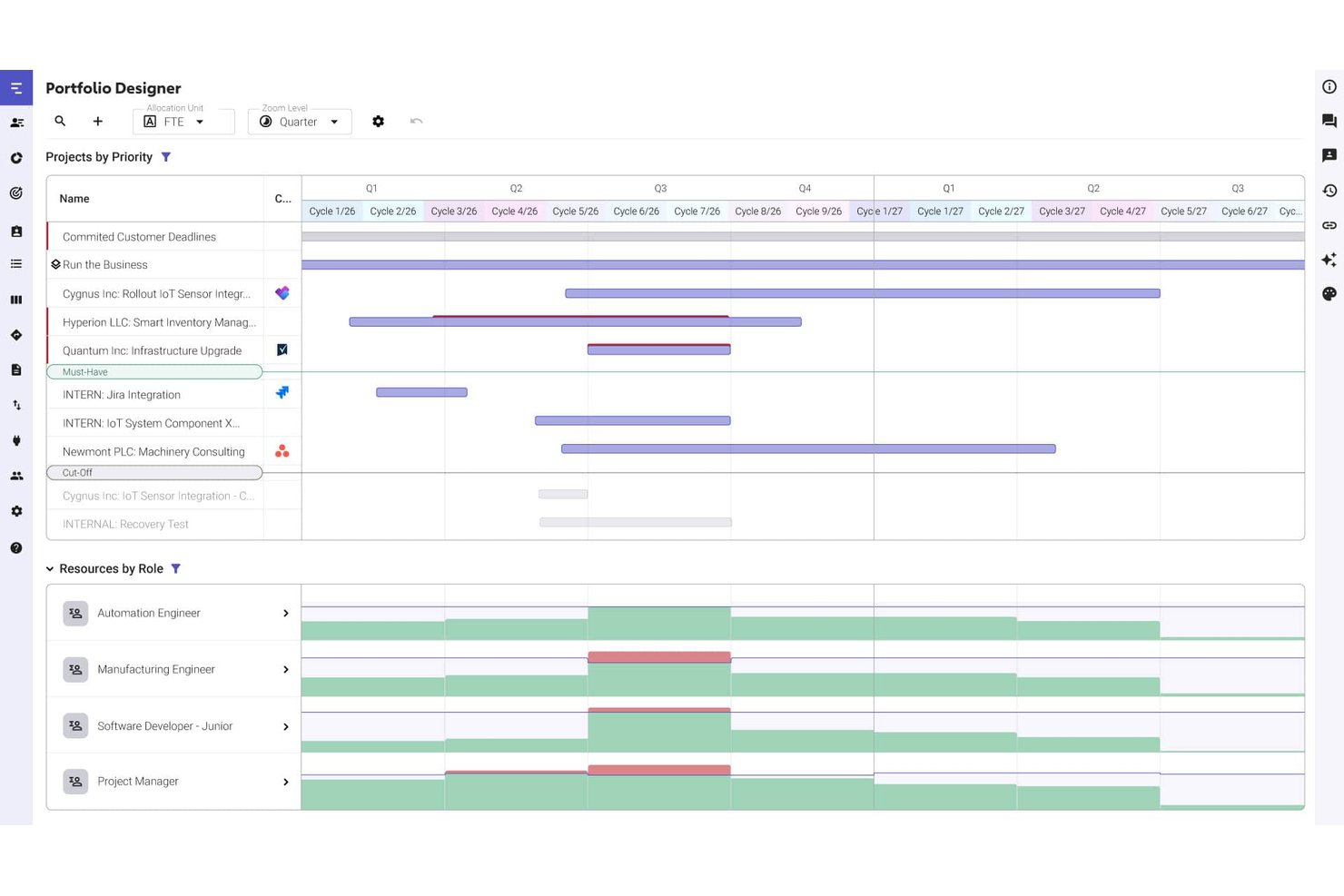
Meisterplan is a project portfolio management platform for organizations that need to prioritize initiatives, coordinate delivery across teams, and make informed project decisions with clearer visibility into workloads and dependencies.
Who Is Meisterplan Best For?
Meisterplan is a good fit for portfolio and resource managers who need to balance team capacity across multiple concurrent projects.
Why I Picked Meisterplan
I picked Meisterplan as a LiquidPlanner alternative because “Best for cross-project capacity planning” describes the gap it can fill. I can prioritize initiatives, review team workloads, and account for dependencies before committing capacity. For example, I can check whether a proposed product launch fits alongside active projects.
Meisterplan Key Features
- Portfolio dashboard: View portfolio KPIs and drill into details.
- Project intake Kanban: Manage proposed initiatives through a portfolio-level intake board.
- Strategic goal mapping: Assign initiatives to company goals in the planning process.
- Roadmap view: Present project progress, deliverables, and milestones in a shareable view.
Meisterplan Integrations
Meisterplan integrates with Jira, Asana, Microsoft Azure DevOps, ClickUp, Microsoft Planner Premium, monday.com, Smartsheet, and Wrike, and supports Microsoft Power Automate and Zapier. Its REST API is available for custom integrations.
Pros and Cons
Pros:
- See portfolio status across separate work tools
- Prioritize initiatives against strategic goals
- Compare capacity scenarios across concurrent projects
Cons:
- No task-level backlog management
- Standard reports can be hard to interpret

OnePlan
Best for Microsoft-aligned portfolio planning
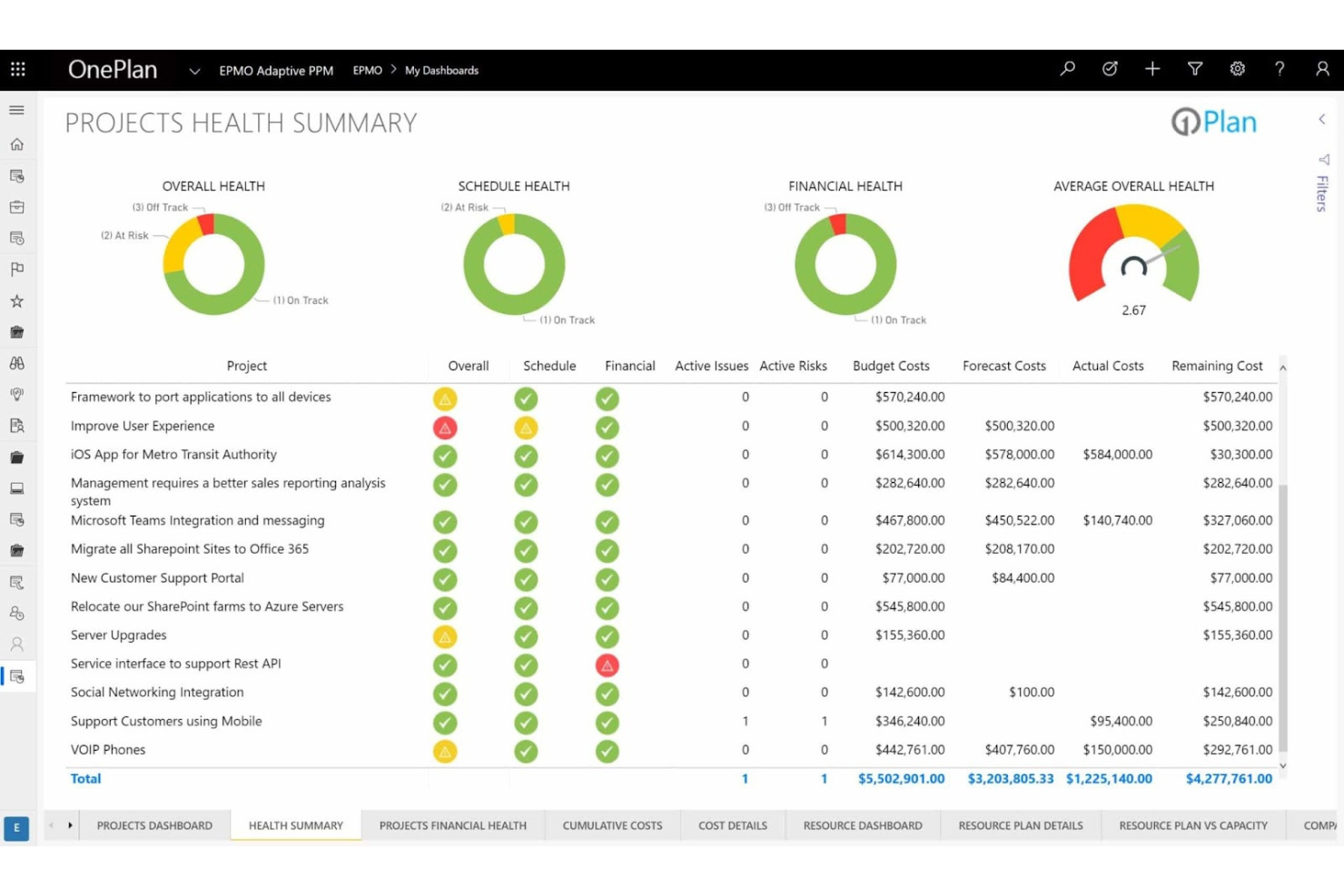
OnePlan is a project and portfolio management platform for organizations coordinating complex work, helping project leaders track priorities, resources, and dependencies across teams.
Who Is OnePlan Best For?
OnePlan suits PMO and portfolio leaders coordinating cross-functional initiatives across teams that rely on Microsoft tools.
Why I Picked OnePlan
I picked OnePlan for the “Best for Microsoft-aligned portfolio planning” use case, especially as an alternative to LiquidPlanner for PMOs managing work across Microsoft tools. I like how it links strategy objectives to portfolios and programs, then supports demand intake and project prioritization. Teams can also bring Project for the web work into portfolios and review portfolio insights in Power BI.
OnePlan Key Features
- Timesheets: Track actual hours against project work.
- Issue and risk tracking: Record and manage project issues and risks.
- Microsoft Teams collaboration: Create project sites with discussions and document management.
- Sofia AI: Ask questions and surface portfolio risks and forecasts.
OnePlan Integrations
OnePlan documents integrations across the Microsoft ecosystem, including Microsoft Teams, Microsoft Project, Microsoft Planner, Azure DevOps, Power BI, and Power Apps, as well as Jira and Asana. It supports Zapier and provides APIs for custom integrations.
Pros and Cons
Pros:
- Configurable intake supports decentralized PMOs
- Capacity heat maps clarify resource constraints
- Connects strategic objectives to delivery outcomes
Cons:
- Some views and hierarchy filters frustrate
- Configuration requires upfront process design

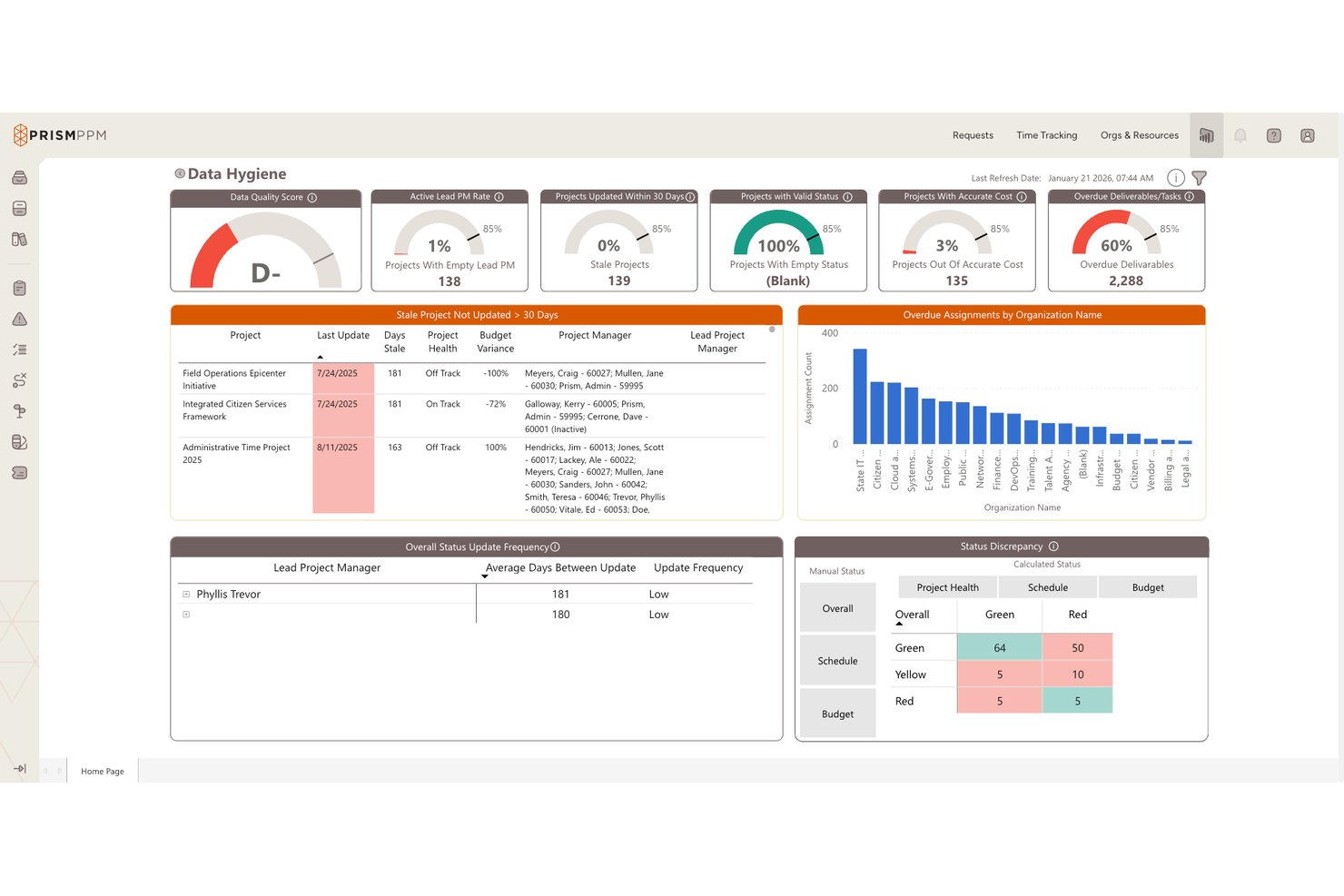
Prism PPM is a project portfolio management platform for PMOs and technology teams that need a clearer view of initiatives, priorities, and delivery progress across the organization.
Who Is Prism PPM Best For?
Prism PPM suits technology PMOs that need to assess resource demand and team capacity across multiple initiatives.
Why I Picked Prism PPM
I picked Prism PPM as a LiquidPlanner alternative for its stated fit: Best for PMO capacity planning across portfolios. Its real-time resource forecasts and What-If scenarios help me test whether shifting engineers across active initiatives would overbook teams before plans change.
Prism PPM Key Features
- Configurable work-request intake: Customize how teams submit and capture project requests.
- Project workplan templates: Use templates to structure project plans.
- Portfolio dashboards: View project and program information in portfolio-level dashboards.
- Project health reports: Review project health, risks, and opportunities.
Prism PPM Integrations
Prism PPM offers Jira integration, with availability varying by plan, plus Power BI Gateway and Databricks Connect options. APIs are also included for custom integrations.
Pros and Cons
Pros:
- Configurable prioritization helps compare competing initiatives
- What-If scenarios test resource shifts before replanning
- Portfolio views connect programs with project detail
Cons:
- Capacity planning can favor percentages over effort
- Some users want leaner project screens

Best for agency resource and budget planning
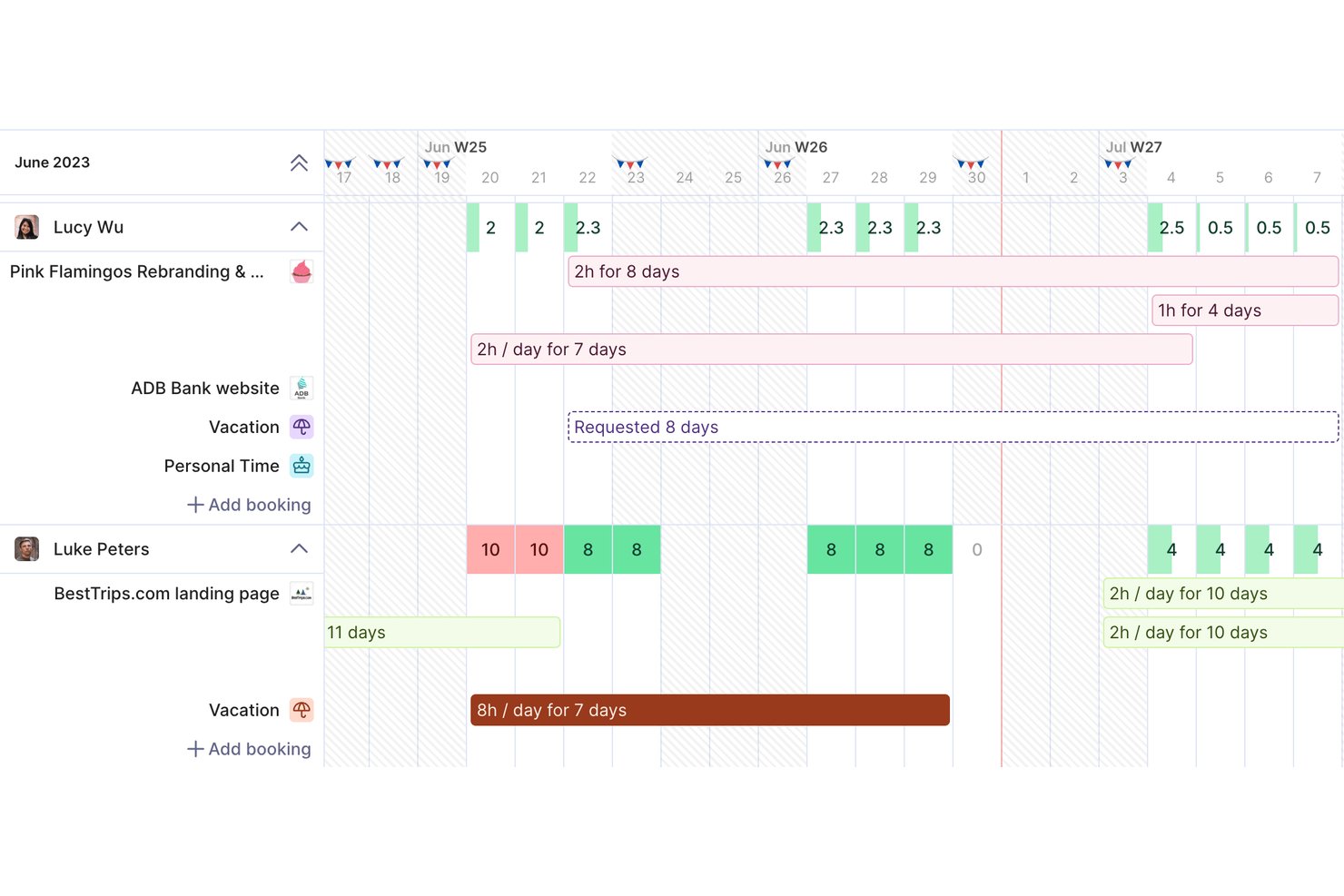
Productive is a project management and professional services platform for agencies that need to coordinate client work, team capacity, timelines, and project finances.
Who Is Productive Best For?
Productive suits project managers and operations teams at client-service agencies overseeing multiple billable engagements.
Why I Picked Productive
I picked Productive because “Best for agency resource and budget planning” describes its appeal to teams comparing LiquidPlanner alternatives. Capacity and utilization tracking help me spot staffing gaps, while logged time connects project work to budgets and profitability. I can check whether assigning a designer to a client project keeps its budget on track.
Productive Key Features
- Task views: Organize project tasks using multiple view options.
- Gantt charts: Visualize project schedules on a timeline.
- Project docs: Create and manage project documentation in Productive.
- Automations: Automate recurring workflows across project work.
Productive Integrations
Productive’s app marketplace lists integrations with Jira, HubSpot, Xero, Google Calendar, Sage, Gmail, Outlook, Slack, and QuickBooks, plus Zapier. It also provides an open API for custom integrations.
Pros and Cons
Pros:
- Projects, resourcing, and finances share one workspace
- Logged time connects project budgets to profitability
- Capacity planning exposes utilization and staffing gaps
Cons:
- Some reviewers report inaccurate resource assignments
- Reporting can feel clunky and resist customization
New Product Updates from Productive
Productive Adds Email and Calendar Integrations for Agents
Productive adds Gmail, Outlook, Google Calendar, and Outlook Calendar connectors for its AI agents. These integrations let agents manage emails and create calendar events directly within Productive. For more information, visit Productive’s official site.

Celoxis
Best for multi-project portfolio visibility
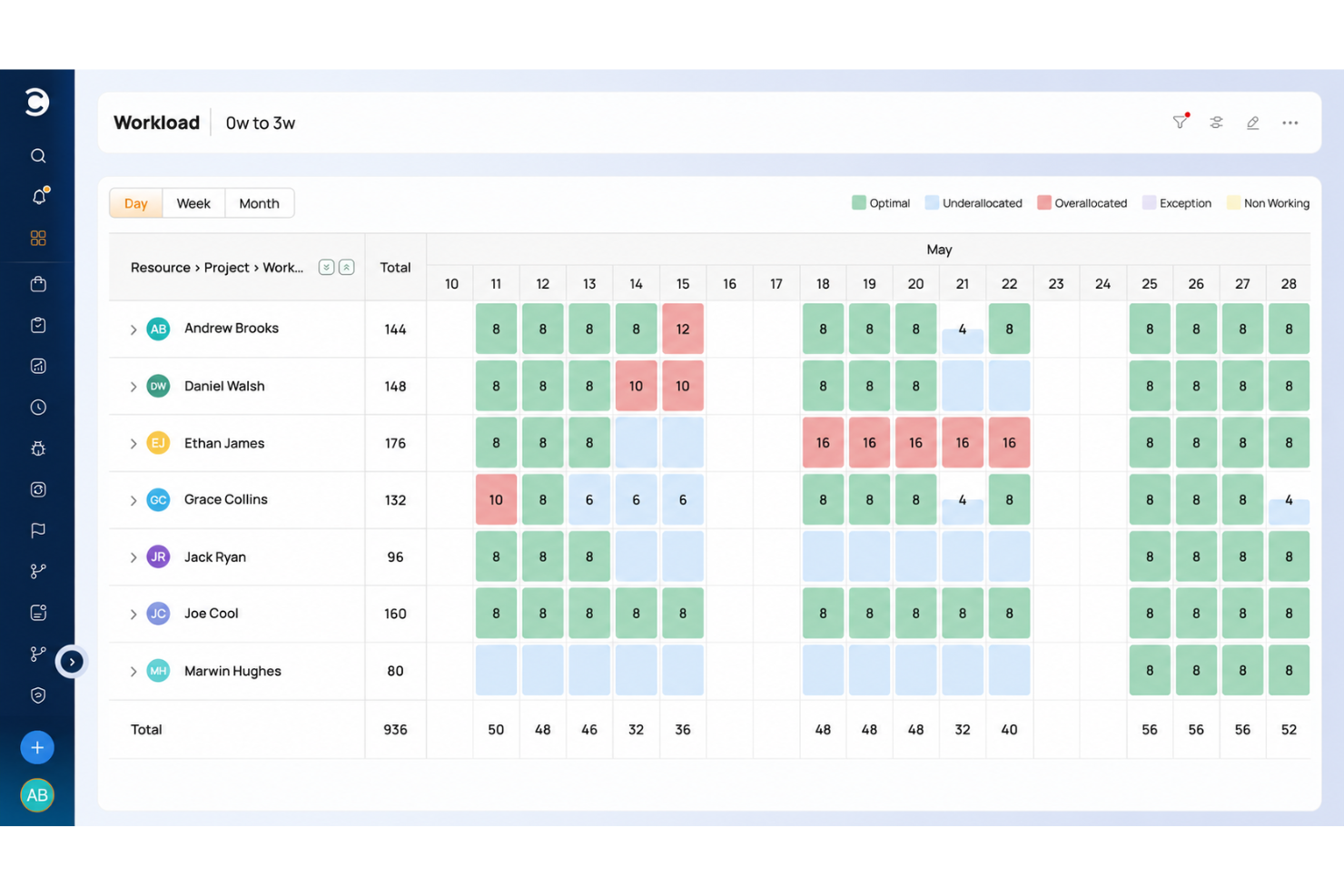
Celoxis helps project managers coordinate complex, cross-functional work by bringing schedules, workloads, budgets, and progress updates into one place, making it easier to spot delays and keep delivery on track.
Who Is Celoxis Best For?
Celoxis suits project and PMO leaders who need to track priorities, resources, and progress across multiple projects.
Why I Picked Celoxis
When I compare LiquidPlanner alternatives, Celoxis earns a place on my list for Best for multi-project portfolio visibility. Its portfolio dashboards bring project health, resource load, budgets, and risks into a shared view. I like that PMO leads can spot overloaded specialists or slipping budgets across initiatives before they disrupt delivery.
Celoxis Key Features
- Gantt scheduling: Map task dependencies, lead and lag time, and critical paths.
- Timesheets: Log time with timers or weekly sheets, then route entries for approval.
- Project intake: Collect requests through forms, email, or spreadsheets and route them for approval.
- Project discussions: Comment on projects and tasks, mention teammates, and manage version-controlled documents.
Celoxis Integrations
Celoxis offers 21 native integrations, including Microsoft Project, Microsoft Excel, Microsoft 365, Google Drive, Jira, Salesforce, QuickBooks Online, Slack, Trello, and GitHub; it also connects with Zapier. A REST API is available for custom integrations.
Pros and Cons
Pros:
- Gantt dependencies account for nonworking days
- Budget and schedule rollups clarify portfolio health
- Cross-project workload alerts expose overallocations
Cons:
- Mobile experience limits detailed project work
- Dense interface takes extra clicks

Best for highly customizable workflows
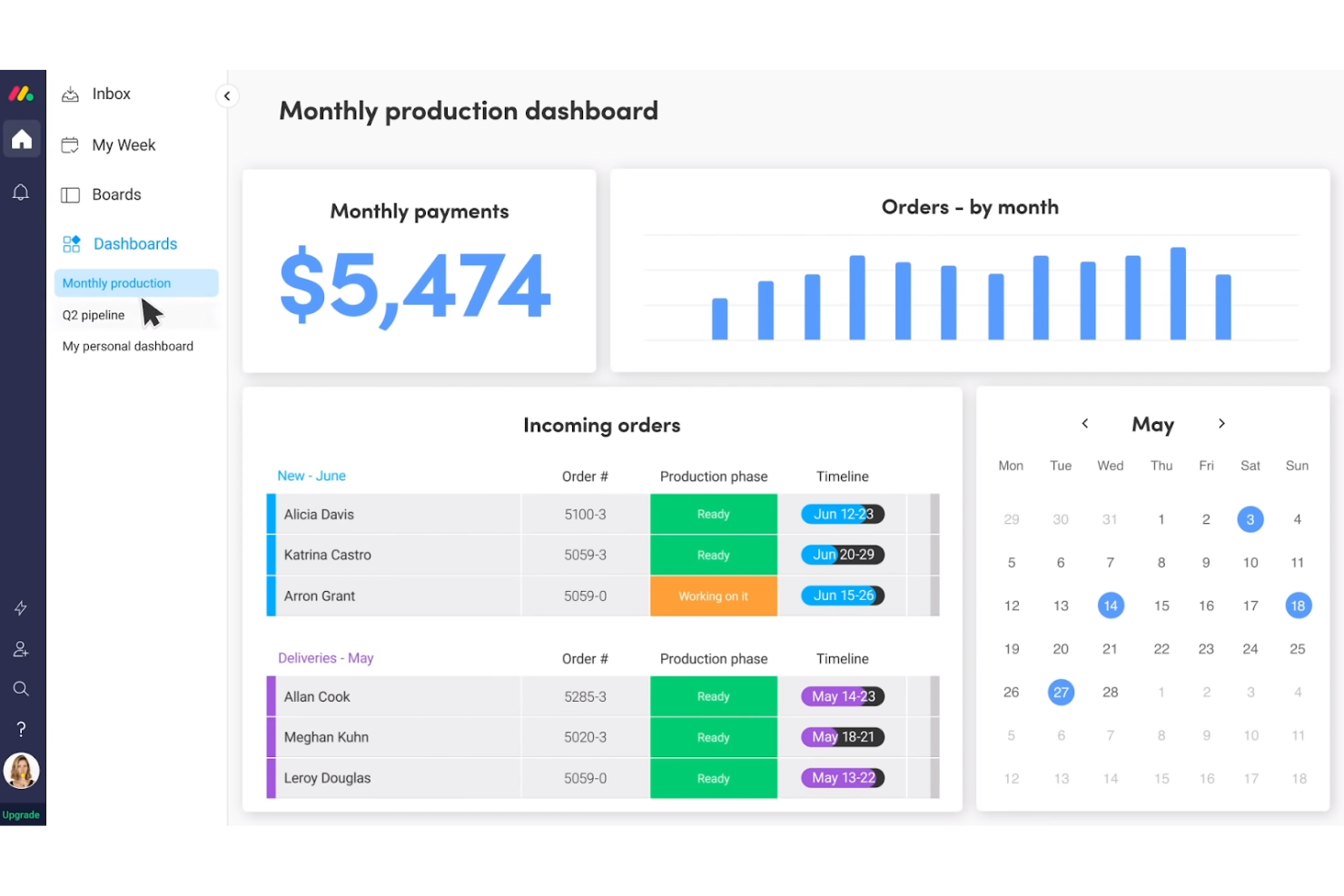
monday AI Workspace is a project management platform for product, engineering, and digital teams that need to coordinate cross-functional work, track deadlines, and adjust plans as priorities shift.
Who Is monday AI Workspace Best For?
Project managers in tech and digital teams can tailor monday AI Workspace to fit different workflows, approval paths, and delivery processes.
Why I Picked monday AI Workspace
I picked monday AI Workspace as one of the best LiquidPlanner alternatives because its USP, “Best for highly customizable workflows,” suits teams with different delivery processes. I can map product launch stages with timelines and milestones, then use customizable live dashboards to track progress across teams.
monday AI Workspace Key Features
- Workload view: See how tasks are distributed across team members.
- Task dependencies: Link tasks to show which work must happen first.
- Automations: Set rules to update task statuses or notify owners.
- Integrations: Connect boards with tools such as Slack and Google Drive.
monday.com Integrations
monday.com lists 850+ integrations and apps, including Slack, Google Calendar, Microsoft Teams, GitHub, and Salesforce. It also offers marketplace apps, connects with Zapier, and provides a GraphQL API for custom integrations.
Pros and Cons
Pros:
- Workload views expose team capacity imbalances
- Cross-board dashboards consolidate project status
- Custom boards adapt to distinct delivery workflows
Cons:
- Lacks LiquidPlanner-style predictive scheduling
- Complex boards require upfront configuration
New Product Updates from monday AI Workspace
monday AI Workspace Adds Human Approval Routing
monday AI Workspace adds a human-in-the-loop approval block to AI Workflows, sending approval requests and routing workflow paths based on responses. For more information, visit monday AI Workspace's official site.

Best for marketing and creative team workflows
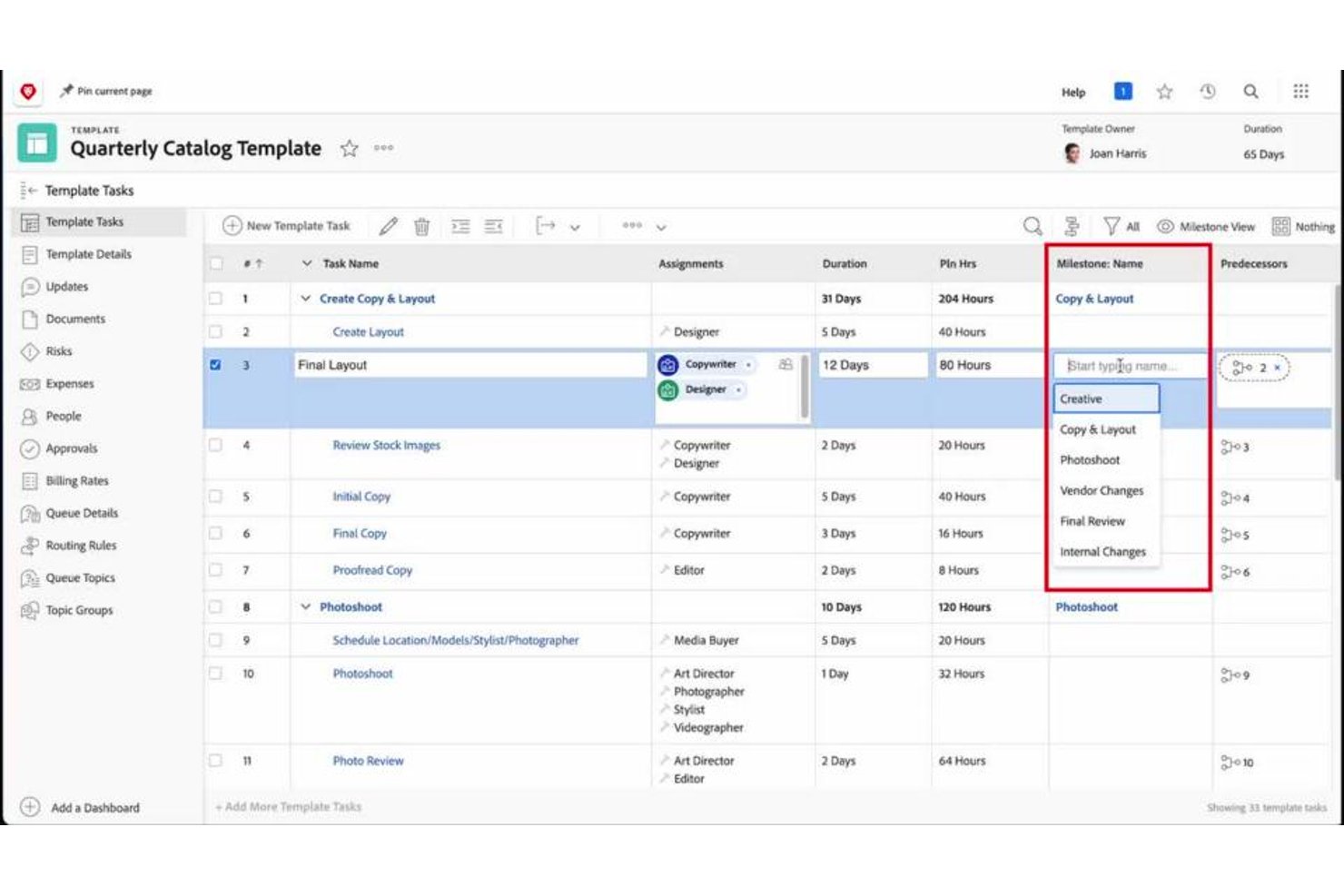
Adobe Workfront gives project managers a centralized work management platform to plan projects, coordinate tasks and approvals, and track cross-team work from intake through delivery.
Who Is Adobe Workfront Best For?
Adobe Workfront suits marketing operations and creative teams managing campaign production and content delivery across departments.
Why I Picked Adobe Workfront
I picked Adobe Workfront because it’s built for marketing and creative team workflows. I like how request queues turn campaign briefs into trackable work, while proofing and approval tools help teams review assets and resolve feedback before launch. That combination suits LiquidPlanner alternative seekers coordinating content projects across departments.
Adobe Workfront Key Features
- Task dependencies: Link tasks to show how one task’s timing affects another.
- Gantt charts: View project tasks and schedules on a timeline.
- Resource planner: Allocate resources across projects and review capacity.
- Reports and dashboards: Build views to track project status and work metrics.
Adobe Workfront Integrations
Adobe Workfront has native integrations with Adobe Creative Cloud, Adobe Experience Manager Assets, Adobe Express, Microsoft Teams, Slack, Box, Dropbox, Google Drive, OneDrive, and SharePoint. Workfront Fusion connects additional apps and services, and its public API supports custom integrations.
Pros and Cons
Pros:
- Capacity views expose cross-project resource conflicts
- Proofing keeps asset feedback tied to approvals
- Campaign intake routes briefs into trackable work
Cons:
- Mobile proofing can frustrate reviewers
- Configuration can burden smaller, simpler projects

Wrike
Best for cross-departmental workload visibility
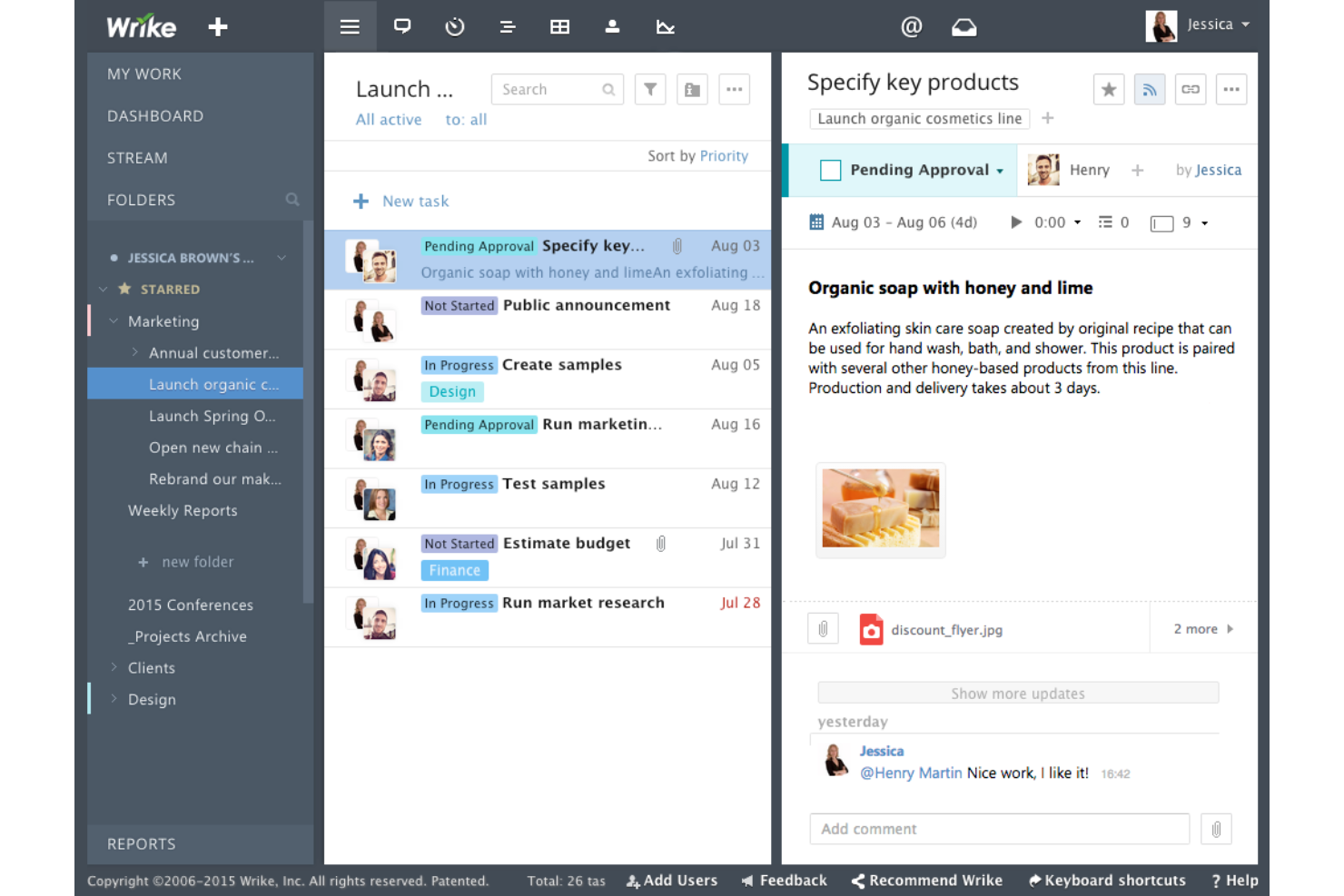
Wrike is a project management platform for product, marketing, and IT teams that need to coordinate complex work, track deadlines, and connect project plans with day-to-day tasks.
Who Is Wrike Best For?
Wrike suits project managers who need to balance workloads and track dependencies across multiple departments.
Why I Picked Wrike
I picked Wrike as Best for cross-departmental workload visibility because its workload charts show assigned effort by person or project, with red indicators flagging capacity overruns. I like that cross-tagging lets teams see the same task in multiple departmental folders, so a shared deliverable stays visible without creating duplicate work.
Wrike Key Features
- Gantt charts: Map tasks on a timeline and adjust dates and dependencies.
- Request forms: Capture project requests through customizable forms.
- Proofing: Add comments and mark up images, videos, and documents.
- Custom workflows: Define workflow stages and status labels for projects.
Wrike Integrations
Wrike has native integrations with Slack and Salesforce, while its Wrike Integrate add-on offers 400+ prebuilt connectors, including Microsoft Teams, Google, Zoom, Jira, GitHub, HubSpot, and QuickBooks. It also supports Zapier and provides an API for custom integrations.
Pros and Cons
Pros:
- Dependencies and Gantt views clarify shifting schedules
- Cross-tagging keeps shared tasks visible across departments
- Workload charts reveal capacity overruns across teams
Cons:
- Cluttered interface slows work on complex projects
- Complex setup can delay onboarding and adoption
New Product Updates from Wrike

Wrike Adds Advanced Filters to Chart View
Wrike introduces new default filters in Chart view, including relative dates, exclusion conditions, multiple filters per field, and status group filtering. These updates help teams refine project data and reporting. For more information, visit Wrike’s official site.


Jira is a project management platform for software teams that need to coordinate product and engineering work, manage dependencies, and keep delivery plans visible as requirements change.
Who Is Jira Best For?
Jira suits software development teams that plan work in sprints and need shared visibility into backlogs, blockers, and delivery progress.
Why I Picked Jira
I picked Jira as a LiquidPlanner alternative because it’s built for dev team sprint planning and tracking. Scrum boards help me organize a backlog, assign work to a sprint, and track progress as developers update issues. I use sprint reports like burndown charts to spot when scope or pace puts a release at risk.
Jira Key Features
- Custom workflows: Configure statuses and transitions to match your team’s delivery process.
- Automation rules: Set triggers and actions for routine tasks, such as assigning issues or sending notifications.
- Dashboards: Combine gadgets to display project data, filters, and charts in one view.
- Custom fields: Capture project-specific details on issues with fields tailored to your team.
Jira Integrations
Jira links work items with development tools such as Bitbucket, GitHub, and GitLab; Atlassian Marketplace offers 3,000+ integration apps, including Slack, Microsoft Teams, and Zapier. Jira also provides REST APIs and webhooks for custom integrations.
Pros and Cons
Pros:
- Epics and dependencies track engineering delivery
- Custom issue workflows clarify ownership and blockers
- Scrum boards connect backlogs to sprint reports
Cons:
- Portfolio planning can spill into spreadsheets
- Workflow and permission setup demands admin time

Scoro
Best for project financials and billing
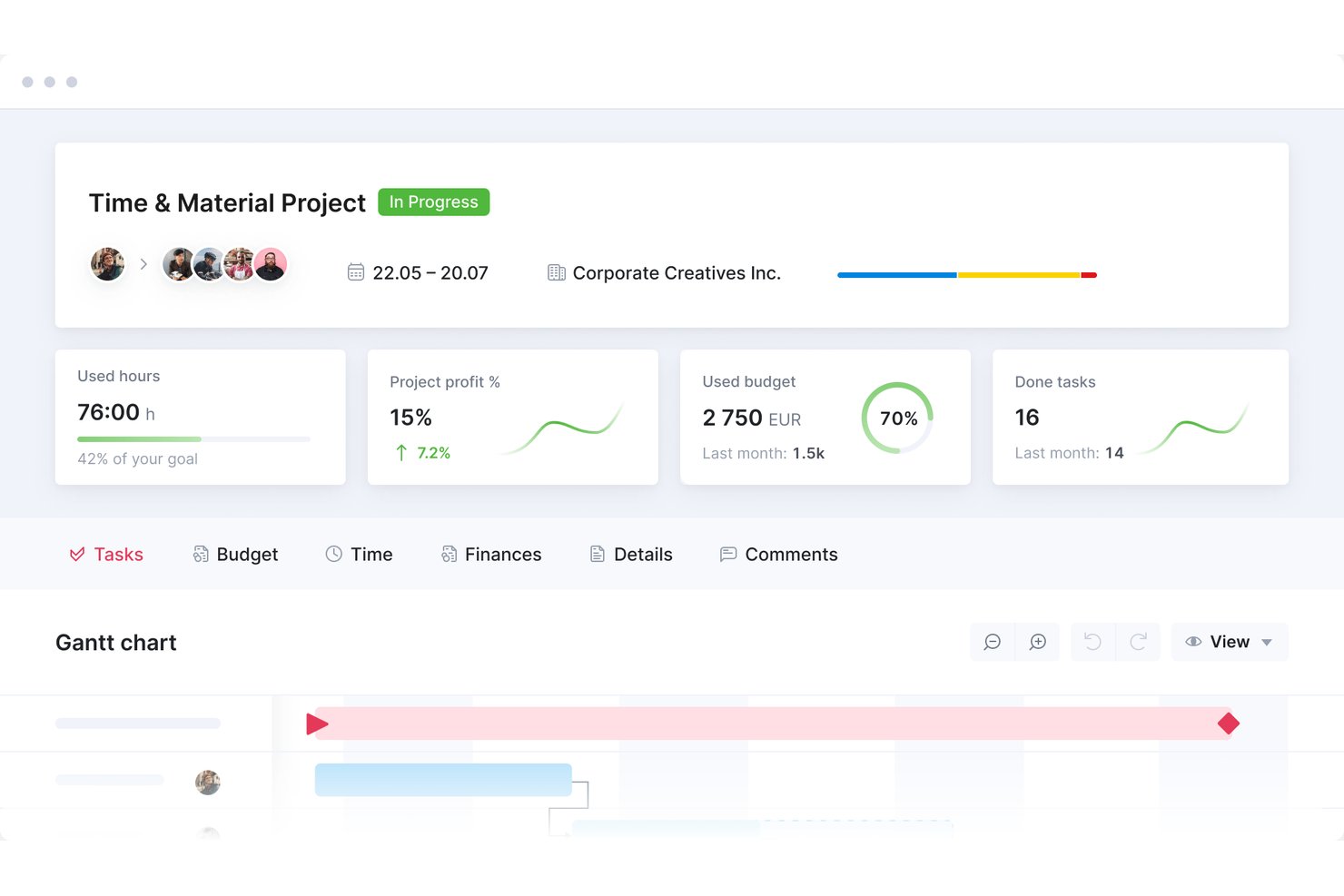
Scoro is work management software for professional services and client-facing teams, combining project planning, collaboration, time tracking, and client work to help you coordinate delivery and keep work visible.
Who Is Scoro Best For?
Scoro suits professional services teams that need to connect project delivery with budgets, time tracking, and client billing.
Why I Picked Scoro
I picked Scoro as a LiquidPlanner alternative for its Best for project financials and billing focus. I can track time, bills, and expenses against a project budget, then use tracked time and costs to create invoices for client work.
Scoro Key Features
- Gantt charts: Map project timelines, assign tasks, and link dependencies.
- Task views: Organize work in Kanban boards, task lists, or calendar view.
- Project templates: Create plans with preset phases, milestones, tasks, and timelines.
- Capacity planning: Assign work based on team availability and existing commitments.
Scoro Integrations
Scoro documents 40+ integrations, including Jira, Slack, Salesforce, Xero, QuickBooks, Sage Intacct, and Google Calendar. It also supports Zapier and provides a REST API and webhooks for custom integrations.
Pros and Cons
Pros:
- Plans team capacity alongside project timelines
- Forecasts project margin from costs and revenue
- Connects estimates, budgets, time, and invoices
Cons:
- Cluttered screens slow day-to-day navigation
- Task setup can require too many steps
New Product Updates from Scoro

Scoro Adds Time Mobile App and ELI Improvements
Scoro adds the Scoro Time mobile app for iOS/Android to track time anywhere and expands ELI with attachments, smarter filtering, and trigger-based actions. For more information, visit Scoro's official site.
Diğer LiquidPlanner Alternatifleri
İşte kısa listeme giremeyen ancak yine de göz atmaya değer bazı ek LiquidPlanner alternatifleri:
- Accelo
For service-to-billing resource tracking
- Asana
For keeping tasks organized across teams
- Zoho Projects
For switching from LiquidPlanner on a budget
- Kantata
For professional services resource planning
- Planview AdaptiveWork
For enterprise PMO portfolio visibility
- Ravetree
For mixing agile and waterfall methods
- ClickUp
For all-in-one project tracking on a budget
- Acuity PPM
For PMO portfolio visibility and governance
- Teamwork
For agency time tracking and billing
- Planisware
For PMO portfolio prioritization


How I Evaluate LiquidPlanner Alternatives
I split my evaluation into three parts. First, I check core functionality: can the tool automatically reschedule across projects as resources shift, and does it give you real workload visibility across your full portfolio? That carries the most weight. Then I look for standout features like ranged estimation modeling or automated resource leveling. Finally, I consider pricing transparency and onboarding support.
Core Functionality (Table Stakes For This List)
When I'm selecting tools for my list, I score each one on a scale from 0 (does not offer the functionality) to 5 (excels in this area) for each core functionality listed below. I then convert the total into a percentage to help assess each tool's overall fit, with extra weight on any functionalities I’ve deemed essential.
- Dynamic Scheduling (Essential): I look for schedules that recalculate across projects when dependencies, scope, or availability change, such as when a specialist becomes unavailable.
- Resource Management (Essential): I assess whether workload and capacity views help managers spot over-allocation and balance assignments across concurrent projects.
- Cross-Project Prioritization: I check whether teams can compare competing work and use ranked priorities to guide what gets scheduled first.
- Predictive Forecasting: I evaluate whether estimates show realistic completion ranges and adapt as task progress or variability changes.
- Portfolio Visibility: I look for consolidated status, timeline, and dependency views that help PMOs track multiple projects together.
- Time Tracking: I check whether task-level time logs roll up into project reports and inform planning, budgeting, or billing.
Once I have a list of tools that meet the criteria, I consider what sets each platform apart.
Differentiating Factors (What Sets Vendors Apart)
Here's how I compare and contrast different vendors:
Standout Features
I look for ranged estimation modeling—tools that accept best-case and worst-case effort inputs and roll them into probabilistic forecasts instead of single fixed dates. That matters when you're quoting delivery windows to clients across several active projects. I also evaluate scenario planning sandboxes, where you can model a priority shift or resource change and preview the downstream impact before committing. Cross-project dependency mapping is another factor I check: if a delayed milestone in one project silently pushes deadlines in another, I want to see that surfaced automatically.
Beyond Features
I check whether a vendor's pricing lets you access forecasting and portfolio views without jumping to an enterprise tier—teams outgrow plans fast when every new resource manager needs a premium seat. Migration support matters too, especially moving historical schedules and estimation data out of LiquidPlanner into a tool with different scheduling logic. I also evaluate vendor stability, looking for a clear product roadmap and active development cadence, since a stalled roadmap is often what drives the switch in the first place.
LiquidPlanner Temel Özellikleri
Alternatif çözümlerin sunduklarını karşılaştırmanıza ve kıyaslamanıza yardımcı olmak için LiquidPlanner'ın bazı temel özelliklerini burada bulabilirsiniz:
- Tahmine dayalı zamanlama: Önceliklere ve kaynaklara göre proje zaman çizelgelerini otomatik olarak tahmin ederek ekibinizin yolunda ilerlemesine yardımcı olur.
- Kaynak yönetimi: Verimliliği en üst düzeye çıkarmak ve kaynakların aşırı tahsis edilmesini önlemek için kaynakları projeler arasında verimli şekilde dağıtır.
- Görev yönetimi: Herkesin neyi ve ne zaman yapacağını bilmesini sağlamak için görevler oluşturmanıza, atamanıza ve takip etmenize olanak tanır.
- Öncelik uyumu: Öncelikleri ekibinizin hedefleriyle uyumlu hâle getirerek en önemli görevlere odaklanmanıza yardımcı olur.
- Gerçek zamanlı içgörüler: Proje durumu hakkında güncel bilgiler sunarak hızlı ve bilinçli kararlar almanıza yardımcı olur.
- Portföy yönetimi: Birden fazla projeyi tek bir görünümde denetlemenize olanak tanır ve proje portföyünüzü etkili bir şekilde yönetip önceliklendirmenize yardımcı olur.
- Zaman takibi: İş yüklerini yönetmenize ve zaman yönetimini geliştirmenize yardımcı olmak için görevlere harcanan zamanı takip eder.
- İş birliği araçları: Yerleşik yorum ve not özellikleriyle ekip iletişimini kolaylaştırır ve herkesin aynı bilgiye sahip olmasını sağlar. Görünüşe göre mesajınız kesilmiş olabilir. Lütfen daha fazla ayrıntı sağlayabilir veya size nasıl yardımcı olabileceğimi bildirebilir misiniz?