

2026 İçin Yazılım ve Uygulamalardaki En İyi 10 Proje Panosu

En İyi Gösterge Tablosu Yazılımları Listesi


Doğru araçlar olmadan proje performansını ve ilerlemesini takip etmek bunaltıcı olabilir. Proje gösterge tablosu yazılımları tam da bu noktada devreye girerek projelerinizi yakından takip etmenize yardımcı olacak merkezi ve görsel içgörüler sunar. Ancak, piyasada bu kadar çok seçenek varken doğru aracı seçmek zordur.
Bu yazıda, yüzlerce projeyi takip etme ve birçok farklı proje gösterge tablosu platformunu kullanma konusundaki kişisel deneyimlerimi paylaşıyor, ayrıca en iyi proje gösterge tablosu yazılımı seçimlerimi aktarıyorum.
Why Trust Our Software Recommendations
Our team has been testing and reviewing software since 2012. As project managers ourselves, we know how difficult—and important—it is to choose the right software.
For this guide, we evaluated tools using hands-on testing and independent research, scoring tools using our selection criteria. We also draw on insights from industry thought leaders and practicing project management experts.
Our reviews reflect our human editorial judgment, not a sales pitch.
Expert reviewers:
Proje Gösterge Tablosu Yazılım Araçları Karşılaştırma Tablosu
Aşağıdaki tabloda, en iyi proje gösterge tablosu yazılımı araçları seçimlerimin fiyatlandırma ayrıntıları karşılaştırılmaktadır.
| Tool | Starting Price | Website | |
|---|---|---|---|
| Best for client access to projects and invoices | — | $12/user/month Free plan + 14-day free trial | Website |
| Best for aligning employees, contractors, & stakeholders | 4.3 out of 5 | $10/user/month Free plan + 14-day trial + demo available | Book Demo |
| Best for agile project tracking | 4.4 out of 5 | $8.48/user/month Free plan + 7-day free trial available | Website |
| Best for enterprise-level project dashboards | 4.3 out of 5 | Pricing upon request Not available | Website |
| Best for holistic views across all business operations | 4.4 out of 5 | $9/user/month 7-day free trial | Website |
| Best resource capacity planning dashboards | 4.4 out of 5 | $9/user/month 14-day free trial available | Website |
| Best project dashboard in an enterprise asset management software | 4.4 out of 5 | Pricing upon request Free demo available | Website |
| Best for goal setting & tracking via dashboards | 4.5 out of 5 | Pricing per request 14 days free trial | Website |
| Best for pre-set reports & dashboard templates | 4.2 out of 5 | $15/user/month 30-day free trial + demo available | Website |
| Best for startups & small teams | 4.4 out of 5 | $3/user/month Free plan available; 14-day free trial | Website |
En İyi Proje Gösterge Tablosu Yazılımlarına Genel Bakış
Bu listede yer alan gösterge tablosu araçlarının her birinin kısa açıklamasını burada bulabilirsiniz.

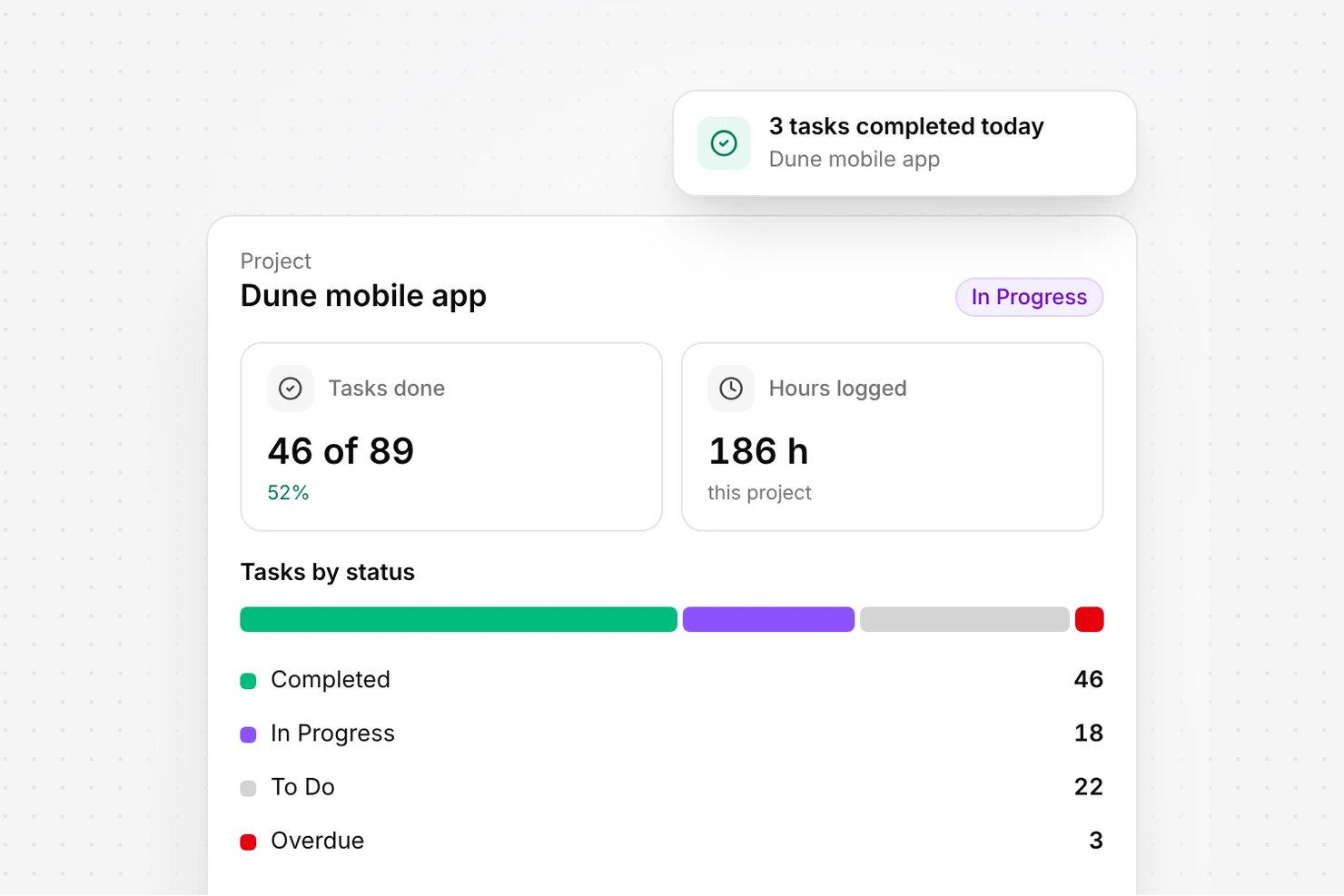
Olqan is an all-in-one business operating system that combines project management, client portal access, invoicing, sales, HR, and finance into a single platform.
Who Is Olqan Best For?
Olqan suits small business owners, freelancers, and founders who need to manage client projects and invoices from a single platform without juggling multiple tools.
Why I Picked Olqan
I picked Olqan as one of the best because of how cleanly it handles client access to live project and invoice data from a single portal. The Client Portal lets clients view project progress, milestones, files, and invoices without needing a separate tool or manual status updates. I also like that the Advanced Dashboard's Project tab surfaces overdue projects and pending milestones at a glance, so nothing slips through before a client notices it first.
Olqan Key Features
- Task report filtering: Filter the Task Report by status, date, or project to zero in on specific work across your client engagements.
- Burndown charts: Track team velocity and sprint progress visually to keep delivery on schedule.
- Role-based permissions: Assign module-level permissions—View, Add, Update, or Delete—to custom or default roles across your team.
- Google Calendar sync: Sync leads, tasks, and events between Olqan and Google Calendar to keep schedules aligned in one place.
Olqan Integrations
Olqan offers documented integrations with QuickBooks, Stripe, PayPal, Square, Slack, WhatsApp, Google Calendar, Google Drive and Google Meet, and supports webhooks. Google Calendar syncs leads, tasks, and events; QuickBooks syncs financial data, while Slack sends Olqan notifications to team channels.
Pros and Cons
Pros:
- Reviewers value dashboard tools in one workspace
- Client portal exposes project milestones and invoices
- Dashboard flags overdue projects and pending milestones
Cons:
- Portfolio views offer limited cross-project drill-down
- Dashboard widgets lack documented arrangement controls

Wrike
Best for aligning employees, contractors, & stakeholders
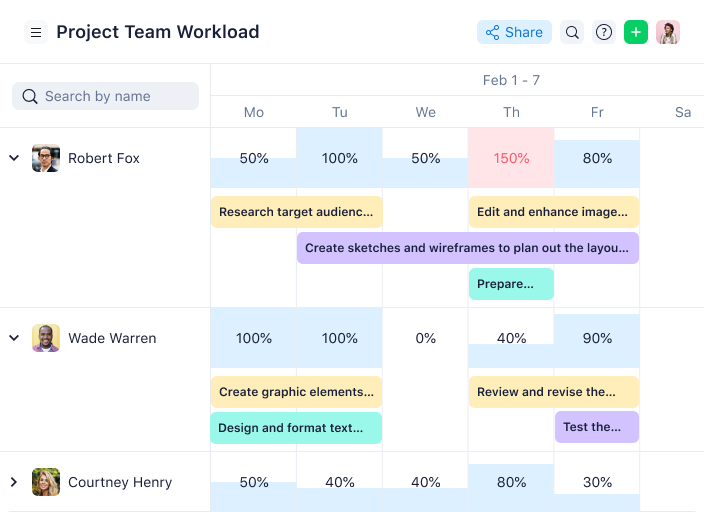
Wrike is an award-winning, easy-to-use project dashboard software trusted by 20,000+ organizations worldwide. The tool is suitable for teams with anywhere from five members to an unlimited number of team members. It’s highly configurable and allows users to customize workflows, dashboards, reports, request forms, and more.
Why I Picked Wrike: Wrike’s simple project dashboard software enables users to switch between Kanban boards, interactive drag-and-drop Gantt charts, and traditional workload views, allowing users to tailor their views and dashboards to their needs. Wrike also features task lists, shared workflows, file sharing, and project health analysis tools such as flagging roadblocks.
Wrike has an easy-to-use, intuitive interface and navigation with distinct spaces, folders, and tasks. Users can toggle between the home screen and timesheets, dashboards, calendars, reports, and an activity stream. Wrike has a dedicated help center with interactive training, videos, a ‘Getting Started’ guide, and a thriving community.
Wrike Standout Features & Integrations
Features include project management, task scheduling/tracking, resource management, expense tracking, API, budgeting, Gantt charts, marketing automations, collaboration support, and reporting.
Integrations include 400+ pre-built native integrations, including integrations with the most popular file management software from Microsoft, Google, and Dropbox, along with sales and marketing software from Salesforce and Marketo.
Pros and Cons
Pros:
- View projects and tasks in different views (list, table, Kanban, Gantt)
- User-friendly and intuitive for all skill levels
- Users have access to a variety of fully customizable dashboards
Cons:
- Time tracking is included in Business and Enterprise plans only
- Only 2GB of storage space with the freemium plan
- Shareable dashboards are limited to paid plans
New Product Updates from Wrike

Wrike Redesigns Workspace Search With New Filters
Wrike introduces a redesigned Workspace Search interface with recent search shortcuts, item type and location filters, and parent-task context. These updates help users find relevant work items and navigate search results efficiently. For more information, visit Wrike’s official site.
 .

Jira
Best for agile project tracking
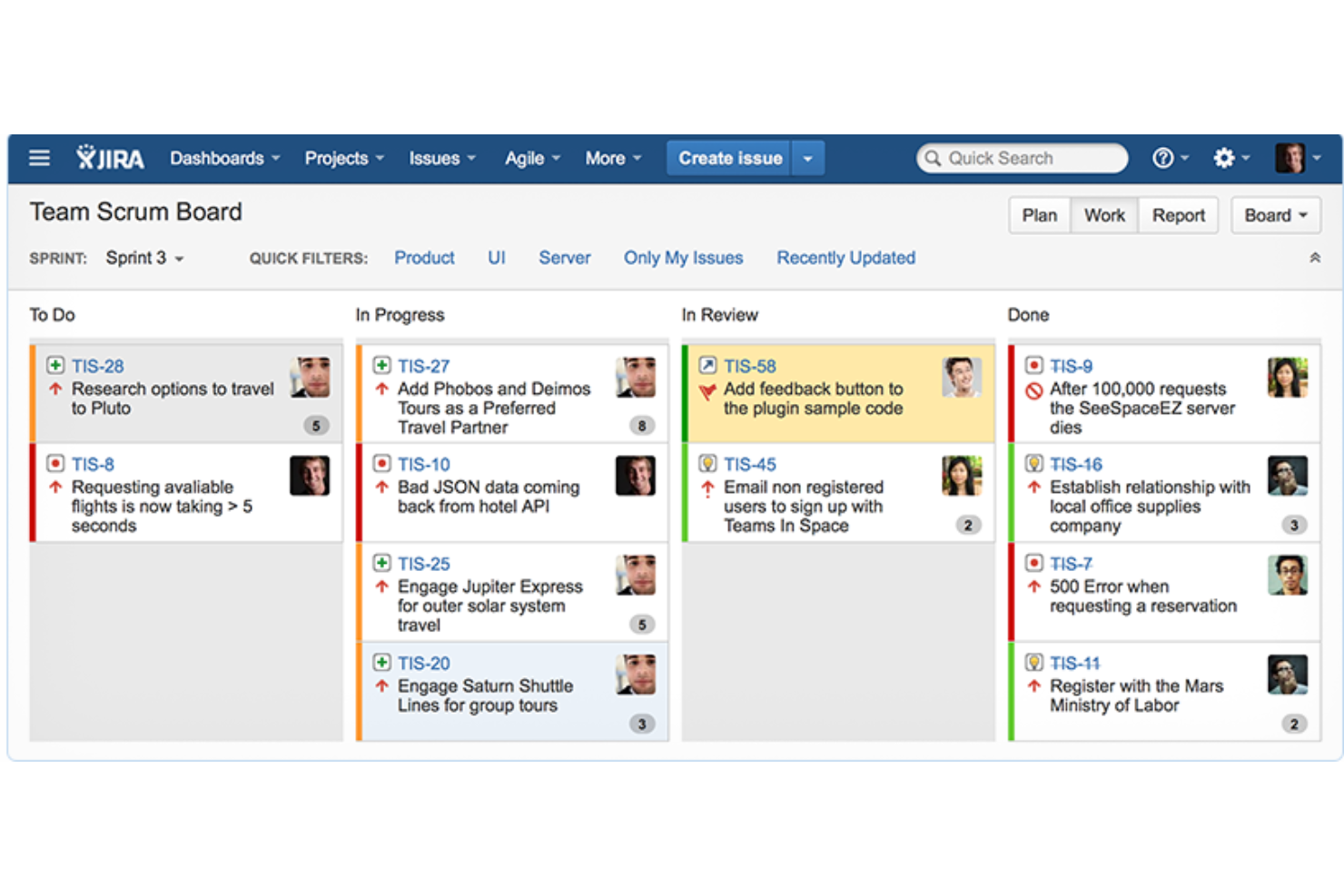
Jira Software is a project and issue tracking tool developed by Atlassian, aimed at assisting agile teams in managing their work. The tool is designed to facilitate visibility and collaboration by breaking down complex tasks into smaller, manageable units. The software also supports various work methodologies, including Scrum and Kanban, and offers templates for bug tracking and DevOps, among others.
Why I picked Jira Software: Jira Software serves as a project dashboard software that provides teams with customizable dashboards to display a variety of project metrics and real-time information. These dashboards and reports are designed to offer insights into team performance, project progress, and workload management, making it a comprehensive tool for project management and team collaboration.
The software also includes features such as search and filter options, customizable layouts, and the ability to create and manage multiple dashboards tailored to different project needs. With Jira Software, users can monitor their work, collaborate in real-time, and access project data with ease.
Jira Software Standout Features & Integrations
Features include planning and tracking tools, release management capabilities, automated processes, a mobile applications, and features to ensure data security and compliance with industry standards.
Integrations include Opsgenie, GitHub, Slack, Zendesk, Invision, Figma, Trello, Microsoft Teams, Confluence, and Bitbucket.
Pros and Cons
Pros:
- Includes customizable workflow management functionality
- Scalable for large teams and complex projects
- Provides strong support for agile methodologies
Cons:
- Steep learning curve for new users
- Slow load times can affect productivity

Best for enterprise-level project dashboards

Adobe Workfront is a cloud-based work management platform that helps teams plan, track, and manage their projects in one place. It’s designed to support enterprise-level coordination across departments, making it easier to align work with business goals.
Why I Picked Adobe Workfront: You can build dashboards using visual tools that let you add reports like timesheets, open issues, or billing data to a customizable canvas. These dashboards can be shared with stakeholders to provide visibility into ongoing work. You can also build custom reports from scratch, using widgets and filters to display the exact data you need.
I also like Workfront’s Data Connect feature, which allows you to export project performance data into data lakes and business intelligence systems. This means you can analyze enterprise-level data or export it to your own data warehouses for analysis.
Adobe Workfront Standout Features & Integrations
Features include automated workflow management that helps reduce manual tasks by using customizable templates and integrated applications. Workfront also offers online proofing tools that allow stakeholders, creative teams, and project managers to review and approve work in one place.
Integrations include Frame.io, Creative Cloud, Box, Dropbox, Google Workspace, Jira, Microsoft Calendars (Office 365/Outlook Live), Microsoft OneDrive, Microsoft Outlook, Microsoft Teams, and Salesforce.
Pros and Cons
Pros:
- Supports various project methodologies
- Integration with BI tools like Tableau and Power BI
- Customizable dashboards and reports
Cons:
- No AI forecasting or predictive analytics
- Integration setup can be time-consuming
Best for holistic views across all business operations

Bonsai is a versatile business management platform designed to meet the needs of professional service providers, consultancies, and agencies. It offers a comprehensive suite of tools for managing projects, clients, and finances in one cohesive system. The platform is particularly effective for those seeking a unified solution that provides a holistic view of all business activities.
Why I Picked Bonsai: I picked Bonsai for its ability to provide an integrated and comprehensive overview of business operations. The platform’s dashboards are designed to offer real-time insights into various aspects of a business, including project progress, financial health, and client interactions. This holistic view ensures that users can monitor all critical metrics from a single interface.
Bonsai Standout Features & Integrations
Features include client portals, project timelines, performance analytics, task management, contract templates, proposal templates, automated invoicing, expense tracking, financial reporting, time tracking, e-signatures, custom workflows, document storage, calendar integration, milestone tracking, and team collaboration tools.
Integrations include Mailchimp, HubSpot, Salesforce, Zoom, Google Calendar, Slack, Asana, Trello, Dropbox, QuickBooks, Xero, PayPal, Stripe, Zapier, Google Drive, OneDrive, Box, Evernote, and Notion.
Pros and Cons
Pros:
- Robust reports on different business operations
- Allows for personalized templates and documents
- Good client management features with the client portal
Cons:
- Mobile app could be improved
- Capacity and resource planning limited to higher-tier plans

Birdview
Best resource capacity planning dashboards
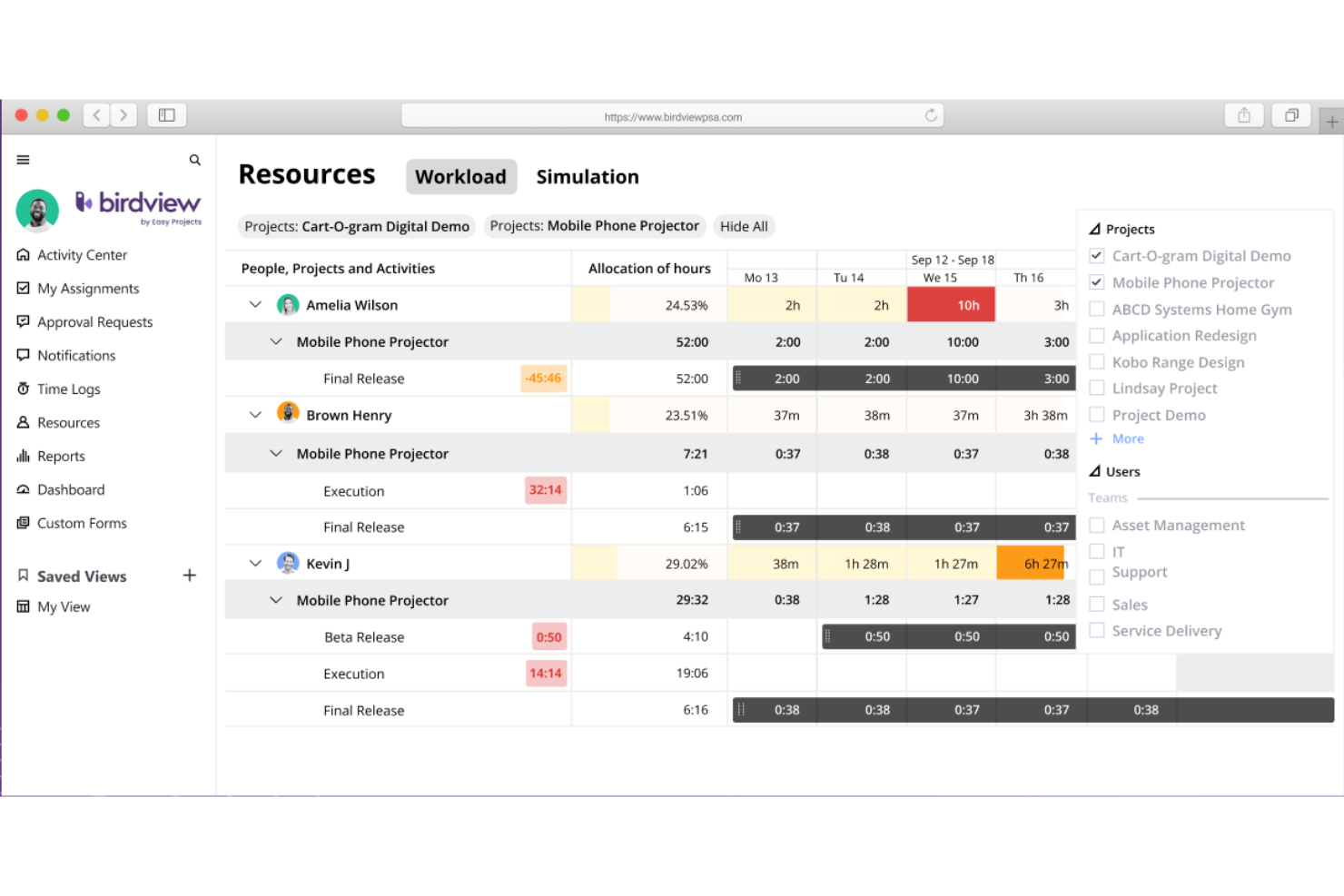
Birdview PSA is a project dashboard software with resource management, project management, financial management, project portfolio planning, time tracking, and collaboration tools. They offer hundreds of integrations, meaning you can pull data from third-party apps and visualize it in Birdview PSA dashboards. They have hundreds of dashboard and report templates, so you don't have to start from scratch.
Why I Picked Birdview PSA: Birdview PSA excels in project dashboards with a strong emphasis on resource management due to its ability to provide a holistic view of resource allocation, availability, and utilization. The platform offers customizable dashboards that allow project managers to track and analyze resource data in real-time, facilitating informed decision-making. With intuitive visualizations and robust reporting capabilities, Birdview PSA empowers stakeholders to easily identify resource bottlenecks, optimize resource allocation, and make data-driven decisions to ensure efficient project execution.
Birdview PSA Standout Features & Integrations
Features include 250+ ready-to-use dashboards and reports for business intelligence, including templates for executive summaries, project scorecards, demand projections, and expected vs actual budgets. I mentioned their resource planning tools above but one particular feature I wanted to highlight is their resource loading simulation tool. You can set up trial projects with available resources and track whether your estimates are accurate before committing to your plan.
Integrations include Microsoft Teams, Microsoft Project, Jira, Adobe Creative Cloud, MS Excel, Outlook, Hubspot, Salesforce, Oracle NetSuite, Gmail, Slack, Zoom, Github, Gitlab, HelpScout, HelpDocs, Olark, and other options for time tracking, design, ERP, and accounting software. You can also use their RESTful API to build additional integrations.
Pros and Cons
Pros:
- Hundreds of integration options, native and otherwise
- 250+ templates for dashboards and reports of all sorts
- AI-powered planning and communications assistance
Cons:
- 2+ custom workflows requires Enterprise plan
- Resource loading tool not on lowest paid plan

Wedia
Best project dashboard in an enterprise asset management software

Wedia is a digital asset management solution that helps enterprise businesses keep their creative assets organized and accounted for.
Why I picked Wedia: Users can manage their projects using the Kanban-style dashboard, and keep track of their creative assets with the Digital Asset Management (DAM) tool in the software. Marketing projects can be defined with contributors, goals, briefs, and the campaigns they're associated with. Approval flows and audit trails allow enterprise businesses to maintain brand and legal standards across all marketing projects.
The software also has tools to manage digital experiences and distributed marketing operations. It's a robust system that can handle the needs of large-scale creative operations, with a friendly user interface that anyone can navigate with ease.
Wedia Standout Features & Integrations
Features include Kanban board, digital asset management (DAM), project-specific comment threads, approval workflows, audit trails, track changes, task notifications, online and offline editing, and AI-powered asset editing tools.
Integrations include Akamai, Azure, Dailymotion, Empower, Google Analytics, Mailjet, Microsoft Suite, Okta, OneLogin, Shutterstock, Unsplash, WordPress, and YouTube.
Pros and Cons
Pros:
- Tools to support distributed marketing departments
- Compliance features for large-scale enterprise needs
- Asset, experience, and project management in one
Cons:
- Customization cannot be managed by the user
- Not suitable for small and medium-sized businesses

Best for goal setting & tracking via dashboards
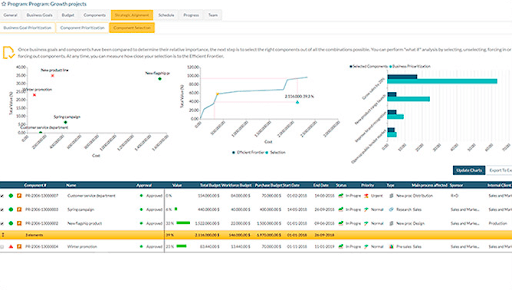
Headquartered in Madrid, Spain, ITM Platform is a SaaS portfolio management tool with robust project dashboard capabilities. ITM Platform is hugely customizable and many teams will find the flexibility useful to their objectives. For example, custom fields are easy-to-add and endlessly useful.
Why I Picked ITM Platform: One of the strengths of ITM Platform is its project portfolio management capabilities as they align with individual and team goals. The software provides tools for aligning project goals with overall business strategy and managing multiple projects more effectively. This allows organizations to prioritize projects based on their strategic importance and allocate resources accordingly.
ITM Platform also provides comprehensive resource management features, allowing users to track utilization, resolve conflicts, and optimize resource allocation. Additionally, the software includes a time tracker that enables users to track time spent on tasks and bill clients for time worked.
ITM Platform Standout Features & Integrations
Features include project portfolio management, resource management, time tracking, task management, collaboration, flexible workflows, reporting & analytics, mobile app, Agile methodologies, financial management, and third-party integrations.
Integrations include Slack, Microsoft Project, Jira, and Teambot. More integration options are available by linking the software to Zapier or using their API that allows you to integrate with third-party tools, like PowerBI or an ERP.
Pros and Cons
Pros:
- Accessible price
- Initiative user interface
- Customizable properties and fields
- Program and project prioritization
Cons:
- No desktop or mobile versions
- No drag and drop functionality

Best for pre-set reports & dashboard templates

ProjectManager.com is a well-rounded, award-winning project management software with real-time project dashboards. The tool's cloud-based software runs on both Windows and Mac computers with no downloads or complex installation needed.
Why I Picked ProjectManager.com: Using ProjectManager.com, you can create project plans, manage tasks, create reports, and manage timesheets, expenses, and workloads. ProjectManager.com also includes the ability to switch between Gantt chart, task list, and Kanban board views. You can use the in-app communication features to comment on tasks and assign them to team members.
Their real-time reports are easy to use—you can use their pre-set reports (project status, timesheets, expenses), or set up your own custom reports. You can also use the real-time dashboard to get an overview of your current project stats.
ProjectManager.com Standout Features & Integrations
Features include project management, Gantt charts, resource management, time tracking, collaboration, reporting, customizable dashboards, mobile app, Agile processes, and third-party integrations.
Integrations include Google Apps like Drive, Gmail, Calendar, etc. as well as Microsoft Office and Microsoft Project. For all other integrations, you can use Zapier to sync ProjectManager.com with other tools.
Pros and Cons
Pros:
- Multilingual and very flexible
- Time and expense tracking
- Customizable schedule templates
- Excellent high level view of project
Cons:
- Doesn’t output schedule files to .mpp
- No way to update partially complete tasks
- No mobile app

Best for startups & small teams
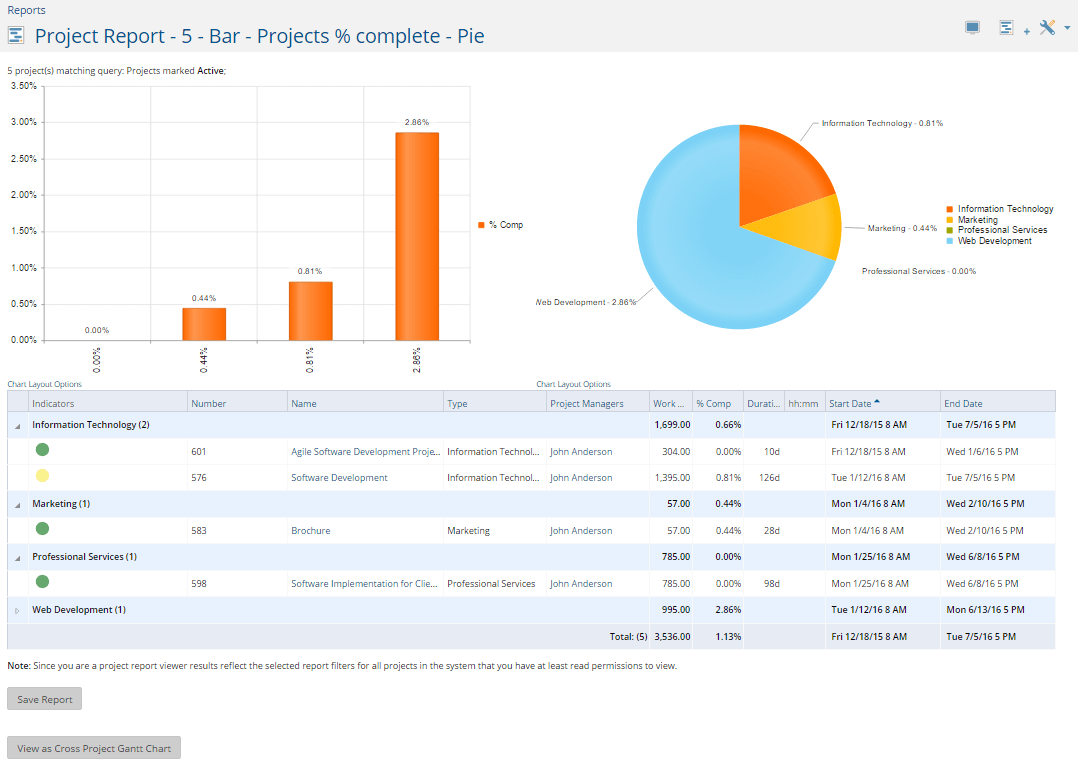
Project Insight is a work and project management software with a complete dashboard tool designed to act as a personalized source of information for you and your team members. The personalized dashboard feature is available as an add-on and will unlock a higher level of collaboration for your projects.
Why I Picked Project Insight: Project Insight's dashboard gives you access to all projects, tasks, and other items assigned to you. Like many other dashboards, you can drag and drop items to rearrange them according to your needs. Additionally, select from 12 different layout options to personalize it even further! One thing I'd like to point out is that Project Insight will aggregate information from the software you integrate into it. Then, it will use that information and your saved projects as a source of data for anything ranging from project management to HR.
Project Insight Standout Features & Integrations
Features include customizable dashboards, project management, resource planning, collaboration, flexible workflows, Agile support, financial management, reporting & analytics, mobile app, time tracking, mobile app, and third-party integrations.
Integrations include Jira, Zendesk, DevOps, and QuickBooks. Additional integrations include Trello, Office 365, Microsoft Project, Gmail, Google Drive, Slack, and Microsoft Teams.
Pros and Cons
Pros:
- Agile support
- Comprehensive project management tools
- Flexible, drag-and-drop dashboards
Cons:
- Has a learning curve
- Somewhat outdated UI
Diğer Proje Yönetimi Takip Araçları
İşte en iyi listeye giremeyen birkaç araç daha. Kullanışlı durum gösterge tabloları için ek önerilere ihtiyacınız varsa bunlara göz atın:
- Parallax
For project financial insights
- Planview Vantage
For ease of use
- Changepoint
Dashboard UX/UI
- ReptonPOD
For dashboard configuration
- monday AI Workspace
For integrations, add-ons, and widgets
- ClickUp
For dashboard widgets for expanded functions
- Smartsheet
Dashboards system for robust project portfolios
- Celoxis
For ad hoc budgeting & costs dashboards
- ClickTime
For real-time project budgeting
- Hive
For team collaboration & planning
- GoodDay
For customizable workspaces
- TaskRay
For Salesforce-native dashboards
- Hub Planner by Milient
For real-time resource scheduling
- Zoho Analytics
Segment comprehensive project intelligence data according to any criteria
- ProWorkflow
Dashboard built right into your homepage
- GoodDay
Tile-based dashboards with support for multiple project management methodologies.
- Acuity PPM
Portfolio-level dashboards that help you see risk and make decisions across different projects.
- Bubble
Live data and automated reporting tools designed to be highly configurable and supportive of your existing processes
- Genius Project
Dashboards that include reports, charts, and documents that can be customized to your project-specific requirements
- Deltek Project & Portfolio Management
In-depth information dashboard that requires analysis to obtain actionable insights.


Proje Gösterge Tablosu Yazılımı Nasıl Seçilir?
Uzun özellik listeleri ve karmaşık fiyatlandırma yapıları arasında kaybolmak kolaydır. Benzersiz yazılım seçim süreciniz üzerinde çalışırken odaklanmanıza yardımcı olmak için göz önünde bulundurmanız gereken faktörlerin bir kontrol listesini aşağıda bulabilirsiniz:
| Faktör | Nelere Dikkat Edilmeli? |
|---|---|
| Ölçeklenebilirlik | Yazılımın ekibinizle birlikte büyüyebildiğinden emin olun. İşletmeniz büyüdükçe performanstan ödün vermeden daha fazla projeyi ve kullanıcıyı destekleyip destekleyemeyeceğini değerlendirin. |
| Entegrasyonlar | Slack veya Google Workspace gibi hâlihazırda kullandığınız araçlarla entegre olup olmadığını kontrol edin. Sorunsuz entegrasyon, iş akışını ve üretkenliği artırabilir. |
| Özelleştirilebilirlik | Gösterge tablolarını, raporları ve iş akışlarını ihtiyaçlarınıza göre uyarlamanızı sağlayan esnek seçenekleri arayın. Özelleştirme, yazılımın belirli proje gereksinimlerinizi karşılamasını sağlar. |
| Kullanım Kolaylığı | Kullanıcı arayüzünü ve öğrenme eğrisini değerlendirin. Anlaşılır bir araç zamandan tasarruf sağlar ve ekibinizin aracı hızlıca benimsemesine yardımcı olur. |
| Bütçe | Fiyatlandırma planlarını karşılaştırın ve mali sınırlarınıza uygun olduğundan emin olun. Ek özelliklerden kaynaklanabilecek gizli maliyetleri veya ücretleri göz önünde bulundurun. |
| Güvenlik Önlemleri | Şifreleme ve GDPR gibi sektör standartlarına uyumluluk gibi veri koruma özelliklerine öncelik verin. Güvenlik, hassas bilgilerin korunması açısından kritik öneme sahiptir. |
| Destek Hizmetleri | Müşteri desteğinin kullanılabilirliğini ve kalitesini inceleyin. Karşılaştığınız sorunlarda veya yazılımla ilgili yardıma ihtiyaç duyduğunuzda hızlı yanıt veren destek kritik olabilir. |
| Raporlama Araçları | Yazılımın anlamlı raporlar oluşturma kapasitesini değerlendirin. Etkili raporlama, karar alma ve proje takibine yardımcı olabilir. |
Açıkçası, sindirmesi gereken çok şey var ve her şeyi doğru yapmanız için üzerinizde büyük bir baskı olabilir; bu nedenle, sizin ve kuruluşunuzun özel ihtiyaçlarına uygun proje yöneticisi araçlarını kısa listeye almanıza yardımcı olması için proje yönetimi yazılımı danışmanlığı hizmetimizden yararlanmanızı öneririm.
Proje Panosu Yazılımındaki Trendler
Araştırmam sırasında farklı proje panosu yazılımı sağlayıcılarından sayısız ürün güncellemesi, basın bülteni ve sürüm günlüğü inceledim. Takip ettiğim yükselen trendlerden bazıları şunlar:
- Yapay Zekâ Destekli İçgörüler: Daha fazla sağlayıcı, tahmine dayalı analizler ve içgörüler sunmak için yapay zekâ kullanıyor. Bu, ekiplerin proje risklerini önceden görmesine ve kaynak tahsisini optimize etmesine yardımcı oluyor. Örneğin, bazı araçlar görev önceliklendirmesi için yapay zekâ destekli öneriler sunuyor.
- Uzaktan İş Birliği Araçları: Uzaktan çalışmanın yaygınlaşmasıyla birlikte sanal iş birliğini geliştiren araçlara yönelik talep artıyor. Sanal beyaz tahtalar ve entegre video konferans gibi özellikler yaygınlaşıyor ve daha etkileşimli uzaktan ekip çalışmasını mümkün kılıyor.
- Gerçek Zamanlı Veri Görselleştirme: Kullanıcılar proje metrikleri hakkında anında içgörü elde etmek istiyor. Anında güncellenen gerçek zamanlı panolar artık temel bir gereklilik hâline geliyor. Bu görselleştirmeler, ekiplerin hızlı ve bilinçli kararlar almasına ve ilerlemeyi etkili bir şekilde takip etmesine yardımcı oluyor.
- Sürdürülebilirlik Takibi: Bazı sağlayıcılar sürdürülebilirlik metriklerini takip etmeye yönelik özellikler ekliyor. Bu trend, çevre dostu uygulamalara odaklanan işletmelerle örtüşüyor. Panolarda artık zaman zaman karbon ayak izi takibi veya kaynak tüketimi analizleri de yer alıyor.
- Kullanıcı Geri Bildirimi Döngüleri: Kullanıcı geri bildirimlerinin geliştirme döngüsüne dâhil edilmesi giderek yaygınlaşıyor. Sağlayıcılar, ürün kullanılabilirliği ve özellik talepleri hakkında doğrudan kullanıcı görüşleri toplamak için özellikler ekliyor; böylece araçların kullanıcı ihtiyaçları doğrultusunda gelişmesini sağlıyor.
Proje Panosu Yazılımı Nedir?
Proje panosu yazılımı, bir projenin temel unsurlarını ve performans metriklerini görsel olarak sunan bir araçtır. İlerleme durumu, son tarihler, bütçeler ve kaynak tahsisi gibi verileri kolay anlaşılır bir biçimde bir araya getirir ve görüntüler.
Proje panosu araçları, proje yöneticilerinin ve ekiplerin bir projenin durumunu hızlı bir şekilde değerlendirmesine, projenin genel sağlığını izlemesine ve gerçek zamanlı verilere dayanarak bilinçli kararlar almasına yardımcı olur. Pano genellikle grafikler, çizelgeler ve ilerleme göstergeleri içerir; daha iyi proje yönetimini ve iletişimi kolaylaştırmak için bir bakışta kapsamlı bir genel görünüm sunar.
Proje Panosu Yazılımının Özellikleri
Proje panosu yazılımı seçerken, proje yönetimini ve ekip iş birliğini geliştirmek için aşağıdaki temel özelliklere sahip araçlara öncelik verin:
- Gerçek Zamanlı Veri Görselleştirme: Gerçek zamanlı veri görselleştirme, çizelgeler, grafikler ve panolar aracılığıyla proje metriklerine anında erişim sağlar. Bu özellik, ekiplerin ilerlemeyi izlemesine, darboğazları belirlemesine ve anında bilinçli kararlar almasına olanak tanır. KPI'lar, bütçeler ve zaman çizelgelerindeki canlı güncellemeleri görüntüleyen proje yöneticileri, projelerin plan doğrultusunda ve kapsam dâhilinde ilerlemesini sağlayabilir.
- Yapay Zekâ Destekli İçgörüler: Yapay zekâ destekli içgörüler, trendleri belirlemek, riskleri öngörmek ve kaynak tahsisinde iyileştirmeler önermek için tahmine dayalı analizlerden yararlanır. Örneğin yazılım, yöneticileri olası gecikmeler konusunda uyarabilir veya son teslim tarihlerini karşılamak için kaynakların yeniden tahsis edilmesini önerebilir. Bu özellik, veriye dayalı tahminler ve uygulanabilir öneriler sunarak karar alma süreçlerini geliştirir.
- Özelleştirilebilir Panolar: Özelleştirilebilir panolar, kullanıcıların kendi rollerine veya projelerine en uygun bilgileri öne çıkaran özel görünümler oluşturmasını sağlar. İster bir ekip üyesinin günlük görevleri takip etmesi, ister bir proje yöneticisinin üst düzey bir genel görünüme ihtiyaç duyması söz konusu olsun, bu esneklik herkesin en önemli bilgileri görmesini sağlar. Özelleştirilebilir raporlar da temel proje metriklerine odaklanarak paydaş iletişimini kolaylaştırır.
- Uzaktan İş Birliği Araçları: Uzaktan iş birliği araçları, entegre video konferans, sanal beyaz tahtalar ve gerçek zamanlı yorum yapma gibi özellikler sunarak dağınık ekipler için kritik öneme sahiptir. Bu araçlar sorunsuz iletişimi destekler, yanlış anlaşılmaları azaltır ve konumlarından bağımsız olarak tüm ekip üyelerinin aynı doğrultuda kalmasını sağlar. Slack veya Microsoft Teams gibi diğer platformlarla entegrasyon, iş birliğini daha da kolaylaştırır.
- Gantt ve Takvim Görünümleri: Gantt çizelgeleri ve takvim görünümleri, proje zaman çizelgelerini, kilometre taşlarını ve görev bağımlılıklarını net bir şekilde görselleştirir. Bu araçlar ekiplerin etkili bir şekilde plan yapmasına, olası zamanlama çakışmalarını belirlemesine ve gerektiğinde zaman çizelgelerini ayarlamasına yardımcı olur. Özellikle son tarihlere göre ilerlemeyi takip etmek ve projelerin zamanında teslim edilmesini sağlamak için kullanışlıdır.
- Kaynak Yönetimi: Kaynak yönetimi özellikleri, kaynakların birden fazla proje arasında verimli bir şekilde planlanmasına ve tahsis edilmesine yardımcı olur. Bu araçlar, kaynak kullanılabilirliği, iş yükü dağılımı ve olası çakışmalar hakkında görünürlük sağlayarak ekiplerin kaynakları aşırı rezerve etmesini veya yeterince kullanmamasını önler. Bazı gelişmiş araçlar, uzun vadeli planlamaya yardımcı olmak için kaynak tahminini de içerir.
- Otomatik İş Akışları: Otomatik iş akışları, tekrarlayan görevlerdeki manuel çabayı azaltarak proje yönetimini kolaylaştırır. Örneğin yazılım; görev atamalarını, onay süreçlerini veya durum güncellemelerini otomatikleştirerek zamandan tasarruf sağlar ve tutarlılığı güvence altına alır. Otomasyon ayrıca insan hatası riskini en aza indirir ve ekiplerin yüksek öncelikli işlere odaklanmasına olanak tanır.
- Sürdürülebilirlik Takibi: Sürdürülebilirlik takibi; enerji kullanımı, karbon ayak izi ve kaynak tüketimi gibi çevre dostu uygulamaları ölçer ve raporlar. Bu özellik, kuruluşların çevresel hedeflerine ulaşmasını, şeffaflığı artırmasını ve sürdürülebilirlik girişimleriyle uyum sağlamasını destekler. Bazı araçlar, israfı azaltmak için kaynak kullanımını nasıl optimize edebileceğiniz konusunda da içgörüler sunar.
- Kullanıcı Geri Bildirim Döngüleri: Kullanıcı geri bildirim döngüleri, araç kullanılabilirliğini ve işlevselliğini geliştirmek için doğrudan kullanıcılardan görüş toplar. Uygulama içi anketler, geri bildirim formları veya özel kullanıcı forumları gibi özellikler, ekiplerin ihtiyaçlarını dile getirmesine ve iyileştirme önerilerinde bulunmasına olanak tanır. Bu sürekli geri bildirim, sağlayıcıların yazılımlarını gerçek dünyadaki kullanım senaryolarıyla daha iyi uyum sağlayacak şekilde geliştirmesine yardımcı olur.
Doğru proje panosu yazılımını seçmek, proje görünürlüğünü, iş birliğini ve karar alma süreçlerini iyileştirmenin anahtarıdır. Ekibinizin ilerlemeyi takip edebilmesini ve hızlı bir şekilde uyum sağlayabilmesini sağlamak için gerçek zamanlı veri görselleştirme, yapay zekâ destekli içgörüler ve özelleştirilebilir panolar gibi özelliklere sahip araçları tercih edin. Gantt görünümleri, kaynak yönetimi ve otomatik iş akışları gibi özelliklerle doğru yazılım, operasyonları kolaylaştırabilir ve projenin başarısını artırabilir. En yüksek etkiyi elde etmek için ekibinizin ihtiyaçlarıyla uyumlu çözümlere öncelik verin.
Proje Panosu Yazılımı SSS
Aşağıda proje panosu yazılımı hakkında sık sorulan bazı soruların yanıtlarını bulabilirsiniz.
Proje panosu nedir?
Proje panosu, temel performans göstergelerinizle ilgili bilgileri sunar. Dönüşüm oranı, tıklama oranı, kaynak planlama, veya çalışanların çalışma süresi gibi temel metrikleri takip ediyor olsanız da proje panosu, ilgili verilerin özetini tek bir sayfada (bazen KPI panosu olarak adlandırılır) görüntüler ve bu verileri hızlı ve kolay bir şekilde incelemenizi sağlar.
Proje yönetimi panosuna neler konulmalı?
Pano oluşturmak zorlu bir ilk adım olabilir. İyi bir pano tasarımı veri açısından zengin, kapsamlı, düzenli, okunması kolay olmalı ve tüm temel performans göstergelerinizin (KPI’lar) özetlerini içermelidir. Müşteri dönüşümü, potansiyel müşteri toplama, sayfa görüntülemeleri, sosyal medya gösterimleri, görev başına harcanan süre, kaynak tahsisi, hata raporları ve daha fazlası gibi uzun ve kısa vadeli hedeflerinizle ilgili öğeleri içeren panolar oluşturmak isteyeceksiniz.
Portföy panosu nedir?
Proje portföyü panosu, aynı anda birden fazla projeyi takip etmenize yardımcı olmak için tasarlanmıştır. Büyük olasılıkla devam eden tüm hesaplarınızı genel bakış şeklinde görüntüler ve belirli müşterilere, projelere, görevlere ve hedeflere odaklanmanızı sağlayan seçenekler sunar. Portföy panosu, herhangi bir zamanda sürekli değişen müşteri ve proje listesine sahip ajanslar için özellikle yararlıdır.
Farklı pano türleri nelerdir?
Farklı pano türleri, farklı veri görüntüleme türlerinde (örneğin satışlar ve gösterimler) uzmanlaşır ve ayrıca farklı sektör türlerine odaklanabilir (örneğin bir pazarlama panosu, muhasebe panosundan oldukça farklı görünür). Pazarlama panosu, görev yönetimi panosu, iş zekâsı (BI) panosu, ekip iş yükü panosu ve daha fazlası gibi panolarla karşılaşabilirsiniz.
Pano raporlama yazılımının temel özellikleri nelerdir?
Bunlar, her pano raporlama çözümü için olmazsa olmaz özelliklerdir.
- Gerçek zamanlı veri güncellemeleri – Pano projenize bağlanır ve gerçek zamanlı verileri görüntüler. İlk kurulum dışında herhangi bir manuel çaba gerektirmez.
- Özelleştirilebilir arayüz – Kullanıcı, veri panosunun farklı bölümlerini neyi, ne zaman, nerede ve nasıl görüntülemek istediğine karar verebilir. Ayrıca özelleştirme, sürükle ve bırak işlevini kullanan beyaz etiketli panolarda olduğu gibi sezgisel ve öğrenmesi kolay olmalıdır.
- Etkileşimli grafikler, pano şablonları veya çizelgeler – En iyi pano yazılımları, etkileşimli görsellerin bir unsurunu içerir. Ayrıca yeni başlayanların işe koyulmasına yardımcı olacak şablonlara sahip olmalıdır.
- Proje durum analizi – Kullanıcılar darboğazları, gecikmeleri, sorunları, kaçırılan teslim tarihlerini, kaynak uyarılarını ve projelerine ilişkin diğer göstergeleri hızlı ve kolay bir şekilde tespit edebilir. Böylece karar almanıza yardımcı olur.