

2026 İçin 10 Proje Raporlama Yazılımı Seçeneği

10 En İyi Proje Raporlama Yazılımları Kısa Listesi


Sayısız seçenek bulunduğundan doğru proje raporlama yazılımını seçmek göz korkutucu olabilir. Proje denetimini basitleştirmenin ve karar alma süreçlerini iyileştirmenin bir yolunu arıyorsunuz, ancak mükemmel aracı bulmak bunaltıcı görünüyor. Bu zorluğu çok iyi anlıyorum. En iyi proje raporlama yazılımını seçerken bu kararı sizin için kolaylaştırmak amacıyla araştırma yaptım ve bu listeyi hazırladım.
Why Trust Our Software Recommendations
Our team has been testing and reviewing software since 2012. As project managers ourselves, we know how difficult—and important—it is to choose the right software.
For this guide, we evaluated tools using hands-on testing and independent research, scoring tools using our selection criteria. We also draw on insights from industry thought leaders and practicing project management experts.
Our reviews reflect our human editorial judgment, not a sales pitch.
Expert reviewers:
Proje Raporlama Yazılımları Karşılaştırma Tablosu
Bu karşılaştırma tablosu, en iyi proje raporlama yazılımı seçimlerim için fiyatlandırma ayrıntılarını özetlemektedir:
| Tool | Starting Price | Website | |
|---|---|---|---|
| Best for real-time reporting visibility | 4.3 out of 5 | $10/user/month Free plan + 14-day trial + demo available | Book Demo |
| Best for enterprise agency dashboards | 4.6 out of 5 | Pricing upon request Not available | Book Demo |
| Best for complex project planning | 4.7 out of 5 | £679.99 one-time purchase Not available | Website |
| Best for combined project docs and tasks | 4.6 out of 5 | $10/user/month Free plan + free trial + free demo available | Website |
| Best for centralized project communication | 4.5 out of 5 | $45/month 14-day free trial + free demo available | Website |
| Best for client and agency projects | 4.4 out of 5 | $9.99/user/month Free plan + 14-day free trial + free demo available | Website |
| Best for real-time agency performance reporting | 4.4 out of 5 | $9/user/month 7-day free trial | Website |
| Best for customizable project apps | 4.2 out of 5 | $14/user/month Free plan + 30-day free trial + free demo available | Website |
| Best for agile software development teams | 4.3 out of 5 | $8.48/user/month Free plan available | Website |
| Best for Kanban board simplicity | — | $5/user/month Free plan + free trial available | Website |
En İyi Proje Raporlama Yazılımı İncelemeleri
Her bir aracın avantajlarını ve sınırlamalarını incelediğimiz, temel özelliklerini ayrıntılı olarak ele aldığımız ve en uygun kullanım senaryolarını öne çıkardığımız en iyi proje raporlama yazılımlarına ilişkin kapsamlı analiz ve genel bakışlarımıza göz atın. Bu incelemeler, proje yönetimi ihtiyaçlarınız ve hedeflerinizle en iyi örtüşen yazılımı belirlemenize yardımcı olmak için hazırlanmıştır.
En iyi proje raporlama yazılımlarının her biri hakkındaki görüşlerim:

Wrike
Best for real-time reporting visibility
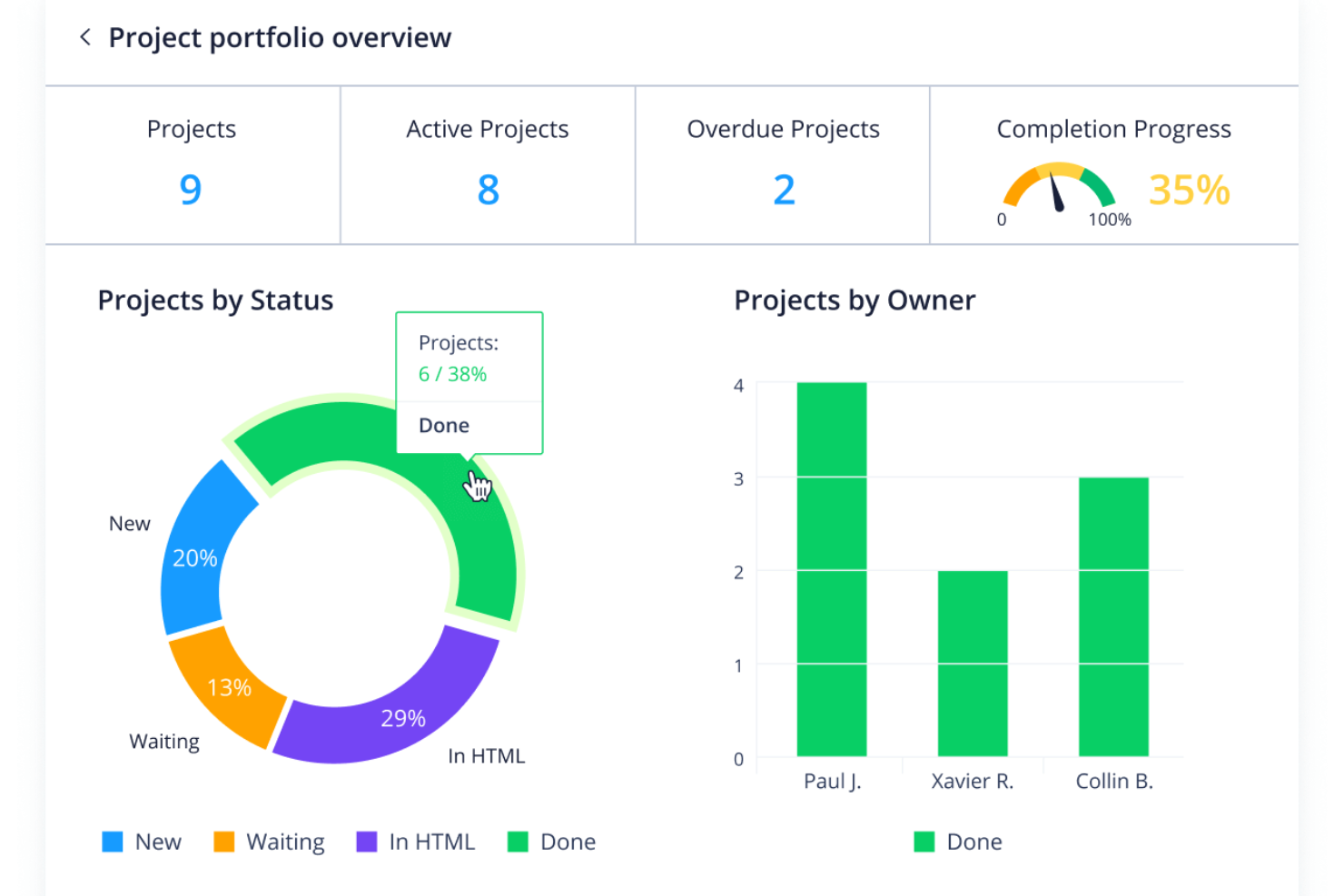
Wrike earns its spot here for making live project data instantly available to anyone who needs it, which is something I rarely see handled this well. What stands out in practice are Wrike’s interactive dashboards and custom report builder—I’ve built reports that update right as projects move, which is a huge advantage when you need to spot trends before they become issues. If your team wants to keep all levels of stakeholders up to speed without chasing status, I think you’ll find this reporting setup makes a real difference.
Wrike’s Best For
- Teams that need live project reporting dashboards
- PMOs and managers coordinating multiple complex projects
Wrike’s Not Great For
- Small teams with basic tracking needs
- People seeking a simple, minimalist reporting tool
What Sets Wrike Apart
Wrike is built for organizations that expect every project to go through a formal review and tracking process. Unlike ClickUp, which leaves a lot up to individual preference, Wrike really assumes you want clear responsibility, automated updates, and high accountability across teams. This tends to work best where audit trails, approvals, and real-time project status aren’t just nice to have, but required.
Tradeoffs with Wrike
Wrike optimizes for structured, multi-layered visibility and control, but the extra process can feel heavy if you’re looking for something quick or ultra-customizable. For teams who want to keep things lightweight, that overhead tends to get in the way.
Pros and Cons
Pros:
- Customizable dashboards
- Advanced workflow automation
- Real-time reporting
Cons:
- Lack of in-app chat without integrations
- Learning curve for new users
New Product Updates from Wrike

Wrike Redesigns Workspace Search With New Filters
Wrike introduces a redesigned Workspace Search interface with recent search shortcuts, item type and location filters, and parent-task context. These updates help users find relevant work items and navigate search results efficiently. For more information, visit Wrike’s official site.
 .

Best for enterprise agency dashboards
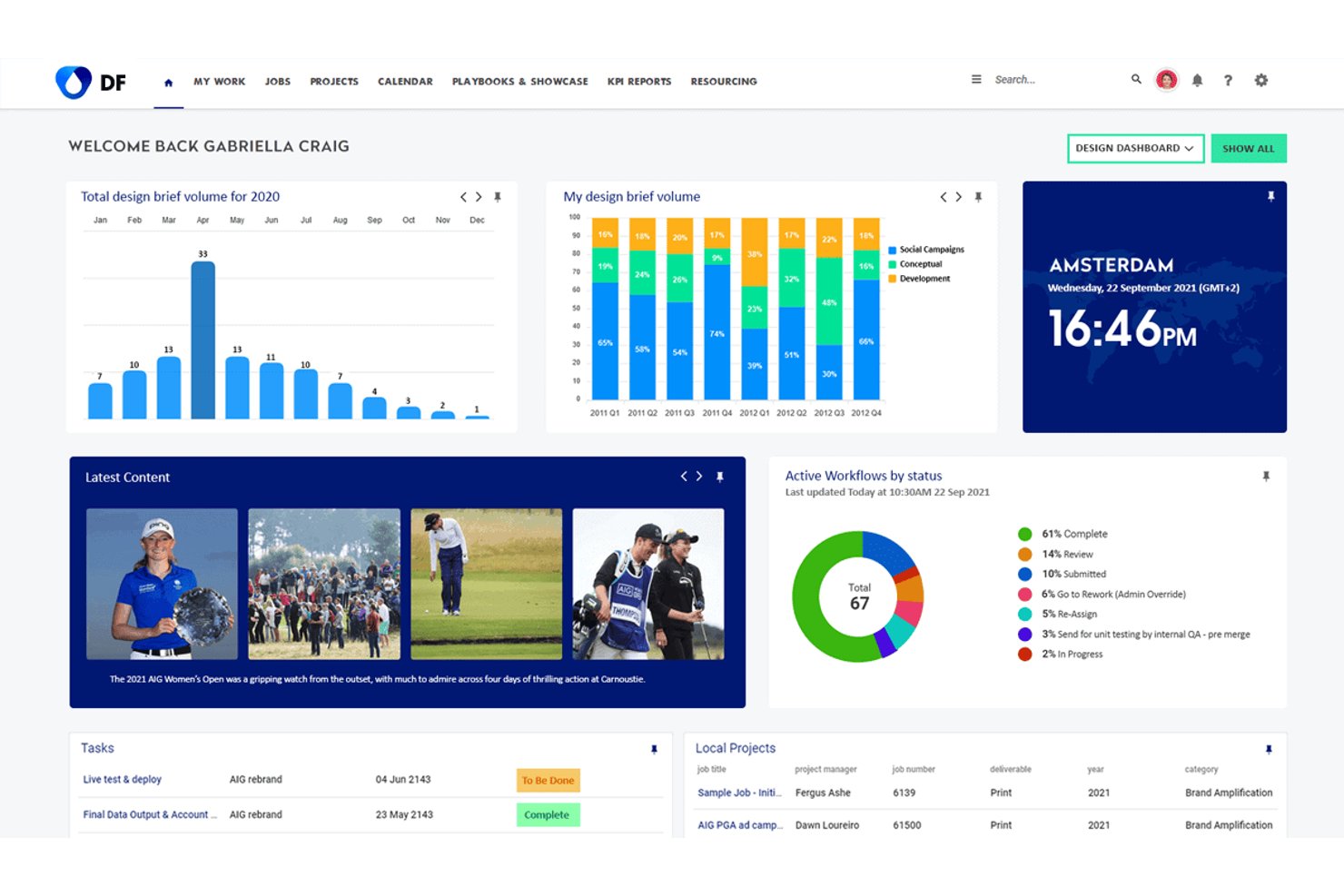
Screendragon is an enterprise workflow and project reporting platform built for marketing teams and agencies, combining real-time dashboards, custom automated reports, resource management, and multi-project visibility in one configurable system.
Who Is Screendragon Best For?
Screendragon suits enterprise marketing departments and large agencies managing high volumes of creative work across multiple brands, clients, or regions.
Why I Picked Screendragon
I picked Screendragon as one of the best because its dashboard layer is built specifically for agency-scale reporting complexity. Each dashboard is personalized and pulls live project data, so a portfolio director can track cross-brand campaign status without chasing down manual updates. I also like that its automated reports run on the account's own data sets, meaning the output reflects how your agency actually structures work rather than forcing data into generic templates.
Screendragon Key Features
- No-code workflow builder: Allows users to design project workflows with custom steps and approval logic without coding.
- Dynamic forms: Lets teams capture project details through configurable forms that trigger specific workflows.
- Resource utilization reporting: Provides reporting views to monitor team capacity, allocation, and workload across projects.
- Granular permissions management: Offers field-level access and routing controls for sensitive project data and stakeholder groups.
Screendragon Integrations
Screendragon offers native integrations with HubSpot, Microsoft Power BI, Ziflow, Brandfolder, Workato, and Smartsheet. An API is available for custom integrations.
Pros and Cons
Pros:
- Resource utilization reports built into the platform
- Automated report scheduling across multiple projects
- Configurable dashboards for portfolio-wide reporting
Cons:
- Report customization steep for non-technical users
- Initial configuration requires significant admin time
Best for complex project planning
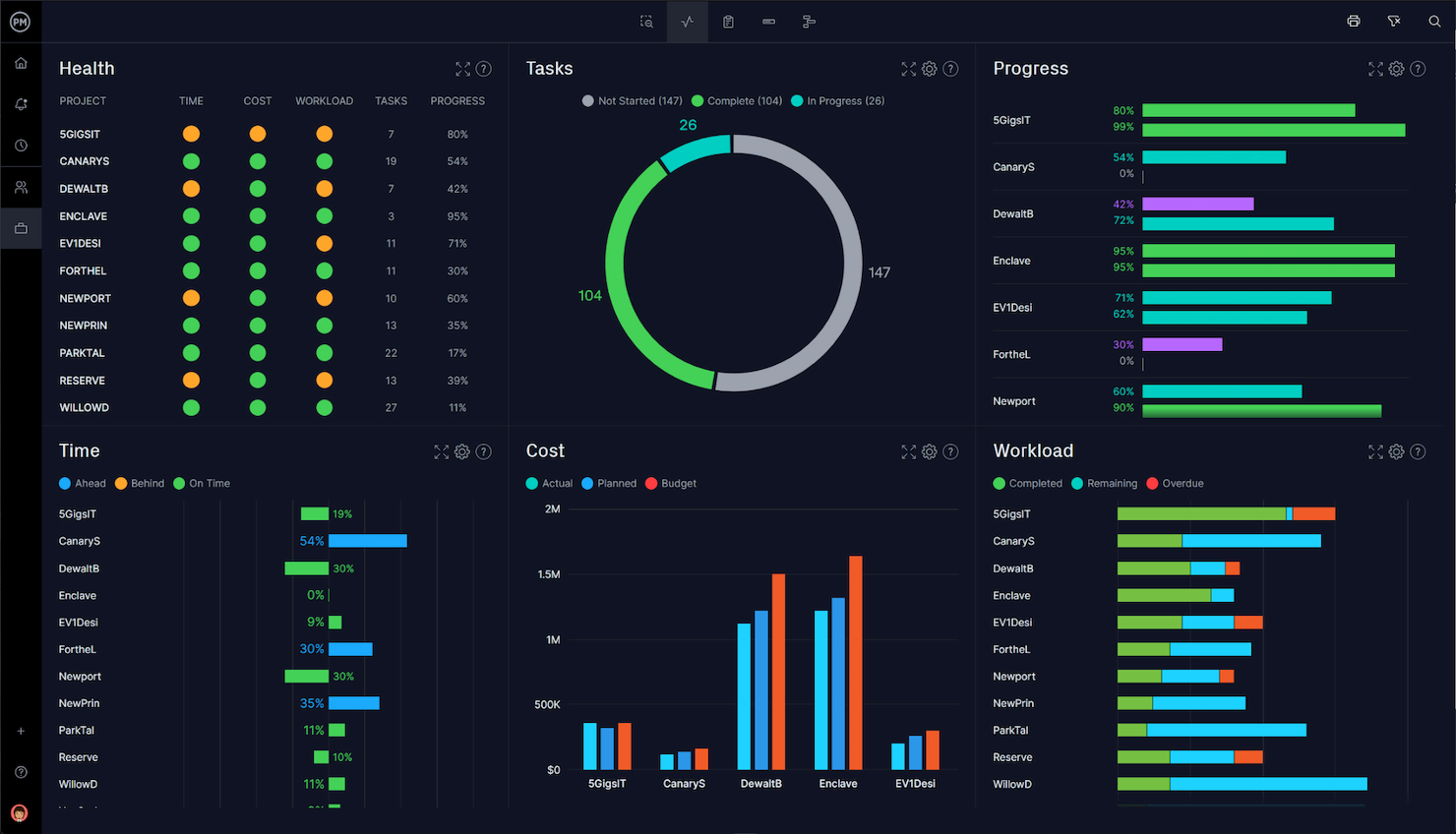
Microsoft Project makes the list because it handles complex project hierarchies and dependencies far beyond what simple task tools can manage. I reference it when teams need executive-ready reporting with custom dashboards, advanced Gantt charts, and detailed resource modeling. What I appreciate here is how you can model interlinked portfolios and surface program-level insights, all from the same set of project data.
Microsoft Project’s Best For
- Program and portfolio managers overseeing complex dependencies
- PMO teams needing executive-ready reporting and resource modeling
Microsoft Project’s Not Great For
- Small teams seeking a lightweight project reporting tool
- Teams with basic needs who want minimal setup and configuration
What sets Microsoft Project apart
Microsoft Project expects you to plan, sequence, and track work using detailed hierarchies and dependencies (more like Primavera than lighter tools such as Asana or Trello). It’s designed around the mindset that projects should have defined structures, resource allocations, and centralized controls. In practice, I see it working best where you need granular oversight at the portfolio or program level and reporting layers that are consistent with enterprise governance standards.
Tradeoffs with Microsoft Project
Microsoft Project optimizes for control and detailed reporting, but this makes setup and workflow management heavy and rigid, so day-to-day changes and fast pivots take more effort.
Pros and Cons
Pros:
- Comprehensive resource management
- Deep integration with Microsoft 365 suite
- Advanced project planning and scheduling
Cons:
- Primarily suited for Windows users
- Can be costly for larger teams
- Steep learning curve for new users
Notion
Best for combined project docs and tasks

Notion makes my list because it gives you a single place to manage both project reports and all related documentation. I've seen teams really benefit when they bring project dashboards, deliverable tracking, and documentation together in custom workspaces. What I like most is how easy it is to combine report templates with embedded timelines or linked tasks, so everyone has the details and the context in one spot.
Notion’s Best For
- Teams that want docs and project reports in one workspace
- Groups who need flexible project dashboards with linked tasks
Notion’s Not Great For
- Organizations with complex, compliance-driven reporting needs
- Teams that require advanced, automated report generation
What sets Notion apart
Notion is designed around the idea that your project docs and reporting live together, not in separate silos. Unlike Asana or Jira, which separate tasks and documentation, Notion expects you to blend wikis, dashboards, and project updates in the same space. In practice, this fits best when you want to create custom reporting layouts and keep all supporting context and decisions visible at a glance.
Tradeoffs with Notion
Notion optimizes for flexibility and unified docs, but that flexibility means it lacks the strict reporting logic and automation you get in dedicated project reporting tools—so routine or compliance-driven reporting tends to become manual and inconsistent.
Pros and Cons
Pros:
- Clean, user-friendly interface
- Highly customizable and flexible
- Unified system for docs and tasks
Cons:
- Limited advanced project management features
- Performance can lag with large databases
- Steep learning curve for new users

ProofHub
Best for centralized project communication

ProofHub makes my list because it keeps all project communication, updates, and files visible in one place (something most reporting tools miss!). When I work with teams who complain about fragmented updates and lost discussions in chat apps, this unified workspace fixes it. I really like how discussions, project notes, and custom reports stay accessible, making status reporting and accountability much clearer for distributed teams.
ProofHub’s Best For
- Teams centralizing discussion, files, and project updates in one hub
- Managers needing quick, accessible reporting on project progress
ProofHub’s Not Great For
- Organizations needing granular, advanced analytics
- Teams that require automated, highly customizable dashboards
What sets ProofHub apart
ProofHub is built with the expectation that project work, discussions, and file sharing all live in a single workspace. Unlike tools like Slack or Google Workspace, you don’t need to jump between messaging, docs, and reporting—everything funnels into the same place where you organize and review progress. In practice, this works best when you want every team conversation and status detail to directly inform project reporting.
Tradeoffs with ProofHub
ProofHub optimizes for centralized visibility, but you lose the ability to customize advanced reporting or automate analytics, so granular data analysis is out of reach.
Pros and Cons
Pros:
- Comprehensive project management features
- Flat pricing model for unlimited users
- Centralized communication tools
Cons:
- Specific integrations and advanced features may be lacking
- Limited customization options compared to some competitors
- May have a learning curve for new users

Best for client and agency projects
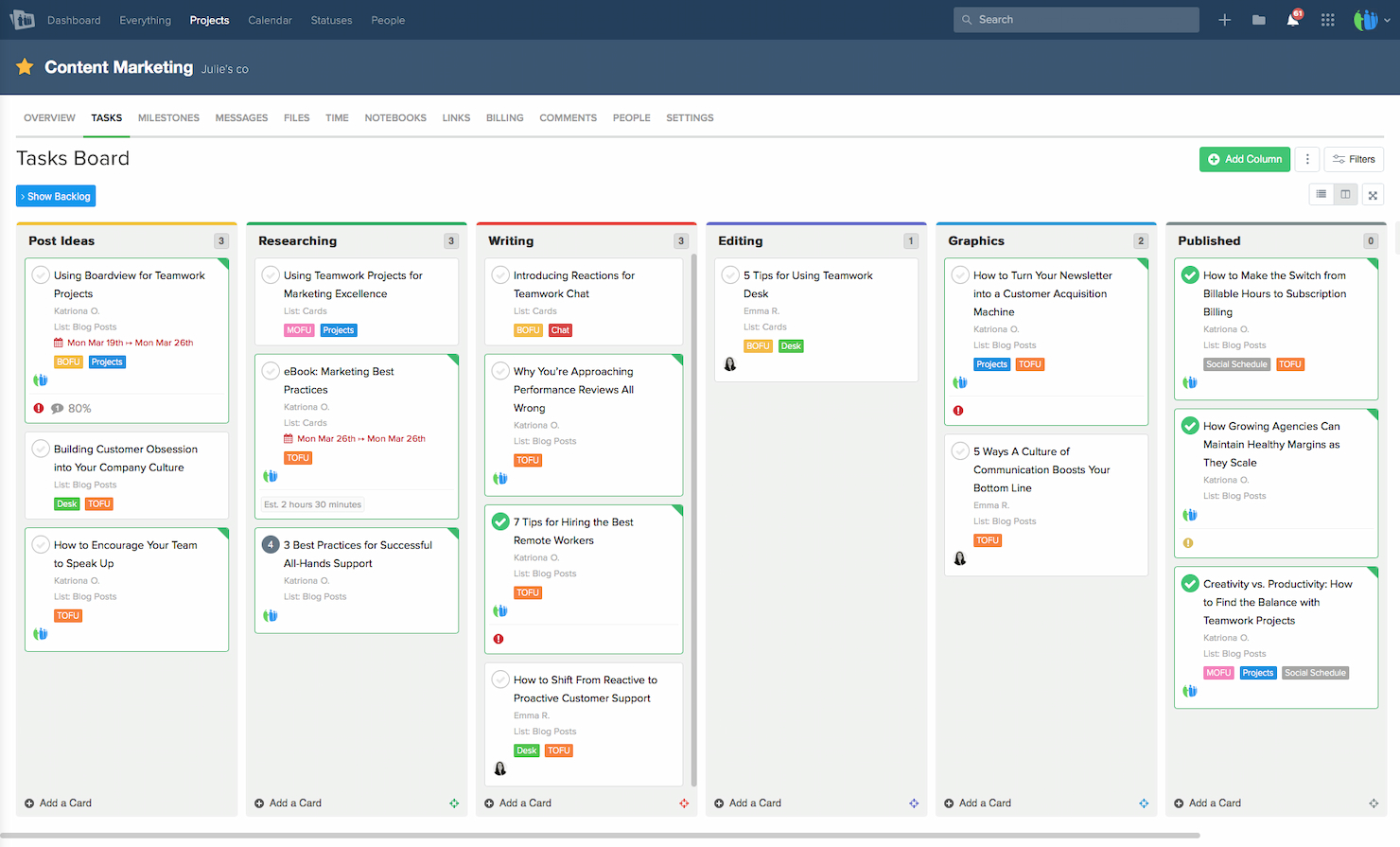
Teamwork.com makes my list because it's built for managing agency and client work where reporting has to double as proof of delivery. I like how granular the project analytics get—every task, milestone, and billable hour can filter into comprehensive client-ready reports. Teams working with multiple clients tend to find value in branded reporting and the ability to share progress updates without exposing internal details.
Teamwork.com’s Best For
- Agencies managing projects and client-facing reporting
- Teams needing branded, detailed project analytics
Teamwork.com’s Not Great For
- Internal IT or product teams without client focus
- Projects that require deep customization of reporting dashboards
What sets Teamwork.com apart
Teamwork.com is built for agencies and client services teams that need to keep billable work and reporting tightly connected. Unlike ClickUp, which emphasizes flexibility for internal projects, Teamwork.com assumes you’ll be juggling multiple clients, each with their own reporting needs. I see this working well when you want branded client reports and cleaner separation between internal notes and what clients see.
Tradeoffs with Teamwork.com
Teamwork.com optimizes for agency reporting, but this focus means its dashboards and reporting setup can feel rigid if you need heavy customization or complex internal metrics.
Pros and Cons
Pros:
- Seamless integrations with essential tools
- Comprehensive project management features
- Dedicated client portals for collaboration
Cons:
- Some features may be redundant for non-agency use
- Can become expensive for larger teams
- Learning curve for new users
Best for real-time agency performance reporting
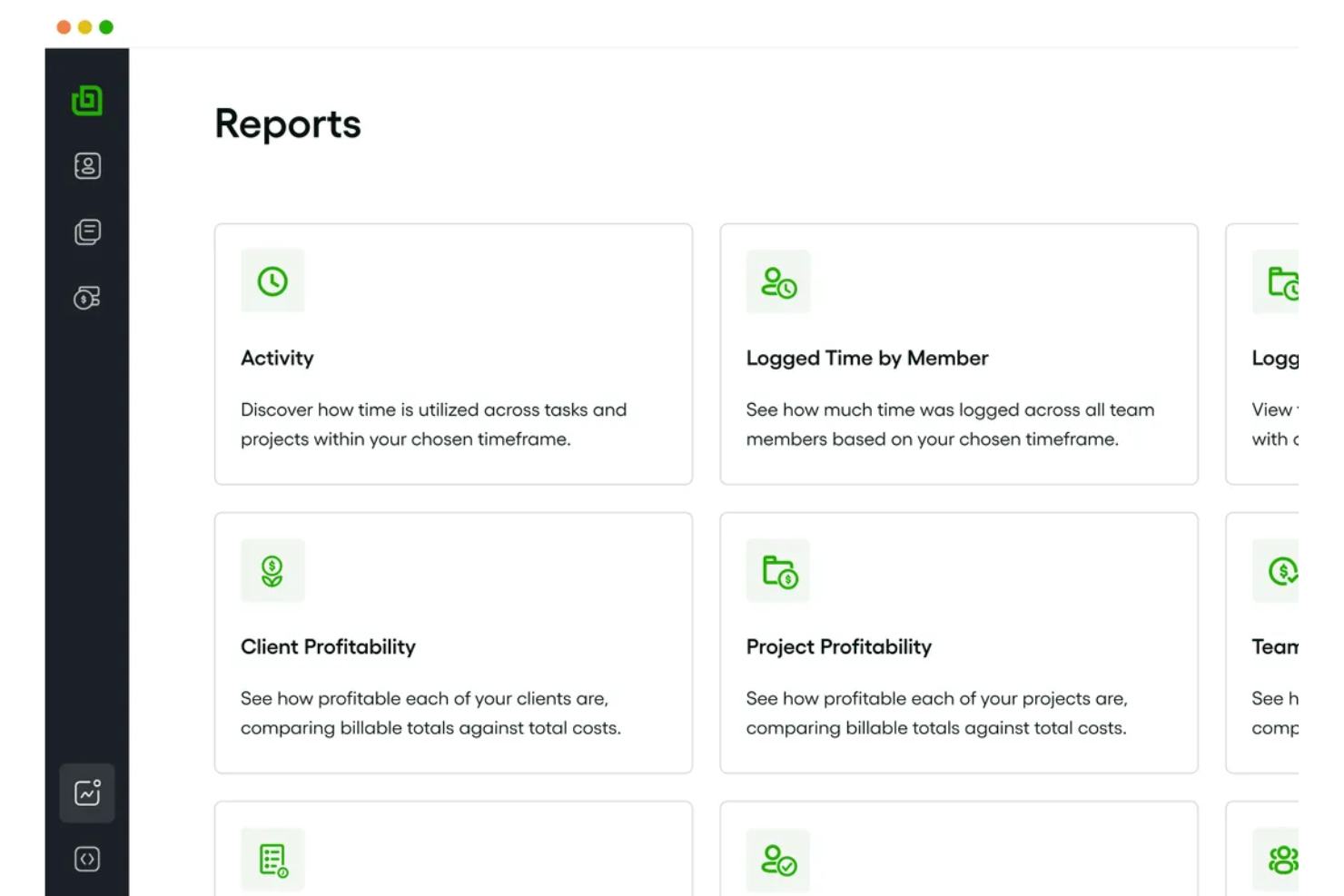
Bonsai Agency Software makes my list for its real-time agency performance dashboards and custom project reporting. I recommend it when teams need up-to-date insights into project margins, utilization, and resource allocation without pulling manual reports. What I appreciate most is how Bonsai lets you drill into revenue data and project health at a glance, which helps agencies manage delivery and profitability in fast-moving environments.
Bonsai Agency Software’s Best For
- Agencies seeking real-time performance tracking and reporting
- Teams who need to track project margins and resource allocation
Bonsai Agency Software’s Not Great For
- Companies needing deep financial analytics or forecasting
- Large enterprises with complex, multi-entity organizational structures
What sets Bonsai Agency Software apart
Bonsai Agency Software takes a dashboard-centric approach, prioritizing up-to-the-minute visibility into project performance and agency-wide metrics. Unlike something like ClickUp, which emphasizes task customization and broad use cases, Bonsai expects you to manage projects with a focus on revenue, profitability, and overall delivery health. I find this works best when you need to make business decisions quickly based on live data rather than sifting through manual reports.
Tradeoffs with Bonsai Agency Software
Bonsai optimizes for real-time agency reporting, but that focus means you lose out on detailed budgeting, forecasting, or robust workload planning, which you find in larger enterprise PM tools.
Pros and Cons
Pros:
- Ability to automate workflows and tasks
- Wide range of templates for client documentation
- Integrated project, client, and financial management
Cons:
- Capacity planning features limited to higher-tier plans
- Mobile app has limitations
Podio
Best for customizable project apps

Podio makes sense for this list because it lets you build exactly the kind of project and reporting apps you need, without being boxed in by pre-designed templates. I like how you can create your own dashboards and reporting layouts to track project KPIs, tasks, or requests. What stands out is being able to automate data collection and reporting flows, so teams get tailored views that actually fit how they work.
Podio’s Best For
- Teams building custom project tracking or reporting apps
- Organizations needing flexible data collection and dashboards
Podio’s Not Great For
- Groups wanting ready-made project reporting templates
- Teams that avoid tool configuration and customization
What sets Podio apart
Podio approaches work by letting you assemble your own project and reporting systems from the ground up. Unlike tools like Jira or Asana, which push you toward built-in structures, Podio expects you to design the way your team tracks progress, collects feedback, and visualizes projects. This tends to work well when off-the-shelf solutions don’t fit and you want full control over your data model and reporting.
Tradeoffs with Podio
Podio optimizes for customization, but building and maintaining those custom apps takes ongoing effort, which means I see teams getting slowed down when they want quick, out-of-the-box reporting.
Pros and Cons
Pros:
- Wide range of native integrations
- Integrated communication tools
- Highly customizable apps and workflows
Cons:
- Basic plan may lack advanced features needed for larger organizations
- Customization requires time and effort to set up
- Can be overwhelming for new users due to complexity

Jira
Best for agile software development teams

Jira earns a spot here because agile software teams push its reporting further than most tools can handle. I see teams rely on sprint and velocity reporting, release burndowns, and custom dashboards to give stakeholders instant visibility into delivery progress and blockers. What I appreciate is how granular you can get with issue-level analytics and how easy it is to surface patterns that drive process improvement. I recommend Jira when you need detailed reporting tied tightly to actual development work.
Jira’s Best For
- Agile development teams tracking issues, sprints, and releases
- Software orgs needing detailed, actionable reporting on delivery
Jira’s Not Great For
- Non-technical teams looking for simple project tracking
- Organizations without structured development or agile processes
What sets Jira apart
Jira is built around agile processes and expects you to structure work with issues, sprints, and epics. Unlike tools like Asana or Trello that emphasize flexibility, Jira is dialed in for teams needing clear workflow boundaries and deep traceability throughout the software development lifecycle. It’s intentional about visibility and expects you to dig into metrics right out of your delivery cycle.
Tradeoffs with Jira
Jira optimizes for process rigor and reporting granularity, but that extra structure adds overhead and can slow down teams that want quick, lightweight tracking.
Pros and Cons
Pros:
- Powerful issue tracking and project management
- Extensive customization and integration options
- Tailored for agile methodologies
Cons:
- Steep learning curve for non-developers
- Performance issues with large projects
- Can be complex for new users


Trello earns its place on this list because its Kanban board system keeps project reporting visual and easy to organize. I pick it when teams want a highly visual, drag-and-drop way to track project status, dependencies, and sprint progress at a glance. What I really value is how you can filter cards by label or member, which makes daily stand-ups and status reporting much smoother. This works best when you need fast, transparent tracking and status sharing without extra layers.
Trello’s Best For
- Teams that want simple Kanban-based project tracking
- Visual status reporting across sprints or ongoing projects
Trello’s Not Great For
- Projects needing complex, multi-layered reporting
- Teams requiring granular permissions or audit trails
What sets Trello apart
Trello focuses on visualizing tasks using boards, lists, and cards, based on the Kanban method. Instead of giving you rigid workflows like Jira, it lets you move items around easily and just see where everything stands. This approach makes status changes and progress transparent without enforcing complex structure. In practice, I see teams use Trello when they want to communicate work visually and keep updates light.
Tradeoffs with Trello
Trello optimizes for simplicity and board visualization, but detailed reporting and advanced workflow controls take a back seat—so you’ll hit limits if you need layered project metrics or strict process rules.
Pros and Cons
Pros:
- Wide range of integrations
- Customizable boards and cards
- Intuitive Kanban board interface
Cons:
- Lacks advanced reporting features
- Can become cluttered with extensive use
- Limited functionality for complex projects
Değerlendirebileceğiniz Diğer Araçlar
Aşağıda kısa listemize aldığımız ancak en iyi listeye giremeyen ek araçların bir listesi yer almaktadır. Bunları kesinlikle incelemeye değer.
- ClickUp
For all-in-one project management
- Smartsheet
For real-time portfolio reporting
- Celoxis
For dynamic PPM with advanced custom reporting
- Zoho Projects
For integration with Zoho Suite
- GoodDay
For real-time project reporting
- TaskRay
With Salesforce-native data security
- Asana
For workflow customization
- Basecamp
For team collaboration features
- Adobe Workfront
Enterprise work management for teams
- Planview AdaptiveWork
Enterprise project and portfolio management
- monday AI Workspace
With AI-driven risk detection and reporting
- ProjectManager
Real-time project planning and tracking
- Scoro
Comprehensive business management suite
- Quickbase
App-building platform for custom solutions
- Redbooth
Streamlined task and project management
- Airtable
For database-driven project management
- Nifty
Project management with milestone tracking
- Tempo Portfolio Manager
Dynamic project planning and analytics


How I Evaluate Project Reporting Software
I split my evaluation into two layers: the baseline a tool must clear—things like multi-project rollups and scheduled reporting—and the differentiators that set one PMO tool apart.
Core Functionality (Table Stakes For This List)
When I'm selecting tools for my list, I rank each one on a scale from 0 (does not offer the functionality) to 5 (excels in this area) for each core functionality listed below. Then, I calculate the tool's total score into a percentage. Each tool needs to achieve a minimum total score of 65% to be considered for inclusion.
- Customizable Report Templates: I look for a solid library of pre-built templates—status updates, budget summaries, risk logs—plus the ability to tailor layouts and fields to match your PMO's reporting cadence.
- Real-Time Dashboards: The dashboard experience matters. I evaluate whether widgets update with live data and let you drill down from a portfolio health overview into individual project metrics.
- Multi-Project Data Aggregation: Tools like monday.com and Smartsheet handle cross-project rollups differently, so I check how each platform consolidates schedules, budgets, and milestones into a single portfolio view.
- Automated Report Scheduling: I look for recurring delivery options—weekly status digests sent to a steering committee's inbox, for example—without requiring someone to manually generate and attach each report.
- Data Integrations: Most teams pull project data from multiple sources. I evaluate native connectors to tools like Jira, Asana, and time-tracking platforms, plus whether an open API supports custom data pipelines.
- Export & Sharing Options: Stakeholders consume reports in different ways, so I check for PDF, Excel, and CSV exports alongside shareable dashboard links with viewer-level permissions for external sponsors.
Once I have a list of tools that meet this criteria, I consider what sets each platform apart.
Differentiating Factors (What Sets Vendors Apart)
Here's how I compare and contrast different vendors:
Standout Features
Baseline and variance tracking is a major differentiator—I look for tools that automatically flag deviations from the planned schedule or budget so PMs aren't manually comparing snapshots. Stakeholder portals also matter. Giving a sponsor a live, branded view of project health without requiring a paid license changes how you communicate progress. I also evaluate custom KPI builders, since every PMO defines success differently, and the ability to create calculated metrics tied to your reporting framework saves hours of spreadsheet work.
Beyond Features
Integration depth matters beyond just having connectors. I evaluate whether a tool syncs bidirectionally with your PM stack—pulling Jira sprint data into a portfolio dashboard, for instance—or just offers one-way imports. Pricing transparency is another factor I weigh, especially how vendors handle viewer licenses. When a PMO distributes weekly reports to dozens of stakeholders, per-viewer costs add up fast. I also check for SOC 2 compliance and role-based access controls, since project reports often contain sensitive budget and resource data that leadership expects to stay locked down.
Proje Raporlama Yazılımı Nasıl Seçilir?
Kendinize özgü yazılım seçim sürecinizi yürütürken aşağıdaki noktaları göz önünde bulundurun:
- Entegrasyon Yetenekleri: Proje raporlama yazılımının ekibinizin kullandığı mevcut araçlar ve sistemlerle sorunsuz bir şekilde entegre olabildiğinden emin olun. Bu husus, farklı sistemlerin veri silolarına yol açması sorununu ele alır. Örneğin ekibiniz sorun takibi için Jira'yı ve iletişim için Slack'i kullanıyorsa seçilen yazılım, raporlamayı kolaylaştırmak üzere bu platformlarla entegre olabilmelidir.
- Özelleştirme ve Ölçeklenebilirlik: Yazılım, raporları belirli proje veya kuruluş ihtiyaçlarına uyarlamak için yüksek düzeyde özelleştirme sunmalıdır. Bu, inşaat veya sağlık hizmetleri gibi kendine özgü raporlama gereksinimleri olan sektörler için kritik öneme sahiptir. Ölçeklenebilirlik, aracın proje boyutlarınız ve karmaşıklıklarınız arttıkça gelişmesini sağlar.
- Kullanıcı Dostu Arayüz: Basit ve sezgisel bir arayüz, öğrenme eğrisini azaltır ve tüm ekip üyelerinin yazılımı etkili bir şekilde kullanabilmesini sağlar. Bu, eğitim için harcanan zamanın önemli bir endişe olduğu hızlı tempolu ortamlarda özellikle önemlidir.
- Gerçek Zamanlı Veriler ve Analizler: Zamanında karar almak ve proje darboğazlarını belirlemek için hayati önem taşıyan gerçek zamanlı veri ve analizler sunan yazılımları seçin. Örneğin pazarlama ajansları, stratejileri hızla ayarlamak için kampanya performansına ilişkin dakikası dakikasına güncel verilere ihtiyaç duyabilir.
- Güvenlik ve Uyumluluk: Proje verilerinin hassas niteliği göz önüne alındığında yazılım, özellikle veri güvenliğinin büyük önem taşıdığı finans ve sağlık hizmetleri gibi sektörlerde, sektör standardı güvenlik protokollerine ve uyumluluk gereksinimlerine uymalıdır.
Proje Raporlama Yazılımındaki Eğilimler
Proje raporlama yazılımı teknolojisinde fark ettiğim güncel ve ilgi çekici bazı eğilimler şunlardır.
Gelişmiş Entegrasyon Yetenekleri
- Üçüncü Taraf Araçlarla Daha Geniş Entegrasyon: Proje raporlama yazılımları, daha birleşik bir proje yönetimi ekosistemi sağlamak amacıyla CRM'ler, iletişim uygulamaları ve finans yazılımları gibi harici araçlar ve platformlarla giderek daha kapsamlı entegrasyonlar sunuyor. Bu durum, farklı işlevler arasında sorunsuz veri akışına ve erişilebilirliğe duyulan ihtiyacı yansıtıyor.
- API İyileştirmeleri: API olanaklarında dikkat çekici bir gelişme görülüyor ve bu da daha özelleştirilebilir entegrasyonlara olanak tanıyor. Bu eğilim, belirli kurumsal iş akışlarına ve süreçlerine uygun özel çözümlere yönelik artan ihtiyaca yanıt veriyor.
Gelişmiş Analiz ve Yapay Zekâ
- Tahmine Dayalı Analiz: Proje sonuçlarını tahmin etmek ve iyileştirmeler önermek için yapay zekâ ve makine öğreniminin kullanımı giderek yaygınlaşıyor. Bu işlev, proje yöneticilerine olası riskler ve fırsatlar hakkında öngörü sunarak daha proaktif proje planlaması yapmalarını sağlamayı amaçlıyor.
- Otomatik Raporlama: Raporların ve içgörülerin otomatik olarak oluşturulmasını sağlayan yapay zekâ destekli özellikler hızla gelişiyor; manuel çabayı azaltırken gerçek zamanlı veri analizi sunuyor. Bu eğilim, zamanında ve doğru proje içgörülerine yönelik talebi karşılıyor.
Kullanıcı Deneyimi ve Özelleştirme
- Gelişmiş Özelleştirme: Daha esnek kullanıcı arayüzlerine ve özelleştirilebilir raporlama panolarına doğru bir yönelim var; bu sayede kullanıcılar yazılımı kendi özel ihtiyaçlarına göre uyarlayabiliyor. Bu eğilim, projelerin çeşitli yapısından ve kişiselleştirilmiş veri görselleştirmesine duyulan ihtiyaçtan kaynaklanıyor.
- Mobil Optimizasyon: Proje verilerine hareket hâlindeyken erişim ihtiyacının artmasıyla birlikte proje raporlama yazılımları, mobil uyumlu arayüzlere ve işlevlere daha fazla odaklanıyor. Böylece proje yöneticileri ve ekip üyeleri her zaman ve her yerde bilgi sahibi olabiliyor.
İş Birliğine Dayalı Özellikler
- Gerçek Zamanlı İş Birliği: Yorum yapma ve görev güncelleme gibi proje raporları içinde gerçek zamanlı iş birliğini destekleyen özelliklere verilen önem artıyor. Bu işlev, en güncel proje verilerine dayanarak daha iyi ekip çalışmasını ve karar almayı kolaylaştırıyor.
- İletişim Platformlarıyla Entegrasyon: Popüler iletişim araçlarıyla doğrudan entegrasyonlar daha yaygın hâle geliyor ve rapor içgörülerini tartışma ve bunlara göre harekete geçme sürecini kolaylaştırıyor.
Bu eğilimler geliştikçe statik raporlama ve yalıtılmış veri siloları gibi bazı özellikler daha az tercih ediliyor. Proje profesyonelleri, kapsamlı içgörüler sunan ve iş birliğini teşvik eden dinamik, entegre çözümler arıyor.
Proje Raporlama Yazılımı Nedir?
Proje raporlama yazılımı, proje performansının çeşitli yönleriyle ilgili verileri bir araya getirmek, analiz etmek ve sunmak için tasarlanmış bir araçtır. Bu yazılım temel olarak proje yöneticileri, ekip liderleri ve paydaşlar tarafından ilerlemeyi takip etmek, kaynak kullanımını izlemek, riskleri belirlemek ve kapsamlı proje içgörülerine dayanarak bilinçli kararlar almak için kullanılır.
Proje raporlama yazılımının temel bileşenleri arasında panolar ve grafikler gibi veri görselleştirme araçları, özelleştirilebilir rapor şablonları, gerçek zamanlı veri güncellemeleri ve diğer proje yönetimi araçlarıyla entegrasyon olanakları bulunur. Bu yazılım, proje metriklerine ilişkin açık ve öz bir genel bakış sunmayı, şeffaf iletişimi kolaylaştırmayı ve ekiplerin proje hedefleri ve zaman çizelgeleriyle uyumunu korumasını sağlamayı amaçlar.
Özellikler
Her iyi proje raporlama yazılımının sahip olması gereken temel özellikler şunlardır:
- Özelleştirilebilir Panolar: Bilgi sunumunu belirli proje ihtiyaçlarına veya paydaşların tercihlerine göre uyarlayın. Beyaz etiketli pano yazılımlarında yaygın olan markalı raporlar gibi özelleştirilebilir panolar, ilgili proje metriklerinin ön planda olmasını sağlayarak hızlı değerlendirme ve karar verme süreçlerine yardımcı olur.
- Gerçek Zamanlı Veri Güncellemeleri: Proje verilerinin güncel ve doğru olmasını sağlayın. Gerçek zamanlı verilere erişim, bilinçli kararlar vermek ve tüm ekip üyeleriyle paydaşları en son proje gelişmelerinden haberdar etmek için hayati önem taşır.
- Gelişmiş Veri Analitiği: Ham verileri uygulanabilir içgörülere dönüştürün. Proje raporlama yazılımındaki gelişmiş analitik araçları eğilimleri ortaya çıkarabilir, olası darboğazları öngörebilir ve ilk bakışta fark edilmeyebilecek içgörüleri açığa çıkarabilir.
- Otomatik Rapor Oluşturma: Zamandan tasarruf edin ve manuel hataları azaltın. Rapor oluşturma sürecindeki otomasyon, sürekli manuel müdahaleye gerek kalmadan düzenli güncellemeler yapılmasını sağlayarak proje güncellemelerinde tutarlılık ve güvenilirlik sağlar.
- Entegrasyon Yetenekleri: İş akışlarını kolaylaştırmak için diğer araçlara ve sistemlere bağlanın. Diğer proje yönetimi, CRM veya ERP sistemleriyle sorunsuz entegrasyon, verilerin platformlar arasında serbestçe akmasını sağlayarak yinelemeleri azaltır ve veri bütünlüğünü korur.
- İş Birliği Araçları: Proje ekibi üyeleri ve paydaşlar arasındaki iletişimi kolaylaştırın. Yerleşik iş birliği araçları, ekiplerin raporları tartışmasına, içgörüleri paylaşmasına ve en güncel verilere dayanarak ortak kararlar almasına yardımcı olur.
- Görev ve Kilometre Taşı Takibi: Önemli proje kilometre taşlarına yönelik ilerlemeyi izleyin. Bu özellik, proje yöneticilerinin bireysel görevleri ve genel proje kilometre taşlarını takip etmesini sağlayarak projenin programa uygun ilerlemesini güvence altına alır.
- Kaynak Dağılımı İçgörüleri: Kaynakların projeler genelinde nasıl dağıtıldığını ve kullanıldığını görüntüleyin. Kaynak dağılımını anlamak, iş yüklerini dengelemek, kaynak kullanımını optimize etmek ve gelecekteki proje ihtiyaçlarını öngörmek için kritik öneme sahiptir.
- Risk Yönetimi Araçları: Olası proje risklerini belirleyin ve azaltın. Risk yönetimi özellikleri, proje takvimini veya bütçesini etkileyebilecek olası sorunları önceden tahmin etmeye yardımcı olarak önleyici adımlar atılmasını sağlar.
- Özel Rapor Filtreleri: Proje verilerini gerektiği şekilde bölümlere ayırın ve ayrıntılı inceleyin. Özel filtreler, kullanıcıların belirli veri bölümlerini görüntülemesine olanak tanıyarak ayrıntılara inmenin ve projenin belirli yönlerini analiz etmenin kolaylaşmasını sağlar.
- Bağımlılıklar: Bu özellik, tamamlanma sırasını yönetmek için görevler arasındaki ilişkileri izler.
- Özel alanlar: Bu özellik, kullanıcıların yazılımı belirli ihtiyaçlara göre uyarlamak için özel alanlar eklemesine olanak tanır.
- Son tarihler: Bu özellik, görevlerin zamanında tamamlanmasını sağlamak için son tarihler belirler.
- Öncelik işaretleri: Bu işlev, kullanıcıların görevleri önem veya aciliyet sırasına göre önceliklendirmesine yardımcı olur.
- Kullanıcı İzinleri: Bu özellik, projenin çeşitli bölümlerini kimlerin görüntüleyebileceğini veya düzenleyebileceğini kontrol eder.
- Proje şablonları: Bu özellik, yeni projelerin kurulumunu kolaylaştırmak için önceden belirlenmiş çerçeveler sunar.
- Alt görevler: Bu özellik, ayrıntılı takip için görevleri daha küçük ve yönetilebilir parçalara böler.
Bu özelliklere sahip proje raporlama yazılımlarını seçmek, proje yöneticilerinin ve ekiplerin projeleri etkili bir şekilde yönetmek için ihtiyaç duydukları araçlara sahip olmasını sağlar. Bu yetenekler yalnızca raporlama sürecini kolaylaştırmakla kalmaz; kapsamlı içgörüler sunarak, iş birliğini kolaylaştırarak ve proaktif proje yönetimini mümkün kılarak projelerin genel stratejik yönetimini de geliştirir.
Faydalar
Proje raporlama yazılımı, proje yönetimi süreçlerini kolaylaştıran ve ekiplerle kuruluşlar için hem verimliliği hem de etkililiği artıran sayısız avantaj sunar. Bu tür bir yazılımı operasyonlarınıza entegre ederek projelerin nasıl yönetildiğini, iletişimin nasıl kurulduğunu ve projelerin nasıl tamamlandığını dönüştürebilecek içgörüler ve araçlar elde edebilirsiniz.
- Geliştirilmiş Karar Verme: Gerçek zamanlı verilere dayanarak bilinçli kararlar alın. Proje raporlama yazılımı, kapsamlı içgörüler ve analizler sunarak yöneticilerin ve paydaşların proje hedefleri ve kurumsal stratejilerle uyumlu, veri odaklı kararlar almasını sağlar.
- Artırılmış Şeffaflık: Projenin tüm yönleri hakkında görünürlüğü koruyun. Bu yazılım, her ekip üyesinin ve paydaşın en güncel proje bilgilerine erişebilmesini sağlayarak açıklık ve hesap verebilirlik kültürünü teşvik eder.
- Geliştirilmiş Verimlilik: Proje yönetimi süreçlerini kolaylaştırın. Rapor oluşturma ve veri birleştirme işlemlerinin otomatikleştirilmesi zamandan tasarruf sağlar, hataları azaltır ve ekiplerin idari işlerle uğraşmak yerine daha stratejik görevlere odaklanmasına olanak tanır.
- Daha İyi Kaynak Yönetimi: Kaynakların tahsisini ve kullanımını optimize edin. Kaynakların nasıl kullanıldığına ilişkin net içgörüler sayesinde kuruluşlar, insan ve finansal kaynakların etkili bir şekilde tahsis edilmesini sağlamak, israfı azaltmak ve proje ROI'sini artırmak için düzenlemeler yapabilir.
- Risklerin Azaltılması: Olası sorunları büyümeden önce belirleyin ve ele alın. Risklerin ve darboğazların erken tespit edilmesi, ekiplerin proaktif bir şekilde düzeltici önlemler almasına olanak tanıyarak proje takvimleri ve bütçeler üzerindeki etkiyi en aza indirir.
Proje raporlama yazılımından yararlanmak, ekiplerin ve kuruluşların projeleri daha etkili bir şekilde yönetmesini sağlar ve hedeflere daha yüksek hassasiyet ve verimlilikle ulaşılmasını güvence altına alır.
Maliyetler ve Fiyatlandırma
Proje raporlama yazılımının maliyet ve fiyatlandırma seçeneklerini değerlendirmek, bu tür araçları kullanmaya yeni başlayanlar için göz korkutucu görünebilir. Genel olarak bu platformlar, ekiplerin ve projelerin farklı ihtiyaç ve boyutlarına uyum sağlamak amacıyla farklı işletme büyüklüklerine yönelik ücretli planlar sunar.
| Plan Türü | Ortalama Fiyat | Yaygın Özellikler |
| Ücretsiz Plan | $0 | Temel raporlama, sınırlı sayıda proje, görev yönetimi |
| Temel | $10-15/kullanıcı/ay | Geliştirilmiş raporlama, sınırsız proje, görev ve zaman takibi |
| Profesyonel | $20-30/kullanıcı/ay | Gelişmiş raporlama özellikleri, kaynak tahsisi, entegrasyon özellikleri |
| Kurumsal | Özel fiyatlandırma | Özel raporlar, tam özelleştirme, özel destek, gelişmiş güvenlik |
Proje raporlama yazılımını değerlendirirken projelerinizin kapsamını ve karmaşıklığını her planın özellikleri ve sınırlamalarıyla karşılaştırmak çok önemlidir. Kurumsal büyümenizle birlikte ölçeklenebilen ve verimli proje yönetimi için gerekli işlevleri sunan bir planı seçmek kritik öneme sahiptir.
SSS
Proje raporlama yazılımı hakkında sıkça sorulan bazı sorular şunlardır:
Proje raporlama yazılımı proje yönetimini nasıl geliştirir?
Proje ilerlemesi hakkında görünürlüğü artırır, ekip üyeleri arasındaki iletişimi geliştirir, raporlama sürecini kolaylaştırır ve risklerin ve fırsatların erken belirlenmesine yardımcı olur.
Proje raporlama yazılımı diğer araçlarla entegre olabilir mi?
Evet, çoğu proje raporlama platformu görev yönetimi yazılımları, CRM’ler ve finansal sistemler dahil olmak üzere çeşitli diğer iş ve proje yönetimi araçlarıyla entegrasyon özellikleri sunar.
Proje raporlama yazılımı küçük ekipler için uygun mudur?
Kesinlikle. Birçok proje raporlama aracı, küçük ekipler veya yeni girişimler için ücretsiz ya da düşük maliyetli planlar da dahil olmak üzere her büyüklükteki ekibe uygun ölçeklenebilir çözümler sunar.
Proje raporlama yazılımı ne kadar güvenlidir?
Saygın proje raporlama yazılımı sağlayıcıları, proje verilerinizi korumak için veri şifreleme, güvenli veri depolama ve sektör standartlarına uyumluluk dahil olmak üzere güçlü güvenlik önlemleri uygular.
Raporları projemin ihtiyaçlarına göre özelleştirebilir miyim?
Evet, özelleştirme proje raporlama yazılımının temel işlevlerinden biridir ve raporları ve panoları projenizin veya paydaşlarınızın özel gereksinimlerini karşılayacak şekilde uyarlamanıza olanak tanır.
Proje raporlama yazılımıyla ne tür bir destek alabilirim?
Çoğu sağlayıcı, her türlü soru veya sorunda size yardımcı olmak için çevrimiçi kaynaklar, canlı sohbet, e-posta desteği ve bazı durumlarda özel hesap yönetimi dahil olmak üzere çeşitli destek seçenekleri sunar.