

2026’da İncelenen Mimarlar İçin En İyi 10 Zaman Takip Yazılımı

Mimarlar İçin En İyi Zaman Takibi Yazılımları Kısa Listesi


Mimari projeleri yönetmek, planları, bütçeleri ve müşteri beklentilerini aynı anda dengelemek anlamına gelir. Bir dakika konseptler çiziyor, sonraki dakika revizyon talepleriyle ilgileniyor, mühendislerle koordinasyon sağlıyor ve bir yandan da çalışma saatlerinin bordroyla gerçekten uyuştuğundan emin olmaya çalışıyorsunuz. Zaman takibi işin pek eğlenceli kısmı değildir, ancak projelerin kârlı kalmasını ve ekiplerin düzenli çalışmasını sağlayan birkaç şeyden biridir.
Zaman takibi yazılımı tam da bu noktada, sahip olunması güzel bir araç olmaktan çıkar. Doğru araç, faturalandırılabilir ve faturalandırılamaz çalışmaları ayırmanıza, müşterilerin “hızlıca” talep ettiği tüm tasarım revizyonlarını takip etmenize ve eski e-postaları incelemek ya da kimin neyi ne zaman yaptığını tahmin etmek zorunda kalmadan bordroyu doğru tutmanıza yardımcı olur.
İş akışınıza uymayan seçenekler arasında gezinmek zorunda kalmamanız için mimarlık ve proje odaklı ekipler için geliştirilmiş en iyi araçları test edip inceledim. Amacım, yazılım şirketlerinin çalıştıklarını düşündüğü biçimi değil, mimarların gerçekten çalışma şeklini destekleyen bir sistem bulmanıza yardımcı olmak.
Bu makalede, mimarlar için en iyi zaman takibi yazılımı seçimlerimi; özellikler, kullanılabilirlik ve her seçeneğin programa uymanıza, bütçe içinde kalmanıza ve ekibinizin bazı sorunlardan kurtulmasına nasıl yardımcı olabileceğine dair bilgilerle birlikte bulacaksınız.
Why Trust Our Software Recommendations
Our team has been testing and reviewing software since 2012. As project managers ourselves, we know how difficult—and important—it is to choose the right software.
For this guide, we evaluated tools using hands-on testing and independent research, scoring tools using our selection criteria. We also draw on insights from industry thought leaders and practicing project management experts.
Our reviews reflect our human editorial judgment, not a sales pitch.
Expert reviewers:
Mimarlar İçin Zaman Takibi Yazılımları Karşılaştırma Tablosu
Aşağıdaki tablo, mimarlar için en iyi zaman takibi yazılımı seçimlerimin fiyatlandırma ayrıntılarını karşılaştırır.
| Tool | Starting Price | Website | |
|---|---|---|---|
| Best for multi-office architecture firm billing | 4.5 out of 5 | $17/user/month 14-day free trial | Book Demo |
| Best for AI-powered resource planning | 4.6 out of 5 | $10/user/month 14-day free trial | Book Demo |
| Best with custom reporting dashboards | 4.7 out of 5 | $9/user/month Free plan available; 30-day free trial; Free demo available | Book Demo |
| Best for project and budget tracking | 4.6 out of 5 | $6/user/month Free plan + Free trial + Free demo available | Book Demo |
| Best with integrated resource and phase planning | — | Pricing upon request Free demo available | Website |
| Best for billable architect project hours | 4.8 out of 5 | $4.99/user/month Free plan + 7-day trial + demo available | Website |
| Best for remote teams | 4.7 out of 5 | $3.99/user/month Free plan + free trial + free demo available | Website |
| Best for budgeting | 4.5 out of 5 | $45/month Free demo available | Website |
| Best for contract work | 4.6 out of 5 | $9/user/month 7-day free trial | Website |
| Best for payroll | 4.5 out of 5 | $5.50/user/month Free plan available | Website |
Mimarlar İçin En İyi Zaman Takibi Yazılımları İncelemeleri
Kısa listeme giren mimarlar için en iyi zaman takibi yazılımlarına ilişkin ayrıntılı özetlerimi aşağıda bulabilirsiniz. İncelemelerim, sizin için en uygun aracı bulmanıza yardımcı olmak amacıyla her aracın temel özelliklerine, artılarına ve eksilerine, entegrasyonlarına ve ideal kullanım alanlarına ayrıntılı bir bakış sunuyor.

Scoro
Best for multi-office architecture firm billing
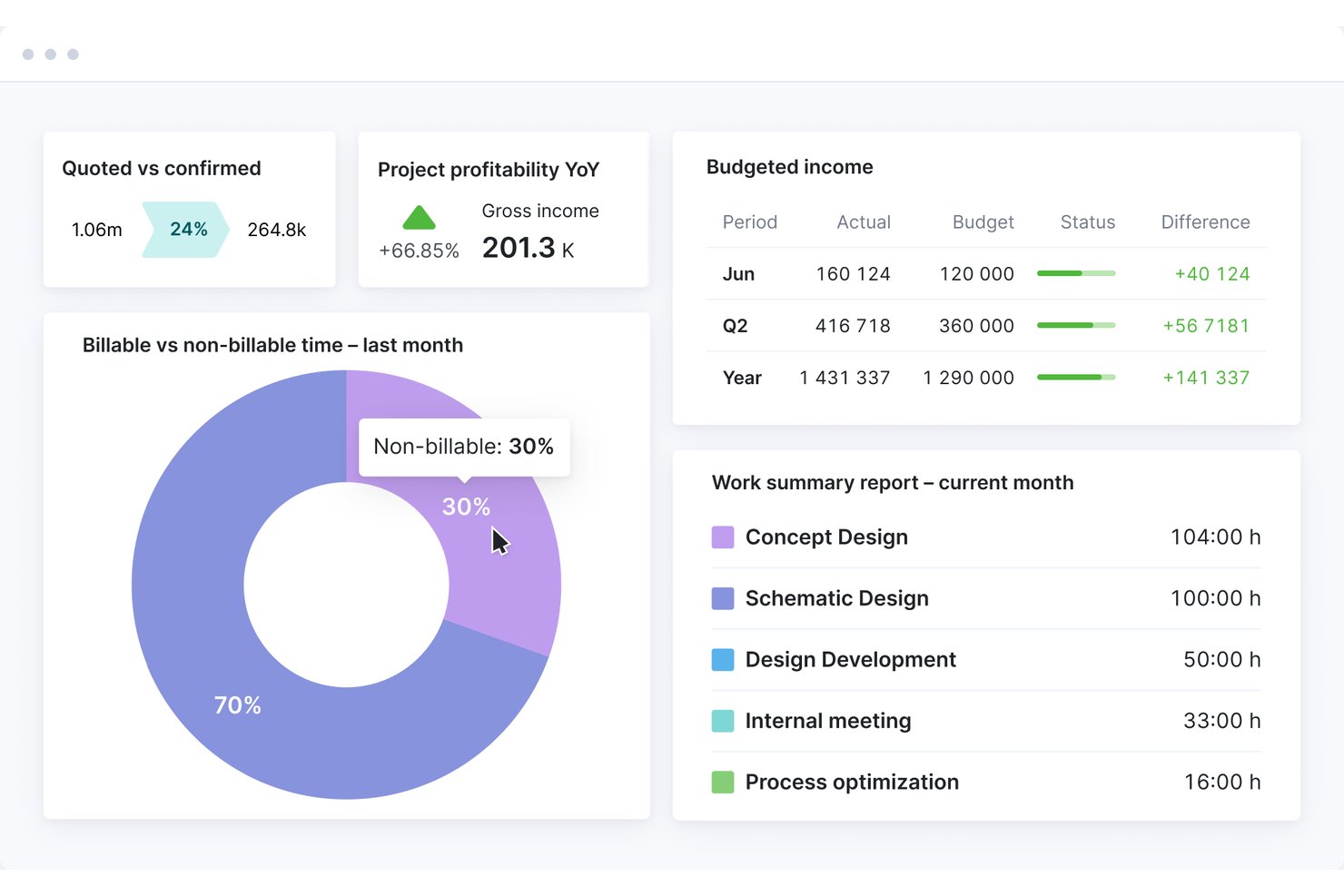
Scoro is a professional services automation (PSA) platform that combines time tracking, project and phase management, resource planning, budget burn monitoring, WIP reporting, and invoicing in a single system.
Who Is Scoro Best For?
Scoro suits growing and mid-size architecture firms that manage multiple offices, sub-consultants, and complex billing across concurrent projects.
Why I Picked Scoro
I've included Scoro in my top picks because it handles multi-office billing complexity better than most tools in this category. Across concurrent projects, it tracks quoted versus actual costs at the phase and role level in real time, so you always know where fee burn stands before it becomes a problem. I also like its PO tracking for sub-consultants, which keeps external spending visible inside the same budget dashboard.
Scoro Key Features
- Role-based labor costing: Assign different cost rates to each team role so every time entry automatically carries the correct labor cost across your projects.
- ELI AI assistant: Query live project and financial data in plain language to pull filtered reports, chase missing timesheets, or surface budget alerts.
- Multi-level timesheet approval: Route submitted timesheets through manager review before any time is invoiced, with time locking to prevent edits after approval.
- Visual capacity planner: See confirmed and tentative bookings for your full team in a single view, with waiting-list flags for staff booked beyond capacity.
Scoro Integrations
Scoro offers documented integrations with Xero, QuickBooks Online, Sage Intacct, Exact, Expensify, Salesforce, HubSpot, Google Calendar, Microsoft Outlook, and Slack. It also provides an open REST API and Zapier, but no native Revit, AutoCAD, or BIM 360 integrations.
Pros and Cons
Pros:
- AI assistant for live project reporting
- Visual capacity planning for multi-office teams
- Real-time budget burn tracking at phase level
Cons:
- Mobile app is unreliable for time entry
- No native AIA invoice format support
New Product Updates from Scoro

Scoro Adds Time Mobile App and ELI Improvements
Scoro adds the Scoro Time mobile app for iOS/Android to track time anywhere and expands ELI with attachments, smarter filtering, and trigger-based actions. For more information, visit Scoro's official site.
 .

Best for AI-powered resource planning
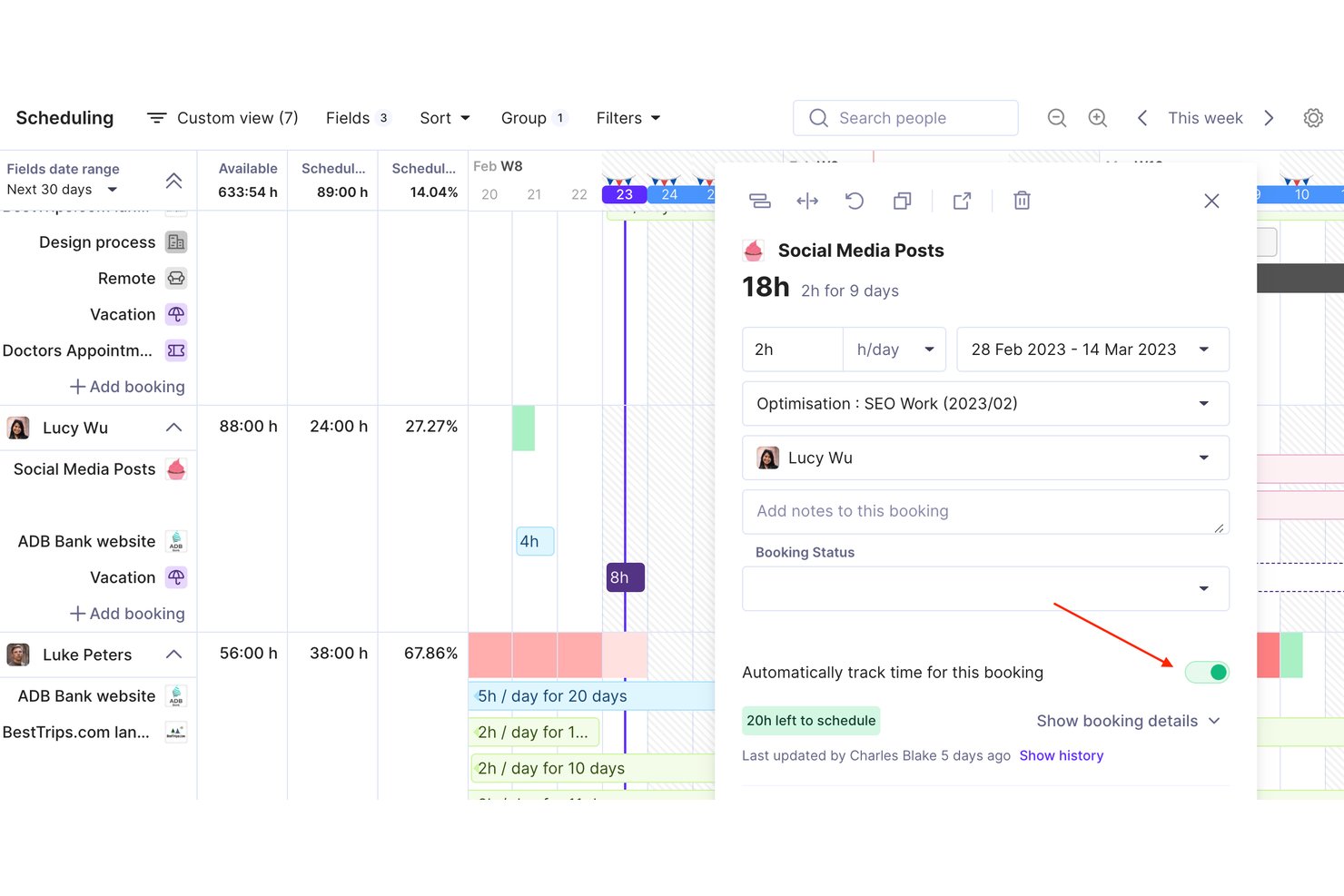
Productive is an agency and professional services management platform that combines time tracking, resource planning, project budgeting, and invoicing in a single tool built for billable-hour businesses like architecture firms.
Who Is Productive Best For?
Productive suits architecture and engineering studios that manage multi-phase projects across mixed teams and need one place to connect time, budgets, and billing.
Why I Picked Productive
I picked Productive as one of the best because its AI-powered resource planning connects directly to time tracking in a way most tools don't. The AI Time Tracking feature suggests time entries based on existing resource bookings, so I'm not chasing my team for missing timesheets at week's end. On top of that, the Scenario Builder lets me stress-test staffing decisions before locking a project plan, which is especially useful when balancing architects across overlapping SD and CD phases.
Productive Key Features
- Rate cards: Set different billing rates by project, client, or team member for precise fee calculations.
- Multi-level project budgeting: Track budgets at the project, phase, and service level.
- Time off management: Capture planned absences and holidays for accurate resource planning.
- Integrated invoicing: Generate and send invoices directly within the platform, linked to actual billable hours.
Productive Integrations
Productive offers native integrations with GitHub, Slack, HubSpot, Notion, Amplitude, Stripe, Linear, Xero, Sage, Jira, and more. It also connects with Zapier, and has an API for custom integrations.
Pros and Cons
Pros:
- Project-level profitability and utilization insights
- Visual resource planning across projects and phases
- AI time tracking suggests entries automatically
Cons:
- US-based retainage billing format not supported
- No prebuilt AIA phase templates
New Product Updates from Productive
Productive Adds Email and Calendar Integrations for Agents
Productive adds Gmail, Outlook, Google Calendar, and Outlook Calendar connectors for its AI agents. These integrations let agents manage emails and create calendar events directly within Productive. For more information, visit Productive’s official site.
 .

Toggl
Best with custom reporting dashboards
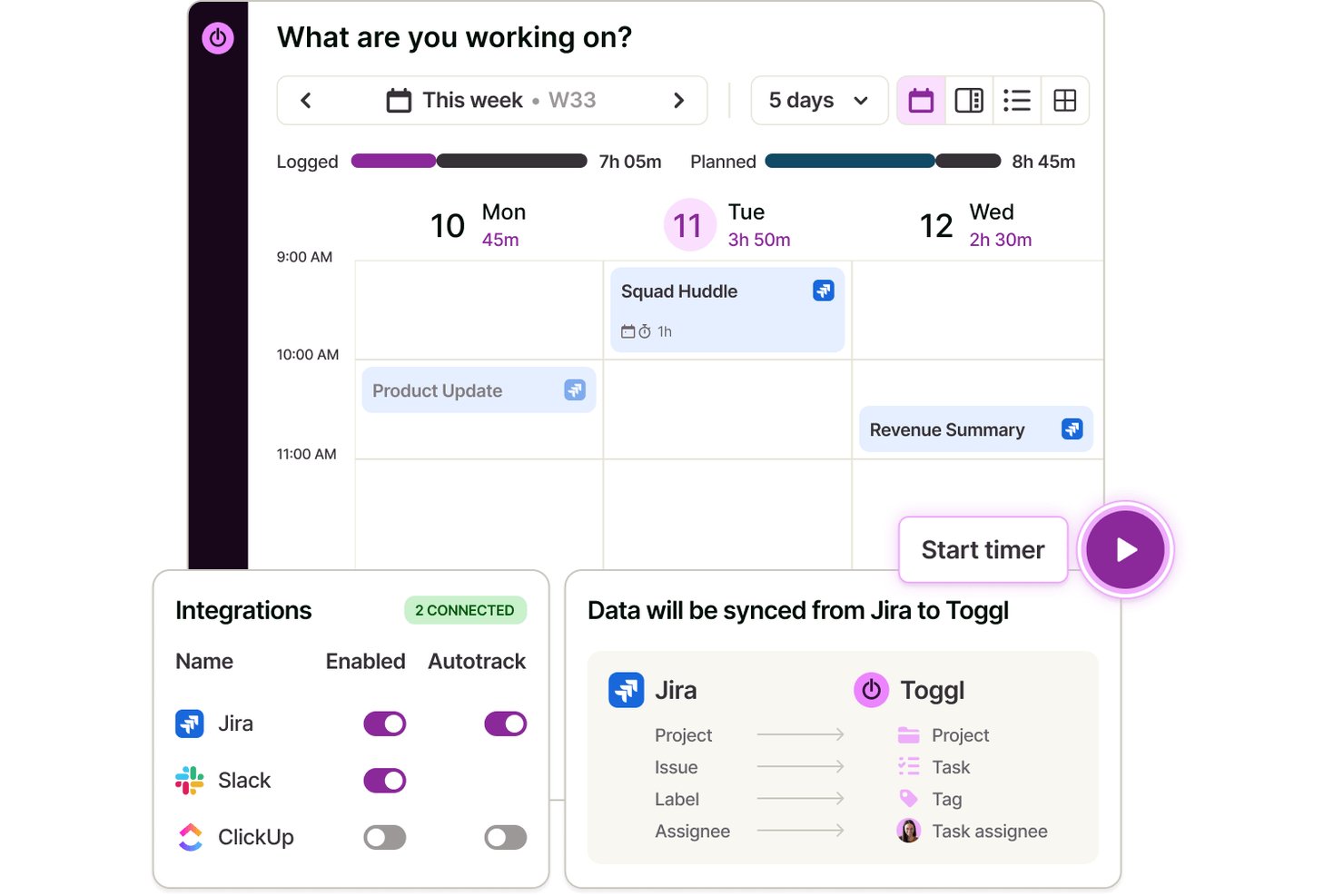
Toggl is a time tracking and capacity planning platform for architects that lets you manage tasks and projects, log billable hours, schedule work across teams, track budgets, and create detailed reports for architectural workflows.
Who Is Toggl Best For?
Architectural firms and studios needing a flexible, cloud-based tool to track project time, capacity, budgets, and staff hours across multiple clients and phases.
Why I Picked Toggl
I picked Toggl as one of the best because I can build custom reporting dashboards that break down time by project, phase, and team member. I use this flexibility to generate visual reports that support precise client billing and resource planning.
Toggl Key Features
- Real-time timer tracking: Log time as you work across devices and platforms.
- Multi-project and client management: Organize and assign hours to specific projects and clients.
- Billable rates and labor cost gates: Set unique rates for roles, users, or project types.
- Approval workflows for timesheets: Managers can review and approve timesheets before submission.
Toggl Integrations
Toggl offers integrations with Asana, Jira, Outlook Calendar, Google Calendar, and Todoist, and connects with Zapier. It also provides an API for custom integrations and an MCP for connecting to AI assistants.
Pros and Cons
Pros:
- Supports team-based timesheet approvals
- Flexible project and phase time tracking
- Drag-and-drop calendar event time tracking
Cons:
- Lacks built-in AIA billing support
- No native architecture phase templates

actiTIME
Best for project and budget tracking
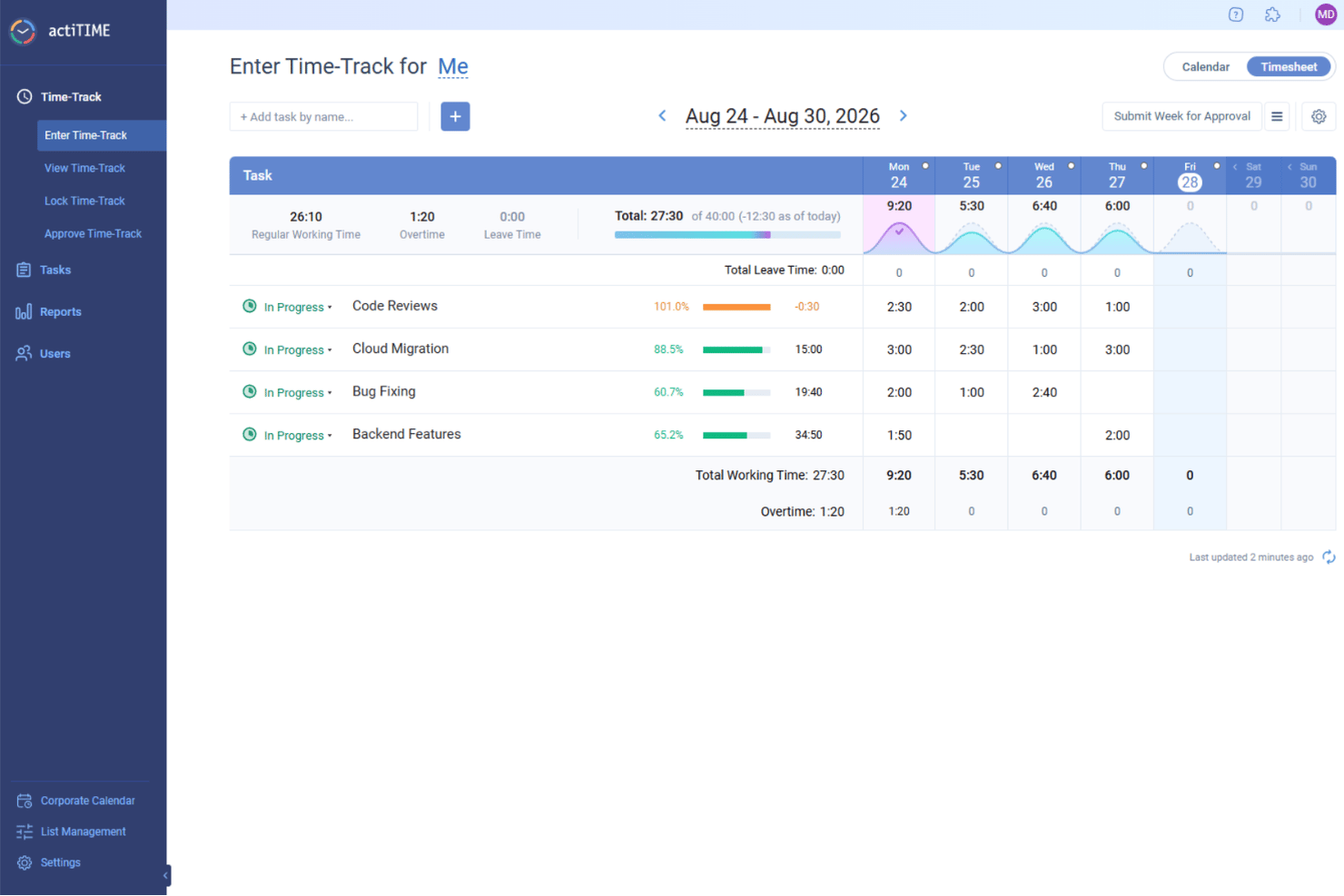
For architects seeking a reliable time tracking solution, actiTIME stands out as a versatile tool that caters to the unique demands of project management within the architecture industry. It offers an array of features designed to streamline workflows, manage budgets, and ensure efficient time allocation, addressing the complex needs of architectural projects. Architects and design professionals can benefit from its robust capabilities in tracking project progress and managing resources, helping to maintain timelines and foster client satisfaction.
Why I Picked actiTIME
I picked actiTIME because it excels in providing detailed project and budget tracking, which are crucial for architects managing multiple projects and resources. Its time tracking feature allows you to record time spent on various tasks, offering insights into project timelines and resource allocation. Additionally, the software’s budget management capabilities enable you to monitor project expenses and compare them against initial estimates, helping to keep projects financially on track. These features address the critical need for precise time and budget oversight in architectural projects.
actiTIME Key Features
In addition to its project and budget tracking capabilities, I also found several other features valuable for architects:
- Reporting: Generate comprehensive reports on time usage and project progress, which are essential for assessing project status and making informed decisions.
- Billing: Create accurate billing reports and client invoices based on tracked time and services, ensuring transparency and accountability in client relationships.
- Team Management: Assign tasks, monitor team performance, and coordinate efforts to enhance collaboration and efficiency within your architectural team.
- Leave Management: Automate PTO tracking and manage leave policies, ensuring seamless team operations and resource availability.
actiTIME Integrations
Integrations include actiPLANS, QuickBooks, and Zapier. An API is also available for custom integrations.
Pros and Cons
Pros:
- Reporting provides detailed project insights
- Project management organizes complex tasks
- Time tracking improves task accuracy
Cons:
- No automatic time tracking feature
- Mobile app lacks offline functionality
New Product Updates from actiTIME

actiTIME Visual Hour Indicator and Time-Track Report Redesign
actiTIME adds a wave-style hour indicator to the Timesheet and Calendar views and refreshes the Time-Track report for smoother navigation and clearer visuals. For more information, visit actiTIME's official site.
 .

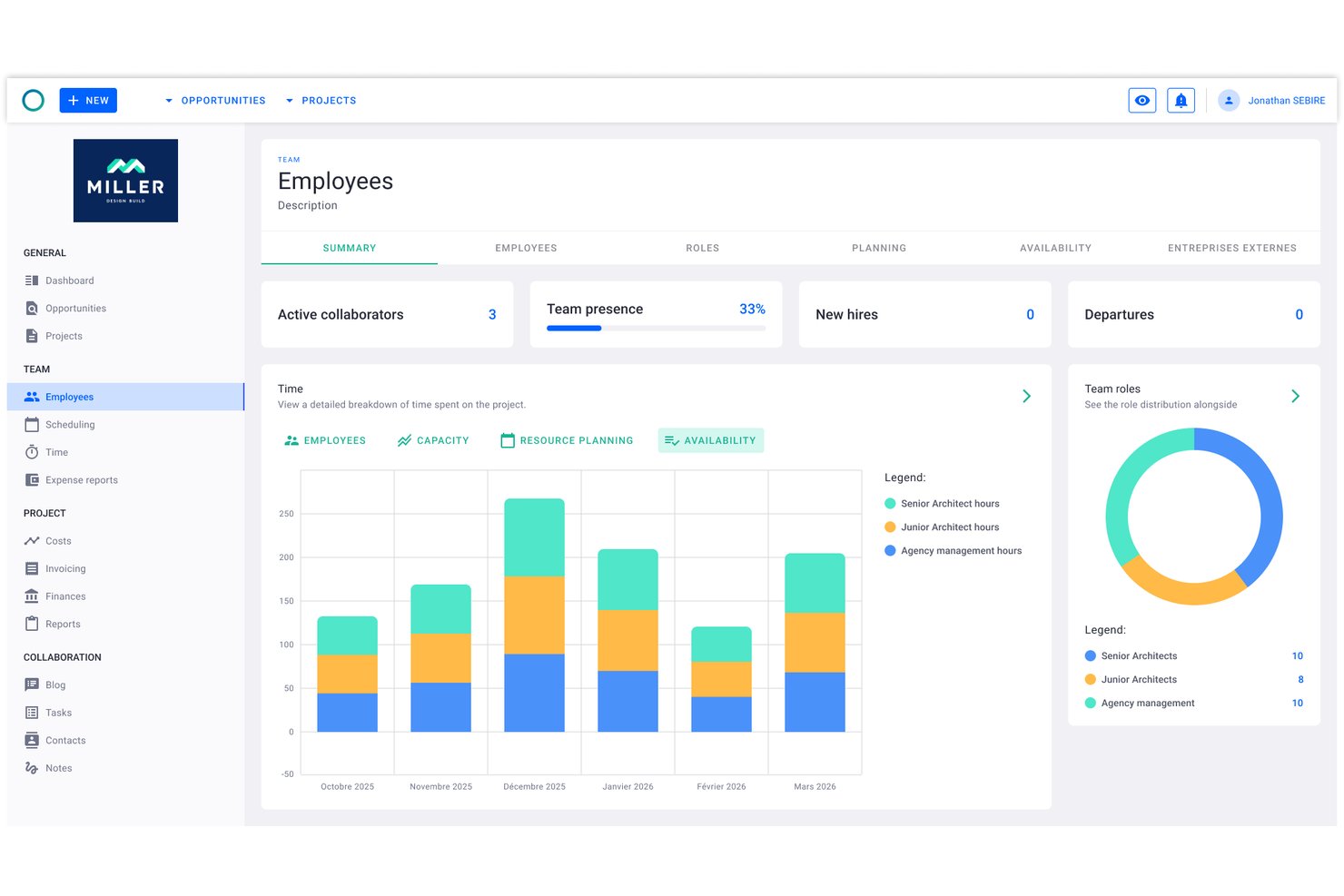
Project Flow by Milient is a project management and time tracking platform built for architecture and engineering firms, combining phase-based project planning, timekeeping, resource management, and invoicing in one system.
Who Is Project Flow by Milient Best For?
Architectural and engineering studios of any size will find it well-suited, particularly those outgrowing spreadsheets and needing connected time, budget, and resource tracking in one place.
Why I Picked Project Flow by Milient
Project Flow by Milient earns its spot on my shortlist because of how tightly it connects phase-level project planning with resource allocation and time tracking. I can break a project into detailed phases, assign team members to each one, and watch hours logged against budgeted time in real time. The live budget vs. actuals dashboard means I'm not waiting until month-end to find out a project has gone over fee.
Project Flow by Milient Key Features
- Resource planning & management: Assign team members to projects and visualize workload across concurrent phases.
- Customizable reporting suite: Generate project hours, utilization, and forecasting reports tailored for architectural practices.
- Integrated invoicing module: Convert tracked time and project data directly into client-ready invoices.
- Mobile time tracking app: Record work hours and manage project tasks from iOS and Android devices.
Project Flow by Milient Integrations
Project Flow by Milient offers native integrations with Xero, QuickBooks, Sage, Visma, Fortnox, Tripletex, and Microsoft Business Central. An API is available for custom integrations.
Pros and Cons
Pros:
- Resource planning synced with project phase timelines
- Invoicing generated directly from tracked project hours
- Phase-level time and budget tracking combined
Cons:
- Mobile app lacks full desktop functionality
- Limited name recognition outside Scandinavian markets

Clockify
Best for billable architect project hours

Clockify is a time tracking software that caters to freelancers, small businesses, and larger organizations. It allows users to track work hours, manage projects, and analyze productivity without any cost barriers.
Why I picked Clockify: I selected Clockify because it provides architects and firm leads with precise control over phase-by-phase project tracking and billable hourly rates. Architectural workflows rely heavily on tracking fixed-fee and hourly milestones across distinct phases like Schematic Design, Construction Documentation, and Contract Administration. Clockify makes it easy to set custom hourly rates per principal, architect, or draftsman, monitor real-time phase burn rates against overall project caps, and export detailed time breakdowns to maintain healthy profit margins.
Standout Features & Integrations
Features include project tracking that allows you to categorize and manage your work efficiently. Customizable reports let you analyze time usage in detail. The tool also provides a time audit feature to ensure accuracy in your logged hours.
Integrations include Trello, Asana, Jira, Monday.com, GitHub, Google Calendar, and Notion.
Pros and Cons
Pros:
- Detailed reporting features
- Budget-friendly
- Allows free time tracking for up to five users
Cons:
- Fewer customization options
- Requires manual entry

TimeCamp
Best for remote teams
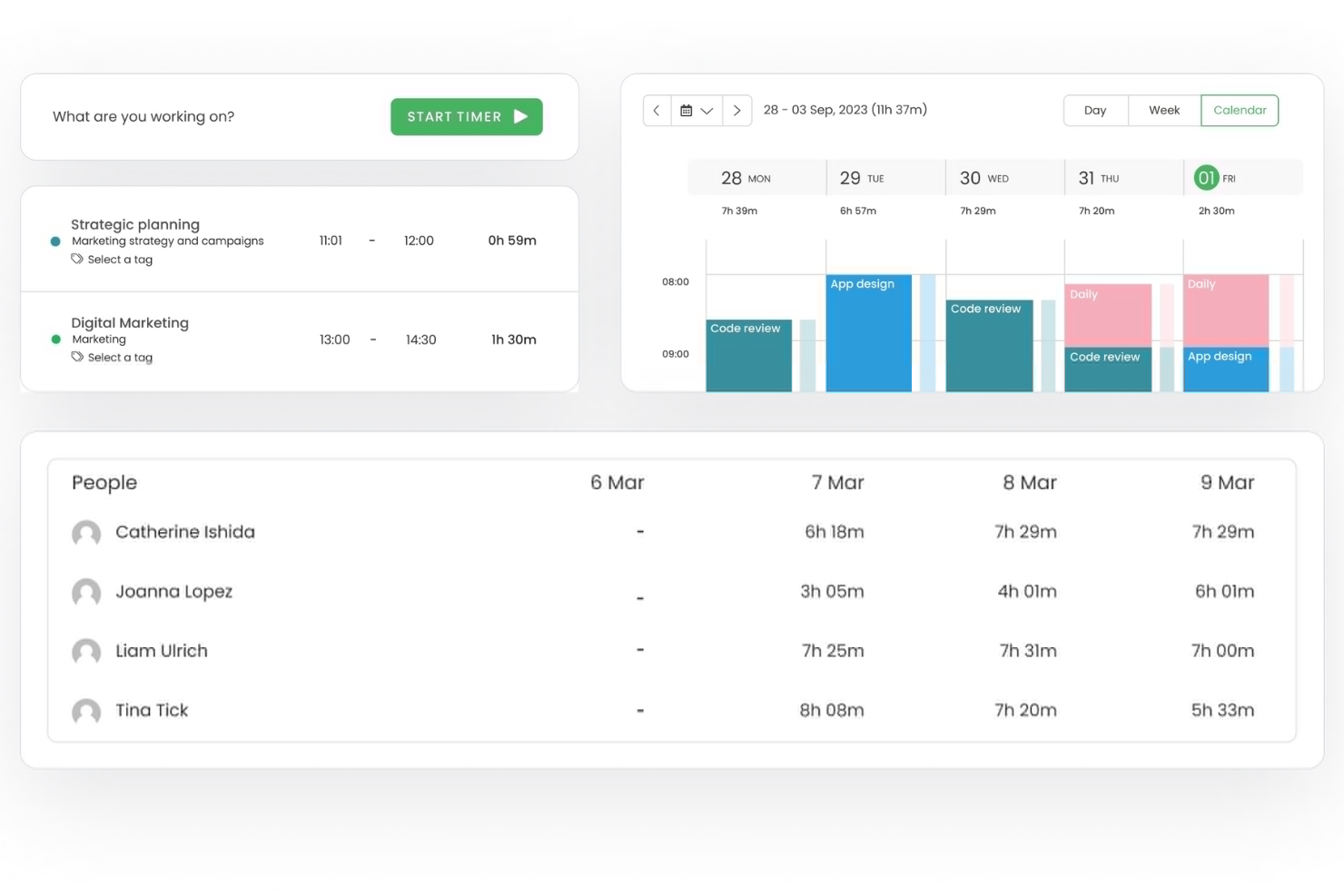
TimeCamp is a time tracking software tailored for remote teams and freelancers. It provides tools for tracking billable hours, managing projects, and generating reports to boost productivity and accountability.
Why I picked TimeCamp: It's ideal for remote teams, offering features that facilitate remote work management and collaboration. Automatic time tracking ensures your team stays productive without constant oversight. You can categorize time entries to track billable and non-billable hours effectively. Its reporting capabilities offer insights into how your team spends their time, helping you make informed decisions.
Standout Features & Integrations
Features include GPS tracking to monitor remote work locations, productivity tracking to assess team performance, and invoicing to streamline client billing. These features help you manage remote teams efficiently and maintain productivity.
Integrations include Trello, Asana, Slack, Jira, monday.com, QuickBooks, Xero, Salesforce, Microsoft Teams, and Google Calendar.
Pros and Cons
Pros:
- GPS location monitoring
- Detailed productivity tracking
- Automatic time tracking
Cons:
- Limited offline functionality
- Limited customization options

Best for budgeting
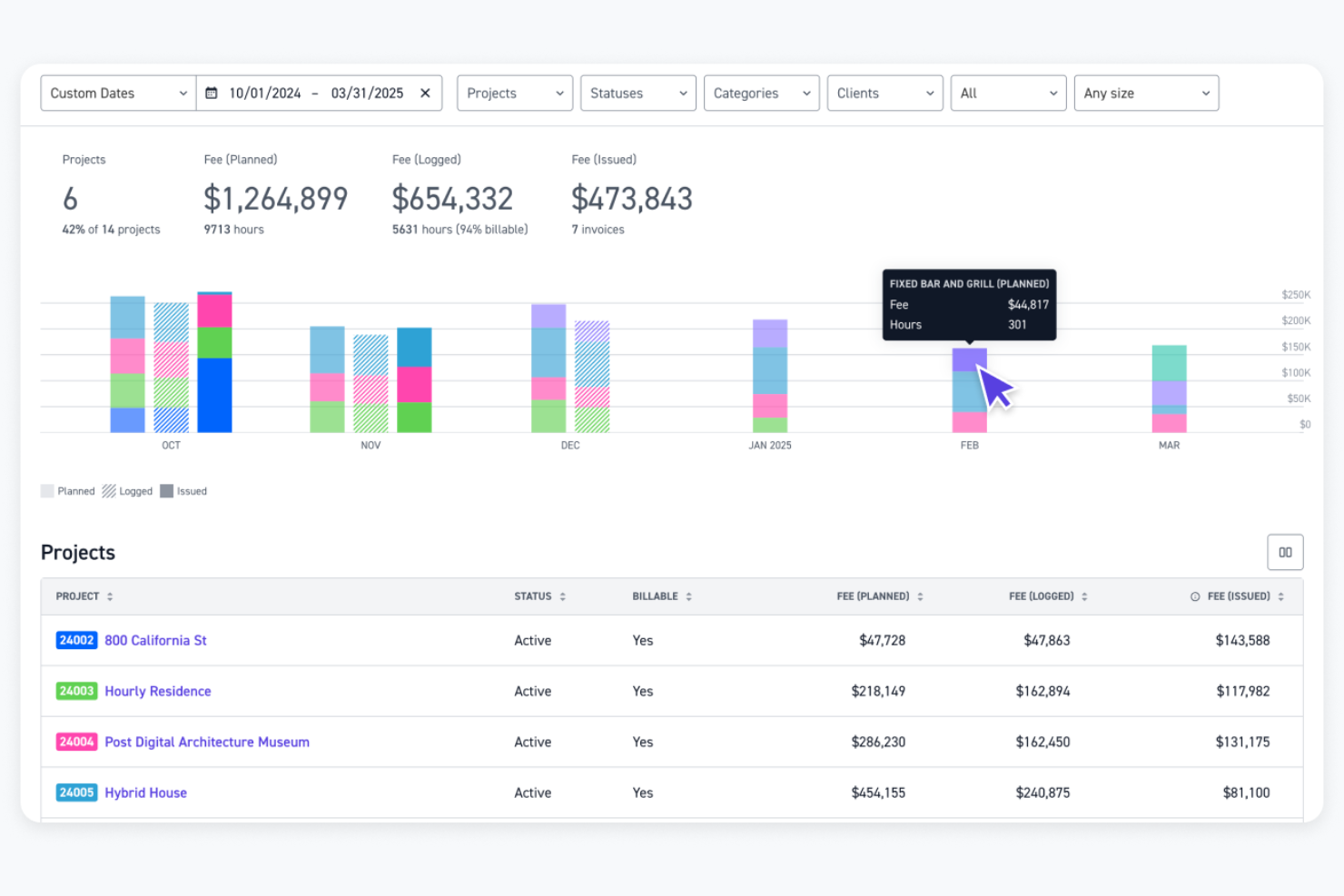
Monograph is a project management software designed specifically for architects and engineers. It helps users with budgeting, staff assignment, project tracking, and accounting.
Why I picked Monograph: It focuses on the needs of architects, offering features like trackable phase budgets and automatic staff assignment to timesheets. This specialization ensures your team can manage projects efficiently. The platform also provides performance forecasting and consultant collaboration, enhancing project outcomes. Its design-centric reports aid in making informed decisions.
Standout Features & Integrations
Features include project tracking for instant visibility, performance forecasting for future planning, and consultant collaboration to manage timelines and deliverables. These tools help you stay on top of your projects and improve overall efficiency.
Integrations include QuickBooks Online, Google Workspace, and Outlook.
Pros and Cons
Pros:
- Includes performance forecasting tools
- Facilitates consultant collaboration
- Intuitive Gantt and visual scheduling
Cons:
- Limited integrations
- Plan options feel expensive for smaller A&E firms

Bonsai
Best for contract work
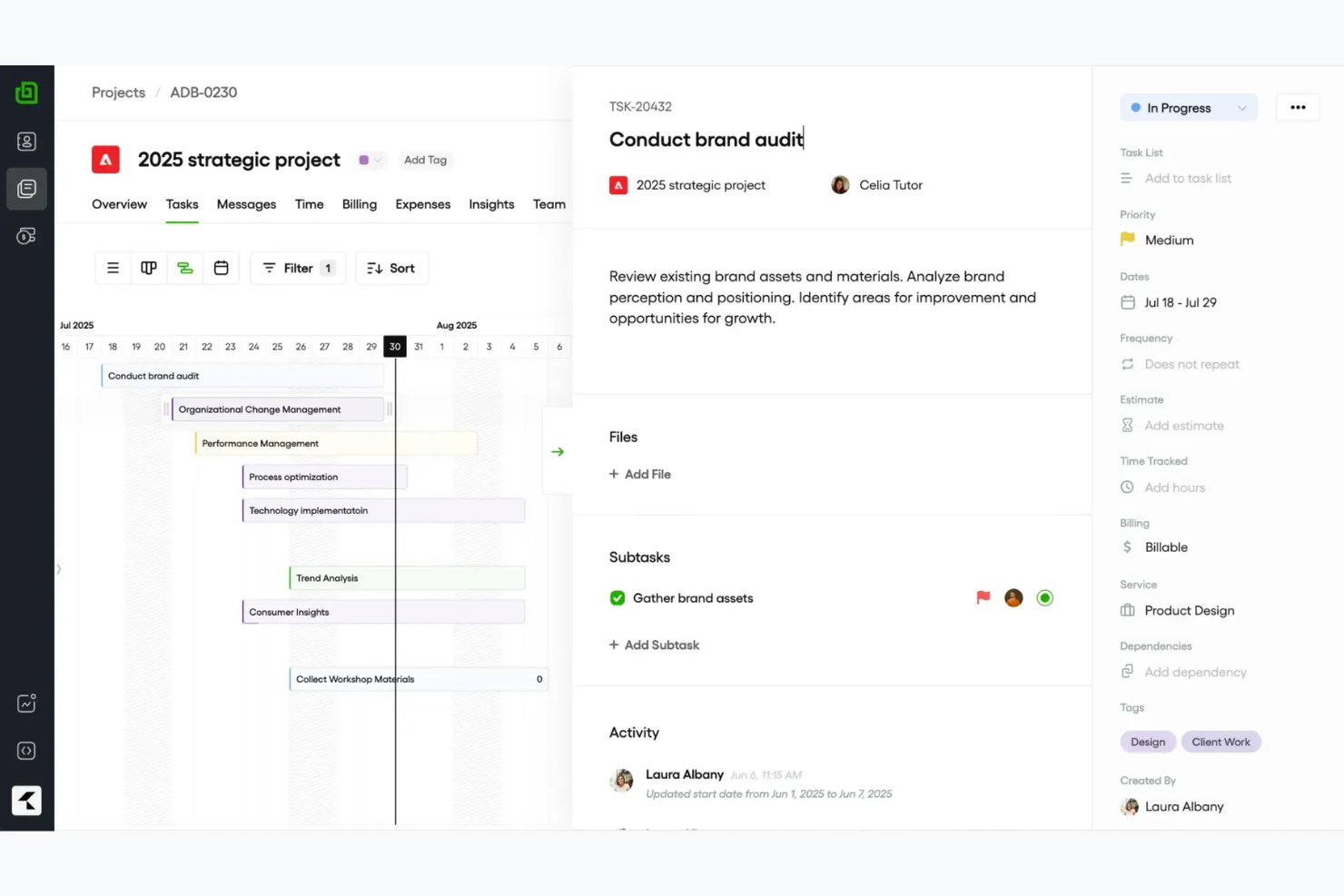
Bonsai is an all-in-one business management software designed for freelancers and small agencies. It offers tools for contract management, invoicing, and time tracking to help users manage their business operations efficiently.
Why I picked Bonsai: It's ideal for contract work, providing features like customizable contract templates and e-signatures. These tools make it easy for you to manage agreements and ensure everything is legally sound. Bonsai also includes time tracking and invoicing capabilities, allowing you to keep track of billable hours and send professional invoices. Additionally, its user-friendly interface simplifies the process of managing multiple projects.
Standout Features & Integrations
Features include customizable proposals to tailor your offerings to clients, automated reminders to ensure timely payments, and a client portal to keep communication organized. These features help you manage your business operations smoothly and maintain strong client relationships.
Integrations include QuickBooks, Xero, Zapier, Calendly, and HiBob.
Pros and Cons
Pros:
- Simplifies project management
- Automated payment reminders
- Strong contract management tools
Cons:
- Limited scalability for large teams
- Basic time-tracking and project reports

Best for payroll

Timesheets.com is a time tracking and payroll management tool designed for small to medium-sized businesses. It helps users track employee hours, manage attendance, and handle payroll tasks efficiently.
Why I picked Timesheets.com: It's especially useful for payroll management, providing features that simplify processing and ensure accuracy. You can track employee hours and manage attendance seamlessly. The tool also offers features to handle overtime calculations, making payroll processing straightforward. Additionally, its reporting capabilities help you gain insights into workforce management.
Standout Features & Integrations
Features include GPS tracking for remote employees, expense tracking to monitor project costs, and detailed reporting for workforce analysis. These features help you manage time and payroll tasks efficiently.
Integrations include QuickBooks, Sage, Paychex, and SurePayroll.
Pros and Cons
Pros:
- Detailed reporting options
- Supports overtime calculations
- Effective payroll management
Cons:
- Lacks advanced features for complex workflows
- Interface can feel dated
Mimarlar İçin Diğer Zaman Takibi Yazılımları
İşte kısa listeme giremeyen ancak yine de göz atmaya değer bazı ek mimar zaman takibi yazılımı seçenekleri:
- Deltek Replicon Time
For compliance
- TimeTracker
For small firms
- Houzz Pro
For design projects
- Harvest
For integrations
- Xero
For accounting integration
- Teamhood
For Agile teams
- TimeClick
For desktop tracking
- CMap
For project forecasting


How I Evaluate Time Tracking Software for Architects
I evaluate these tools in two layers: core features like phase-based billing and timesheet approvals that every tool must have, then the differentiators that matter most to architectural studios.
Core Functionality (Table Stakes For This List)
When I'm selecting tools for my list, I rank each one on a scale from 0 (does not offer the functionality) to 5 (excels in this area) for each core functionality listed below. Then, I calculate the tool's total score into a percentage. Each tool needs to achieve a minimum total score of 55% to be considered for inclusion.
- Project & Phase Time Tracking: I check whether hours can be logged against specific project phases like SD, DD, CD, and CA rather than just top-level project names.
- Billable Hours & Rate Configuration: Each tool should let you set different billing rates by role, project, or client so a principal's time bills differently than a junior designer's.
- Timesheet Submission & Approval: I look for structured timesheet workflows where staff submit entries and managers review them before hours flow into billing or payroll.
- Budget & Fee Monitoring: Tracking fee burn against a fixed project budget matters here—I evaluate how clearly each tool shows where a project stands relative to its contracted fee.
- Invoicing & Billing Export: Whether it's a native invoice generator or a sync with QuickBooks or Xero, the tool should move billable time into client invoices without manual re-entry.
- Reporting & Utilization Insights: Good reporting means more than hour totals—I look for views into staff utilization, project profitability, and allocation across active engagements.
Once I have a list of tools that meet this criteria, I consider what sets each platform apart.
Differentiating Factors (What Sets Vendors Apart)
Here's how I compare and contrast different vendors:
Standout Features
Resource forecasting is a big one—I look for visual capacity planning that shows who's available across upcoming projects so principals can staff new work without overloading their team. Mobile time capture also matters because architects split time between the studio, job sites, and client meetings, and offline entry keeps timesheets accurate. I also evaluate whether a tool includes pre-built AIA phase templates, which save setup time on every new project.
Beyond Features
Integration with accounting platforms like QuickBooks, Xero, or Sage Intacct is one of the first things I check, because a tool that can't sync billable hours into your invoicing workflow creates double entry. I also evaluate firm size fit—a five-person studio needs something lean, while a 200-person multi-office practice needs role-based permissions and cost center separation. Compliance with AIA billing formats matters too, especially for firms that submit percent-complete invoices on public or institutional projects.
Mimarlar İçin Zaman Takibi Yazılımı Nasıl Seçilir?
Uzun özellik listeleri ve karmaşık fiyatlandırma yapıları içinde kaybolmak kolaydır. Benzersiz yazılım seçme süreciniz üzerinde çalışırken odağınızı korumanıza yardımcı olmak için göz önünde bulundurmanız gereken faktörleri içeren bir kontrol listesi hazırladım:
| Faktör | Dikkat Edilmesi Gerekenler |
|---|---|
| Ölçeklenebilirlik | Araç firmanızla birlikte büyüyebilir mi? İşletmeniz genişledikçe ek kullanıcıları ve projeleri destekleyip desteklemediğini değerlendirin. Büyümeye uyum sağlayan esnek planlar arayın. |
| Entegrasyonlar | Mevcut araçlarınıza bağlanabiliyor mu? Manuel veri girişini azaltmak için CAD, proje yönetimi ve finans uygulamaları gibi yazılımlarla entegre olup olmadığını kontrol edin. |
| Özelleştirilebilirlik | İş akışlarınıza göre uyarlayabilir misiniz? Aracın raporları, gösterge tablolarını ve ayarları özel ihtiyaçlarınıza uygun şekilde özelleştirmenize izin verip vermediğini değerlendirin. |
| Kullanım kolaylığı | Ekibinizin benimsemesi kolay mı? Eğitim süresini azaltmak ve kullanıcı memnuniyetini artırmak için sezgisel bir arayüz ve anlaşılır talimatlar arayın. |
| Uygulama ve işe alıştırma | Ne kadar hızlı kullanmaya başlayabilirsiniz? Sorunsuz bir geçiş sağlamak için eğitim materyallerinin, kurulum yardımının ve desteğin mevcut olup olmadığını değerlendirin. |
| Maliyet | Bütçenize uygun mu? Fiyatlandırma planlarını karşılaştırın ve toplam harcamalarınızı etkileyebilecek yükseltmeler veya eklentiler gibi gizli maliyetleri değerlendirin. |
| Güvenlik önlemleri | Verileriniz korunuyor mu? Hassas bilgileri güvence altına almak için aracın şifreleme, düzenli yedekleme ve erişim denetimlerine sahip olduğundan emin olun. |
| Uyumluluk gereksinimleri | Sektör standartlarını karşılıyor mu? Özellikle katı veri yasalarının geçerli olduğu bölgelerde faaliyet gösteriyorsanız, yazılımın ilgili düzenlemelere uyup uymadığını doğrulayın. |
Zaman Takibi Yazılımı Nedir?
Zaman takibi yazılımı, çeşitli projelerde harcanan zamanı yönetmeye ve kaydetmeye yardımcı olan bir araçtır. Mimarlar, tasarımcılar ve proje yöneticileri bu araçları genellikle faturalandırılabilir saatleri takip etmek, proje bütçelerini yönetmek ve kaynakların verimli şekilde tahsis edilmesini sağlamak için kullanır. Proje takibi, zaman çizelgesi oluşturma ve bütçe izleme gibi özellikler, doğru zaman kaydı ve finansal yönetim konularında yardımcı olur. Genel olarak bu araçlar, proje verimliliğini ve kârlılığını artırmaya yardımcı olan değerli bilgiler sunar.
Özellikler
Mimarlar için zaman takibi yazılımı seçerken aşağıdaki temel özelliklere dikkat edin:
- Proje takibi: Son tarihlerin ve bütçelerin karşılanmasını sağlayarak her projenin ilerlemesini izlemenize olanak tanır.
- Zaman çizelgesi oluşturma: Çalışılan saatleri, bordro ve faturalandırma işlemlerini kolaylaştıran kapsamlı zaman çizelgelerinde otomatik olarak bir araya getirir.
- Bütçe izleme: Proje harcamalarını takip etmenize ve bütçe dahilinde kalmanıza yardımcı olarak aşırı harcamayı önler.
- Özelleştirilebilir raporlama: Zaman kullanımı ve üretkenlik hakkında özel ihtiyaçlarınıza göre uyarlanmış ayrıntılı bilgiler sunar.
- Entegrasyon özellikleri: İş akışlarını kolaylaştırmak için CAD yazılımları ve proje yönetimi uygulamaları gibi diğer araçlara bağlanır.
- GPS takibi: Şeffaflık ve hesap verebilirlik sağlamak için uzaktan çalışma konumlarını izlemenize olanak tanır.
- Müşteri iletişim araçları: İş birliğini kolaylaştırır ve müşterileri proje ilerlemesi ile güncellemeler hakkında bilgilendirir.
- Gider takibi: Projeyle ilgili maliyetleri izler ve faturalandırma sürecini basitleştirir.
- Faturalandırma özellikleri: Takip edilen saatlere ve giderlere göre profesyonel faturalar oluşturur ve ödeme süreçlerini hızlandırır.
- Güvenlik önlemleri: Hassas verileri şifreleme ve erişim denetimleriyle koruyarak sektör standartlarına uyumluluğu sağlar.
Faydalar
Mimarlar için zaman takibi yazılımını uygulamak, ekibiniz ve işletmeniz açısından çeşitli faydalar sağlar. İşte yararlanabileceğiniz birkaç fayda:
- Geliştirilmiş proje yönetimi: Zamanı ve bütçeleri takip ederek projelerin programa uygun ve finansal sınırlar içinde kalmasını sağlayabilirsiniz.
- Artan üretkenlik: Zaman kullanımıyla ilgili ayrıntılı raporlar sayesinde verimsizlikleri belirleyebilir ve ekibinizin iş akışını optimize edebilirsiniz.
- Doğru faturalandırma: Otomatik olarak oluşturulan zaman çizelgeleri ve faturalar, müşterilerin çalışılan saatler için doğru şekilde ücretlendirilmesini sağlar.
- Geliştirilmiş müşteri iletişimi: Güncellemeleri ve iş birliğini kolaylaştıran araçlar, müşterilerinizin bilgilenmesini ve memnun kalmasını sağlar.
- Maliyet kontrolü: Harcamaları izlemek, aşırı harcamayı önlemeye ve projelerinizin kârlılığını korumaya yardımcı olur.
- Veri güvenliği: Şifreleme ve erişim denetimleri sayesinde hassas proje verileriniz korunur ve sektör standartlarına uygun kalır.
- Kolay entegrasyon: Mevcut araçlara bağlanmak süreçlerinizi kolaylaştırır ve manuel veri girişini azaltır.
Mimarlar için Zaman Takibi Yazılımının Maliyetleri ve Fiyatlandırması
Mimarlar için zaman takip yazılımı seçmek, mevcut çeşitli fiyatlandırma modellerini ve planları anlamayı gerektirir. Maliyetler özelliklere, ekip büyüklüğüne, eklentilere ve daha fazlasına göre değişir. Aşağıdaki tablo, mimarlara yönelik zaman takip yazılımı çözümlerinde yaygın planları, ortalama fiyatlarını ve genellikle sunulan özellikleri özetlemektedir:
Zaman Takip Yazılımı İçin Plan Karşılaştırma Tablosu
| Plan Türü | Ortalama Fiyat | Yaygın Özellikler |
|---|---|---|
| Ücretsiz Plan | $0 | Temel zaman takibi, sınırlı raporlama ve gerekli entegrasyonlar. |
| Kişisel Plan | $5-$15/user/month | Zaman takibi, proje yönetimi, faturalandırma ve temel raporlama. |
| İşletme Planı | $20-$40/user/month | Gelişmiş raporlama, bütçe takibi, gider yönetimi ve gelişmiş entegrasyonlar. |
| Kurumsal Plan | $50-$100/user/month | Özelleştirilebilir özellikler, özel destek, gelişmiş güvenlik ve kapsamlı analizler. |
Mimarlar İçin Zaman Takip Yazılımı Hakkında SSS
Mimarlar için zaman takip yazılımı hakkında sık sorulan bazı soruların yanıtlarını burada bulabilirsiniz:
Zaman takip yazılımını uygulamak zor mudur?
Hayır, mimarlar için zaman takip yazılımlarının çoğu kullanıcı dostu olacak ve kolayca uygulanabilecek şekilde tasarlanmıştır. Ekibinizin hızla kullanmaya başlamasına yardımcı olmak için eğitim kaynakları, öğreticiler ve müşteri desteği sunan araçları tercih edin. Sorunsuz bir işe alıştırma süreci, kesintileri en aza indirebilir ve ekibinizin yeni aracı kullanırken kendini rahat hissetmesini sağlayabilir.
Zaman takip yazılımı diğer araçlarla entegre olabilir mi?
Evet, birçok zaman takip çözümü proje yönetimi, muhasebe ve iletişim için kullanılan popüler araçlarla entegrasyonlar sunar. Yazılımı seçmeden önce, süreçlerinizi iyileştirmek ve manuel veri girişini azaltmak için CAD yazılımı veya muhasebe platformları gibi hâlihazırda kullandığınız araçlarla entegre olup olmadığını kontrol edin.
Zaman takip yazılımı ne kadar güvenlidir?
Mimarlar için zaman takip yazılımları, verilerinizi korumak amacıyla genellikle şifreleme ve erişim denetimleri gibi güvenlik önlemleri içerir. Seçenekleri değerlendirirken sağlayıcının güvenlik protokollerini ve sektör standartlarına uygunluğunu öğrenin. Gelişmiş güvenlik özelliklerine sahip bir araç seçmek, hassas bilgilerinizin güvende kalmasını sağlar.