

2026 İçin Seçilen En İyi 10 İnşaat İş Akışı Yazılımı

10 En İyi İnşaat İş Akışı Yazılımları Kısa Listesi


İnşaat iş akışı yazılımı seçmek göz korkutucu olabilir. Proje süreçlerini kolaylaştırmak istiyorsunuz, ancak doğru aracı seçmek bunaltıcı görünebilir. Kararınızı kolaylaştırmak için buradayım. İnşaat sektöründe yazılım uzmanı olarak edindiğim yıllara dayanan deneyimime dayanarak, gerçekten fark yaratan en iyi araçların bir listesini derledim. Her araç, inşaat projelerini etkili bir şekilde düzenlemek, takip etmek ve yönetmek için benzersiz özellikler sunuyor. Bu araçlar yalnızca karmaşık iş akışlarını otomatikleştirmekle kalmaz, aynı zamanda hataları ve gecikmeleri de önemli ölçüde azaltır; iletişim kopukluğu ve bütçe aşımları gibi yaygın sorunların doğrudan ele alınmasını sağlar. İşte şu anda en iyi inşaat iş akışı yazılımları için seçimlerim.
Why Trust Our Software Recommendations
Our team has been testing and reviewing software since 2012. As project managers ourselves, we know how difficult—and important—it is to choose the right software.
For this guide, we evaluated tools using hands-on testing and independent research, scoring tools using our selection criteria. We also draw on insights from industry thought leaders and practicing project management experts.
Our reviews reflect our human editorial judgment, not a sales pitch.
Expert reviewers:
Karşılaştırma Tablosu: İnşaat İş Akışı Yazılımları
Bu karşılaştırma tablosu, en iyi inşaat iş akışı yazılımı seçimlerimin fiyatlandırma ayrıntılarını özetler.
| Tool | Starting Price | Website | |
|---|---|---|---|
| Best for centralized construction project management | 4.3 out of 5 | $10/user/month Free plan + 14-day trial available | Book Demo |
| Best for master schedules tied to daily plans | — | $610/project/month Free trial + demo available | Website |
| Best for comprehensive construction management at scale | 4.5 out of 5 | Pricing upon request 14-day free trial for Procore Estimating + free demo available | Website |
| Best for home builders and remodelers for project tracking | 4.5 out of 5 | Pricing upon request Free demo available | Website |
| Best for field management and on-site coordination | 4.5 out of 5 | $39/user/month Free plan available | Website |
| Best for managing custom fabrication projects | 4.5 out of 5 | $790/month Free demo available | Website |
| Best for workflow templates | 4.2 out of 5 | Pricing upon request Free plan available | Website |
| Best for construction firms focusing on cost tracking | — | $45/user/month. 14-day free trial | Website |
| Best for visual collaboration in BIM projects | — | $50/user/month | Website |
| Best for non-technical users in process automation | — | £1,722/month 7-day free trial + free demo | Website |

En İyi İnşaat İş Akışı Yazılımları İncelemeleri
En iyi inşaat iş akışı yazılımlarına ilişkin ayrıntılı incelemelerimizi keşfedin; burada her aracın avantajlarını ve dezavantajlarını ayrıntılı olarak ele alıyoruz. Özellikleri hakkında bilgi edinin ve hangi yazılımın belirli inşaat projesi ihtiyaçlarına en uygun olduğunu belirleyin.

Wrike
Best for centralized construction project management

Wrike is a versatile project management tool with comprehensive and flexible solutions, offering features such as task management, time tracking, and collaboration tools. It stands out for its centralized solution that offers 360-degree visibility on all projects.
Why I Picked Wrike: One of Wrike’s most compelling attributes is its ability to handle complex project timelines and dependencies in a centralized place. The platform’s Gantt chart tool allows for detailed planning and visualization of construction schedules, enabling easy adjustments to timelines and resources as projects evolve. Additionally, Wrike supports the creation of custom workflows that mirror the multi-stage nature of construction projects, ensuring that each phase transitions smoothly into the next while maintaining oversight of critical tasks and deadlines.
Standout features & integrations:
Wrike features comprehensive resource management tools, allowing for the efficient allocation and tracking of both human and material resources across projects. It also offers workflow automation for teams to automate routine tasks and notifications. The platform also includes detailed reporting and analytics functions, providing critical insights into project performance, team productivity, and budget tracking.
Wrike integrates with a range of tools, including OneDrive, Microsoft SharePoint, Adobe Creative Cloud, Microsoft Teams, Slack, Salesforce, Google Drive, and Zoom. It also has an API and Wrike Integrate, a tool for custom integrations.
Pros and Cons
Pros:
- All-in-one project management solution
- Interactive visual Gantt chart
- Flexible project templates
Cons:
- Potential complexity in setting up automated workflows
- Lack of in-platform chat option
New Product Updates from Wrike

Wrike Adds Advanced Filters to Chart View
Wrike introduces new default filters in Chart view, including relative dates, exclusion conditions, multiple filters per field, and status group filtering. These updates help teams refine project data and reporting. For more information, visit Wrike’s official site.

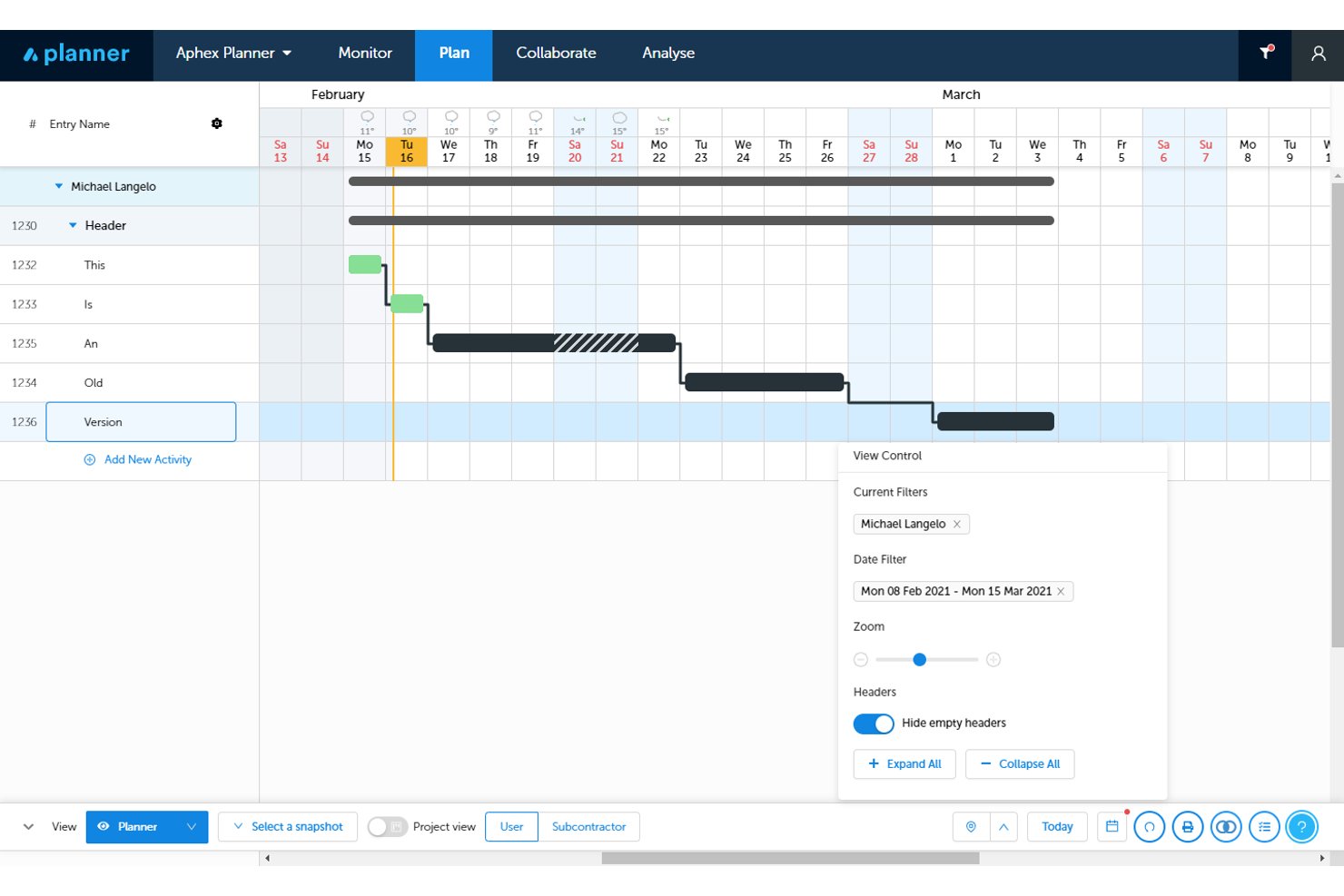
Aphex is a construction planning platform that connects master schedules, lookahead plans, weekly work plans, and daily coordination into a single shared live programme.
Who Is Aphex Best For?
Aphex is a strong fit for construction project managers who need their master schedule and daily site coordination to live in the same place.
Why I Picked Aphex
I picked Aphex as one of the best because it's the only tool I've seen that genuinely connects a master schedule to daily site coordination without treating them as separate systems. I love how the daily coordination meeting view builds itself automatically from the live lookahead, so my team isn't rebuilding task lists each morning. Lookaheads, weekly work plans, and the master schedule all update in one shared plan, which means slippage and delay reasons are visible to everyone the moment they're logged.
Aphex Key Features
- Resource planning: Assign labour, plant, and materials to tasks, with project-wide demand views that surface bottlenecks and scheduling overlaps.
- Dependency linking: Connect tasks using Start-to-Start, Start-to-Finish, Finish-to-Start, and Finish-to-Finish links with lag, so date changes cascade automatically to dependent successors.
- Publishing routines: Set recurring deadlines for plan updates, notify task owners to ready their plans, and review readiness and blockers before each publish.
- Staging diagrams: Visualise planned work on site maps or floor plans, with diagrams that update automatically as the live plan changes and can be printed or shared with crews.
Aphex Integrations
Aphex supports schedule imports from Primavera P6, Microsoft Project, Asta, and Powerproject, plus native Power BI and Tableau connectors and mapping integrations with ArcGIS, Propeller, and DroneDeploy. It offers Work Area, Plan, and Version APIs for custom integrations.
Pros and Cons
Pros:
- Live plans expose delays and blockers
- Dependency changes recalculate successor dates
- Master schedules feed daily coordination
Cons:
- No drawing version control or sign-offs
- No RFI or submittal approval chains

Procore
Best for comprehensive construction management at scale

Procore offers a robust platform designed to manage all phases of construction projects, from planning to completion, across multiple projects simultaneously. This software is particularly effective for large-scale construction firms needing extensive project oversight and collaboration capabilities.
Why I Picked Procore: I selected Procore for this list because of its exceptional ability to handle complex, large-scale construction projects, a task that many other software struggle with. It stands out for its comprehensive set of tools that cover every aspect of construction management, making it ideal for large companies with extensive project needs. It is best for this due to its scalability and integration depth which support large teams and multifaceted projects efficiently.
Standout features & integrations:
Procore excels with its real-time data access, which ensures all stakeholders can see project updates as they happen, enhancing decision-making and problem-solving. The tool's quality and safety compliance features help maintain standards across sites, while its financial management capabilities streamline budget tracking and cost control. These features collectively ensure projects stay on track and within budget.
Procore integrates natively with numerous other applications, including Autodesk, Sage, QuickBooks, Oracle, Microsoft Project, Zapier, Slack, Box, and DocuSign. This wide range of integrations enhances its functionality, allowing for seamless data flow between different systems and platforms used within construction projects.
Pros and Cons
Pros:
- Real-time data and analytics
- Extensive integration capabilities
- Comprehensive project oversight
Cons:
- Primarily tailored to large enterprises
- Steep learning curve
- Higher cost barrier for small firms

Best for home builders and remodelers for project tracking
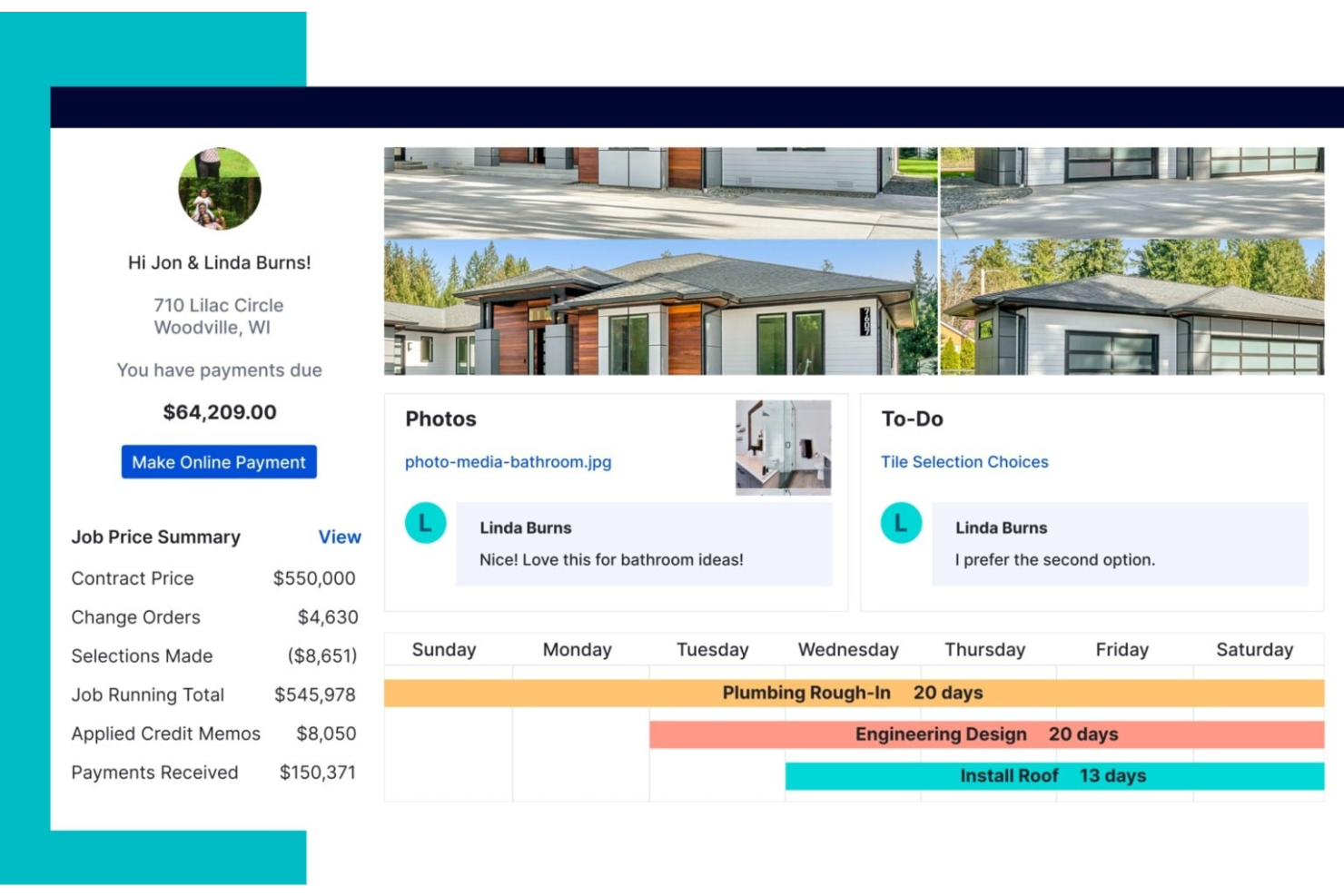
Buildertrend provides a comprehensive construction management solution tailored to the needs of home builders and remodelers. It focuses on project tracking, client management, and financial oversight, facilitating smoother project flows and improved client communication.
Why I Picked Buildertrend: I chose Buildertrend for this list because it specifically addresses the challenges faced by residential construction businesses in tracking and managing projects. Its user-friendly interface and specialized tools for home builders and remodelers make it a standout choice. It is best for these groups because it offers tailored solutions that streamline daily operations and enhance client satisfaction.
Standout features & integrations:
Buildertrend features robust project scheduling tools that keep all team members on track with real-time updates. The software's customer relationship management (CRM) capabilities ensure efficient communication with clients, and its financial tools support precise budgeting and invoicing. These features help in maintaining alignment among project stakeholders and in managing financials transparently.
Buildertrend natively integrates with many popular tools including QuickBooks, Xero, Dropbox, Zapier, Google Calendar, Outlook, PlanSwift, and Autodesk. These integrations facilitate seamless data transfer and communication across various platforms essential for construction management.
Pros and Cons
Pros:
- Strong client communication tools
- Comprehensive project management features
- Tailored for residential construction
Cons:
- Can be overwhelming for smaller projects
- Requires commitment to fully integrate into workflows
- Premium pricing model

Best for field management and on-site coordination

Fieldwire is focused on enhancing field management and on-site coordination for construction teams, offering tools that streamline communication and task management. Its platform is designed to connect field workers with project managers, ensuring everyone stays informed and aligned throughout the project lifecycle.
Why I Picked Fieldwire: I picked Fieldwire because of its strong capabilities in managing on-site activities, an area that's critical for the successful execution of construction projects. It excels in providing clear, real-time communications and task updates, which are essential for dynamic construction environments. This tool is best for field management and on-site coordination due to its emphasis on accessibility and immediate information flow essential for field workers.
Standout features & integrations:
Fieldwire's real-time push notifications ensure that field teams are instantly aware of changes or new information, reducing delays and miscommunications. Its powerful task management system allows for detailed assignment tracking and progress updates. The platform also features comprehensive plan management tools, enabling easy access to blueprints and updates directly from the field.
Fieldwire integrates with numerous construction and business tools to enhance its functionality, including PlanGrid, Autodesk, Box, Dropbox, Google Drive, and Zapier. These integrations help streamline document management and communication between various platforms used in construction projects.
Pros and Cons
Pros:
- Immediate updates and notifications
- Effective task and plan management
- Strong focus on field communication
Cons:
- Requires annual commitment for best pricing
- Primarily tailored for field use, less focus on back-office functions
- Higher cost for smaller teams

Archdesk
Best for managing custom fabrication projects

Archdesk is a versatile construction management software tailored for complex, custom fabrication projects. It integrates various aspects of project management, financial management, and resource planning into a single platform, providing specialized tools for industries with unique demands.
Why I Picked Archdesk: I chose Archdesk for its robust handling of the unique challenges in custom fabrication projects. It distinguishes itself from other software with its ability to adapt to the highly specific needs of custom project workflows. This tool is best for managing custom fabrication projects because it offers the flexibility and detail-oriented features necessary for precise, tailored project execution.
Standout features & integrations:
Archdesk excels with its detailed project tracking which allows for meticulous monitoring of custom fabrication processes. The software includes powerful ERP features that integrate project management with financial analysis, enhancing budget control and cost analysis. Additionally, its resource scheduling capabilities ensure optimal allocation of materials and labor, critical for project efficiency.
Archdesk typically integrates with accounting software, CRM systems, ERP tools, document management systems, and analytics platforms. These integrations help streamline operations across various departments involved in custom fabrication projects.
Pros and Cons
Pros:
- Advanced resource scheduling tools
- Comprehensive ERP features
- Tailored for custom fabrication projects
Cons:
- Requires training for maximum benefit
- May be complex for smaller projects
- Pricing information not transparent

Best for workflow templates

Pneumatic Workflow is a workflow management software that helps teams build, organize, and manage repetitive processes with ease.
Why I Picked Pneumatic Workflow: It provides a structured approach to handling recurring tasks and workflows. With its templating feature, you can standardize processes, making it easy for team members to follow set steps without deviation. Each step in a workflow is assigned to specific team members, and built-in task tracking ensures nothing slips through the cracks. Real-time notifications also keep everyone updated on task status. Pneumatic’s form builder adds to its versatility, allowing you to collect and manage data within each workflow. Its capabilities are particularly beneficial for construction teams who need an adaptable yet controlled way to handle tasks across multiple projects.
Standout features & integrations:
Features include detailed analytics that provide insight into process bottlenecks and completion rates, valuable for teams that need to optimize for efficiency. Role-based permissions further enhance security, letting you control access to workflows as needed. It also offers an AI-powered workflow builder, conditional workflow logic, and the ability to label any workflow as an urgent priority.
Integrations include Slack, Google Sheets, Trello, Gmail, HubSpot, Microsoft Outlook, Google Calendar, Asana, Salesforce, Dropbox, Microsoft Teams, and Zoom.
Pros and Cons
Pros:
- Customizable workflow templates
- Facilitates collaboration among team members
- Automation within the tool assists in simplifying workflows
Cons:
- Could offer more integrations
- Performance may vary depending on workflow complexity


WorkflowMax offers a comprehensive construction project management solution with a strong emphasis on financial tracking and project costing. It is designed to help construction firms manage their projects, resources, and costs more effectively, providing clear visibility into every aspect of their operations.
Why I Picked WorkflowMax: I selected WorkflowMax for this list because of its specialized capabilities in cost tracking and project financial management, which are critical for maintaining profitability in the construction industry. It stands out due to its detailed financial insights and the ability to manage project quotes, invoices, and timesheets in one integrated platform. It is best for construction firms focusing on cost tracking as it offers tools that help firms control budgets and improve financial outcomes.
Standout features & integrations:
WorkflowMax features powerful job costing tools that allow firms to track actual vs. budgeted costs in real-time, providing a clear view of financial health. Its project management capabilities integrate tasks, staff, and contractor time tracking, ensuring that all project components are accurately logged and monitored. The software also includes customizable reports that enable users to generate detailed insights into every aspect of their projects.
WorkflowMax integrates with a variety of other tools to enhance its functionality, including Xero for accounting, Box for document management, and Zapier for workflow automation. Other integrations typically include CRM systems, payroll solutions, and various communication tools to streamline all facets of project management.
Pros and Cons
Pros:
- Customizable reporting features
- Integration with Xero enhances accounting capabilities
- Detailed cost tracking and financial management
Cons:
- Focuses mainly on cost management, less on other aspects of project management
- Pricier option for small firms
- Steeper learning curve due to complex features


Revizto is a construction workflow software that specializes in Building Information Modeling (BIM) integration and collaboration. It facilitates seamless communication and coordination among teams by visualizing project data in real-time, which is crucial for complex construction and architectural projects.
Why I Picked Revizto: I selected Revizto for its outstanding capabilities in supporting BIM projects through enhanced visual collaboration tools. It stands out from other construction workflow software with its robust feature set designed specifically for managing BIM data effectively. It's best for visual collaboration in BIM projects because it provides an intuitive platform for teams to interact with 3D models and share insights, ensuring everyone is aligned and informed throughout the project lifecycle.
Standout features & integrations:
Revizto's real-time 3D visualization tools allow project stakeholders to view and interact with BIM models directly from any device, fostering better decision-making and project outcomes. The software includes issue tracking functionality that integrates directly with the 3D model, making it easier to pinpoint and resolve issues promptly. Additionally, Revizto supports collaborative markups, enabling teams to annotate directly on the model to communicate changes or concerns effectively.
Integrations: Revizto integrates with a range of industry-standard tools such as Autodesk Revit, AutoCAD, Navisworks, SketchUp, and Trimble, enhancing its utility in BIM environments. Further integrations typically include common project management software, enhancing its ability to function seamlessly within a company's existing technological ecosystem.
Pros and Cons
Pros:
- Support for extensive industry-standard BIM tools
- Effective issue tracking integrated with models
- Advanced 3D BIM visualization
Cons:
- Predominantly beneficial for projects that utilize BIM
- Requires familiarity with BIM processes
- Higher cost relative to some traditional project management tools


Flowforma is designed to empower construction companies by automating processes in a user-friendly environment, particularly suited for non-technical users. It facilitates efficient management of daily operations, compliance, and quality control, using no-code process automation to simplify complex tasks.
Why I Picked Flowforma: I picked Flowforma because of its exceptional ability to democratize process automation for users without technical backgrounds. Its no-code approach allows field managers, project managers, and other construction professionals to automate and streamline processes effortlessly. It stands out because it makes sophisticated automation accessible, making it best for non-technical users in process automation by removing common barriers to technology adoption.
Standout features & integrations:
Flowforma is equipped with drag-and-drop process builders, which make it straightforward to create and modify workflows. The tool offers robust decision and rule-based logic capabilities that guide users through each step of a process, ensuring compliance and minimizing errors. Additionally, its comprehensive document generation and management features improve documentation accuracy and availability.
Flowforma typically integrates with core Microsoft technologies and other enterprise systems to enhance its functionality in real-world scenarios.
Pros and Cons
Pros:
- Effective compliance management
- User-friendly interface
- No-code process automation
Cons:
- Focus on Microsoft integration may limit some users
- May not suit very complex IT environments
- Limited public information on integrations
Değerlendirilebilecek Diğer İnşaat İş Akışı Yazılımları
Aşağıda, kısa listemize aldığımız ancak en iyi listeye giremeyen ek inşaat iş akışı yazılımlarının bir listesi yer alıyor. Kesinlikle göz atmaya değer.
- Orangescrum
For agile project management in construction
- Dashpivot by Sitemate
For photo and video-based progress tracking
- Ontraccr
For real-time project status updates
- Jotform Workflows
For customizable construction approval workflows
- Jobber
For small business efficiency in scheduling and invoicing
- GoodDay
For dynamic construction workflows
- Smartsheet
Good for spreadsheet-style project management
- Zoho Projects
Good for comprehensive project scheduling and tracking
- Kantata
Good for resource management and profitability insights
- monday AI Workspace
With AI-powered risk and workflow insights
- ClickUp
Good for customizable workflow automation
- Methvin
Good for precise construction estimating
- Fluix
Good for mobile workflow management in the field
- Asana
Good for task management and team collaboration


How I Evaluate Construction Workflow Software
I evaluate every tool against two layers: the baseline capabilities—RFI management, field sync, document control—that qualify it for inclusion, and the differentiators that make it the right fit.
Core Functionality (Table Stakes For This List)
When I'm selecting tools for my list, I rank each one on a scale from 0 (does not offer the functionality) to 5 (excels in this area) for each core functionality listed below. Then, I calculate the tool's total score into a percentage. Each tool needs to achieve a minimum total score of 65% to be considered for inclusion.
- RFI & Submittal Workflows: I check whether each tool supports structured RFI and submittal routing with ball-in-court tracking, so teams know exactly who's holding up a response.
- Field-to-Office Collaboration: Mobile daily logs, punch lists, and field reports should sync back to office records, even when crews are working offline at remote job sites.
- Drawing & Document Control: I look for version-controlled sheet management with markup tools, so a superintendent can confirm they're building from the latest revision set.
- Change Order Approvals: Each tool should offer configurable approval chains that connect change orders to project budgets, giving PMs a clear cost-impact view before sign-off.
- Schedule & Task Coordination: I evaluate whether the tool handles task dependencies, milestones, and lookahead planning across trades rather than offering a basic task list.
- Subcontractor Management: Assigning work, sharing documents, and tracking compliance items like insurance certificates and lien waivers should all live within the platform.
Once I have a list of tools that meet the criteria, I consider what sets each platform apart.
Differentiating Factors (What Sets Vendors Apart)
Here's how I compare and contrast different vendors:
Standout Features
BIM integration matters when your team needs to view and coordinate 3D models alongside RFIs and submittals without jumping to a separate platform. I also evaluate real-time cost sync—when a change order gets approved, the project budget should update automatically. Safety and incident reporting is another differentiator, especially for teams managing JHAs and toolbox talks alongside daily logs on the same job site record.
Beyond Features
Integrations shape how well a platform fits your existing stack. I check for native connectors to construction accounting systems like Sage 300 CRE or Viewpoint Vista, plus scheduling tools like Primavera P6. Implementation support also matters—rolling out standardized workflows across multiple job sites requires hands-on guidance from consultants who understand construction. Pricing transparency is worth evaluating too, particularly whether subcontractor and collaborator seats are included or billed separately as your project teams scale.
İnşaat İş Akışı Yazılımı Nasıl Seçilir?
Kendinize özgü yazılım seçim sürecinizi yürütürken aşağıdaki noktaları göz önünde bulundurun:
- Entegrasyon Olanakları: İnşaat projeleri çeşitli sistemleri ve paydaşları içerir. ERP sistemleri, muhasebe yazılımları ve proje yönetimi platformları gibi kullandığınız diğer araçlarla sorunsuz bir şekilde entegre olan yazılımları seçin. Örneğin, muhasebe departmanınız belirli bir araç kullanıyorsa iş akışı yazılımınız, manuel veri girişi gerektirmeden bu araçtan veri alabilmeli ve bu araca veri gönderebilmelidir.
- Kullanım Kolaylığı: Yazılımın verimliliği genellikle kullanılabilirliğiyle sınırlıdır. Teknolojiye daha az aşina ekip üyeleri için bile sezgisel ve kolay gezilebilir bir araç seçin. Bu, hızlı benimsemeyi sağlar ve yoğun proje ortamlarında işe alıştırmaya karşı direnci doğrudan ele alarak eğitim süresini en aza indirir.
- Mobil Erişim: Ekipler genellikle ofis konumları ve aktif inşaat sahaları arasında bölündüğünden, iş akışı yazılımınıza mobil erişimin olması çok önemlidir. Hareket hâlindeyken gerçek zamanlı güncelleme ve karar alma ihtiyacını karşılamak için akıllı telefonlarda ve tabletlerde tüm işlevleri sunmalıdır.
- Özelleştirme Seçenekleri: Her inşaat projesi farklıdır. Yazılımınız, özel iş akışı ihtiyaçlarınızla uyumlu özelleştirme seçenekleri sunmalıdır. Bu, farklı roller için ayarlanabilir gösterge panelleri veya formları ve raporları projenin gereksinimlerine uyacak şekilde değiştirme olanağı anlamına gelebilir.
- Destek ve Eğitim: İnşaat projeleri geliştikçe yazılım ihtiyaçlarınız da gelişir. Sürekli olarak mükemmel destek ve eğitim sağlayan bir tedarikçiyi tercih edin. Bu, proje ilerlemesini engelleyebilecek yazılım kesintileri veya güncellemeler gibi sorunları ele almak ve ihtiyaç duyduğunuzda her zaman yardım alabilmenizi sağlamak açısından hayati önem taşır.
İnşaat İş Akışı Yazılımındaki Eğilimler
İnşaat iş akışı yazılımı teknolojisinde fark ettiğim bazı eğilimleri ve bunların pazarlama sektörünün geleceği açısından ne anlama gelebileceğini burada bulabilirsiniz. En önemli içgörüleri ortaya çıkarmak için sayısız ürün güncellemesini, basın bültenini ve sürüm günlüğünü inceledim.
- Gelişmekte Olan Teknolojilerle Entegrasyon: İnşaat iş akışı yazılımı, yapay zekâ, IoT ve AR/VR gibi gelişmekte olan teknolojileri giderek daha fazla bünyesine katıyor. Bu entegrasyonlar daha akıllı proje yönetimine, proje zaman çizelgeleri ve kaynak tahsisi için öngörücü analizlere ve geliştirilmiş sanal saha turlarına olanak tanıyor. Bu eğilim, sektörün dijital dönüşüme yönelişini ortaya koyarak hataları azaltmayı ve verimliliği artırmayı amaçlıyor.
- Mobil Optimizasyon ve Erişim: Yazılımlar artık masaüstü uygulamalarının yeteneklerini yansıtan daha güçlü mobil platformlar sunduğundan, mobil işlevselliğe verilen önem artmaya devam ediyor. Proje durumlarını güncelleme, belgelere erişme ve ekip üyeleriyle gerçek zamanlı iletişim kurma olanağının tümünün mobil bir cihazdan sağlanabilmesi, inşaat sahalarının dinamik ortamında büyük önem taşıyan hareket hâlinde proje yönetimi ihtiyacını karşılıyor.
- Geliştirilmiş Gerçek Zamanlı İş Birliği: Gerçek zamanlı veri paylaşımı ve iş birliği özellikleri giderek daha gelişmiş hâle geliyor. Platformlar, ekip üyelerinin güncellemeleri anında görmesine, tartışmalara katkıda bulunmasına ve hızlı kararlar almasına olanak tanıyan daha kapsamlı gösterge panelleri ve geliştirilmiş iletişim araçları sunacak şekilde gelişiyor. Projeler daha karmaşık, ekipler de coğrafi açıdan daha dağınık hâle geldikçe bu özellik özellikle önem kazanıyor.
- Sürdürülebilirliğin Takibi: İnşaat projelerinin çevresel etkisini takip etme ve yönetme olanağı, ilgi gören yeni bir işlev olarak öne çıkıyor. Karbon ayak izlerini hesaplamak, atıkları yönetmek ve kaynakların sürdürülebilir kullanımını sağlamak için araçlar geliştiriliyor. Sektör, çevre düzenlemelerine uyma ve sürdürülebilir şekilde yapı inşa etme baskısıyla karşı karşıya olduğundan, bu işlev giderek daha kritik hâle geliyor.
- Bağımsız Araçlarda Gerileme: Yalnızca planlama veya faturalandırma gibi inşaat yönetiminin tek bir yönünü yöneten bağımsız araçlara yönelik talepte belirgin bir düşüş yaşanıyor. Pazar, uçtan uca yönetim olanakları sunan kapsamlı çözümlere doğru kayıyor. Bu durum, proje yönetiminin birden fazla yönünü verimli şekilde ele alabilen entegre sistemlere duyulan ihtiyacı yansıtıyor.
Bu eğilimler, inşaat sektörünün geleneksel zorlukları çözmek ve proje sonuçlarını iyileştirmek için dijital araçlardan yararlanma konusundaki kararlılığını gösteriyor. Teknoloji gelişmeye devam ettikçe bu yazılım çözümleri, inşaat proje yönetiminin daha da ayrılmaz bir parçası hâline gelmeye ve bu alanda verimlilik ile yeniliği artırmaya hazırlanıyor.
İnşaat İş Akışı Yazılımı Nedir?
İnşaat iş akışı yazılımı, inşaat projelerinde yer alan çeşitli süreçleri kolaylaştırmak ve yönetmek için tasarlanmış dijital bir platformdur. Bu yazılım türü, proje verimliliğini ve iletişimi geliştirmek isteyen proje yöneticileri, yükleniciler ve inşaat firmaları tarafından ağırlıklı olarak kullanılır. Temel amacı görevleri koordine etmek, proje ilerlemesini takip etmek, belgeleri yönetmek ve sektör standartlarına uygunluğu sürdürmektir. Böylece inşaat projelerinin zamanında, bütçe dâhilinde ve teknik özelliklere uygun şekilde tamamlanması sağlanır.
İnşaat iş akışı yazılımının temel bileşenleri arasında proje planlama araçları, kaynak tahsisi özellikleri, bütçe yönetimi sistemleri, gerçek zamanlı iletişim olanakları ve uygunluk takip mekanizmaları bulunur. Bu entegre araçlar ekip üyeleri ve paydaşlar arasındaki iş birliğini kolaylaştırır, proje yönetiminde şeffaflık sağlar ve kullanıcıların bir inşaat projesinin yaşam döngüsü boyunca bilinçli kararlar almasına olanak tanır.
İnşaat İş Akışı Yazılımının Özellikleri
İnşaat iş akışı yazılımını incelerken, inşaat projelerini yönetmenin verimliliğini ve etkinliğini doğrudan artıran özellikleri belirlemek çok önemlidir. Doğru özellikler bütünü, planlamadan uygunluğa kadar her şeyi etkileyerek projelerin nasıl yürütüldüğünü dönüştürebilir. Aşağıda, başarılı proje yürütme sürecinin sağlanmasına yardımcı olan ve aranması gereken en önemli özelliklerin bir listesi yer alıyor:
- Gerçek zamanlı iş birliği: Ekip üyeleri arasındaki anlık iletişimi ve güncellemeleri kolaylaştırır. Bu özellik, çeşitli proje aşamaları ve paydaşlar arasındaki uyumu korumak için hayati önem taşır.
- Proje takibi ve raporlama: Proje ilerlemesi ve durumu hakkında kapsamlı bilgiler sunar. Projelerin zamanında ve bütçe dahilinde ilerlemesini sağlamak için gereklidir.
- Belge yönetimi: Tüm proje belgelerinin depolanmasını, bunlara erişimi ve yönetimini merkezileştirir. Herkesin en güncel bilgilere erişmesini sağlayarak hataları azaltır ve verimliliği artırır.
- Kaynak planlaması: İş gücü, malzeme ve ekipman dahil olmak üzere kaynakları verimli bir şekilde tahsis eder. Aşırı tahsisi önler ve mevcut kaynakların en iyi şekilde kullanılmasını sağlar.
- Bütçe yönetimi: Tüm maliyetleri proje bütçesine göre takip eder. Mali denetim ve maliyet aşımlarını önleme açısından kritik öneme sahiptir.
- Uyumluluk takibi: Tüm proje faaliyetlerinin sektör düzenlemelerine ve standartlarına uygun olmasını sağlar. Yasal sorunlardan ve para cezalarından kaçınmak için kritik öneme sahiptir.
- Görev otomasyonu: Zaman kazanmak ve insan hatasını azaltmak için tekrarlayan görevleri kolaylaştırır. Genel proje verimliliğini artırır.
- Özelleştirilebilir iş akışları: Proje iş akışlarının belirli ihtiyaçlara uyacak şekilde değiştirilmesine olanak tanır. Çeşitli proje gereksinimlerine esneklik ve uyarlanabilirlik sunar.
- Mobil erişim: Projeleri her yerden yönetme ve denetleme olanağı sağlar. Saha yöneticileri ve hareket halindeki ekipler için gereklidir.
- Entegrasyon özellikleri: Diğer araçlar ve yazılımlarla sorunsuz entegrasyonu destekler. İşlevselliği artırır ve daha bütünleşik bir yönetim yaklaşımına olanak tanır.
- Değişiklik emirleri: Bir projenin kapsamı, zaman çizelgesi veya maliyetinde yapılan düzenlemeler.
- Şantiye takibi: İnşaat çalışmalarının gerçekleştirildiği fiziksel konum.
- Proje ekibi koordinasyonu: Bir proje üzerinde birlikte çalışan kişilerden oluşan grup.
- RFI (bilgi talepleri) şablonları: Proje ayrıntıları veya açıklamalar için yapılan resmi talepler.
- Özelleştirilebilir iş süreçleri: Belirli kurumsal hedeflere ulaşmayı sağlayan yapılandırılmış faaliyetler.
- Kontrol listeleri: Adımların veya gereksinimlerin tamamlandığını doğrulamak için kullanılan listeler.
- İş ölçümleri: Performansı ve ilerlemeyi takip etmek için kullanılan nicel ölçütler.
- Eksik işler listeleri: Projenin tamamlanmasından önce bitirilmesi gereken görevler.
- Planlama yazılımı: Proje zaman çizelgelerini planlamak ve düzenlemek için kullanılan araçlar.
- Onaya sunulan belgeler: İnşaatta onay için sunulan belgeler veya numuneler.
İnşaat İş Akışı Yazılımının Faydaları
İnşaat iş akışı yazılımı, inşaat sektöründeki operasyonel verimliliği ve proje yönetimi yeteneklerini geliştirmek üzere tasarlanmıştır. Bu tür bir yazılımı uygulayan kullanıcılar ve kuruluşlar, operasyonlarının çeşitli temel alanlarında önemli iyileştirmeler bekleyebilir. İnşaat iş akışı yazılımının sunduğu beş temel fayda şunlardır:
- Geliştirilmiş proje yönetimi: Proje planlama ve yürütme süreçlerini kolaylaştırır. Bu fayda, yöneticilerin ve ekiplerin daha etkili bir şekilde koordinasyon sağlamasına olanak tanıyarak projelerin zamanında ve bütçe dahilinde tamamlanmasını güvence altına alır.
- Geliştirilmiş iletişim: Tüm paydaşlar arasındaki iletişimi iyileştirir. Bu yazılımın kullanılması, taşeronlardan müşterilere kadar herkesin güncel bilgilere sahip olmasına yardımcı olur; yanlış anlaşılmaları azaltır ve şeffaflığı sağlar.
- Artan üretkenlik: Rutin görevleri otomatikleştirir ve karmaşık işlemleri basitleştirir. Yazılımın süreçleri otomatikleştirme ve kolaylaştırma özelliği, manuel görevlere harcanan zamanı azaltarak ekiplerin projenin daha kritik yönlerine odaklanmasını sağlar.
- Maliyet kontrolü: Ayrıntılı bütçe takibi ve mali denetim sunar. Bu fayda, kuruluşların harcamaları daha sıkı kontrol altında tutmasına, maliyet aşımlarının olasılığını azaltmasına ve kârlılığı artırmasına yardımcı olur.
- Uyumluluk ve kalite güvencesi: Projelerin sektör standartlarına ve düzenlemelerine uygun olmasını sağlar. Yazılım, yüksek kaliteyi ve yasal gerekliliklere uyumu korumaya yardımcı olarak riskleri ve olası para cezalarını en aza indirir.
Şirketler, inşaat iş akışı yazılımını operasyonlarına entegre ederek daha yüksek verimlilik, etkililik ve uyumluluk düzeylerine ulaşabilir. Bu araçlar yalnızca inşaat projelerinin karmaşıklıklarının yönetilmesine yardımcı olmakla kalmaz, aynı zamanda genel işletme performansını da geliştirir ve bu nedenle inşaatla ilgili her işletme için değerli bir yatırım niteliği taşır.
İnşaat İş Akışı Yazılımı İçin Maliyetler ve Fiyatlandırma
İnşaat iş akışı yazılımının maliyetlerini ve fiyatlandırma seçeneklerini anlamak, bu teknolojiyi etkili bir şekilde uygulamak isteyen işletmeler için kritik öneme sahiptir. Farklı yazılım sağlayıcıları, her biri kendine özgü özellik ve avantajlara sahip olan, çeşitli büyüklük ve türlerdeki inşaat projelerine hitap eden bir dizi fiyatlandırma planı sunar. Aşağıda, inşaat iş akışı yazılımı seçerken karşılaşabileceğiniz yaygın plan seçeneklerini sıraladım. Bu seçenekler, işletmenizin ihtiyaçlarına en uygun olanı değerlendirmenize yardımcı olacaktır.
| Plan Türü | Ortalama Fiyat | Yaygın Özellikler |
| Ücretsiz | $0 | Temel proje takibi, sınırlı kullanıcı sayısı, temel entegrasyonlar |
| Başlangıç Düzeyi | $20 - $50/kullanıcı/ay | Gelişmiş proje yönetimi araçları, birden fazla kullanıcı desteği, temel raporlama |
| Profesyonel | $50 - $100/kullanıcı/ay | Tam proje yönetimi paketi, gelişmiş raporlama, özel entegrasyonlar, daha yüksek güvenlik |
| Kurumsal | Özel fiyatlandırma | İhtiyaca göre uyarlanmış çözümler, öncelikli destek, sınırsız proje ve kullanıcı, gelişmiş analizler |
Hangi planı seçeceğinizi değerlendirirken projelerinizin ölçeğini ve ekibinizin özel ihtiyaçlarını göz önünde bulundurmanız önemlidir. Küçük ve basit projeler için ücretsiz bir plan yeterli olabilirken, daha büyük veya karmaşık projeler daha kapsamlı özelliklere sahip profesyonel ya da kurumsal bir plan gerektirebilir. Yazılımın en verimli şekilde kullanılmasını ve yatırımınızdan iyi bir getiri elde edilmesini sağlamak için seçtiğiniz planı her zaman proje gereksinimleriniz ve bütçe kısıtlamalarınızla uyumlu hâle getirin.