

2026 E-postayla Entegre En İyi 10 Proje Yönetimi Yazılımı

E-posta Entegrasyonuna Sahip En İyi Proje Yönetimi Yazılımları Kısa Listesi


E-posta, ekiplerin iletişim kurmasının hâlâ en yaygın yollarından biri; ancak proje yönetimi aracınıza bağlı değilse bazı şeyler gözden kaçabilir. Güncellemeleri bulmak, yanıtların peşinden koşmak veya bilgileri bir sistemden diğerine kopyalamak için zaman kaybedersiniz.
E-posta entegrasyonuna sahip proje yönetimi yazılımları bu sorunu çözebilir. Görüşmeleri görevlere bağlar ve gün boyunca araçlar arasında geçiş yapmadan neler olup bittiğini takip etmenizi kolaylaştırır.
Bu makalede, test ettiğim en iyi seçenekleri sizin için inceleyeceğim. Her biri, proje takibini e-postayla ekip olarak odaklanmanıza ve eşgüdüm içinde kalmanıza yardımcı olacak şekilde birleştirir.
Why Trust Our Software Recommendations
Our team has been testing and reviewing software since 2012. As project managers ourselves, we know how difficult—and important—it is to choose the right software.
For this guide, we evaluated tools using hands-on testing and independent research, scoring tools using our selection criteria. We also draw on insights from industry thought leaders and practicing project management experts.
Our reviews reflect our human editorial judgment, not a sales pitch.
Expert reviewers:
Karşılaştırma Tablosu: E-posta Entegrasyonuna Sahip Proje Yönetimi Yazılımları
Bu karşılaştırma tablosu, e-posta entegrasyonuna sahip proje yönetimi yazılımları için en iyi seçimlerimin fiyatlandırma ayrıntılarını özetlemektedir.
| Tool | Starting Price | Website | |
|---|---|---|---|
| Best for in-platform email communication | 4.3 out of 5 | $10/user/month Free plan + 14-day trial available | Book Demo |
| Best for email-to-task conversion | 4.3 out of 5 | Pricing upon request Free plan + 15-day trial + demo available | Website |
| Best for team inbox collaboration | 4.8 out of 5 | $14/user/month 30-day free trial available | Website |
| Best for proofing and approvals | 4.5 out of 5 | $5/user/month Free plan + 14-day trial + demo available | Website |
| Best for project management unification | 4.6 out of 5 | $10/user/month Free plan + 14-day trial + demo available | Website |
| Best for unlimited storage | 4.7 out of 5 | $2.49/user/month Free plan + 14-day trial available | Website |
| Best for cross-department collaboration | 4.7 out of 5 | $8/user/month 14-day free trial + demo available | Website |
| Best for unified project planning | 4.5 out of 5 | $45/month 14-day free trial + free demo available | Website |
| Best for client work management | 4.4 out of 5 | $9.99/user/month Free plan + 14-day free trial + free demo available | Website |
| Best for customizable solutions | 4.2 out of 5 | $14/user/month Free plan + 30-day free trial + free demo available | Website |
E-posta Entegrasyonuna Sahip En İyi Proje Yönetimi Yazılımları İncelemeleri
Aşağıda, kısa listeme giren e-posta entegrasyonuna sahip en iyi proje yönetimi yazılımlarının ayrıntılı özetlerini bulabilirsiniz. İncelemelerim, size en uygun olanı bulmanıza yardımcı olmak için her aracın temel özelliklerine, artılarına ve eksilerine, entegrasyonlarına ve ideal kullanım alanlarına ayrıntılı bir bakış sunmaktadır.

Wrike
Best for in-platform email communication

Wrike is solid option for in-platform email collaboration because it offers a project management platform that connects task management with email communication. Wrike helps teams consolidate their work and communications in one place, reducing reliance on external email chains and improving project visibility.
Why I Picked Wrike: I picked Wrike for this list because of its in-platform email communication feature, which allows you to manage external correspondence without leaving the tool. This makes it easier to keep project communications organized and tied directly to tasks. I also appreciate Wrike’s automation tools, which reduce repetitive admin work, helping your team focus on more impactful project activities. These capabilities make Wrike a strong choice for teams looking to centralize work and communication.
Standout features & integrations:
Wrike offers project views like Gantt charts and Kanban boards, along with AI tools for summarizing updates and generating project plans. Its dashboards give you real-time visibility into project progress, while in-platform email helps manage communications without switching between tools.
Integrations include 400+ pre-built native connections, including Microsoft, Google, Dropbox, Salesforce, and Marketo.
Pros and Cons
Pros:
- Easily visualize workflow performance
- Individuals and teams can track workloads
- In-app chat to reduce switch cost for collaboration
Cons:
- Limited to 10 workflows per space
- Not suitable for small organizations
New Product Updates from Wrike

Wrike Redesigns Workspace Search With New Filters
Wrike introduces a redesigned Workspace Search interface with recent search shortcuts, item type and location filters, and parent-task context. These updates help users find relevant work items and navigate search results efficiently. For more information, visit Wrike’s official site.
 .

Best for email-to-task conversion

Zoho Projects is tailored for businesses seeking to enhance their project management capabilities with integrated email functions. It's particularly appealing to industries like IT, marketing, and construction, where seamless communication and task management are crucial. By integrating email, Zoho Projects addresses the challenge of managing scattered communications, providing a centralized platform that keeps your team organized and informed. This makes it an ideal solution for professionals needing to streamline both project tasks and email correspondence.
Why I Picked Zoho Projects
I picked Zoho Projects for its unique ability to convert emails into actionable tasks and issues directly within the platform. This feature is invaluable for teams frequently communicating via email, as it ensures that important information doesn't get lost in inboxes. Additionally, the integration with Zoho Mail allows users to manage tasks and projects seamlessly from their email interface, enhancing productivity. These specific features cater to teams looking to integrate their project management with everyday communication tools.
Zoho Projects Key Features
Aside from email-to-task conversion, Zoho Projects offers:
- Task Management: Streamline task assignments and track progress to ensure project timelines are met.
- Time Tracking: Log hours and track time spent on tasks to manage resources effectively.
- Gantt Charts: Visualize project timelines and dependencies to monitor progress and adjust plans as needed.
- Automation: Automate routine tasks with a drag-and-drop interface to save time and reduce manual efforts.
Zoho Projects Integrations
Integrations include Zoho CRM, Zoho Desk, Zoho Analytics, Slack, Microsoft Teams, Google Drive, Dropbox, GitHub, Bitbucket, and Google Calendar.
Pros and Cons
Pros:
- Centralized platform that improves visibility across projects
- Includes strong time tracking and reporting capabilities
- Facilitates collaboration with a robust client portal
Cons:
- Some useful features locked behind higher pricing tiers
- Performance slowdowns when handling large or complex projects
New Product Updates from Zoho Projects
Zoho Projects Adds CodeX Scripts for Custom Modules
Zoho Projects now supports CodeX Scripts for custom modules, enabling conditional logic and rules for creating, updating, and deleting records. For more information, visit Zoho Projects' official site.
 .
Missive
Best for team inbox collaboration
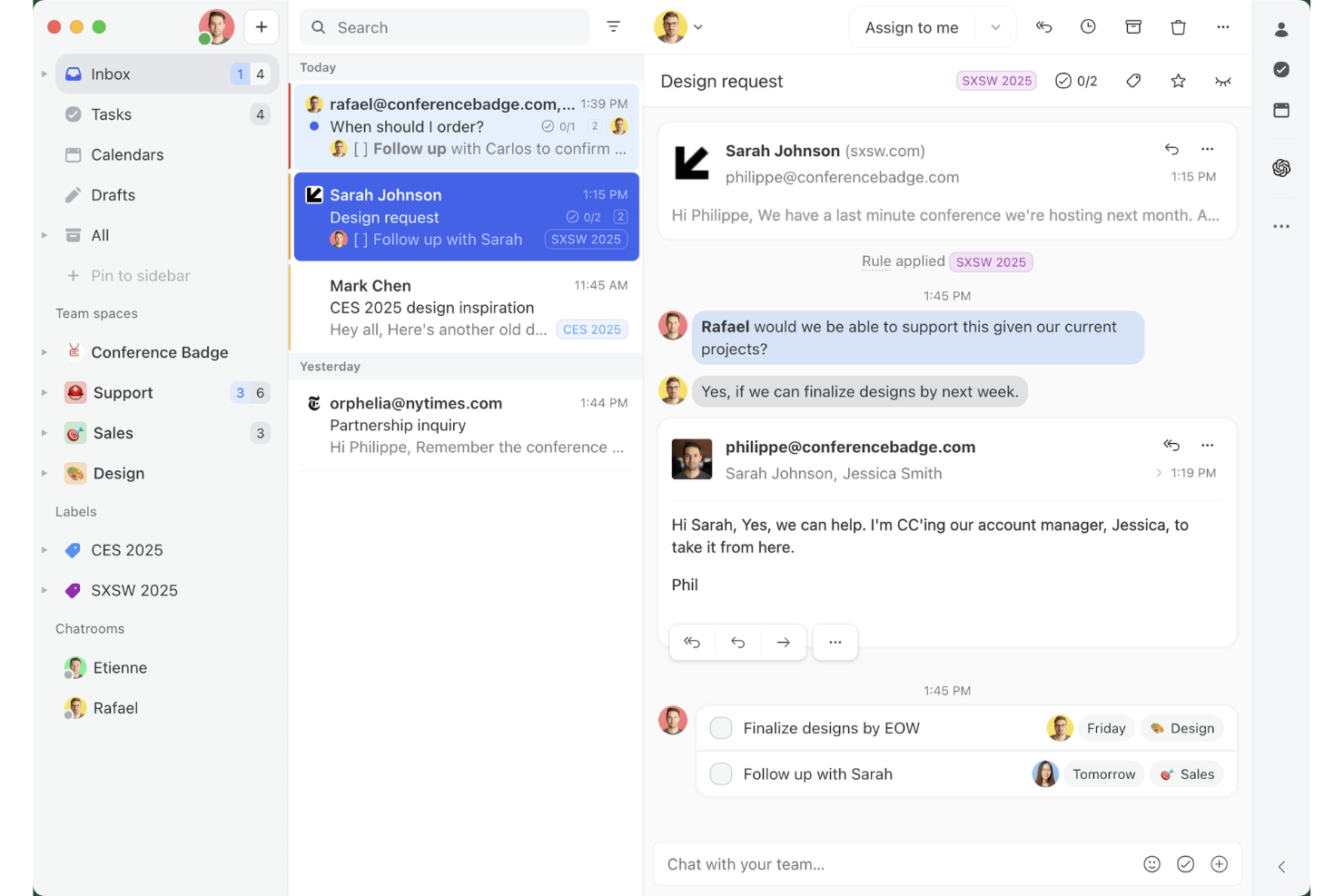
Missive is a collaborative email client that combines a shared team inbox, built-in task management, and multi-channel messaging into a single interface.
Who Is Missive Best For?
Missive is a strong fit for client-facing teams—agencies, account managers, and ops leads—who need to manage shared email queues and turn conversations into tasks without leaving their inbox.
Why I Picked Missive
Missive earns its spot on my shortlist because no other tool handles shared team inbox collaboration quite like it does. I love how the "T" shortcut converts any email into a task that stays linked to the original thread, so nothing gets lost between the conversation and the to-do. AI Rules take that further by detecting deadlines or urgency in message content and automatically triaging accordingly. It's genuinely built for teams managing high volumes of client email, not just project updates.
Missive Key Features
- Shared team inbox: Multiple teammates can view, assign, and discuss emails in a single inbox without sending duplicate replies.
- Missive MCP Server: Connect external AI clients (like Claude or ChatGPT) via mcp.missiveapp.com to search conversations, query linked project tasks, and draft replies—keeping team approval required before sending.
- AI Rules: Content-aware automations that auto-label, draft replies, or escalate emails based on message context.
- Guest access: External clients or contractors can be invited into specific conversations to view history, attachments, and post comments.
- Multi-channel unified inbox: Email, SMS, WhatsApp Business, Messenger, and live chat all route into one collaborative workspace.
Missive Integrations
Missive offers native integrations with Gmail, Google Workspace, Outlook, Microsoft 365, Asana, ClickUp, Trello, Todoist, HubSpot, Salesforce, Pipedrive, and Close CRM. It also provides Zapier support, API access, webhooks, and its new MCP Server (mcp.missiveapp.com) for external AI integrations (available on Productive and Business plans when enabled by an admin).
Pros and Cons
Pros:
- Tasks are directly linked to emails
- AI automations triage and route emails
- Shared team inbox for collaboration
Cons:
- Lacks project timelines or dependency views
- Does not integrate inside Gmail or Outlook
New Product Updates from Missive

Missive Adds Multi-Step Automations With Timed Rules
Missive adds time-based rule steps that let automations run through multiple stages on the same conversation. This helps teams build follow-ups and SLA escalations without creating separate rules. For more information, visit Missive’s official site.
 .
Hive
Best for proofing and approvals

Hive is a project management platform that combines task tracking and collaboration with integrated email, so you can manage communication and projects in one place. It helps teams coordinate work, track time, and handle feedback loops without juggling multiple tools.
Why I Picked Hive:
I included Hive in this list because of its strong proofing and approvals feature. For teams that need multiple rounds of feedback, Hive centralizes comments and sign-offs so you don’t waste time in back-and-forth emails. Combined with built-in time tracking and resourcing, you can see exactly how your team’s time is allocated while ensuring work is approved on schedule.
Standout features & integrations:
Hive’s standout features include goal setting, forms for intake and client requests, and its AI assistant (Buzz AI) that automates repetitive tasks. You can also create dashboards for quick visibility into project progress and use templates to spin up projects faster.
Hive integrates with Google Drive, Google Calendar, Dropbox, QuickBooks, Zoom, Microsoft OneDrive, Microsoft Teams, Outlook Calendar, Jira, Slack, GitHub, and Box.
Pros and Cons
Pros:
- AI-powered task automation
- Built-in time tracking
- Centralized proofing and approvals
Cons:
- Dashboards less customizable
- Mobile app lacks features

Nifty
Best for project management unification

Nifty is best for project management unification because it offers a comprehensive suite of features that facilitate collaboration and progress tracking across all stages of a project, all within a single platform.
Why I Picked Nifty:
I chose Nifty for this list because it stands out as a holistic solution for project management, offering a unified space for all project-related activities. Its ability to combine discussions, roadmaps, tasks, and documentation in one place differentiates it from other project management software. I believe Nifty is best for project management unification due to its integrated approach that aligns teams and goals, streamlining processes and reducing the need for multiple tools.
Standout features & integrations:
Nifty's key features include discussions, roadmaps (Gantt Chart), goals, tasks, forms, docs & files, time tracking, and reporting. These features are designed to enhance team collaboration and provide a high level of detail for managing daily work. Nifty integrates natively with Google Docs and offers a variety of views such as Kanban, List, Timeline, Calendar, and Swimlane to accommodate different project management styles.
Nifty integrates with a range of tools, including Asana, Basecamp, ClickUp, Jira, Trello, and Wrike. It also allows for the import of .CSV and Excel sheets, ensuring transition and data synchronization.
Pros and Cons
Pros:
- Positive reviews for design and performance
- Flexible views and integrations for various management styles
- Comprehensive suite of project management features
Cons:
- Limited information on the website regarding the minimum number of seats or setup fees
- May have a learning curve for new users due to its extensive features
- Higher starting price point compared to some competitors

Best for unlimited storage

Freedcamp is a project management platform that offers unlimited file storage across all its plans, ensuring that teams can manage their projects without worrying about running out of space.
Why I Picked Freedcamp:
I chose Freedcamp for the list because it offers a robust set of features that cater to various project management needs while also providing unlimited storage, which is a significant advantage for teams with extensive file management requirements. I believe Freedcamp is best for unlimited storage because it removes the constraints on file space, allowing teams to focus on their work without the overhead of managing storage limits.
Standout features & integrations:
Freedcamp's key features include task management, time tracking, milestones, discussions, and an issue tracker. It also has a built-in calendar and file management system with unlimited storage, which is particularly useful for teams that handle large volumes of documents and media files.
Freedcamp integrates natively with Google Drive, Dropbox, OneDrive, Zapier, Google Calendar, Outlook, Slack, and supports email integration, allowing users to create tasks and discussions directly via email.
Pros and Cons
Pros:
- Wide range of integrations
- A generous free tier with essential features
- Unlimited storage on all plans
Cons:
- Some integrations are only available on higher-tier plans
- Annual billing required for the best rates

Workzone
Best for cross-department collaboration

Workzone is a project management platform with built-in email integration that lets cross-functional teams track tasks, manage documents, and coordinate work across departments from a single workspace.
Who Is Workzone Best For?
Workzone is a good fit for mid-sized organizations where multiple departments need to collaborate on projects without outgrowing a tool that still feels manageable.
Why I Picked Workzone
I've included Workzone in my top picks because it's one of the few project management tools built with cross-department visibility as a core design principle, not an add-on. I like that each department gets its own dedicated workspace while still sharing tasks, timelines, and documents across projects. Email notifications keep every stakeholder in the loop automatically, so teammates in marketing, engineering, or finance stay updated without logging in to check status.
Workzone Key Features
- Gantt charts: Visualize project timelines, set task dependencies, and track progress across multiple projects simultaneously.
- Workload management: View team capacity across departments to identify bottlenecks and reassign tasks before deadlines slip.
- Project request forms: Capture incoming work requests through customizable forms that route directly into project workflows.
- Time tracking: Log hours against specific tasks to monitor effort across projects and generate time-based reports.
Workzone Integrations
Workzone offers native integrations with Microsoft Teams, Slack, Google Drive, and OneDrive. It also connects with Zapier and has a REST API for custom integrations.
Pros and Cons
Pros:
- Dedicated customer success manager assigned
- 1,000+ industry-specific project templates included
- Built-in proofing and markup for documents
Cons:
- Search and item filtering feel slow
- Interface looks dated compared to competitors
New Product Updates from Workzone

Workzone Enterprise Adds Multi-Stage Approval Workflows
Workzone Enterprise now includes Approval Workflows, enabling multi-stage document approvals to standardize complex processes and reduce manual effort. For more information, visit Workzone's official site.
 .

ProofHub
Best for unified project planning

ProofHub stands out as the best for unified project planning because it centralizes all project aspects, enabling teams to plan, execute, track, and manage projects from start to finish in one place.
Why I Picked ProofHub:
I chose ProofHub for the list because of its robust set of features that cater to various teams and workflows, making it a versatile tool for project management. Its ability to bring together tasks, discussions, Gantt charts, and time tracking under one roof makes it a unified solution for planning and executing projects. I believe ProofHub is best for unified project planning because it provides a single source of truth for all project-related information, which is crucial for maintaining project coherence and ensuring that all team members are on the same page.
Standout features & integrations:
ProofHub's most important features include task management with boards and table views, Gantt charts for setting dependencies and tracking deadlines, and collaboration tools like discussions, chat, and proofing. These features are designed to streamline project planning and execution, enhance communication among team members, and improve overall productivity.
ProofHub integrates natively with several tools, including Dropbox, Google Drive, Box, OneDrive, and it also offers API access for custom integrations. The software's email integration allows users to become part of discussions, add tasks, and upload files without logging into their ProofHub account.
Pros and Cons
Pros:
- Wide range of integrations and collaboration tools
- Flat pricing with no per-user fee
- Unified project planning and execution
Cons:
- May not be suitable for very large enterprises with needs beyond the Ultimate Control plan
- Limited to 40 projects in the Essential plan
Best for client work management

Teamwork is a project management platform tailored for client work management across various industries. It's recognized for its comprehensive suite of features that streamline project planning, resource allocation, and collaboration.
Why I Picked Teamwork:
I chose Teamwork for its robust set of features that specifically cater to the needs of client-focused teams. Its ability to manage multiple aspects of client work, from project planning to time tracking, sets it apart from other project management tools. I believe Teamwork is best for client work management because it provides a centralized platform for managing all client-related activities, ensuring that every task, timeline, and billable minute is accounted for efficiently.
Standout features & integrations:
Teamwork's standout features include time tracking, resource management, milestone setting, and task customization, which are essential for managing client projects effectively. It also offers various views such as lists, kanban boards, tables, and Gantt charts to suit different user preferences.
Teamwork integrates natively with Slack, Zapier, MS Teams, Google Drive, QuickBooks, HubSpot, and other tools, making it a versatile platform for integrating with existing workflows.
Pros and Cons
Pros:
- Integrates with a wide range of tools
- Customizable for various client services businesses
- Comprehensive project management features
Cons:
- Limited storage on the free plan
- Minimum user requirement for paid plans

Podio
Best for customizable solutions

Podio is a versatile project management software that integrates customizable workflows, team communication, and data management in one user-friendly platform.
Why I Picked Podio:
I chose Podio for the list because it excels in offering customizable solutions that cater to the unique needs of different teams and projects. I believe Podio is best for customizable solutions due to its ability to be tailored extensively, providing a personalized approach to project management that can align with any workflow.
Standout features & integrations:
Podio's standout features include task management, automated workflows, and data visualization, which are all highly customizable.
Podio integrates natively with tools such as Google Drive, Dropbox, Evernote, Zendesk, FreshBooks, Campaign Monitor, GoToMeeting, and more, facilitating a connected and efficient work environment.
Pros and Cons
Pros:
- Free plan for small teams
- Comprehensive email integration
- Customizable workflows and apps
- Free plan for small teams
- Comprehensive email integration
- Customizable workflows and apps
Cons:
- Annual billing may not suit all budgets
- May require technical skill for complex customizations
- Annual billing may not suit all budgets
- May require technical skill for complex customizations
E-posta Entegrasyonuna Sahip Diğer Proje Yönetimi Yazılımları
Kısa listeme giremeyen ancak yine de göz atmaya değer bazı ek e-posta entegrasyonlu proje yönetimi yazılımı seçenekleri şunlardır:
- Jira Service Management
For team tracking and planning
- Bitrix24
For business tool integration
- Redmine
For open-source flexibility
- Ravetree
For email-to-task conversion
- Notion
For notes and documentation
- Kanbanize
For enterprise agility
- GanttPRO
For Gantt chart planning
- Celoxis
For project analytics
- Scoro
For comprehensive project oversight
- ProWorkflow
For centralized task management


How I Evaluate Project Management Software With Email Integration
I split my evaluation into two layers: the baseline each tool must clear—like email-to-task conversion and two-way sync—then the differentiators that make one a better fit than another.
Core Functionality (Table Stakes For This List)
When I'm selecting tools for my list, I rank each one on a scale from 0 (does not offer the functionality) to 5 (excels in this area) for each core functionality listed below. Then, I calculate the tool's total score into a percentage. Each tool needs to achieve a minimum total score of 65% to be considered for inclusion.
- Email-to-Task Conversion: I check whether forwarding an email creates a task with the subject, body, and attachments intact—or if it dumps everything into a generic note.
- Two-Way Email Sync: Replies from external stakeholders should update the linked task automatically. I look for threading that keeps both sides in sync without duplication.
- Native Email Client Integration: I evaluate the quality of Gmail and Outlook add-ins, looking at whether you can create, assign, and update tasks directly from your inbox.
- Task & Project Management Core: The PM fundamentals matter—task assignments, due dates, statuses, and multiple views like boards, lists, and timelines all factor into my evaluation.
- Email Notifications & Updates: I look at how granular the notification settings are, from per-project controls to digest options that keep inboxes from getting flooded.
- Attachment & Thread Linking: Full email threads attached to tasks give teams the context they need. I evaluate whether the history is searchable and preserved on the task itself.
Once I have a list of tools that meet the criteria, I consider what sets each platform apart.
Differentiating Factors (What Sets Vendors Apart)
Here's how I compare and contrast different vendors:
Standout Features
A shared team inbox changes how project teams handle client emails—I look at whether multiple people can triage, assign, and respond from one place instead of forwarding chains back and forth. AI-powered email triage matters for high-volume teams that need incoming messages automatically categorized and turned into suggested tasks. For agencies managing multiple clients, I also evaluate client portal features that let external stakeholders email into projects with visibility limited to their own threads.
Beyond Features
Pricing structure is something I evaluate closely—some vendors gate email integration behind higher tiers, and guest seats for external collaborators can add up fast for client-facing teams. I also consider how well each tool fits into existing tech stacks, especially native connections to Google Workspace, Microsoft 365, and CRMs where project-related emails often originate. Scalability matters too; a tool that works for a five-person team but buckles under high email volumes won't serve a growing PMO.
E-posta Entegrasyonuna Sahip Proje Yönetimi Yazılımı Nasıl Seçilir?
Uzun özellik listeleri ve karmaşık fiyatlandırma yapıları arasında kaybolmak kolaydır. Kendinize özgü yazılım seçim süreciniz üzerinde çalışırken odaklanmanızı kolaylaştırmak için göz önünde bulundurmanız gereken faktörlerin bir kontrol listesini burada bulabilirsiniz:
| Faktör | Dikkat Edilmesi Gerekenler |
| Ölçeklenebilirlik | Yazılımın ekibinizle birlikte büyüyebildiğinden emin olun. Esnek kullanıcı limitleri, özellik eklentileri ve küçük ekiplerden büyük ekiplere kadar destek sunan fiyatlandırma planları arayın. |
| Entegrasyonlar | Yazılımın ekibinizin kullandığı Gmail veya Outlook gibi e-posta platformlarıyla ve Slack ile CRM sisteminizle entegre olup olmadığını kontrol edin. Güçlü entegrasyonlar manuel işi azaltır ve her şeyin senkronize kalmasını sağlar. |
| Özelleştirilebilirlik | İş akışlarını, etiketleri ve e-posta-görev kurallarını ekibinizin çalışma biçimine uyacak şekilde ayarlamanıza olanak tanıyan bir araç seçin. Tek bir çözüm nadiren herkes için uygundur. |
| Kullanım Kolaylığı | Temiz bir düzen ve öğrenme süreci gerektirmeyen özellikler arayın. Ek adımlar olmadan e-postaları gönderebilmeli, alabilmeli ve görevlere bağlayabilmelisiniz. |
| Bütçe | E-posta özelliklerinin dahil mi olduğunu yoksa daha yüksek paketlerin arkasında mı kilitli bulunduğunu görmek için planları karşılaştırın. Ücretsiz denemeler, karar vermeden önce test yapmanıza yardımcı olabilir. |
| Güvenlik Önlemleri | Ekibiniz hassas bilgilerle çalışıyorsa platformun şifrelemeyi, rol tabanlı erişimi ve SOC 2 veya GDPR gibi uyumluluk standartlarını desteklediğinden emin olun. |
| Görev Bağlama | Bağlamı kaybetmemeniz için e-posta dizilerini belirli görevlere veya projelere otomatik olarak bağlayan araçlar arayın. |
| Mobil Erişim | Ekibiniz hareket hâlinde çalışıyorsa e-posta entegrasyonunun mobil uygulamalarda sorunsuz çalıştığından ve önemli özellikleri kısıtlamadığından emin olun. |
E-posta Entegrasyonuna Sahip Proje Yönetimi Yazılımlarındaki Trendler
Araştırmam sırasında e-posta entegrasyonuna sahip farklı proje yönetimi yazılımı sağlayıcılarının sayısız ürün güncellemesini, basın bültenini ve sürüm kaydını inceledim. Takip ettiğim yeni trendlerden bazıları şunlar:
- Yapay Zekâ Destekli E-posta Özetleri: Daha fazla araç, uzun e-posta zincirlerini kısa ve okunabilir özetlere ayırmak için yapay zekâ kullanıyor. Bu, ekiplerin yazışmaları tek tek incelemeden güncel kalmasına yardımcı oluyor.
- Akıllı E-postadan Göreve Ayrıştırma: Yazılımlar; teslim tarihleri, öncelikler ve atanan kişiler gibi görev ayrıntılarını e-postalarda tespit etme ve bunları minimum kullanıcı girdisiyle otomatik olarak yapılandırılmış görevlere dönüştürme konusunda gelişiyor.
- Görevler İçinde Konuşma Dizileri: Platformlar tek bir e-postayı eklemek yerine artık e-posta dizilerinin tamamını görevlerin içine yerleştiriyor. Bu, ekipteki herkesin platformlar arasında geçiş yapmadan tüm bağlama erişmesini sağlıyor.
- Rol Tabanlı E-posta Denetimleri: Ekipler artık proje bağlantılı e-postalarla kimlerin bilgilendirileceğini veya kimlerin yanıt verebileceğini kontrol edebiliyor. Bu, gelen kutusu karmaşasını azaltmaya ve gereksiz karşılıklı yazışmaları önlemeye yardımcı oluyor.
- Dahili Mesajlaşmaya Azalan Odak: Daha fazla ürün, yerleşik sohbet özelliklerinden uzaklaşıp e-postanın proje iş akışları içinde daha iyi çalışmasına odaklanıyor ve araçların işlevlerinin örtüşmesini azaltıyor.
E-posta Entegrasyonuna Sahip Proje Yönetimi Yazılımı Nedir?
E-posta entegrasyonuna sahip proje yönetimi yazılımı, geleneksel proje yönetimi işlevlerini doğrudan e-posta özellikleriyle birleştiren dijital bir araçtır. Proje yöneticileri ve ekipler tarafından iletişimi ve görev yönetimini tek bir platformda kolaylaştırmak için kullanılır. Yazılım, proje iş akışlarını e-posta yazışmalarıyla birbirine bağlayarak kullanıcıların projeleri yönetmesine ve ekip üyeleriyle paydaşlarla doğrudan yazılım üzerinden iletişim kurmasına olanak tanır.
Bu yazılımın bileşenleri arasında e-posta üzerinden görev atama, ilerleme güncellemeleri ve dosyaları ile tartışmaları belirli proje görevlerine ekleme olanağı bulunur. Bu entegrasyonun genel amacı, proje bilgilerini ve yazışmaları merkezileştirerek ekip üyelerinin ayrı uygulamalar arasında geçiş yapmadan etkili bir şekilde iş birliği yapabilmesi için bunlara erişim sağlamaktır.
E-posta Entegrasyonuna Sahip Proje Yönetimi Yazılımının Özellikleri
E-posta entegrasyonuna sahip proje yönetimi yazılımı seçerken aşağıdaki temel özelliklere dikkat edin:
- İki yönlü e-posta senkronizasyonu: Mevcut e-posta adresinizi kullanarak e-postaları doğrudan proje yönetimi platformu içinde gönderip almanızı sağlar.
- E-postayı göreve dönüştürme: Gelen e-postaları, atanmış ekip üyeleri, teslim tarihleri ve öncelik düzeyleriyle birlikte otomatik olarak görevlere dönüştürür.
- Dizili e-posta geçmişi: Ekip üyelerinin araçlar arasında geçiş yapmadan tüm bağlamı görebilmesi için e-posta yazışmalarının tamamını görevlere ekler.
- Özel e-posta tetikleyicileri: Herkesi bilgilendirmek için görev durumları değiştiğinde veya son teslim tarihleri yaklaştığında otomatik e-postalar gönderir.
- Paylaşılan gelen kutusu entegrasyonu: İlgili tüm e-postalara tek bir yerden erişilebilmesi için bir ekip gelen kutusunu bir projeye bağlar.
- Ekleri yakalama: Kolay erişim için e-posta eklerini doğrudan ilgili görevlere veya proje klasörlerine kaydeder.
- Göndereni etiketleme ve filtreleme: Dağınıklığı azaltmak ve odağı artırmak için gelen e-postaları gönderen veya konuya göre kategorilere ayırmaya yardımcı olur.
- Dahili ve harici alıcı seçenekleri: Ekiplerin hem çalışma arkadaşlarıyla hem de müşterilerle iletişimi proje aracı içinden yönetmesini sağlar.
- E-posta takibi ve okundu bilgileri: Önemli, projeyle ilgili e-postaları kimlerin açtığını veya yanıtladığını gösterir.
- Görev görünümünden yanıt verme: Her şeyi bağlam içinde tutmak için kullanıcıların e-postaları doğrudan görev penceresinden yanıtlamasını sağlar.
E-posta Entegrasyonlu Proje Yönetimi Yazılımının Faydaları
E-posta entegrasyonlu proje yönetimi yazılımını uygulamaya almak, ekibiniz ve işletmeniz için çeşitli faydalar sağlayabilir. Yararlanabileceğiniz bazı faydalar şunlardır:
- Daha az bağlam değiştirme: Ekibiniz uygulamalar arasında geçiş yapmak yerine görevleri ve e-postaları tek bir yerden yönetebilir.
- Daha az kaçırılan güncelleme: E-postayı göreve dönüştürme ve bildirimler, önemli bilgilerin gözden kaçmamasına yardımcı olur.
- Daha net iletişim: Görevlerin içindeki dizili e-posta geçmişi, herkesin yazışmanın tamamına erişmesini sağlar.
- Daha hızlı görev oluşturma: Gelen e-postalar anında görevlere dönüştürülebilir ve manuel veri girişinde zaman kazandırır.
- Daha iyi müşteri görünürlüğü: Projelere bağlanan harici e-postalar, müşteri iletişiminin tüm ekip tarafından görülebilmesini sağlar.
- Daha düzenli dosyalar: E-posta yoluyla gönderilen ekler doğru görevlere kaydedilir; böylece onları bulmak için gelen kutularını taramanız gerekmez.
- Daha kolay ekip iş birliği: Herkes, özgün iletiye doğrudan erişmesine gerek kalmadan projeyle ilgili e-postaları görebilir ve yanıtlayabilir.
E-posta Entegrasyonlu Proje Yönetimi Yazılımının Maliyetleri ve Fiyatlandırması
E-posta entegrasyonlu proje yönetimi yazılımını seçmek, mevcut çeşitli fiyatlandırma modellerini ve planları anlamayı gerektirir. Maliyetler özelliklere, ekip büyüklüğüne, eklentilere ve daha fazlasına göre değişir. Aşağıdaki tabloda, e-posta entegrasyonlu proje yönetimi yazılımı çözümlerinde yaygın planlar, ortalama fiyatları ve genellikle sunulan özellikler özetlenmiştir:
E-posta Entegrasyonlu Proje Yönetimi Yazılımı İçin Plan Karşılaştırma Tablosu
| Plan Türü | Ortalama Fiyat | Yaygın Özellikler |
| Ücretsiz | $0 | Sınırsız kullanıcı (bazılarında proje veya koltuk sayısına ilişkin sınırlamalar bulunur), temel görev ve proje yönetimi özellikleri, e-postayı göreve dönüştürme, e-posta bildirimleri |
| Temel | $5 - $10/kullanıcı/ay | Kanban panolarında görev görselleştirme, zaman takibi (eklenti gerektirebilir), belirli düzeyde e-posta entegrasyonu, sınırlı depolama alanı |
| Standart | $8 - $14/kullanıcı/ay | Gelişmiş iş birliği araçları, gelişmiş e-posta entegrasyonu özellikleri, Temel planlardan daha fazla depolama alanı, daha fazla proje görünümüne ve yönetim aracına erişim |
| Profesyonel | $9.80 - $27/kullanıcı/ay | Kapsamlı proje yönetimi özellikleri, görev dönüştürme ve bildirimlerle tam e-posta entegrasyonu, iş yükü yönetimi, gelişmiş raporlama ve analiz |
| İşletme | $7 - $32/kullanıcı/ay | Profesyonel işletmeler için tasarlanmıştır; gelişmiş kaynak yönetimi araçları, özelleştirilebilir iş akışları ve entegrasyonlar, gelişmiş güvenlik özellikleri |
| Kurumsal | Özel Fiyatlandırma | Büyük işletmelere göre uyarlanmıştır; nitelikli güvenlik özellikleri, üst düzey API'ler ve entegrasyonlar, gelişmiş destek ve eğitim hizmetleri |
E-posta Entegrasyonlu Proje Yönetimi Yazılımı SSS
Sizin için ele almak istediğim birkaç sık sorulan soru burada.
E-posta entegrasyonu proje yönetimini nasıl geliştirir?
Proje yönetimi yazılımındaki e-posta entegrasyonu, proje çerçevesi içinde doğrudan iletişime olanak tanıyarak ekip üyeleri arasındaki iş birliğini geliştirebilir. Belirli görevler veya projelerle ilgili görüşmelerin izlenmesini sağlar ve önemli bilgilerin ayrı e-posta gelen kutularında kaybolmasını önler. Bu, daha iyi bir organizasyon ve daha verimli proje yürütme sağlayabilir.
Mevcut e-postamı herhangi bir proje yönetimi yazılımıyla entegre edebilir miyim?
Her proje yönetimi yazılımı e-posta entegrasyonu sunmaz ve uyumluluk değişiklik gösterebilir. Yazılımın mevcut e-posta sağlayıcınızla entegrasyonu destekleyip desteklemediğini kontrol etmeniz önemlidir. Önde gelen birçok proje yönetimi aracı, Gmail ve Outlook gibi popüler e-posta hizmetleriyle entegrasyon sunar.
E-posta entegrasyonu, e-postalardan görev oluşturulmasına olanak tanır mı?
Evet, e-posta entegrasyonuna sahip birçok proje yönetimi aracı, doğrudan e-postalardan görev oluşturma olanağı sunar. Bu özellik, ekip üyelerinin e-posta içeriğini proje yönetimi sistemi içindeki eyleme geçirilebilir öğelere hızla dönüştürmesine olanak tanıyarak iş akışını önemli ölçüde iyileştirebilir.
Proje yönetimi yazılımından gelen e-posta bildirimlerini özelleştirmek mümkün mü?
Evet, e-posta entegrasyonuna sahip çoğu proje yönetimi yazılımı, kullanıcıların e-posta bildirimlerini özelleştirmesine olanak tanır. Kullanıcılar genellikle almak istedikleri güncelleme türlerini, bildirimleri ne sıklıkta alacaklarını ve hangi proje etkinliklerinin e-posta uyarısını tetiklemesi gerektiğini seçebilir.
E-postayı proje yönetimi yazılımına entegre etmenin güvenlikle ilgili endişeleri var mı?
E-postanın proje yönetimi yazılımına entegre edilmesi güvenlikle ilgili hususları da beraberinde getirir. Hassas bilgileri korumak için yazılımın güçlü güvenlik önlemleri sunduğundan emin olmak önemlidir. Şifreleme, güvenli oturum açma protokolleri ve sektör standardı güvenlik sertifikalarına uygunluk gibi özellikleri arayın.