


Ariso AI vs. Linear: Expert Comparison and Reviews for 2026



If you’re struggling to keep projects moving, both Ariso AI and Linear promise to help your team organize, prioritize, and deliver. Maybe you’re eyeing AI-powered automations, or maybe you want something clean and fast. Choosing the right project management software can make or break your workflow.
In this article, I’ll break down how Ariso AI and Linear compare on key features, pros and cons, typical use cases, pricing, security, and how easy they are to use—so you can make a confident call for your team.
Ariso AI vs. Linear: An Overview
Ariso AI
Linear

Why Trust Our Software Recommendations
Our team has been testing and reviewing software since 2012. As project managers ourselves, we know how difficult—and important—it is to choose the right software.
For this guide, we evaluated tools using hands-on testing and independent research, scoring tools using our selection criteria. We also draw on insights from industry thought leaders and practicing project management experts.
Our reviews reflect our human editorial judgment, not a sales pitch.
Expert reviewers:
Ariso AI vs. Linear Pricing Comparison
| Ariso AI | Linear | |
|---|---|---|
| Free Trial | Free demo available | Free plan available |
| Pricing | From $1/day | From $10/user/month (billed annually) |
Ariso AI vs. Linear Pricing & Hidden Costs
Ariso AI uses a free-to-start model for its individual Ari experience, with pricing listed at $1 per day after the free period. Bigger teams get to experience the demo-to-custom-quote process that is common with SaaS tools. Linear keeps its pricing straightforward, with a focus on user-based subscriptions and a simple feature split between its standard and advanced plans. Watch for potential add-ons with either tool, such as API usage fees, extra storage, or dedicated support.
To choose the right pricing model, look beyond the base cost and consider how each tool charges for the features your workflow relies on. Pay close attention to limits on automations, integrations, support response times, and any add-on services you might need as your team grows. I’d suggest mapping your actual usage patterns to each vendor’s pricing details—this helps reveal which platform delivers the most value as your team scales.
Ariso AI vs. Linear Feature Comparison
| Ariso AI | Linear | |
|---|---|---|
| API | ||
| Calendar Management | ||
| Dashboard | ||
| Data Export | ||
| Data Import | ||
| Data Visualization | ||
| External Integrations | ||
| Multi-User | ||
| Notifications | ||
| Scheduling |
Ariso AI vs. Linear Integrations
| Integration | Ariso AI | Linear |
|---|---|---|
| Jira | ✅ | ✅ |
| Slack | ✅ | ✅ |
| GitHub | ✅ | ✅ |
| Google Drive | ✅ | ✅ |
| Figma | ❌ | ✅ |
| Trello | ✅ | ❌ |
| Asana | ✅ | ❌ |
| Microsoft Teams | ✅ | ❌ |
| API | ✅ | ✅ |
| Zapier | ✅ | ✅ |
Both tools cover the major integrations for collaboration and workflow, but Ariso AI connects more broadly to tools like Asana and Microsoft Teams, while Linear is stronger with Figma and developers’ favorites. With API available on both, most teams should find what they need—though if you have a favorite tool, check availability before committing.
Ariso AI vs. Linear Security, Compliance & Reliability
| Factor | Ariso AI | Linear |
|---|---|---|
| Data Encryption | Uses per-user end-to-end encryption for data in transit and at rest. | Encrypts user data both in transit and at rest with industry standards. |
| Regulatory Compliance | Offers GDPR and SOC 2 compliance, plus regional data residency options. | SOC 2 certified and supports GDPR requirements for European users. |
| Access Controls | Provides granular user roles and multi-factor authentication. | Role-based access controls and SSO support for stronger authentication. |
| Uptime | Promises 99.9% uptime given its hosting via AWS. | High uptime backed by SLAs and public reliability metrics. |
| Audit Logging | Full activity logs for account and data changes are available. | Maintains detailed audit logs for actions and user access. |
Both platforms hit the mark for security and compliance, but Ariso AI stands out for its range of authentication options while Linear impresses with fast, transparent reliability. In my experience, Ariso AI is a safe pick if your organization has strict compliance requirements, while Linear’s transparency and uptime offer peace of mind for tech-focused teams.
Ariso AI vs. Linear Ease of Use
| Factor | Ariso AI | Linear |
|---|---|---|
| User Interface | Modern, visually guided dashboards with lots of customization. | Minimalist UI that’s fast, clean, and keyboard-friendly. |
| Onboarding | Guided walkthroughs and AI-influenced suggestions for faster setup. | Quick setup with tooltips and intuitive workflows. |
| Learning Curve | Some complexity when trying to replace existing tools, but there is clear documentation and great support. | Low learning curve. Mostly a plug-and-play tool. |
| Support Resources | Contextual help, help center, and AI chatbot support. | Extensive docs, active community, and responsive support team. |
| Task Navigation | Smart search and automation for workflow shortcuts. | Fast navigation and powerful shortcut keys. |
Linear is hard to beat for speed and simplicity, while Ariso AI packs more features into a slightly denser package that rewards power users. In my experience, Ariso AI is best if you want customizable automation, but Linear is the clear choice if you crave speed with almost no ramp-up.
Ariso AI vs Linear: Pros & Cons
Ariso AI
- Ari (AI agent) surfaces risks from real-time project activity
- Automatic status updates eliminate manual progress reporting
- Centralizes communication, knowledge, and project data in one hub
- Takes time to reach full value, as Ari needs to learn the context of your team’s projects.
- Requires broad team adoption for best results.
- Replacing or supplementing existing tools may require dedicated work and process changes.
Linear
- Your team will appreciate Linear's intuitive and fast interface.
- It offers strong task management that keeps your projects organized.
- Agile teams find its simplicity perfect for efficient collaboration.
- Your team might find customer support a bit slow.
- It lacks advanced customization options for complex projects.
- Linear may not suit teams needing extensive reporting features.
Best Use Cases for Ariso AI and Linear
Ariso AI
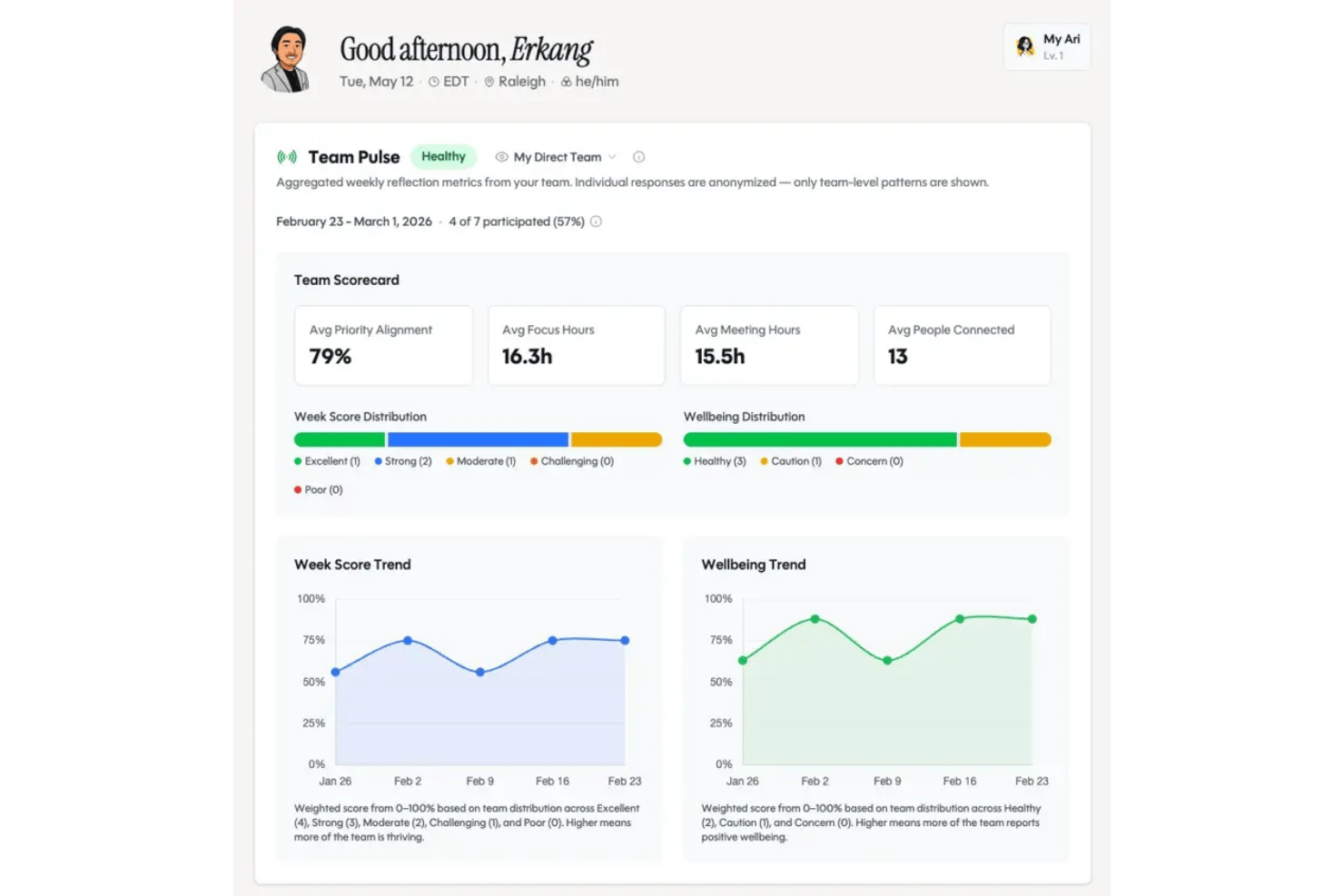
- Technology Teams Ariso AI works well for technology teams because it provides a shared execution layer where employees and AI agents can collaborate using the same project context while people retain control over decisions and accountability.
- Marketing Agencies Marketing teams can use automations and AI-powered reporting to coordinate campaigns, manage deadlines, and keep clients in the loop.
- Consulting Teams Ariso AI is a good choice for consulting teams because it can capture the context created across client conversations and meetings and translate it into projects, responsibilities, decisions, and next steps.
- Remote Teams Built-in chat, cross-tool integrations, and real-time notifications make it easier for globally distributed teams to coordinate without silos.
- IT Departments With native integrations to development tools, Ariso AI helps IT teams track tickets, PRs, and project requests in one streamlined platform.
- Data-Driven Enterprises Advanced reporting, workflow analytics, and customizable dashboards let enterprises keep tabs on KPIs and company goals across large projects.
Linear
- Tech Startups Linear helps your startup team stay organized with its simple yet effective task management.
- Software Development Linear's agile-focused features are perfect for your development team needing quick task adjustments. It supports scrum rhythms and lightweight triage of bugs so engineering teams can ship faster.
- Product Teams The emphasis on product roadmaps and clear notifications helps maintain momentum across releases.
- Design Teams Linear's intuitive interface helps your design team collaborate efficiently without getting bogged down. Reusable templates and visual dashboards bring clarity to iterations.
- Small Businesses Your small business can keep projects organized with Linear's easy-to-use features.
- Remote Teams Linear's straightforward tools support your remote team in managing tasks across different locations.
Who Should Use Ariso AI, And Who Should Use Linear?
Ariso AI is my pick for small to mid-sized teams managing shared, cross-functional projects, particularly when meetings, decisions, documents, and ongoing collaboration generate a lot of context that needs to be turned into action. You’ll get more out of Ariso AI if your projects are complex or span multiple departments, as Ari will learn context and work patterns and improve insights over time. Linear, on the other hand, is the sweet spot for solopreneurs and leaner teams, especially developers and product teams, who value speed, clarity, and a frictionless user experience. If your culture is all about AI innovation, Ariso AI is the better choice.
Differences Between Ariso AI and Linear
| Ariso AI | Linear | |
|---|---|---|
| AI Automation | Deep AI-driven suggestions and workflow automations built in. | Minimal automation, focused on speed and manual workflows. |
| Collaboration Tools | Integrations with popular communication tools and role settings for cross-team collaboration. | Streamlined team communication for product and dev teams. |
| Compliance Features | Offers extra compliance, data residency, and advanced access controls. | Meets baseline compliance with developer-focused priorities. |
| Pricing Structure | Two tiers that serve individuals & small teams vs bigger organizations. | Straightforward per-user pricing with clear plan limits. |
| User Experience | Highly customizable with rich dashboards. | Minimalist interface built for speed, with keyboard shortcuts. |
| Visit Ariso AIOpens new window | Read Linear ReviewOpens new window |
Similarities Between Ariso AI and Linear
| API & Automation | Both offer robust APIs and Zapier integrations, letting you automate work or connect with custom tools as your team requires. |
|---|---|
| Cloud-Based Delivery | Ariso AI and Linear are both fully cloud-hosted solutions, offering browser access, secure backups, and always-on updates. |
| Real-Time Collaboration | Teams can comment, update statuses, and share files in real time, supporting quick check-ins and updates across both tools. |
| Task Management | Both let you capture, assign, and track tasks from creation to completion with timeline and status updates for your team. |
| Third-Party Integrations | Each provides popular integrations like Slack, GitHub, and Google Drive to connect workflows beyond their own platforms. |
| Visit Ariso AIOpens new window Read Linear ReviewOpens new window | |