


Toggl vs. Float: Expert Reviews Compared 2026



Tracking hours is easy. Knowing whether those hours still match your plans is where things start to get interesting.
Picking between Toggl and Float comes down to whether your team needs flexible time capture or time logs connected to planned work. If shifting scope makes it hard to tell where hours go or whether schedules still match reality, this time tracking software comparison can help. I’ll compare the tools’ pros and cons, use cases, pricing, security, and usability so you can choose a fit for your team.
Toggl vs. Float.com: An Overview
Toggl
Float.com


Why Trust Our Software Recommendations
Our team has been testing and reviewing software since 2012. As project managers ourselves, we know how difficult—and important—it is to choose the right software.
For this guide, we evaluated tools using hands-on testing and independent research, scoring tools using our selection criteria. We also draw on insights from industry thought leaders and practicing project management experts.
Our reviews reflect our human editorial judgment, not a sales pitch.
Expert reviewers:
Toggl vs. Float.com Pricing Comparison
| Toggl | Float.com | |
|---|---|---|
| Free Trial | Free plan available; 30-day free trial; Free demo available | Free trial available |
| Pricing | From $9/user/month | From $7/scheduled user/month |
Toggl vs. Float Pricing & Hidden Costs
Toggl offers a free plan for up to three users, then charges per license on monthly or annual plans for its Starter and Premium tier; Enterprise pricing is custom. Optional Time Off Pro and Capacity Management add-ons can increase the bill. Float charges by scheduled person, with monthly or annual plans and custom Enterprise pricing. Adding someone to the schedule triggers a prorated charge for the rest of the billing cycle, while removing them frees a seat. Unlike Toggl, however, Float doesn’t offer a free plan – so keep that in consideration.
Before choosing, map each plan’s included features against your actual workflow, especially reporting, capacity planning, and time-off management. Estimate costs using the number of licenses. Compare monthly flexibility with annual commitments, and check add-on needs and Enterprise requirements before relying on a trial or quote.
Toggl vs. Float.com Feature Comparison
| Toggl | Float.com | |
|---|---|---|
| API | ||
| Approval Workflows | ||
| Budgeting | ||
| Calendar Management | ||
| Dashboard | ||
| Data Export | ||
| Data Import | ||
| Data Visualization | ||
| Expense Tracking | ||
| External Integrations | ||
| Forecasting | ||
| Multi-User | ||
| Notifications | ||
| Project Management | ||
| Resource Management | ||
| Scheduling |
Toggl vs. Float Integrations
| Integration | Toggl | Float |
|---|---|---|
| Asana | ✅ | ✅ |
| Jira | ✅ | ✅ |
| Slack | ✅ | ✅ |
| Google Calendar | ✅ | ✅ |
| GitHub | ✅ | ❌ |
| Gmail | ✅ | ❌ |
| ClickUp | ❌ | ✅ |
| HubSpot | ❌ | ✅ |
| API | ✅ | ✅ |
| Zapier | ❌ | ✅ |
Both tools connect with popular project and calendar apps, but Toggl offers GitHub and Gmail integrations, while Float supports Linear, ClickUp, and HubSpot, and Zapier. Both provide an API for custom workflows; Toggl suits teams tracking time inside familiar apps, while Float fits teams connecting project data to resource schedules.
Toggl vs. Float Security, Compliance & Reliability
| Factor | Toggl | Float |
|---|---|---|
| Encryption | Toggl encrypts data in transit with TLS and at rest with AES, backups included. | Float uses AES encryption and TLS, and one-way encrypts passwords. |
| Compliance | Toggl holds a SOC 2 Type II attestation and ISO/IEC 27001 certification, and complies with GDPR and CCPA. | Float is SOC 2 and GDPR compliant, and is also a certified B Corp. |
| Access Privacy | Toggl uses role-based access, SAML single sign-on on Premium, and passkey logins, and keeps desktop activity data private to each user. | Float offers customizable account permissions, SSO with domain restrictions on Pro, and team-enforced two-factor authentication. |
| Reliability | Toggl runs on Google Cloud with encrypted automated backups, regular disaster recovery drills, independent penetration testing, and a public status page. | Float runs on Google Cloud in the US, keeps a public status page with uptime history, and undergoes routine third-party vulnerability audits. |
Toggl has the stronger documented assurance profile, pairing a Type II audit and ISO certification with tested recovery plans. In my assessment, it suits teams with stricter assurance needs, while Float’s encryption, permissions, and SSO cover most resource-planning teams; security reviewers should still request its SOC 2 report.
Toggl vs. Float Ease of Use
| Factor | Toggl | Float |
|---|---|---|
| Interface | Toggl’s clean, minimalist layout keeps timers, projects, and reports easy to find. | Float’s color-coded schedule, custom tags, and saved views make team assignments and availability easy to scan. |
| Time Entry | Start a one-click timer, pull in calendar events, or turn private desktop activity into entries, then edit as needed. | Confirm timesheets pre-filled from scheduled work with a click, adjust them, or run a web timer; the mobile app handles logging too. |
| Onboarding | Teams can start quickly on the free plan, with admin guides and free importers for Toggl Track, Plan, or CSV data from other tools. | A no-card Pro trial and video guides cover setup, while Enterprise adds hands-on rollout, training, and data import help. |
| Navigation | Project and task tracking is simple, but finding specific settings or switching between tasks can take extra effort. | Filters and saved views narrow the schedule by person, project, or tag, though planning in hours or percentages across a large team takes practice. |
Toggl is easier to pick up for quick, flexible time capture, while Float makes resource plans clearer but takes more practice to navigate. I’d choose Toggl for its low-friction timer and varied capture options, and Float for its quick allocation changes and timesheets that fill in from the plan.
Toggl vs Float.com: Pros & Cons
Toggl
- Timers across web, desktop, and mobile, plus calendar entries and private activity capture, suit different tracking habits.
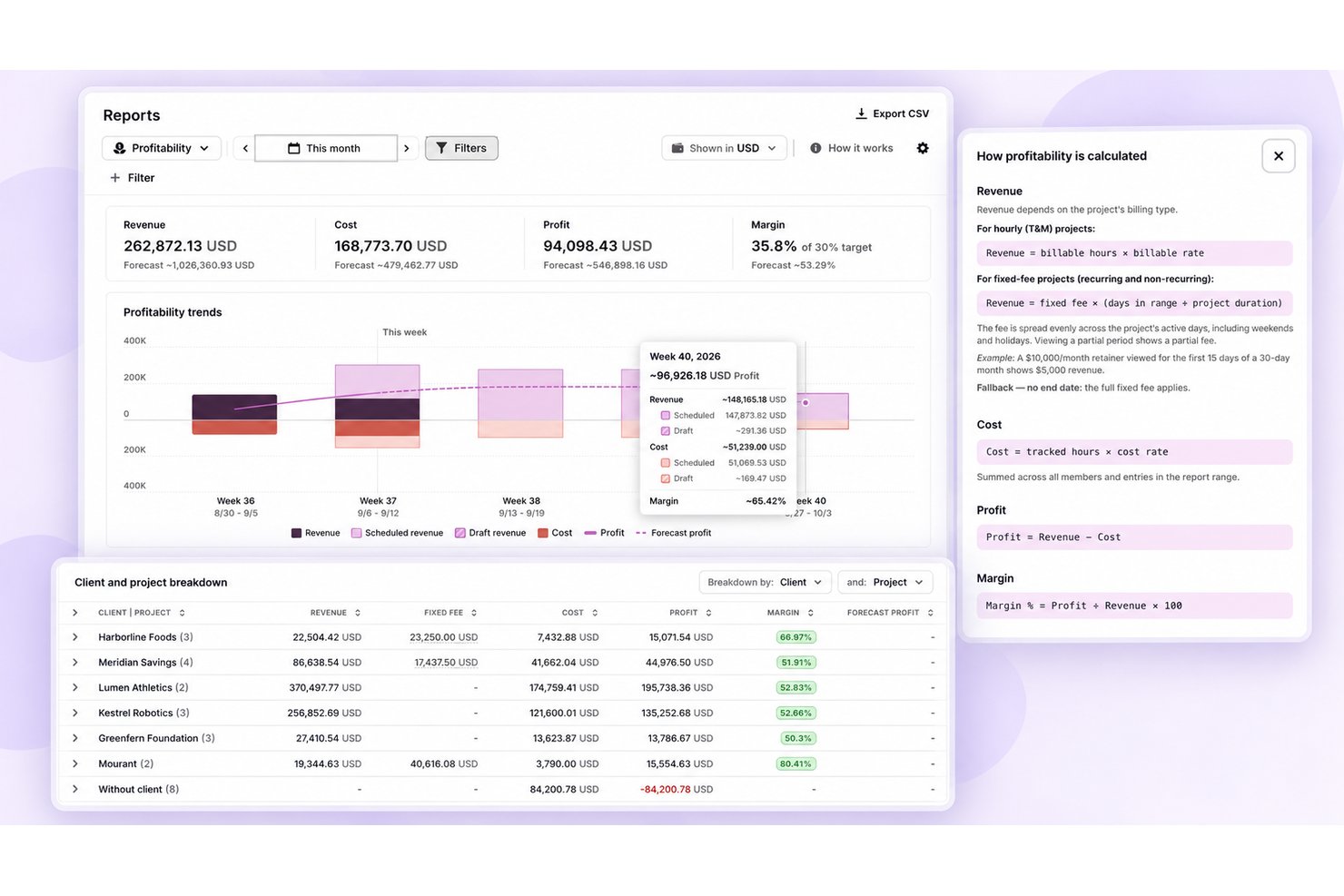
- Estimates and tracked hours live together, clarifying capacity, billable time, and margins.
- A privacy-first approach avoids screenshots, keystroke recording, and GPS tracking.
- Users report login hiccups, slow loads, and timer or calendar sync glitches.
- Utilization, profitability, approvals, and longer-range capacity planning need higher tiers.
- Built-in invoicing hasn’t reached the new Toggl yet, though Toggl Track still offers it.
Float.com
- Float offers built-in time tracking so you can track actuals and improve accuracy in future resource planning.
- Strong forecasting tools support long-term planning and resource allocation.
- Flexible dashboards make managing complex projects more organized.
- Interface can feel overwhelming for small or simple projects.
- Time tracking features require a higher plan
- New users might need time to navigate and understand the platform's full features.
Best Use Cases for Toggl and Float.com
Toggl
- Small Agencies Agencies with up to three users can start on the free plan, then add billable rates and team or revenue reports with Starter.
- Consulting And Accounting Firms Firms that bill by the hour can run timers or log missed work manually, then use billable rates and retainer projects to track client time.
- Software Teams Teams working in Jira, GitHub, Asana, or Slack can connect Toggl to those tools, though Jira and Asana syncs need Premium and only pull data into Toggl.
- Client-Service Teams Teams can organize time entries by project, client, and tag, and use paid plans for billable rates, revenue reports, and labor costs.
- Project Leads Project leads who need oversight can use Premium’s project dashboards and forecasts, profitability reports, and timesheet approvals.
- In-House Service Teams In-house IT, engineering, and PMO groups can plan resources around time off and holidays in Timeline, though formal leave policies, accrual tracking, and time-off approvals need the Time Off Pro add-on.
Float.com
- Creative agencies Float’s visual schedule helps you manage multiple projects and multiple client demands with ease.
- Tech startups Real-time updates keep your remote teams aligned and responsive to changes.
- Marketing departments You can quickly adjust schedules to accommodate new campaigns and priorities.
- Product development Clear reporting helps you make informed decisions for your development sprints.
- Remote teams Float's integrations with Slack and Google Calendar improve communication and coordination, which is vital for remote teams with varied schedules.
- Studios Studios benefit from Float's ability to track time and resources, and you can make sure projects stay on budget with the tool's real-time budget updates.
Who Should Use Toggl, and Who Should Use Float?
Choose Toggl if your team wants flexible, privacy-friendly time tracking with growing support for estimates, capacity planning, and profitability. Float covers much of the same ground, but leans more heavily into visual resource scheduling, tentative project planning, and matching assignments to team availability. The choice is closer than it first appears: Toggl is stronger when time data is the foundation of your planning, while Float is better suited to teams that start with resource allocation and build time tracking around the schedule.
Differences Between Toggl and Float.com
| Toggl | Float.com | |
|---|---|---|
| Automation | Auto-tracking rules and calendar sync cut down on manual entries. | Recurring allocations and retainers flow into timesheets automatically, backed by reminders and locking. |
| Billing model | Pay per user, with a free plan for small teams and optional add-ons. | Pay per scheduled person, with free view-only guests and prorated charges for added seats. |
| Interface | Find timers, projects, and reports in a clean layout built for time tracking. | Scan a color-coded schedule to check assignments and team availability. |
| Resource planning | Compare estimates with logged hours in Timeline, with longer-range capacity planning as a paid add-on. | Drag allocations across a visual schedule, add placeholders, and spot over-capacity warnings. |
| Time capture | Run timers, add calendar entries, or convert private desktop activity into time entries. | Confirm timesheets pre-filled from the schedule, adjust them, or use a web timer on Pro. |
| Visit TogglOpens new window | Visit Float.comOpens new window |
Similarities Between Toggl and Float.com
| Admin Permissions | Both give admins ways to manage access, with SSO on mid-tier plans: Toggl Premium and Float Pro. Toggl adds role-based controls and custom roles on Enterprise; Float provides customizable permissions for account sections. |
|---|---|
| App Connections | Both connect with Asana, Jira, Slack, and Google and Outlook calendars, and offer an API and an MCP server. Toggl also covers GitHub and Gmail; Float adds Trello and Linear, plus ClickUp and HubSpot through Zapier. |
| Data Protection | Both comply with GDPR, host on Google Cloud, and encrypt data in transit and at rest. Each also lets you export your data. |
| Plan Cadence | Both offer monthly and annual plans, free trials, and custom Enterprise pricing, though Float’s Enterprise tier requires an annual contract. Toggl bills per user, while Float bills per scheduled person, so check how each handles team changes. |
| Project Reports | Both let teams compare planned and actual hours and track budgets and margins. Toggl builds reports up from time entries, while Float starts from scheduled work and layers in logged time. |
| Visit TogglOpens new window Visit Float.comOpens new window | |