

Os 10 melhores softwares de gestão de ativos digitais para marketing em 2026

Melhor software de gestão de ativos digitais para marketing: seleção


O software de gestão de ativos digitais (DAM) oferece a vantagem de manter os seus conteúdos organizados e acessíveis, o que é importante para garantir a consistência da marca e acelerar os seus processos de marketing.
No entanto, encontrar a solução de DAM certa para a sua equipa pode ser um desafio, sobretudo quando existem tantas opções disponíveis no mercado. Para ajudar a encontrar a melhor solução, utilizei a minha experiência em software de gestão de projetos para identificar e analisar diferentes opções.
Quer tenha uma pequena empresa ou uma grande organização, a minha análise abrangente irá ajudá-lo a encontrar a ferramenta de DAM ideal para otimizar os seus esforços de marketing.
Why Trust Our Software Recommendations
Our team has been testing and reviewing software since 2012. As project managers ourselves, we know how difficult—and important—it is to choose the right software.
For this guide, we evaluated tools using hands-on testing and independent research, scoring tools using our selection criteria. We also draw on insights from industry thought leaders and practicing project management experts.
Our reviews reflect our human editorial judgment, not a sales pitch.
Expert reviewers:
Tabela de comparação: software de gestão de ativos digitais para marketing
Esta tabela de comparação resume os detalhes de preços das minhas principais escolhas de software de gestão de ativos digitais para marketing.
| Tool | Best For | Trial Info | Price | ||
|---|---|---|---|---|---|
| 1 | Best for AI-driven metadata tagging | Not available | Pricing upon request | Website | |
| 2 | Best for AI-powered asset discovery | Free demo available | Pricing upon request | Website | |
| 3 | Best for sharing digital assets | 7-day free trial + free demo available | From $100/month | Website | |
| 4 | Best for unlimited user access | Free plan + 14-day free trial + demo available | From $99/month | Website | |
| 5 | Best for AI-powered visual search and tagging | Free plan + free trial available | From $250/month (billed annually) | Website | |
| 6 | Best for content workflows | Free demo available | Pricing upon request | Website | |
| 7 | Best for cost-effective DAM | 30-day free trial available | From $29/month | Website | |
| 8 | Best for integrated DAM and PIM | 14-day free trial | Pricing upon request | Website | |
| 9 | Best for detailed metadata tagging | Free demo available | Pricing upon request | Website | |
| 10 | Best for scalable DAM | Free trial + demo available | From $300/user/month | Website |
Análises do melhor software de gestão de ativos digitais para marketing
Na área do marketing, é importante dispor de um software de gestão de ativos digitais escalável que ajude a otimizar os fluxos de trabalho e a melhorar a colaboração. Abaixo encontrará as minhas análises do melhor software de DAM para marketing, incluindo as vantagens e desvantagens, os preços, as funcionalidades e as integrações de cada solução.

Papirfly
Best for AI-driven metadata tagging
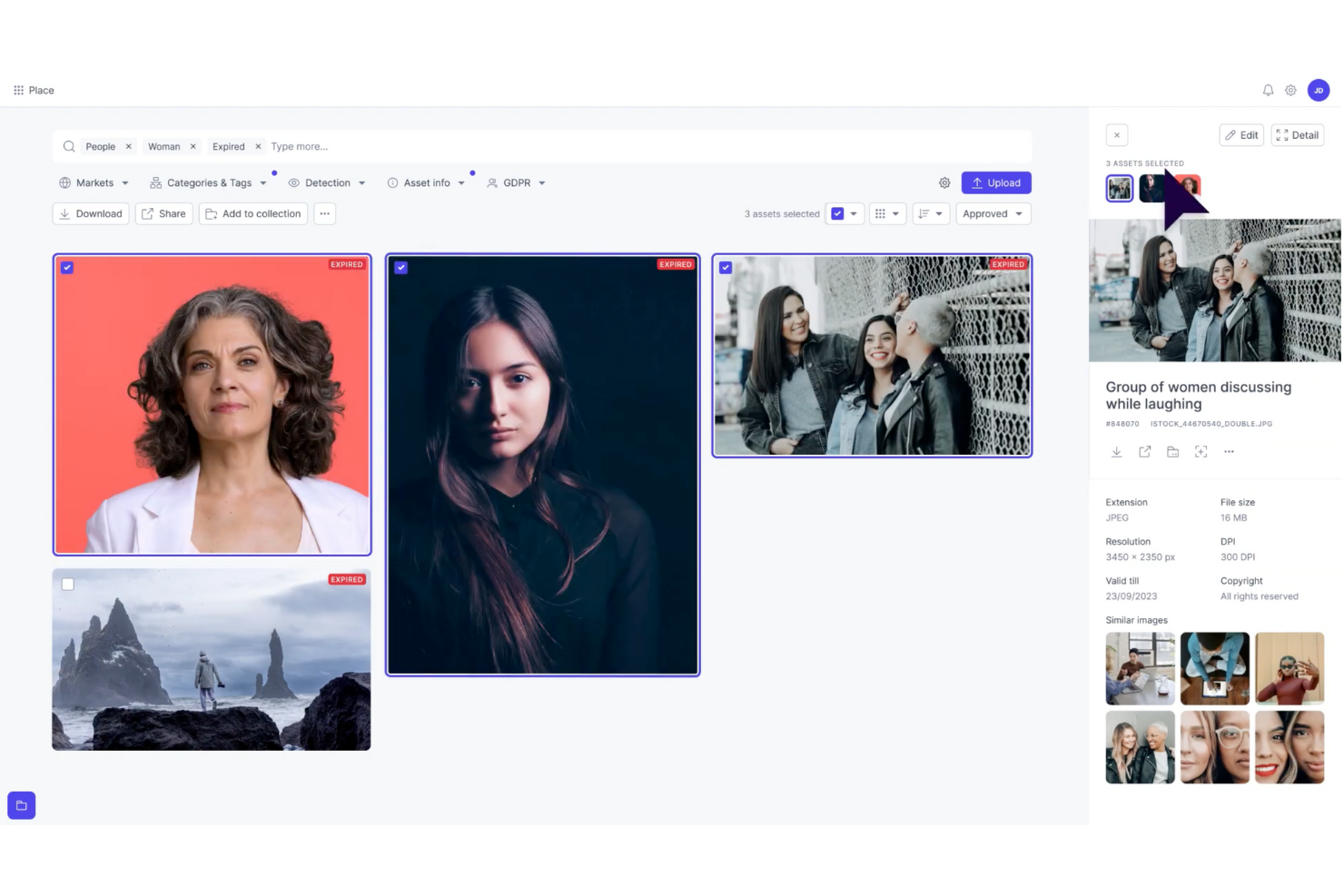
Papirfly is a digital asset management (DAM) solution built for marketing teams that need to organize and scale their content efficiently. Its AI-driven metadata tagging helps you quickly sort, store, and retrieve assets, reducing time spent searching for files. If your team struggles with scattered assets or inconsistent branding, Papirfly’s centralized platform streamlines workflows and supports brand compliance across all channels, making it especially valuable for large or multi-market organizations.
Why I Picked Papirfly
I picked Papirfly for its unique ability to enhance brand consistency through its customizable brand portals and AI-driven metadata tagging. These features ensure that your team can quickly access and utilize the right assets while maintaining brand compliance. Additionally, Papirfly's workflow automation capabilities can significantly accelerate your marketing processes, allowing your team to focus more on creative tasks rather than administrative ones.
Papirfly Key Features
In addition to AI-driven metadata tagging, Papirfly offers:
- Templated Content Creation: Provides pre-designed templates that help your team create on-brand content quickly and easily.
- Campaign Management Tools: These tools allow you to plan, execute, and manage marketing campaigns within the same platform.
- Compliance Management: Ensures that all digital assets adhere to legal and brand guidelines, reducing the risk of unauthorized usage.
- Analytics and Reporting: Offers insights into asset performance and usage, enabling data-driven marketing decisions.
Papirfly Integrations
Integrations include Adobe Creative Cloud, Microsoft Office 365, Salesforce, HubSpot, WordPress, Shopify, Google Analytics, Mailchimp, Slack, and Canva. Native integrations are not currently listed by Papirfly, but these tools facilitate seamless access and management of digital assets.
Pros and Cons
Pros:
- Centralized library helps maintain brand consistency
- Templated content creation speeds up marketing materials production
- AI-driven metadata tagging improves asset searchability
Cons:
- Limited customization options for specific industry needs
- Users report occasional slow performance
New Product Updates from Papirfly

Papirfly Prove Enterprise Adds Analytics Agent
Papirfly Prove Enterprise adds Analytics Agent for asking data questions in plain language and generating figures or charts. This helps users explore analytics without setting up filters or queries. For more information, visit Papirfly’s official site.
 .

Best for AI-powered asset discovery
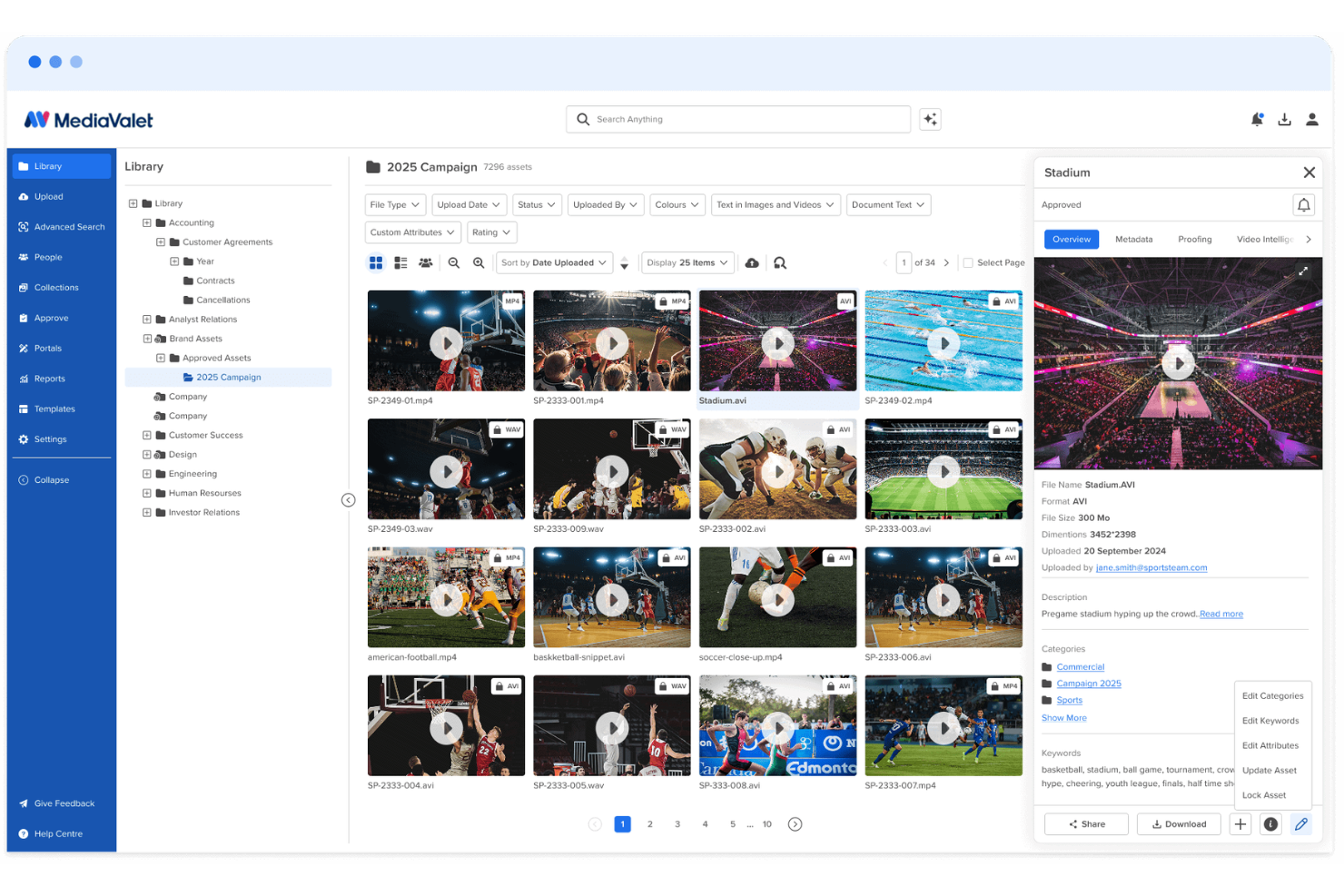
MediaValet is a digital asset management platform for marketing and creative teams that need to organize large libraries of images, videos, documents, and brand assets. Its AI-powered search, auto-tagging, branded portals, and asset reporting help teams find approved content faster, reduce duplicate work, and keep brand materials consistent across campaigns.
Who Is MediaValet Best For?
MediaValet is a good fit for enterprise marketing and creative teams that manage large volumes of digital content across multiple brands, regions, or channels.
Why I Picked MediaValet
I picked MediaValet because it helps marketing teams find approved assets faster through AI-powered asset discovery. Its auto-tagging, natural language search, object recognition, and face recognition make it easier for your team to locate images, videos, and brand files without digging through folders manually. I also like that MediaValet supports video search, so teams can find specific clips, frames, and spoken words inside media files. This makes it a good fit for marketing and creative teams managing large asset libraries across campaigns, channels, and departments.
MediaValet Key Features
Beyond asset discovery, MediaValet includes features that help marketing teams share, govern, and measure brand content:
- Experience Portals: Create branded portals to curate and share approved asset collections with internal teams, partners, or external stakeholders.
- CDN linking: Distribute assets through CDN links so teams can publish and update media across channels without manually replacing files.
- Usage reporting: Track asset views, downloads, user activity, and content performance to understand how your library is being used.
- Creative proofing: Review, comment on, and approve creative files through built-in proofing workflows before final assets are added to the library.
MediaValet Integrations
Integrations include Adobe Creative Cloud, Canva, Marq, Asana, monday.com, Microsoft 365, Contentful, Drupal, WordPress, and Salesforce Sales Cloud.
Pros and Cons
Pros:
- Usage reports show views, downloads, and asset engagement
- Branded portals simplify approved asset sharing
- AI tagging improves asset search across large libraries
Cons:
- Minor bugs can delay saved changes or affect buttons
- Search accuracy may need improvement for some users

Pics.io
Best for sharing digital assets

Pics.io is a digital asset management software that offers a wide range of features to help with marketing asset management.
Why I picked Pics.io: I chose Pics.io because of its capabilities in sharing digital assets. For marketing teams, Pics.io offers a robust file-sharing system that allows users to publish and share individual or bulk assets, showcase work with pre-made templates, and use an interactive proofing template for external collaboration. The platform's advanced metadata tagging and search functionalities also enable marketers to quickly locate and utilize the exact files they need.
Standout features & integrations:
Features include unlimited digital asset storage that allows users to store digital assets without restrictions on file types or sizes. It also offers inboxes for direct communication with external stakeholders, version control to track changes on assets, and AI capabilities such as face recognition and speech-to-text transcription.
Integrations include Google Drive, Amazon S3, Slack, Zapier, Adobe Photoshop, Adobe Premiere Pro, Shopify, Salesforce, Trello, Figma, Wrike, WordPress, monday.com, and more.
Pros and Cons
Pros:
- Dynamic AI-based tagging
- Robust collaboration features
- Search function to quickly locate assets
Cons:
- Larger files may experience slower loading times
- Web views and asset inbox could be more customizable
New Product Updates from Pics.io
Pics.io Adds Filtered Audit Trail CSV Exports
Pics.io now lets you export Audit Trail logs to CSV and apply filters before exporting, making it easier to analyze and share activity history. For more information, visit Pics.io's official site.
 .

Best for unlimited user access
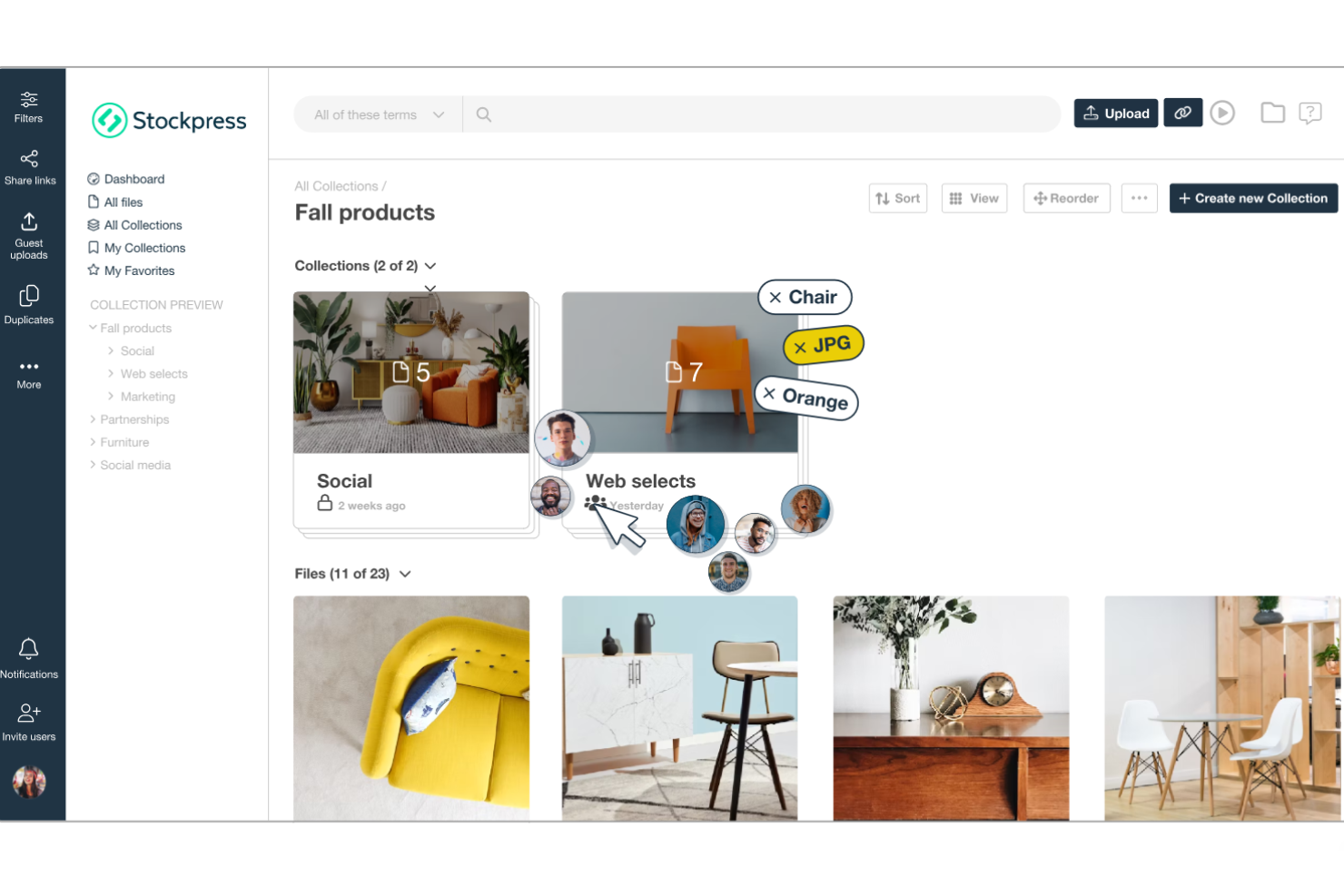
Stockpress is a digital asset management (DAM) platform designed to help teams organize, find, collaborate on, and share digital files within a single shared workspace.
Why I picked Stockpress: One thing I like about Stockpress is its AI-powered tagging system. This tool automatically assigns relevant tags to your files, enhancing searchability and saving your team from the tedious task of manual tagging. Stockpress also stands out with its unlimited user access model and customizable roles. This means that your team can work with internal and external collaborators without worrying about additional fees.
Standout features & integrations:
Features include version control, which allows your team to manage multiple iterations of a file. Additionally, the platform offers customizable share links that let you control who accesses your files and set expiration dates for added security. It also offers duplicate detection to help maintain an organized library by identifying and removing redundant files.
Integrations include Google Drive, Dropbox, Box, Adobe Photoshop, Slack, Mailchimp, Okta, Webflow, Klaviyo, Adobe Illustrator, Adobe InDesign, and Canva.
Pros and Cons
Pros:
- Robust security features for safe file sharing
- Efficient search functionality with AI tagging
- Unlimited users without additional costs
Cons:
- Initial setup may require time to organize existing assets
- Limited offline access
Best for AI-powered visual search and tagging
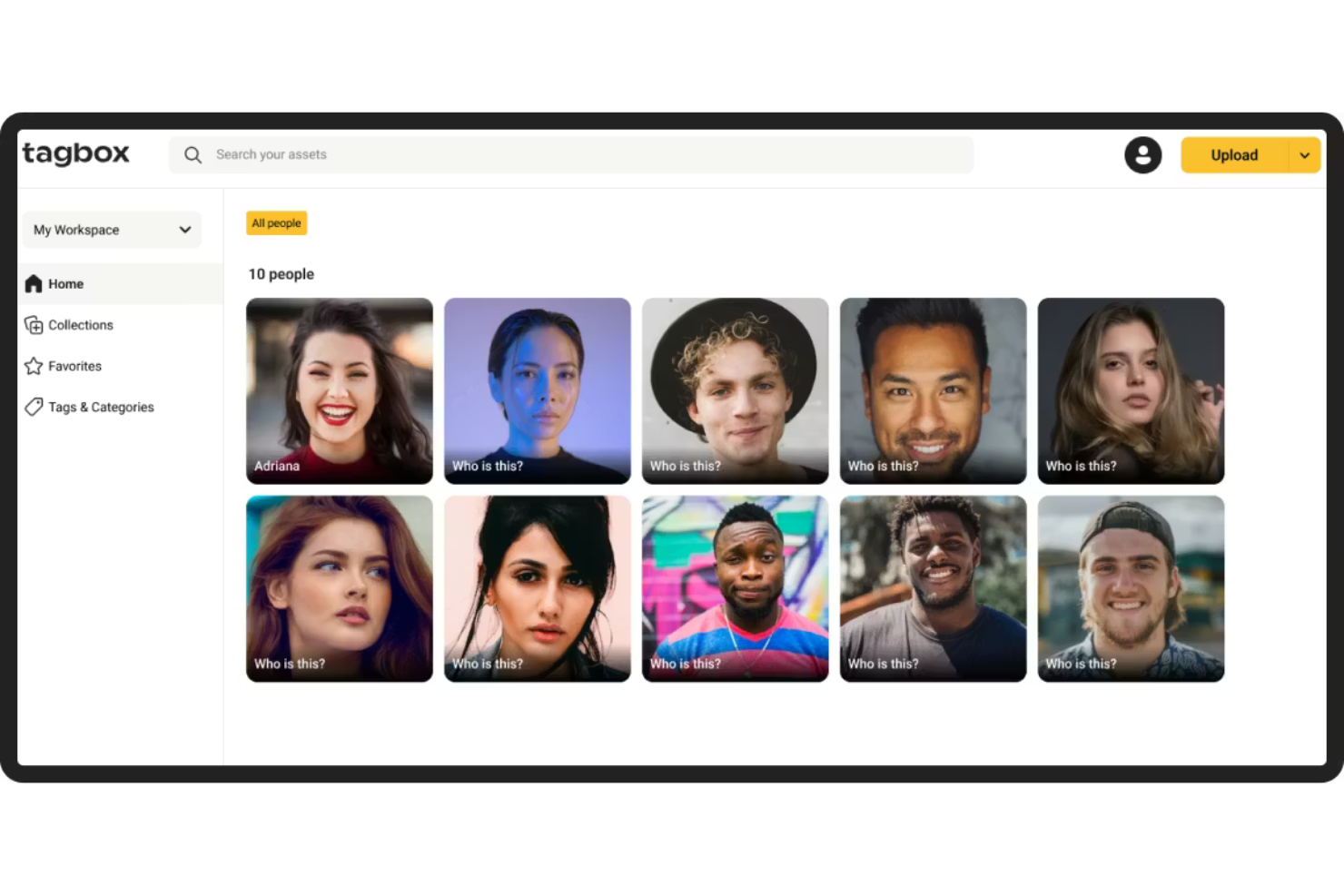
Tagbox.io is a digital asset management platform built for marketing teams that need AI-powered tagging, visual search, and structured permissions to manage large image and video libraries efficiently.
Who Is Tagbox.io Best For?
Tagbox.io is a strong fit for marketing and creative teams managing high volumes of visual content who need faster asset discovery, duplicate control, and clear permission-based access.
Why I Picked Tagbox.io
I picked Tagbox.io because its AI-powered tagging and visual search significantly reduce the time spent locating assets. The system automatically detects objects, scenes, colors, and faces, and you can apply structured custom tags that reflect your brand taxonomy. In practice, that means my team can combine natural-language search with filters like collections, people, or approval status in one query. For marketing teams managing thousands of assets, that level of search precision is a real operational advantage.
Tagbox.io Key Features
- Face recognition: Automatically detects and groups images by individual, making event and campaign photos easy to retrieve.
- Video AI analysis: Analyzes video content frame by frame to detect people and visual elements, making video files searchable.
- Duplicate detection: Identifies identical or near-identical images to reduce clutter and maintain a clean library.
- Guest uploads: Allows external collaborators to upload assets into controlled collections without full platform access.
Tagbox.io Integrations
Connect Tagbox.io through Tagbox Desktop (drag-and-drop into any app), Zapier, Make, and a REST API. Custom workflows are available for Enterprise.
Pros and Cons
Pros:
- Granular permissions for controlled marketing asset sharing
- Duplicate detection helps reduce asset clutter
- Advanced AI-powered visual search and filtering
Cons:
- No built-in image editing or creative design tools
- Advanced AI tagging may require initial taxonomy setup for best results

Bynder
Best for content workflows

Bynder is a cloud-based digital asset management (DAM) platform designed to help marketing teams efficiently organize, manage, and distribute their digital content. It serves as a centralized hub where you can store various media assets, ensuring easy access and consistent brand messaging across all channels.
Why I picked Bynder: I like its AI-powered asset management. This functionality allows your team to organize and locate files, thanks to intelligent tagging and advanced search capabilities. By leveraging AI, Bynder ensures that your marketing materials are not only well-organized but also easily retrievable. Bynder also has a robust asset workflow module that enhances the process of briefing, reviewing, and approving digital assets within your team.
Standout features & integrations:
Features include a studio for scaling and automating digital content creation and analytics that provide data-driven insights into your content and portal usage. It also has built-in security controls such as two-factor authentication and user rights and access settings to protect your content.
Integrations include Salesforce, Salsify, Sanity, SAP Commerce Cloud, Sprout Social, SharePoint, Asana, Adobe Creative Cloud, Contentful, and Contentstack.
Pros and Cons
Pros:
- Efficient search functionality allows quick access to assets
- Robust analytics and reporting
- Ability to approve assets
Cons:
- Time-consuming initial setup
- Limited customization options for certain functionalities

Filecamp
Best for cost-effective DAM

Filecamp is a digital asset management solution that excels in affordability. It stands out as the best for cost-effective DAM, offering a comprehensive set of features at a competitive price point.
Why I picked Filecamp: Filecamp provides users with a user-friendly interface and robust features tailored for branding and collaboration. It allows marketing teams to easily organize, share, and collaborate on digital assets while ensuring brand consistency through customizable branding options. I determined Filecamp to be the best for cost-effective DAM because it delivers essential DAM features without imposing a significant financial burden on its users.
Standout features & integrations:
Features include a user-friendly interface, customizable branding options, and granular permission settings. It also boasts powerful search capabilities and supports a variety of file formats.
Integrations include Slack, WordPress, Salesf
Pros and Cons
Pros:
- Advanced search capabilities
- Customizable branding options
- Unlimited users in all plans
Cons:
- Extra costs for additional storage
- Higher-tier plans are required for some features
- Limited storage with the basic plan
New Product Updates from Filecamp
Filecamp Adds Analytics, AI Thumbnails, and CDN Embed Links
Filecamp adds Analytics, AI-powered thumbnails, and CDN-backed Embed links. These updates give teams more visibility into asset usage, improve thumbnail presentation, and make embedded images easier to manage. For more information, visit Filecamp’s official site.
 .

Best for integrated DAM and PIM

4ALLPORTAL is a software that specializes in digital asset management (DAM) and product information management (PIM) solutions for various industries.
Why I picked 4ALLPORTAL: For marketing teams wanting to centralize their digital asset management system, 4ALLPORTAL allows users to create, share, and export digital assets directly within the system. It supports a range of files, including images, videos, audio files, and documents. It also has collaboration features with tailored approval workflows that can be defined by roles, folders, keywords, or specific rules. Its integrated DAM and PIM capabilities further help marketing teams looking to manage digital assets and product information in one place.
Standout features & integrations:
Features include automated processes, like batch uploading images to your CMS in the same format and correct resolution and with all the right metadata for SEO. It also has a powerful search feature, allowing you to filter based on file type, tags, keywords, release status, intended use, description, and more.
Integrations include Dropbox, Canva, Jira, Shopify, Microsoft Excel, Microsoft Teams, WordPress, Adobe Illustrator, Adobe Creative Cloud, Adobe Photoshop, Hootsuite, Adobe InDesign, Salesforce, and more.
Pros and Cons
Pros:
- Support for multiple language translations
- Workflow automation capabilities
- Scalable with the needs of a growing business
Cons:
- Customizing the portal may require a time investment
- Interface can be challenging to navigate
Best for detailed metadata tagging

Acquia DAM is a digital asset management system designed to help teams across various industries, including marketing teams, organize, manage, and distribute their digital assets. It centralizes your brand's images, videos, and other media files, making them easily accessible and shareable across your organization.
Why I picked Acquia DAM: I like the platform's support for metadata and taxonomy management. Acquia DAM allows you to add detailed metadata to your assets, making it easier to categorize and search for specific files. This functionality is particularly beneficial for marketing teams that deal with a large volume of digital content, as it simplifies the process of finding and retrieving the right assets when needed.
Standout features & integrations:
Features include version control, which helps your team keep track of changes made to assets over time, ensuring that everyone is working with the most current versions. The platform also offers user permissions, allowing you to control who has access to specific assets, which is essential for maintaining security and proper usage.
Integrations include Box, Airtable, Figma, Dropbox, Google Drive, Slack, Asana, Adobe Creative Cloud, Contentful, and WordPress.
Pros and Cons
Pros:
- Dynamic embed codes allow for flexible asset customization
- AI-powered auto-tagging enhances asset discoverability
- Branded portals facilitate organized asset sharing
Cons:
- Channel distribution limited to higher-tier plans
- Could have more template options for portals and dashboards

Image Relay
Best for scalable DAM

Image Relay is a digital asset management platform designed to organize, manage, and distribute brand assets.
Why I picked Image Relay: Image Relay’s unique approach to digital asset management caters to various industries and scales with business growth. Its emphasis on simplicity and efficiency in managing and sharing digital assets makes it a standout choice. I believe Image Relay is the best for scalable DAM because it offers customizable metadata fields, a user-friendly folder structure, and bulk actions, which are essential for managing large volumes of digital assets effectively.
Standout features & integrations:
Features include powerful search capabilities with customizable metadata fields, a clear folder structure for asset organization, and bulk upload, download, and update options to save time. The platform also offers customizable user permissions and self-serve capabilities for external users, streamlining the asset management process.
Integrations include Slack, Adobe Creative Cloud, Salesforce, WordPress, Hootsuite, Canva, Shopify, Asana, Zapier, and Jira.
Pros and Cons
Pros:
- Customizable user permissions for controlled asset access
- Bulk actions for uploads, downloads, and updates save time
- Customizable metadata and folder structures for efficient asset organization
Cons:
- Requires a minimum of five users, making it less accessible for smaller teams
- Higher starting price point compared to some competitors
Outro software de gestão de ativos digitais para marketing
Segue-se uma lista de software adicional de gestão de ativos digitais para marketing que incluí na minha seleção. Embora não tenham chegado aos 10 primeiros, continuam a ser opções valiosas que merecem uma análise mais aprofundada.
- Canto
For brand asset optimization
- Adobe Experience Manager
For adaptable content
- Lingo
For centralized brand asset management
- MarcomCentral
For channel marketing
- Mailchimp
For email and SMS marketing
- Scaleflex
For AI asset optimization
- Aprimo
For content operations
- Adobe Experience Manager Assets
For cloud-native DAM
- Cloudinary Assets
For media asset optimization
- PhotoShelter
For visual content management
- ResourceSpace
For centralized asset storage
- Extensis Portfolio
For creative teams
- Dash
For effective brand positioning
- Orange Logic
For managing digital rights
- Daminion
For asset tagging


How I Evaluate Digital Asset Management Software for Marketing
I split my evaluation into two layers: baseline requirements every tool must meet—like asset libraries and approval workflows—and differentiators that set platforms apart for marketing teams.
Core Functionality (Table Stakes For This List)
When I'm selecting tools for my list, I rank each one on a scale from 0 (does not offer the functionality) to 5 (excels in this area) for each core functionality listed below. Then, I calculate the tool's total score into a percentage. Each tool needs to achieve a minimum total score of 65% to be considered for inclusion.
- Centralized Asset Library: I check whether a platform lets marketing teams store, preview, and search across file types—from video edits to campaign PDFs—in one place.
- Metadata & Tagging: Custom taxonomies and auto-tagging matter here, especially for teams managing thousands of assets across seasonal campaigns or product lines.
- Version Control: I look for clear version histories with rollback, so project managers can confirm their team is always working from the latest approved creative.
- Approval Workflows: Multi-step review routing with annotation is key, like when a social asset needs sign-off from design, legal, and the brand manager before launch.
- Permissions & Rights Management: I evaluate how granular access controls are and whether the tool tracks usage licenses—helpful when assets have regional or time-bound restrictions.
- Project Management Integrations: Native connections to tools like Asana, Wrike, or Jira show me whether the DAM fits into existing marketing project workflows or creates silos.
Once I have a list of tools that meet this criteria, I consider what sets each platform apart.
Differentiating Factors (What Sets Vendors Apart)
Here's how I compare and contrast different vendors:
Standout Features
Brand portals are a big differentiator—I look for platforms that let you spin up a shareable hub where agencies and partners grab approved assets without filing requests. Creative templating is equally valuable, especially when regional teams need to localize campaign materials without pulling in a designer. I also evaluate usage analytics, since knowing which assets get downloaded and reused helps project managers justify content investment to leadership.
Beyond Features
Collaboration access matters—I check whether a platform supports guest users for agencies and freelancers without inflating seat costs, since most marketing projects involve external contributors. Ecosystem fit is just as important. A DAM that connects to your CMS, marketing automation platform, and creative tools saves project managers from becoming middlemen shuttling files between systems. I also evaluate security posture, looking for SOC 2 compliance, SSO support, and audit logs that satisfy enterprise governance requirements.
Como escolher software de gestão de ativos digitais para marketing
É fácil perder-se em listas extensas de funcionalidades e estruturas de preços complexas. Para o ajudar a manter o foco enquanto percorre o seu processo exclusivo de seleção de software, apresentamos uma lista de verificação dos fatores a ter em conta:
| Fator | O que considerar |
|---|---|
| Escalabilidade | O software pode crescer com a sua equipa? Considere as necessidades futuras de armazenamento e a expansão do número de utilizadores. Procure planos flexíveis que permitam aumentar ou reduzir a escala facilmente. |
| Integrações | O software liga-se às suas ferramentas existentes? Verifique a compatibilidade com a sua atual pilha tecnológica para evitar interrupções nos fluxos de trabalho. |
| Personalização | Pode adaptar o software aos seus processos? Avalie a possibilidade de personalizar fluxos de trabalho, elementos de marca e permissões de utilizador para responder às suas necessidades específicas. |
| Facilidade de utilização | A interface é intuitiva para todos os utilizadores? Certifique-se de que os membros da equipa conseguem aprender rapidamente a utilizar o software sem necessidade de formação extensa. |
| Implementação e integração inicial | A transição para o novo sistema é simples? Procure ferramentas com um apoio sólido durante a integração inicial, como tutoriais e serviço de apoio ao cliente, para facilitar a mudança. |
| Custo | O preço enquadra-se no seu orçamento? Compare os custos com os benefícios e tenha em conta quaisquer taxas ocultas ou contratos de longa duração que possam afetar o seu orçamento. |
| Medidas de segurança | Os seus ativos estão protegidos? Analise a encriptação de dados, os controlos de acesso e a conformidade com regulamentos como o RGPD para garantir a segurança dos dados. |
| Disponibilidade do apoio | É possível obter ajuda quando necessário? Verifique se o fornecedor oferece apoio 24 horas por dia, 7 dias por semana, e várias opções de contacto para resolver problemas rapidamente. |
Tendências do software de gestão de ativos digitais para marketing
À medida que o panorama digital continua a evoluir, as tendências do software de gestão de ativos digitais para marketing vão revolucionar a forma como as empresas gerem os seus ativos multimédia. Desde a automatização baseada em IA e ferramentas de colaboração melhoradas até capacidades de integração aperfeiçoadas, estas são as tendências que tenho observado nas soluções de gestão de ativos digitais para marketing:
- Integração com inteligência artificial e aprendizagem automática: A inteligência artificial e a aprendizagem automática estão a ser cada vez mais integradas no software de gestão de ativos digitais. Esta tendência permite uma organização e recuperação mais inteligentes dos ativos, reduzindo significativamente o tempo dedicado à gestão de ativos.
- Ênfase na experiência do utilizador: Melhorar a experiência do utilizador é uma tendência fundamental no software de gestão de ativos digitais. Os programadores estão a apostar em interfaces intuitivas e fluxos de trabalho simplificados, uma vez que estes têm um impacto direto na produtividade e nas taxas de adoção pelos utilizadores.
- Medidas de segurança reforçadas: A segurança está a tornar-se uma prioridade máxima no software de gestão de ativos digitais, e estão a ser implementados mecanismos de encriptação e controlos de acesso avançados para proteger ativos de marketing sensíveis. Esta tendência é importante devido às crescentes preocupações com violações de dados e roubo de propriedade intelectual.
- Adoção de soluções baseadas na nuvem: As soluções de gestão de ativos digitais baseadas na nuvem estão a ganhar popularidade, uma vez que oferecem escalabilidade e acesso remoto. Esta evolução é positiva, pois permite a colaboração em tempo real e o acesso a partir de qualquer lugar.
- Foco na análise e nos relatórios: As funcionalidades de análise e elaboração de relatórios estão a assumir maior importância no software de gestão de ativos digitais, fornecendo informações sobre a utilização e o desempenho dos ativos. Esta tendência é particularmente relevante, pois ajuda os profissionais de marketing a tomar decisões baseadas em dados sobre as suas estratégias de conteúdos.
Funcionalidades
Ao selecionar software de gestão de ativos digitais para marketing, procure as seguintes funcionalidades essenciais:
- Etiquetagem de metadados: Organize e categorize automaticamente os ativos para facilitar a sua localização e gestão.
- Controlo de versões: Garanta que todos trabalham com as versões mais recentes dos ficheiros, reduzindo erros e confusões.
- Permissões de utilizador: Controle quem pode aceder e editar os ativos, reforçando a segurança e mantendo a integridade da marca.
- Pesquisa avançada: Encontre rapidamente ativos específicos através de funcionalidades de pesquisa avançadas, poupando tempo e esforço.
- Elementos de marca personalizáveis: Adapte a interface para refletir a identidade da sua marca, garantindo a consistência.
- Automatização de fluxos de trabalho: Automatize tarefas repetitivas para aumentar a eficiência e libertar tempo para outras atividades.
- Ferramentas de análise: Obtenha informações sobre a utilização e o desempenho dos ativos, ajudando-o a tomar decisões fundamentadas.
- Capacidades de integração: Ligue o software às ferramentas e plataformas existentes para simplificar os fluxos de trabalho e manter a produtividade.
- Armazenamento escalável: Acomode bibliotecas de ativos em crescimento com opções de armazenamento flexíveis que podem acompanhar as suas necessidades.
- Funcionalidades de colaboração: Facilite a comunicação da equipa e a coordenação de projetos com ferramentas de colaboração integradas.
Benefícios
A implementação de software de gestão de ativos digitais para marketing oferece vários benefícios à sua equipa e à sua empresa. Eis alguns dos benefícios que pode esperar:
- Organização melhorada: A etiquetagem de metadados e o controlo de versões ajudam a manter os seus ativos digitais organizados e fáceis de encontrar.
- Colaboração melhorada: As permissões de utilizador e as funcionalidades de colaboração permitem que a sua equipa trabalhe em conjunto de forma eficiente nos projetos.
- Poupança de tempo: A pesquisa avançada e a automatização de fluxos de trabalho reduzem o tempo gasto a procurar ativos e a executar tarefas repetitivas.
- Maior segurança: As permissões de utilizador e o armazenamento escalável garantem que os seus ativos digitais estão seguros e acessíveis apenas a utilizadores autorizados.
- Melhor tomada de decisões: As ferramentas de análise fornecem informações sobre a utilização dos ativos, ajudando-o a tomar decisões de marketing fundamentadas.
- Consistência da marca: A personalização da marca garante que todos os ativos digitais estão alinhados com a identidade da sua marca.
- Escalabilidade: À medida que a sua empresa cresce, o armazenamento escalável e as capacidades de integração permitem que o seu sistema de gestão de ativos cresça consigo.
Custos e preços
A seleção de software de gestão de ativos digitais para marketing exige uma compreensão dos vários modelos de preços e planos disponíveis. Os custos variam consoante as funcionalidades, o tamanho da equipa, os complementos e muito mais. A tabela abaixo resume os planos comuns, os preços médios e as funcionalidades normalmente incluídas nas soluções de software de gestão de ativos digitais para marketing:
Tabela de comparação de planos de software de gestão de ativos digitais para marketing
| Tipo de plano | Preço médio | Funcionalidades comuns |
|---|---|---|
| Plano gratuito | $0 | Armazenamento básico, acesso limitado dos utilizadores e ferramentas essenciais de gestão de ativos. |
| Plano pessoal | $5-$25/user/month | Mais armazenamento, permissões de utilizador e funcionalidades básicas de colaboração. |
| Plano empresarial | $30-$75/user/month | Pesquisa avançada, personalização da marca e automatização de fluxos de trabalho. |
| Plano corporativo | $100+/user/month | Armazenamento ilimitado, análises abrangentes e medidas de segurança reforçadas. |
O que é o software de gestão de ativos digitais para marketing?
O software de marketing de ativos digitais é uma ferramenta especializada concebida para gerir, organizar e distribuir ativos digitais. Os profissionais de marketing utilizam-no para gerir uma vasta gama de conteúdos digitais, como imagens, vídeos e documentos. Geralmente, funciona como um repositório central que apoia as atividades de marketing, garantindo que os ativos multimédia são facilmente acessíveis e podem ser partilhados de forma eficiente
Perguntas frequentes sobre software de gestão de ativos digitais para marketing
Aqui estão algumas das perguntas mais frequentes que recebo sobre software de gestão de ativos digitais para marketing:
Quanto tempo demora a implementar um software de gestão de ativos digitais?
O prazo para implementar um sistema DAM não é fixo e depende de fatores como a disponibilidade da equipa, os conhecimentos especializados em DAM e a complexidade dos fluxos de trabalho e dos requisitos. Embora algumas organizações possam fazer a integração rapidamente, outras poderão demorar vários meses. É essencial ter um processo de integração flexível, alinhado com os objetivos da sua equipa.
O software de gestão de ativos digitais é compatível com equipas grandes?
Sim, o software DAM é escalável e pode ser utilizado por equipas grandes em diferentes localizações. Por exemplo, muitas equipas utilizam software DAM para universidades e recorrem a um único software simplificado em vários campus. Disponibiliza funcionalidades como o controlo de acesso baseado em funções, que garante que os membros da equipa têm acesso adequado aos ativos de acordo com os requisitos das suas funções. A plataforma consegue gerir grandes volumes de dados e vários utilizadores em simultâneo, sendo adequada para organizações de grande dimensão com necessidades complexas de gestão de ativos.
Qual é o nível de segurança do software de gestão de ativos digitais?
O software de gestão de ativos digitais oferece normalmente elevados níveis de segurança para proteger os ativos contra acessos não autorizados e ameaças informáticas. São comuns funcionalidades como o armazenamento de dados encriptados, protocolos seguros de transferência de ficheiros e auditorias de segurança regulares. Além disso, os sistemas DAM fornecem registos detalhados de acessos e a possibilidade de definir permissões granulares para diferentes utilizadores e grupos.
Que tipos de ficheiros podem ser geridos com software de gestão de ativos digitais?
O software DAM pode gerir uma grande variedade de tipos de ficheiros, incluindo imagens, vídeos, ficheiros de áudio, PDFs e ficheiros de documentos. A maioria das plataformas foi concebida para lidar com ficheiros de grandes dimensões e diferentes formatos de ficheiro, garantindo que as equipas de marketing podem armazenar e aceder a uma gama diversificada de conteúdos digitais conforme necessário.
Como é que o software de gestão de ativos digitais melhora a eficiência do marketing?
O software DAM centraliza todos os ativos de marketing num único local, tornando mais rápido e fácil para as equipas encontrar e utilizar os materiais certos. Reduz o tempo despendido a procurar ativos e ajuda a evitar a recriação de materiais já existentes. Ao simplificar a gestão de ativos, as equipas podem lançar campanhas de marketing de forma mais rápida e coerente. Além disso, permite uma melhor colaboração entre membros da equipa e departamentos.