

As 10 melhores soluções de gestão de recursos na construção avaliadas em 2026

Melhor software de gestão de recursos na construção civil


Manter as equipas no caminho certo, o equipamento onde é necessário e os horários sob controlo não é fácil. Quando gere mão de obra, materiais e subempreiteiros em vários locais, os atrasos e as falhas de comunicação podem acumular-se rapidamente.
O software de gestão de recursos na construção civil ajuda a atribuir trabalho, acompanhar a disponibilidade e antecipar problemas antes que lhe façam perder tempo ou dinheiro.
Nesta lista, apresento-lhe as melhores opções disponíveis no mercado. Testo e analiso software de gestão de projetos de forma independente e selecionei estas ferramentas com base no que funciona realmente para quem trabalha na gestão de projetos de construção.
Why Trust Our Software Recommendations
Our team has been testing and reviewing software since 2012. As project managers ourselves, we know how difficult—and important—it is to choose the right software.
For this guide, we evaluated tools using hands-on testing and independent research, scoring tools using our selection criteria. We also draw on insights from industry thought leaders and practicing project management experts.
Our reviews reflect our human editorial judgment, not a sales pitch.
Expert reviewers:
Tabela comparativa de software de gestão de recursos na construção civil
Esta tabela comparativa resume os detalhes de preços das minhas principais escolhas de software de gestão de recursos na construção civil:
| Tool | Best For | Trial Info | Price | ||
|---|---|---|---|---|---|
| 1 | Best for visualizing team workloads | Free plan + 14-day trial + demo available | From $10/user/month (billed annually) | Website | |
| 2 | Best for capacity-based resource allocation | 14-day free trial | From $17/user/month | Website | |
| 3 | Best with a single database platform | Free demo available | Pricing upon request | Website | |
| 4 | Best for resource maintenance | Free demo available | Pricing upon request | Website | |
| 5 | Best for resource allocation | 15-day free trial | From $63.55/month (billed annually) | Website | |
| 6 | Best for on-site efficiency | 30-day free trial | From $49/month (billed annually) | Website | |
| 7 | Best for customer management | Free demo available | Pricing upon request | Website | |
| 8 | Best for field coordination | Free plan available | From $39/user/month (billed annually) | Website | |
| 9 | Best for planning accuracy | Not available | Pricing upon request | Website | |
| 10 | Best for connecting field data to job costs | Free demo available | Pricing upon request | Website |


Análises do melhor software de gestão de recursos na construção civil
Abaixo encontrará os meus resumos detalhados do melhor software de gestão de recursos na construção civil que entrou na minha seleção. As minhas análises apresentam uma visão detalhada das principais funcionalidades, vantagens & desvantagens, integrações e casos de utilização ideais de cada ferramenta, para o ajudar a encontrar a melhor opção para si.

Wrike
Best for visualizing team workloads
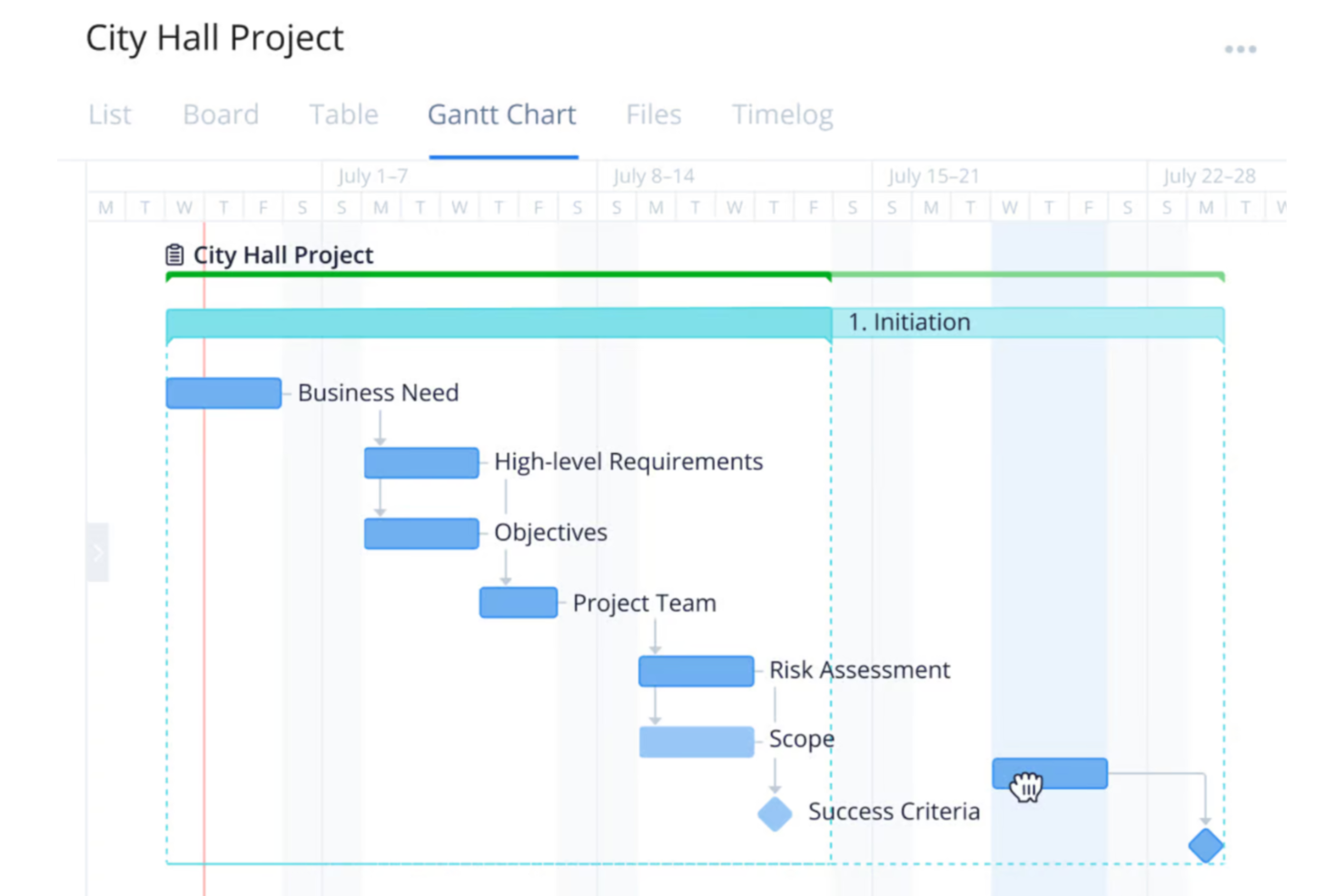
Wrike is a versatile project management platform designed for organizations across various industries, including construction teams wanting to improve the planning, execution, and delivery of projects.
Why I Picked Wrike:
One of Wrike's key features is its workload charts. These charts provide a clear view of each team member's assignments and capacity, helping you distribute tasks effectively and prevent overloading. By visualizing workloads, you can allocate resources based on availability and project needs, ensuring balanced workloads and timely project completion. I also like Wrike's time-tracking tools. These allow your team to log hours spent on tasks, providing insights into productivity and project progress.
Standout features & integrations:
Features include customizable dashboards that let you tailor your workspace to your team's specific needs, providing quick access to essential project information. Additionally, Wrike's dynamic request forms streamline the intake process by capturing all necessary details upfront, reducing back-and-forth communications. The platform also offers real-time reporting tools, enabling you to generate up-to-date reports on project status and resource utilization.
Integrations include QuickBooks, Skyvia, Power BI, Google Sheets, Miro, Salesforce, Tableau, Microsoft Teams, MediaValet, Zoom, Adobe Creative Cloud, and Google Drive.
Pros and Cons
Pros:
- Scalable for growing teams
- Custom workflows, dashboards, and reports
- Offers diverse project management tools
Cons:
- No built-in chat feature
- Learning curve due to extensive features
New Product Updates from Wrike
Wrike Expands Gantt Planning, Approvals, and AI Work Intake
Wrike adds cross-project Gantt dependencies, flexible approval routing, and AI work intake through Wrike MCP. These updates give teams more control over planning, decision-making, and incoming work. For more information, visit Wrike’s official site.

Scoro
Best for capacity-based resource allocation
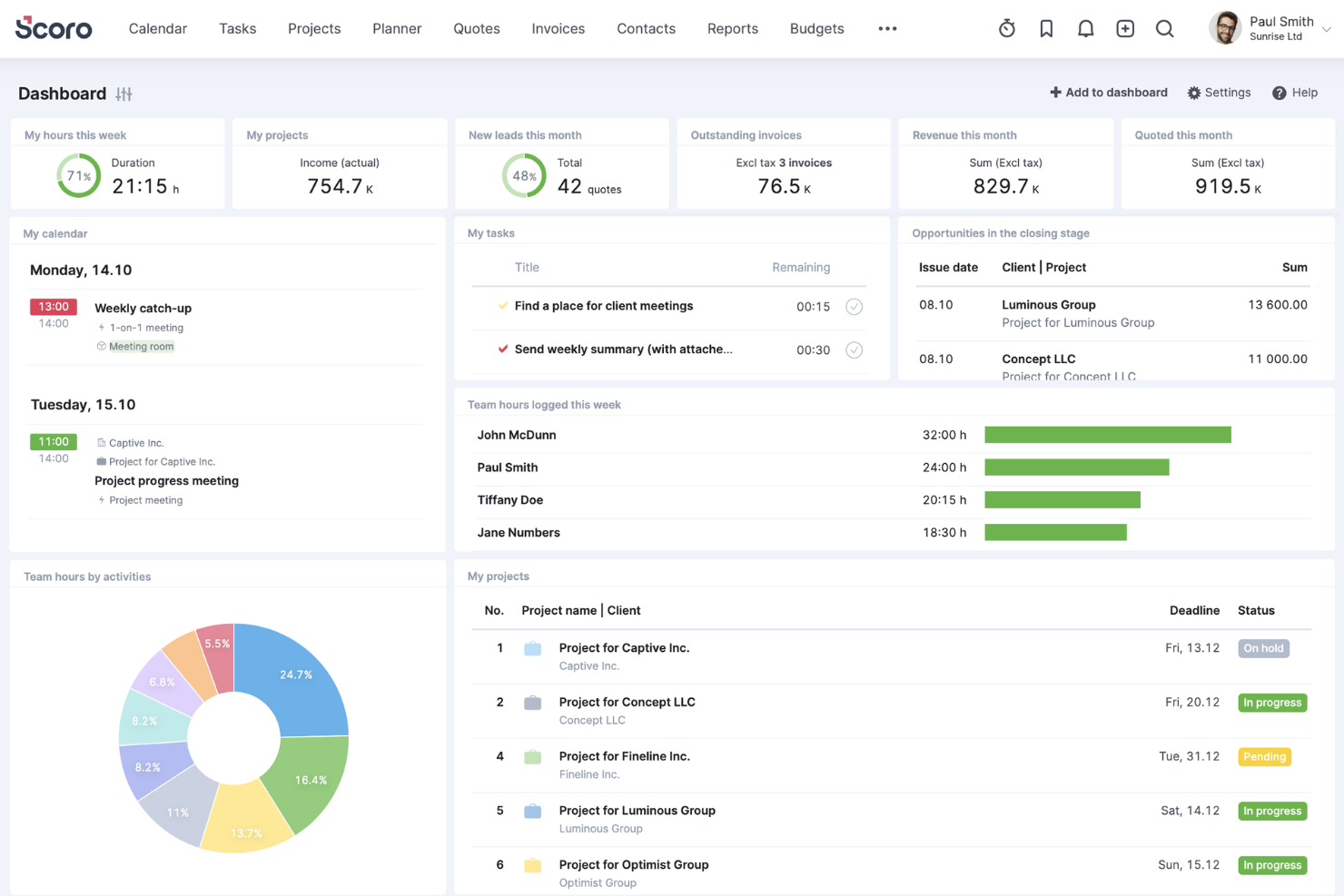
Scoro is an all-in-one business management software designed to help professional service firms enhance their operations. It integrates project management, resource planning, sales, billing, and reporting into a single platform.
Why I Picked Scoro:
Scoro offers a dynamic Gantt chart feature that allows you to track real-time progress, manage tasks and dependencies, and adjust plans as needed. This ensures that your construction projects stay on schedule and that any changes are immediately reflected across the team, minimizing manual updates and reducing the risk of double bookings. Another valuable feature is Scoro's resource planning capabilities. You can define individual team members' capacity and allocate resources based on actual availability, helping you avoid overloading your staff and ensuring optimal utilization.
Standout features & integrations:
Features include time-tracking tools that let your team log both billable and non-billable hours, providing accountability and accurate client billing. Shared calendars and timesheets enhance team coordination by offering a unified view of schedules and deadlines. Additionally, Scoro's quoting and budgeting tools enable you to create detailed proposals and monitor project costs against budgets.
Integrations include Gmail, Google Calendar, Microsoft Exchange, QuickBooks, Xero, Stripe, PayPal, Jira, Asana, HubSpot, Salesforce, Dropbox, and Zapier.
Pros and Cons
Pros:
- Robust reporting and analytics
- Good resource planning and utilization management
- Comprehensive project management features
Cons:
- Some time tracking features are limited to higher-tier plans
- Mobile app could be improved
New Product Updates from Scoro

Scoro Adds Time Mobile App and ELI Improvements
Scoro adds the Scoro Time mobile app for iOS/Android to track time anywhere and expands ELI with attachments, smarter filtering, and trigger-based actions. For more information, visit Scoro's official site.
CMiC
Best with a single database platform
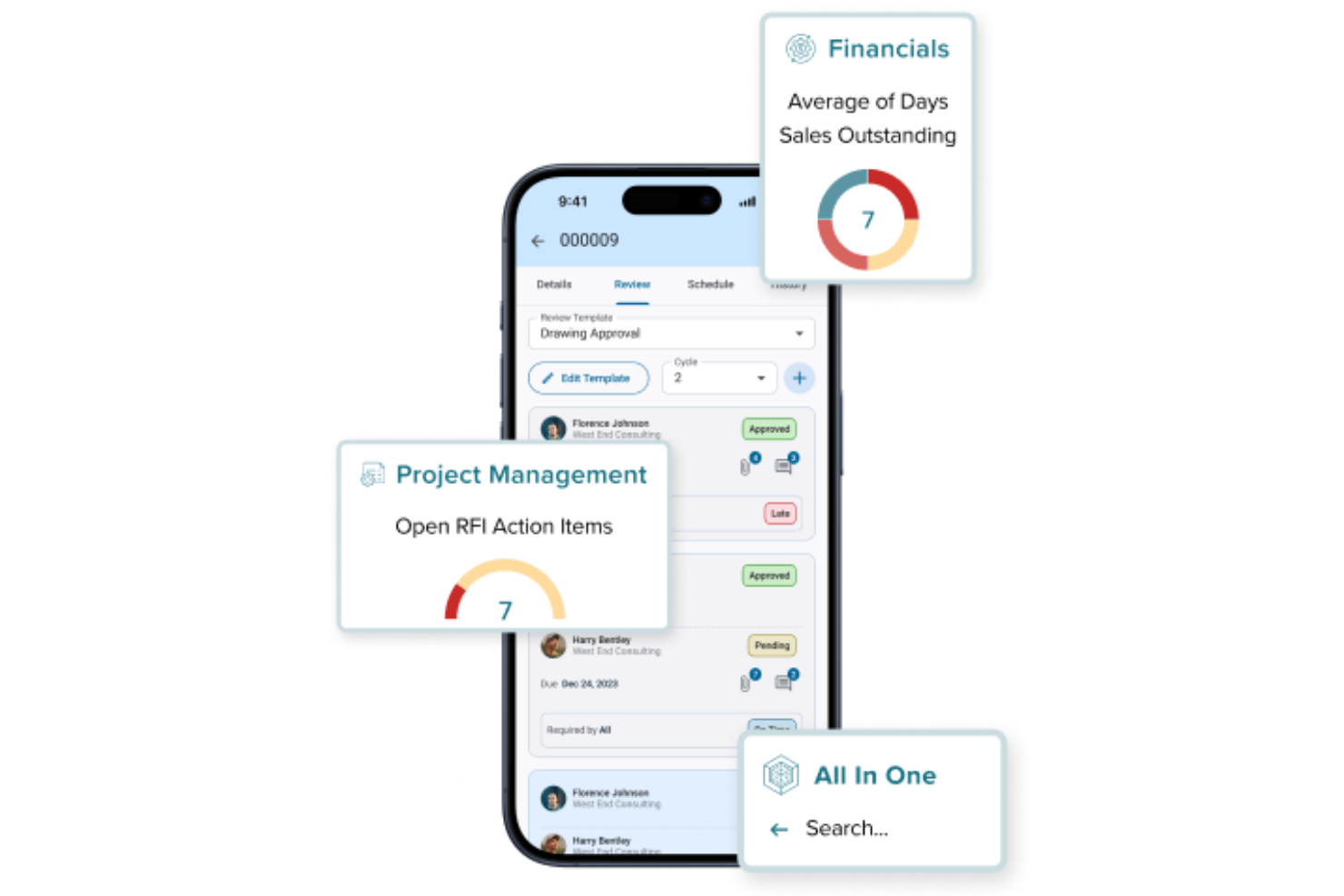
CMiC is a construction management platform built for firms that need to connect project teams, resources, and financials in one place. It’s designed for general contractors, specialty contractors, and project managers who want to unify their workflows and data. CMiC helps address challenges like fragmented information, manual processes, and lack of real-time visibility across construction projects.
Who Is CMiC Best For?
CMiC is a good fit for mid-sized to large construction firms and contractors that need to manage complex projects, resources, and financials within a unified platform.
Why I Picked CMiC
I picked CMiC because its single database platform addresses one of the biggest challenges in construction resource management: fragmented data across multiple systems. With all project, resource, and financial information stored in one centralized database, teams can access real-time updates and maintain data consistency throughout the project lifecycle. This unified approach reduces errors and eliminates the need for manual data reconciliation. I also appreciate how this setup supports better collaboration between office and field teams, ensuring everyone works from the same source of truth.
CMiC Key Features
Some other features in CMiC that stand out for construction resource management include:
- Resource scheduling tools: Assign and manage labor, equipment, and materials across multiple projects from a centralized dashboard.
- Document management system: Store, organize, and share project documents, drawings, and contracts with version control.
- Mobile field applications: Enable field teams to access project data, submit reports, and update progress directly from job sites.
- Change order management: Track, approve, and document change orders to maintain project control and transparency.
CMiC Integrations
Integrations include Arcoro, Prophix, Workday, Cosential, HammerTech, SmartBarrel, Nutrient, Salesforce, Clearstory, and Oracle Cloud.
Pros and Cons
Pros:
- Strong payroll and compliance tracking features
- Built-in equipment and subcontractor management tools
- Real-time job costing supports accurate forecasting
Cons:
- Custom report building can be complex
- Mobile app functionality is limited compared to peers

Limble
Best for resource maintenance

Limble is a cloud-based computerized maintenance management system (CMMS) designed for maintenance and resource management operations. It provides an intuitive interface and powerful tools that cater to various industries, including construction.
Why I Picked Limble:
It allows construction teams to manage and prioritize their critical equipment and resources, minimizing downtime and maintenance costs. Limble's preventive maintenance programs automate scheduling and task assignments, ensuring that equipment is maintained proactively, which is essential for avoiding breakdowns and delays in construction projects.
Standout features & integrations:
Features include its mobile accessibility, allowing field teams to manage maintenance tasks on the go, and comprehensive asset management capabilities that centralize all asset information in one place. Additionally, Limble offers a spare parts inventory management system, which ensures that critical parts are always in stock. Other notable features are real-time reporting and dashboards, predictive maintenance, and workflow automation.
Integrations include QuickBooks, Salesforce, Microsoft Teams, Slack, Jira, ServiceNow, and Google Workspace.
Pros and Cons
Pros:
- User-friendly mobile accessibility
- Custom dashboards and work orders
- Automated preventative maintenance
Cons:
- Automated reporting features could be more robust
- Initial setup can be complex

Ezo
Best for resource allocation
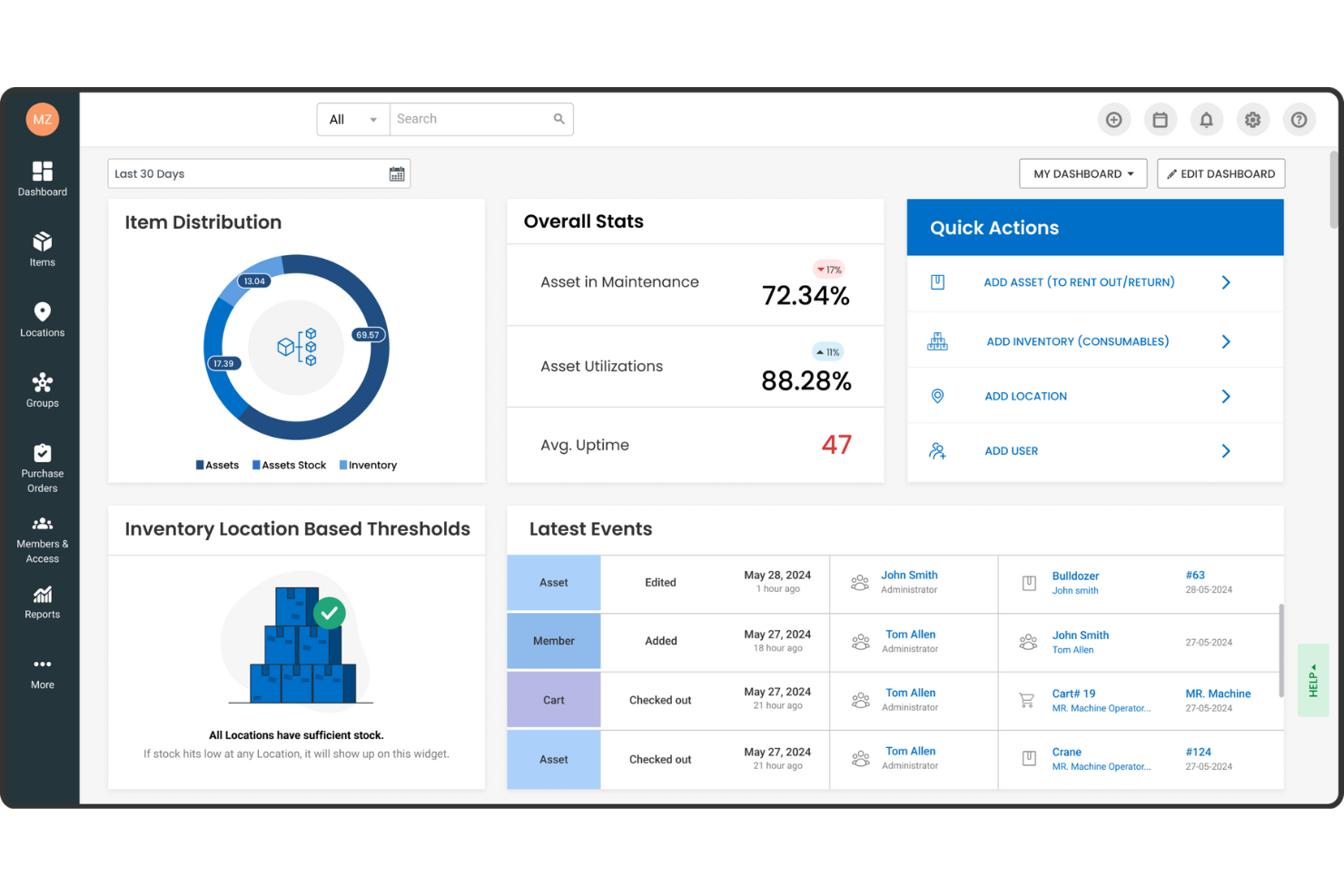
EZOfficeInventory, now known as EZO, is an asset management software designed to enhance the efficiency and utilization of physical assets. It's particularly tailored for sectors like construction, where meticulous resource management is crucial.
Why I Picked EZOfficeInventory:
I picked EZOfficeInventory for construction resource management because of its focus on fixed asset tracking, inventory management, and maintenance management. These features help construction companies keep tabs on their equipment and materials, ensuring everything is in the right place and in good working order. By using these tools, your team can focus more on the project and less on logistical headaches. Another reason is the software's advanced reporting and analytics capabilities, which provide valuable insights into asset performance. This means you can make more informed decisions about resource allocation and maintenance schedules. Knowing exactly how your assets are performing helps you anticipate issues before they become problems, keeping projects on track.
Standout features & integrations:
Features include tool tracking software that allows you to monitor equipment and tools effectively, minimizing loss or misplacement. The software supports various asset tracking methods like barcode, QR code, and RFID, enhancing inventory accuracy. Additionally, EZO offers customizable reporting options tailored to the construction industry's needs, providing valuable data to help you manage resources better.
Integrations include Google Sheets, monday.com, Google Forms, Slack, QuickBooks Online, Microsoft Office 365, Smartsheet, Knack, Zendesk, Jira, Dropbox, and OneDrive.
Pros and Cons
Pros:
- Offers cloud backup management
- Supports multiple tracking technologies like barcode, QR code, and RFID
- Customizable reporting and analytics
Cons:
- Requires training for effective use
- Lack of a sandbox environment for testing new features

Best for on-site efficiency
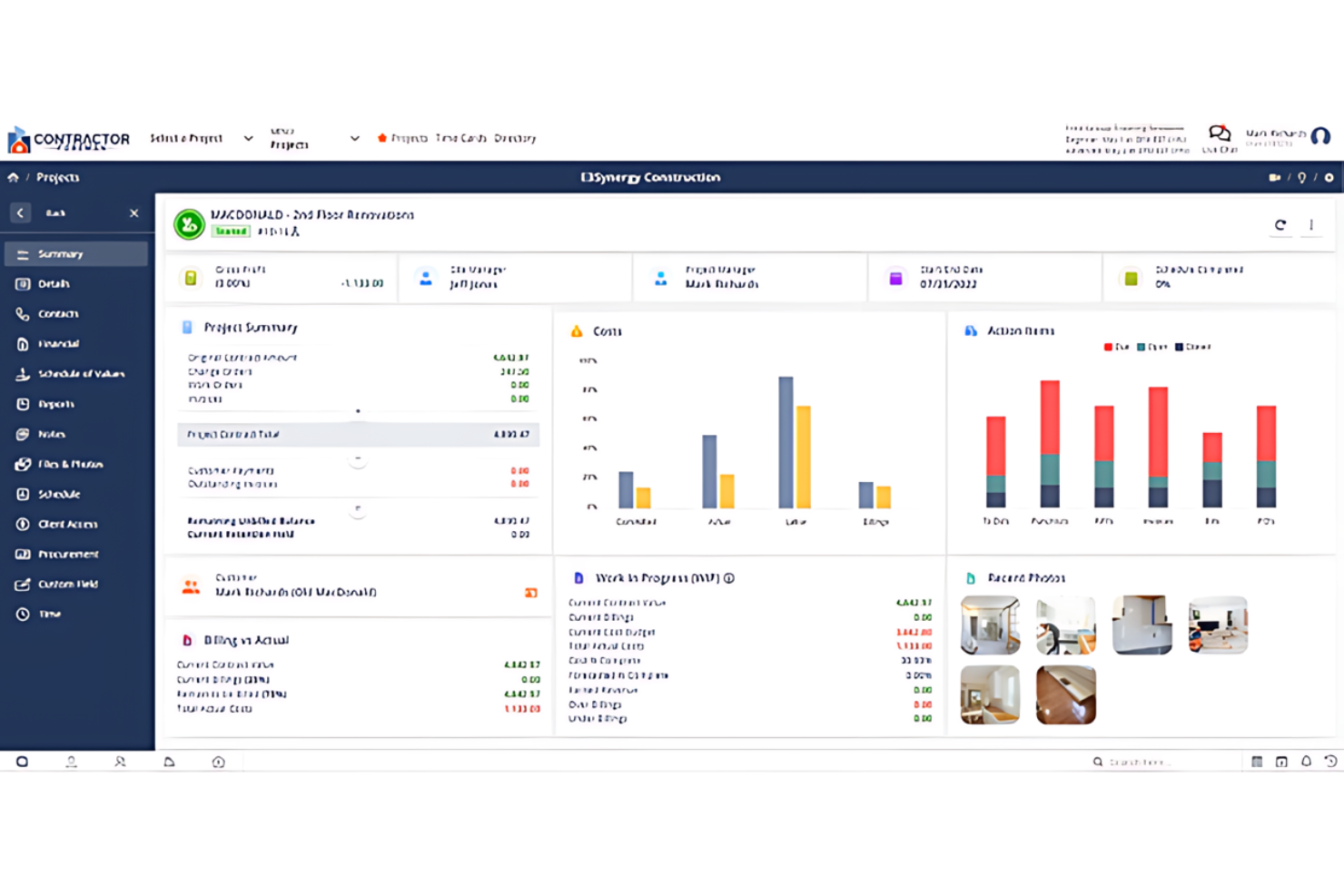
Contractor Foreman is best for contractors needing on-site project management tools. It offers on-site efficiency and has tools designed specifically for contractors' project management needs.
Why I Picked Contractor Foreman:
I selected Contractor Foreman because it uniquely addresses the demands of on-site construction management. Its specialized features help with project oversight and coordination directly in the field. I think it's best for on-site efficiency as it helps contractors manage projects with tools specifically designed for construction sites.
Standout features & integrations:
Features include job scheduling, incident reporting, and time tracking. These are accessible on mobile devices, ensuring project managers and workers stay connected.
Integrations include QuickBooks, Xero, PlanSwift, Google Calendar, Outlook, and Dropbox.
Pros and Cons
Pros:
- Direct integrations with popular accounting and productivity tools
- Complete feature set for end-to-end project management
- Mobile app for on-the-go management
Cons:
- The interface may have a learning curve for new users
- Additional costs for extra features or integrations may apply

Best for customer management

Buildertrend is a construction resource management software that simplifies project management, scheduling, and financial tracking. It helps construction businesses improve accuracy in planning and managing their projects.
Why I Picked Buildertrend:
I chose Buildertrend for its unique focus on customer management in construction. Its dedicated tools for client engagement, including a client portal, enhance transparency and collaboration. These features set it apart from other construction management software.
Standout features & integrations:
Features include project scheduling, budgeting, and customer management, all centralized within a user-friendly interface. The client portal also enables direct communication and updates.
Integrations include QuickBooks, Xero, Procore, Dropbox, DocuSign, Google Calendar, Microsoft Project, Google Drive, Slack, and Trello.
Pros and Cons
Pros:
- Integration with popular accounting and procurement platforms
- Comprehensive project management capabilities
- Dedicated client portal for improved customer interaction
Cons:
- Advanced features require higher-tier plans
- Potential complexity when using the extensive features

Best for field coordination
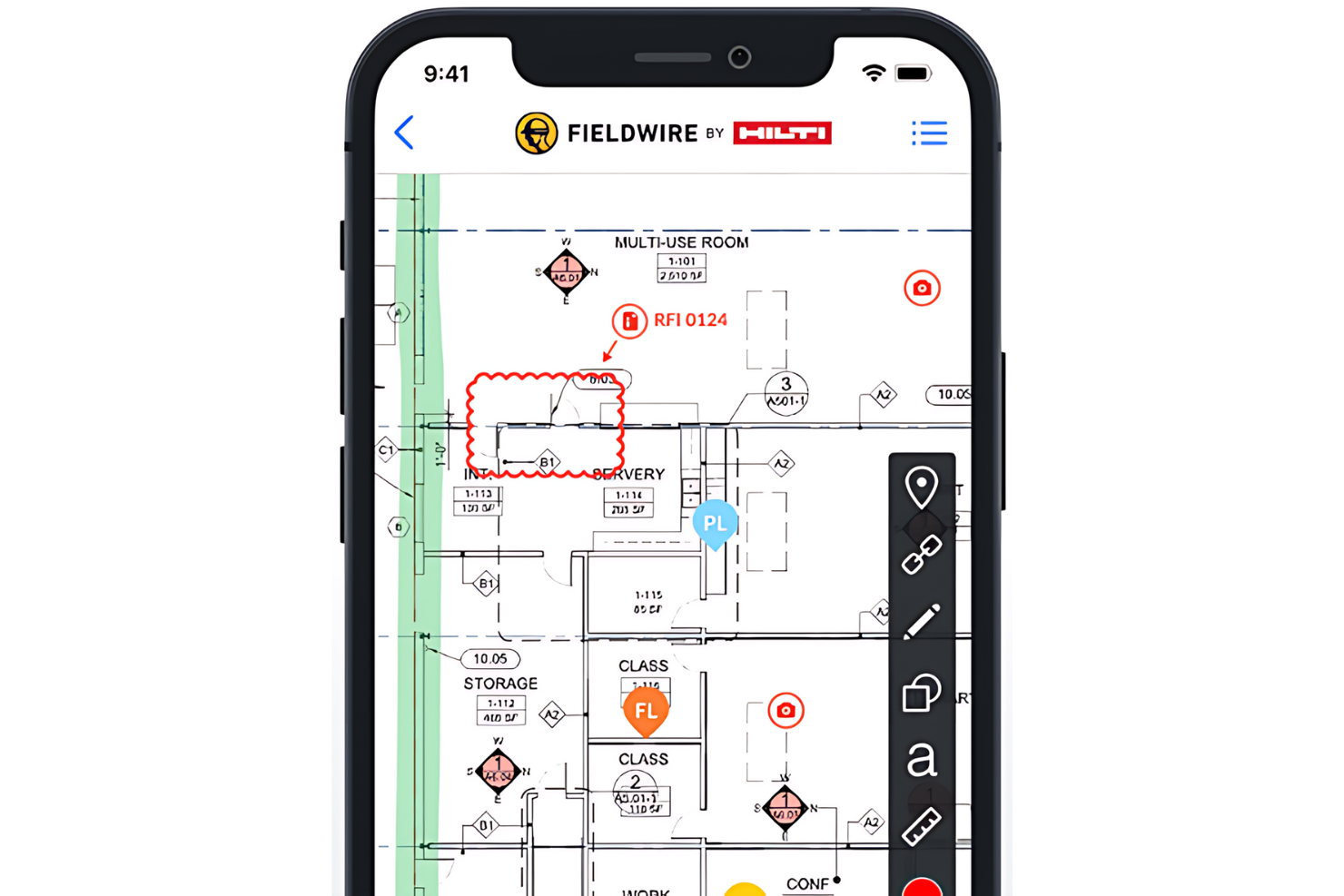
Fieldwire is a task management platform for construction teams. It is ideal for field coordination and simplifying direct communication.
Why I Picked Fieldwire:
I selected Fieldwire for its task management capabilities and emphasis on improving field coordination. Its real-time communication and collaboration features set it apart from other construction management tools. I think Fieldwire is best for field coordination because it can manage tasks, track work progress, and ensure that field teams are always aligned with project goals.
Standout features & integrations:
Features include plan viewing, task management, and issue tracking. The platform also offers powerful reporting tools and a mobile app to keep teams connected.
Integrations include PlanGrid, Autodesk BIM 360, Box, Dropbox, Google Drive, OneDrive, Egnyte, Bluebeam, and Zapier.
Pros and Cons
Pros:
- Mobile app for on-site access
- Comprehensive task management and tracking
- Real-time updates and communication
Cons:
- Higher-tier features require additional investment
- Annual billing is required for the starting price

Basis
Best for planning accuracy
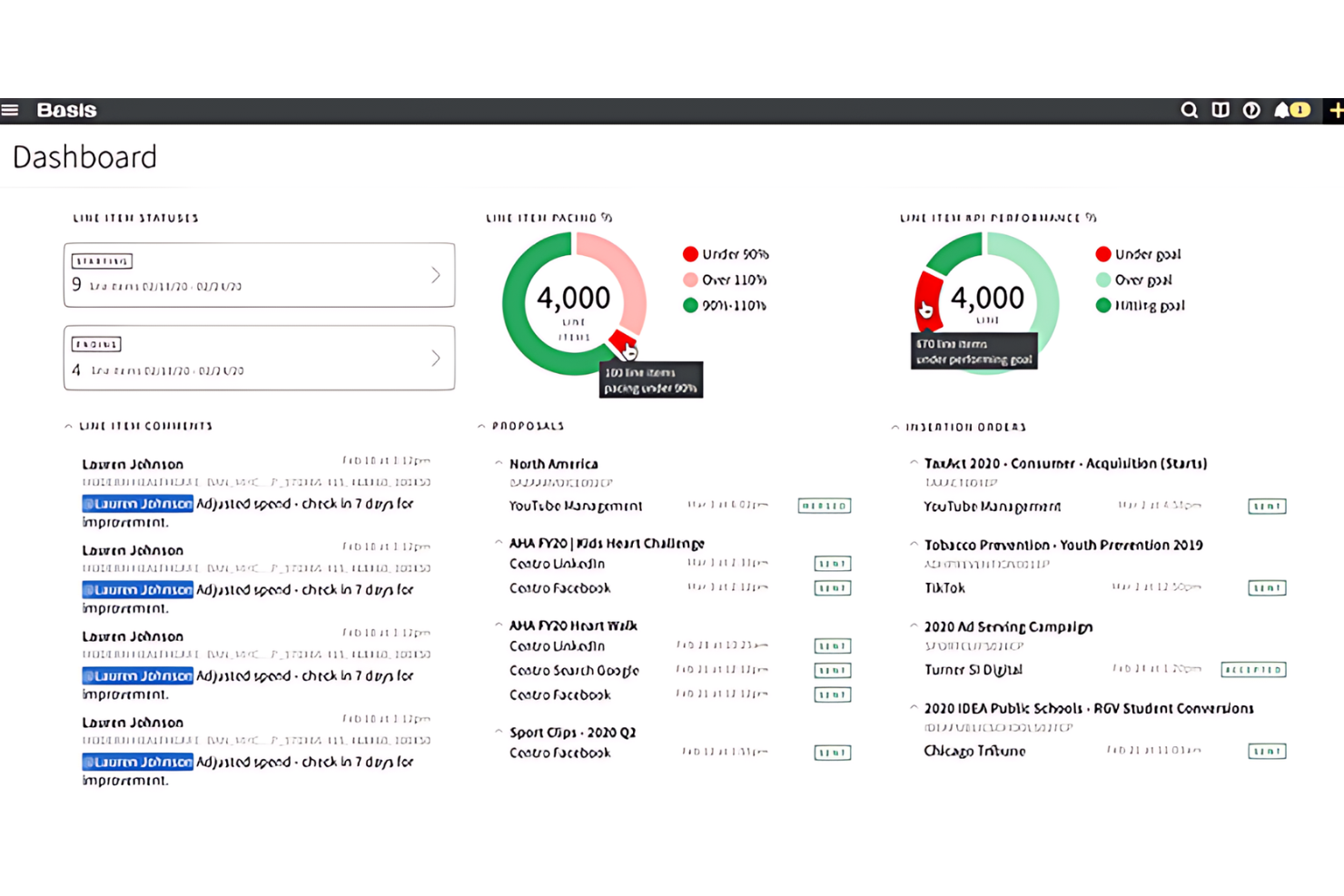
Basis is a software that enhances project planning and scheduling precision. It is best for teams requiring detailed project planning and scheduling as it offers automated bid tracking and efficient organization of bid invites.
Why I Picked Basis:
I chose Basis for its efficient bid management automation, making it ideal for subcontractors and material vendors. Its centralized dashboard ensures planning accuracy by automatically updating bid invites and project schedules.
Standout features & integrations:
Features include a cost database, project and bid management, RFP and task management, file sharing, quotes, version control, supplier management, collaboration tools, and project tracking. These features are essential for streamlining the bidding process and providing bid data analysis.
Integrations include Procore, PlanGrid, Bluebeam, Microsoft Office Suite, QuickBooks, Autodesk BIM 360, Smartsheet, Box, DocuSign, Xero, and more, helping businesses optimize their operations.
Pros and Cons
Pros:
- User-friendly interface with strong customer support
- A centralized dashboard streamlines project planning
- Automated bid tracking eliminates manual data entry
Cons:
- A steep learning curve for some users
- Lack of transparent pricing information
Miter
Best for connecting field data to job costs
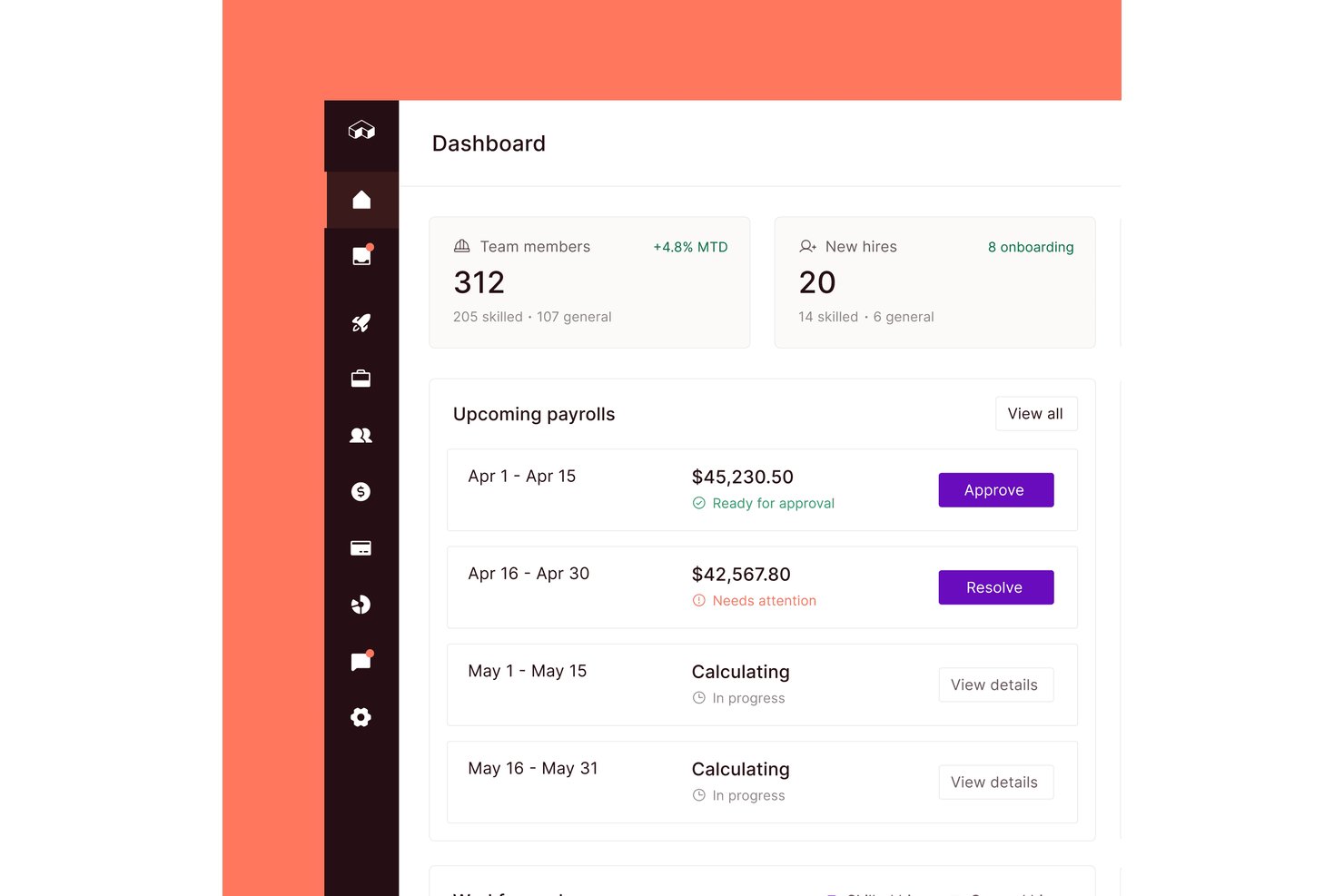
Miter is a construction workforce management platform that covers field time tracking, employee and equipment scheduling, production tracking, daily reports, and safety tools—connected to payroll and ERP job costing.
Who Is Miter Best For?
Miter is a strong fit for construction contractors who need field time tracking and production data tied directly to payroll and ERP job costing.
Why I Picked Miter
I've included Miter in my top picks because it's one of the few tools that closes the loop between what's happening on the jobsite and what shows up in job costing. I love how field crews can log production quantities and equipment hours directly against cost codes, with that data syncing back to ERPs like Sage Intacct or Viewpoint in real time. Supervisors can also compare actual quantities against budgeted quantities by crew, date, and cost code, giving the back office a live picture of where labor and equipment costs are landing.
Miter Key Features
- Geofenced time tracking: Workers can clock in and out via mobile app or kiosk, with geofencing to flag or restrict clock-ins outside a designated jobsite boundary.
- Certification tracking with expiry alerts: Employee credentials and external licenses are stored centrally, with automated reminders before expiration and visibility into missing or lapsing certifications.
- Daily report builder: Field teams can compile timesheets, equipment logs, production quantities, photos, weather data, and signatures into branded PDF jobsite reports.
- Multi-ERP integration: Miter connects natively to Sage Intacct, Viewpoint, Acumatica, QuickBooks, and other construction accounting systems to sync jobs, cost codes, and payroll data.
Miter Integrations
Miter has native integrations with Acumatica, Sage Intacct, Sage 300 CRE, Viewpoint Vista, Viewpoint Spectrum, NetSuite, Procore, HCSS, BuildOps, and QuickBooks. Its REST API supports custom integrations.
Pros and Cons
Pros:
- Field data supports job-costing decisions
- Recurring labor and equipment assignments
- Production quantities compare against budgets
Cons:
- Crews must select the correct job for time entries
- No equipment utilization or demand forecasts
Outro software de gestão de recursos na construção civil
Eis algumas opções adicionais de software de gestão de recursos na construção civil que não entraram na minha seleção, mas que ainda vale a pena conhecer:
- Orangescrum
For team collaboration
- PlanGrid
For document centralization
- CMiC
For enterprise integration
- ConstructionOnline
For real-time data
- Jonas Construction
For financial control
- Builterra
For civil engineering projects
- Hub Planner by Milient
For managing overlapping projects
- Jira
For agile teams
- Zoho Projects
For budget tracking


How I Evaluate Construction Resource Management Software
I split my evaluation into three parts, with the most weight on core functionality: scheduling crews, equipment, and materials across sites, and showing availability to prevent double-booking. Next, I look for differentiators such as equipment GPS tracking or what-if planning. Finally, I consider beyond-feature factors like offline reliability, onboarding support, and ERP integration.
Core Functionality (Table Stakes For This List)
When I'm selecting tools for my list, I score each one on a scale from 0 (does not offer the functionality) to 5 (excels in this area) for each core functionality listed below. I then convert the total into a percentage to help assess each tool's overall fit, with extra weight on any functionalities I’ve deemed essential.
- Multi-Resource Scheduling (Essential): I look for ways to assign crews, equipment, and materials to tasks across sites, then revise plans when availability or delivery dates change.
- Assignment Visibility (Essential): I assess whether a calendar, Gantt, or board view makes bookings across projects easy to scan for gaps and overlaps.
- Capacity & Utilization: I check whether booked and available capacity is clear over time, so an overloaded crew or idle machine is easier to spot.
- Cross-Site Coordination: I look at how readily teams can reallocate shared resources and coordinate handoffs between concurrent projects or job sites.
- Construction Resource Types: I check whether the tool distinguishes trades and crews, equipment units, and materials rather than treating resources as generic tasks.
- Conflict Alerts: I look for automatic flags when a crew or machine is double-booked, plus clear options to reassign it.
Once I have a list of tools that meet the criteria, I consider what sets each platform apart.
Differentiating Factors (What Sets Vendors Apart)
Here's how I compare and contrast different vendors:
Standout Features
I check whether a tool connects with fleet GPS or IoT sensors to show equipment location and usage hours in real time—knowing where a crane actually is beats trusting a spreadsheet. Certification expiry alerts matter just as much, since a lapsed operator license can shut down a pour mid-day. I also look for scenario planning that lets you model crew swaps across projects before committing changes.
Beyond Features
I check whether scheduling data syncs with accounting or ERP systems like Sage or QuickBooks, since dual entry between resource plans and job costing is where margin visibility breaks down. Offline reliability matters just as much—field supervisors on remote sites need mobile apps that capture and sync labor logs without data loss. I also evaluate onboarding support, because construction crews moving off whiteboards need hands-on training to actually adopt the tool.
Como escolher software de gestão de recursos na construção civil
É fácil perder-se em listas longas de funcionalidades e estruturas de preços complexas. Para o ajudar a manter o foco enquanto conduz o seu processo específico de seleção de software, apresentamos uma lista de verificação dos fatores a ter em conta:
| Fator | O que considerar |
| Escalabilidade | Certifique-se de que o software consegue acompanhar o crescimento da sua empresa, suportando mais projetos, utilizadores e locais de obra conforme necessário. |
| Integrações | Procure ferramentas que se liguem aos seus sistemas de agendamento, processamento salarial, contabilidade ou ERP para reduzir a introdução duplicada de dados. |
| Possibilidade de personalização | Deve ser possível adaptar os campos, as vistas e os fluxos de trabalho da ferramenta à forma como a sua equipa acompanha as pessoas e o equipamento. |
| Facilidade de utilização | A sua equipa precisa de aprender a utilizar o software rapidamente, especialmente os encarregados e supervisores no terreno que não trabalham à secretária. |
| Orçamento | Verifique que funcionalidades estão incluídas em cada nível de preços. Algumas ferramentas cobram um valor adicional por elementos essenciais, como relatórios ou acesso móvel. |
| Medidas de segurança | Certifique-se de que a plataforma disponibiliza acesso baseado em funções, encriptação de dados e cópias de segurança regulares para manter os dados dos seus projetos protegidos. |
| Acesso móvel | As equipas no terreno devem poder consultar atribuições, atualizar o progresso e registar problemas a partir de qualquer dispositivo no local da obra. |
| Opções de suporte | Um suporte fiável é importante quando os projetos estão em jogo. Procure chat em direto, ajuda na integração e recursos explicativos. |
Tendências do software de gestão de recursos para a construção
Na minha pesquisa, recolhi inúmeras atualizações de produtos, comunicados de imprensa e registos de lançamentos de diferentes fornecedores de software de gestão de recursos para a construção. Eis algumas das tendências emergentes que estou a acompanhar:
- Personalização por especialidade: Atualmente, mais ferramentas disponibilizam definições e modelos adaptados a diferentes especialidades, como canalização, betão ou eletricidade. Isto ajuda a gerir os tipos de equipas e equipamentos adequados para cada trabalho, sem ter de personalizar tudo de raiz.
- Previsão baseada em IA: Atualmente, mais ferramentas utilizam IA para prever as necessidades de mão de obra e equipamento com base no histórico de planeamento e no tipo de projeto. Isto ajuda a sua equipa a evitar a sobrelotação ou a alocação insuficiente de recursos a fases essenciais do trabalho.
- Planeamento visual de recursos: Os calendários de arrastar e largar e as vistas de mapa estão a tornar-se padrão. Estas funcionalidades facilitam a atribuição de equipas e equipamentos por localização, data ou tipo de trabalho, sem ter de percorrer listas.
- Monitorização da conformidade integrada: O software começa a monitorizar certificações dos trabalhadores, formação em segurança e inspeções de equipamentos diretamente no sistema de planeamento. Isto reduz a necessidade de ferramentas ou folhas de cálculo separadas.
- Atualizações de campo em tempo real: As equipas no terreno podem agora enviar atualizações de estado, comunicar atrasos e confirmar a conclusão de tarefas a partir dos seus telemóveis. Essas informações são registadas imediatamente para análise pelo pessoal do escritório.
O que é o software de gestão de recursos para a construção?
O software de gestão de recursos para a construção é uma ferramenta especializada para planear, coordenar e controlar recursos em projetos de construção. É utilizado por gestores de construção, empreiteiros e construtores para simplificar a alocação e a utilização de materiais, mão de obra, equipamentos e recursos financeiros.
O software garante que os recursos estão disponíveis quando são necessários. Por sua vez, otimiza o fluxo de trabalho e ajuda a concluir os projetos dentro do prazo e do orçamento.
Funcionalidades
Eis as principais funcionalidades que qualquer bom software de gestão de recursos para a construção deve ter:
- Planeamento de recursos: Permite-lhe atribuir trabalhadores, equipamentos e materiais a projetos e cronogramas específicos.
- Monitorização da disponibilidade: Mostra quem e o que está disponível em tempo real, para evitar conflitos e reservas excessivas.
- Gestão de equipamentos: Regista a utilização, os calendários de manutenção e as localizações de todos os equipamentos e ferramentas.
- Registo de tempos: Regista as horas dos trabalhadores e a assiduidade das equipas para ajudar no processamento salarial e nos relatórios de projeto.
- Previsão do projeto: Prevê as necessidades futuras de recursos com base na utilização atual e nas próximas fases do projeto.
- Monitorização do orçamento: Ajuda a acompanhar os custos de mão de obra e equipamentos face aos orçamentos dos projetos.
- Acesso móvel: Permite às equipas no terreno atualizar os cronogramas, consultar atribuições e registar problemas a partir de qualquer dispositivo.
- Monitorização de certificações: Mantém registos das licenças, formações e documentação de segurança dos trabalhadores.
- Relatórios personalizados: Permite criar relatórios sobre a utilização de recursos, a produtividade e os custos de vários trabalhos.
- Acesso baseado em funções: Controla quem pode consultar ou editar cronogramas, custos e detalhes dos projetos com base na função desempenhada.
Benefícios
A implementação de software de gestão de recursos para a construção proporciona vários benefícios à sua equipa e à sua empresa. Eis alguns dos benefícios que pode esperar:
- Menos conflitos de planeamento: Ao acompanhar a disponibilidade em tempo real, pode evitar a duplicação de reservas de equipas ou equipamentos.
- Melhor controlo dos custos: Pode acompanhar as despesas de mão de obra e equipamentos à medida que ocorrem, e não apenas posteriormente.
- Tomada de decisões mais rápida: Com painéis e previsões, pode reagir rapidamente a atrasos ou alterações no local.
- Melhor comunicação no terreno: O acesso móvel permite às suas equipas no terreno consultar os cronogramas e enviar atualizações sem terem de telefonar.
- Verificações de conformidade mais fáceis: A monitorização integrada de certificações ajuda a antecipar os requisitos de formação, segurança e inspeção.
- Relatórios mais precisos: Os relatórios personalizados proporcionam informações claras sobre a forma como os recursos estão a ser utilizados nos vários trabalhos.
- Maior produtividade da equipa: Quando as pessoas e as ferramentas certas estão disponíveis, as equipas podem começar mais depressa e manter-se no caminho certo.
Custos e preços
A seleção de software de gestão de recursos na construção requer uma compreensão dos vários modelos de preços e planos disponíveis. Os custos variam consoante as funcionalidades, o tamanho da equipa, os complementos, entre outros fatores. A tabela abaixo resume os planos comuns, os respetivos preços médios e as funcionalidades normalmente incluídas nas soluções de software de gestão de recursos na construção:
Tabela de comparação de planos de software de gestão de recursos na construção
| Tipo de plano | Preço médio | Funcionalidades comuns |
| Gratuito | $0 | Acompanhamento básico de projetos, número limitado de utilizadores, acesso ao apoio da comunidade |
| Padrão | $50/utilizador/mês | Agendamento de projetos, acompanhamento do orçamento, colaboração em tempo real, relatórios básicos |
| Profissional | $100/utilizador/mês | Relatórios avançados, acesso à API, projetos ilimitados, apoio premium |
| Empresarial | Preço personalizado | Integrações personalizadas, funcionalidades de segurança avançadas, gestor de conta dedicado, sessões de formação completas |