

10 Melhores ferramentas alternativas ao ProofHub para projetos em 2026

Melhores alternativas ao ProofHub — lista restrita


O ProofHub disponibiliza um conjunto de ferramentas para a gestão de projetos e a colaboração entre equipas. Simplifica a organização dos projetos, melhora a comunicação e permite acompanhar tarefas e prazos. No entanto, algumas equipas podem procurar outras opções devido a preferências por funcionalidades, preços ou experiências de utilização diferentes. Nesta publicação, partilharei as minhas recomendações de excelentes alternativas ao ProofHub, para o ajudar a encontrar a solução que melhor funciona para a sua equipa.
O que é o ProofHub?
O ProofHub é um software de gestão de projetos e colaboração entre equipas concebido para simplificar o trabalho em equipa. É utilizado por gestores, equipas e organizações para planear, colaborar, organizar e concluir projetos atempadamente e dentro do orçamento.
O software funciona como um ponto central para a gestão do trabalho, combinando o planeamento de projetos, a gestão de tarefas, o registo de tempo e a comunicação entre equipas, de modo a facilitar a entrega eficiente dos projetos. O ProofHub foi concebido para utilizadores que precisam de manter o controlo dos projetos e colaborar eficazmente com as suas equipas e partes interessadas.
Why Trust Our Software Recommendations
Our team has been testing and reviewing software since 2012. As project managers ourselves, we know how difficult—and important—it is to choose the right software.
For this guide, we evaluated tools using hands-on testing and independent research, scoring tools using our selection criteria. We also draw on insights from industry thought leaders and practicing project management experts.
Our reviews reflect our human editorial judgment, not a sales pitch.
Expert reviewers:
Tabela de comparação de preços das alternativas ao ProofHub
Esta tabela de comparação resume os detalhes de preços das minhas principais alternativas ao ProofHub, para o ajudar a encontrar o melhor software para o seu orçamento e as necessidades da sua empresa.
| Tool | Best For | Trial Info | Price | ||
|---|---|---|---|---|---|
| 1 | Best for integrations and customizability | Free plan + 15-day trial + demo available | From $4/user/month (billed annually) | Website | |
| 2 | Best for flexible project management | Free plan + 14-day free trial available | From $10/user/month (billed annually) | Website | |
| 3 | Best for visual project collaboration | Free plan + free trial available | From $5/user/month (billed annually) | Website | |
| 4 | Best for customizable workflows | Free demo available | From $8/user/month | Website | |
| 5 | Best for open-source flexibility | Free plan + demo available | Pricing upon request | Website | |
| 6 | Best for enterprise agility | 30-day free trial available | Pricing upon request | Website | |
| 7 | Best for creative team management | Not available | Pricing upon request | Website | |
| 8 | Best for AI-driven engineering management | Not available | Pricing upon request | Website | |
| 9 | Best for detailed project planning | Free trial + free demo available | From $79/user/month | Website | |
| 10 | Best for breaking down complex projects | Free plan + 30-day free trial available | From $7.65/user/month (billed annually) | Website |
Análises das melhores alternativas ao ProofHub
Com base na minha vasta experiência em gestão de projetos, apresentarei uma análise detalhada e uma visão geral de cada alternativa ao ProofHub. Descobrirá as vantagens, desvantagens, funcionalidades e utilizações ideais de cada ferramenta.

Best for integrations and customizability
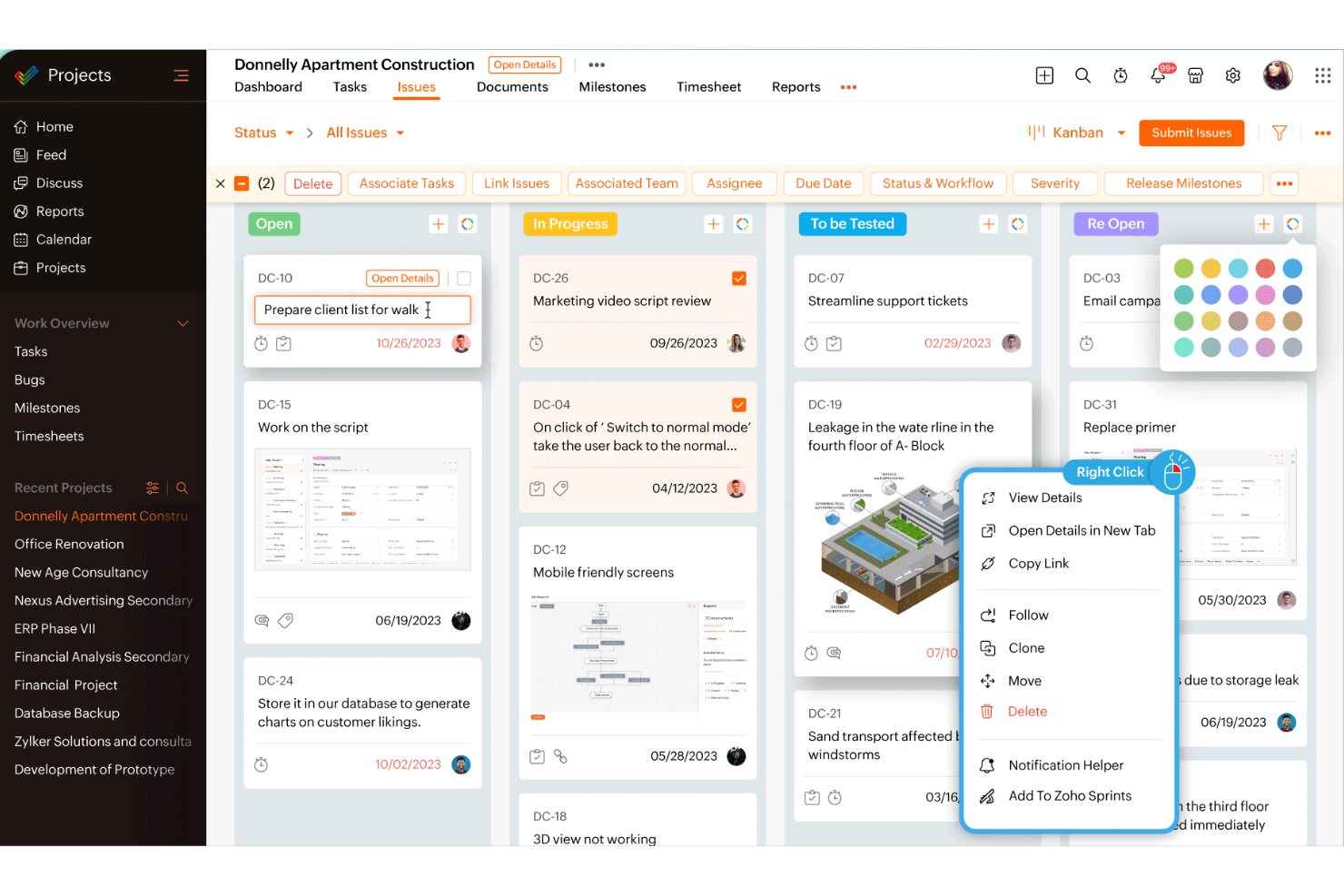
Zoho Projects is a project management platform that combines task tracking, Gantt charts, Kanban boards, time logging, workflow automation, and team collaboration tools with an extensive library of third-party integrations.
Who Is Zoho Projects Best For?
Zoho Projects is a strong fit for teams already using other Zoho tools—like CRM, Desk, or Books—who want project management that connects natively with the rest of their stack.
Why I Picked Zoho Projects
Zoho Projects earns its spot on my shortlist because of how well it connects with the broader Zoho ecosystem—and that's genuinely useful when you're managing projects alongside CRM, support, or finance workflows. I particularly like how Blueprints let you automate task transitions by assigning approvers and triggering field updates as work moves through defined statuses, which brings real structure to repeatable processes. The workload report is another standout: it color-codes allocation across your team and lets you reassign tasks or adjust schedules directly from the view.
Zoho Projects Key Features
- Portfolio dashboard: View project status, ownership, and budget health across all active projects in a single consolidated view.
- Task blueprints: Define structured task workflows that assign approvers and trigger field updates as work moves through each status.
- Gantt chart with dependencies: Map task sequences and relationships visually, with the ability to reschedule tasks directly from the chart.
- Custom workflow rules: Set triggers based on user actions or date/time conditions to automate field updates and email notifications.
Zoho Projects Integrations
Zoho Projects offers 50+ integrations, including native connections with Zoho CRM, Zoho Desk, Zoho Books, Google Drive, Microsoft Teams, Slack, GitHub, GitLab, and Jira. It also supports a REST API and Zapier.
Pros and Cons
Pros:
- Blueprints automate repeatable task transitions
- Workload views expose overloaded contributors
- Gantt dependencies clarify project sequencing
Cons:
- Advanced reporting customization remains limited
- Crowded menus can slow navigation
New Product Updates from Zoho Projects
Zoho Projects Adds CodeX Scripts for Custom Modules
Zoho Projects now supports CodeX Scripts for custom modules, enabling conditional logic and rules for creating, updating, and deleting records. For more information, visit Zoho Projects' official site.
 .
Nifty
Best for flexible project management
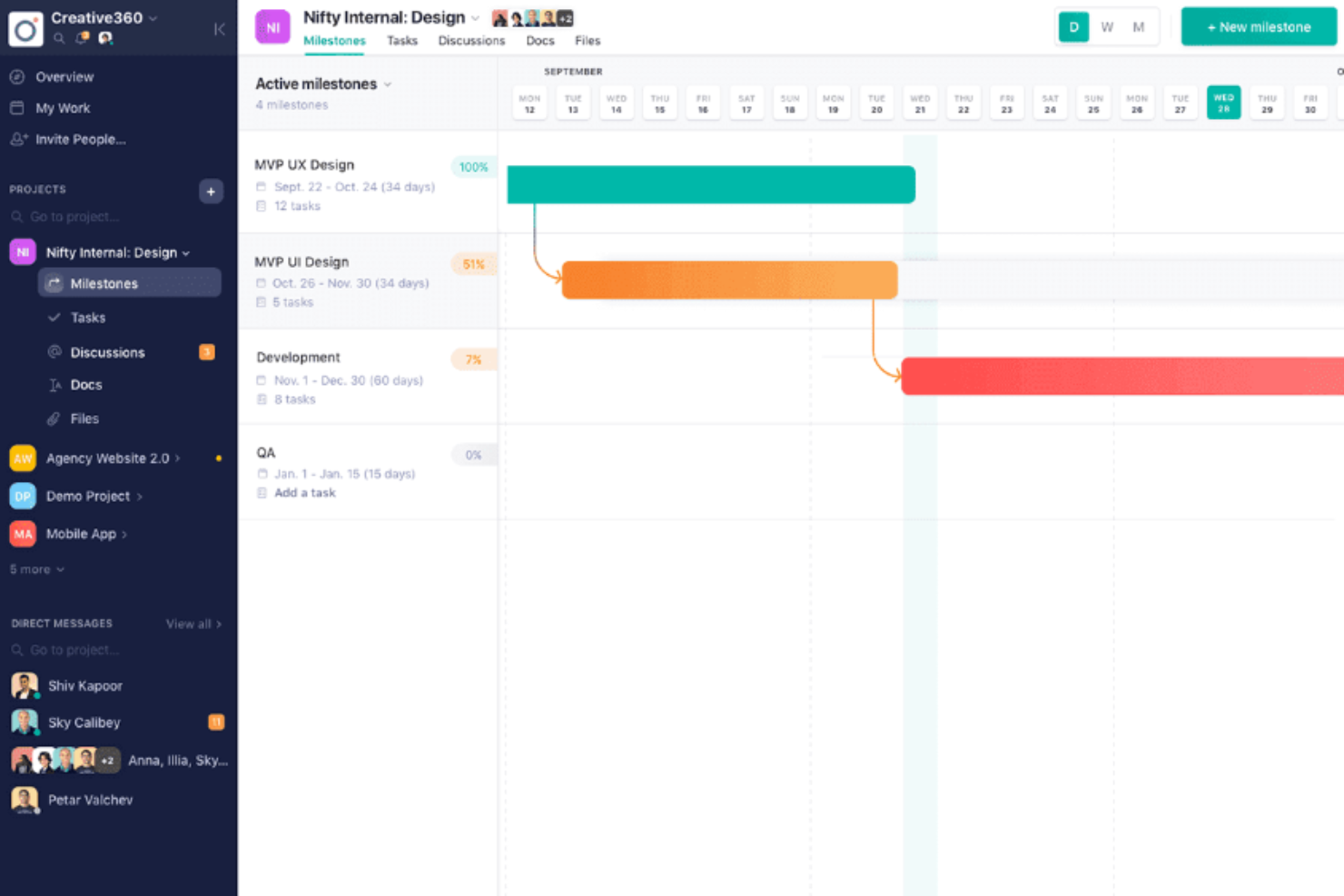
Nifty is a project management platform that brings together task tracking, milestone-based roadmaps, team discussions, collaborative docs, and file proofing in a single workspace.
Who Is Nifty Best For?
Nifty is a strong fit for cross-functional teams—especially project managers working alongside product and engineering—who need one place for tasks, milestones, and team communication.
Why I Picked Nifty
I've included Nifty in my top picks because it gives you genuine flexibility in how you structure project work, which is exactly what's missing when ProofHub's fixed model stops fitting your team. I love that milestones automatically roll up progress from linked tasks, so your roadmap stays current without manual updates. Pair that with Swimlane view to see who owns what across milestones, and cross-project coverage becomes easy to maintain at a glance.
Nifty Key Features
- Workflow automation builder: Set if/then rules triggered by task creation, completion, overdue status, or custom-field changes to automatically assign users, set dates, add subtasks, or post messages.
- File and video proofing: Annotate images and videos with comments tied to specific areas or timestamps, which convert into assignable subtasks when the file is attached to a task.
- Team workloads view: See assignments across the workspace with date-range filters, and reschedule tasks by dragging them directly within the view.
- Portfolio dashboards: Group projects into portfolios and view high-level status, team members, and progress across all projects in one place.
Nifty Integrations
Nifty offers native integrations with Google Drive and Calendar, Microsoft Suite, Slack, Zoom, GitHub, GitLab, HubSpot, Miro, Typeform, and Harvest. It also provides a REST API, webhooks, and Zapier support.
Pros and Cons
Pros:
- Discussions, documents, and tasks share project context
- File and video annotations become assignable subtasks
- Milestone progress rolls up from linked tasks
Cons:
- Reviewers report mobile app and notification gaps
- Reviewers want more customizable reporting
Trello
Best for visual project collaboration
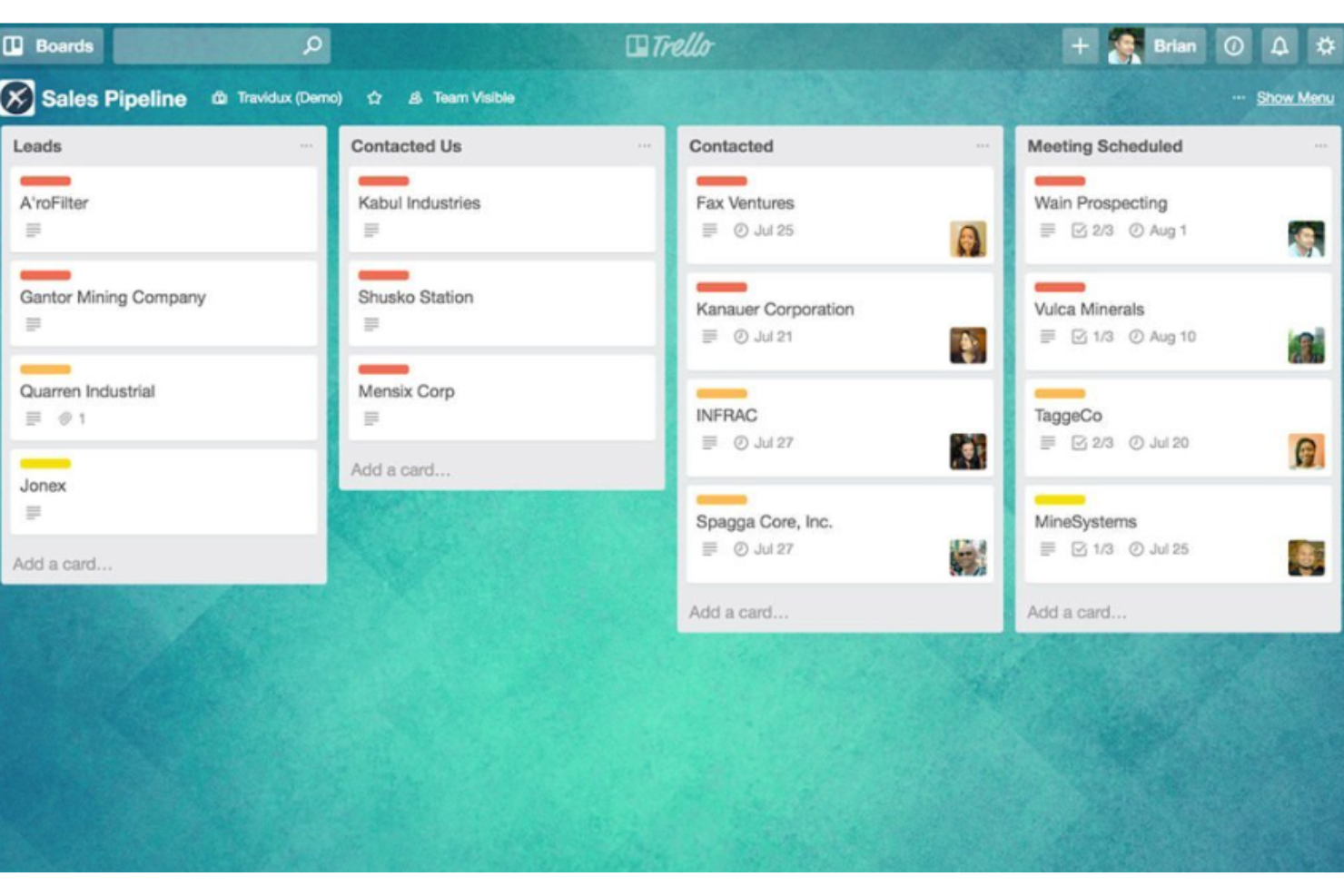
Trello is a visual project management tool built around boards, lists, and cards, with views for timelines, calendars, and dashboards, plus automation and a wide library of integrations.
Who Is Trello Best For?
Trello works well for small teams and team leads who need a visual, low-friction way to manage tasks and track project progress without a steep learning curve.
Why I Picked Trello
I picked Trello as one of the best ProofHub alternatives because its visual project collaboration model is genuinely hard to replicate. I love how the Timeline view lets me group cards by team member across day, week, month, and quarter scales, giving me a real cross-team picture of what's in flight. Pair that with the Dashboard view's per-member card charts, and I can spot workload imbalances before they become missed deadlines.
Trello Key Features
- Card automation rules: Trigger automatic actions on cards when set conditions are met, such as moving cards between lists or assigning members when a due date approaches.
- Custom Fields: Add structured data fields to cards to capture workflow-specific information like priority, budget, or status.
- Cross-app automation: Connect Trello boards to Slack, Jira, and email directly from automation rules without a separate integration tool.
- Advanced checklists: Assign individual checklist items to specific team members and set separate due dates for each sub-task within a card.
Trello Integrations
Trello lists 236 marketplace integrations, including Slack, Jira Cloud, Miro, Microsoft Teams, Gmail, and Make. It also provides a REST API for custom integrations.
Pros and Cons
Pros:
- Automation handles repetitive card moves
- Card comments keep updates beside tasks
- Timeline groups work by assignee
Cons:
- Workload charts omit underlying cards
- No native dependencies for linked tasks

Infinity
Best for customizable workflows
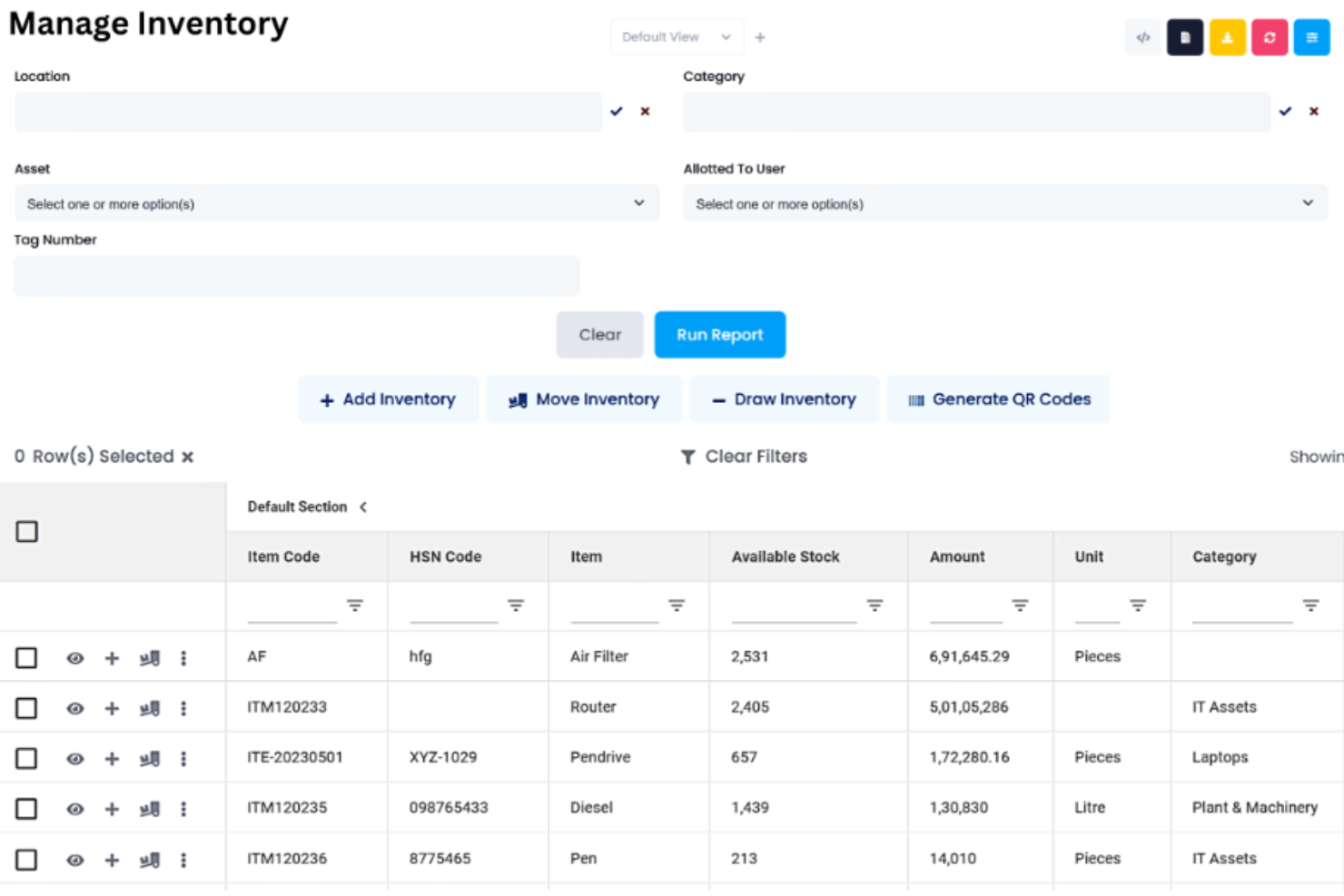
Infinity is a work management platform that combines task tracking, multiple project views, customizable workflows, and automation across a highly configurable workspace structure.
Who Is Infinity Best For?
Infinity works well for teams and small agencies that need to build their own workflow structure rather than adapt to a tool's fixed setup.
Why I Picked Infinity
I picked Infinity as one of the best because it lets you build your workflow structure from scratch rather than bending your process to fit a preset template. I love how you can layer workspaces, boards, folders, and subfolders, then switch the same data between Kanban, Gantt, Table, and Calendar views without duplicating anything. The custom attributes, from progress bars to formulas, mean I can track exactly what matters for each project type.
Infinity Key Features
- Time tracking: Log time directly on individual work items and optionally track multiple items simultaneously.
- Automation rules: Set up If-Then triggers to automatically move, create, or update items based on defined conditions.
- Granular permissions: Control access at the workspace, board, or folder level for individual members or roles.
- White-label branding: Apply your own logos and color schemes to the interface under the Agency plan.
Infinity Integrations
Infinity offers native integrations with Google Calendar, Google Drive, Clockify, Trello, iCalendar, and CSV. It also provides an API and webhooks for custom integrations, plus Zapier.
Pros and Cons
Pros:
- Recurring-task rules reduce routine coordination
- Switchable views keep shared project data aligned
- Custom boards adapt to varied project workflows
Cons:
- Initial navigation can obscure where work lives
- Reporting offers limited control over output formats
Redmine
Best for open-source flexibility
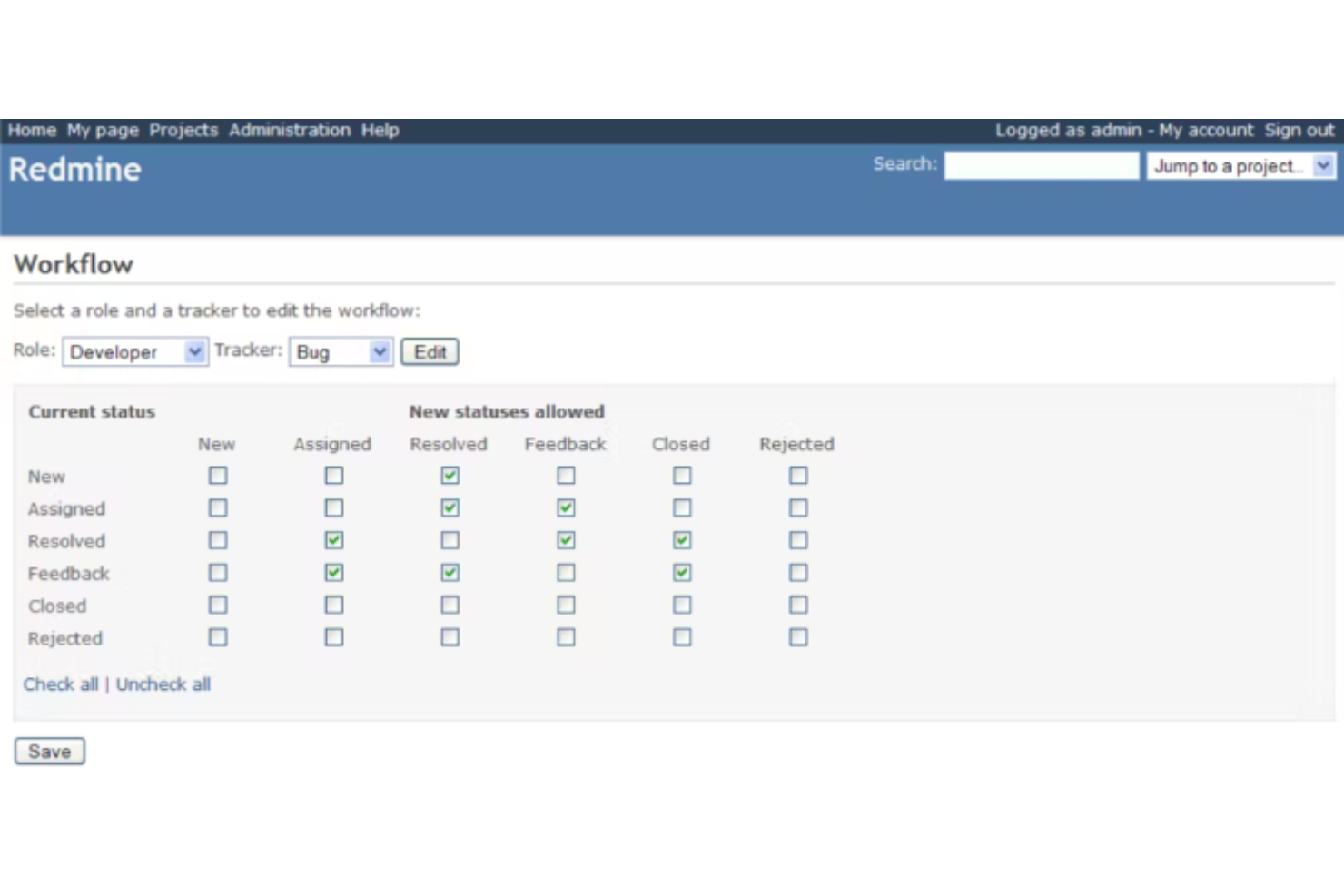
Redmine is a self-hosted, open-source project management tool that covers issue tracking, task management, Gantt charts, time tracking, wikis, and project forums across multiple projects in a single instance.
Who Is Redmine Best For?
Redmine is a strong fit for technical teams—developers, DevOps, and engineering-led organizations—that want full control over their project management environment without paying per seat.
Why I Picked Redmine
Redmine earns its spot on my shortlist because it's the rare open-source project management tool that gives engineering teams full custody of their own environment, with no per-seat costs and no vendor lock-in. I particularly like that you can define custom issue trackers, statuses, and role-specific workflow transitions, so the tool shapes itself around your team's process rather than the other way around. The built-in time logging with reports broken down by user, activity, or issue category is something my team actively uses to inform sprint estimates without needing a separate tool.
Redmine Key Features
- Multi-project issue tracking: Manage multiple projects and subprojects in one instance, with issues organized by tracker, status, and assignee across each project.
- Role-based access control: Define custom roles with specific permissions and assign users different roles across different projects within the same installation.
- Per-project wikis and forums: Each project gets its own wiki and discussion forum, giving teams a dedicated space for documentation and async communication.
- REST API: Access project data, issues, and time entries programmatically via a REST API that supports both XML and JSON formats.
Redmine Integrations
Redmine offers native repository integrations with Git, Subversion, Mercurial, Bazaar, and CVS, plus LDAP authentication. Its REST API supports XML and JSON for custom integrations, while broader business-app connections aren’t clearly documented.
Pros and Cons
Pros:
- Project wikis and forums centralize team updates
- Nested subtasks and dependencies clarify delivery
- Custom issue workflows fit engineering processes
Cons:
- No native proofing or approval workflows
- Dated interface feels less polished

Best for enterprise agility
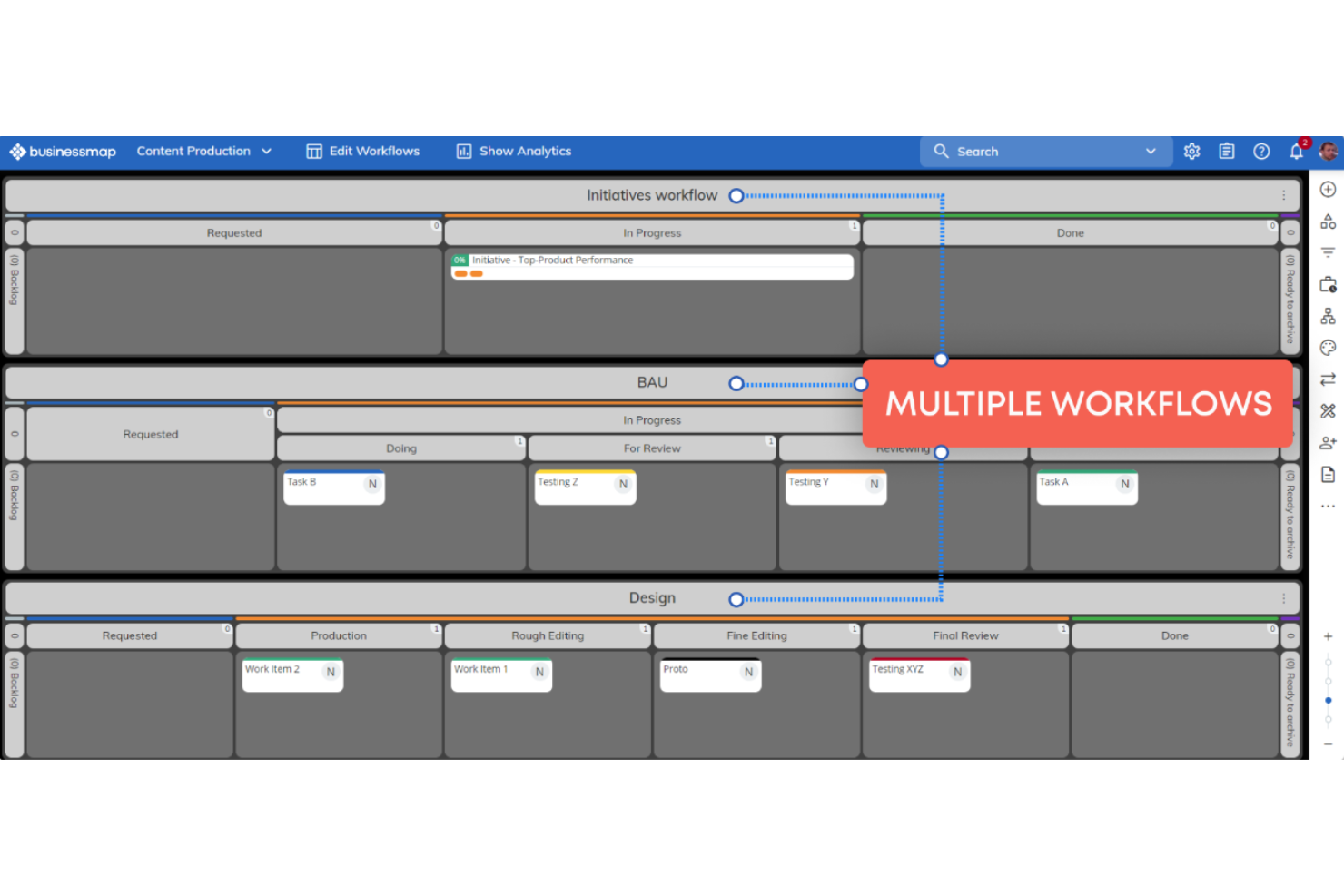
Businessmap is an enterprise project and portfolio management platform that connects strategy to execution through Kanban boards, Gantt planning, linked multi-level workflows, OKRs, capacity planning, and advanced analytics.
Who Is Businessmap Best For?
Businessmap is a strong fit for enterprise teams that need to connect portfolio-level strategy to day-to-day execution across multiple departments.
Why I Picked Businessmap
Businessmap earns its spot on my shortlist because it connects portfolio-level strategy to day-to-day execution in a way most project tools don't attempt. I love how linked workflows keep team boards synchronized with higher-level management boards, so when a card moves in progress, leadership dashboards reflect it instantly. Paired with OKR tracking and multi-level capacity planning, it's built for enterprise teams that need more than task lists.
Businessmap Key Features
- Kanban board customization: Configure board sections, stages, sub-columns, and swimlanes to reflect your team's specific process.
- Worklog reporting: Filter and export time-log data by board, column, or user in pivot or table format.
- Collaboration Canvas: Create, import, and plan workflows in a shared canvas space with analytics widgets alongside planning content.
- Dependency management: Map cross-board dependencies to connect workflows across teams and surface blockers before they stall delivery.
Businessmap Integrations
Businessmap offers native integrations with Jira, GitLab, Bitbucket, Power BI, Tableau, Looker Studio, Microsoft Teams, and Microsoft Outlook. It also supports Make, Power Automate, Zapier, and a REST API for custom integrations.
Pros and Cons
Pros:
- Configurable workflows fit varied team processes
- Kanban views help teams spot bottlenecks
- Linked boards provide portfolio-level progress visibility
Cons:
- Finding and prioritizing work can feel cumbersome
- Built-in reports offer limited field control

Best for creative team management
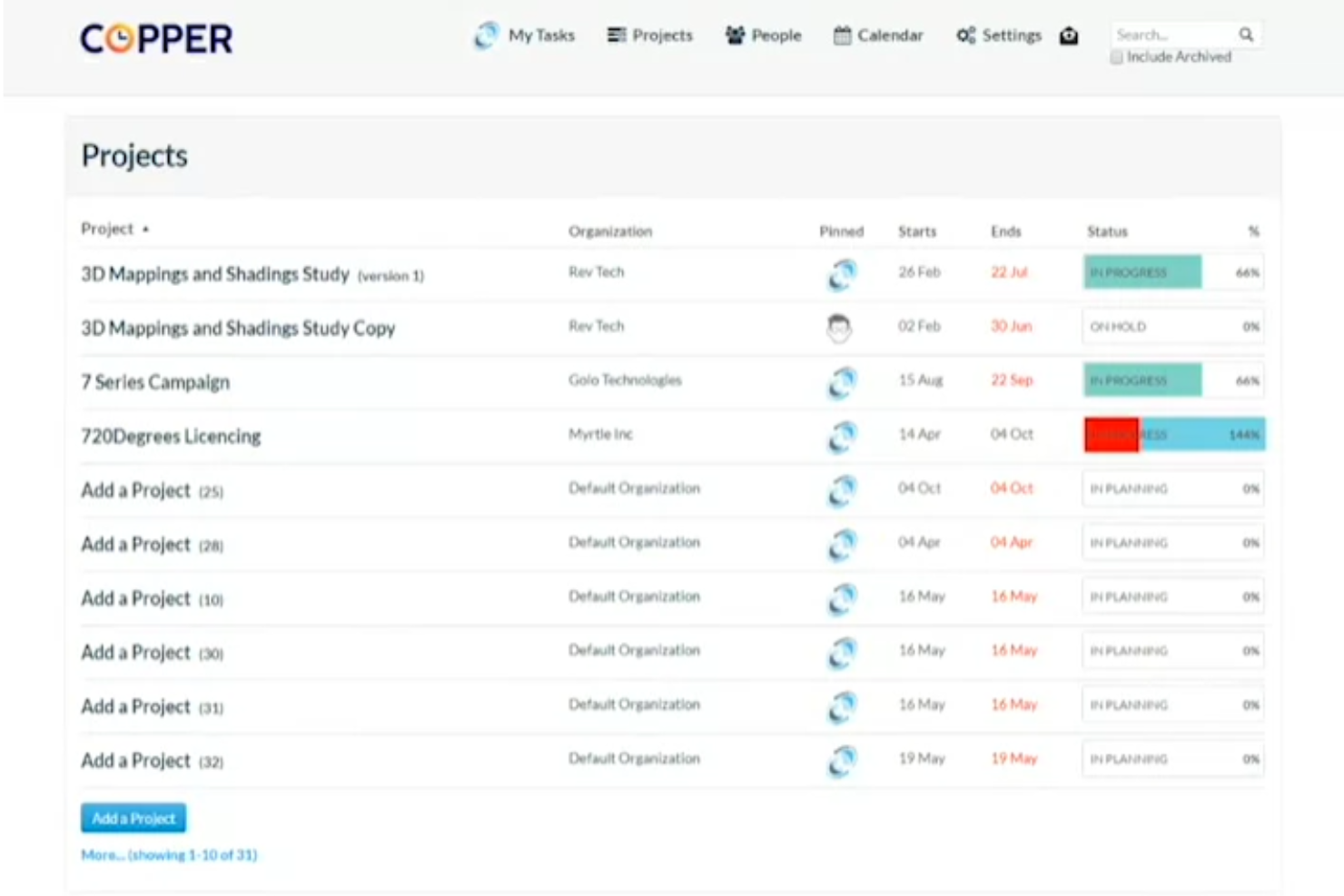
Copper Project is a web-based project management tool built for creative teams, offering task tracking, time tracking, file sharing, and calendar-based project planning.
Who Is Copper Project Best For?
Copper Project suits creative teams that need a straightforward way to manage tasks, track time, and share files without a steep learning curve.
Why I Picked Copper Project
I've included Copper Project in my top picks because it's purpose-built for creative teams that need a focused, no-fuss way to manage work. I like how its calendar-based project views let teams drag and drop tasks to reshape timelines on the fly, and the built-in time tracking keeps billable hours tied directly to project work. For creative teams moving between multiple client projects, that combination keeps deliverables visible without the overhead of a more complex tool.
Copper Project Key Features
- File sharing: Upload and share project files directly within Copper Project so your team can access the assets they need without switching tools.
- Real-time collaboration: Team members can access and update shared tasks simultaneously, keeping everyone aligned on project progress.
- Xero and FreshBooks integration: Connect Copper Project to your accounting software to send invoices directly from your project workspace.
- Import/export tools: Move project data in and out of Copper Project using the built-in import and export functionality in the admin panel.
Copper Project Integrations
Copper Project documents integrations with Xero for invoice sending and FreshBooks for billing. It also describes a fully functioning API for custom connections, but no broader integration catalog is documented.
Pros and Cons
Pros:
- Reviewers praise quick setup and responsive support
- Calendar drag-and-drop reshapes creative timelines
- Task assignment keeps client projects organized
Cons:
- Reporting detail and workload visibility remain unclear
- No documented task-linked discussions or mentions

Tara AI
Best for AI-driven engineering management
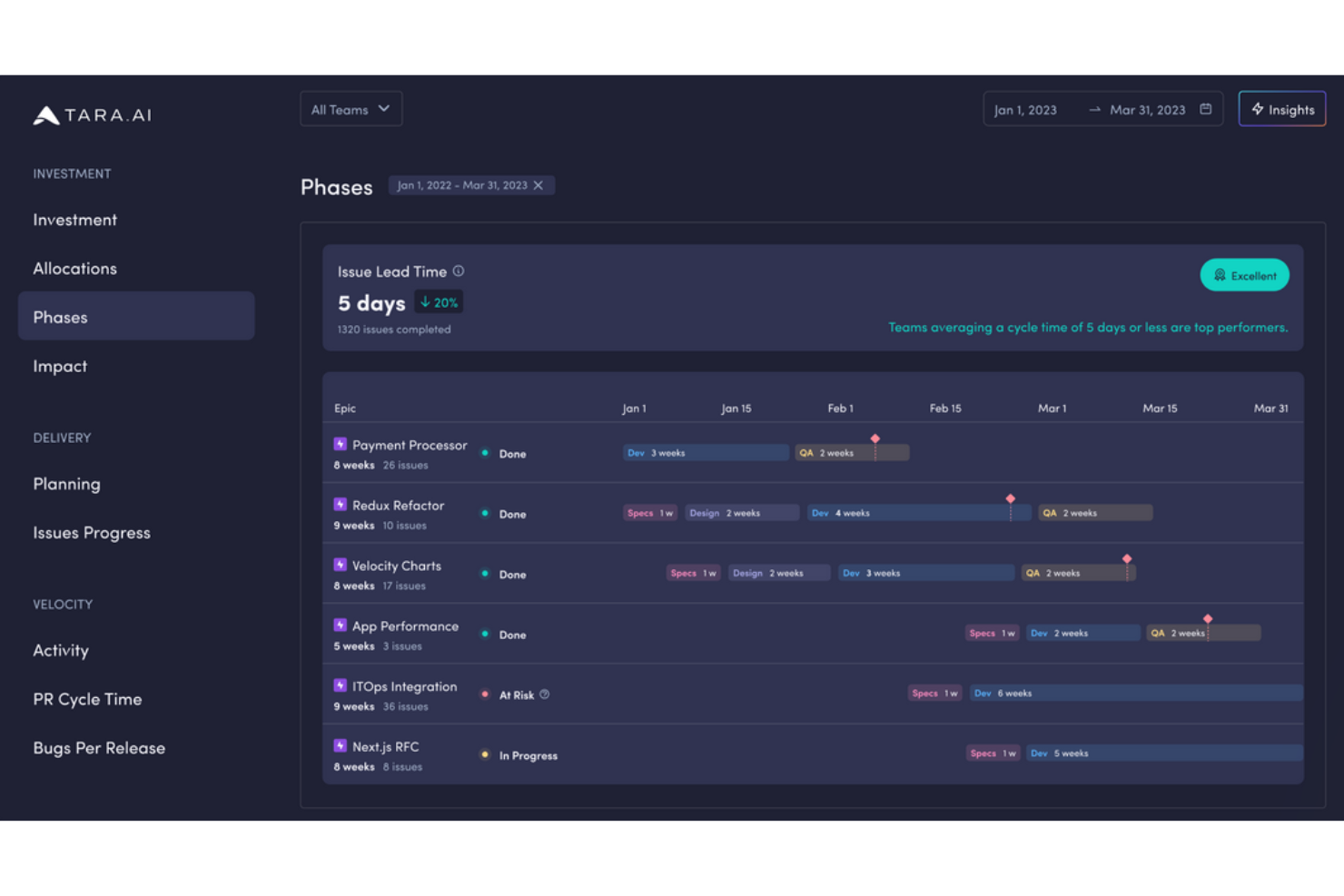
Tara AI is an engineering management tool that connects to GitHub to support sprint planning, task and subtask tracking, and automated status syncing across repositories and teams.
Who Is Tara AI Best For?
Tara AI suits engineering teams that run GitHub-based sprint workflows and want automated status syncing without manually updating a separate project tool.
Why I Picked Tara AI
I've included Tara AI in my top picks because it approaches engineering management differently, using AI trained on source-control and project data to surface what's actually slowing teams down. I like how it syncs task statuses directly with GitHub pull-request workflows, so sprint boards reflect real dev activity without manual updates. Its built-in blocker and CI views make daily standups more grounded in what's actually happening across repositories.
Tara AI Key Features
- Sprint planning with GitHub sync: Teams can build and manage sprints directly from GitHub issues across multiple repositories, with updates syncing back to GitHub in real time.
- Automated task status updates: Task statuses update automatically based on pull-request activity in GitHub, keeping sprint boards current without manual input.
- Idle pull-request notifications: Tara flags pull requests that have gone stale, alerting teams to unblocked work that needs attention.
- Subtask breakdown with metadata: Tasks can be broken into subtasks and tagged with story type, priority, and status details to support structured sprint execution.
Tara AI Integrations
Tara AI offers one documented integration via GitHub Marketplace, syncing issues, repositories, commits, and pull requests in both directions. No other native integrations or API access are clearly documented.
Pros and Cons
Pros:
- Subtasks carry story type and priority metadata
- Blocker and CI views sharpen standups
- Sprint statuses follow pull-request activity automatically
Cons:
- Task-linked discussion and file-sharing evidence is thin
- No documented Kanban, calendar, or timeline views

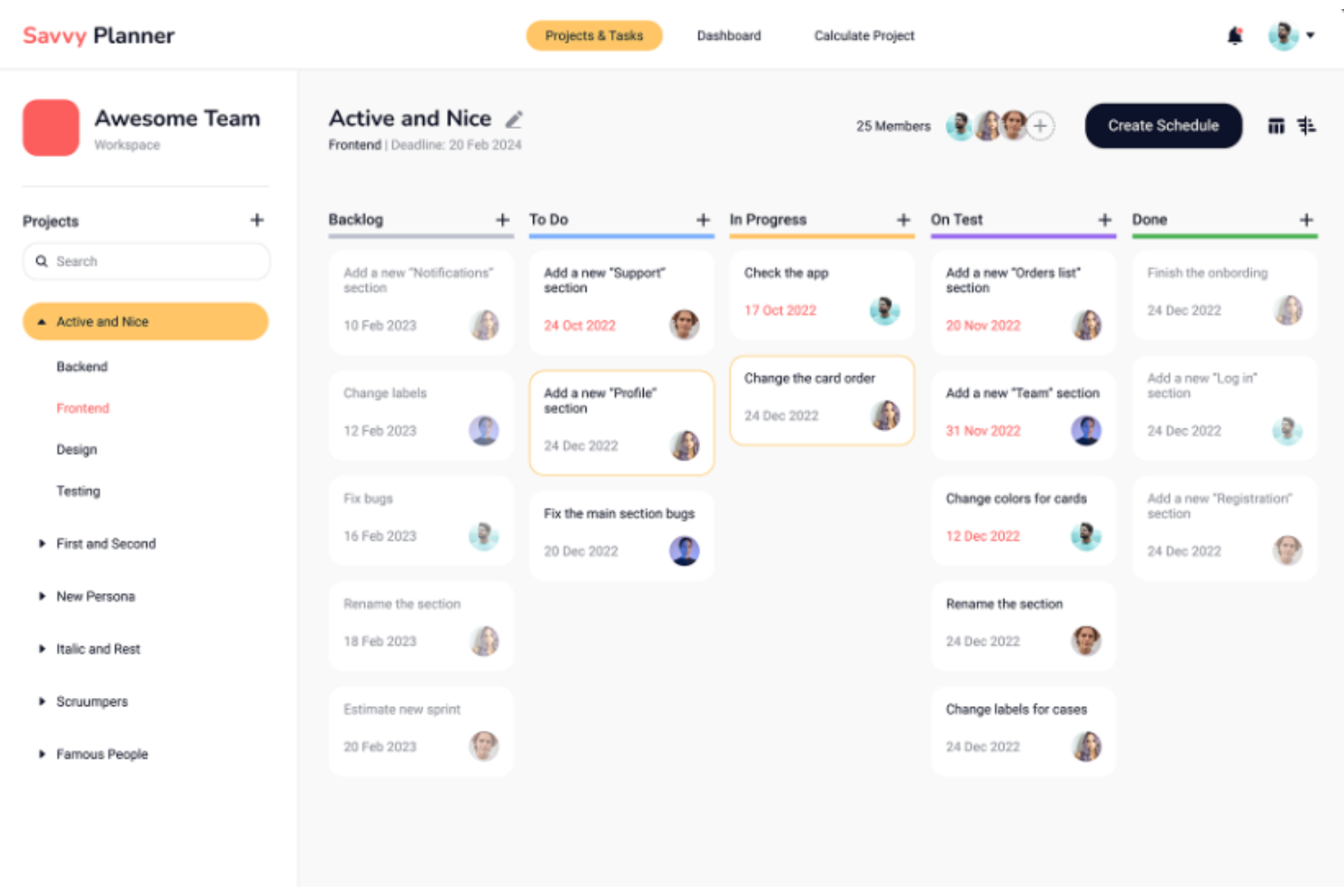
Savvy Planner is an AI-driven project management platform that handles task tracking, visual planning, team collaboration, and automated project scheduling and deadline prediction.
Who Is Savvy Planner Best For?
Savvy Planner is a good fit for teams that need AI-driven scheduling and deadline prediction built into their planning workflow.
Why I Picked Savvy Planner
I picked Savvy Planner as one of the best because its AI-driven scheduling sets it apart for detailed project planning. Instead of manually estimating timelines, the platform automatically schedules tasks and predicts realistic deadlines based on your project data. I especially like the combination of Gantt charts, Kanban boards, and mind maps, which lets you switch views without rebuilding your plan from scratch.
Savvy Planner Key Features
- Workload distribution: Assigns team members to tasks based on availability and tracks workload across your team to flag imbalances.
- Integrated chat and messaging: Built-in messaging lets your team communicate directly within the platform alongside tasks and project updates.
- Recurring tasks: Automates the creation of repeating tasks so routine work gets scheduled without manual setup each cycle.
- Custom fields and views: Lets you tailor task layouts and data fields to match how your team actually tracks and organizes work.
Savvy Planner Integrations
Native integrations are not clearly documented. Savvy Planner lists integrations for file storage, communication, time tracking, CRM, issue tracking, ERP, and automation tools, plus API integration for custom connections.
Pros and Cons
Pros:
- Integrated chat, comments, and file sharing
- Gantt, Kanban, calendar, and mind-map views
- AI scheduling predicts realistic deadlines
Cons:
- Sparse independent reviews make validation harder
- No documented proofing or approval workflows

Quire
Best for breaking down complex projects
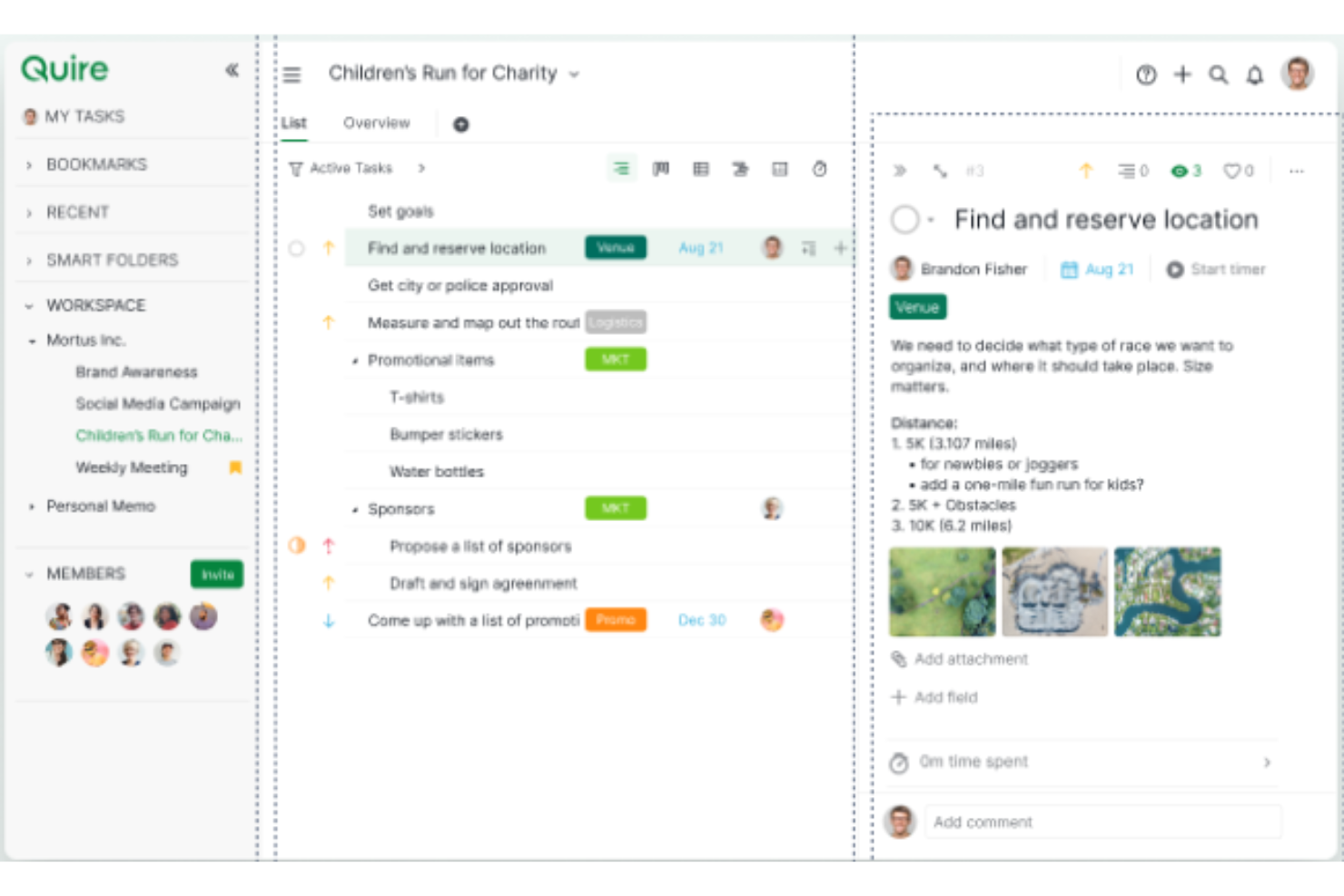
Quire is a project management tool that combines nested task lists, multiple project views (including Gantt-style timelines and Kanban boards), time tracking, and team collaboration features like chat, comments, and shared documents.
Who Is Quire Best For?
Quire is a strong fit for project managers and cross-functional teams working on layered, multi-phase projects that need to be broken down into structured, trackable subtasks.
Why I Picked Quire
Quire is one of my top picks because I love how it handles project complexity through its nested task structure, letting you break a sprawling initiative into unlimited subtask levels without losing sight of the whole. Where ProofHub keeps things relatively flat, Quire's Tree view lets you drill into granular subtasks while its Gantt-style Timeline surfaces dependencies and schedule conflicts in one glance. I also find the Peekaboo feature genuinely useful: you can hide tasks until they're actionable, keeping the team focused on what's actually ready to move.
Quire Key Features
- Task dependencies: Link tasks to define work sequences, with dependency lines visualized in the Timeline view and a Blocked widget surfacing tasks waiting on predecessors.
- Peekaboo: Hide tasks from the team until they're ready to action, reducing noise and keeping the active task list focused on work that can move forward.
- Time tracking and time reports: Log time via stopwatch, Pomodoro timer, or manual entry, then review hours grouped by task or team member and export reports as CSV.
- Project chat: Communicate with teammates in dedicated per-project chat channels, separate from task comments, without leaving Quire.
Quire Integrations
Quire offers native integrations with Google Calendar, Slack, Google Drive, Dropbox, Box, Microsoft Teams, GitHub, Gmail, and Outlook. It also supports a REST API with OAuth 2.0 and webhooks, plus Zapier.
Pros and Cons
Pros:
- Task comments keep coordination beside work
- Dependency lines reveal schedule conflicts
- Nested subtasks keep complex plans visible
Cons:
- Mobile app trails desktop functionality
- Reporting offers limited analytical depth
New Product Updates from Quire
Quire Adds Custom Field Locking and Comment Reaction API Support
Quire adds custom field locking and API support for reading and setting emoji reactions on comments. These updates give teams more control over field data and expand comment interaction options for developers. For more information, visit Quire’s official site.
 .
Outras alternativas ao ProofHub
Segue-se uma lista de alternativas adicionais ao ProofHub que selecionei, mas que não entraram na lista principal. Vale a pena conhecê-las.
- Celoxis
For a balance of features and ease of use
- Scoro
For comprehensive work management
- Hive
For team productivity enhancement
- Smartsheet
For spreadsheet-like project management
- Asana
For team collaboration
- Basecamp
For remote teams
- Wrike
For scaling organizations
- monday AI Workspace
For workflow automation
- Teamwork.com
For client work management
- ClickUp
For custom task views


Análises relacionadas de software de gestão de projetos
Se ainda não encontrou aqui o que procura, consulte estas outras análises de ferramentas de gestão de projetos que selecionámos para si:
- Ferramentas de produtividade
- Software de acompanhamento de projetos
- Software de calendarização de projetos
- Software de gestão de projetos
- Software de gestão de recursos
- Software de automatização de fluxos de trabalho
How I Evaluate ProofHub Alternatives
I break my evaluation into two layers: the baseline a tool must clear—multi-view scheduling, time tracking, team collaboration—and the differentiators that actually separate the best options.
Core Functionality (Table Stakes For This List)
When I'm selecting tools for my list, I rank each one on a scale from 0 (does not offer the functionality) to 5 (excels in this area) for each core functionality listed below. Then, I calculate the tool's total score into a percentage. Each tool needs to achieve a minimum total score of 75% to be considered for inclusion.
- Task & Project Management: I look for subtasks, dependencies, recurring tasks, and multi-project support—things like splitting a product launch into parallel workstreams with clear ownership.
- Multiple Project Views: Teams work differently, so I check whether a tool offers Kanban, Gantt, calendar, and list views that let you switch context without losing information.
- Team Collaboration Tools: I evaluate how a tool handles discussions, @mentions, and real-time chat—especially for async teams who need threaded conversations tied to specific tasks.
- Time Tracking & Reporting: Built-in timers, timesheets, and project reports matter here. I look at whether you can log billable hours and pull workload summaries without exporting to a spreadsheet.
- File Sharing & Proofing: Creative review is a core ProofHub use case, so I check for file markup, version control, and approval workflows on documents and images.
- Custom Workflows & Roles: Every team structures work differently. I evaluate whether you can define custom project stages, set granular permissions, and control visibility per role or team.
Once I have a list of tools that meet this criteria, I consider what sets each platform apart.
Differentiating Factors (What Sets Vendors Apart)
Here's how I compare and contrast different vendors:
Standout Features
Resource and workload management is a major differentiator. I look for visual capacity planning that shows who's overloaded across projects so you can redistribute work before deadlines slip. Client and guest access also matters—agencies need external reviewers to approve deliverables without requiring a paid seat. Workflow automation separates good tools from great ones, especially when you can auto-assign tasks or trigger status updates based on project milestones rather than manual check-ins.
Beyond Features
Pricing structure is a big one here. ProofHub is known for flat-rate pricing, so I evaluate whether alternatives charge per user or offer similar predictable models—this changes the math completely for growing teams. Integration depth also shapes my recommendations. A tool that connects natively to Slack, Google Workspace, and GitHub fits most tech teams, but I check for open API or Zapier support when custom workflows are part of the picture. I also consider team fit, since a 5-person startup and a 50-person agency need very different things from the same category.
Por que procurar uma alternativa ao ProofHub
Poderá estar à procura de uma alternativa ao ProofHub se precisar de:
- Custos mais baixos: Considerar que a estrutura de preços do ProofHub está além do seu orçamento.
- Funcionalidades específicas: Procurar funcionalidades adicionais ou diferentes que não estão disponíveis no ProofHub.
- Experiência de utilização diferente: Preferir uma interface de utilizador mais intuitiva ou fácil de utilizar.
- Mais integrações: Necessitar de melhores capacidades de integração com outras ferramentas e software.
- Escalabilidade: Precisar de uma solução que se adapte de forma mais eficaz às necessidades crescentes da sua empresa.
As alternativas ao ProofHub podem oferecer diferentes modelos de preços, funcionalidades adicionais, experiências de utilização melhoradas, melhores opções de integração e maior escalabilidade. Estas alternativas podem estar mais alinhadas com requisitos empresariais e fluxos de trabalho específicos, fornecendo soluções que o ProofHub não oferece.
Funcionalidades a procurar nas alternativas ao ProofHub
Ao selecionar uma alternativa ao ProofHub, é fundamental considerar as funcionalidades que se alinham com as suas necessidades de gestão de projetos. Cada funcionalidade desempenha um papel importante na melhoria da colaboração da equipa e da eficiência dos projetos. Apresento abaixo as funcionalidades mais importantes a procurar e explico como cada uma contribui para uma gestão eficaz de projetos.
- Gestão de tarefas: Centralizar a atribuição e o acompanhamento de tarefas. Esta funcionalidade permite às equipas ver quem está a fazer o quê e até quando, ajudando a distribuir as cargas de trabalho de forma equilibrada e a manter todos no caminho certo.
- Registo de tempo: Monitorizar e registar o tempo dedicado a várias tarefas. Essencial para a faturação, a melhoria da produtividade e a compreensão dos padrões de trabalho em equipa, o registo de tempo ajuda a garantir que os projetos se mantêm dentro do orçamento e cumprem os prazos.
- Partilha e armazenamento de ficheiros: Disponibilizar uma localização central e segura para todos os documentos do projeto. Esta funcionalidade permite controlar versões e aceder rapidamente aos ficheiros, reduzindo erros e poupando o tempo despendido na sua procura.
- Ferramentas de comunicação em tempo real: Permitir mensagens instantâneas, videochamadas e fóruns de discussão no ambiente do projeto. Estas ferramentas ajudam a reduzir o excesso de mensagens de correio eletrónico e garantem uma tomada de decisões e uma resolução de problemas mais rápidas.
- Diagramas de Gantt: Disponibilizar ferramentas visuais de planeamento de projetos que apresentem tarefas, dependências e progresso. Os diagramas de Gantt são indispensáveis para planear os calendários dos projetos e atribuir recursos de forma eficaz.
- Quadros Kanban: Implementar uma gestão visual de tarefas com uma interface de arrastar e largar. Esta funcionalidade é excelente para gerir fluxos de trabalho, visualizar o progresso das tarefas e adaptar-se rapidamente às alterações.
- Integração com calendários: Sincronizar com calendários externos para acompanhar os marcos e os prazos dos projetos. Esta integração garante que todos os membros da equipa conhecem as datas importantes e podem planear o seu trabalho em conformidade.
- Relatórios e análises: Gerar relatórios detalhados sobre o estado dos projetos, a atribuição de recursos e as métricas de desempenho. As análises ajudam os gestores de projeto a tomar decisões baseadas em dados e proporcionam transparência às partes interessadas.
- Personalização: A ferramenta deve ser configurável de acordo com as necessidades específicas dos projetos e as preferências da equipa. A personalização pode incluir a configuração de fluxos de trabalho exclusivos, a criação de campos personalizados e a adaptação da interface ao estilo da equipa.
- Acesso móvel: Disponibilizar uma aplicação móvel totalmente funcional para gerir projetos a partir de qualquer lugar. O acesso móvel é fundamental para equipas que trabalham remotamente ou que precisam de atualizar tarefas e consultar o estado dos projetos em movimento.