

10 Melhores Ferramentas Alternativas ao FigJam para Colaboração em 2026

Melhores alternativas ao FigJam — lista restrita


O FigJam funciona como um quadro branco online concebido para promover a colaboração entre equipas, com funcionalidades como desenho, criação de diagramas e notas autocolantes. Embora seja uma ferramenta valiosa para a comunicação visual, pode não ser a opção adequada para a sua equipa. Para o ajudar a encontrar as melhores alternativas ao FigJam, pesquisei, experimentei e avaliei as principais soluções.
Além das análises detalhadas abaixo, também apresento informações sobre o meu processo de seleção, software alternativo gratuito e tendências do setor, para que possa tomar uma decisão completa e fundamentada.
O que é o FigJam?
O FigJam é um quadro branco online concebido para a colaboração entre equipas. É utilizado principalmente por designers, equipas de produto e professores para fazer brainstorming, desenvolver ideias e criar em conjunto num espaço partilhado. Com ferramentas e funcionalidades adicionais que apoiam a interação, o feedback e a criação colaborativa em tempo real, o FigJam é um recurso valioso para equipas remotas e distribuídas que procuram colaborar visualmente.
Why Trust Our Software Recommendations
Our team has been testing and reviewing software since 2012. As project managers ourselves, we know how difficult—and important—it is to choose the right software.
For this guide, we evaluated tools using hands-on testing and independent research, scoring tools using our selection criteria. We also draw on insights from industry thought leaders and practicing project management experts.
Our reviews reflect our human editorial judgment, not a sales pitch.
Expert reviewers:
Tabela de comparação de alternativas ao FigJam
Esta tabela de comparação resume os detalhes de preços das minhas principais alternativas ao FigJam:
| Tool | Best For | Trial Info | Price | ||
|---|---|---|---|---|---|
| 1 | Best for visual creative project organization | Free plan + free trial + free demo available | From $9.99/user/month (billed annually) | Website | |
| 2 | Best for brainstorming and planning | Free plan + 30-day trial + free demo available | Pricing upon request | Website | |
| 3 | Best for online tutoring and conferencing | 30-day free trial + free plan available | From $19.99/user/month (billed annually) | Website | |
| 4 | Best for team digital collaboration | Free plan + 30-day trial available | From €5/user/month | Website | |
| 5 | Best for secure collaboration | Free demo available | Pricing upon request | Website | |
| 6 | Best for structural diagramming online | Free plan available | From $6/month | Website | |
| 7 | Best for collaborative diagram creation | 14-day free trial + free plan available | From $5/user/month (billed annually) | Website | |
| 8 | Best for online whiteboard collaboration | Free plan available | From $9/month | Website | |
| 9 | Best for simplistic whiteboarding | Free plan + 14-day trial available | From $5/user/month | Website | |
| 10 | Best for data visualization | Free plan + 7-day free trial available | From $9/month (billed annually) | Website |
Análises das melhores alternativas ao FigJam
Abaixo, apresentarei uma análise e uma visão geral detalhadas de cada alternativa ao FigJam. Examinaremos as vantagens e desvantagens, analisaremos as suas funcionalidades e discutiremos os cenários em que se destacam mais.
Milanote
Best for visual creative project organization

Milanote is a tool for organizing creative projects into visual boards. It’s best for visual creative project organization due to its flexible interface that allows users to arrange ideas visually.
Why it's a good FigJam alternative:
Milanote offers a unique approach to project organization that emphasizes visual elements. Its ability to handle a variety of content types and its visual board layout make it a strong alternative to FigJam, especially for creative professionals who rely on visual organization.
Standout features & integrations:
Features include unlimited notes, images, and links, as well as unlimited doc and file uploads and shared boards. The platform's drag and drop interface caters to the creative process, allowing for moodboarding, brainstorming, storyboarding, and more.
Integrations include Google, Apple, Slack, GIPHY, Dropbox, Trello, Evernote, Zoom, and more. It also supports common file types including JPGs, PDFs, Word, Excel, and common design files.
Pros and Cons
Pros:
- Free plan with no time limit
- Flexible drag and drop interface
- Unlimited notes, images, and links for paid plans
Cons:
- Limited offline functionality
- Less advanced project management tools compared to other software

Best for brainstorming and planning

Stormboard is a digital workspace for efficient meetings and collaborative brainstorming. It excels in turning ideas into structured, actionable plans.
Why it's a good FigJam alternative:
Stormboard combines brainstorming tools with advanced collaboration features, including real-time sticky notes, drawing tools, and templates. Its powerful integration capabilities and detailed reporting options make it ideal for teams looking to enhance their project planning and execution processes.
Standout features & integrations:
Features include digital sticky notes for brainstorming, templates for various business processes, real-time collaboration tools, voting and commenting options to facilitate decision-making, customizable reports to track meeting outcomes, secure data encryption for privacy, mobile accessibility to engage participants on any device, and a large, scalable workspace that supports multiple simultaneous users.
Integrations include Microsoft Office 365, Slack, Trello, Jira, Google Drive, Zoom, Azure Active Directory, and Dropbox.
Pros and Cons
Pros:
- Comprehensive reporting and export options
- Smart templates for collaboration
- Data-driven brainstorming
Cons:
- Requires a structured approach to brainstorming
- Complexity in real-time data processing

Best for online tutoring and conferencing

Groupboard is a web-based tool designed for interactive online tutoring and conferencing. It offers a range of features such as whiteboard collaboration, video conferencing, and screen sharing, making it ideal for educational and professional settings.
Why it's a good FigJam alternative:
Groupboard succeeds in providing a seamless online tutoring and conferencing experience. Its interactive whiteboard and video conferencing capabilities make it ideal for educational and business settings. Additionally, its cross-platform compatibility, ease of use, and interactive drawing tools enhance collaborative efforts and visual communication.
Standout features & integrations:
Features include real-time collaboration, interactive drawing tools, cross-platform compatibility, customizable interface, user management, session recording, chat functionality, file sharing, integration with learning management systems, mobile access, and secure data encryption.
Integrations include Google Drive, Microsoft OneDrive, Zoom, Slack, Dropbox, Moodle, Canvas, Blackboard, Skype, and Webex.
Pros and Cons
Pros:
- Multi-user support
- Integrated video conferencing
- Interactive whiteboard
Cons:
- Limited customization options
- Interface can be outdated


Conceptboard is a secure online collaboration tool that facilitates digital teamwork. It’s best for team digital collaboration due to its detailed set of features designed to support remote teams in various collaborative tasks.
Why it's a good FigJam alternative:
Conceptboard provides a GDPR compliant and ISO 27001 certified environment, which is crucial for teams that prioritize data security in their digital collaboration. Its advanced feature set and compliance standards make it a standout alternative to FigJam, especially for teams that require a secure platform for their collaborative efforts.
Standout features & integrations:
Features include real-time collaboration, infinite canvas, task management, video conferencing, sticky notes, drawing tools, file sharing, customizable templates, version history, comment and feedback system, and secure data encryption.
Integrations include Microsoft Teams, Dropbox, Google Drive, Box, OneDrive, Trello, Slack, Jira, Asana, and Salesforce.
Pros and Cons
Pros:
- Access to over 100 templates for various use cases
- Unlimited powerful whiteboards for extensive collaboration
- GDPR compliant and ISO 27001 certified for enhanced security
Cons:
- Limited offline capabilities
- The platform may have a learning curve for new users


Bluescape is a collaboration tool designed to enhance team productivity and security. It provides a visual workspace for teams to share and interact with content, ensuring that all data remains secure.
Why it's a good FigJam alternative:
Bluescape is a good FigJam alternative because it offers a highly interactive digital workspace with advanced tools, including real-time editing, video conferencing, and extensive visual organization features. Its unique integration capabilities and secure environment make it ideal for teams needing a collaborative platform for creative and strategic projects.
Standout features & integrations:
Features include a real-time collaboration, infinite canvas, video conferencing, advanced drawing and annotation tools, customizable templates, file and media sharing, secure data encryption, version control, task management, presentation mode, and detailed analytics and reporting.
Integrations include Slack, Microsoft Teams, Adobe Creative Cloud, Zoom, Box, Google Drive, OneDrive, Trello, Jira, and Salesforce.
Pros and Cons
Pros:
- Integrates with popular tools
- Visual collaboration workspace
- Strong security features
Cons:
- Limited customization options
- Can be complex to set up


Sketchboard is a digital whiteboard designed to help teams collaborate on creating and sharing structural diagrams online. This tool is particularly effective for structural diagramming because it combines ease of use with powerful diagramming capabilities, enabling teams to visualize complex structures efficiently.
Why it's a good FigJam alternative:
Sketchboard offers specialized features for structural diagramming that FigJam doesn't focus on as intensely. It stands out due to its emphasis on diagrammatic structures and its ability to handle a wide array of diagram types with ease. Additionally, the tool's straightforward approach to creating and linking ideas helps teams to visualize structures and processes more clearly and quickly.
Standout features & integrations:
Features include an infinite canvas and a variety of shapes and connectors that are specifically designed for creating structural diagrams, including support for UML, flowcharts, and network diagrams. Additionally, Sketchboard's real-time collaboration capabilities enable team members to work together synchronously, regardless of their location.
Integrations include Slack, GitHub, Google Drive, Trello, Confluence, Jira, Microsoft Teams, Dropbox, Box, and Miro.
Pros and Cons
Pros:
- User-friendly interface that is easy for beginners and efficient for experienced users
- Real-time collaboration enhances teamwork and idea sharing
- Specialized tools and shapes for various structural diagrams
Cons:
- Primarily online use, with limited offline capabilities
- Limited customization options for shapes and diagrams


Cacoo is a diagramming tool designed to help teams create, edit, and share diagrams in real time. It supports a variety of diagram types, making it a versatile solution for collaborative visual work.
Why it's a good FigJam alternative:
Cacoo offers advanced diagramming and collaboration tools, allowing teams to create, edit, and share diagrams in real time. Its extensive template library, integration with popular apps, and intuitive user interface make it an excellent choice for enhancing visual communication and project planning.
Standout features & integrations:
Features include real-time collaboration, extensive template library, drag-and-drop interface, diagramming tools, version history, secure sharing, commenting and feedback options, customizable charts and graphs, multiple export formats, and user management tools.
Integrations include Slack, Google Drive, Dropbox, Adobe Creative Cloud, Confluence, Jira, Microsoft Teams, Typetalk, Redmine, and Zapier.
Pros and Cons
Pros:
- Integrated commenting and chat functionalities
- Wide variety of templates and shapes
- Real-time collaborative editing
Cons:
- Limited offline access
- Can be complex for beginners


Ziteboard is an online whiteboard designed for real-time collaboration. It's best for online whiteboard collaboration due to its intuitive interface and cross-platform compatibility.
Why it's a good FigJam alternative:
Ziteboard offers a simple, intuitive online whiteboard experience with real-time collaboration, making it ideal for brainstorming and visual planning. It also supports infinite canvas, easy image and PDF import, and integration with various tools, providing flexibility and versatility for different project needs.
Standout features & integrations:
Features include unlimited boards, shared whiteboards, and real-time collaborators. It supports high-quality image imports, PDF imports, and exports in PNG, SVG, and PDF formats. The platform also includes text chat and audio & video chat capabilities, enhancing the collaborative experience.
Integrations include Google Drive, Slack, Dropbox, Trello, Microsoft Teams, Zoom, Microsoft OneDrive, Asana, Box, and Jira.
Pros and Cons
Pros:
- Cross-platform compatibility ensures access on various devices
- Real-time collaboration across unlimited boards
- Free plan available with basic features
Cons:
- Occasional performance issues with larger boards or multiple collaborators
- Limited customization options for board elements and templates


Limnu is an online whiteboard software designed for collaborative sketching and brainstorming. It’s considered best for intuitive online whiteboarding due to its ease of use and smooth drawing experience.
Why it's a good FigJam alternative:
Limnu provides users with a straightforward and natural whiteboarding experience. Its intuitive interface and expansive canvas make it a strong alternative to FigJam, especially for teams that require a simple yet effective tool for real-time collaboration.
Standout features & integrations:
Features include an infinite canvas, real-time collaboration capabilities, board organization tools, and security controls for team plans.
Integrations include Slack, Google Drive, Zoom, Microsoft Teams, Trello, Dropbox, GitHub, Jira, Asana, and OneDrive.
Pros and Cons
Pros:
- Slack integration for enhanced communication
- Real-time collaboration for effective team work
- Infinite canvas for unlimited brainstorming space
Cons:
- Slower performance with complex and large boards
- Limited advanced features

Lucidchart
Best for data visualization
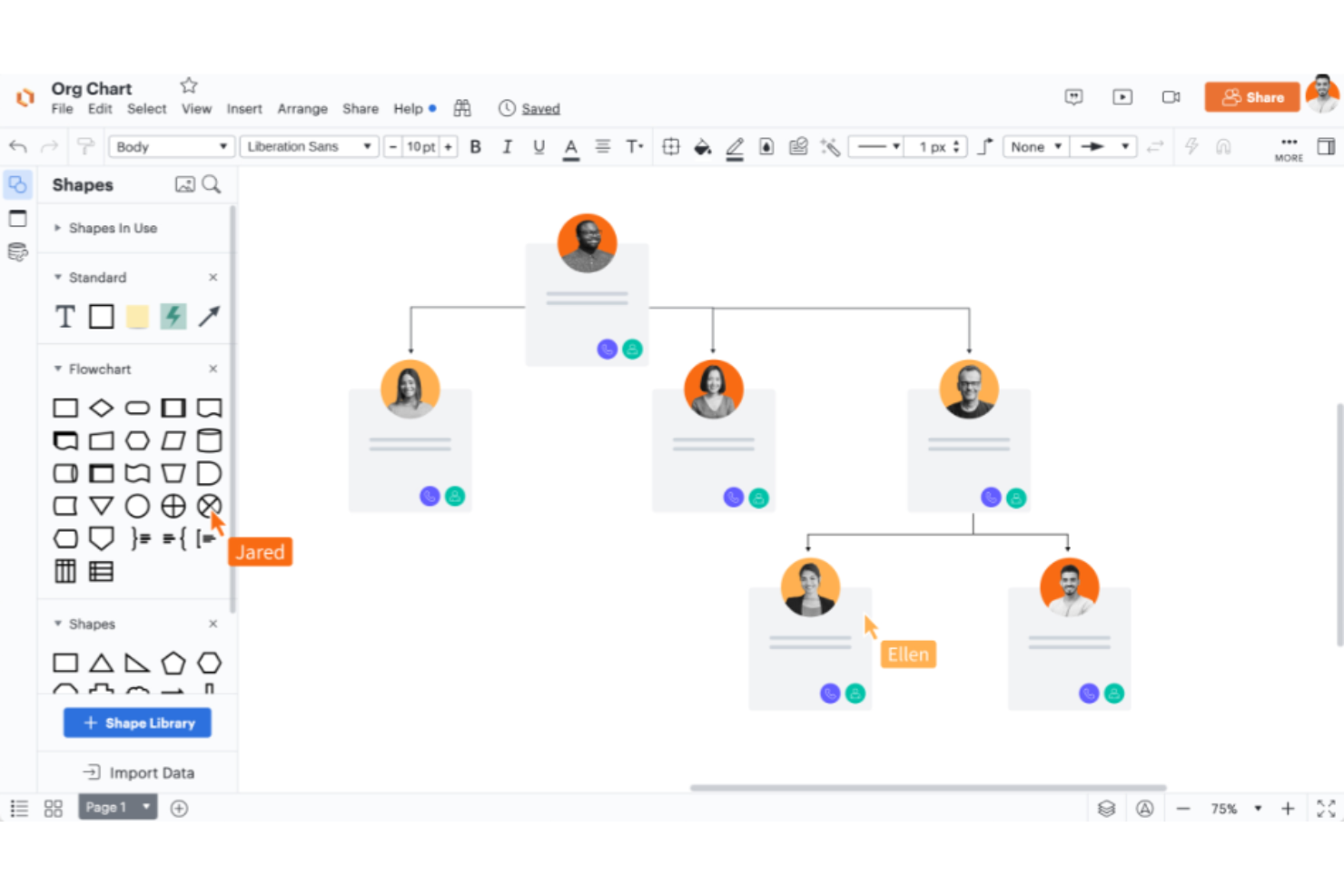
Lucidchart is a web-based diagramming tool with powerful features that support a wide range of data visualization needs. Its effectiveness in transforming raw data into clear, understandable visual formats makes it the best tool for data visualization.
Why it's a good FigJam alternative:
Lucidchart excels in creating diverse and complex data visualizations that FigJam does not inherently focus on. It stands out with its ability to handle a wide array of diagram types (including technical diagrams like UML and ERD) which are essential for detailed data analysis and presentation. The tool's focus on precision and versatility in data representation makes it a superior choice for professionals needing to visualize intricate data structures.
Standout features & integrations:
Features include intuitive drag-and-drop interface, real-time collaboration, a vast library of templates and shapes, data linking, advanced diagramming tools, version history, custom styling options, presentation mode, secure sharing, and detailed export options.
Integrations include Google Workspace, Microsoft Office 365, Slack, Confluence and Jira, Salesforce, GitHub, AWS, Trello, Dropbox and Box, Zapier, and more.
Pros and Cons
Pros:
- Powerful data linking and conditional formatting features
- Real-time collaboration across teams and platforms
- Supports a wide variety of diagram types and templates
Cons:
- Pricing can get expensive for larger teams or advanced features
- Can be complex for beginners to utilize all features
Outras alternativas ao FigJam
Segue-se uma lista de alternativas adicionais ao FigJam que selecionei. Embora não tenham entrado nas 10 melhores, continuam a ser valiosas e merecem uma pesquisa mais aprofundada.
- Collaboard
For interactive workshops
- InVision Freehand
For real-time design collaboration
- Padlet
For content curation and sharing
- Draft.io
For simple, visual task management
- Notebookcast
For templated projects
- Vectera
For client meeting organization


Encontre mais ferramentas alternativas nesta lista de alternativas ao Coda.
Análises de software de gestão de projetos relacionadas
- Software de gestão de projetos
- Software de gestão de recursos
- Software de automatização de fluxos de trabalho
- Software de controlo de tempo
- Software de gestão de tarefas
- Ferramentas de colaboração
- Criador de gráficos de Gantt
- Ferramentas de produtividade
- Software de acompanhamento de projetos
- Software de planeamento de projetos
How I Evaluate FigJam Alternatives
I split my evaluation into three parts, weighting core functionality most: live canvas collaboration and templates for retros or sprint planning. Next, I look for standout features such as AI idea clustering. Finally, I consider beyond-feature factors like onboarding, support, and pricing.
Core Functionality (Table Stakes For This List)
When I'm selecting tools for my list, I score each one on a scale from 0 (does not offer the functionality) to 5 (excels in this area) for each core functionality listed below. I then convert the total into a percentage to help assess each tool's overall fit, with extra weight on any functionalities I’ve deemed essential.
- Collaborative Canvas (Essential): I look for an open canvas with clear ways to group and navigate workshop notes, workflow maps, and planning artifacts as projects grow.
- Live Collaboration (Essential): I consider how live cursors, presence, and follow features support distributed teams during sprint planning or a stakeholder workshop.
- PM Templates: I check for practical templates for retrospectives, sprint planning, roadmaps, and other recurring project activities.
- Visual Elements: I look for sticky notes, shapes, connectors, text, and drawing tools that help teams map dependencies or organize ideas.
- PM Integrations: I evaluate whether teams can bring Jira, Asana, Trello, or other project work into the canvas through cards or task links.
- Facilitation Tools: I consider whether timers, voting, and participant guidance help a facilitator run structured sessions and capture decisions.
Once I have a list of tools that meet the criteria, I consider what sets each platform apart.
Differentiating Factors (What Sets Vendors Apart)
Here's how I compare and contrast different vendors:
Standout Features
AI-powered assistance is a big differentiator. I look for tools that go beyond basic generation to cluster sticky notes, summarize discussions, or auto-create diagrams from text. During a large brainstorm, that kind of synthesis saves real facilitation time. Async video and threaded comments also matter, especially for distributed teams running retros across time zones without scheduling another call. I also evaluate presentation mode, since the ability to walk stakeholders through a board as a guided slideshow removes the need to rebuild content in a separate deck.
Beyond Features
Pricing structure matters a lot when your retros and workshops pull in 15+ participants but only a few people actually edit the board. I check whether a tool charges per editor or per seat, since that distinction changes your cost dramatically at scale. Security and compliance certifications like SOC 2 Type II and SSO support are non-negotiable for teams in regulated industries. I also evaluate onboarding resources, particularly template libraries curated for project management ceremonies, because a strong starting template cuts facilitation prep in half.
Por que procurar uma alternativa ao FigJam
O FigJam é uma solução de software valorizada, mas pode não funcionar para todas as equipas. Eis algumas das razões mais comuns pelas quais pode estar à procura de uma alternativa ao FigJam:
- Preocupações com os custos: O preço do FigJam é relativamente acessível, mas se for uma startup, uma pequena empresa ou simplesmente não precisar de muitas licenças, poderá considerar mais viável uma opção mais barata.
- Limitações das funcionalidades: O FigJam tem várias funcionalidades de colaboração, incluindo conversação por áudio, notas autocolantes, apresentações e partilha de ficheiros. No entanto, poderá estar à procura de mais funcionalidades, como recorte de páginas Web, painéis de inspiração e ferramentas de comentários.
- Problemas de integração: Os utilizadores procuram frequentemente ferramentas que se integrem perfeitamente com o conjunto de software que já utilizam. Se o FigJam não se integrar bem com outras ferramentas que utiliza, poderá optar por alternativas que ofereçam uma melhor compatibilidade.
- Experiência do utilizador: Dependendo da sua experiência técnica, a sua equipa poderá precisar de uma interface mais simples ou mais complexa.
- Necessidades de colaboração: Alguns utilizadores poderão precisar de mais opções de personalização ou de fluxos de trabalho flexíveis que o FigJam não disponibiliza. As alternativas poderão oferecer soluções mais adaptadas.
As alternativas ao FigJam podem disponibilizar funcionalidades e benefícios que o FigJam não oferece, respondendo a necessidades e preferências específicas. Poderão adequar-se melhor a determinados projetos ou equipas alinhados com os objetivos atuais, proporcionando simultaneamente uma maior capacidade de expansão.
Principais funcionalidades a procurar nas alternativas ao FigJam
Eis algumas funcionalidades essenciais do FigJam que o seu software alternativo deverá conseguir replicar ou melhorar para ser uma boa escolha:
- Colaboração online: Permite às equipas debater, desenvolver e organizar ideias num quadro branco digital partilhado.
- Acessibilidade: É fácil de utilizar por pessoas com diferentes níveis de experiência com ferramentas de design.
- Desenho e realce: Oferece ferramentas para fazer esboços, realçar elementos e utilizar fita washi para dar ênfase.
- Adicionar texto: Disponibiliza opções para adicionar texto de ponto e texto de área para comunicar ideias.
- Modelos: Fornece modelos para estruturar atividades e reuniões.
- Importação de objetos: Permite importar imagens, designs do Figma e ligações de texto clicáveis.
- Ferramentas de colaboração: Inclui ferramentas para sessões de votação, quadros de reuniões e exercícios de ordenação de cartões.
- Comentários e comunicação: Inclui carimbos, emojis, chamadas de áudio e destaque de participantes para reuniões interativas.
- Personalização: Permite criar e publicar modelos personalizados para fluxos de trabalho únicos.
- Elementos e bibliotecas: Integra-se com elementos e bibliotecas do Figma para melhorar os componentes dos quadros.