

How to Use Monday CRM’s Forecast View for Pipeline Gap Detection and Resource Planning


The forecast looked fine on the surface, but deals were sitting too long in the same stage, activity was inconsistent, and there was no clear answer on whether the pipeline was actually healthy heading into the next quarter.
That is usually where pipeline gaps start becoming harder to ignore. Once visibility becomes fragmented across deals, activity, and forecasting, it gets much harder to know where resources should go or what needs attention first.
This is where monday CRM can help. With Forecast View and the right reporting setup, teams can spot pipeline gaps earlier, understand what is slowing deals down, and make more informed resource decisions before targets are affected.
 can help. With Forecast View and the right reporting setup, teams can spot pipeline gaps earlier, understand what is slowing deals down, and make more informed resource decisions before targets are affected.
How monday CRM Helps You Detect Pipeline Gaps Earlier
Once pipeline issues become harder to track manually, teams need a clearer way to understand what is actually happening across the pipeline.
monday CRM helps centralize forecasting visibility so revenue teams can identify gaps, review deal movement, and understand where pipeline coverage may be weakening before targets are affected.
- Centralizes deals, emails, meetings, and follow-ups into one workspace so teams can review pipeline activity without switching between tools
- Helps teams compare current pipeline performance against targets to identify whether revenue is on track, ahead, or at risk
- Uses Funnel Charts, Leaderboards, and activity tracking to show where deals slow down, which reps or segments need support, and how engagement affects pipeline movement
Together, these views help teams move beyond surface-level forecasting and better understand what is actually causing pipeline gaps inside monday CRM.
How to Perform Pipeline Gap Detection and Resource Planning in monday CRM
Now that I have covered where pipeline gaps usually come from, let’s walk through how to actually identify and manage them inside monday CRM.
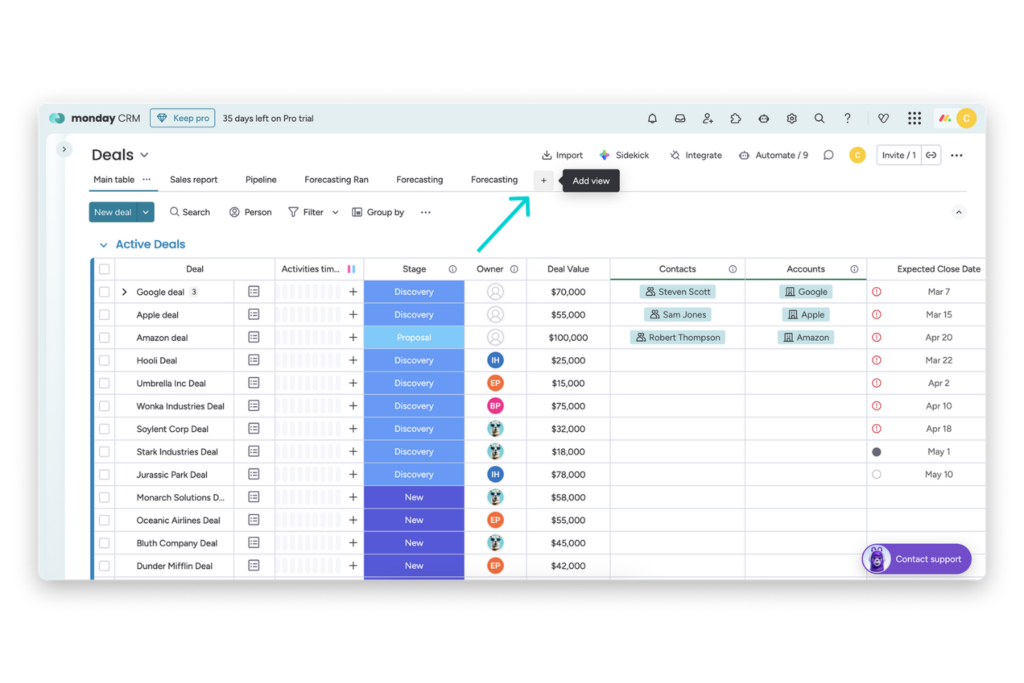
Step 1: Standardize your Deals board first
Start by making sure your Deals board has the fields needed for a reliable forecast.
Each active deal should include a stage, owner, expected close date, deal value, and segment or territory field. This matters because Forecast View is only useful if the deal data behind it is clean and consistent.
The draft also notes that this setup should happen before building the dashboard.

Step 2: Open Forecast View and compare pipeline against your goal
Use Forecast View as your starting point.
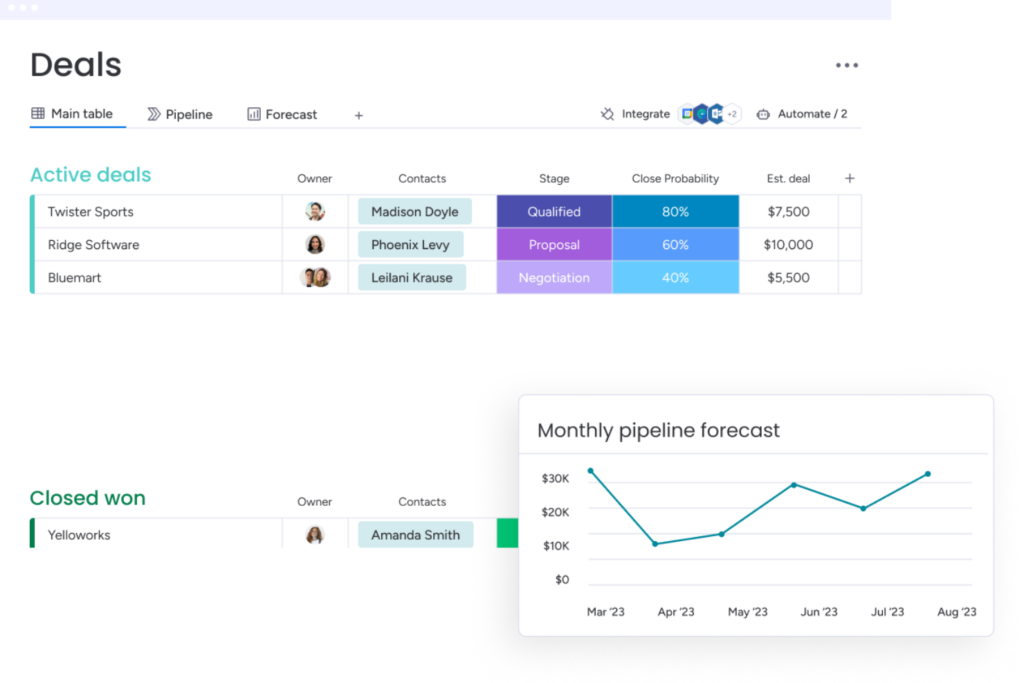
Compare projected revenue against your monthly, quarterly, or annual target so you can see whether the team is ahead, on track, or exposed. This keeps the review focused on the gap between forecast and goal instead of relying on assumptions.
monday’s CRM support materials also describe the built in Sales Dashboard as a way to review sales health, forecasting, and whether the team is close to reaching its goals.
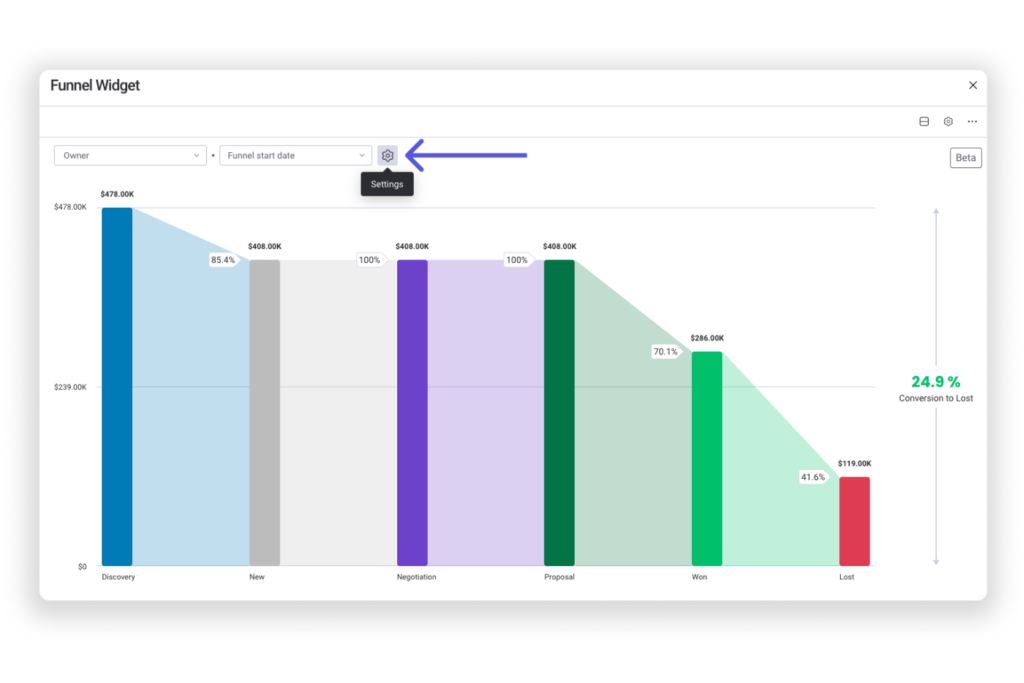
Step 3: Use a Funnel Chart to find where deals are slowing down
Once you see a possible gap, check where the pipeline is breaking down.
A Funnel Chart can help show how deals move from one stage to the next. If you have enough pipeline at the top but fewer deals moving through the middle or late stages, the issue may be conversion or stage progression, not lead volume.
monday’s dashboard tools support chart based reporting from board data, which makes this a useful next layer after Forecast View.
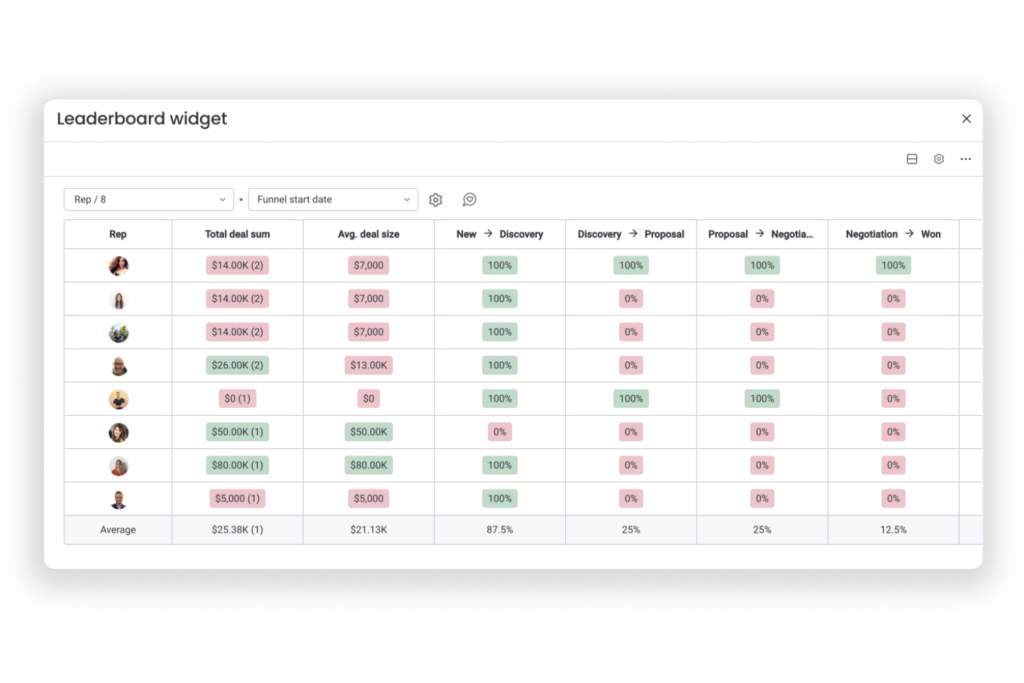
Step 4: Use a Leaderboard to check rep, team, or segment performance
Next, review whether the gap is tied to a specific rep, team, territory, or segment. A Leaderboard can help separate broader pipeline issues from coverage or workload issues.
For example, one rep may be overloaded, one segment may be under covered, or one sales motion may be converting weaker than the rest.
The draft positions this step as a way to separate territory problems from rep bottlenecks.
Step 5: Review activity data alongside the forecast
Pipeline gaps are not always caused by weak demand. Sometimes deals are stuck because follow ups are late, meetings are not happening, or buyer engagement has dropped.
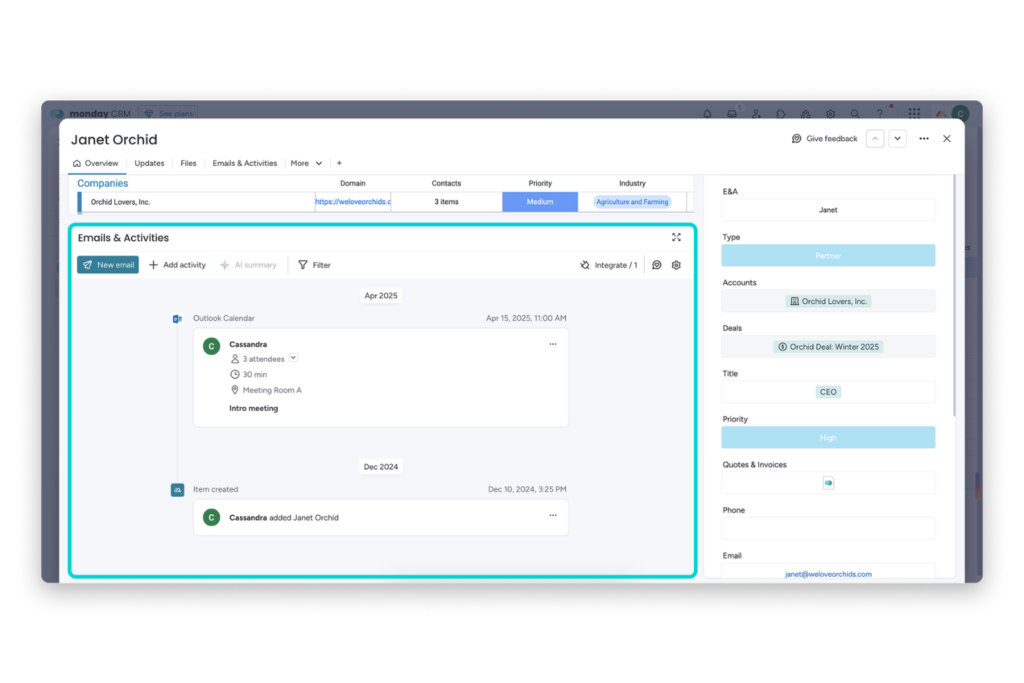
Bring activity data into the same review so you can check emails, meetings, and follow ups against deal movement.
monday CRM’s Emails & Activities and item level views help centralize customer interaction data, which gives managers more context behind each deal.
Step 6: Set automations around close dates and stalled progress
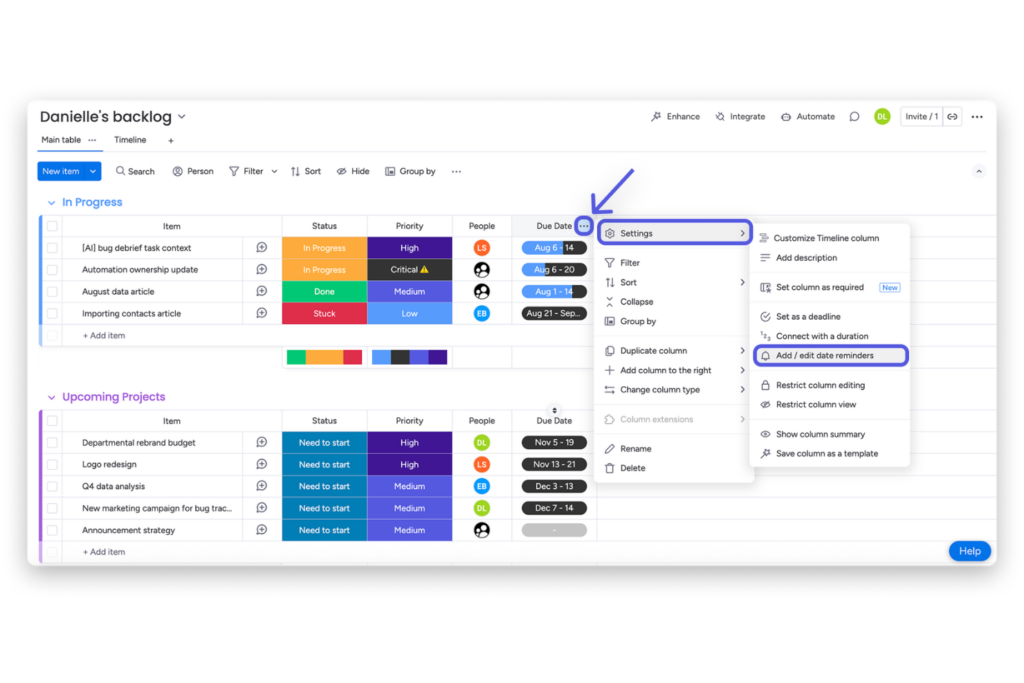
Use automations to flag deals that are approaching their expected close date without meaningful progress or have stayed in the same stage for too long.
This helps the team catch slippage before it becomes a last minute forecast surprise. The draft specifically recommends automations around expected close dates and stalled progress for this reason.
Step 7: Turn the review into a resource decision
The final step is deciding what to do with what you found.
If the gap comes from low activity, shift rep focus. If the issue is weak stage movement, review conversion points. If one segment is under covered, adjust campaign support or territory attention.
The goal is not just to report the gap, but to use monday CRM as a weekly decision surface for reallocating resources while there is still time to protect revenue.
What Successful Pipeline Gap Detection Looks Like in monday CRM
When this process is set up properly, your pipeline review stops feeling like a guessing game and starts feeling clear and actionable. You are not just looking at numbers. You understand what they mean and what to do next.
At a glance, you should be able to answer:
- Where is our forecast tracking compared to our target
- Where in the pipeline are deals slowing down or breaking down
- Is team effort aligned with where the pipeline actually needs support
Inside monday CRM, this usually looks like a consistent view of pipeline health where gaps are visible early, not at the end of the quarter. Instead of reacting to missed targets, your team can adjust activity, coverage, and priorities while there is still time to make an impact.
Over time, this becomes part of your weekly rhythm. Pipeline reviews turn into clear decisions on where to focus, what to fix, and how to keep revenue on track.
Common Mistakes When Using monday CRM for Pipeline Analysis
Even with the right setup inside monday CRM, a few common habits can make pipeline gaps harder to spot or lead teams toward the wrong decisions.
Relying only on total pipeline value
A large pipeline can look reassuring, but it does not tell you how healthy it is. Without checking stage movement and conversion, it is easy to miss where deals are slowing down or not progressing.
Ignoring activity data
Deals do not move without consistent follow-up. If emails, meetings, and next steps are not reviewed alongside pipeline data, it becomes harder to understand why deals are stalled or at risk.
Letting close dates become unreliable
Forecasts depend on expected close dates. When these dates are outdated or overly optimistic, the forecast can look stronger than it actually is, which makes gaps harder to detect early.
Conclusion
Pipeline gap detection works best when it becomes part of a consistent operating rhythm instead of a one time reporting exercise.
As your process matures, you can continue expanding your setup inside monday CRM with additional dashboards, automations, and activity tracking so your team has a clearer view of pipeline health and resource allocation over time.
If you want to continue improving your forecasting and pipeline workflows, you can explore more of what they support throughmonday CRM.
Good luck with your pipeline reviews and resource planning efforts, and I hope this guide helped you build a clearer and more actionable workflow moving forward.
FAQs
How often should teams review this in monday CRM?
A weekly review is the most effective cadence for most SaaS and agency teams. It gives teams enough movement to identify trends early while still allowing time to adjust before targets are affected.
Which dashboard elements matter most for this use case?
Start with Forecast View to compare pipeline against targets. Then use Funnel Chart, Leaderboard, and activity tracking to review stage movement, rep performance, and deal engagement in one workflow.
Can this work without a BI team?
Yes. monday CRM is designed to support operational reporting without requiring a separate BI or analytics team. Teams can build dashboards and review pipeline health directly inside the CRM.
Who should own the process?
A revenue leader or RevOps owner should usually lead the review process. Marketing and operations teams can support by providing campaign context, segment insights, and pipeline coverage analysis.
What are the most common signs of a pipeline gap in monday CRM?
Common signs include stalled deals, low activity levels, weak stage conversion, and a growing gap between forecasted revenue and targets. Reviewing Forecast View alongside activity and stage movement helps teams identify these issues earlier.

