

How to Use monday CRM’s Deal Insights for Early At-Risk Deal Detection


A deal still looks active in the pipeline, but the signs are starting to tell a different story.
Replies have slowed down, the next step is unclear, the close date is getting too close, and nobody on the team is fully sure which opportunities actually need attention first.
That is where monday CRM’s Deal Insights can help.
In this guide, we’ll walk through how to use it to spot at-risk deals earlier, identify the warning signs that matter most, and build a healthier sales pipeline before stalled opportunities turn into missed revenue.
Why Early Deal Risk Detection Matters
Early deal risk detection matters because most stalled opportunities do not fail all at once.
The warning signs usually appear much earlier through slower replies, missed follow ups, unclear next steps, and slipping close dates. The challenge is that many teams only notice these issues once the deal has already lost momentum.
By identifying those signals earlier, sales teams can respond faster, improve pipeline visibility, reduce forecast surprises, and focus attention on the opportunities that still have a real chance of moving forward.
How monday CRM Helps Teams Detect At-Risk Deals Earlier
monday CRM helps you detect at-risk deals earlier by giving you clearer visibility into your pipeline so you can spot stalled opportunities before they start affecting forecasts and revenue.
 helps you detect at-risk deals earlier by giving you clearer visibility into your pipeline so you can spot stalled opportunities before they start affecting forecasts and revenue.
monday CRM’s Deal Insights Widget
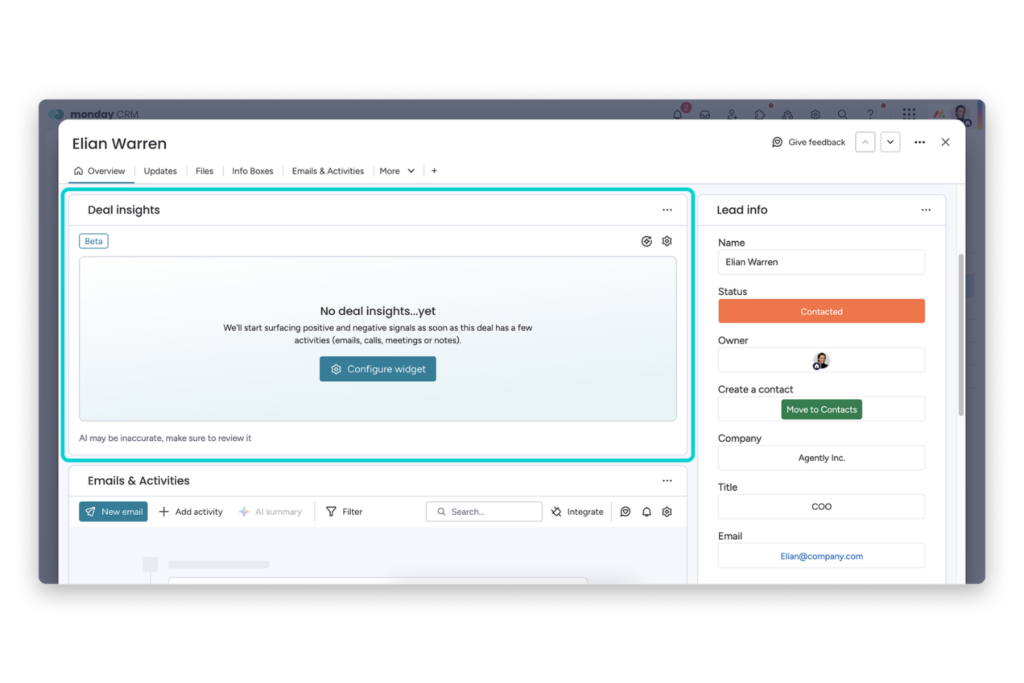
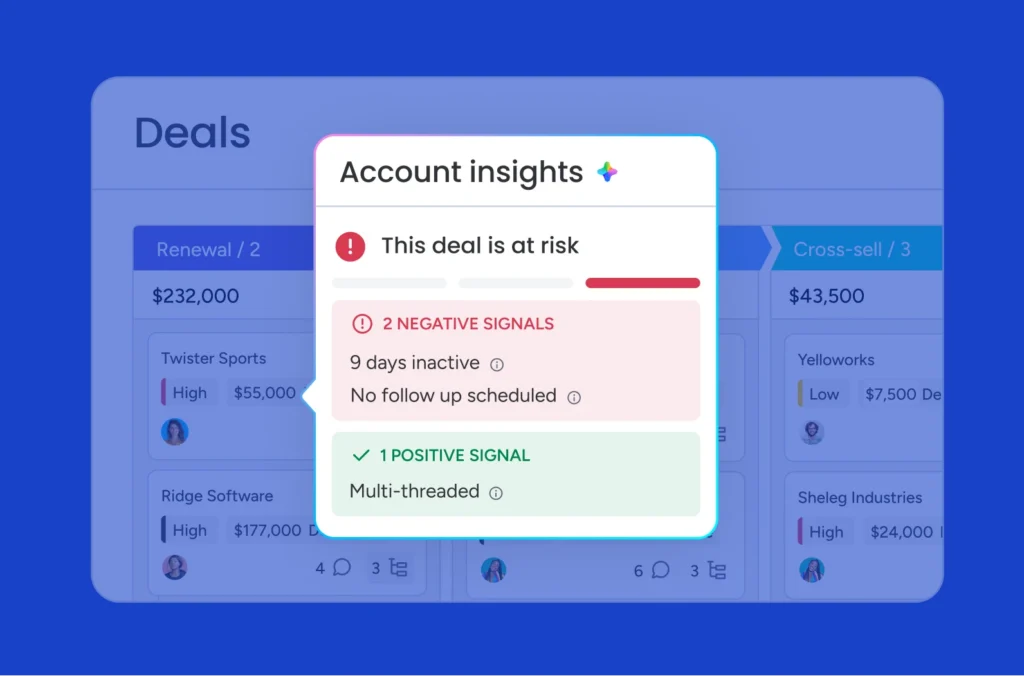
The Deal Insights widget helps you spot warning signs like no buyer replies, overdue close dates, missing next steps, and stalled engagement. This gives you a clearer view of which opportunities may already be losing momentum before they start affecting your pipeline.
Activities Timeline in monday CRM
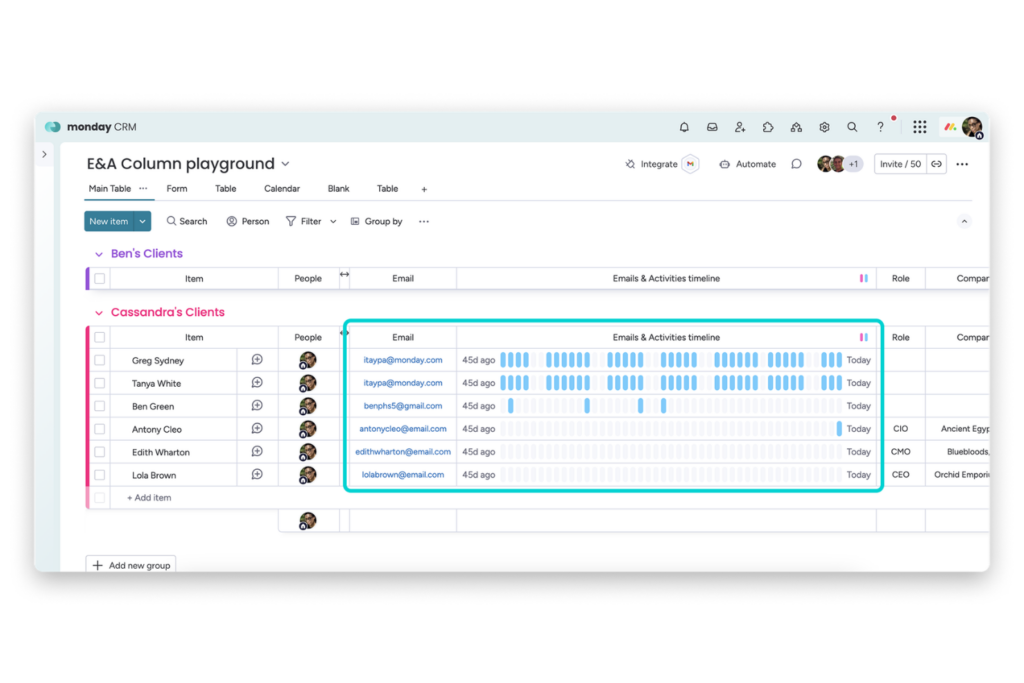
The Activities Timeline lets you quickly review recent emails, meetings, notes, and follow ups directly from the board. This makes it easier to identify inactive deals and communication gaps without opening every record one by one.
monday CRM Automations for Deal Monitoring
monday CRM automations help you stay ahead of slipping opportunities through alerts, reminders, and close date monitoring. This makes it easier to catch stalled deals earlier instead of discovering issues too late during forecasting or pipeline reviews.
Now that you have a better idea of how monday CRM helps surface deal risk earlier, let’s walk through how to set up a workflow that helps you monitor those signals more consistently.
How to Set Up Early At-Risk Deal Detection in monday CRM
Setting up early at-risk deal detection in monday CRM helps you spot warning signs earlier so your team can respond before stalled deals start affecting your pipeline and forecasts.
Step 1: Organize Your monday CRM Deals Board
Start with the basics first. Every active deal should have a clear stage, owner, expected close date, and recent activity history. If your pipeline data is inconsistent, it becomes much harder to identify which opportunities are actually at risk.

Step 2: Add the Activities Timeline Column
Add the Activities Timeline column so you can quickly review emails, meetings, notes, and follow ups directly from the board. This makes it easier to spot inactive deals or communication gaps without opening every record individually.
Step 3: Configure the Deal Insights Widget
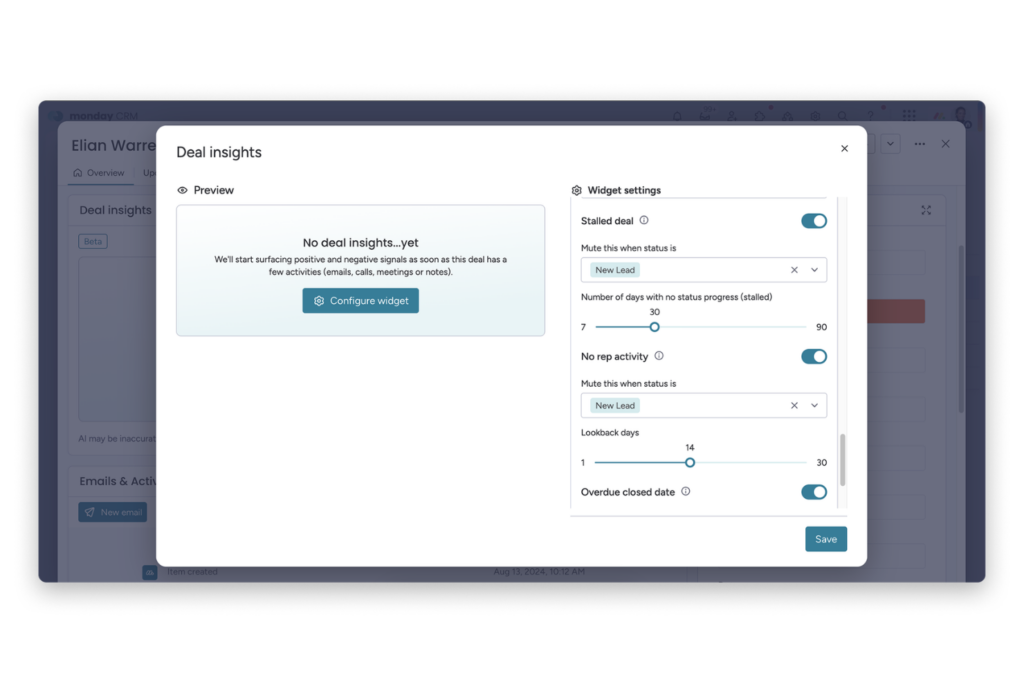
Add the Deal Insights widget to the Deals or Opportunities boards your team reviews regularly. This is where monday CRM starts surfacing warning signs tied to engagement, follow ups, and overall deal activity.
Step 4: Turn On High-Impact Risk Signals
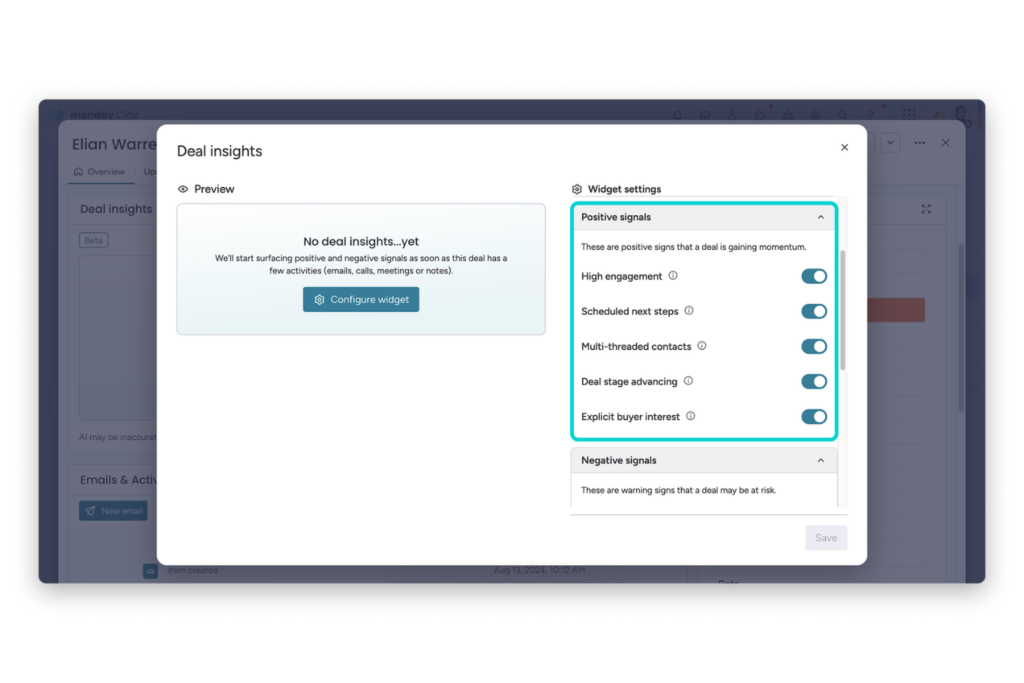
Start with the signals most likely to predict stalled opportunities for your sales process.
Common examples include customer not replying, no scheduled next step, no decision-makers engaged, stalled deals, no rep activity, and overdue close dates.
Step 5: Customize Thresholds and Lookback Windows
Adjust your settings based on your actual sales cycle. This helps reduce unnecessary alerts so newer deals are not treated the same way as late-stage opportunities or longer sales cycles.
Step 6: Review Team Activity With the Activity Tracker
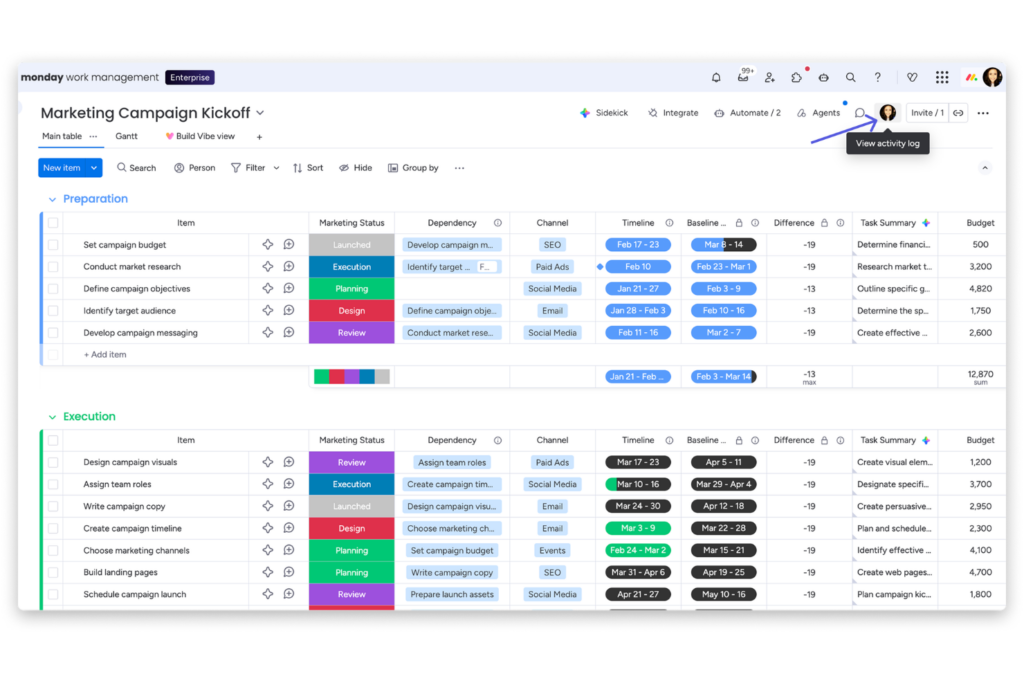
Use the Activity Tracker to review follow up consistency and overall sales activity across your pipeline. If a deal starts showing risk signals, this helps you figure out if the issue is low buyer engagement or simply not enough outreach from the team.
Step 7: Add monday CRM Automations for Slipping Deals
Set up automations tied to close dates, inactivity, and stalled stages. Alerts and reminders help your team catch slipping opportunities earlier instead of discovering problems during forecasting or end-of-quarter reviews.
Step 8: Build a Real Deal Intervention Workflow
Once risk becomes visible, decide how your team should respond. That can include scheduling the next step, involving additional stakeholders, escalating the account internally, revising close dates, or shifting rep attention toward deals that still show buying intent.
Things to Keep in Mind When Using monday CRM Deal Insights for Early At-Risk Deal
Before anything else, it is important to keep these things in mind before relying on monday CRM Deal Insights for early at-risk deal detection.
What Success Looks Like
A healthy setup helps you spot stalled opportunities earlier instead of discovering them too late during forecasting or pipeline reviews.
You should have a clearer view of which deals are actively progressing, which ones are losing momentum, and where your team may need to step in before opportunities completely stall.
Common Mistakes to Avoid
One of the biggest mistakes is turning on too many risk signals at once. This can create unnecessary alerts and make it harder to identify the issues that actually matter.
It is also important not to treat every deal the same, since shorter sales cycles and enterprise opportunities usually behave very differently.
Most importantly, Deal Insights should support manager judgment, not replace it.
Prerequisites and Setup Requirements
Before relying on Deal Insights, make sure your pipeline is properly organized.
Every active deal should have a clear stage, owner, expected close date, and recent activity history. It also helps to keep Emails & Activities tracking enabled so monday CRM has enough engagement data to surface meaningful risk signals.
Conclusion
If your team is still identifying risky deals too late in the pipeline, this is one of the most valuable workflows to improve first.
Inside monday CRM, tools like Deal Insights, activity tracking, automations, and activity timelines can help surface stalled opportunities earlier so teams have more time to respond before pipeline performance is affected.
If you want to continue refining your workflow, you can explore more of what they support through monday CRM. They also have a dedicated guide on the Deal Insights Widget if you want a deeper look into how monday CRM helps teams identify and monitor at risk deals.
Good luck with your deal reviews and pipeline management efforts, and I hope this guide helped you build a more proactive approach to identifying and managing deal risk moving forward.
FAQs
What kinds of risk signals can monday CRM surface?
Teams can configure signals such as no decision-makers engaged, not enough contacts, customer not replying, no scheduled actions, negative sentiment, stalled deal, no rep activity, and overdue close date, alongside positive engagement indicators.
Can managers reduce noise in Deal Insights?
Yes. Teams can mute signals for selected statuses and customize thresholds so the widget reflects their process rather than over-alerting.
What if our plan does not include Deal Insights yet?
Start with the Activities timeline column, Activity tracker, and close-date automations. Those still provide a strong early-warning workflow.
Does this replace manager judgment?
No. It improves judgment by surfacing better signals earlier. Humans still decide whether the right response is escalation, re-threading stakeholders, more follow-up, or a realistic forecast reset.
Which boards are best for this workflow?
Deals or Opportunities boards are best because that is where managers already review pipeline motion and can act on the signals quickly.

