

How to Use monday CRM’s AI Tools for Sales Forecasting Implementation


Forecast meetings start turning into cleanup sessions once CRM data stops matching actual pipeline activity. Teams spend more time chasing updates and rebuilding spreadsheets than reviewing forecast risks and revenue opportunities.
This is where monday CRM’s AI tools can help. Features like Emails & Activities, AI summaries, automations, and AI powered columns help teams centralize forecasting data and maintain a more structured forecasting workflow.
 , automations, and AI powered columns help teams centralize forecasting data and maintain a more structured forecasting workflow.
In this guide, we’ll walk through how to use monday CRM’s AI tools for sales forecasting implementation and the setups that help improve forecasting visibility and workflow management.
Can monday CRM’s AI Tools Improve Sales Forecasting Accuracy?
Yes. monday CRM’s AI tools can help improve sales forecasting accuracy by helping teams maintain cleaner forecasting data and better pipeline visibility.
Many forecasting issues come from inconsistent deal updates and missing activity tracking. Features like Emails & Activities, AI summaries, automations, and AI powered columns help teams centralize deal activity and maintain cleaner forecasting records inside the CRM.
How Effective is monday CRM for Sales Forecasting Implementation?
To better understand how monday CRM’s AI tools help with sales forecasting implementation, here are some of the biggest ways they improve forecasting workflows and pipeline visibility.
Centralizes Forecasting Data and Pipeline Activity
Forecasting becomes easier to manage when deal stages, close dates, pipeline value, emails, meetings, and activity history are tracked inside one system. monday CRM’s AI tools help teams keep forecasting data more organized and reduce the need to rebuild reports across spreadsheets and disconnected platforms.
AI Tools Help Structure Forecasting Information
AI powered summaries, automated categorization, activity tracking, and AI powered columns help organize forecasting information into cleaner and more usable records. This reduces manual administrative work and helps teams review pipeline activity more consistently during forecast planning.
Supports Flexible Forecasting Workflows
The platform allows teams to customize forecasting dashboards, automate reminders, track pipeline movement, and manage forecast reviews around their existing sales process. monday CRM’s AI tools work well for teams that want a forecasting setup that is easier to maintain without relying on a heavily customized enterprise system.
How to Implement Sales Forecasting in monday CRM
Here’s how to build a more structured sales forecasting workflow using monday CRM’s AI tools.
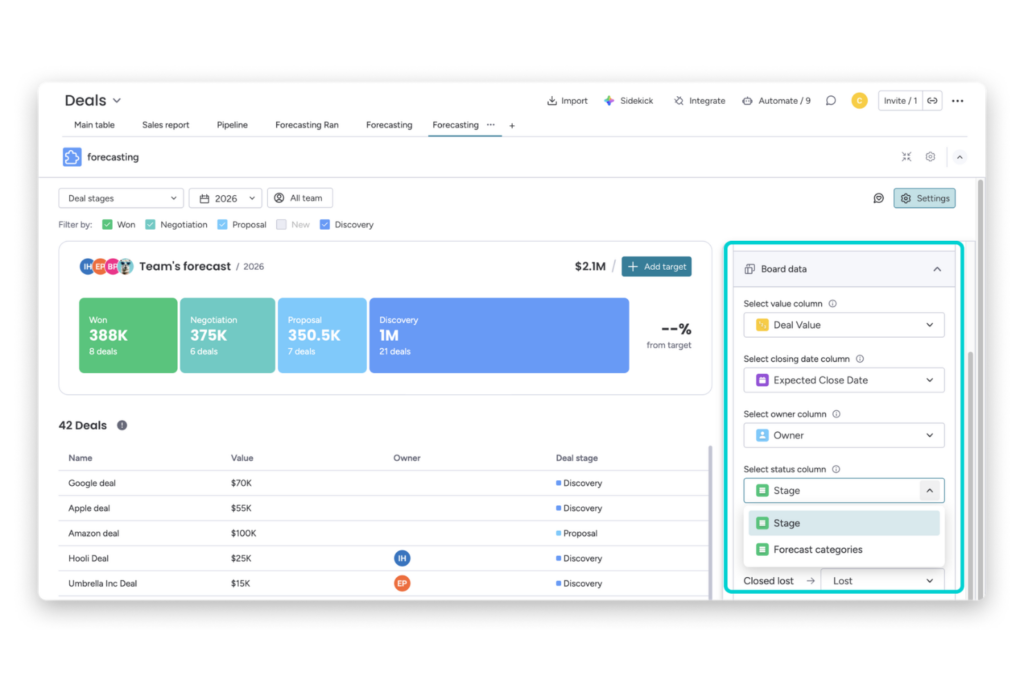
Step 1: Define Your Forecasting Data Model
Start by standardizing the core forecasting fields every deal must contain.
This usually includes deal stage, owner, expected close date, deal value, segment, and territory. Consistent forecasting fields help monday CRM AI tools organize pipeline data more accurately and improve forecasting visibility across the team.
Step 2: Enable monday CRM’s AI Tools and Confirm Workspace Access
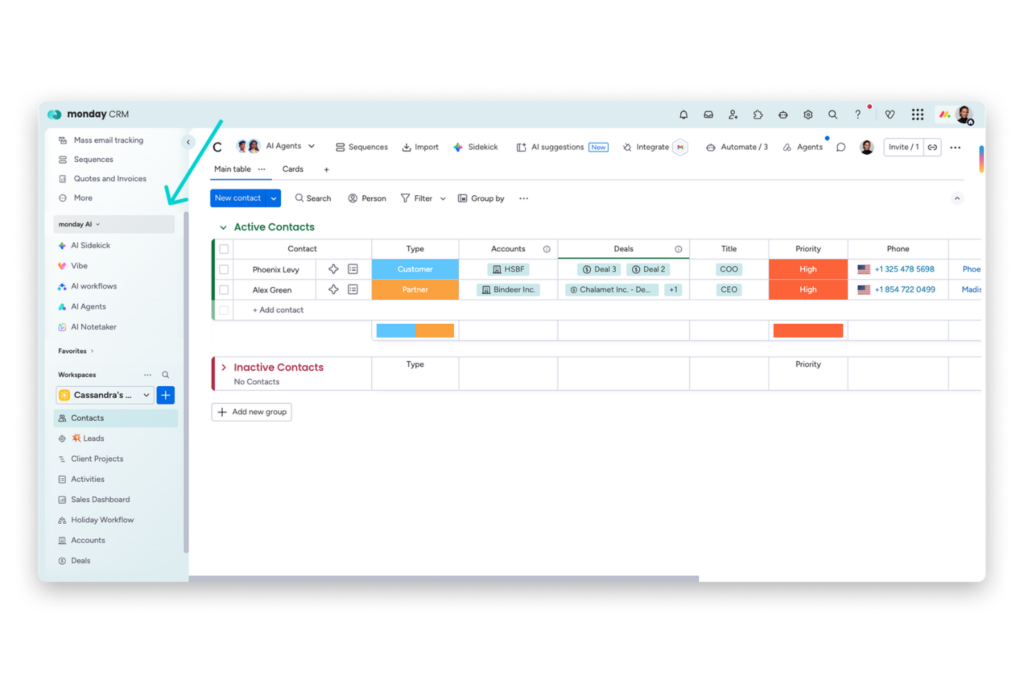
Before building forecasting workflows, confirm that your workspace has access to the AI features your team plans to use.
An admin may need to enable monday AI depending on your plan and workspace permissions.
This helps ensure AI powered columns, summaries, automations, and forecasting related workflows are available during implementation.
Step 3: Centralize Customer Activity Using Emails & Activities
Connect Emails & Activities so customer emails, meetings, notes, calls, and follow ups are stored inside the same CRM record the forecast depends on.
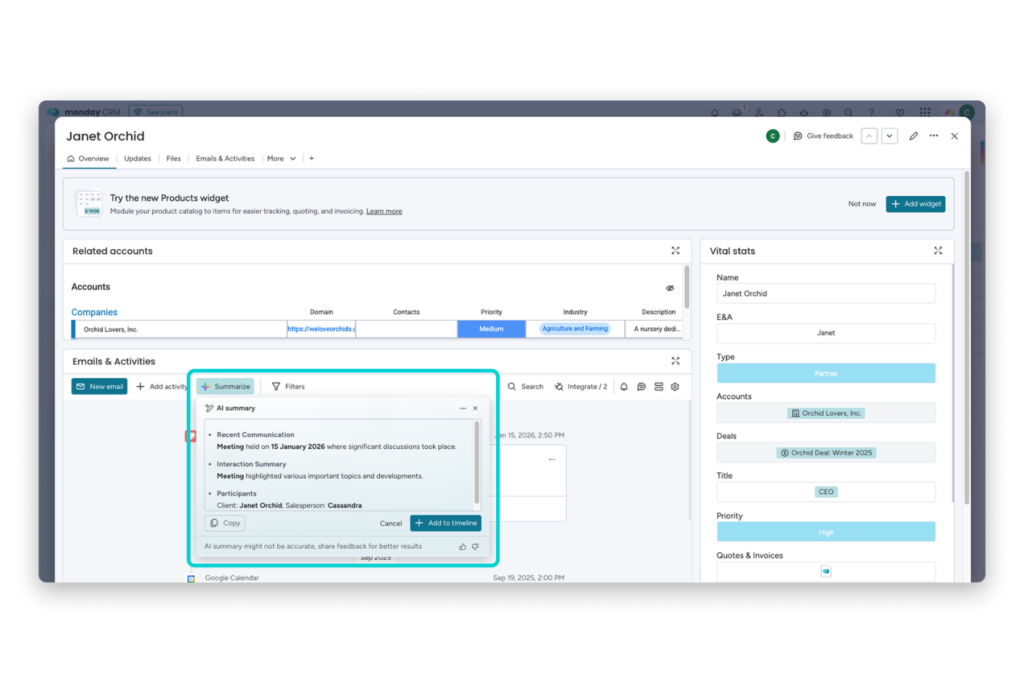
This gives teams a more complete activity history and allows monday CRM’s AI tools to summarize conversations, organize forecasting context, and improve pipeline visibility during reviews.

Step 4: Configure Forecast View and Forecasting Dashboards
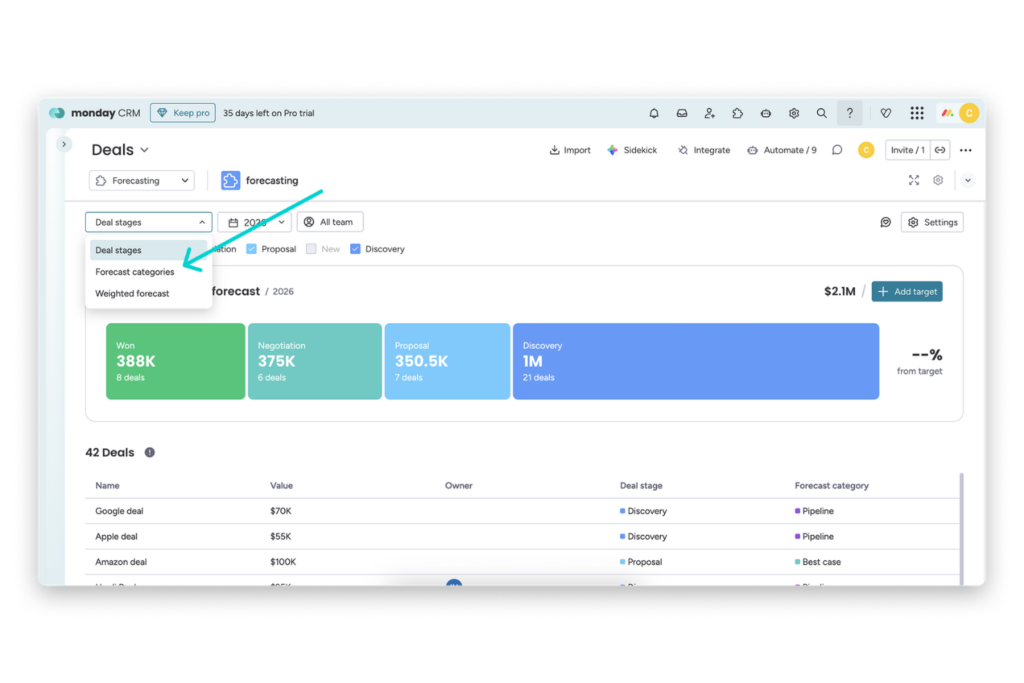
Set up Forecast view as the main forecasting workspace, then build supporting dashboards around the metrics your team actually reviews.
Start with pipeline value, projected revenue, deal stages, and forecast progress before adding extra widgets like Funnel, Leaderboard, or activity tracking dashboards.
Step 5: Add AI Powered Workflow Assistance
Use AI powered columns, summaries, automations, and categorization tools where they reduce repetitive forecasting work.
monday CRM’s AI tools can help extract information from updates, summarize long activity histories, organize records, assign labels, and structure forecasting data into cleaner operational signals.
Step 6: Launch a Pilot Forecasting Workflow First
Start with one team, territory, or sales segment before rolling forecasting workflows out across the organization.
A pilot rollout makes it easier to identify inconsistent stage definitions, missing activity tracking, reporting gaps, and forecasting workflow issues before scaling the process further.
Step 7: Redesign Forecast Review Meetings Around Exceptions
Forecast meetings should focus on pipeline risks, stalled deals, missing activity, forecasting changes, and rep judgment calls instead of manually collecting updates.
With forecasting data centralized inside the CRM and supported by AI assisted summaries, teams can spend more time reviewing pipeline health and less time rebuilding reports.
Step 8: Optimize Based on Workflow Friction
Review which fields, automations, and AI actions the team consistently uses during forecasting reviews. If a field is rarely updated, simplify it, automate it, or remove it.
If an AI workflow creates unnecessary noise instead of improving forecasting visibility, refine the process so the forecasting system stays easier to maintain long term.
Common Sales Forecasting Mistakes and Best Practices
Here are some common forecasting mistakes and best practices that help teams use monday CRM’s AI tools more effectively.
Keep Forecasting Inputs Simple
One common mistake is adding too many forecasting fields and workflows too early. This usually leads to inconsistent updates and lower CRM adoption.
Focus on the forecasting inputs that directly affect pipeline visibility, such as deal stage, owner, value, expected close date, and activity tracking.
Use AI to Support Forecasting Decisions
monday CRM’s AI tools work best when they help organize and structure forecasting information instead of replacing forecasting decisions entirely.
Use AI powered summaries, categorization, and automations to reduce manual administrative work while managers continue handling pipeline reviews and deal risk evaluation.
Build Forecast Reviews Around Exceptions
Forecast meetings should focus on stalled deals, missing activity, forecasting changes, and pipeline risks instead of manually collecting updates from reps.
Centralized activity tracking and AI assisted summaries help teams review forecasting issues faster and more consistently.
Standardize CRM Hygiene Across the Team
Forecasting accuracy depends heavily on consistent CRM usage. Allowing reps to manage deal updates outside the CRM often creates incomplete forecasting records and unreliable pipeline visibility.
Set clear expectations around activity logging, close dates, deal stages, and forecasting field updates.
Optimize Based on Workflow Friction
Overbuilt dashboards, excessive automations, and unnecessary AI actions can make forecasting workflows harder to maintain.
Review which workflows teams actually use during forecast reviews and simplify anything that slows updates or creates unnecessary administrative work.
Conclusion
As your forecasting process becomes more consistent, you can continue expanding it with additional dashboards, automations, templates, and AI supported workflows inside monday CRM without rebuilding your existing CRM structure.
If you want to continue refining your setup, you can explore more of what they support through monday CRM. They also have a ready to use sales forecasting CRM template and a practical guide on building a sales forecast template if you want a more structured starting point for your forecasting process.
Good luck with your sales forecasting and resource planning efforts, and they hope this guide helped you build a more reliable and scalable forecasting workflow moving forward.
FAQs
Do I need a technical or data science team to set this up?
Not usually. monday CRM is designed so teams can build and manage forecasting workflows without requiring a separate data science or BI team.
What data should teams standardize first?
Start with deal stage, value, expected close date, owner, and activity history. These fields directly affect forecast accuracy and reporting consistency.
Can monday AI use information from Emails & Activities?
Yes. monday CRM’s AI features can use activity history, meeting notes, and communication data to help generate summaries and support forecasting workflows.
Should the rollout begin with dashboarding or AI actions?
Start with the board structure and dashboard setup first. AI actions become more useful once your pipeline data, review process, and activity tracking are already consistent.
How do I know the implementation is working?
Common signs include fewer manual reporting steps, faster forecast reviews, cleaner deal data, and more consistent pipeline visibility across the team.

