



Moxo versus Pipefy: Vergelijking en beoordelingen door experts voor 2026



Workflow automation sounds simple until a process starts bouncing between departments, clients, vendors, systems, and the occasional approval no one wants to own. At that point, a few triggers and reminder emails are not enough. You need a clearer way to manage the full workflow without losing the humans who still need to make the important calls.
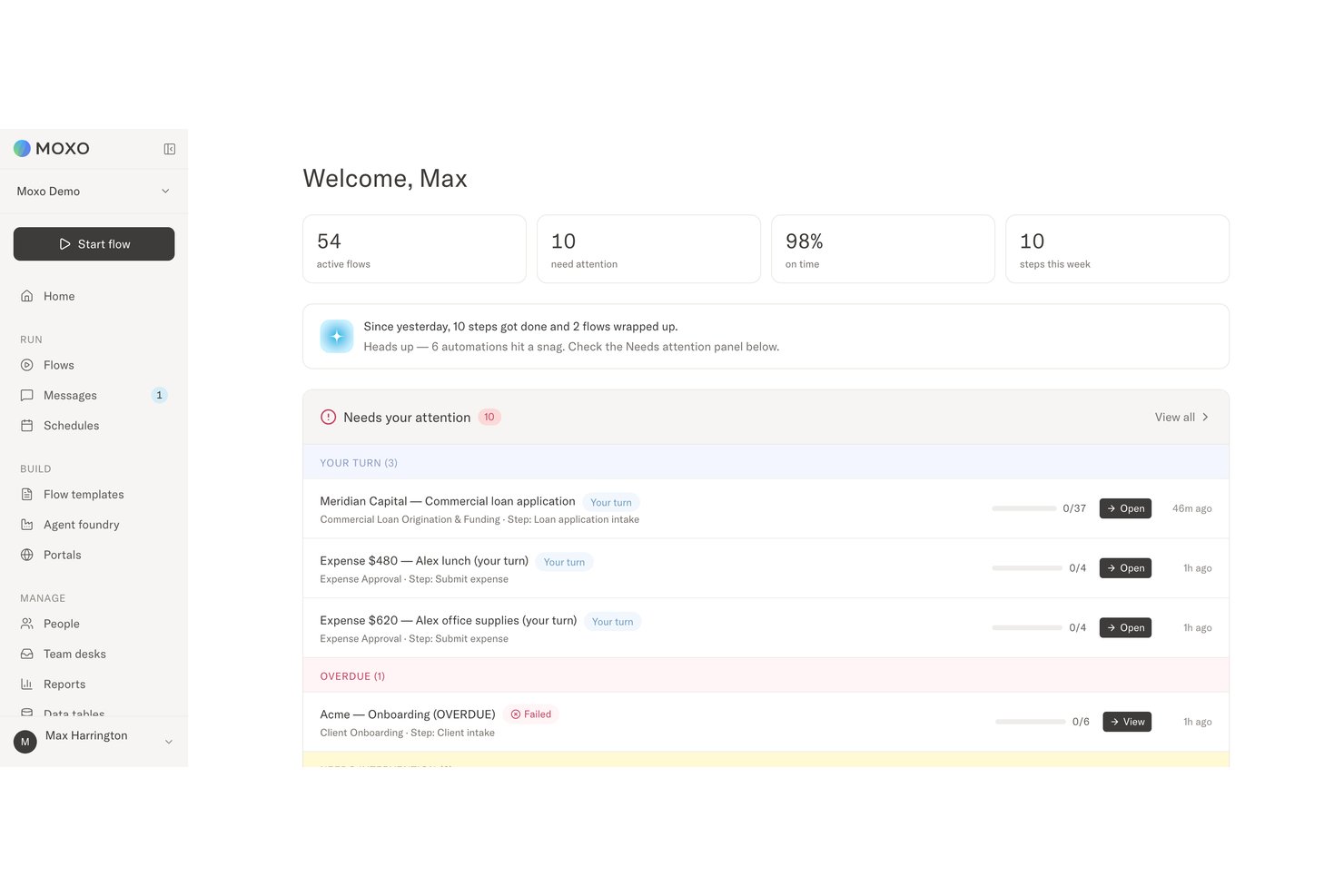
Moxo and Pipefy are workflow automation platforms, but they solve the problem differently. Moxo combines human-AI orchestration, custom client workspaces, and accountable decision-making, while Pipefy focuses on no-code process design, AI agents, forms, portals, integrations, and governance across broader business operations.
In this detailed comparison, I’ve evaluated and tested Moxo and Pipefy using my expertise in workflow automation to help you determine which tool is the right fit for your business processes and productivity goals.
Moxo vs. Pipefy: An Overview
Moxo
Pipefy


Waarom u onze softwareaanbevelingen kunt vertrouwen
Ons team test en beoordeelt software sinds 2012. Als projectmanagers weten we zelf hoe moeilijk — en belangrijk — het is om de juiste software te kiezen.
Voor deze gids hebben we tools geëvalueerd met behulp van praktijktests en onafhankelijk onderzoek, waarbij we tools beoordeelden aan de hand van onze selectiecriteria. We putten ook uit inzichten van vooraanstaande experts uit de branche en praktiserende projectmanagementprofessionals.
Onze reviews weerspiegelen ons menselijke redactionele oordeel, geen verkooppraatje.
Deskundige beoordelaars:
Moxo vs. Pipefy Pricing Comparison
| Moxo | Pipefy | |
|---|---|---|
| Free Trial | Free demo available | Free plan |
| Pricing | From $5,000/year (billed annually) | Pricing upon request |
Moxo versus Pipefy: prijzen en verborgen kosten
Moxo is vooraf eenvoudiger te budgetteren omdat het prijzen publiceert voor de niveaus Free, Business en Pro, terwijl Enterprise aangepaste prijzen gebruikt. De kosten kunnen nog steeds stijgen wanneer teams meer flows en AI-credits nodig hebben of naar hogere niveaus overstappen voor aangepaste klantportalen, geavanceerde agents, API-toegang, SSO en aanpassingen voor ondernemingen. Pipefy biedt een gratis Starter-abonnement, maar voor Business en Enterprise is een offerte van de verkoopafdeling vereist. De betaalde abonnementen kunnen ook facturering per gebruiker, hogere gebruikslimieten, integraties, opslag, databasecapaciteit en aanvullende ondersteuningsdiensten omvatten.
De belangrijkste vraag is welk platform de mogelijkheden bevat die je processen vereisen. Moxo biedt mogelijk meer waarde wanneer externe belanghebbenden, AI-agents, aangepaste portalen en goedkeuringen met duidelijke verantwoordelijkheid centraal staan in de workflow. Pipefy kan geschikt zijn voor organisaties die processen standaardiseren voor grote gebruikersgroepen en afdelingen, hoewel facturering per gebruiker en abonnementen op basis van offertes de kosten minder voorspelbaar kunnen maken. Controleer de gebruikslimieten, implementatieondersteuning, integratiekosten, training, e-maillimieten en kosten voor automatisering of opslag voordat je een beslissing neemt.
Moxo vs. Pipefy Feature Comparison
| Moxo | Pipefy | |
|---|---|---|
| API | ||
| Access Management | ||
| Analytics | ||
| Approval Workflows | ||
| Audit Trail | ||
| Batch Permissions & Access | ||
| Business Rules Mining | ||
| Compliance Tracking | ||
| Custom Reports | ||
| Customer Management | ||
| Data Export | ||
| Data Import | ||
| Document Management | ||
| External Integrations | ||
| Form Builder | ||
| Multi-User | ||
| Notifications | ||
| Process Modeling | ||
| Process Reporting | ||
| Project Management | ||
| Reports | ||
| Risk Assessment | ||
| Roadmapping | ||
| White-label | ||
| Workflow Management |
Moxo versus Pipefy: integraties
| Integratie | Moxo | Pipefy |
|---|---|---|
| DocuSign | ✅ | ✅ |
| Gmail | ✅ | ✅ |
| HubSpot | ✅ | ✅ |
| Slack | ✅ | ✅ |
| Jira | ✅ | ✅ |
| Salesforce | ✅ | ✅ |
| SAP | ✅ | ✅ |
| Google Drive | ✅ | ✅ |
| QuickBooks | ✅ | ✅ |
| Dropbox | ✅ | ✅ |
| API | ✅ | ✅ |
| Zapier | ✅ | ✅ |
Beide platforms kunnen verbinding maken met veelgebruikte communicatie-, CRM-, document-, financiële en bedrijfstools. Moxo gebruikt integraties om gegevens en acties in workflows met meerdere partijen te coördineren, terwijl Pipefy automatisering ondersteunt voor afdelingen en processen die door aanvragers worden gestart. API's en Zapier breiden beide platforms uit wanneer er geen vooraf gebouwde connector beschikbaar is.
Moxo vs. Pipefy Beveiliging, Naleving & Betrouwbaarheid
| Factor | Moxo | Pipefy |
|---|---|---|
| Gegevensbescherming | Gebruikt een architectuur met meerdere tenants en door KMS versleutelde opslag voor workflowgegevens, bestanden en procesregistraties. | Versleutelt gegevens tijdens overdracht en in rust met behulp van beveiligingscontroles voor ondernemingen. |
| Beveiliging & Naleving | Voldoet aan SOC 2 Type II, met gedocumenteerde controles voor de beveiliging en verwerking van klantgegevens. | Voldoet aan SOC 2 Type II en ondersteunt privacy- en governancevereisten voor ondernemingen. |
| Toegangsbeheer | Ondersteunt SAML 2.0 SSO en op rollen gebaseerd toegangsbeheer voor werknemers, externe deelnemers en AI-agenten. | Biedt SSO, meervoudige verificatie, priv processen en configureerbare gebruikersrechten. |
| Controleerbaarheid | Houdt onveranderlijke auditlogboeken bij waarin workflowacties, beslissingen, tijdstempels en verantwoordelijkheid voor menselijke en door AI ondersteunde stappen worden vastgelegd. | Registreert workflowactiviteiten, gebruikersacties en proceswijzigingen via auditlogboeken en procesgeschiedenissen. |
| Elektronische handtekeningen | Bevat native elektronische handtekeningen die worden beschermd door cryptografie op basis van KMS, zodat ondertekende acties binnen dezelfde controleerbare workflow blijven. | Ondersteunt elektronische handtekeningen binnen goedkeurings- en procesworkflows. |
Zowel Moxo als Pipefy bieden de beveiligingscontroles die van software voor workflowautomatisering in ondernemingen worden verwacht, waaronder versleuteling, toegangsbeheer, nalevingsondersteuning en auditregistratie. Moxo legt de nadruk op traceerbaarheid op beslissingsniveau voor mensen en AI-agenten, terwijl Pipefy breder governance biedt voor automatisering per afdeling.
Moxo vs. Pipefy Gebruiksgemak
| Factor | Moxo | Pipefy |
|---|---|---|
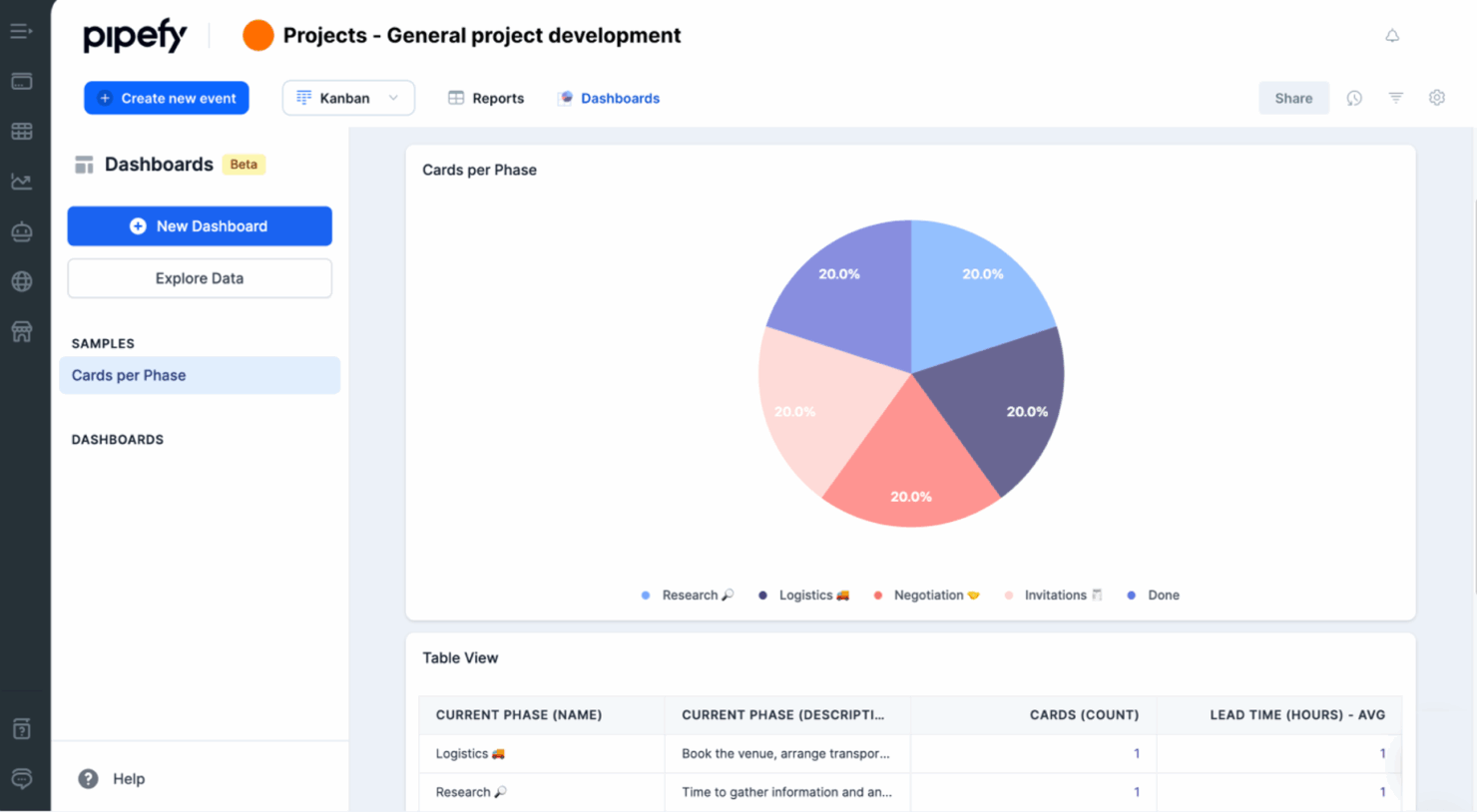
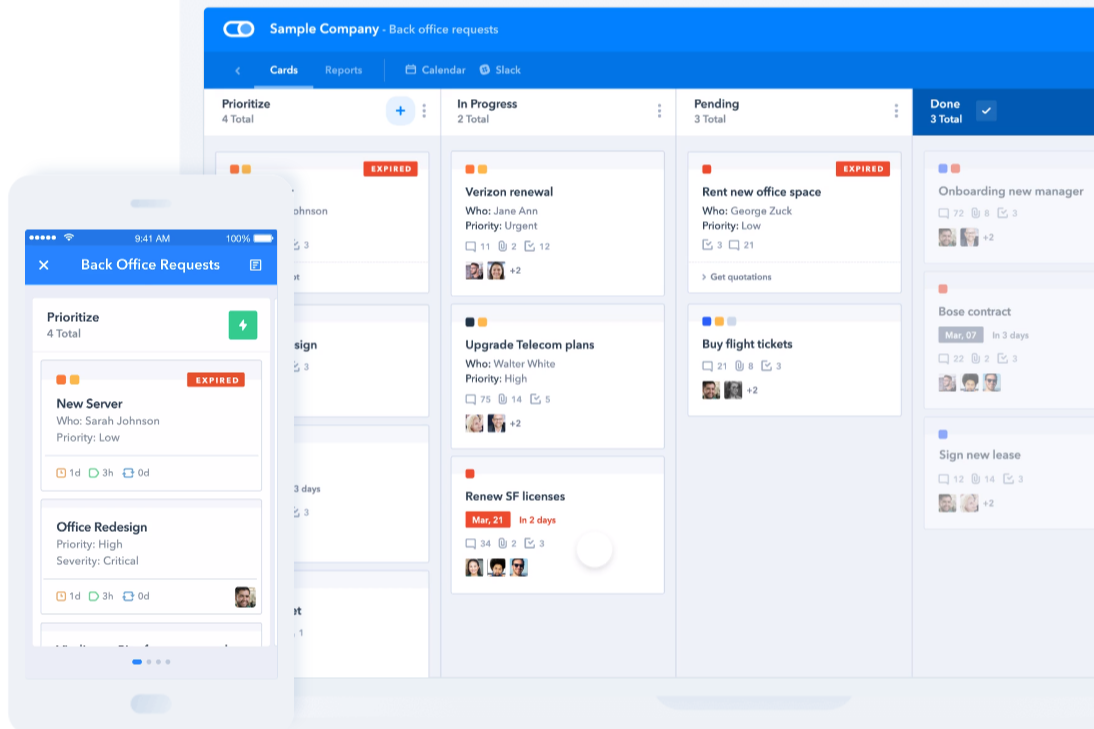
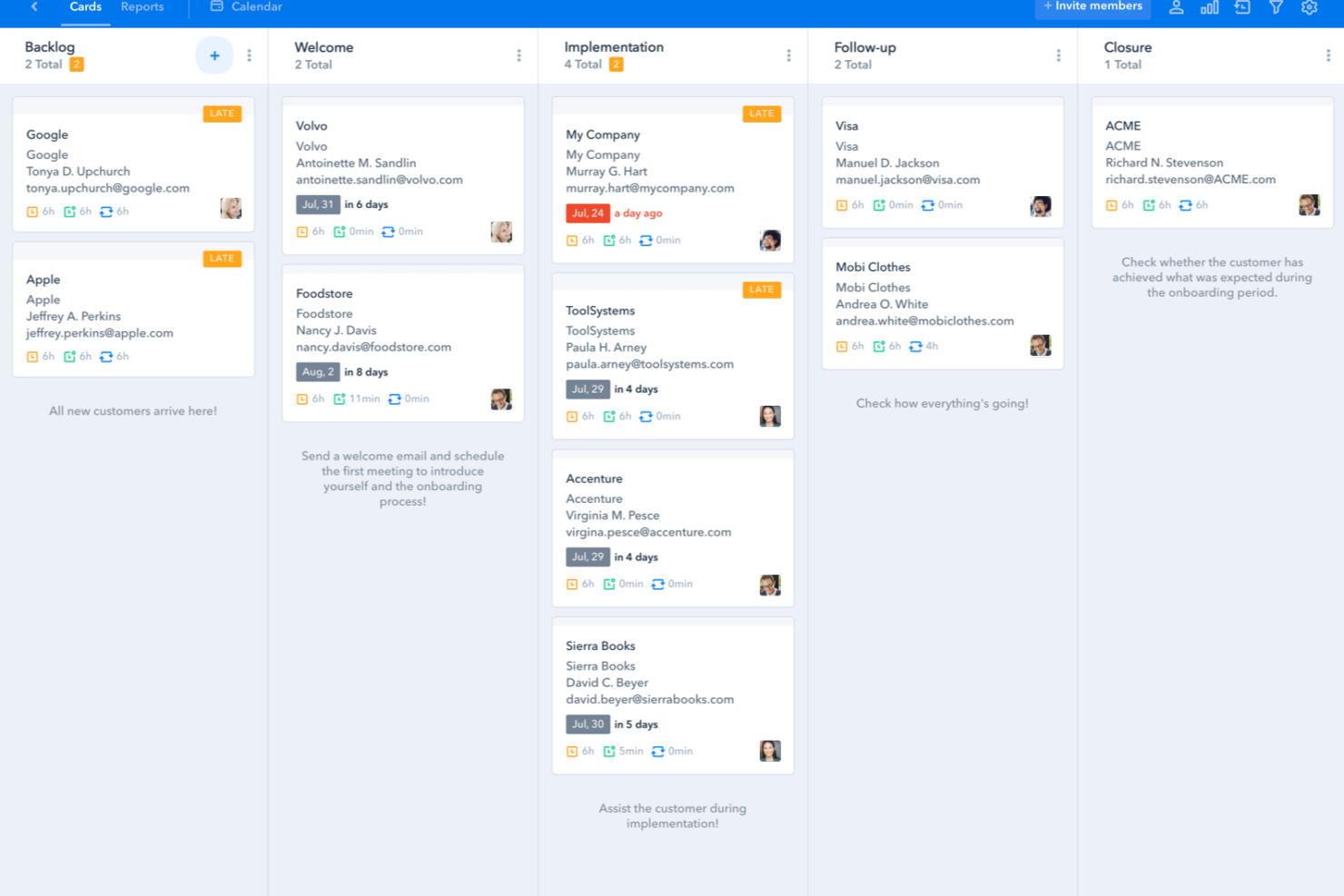
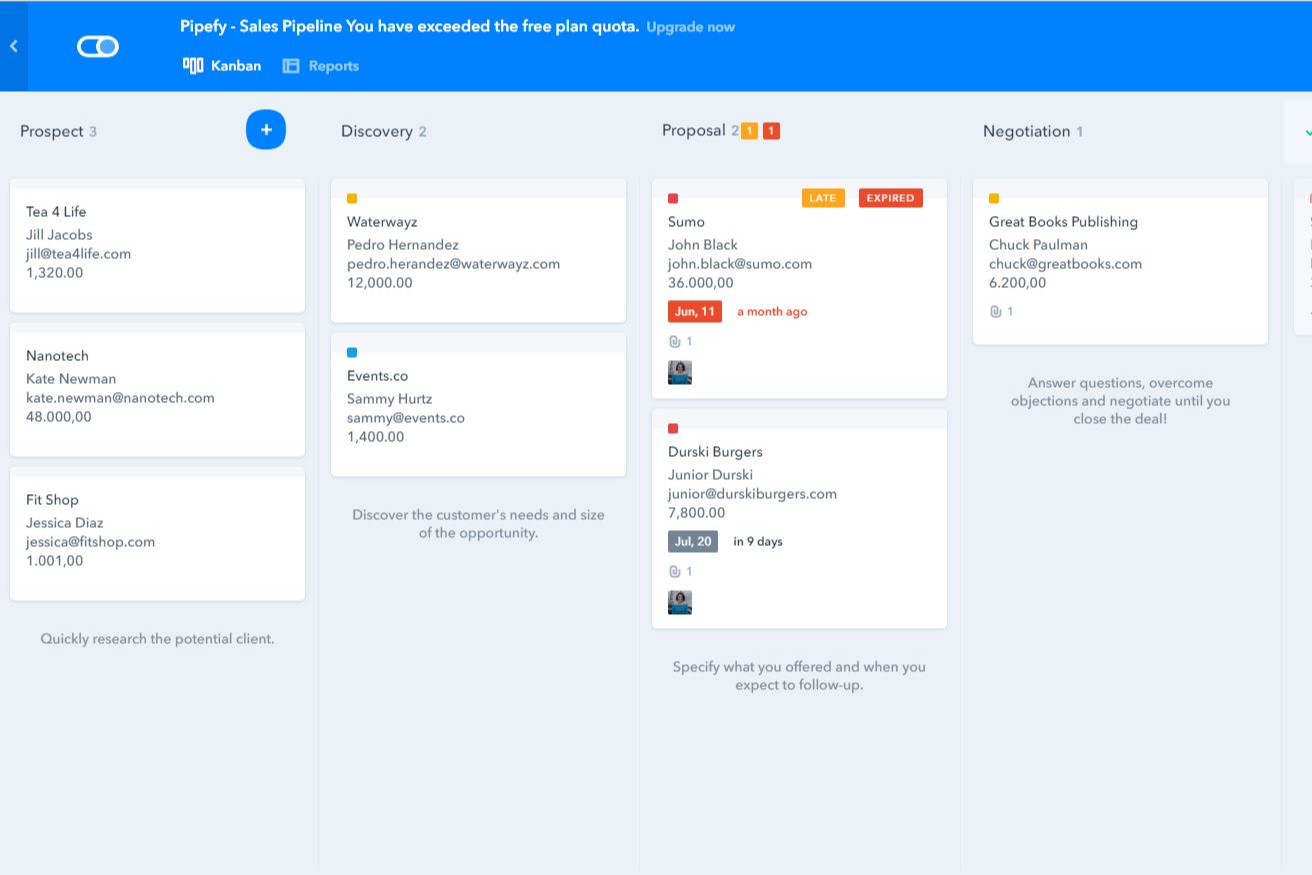
| Gebruikersinterface | Combineert begeleide flows, aangepaste portalen, contextuele berichten, bestanden en beslissingsstappen, zodat werknemers en externe deelnemers zien wat relevant is voor hun rol. | Gebruikt een visuele werkruimte zonder code met pijplijnen, kaarten, formulieren en fasen in Kanban-stijl, waardoor de processtatus gemakkelijk te overzien is. |
| Onboarding | Ondersteunt zelfbedieningsconfiguratie via sjablonen, AI-ondersteunde procescreatie en documentuploads, plus begeleide implementatie voor grotere uitrol. | Biedt sjablonen, handleidingen en configuratie zonder code voor een snelle installatie, hoewel rechten voor ondernemingen en integraties mogelijk meer tijd kosten om te configureren. |
| Workflowconfiguratie | De workflowbouwer zonder code genereert gestructureerde flows op basis van geschreven instructies, diagrammen of procesdocumenten, hoewel complexe vertakkingen en toezicht op agenten meer planning vereisen. | Biedt een bouwer met slepen en neerzetten, aanpasbare fasen, formulieren, voorwaardelijke logica en automatiseringsregels voor gestructureerde interne workflows. |
| Ondersteuningsbronnen | Omvat ondersteuning in de app, waarbij klantensuccesbeheer en technisch personeel op locatie beschikbaar zijn voor hogere abonnementen. | Biedt een helpcentrum, academie, communitybronnen en abonnementsafhankelijke ondersteuning voor implementatie en configuratie. |
| Mobiele ervaring | Ondersteunt mobiele toegang tot aangepaste portalen, berichten, bestanden, aanvragen en toegewezen acties, terwijl magische koppelingen externe deelnemers laten deelnemen zonder een volledig account aan te maken. | Met de mobiele apps kunnen gebruikers pijplijnen bekijken, kaarten bijwerken, meldingen ontvangen en workflowtaken uitvoeren zonder desktop. |
Moxo biedt een meer begeleide ervaring voor workflows waarbij klanten, leveranciers en andere externe deelnemers betrokken zijn, vooral via de aangepaste portalen en contextuele acties. Pipefy voelt vertrouwder aan voor teams die de voorkeur geven aan visuele borden, formulieren en duidelijk gedefinieerde procesfasen. Beide zijn toegankelijk, hoewel de geavanceerde vertakkingen en workflows op basis van agenten van Moxo mogelijk meer werk op het gebied van procesontwerp vereisen.
Moxo vs Pipefy: Pros & Cons
Moxo
- Agentic AI handles preparation, validation, routing, and monitoring
- Custom portals keep external participants aligned
- Human-in-the-loop controls, SLA rules, and audit trails reinforce accountability
- Advanced workflow design requires an adjustment period
- Less common integrations may require Zapier, Composio, or APIs
- Reporting focuses on process operations rather than customizable BI
Pipefy
- Pipefy's user-friendly interface helps your team quickly adapt and manage tasks.
- It offers excellent customer support, so your team can resolve issues promptly.
- The platform's flexibility makes it easy for your team to customize workflows to fit specific needs.
- The onboarding process can be challenging and might require extra time to master.
- The reporting features may not meet the needs of teams that want advanced analytics.
- Customization options can be limited for teams with highly specific requirements.
Best Use Cases for Moxo and Pipefy
Moxo
- Professional Services Firms Accounting, legal, consulting, and marketing firms can manage client onboarding, document collection, approvals, and recurring service delivery.
- Financial Services and Insurance Banks, lenders, wealth managers, and insurers can coordinate applications, compliance checks, exception reviews, signatures, and client decisions.
- Healthcare Administration Healthcare organizations can manage provider credentialing, intake, document verification, acknowledgements, and approval-heavy processes.
- B2B SaaS Customer Operations Customer success and implementation teams can coordinate onboarding, account reviews, renewals, and service requests across customers and internal specialists.
- Real Estate and Construction Firms Moxo helps organize contracts, approvals, vendor requirements, project documentation, and communication between clients, brokers, contractors, and internal staff.
- Manufacturing and Logistics Operations Operations teams can use Moxo for vendor onboarding, order fulfillment, compliance checks, document requests, and other multi-party workflows.
Pipefy
- Marketing teams Pipefy lets your team automate campaign workflows to save time and reduce manual tasks.
- HR departments Your HR team can improve recruitment and onboarding processes with Pipefy's customizable workflows.
- Finance teams Pipefy helps your finance team automate approval processes and manage invoices effectively.
- Small businesses Pipefy’s easy-to-use platform lets small businesses get up and running and start organizing and automating daily operations quickly.
- Project managers Pipefy provides project managers with tools to track progress and manage tasks smoothly.
- Customer support Customer support teams can use Pipefy to automate ticket management and improve response times.
Wie zou Moxo moeten gebruiken en wie Pipefy?
Als je workflowautomatiseringssoftware nodig hebt voor complexe processen tussen werknemers, klanten, leveranciers, AI-agenten en verbonden systemen, is Moxo waarschijnlijk de betere keuze. Het is geschikt voor professionele dienstverlening, financiële dienstverlening, gezondheidszorg en andere organisaties met strenge nalevingsvereisten die aangepaste klantportalen, verantwoordelijke goedkeuringen, audittrailregistraties en samenwerking buiten interne teams nodig hebben.
Als je een visueel platform zonder code wilt voor het automatiseren en standaardiseren van processen in meerdere afdelingen, is Pipefy mogelijk de sterkere keuze. Het werkt goed voor workflows op het gebied van HR, financiën, IT, klantenondersteuning, marketing en bedrijfsvoering, vooral wanneer aanpasbare formulieren, portalen, fasen in Kanban-stijl en voorwaardelijke automatisering het belangrijkst zijn.
Differences Between Moxo and Pipefy
| Moxo | Pipefy | |
|---|---|---|
| AI Agent Architecture | Agent Foundry supports purpose-built agents that prepare, advise, review, automate, and monitor work, with supervisor agents available to check outputs and escalate exceptions. | Uses AI agents, Copilot, and assistant capabilities to build workflows, extract information, answer questions, and automate repetitive process tasks. |
| Decision Governance | Keeps humans accountable for approvals, exceptions, compliance sign-offs, and client commitments, with immutable logs recording who decided, when, and with what context. | Uses permissions, approval rules, activity histories, and process controls to govern how work moves through automated departmental workflows. |
| External Participant Experience | Provides branded workspaces configured for clients, vendors, partners, and other participants, with access to relevant messages, files, resources, and assigned actions through accounts or magic links. | Offers portals and request forms that let employees, customers, suppliers, and other guests submit information, track requests, and participate in selected process steps. |
| Primary Workflow Scope | Built around complex, multi-party processes that cross organizational boundaries, including customer onboarding, implementations, service delivery, and vendor management. | Built for broad business process automation across HR, finance, IT, procurement, customer support, and operations, including processes involving external requesters. |
| Workflow Design Model | Its no-code workflow builder generates structured flows from natural-language instructions, uploaded diagrams, or process documents, including roles, branching, data references, deadlines, and escalation rules. | Combines natural-language and AI-assisted process creation with a visual no-code model based on pipes, cards, forms, stages, conditional logic, and automation rules. |
| Visit MoxoOpens new window | Read Pipefy ReviewOpens new window |
Similarities Between Moxo and Pipefy
| Automation and Notifications | Both can trigger actions, route work, send reminders, and notify participants based on workflow events, conditions, and due dates. |
|---|---|
| Document Workflows | Both support file requests, document sharing, electronic signatures, and process records for workflows that depend on submitted or approved documents. |
| Forms and Data Collection | Both let teams build forms and questionnaires to collect complete, standardized information from employees, customers, vendors, and other participants. |
| Integrations and Extensibility | Both connect with common business applications and provide API and Zapier support for extending workflows into additional systems. |
| Task and Approval Management | Both support assigned tasks, deadlines, approvals, decisions, and structured handoffs that move work from one stage to the next. |
| Visit MoxoOpens new window Read Pipefy ReviewOpens new window | |