


Beoordeling van de taakbeheersoftware Microsoft To Do voor 2026



Microsoft To Do is a task management software for individuals and small teams who need a simple way to manage tasks, to-do lists, and daily priorities. I'd consider it over Todoist if your team already runs on Microsoft 365, as the native connections to Outlook, Teams, and Planner give you an integrated workflow that Todoist and other task management tools can't replicate without workarounds.
Microsoft To Do Evaluation Summary
- Free to use
- Free-forever plan available
Waarom u onze softwareaanbevelingen kunt vertrouwen
Ons team test en beoordeelt software sinds 2012. Als projectmanagers weten we zelf hoe moeilijk — en belangrijk — het is om de juiste software te kiezen.
Voor deze gids hebben we tools geëvalueerd met behulp van praktijktests en onafhankelijk onderzoek, waarbij we tools beoordeelden aan de hand van onze selectiecriteria. We putten ook uit inzichten van vooraanstaande experts uit de branche en praktiserende projectmanagementprofessionals.
Onze reviews weerspiegelen ons menselijke redactionele oordeel, geen verkooppraatje.
Deskundige beoordelaars:
Microsoft To Do Overview
In my opinion, Microsoft To Do is a task management tool that works especially well for teams already using Microsoft 365. Its strength lies in its simplicity and smooth integration with other Microsoft apps—such as Outlook, Teams, and Planner—that offers a unified experience across tools.
That said, the platform may not meet the needs of users seeking advanced project management features like Gantt charts, Kanban boards, or complex automations. It’s best suited for small to mid-sized teams looking for a simple, cost-effective option that fits into the Microsoft ecosystem.

pros
-
Intuitive interface for easy task organization
-
Seamless Microsoft 365 integration
-
Cross-device synchronization
cons
-
Limited advanced project management features
-
Basic customization options
-
Not ideal for large teams or detailed tracking
-

Smartsheet
Visit WebsiteThis rating combines scores from multiple user review sites to reflect overall customer sentiment about the product.4.5 -
Celoxis
Visit WebsiteThis rating combines scores from multiple user review sites to reflect overall customer sentiment about the product.4.5 -
Accelo
Visit WebsiteThis rating combines scores from multiple user review sites to reflect overall customer sentiment about the product.4.4





Our Review Methodology
How We Test & Score Tools
We’ve spent years building, refining, and improving our software testing and scoring system. The rubric is designed to capture the nuances of software selection and what makes a tool effective, focusing on critical aspects of the decision-making process.
Below, you can see exactly how our testing and scoring works across seven criteria. It allows us to provide an unbiased evaluation of the software based on core functionality, standout features, ease of use, onboarding, customer support, integrations, customer reviews, and value for money.
Core Functionality (25% of final scoring)
The starting point of our evaluation is always the core functionality of the tool. Does it have the basic features and functions that a user would expect to see? Are any of those core features locked to higher-tiered pricing plans? At its core, we expect a tool to stand up against the baseline capabilities of its competitors.
Standout Features (25% of final scoring)
Next, we evaluate uncommon standout features that go above and beyond the core functionality typically found in tools of its kind. A high score reflects specialized or unique features that make the product faster, more efficient, or offer additional value to the user.
We also evaluate how easy it is to integrate with other tools typically found in the tech stack to expand the functionality and utility of the software. Tools offering plentiful native integrations, 3rd party connections, and API access to build custom integrations score best.
Ease of Use (10% of final scoring)
We consider how quick and easy it is to execute the tasks defined in the core functionality using the tool. High scoring software is well designed, intuitive to use, offers mobile apps, provides templates, and makes relatively complex tasks seem simple.
Onboarding (10% of final scoring)
We know how important rapid team adoption is for a new platform, so we evaluate how easy it is to learn and use a tool with minimal training. We evaluate how quickly a team member can get set up and start using the tool with no experience. High scoring solutions indicate little or no support is required.
Customer Support (10% of final scoring)
We review how quick and easy it is to get unstuck and find help by phone, live chat, or knowledge base. Tools and companies that provide real-time support score best, while chatbots score worst.
Customer Reviews (10% of final scoring)
Beyond our own testing and evaluation, we consider the net promoter score from current and past customers. We review their likelihood, given the option, to choose the tool again for the core functionality. A high scoring software reflects a high net promoter score from current or past customers.
Value for Money (10% of final scoring)
Lastly, in consideration of all the other criteria, we review the average price of entry level plans against the core features and consider the value of the other evaluation criteria. Software that delivers more, for less, will score higher.
Core Features
Task lists: You can create tasks, break them into smaller subtasks (called “steps”) and arrange them into organized to-do lists, making it easy to categorize, prioritize, and track various aspects of your professional or personal tasks.
Due dates: Set deadlines for each task to ensure timely completion. Due dates appear across your devices and sync with Outlook, which can help you manage schedules and meet project timelines consistently.
Reminders: You can set time-based reminders for tasks, so you never miss an important deadline. These notifications are designed to keep your team on-track and avoid last-minute rushes.
Recurring tasks: Schedule tasks to repeat at customizable intervals (daily, weekly, monthly, etc.). This is perfect for repetitive work like weekly reports, follow-ups, or administrative tasks.
Custom themes: You can personalize your task lists by applying different background themes and colors, making your workspace more visually appealing and easier to organize.
Priority levels: Assign priority tags (Important or Normal) to tasks. The “Important” tag adds the task to the "Important" smart list, helping you focus on high-priority work and better manage your workload.
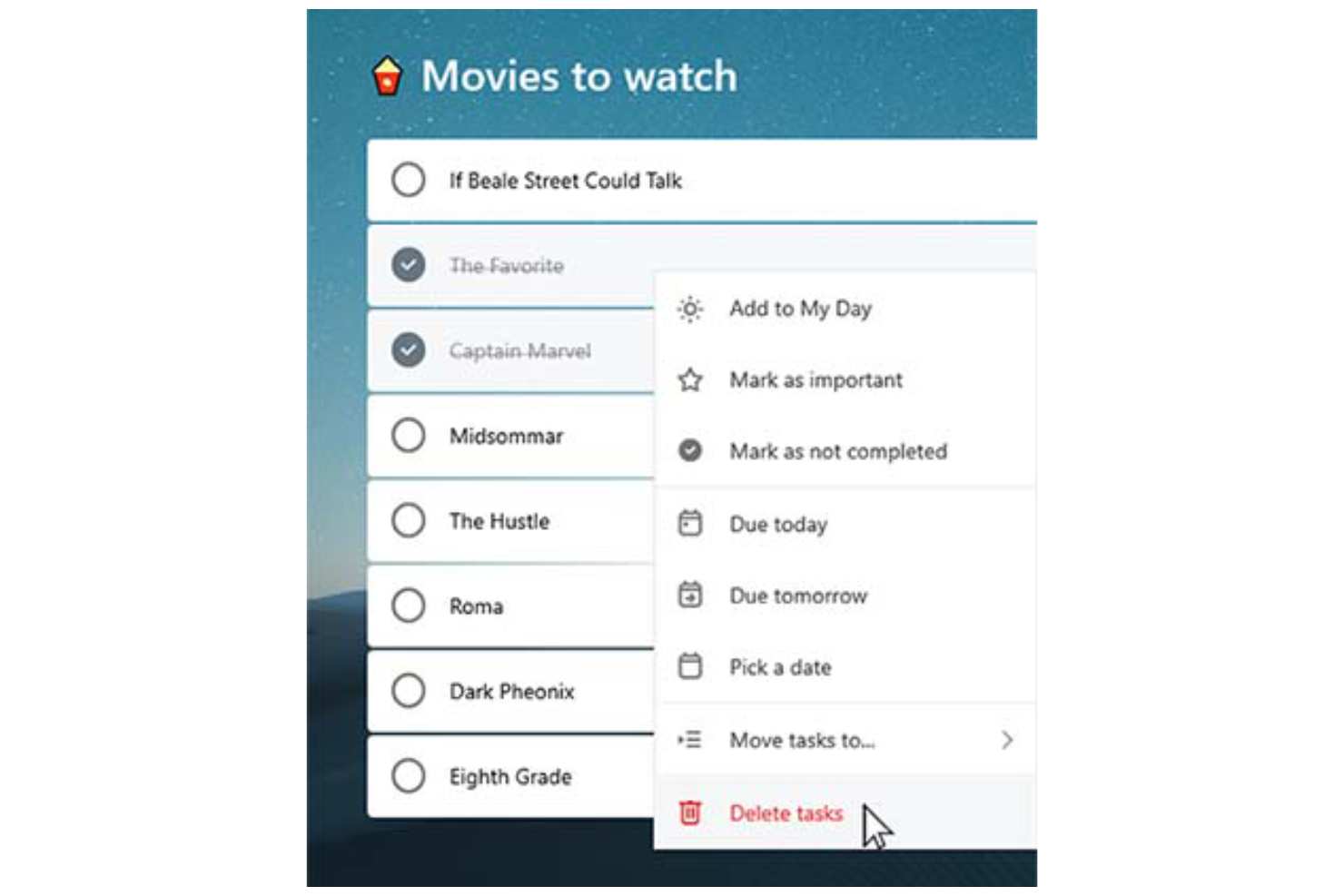
Ease of Use
Microsoft To Do stands out with its clean, user-friendly interface that simplifies task management for you and your team. Features like drag-and-drop organization make it easy to rearrange tasks and update priorities on the fly.
The system’s integration with Microsoft 365 also enhances accessibility, allowing you to manage tasks across desktop (Mac or Windows), web, and mobile devices (including Android, iPhone, iPad, and Apple Watch). The mobile to-do list app, available on iOS and Android, ensures you can stay organized and productive wherever you are.
For simple and efficient task management, Microsoft To Do is a reliable choice.

Microsoft To Do Specs
- API
- Batch Permissions & Access
- Budgeting
- Calendar Management
- Collaboration Support
- Contact Management
- Contact Sharing
- Customer Management
- Dashboard
- Dashboards
- Data Export
- Data Import
- Data Visualization
- Dependency Tracking
- Document Sharing
- Expense Tracking
- External Integrations
- File Sharing
- Gantt Charts
- Kanban Boards
- Multi-User
- Notifications
- Project Management
- Resource Management
- Scheduling
- Task Scheduling/Tracking
- Third-Party Plugins/Add-Ons
- Time Management
- Travel Management
- Workflow Management
Alternatives to Microsoft To Do



Veelgestelde vragen over Microsoft To Do
Hoe gaat Microsoft To Do om met gegevensbeveiliging?
Microsoft To Do is gebouwd op de beveiligingsinfrastructuur van Microsoft 365, wat betekent dat het profiteert van beveiliging op ondernemingsniveau. Je gegevens worden beveiligd met encryptieprotocollen volgens de industriestandaard, waaronder versleuteling van gegevens in rust en tijdens de overdracht. Taken en andere gebruikersinformatie worden opgeslagen in wereldwijd verspreide datacenters van Microsoft, die gecertificeerd zijn volgens internationale nalevingsnormen zoals ISO/IEC 27001, SOC 1, 2 en 3, en GDPR.
Daarnaast ondersteunt Microsoft To Do meervoudige verificatie (MFA) en rolgebaseerde toegangscontrole als onderdeel van de bredere Microsoft-accountomgeving.
Kan ik Microsoft To Do offline gebruiken?
Je kunt Microsoft To Do offline gebruiken om je taken te bekijken en te bewerken. Wijzigingen die je aanbrengt, worden automatisch gesynchroniseerd op al je apparaten zodra je weer online bent, zodat alles up-to-date blijft.
Ondersteunt Microsoft To Do teamsamenwerking?
Microsoft To Do ondersteunt eenvoudige teamsamenwerking via gedeelde takenlijsten. Je kunt anderen uitnodigen om deel te nemen aan een lijst, zodat teamleden taken kunnen bekijken, toevoegen, voltooien en bewerken. Dit maakt het een handig hulpmiddel voor eenvoudige coördinatie binnen kleine teams of afdelingen, bijvoorbeeld voor het bijhouden van gedeelde verantwoordelijkheden of planningschecklists.
Microsoft To Do bevat echter geen geavanceerde samenwerkingsfuncties zoals taakopmerkingen, activiteitenoverzichten, realtime gezamenlijk bewerken of rolgebaseerde machtigingen. Voor uitgebreidere projectsamenwerking, zoals sprintplanning, het delen van documenten of teamchat, geven teams mogelijk de voorkeur aan geïntegreerde productiviteitstools zoals Microsoft Planner, Trello of Asana.
Hoe integreert Microsoft To Do met andere Microsoft-apps?
Microsoft To Do integreert met andere Microsoft-apps zoals Outlook en Teams. Je kunt taken uit Outlook-e-mails en agenda-afspraken synchroniseren, zodat je alles op één plek georganiseerd houdt en je algehele productiviteit verbetert.
Kan ik taakweergaven in Microsoft To Do aanpassen?
Microsoft To Do biedt beperkte aanpassingsmogelijkheden voor taakweergaven. Je kunt taken sorteren op vervaldatum, belangrijkheid of datum van toevoeging, maar verder zijn de aanpassingsmogelijkheden minimaal. De tool is ontworpen om eenvoudig te blijven, zodat je je kunt concentreren op efficiënt taakbeheer.
Is er een mobiele app voor Microsoft To Do?
Ja, Microsoft To Do biedt een mobiele app voor iOS- en Android-apparaten. De app synchroniseert automatisch met de web- en desktopversies via je Microsoft-account, zodat je takenlijsten en updates in realtime op alle platforms beschikbaar zijn.
Met de mobiele app kun je onderweg nieuwe taken aanmaken, bewerken en organiseren, herinneringen instellen en items voltooien. Zo blijf je georganiseerd en productief, waar je ook bent.
Kan ik taken uit andere apps importeren in Microsoft To Do?
Ja, je kunt taken importeren in Microsoft To Do, vooral vanuit Outlook en andere tools binnen het Microsoft-ecosysteem. Taken in Outlook Tasks worden automatisch gesynchroniseerd met Microsoft To Do als je hetzelfde Microsoft-account gebruikt. Voor het importeren van taken uit apps van derden, zoals Todoist of TickTick, is doorgaans handmatige invoer nodig of kun je tools van derden zoals Zapier of Microsoft Power Automate gebruiken om het migratieproces te automatiseren.
Als je overstapt van een app met exportfunctionaliteit, kun je je taken mogelijk exporteren naar een CSV-bestand en ze handmatig opnieuw invoeren in To Do of er een script voor gebruiken. Er is echter geen systeemeigen functie voor bulksgewijs importeren van CSV- of JSON-bestanden.
Overzicht & geschiedenis van Microsoft To Do
Microsoft To Do is een cloudgebaseerde app voor taakbeheer die is ontwikkeld door Microsoft, gevestigd in Redmond, Washington. De app werd officieel gelanceerd in april 2017 als opvolger van Wunderlist, dat Microsoft in juni 2015 overnam van de in Berlijn gevestigde startup 6Wunderkinder.
Als onderdeel van het Microsoft 365-pakket integreert de app met diensten zoals Outlook om de productiviteit te ondersteunen. Met de app kunnen gebruikers taken op verschillende apparaten beheren, wat een consistente en verbonden ervaring biedt.
Belangrijke mijlpalen van Microsoft To Do
- 2015: Microsoft neemt Wunderlist over.
- 2017: Microsoft To Do wordt gelanceerd als opvolger van Wunderlist.
- 2019: Een groot herontwerp brengt Microsoft To Do qua interface nauwer in lijn met Wunderlist.
- 2020: Microsoft zet Wunderlist officieel stop om zich te richten op Microsoft To Do.
Wat komt hierna?
Wil je contact leggen met andere digitale projectmanagers om bronnen en beste praktijken te delen? Word lid van onze community en krijg toegang tot meer dan 100 sjablonen, voorbeelden en modeldocumenten, en kom via Slack in contact met honderden andere digitale projectmanagers.