



Ariso AI versus Jira: Vergelijking en deskundige beoordelingen voor 2026



Choosing between Ariso AI and Jira isn’t easy when you’re under pressure to keep work on track, juggle shifting priorities, and deal with clunky tools. Ideally, you want project management software that makes life easier, instead of adding another headache. I can confirm that both tools are promising when it comes to automation, workflows, or team visibility. However, it’s important to consider that Jira also lives within the wider Atlassian ecosystem, which changes the maths if you already run tools like Confluence.
In this article, you’ll get a clear comparison of Ariso AI and Jira, covering the pros and cons, use cases, pricing, security, and usability. If you’re scanning for a Jira alternative rather than a straight Jira replacement, that distinction matters, and I’ll flag where it does. I’ll help you figure out which tool matches your goals so you can move forward with confidence.
Ariso AI vs. Jira: An Overview
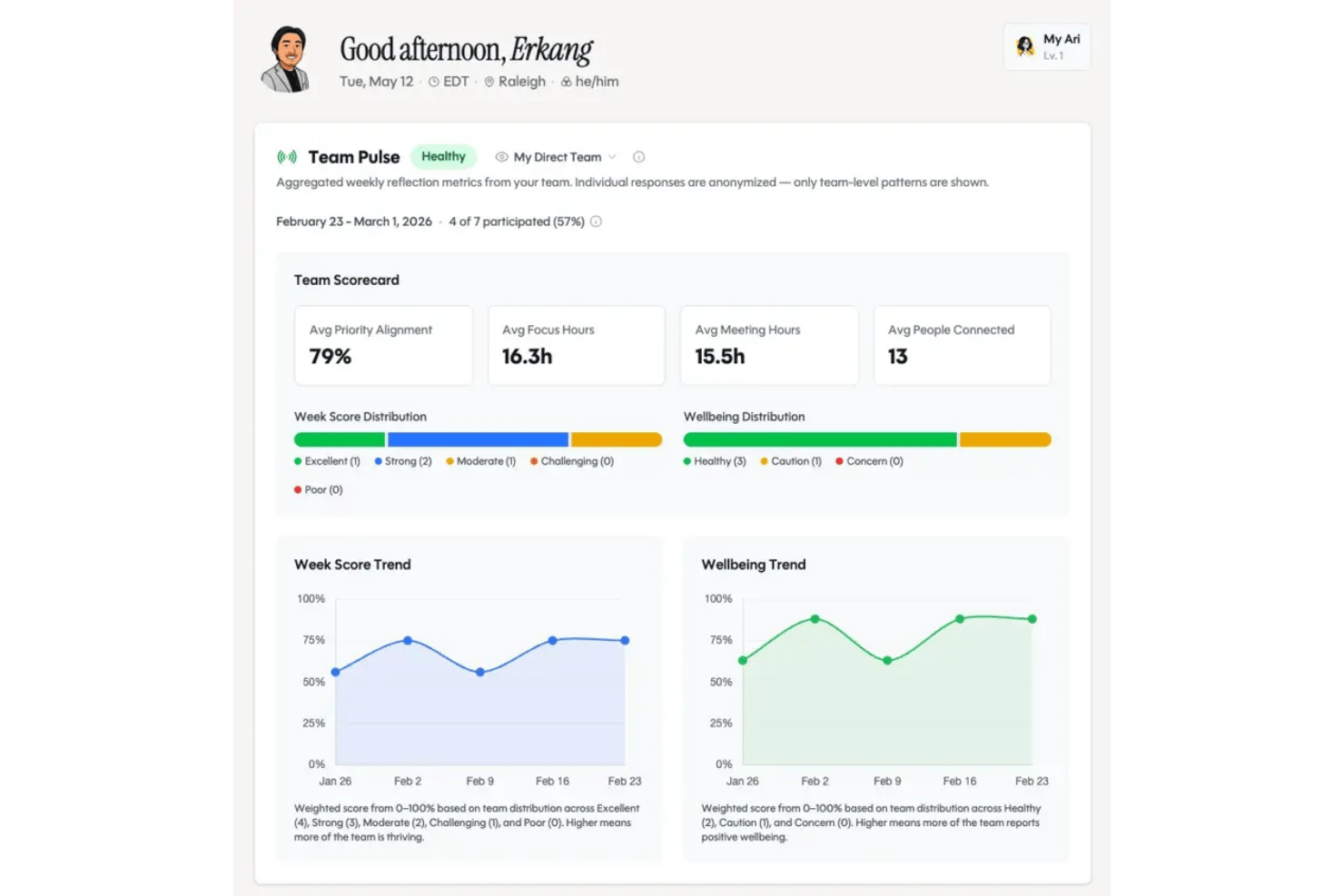
Ariso AI
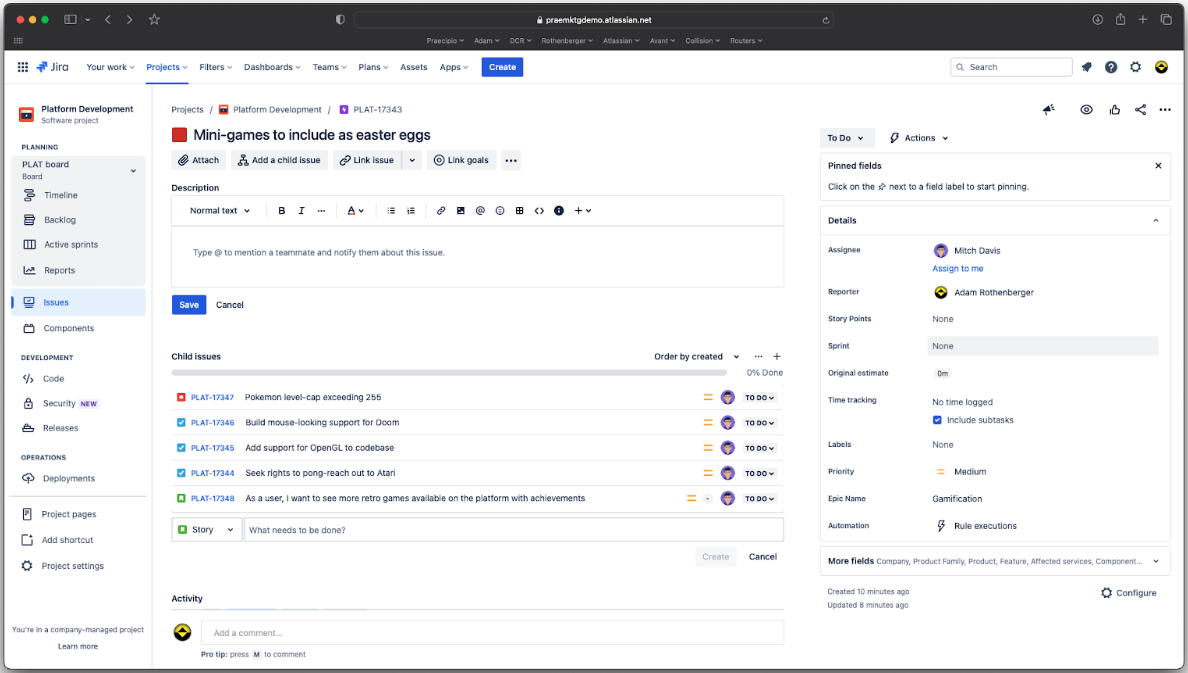
Jira
Waarom u onze softwareaanbevelingen kunt vertrouwen
Ons team test en beoordeelt software sinds 2012. Als projectmanagers weten we zelf hoe moeilijk — en belangrijk — het is om de juiste software te kiezen.
Voor deze gids hebben we tools geëvalueerd met behulp van praktijktests en onafhankelijk onderzoek, waarbij we tools beoordeelden aan de hand van onze selectiecriteria. We putten ook uit inzichten van vooraanstaande experts uit de branche en praktiserende projectmanagementprofessionals.
Onze reviews weerspiegelen ons menselijke redactionele oordeel, geen verkooppraatje.
Deskundige beoordelaars:
Ariso AI vs. Jira Pricing Comparison
| Ariso AI | Jira | |
|---|---|---|
| Free Trial | Free demo available | Free plan available |
| Pricing | From $1/day | From $8.48/user/month |
Prijzen en verborgen kosten van Ariso AI versus Jira
Ariso AI gebruikt een gratis startmodel voor de individuele Ari-ervaring, met een prijs van $1 per dag na de gratis periode. Organisaties die team-breed beheer, gedeelde intelligentie en administratieve functies nodig hebben, moeten echter een demo inplannen om toegang te krijgen tot prijzen op maat. Jira biedt meerdere abonnementen, waaronder gratis en betaalde niveaus, met add-ons die de kosten kunnen verhogen naarmate je gebruik toeneemt—apps uit de appmarktplaats en Jira Service Management-plaatsen zijn de twee kostenposten die mensen het vaakst verrassen. Beide tools kunnen extra kosten in rekening brengen voor geavanceerde integraties, hogere opslaglimieten of premiumondersteuning. Daardoor kunnen je maandelijkse uitgaven hoger uitvallen dan verwacht als je behoeften groeien.
Om de juiste leverancier te kiezen, breng je huidige en geplande gebruik door je team in kaart—kijk verder dan het aantal gebruikers en controleer welke belangrijke functies, integraties en ondersteuningsniveaus je daadwerkelijk elke maand zult gebruiken. Breng tegelijkertijd de toewijzing van middelen in kaart: als JSM-agents of premiumondersteuning onder een andere kostenpost vallen, verandert dat het werkelijke totaalbedrag. Controleer of een van beide tools workflows of belangrijke functies achter duurdere abonnementsniveaus vergrendelt. Bespreek ook met je financiële of inkoopteam hoeveel flexibiliteit je nodig hebt: je wilt een prijsmodel waarmee je kunt bijsturen wanneer je projectbehoeften veranderen, niet een model dat je later voor verrassingen stelt.
Ariso AI vs. Jira Feature Comparison
| Ariso AI | Jira | |
|---|---|---|
| API | ||
| Calendar Management | ||
| Data Export | ||
| Data Import | ||
| External Integrations | ||
| Multi-User | ||
| Notifications |
Ariso AI versus Jira-integraties
| Integratie | Ariso AI | Jira |
|---|---|---|
| Slack | ✅ | ✅ |
| Microsoft Teams | ✅ | ✅ |
| Google Drive | ✅ | ✅ |
| Dropbox | ✅ | ✅ |
| GitHub | ✅ | ✅ |
| Salesforce | ✅ | ✅ |
| Zendesk | ✅ | ✅ |
| HubSpot | ✅ | ❌ |
| Asana | ✅ | ✅ |
| Trello | ❌ | ✅ |
| API | ✅ | ✅ |
| Zapier | ✅ | ✅ |
Zowel Ariso AI als Jira bieden essentiële integraties zoals Slack, Teams, Salesforce en GitHub, maar Jira loopt in deze categorie voorop dankzij de Atlassian Marketplace, die meer dan 1000 integraties biedt. De API's en Zapier op beide platforms bieden echter flexibele manieren om verbinding te maken met de rest van je workflow.
Ariso AI vs. Jira Beveiliging, Naleving & Betrouwbaarheid
| Factor | Ariso AI | Jira |
|---|---|---|
| Gegevensprivacy | Biedt SOC 2- en AVG-conforme gegevenspraktijken en opties voor gegevenslocatie. | Voldoet aan de AVG en CCPA en biedt geavanceerde beheermogelijkheden voor gegevenslocatie. |
| Versleuteling | Gebruikt end-to-endversleuteling per gebruiker voor alle projectgegevens tijdens overdracht en in rust. | Biedt versleuteling tijdens overdracht en in rust volgens standaarden op ondernemingsniveau. |
| Toegangsbeheer | Op rollen gebaseerde machtigingen en SSO zijn beschikbaar voor nauwkeurig gebruikersbeheer. | Gedetailleerde rolmachtigingen, SSO en SCIM voor geavanceerde gebruikersinrichting. |
| Uptime-SLA | Kan een uptimegarantie van 99.9% waarmaken, ondersteund door proactieve infrastructuurbewaking en hosting via AWS. | Handhaaft een uptime-SLA van 99.9%, met openbare statusdashboards en rapportage. |
| Auditlogboekregistratie | Bevat basisregistratie voor activiteiten en beheerdersacties. | Uitgebreide auditlogboekregistratie en exporteerbare logboeken voor nalevingsvereisten. |
Jira is de sterkere keuze als je geavanceerde nalevingsopties, gedetailleerde toegangscontroles en uitgebreide auditregistratie nodig hebt. Ariso AI biedt solide bescherming voor de meeste teams, maar Jira's reputatie op het gebied van betrouwbaarheid en naleving van regelgeving is moeilijk te overtreffen.
Ariso AI vs. Jira Gebruiksgemak
| Factor | Ariso AI | Jira |
|---|---|---|
| Gebruikersinterface | Moderne, overzichtelijke interface, ontworpen voor snelle, intuïtieve navigatie. | Drukke interface met uitgebreide functionaliteit die tijd kost om te leren en aan te passen. |
| Introductie | Begeleide aanwijzingen en ingebouwde zelfstudies helpen nieuwe gebruikers snel aan de slag. Voor grotere teams zijn ook introductiediensten beschikbaar. | Biedt introductie, maar gebruikers hebben vaak handleidingen of hulp bij de beheerdersinstellingen nodig om de complexiteit aan te kunnen. |
| Insteltijd | Snelle installatie—de meeste teams kunnen gegevens in één sessie importeren en aan de slag gaan. | De installatie is grondig maar tijdrovend, vooral bij aangepaste workflows of integraties. |
| Ondersteuning in de app | Livechat en AI-gestuurde tips zijn overal in de app eenvoudig toegankelijk. | Contextuele hulp is beschikbaar, met links naar uitgebreide documentatie en communityforums. |
| Aanpasbaarheid | Beperkte opties, met focus op eenvoud in plaats van uitgebreide aanpasbaarheid. | Hoog aanpasbaar, maar vereist meer inspanning om het af te stemmen op teamworkflows. |
Ariso AI biedt nieuwe teams de snelste start, omdat het meeste werk transparant voor de gebruiker verloopt dankzij Ari, dat patronen leert en op de achtergrond informatie verwerkt. De aanpasbaarheid van Jira levert echter voordelen op zodra je hebt geïnvesteerd in de installatie en training. Over het geheel genomen vind ik Ariso AI de eenvoudigste tool om te gebruiken.
Ariso AI vs Jira: Pros & Cons
Ariso AI
- Ari (AI agent) surfaces risks from real-time project activity
- Automatic status updates eliminate manual progress reporting
- Centralizes communication, knowledge, and project data in one hub
- Takes time to reach full value, as Ari needs to learn the context of your team’s projects.
- Requires broad team adoption for best results.
- Replacing or supplementing existing tools may require dedicated work and process changes.
Jira
- Agile workflow management supports Scrum and Kanban and can improve your teams' productivity.
- Automation rules are easy to set up, which helps your team speed up their work.
- Custom filters can be created and accessed quickly, which improves your team's efficiency.
- Field names can be confusing, which might slow down your team's workflow.
- The interface can be too crowded in Scrum projects, which can make it hard for your team to navigate.
- There's a lack of resource management capabilities, which could limit your team's planning.
Best Use Cases for Ariso AI and Jira
Ariso AI
- Technology Teams Ariso AI works well for technology teams because it provides a shared execution layer where employees and AI agents can collaborate using the same project context while people retain control over decisions and accountability.
- Marketing Agencies Marketing teams can use automations and AI-powered reporting to coordinate campaigns, manage deadlines, and keep clients in the loop.
- Consulting Teams Ariso AI is a good choice for consulting teams because it can capture the context created across client conversations and meetings and translate it into projects, responsibilities, decisions, and next steps.
- Remote Teams Built-in chat, cross-tool integrations, and real-time notifications make it easier for globally distributed teams to coordinate without silos.
- IT Departments With native integrations to development tools, Ariso AI helps IT teams track tickets, PRs, and project requests in one streamlined platform.
- Data-Driven Enterprises Advanced reporting, workflow analytics, and customizable dashboards let enterprises keep tabs on KPIs and company goals across large projects.
Jira
- Software development Jira’s agile tools like Scrum and Kanban boards make it perfect for managing software projects.
- IT departments Its issue tracking capabilities help your team efficiently handle technical support and bug fixes.
- Tech startups Jira offers customization capabilities that allow your team to scale and adapt as your projects grow.
- Agile teams Sprint planning and backlog management features keep your agile processes organized and effective.
- Large enterprises Jira’s automation rules can streamline your complex workflows and improve team productivity.
- Project managers Its reporting and analytics provide insights that help you make informed decisions quickly.
Wie zou Ariso AI moeten gebruiken en wie Jira?
Ariso AI is perfect voor snel bewegende technologieteams en startups die een laagdrempelig, AI-aangedreven platform willen met een agent die op de achtergrond draait, contextuele informatie verwerkt en plannen en taakbeheer eenvoudig maakt. Jira is de standaardkeuze voor grotere organisaties, gereguleerde sectoren en teams die volledig gericht zijn op gedetailleerde workflows, procescontroles of ontwikkelaarsgerichte integraties. Als je prioriteit ligt bij eenvoud, een snelle introductie of kleinere budgetten, is Ariso AI waarschijnlijk de betere keuze. Maar als je uitgebreide aanpasbaarheid, naleving of ondersteuning voor complexe leveringsmodellen nodig hebt, is Jira moeilijk te overtreffen.
Differences Between Ariso AI and Jira
| Ariso AI | Jira | |
|---|---|---|
| AI-Driven Features | Built-in AI that connects preparation, live meeting context, decisions, action items, and surfaces risks before they become blockers. | Minimal AI features that rely more on manual configuration and rules. |
| Integration Depth | Covers most common business tools but is still in the early stages of developing built-in integrations. | Expansive integration marketplace with 1000+ specialized plugins. |
| Onboarding Speed | Designed for rapid setup; most teams get started in under a day. | Gradual setup, especially for teams needing advanced structure or integrations. |
| Pricing Structure | Two tiers that serve individuals & small teams vs bigger organizations. | Multiple pricing tiers, with add-ons and per-user costs that scale for larger orgs. |
| Workflow Customization | Simple templates with limited customization to keep things streamlined. | Highly customizable workflows for every project and team scenario. |
| Visit Ariso AIOpens new window | Read Jira ReviewOpens new window |
Similarities Between Ariso AI and Jira
| API Availability | Ariso and Jira can connect external tools and build integrations using each platform’s open API. |
|---|---|
| Automation | They offer workflow automation—Ariso AI with AI-driven rules, Jira with customizable automated triggers and actions. |
| Cloud-Based Access | Users can access these tools via browsers and sync information across devices. |
| Task Management | Both support task assignment, tracking, and status updates, making it easy to manage workloads and deadlines. |
| Team Collaboration | Each provides shared dashboards, comments, and notifications that keep teams aligned across remote or hybrid setups. |
| Visit Ariso AIOpens new window Read Jira ReviewOpens new window | |