

De 10 beste programvarene for prosjektstyring i eiendomsbransjen i 2026

10 Beste programvare for prosjektstyring innen eiendom – kortliste


Å håndtere eiendomsprosjekter innebærer et konstant press når du følger opp budsjetter, tidsfrister, godkjenninger og entreprenører, samtidig som du sørger for at alle detaljer utvikler seg smidig i riktig retning.
Programvare for prosjektstyring innen eiendom kan gjøre dette arbeidet enklere. Den hjelper deg med å holde orden, unngå forsinkelser, administrere flere eiendommer og sørge for at alle er samkjørte på tvers av team og tidsplaner.
I denne listen går jeg gjennom de beste tilgjengelige verktøyene. Jeg har testet hvert av dem med fokus på hvor godt de håndterer de reelle kravene i prosjektarbeid innen eiendom.
Why Trust Our Software Recommendations
Our team has been testing and reviewing software since 2012. As project managers ourselves, we know how difficult—and important—it is to choose the right software.
For this guide, we evaluated tools using hands-on testing and independent research, scoring tools using our selection criteria. We also draw on insights from industry thought leaders and practicing project management experts.
Our reviews reflect our human editorial judgment, not a sales pitch.
Expert reviewers:
Sammenligningstabell for programvare for prosjektstyring innen eiendom
Denne sammenligningstabellen oppsummerer prisdetaljene for mine beste utvalgte programmer for prosjektstyring innen eiendom.
| Tool | Best For | Trial Info | Price | ||
|---|---|---|---|---|---|
| 1 | Best for real-time development budget controls | Free demo available | From $375/project month (billed annually) | Website | |
| 2 | Best for integrated business operations | Free plan + 15-day free trial + free demo available | From $4/user/month (billed annually) | Website | |
| 3 | Best for custom dashboards | Free plan + 14-day free trial available | From $10/user/month (billed annually) | Website | |
| 4 | Best for one-workspace real estate team coordination | Free plan available | From $12/user/month | Website | |
| 5 | Best for coordinating projects with external clients | Free plan + 14-day free trial available | From $9.99/user/month (billed annually) | Website | |
| 6 | Best for comprehensive project visibility | 2-week free trial; free demo available | From $8/user/month (billed annually) | Website | |
| 7 | Best for large-scale contractor coordination | Free demo available | Pricing upon request | Website | |
| 8 | Best for construction cost and contractor coordination | Free demo available | Pricing upon request | Website | |
| 9 | Best for investment-led development tracking | Free demo available | Pricing upon request | Website | |
| 10 | Best for construction draw and lender reporting | Free demo available | Pricing upon request | Website |

Anmeldelser av den beste programvaren for prosjektstyring innen eiendom
Nedenfor finner du mine detaljerte sammendrag av den beste programvaren for prosjektstyring innen eiendom som kom med på kortlisten. Anmeldelsene mine gir et detaljert innblikk i de viktigste funksjonene, fordelene & ulempene, integrasjonene og ideelle bruksområdene for hvert verktøy, slik at du kan finne det beste alternativet for deg.

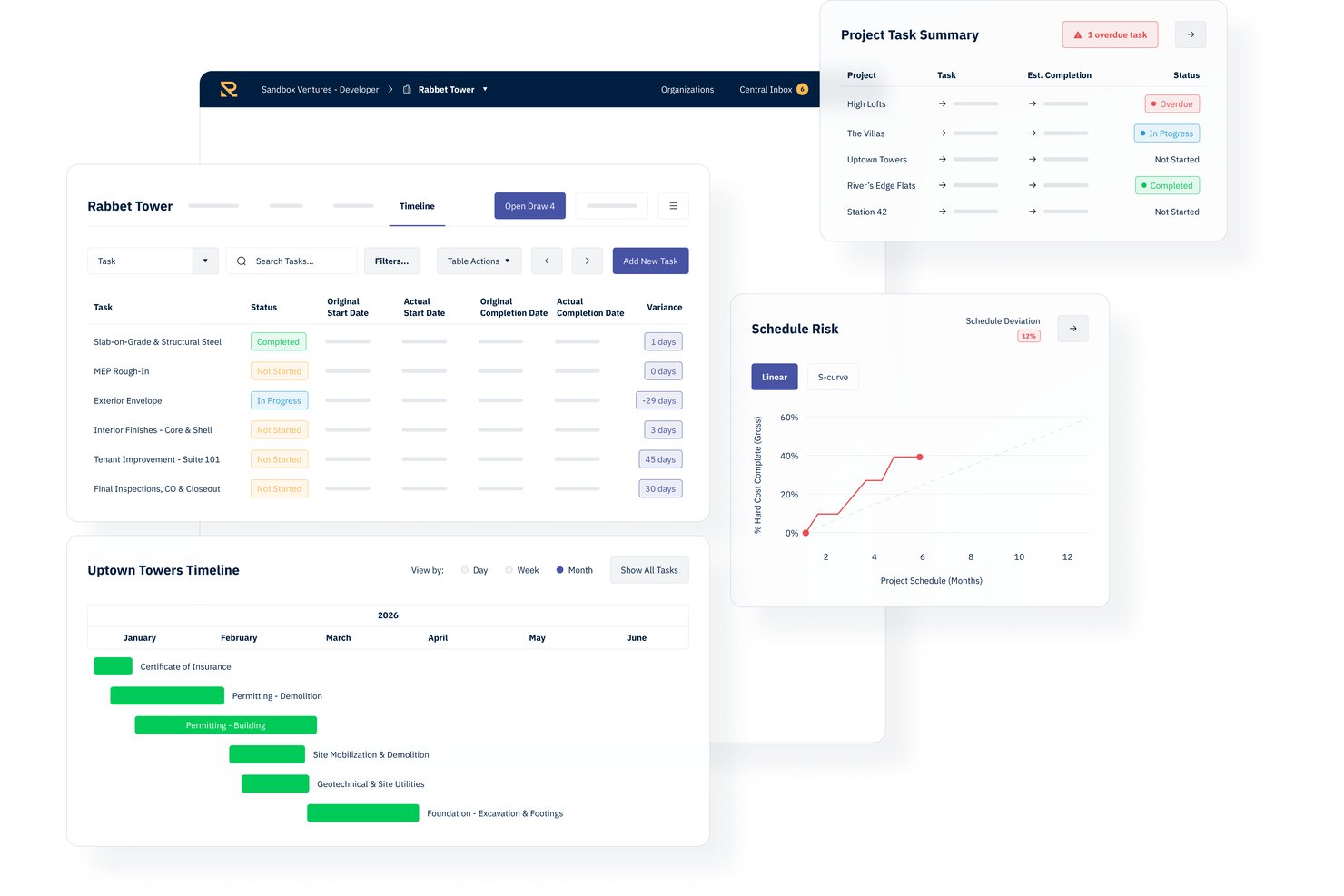
Rabbet is a real estate development management platform that centralizes budgets, contracts, draw packaging, document processing, and portfolio cash flow tracking for development teams.
Who Is Rabbet Best For?
Rabbet is a strong fit for real estate developers and development finance teams managing active construction projects with regular lender draw cycles.
Why I Picked Rabbet
Rabbet earns its spot on my shortlist because of how it handles document processing at the draw stage. I love the AI Document Router, which automatically splits uploaded PDFs by document type and classifies invoices, lien waivers, and pay applications without manual sorting. My team can review and approve rather than chase down paperwork. Missing items get flagged before draw submission, which cuts down on rejected packages coming back from lenders.
Rabbet Key Features
- Live budget tracking: Track anticipated and actual project costs in real time with variance alerts.
- Portfolio dashboard: View funding status, draw timelines, and cash requirements across all projects at once.
- Gantt chart timelines: Organize, visualize, and update project schedules with automated milestone alerts.
- Accounting system integrations: Sync invoice and payment data directly with QuickBooks, Yardi, MRI, Bill.com, and NexusPayables.
Rabbet Integrations
Rabbet offers native integrations with QuickBooks, Yardi Voyager, MRI, Bill.com, NexusPayables, and AvidXChange. An API is available for custom integrations, and single sign-on is supported on higher-tier plans.
Pros and Cons
Pros:
- Portfolio dashboard tracks multiple projects simultaneously
- Draw management workflows reduce manual review steps
- Invoicing automation with advanced AI document parsing
Cons:
- Mobile app functionality is not available
- Advanced reporting options are somewhat limited

Best for integrated business operations

Zoho Projects is a comprehensive project management tool that facilitates project planning and collaboration. It stands out for its ability to integrate deeply with a suite of business applications, enhancing overall operational efficiency.
Why I Picked Zoho Projects: I chose Zoho Projects for its robust integration capabilities that streamline business processes, making it an excellent choice for managing complex projects with various moving parts. Its standout feature is the seamless connection with other Zoho apps and third-party services, which is why it's best for integrated business operations. This tool significantly differs from other real estate project management software by offering an all-in-one solution that can adapt to a wide range of business needs, ensuring that everything from project tracking to resource management works harmoniously together.
Standout features & integrations:
Features included task management, time tracking, and collaboration features, enabling teams to work efficiently and stay aligned on project goals. The tool's ability to integrate with a vast ecosystem of apps, both within the Zoho suite and external platforms, stands out. This connectivity allows for a more cohesive workflow, enhancing productivity and project visibility.
Integrates natively with Zoho CRM, Zoho Books, Zoho Invoice, Zoho Analytics, Zoho Cliq, Zoho Desk, Zoho Mail, Slack, Google Drive, and GitHub, among others.
Pros and Cons
Pros:
- Affordable pricing structure
- Extensive integration capabilities
- Comprehensive project management features
Cons:
- Performance can lag with large projects
- Limited customization options
- Learning curve for new users
New Product Updates from Zoho Projects
Zoho Projects Adds CodeX Scripts for Custom Modules
Zoho Projects now supports CodeX Scripts for custom modules, enabling conditional logic and rules for creating, updating, and deleting records. For more information, visit Zoho Projects' official site.
 .
.
Wrike
Best for custom dashboards

Wrike is a project management tool that helps teams organize tasks, collaborate on projects, and track progress. It offers various features to manage workflows and improve productivity.
Why I Picked Wrike: Wrike's customizable dashboards let you create views that fit your real estate projects. You can monitor tasks, deadlines, and team workloads in one place, making it easier to keep track of property listings, client communications, and transaction statuses. This helps you stay organized and respond quickly to changes.
Standout features & integrations:
Features include Gantt charts, kanban boards, custom workflows, real-time collaboration, dynamic request forms, project templates, workload management, time tracking, document proofing, mobile app access, reporting and analytics, and calendar integration.
Integrations include Salesforce, Microsoft Teams, Zoom, Adobe Creative Cloud, Google Drive, Microsoft SharePoint, OneDrive, Wrike for Gmail, Google Sheets, Power BI, Miro, and Trello.
Pros and Cons
Pros:
- Various project views
- Good resource management features
- Workflow automation capabilities
Cons:
- Limited storage on lower-tier plans
- Can be complicated to learn the platform
New Product Updates from Wrike
Wrike Adds Klaxoon MCP Integration
Wrike’s Klaxoon MCP integration is now generally available, enabling AI agents to navigate between Wrike tasks and attached whiteboards, read task context, and manage whiteboard attachments via API. For more information, visit Wrike's official site.

ClickUp
Best for one-workspace real estate team coordination
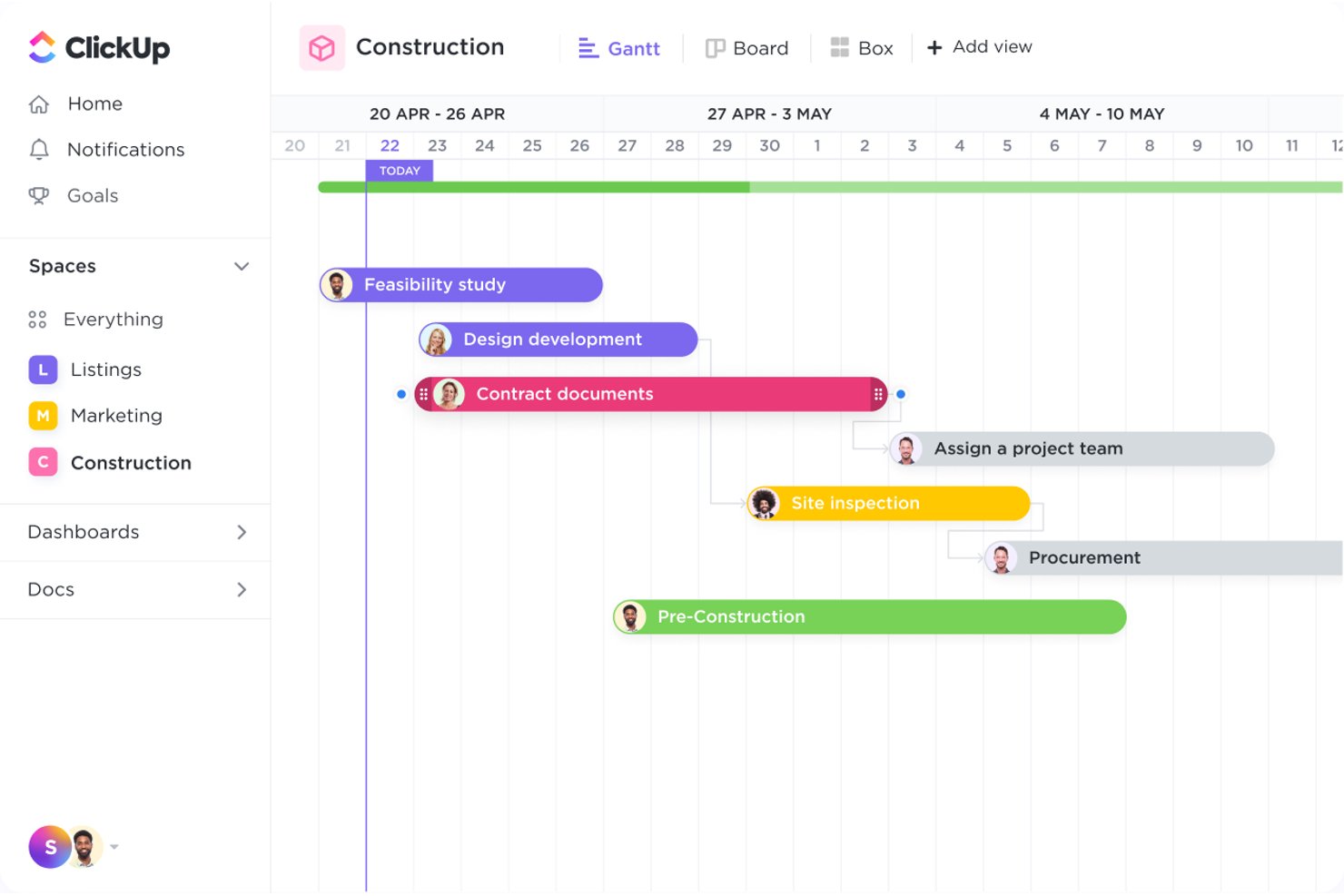
ClickUp is an all-in-one work management platform that combines task tracking, Gantt scheduling, collaborative Docs, dashboards, and built-in chat to coordinate real estate projects across teams.
Who Is ClickUp Best For?
ClickUp works well for real estate teams that want to manage tasks, docs, communication, and reporting in a single workspace instead of juggling multiple tools.
Why I Picked ClickUp
I picked ClickUp as one of the best because it genuinely consolidates every layer of real estate team coordination into a single workspace. I like how Gantt charts with dependency tracking let you map construction phases from site selection through punch lists, automatically rescheduling downstream tasks when timelines shift. Pair that with linked Docs for centralizing blueprints and permits, and Chat channels tied directly to tasks, and your whole team operates from one source of truth instead of scattered tools.
ClickUp Key Features
- Custom Fields: Add Money, Number, Location, and formula field types to tasks to capture property-specific data like pricing, offers, and budget calculations.
- Guest permissions: Invite contractors and vendors as guests with view-only, comment, or edit access scoped only to the items you share with them.
- Dashboards: Build real-time reporting views that combine charts, workload data, and task status across multiple projects and properties.
- Offline Mode: Create tasks and view previously opened work without a connection, with data syncing automatically when you're back online.
ClickUp Integrations
ClickUp offers 50+ native integrations, including QuickBooks Online Sync, Google Drive, Dropbox, Box, HubSpot, and Salesforce. It also provides a public API, webhooks, OAuth, MCP, and Zapier for custom connectivity.
Pros and Cons
Pros:
- Shared tasks coordinate vendors and teams
- Dashboards show status across properties
- Gantt dependencies keep project timelines visible
Cons:
- Large workspaces can load slowly
- No dedicated construction draw management

Best for coordinating projects with external clients
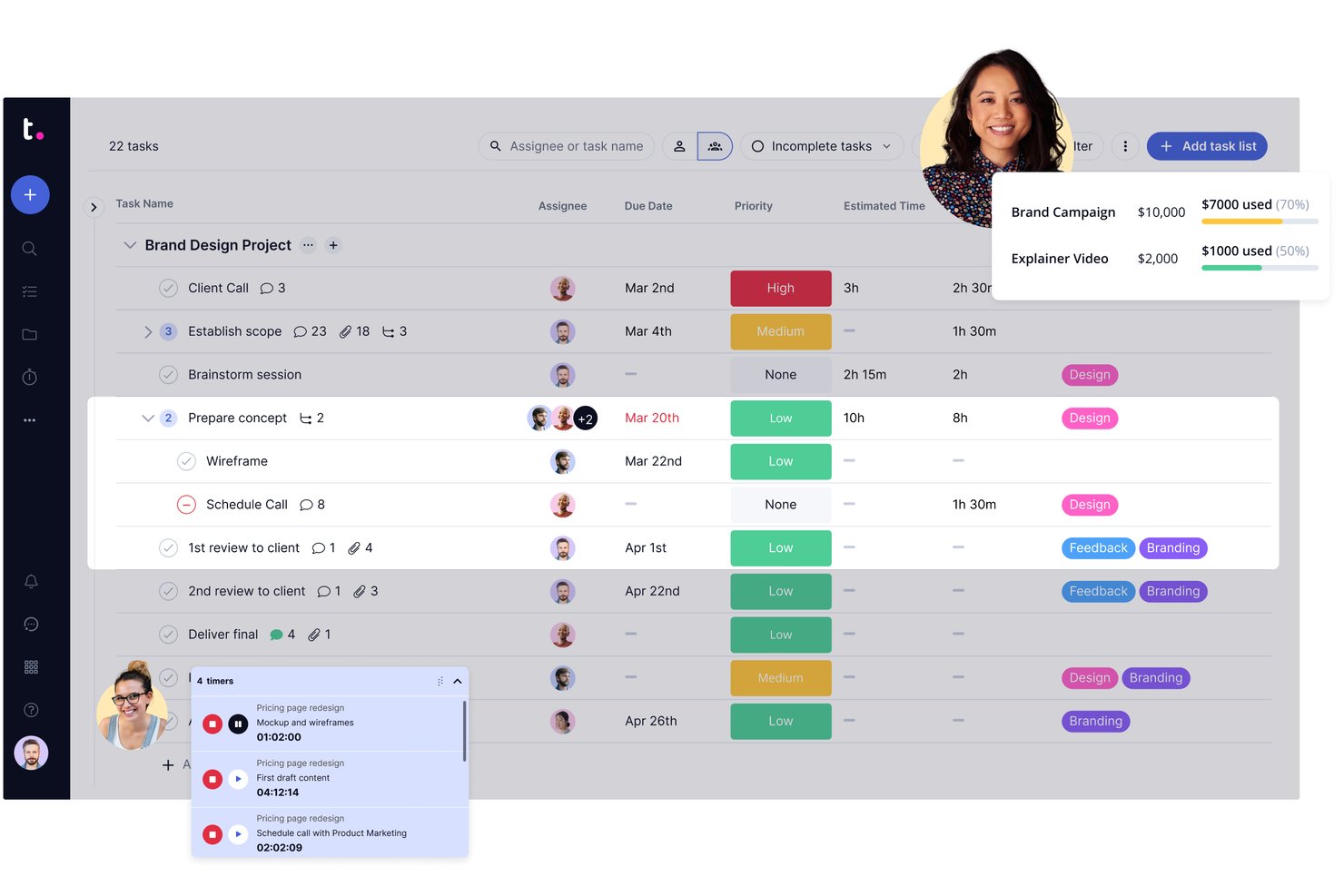
Teamwork.com is a client-work project management platform that combines task tracking, Gantt scheduling, budget management, portfolio views, and external client collaboration tools.
Who Is Teamwork.com Best For?
Teamwork.com suits project-driven teams that need to loop external clients or contractors into active projects without giving them full platform access.
Why I Picked Teamwork.com
I've included Teamwork.com in my top picks because it handles external client collaboration better than most general-purpose tools I've used. When coordinating real estate projects with outside stakeholders, like contractors or property owners, you can invite them directly into active projects, assign tasks, collect file uploads, and run approval workflows through the proofing feature, all without giving them access to your financials or portfolio reporting.
Teamwork.com Key Features
- Gantt chart with task dependencies: Visualize project timelines, assign durations, and link tasks with finish-to-start or finish-to-finish dependencies across multiple projects.
- Portfolio boards: View and filter multiple active projects by status, health, owner, and custom fields from a single dashboard.
- Project budgeting: Set up budgets by hours, fixed fee, or retainer type, with threshold notifications when spending reaches a set percentage.
- File versioning: Upload and manage multiple versions of project files, with privacy controls configurable at the project, company, or team level.
Teamwork.com Integrations
Teamwork.com supports 150+ integrations, including QuickBooks, Xero, Salesforce, NetSuite, HubSpot, Google Drive, SharePoint, Microsoft Teams, and Slack. It also offers API access, webhooks, and Zapier.
Pros and Cons
Pros:
- External clients can review files and approvals
- Budget tracking connects hours, costs, and progress
- Visual Gantt timelines map project dependencies
Cons:
- No permit, RFI, or construction-draw workflows
- No property records link projects to assets

Workzone
Best for comprehensive project visibility
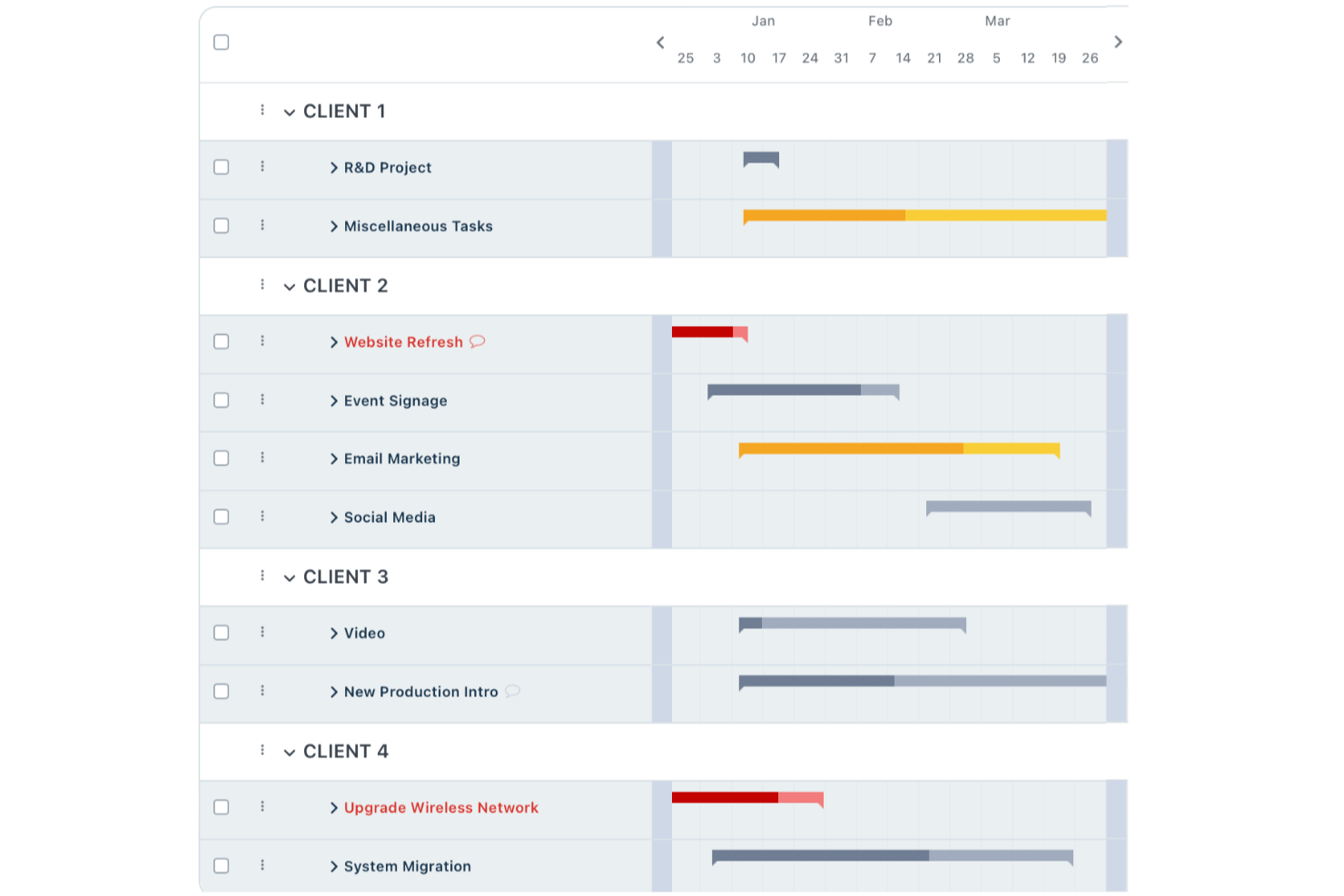
Workzone is a project management platform that covers task tracking, multi-project portfolio visibility, document approvals, and contractor collaboration across real estate teams and portfolios.
Who Is Workzone Best For?
Workzone is a good fit for real estate portfolio teams that need cross-project visibility and structured contractor collaboration without the complexity of construction-specific software.
Why I Picked Workzone
I picked Workzone as one of the best because its Portfolio View gives real estate teams genuine cross-project visibility, showing what's on track, at risk, and needs attention across every property and initiative at once. I love that task dependencies automatically recalculate dates when a predecessor shifts, so a construction delay ripples through the schedule without manual updates. The Reviewer and Partner user types also let me bring contractors and consultants into specific workspaces without exposing the full portfolio.
Workzone Key Features
- Reusable project templates: Build standardized workflows with preset tasks, owners, timelines, and dependencies, then apply them across every new property or build-out.
- Multi-stage document approvals: Route files through configurable approval stages with defined approvers, rules, and deadlines, with progress tracked in the Approval Dashboard.
- Time and expense tracking: Log hours and expenses directly against projects for budget and billing visibility across your portfolio.
- Role-based external user access: Assign contractors and consultants as Partner or Reviewer users, giving them scoped access to specific folders and tasks without exposing the full account.
Workzone Integrations
Workzone has native integrations with Microsoft Teams, Slack, Google Drive, and OneDrive. It also integrates with QuickBooks, FreshBooks, and Harvest, offers a REST API, and supports over 1,000 web app integrations through Zapier.
Pros and Cons
Pros:
- Partner access scopes contractor collaboration
- Dependencies shift downstream task dates automatically
- Portfolio dashboards flag at-risk property projects
Cons:
- No permit tracking or structured property records
- No construction draw management or change orders
New Product Updates from Workzone

Workzone Enterprise Adds Multi-Stage Approval Workflows
Workzone Enterprise now includes Approval Workflows, enabling multi-stage document approvals to standardize complex processes and reduce manual effort. For more information, visit Workzone's official site.
 .
.
Procore
Best for large-scale contractor coordination
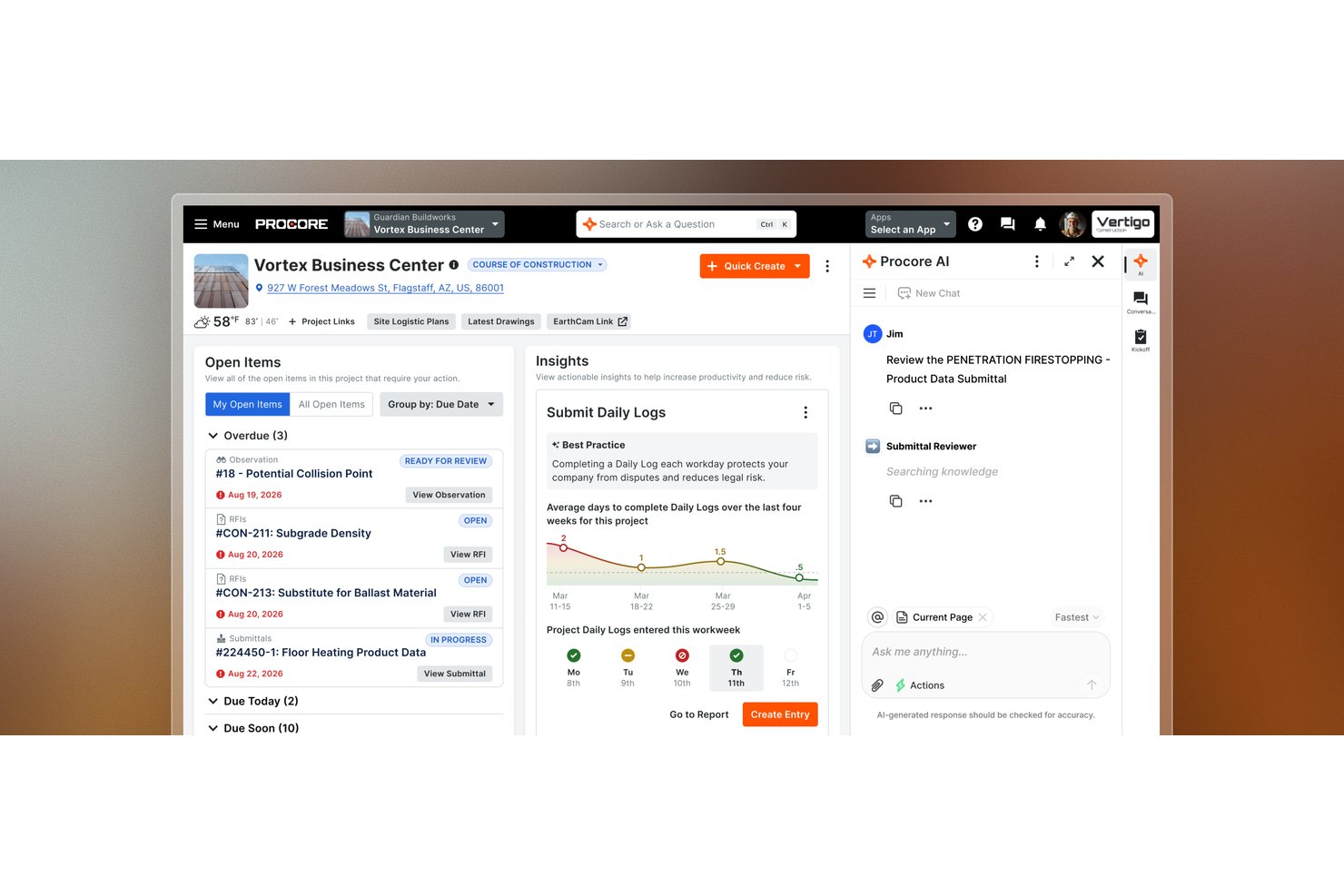
Procore is a construction project management platform that brings together scheduling, bid management, budgeting, RFI workflows, document control, and field-to-office coordination across development projects.
Who Is Procore Best For?
Procore is a strong fit for real estate developers and construction project managers running large, multi-contractor builds where coordinating bids, RFIs, schedules, and budgets across external teams is the core challenge.
Why I Picked Procore
I picked Procore as one of the best because it's built around the realities of large, multi-contractor builds where keeping dozens of external teams aligned is the hardest part of the job. Bid management lets you distribute bid packages, track coverage, and collect responses in one place, while cross-account RFI syncing keeps status updates and attachments flowing between your account and each contractor's without chasing emails. I also like that project budgets connect directly to field data, so change events and subcontractor invoice approvals roll up into owner draw-request PDFs without manual reconciliation.
Procore Key Features
- 360 Reporting: Build company- or project-level reports across datasets including financials, project execution, and portfolio directory.
- Daily log capture: Record site conditions, crew activity, and progress notes from the field for office visibility.
- Punch list management: Create, assign, and track punch-list items through resolution during project closeout.
- Role-based permissions: Assign permission templates and project roles to internal users, subcontractors, and external companies at the project level.
Procore Integrations
Relevant marketplace integrations include Yardi, MRI, Oracle NetSuite, QuickBooks Connector, Sage, Microsoft Project, Oracle Primavera P6, and DocuSign. Procore also offers REST APIs and webhooks for custom integrations.
Pros and Cons
Pros:
- Budget and change-order tracking improve cost visibility
- Centralized drawings and RFIs clarify contractor ownership
- Bid and RFI workflows coordinate external contractors
Cons:
- Portfolio planning trails specialized scheduling tools
- Financial reporting can feel clunky to users

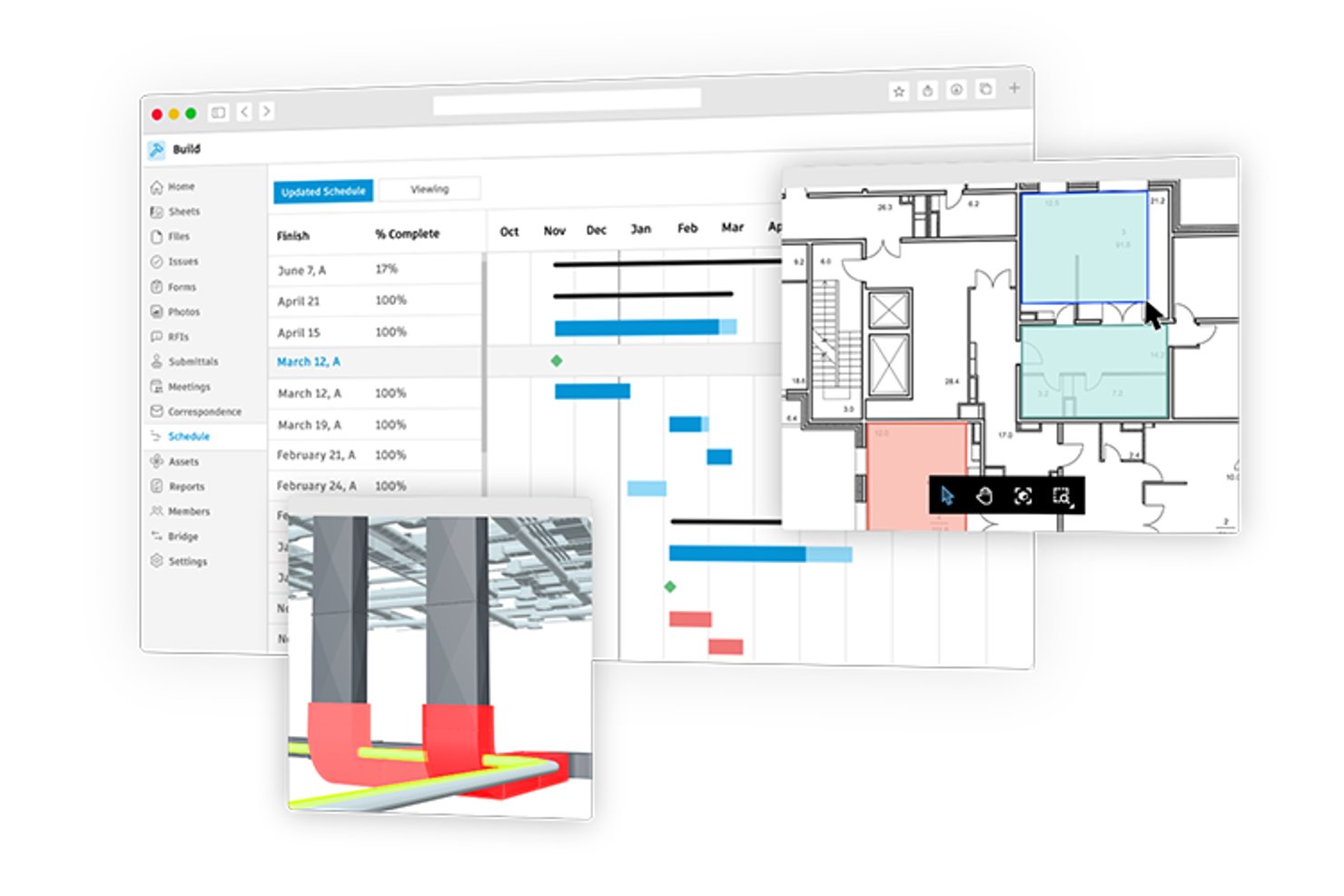
Autodesk Forma Build is construction project management software that covers cost management, contract tracking, RFI and submittal workflows, schedule management, and contractor coordination across office and field teams.
Who Is Autodesk Construction Cloud Best For?
Autodesk Construction Cloud is a strong fit for construction project managers who need to connect cost tracking, contractor workflows, and field teams in one platform.
Why I Picked Autodesk Construction Cloud
I picked Autodesk Construction Cloud (Forma Build) as one of the best because it connects cost tracking and contractor coordination in a way that's hard to replicate on a construction project. I particularly like how change orders link directly to RFIs and budget line items, so when a contractor flags a site condition, the cost impact is traceable from request through approval. The collaborative Potential Change Order workflow also lets external contractors respond to cost items with limited editing access, keeping sensitive financial data protected while still moving approvals forward.
Autodesk Construction Cloud Key Features
- Schedule import and sync: Import and sync project schedules from P6, Microsoft Project, or ASTA, and compare schedule versions over time.
- Weekly work plans: Build three-to-six-week look-ahead plans linked to the master schedule, record trade commitments, and track plan reliability with PPC and variance metrics.
- Construction IQ risk insights: Machine learning analyzes project data to surface high-risk areas across design, quality, safety, and project controls.
- Data Connector: Extract project and hub-level data—including cost, schedule, RFIs, and assets—into CSV files for use with business intelligence tools, with daily, weekly, or monthly scheduled extractions.
Autodesk Construction Cloud Integrations
Autodesk Construction Cloud offers 400+ integrations, including Sage 300, Viewpoint Vista, CMiC, Sage Intacct, Acumatica, and QuickBooks through Agave. Forma APIs and webhooks support custom integrations.
Pros and Cons
Pros:
- Field teams can access project files offline
- Users value budget tracking for construction work
- Reviewers praise centralized drawings and version control
Cons:
- Portfolio milestones rely on extracted data
- No property-level ownership or tenant records
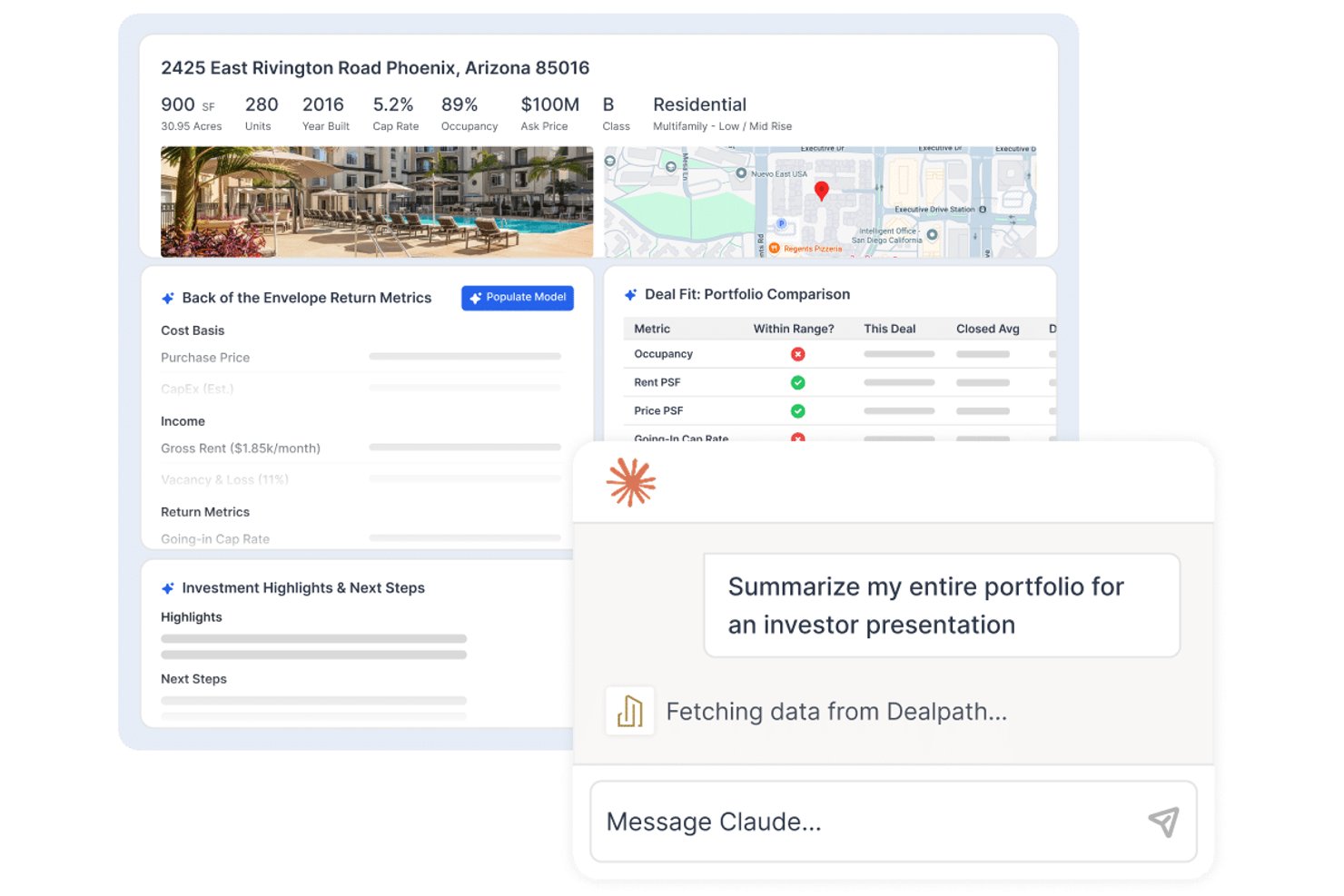
Dealpath is a real estate deal management platform built for investment teams, offering pipeline tracking, development project workflows, AI-powered deal screening, reporting and analytics, and collaboration tools across acquisitions, dispositions, and development.
Who Is Dealpath Best For?
Dealpath is a strong fit for real estate investment teams—developers, lenders, and REITs—that need structured deal tracking across acquisitions, development, and portfolio management.
Why I Picked Dealpath
I picked Dealpath as one of the best because it's purpose-built for investment teams that need to manage development projects as part of a broader deal lifecycle, not just as standalone construction tasks. I love how it tracks projects from site selection through entitlements, construction, and stabilization, with role-based task dependencies that automatically shift projected milestone dates when timelines change. Its development reporting lets my team compare budgets against actuals across multiple projects simultaneously, which is exactly what investment-led development tracking requires.
Dealpath Key Features
- AI deal screening: Processes offering memorandums, rent rolls, and pro formas to generate a tear sheet with deal highlights and preliminary analysis.
- Dealpath Connect listings: Lets teams browse and filter institutional brokerage listings from JLL, CBRE, and Cushman & Wakefield, then move them directly into the pipeline.
- CRM and relationship tracking: Captures broker outreach, calls, meetings, and submissions alongside deal records to manage sourcing relationships.
- Configurable reporting dashboards: Lets teams build custom reports that drill down by project phase, region, or sector across the full development portfolio.
Dealpath Integrations
Dealpath integrations include MRI Software, CompStak, Real Capital Analytics, Esri, Cherre, NavigatorCRE, Box, Dropbox, and Microsoft tools. Its open API supports custom connections, including Yardi and asset-management platforms.
Pros and Cons
Pros:
- Centralized deal records make information easier to find
- Portfolio reports compare deal progress side by side
- Tasks, due dates, and reminders stay visible
Cons:
- No RFI or submittal workflows
- No documented construction-loan draw workflows
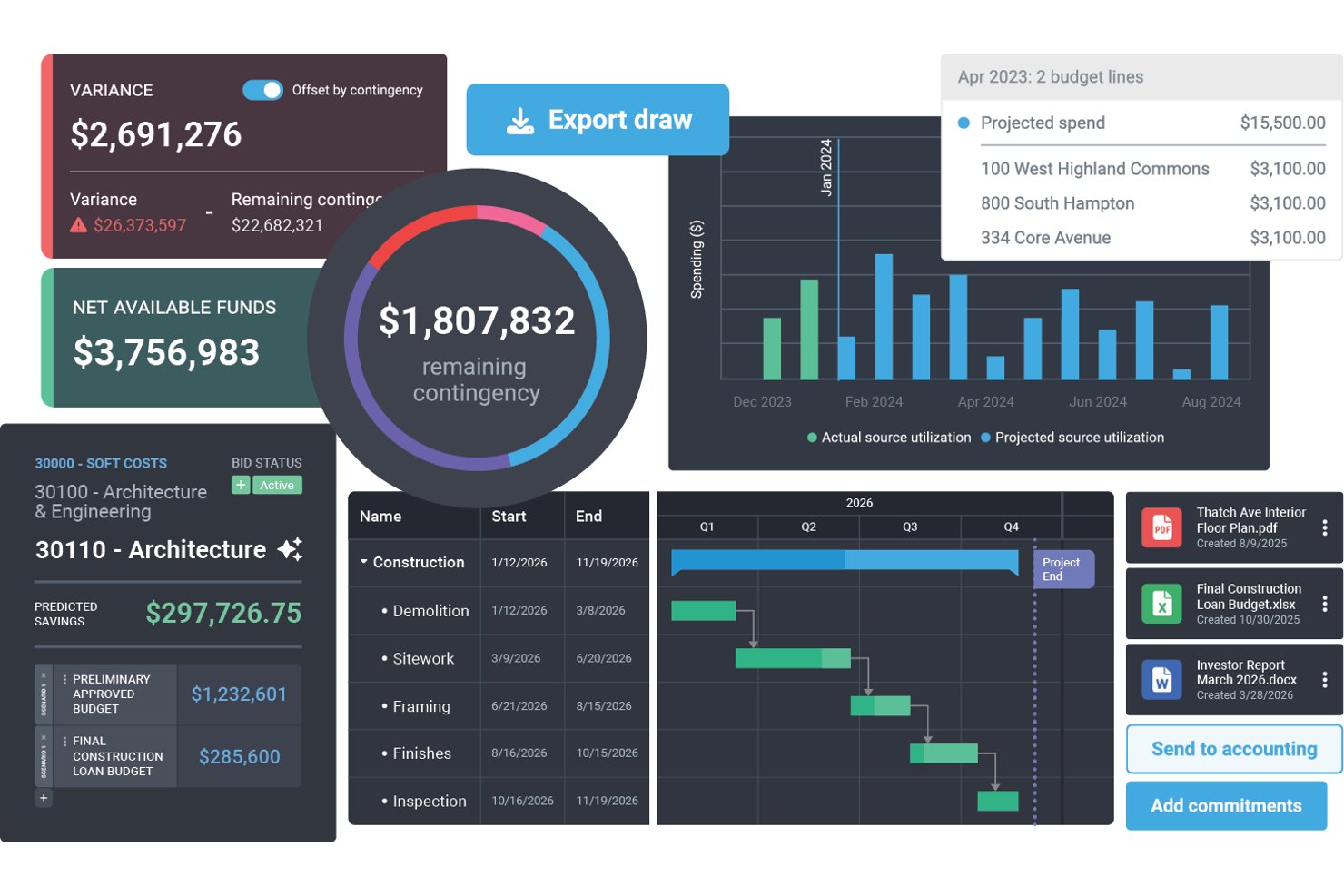
Northspyre is a real estate development project management platform that centralizes budget tracking, draw management, vendor coordination, document control, and portfolio analytics across development projects.
Who Is Northspyre Best For?
Northspyre is built for real estate development teams that manage capital projects and need tight control over budgets, draws, and lender reporting across a portfolio.
Why I Picked Northspyre
I picked Northspyre as one of the best because of how well it handles the draw management and lender reporting side of real estate development. When I'm preparing a draw package, the Lender Compliance Checklist checks readiness across budget lines, documentation, contracts, lien waivers, and insurance before anything goes out. The Funding Portal gives lenders and capital partners 24/7 access to current and historical draw packages, which cuts down the back-and-forth that typically slows funding cycles.
Northspyre Key Features
- Anticipated Cost Report: View and forecast project budgets and costs, including potential costs and worst-case scenarios, to stay ahead of overruns.
- Vendor Marketplace: Find pre-qualified vendors and invite them to bid on specific scopes of work directly within the platform.
- COI Co-Pilot: Set vendor insurance requirements by policy type and receive AI-generated alerts when certificates of insurance are missing or expired.
- Portfolio Manager: View project progress, spending history, and key metrics across all active and historical projects in one dashboard.
Northspyre Integrations
Northspyre offers native integrations with Yardi Voyager, MRI, Sage Intacct, QuickBooks Online, QuickBooks Desktop, AppFolio, Entrata, RealPage, Acumatica, and Oracle JD Edwards EnterpriseOne. Its Open API supports custom connections.
Pros and Cons
Pros:
- Centralized records reduce spreadsheet juggling
- Portfolio-wide budget and cost visibility
- Faster lender-ready draw package preparation
Cons:
- Invoice and lien-waiver workflows frustrate users
- Future-cost forecasting can be difficult
Annen programvare for prosjektstyring innen eiendom
Her er noen flere alternativer for programvare for prosjektstyring innen eiendom som ikke kom med på kortlisten, men som fortsatt er verdt å sjekke ut:
- Scoro
For multi-project financial oversight
- Smartsheet
For multi-site portfolio visibility
- Nifty
For visualizing milestones across projects
- Buildertrend
For contractor and subcontractor coordination
- JIRA
For agile construction team workflows
- JobTread
For rehab budgeting and contractor bids
- Kahua
For construction portfolio asset handover


How I Evaluate Real Estate Project Management Software
I break my evaluation into two layers: baseline requirements every tool must meet—like phase tracking and budget management—and differentiators that show whether it's purpose-built for real estate.
Core Functionality (Table Stakes For This List)
When I'm selecting tools for my list, I rank each one on a scale from 0 (does not offer the functionality) to 5 (excels in this area) for each core functionality listed below. Then, I calculate the tool's total score into a percentage. Each tool needs to achieve a minimum total score of 65% to be considered for inclusion.
- Real Estate Project Tracking: I look for phase-based workflows that map to real estate lifecycles—things like entitlement, design, construction, and tenant handover stages.
- Budget & Cost Management: Each tool should handle job costing, change orders, and draw tracking so teams can monitor spend across active developments.
- Document & Drawing Management: I check whether a platform supports version-controlled storage for site plans, permits, contracts, and construction drawings.
- Stakeholder & Vendor Collaboration: Tools should let you bring in external contractors, architects, and consultants with role-based access rather than full user seats.
- Scheduling & Milestone Tracking: I evaluate whether the platform offers Gantt views or critical path scheduling suited to multi-phase construction timelines and site dependencies.
- Property & Portfolio Dashboards: Reporting should roll up KPIs across properties—budget status, milestone completion, open RFIs—into views built for leadership and investors.
Once I have a list of tools that meet the criteria, I consider what sets each platform apart.
Differentiating Factors (What Sets Vendors Apart)
Here's how I compare and contrast different vendors:
Standout Features
Mobile field access matters when your team splits time between job sites and the office. I look for apps that let supervisors log punch lists and upload progress photos directly on-site. BIM and CAD integration is another differentiator—viewing and marking up construction drawings inside the platform saves your team from toggling between separate tools. I also check for automated draw request workflows, since manually assembling lender documentation across spreadsheets slows down every funding cycle.
Beyond Features
Integration with real estate accounting systems like Sage 300 CRE, Yardi, or MRI is a major consideration—without it, teams end up reconciling budgets manually between platforms. I also evaluate how well a tool scales across portfolio sizes. A firm managing three developments has different needs than one running fifty across multiple regions. Total cost of ownership rounds out my evaluation, especially how vendors price external collaborator access, since real estate projects typically involve dozens of outside parties.
Slik velger du programvare for prosjektstyring innen eiendom
Det er lett å gå seg vill i lange lister over funksjoner og kompliserte prismodeller. For å hjelpe deg med å holde fokus mens du går gjennom din unike prosess for valg av programvare, får du her en sjekkliste over faktorer du bør ha i bakhodet:
| Faktor | Dette bør du vurdere |
| Skalerbarhet | Pass på at programvaren kan håndtere flere eiendommer, prosjekter og brukere etter hvert som porteføljen din vokser. |
| Integrasjoner | Se etter integrasjoner med verktøy du allerede bruker, for eksempel regnskapsprogramvare, CAD-programmer eller plattformer for dokumentlagring. |
| Tilpasningsmuligheter | Du bør kunne tilpasse arbeidsflyter, dashbord og rapporteringsverktøy slik at de passer til teamets arbeidsprosesser. |
| Brukervennlighet | Plattformen bør være intuitiv, spesielt for feltteam eller entreprenører som kanskje ikke er teknologisk kyndige. |
| Budsjett | Kontroller om prisen passer til prosjektets størrelse. Noen verktøy tar betalt per bruker, per prosjekt eller basert på funksjoner. |
| Sikkerhetstiltak | Se etter tilgangskontroller, datakryptering og revisjonslogger – spesielt hvis du håndterer sensitiv økonomisk eller juridisk informasjon. |
| Mobiltilgang | Feltteam må kunne få tilgang til tidsplaner, planer og filer på stedet ved hjelp av telefoner eller nettbrett. |
| Rapporteringsverktøy | Velg programvare som gir deg lettleste rapporter om kostnader, tidsplaner og ressursbruk for hvert prosjekt. |
Trender innen programvare for prosjektstyring av eiendom i 2025
I arbeidet med undersøkelsen min hentet jeg inn utallige produktoppdateringer, pressemeldinger og lanseringslogger fra ulike leverandører av programvare for prosjektstyring innen eiendom. Her er noen av de fremvoksende trendene jeg følger med på:
- KI-drevet risikodeteksjon: Flere verktøy bruker KI til å varsle om potensielle forsinkelser eller budsjettoverskridelser før de oppstår. Noen plattformer varsler nå også brukere når det er sannsynlig at tillatelser blir forsinket, basert på tidligere data eller værforhold.
- Integrasjon av digitale tvillinger: Noen leverandører legger til støtte for digitale tvillinger for å gi prosjektledere en digital sanntidsvisning av bygninger mens de oppføres. Dette gjør det enklere å oppdage byggeproblemer tidligere og forbedre koordineringen.
- Portaler for kunder: Programvaren begynner å inkludere kundedashbord som viser sanntidsoppdateringer, godkjenninger og viktige dokumenter. Det er en måte å holde kundene oppdatert på uten e-poster frem og tilbake.
- Innebygd kostnadsprognostisering: Prognoseverktøy går nå lenger enn statiske budsjetter og justerer forutsigelsene basert på trender i arbeidsmarkedet, materialpriser eller problemer hos leverandører. Noen leverandører bruker også direkte datastrømmer til å oppdatere estimater når forholdene endrer seg.
- Verktøy for arbeidsflyt knyttet til tillatelser: Flere verktøy utvikler funksjoner for å følge tidsplaner for tillatelser, varsle om manglende dokumenter og loggføre kommunikasjon med myndighetene. Disse verktøyene hjelper team med å overholde kravene og unngå forsinkelser.
Hva er programvare for prosjektstyring innen eiendom?
Programvare for prosjektstyring innen eiendom er et spesialisert verktøy utviklet for å hjelpe utviklere, prosjektledere og fagfolk innen eiendom med å føre tilsyn med alle sider av eiendomsutvikling, fra oppstart til ferdigstillelse. Den legger til rette for planlegging, gjennomføring og oppfølging av prosjekter, slik at de leveres i tide, innenfor budsjettet og i henhold til forhåndsdefinerte spesifikasjoner.
Komponentene i programvare for prosjektstyring innen eiendom omfatter oppgaveplanlegging, budsjettstyring, dokumentlagring, kommunikasjonsverktøy og rapporteringsfunksjoner. Den samler ulike funksjoner, som prosjektplanlegging, ressursfordeling, økonomiske prognoser og resultatoppfølging, i én plattform.
Funksjoner i programvare for prosjektstyring innen eiendom
Når du velger programvare for prosjektstyring innen eiendom, bør du se etter følgende nøkkelfunksjoner:
- Porteføljerapportering: Viser resultater på tvers av flere utbyggingsprosjekter, slik at du kan ta bedre strategiske beslutninger.
- Oppgaveplanlegging: Lar deg tildele oppgaver med frister og avhengigheter for å holde byggeplanene på rett spor.
- Budsjettoppfølging: Hjelper deg med å overvåke utgifter opp mot beregnede kostnader og varsle tidlig om overskridelser.
- Dokumenthåndtering: Lagrer tegninger, kontrakter og tillatelser på ett sted for enkel tilgang og deling.
- Ressursfordeling: Følger opp bruken av arbeidskraft og utstyr på tvers av prosjekter for å unngå dobbeltbooking eller dødtid.
- Gantt-diagramvisninger: Visualiserer prosjektets tidslinjer, slik at du raskt kan se faser, milepæler og flaskehalser.
- Oppfølging av endringsordrer: Loggfører prosjektendringer og deres innvirkning på kostnader og tidsplan for å redusere konflikter.
- Kommunikasjon med interessenter: Tilbyr meldings- eller dashbordfunksjoner for å holde kunder og samarbeidspartnere oppdatert.
- Oppfølging av tillatelser: Overvåker godkjenningstidslinjer og frister for å hjelpe deg med å overholde lokale forskrifter.
- Sjekklister for inspeksjoner: Tilbyr maler for inspeksjoner på byggeplassen for å sikre at standarder og sikkerhetsprotokoller følges.
Fordeler med programvare for prosjektstyring innen eiendom
Implementering av programvare for prosjektstyring innen eiendom kan gi flere fordeler for teamet og virksomheten din. Her er noen av fordelene du kan se frem til:
- Færre forsinkelser: Verktøy som oppgaveplanlegging og oppfølging av tillatelser hjelper deg med å oppdage hindringer tidlig og holde arbeidet i gang.
- Bedre kostnadskontroll: Funksjoner for budsjettoppfølging og kostnadsprognoser hjelper deg med å holde oversikt over utgiftene og unngå overskridelser.
- Mindre papirarbeid: Verktøy for dokumenthåndtering reduserer behovet for utskrift og e-postutveksling, samt risikoen for tapte filer.
- Tydeligere kommunikasjon: Delte dashbord og meldingsverktøy gjør det enklere å holde kunder og teammedlemmer oppdatert.
- Smartere beslutninger: Rapporteringsverktøy gir deg innsikt i prosjektfremdrift, ressursbruk og utgifter.
- Enklere etterlevelse: Oppfølging av tillatelser og inspeksjonsfunksjoner hjelper deg med å overholde lokale regler og sikkerhetskrav.
- Bedre planlegging av arbeidsbelastning: Verktøy for ressursfordeling lar deg tildele arbeidskraft og utstyr mer effektivt på tvers av prosjekter.
Kostnader og priser for programvare for prosjektstyring innen eiendom
Valg av programvare for prosjektstyring innen eiendom krever en forståelse av de ulike prismodellene og tilgjengelige abonnementene. Kostnadene varierer basert på funksjoner, teamstørrelse, tillegg og mer. Tabellen nedenfor oppsummerer vanlige abonnementer, gjennomsnittsprisene deres og typiske funksjoner som er inkludert i programvareløsninger for prosjektstyring innen eiendom:
| Abonnementstype | Gjennomsnittspris | Vanlige funksjoner |
| Gratis | $0 | Grunnleggende oppgavestyring, begrenset antall brukere, viktige integrasjoner |
| Grunnleggende | $10 - $25/bruker/måned | Oppgave- og prosjektstyring, budsjettoppfølging, enkelte tilpassede rapporter |
| Profesjonell | $25 - $50/bruker/måned | Alle funksjonene i Grunnleggende, samt avansert rapportering, flere integrasjonsmuligheter og større grad av tilpasning |
| Bedrift | $50+/bruker/måned | Alle funksjonene i Profesjonell, samt full tilpasning, dedikert kundestøtte og avanserte sikkerhetsalternativer |
Vanlige spørsmål om programvare for prosjektstyring innen eiendom
Her er noen vanlige spørsmål om programvare for prosjektstyring innen eiendom:
Hvem bruker programvare for prosjektstyring innen eiendom?
Denne programvaren brukes vanligvis av eiendomsutviklere, prosjektledere, utbyggere og byggeledere som har ansvar for å føre tilsyn med utviklingen av eiendomsprosjekter fra idé til ferdigstillelse.
Hvor mye koster programvare for prosjektstyring innen eiendom?
Kostnadene kan variere betydelig avhengig av systemets funksjoner og skalerbarhet. Grunnleggende abonnementer kan starte på rundt $25 per bruker per måned, mens mer avanserte alternativer kan koste $50 per bruker per måned eller mer. Bedriftsløsninger krever ofte tilpasset prissetting.
Kan programvare for prosjektstyring innen eiendom bidra til samsvarsoppfølging?
Ja, mange verktøy for prosjektstyring innen eiendom har funksjoner som bidrar til å sikre at prosjekter overholder relevante lover og forskrifter, noe som reduserer risikoen for bøter og juridiske problemer.
Passer programvare for prosjektstyring innen eiendom for små prosjekter?
Ja, det finnes ulike programvarealternativer som passer til forskjellige prosjektstørrelser. Mindre prosjekter kan dra nytte av mindre komplekse systemer med grunnleggende funksjonalitet, noe som kan være mer kostnadseffektivt.
Hvordan integreres programvare for prosjektstyring innen eiendom med andre verktøy?
De fleste systemer for prosjektstyring innen eiendom tilbyr integrasjonsmuligheter med verktøy som CRM-programvare, regnskapssystemer, kommunikasjonsplattformer og mer. Dette bidrar til å effektivisere ulike aspekter ved prosjektstyringen og samle informasjonen på ett sted.
Hva bør jeg se etter når jeg velger programvare for prosjektstyring innen eiendom?
Viktige funksjoner å vurdere omfatter oppgave- og prosjektoppfølging, budsjettstyring, dokumentlagring, muligheter for kommunikasjon i sanntid, tilpasningsalternativer, brukervennlighet og kvaliteten på kundestøtten. Det er også viktig å velge programvare som kan skaleres i takt med virksomhetens behov.