

De 10 beste AI-programvarene for arbeidsflyt i virksomheter, vurdert i 2026

Beste AI-programvare for arbeidsflyt i virksomheter – kortliste


Å lede prosjekter på virksomhetsnivå innebærer å koordinere komplekse arbeidsflyter, sørge for at teamene er samkjørte og tilpasse seg raskt når prioriteringene endres. AI-programvare for arbeidsflyt i virksomheter støtter dette arbeidet ved å automatisere rutineoppgaver, gi bedre oversikt og hjelpe team med å arbeide mer effektivt på tvers av store, sammenkoblede systemer.
Med mange års erfaring med testing av plattformer for prosjektstyring og arbeidsflyt fokuserer jeg på å identifisere verktøy som faktisk forbedrer den daglige driften, fremfor å tilføre flere lag med kompleksitet. Målet mitt er å tilby en objektiv og grundig gjennomgått vurdering av AI-løsninger for arbeidsflyt som gir en meningsfull effekt.
I denne artikkelen tar jeg deg gjennom de beste alternativene som er tilgjengelige i dag, og fremhever de AI-drevne funksjonene og fordelene som skiller hvert verktøy fra de andre. Du får innsikt tilpasset virkeligheten for virksomhetsteam, slik at du kan velge løsningen som best forbedrer arbeidsflyten og støtter organisasjonens mål.
Hvorfor du kan stole på våre programvareanbefalinger
Teamet vårt har testet og anmeldt programvare siden 2012. Vi er selv prosjektledere, så vi vet hvor vanskelig og hvor viktig det er å velge riktig programvare.
I denne guiden har vi vurdert verktøyene gjennom praktisk testing og uavhengig research og gitt dem poeng ut fra våre utvelgelseskriterier. Vi bygger også på innsikt fra ledende eksperter i bransjen og erfarne prosjektledere.
Anmeldelsene våre bygger på vår egen redaksjonelle vurdering. De er ikke et salgsargument.
Ekspertanmeldere:
Sammenligningstabell for AI-programvare for arbeidsflyt i virksomheter
Denne sammenligningstabellen oppsummerer prisdetaljene for mine beste utvalgte AI-programvarer for arbeidsflyt i virksomheter.
| Tool | Best For | Trial Info | Price | ||
|---|---|---|---|---|---|
| 1 | Best for AI-driven project management | 14-day free trial | From $10/user/month (billed annually) | Website | |
| 2 | Best for client-facing portals | Free demo available | From $5,000/year (billed annually) | Website | |
| 3 | Best for enterprise-grade no-code governance | Free demo available | $40/user/month | Website | |
| 4 | Best for AI-powered enterprise workflows | Free demo available | Pricing upon request | Website | |
| 5 | Best with 1,000+ prebuilt app connectors | 30-day free trial | Pricing upon request | Website | |
| 6 | Best for document processing | Free trial available + free demo | Pricing upon request | Website | |
| 7 | Best for custom workflows | Free trial available | From €20/month (billed annually) | Website | |
| 8 | Best for data visualization | 30-day free trial | Pricing upon request | Website | |
| 9 | Best for secure file sharing | 14-day free trial | From CAD$21/user/month (billed annually) | Website | |
| 10 | Best for AI orchestration and automation | Free plan available | From $19.99/month (billed annually) | Website |


Vurderinger av den beste AI-programvaren for arbeidsflyt i virksomheter
Nedenfor finner du mine detaljerte sammendrag av den beste AI-programvaren for arbeidsflyt i virksomheter som kom med på kortlisten. Vurderingene mine gir et detaljert innblikk i de viktigste funksjonene, fordelene og ulempene, integrasjonene og ideelle bruksområdene for hvert verktøy, slik at du kan finne det som passer best for deg.

Wrike
Best for AI-driven project management

Wrike offers a versatile project management solution tailored for teams looking to streamline their workflows and enhance productivity. Designed to reduce busywork through automation and AI, it appeals to businesses across various industries, from retail giants to tech innovators, who seek to optimize their operations without the hassle of complex setups. By integrating seamlessly with existing tools, Wrike addresses the need for improved efficiency and effective collaboration in managing projects.
Why I Picked Wrike
I picked Wrike for its unique ability to blend AI and automation into project management, making it an ideal choice for enterprises. The platform's generative AI capabilities, such as creating project plans and summarizing meetings, directly address the need for efficient task management. Additionally, Wrike's real-time dashboards offer an invaluable feature for monitoring project progress and ensuring alignment across teams, which is crucial for managing large-scale operations. These features together make Wrike a compelling option for businesses looking to enhance their workflow processes.
Wrike Key Features
In addition to its AI-driven project planning and real-time monitoring, I also found the following features to be useful:
- Customizable Request Forms: Allow your team to tailor project intake processes to fit specific needs and streamline task initiation.
- Gantt Charts: Provide a visual timeline of project tasks, helping your team to plan and adjust schedules dynamically.
- Kanban Boards: Enable your team to visualize work stages, making it easier to track progress and manage workloads.
- In-Platform Communication: Facilitate seamless collaboration by keeping all project-related discussions within the platform.
Wrike Integrations
Integrations include NetSuite, QuickBooks, Jira, Microsoft Teams, Salesforce, Dropbox, Google Drive, Slack, Box, and GitHub.
Pros and Cons
Pros:
- AI supports enterprise project prioritization
- Highly customizable workflows for teams
- AI supports enterprise project prioritization
Cons:
- Steep learning curve initially
- Advanced AI features cost more
New Product Updates from Wrike
Wrike Adds Klaxoon MCP Integration
Wrike’s Klaxoon MCP integration is now generally available, enabling AI agents to navigate between Wrike tasks and attached whiteboards, read task context, and manage whiteboard attachments via API. For more information, visit Wrike's official site.

Moxo
Best for client-facing portals
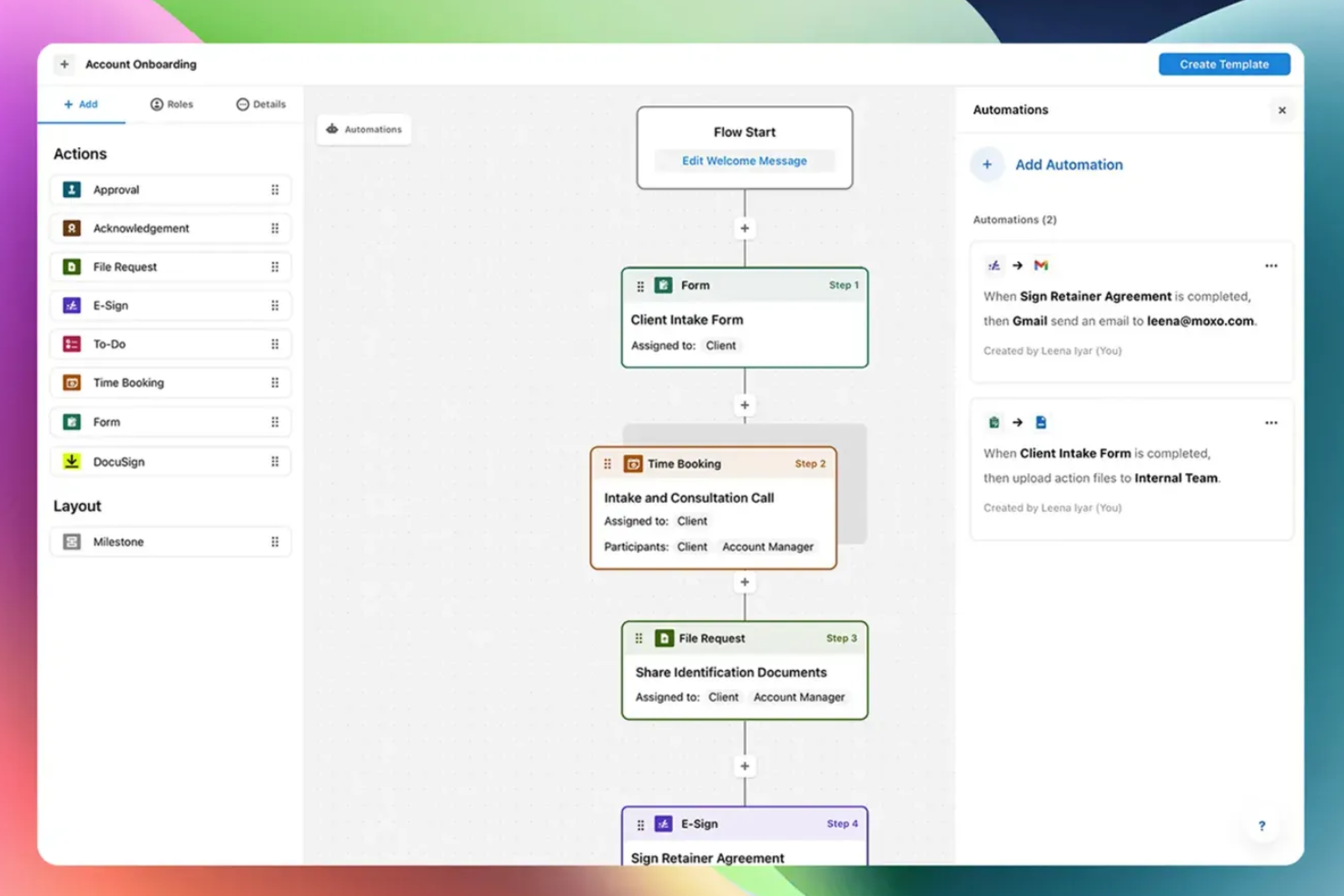
Moxo is an AI-powered workflow orchestration platform that combines visual workflow building, client-facing portals, AI agents, and built-in communication tools to manage multi-party business processes.
Who Is Moxo Best For?
Moxo is a strong fit for mid-size to enterprise teams in financial services, legal, or professional services that run high-touch, client-facing workflows with multiple external stakeholders.
Why I Picked Moxo
Moxo earns its spot on my shortlist because of how it handles external stakeholder participation in a live workflow. When a client needs to approve a document, submit a form, or sign a contract, they get a focused portal view showing exactly their action and the context around it, with no training required and no access to internal process logic. I also like that this portal experience is built directly into the workflow engine, so the moment a client completes their step, the next internal action triggers automatically, with no manual handoff needed.
Moxo Key Features
- AI agent framework: Deploy Assist, Automate, and Amplify agents to handle preparation, validation, and monitoring tasks around human decision points in a workflow.
- Visual workflow builder: Design multi-step processes with conditional branching, parallel paths, looping, and subflows using a drag-and-drop canvas.
- AI utilities: Apply built-in AI actions to extract, summarize, translate, or transcribe content at any step in a workflow.
- Audit logs: Access a timestamped record of every action taken across a workflow instance for compliance and accountability tracking.
Moxo Integrations
Moxo offers data sync connectors with Salesforce, HubSpot, Microsoft Dynamics, Zoho, Wealthbox, Redtail, Filevine, Global Relay, Smarsh, and Xero, along with integrations for tools like DocuSign, Jira, Slack, Stripe, QuickBooks, and file upload connections from Google Drive, Dropbox, Box, and OneDrive. It's available on Zapier and has a REST API and webhooks for custom integrations.
Pros and Cons
Pros:
- Drag-and-drop builder with reusable templates
- Built-in chat, video, and screen sharing
- White-label portals preserve your brand identity
Cons:
- No built-in annotation on documents
- No built-in timer for tracking task duration
Best for enterprise-grade no-code governance
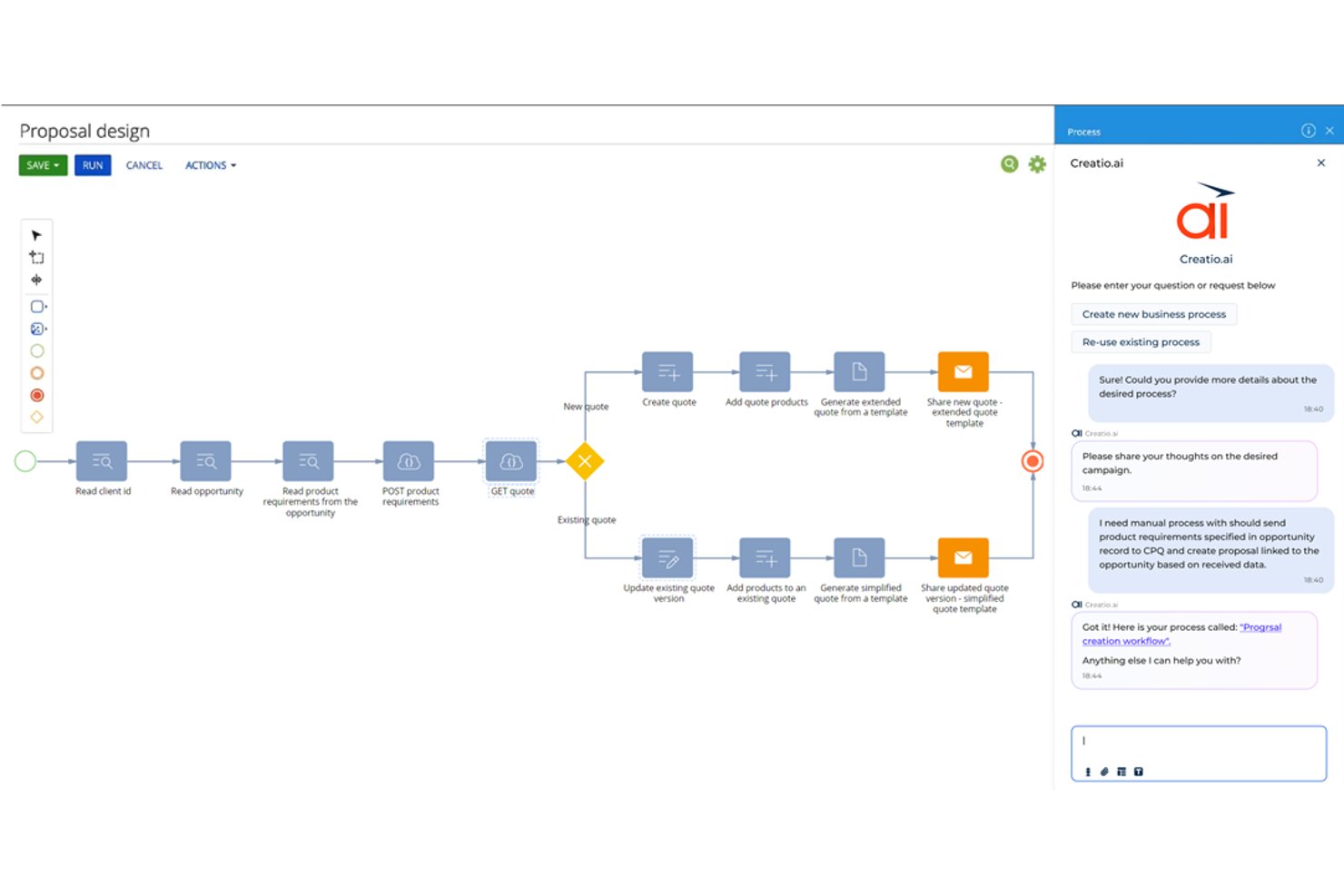
Creatio Studio is a no-code AI platform for building enterprise workflow automation, custom applications, and AI agents across cross-functional business processes.
Who Is Creatio Studio Best For?
Creatio Studio is a strong fit for mid-market and enterprise teams in regulated industries like banking, insurance, and the public sector that need customizable, governance-heavy workflow automation.
Why I Picked Creatio Studio
I picked Creatio Studio as one of the best because no-code governance is genuinely central to how it's built, not bolted on as an afterthought. It enforces GDPR, HIPAA, and SOC 2 compliance at the workflow level and automates internal compliance audits across IT, operational, and management processes. That means my team can build and deploy automated workflows that are already compliant by design, without running a separate audit cycle after the fact.
Creatio Studio Key Features
- Visual process designer: Drag-and-drop builder for designing complex multi-step workflows across teams.
- AI-driven app creation: Build applications from natural language prompts using generative AI tools.
- Composable component library: Access and reuse a wide range of prebuilt workflow building blocks.
- Marketplace integrations: Connect to a library of add-ons for ERP, CRM, ITSM, and collaboration systems.
Creatio Studio Integrations
Creatio Studio offers native integrations with Power BI, Microsoft 365, Twilio, WhatsApp, Zoom, Formstack, Avaya, and more. An API is available for custom integrations.
Pros and Cons
Pros:
- AI-powered process and app design capabilities
- Enterprise-grade governance and compliance controls
- Comprehensive workflow automation builder
Cons:
- Long implementation cycles for complex organizations
- Steep learning curve for beginners
New Product Updates from Creatio AI Studio
Creatio Studio Expands AI App-Building Capabilities
Creatio Studio adds expanded AI coding agents, AI-generated pivot tables, and built-in analytics for generated apps. These updates let users build more UI, logic, and reporting components from natural-language prompts. For more information, visit Creatio Studio’s official site.

Best for AI-powered enterprise workflows

For organizations seeking an AI-driven enterprise workflow solution, Screendragon offers an adaptable platform designed to transform complex operations. By integrating AI agents with no-code workflow customization, it caters to creative and marketing teams looking to automate mundane tasks and focus on impactful work. With features that enhance team alignment and decision-making, Screendragon addresses the challenge of managing intricate workflows efficiently.
Why I Picked Screendragon
I picked Screendragon for its unique ability to combine advanced automation with a no-code visual workflow builder, making it highly suitable for enterprise teams. The platform's AI agents automate repetitive tasks, allowing your team to concentrate on strategic initiatives. Additionally, its digital approval workflow management centralizes data and comments, simplifying the review process and ensuring compliance. These features make Screendragon an excellent choice for those looking to enhance productivity and governance in their workflow management.
Screendragon Key Features
In addition to its standout automation capabilities, Screendragon offers:
- Dynamic Custom Forms: Create and connect forms to automated steps, customizing fields, language, and layout to fit your team's needs.
- Secure Workflow System with Advanced Permission Controls: Architect workflows with sophisticated permissions to suit decision-making and compliance requirements.
- Workflow Analytics with Real-time Insight and Reports: Build custom automated reports and track status updates or milestones in real-time using personalized dashboards.
- Enterprise-Grade Security: Benefit from high data security standards that can be scaled to thousands of users globally.
Screendragon Integrations
Integrations include Microsoft Power BI, Slack, Microsoft Teams, HubSpot, Okta, Aprimo, SugarCRM, and Adobe. Additionally, Screendragon can connect with over 1,000 apps via Zapier.
Pros and Cons
Pros:
- Easy to adapt to different project sizes and organizational needs
- Automation features streamline processes and improve efficiency
- No-code platform allows users to create workflows without coding
Cons:
- Reporting and manual report creation can feel limited or complex
- The admin console and settings may be confusing for new users
New Product Updates from Screendragon
Screendragon Unveils New AI Hub
Screendragon introduced AI Hub, a new capability that lets teams build and manage AI agents directly within workflows. The update helps marketing teams automate tasks, maintain governance controls, and scale AI-driven operations more efficiently. For more information, visit Screendragon's official site.

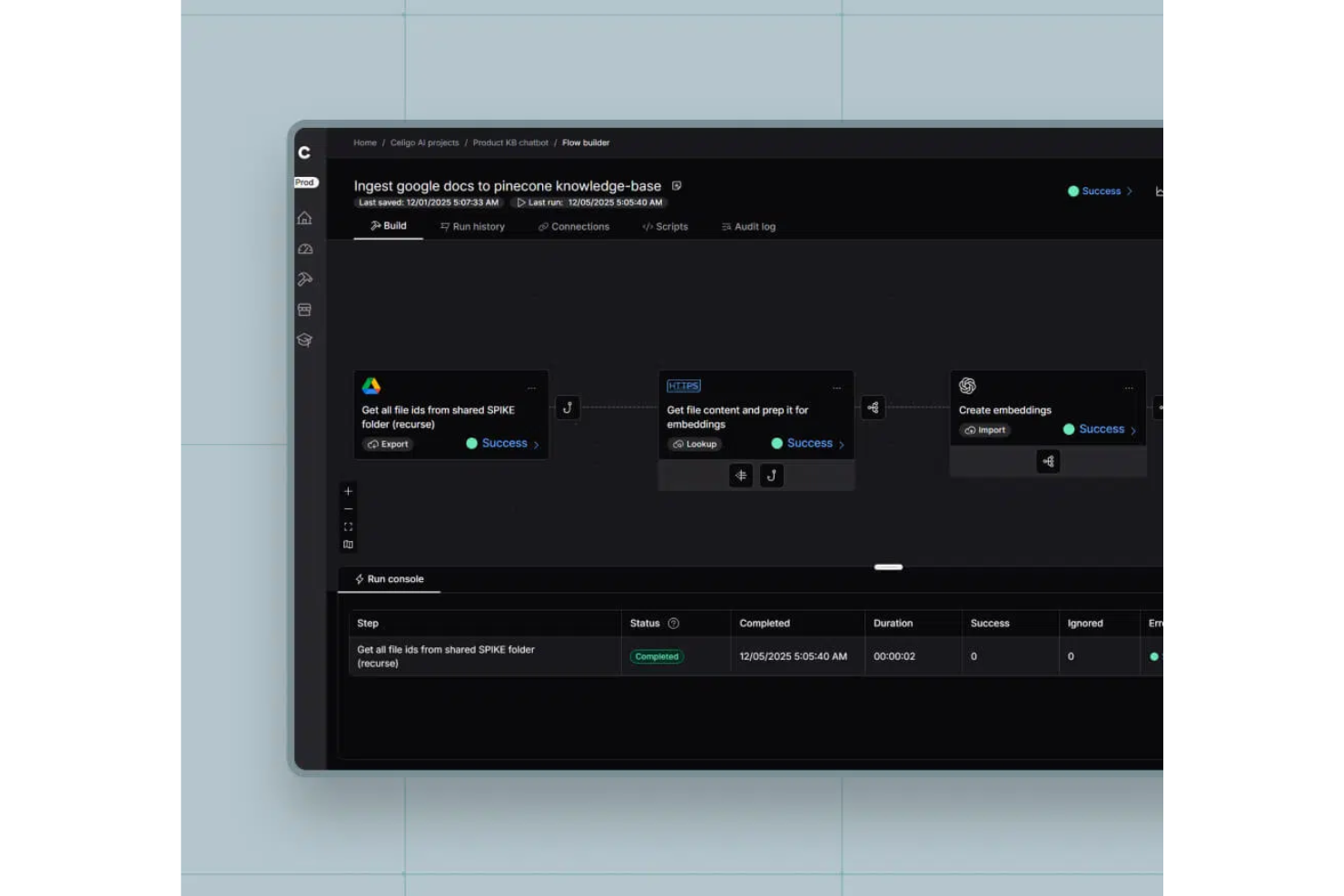
Celigo is an ai enterprise workflow software platform that lets you automate, integrate, and orchestrate business processes across cloud and on-premises applications using AI-driven tools and prebuilt connectors.
Who Is Celigo Best For?
Enterprise IT and operations teams who need to automate and connect workflows across a wide range of business applications.
Why I Picked Celigo
I picked Celigo as one of the best because its library of 1,000+ prebuilt app connectors lets my team quickly connect enterprise systems without custom development. I use these connectors to automate workflows between ERP, CRM, and ecommerce platforms. In practice, that means we can launch new integrations in days instead of weeks, even when working with legacy or niche applications.
Celigo Key Features
- AI-guided flow builder: Build and optimize workflows using AI-driven recommendations and automation.
- Error management dashboard: Monitor, troubleshoot, and resolve integration errors from a centralized interface.
- Role-based access controls: Set granular permissions for users and teams to manage workflow security.
- Workflow analytics: Track performance metrics and process efficiency with built-in analytics and reporting tools.
Celigo Integrations
Celigo offers 1,000+ native integrations, including Salesforce, NetSuite, Shopify, ServiceNow, Zendesk, Microsoft 365, Google Workspace, Amazon Redshift, Snowflake, Jira, and Slack. An API is available for custom integrations.
Pros and Cons
Pros:
- Supports multi-environment deployment and versioning
- Visual process mapping with real-time suggestions
- Built-in compliance controls for regulated industries
Cons:
- Limited offline workflow management options
- Initial setup can be complex for large orgs
New Product Updates from Celigo
Celigo Adds SuiteTax and Variant Publishing for Shopify–NetSuite
Celigo adds NetSuite SuiteTax support and variant-level sales channel publishing to its Shopify–NetSuite integration. These updates improve tax handling and give merchants more control over how product variants are published. For more information, visit Celigo’s official site.
 .
.
TrailHQ
Best for document processing

Nanonets is an AI-driven document processing tool designed for businesses that need to automate data extraction from documents. It primarily serves industries like finance, logistics, and healthcare, where handling large volumes of documents is common.
Why I picked Nanonets: Nanonets excels in document processing, providing AI models that learn and adapt to your specific needs. You can automate data extraction from invoices, receipts, and other documents with ease. The platform allows you to train custom models, ensuring accuracy and efficiency. Its scalability makes it suitable for businesses of all sizes, handling various document types effectively.
Standout features & integrations:
Features include customizable AI models that adapt to your documents, automated data extraction to save time, and scalability to handle varying document volumes. You can also benefit from its user-friendly interface that simplifies the setup process.
Integrations include Salesforce, QuickBooks, Google Drive, Dropbox, Slack, Microsoft Dynamics 365, SAP, Zoho CRM, HubSpot, and Box.
Pros and Cons
Pros:
- Enterprise SLAs with priority support
- SOC2-compliant secure infrastructure
- Granular permission and role-based access control
Cons:
- Limited controls for data file processing
- Training time varies by system performance

n8n
Best for custom workflows

n8n is an open-source workflow automation tool that allows users to create custom workflows without complex coding. It's popular among developers and tech-savvy users who want to automate repetitive tasks and data processes.
Why I picked n8n: n8n is perfect for custom workflows, offering a flexible and extendable platform. The visual workflow editor lets your team design processes tailored to your needs. With its open-source nature, you can modify and expand its capabilities to fit your unique requirements. The platform also supports complex logic, enabling sophisticated automation scenarios.
Standout features & integrations:
Features include a visual workflow editor to simplify process design, support for complex logic to create advanced automations, and the ability to run on your own server for full control. You also get access to a vibrant community that contributes to continuous improvements.
Integrations include Slack, Google Sheets, GitHub, Trello, Airtable, Dropbox, and Stripe.
Pros and Cons
Pros:
- Fully on-premise with version control support
- Advanced security with SSO, LDAP support, and encryption
- User-friendly interface and intuitive workflow
Cons:
- Requires coding for advanced tasks
- Costly execution-based pricing model
Domo
Best for data visualization

Domo is a cloud-based business intelligence platform that caters to data-driven enterprises seeking to visualize and analyze data effectively. Its main users include business leaders and analysts who need to make informed decisions quickly.
Why I picked Domo: Domo excels in data visualization, offering interactive dashboards that give your team real-time insights. Its drag-and-drop interface makes it easy to create custom visualizations without needing extensive technical skills. Domo's ability to handle large datasets allows your team to view trends and patterns effortlessly. The platform also includes built-in data governance to ensure data quality and security.
Standout features & integrations:
Features include interactive dashboards for real-time insights, drag-and-drop tools for custom visualizations, and built-in data governance to maintain data quality. You can also access mobile capabilities to view dashboards on the go.
Integrations include Salesforce, Microsoft 365, Slack, Google Analytics, HubSpot, Shopify, Zendesk, QuickBooks, Marketo, and Facebook.
Pros and Cons
Pros:
- Real-time data updates
- Handles large datasets
- Customizable dashboards
Cons:
- Requires consistent data management
- May require technical support

Box
Best for secure file sharing

Box is a cloud-based content management and collaboration platform designed for businesses that need secure file sharing and management. Its primary users include enterprises that prioritize data protection and workflow automation.
Why I picked Box: Box offers a secure environment for file sharing with advanced security measures like ransomware protection. It stands out with its AI-driven content management and no-code applications, enabling you to automate workflows. The platform's emphasis on security is ideal for industries requiring strict data compliance. Box also provides intelligent insights to manage your data effectively.
Standout features & integrations:
Features include advanced security measures to protect your data, AI-driven content management to automate your processes, and no-code applications for easy workflow customization.
Integrations include Microsoft 365, Google Workspace, Slack, Salesforce, IBM, Okta, Adobe, Zoom, Oracle, and ServiceNow.
Pros and Cons
Pros:
- No-code workflow automation
- AI-driven content insights
- Strong data security features
Cons:
- Document collaboration tools are insufficient
- Storage limitations reduce efficiency


Zapier is an AI orchestration platform that allows enterprise teams to connect thousands of apps and build multi-step automated workflows without code. It's used by teams across marketing, sales, RevOps, IT, HR, and operations to centralize workflows and reduce manual work across large, distributed tech stacks.
Why I picked Zapier: Zapier stands out for its deep automation capabilities combined with an accessible, no-code experience. Teams can build workflows using natural language with Zapier Copilot, add AI-powered steps, and manage automations at scale with admin controls, permissions, and audit logs. With thousands of app integrations, Zapier is especially strong for organizations with complex, multi-system environments.
Standout features & integrations:
Features include scalable, multi-step workflows with logic and AI actions, supported by built-in data tools like Zapier Tables and Forms. Enterprise plans add centralized administration, access controls, and security features to support large teams.
Integrations include Salesforce, HubSpot, Slack, Google Sheets, Gmail, Stripe, Airtable, ServiceNow, Shopify, OpenAI, and more.
Pros and Cons
Pros:
- Enterprise-scale automation with no-code and AI-first tools
- Extensive app and AI integration ecosystem
- Strong security, governance, and admin controls
Cons:
- Free plan limited to two-step workflows
- No mobile app
Annen AI-programvare for arbeidsflyt i virksomheter
Her er noen flere alternativer innen AI-programvare for arbeidsflyt i virksomheter som ikke kom med på kortlisten min, men som likevel er verdt å se nærmere på:
- Appian
For low-code development
- Jitterbit
For API integration
- Gumloop
For collaborative planning
- Atomicwork
For small teams
- Flowable
For BPM solutions
- AutoKitteh
For automated testing
- Miro
For AI-enhanced virtual collaboration
- Workato
For enterprise integration AI support
- Apache Airflow
For AI-management for data pipelines
- Moveworks
For IT service AI automation
- Sana
For AI-driven personalized learning
- Kognitos
For business process AI automation


How I Evaluate AI Enterprise Workflow Software
Every tool here has to deliver AI that actually helps cross-functional delivery teams—not just a chatbot layered onto a task board. I evaluate in two layers: core functionality a tool must offer to make the list, and differentiating factors that set one vendor apart from another.
Core Functionality (Table Stakes For This List)
When I'm selecting tools for my list, I rank each one on a scale from 0 (does not offer the functionality) to 5 (excels in this area) for each core functionality listed below. Then, I calculate the tool's total score into a percentage. Each tool needs to achieve a minimum total score of 65% to be considered for inclusion.
- AI-Driven Workflow Automation: I look for tools that go beyond simple if/then rules—like auto-routing approval requests, reassigning tasks when blockers arise, or triggering downstream handoffs between teams.
- Cross-Functional Process Orchestration: The tool should coordinate workflows across departments, such as syncing design reviews with engineering sprints and stakeholder sign-offs in one unified flow.
- Predictive Project Analytics: I evaluate whether the platform can forecast schedule risks, flag resource conflicts, or surface at-risk milestones using patterns from past project data.
- Generative AI Capabilities: Tools earn higher marks when their AI drafts status updates, summarizes meeting notes, or answers natural-language questions about project health and progress.
- Enterprise System Integrations: I check for native, bidirectional connections with tools teams already rely on—think Jira, Salesforce, ServiceNow, SAP, or Slack—so workflows span the full tech stack.
- Governance and Security Controls: Role-based access, audit trails, SSO, and compliance certifications like SOC 2 and ISO 27001 all factor into how well a tool fits enterprise requirements.
Once I have a list of tools that meet this criteria, I consider what sets each platform apart.
Differentiating Factors (What Sets Vendors Apart)
Here's how I compare and contrast different vendors:
Standout Features
I look for no-code AI builders that let operations leads design workflows visually, without waiting on engineering. Autonomous AI agents add another layer—tools where agents can triage incoming requests, assign tasks, and escalate blockers on their own save teams real time. Process mining capabilities also stand out, especially when the platform can analyze existing workflows and pinpoint where delays or redundancies live before you start automating.
Beyond Features
AI transparency matters a lot in this space. I check whether a platform explains why it made a recommendation or flagged a risk, so project leads can justify decisions to stakeholders. Pricing predictability is another big factor—some vendors charge per workflow execution, which can spike costs fast when you're running hundreds of automated processes daily. I also evaluate how quickly teams can go live, looking for pre-built templates and guided onboarding that shrink the gap between purchase and first production workflow.
Slik velger du AI-programvare for arbeidsflyt i virksomheter
Det er lett å gå seg vill i lange funksjonslister og komplekse prisstrukturer. For å hjelpe deg med å holde fokus mens du går gjennom den unike prosessen din for valg av programvare, får du her en sjekkliste over faktorer du bør ha i tankene:
| Faktor | Hva bør vurderes |
|---|---|
| Skalerbarhet | Kan programvaren vokse med virksomheten din? Se etter alternativer som støtter et økende antall brukere og prosesser uten problemer. Vurder om verktøyet kan håndtere økt arbeidsmengde, eller om det vil kreve kostbare oppgraderinger. |
| Integrasjoner | Integreres det med de eksisterende verktøyene dine? Kontroller kompatibiliteten med de nåværende systemene dine, for eksempel CRM-, ERP- eller kommunikasjonsplattformer. Unngå verktøy som krever omfattende nødløsninger eller ikke synkroniseres med hovedprogramvaren din. |
| Tilpasningsmuligheter | Hvor fleksibelt er verktøyet for behovene dine? Vurder om du kan tilpasse arbeidsflyter og kontrollpaneler slik at de passer til prosessene dine. Vær oppmerksom på overdrevent rigide systemer som tvinger deg inn i forhåndsdefinerte strukturer. |
| Brukervennlighet | Er grensesnittet brukervennlig for teamet ditt? Test om ikke-tekniske brukere enkelt kan navigere og utføre oppgaver uten frustrasjon. Et komplekst grensesnitt kan føre til lav brukeradopsjon. |
| Implementering og opplæring | Hvor lang tid vil det ta å komme i gang? Se etter leverandører som tilbyr omfattende støtte ved oppstart, inkludert opplæringsmateriell og hjelp med konfigurering. Unngå verktøy med lange og komplekse implementeringsprosesser. |
| Kostnad | Passer prisen inn i budsjettet ditt? Sammenlign kostnadene med konkurrentenes, og se etter skjulte gebyrer. Sørg for at funksjonene du trenger, er inkludert i grunnprisen, og vurder den potensielle avkastningen på investeringen. |
| Sikkerhetstiltak | Er dataene og prosessene dine sikre? Kontroller at programvaren overholder bransjens sikkerhetsstandarder og tilbyr funksjoner som kryptering og tilgangskontroller. Vurder leverandørens historikk når det gjelder databeskyttelse. |
| Etterlevelseskrav | Oppfyller verktøyet kravene til etterlevelse i bransjen din? Se etter funksjoner som støtter lovpålagte krav, for eksempel GDPR eller HIPAA. Manglende etterlevelse kan føre til bøter og skade på omdømmet ditt. |
Hva er AI-programvare for arbeidsflyter i virksomheter?
AI-programvare for arbeidsflyter i virksomheter er et verktøy som er utviklet for å automatisere og optimalisere forretningsprosesser i en organisasjon. Det brukes vanligvis av fagpersoner som prosjektledere, IT-spesialister og driftsteam for å forbedre effektiviteten og produktiviteten. Funksjoner for automatisering, dataintegrasjon og sanntidsanalyse bidrar til å håndtere arbeidsflyter, redusere manuelle oppgaver og sikre nøyaktig dataflyt. Samlet sett gir disse verktøyene betydelig verdi ved å forbedre driftseffektiviteten og støtte informerte beslutninger.
Funksjoner
Når du velger AI-programvare for arbeidsflyter i virksomheter, bør du se etter følgende nøkkelfunksjoner:
- Automatisering: Automatiserer gjentakende oppgaver for å spare tid og redusere menneskelige feil.
- Dataintegrasjon: Kobler seg til ulike datakilder for å sikre optimal dataflyt på tvers av systemer.
- Sanntidsanalyse: Gir innsikt og analyser som bidrar til beslutningstaking og resultatoppfølging.
- Tilpassbare arbeidsflyter: Gjør det mulig å tilpasse prosesser til spesifikke forretningsbehov og mål.
- Brukervennlig grensesnitt: Sikrer at alle teammedlemmer enkelt kan bruke løsningen, og reduserer læringskurven.
- Sikkerhetsfunksjoner: Beskytter sensitive data med kryptering og tilgangskontroller.
- Støtte for etterlevelse: Bidrar til å oppfylle bransjeregler og standarder, og reduserer risikoen.
- Skalerbarhet: Tilpasser seg virksomhetens vekst og støtter økt arbeidsmengde og flere brukere.
- Samarbeidsverktøy: Tilrettelegger for kommunikasjon og samarbeid på tvers av avdelinger.
- Mobil tilgang: Gjør det mulig å administrere arbeidsflyter mens du er på farten, og sikrer fleksibilitet og rask respons.
Fordeler
Implementering av AI-programvare for arbeidsflyter i virksomheter gir flere fordeler for teamet og virksomheten din. Her er noen av fordelene du kan se frem til:
- Økt effektivitet: Automatiserer gjentakende oppgaver, slik at teamet kan konsentrere seg om aktiviteter med høyere verdi.
- Bedre datanøyaktighet: Integrerer data på tvers av systemer, reduserer feil og sikrer en konsekvent informasjonsflyt.
- Bedre beslutningstaking: Tilbyr sanntidsanalyser og innsikt som støtter informerte forretningsbeslutninger.
- Større fleksibilitet: Tilpassbare arbeidsflyter og skalerbare løsninger tilpasser seg virksomhetens behov og vekst.
- Bedre etterlevelse: Støtter lovpålagte krav med innebygde funksjoner for etterlevelse, slik at risikoen reduseres.
- Bedre samarbeid: Tilbyr verktøy som legger til rette for samarbeid og kommunikasjon på tvers av avdelinger.
- Kostnadsbesparelser: Reduserer manuelt arbeid og feil, noe som fører til lavere driftskostnader over tid.
Kostnader og priser for AI-programvare for arbeidsflyter i virksomheter
Ved valg av AI-basert arbeidsflytprogramvare for virksomheter er det viktig å forstå de ulike prismodellene og abonnementene som er tilgjengelige. Kostnadene varierer basert på funksjoner, teamstørrelse, tillegg og mer. Tabellen nedenfor oppsummerer vanlige abonnementer, gjennomsnittsprisene deres og typiske funksjoner som er inkludert i løsninger for AI-basert arbeidsflytprogramvare for virksomheter:
Sammenligningstabell for AI-basert arbeidsflytprogramvare for virksomheter
| Abonnementstype | Gjennomsnittspris | Vanlige funksjoner |
|---|---|---|
| Gratisabonnement | $0 | Grunnleggende automatisering av oppgaver, begrensede integrasjoner og brukerstøtte fra fellesskapet. |
| Personlig abonnement | $15-$2,347/bruker/måned | Automatisering av oppgaver, grunnleggende analyse, integrasjon med populære apper og begrensede tilpasningsmuligheter. |
| Forretningsabonnement | $244-$3293/bruker/måned | Avansert automatisering, forbedret analyse, flere integrasjoner og tilpassede arbeidsflyter. |
| Virksomhetsabonnement | $50-$15,000/bruker/måned | Full automatiseringspakke, sanntidsanalyse, ubegrensede integrasjoner, avanserte sikkerhetsfunksjoner og dedikert brukerstøtte. |
Vanlige spørsmål om AI-basert arbeidsflytprogramvare for virksomheter
Her er noen svar på vanlige spørsmål om AI-basert arbeidsflytprogramvare for virksomheter:
Hva er forskjellen mellom skybasert programvare og lokal programvare?
Skybasert programvare driftes på leverandørens servere og brukes på nettet, mens lokal programvare installeres på bedriftens servere. Skybaserte løsninger gir enklere tilgang og skalerbarhet, mens lokale løsninger gir bedre kontroll over data og sikkerhet. Ta hensyn til teamets behov og IT-muligheter når du tar avgjørelsen.
Hvordan sikrer jeg datasikkerheten med arbeidsflytprogramvare?
Ja, datasikkerhet er avgjørende. Se etter programvare som tilbyr kryptering, tilgangskontroller og samsvar med bransjestandarder som GDPR eller HIPAA. Gå alltid gjennom leverandørens sikkerhetstiltak, og vurder å gjennomføre en sikkerhetsrevisjon for å sikre at de oppfyller organisasjonens krav.
Kan arbeidsflytprogramvare tilpasses virksomhetens behov?
Ja, mange løsninger for arbeidsflytprogramvare tilbyr funksjoner som kan tilpasses. Du kan ofte tilpasse arbeidsflyter, dashbord og rapporter slik at de samsvarer med de spesifikke prosessene dine. Se etter verktøy med fleksible tilpasningsmuligheter, og vurder teamets evne til å administrere disse tilpasningene uten ekstern hjelp.
Hvor lang tid tar det å implementere arbeidsflytprogramvare?
Implementeringstiden varierer ut fra programvarens kompleksitet og omfang. Noen verktøy kan settes opp raskt med minimale tilpasninger, mens andre kan kreve uker eller måneder for full integrasjon. Planlegg opplærings- og testfaser, og sett av ressurser for å sikre en smidig overgang.
Hva skjer videre:
Hvis du undersøker AI-basert arbeidsflytprogramvare for virksomheter, kan du kontakte en SoftwareSelect-rådgiver for gratis anbefalinger.
Du fyller ut et skjema og tar en kort samtale der de går gjennom behovene dine i detalj. Deretter får du en kortliste over programvare du kan vurdere. De støtter deg også gjennom hele kjøpsprosessen, inkludert prisforhandlinger.