

10 beste programvarer for forvaltning av digitale ressurser i markedsføring 2026

Beste programvare for administrasjon av digitale ressurser for markedsføring – kortliste


Programvare for administrasjon av digitale ressurser (DAM) gjør det enklere å holde innholdet organisert og tilgjengelig, noe som er viktig for å opprettholde en konsekvent merkevareprofil og effektivisere markedsføringsprosessene.
Det kan imidlertid være utfordrende å finne den riktige DAM-løsningen for teamet ditt, særlig når det finnes så mange alternativer på markedet. For å hjelpe deg med å finne den beste løsningen brukte jeg erfaringen min med prosjektstyringsprogramvare til å finne og vurdere ulike alternativer.
Enten du driver en liten bedrift eller en stor virksomhet, vil min omfattende gjennomgang hjelpe deg med å finne det ideelle DAM-verktøyet for å effektivisere markedsføringsarbeidet.
Why Trust Our Software Recommendations
Our team has been testing and reviewing software since 2012. As project managers ourselves, we know how difficult—and important—it is to choose the right software.
For this guide, we evaluated tools using hands-on testing and independent research, scoring tools using our selection criteria. We also draw on insights from industry thought leaders and practicing project management experts.
Our reviews reflect our human editorial judgment, not a sales pitch.
Expert reviewers:
Sammenligningstabell: Programvare for administrasjon av digitale ressurser for markedsføring
Denne sammenligningstabellen oppsummerer prisdetaljene for mine beste utvalgte programmer for administrasjon av digitale ressurser for markedsføring.
| Tool | Best For | Trial Info | Price | ||
|---|---|---|---|---|---|
| 1 | Best for AI-driven metadata tagging | Free demo available | Pricing upon request | Website | |
| 2 | Best for AI-powered asset discovery | Free demo available | Pricing upon request | Website | |
| 3 | Best for sharing digital assets | Free demo available | Pricing upon request | Website | |
| 4 | Best for unlimited user access | Free plan available | From $99/month | Website | |
| 5 | Best for AI-powered visual search and tagging | 30-day free trial available | From $250/month (billed annually) | Website | |
| 6 | Best for content workflows | Free demo available | Pricing upon request | Website | |
| 7 | Best for cost-effective DAM | 30-day free trial | From $29/month | Website | |
| 8 | Best for AI asset optimization | 14-day free trial | From $213/month | Website | |
| 9 | Best for scalable DAM | Free trial + demo available | From $300/user/month | Website | |
| 10 | Best for brand asset optimization | Free demo available | Pricing upon request | Website |
Anmeldelser av den beste programvaren for administrasjon av digitale ressurser for markedsføring
I markedsføringsbransjen er det viktig å ha en skalerbar programvare for administrasjon av digitale ressurser som kan bidra til å effektivisere arbeidsflyter og forbedre samarbeidet. Nedenfor finner du mine anmeldelser av den beste DAM-programvaren for markedsføring, inkludert fordeler og ulemper, priser, funksjoner og integrasjoner for hver løsning.

Papirfly
Best for AI-driven metadata tagging
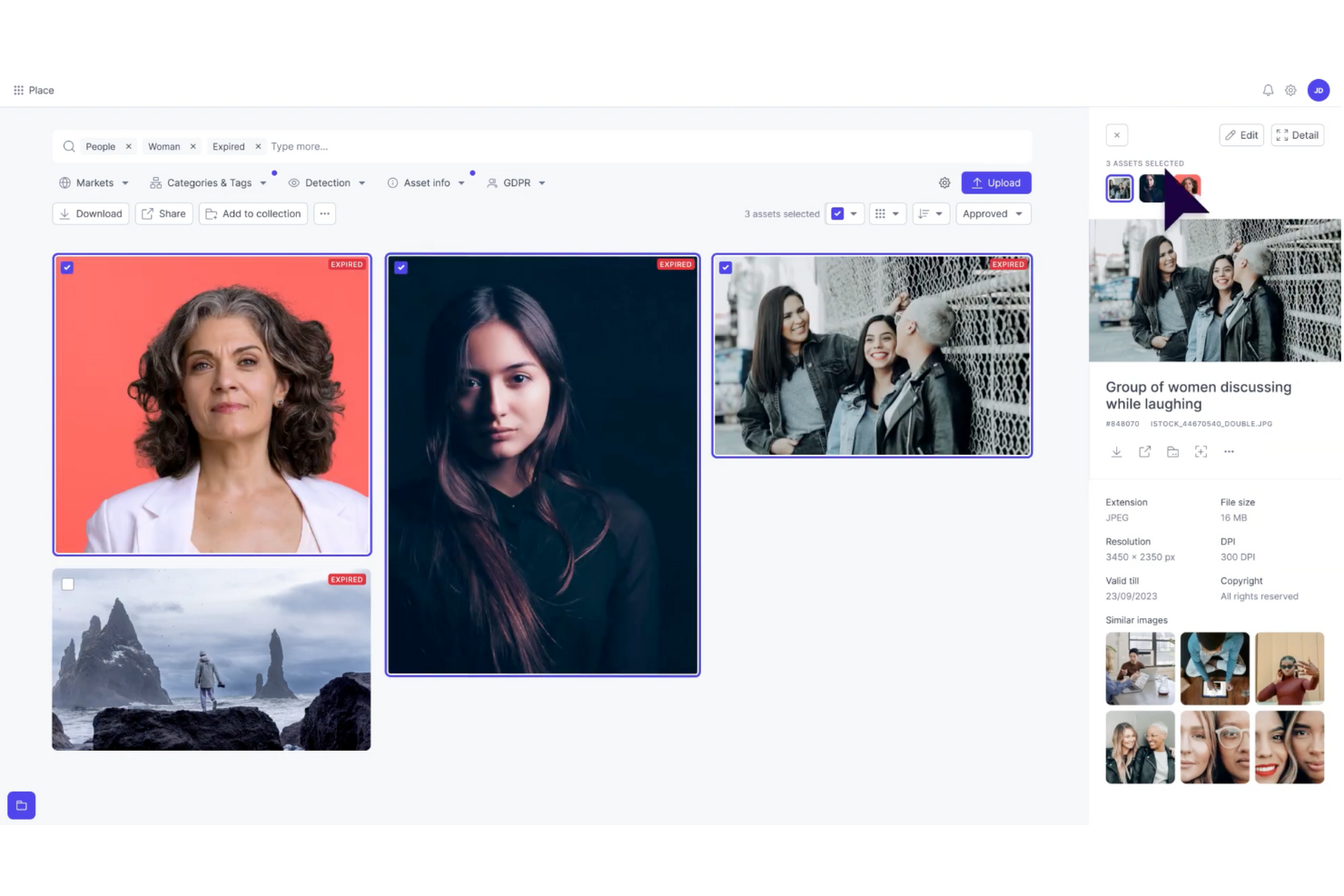
Papirfly is a digital asset management (DAM) solution built for marketing teams that need to organize and scale their content efficiently. Its AI-driven metadata tagging helps you quickly sort, store, and retrieve assets, reducing time spent searching for files. If your team struggles with scattered assets or inconsistent branding, Papirfly’s centralized platform streamlines workflows and supports brand compliance across all channels, making it especially valuable for large or multi-market organizations.
Why I Picked Papirfly
I picked Papirfly for its unique ability to enhance brand consistency through its customizable brand portals and AI-driven metadata tagging. These features ensure that your team can quickly access and utilize the right assets while maintaining brand compliance. Additionally, Papirfly's workflow automation capabilities can significantly accelerate your marketing processes, allowing your team to focus more on creative tasks rather than administrative ones.
Papirfly Key Features
In addition to AI-driven metadata tagging, Papirfly offers:
- Templated Content Creation: Provides pre-designed templates that help your team create on-brand content quickly and easily.
- Campaign Management Tools: These tools allow you to plan, execute, and manage marketing campaigns within the same platform.
- Compliance Management: Ensures that all digital assets adhere to legal and brand guidelines, reducing the risk of unauthorized usage.
- Analytics and Reporting: Offers insights into asset performance and usage, enabling data-driven marketing decisions.
Papirfly Integrations
Integrations include Adobe Creative Cloud, Microsoft Office 365, Salesforce, HubSpot, WordPress, Shopify, Google Analytics, Mailchimp, Slack, and Canva. Native integrations are not currently listed by Papirfly, but these tools facilitate seamless access and management of digital assets.
Pros and Cons
Pros:
- Centralized library helps maintain brand consistency
- Templated content creation speeds up marketing materials production
- AI-driven metadata tagging improves asset searchability
Cons:
- Limited customization options for specific industry needs
- Users report occasional slow performance
New Product Updates from Papirfly

Papirfly Point Adds Brand Assistant Admin Controls
Papirfly now lets admins configure Brand Assistant directly in Point, including enabling the assistant, accepting AI terms, tuning conversation style, and managing knowledge sources and documents. For more information, visit Papirfly's official site.
 .
.
Best for AI-powered asset discovery
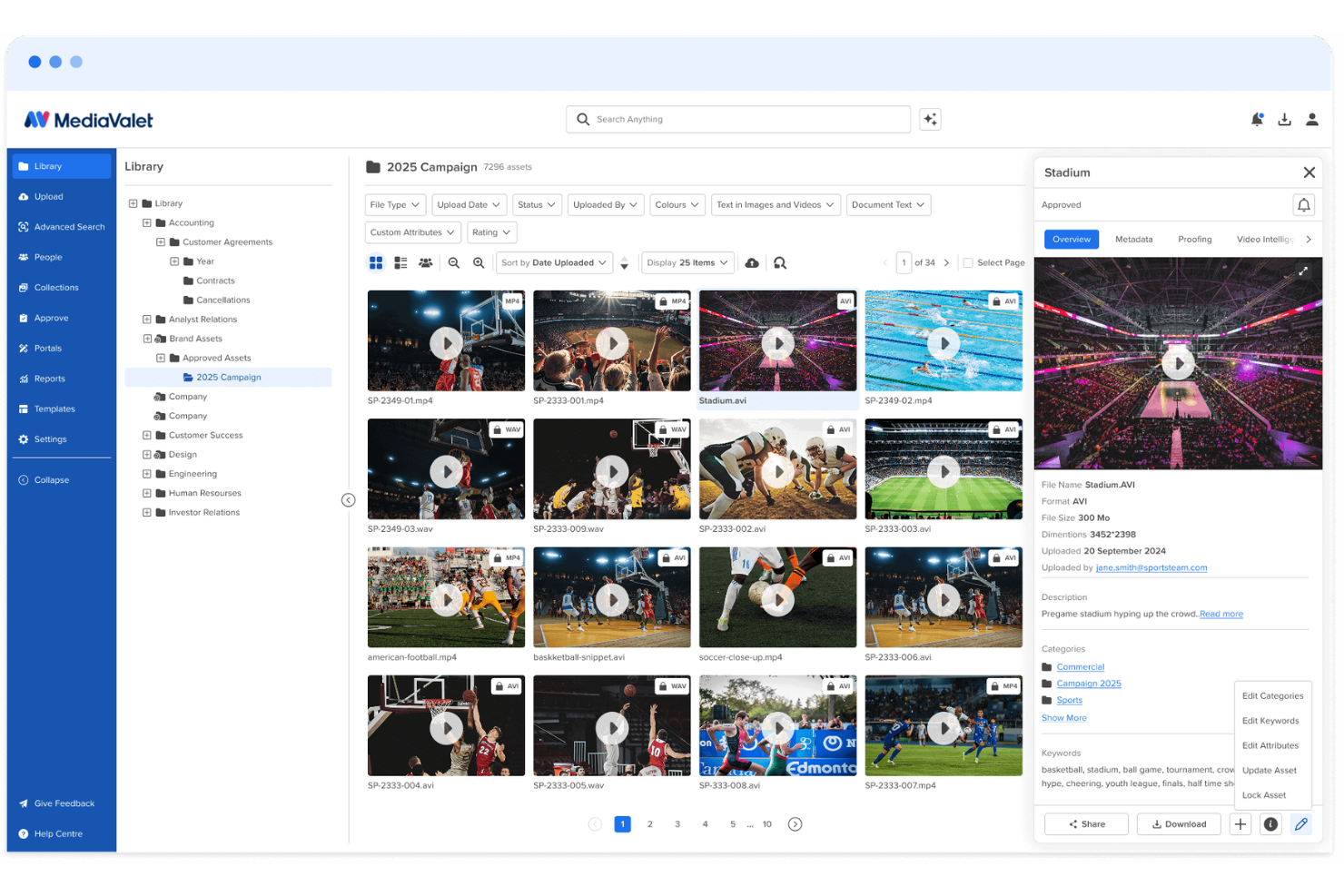
MediaValet is a digital asset management platform for marketing and creative teams that need to organize large libraries of images, videos, documents, and brand assets. Its AI-powered search, auto-tagging, branded portals, and asset reporting help teams find approved content faster, reduce duplicate work, and keep brand materials consistent across campaigns.
Who Is MediaValet Best For?
MediaValet is a good fit for enterprise marketing and creative teams that manage large volumes of digital content across multiple brands, regions, or channels.
Why I Picked MediaValet
I picked MediaValet because it helps marketing teams find approved assets faster through AI-powered asset discovery. Its auto-tagging, natural language search, object recognition, and face recognition make it easier for your team to locate images, videos, and brand files without digging through folders manually. I also like that MediaValet supports video search, so teams can find specific clips, frames, and spoken words inside media files. This makes it a good fit for marketing and creative teams managing large asset libraries across campaigns, channels, and departments.
MediaValet Key Features
Beyond asset discovery, MediaValet includes features that help marketing teams share, govern, and measure brand content:
- Experience Portals: Create branded portals to curate and share approved asset collections with internal teams, partners, or external stakeholders.
- CDN linking: Distribute assets through CDN links so teams can publish and update media across channels without manually replacing files.
- Usage reporting: Track asset views, downloads, user activity, and content performance to understand how your library is being used.
- Creative proofing: Review, comment on, and approve creative files through built-in proofing workflows before final assets are added to the library.
MediaValet Integrations
Integrations include Adobe Creative Cloud, Canva, Marq, Asana, monday.com, Microsoft 365, Contentful, Drupal, WordPress, and Salesforce Sales Cloud.
Pros and Cons
Pros:
- Usage reports show views, downloads, and asset engagement
- Branded portals simplify approved asset sharing
- AI tagging improves asset search across large libraries
Cons:
- Minor bugs can delay saved changes or affect buttons
- Search accuracy may need improvement for some users

Pics.io
Best for sharing digital assets

Pics.io is a digital asset management software that offers a wide range of features to help with marketing asset management.
Why I picked Pics.io: I chose Pics.io because of its capabilities in sharing digital assets. For marketing teams, Pics.io offers a robust file-sharing system that allows users to publish and share individual or bulk assets, showcase work with pre-made templates, and use an interactive proofing template for external collaboration. The platform's advanced metadata tagging and search functionalities also enable marketers to quickly locate and utilize the exact files they need.
Standout features & integrations:
Features include unlimited digital asset storage that allows users to store digital assets without restrictions on file types or sizes. It also offers inboxes for direct communication with external stakeholders, version control to track changes on assets, and AI capabilities such as face recognition and speech-to-text transcription.
Integrations include Google Drive, Amazon S3, Slack, Zapier, Adobe Photoshop, Adobe Premiere Pro, Shopify, Salesforce, Trello, Figma, Wrike, WordPress, monday.com, and more.
Pros and Cons
Pros:
- Dynamic AI-based tagging
- Robust collaboration features
- Search function to quickly locate assets
Cons:
- Larger files may experience slower loading times
- Web views and asset inbox could be more customizable
New Product Updates from Pics.io
Pics.io Adds AVIF File Support
Pics.io now supports AVIF files, expanding the image formats you can upload and manage in the platform. This gives teams more flexibility when working with modern image assets. For more information, visit Pics.io’s official site.
 .
.
Best for unlimited user access
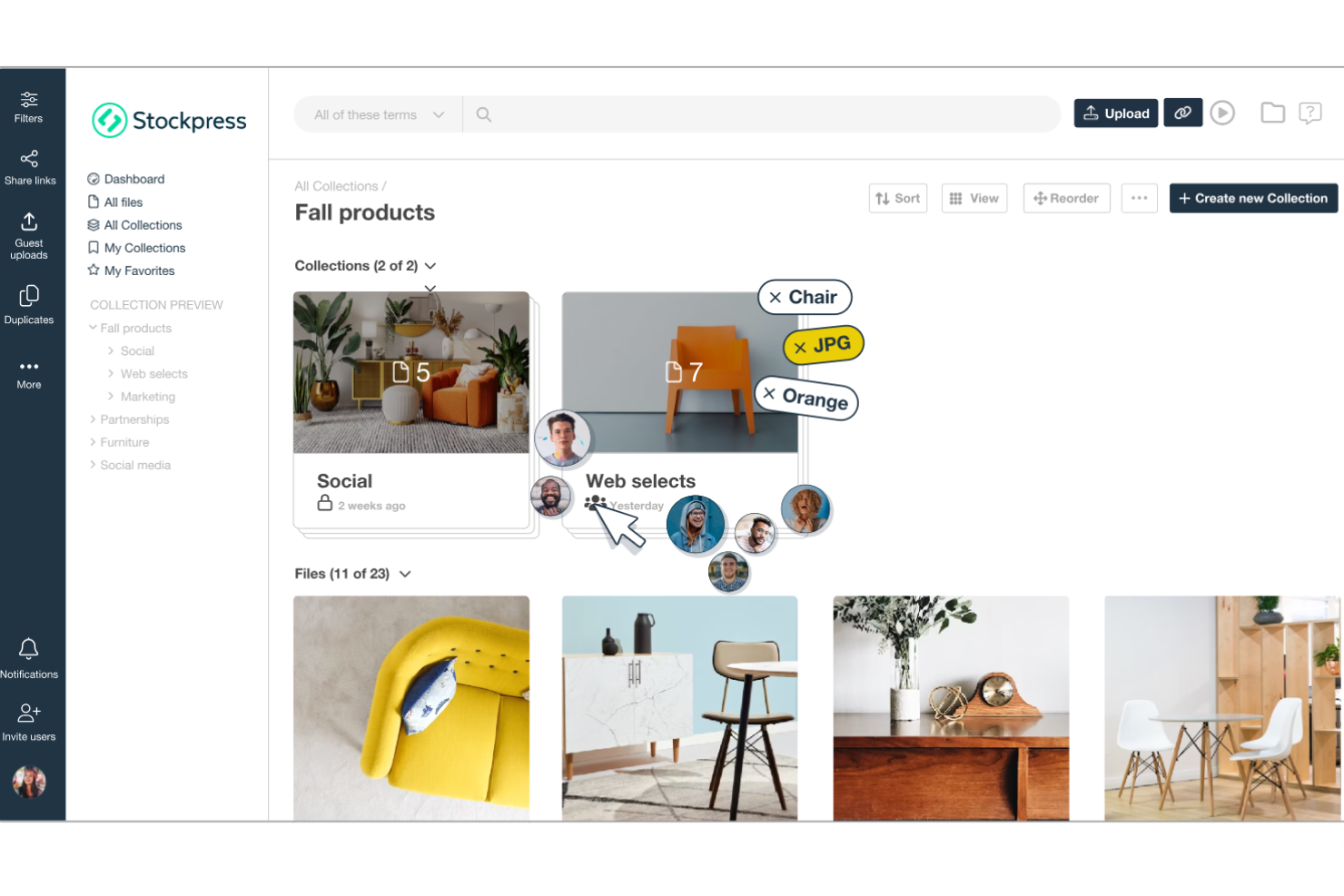
Stockpress is a digital asset management (DAM) platform designed to help teams organize, find, collaborate on, and share digital files within a single shared workspace.
Why I picked Stockpress: One thing I like about Stockpress is its AI-powered tagging system. This tool automatically assigns relevant tags to your files, enhancing searchability and saving your team from the tedious task of manual tagging. Stockpress also stands out with its unlimited user access model and customizable roles. This means that your team can work with internal and external collaborators without worrying about additional fees.
Standout features & integrations:
Features include version control, which allows your team to manage multiple iterations of a file. Additionally, the platform offers customizable share links that let you control who accesses your files and set expiration dates for added security. It also offers duplicate detection to help maintain an organized library by identifying and removing redundant files.
Integrations include Google Drive, Dropbox, Box, Adobe Photoshop, Slack, Mailchimp, Okta, Webflow, Klaviyo, Adobe Illustrator, Adobe InDesign, and Canva.
Pros and Cons
Pros:
- Robust security features for safe file sharing
- Efficient search functionality with AI tagging
- Unlimited users without additional costs
Cons:
- Initial setup may require time to organize existing assets
- Limited offline access
Best for AI-powered visual search and tagging
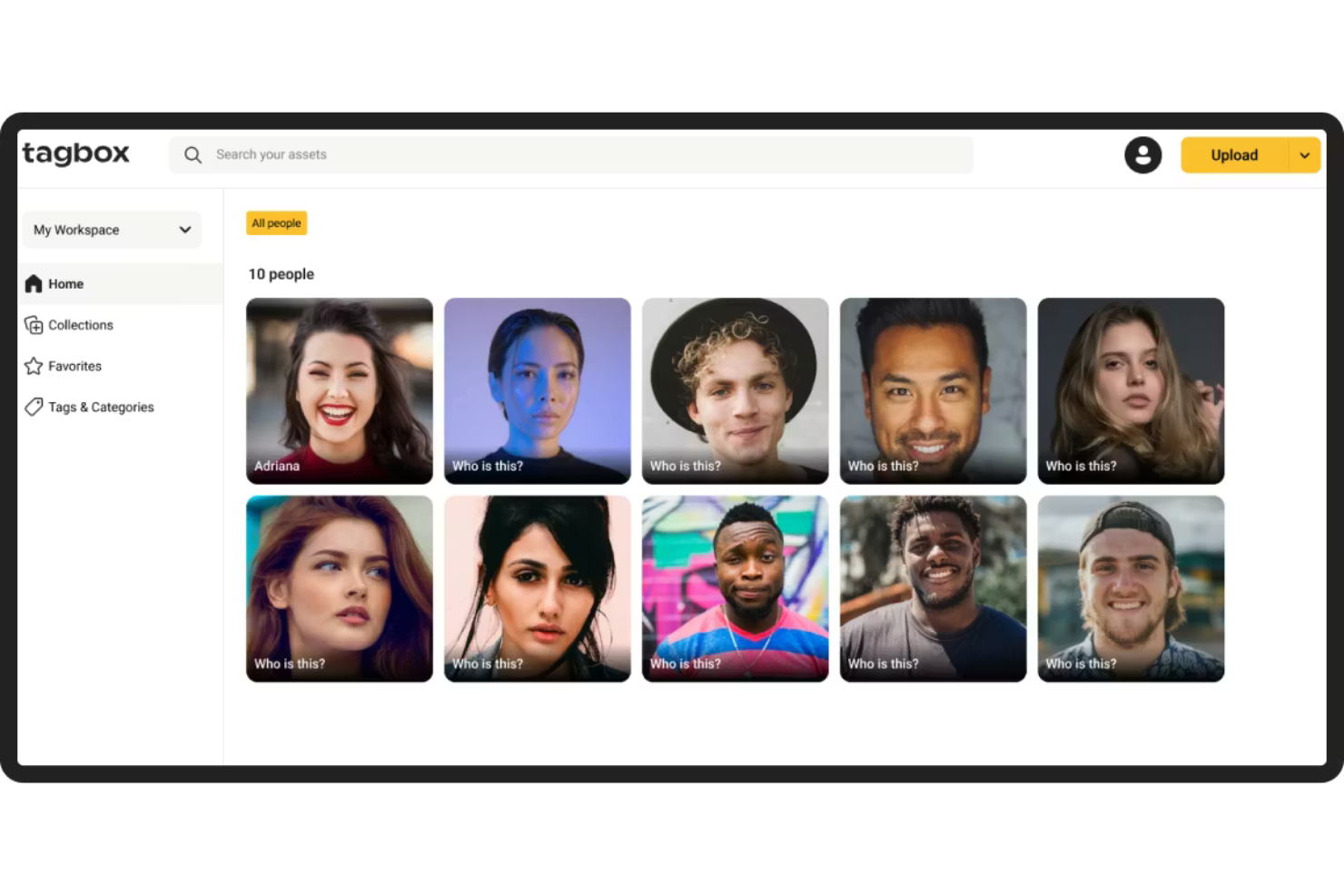
Tagbox.io is a digital asset management platform built for marketing teams that need AI-powered tagging, visual search, and structured permissions to manage large image and video libraries efficiently.
Who Is Tagbox.io Best For?
Tagbox.io is a strong fit for marketing and creative teams managing high volumes of visual content who need faster asset discovery, duplicate control, and clear permission-based access.
Why I Picked Tagbox.io
I picked Tagbox.io because its AI-powered tagging and visual search significantly reduce the time spent locating assets. The system automatically detects objects, scenes, colors, and faces, and you can apply structured custom tags that reflect your brand taxonomy. In practice, that means my team can combine natural-language search with filters like collections, people, or approval status in one query. For marketing teams managing thousands of assets, that level of search precision is a real operational advantage.
Tagbox.io Key Features
- Face recognition: Automatically detects and groups images by individual, making event and campaign photos easy to retrieve.
- Video AI analysis: Analyzes video content frame by frame to detect people and visual elements, making video files searchable.
- Duplicate detection: Identifies identical or near-identical images to reduce clutter and maintain a clean library.
- Guest uploads: Allows external collaborators to upload assets into controlled collections without full platform access.
Tagbox.io Integrations
Connect Tagbox.io through Tagbox Desktop (drag-and-drop into any app), Zapier, Make, and a REST API. Custom workflows are available for Enterprise.
Pros and Cons
Pros:
- Granular permissions for controlled marketing asset sharing
- Duplicate detection helps reduce asset clutter
- Advanced AI-powered visual search and filtering
Cons:
- No built-in image editing or creative design tools
- Advanced AI tagging may require initial taxonomy setup for best results

Bynder
Best for content workflows

Bynder is a cloud-based digital asset management (DAM) platform designed to help marketing teams efficiently organize, manage, and distribute their digital content. It serves as a centralized hub where you can store various media assets, ensuring easy access and consistent brand messaging across all channels.
Why I picked Bynder: I like its AI-powered asset management. This functionality allows your team to organize and locate files, thanks to intelligent tagging and advanced search capabilities. By leveraging AI, Bynder ensures that your marketing materials are not only well-organized but also easily retrievable. Bynder also has a robust asset workflow module that enhances the process of briefing, reviewing, and approving digital assets within your team.
Standout features & integrations:
Features include a studio for scaling and automating digital content creation and analytics that provide data-driven insights into your content and portal usage. It also has built-in security controls such as two-factor authentication and user rights and access settings to protect your content.
Integrations include Salesforce, Salsify, Sanity, SAP Commerce Cloud, Sprout Social, SharePoint, Asana, Adobe Creative Cloud, Contentful, and Contentstack.
Pros and Cons
Pros:
- Efficient search functionality allows quick access to assets
- Robust analytics and reporting
- Ability to approve assets
Cons:
- Time-consuming initial setup
- Limited customization options for certain functionalities

Filecamp
Best for cost-effective DAM

Filecamp is a digital asset management solution that excels in affordability. It stands out as the best for cost-effective DAM, offering a comprehensive set of features at a competitive price point.
Why I picked Filecamp: Filecamp provides users with a user-friendly interface and robust features tailored for branding and collaboration. It allows marketing teams to easily organize, share, and collaborate on digital assets while ensuring brand consistency through customizable branding options. I determined Filecamp to be the best for cost-effective DAM because it delivers essential DAM features without imposing a significant financial burden on its users.
Standout features & integrations:
Features include a user-friendly interface, customizable branding options, and granular permission settings. It also boasts powerful search capabilities and supports a variety of file formats.
Integrations include Slack, WordPress, Salesf
Pros and Cons
Pros:
- Advanced search capabilities
- Customizable branding options
- Unlimited users in all plans
Cons:
- Extra costs for additional storage
- Higher-tier plans are required for some features
- Limited storage with the basic plan
New Product Updates from Filecamp
Filecamp Adds Analytics, AI Thumbnails, and CDN Embed Links
Filecamp adds Analytics, AI-powered thumbnails, and CDN-backed Embed links. These updates give teams more visibility into asset usage, improve thumbnail presentation, and make embedded images easier to manage. For more information, visit Filecamp’s official site.
 .
.
Best for AI asset optimization
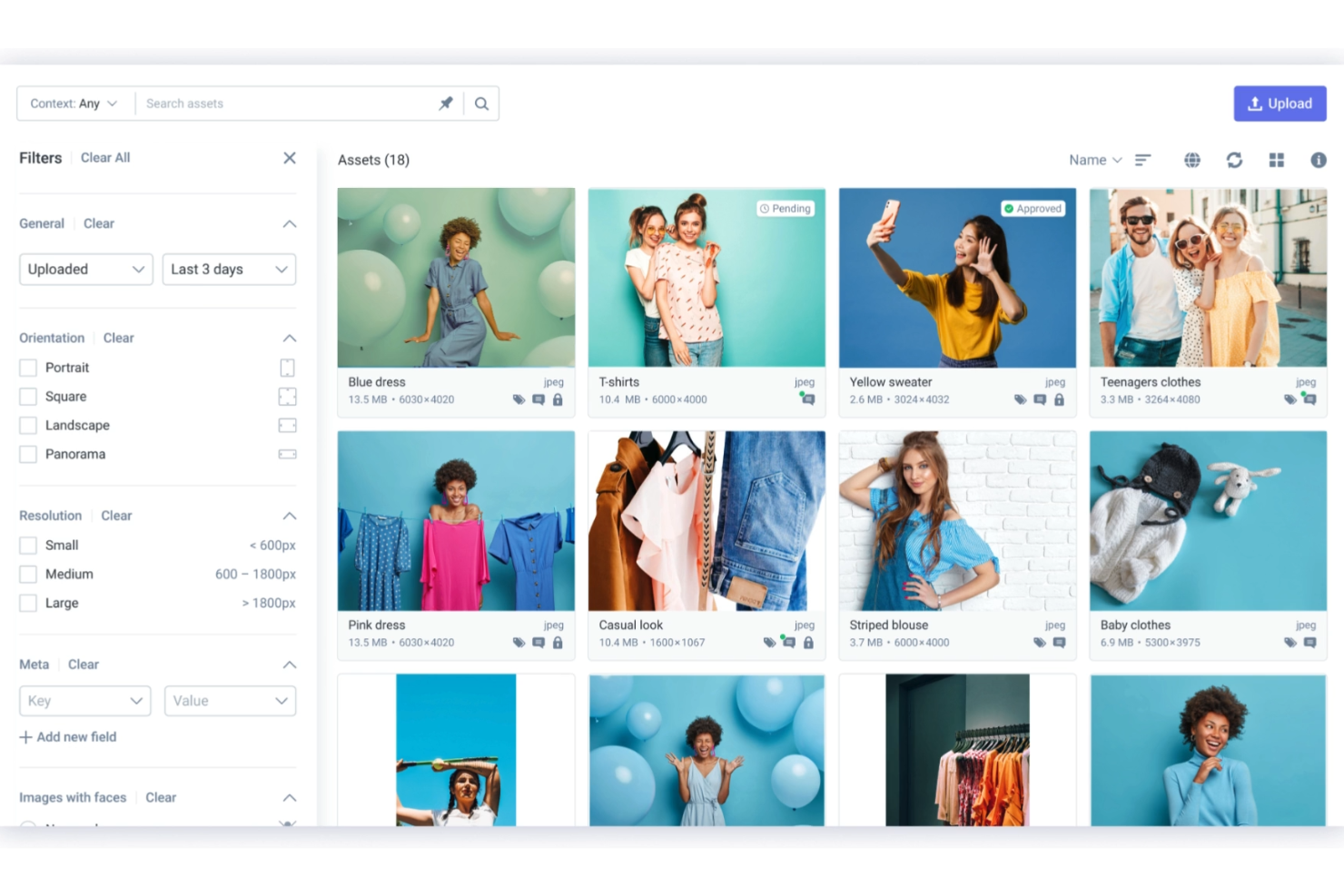
Scaleflex is a digital asset management solution designed to help teams from various industries, including marketing, efficiently organize, optimize, and share media files like images and videos.
Why I picked Scaleflex: When considering a digital asset management solution for marketing, Scaleflex stands out with its dynamic media optimization feature. This functionality uses AI-driven image and video compression to ensure your media loads quickly and efficiently, which can significantly enhance your website's SEO. With over 150 on-the-fly transformations available, your team can tailor visuals to meet various channel requirements without compromising quality.
Standout features & integrations:
Features include generative AI, a customizable user interface, content syndication, automated workflows, smart content classification, global content delivery, and secure access with advanced user permissions.
Integrations include WordPress, Filerobot, Cloudimage, Shopify, Magento, Prestashop, Drupal, Prismic, Amazon S3, Azure, Angular, and React.js.
Pros and Cons
Pros:
- Efficient media optimization
- The platform integrates well with various tools
- AI-powered automation
Cons:
- Some users find the interface complex initially
- Lower-tier plans are limited to one project

Best for scalable DAM

Image Relay is a digital asset management platform designed to organize, manage, and distribute brand assets.
Why I picked Image Relay: Image Relay’s unique approach to digital asset management caters to various industries and scales with business growth. Its emphasis on simplicity and efficiency in managing and sharing digital assets makes it a standout choice. I believe Image Relay is the best for scalable DAM because it offers customizable metadata fields, a user-friendly folder structure, and bulk actions, which are essential for managing large volumes of digital assets effectively.
Standout features & integrations:
Features include powerful search capabilities with customizable metadata fields, a clear folder structure for asset organization, and bulk upload, download, and update options to save time. The platform also offers customizable user permissions and self-serve capabilities for external users, streamlining the asset management process.
Integrations include Slack, Adobe Creative Cloud, Salesforce, WordPress, Hootsuite, Canva, Shopify, Asana, Zapier, and Jira.
Pros and Cons
Pros:
- Customizable user permissions for controlled asset access
- Bulk actions for uploads, downloads, and updates save time
- Customizable metadata and folder structures for efficient asset organization
Cons:
- Requires a minimum of five users, making it less accessible for smaller teams
- Higher starting price point compared to some competitors
Canto
Best for brand asset optimization

Canto is a digital asset management platform designed to organize, find, and share digital assets.
Why I picked Canto: Canto offers a comprehensive feature set that addresses the full spectrum of digital asset management needs. Its ability to streamline content workflows and enhance collaboration makes it a standout choice among other DAM solutions. I believe Canto is the best for brand asset optimization because it provides tools that ensure brand consistency across all digital assets, which is crucial for maintaining brand identity.
Standout features & integrations:
Features include AI Visual Search, Media Delivery Cloud, and Video Enhancements. It also offers security measures, archiving options, and analytics to track content performance.
Integrations include Adobe Creative Cloud, Slack, Dropbox, Google Drive, Microsoft Office, WordPress, Hootsuite, Salesforce, Mailchimp, and Zapier.
Pros and Cons
Pros:
- API integration for connecting with other platforms
- Unlimited portals and style guides for brand consistency
- Powerful search capabilities with smart tags and facial recognition
Cons:
- May experience performance issues with larger volumes of assets
- Limited customization options available
Annen programvare for administrasjon av digitale ressurser for markedsføring
Nedenfor finner du en liste over annen programvare for administrasjon av digitale ressurser for markedsføring som jeg tok med på kortlisten. Selv om de ikke kom blant de 10 beste, er de fortsatt verdifulle og verdt å undersøke nærmere.
- Adobe Experience Manager
For adaptable content
- Lingo
For centralized brand asset management
- MarcomCentral
For channel marketing
- Mailchimp
For email and SMS marketing
- Aprimo
For content operations
- Adobe Experience Manager Assets
For cloud-native DAM
- Cloudinary Assets
For media asset optimization
- PhotoShelter
For visual content management
- ResourceSpace
For centralized asset storage
- Extensis Portfolio
For creative teams
- Dash
For effective brand positioning
- Orange Logic
For managing digital rights
- Daminion
For asset tagging
- Acquia DAM (Widen)
For detailed metadata tagging
- Plytix
For product marketing assets


How I Evaluate Digital Asset Management Software for Marketing
I split my evaluation into two layers: baseline requirements every tool must meet—like asset libraries and approval workflows—and differentiators that set platforms apart for marketing teams.
Core Functionality (Table Stakes For This List)
When I'm selecting tools for my list, I rank each one on a scale from 0 (does not offer the functionality) to 5 (excels in this area) for each core functionality listed below. Then, I calculate the tool's total score into a percentage. Each tool needs to achieve a minimum total score of 65% to be considered for inclusion.
- Centralized Asset Library: I check whether a platform lets marketing teams store, preview, and search across file types—from video edits to campaign PDFs—in one place.
- Metadata & Tagging: Custom taxonomies and auto-tagging matter here, especially for teams managing thousands of assets across seasonal campaigns or product lines.
- Version Control: I look for clear version histories with rollback, so project managers can confirm their team is always working from the latest approved creative.
- Approval Workflows: Multi-step review routing with annotation is key, like when a social asset needs sign-off from design, legal, and the brand manager before launch.
- Permissions & Rights Management: I evaluate how granular access controls are and whether the tool tracks usage licenses—helpful when assets have regional or time-bound restrictions.
- Project Management Integrations: Native connections to tools like Asana, Wrike, or Jira show me whether the DAM fits into existing marketing project workflows or creates silos.
Once I have a list of tools that meet this criteria, I consider what sets each platform apart.
Differentiating Factors (What Sets Vendors Apart)
Here's how I compare and contrast different vendors:
Standout Features
Brand portals are a big differentiator—I look for platforms that let you spin up a shareable hub where agencies and partners grab approved assets without filing requests. Creative templating is equally valuable, especially when regional teams need to localize campaign materials without pulling in a designer. I also evaluate usage analytics, since knowing which assets get downloaded and reused helps project managers justify content investment to leadership.
Beyond Features
Collaboration access matters—I check whether a platform supports guest users for agencies and freelancers without inflating seat costs, since most marketing projects involve external contributors. Ecosystem fit is just as important. A DAM that connects to your CMS, marketing automation platform, and creative tools saves project managers from becoming middlemen shuttling files between systems. I also evaluate security posture, looking for SOC 2 compliance, SSO support, and audit logs that satisfy enterprise governance requirements.
Slik velger du programvare for administrasjon av digitale ressurser for markedsføring
Det er lett å gå seg vill i lange funksjonslister og komplekse prisstrukturer. For å hjelpe deg med å holde fokus mens du går gjennom den unike prosessen med å velge programvare, får du her en sjekkliste over faktorer du bør ha i bakhodet:
| Faktor | Hva bør vurderes |
|---|---|
| Skalerbarhet | Kan programvaren vokse sammen med teamet ditt? Vurder fremtidige lagringsbehov og utvidelse av antall brukere. Se etter fleksible abonnementer som gjør det enkelt å skalere opp eller ned. |
| Integrasjoner | Kan den kobles til de eksisterende verktøyene dine? Kontroller kompatibiliteten med den nåværende teknologistakken for å unngå avbrudd i arbeidsflyten. |
| Tilpasningsmuligheter | Kan du tilpasse programvaren til prosessene dine? Vurder muligheten til å tilpasse arbeidsflyter, merkevarebygging og brukertillatelser slik at de passer til de unike behovene dine. |
| Brukervennlighet | Er grensesnittet intuitivt for alle brukere? Sørg for at teammedlemmene raskt kan lære seg programvaren uten omfattende opplæring. |
| Implementering og innføring | Hvor smidig er overgangen til det nye systemet? Se etter verktøy med god støtte for innføring, for eksempel veiledninger og kundeservice, som gjør overgangen enklere. |
| Kostnad | Passer prisen med budsjettet ditt? Sammenlign kostnadene med fordelene, og vurder eventuelle skjulte gebyrer eller langsiktige avtaler som kan påvirke budsjettet. |
| Sikkerhetstiltak | Er ressursene dine beskyttet? Undersøk datakryptering, tilgangskontroller og samsvar med regelverk som GDPR for å sikre datasikkerheten. |
| Tilgjengelig support | Er hjelp tilgjengelig når du trenger den? Kontroller om leverandøren tilbyr support døgnet rundt, hele uken, og flere kontaktalternativer for å løse problemer raskt. |
Trender innen programvare for forvaltning av digitale ressurser i markedsføring
Etter hvert som det digitale landskapet fortsetter å utvikle seg, vil trendene innen DAM-programvare for markedsføring revolusjonere måten virksomheter håndterer medieinnholdet sitt på. Fra AI-drevet automatisering og forbedrede samarbeidsverktøy til bedre integrasjonsmuligheter – her er trendene jeg har lagt merke til i utviklingen av DAM-løsninger for markedsføring:
- Integrasjon med AI og maskinlæring: Kunstig intelligens og maskinlæring integreres i stadig større grad i programvare for forvaltning av digitale ressurser. Denne trenden gir smartere organisering og gjenfinning av ressurser, noe som reduserer tiden som brukes på ressursforvaltning betydelig.
- Fokus på brukeropplevelse: Forbedring av brukeropplevelsen er en viktig trend innen programvare for forvaltning av digitale ressurser. Utviklere fokuserer på intuitive grensesnitt og forenklede arbeidsflyter, ettersom dette har direkte innvirkning på produktiviteten og brukernes anvendelse av løsningen.
- Forbedrede sikkerhetstiltak: Sikkerhet blir stadig viktigere innen programvare for forvaltning av digitale ressurser, og kryptering og avanserte tilgangskontroller implementeres for å beskytte sensitive markedsføringsressurser. Denne trenden er viktig på grunn av økende bekymring for datainnbrudd og tyveri av immaterielle rettigheter.
- Innføring av skybaserte løsninger: Skybaserte løsninger for forvaltning av digitale ressurser blir stadig mer utbredt, ettersom de gir skalerbarhet og ekstern tilgang. Dette er en fremtidsrettet utvikling fordi den støtter samarbeid i sanntid og tilgang fra hvor som helst.
- Fokus på analyse og rapportering: Analyse- og rapporteringsfunksjoner får større plass i programvare for forvaltning av digitale ressurser og gir innsikt i bruken av og ytelsen til ressursene. Denne trenden er unik fordi den hjelper markedsførere med å ta datadrevne beslutninger om innholdsstrategiene sine.
Funksjoner
Når du velger programvare for forvaltning av digitale ressurser til markedsføring, bør du se etter følgende nøkkelfunksjoner:
- Metadatamerking: Organiser og kategoriser ressurser automatisk for enkel gjenfinning og forvaltning.
- Versjonskontroll: Sørg for at alle arbeider med de nyeste filversjonene, slik at feil og forvirring reduseres.
- Brukertillatelser: Kontroller hvem som kan få tilgang til og redigere ressurser, for å styrke sikkerheten og ivareta merkevareintegriteten.
- Avansert søk: Finn raskt bestemte ressurser ved hjelp av kraftige søkefunksjoner, og spar tid og arbeid.
- Tilpassbar merkevarebygging: Tilpass grensesnittet slik at det gjenspeiler merkevareidentiteten din og sikrer konsistens.
- Automatisering av arbeidsflyt: Automatiser repetitive oppgaver for å øke effektiviteten og frigjøre tid til andre aktiviteter.
- Analyseverktøy: Få innsikt i bruken av og ytelsen til ressursene, slik at du kan ta velinformerte beslutninger.
- Integrasjonsmuligheter: Koble til eksisterende verktøy og plattformer for å effektivisere arbeidsflyter og opprettholde produktiviteten.
- Skalerbar lagring: Håndter voksende ressursbiblioteker med fleksible lagringsalternativer som kan skaleres etter behovene dine.
- Samarbeidsfunksjoner: Legg til rette for kommunikasjon i teamet og koordinering av prosjekter med innebygde samarbeidsverktøy.
Fordeler
Implementering av programvare for forvaltning av digitale ressurser til markedsføring gir flere fordeler for teamet og virksomheten din. Her er noen av fordelene du kan se frem til:
- Forbedret organisering: Metadatamerking og versjonskontroll bidrar til å holde de digitale ressursene dine organisert og enkle å finne.
- Forbedret samarbeid: Brukertillatelser og samarbeidsfunksjoner gjør det mulig for teamet ditt å jobbe effektivt sammen med prosjekter.
- Tidsbesparelser: Avansert søk og automatisering av arbeidsflyter reduserer tiden som brukes på å lete etter ressurser og utføre repetitive oppgaver.
- Økt sikkerhet: Brukertillatelser og skalerbar lagring sørger for at de digitale ressursene dine er sikre og bare tilgjengelige for autoriserte brukere.
- Bedre beslutningstaking: Analyseverktøy gir innsikt i bruk av ressurser, slik at du kan ta informerte markedsføringsbeslutninger.
- Konsekvent merkevarebygging: Tilpassbar merkevareprofilering sørger for at alle digitale ressurser samsvarer med merkevareidentiteten din.
- Skalerbarhet: Etter hvert som virksomheten din vokser, gjør skalerbar lagring og integrasjonsmuligheter det mulig for systemet for ressursforvaltning å vokse sammen med deg.
Kostnader & priser
Valg av programvare for håndtering av digitale ressurser til markedsføring krever en forståelse av de ulike prismodellene og abonnementene som er tilgjengelige. Kostnadene varierer basert på funksjoner, teamstørrelse, tillegg og mer. Tabellen nedenfor oppsummerer vanlige abonnementer, gjennomsnittsprisene deres og typiske funksjoner som er inkludert i løsninger for programvare for håndtering av digitale ressurser til markedsføring:
Sammenligningstabell for programvare for håndtering av digitale ressurser til markedsføring
| Abonnementstype | Gjennomsnittspris | Vanlige funksjoner |
|---|---|---|
| Gratisabonnement | $0 | Grunnleggende lagring, begrenset brukertilgang og viktige verktøy for ressursforvaltning. |
| Personlig abonnement | $5-$25/bruker/måned | Økt lagringsplass, brukertillatelser og grunnleggende samarbeidsfunksjoner. |
| Bedriftsabonnement | $30-$75/bruker/måned | Avansert søk, tilpassbar merkevareprofilering og automatisering av arbeidsflyter. |
| Virksomhetsabonnement | $100+/bruker/måned | Ubegrenset lagring, omfattende analyser og forbedrede sikkerhetstiltak. |
Hva er programvare for håndtering av digitale ressurser til markedsføring?
Programvare for markedsføring av digitale ressurser er et spesialisert verktøy som er utviklet for å håndtere, organisere og distribuere digitale ressurser. Markedsførere bruker det til å håndtere et stort utvalg digitalt innhold, for eksempel bilder, videoer og dokumenter. Det fungerer vanligvis som et sentralt arkiv som støtter markedsføringsaktiviteter ved å sørge for at mediefiler er lett tilgjengelige og kan deles effektivt
Vanlige spørsmål om programvare for forvaltning av digitale ressurser for markedsføring
Her er noen av de vanligste spørsmålene jeg får om programvare for forvaltning av digitale ressurser for markedsføring:
Hvor lang tid tar det å implementere programvare for forvaltning av digitale ressurser?
Tidsrammen for implementering av et DAM-system er ikke fastsatt og avhenger av faktorer som teamets tilgjengelighet, DAM-kompetanse og hvor komplekse arbeidsflytene og kravene er. Mens noen organisasjoner kan komme raskt i gang, kan det ta flere måneder for andre. En fleksibel implementeringsprosess som er tilpasset teamets mål, er avgjørende.
Kan programvare for forvaltning av digitale ressurser støtte store team?
Ja, DAM-programvare er skalerbar og kan støtte store team på tvers av ulike steder. Mange team bruker for eksempel DAM-programvare for universiteter og benytter én samlet programvareløsning på tvers av flere campuser. Den tilbyr funksjoner som rollebasert tilgangskontroll, noe som sikrer at teammedlemmer får riktig tilgang til ressurser basert på arbeidsoppgavene sine. Plattformen kan håndtere store datamengder og flere brukere samtidig, noe som gjør den egnet for store organisasjoner med komplekse behov for ressursforvaltning.
Hvor sikker er programvare for forvaltning av digitale ressurser?
Programvare for forvaltning av digitale ressurser tilbyr vanligvis et høyt sikkerhetsnivå for å beskytte ressurser mot uautorisert tilgang og cybertrusler. Funksjoner som kryptert datalagring, sikre protokoller for filoverføring og regelmessige sikkerhetsrevisjoner er vanlige. DAM-systemer tilbyr også detaljerte tilgangslogger og muligheten til å angi detaljerte tillatelser for ulike brukere og grupper.
Hvilke filtyper kan administreres med programvare for forvaltning av digitale ressurser?
DAM-programvare kan håndtere et bredt utvalg av filtyper, inkludert bilder, videoer, lydfiler, PDF-filer og dokumentfiler. De fleste plattformer er utviklet for å håndtere store filer og ulike filformater, slik at markedsføringsteam kan lagre og få tilgang til et mangfold av digitalt innhold etter behov.
Hvordan forbedrer programvare for forvaltning av digitale ressurser effektiviteten i markedsføringen?
DAM-programvare samler alle markedsføringsressurser på ett sted, slik at teamene raskere og enklere kan finne og bruke riktig materiale. Den reduserer tiden som brukes på å lete etter ressurser, og bidrar til å forhindre at eksisterende materiale blir laget på nytt. Ved å effektivisere ressursforvaltningen kan team lansere markedsføringskampanjer raskere og mer helhetlig. I tillegg legger den til rette for bedre samarbeid mellom teammedlemmer og avdelinger.