

10 beste programvareløsninger for digital prosessautomatisering i 2026

Beste programvare for digital prosessautomatisering – kortliste


Med så mange tilgjengelige programvarealternativer for digital prosessautomatisering er det vanskelig å finne ut hva som passer for deg. Du ønsker å effektivisere og automatisere forretningsprosessene dine, men må finne ut hvilket verktøy som er best. Jeg hjelper deg! I dette innlegget gjør jeg valget enkelt ved å dele mine personlige erfaringer med bruk av ulike automatiseringsverktøy på tvers av forskjellige bransjer, samt mine anbefalinger av den beste programvaren for digital prosessautomatisering.
Programvare for digital prosessautomatisering automatiserer repetitive oppgaver og arbeidsflyter. Den øker effektiviteten og reduserer feil. Den løser utfordringene ved manuelle prosesser, ineffektivitet og høye feilrater.
Hvorfor du kan stole på våre programvareanbefalinger
Teamet vårt har testet og anmeldt programvare siden 2012. Vi er selv prosjektledere, så vi vet hvor vanskelig og hvor viktig det er å velge riktig programvare.
I denne guiden har vi vurdert verktøyene gjennom praktisk testing og uavhengig research og gitt dem poeng ut fra våre utvelgelseskriterier. Vi bygger også på innsikt fra ledende eksperter i bransjen og erfarne prosjektledere.
Anmeldelsene våre bygger på vår egen redaksjonelle vurdering. De er ikke et salgsargument.
Ekspertanmeldere:
Sammenligningstabell for programvare for digital prosessautomatisering
| Tool | Best For | Trial Info | Price | ||
|---|---|---|---|---|---|
| 1 | Best for cross-system workflow automation | Free trial available | Pricing upon request | Website | |
| 2 | Best for AI-powered document management | Free plan available | From $25/month | Website | |
| 3 | Best for scalable RPA solutions | 30-day free trial | Pricing upon request | Website | |
| 4 | Best for low-code process automation | Free plan available | Pricing upon request | Website | |
| 5 | Best for hybrid deployment flexibility | Free plan available | From $1,090/month | Website | |
| 6 | Best for workflow automation templates | 30-day free trial | Pricing upon request | Website | |
| 7 | Best for integrated BPM and case management | 30-day free trial | Pricing upon request | Website | |
| 8 | Best for integrated risk management (IRM) | Free demo available | Pricing upon request | Website | |
| 9 | Best for full-stack development capabilities | Free plan + free demo available | From $36,300 (billed annually) | Website | |
| 10 | Best for AI-powered decision-making | Free demo + free trial available | Pricing upon request | Website |
Anmeldelser av den beste programvaren for digital prosessautomatisering
Denne delen gir en grundig analyse og oversikt over ulike programmer for digital prosessautomatisering. Vi går gjennom fordeler og ulemper, funksjonene deres og de beste bruksområdene.

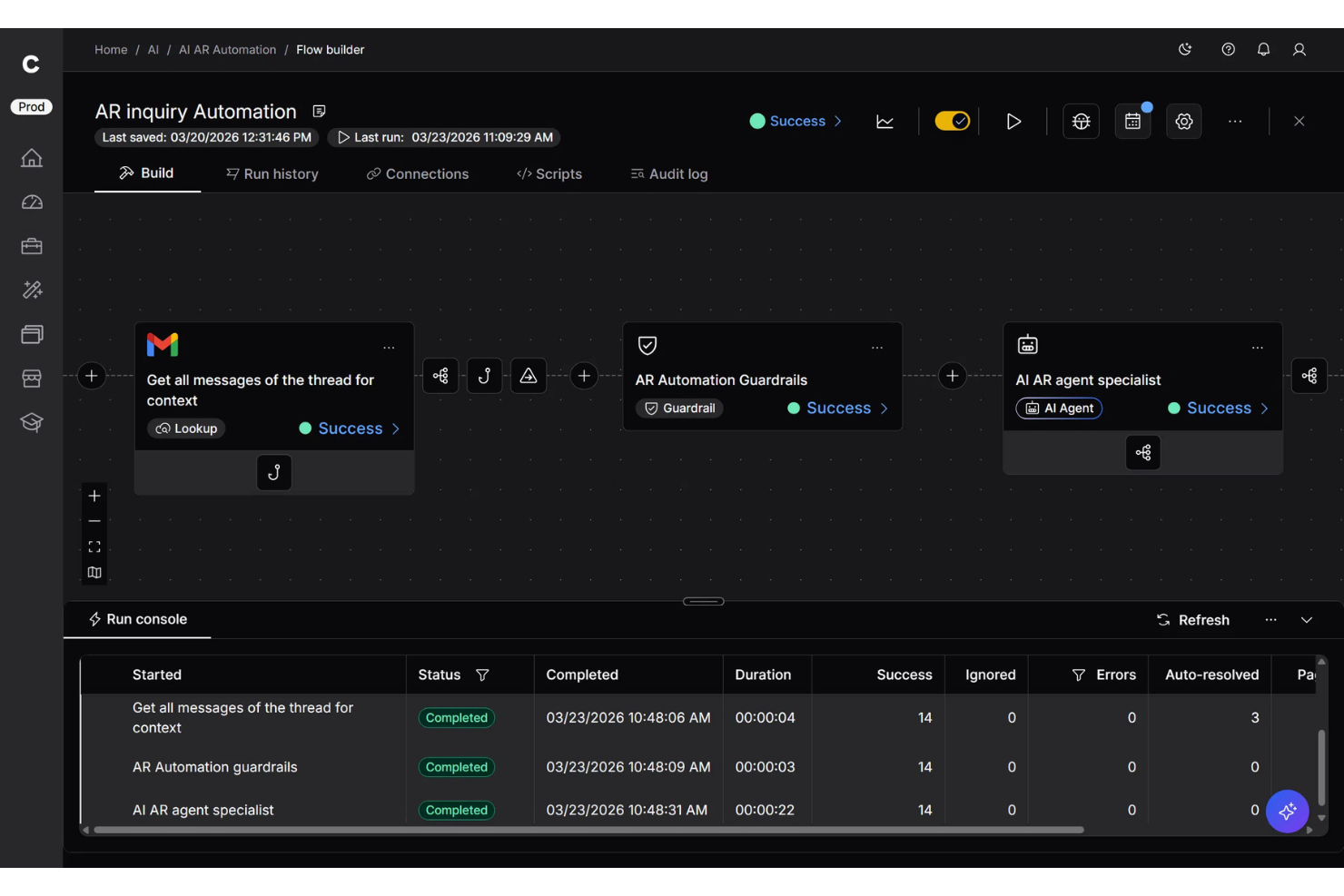
Celigo is a digital process automation platform built for teams that need to connect apps, automate repetitive workflows, and keep data moving smoothly across business systems. It’s especially useful for growing companies managing complex processes across cloud and on-premise environments. What makes it stand out is its strong integration focus, which helps reduce manual work and unify operations across disconnected tools.
Who Is Celigo Best For?
Celigo is a good fit for IT teams and operations leaders at mid-sized to large businesses that need to automate and connect multiple business applications.
Why I Picked Celigo
I picked Celigo because it’s especially good for cross-system workflow automation, helping you connect processes across the apps your team already uses. Its prebuilt connectors and integration templates reduce the amount of manual setup needed to move data between systems. I also like that it supports both cloud and on-premise applications, which is useful if your team relies on a mix of modern and legacy tools. This makes it easier to automate workflows that span multiple departments instead of managing each system separately. For teams dealing with disconnected business apps, Celigo helps keep processes consistent and data up to date.
Celigo Key Features
Some other features in Celigo support teams managing automated workflows across multiple business systems:
- Flow builder: Design multi-step automations using a visual builder that maps how data moves between systems.
- Error management dashboard: Monitor integration issues in one place so your team can troubleshoot failed workflows faster.
- Role-based access controls: Set user permissions to control who can build, edit, and manage integrations securely.
- Integration dashboard: Track flow performance, run history, and system activity to keep automated processes visible.
Celigo Integrations
Integrations include NetSuite, SAP, Microsoft Dynamics 365, Oracle, Salesforce, Shopify, Amazon, Snowflake, Jira, and Slack
Pros and Cons
Pros:
- Flexible platform supports both business users and technical teams
- Centralized error management helps teams monitor and maintain automated workflows
- Connects cloud and on-premise systems for cross-system workflow automation
Cons:
- Field mapping can be difficult for more advanced logic setups
- Error messages can be vague during troubleshooting of complex flows
New Product Updates from Celigo
Celigo Adds SuiteTax and Variant Publishing for Shopify–NetSuite
Celigo adds NetSuite SuiteTax support and variant-level sales channel publishing to its Shopify–NetSuite integration. These updates improve tax handling and give merchants more control over how product variants are published. For more information, visit Celigo’s official site.
 .
.
UiPath
Best for AI-powered document management

UiPath leverages AI to optimize and automate business processes for mining, task mining, and communications mining. It offers comprehensive robotic process automation to design, deploy, and manage business functions with high efficiency and accuracy.
Why I Picked UiPath: UiPath's Document Understanding combines RPA with AI to extract, interpret, and process data from complex documents, including those with unstructured or semi-structured formats. It supports a wide range of document types, from invoices to contracts, and uses machine learning to improve accuracy over time. This feature is niche because it allows businesses to automate document-centric processes that are traditionally difficult to handle with standard RPA, making it a powerful tool for industries like finance, legal, and insurance where document processing is critical.
Standout Features & Integrations:
Features include AI-powered process mining, task mining, and communications mining, which help identify high-ROI automation opportunities. The platform also offers low-code development, intelligent document processing, and real-time analytics to optimize automation programs at scale.
Integrations include Microsoft, Google Cloud, SAP, Amazon Web Services (AWS), Salesforce, Oracle, ServiceNow, Workday, Slack, and Jira.
Pros and Cons
Pros:
- Strong integration with major AI services
- Multi-platform automation capability
- Extensive component library
Cons:
- Resource-heavy orchestration
- Limited-out-of-the-box AI models
Best for scalable RPA solutions

Blue Prism offers enterprise-grade robotic process automation capabilities, enabling organizations to automate repetitive, rule-based tasks with high precision and reliability.
Why I Picked Blue Prism: Blue Prism was designed for scalability, allowing businesses to automate repetitive, rule-based tasks across multiple departments and geographies without compromising performance or reliability. The software can manage thousands of automated processes simultaneously, while maintaining strict security and compliance standards, making it a standout choice for organizations needing large-scale digital transformation initiatives. It leverages AI and machine learning to address more sophisticated workflows and commits to secure automation, including role-based access and audible trails.
Standout Features & Integrations:
Features include a secure and scalable intelligent automation platform, cloud-native capabilities, and various tools like desktop automation, human-digital worker collaboration, and document automation.
Integrations include Salesforce, SAP, Oracle, Microsoft Dynamics, ServiceNow, Workday, Google Cloud, Amazon Web Services, IBM Watson, and UiPath.
Pros and Cons
Pros:
- Extensive library of pre-built connectors
- Digital workforce with AI integration
- Centralized management console
Cons:
- Resource and cost-intensive implementation and customization
- Limited AI capabilities without add-ons

Appian
Best for low-code process automation

Appian is a comprehensive platform that enables organizations to develop and deploy complex business applications, integrating low-code development with powerful automation capabilities.
Why I Picked Appian: Appian provides a low-code environment with its intuitive drag-and-drop interface, allowing users to build and deploy applications without extensive knowledge and reducing development time. It has a unified platform combining process automation, case management, and AI-driven decision-making for managing structured and unstructured processes. Additionally, the platform supports rapid prototyping and iterative development where applications can be continuously refined based on user feedback and changing business conditions.
Standout Features & Integrations:
Features include low-code design, process automation with RPA and AI, and integrated data fabric. These features enable businesses to build applications quickly, automate complex workflows, and unify data across systems for better decision-making.
Integrations include Salesforce, Google, Microsoft SharePoint, DocuSign, AWS, SAP, Oracle, ServiceNow, Workday, and IBM.
Pros and Cons
Pros:
- Business process optimization tools
- Rapid prototyping with instant feedback loops
- Unified interface for developers and business users
Cons:
- Resource-intensive for advanced customization and integration
- Limited UI/UX customization
Mendix
Best for hybrid deployment flexibility
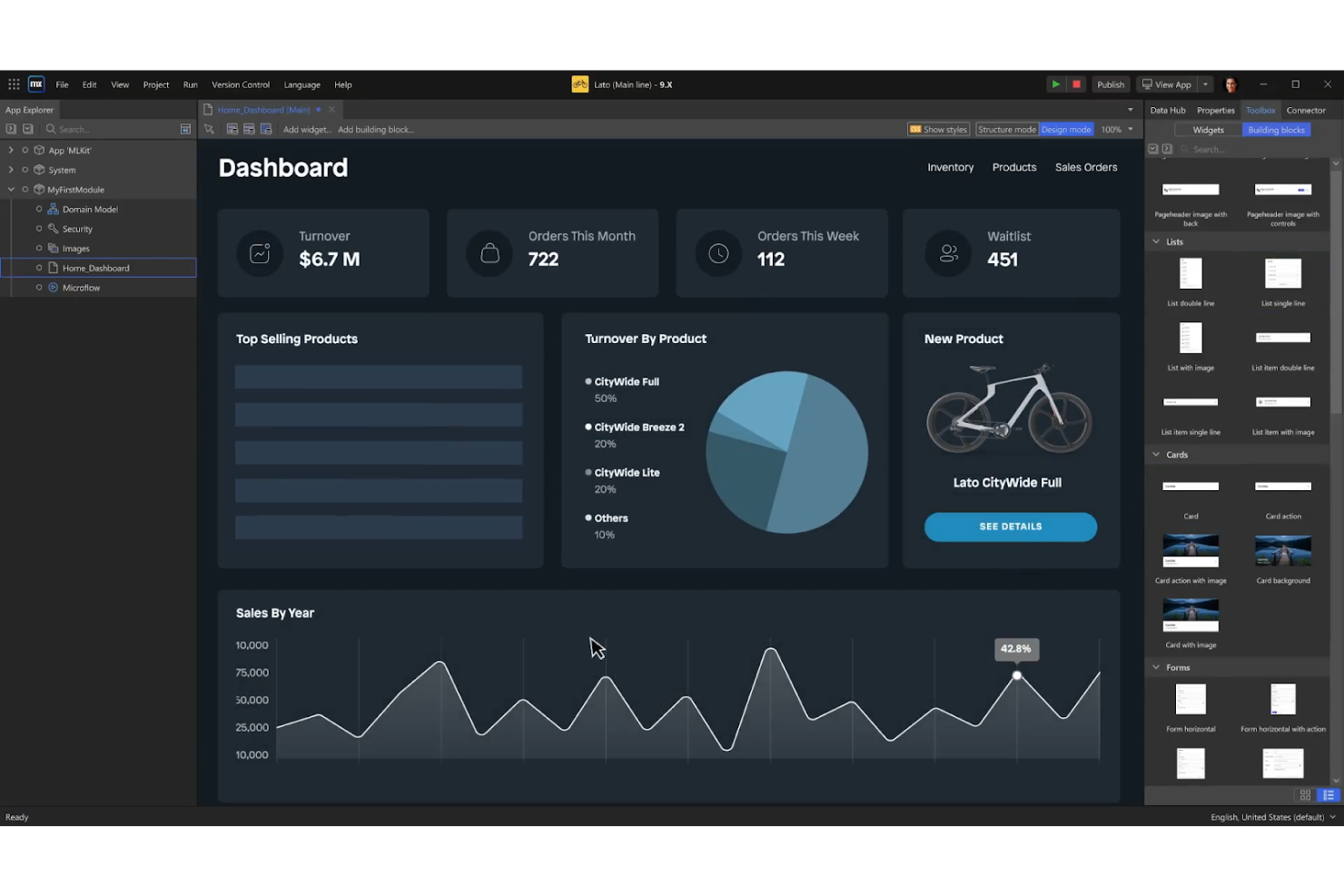
Mendix is a low-code application development that leverages AI to simplify and accelerate enterprise app development. It supports full lifecycle management with built-in integration, testing, and monitoring tools.
Why I Picked Mendix: Mendix is highly flexible when it comes to deployment options, offering multi-cloud and hybrid deployment capabilities out-of-the-box. Users can deploy applications on public clouds like AWS, Azure, and Google Cloud, on private clouds, or in hybrid environments. This flexibility is relatively uncommon and gives organizations the freedom to choose the deployment strategy that best fits their specific needs, whether that’s optimizing for cost, performance, or regulatory compliance.
Standout Features & Integrations:
Features include AI-powered development tools that accelerate delivery, a visual IDE for streamlined application development, and robust governance tools for enterprise-level control and compliance.
Integrations include AWS, Red Hat, Snowflake, SAP, Salesforce, Microsoft Azure, Google Cloud, IBM Cloud, Oracle, and ServiceNow.
Pros and Cons
Pros:
- Integrated machine learning models
- Multi-experience development
- Low-code and pro-code flexibility
Cons:
- Limited integration with non-Mendix tools
- Complexity in managing large projects

Nintex
Best for workflow automation templates

Nintex is a comprehensive platform with powerful automation capabilities that streamlines organizational and business processes and accelerates the automation journey with its workflow templates.
Why I Picked Nintex: Nintex offers an extensive library of pre-built workflow automation templates, covering various common processes like document approvals and employee onboarding. This allows organizations to implement automation solutions quickly and with minimal customizations. Nintex also offers advanced customization options for these templates, ensuring they meet organizational needs. Additionally, it provides an easy-to-use drag-and-drop interface and process mapping and analytics tools, allowing organizations to visualize and analyze their workflows in real-time.
Standout Features & Integrations:
Features include process identification, management, workflow automation, application development, forms automation, RPA, document generation, and analytics. These features collectively offer a powerful suite for managing and automating business processes.
Integrations include Microsoft 365, Salesforce, SharePoint, Adobe Sign, DocuSign, SAP, Oracle, Google Drive, Dropbox, and Box.
Pros and Cons
Pros:
- Visual process mapping
- Process automation across hybrid environments
- Extensive library of pre-built connectors
Cons:
- Lack of advanced AI features
- Limited scalability for complex processes

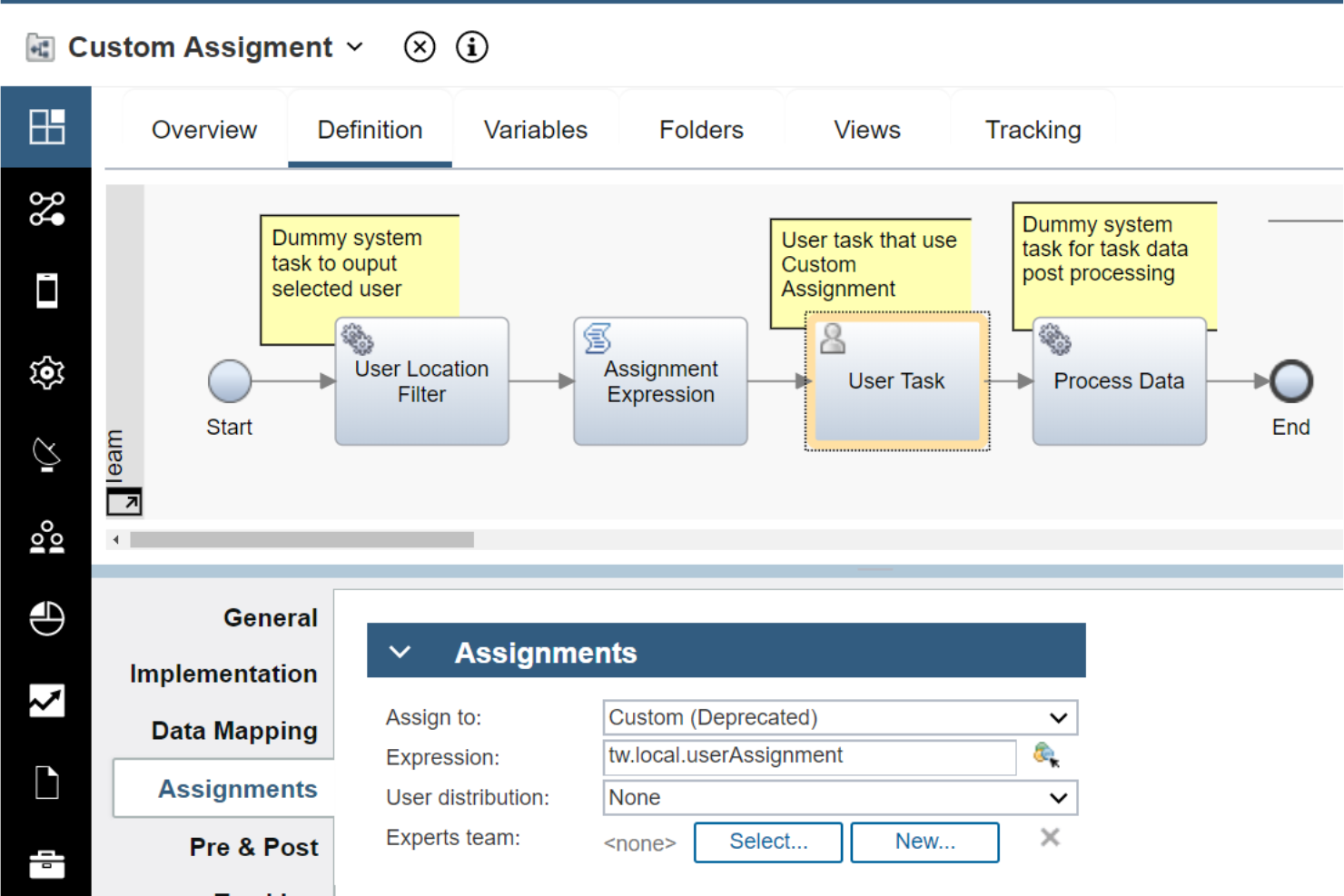
IBM Business Automation Workflow (BAW) combined business process management (BPM) and case management capabilities, enabling organizations to design, execute, and monitor complex workflows and accelerate digital transformation initiatives.
Why I Picked IBM Business Automation Workflow: IBM Business Automation Workflow (BAW)’s dual capabilities can handle complex, cross-functional processes that require rigid process control and the flexibility to manage exceptions and case-based work. It offers a highly customizable environment, allowing users to design workflows that adapt based on the context of each case, and offers powerful analytics capabilities for real-time insights into process performance. Additionally, it integrates with IBM’s strong AI and analytics tools, enabling intelligent automation and analysis of large amounts of data to identify patterns, predict outcomes, and make recommendations.
Standout Features & Integrations:
Features include built-in monitoring and analytics, which provide visibility and insights to improve productivity and prioritize work. The software also offers governance and compliance capabilities to manage information lifecycle requirements and dynamic content-centric applications for agile deployment of customized solutions.
Integrations include IBM Watsonx Orchestrate, IBM Cloud Pak for Business Automation, IBM Process Mining, Salesforce, SAP, Microsoft Dynamics, Oracle, ServiceNow, Box, and Google Workspace.
Pros and Cons
Pros:
- Advanced process monitoring
- Scalable across global enterprises
- Comprehensive BPM and case management
Cons:
- Limited out-of-the-box templates
- Complex integration with non-IBM systems


ServiceNow excels in automating and optimizing enterprise workflows across various departments, including IT, HR, customer service, and operations. It integrates with different technologies, focusing on improving productivity and maximizing return on investment.
Why I Picked ServiceNow: ServiceNow offers a comprehensive Integrated Risk Management suite that combines governance, risk, and compliance (GRC) capabilities with IT, security, and business continuity management. What makes this feature stand out is its ability to provide real-time visibility into risk across the entire organization through a unified platform. It enables businesses to align risk management with business objectives, automate compliance tasks, and respond to risks dynamically, which is particularly niche for organizations with complex regulatory and operational environments.
Standout Features & Integrations:
Features include a powerful workflow engine, low-code development environment, AI-driven analytics and automation, real-time predictive analytics, natural language processing, automated decision-making, and enterprise-grade security and compliance.
Integrations include Microsoft Azure, AWS, Google Cloud, Salesforce, SAP, Oracle, Workday, Slack, Zoom, and Microsoft Teams.
Pros and Cons
Pros:
- AI-driven task prioritization and problem resolution
- Customizable dashboards and reporting
- Advanced natural language processing (NLP)
Cons:
- Limited workflow modification flexibility
- Steep Learning curve for advanced features


OutSystems is an AI-powered low-code platform that accelerates digital transformation and application development with its highly intuitive visual development environment and scalable and customizable solutions.
Why I Picked OutSystems: Unlike many other low-code platforms that focus primarily on frontend development, OutSystems provides full-stack development capabilities, allowing developers to create both the frontend and backend of applications. This includes the ability to integrate with complex databases, APIs, and enterprise systems, as well as build custom logic and services. The platform's emphasis on enabling end-to-end development within a single environment is unusual in the low-code space and makes it particularly appealing to enterprises that need to build sophisticated, large-scale applications.
Standout Features & Integrations:
Features include AI-assisted development and lifecycle management, a comprehensive GenAI toolset, and pre-built integrations that simplify the development process. OutSystems also offers automated testing, built-in DevOps, and monitoring tools, ensuring a smooth and efficient development experience.
Integrations include Salesforce, SAP, Microsoft Dynamics 365, Oracle, AWS, Azure, Google Cloud, Slack, Twilio, and Jira.
Pros and Cons
Pros:
- Hybrid app development
- AI-driven development assistance
- Automated code refactoring
Cons:
- Dependency on platform-specific components
- Limited low-code customization


Pega automates complex business processes and customer engagement workflows through its model-driven architecture. It allows users to design, automate, and optimize processes without extensive coding knowledge.
Why I Picked Pega: Pega integrates AI and machine learning directly into the core of its process automation, allowing businesses to make intelligent and data-driven decisions. Pega combines real-time analytics with predictive and adaptive models, allowing businesses to anticipate customer needs and respond proactively. Additionally, it automates customer engagement, using AI to deliver personalized experiences across multiple channels, improving customer satisfaction and driving higher conversion rates.
Standout Features & Integrations:
Features include model-driven architecture for visual process design, advanced customer engagement tools, adaptive and predictive modeling, scalability for large enterprises, dynamic case management, and low-code development capabilities.
Integrations include Salesforce, Microsoft Dynamics, SAP, Oracle, AWS, Google Cloud, IBM, MuleSoft, ServiceNow, and Twilio.
Pros and Cons
Pros:
- Integrated knowledge management
- Customizable AI models
- Unified CRM and DPM platform
Cons:
- UI interface creation feature needs improvement
- Limited reporting capabilities
Annen programvare for digital prosessautomatisering
Nedenfor finner du en liste over ytterligere programmer for digital prosessautomatisering som vi vurderte, men som ikke kom med på topplisten. Det kan være verdt å se nærmere på dem.
- Automation Anywhere
For intelligent document processing
- Bizagi
For enterprise orchestration
- Bonitasoft
For open-source BPM
- Kissflow
For good workflow automation
- TIBCO
For good data integration capabilities
- Flowforma
For good process management in Microsoft 365
- Camunda
For good BPMN 2.0 support
- Signavio
For good collaborative process design
- AuraQuantic
For business intelligence & reporting
- WorkFusion
For good intelligent automation


How I Evaluate Digital Process Automation Software
My evaluation splits into two layers: what a DPA tool must do to make the list—like visual workflow design and conditional routing—and what separates the best options for PMO teams.
Core Functionality (Table Stakes For This List)
When I'm selecting tools for my list, I rank each one on a scale from 0 (does not offer the functionality) to 5 (excels in this area) for each core functionality listed below. Then, I calculate the tool's total score into a percentage. Each tool needs to achieve a minimum total score of 65% to be considered for inclusion.
- Visual Workflow Builder: I evaluate how each tool handles multi-step process design, checking whether a PMO lead could map out a project intake-to-kickoff flow using drag-and-drop without developer help.
- Business Rules & Logic: Conditional routing matters here—I look for branching, approval escalations, and dynamic task assignments like auto-routing change requests by budget tier.
- Digital Forms & Data Capture: Each tool should offer configurable forms that feed directly into workflows, such as a project request form that auto-populates fields and triggers approval chains.
- Process Integrations & APIs: I check for prebuilt connectors to tools like Jira, Smartsheet, and Salesforce, plus REST APIs that let teams orchestrate processes across their existing stack.
- Task Automation & Triggers: Event-based and scheduled triggers are what I evaluate here, like auto-creating follow-up tasks when a milestone is marked complete, or an SLA deadline approaches.
- Process Analytics & Monitoring: Dashboards, audit trails, and SLA tracking are what I look for—teams need to spot where approvals stall or handoffs break down across project phases.
Once I have a list of tools that meet the criteria, I consider what sets each platform apart.
Differentiating Factors (What Sets Vendors Apart)
Here's how I compare and contrast different vendors:
Standout Features
Process mining is a big differentiator—I look for tools that can analyze system logs to surface where project handoffs or approvals actually slow down, not just where you think they do. AI-powered automation adds another layer, suggesting workflow optimizations or auto-classifying incoming requests by priority. I also evaluate citizen developer enablement, since PMO teams benefit when non-technical stakeholders can safely build their own workflows using governed templates and sandboxes.
Beyond Features
Integration ecosystem depth matters—I check whether a platform connects natively to tools like Jira, ServiceNow, and Microsoft 365 so project workflows can span systems without custom middleware. Implementation and time-to-value are another factor I weigh heavily. PMO teams often need to show results within a quarter, so I look for prebuilt process templates for common scenarios like change request routing or project intake. Pricing transparency also plays a role, especially whether execution-based billing could create cost surprises as automation scales.
Slik velger du programvare for digital prosessautomatisering
Mens du går gjennom den unike prosessen din for valg av programvare, bør du ha følgende punkter i bakhodet:
- Identifiser behovene: Før du går i gang med valgprosessen, bør du definere virksomhetens mål og formål. Identifiser hvilke prosesser du ønsker å automatisere, og hvilke resultater du håper å oppnå. Når du forstår behovene dine, blir det enklere å avgjøre hvilken automatiseringsløsning som passer best med målene dine.
- Enkel integrasjon: Prosessautomatisering er mest effektiv når den integreres sømløst med de eksisterende systemene og verktøyene dine. Vurder om løsningen enkelt kan kobles til CRM-, ERP- og andre programvareapplikasjoner for å sikre en smidig overgang og unngå kostbare og tidkrevende integrasjonsutfordringer.
- Skalerbarhet: Etter hvert som virksomheten vokser, vil automatiseringsbehovene dine utvikle seg. Det er viktig å velge en løsning som kan skaleres i takt med virksomheten. Skalerbarhet betyr at automatiseringsløsninger kan håndtere økende arbeidsmengder, flere brukere og større datamengder uten betydelige forstyrrelser.
- Brukervennlighet: Hvor vellykket automatiseringsinitiativet ditt blir, avhenger av om brukerne tar det i bruk. Et intuitivt og brukervennlig grensesnitt sikrer at teamet ditt enkelt kan bruke automatiseringsløsningen. Opplæring og introduksjon bør være enkelt, og løsningen bør gjøre medarbeiderne i stand til å jobbe mer effektivt i stedet for å gjøre oppgavene deres mer kompliserte.
- Sikkerhet og samsvar: Automatisering innebærer håndtering av sensitive data og kritiske forretningsprosesser. Sikkerhet bør ha høyeste prioritet når du velger en løsning. Se etter funksjoner som datakryptering, tilgangskontroller for brukere og revisjonsspor.
Trender innen programvare for digital prosessautomatisering
Programvare for digital prosessautomatisering utvikler seg raskt. Her er noen viktige trender du bør følge med på i det siste.
- KI-drevet automatisering: KI-drevet automatisering blir stadig mer utbredt. Det muliggjør mer intelligente beslutninger og reduserer behovet for manuell inngripen, noe som øker effektiviteten og nøyaktigheten.
- Lavkodeplattformer: Plattformer med lavkode og uten kode får stadig større utbredelse. De gjør det mulig for brukere å lage applikasjoner med minimal kunnskap om programmering. Dette demokratiserer programvareutvikling og fremskynder utrullingen.
- Hyperautomatisering: Hyperautomatisering kombinerer flere teknologier for å automatisere komplekse prosesser. Det integrerer kunstig intelligens, maskinlæring og robotisert prosessautomatisering. Denne trenden er betydningsfull på grunn av potensialet til å håndtere forretningsprosesser fra ende til ende.
- Prosessutvinning: Prosessutvinning bruker data til å analysere og forbedre arbeidsflyter. Det gir innsikt i ineffektivitet og flaskehalser. Denne trenden er avgjørende for å optimalisere forretningsdriften.
- Integrasjon med IoT: Integrasjon med IoT-enheter er i vekst. Det muliggjør innsamling av sanntidsdata og prosessautomatisering. Denne trenden er interessant fordi den knytter sammen den fysiske og den digitale verdenen.
Programvare for digital prosessautomatisering fortsetter å utvikle seg og gir virksomheter nye muligheter.
Hva er programvare for digital prosessautomatisering?
Programvare for digital prosessautomatisering er et verktøy som automatiserer forretningsprosesser for å forbedre effektivitet og nøyaktighet. Organisasjoner bruker det til å forenkle arbeidsflytstyringen, redusere manuelle oppgaver og sikre ensartet drift.
De viktigste komponentene i enhver plattform for digital prosessautomatisering omfatter programvare for arbeidsflytautomatisering, programvare for oppgaveautomatisering, prosessmodellering og integrasjonsfunksjoner. Disse elementene fungerer sammen for å automatisere repetitive oppgaver, modellere komplekse prosesser og integrere med andre systemer for å tilby et helhetlig operasjonelt rammeverk.
Funksjoner i programvare for digital prosessautomatisering
Programvare for digital prosessautomatisering er avgjørende for virksomheter som ønsker å effektivisere driften og forbedre effektiviteten. Her er de viktigste funksjonene du bør se etter i programvare for digital prosessautomatisering:
- Verktøy for arbeidsflytautomatisering: Denne funksjonen lar deg automatisere repetitive oppgaver og prosesser, slik at du sikrer ensartethet og effektivitet i driften.
- Integrasjonsfunksjoner: Programvaren bør integreres sømløst med eksisterende systemer og applikasjoner, slik at dataflyt og kommunikasjon mellom ulike plattformer blir problemfri.
- Brukervennlig grensesnitt: Et enkelt og intuitivt grensesnitt gjør det lett for brukere å navigere i og benytte programvaren uten omfattende opplæring.
- Skalerbarhet: Programvaren bør kunne vokse i takt med virksomheten og håndtere økende arbeidsmengder og mer komplekse prosesser etter behov.
- Tilpasningsmuligheter: Muligheten til å tilpasse arbeidsflyter og prosesser til virksomhetens spesifikke behov er avgjørende for å maksimere programvarens effektivitet.
- Sanntidsanalyse: Tilgang til sanntidsdata og analyser hjelper deg med å ta informerte beslutninger og overvåke ytelsen til de automatiserte prosessene.
- Sikkerhetsfunksjoner: Robuste sikkerhetstiltak beskytter sensitive data og sikrer samsvar med bransjereguleringer.
- Mobiltilgang: Mobiltilgang gjør det mulig å administrere og overvåke de automatiserte prosessene dine hvor som helst, noe som gir fleksibilitet og brukervennlighet.
- Samarbeidsverktøy: Funksjoner som legger til rette for samarbeid mellom teammedlemmer, forbedrer kommunikasjon og koordinering, noe som fører til mer effektive arbeidsflyter.
- Kundestøtte: Pålitelig kundestøtte sikrer at eventuelle problemer eller spørsmål blir håndtert raskt, slik at nedetid og driftsforstyrrelser minimeres.
Ved å velge riktig programvare for digital prosessautomatisering med disse funksjonene kan du optimalisere forretningsprosessene, forbedre produktiviteten og nå målene dine mer effektivt.
Fordeler med programvare for digital prosessautomatisering
Programvare for digital prosessautomatisering (DPA) endrer måten virksomheter drives på ved å effektivisere arbeidsflyter, redusere manuelle oppgaver og forbedre den generelle effektiviteten. Nedenfor finner du fem sentrale fordeler med programvare for digital prosessautomatisering for brukere og organisasjoner.
- Økt effektivitet: Ved å automatisere repetitive oppgaver gjør DPA-programvare det mulig for ansatte å fokusere på mer strategiske aktiviteter, noe som øker produktiviteten og effektiviteten.
- Kostnadsbesparelser: Automatisering av prosesser reduserer behovet for manuelt arbeid og minimerer feil, noe som fører til betydelige kostnadsbesparelser både når det gjelder tid og ressurser.
- Forbedret nøyaktighet: DPA-programvare sikrer at oppgaver utføres konsekvent og nøyaktig, noe som reduserer risikoen for menneskelige feil og forbedrer kvaliteten på resultatene.
- Forbedret samsvar: Med innebygde funksjoner for samsvar hjelper DPA-programvare organisasjoner med å overholde bransjereguleringer og standarder, noe som reduserer risikoen for manglende samsvar og tilknyttede sanksjoner.
- Bedre kundeopplevelse: Ved å effektivisere prosesser og redusere behandlingstiden gjør DPA-programvare det mulig for organisasjoner å svare raskere på kundenes behov, noe som forbedrer den generelle kundetilfredsheten.
Investering i programvare for digital prosessautomatisering kan være fordelaktig for virksomheter som ønsker å optimalisere driften og ligge i forkant i et konkurransepreget marked. Ved å utnytte kraften i automatisering kan organisasjoner oppnå større effektivitet, kostnadsbesparelser, nøyaktighet, samsvar og kundetilfredshet.
Kostnader og priser for programvare for digital prosessautomatisering
Denne delen gir et estimat over gjennomsnittlige abonnementer og kostnader for programvare for digital prosessautomatisering. Prisene varierer basert på abonnementstypen og funksjonene som tilbys.
Sammenligningstabell for abonnementer for programvare for digital prosessautomatisering
| Abonnementstype | Gjennomsnittspris | Vanlige funksjoner |
| Gratisabonnement | $0 | Grunnleggende arbeidsflytautomatisering, begrensede integrasjoner, grunnleggende rapportering og analyse |
| Personlig abonnement | $10 - $50 per måned | Avansert arbeidsflytautomatisering, flere integrasjoner, forbedret rapportering og analyse |
| Virksomhetsabonnement | $50 - $200 per måned | Full arbeidsflytautomatisering, omfattende integrasjoner, sanntidsovervåking, avansert sikkerhet og samsvar, kodefattige utviklingsverktøy |
| Virksomhetsabonnement | $200 - $500+ per måned | Tilpassbare arbeidsflyter, ubegrensede integrasjoner, funksjoner for kunstig intelligens og maskinlæring, omfattende rapportering og analyse, sikkerhet og samsvar på virksomhetsnivå, dedikert brukerstøtte |
Vanlige spørsmål om programvare for digital prosessautomatisering
Her er noen vanlige spørsmål jeg har fått om programvare for digital prosessautomatisering.
Hvordan integrerer jeg programvare for digital prosessautomatisering med de eksisterende systemene mine?
Integrering av programvare for digital prosessautomatisering med eksisterende systemer innebærer vanligvis bruk av API-er (programmeringsgrensesnitt) for å muliggjøre kommunikasjon mellom ulike programvareapplikasjoner. De fleste verktøy for digital prosessautomatisering tilbyr innebygde koblinger for populære bedriftssystemer som ERP, CRM og HRM. I tillegg kan mellomvareløsninger brukes for å forenkle integreringen når direkte koblinger ikke er tilgjengelige.
Hva er de beste fremgangsmåtene for å skalere digital prosessautomatisering i en organisasjon?
For å skalere digital prosessautomatisering effektivt bør du starte med et pilotprosjekt for å demonstrere verdien og samle inn innsikt. Utarbeid et tydelig veikart som omfatter prioritering av prosesser basert på innvirkning og kompleksitet. Sørg for støtte fra interessentene, og gi tilstrekkelig opplæring og støtte. Gå jevnlig gjennom og optimaliser automatiserte prosesser for å tilpasse dem til endrede forretningsbehov.
Hvordan måler jeg avkastningen på investeringen i programvare for digital prosessautomatisering?
Måling av avkastningen på investeringen i skybasert programvare for prosessautomatisering innebærer å følge med på viktige resultatindikatorer (KPI-er), for eksempel prosessens syklustid, feilrater og kostnadsbesparelser. Sammenlign disse målene før og etter implementeringen for å tallfeste forbedringene. Ta også hensyn til kvalitative fordeler som medarbeidertilfredshet og forbedringer i kundeopplevelsen.
Hvilke sikkerhetstiltak bør være på plass ved bruk av programvare for digital prosessautomatisering?
Sikkerhetstiltak for programvare for digital prosessautomatisering bør omfatte databehandling, datakryptering, brukerautentisering og tilgangskontroller. Regelmessige sikkerhetsrevisjoner og overholdelse av bransjestandarder (f.eks. GDPR og HIPAA) er avgjørende. Rollebasert tilgang sikrer at bare autorisert personell får tilgang til sensitiv informasjon.
Hvordan håndterer jeg unntak og feil i automatiserte prosesser?
Håndtering av unntak og feil i automatiserte prosesser krever at det etableres robuste mekanismer for feilhåndtering. Dette kan omfatte automatiske varsler, logging av feil for gjennomgang og opprettelse av reserveprosedyrer. Regelmessig overvåking og analyse av feillogger bidrar til å identifisere tilbakevendende problemer og forbedre prosessens pålitelighet.
Kan programvare for digital prosessautomatisering tilpasses spesifikke forretningsbehov?
Ja, de fleste løsninger for digital prosessautomatisering tilbyr tilpasningsmuligheter for å dekke spesifikke forretningsbehov. Dette kan omfatte tilpassede arbeidsflyter, brukergrensesnitt og integrering med unike forretningssystemer. Samarbeid med en leverandør eller et kompetent internt utviklingsteam kan bidra til å tilpasse programvaren slik at den oppfyller organisasjonens krav.
Hvilke vanlige utfordringer oppstår under implementeringen av programvare for digital prosessautomatisering?
Vanlige utfordringer under implementeringen omfatter motstand mot endring, mangel på tydelige mål og utilstrekkelig opplæring. Håndter disse utfordringene ved å involvere interessentene tidlig, sette tydelige mål og tilby omfattende opplæring og støtte. Sørg også for at den valgte programvaren er tilpasset organisasjonens tekniske infrastruktur og forretningsprosesser.
Hvor ofte bør automatiserte prosesser gjennomgås og oppdateres?
Automatiserte prosesser bør gjennomgås og oppdateres regelmessig for å sikre at de fortsatt er effektive og samsvarer med forretningsmålene. En kvartalsvis gjennomgang er et godt utgangspunkt, men hyppigheten kan variere basert på prosessenes kompleksitet og kritiske betydning. Kontinuerlig overvåking og tilbakemeldingssløyfer kan bidra til å identifisere områder for kontinuerlig forbedring og sikre løpende optimalisering.