

10 beste Coda-alternativer for prosjektteam i 2026

Beste alternativer til Coda – kortliste


Hvis Coda ikke dekker teamets unike behov fordi bestemte funksjoner mangler eller løsningen ikke passer arbeidsflyten deres, finnes det mange Coda-alternativer som kan gjøre en stor forskjell for hvor smidig prosjektene deres gjennomføres.
Riktig programvare kan avhjelpe problemer som uorganisering og misforståelser. Jeg har brukt erfaringen min med å teste og vurdere prosjektstyringsverktøy til å se nærmere på de beste Coda-alternativene og hjelpe deg med å finne det som passer best for teamet ditt.
Jeg veileder deg gjennom hvert alternativ og forklarer hva som skiller dem fra hverandre, slik at du får en god forståelse av hvilket verktøy som kan hjelpe deg med å håndtere utfordringene dine.
Hva er Coda?
Coda er en prosjektstyringsprogramvare som kombinerer dokumenter, regneark og apper i én fleksibel plattform. Den er populær blant prosjektledere, teamledere og kreative fagfolk som ønsker et verktøy for å organisere prosjekter og samarbeide effektivt.
Codas tabellbaserte struktur, integrasjonsmuligheter og tilpassbare maler hjelper deg med å organisere data, automatisere oppgaver og forbedre teamsamarbeidet. Den tilbyr også et allsidig arbeidsområde der teamet ditt kan administrere prosjekter og ideer på en effektiv måte.
Why Trust Our Software Recommendations
Our team has been testing and reviewing software since 2012. As project managers ourselves, we know how difficult—and important—it is to choose the right software.
For this guide, we evaluated tools using hands-on testing and independent research, scoring tools using our selection criteria. We also draw on insights from industry thought leaders and practicing project management experts.
Our reviews reflect our human editorial judgment, not a sales pitch.
Expert reviewers:
Sammenligningstabell for Coda-alternativer
Sammenlign prisdetaljer og andre spesifikasjoner for Coda-alternativer side ved side:
| Tool | Best For | Trial Info | Price | ||
|---|---|---|---|---|---|
| 1 | Best for project portfolio dashboards | 14-day free trial | From $15/user/month (billed annually) | Website | |
| 2 | Best for open-source database-first teams | Free plan available | From $10/user/month (billed annually) | Website | |
| 3 | Best for no-code AI app building | Free plan available | From $20/month | Website | |
| 4 | Best for Jira-connected team documentation | Free plan available | From $5.78/user/month | Website | |
| 5 | Best for integrated business apps | Free plan available | From $38.90/user/month | Website | |
| 6 | Best for docs and databases in one workspace | Free plan available | From $10/user/month (billed annually) | Website | |
| 7 | Best for cross-project workload planning | Free plan available; 14-day free trial | From $9/user/month (billed annually) | Website | |
| 8 | Best for relational database-driven projects | Free plan available; 14-day free trial | From $20/user/month (billed annually) | Website | |
| 9 | Best for all-in-one productivity | Free plan available | From $12/user/month | Website | |
| 10 | Best for cross-project scheduling and workload | Free plan + free demo available | From $10.99/user/month (billed annually) | Website |

Anmeldelser av de beste Coda-alternativene
Nedenfor finner du mine detaljerte sammendrag av hvert av de beste Coda-alternativene som kom med på kortlisten min. Anmeldelsene mine gir et detaljert innblikk i de viktigste funksjonene, fordelene & ulempene, integrasjonene og ideelle bruksområdene for hvert verktøy, slik at du kan finne det beste alternativet for deg.
Best for project portfolio dashboards
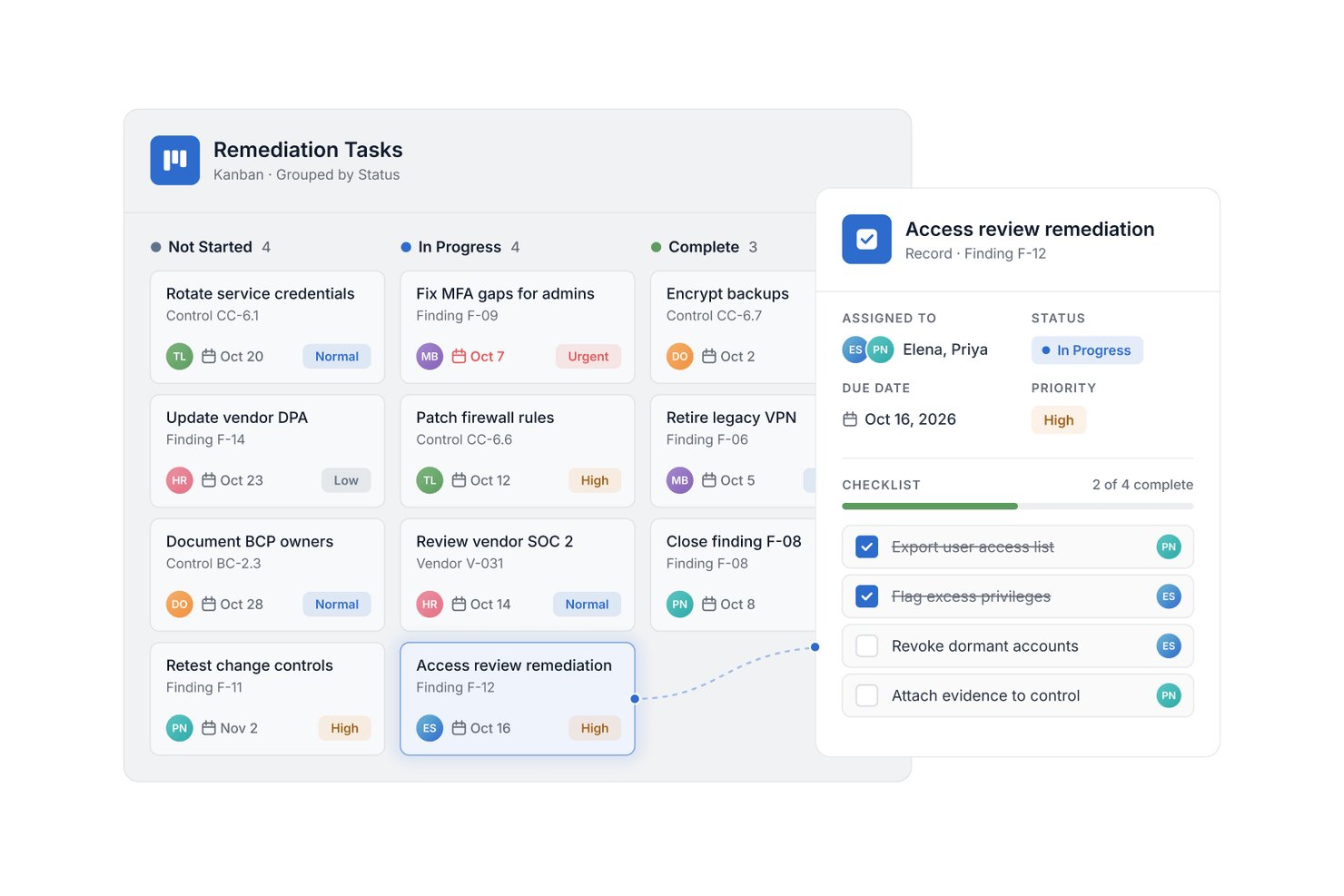
SmartSuite is a configurable work management platform for project teams that need to coordinate cross-functional work, clarify ownership, and track progress through shared workflows.
Who Is SmartSuite Best For?
SmartSuite suits project and PMO teams that need portfolio dashboards to track status, ownership, and priorities across multiple initiatives.
Why I Picked SmartSuite
I picked SmartSuite, my choice for “Best for project portfolio dashboards,” as a Coda alternative because its dashboards track status, ownership, and priorities across initiatives. I like pairing those views with configurable shared workflows, so cross-functional teams can follow project work consistently.
SmartSuite Key Features
- Gantt charts: Map tasks, dependencies, and milestones on a timeline.
- Time tracking: Log hours against records with a timer or manual entry.
- Forms: Collect requests and intake data as structured records.
- Automations: Set trigger-and-action rules for approvals and overdue work.
SmartSuite Integrations
SmartSuite documents 16 native integrations, including Microsoft Teams, Jira Cloud, Salesforce, HubSpot, Gmail, Outlook, Google Drive, Google Sheets, Box, and Dropbox; Zapier is also supported. SmartSuite provides a REST API and webhooks for custom integrations.
Pros and Cons
Pros:
- No-code automations route approvals and overdue work
- Linked records tie plans to operational data
- Portfolio dashboards surface status across concurrent initiatives
Cons:
- Peak-time performance can slow page loading
- Formula options limit complex spreadsheet-style analysis
Baserow
Best for open-source database-first teams
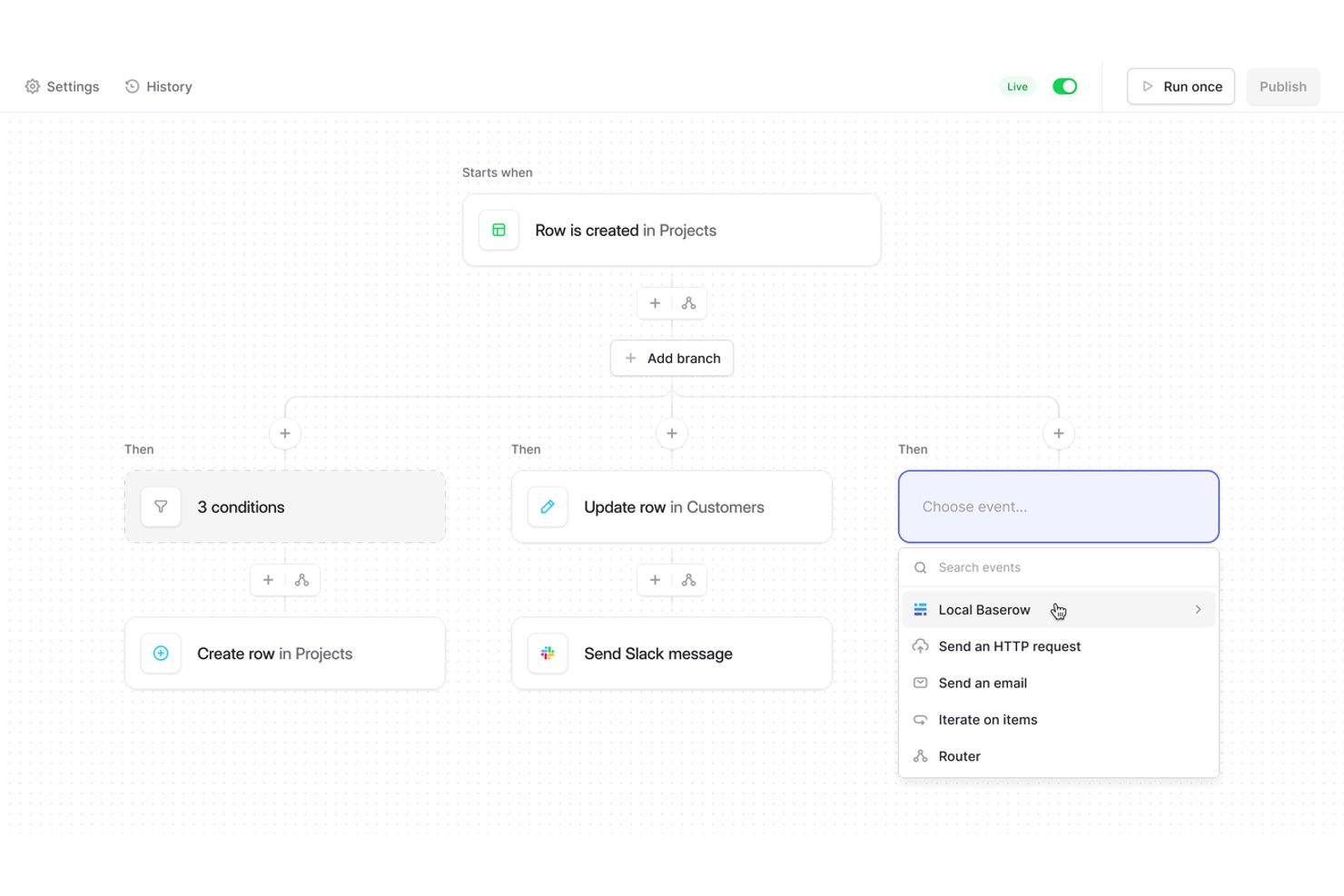
Baserow gives product and operations teams a collaborative workspace to organize project data, connect related records, and build shared workflows without relying on scattered spreadsheets and documents.
Who Is Baserow Best For?
Baserow suits technical and operations teams that want open-source, database-first tools they can adapt to their own workflows.
Why I Picked Baserow
I picked Baserow as a Coda alternative for “Best for open-source database-first teams.” Linked-table fields connect projects, owners, and deliverables, while filtered views give each workstream its own slice of the same records. I also value its self-hosted option when a team needs project data on infrastructure it controls.
Baserow Key Features
- Form view: Create forms that add submitted responses as database rows.
- Kanban view: Display records as cards grouped into columns.
- Calendar view: Place records on a calendar using date fields.
- REST API: Access and update database records through API endpoints.
Baserow Integrations
Baserow offers documented integrations with Make and Zapier, plus a REST API for custom integrations.
Pros and Cons
Pros:
- Views reshape shared records by workstream
- Linked records connect work across database tables
- Self-hosting keeps project data under your control
Cons:
- Reviewers report slower performance as data scales
- Application Builder offers limited styling control

Taskade
Best for no-code AI app building
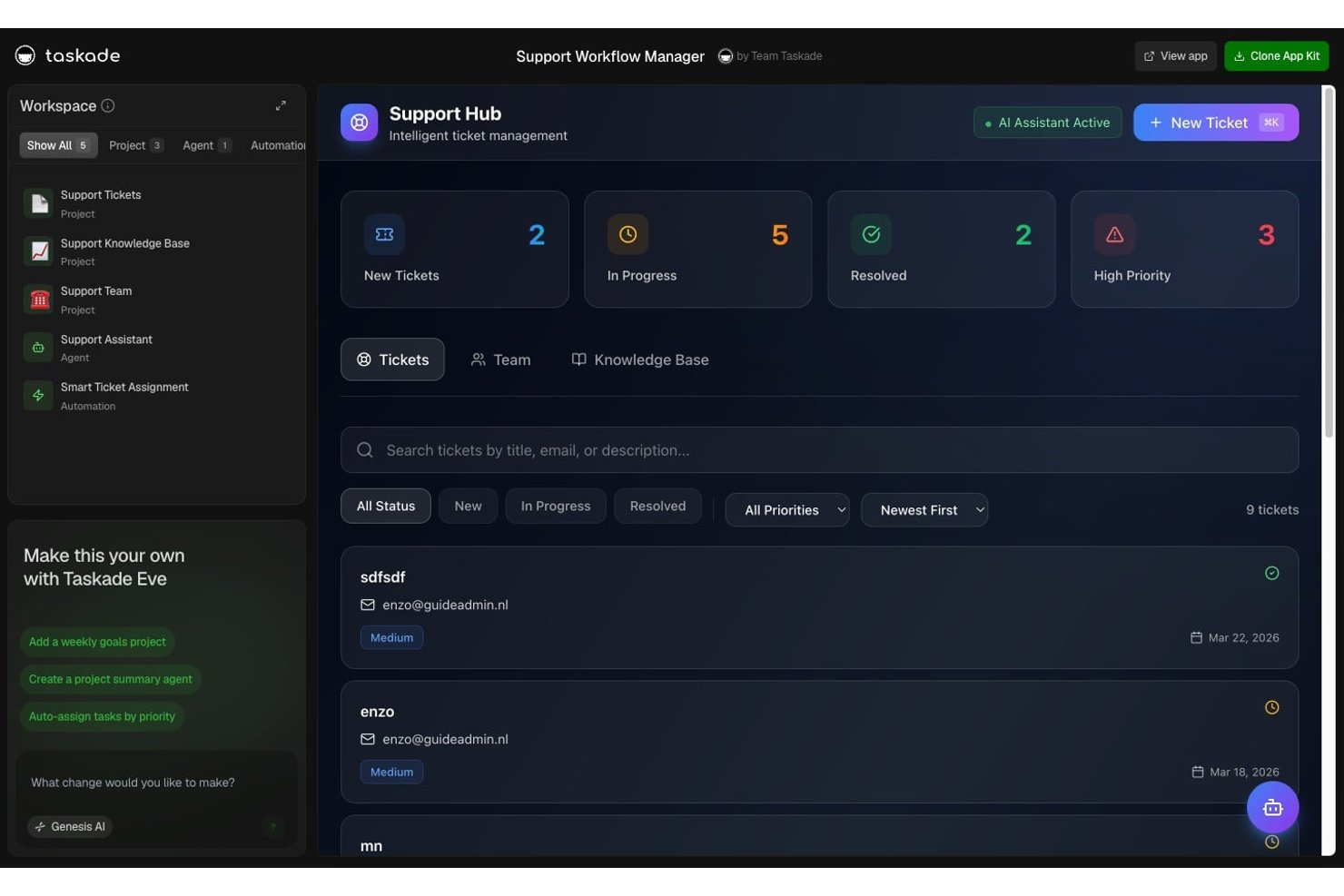
Taskade is a collaborative project workspace for product, engineering, and cross-functional teams that want to bring tasks, notes, and team conversations together to coordinate work and keep project context visible.
Who Is Taskade Best For?
Taskade suits product and operations teams that want to build AI-powered apps and workflows without writing code.
Why I Picked Taskade
I picked Taskade as a Coda alternative for Best for no-code AI app building. A prompt can generate a hosted app connected to project data, AI agents, and automations. I like how a product team could create a launch tracker where an agent answers questions from project documents and workflows update records as work progresses.
Taskade Key Features
- Project views: Switch between list, board, table, mind map, and calendar layouts for the same project data.
- Gantt chart: Map tasks on a timeline with dependencies and milestones.
- Recurring tasks: Set tasks to repeat daily, weekly, monthly, or yearly.
- Custom fields: Add structured data fields to project views.
Taskade Integrations
Taskade offers 100+ native integrations, including Slack, Microsoft Teams, Google Calendar, Google Sheets, GitHub, Jira, Linear, Stripe, HubSpot, and Salesforce, and connects with Zapier. It also supports incoming webhooks, HTTP requests, and an API for custom integrations.
Pros and Cons
Pros:
- Mind maps and multiple task views
- Ready-to-use task templates support common workflows
- Prompt-built apps connect to project data
Cons:
- No offline access to project work
- Shared AI credits limit sustained app building

Best for Jira-connected team documentation
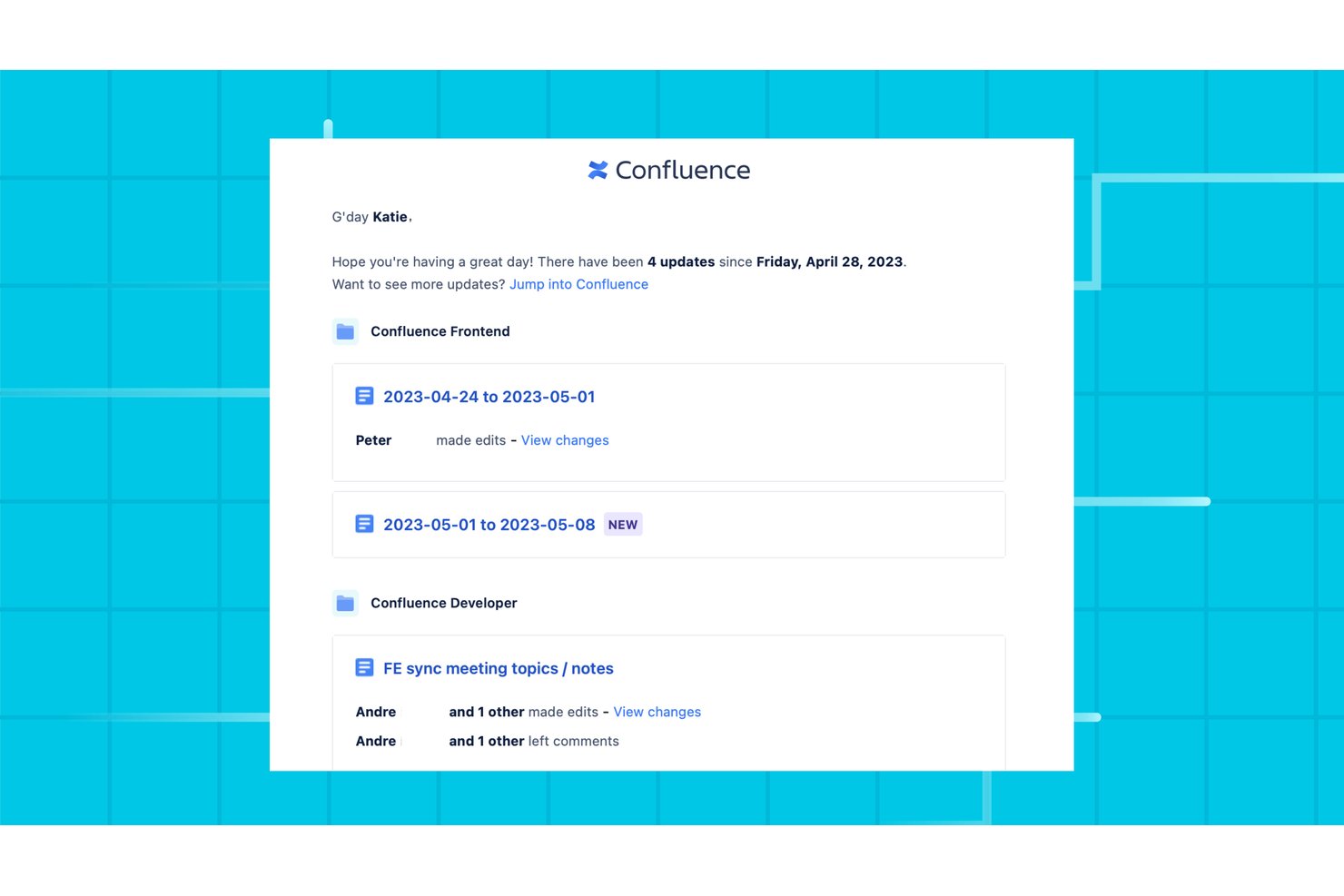
Confluence is a collaborative workspace for product, engineering, and operations teams that need to document decisions, share project knowledge, and keep requirements and plans accessible as work changes.
Who Is Confluence Best For?
Confluence suits product and engineering teams that want project plans, decisions, and requirements connected to their Jira work.
Why I Picked Confluence
I picked Confluence for Jira-connected team documentation because Jira issue and filter macros show ticket details on project pages. I like how teams can keep requirements and decision records beside the Jira work they describe, making it easier to trace a change from its rationale to the relevant issue.
Confluence Key Features
- Page templates: Start pages with templates for meeting notes, project plans, and decision records.
- Inline comments: Leave feedback on selected text and mention teammates in page comments.
- Page history: Review earlier page versions and restore one when needed.
- Whiteboards: Sketch ideas and organize sticky notes on a shared visual canvas.
Confluence Integrations
Confluence has a native Jira integration for displaying work items, reports, and links on pages, plus built-in Loom embeds. Atlassian-supported integrations connect Confluence with Slack, Microsoft Teams, and Trello, and thousands of additional apps are available through the Atlassian Marketplace.
Pros and Cons
Pros:
- Templates speed up repeatable project documentation
- Page history makes changes and restores traceable
- Space-based organization keeps project knowledge grouped
Cons:
- Page editing and formatting can feel cumbersome
- Search can return inconsistent or hard-to-rank results

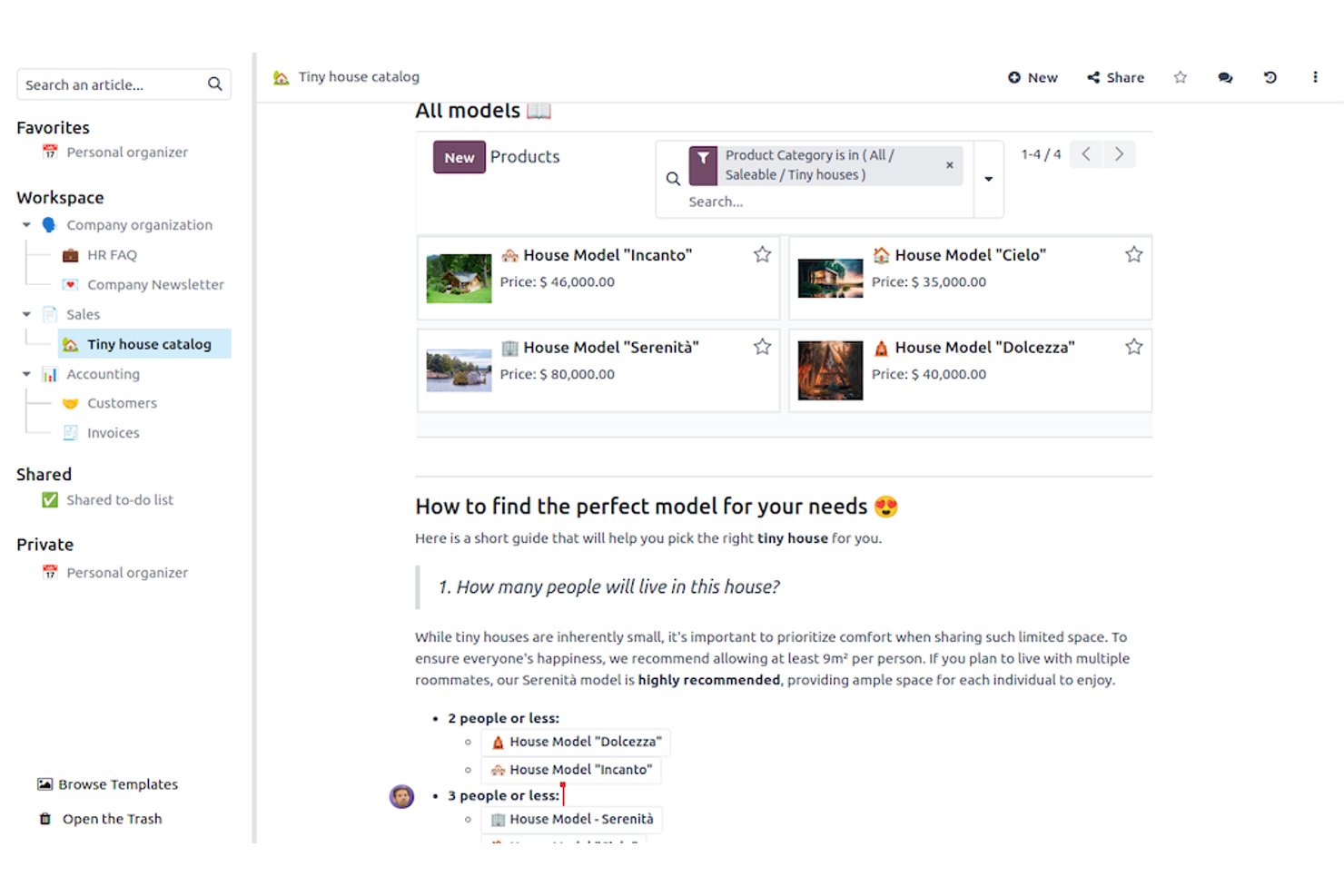
Odoo is a business management platform with project tools connected to apps for areas like sales and finance, helping cross-functional teams coordinate project work with day-to-day operations.
Who Is Odoo Best For?
Odoo suits operations teams that want to manage projects within a broader suite of connected business apps.
Why I Picked Odoo
I picked Odoo as a Coda alternative because it pairs project work with integrated business apps. Its Project app tracks tasks and timesheets, while links to Sales and Accounting help teams connect delivery work to customer orders and invoices. I like this fit when project status needs to sit alongside operational records.
Odoo Key Features
- Gantt view: Plan work on a timeline and review deadlines, progress, and dependencies.
- Calendar view: Reschedule work by dragging items to new dates.
- Kanban view: Move work between stages and filter or group the board.
- Recurring tasks: Set tasks to recur daily, weekly, or monthly.
Odoo Integrations
Odoo connects Project with its Sales and Accounting apps, and its Calendar app syncs with Google Calendar and Outlook; Odoo CRM is also available through Zapier. Odoo provides an external API for custom integrations on Custom plans.
Pros and Cons
Pros:
- Recurring tasks and dependencies support repeatable workflows
- Task timesheets expose project effort and costs
- Gantt, Kanban, and calendar views support planning
Cons:
- Project controls feel lighter than dedicated platforms
- Planning and timesheet assignment can feel confusing
Notion
Best for docs and databases in one workspace

Notion is a flexible project management platform for product and engineering teams that need to coordinate work, share project context, and keep decisions visible across teams.
Who Is Notion Best For?
Notion suits product managers and team leads who need a flexible hub for project plans, decisions, and team knowledge.
Why I Picked Notion
I picked Notion as a Coda alternative because it’s “Best for docs and databases in one workspace.” I use database properties and linked views to track a product roadmap, then open each item’s page for specs, decisions, and meeting notes. That keeps delivery context beside the work.
Notion Key Features
- Database automations: Trigger actions when a property changes or a schedule runs.
- Forms: Collect project requests and add submissions to a database.
- Subtasks and dependencies: Break tasks into smaller steps and link dependent work.
- Project templates: Start projects with reusable task structures and page layouts.
Notion Integrations
Notion integrates with Slack and GitHub, and its connections gallery includes Google Drive and Figma; it also connects with Zapier. Notion’s API supports custom integrations.
Pros and Cons
Pros:
- Reusable templates reduce repeated project setup
- Linked database views keep specs beside tasks
- Pages pair decisions with structured task data
Cons:
- Reporting trails dedicated project platforms
- Large databases can load slowly

Best for cross-project workload planning
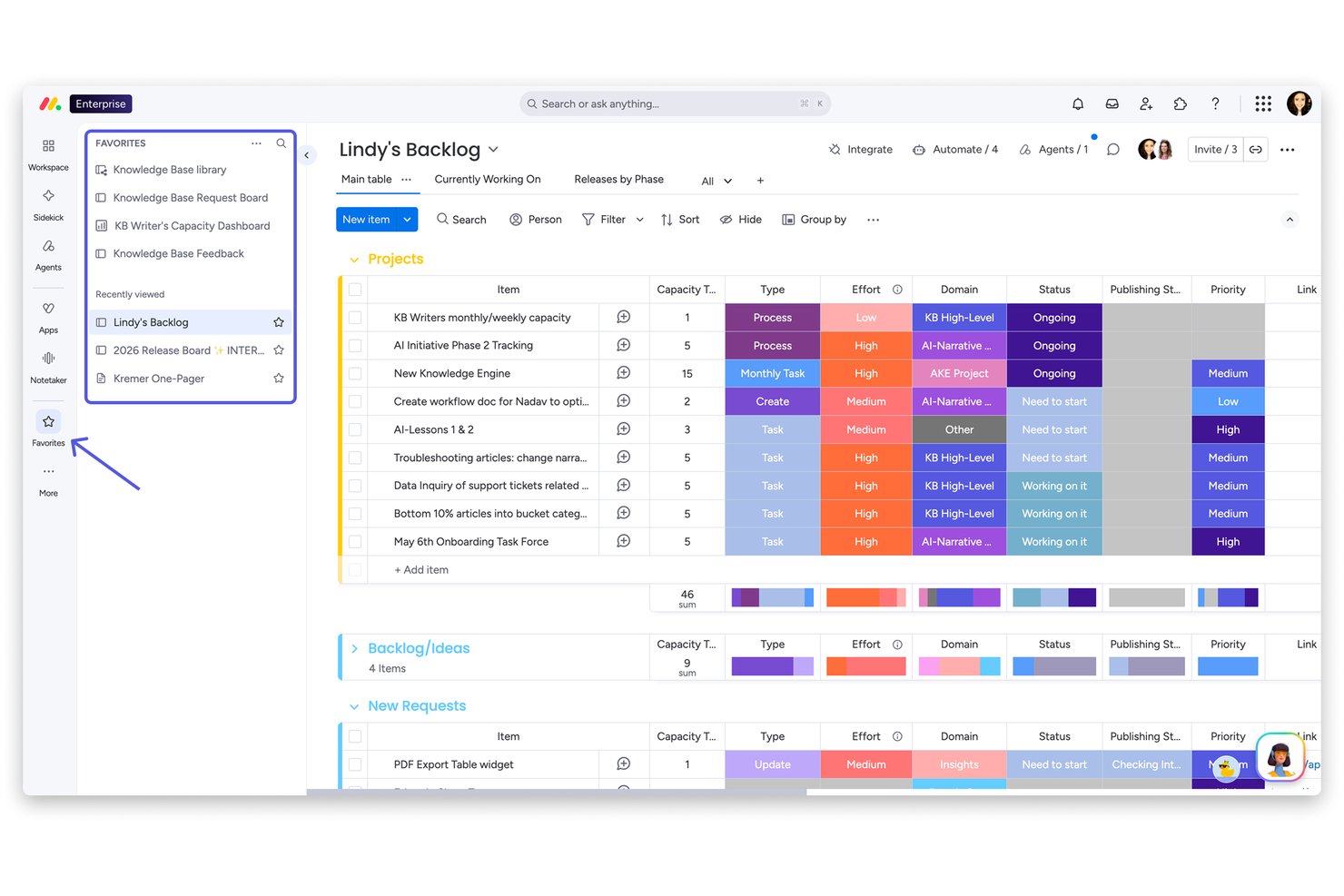
monday AI Workspace gives product, engineering, and design teams a visual project management platform to coordinate tasks and workflows, clarify ownership, and track progress across cross-functional work.
Who Is monday AI Workspace Best For?
monday AI Workspace fits project managers and delivery leads who need a shared view of team capacity across concurrent initiatives.
Why I Picked monday AI Workspace
I picked monday AI Workspace because its cross-project workload planning helps me see where competing initiatives draw on the same people. I use its visual project views to track task ownership and progress across product, engineering, and design, then check team capacity before shifting priorities or assigning more work.
monday AI Workspace Key Features
- WorkForms: Collect project requests through forms that send submissions to a board.
- Automations: Set rules to move items between boards or create project boards from templates.
- Dependencies and Gantt: Link dependent tasks and view their relationships on a Gantt chart.
- AI workdocs: Draft project briefs and generate supporting content in workdocs.
monday AI Workspace Integrations
monday.com offers 850+ integrations and apps, including Slack, Google Calendar, Microsoft Teams, GitHub, GitLab, Salesforce, HubSpot, and Outlook. It also supports Zapier and provides an API and SDKs for custom integrations.
Pros and Cons
Pros:
- Forms and automations route requests into projects
- Visual boards clarify ownership across workstreams
- Cross-project workload views expose capacity conflicts
Cons:
- Nested task breakdown stops at one level
- Document-centric work feels less natural than Coda
New Product Updates from monday AI Workspace
monday AI Workspace Adds Human Approval Routing
monday AI Workspace adds a human-in-the-loop approval block to AI Workflows, sending approval requests and routing workflow paths based on responses. For more information, visit monday AI Workspace's official site.
Airtable
Best for relational database-driven projects

Airtable gives product and engineering teams a flexible workspace to plan projects, connect related work, and adjust workflows as requirements, owners, and deadlines change.
Who Is Airtable Best For?
Airtable fits project managers in tech teams who need structured, interconnected project data rather than a fixed task-list workflow.
Why I Picked Airtable
I picked Airtable for “Best for relational database-driven projects” because linked records connect features, owners, and releases without duplicating project data. I like using filtered views to give product and engineering teams different perspectives on the same backlog, while rollups surface progress across releases.
Airtable Key Features
- Automations: Trigger actions or notifications when records meet specified conditions.
- Interface Designer: Build custom project dashboards and pages for different team roles.
- Timeline view: Schedule work across a timeline and adjust task dates.
- Forms: Collect project requests or updates and add responses to a table.
Airtable Integrations
Airtable offers native integrations with Slack, Google Drive, Google Calendar, Box, and Salesforce, which requires an Enterprise plan. It also connects with Zapier and provides a Web API for custom integrations.
Pros and Cons
Pros:
- Automations handle routine record-triggered actions
- Multiple views tailor backlogs to team roles
- Linked records keep project data connected
Cons:
- Dependency-heavy schedules often need workarounds
- Document-first project hubs suit Coda better

ClickUp
Best for all-in-one productivity

ClickUp is a project management platform for product and engineering teams that brings tasks, documentation, and cross-functional work into one workspace, with the listed fit “Best for all-in-one productivity.”
Who Is ClickUp Best For?
ClickUp is a good fit for project managers coordinating product and engineering work across teams.
Why I Picked ClickUp
I picked ClickUp as a Coda alternative because its tasks and Docs sit in one workspace, fitting “Best for all-in-one productivity.” I like that product managers can document requirements in Docs, connect them to delivery tasks, and track engineering ownership as scope changes.
ClickUp Key Features
- Project views: Switch among List, Board, Calendar, and Gantt views.
- Custom fields: Add details such as priority, effort, or status to work items.
- Workflow automations: Set rules to trigger actions when conditions are met.
- Time tracking: Record time against work items and review timesheets.
ClickUp Integrations
ClickUp documents native integrations with Slack, GitHub, GitLab, Bitbucket, Google Drive, Google Calendar, Zoom, HubSpot, Figma, and Microsoft Teams, and it connects with Zapier. It also offers a public API for custom integrations.
Pros and Cons
Pros:
- Multiple views pair task status with workload
- Nested subtasks and dependencies clarify delivery ownership
- Connects project Docs directly to delivery tasks
Cons:
- Large workspaces can load slowly
- Docs tables can frustrate teams replacing Coda

Asana gives product, engineering, and marketing teams a shared work management platform to plan projects, assign tasks, and keep priorities and ownership clear as requirements change.
Who Is Asana Best For?
Asana suits project managers overseeing cross-functional portfolios who need shared visibility into ownership and delivery timelines.
Why I Picked Asana
I picked Asana as a Coda alternative for cross-project scheduling and workload: portfolios help me track delivery across initiatives, while Workload shows assignments against team capacity. I use project timelines and dependencies to spot when a slip in one workstream threatens another and adjust ownership before dates move.
Asana Key Features
- Custom fields: Add structured values such as status, priority, or effort to project tasks.
- Forms: Collect requests through forms that create tasks in a project.
- Rules: Set triggers and actions to automate routine task updates.
- Approvals: Mark tasks for review and record approval or changes requested.
Asana Integrations
Asana’s App Directory includes 200+ partner integrations, including Slack, Google Drive, Microsoft Teams, Jira Cloud, GitHub, GitLab, Dropbox, and Zapier. Asana also provides an API for custom integrations.
Pros and Cons
Pros:
- Dependencies clarify downstream schedule impacts
- Workload maps assignments against team capacity
- Portfolios surface cross-project delivery risks
Cons:
- Stakeholder reporting customization can feel limited
- Less adaptable than Coda’s doc-table systems
Andre Coda-alternativer
Her er noen flere Coda-alternativer som ikke kom med på kortlisten min, men som likevel er verdt å undersøke:
- Fibery
For relational data modeling across teams
- Smartsheet
For enterprise-scale Gantt scheduling
- Wrike
For cross-project portfolio tracking
- Lark
For ops teams on a startup budget
- Softr
For no-code client portal building
- Google Workspace
For Google-native workflow automation
- Aha!
For product roadmap planning
- FuseBase
For client portal collaboration
- NocoDB
For self-hosted database tracking
- Bitrix24
For CRM-driven team collaboration


How I Evaluate Coda Alternatives
I split evaluation into two layers: baseline capabilities every tool must clear—relational databases, task views, and live collaboration—and differentiators that set standout options apart.
Core Functionality (Table Stakes For This List)
When I'm selecting tools for my list, I rank each one on a scale from 0 (does not offer the functionality) to 5 (excels in this area) for each core functionality listed below. Then, I calculate the tool's total score into a percentage. Each tool needs to achieve a minimum total score of 65% to be considered for inclusion.
- Flexible Docs & Databases: I check whether you can build relational tables inside docs—like linking a sprint backlog table to a project brief—and reference data across pages.
- Multiple Project Views: Each tool should let you flip the same dataset between table, kanban, calendar, and timeline views so you can plan sprints and track milestones.
- Task & Project Management: I look for assignees, due dates, dependencies, and subtasks that let you run a real delivery workflow, not just organize a to-do list.
- Real-Time Collaboration: Teams need live co-editing, threaded comments, and @mentions so a distributed squad can update a project doc without version conflicts.
- Automations & Workflows: I evaluate whether you can set up triggers like auto-assigning tasks when a status changes or notifying Slack when a deadline shifts.
- Integrations & API: The tool should connect to your existing stack—Slack, GitHub, Google Workspace, Jira—plus offer an open API for custom data syncing.
Once I have a list of tools that meet this criteria, I consider what sets each platform apart.
Differentiating Factors (What Sets Vendors Apart)
Here's how I compare and contrast different vendors:
Standout Features
AI features matter here—I look for tools that let you summarize a sprint retro doc or generate task lists from meeting notes without switching apps. Portfolio dashboards are another differentiator, especially when you need to roll up status across multiple workstreams for a steering committee update. I also evaluate client or guest portals, since agency PMs and client services leads often need to share live project progress without adding external stakeholders as paid users.
Beyond Features
Migration paths deserve close attention—I check whether a tool can import Coda docs and tables without losing formulas or linked references. Pricing structure matters too, particularly how a vendor handles viewer and guest seats, since most project workspaces involve stakeholders who only need read access. I also evaluate security posture, looking for SOC 2 compliance, SSO/SAML support, and audit logs that enterprise IT teams typically require before approving a new workspace tool.
Hvorfor se etter et alternativ til Coda?
Selv om Coda er et godt valg for prosjektstyring, ser noen brukere etter alternative løsninger. Det kan hende du ser etter et Coda-alternativ fordi …
- Du trenger avanserte rapporteringsfunksjoner
- Teamet ditt trenger tilgang uten nett
- Du ønsker flere integrasjonsmuligheter
- Du trenger et enklere brukergrensesnitt
- Virksomheten din vokser raskt
- Du trenger bedre støtte for mobilapper
Hvis noe av dette høres kjent ut, har du kommet til rett sted. Listen min inneholder flere alternativer innen prosjektstyringsprogramvare som passer bedre for team som står overfor disse utfordringene og ser etter alternative løsninger.
Viktige funksjoner i Coda
Her er noen av de viktigste funksjonene i Coda, slik at du kan sammenligne dem med det alternative løsninger tilbyr:
- Integrasjon: Kobler seg til over 600 verktøy for å forbedre arbeidsflytene for teamet ditt.
- Coda AI: En AI-assistent som hjelper teamet ditt med å finne informasjon, generere innhold og automatisere oppgaver effektivt.
- Tilpassbare maler: Tilbyr maler for ulike team som hjelper deg med å effektivisere prosessene dine.
- Teamknutepunkter: Sentraliserte områder der teamet ditt kan samarbeide om strategier, tidsplaner og prosjekter.
- Dynamisk samarbeid: Kombinerer det velkjente ved dokumenter med engasjement som i apper for å forbedre teamarbeidet.
- Datahåndtering: Synkroniserer tabeller og redigeringer på tvers av dokumenter for å erstatte tradisjonelle regneark og gi bedre datahåndtering.
- Priser: Codas prisplaner starter på $10/måned per dokumentoppretter, og går helt opp til en tilpasset Enterprise-plan. En gratisplan er også tilgjengelig.