

10 beste alternativer til Confluence for kunnskapsstyring i 2026

Kortliste over de beste alternativene til Confluence


Hvis du bruker Atlassian Confluence til å administrere teamets kunnskap og prosjektdokumentasjon, kan du ha støtt på noen utfordringer – tungvint redigering, begrensede tilpasningsmuligheter eller priser som ikke passer teamets behov.
Programvare for kunnskapsadministrasjon bør hjelpe teamet med å holde orden, dele oppdateringer tydelig og redusere forvirring. Hvis Confluence ikke gjør dette for deg, kan det være på tide å prøve noe nytt.
I denne artikkelen har jeg samlet de beste alternativene til Confluence som er verdt å vurdere. Jeg tester og vurderer programvare uavhengig, og jeg har valgt verktøy som løser vanlige utfordringer innen prosjektstyring, samtidig som de passer bedre for ulike team og budsjetter.
Hva er Confluence?
Confluence fra Atlassian er et verktøy for kunnskapsadministrasjon som hjelper team med å organisere, få tilgang til og dele informasjon på ett sted. Det brukes mye av prosjektledere, utviklere og IT-fagfolk som trenger et sentralt sted for samarbeid.
Viktige funksjoner som dokumentredigering, oppgavesporing og integrasjoner med tredjeparter gjør det enklere for team å samarbeide og holde seg samkjørte. Alt i alt bidrar Confluence til bedre kommunikasjon og økt produktivitet på tvers av team.
Why Trust Our Software Recommendations
Our team has been testing and reviewing software since 2012. As project managers ourselves, we know how difficult—and important—it is to choose the right software.
For this guide, we evaluated tools using hands-on testing and independent research, scoring tools using our selection criteria. We also draw on insights from industry thought leaders and practicing project management experts.
Our reviews reflect our human editorial judgment, not a sales pitch.
Expert reviewers:
Sammenligningstabell for alternativer til Confluence
Denne sammenligningstabellen oppsummerer prisopplysningene for mine beste utvalgte alternativer til Confluence:
| Tool | Best For | Trial Info | Price | ||
|---|---|---|---|---|---|
| 1 | Best for AI-powered knowledge bases | Free demo available | Pricing upon request | Website | |
| 2 | Best for AI-driven doc upkeep | Free demo + 14-day free trial available | From $10/user/month (billed annually) | Website | |
| 3 | Best for self-hosted Confluence migration | Free plan + 30-day free trial available | From €2.50/user/month (billed annually) | Website | |
| 4 | Best for docs-as-code Git workflows | 14-day free trial + free plan available | From $65/site/month + $12/user/month (billed annually) | Website | |
| 5 | Best for keeping team knowledge current | Free plan available | From $6.67/user/month (billed annually) | Website | |
| 6 | Best for docs linked to tasks and projects | Free plan available | From $9/user/month (billed annually) | Website | |
| 7 | Best for M365-native document governance | Free trial available | From $7/user/month (billed annually) | Website | |
| 8 | Best for verified, always-current knowledge | Free demo available | Pricing upon request | Website | |
| 9 | Best for flat-rate, Markdown-first knowledge bases | Free plan + 30-day free trial available | From $10/month | Website | |
| 10 | Best for docs, data, and workflows in one hub | Free plan available | From $25/user/month (billed annually) | Website |

Anmeldelser av de beste alternativene til Confluence
Nedenfor finner du mine detaljerte sammendrag av de beste alternativene til Confluence som kom med på kortlisten. Anmeldelsene mine gir en detaljert gjennomgang av de viktigste funksjonene, fordelene & ulempene, integrasjonene og ideelle bruksområdene for hvert verktøy, slik at du kan finne det som passer best for deg.

Best for AI-powered knowledge bases

Document360 is a knowledge base software designed to help teams create and manage documentation efficiently. It's commonly used by customer support and technical teams needing a centralized platform for their knowledge resources.
Why it's a good Confluence alternative: Document360 provides AI-powered search capabilities, a powerful authoring experience, and version control, which help with maintaining accurate and accessible documentation. The ability to create multilingual content and detailed analytics further supports the software’s role as a comprehensive knowledge management tool.
Standout Features & Integrations:
Features include customizable branding options that let your team maintain a consistent look across your documentation. You can also use the category manager to organize content logically. The platform additionally supports collaboration with a comprehensive commenting system to enhance team communication.
Integrations include Microsoft Teams, Zendesk, Intercom, Slack, Freshdesk, Google Analytics, Drift, Zoho PageSense, Olark, and Gorgias.
Pros and Cons
Pros:
- Detailed analytics available
- Strong version control
- AI-powered search capabilities
Cons:
- Basic mobile support
- Can be resource-intensive
New Product Updates from Document360

Document360 Adds Bulk Mirroring, Eddy AI Citations, and Unified SSO
Document360 adds bulk article mirroring, citations in Eddy AI chatbot responses, and a unified Enterprise SSO setup. These updates improve content reuse, answer verification, and access management. For more information, visit Document360’s official site.
 .
.
Slite
Best for AI-driven doc upkeep

Slite is a collaborative knowledge base for tech and digital teams that organizes project briefs, processes, and decisions in one workspace, so people can find shared context as work changes.
Who Is Slite Best For?
Slite suits product, engineering, and operations teams that need a shared knowledge base and AI support to keep internal documentation current.
Why I Picked Slite
I picked Slite as a Confluence alternative because it’s Best for AI-driven doc upkeep. Its verification workflows assign document owners and prompt reviews, while Ask answers questions from your knowledge base with source links. I like this for product teams that need to check whether specs and decisions are current before acting.
Slite Key Features
- Templates: Use or customize templates for recurring project briefs, meeting notes, and onboarding docs.
- Collections: Add tags, people, dates, and links to docs, then filter, sort, or view them as a table or board.
- Embedded content: Add Jira issues, Figma designs, Google Sheets, and other connected content directly to docs.
- Document imports: Bring existing knowledge into Slite with migration tools for Notion, Confluence, and Google Docs.
Slite Integrations
Slite offers a built-in Slack integration, agent-source connections for Jira and Google Drive, and document embeds for GitHub, Linear, Asana, Figma, and Google Sheets; it also supports Zapier. Slite provides an API for custom integrations.
Pros and Cons
Pros:
- Reviewers praise easy Confluence migration
- Verification workflows flag outdated team documentation
- AI answers link back to source documents
Cons:
- Offline work isn’t supported, reviewers report
- Table editing can be awkward

XWiki
Best for self-hosted Confluence migration

XWiki is an extensible wiki platform for product and engineering teams that need to organize shared knowledge, document processes, and build custom collaboration tools around their workflows.
Who Is XWiki Best For?
XWiki suits IT and engineering teams migrating from Confluence who need a self-hosted wiki they can adapt to their documentation workflows.
Why I Picked XWiki
I picked XWiki as a best Confluence alternative for self-hosted Confluence migration because its toolkit can import spaces or full backups, including permissions and page history. Compatibility macros help preserve Confluence content behavior, while on-premises deployment lets your IT team control where the wiki runs.
XWiki Key Features
- WYSIWYG editor: Edit wiki pages visually in your browser.
- Structured data: Build forms and browse records in filterable tables.
- Advanced search: Search wiki content and filter results by space.
- LDAP and SSO: Connect XWiki to existing directory and sign-on systems.
XWiki Integrations
XWiki supports identity integrations with LDAP, Microsoft Active Directory and Entra ID, SAML, OpenID Connect, and Keycloak; an available extension connects XWiki with Jira Server and Data Center. XWiki also provides a REST API for custom integrations.
Pros and Cons
Pros:
- Structured pages support forms and filtered tables
- Docker deployment makes private hosting straightforward
- Imports Confluence spaces with permissions and history
Cons:
- Large Confluence XML imports can take hours
- Text editing feels less smooth than alternatives


GitBook is a knowledge base for product and engineering teams that need to publish clear technical documentation and keep shared answers current as software and workflows change.
Who Is GitBook Best For?
GitBook suits engineering teams that want to manage technical documentation through docs-as-code workflows and keep changes aligned with Git.
Why I Picked GitBook
I picked GitBook as a Confluence alternative because it fits “Best for docs-as-code Git workflows.” Git Sync connects documentation to GitHub or GitLab, so engineers can propose API guide changes through pull requests and review them alongside code. That keeps documentation updates in the same version-control process as a release.
GitBook Key Features
- Block editor: Create pages with structured content blocks and custom blocks.
- Full-text search: Let readers search published documentation for relevant pages.
- Custom domains: Publish your documentation under your own domain.
- Site analytics: Track page views, search terms, and reader feedback.
GitBook Integrations
GitBook offers built-in integrations with GitHub, GitLab, Slack, Jira, Linear, Intercom, Google Analytics, Segment, Fathom, and PostHog. Its developer platform supports custom integrations.
Pros and Cons
Pros:
- Real-time drafts support team review
- Markdown editing suits technical documentation
- Git-based reviews align docs with releases
Cons:
- Media assets can be hard to manage
- Page design controls remain limited


Slab is a team knowledge platform for product and engineering groups that brings project docs, processes, and decisions into one workspace, helping reduce scattered information and repeated questions compared with Confluence.
Who Is Slab Best For?
Slab fits tech teams whose project managers need a shared place to keep project guidance, decisions, and team practices up to date.
Why I Picked Slab
I rate Slab among the best Confluence alternatives because its verification feature assigns maintainers to review and confirm posts, helping project decisions and process docs stay current. Unified Search also finds answers across Slab and connected tools, so I can locate the latest guidance without checking each workspace separately.
Slab Key Features
- Content editor: Create formatted posts with modern editing tools.
- Topics: Group posts by subject and add context for readers.
- Realtime collaboration: Edit posts with teammates at the same time.
- Templates: Start common documents with reusable layouts.
Slab Integrations
Slab’s integration catalog lists 50 connections, including Slack, Google Workspace, GitHub, GitLab, Jira, Linear, Asana, Confluence, Dropbox, and Figma. These connect team knowledge with tools for communication, search, documentation, and issue tracking.
Pros and Cons
Pros:
- Verification assigns owners to review documentation
- Topics let teams tag posts across subjects
- Unified search finds answers across team knowledge
Cons:
- Imported documents may need structural cleanup
- Tables and image formatting can feel clunky

ClickUp
Best for docs linked to tasks and projects
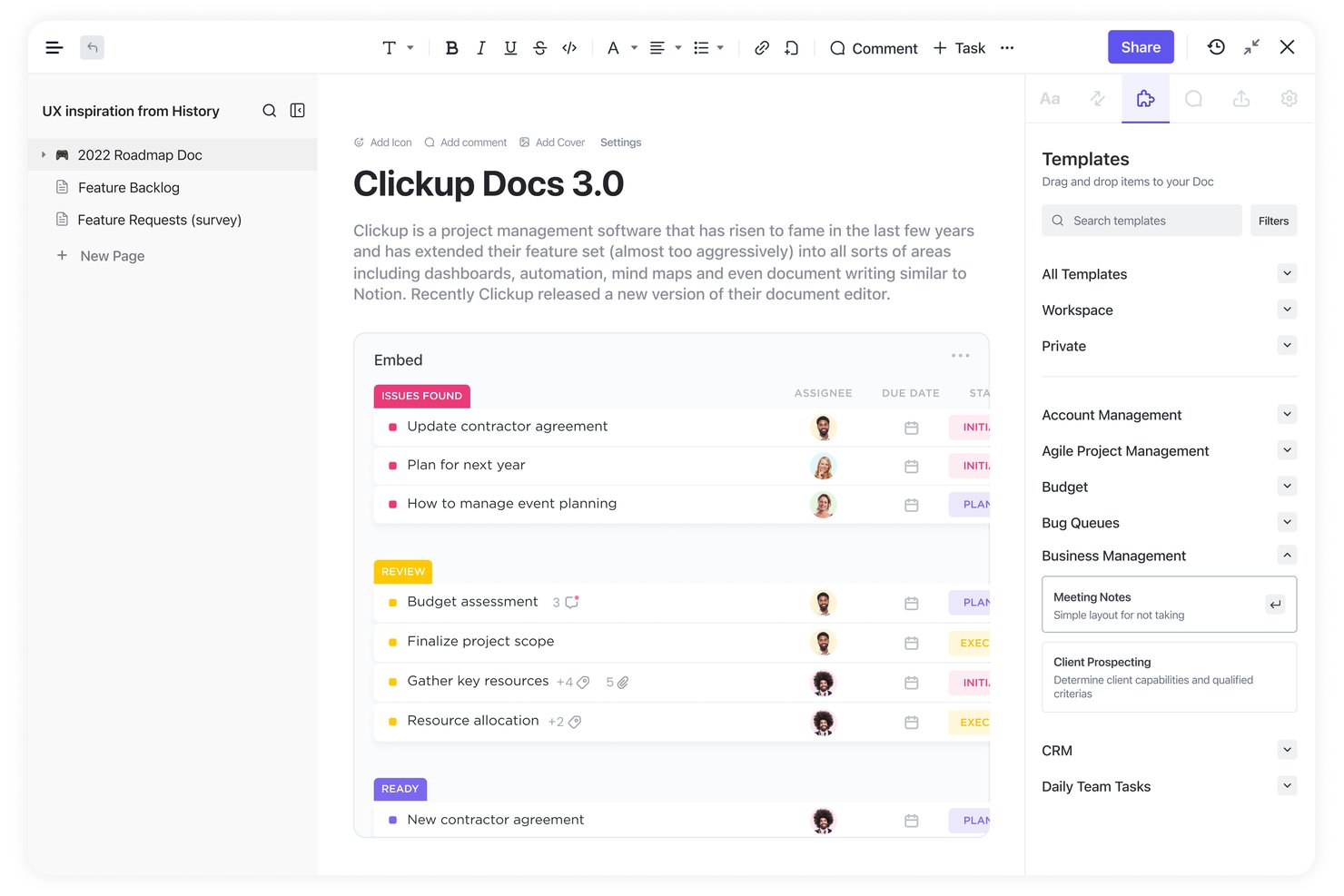
For product and engineering teams evaluating Confluence alternatives, ClickUp is a work management platform that helps organize team knowledge and coordinate cross-functional projects in one workspace.
Who Is ClickUp Best For?
ClickUp suits project managers and cross-functional teams that want project plans and reference docs connected directly to tasks.
Why I Picked ClickUp
I picked ClickUp as Best for docs linked to tasks and projects because ClickUp Docs can connect project briefs and requirements directly to the work they guide. I like that connection for tracking decisions alongside task ownership and progress, rather than searching separately for context in a Confluence alternative.
ClickUp Key Features
- Docs Hub: Browse and organize Docs and wikis from a central location.
- Nested pages: Add subpages to structure information within a Doc.
- Doc templates: Create Docs from reusable templates.
- Page permissions: Control who can view or edit a Doc.
ClickUp Integrations
ClickUp offers native integrations with Slack, GitHub, GitLab, Bitbucket, Google Drive, Google Calendar, Microsoft Teams, and Figma. It also connects with Zapier and provides a public API for custom integrations.
Pros and Cons
Pros:
- Reuse templates for project documentation
- Organize reference material with nested pages
- Link project briefs directly to tasks
Cons:
- Wiki organization feels limited for knowledge bases
- Large Docs can lag or crash
New Product Updates from ClickUp
ClickUp Adds Meetings Hub, Super Agent Templates, and ZoomInfo Integration
ClickUp adds a searchable Meetings Hub, new ways to clone and template Super Agents, and a ZoomInfo integration through the App Center. These updates improve meeting retrieval, agent reuse, and access to sales intelligence. For more information, visit ClickUp’s official site.

Best for M365-native document governance

Microsoft SharePoint is a knowledge management and collaboration platform for Microsoft 365 organizations, helping project teams organize documentation, publish internal guidance, and reduce scattered information.
Who Is Microsoft SharePoint Best For?
Microsoft SharePoint suits project and operations teams in Microsoft 365 organizations that need governed document libraries and internal guidance.
Why I Picked Microsoft SharePoint
I picked Microsoft SharePoint as a Confluence alternative for its “Best for M365-native document governance” focus. Document libraries pair version history with access permissions, while metadata and views help me separate approved project guidance from drafts. SharePoint pages let me publish that guidance alongside the files teams need.
Microsoft SharePoint Key Features
- SharePoint search: Find content across sites, pages, and files with keyword searches.
- News posts: Publish announcements and updates on team or communication sites.
- SharePoint lists: Track project items such as decisions, issues, and risks in structured lists.
- Site templates: Start a site with a preconfigured layout and features for a specific purpose.
Microsoft SharePoint Integrations
SharePoint has native integrations across Microsoft 365, including Microsoft Teams, OneDrive, Word, Excel, and Outlook. It also connects with Power Automate and Power Apps through Microsoft’s SharePoint connector, and supports custom integrations through Microsoft Graph.
Pros and Cons
Pros:
- Shared libraries centralize project files
- Metadata views distinguish guidance from drafts
- Version history reduces document version confusion
Cons:
- Search misses files in poorly structured libraries
- Site navigation can obscure wiki-style guidance

Guru
Best for verified, always-current knowledge
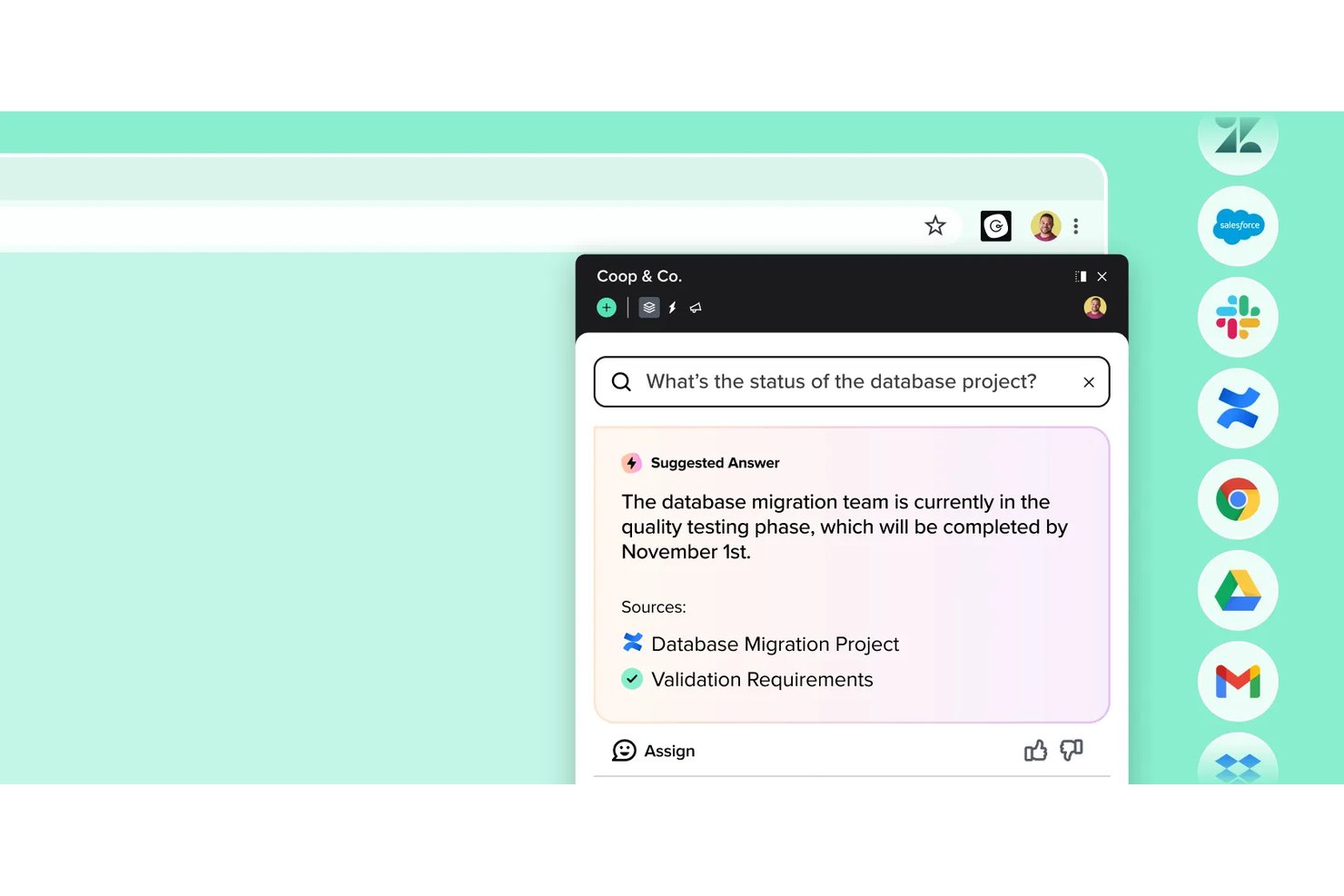
Guru is a knowledge management platform for cross-functional teams that brings company guidance into everyday work, helping product and engineering groups find answers without relying on scattered Confluence pages.
Who Is Guru Best For?
Guru suits knowledge managers and team leads at tech companies who need subject matter experts to keep internal answers verified and current.
Why I Picked Guru
I picked Guru for “Best for verified, always-current knowledge.” Its verification workflow assigns knowledge cards to subject matter experts and prompts them to review content on a schedule. When an API process changes, an owner can update and reverify the guidance before engineers rely on an outdated Confluence page.
Guru Key Features
- AI answers: Knowledge Agents answer questions from company knowledge with citations.
- Enterprise search: Search Guru and connected sources from one place.
- Slack and Microsoft Teams integrations: Search knowledge and get cited answers within either app.
- Browser extension: Find contextual answers and knowledge triggers without leaving your current tab.
Guru Integrations
Guru offers integrations with Confluence, Jira, Slack, Microsoft Teams, GitHub, Google Drive, Notion Pages, and more for search and in-context knowledge access. It also supports Zapier and provides an API for custom integrations.
Pros and Cons
Pros:
- Browser extension puts answers beside work
- Cited answers surface knowledge in context
- Expert verification prompts keep guidance current
Cons:
- Verification workload grows across large libraries
- Search can miss cards without exact titles


Outline is a collaborative knowledge base for product and engineering teams that keeps internal documentation, project decisions, and team guides organized and searchable as work changes.
Who Is Outline Best For?
Outline suits software teams where project leads and engineers need to maintain shared internal documentation in Markdown under a flat-rate plan.
Why I Picked Outline
I picked Outline as a Confluence alternative because it fits “Best for flat-rate, Markdown-first knowledge bases.” I like its Markdown editor for maintaining engineering runbooks and decision records, while collections group related docs and search helps me find project guidance.
Outline Key Features
- Comments and threads: Discuss document details in focused conversations.
- Access permissions: Set read and write access for users and groups.
- Public sharing: Share selected documents with people outside your workspace.
- Document templates: Create reusable templates for recurring documents.
Outline Integrations
Outline documents 20+ integrations, including Slack, GitHub, GitLab, Linear, Figma, Google Analytics, Notion, and Zapier. It also offers an API and webhooks for custom integrations.
Pros and Cons
Pros:
- Document links and version history aid traceability
- Live collaboration keeps edits and comments together
- Markdown editing suits engineering documentation
Cons:
- Collection permissions cannot exclude individual documents
- Search can lag behind recent updates

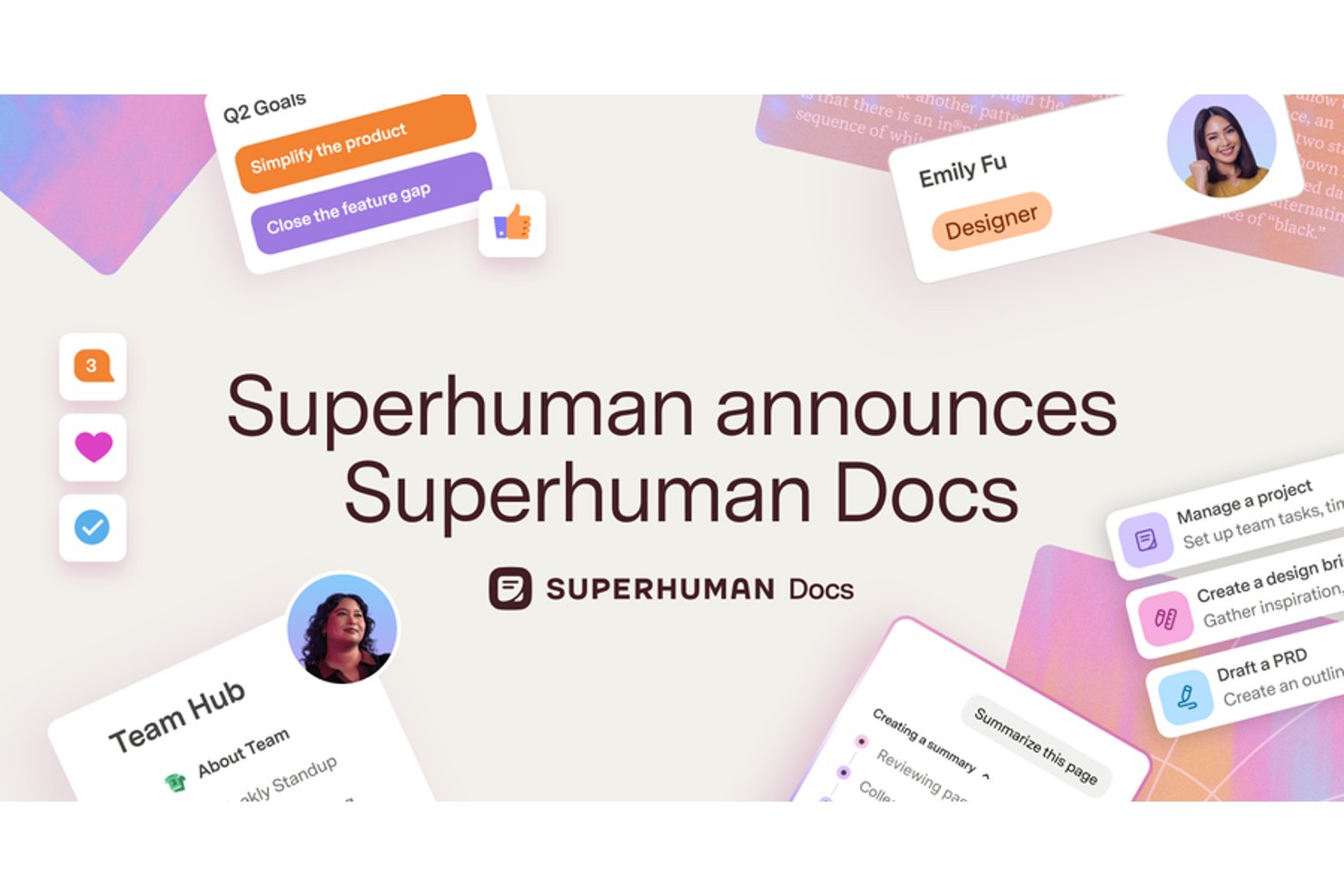
Superhuman gives product and engineering teams a collaborative workspace to document decisions, organize team knowledge, and connect information to project work, offering an alternative to static Confluence pages.
Who Is Superhuman Best For?
Technical program managers and cross-functional leads coordinating product and engineering work can use Superhuman to keep team knowledge, project data, and workflows together.
Why I Picked Superhuman
I picked Superhuman as a Confluence alternative because it’s “Best for docs, data, and workflows in one hub.” Docs AI builds interactive tables, formulas, and buttons from prompts, while knowledge hubs keep project information in a shared source of truth. I like that teams can also build approval workflows and project trackers directly in their docs.
Superhuman Key Features
- Version history: Review earlier document versions within your plan’s retention period.
- Tool integrations: Sync information from connected tools such as Jira, Salesforce, and Asana.
- Custom-domain publishing: Publish documents under a branded custom domain.
- Custom roles and permissions: Set access permissions for different users and roles.
Superhuman Integrations
Superhuman Docs supports 800+ integrations, including Jira, Salesforce, Asana, and Slack, with two-way sync for connected tools. It also offers a public API for custom integrations and connects with Zapier.
Pros and Cons
Pros:
- Live collaboration keeps team information centralized
- Formulas turn knowledge pages into project trackers
- Docs and relational tables share one workspace
Cons:
- Large project portfolios can outgrow its structure
- Advanced formulas and automations take time to learn
Andre alternativer til Confluence
Her er noen flere alternativer til Confluence som ikke kom med på kortlisten, men som likevel er verdt å sjekke ut:
- Docmost
For self-hosted open-source wiki teams
- Nuclino
For wiki-style docs without the complexity
- Tettra
For Slack-native Q&A documentation
- Notion
For docs, databases, and wikis in one place
- Helpjuice
For dedicated customer knowledge bases
- Archbee
For developer-focused API doc publishing
- Wiki.js
For self-hosted wiki with granular access rules
- Papyrs
For intranet-style internal portals
- ONES.com
For linking docs to project workflows


How I Evaluate Confluence Alternatives
For teams leaving Confluence or consolidating wikis with project work, I split the evaluation into two layers: baseline criteria every tool must meet and the differentiators that determine real fit.
Core Functionality (Table Stakes For This List)
When I'm selecting tools for my list, I rank each one on a scale from 0 (does not offer the functionality) to 5 (excels in this area) for each core functionality listed below. Then, I calculate the tool's total score into a percentage. Each tool needs to achieve a minimum total score of 65% to be considered for inclusion.
- Collaborative Document Editing: I check whether multiple team members can co-edit a page in real time, leave inline comments, and track version history the way you'd expect during a sprint retrospective.
- Knowledge Base Structure: A clear hierarchy matters. I look for nested pages, spaces, and cross-linking that let you organize runbooks, project specs, and onboarding docs without things getting buried.
- Project & Task Integration: I evaluate how well docs connect to actual project work, whether through native task boards and timelines or deep integrations with tools like Jira, Asana, or ClickUp.
- Search & Content Discovery: Finding a decision log from three months ago shouldn't take five minutes. I look for full-text search with filters, tags, and content-type facets that surface the right page fast.
- Permissions & Access Control: Teams sharing docs with contractors, clients, or leadership need page-level permissions and guest access. I check for granular role controls beyond basic workspace-wide settings.
- Templates & Content Reusability: I look for template libraries covering PM staples like meeting notes, project charters, and status reports, plus the ability to create and share custom templates across your team.
Once I have a list of tools that meet this criteria, I consider what sets each platform apart.
Differentiating Factors (What Sets Vendors Apart)
Here's how I compare and contrast different vendors:
Standout Features
AI-driven features like page summarization and draft generation can shave real time off weekly status updates and post-mortem write-ups. I also look for embedded databases that turn a static project page into a live tracker with board, table, or calendar views. Built-in whiteboards and diagramming tools matter for teams running discovery sessions or retros where visual collaboration needs to live right next to the project docs.
Beyond Features
Migration support is a big one. I check whether a platform offers a dedicated Confluence importer that preserves your page hierarchy, attachments, and formatting. Rebuilding hundreds of pages manually is a dealbreaker for most teams. The integration ecosystem also carries real weight—your wiki needs to plug into Slack, Jira, or whatever PM tools your team already runs. Pricing models deserve close attention too, especially how vendors handle guest seats for contractors and stakeholders who only need view or comment access.
Hvorfor se etter et alternativ til Confluence?
Selv om Confluence er et godt valg for programvare for kunnskapsadministrasjon, ser noen brukere etter alternative løsninger. Du kan være på utkikk etter et alternativ til Confluence fordi …
- Du trenger bedre integrasjon med andre verktøy
- Teamet ditt synes grensesnittet er for komplisert
- Du ønsker flere tilpasningsmuligheter
- Budsjettet ditt for programvareabonnementer er begrenset
- Du trenger tilgang til dokumenter uten nett
- Teamet ditt trenger raskere kundestøtte
Hvis noe av dette høres kjent ut, har du kommet til rett sted. Listen min inneholder flere alternativer for kunnskapsadministrasjon som passer bedre for team som møter utfordringer med Confluence og ser etter alternative løsninger.
Viktige funksjoner i Confluence
Her er noen viktige funksjoner i Confluence som kan hjelpe deg med å sammenligne dem med det alternative løsninger tilbyr:
- Redigering i sanntid: Team kan redigere innhold samtidig i samarbeid.
- Kommentering: Kommentarer i teksten gjør det mulig for teamet å diskutere direkte i innholdet.
- Varsler: Få varsler for å holde deg oppdatert om endringer og fremdrift i prosjektene dine.
- Whiteboardtavler: Bruk et uendelig lerret til idémyldring og idéutvikling med teamet ditt.
- Databaser: Organiser og visualiser informasjon med oppdateringer i sanntid fra ulike verktøy.
- KI- og automatiseringsfunksjoner: Automatiser oppgaver og forbedre kommunikasjonseffektiviteten med KI-funksjoner.
- Confluence-områder: Organiser kunnskap etter team og prosjekter med avanserte søkealternativer.
- Fillagring: Lagre innhold sikkert med alternativer for 250 GB eller ubegrenset lagring.
- Brukeradministrasjon: Støtte for ubegrenset antall brukere muliggjør omfattende teamsamarbeid.
- Innholdstillatelser: Tilpass tilgangen for brukere og grupper for å administrere innsynet i innholdet.