

10 beste alternativer til Cloudinary for 2026

Kortliste over beste alternativer til Cloudinary


Som digital prosjektleder er jeg ofte avhengig av Cloudinary på grunn av mediehåndteringsfunksjonene som gjør det enkelt å laste opp, lagre og levere bilder og videoer på tvers av ulike nettplattformer.
Likevel ser jeg noen ganger etter alternativer på grunn av kostnadshensyn eller behovet for bestemte funksjoner som passer bedre til spesifikke prosjektkrav. Her er mine forslag til de beste alternativene til Cloudinary.
Hva er Cloudinary?
Cloudinary er en skybasert tjeneste som tilbyr løsninger for håndtering av medieressurser på nettet og mobile enheter. Den er laget for utviklere, markedsførere og IT-fagfolk ved å forenkle prosessen med å laste opp, lagre, administrere, manipulere og levere bilder og videoer til nettsteder og apper.
Brukere benytter Cloudinary på grunn av tjenestens evne til å automatisere og forbedre mediearbeidsflyten. Dette sikrer at medieressurser er optimalisert for brukerengasjement og konvertering.
Hvorfor du kan stole på våre programvareanbefalinger
Teamet vårt har testet og anmeldt programvare siden 2012. Vi er selv prosjektledere, så vi vet hvor vanskelig og hvor viktig det er å velge riktig programvare.
I denne guiden har vi vurdert verktøyene gjennom praktisk testing og uavhengig research og gitt dem poeng ut fra våre utvelgelseskriterier. Vi bygger også på innsikt fra ledende eksperter i bransjen og erfarne prosjektledere.
Anmeldelsene våre bygger på vår egen redaksjonelle vurdering. De er ikke et salgsargument.
Ekspertanmeldere:
Sammenligningstabell for alternativer til Cloudinary
Denne sammenligningstabellen oppsummerer prisopplysningene for mine beste utvalgte alternativer til Cloudinary:
| Tool | Best For | Trial Info | Price | ||
|---|---|---|---|---|---|
| 1 | Best for cross-team brand consistency | Free demo available | Pricing upon request | Website | |
| 2 | Best for mid-market and unlimited storage | 7-day free trial | From $100/month | Website | |
| 3 | Best for AI-driven asset organization | Free demo available | Pricing upon request | Website | |
| 4 | Best for AI-powered media search | Free plan available | From $10/month (billed annually) | Website | |
| 5 | Best for video-first businesses | 14-day free trial + free plan available | From $10/user/month (billed monthly) | Website | |
| 6 | Best for dynamic imaging and 360 spins | 30-day free trial | From $19/user/month | Website | |
| 7 | Best for integrated file handling | 14-day free trial + free plan available | From $79/user/month (billed annually) | Website | |
| 8 | Best for centralized digital asset management | Free demo available | Pricing upon request | Website | |
| 9 | Best for modern CDN services | 30-day free trial | Pricing upon request | Website | |
| 10 | Best for real-time image optimization | 30-day free trial + free plan available | From $19/user/month | Website |

Anmeldelser av de beste alternativene til Cloudinary
Jeg vil gi en detaljert analyse og oversikt over hvert alternativ til Cloudinary, og fremheve styrkene og svakhetene deres. Du får vite mer om de unike funksjonene og hvilke situasjoner hvert verktøy egner seg best for.

Papirfly
Best for cross-team brand consistency
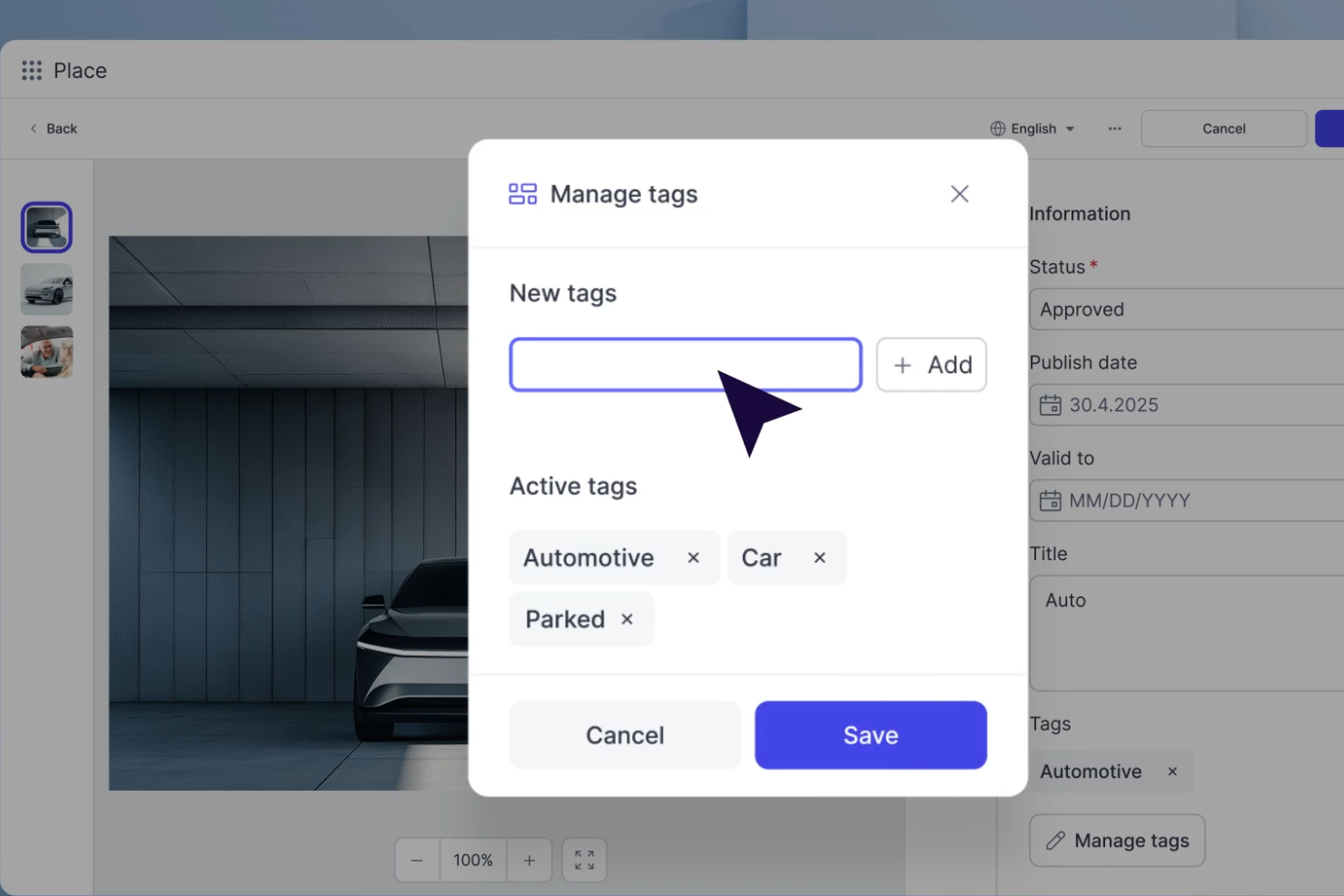
Papirfly is a digital asset management and templated content creation platform that centralizes brand assets, locks down design elements, and supports multichannel content production across social media, video, print, email, and display ads.
Who Is Papirfly Best For?
Papirfly is a strong fit for enterprise marketing teams that need to manage brand governance and content production across multiple regions, markets, or business units.
Why I Picked Papirfly
Papirfly is one of my top picks because I love how it handles brand consistency at the enterprise level, where the real risk is distributed teams going off-brand without anyone noticing. The templated content creation feature lets me lock down logos, fonts, and colours while still giving local teams room to customize approved elements. The brand portal then acts as a live hub where every stakeholder can access the latest guidelines, assets, and campaign materials in their own language.
Papirfly Key Features
- Digital asset management: Store, organize, and retrieve brand-approved images, videos, and documents from a single centralized library.
- Multi-format content export: Automatically resize and reformat assets for different channels, including social media, display ads, and print, from a single design.
- Video creation tool: Build on-brand video content using pre-approved templates without requiring external video editing software.
- Campaign planning: Organize and schedule multichannel campaigns with a shared workspace that keeps all related assets in one place.
Papirfly Integrations
Integrations include Adobe Creative Cloud, Adobe Commerce, Akamai, Akeneo, Asana, BigCommerce, Canva, Contentful, DeepL, and Dynamics 365.
Pros and Cons
Pros:
- Automatically validates assets during upload
- Scales visual assets across multiple markets
- Locks design elements inside asset templates
Cons:
- Lacks production timeline tools for video
- Requires training for advanced portal setup
New Product Updates from Papirfly

Papirfly Prove Enterprise Adds Analytics Agent
Papirfly Prove Enterprise adds Analytics Agent for asking data questions in plain language and generating figures or charts. This helps users explore analytics without setting up filters or queries. For more information, visit Papirfly’s official site.
 .

Pics.io
Best for mid-market and unlimited storage

Pics.io is a digital asset management (DAM) platform that helps mid-market businesses organize, manage, and collaborate on media files. Since it works with your existing cloud storage, like Google Drive or Amazon S3, your storage space is determined by your chosen cloud storage provider—Pics.io itself doesn't have limitations for the number of uploads or file sizes.
Why it's a good Cloudinary alternative:
I picked Pics.io as a good alternative to Cloudinary because of its AI-powered tagging, face recognition, and automated descriptions that help organize large volumes of media assets efficiently. It also offers solid version control, letting you track changes, compare edits side by side, and revert to previous versions when needed. These features support teams that collaborate on evolving content and need a clear asset history. By enhancing asset searchability and content integrity, Pics.io helps teams stay on top of growing media libraries.
Standout features & integrations:
Features include collections, metadata management, speech-to-text transcription, fashion tagging, file comparison, PDF viewer, inboxes for external uploads, DAM for 3D models, analytics and reporting, customizable branding, and watermarking.
Integrations include Google Drive, Amazon S3, Dropbox, Slack, Zapier, Google Workspace Add-ons, Adobe Photoshop, Adobe Illustrator, Adobe Premiere Pro, Shopify, Salesforce, and Trello.
Pros and Cons
Pros:
- Comprehensive analytics and reporting tools for monitoring asset usage
- Efficient asset management with AI-powered tagging
- Robust version control features for tracking changes
Cons:
- Some metadata features are paid add-ons for lower-tier plans
- Occasional slow loading for larger files
New Product Updates from Pics.io
Pics.io Adds Filtered Audit Trail CSV Exports
Pics.io now lets you export Audit Trail logs to CSV and apply filters before exporting, making it easier to analyze and share activity history. For more information, visit Pics.io's official site.
 .

Bynder
Best for AI-driven asset organization

Bynder is a digital asset management platform that offers a centralized solution for storing, organizing, and sharing digital assets, including images, videos, and documents.
Why it's a good Cloudinary alternative:
I chose Bynder because of its AI-powered asset organization. This uses artificial intelligence to automatically tag and categorize your assets, making it easier for your team to find and use the right content when needed. This feature can reduce the time spent on manual tagging and minimize errors in asset management. It also offers dynamic asset transformation. You can deliver personalized assets based on visitor characteristics and optimize them to reduce web load times.
Standout features & integrations:
Features include asset versioning, rights management, customizable metadata fields, batch editing, automated workflows, user permissions management, watermarking, facial recognition, duplicate detection, video transcoding, content archiving, and audit trails.
Integrations include Salesforce, Salsify, Sanity, SAP Commerce Cloud, Sprout Social, SharePoint, Asana, Adobe Creative Cloud, Contentful, and Contentstack.
Pros and Cons
Pros:
- Ability to review and approve assets
- Robust analytics and reporting
- Efficient search functionality allows quick access to assets
Cons:
- Limited customization options for certain functionalities
- Initial setup may be time-consuming

Air
Best for AI-powered media search

Air is a creative operations platform that helps marketing and design teams organize, manage, and scale their content workflows. It provides a visual workspace for storing, approving, and sharing creative assets across teams, making it easier to manage campaigns and creative projects collaboratively.
Why it’s a good Cloudinary alternative:
I chose Air for this list because it focuses on AI-powered search and media organization, which can help teams find creative assets faster than traditional digital asset management tools. While Cloudinary emphasizes image transformation and delivery, Air stands out for its creative collaboration features and content discovery capabilities. Its AI can recognize colors, objects, faces, and even dialogue, allowing you to search vast content libraries in seconds. This makes Air especially valuable for creative and marketing teams handling large volumes of media.
Standout features & integrations:
Features include facial recognition that automatically tags people in photos, desktop sync for direct file access, and AI-generated video and audio transcription to make all content instantly searchable.
Integrations include Canva, Slack, Adobe Premiere Pro, Figma, Microsoft Teams, Google Drive, Dropbox, Asana, Trello, Monday.com, Notion, and Airtable.
Pros and Cons
Pros:
- Easy desktop file syncing
- Strong creative collaboration tools
- AI search saves valuable time
Cons:
- Slight learning curve for new users
- Limited file transformation capabilities
New Product Updates from Air

Air Showcases Introduces Custom Branding, Content Blocks, and Sub-Pages
Air Showcases now support custom branding, content blocks, sub-pages, and saved default layout settings, plus more control over removing items and branding options for Enterprise. For more information, visit Air's official site.

Gumlet
Best for video-first businesses

Gumlet provides video and image storage, optimization, transcoding, and delivery services. It's best for video-first businesses because it focuses on high-quality video streaming and cost-effective solutions.
Why it's a good Cloudinary alternative:
I chose Gumlet for the list because it offers a mix of video-focused features and affordability. Gumlet offers encrypted storage, DRM (Digital Rights Management) protection, signed URLs, geo-blocking, and tokenized access to protect video content from unauthorized access and piracy. Its emphasis on video streaming and optimization makes it a standout Cloudinary alternative, especially for businesses prioritizing video content.
Standout features & integrations:
Features include encrypted storage capabilities, video and image optimization, transcoding, and delivery services. It offers a user-friendly interface and easy-to-use video uploading capabilities, making Gumlet a secure and efficient video storage and management solution.
Integrations include WordPress, Shopify, Google Drive, Dropbox, and Zapier.
Pros and Cons
Pros:
- Highly customizable
- Videos load quickly with limited buffering
- Praised for its quality-to-price ratio
Cons:
- The UI can be difficult to navigate for some users
- Modest learning curve for new users

Sirv
Best for dynamic imaging and 360 spins
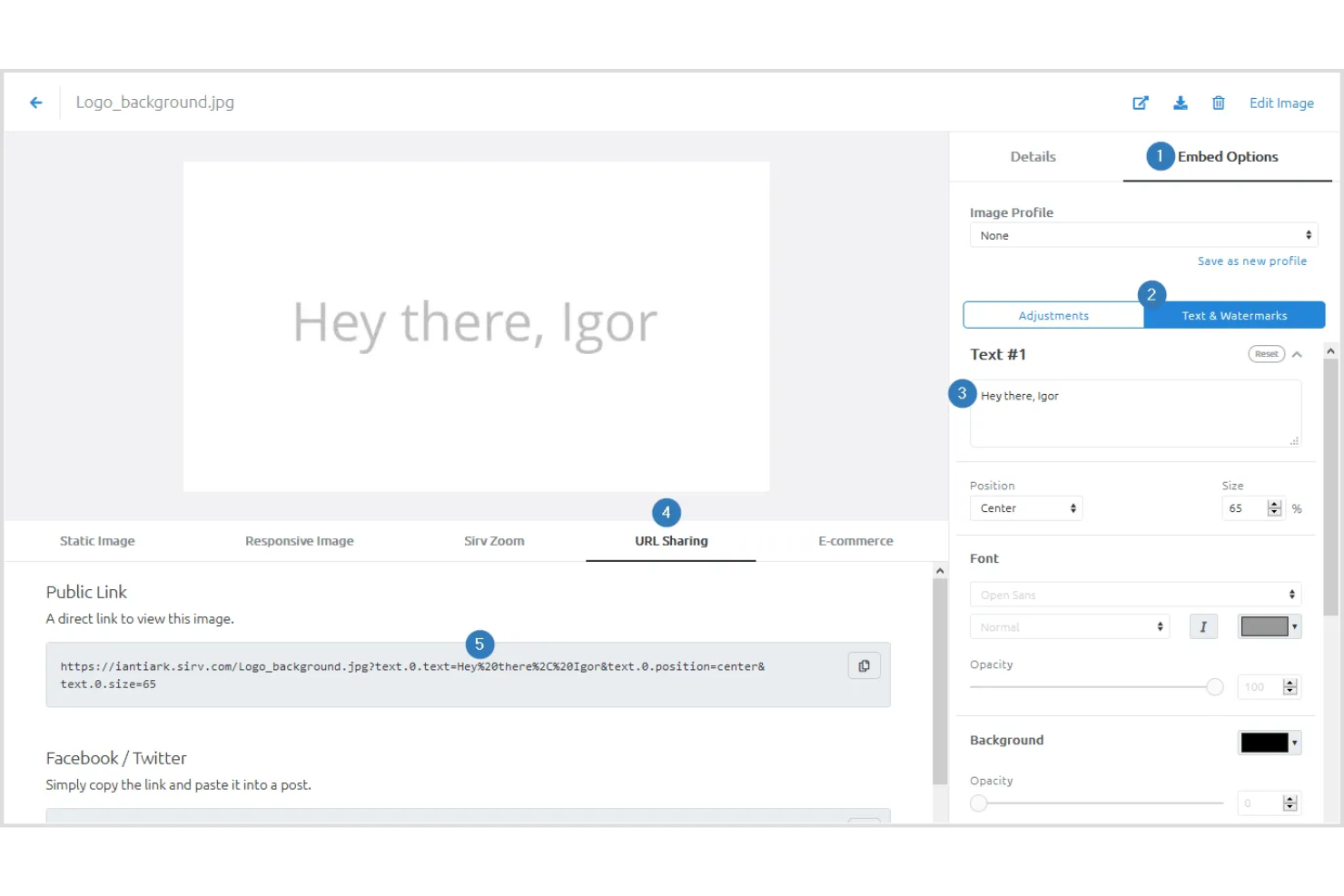
Sirv is a real-time image optimization and processing solution best suited for dynamic imaging and 360-degree spins.
Why it's a good Cloudinary alternative:
I chose Sirv for the list because it offers a unique combination of dynamic imaging and 360-degree product views, which are essential for e-commerce platforms. Its ability to instantly serve images at any size and style makes it a solid Cloudinary alternative, especially for businesses that require high-quality visual content to engage customers.
Standout features & integrations:
Features include image processing, resizing, optimization, responsive images, 360 spin, and image zoom. It also supports dynamic imaging and lazy loading, which can significantly improve website performance.
Integrations include WordPress, WooCommerce, Magento, Shopify, Drupal, Wix, eBay, Prestashop, BigCommerce, Salesforce Commerce Cloud, Squarespace, and Weebly.
Pros and Cons
Pros:
- Specialized features for dynamic imaging and 360-degree product views
- Smaller file sizes for faster website/app performance
- Instant accessibility of images at any size and style
Cons:
- May be considered pricey for small businesses or individuals
- Limited customization options for some users

Best for integrated file handling

Uploadcare is a complete file-handling platform that's best for integrated file handling due to its full-stack approach to file management.
Why it's a good Cloudinary alternative:
I chose Uploadcare for the list because it offers a file-handling solution that includes uploading, storage bandwidth, processing, and delivery. Its features and integrations make it a solid Cloudinary alternative, particularly for projects requiring a full-stack file management approach.
Standout features & integrations:
Features include its integrated cloud storage, on-the-fly image processing, and delivery through a worldwide CDN. It supports a variety of file operations, including image optimization to next-gen formats and content-aware image crop and resize.
Integrations include WordPress, Shopify, Contentful, Amazon S3, Zapier, Integrately, Make, Webflow, and Wix.
Pros and Cons
Pros:
- Worldwide CDN with 325,000+ nodes in 135 countries
- On-the-fly image processing and optimization
- Comprehensive file handling from upload to delivery
Cons:
- The validations API can be cumbersome
- Initial setup may be difficult
Canto
Best for centralized digital asset management

Canto simplifies the management and sharing of digital assets. It provides centralized digital asset management by offering a singular platform for organizing and accessing all digital content.
Why it's a good Cloudinary alternative:
I chose Canto for this list because it provides a centralized solution for managing various digital assets. Its focus on centralization and ease of access for teams makes it a strong contender as an alternative to Cloudinary.
Standout features & integrations:
Features include search capabilities, smart tagging, facial recognition, and text recognition. It also offers unlimited portals for sharing assets and style guides to maintain brand consistency.
Integrations include Contentful, Contentstack, commercetools, Commerce Cloud, Sanity, Akeneo, Syndigo, ContentSquare, Conscia, Uniform, AWS, and Google Cloud.
Pros and Cons
Pros:
- Unlimited portals and style guides for sharing and brand consistency
- Advanced search with smart tagging and recognition features
- Centralized management of digital assets
Cons:
- May require a learning curve for new users to fully utilize all features
- User interface needs updating


Fastly Image Optimizer is a tool that enhances image delivery across the web. It is best for modern CDN services due to its advanced network capabilities and performance features.
Why it's a good Cloudinary alternative:
I chose Fastly Image Optimizer for the list because it offers essential features for modern content delivery networks (CDNs). Its performance in delivering optimized images quickly and efficiently makes it a solid alternative to Cloudinary.
Standout features & integrations:
Features include real-time image optimization and delivery, which is essential for websites and applications that rely on visual content. Fastly Image Optimizer supports various image manipulations, including brightness, contrast, watermarking, saturation, and sharpening. This flexibility allows precise control over how images are presented across different devices and contexts.
Integrations include Drupal, WordPress, Magento, Terraform, AWS, Azure, and Google Cloud Platform.
Pros and Cons
Pros:
- Utilizes a powerful global network for content delivery
- Provides real-time image optimization
- Optimizes images quickly and efficiently
Cons:
- Potential high costs for small businesses
- Customizations can be complex


Imgix is a service that delivers real-time image optimization due to its dynamic asset management and on-the-fly image processing capabilities.
Why it's a good Cloudinary alternative:
I chose Imgix for the list because it provides a good alternative to Cloudinary, focusing on real-time image optimization. Its asset management and real-time processing capabilities allow for quick and efficient image delivery, which is important for modern web and mobile applications.
Imgix Standout Features & Integrations
Features include real-time image processing and CDN delivery, ensuring images are delivered quickly and according to the required specifications. It supports responsive images and automatic format selection and also has a simple API for integration.
Integrations include Amazon S3, Google Cloud Storage, Microsoft Azure Blob Storage, WebDAV, and FTP/SFTP.
Pros and Cons
Pros:
- Simple API for easy integration
- Responsive image support
- Real-time image processing
Cons:
- Limited information on advanced features
- Higher starting price point
Andre alternativer til Cloudinary
Nedenfor finner du en liste over flere alternativer til Cloudinary som vi tok med i kortlisten, men som ikke nådde opp blant de beste. Det er verdt å sjekke dem ut!
- Filestack
For file uploading and API integration
- Orange Logic
For enterprise scale content workflows
- Cloudimage
For on-the-fly image optimization
- Piio
For image loading speed improvements
- ImageKit
For automated image and video delivery
- Acquia DAM (Widen)
For real-time asset transformations
- Brandfolder
For tailored tools for content automation
- Stockpress
For unlimited user access
- Tagbox.io
For visual tagging of creative assets
- Adobe Experience Manager
For enterprise-level digital asset management


Relaterte anmeldelser av prosjektstyringsverktøy
Hvis du fortsatt ikke har funnet det du leter etter her, kan du ta en titt på disse andre anmeldelsene av prosjektstyringsverktøy som vi har samlet for deg.
- Gantt-diagramverktøy
- Produktivitetsverktøy
- Programvare for prosjektsporing
- Programvare for prosjektplanlegging
- Prosjektstyringsprogramvare
- Ressursstyringsprogramvare
How I Evaluate Cloudinary Alternatives
I split my evaluation into must-have baseline capabilities—dynamic transformations, CDN delivery, and developer APIs—and differentiators like pricing structure, migration support, and AI tooling.
Core Functionality (Table Stakes For This List)
When I'm selecting tools for my list, I rank each one on a scale from 0 (does not offer the functionality) to 5 (excels in this area) for each core functionality listed below. Then, I calculate the tool's total score into a percentage. Each tool needs to achieve a minimum total score of 65% to be considered for inclusion.
- Media Asset Management: I look for centralized libraries with tagging, search, and folder structures that let project teams locate the right hero image or campaign video in seconds.
- Dynamic Transformations: Each tool should support URL- or API-based resizing, cropping, and format conversion so developers can serve device-appropriate assets without pre-generating variants.
- CDN Delivery: Global edge delivery matters, so I evaluate the breadth of a platform's CDN coverage and how it handles caching, cache invalidation, and geographic routing.
- Developer APIs & SDKs: Whether your team works in React, Python, or Flutter, the platform should offer well-documented SDKs and REST endpoints for uploading, transforming, and managing assets programmatically.
- Automated Optimization: I check for auto-format selection (WebP, AVIF) and intelligent compression that adjusts quality based on content type—product photos need different treatment than background textures.
- Workflow Integrations: Connecting media delivery to tools your team already uses—CMS platforms, DAM systems, or project management apps—keeps asset handoffs from becoming a bottleneck.
Once I have a list of tools that meet this criteria, I consider what sets each platform apart.
Differentiating Factors (What Sets Vendors Apart)
Here's how I compare and contrast different vendors:
Standout Features
AI-powered enhancements like smart cropping and background removal can cut hours off a sprint's creative workload, so I evaluate how far each platform's automation goes. I also look at usage analytics—being able to show leadership exactly how bandwidth and transformation volumes trend over time makes it easier to justify the tool's cost. Collaborative review tools matter too, especially for distributed teams that need annotation and approval workflows tied to asset versions.
Beyond Features
Pricing model matters a lot here. Usage-based billing can spiral fast when a campaign drives unexpected traffic, so I check whether a platform offers predictable tiers or at least spending caps. Migration support is another big one—switching from Cloudinary means remapping URL structures and moving asset libraries, and the right vendor provides tooling or guided assistance to speed that up. I also evaluate compliance credentials like SOC 2 and GDPR readiness, especially for teams handling assets across regulated industries.
Hvorfor se etter et alternativ til Cloudinary?
Du kan se etter et alternativ til Cloudinary hvis du har behov for noe av følgende.
- Tilpasning og kontroll: Cloudinarys forhåndsinnstillinger og transformasjoner tilbyr kanskje ikke de høyere nivåene av tilpasning og kontroll over bilde- og videohåndteringen som du trenger.
- Enkelt brukergrensesnitt: Du foretrekker kanskje et mer oversiktlig eller intuitivt grensesnitt som er tilpasset teamets spesifikke behov.
- Tredjepartsintegrasjoner: Du ønsker å integrere med et annet utvalg tredjepartsapplikasjoner eller -tjenester som ikke støttes av Cloudinary.
- Ytelses- og regionale krav: Du kan oppleve ytelsesbegrensninger med Cloudinary eller ha spesifikke krav til regionale servere som Cloudinary ikke oppfyller.
- Kostnadseffektivitet: Du kan ha behov for en rimeligere løsning, ettersom Cloudinarys priser kan bli høye ved økt bruk.
Alternativer til Cloudinary kan gi ulike fordeler som passer bedre med prosjektets krav. Ved å vurdere disse faktorene kan du finne en tjeneste som ikke bare oppfyller, men også overgår Cloudinarys tilbud på områder som er viktige for de digitale prosjektene dine.
Viktige funksjoner i alternativer til Cloudinary
Her er noen viktige funksjoner i Cloudinary som den alternative programvaren bør kunne gjenskape eller forbedre for å passe godt.
- Effektiv og rask opplasting: Innhold kan lastes opp raskt og i store mengder, noe som sikrer en smidig arbeidsflyt for mediehåndtering.
- AI-basert innholdsanalyse: Merker bilder og videoer automatisk ved hjelp av AI, noe som gjør det enklere å søke etter og organisere dem.
- Full kontroll over metadata: Henter ut, lagrer og gjør det mulig å endre metadata, noe som gir omfattende muligheter for datahåndtering.
- Avansert søk og oppdagelse: Søker etter innhold ved hjelp av ulike attributter og filtre, slik at det blir enkelt å finne bestemte medieelementer.
- Rollebasert brukeradministrasjon: Styrer brukertilgang til ulike deler av plattformen og sikrer et trygt og organisert samarbeid mellom brukerne.
- Mapper og samlinger: Organiserer innhold for kontrollert tilgang og samarbeid, slik at teamene kan holde seg organiserte og effektive.
- Dynamiske bilde- og videotransformasjoner: Endrer størrelse på, beskjærer og forbedrer medier dynamisk, slik at medier kan justeres underveis.
- Utvidbare API-er: Integrerer funksjonalitet for digital kapitalforvaltning i eksisterende systemer ved hjelp av API-er, noe som gir fleksibilitet og tilpasningsmuligheter.
- Språklig tilpasning: Angir standardspråk for ulike deler av plattformen og tilrettelegger for globale team og ulike brukergrupper.
- Valgfrie apper: Utvider kjernefunksjonaliteten med valgbare apper og gir flere verktøy og funksjoner etter behov.
Ved å sikre at alternativet til Cloudinary gjenskaper eller forbedrer de viktigste funksjonene, kan du effektivisere mediehåndteringen og arbeidsflyten. Ved å vurdere disse viktige funksjonene kan du velge en løsning for håndtering av digitale ressurser som oppfyller dine spesifikke behov og overgår forventningene dine.