

10 beste AI-fakturageneratorer i 2026

Beste AI-fakturagenerator – kortliste


En AI-fakturagenerator er programvare som bruker kunstig intelligens til å automatisere oppretting, tilpasning og håndtering av fakturaer for virksomheten din. Hvis du leter etter den beste AI-fakturageneratoren, ønsker du sannsynligvis å effektivisere faktureringen, redusere manuell registrering og begrense antall feil ved håndtering av gjentakende eller komplekse fakturaer. Med så mange alternativer kan det føles overveldende å finne en løsning som passer arbeidsflyten og budsjettet ditt. Denne veiledningen går gjennom de ledende verktøyene, fremhever hva som gjør hvert av dem unikt, og hjelper deg med å finne den rette løsningen for teamets behov og mål.
Hvorfor du kan stole på våre programvareanbefalinger
Teamet vårt har testet og anmeldt programvare siden 2012. Vi er selv prosjektledere, så vi vet hvor vanskelig og hvor viktig det er å velge riktig programvare.
I denne guiden har vi vurdert verktøyene gjennom praktisk testing og uavhengig research og gitt dem poeng ut fra våre utvelgelseskriterier. Vi bygger også på innsikt fra ledende eksperter i bransjen og erfarne prosjektledere.
Anmeldelsene våre bygger på vår egen redaksjonelle vurdering. De er ikke et salgsargument.
Ekspertanmeldere:
Sammenligningstabell for AI-fakturageneratorer
Denne sammenligningstabellen oppsummerer prisdetaljene for mine beste utvalgte AI-fakturageneratorer.
| Tool | Best For | Trial Info | Price | ||
|---|---|---|---|---|---|
| 1 | Best for contract and payment integration | 7-day free trial | From $9/user/month (billed annually) | Website | |
| 2 | Best for multi-user team permission controls | Free plan + free demo available | From $8/month (billed annually) | Website | |
| 3 | Best for client portal and feedback features | 7-day free trial | From $19/month | Website | |
| 4 | Best for agency-centric invoice tools | 14-day free trial | From $10/user/month (billed annually) | Website | |
| 5 | Best for end-to-end business management | 14-day free trial | From $17/user/month | Website | |
| 6 | Best for time tracking and billing integration | Free plan + 30-day free trial available | From $9/seat/month (billed annually) | Website | |
| 7 | Best for multi-currency invoice generation | Free plan available | From $14/month (billed annually) | Website | |
| 8 | Best for fast invoice creation from email data | 7-day free trial | From $29.99/user/month | Website | |
| 9 | Best for one-click invoice automation | Free plan available | Pricing upon request | Website | |
| 10 | Best for freelancers needing flexible templates | Free plan available | From $20/month | Website |


Anmeldelser av de beste AI-fakturageneratorene
Nedenfor finner du mine detaljerte oppsummeringer av de beste AI-fakturageneratorene som kom med på kortlisten. Anmeldelsene mine gir en detaljert oversikt over funksjonene, de beste bruksområdene og integrasjonene til hvert verktøy, slik at du kan finne det som passer best for deg.

Bonsai
Best for contract and payment integration
Bonsai is a client management platform for freelancers and small businesses that offers AI-powered invoice generation, contract creation, payments, proposals, and workflow automation in one place.
Who Is Bonsai Best For?
Bonsai is ideal for freelancers and small business owners who need integrated tools for contracts, invoicing, and payment management in one platform.
Why I Picked Bonsai
I picked Bonsai as one of the best because I can generate AI-powered invoices directly tied to contracts, get clients to e-sign documents, and then trigger payment requests from a single workspace. I like having proposals, contracts, and invoicing so tightly connected.
Bonsai Key Features
- AI-powered invoice creation: Generate invoices automatically from tracked hours and billable tasks.
- Recurring payment scheduling: Set up and manage automated recurring invoices for repeat clients.
- Expense tracking: Categorize and monitor project-related expenses within the same workspace.
- Tax reports dashboard: Access downloadable tax summaries and financial reports for every client and project.
Bonsai Integrations
Bonsai offers native integrations with QuickBooks, PayPal, Stripe, and Zapier. An API is also available for custom integrations.
Pros and Cons
Pros:
- Contracts, proposals, and invoicing in one system
- AI reads tracked hours for invoice creation
- Generates invoices directly from contracts
Cons:
- Few workflow automation capabilities
- No built-in file or asset proofing mechanisms


Refrens is an online invoicing platform for teams that offers invoicing, estimate management, purchase orders, expense tracking, and payment collection in one system.
Who Is Refrens Best For?
Refrens is a strong fit for small to midsize businesses that need multi-user invoicing, approval processes, and expense management for distributed teams.
Why I Picked Refrens
I picked Refrens because I can set detailed user permissions for billing, finance, and sales roles—controlling who can create, approve, or edit invoices. I like having dedicated approval flows and audit logs for every edit or action on invoices.
Refrens Key Features
- Invoice generator: Quickly create GST-compliant invoices with customizable fields.
- Expense tracking: Log and categorize expenses directly within the platform.
- Quotation and estimate tools: Build and send sales quotes or estimates to clients.
- Recurring billing: Automate invoice generation for repeat clients or subscriptions.
Refrens Integrations
Refrens offers native integrations with Razorpay, PayPal, and Google Sheets. An API is available for custom integrations.
Pros and Cons
Pros:
- Built-in client portal for invoice sharing
- Approval workflows for invoice edits
- Multi-level team and role permissions
Cons:
- No built-in OCR for document scanning
- Limited third-party software connections


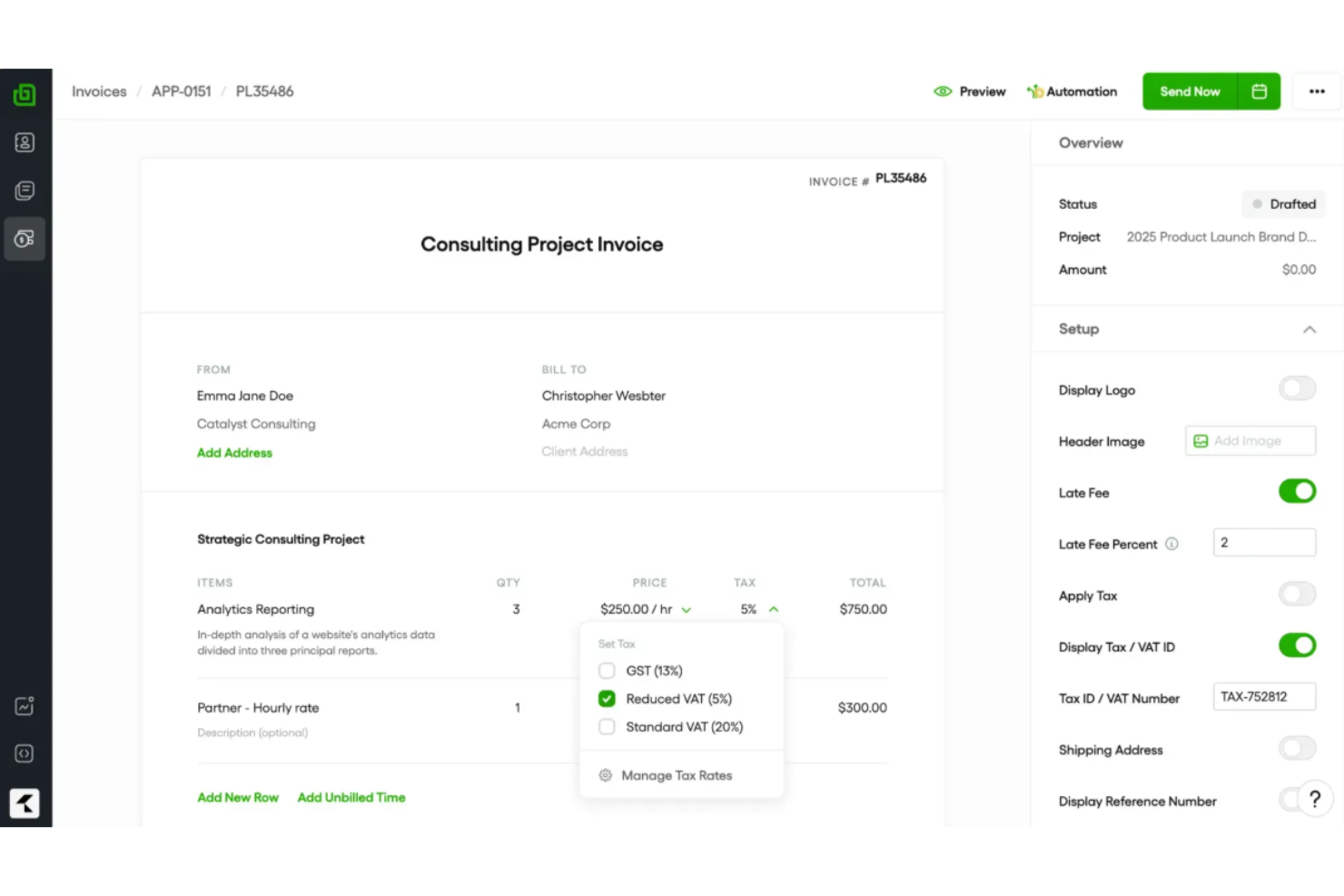
Plutio is an all-in-one business management platform with invoicing, proposals, contracts, time tracking, and task management for teams and freelancers.
Who Is Plutio Best For?
Freelancers, agencies, and small creative teams who need an integrated system for handling client work, invoicing, and communication.
Why I Picked Plutio
I picked Plutio because I can invite clients into a secure, branded portal, collect invoice feedback, and enable clients to approve or reject line items. I also like managing project conversations and payment tracking all in one place.
Plutio Key Features
- Custom invoice templates: Create branded invoices with adjustable fields and layouts.
- Multi-currency support: Issue invoices and accept payments in multiple currencies.
- Automated payment reminders: Send scheduled follow-ups when invoices remain unpaid.
- Partial payments: Allow clients to pay invoices in multiple installments.
Plutio Integrations
Plutio offers native integrations with Stripe, PayPal, and Zapier. An API is available for custom integrations.
Pros and Cons
Pros:
- Built-in commenting and feedback for each invoice
- Supports partial payments and installment scheduling
- Invoices and payment status visible in client portal
Cons:
- Invoice templates have few customization options
- Automations for invoices are limited

Best for agency-centric invoice tools
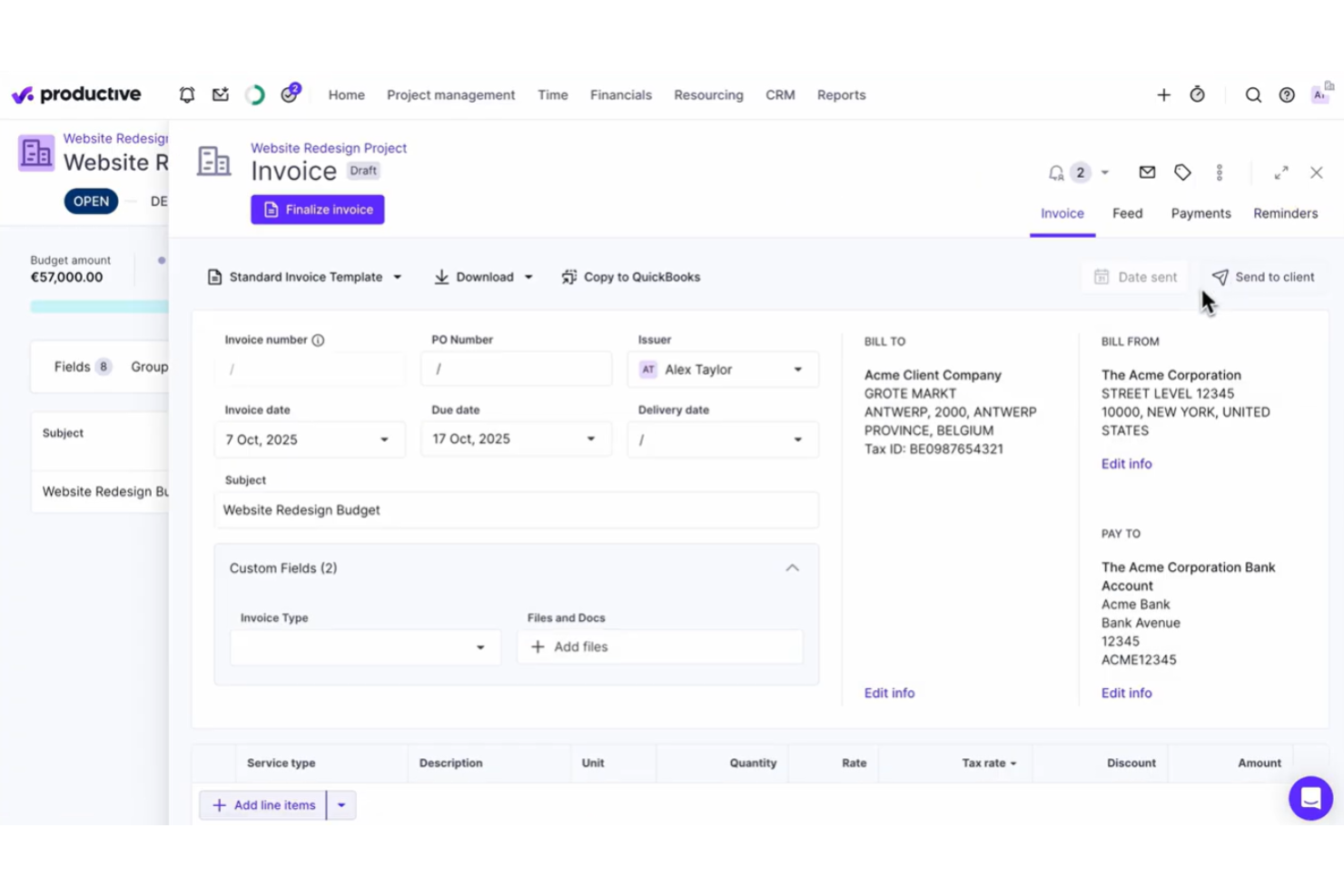
Productive is a work management and invoicing platform designed for agencies that need project budgeting, time tracking, real-time reporting, and automated invoice generation in one system.
Who Is Productive Best For?
Productive suits digital agencies and consultancies that need project-based invoicing, resource planning, and integrated time tracking in one platform.
Why I Picked Productive
I picked Productive as one of the best because I create invoices directly from tracked time, budgets, or project milestones, which is ideal for agencies with complex billing models. I also like using custom templates to match client expectations.
Productive Key Features
- Automated invoice notifications: Send automated reminders and updates to clients for outstanding invoices.
- Multi-currency support: Generate invoices and handle payments in multiple currencies for international clients.
- Integrated expense management: Attach billable expenses to invoices directly from tracked project costs.
- Batch invoice creation: Create and send multiple invoices at once for recurring or repeat work.
Productive Integrations
Productive offers native integrations with Xero, QuickBooks Online, Slack, Google Calendar, and Jira, and provides an API for custom integrations.
Pros and Cons
Pros:
- Supports multi-currency invoicing and client portals
- Links projects, budgets, and invoices automatically
- Built for agency workflows and billing models
Cons:
- Invoicing features require time tracking setup
- Invoice customization is somewhat limited
New Product Updates from Productive
Productive Adds Voice Dictation, Slack Connector, Proposals, and Overtime
Productive adds voice dictation, a Slack Connector, proposal controls, and overtime tracking. These updates support faster AI interactions, client proposals, and time management. For more information, visit Productive’s official site.

Scoro
Best for end-to-end business management
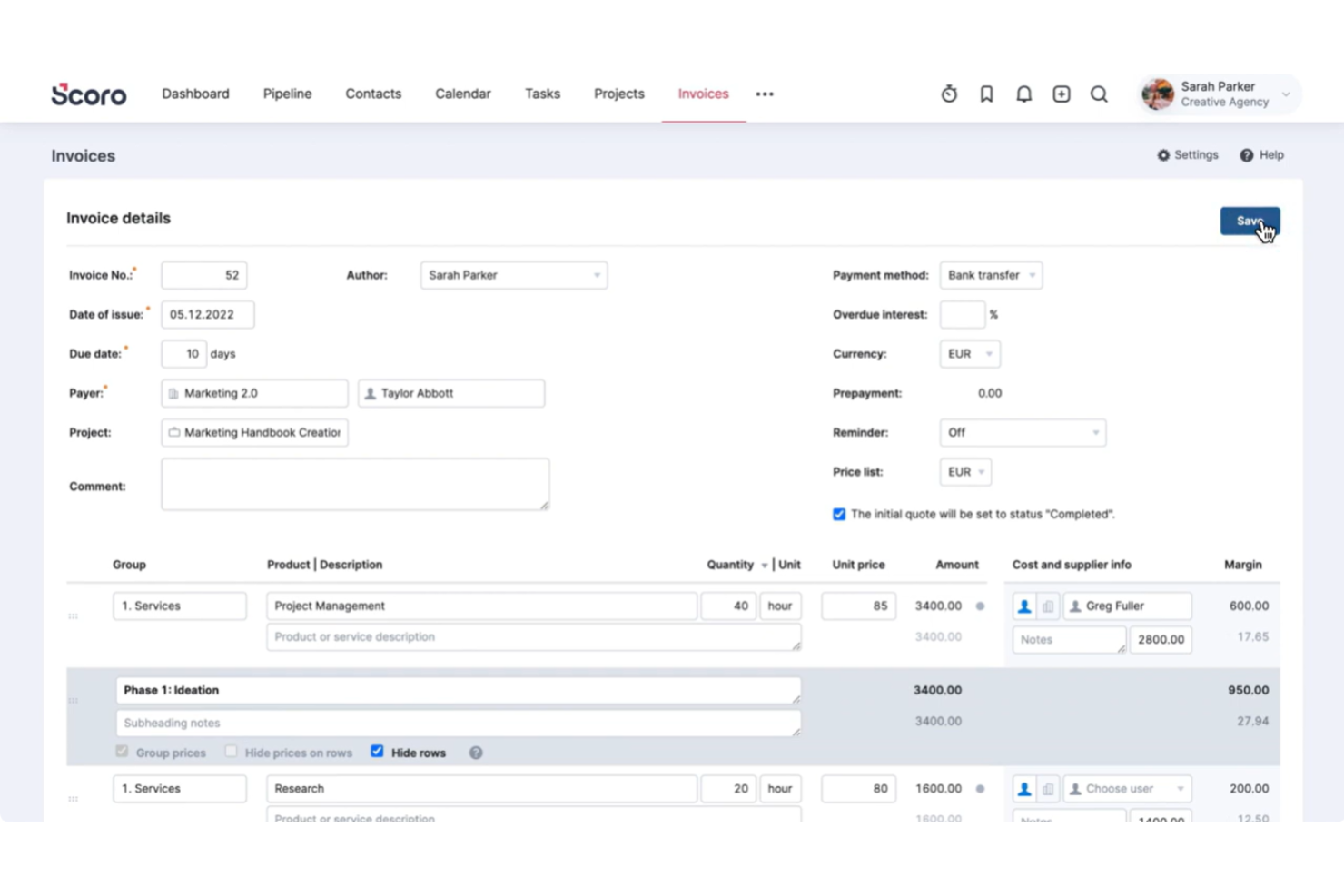
Scoro is a unified business management platform for invoicing, quoting, billing, and automation that combines financial management with project tracking and workflow automation tools.
Who Is Scoro Best For?
Scoro is a good fit for mid-sized agencies and consultancies that need integrated invoicing, project management, and workflow tools in one platform.
Why I Picked Scoro
I picked Scoro as one of the best because I can issue invoices, manage recurring payments, and track overdue accounts, all while tying them directly to projects and quotes. I like viewing business performance and invoicing data from a single dashboard.
Scoro Key Features
- Customizable invoice templates: Create and save branded templates with pre-configured fields.
- Product and service catalogue: Add items directly to invoices from a searchable catalogue.
- Multi-currency support: Generate invoices in multiple currencies for global clients.
- Automated tax calculations: Apply regional taxes automatically during invoice creation.
Scoro Integrations
Scoro offers native integrations with Xero, QuickBooks, Mailchimp, Google Calendar, Outlook, and Dropbox, and it provides an API for custom integrations.
Pros and Cons
Pros:
- Offers built-in approval workflows for invoices
- Handles recurring billing and subscription invoicing
- Connects invoices directly to tracked projects
Cons:
- Custom invoice fields are only partly configurable
- Time tracking must be enabled for invoicing
New Product Updates from Scoro

Scoro Adds Time Mobile App and ELI Improvements
Scoro adds the Scoro Time mobile app for iOS/Android to track time anywhere and expands ELI with attachments, smarter filtering, and trigger-based actions. For more information, visit Scoro's official site.

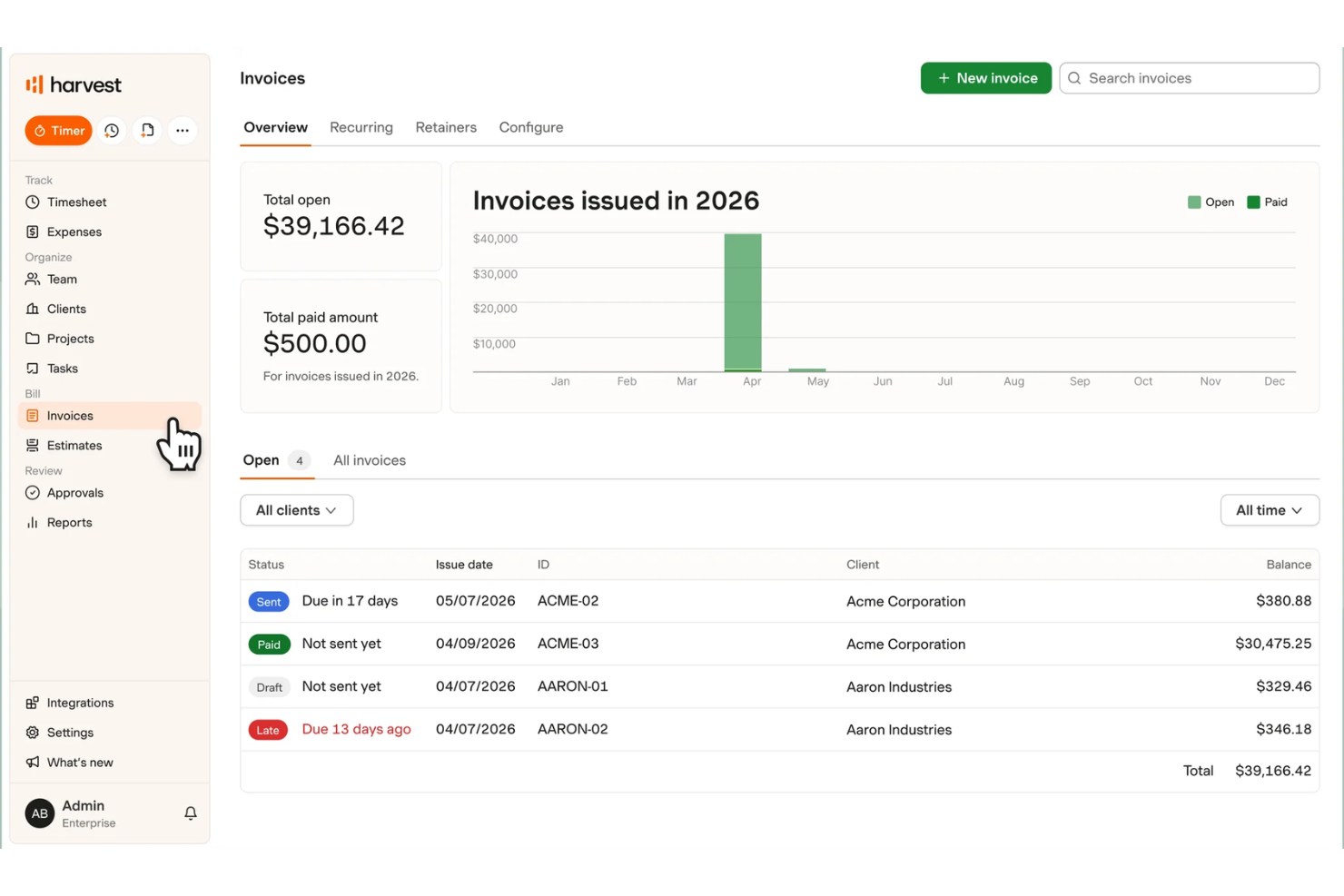
Harvest is a time tracking and invoicing platform that brings together project timesheets, AI-powered invoice generation, expenses management, and billing workflows for teams and freelancers.
Who Is Harvest Best For?
Harvest is a strong fit for agencies and service-based businesses that need combined time tracking and invoicing in one platform.
Why I Picked Harvest
I picked Harvest because I can turn tracked billable hours into AI-powered invoices, all linked within ongoing projects. I like how the tool pulls accurate time, expense, and rate data from timesheets into professional invoice templates with almost no manual entry.
Harvest Key Features
- Multiple currency support: Send invoices in over 160 currencies for global clients.
- Custom invoice fields: Add custom notes, tax rates, and payment terms to each invoice.
- Invoice status tracking: Monitor which invoices are sent, viewed, and paid in real time.
- Payment integration: Accept online payments directly through PayPal and Stripe.
Harvest Integrations
Harvest offers native integrations with QuickBooks Online, Xero, Stripe, PayPal, Asana, Trello, Google Workspace, Slack, and Jira. An API is available for custom integrations.
Pros and Cons
Pros:
- Supports multiple currencies in invoices
- Tracks time, expenses, and projects together
- AI-generated invoices from tracked billable hours
Cons:
- Does not automate recurring payment reminders
- AI suggestions limited to invoice creation

Eonebill
Best for multi-currency invoice generation
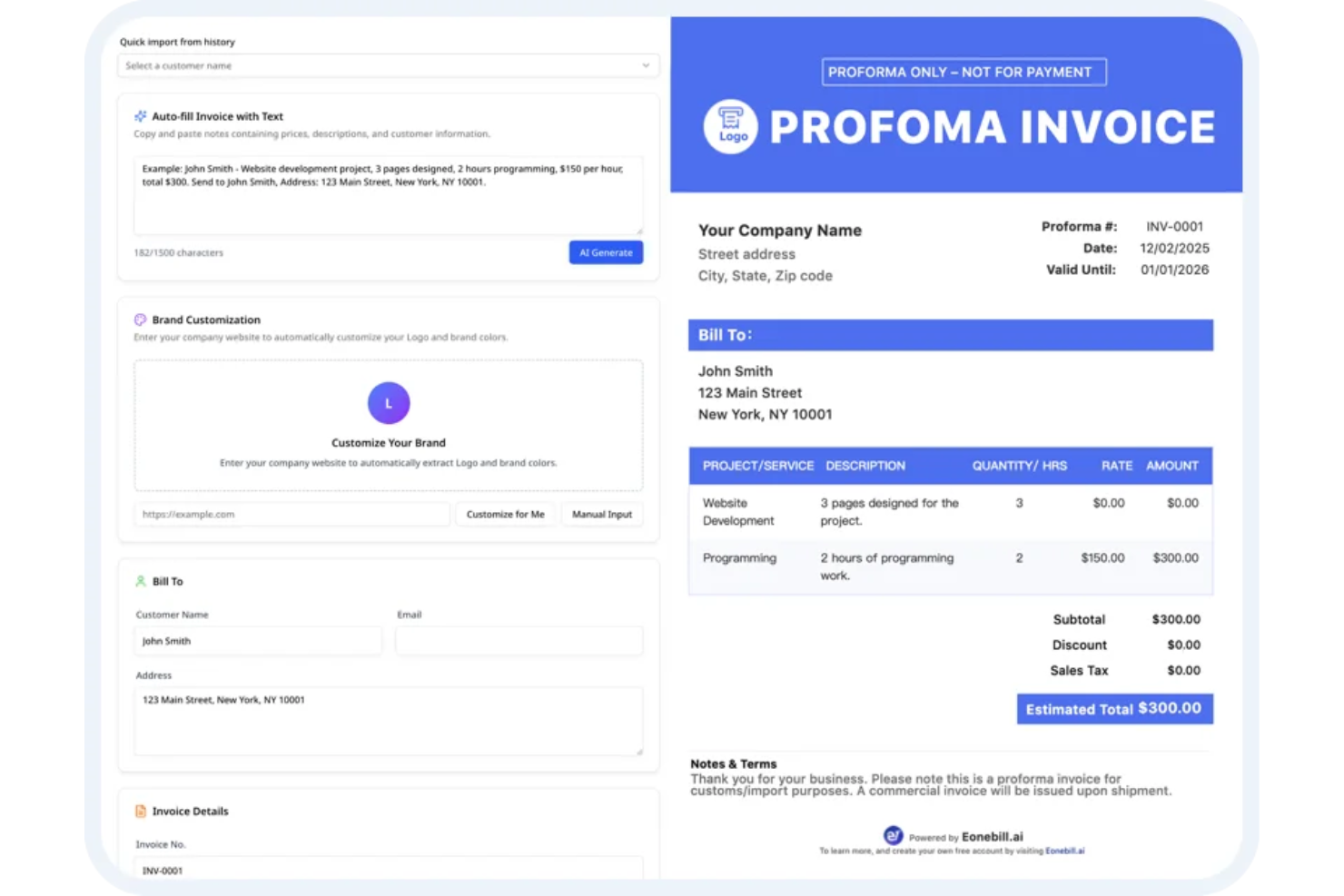
Eonebill is an AI invoice generator platform for businesses that supports invoice creation, automated payment collection, GST and tax compliance, expense tracking, and global client management.
Who Is Eonebill Best For?
Eonebill is a good fit for finance teams or small businesses managing international clients and needing built-in multi-currency invoicing functionality.
Why I Picked Eonebill
I picked Eonebill because I can create invoices in multiple currencies with real-time exchange rates and auto-convert totals. I like being able to send AI-powered invoices to international clients and track GST, VAT, and other taxes automatically.
Eonebill Key Features
- Automated payment reminders: Schedule and send payment follow-up messages to clients automatically.
- Expense tracking: Log and categorize business expenses inside the platform for financial oversight.
- GST and tax compliance tools: Generate GST, VAT, and other compliance reports directly from invoices.
- Multi-user access: Allow team members to collaborate and manage invoices under one account.
Eonebill Integrations
It provides an API for custom integrations.
Pros and Cons
Pros:
- AI-assisted invoice creation from tracked hours
- Automated GST and VAT compliance features
- Multi-currency invoice generation with real-time conversion
Cons:
- Invoice template customization options are basic
- Limited native integrations for workflow automation

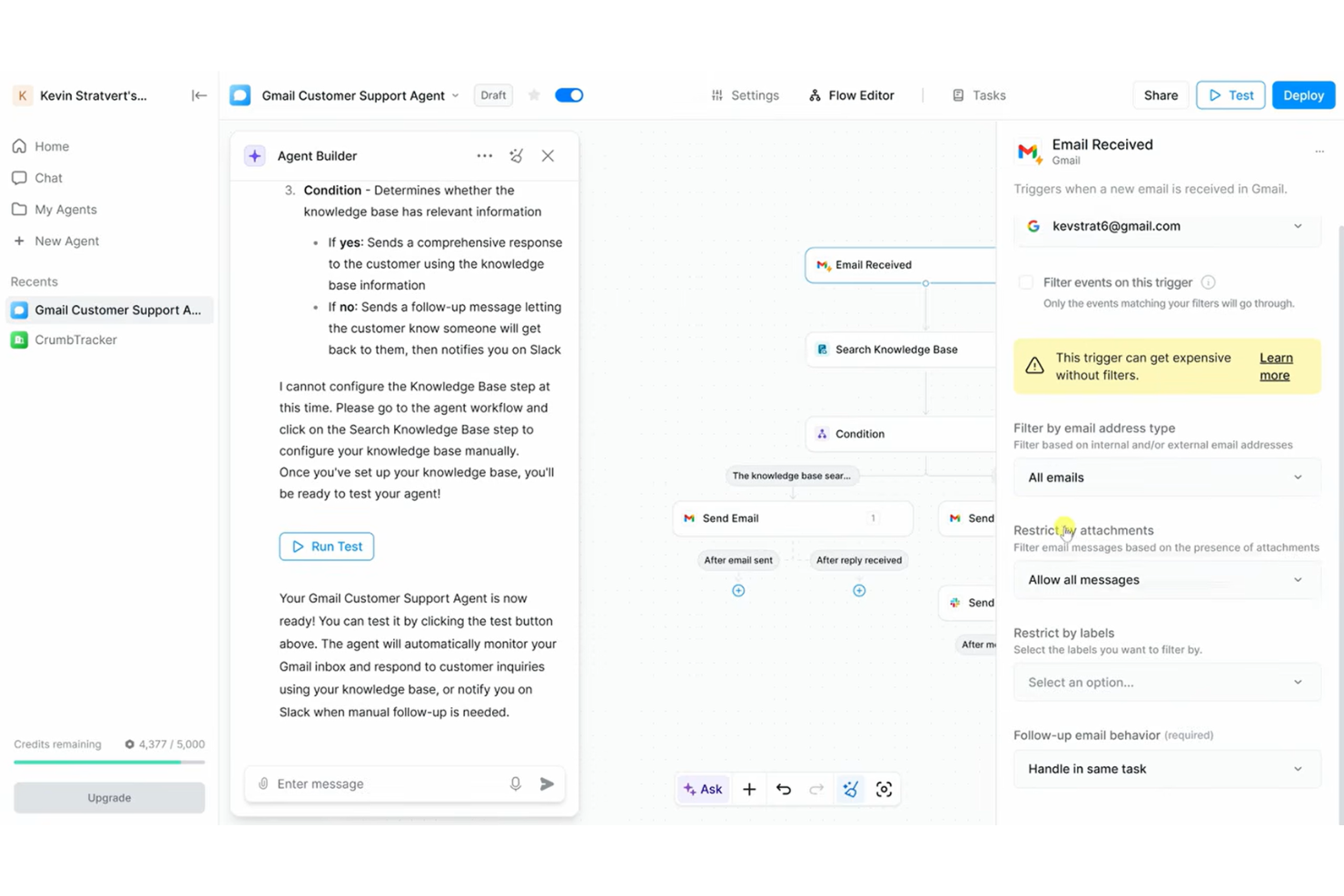
Lindy is an AI invoice generator platform that uses automation and email parsing to help teams create, manage, and customize invoices directly from communication data.
Who Is Lindy Best For?
Small businesses and finance teams that manage high volumes of invoice requests by email.
Why I Picked Lindy
I picked Lindy as one of the best because I can extract invoice details straight from email threads, automatically generate draft invoices, and handle frequent, ad hoc billing requests without switching between tools.
Lindy Key Features
- Custom invoice templates: Create and save templates to match your branding and client needs.
- Automated data extraction: Pull line item details from attached files and forms.
- Batch invoice processing: Generate and send multiple invoices in bulk with a single action.
- Real-time invoice tracking: Monitor invoice status updates within the dashboard.
Lindy Integrations
Integrations include Google Sheets, Gmail, Slack, Google Drive, HubSpot, Calendly, Airtable, Salesforce, Amazon, and Adobe Photoshop.
Pros and Cons
Pros:
- Scales high-volume billing capacity
- Handles high volumes of billing requests quickly
- Captures invoice details directly from email content
Cons:
- Advanced customization options are limited
- Base tier limits number of connected mailboxes
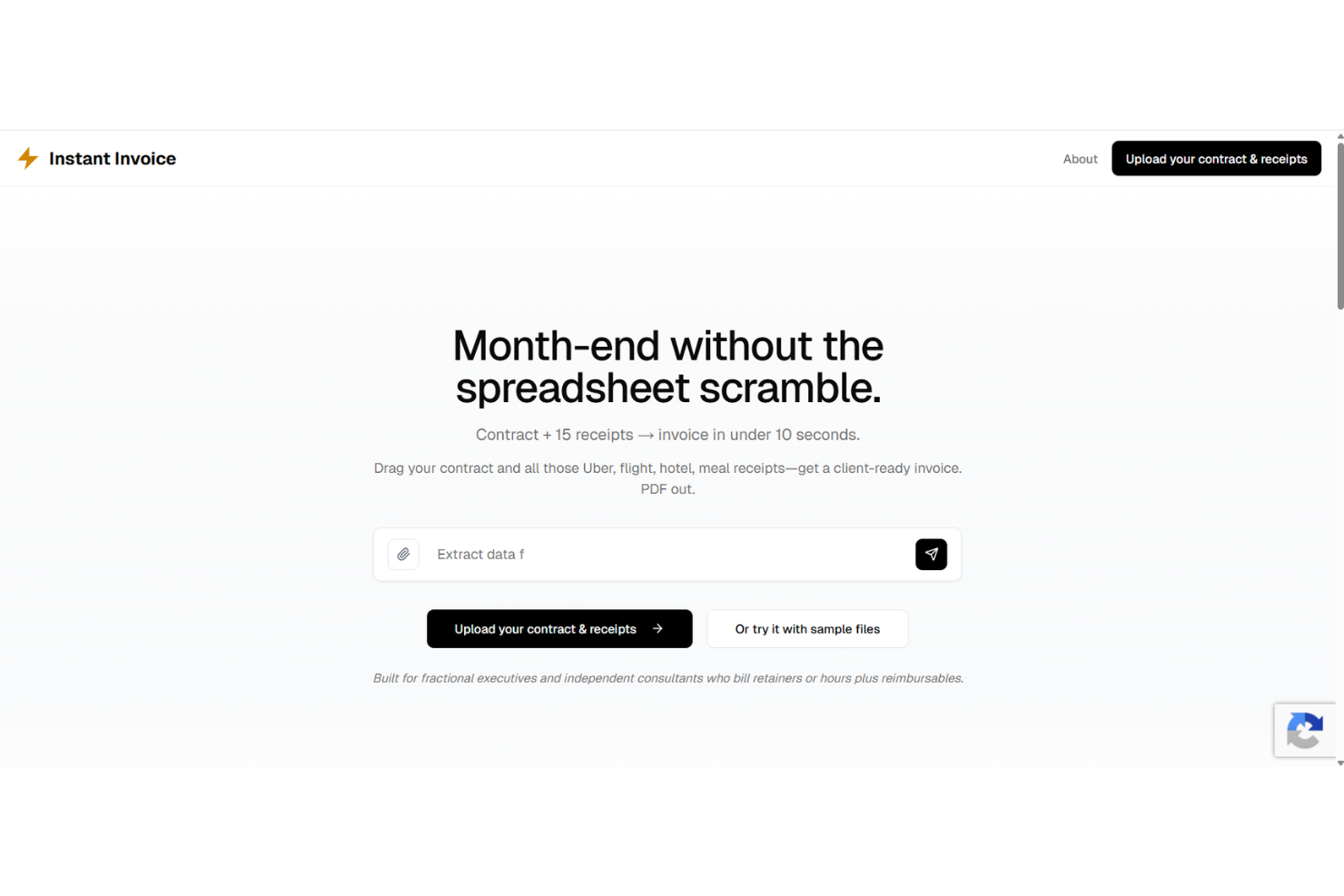
Instant Invoice is an AI invoice generator that uses automation and smart template matching to let you create, customize, and send invoices with minimal manual steps.
Who Is Instant Invoice Best For?
Freelancers and small business owners who need to automate invoice creation and delivery with minimal manual work.
Why I Picked Instant Invoice
I included Instant Invoice in my shortlist because I can auto-populate invoice fields from client data and trigger invoice creation with one click. I like being able to set up recurring invoice workflows and manage drafts in a centralized dashboard.
Instant Invoice Key Features
- Custom invoice templates: Choose from pre-built designs or create your own styles.
- Smart data extraction: Automatically recognize and input details from uploaded files.
- Multi-currency support: Issue invoices in different currencies for global clients.
- Audit trail tracking: Keep a record of invoice edits and user actions.
Instant Invoice Integrations
An API is available for custom integrations.
Pros and Cons
Pros:
- Extracts invoice details using AI parsing
- Handles batch invoice creation requests
- One-click invoice generation from email content
Cons:
- Relies on preset format structures
- No mobile app available for iOS or Android

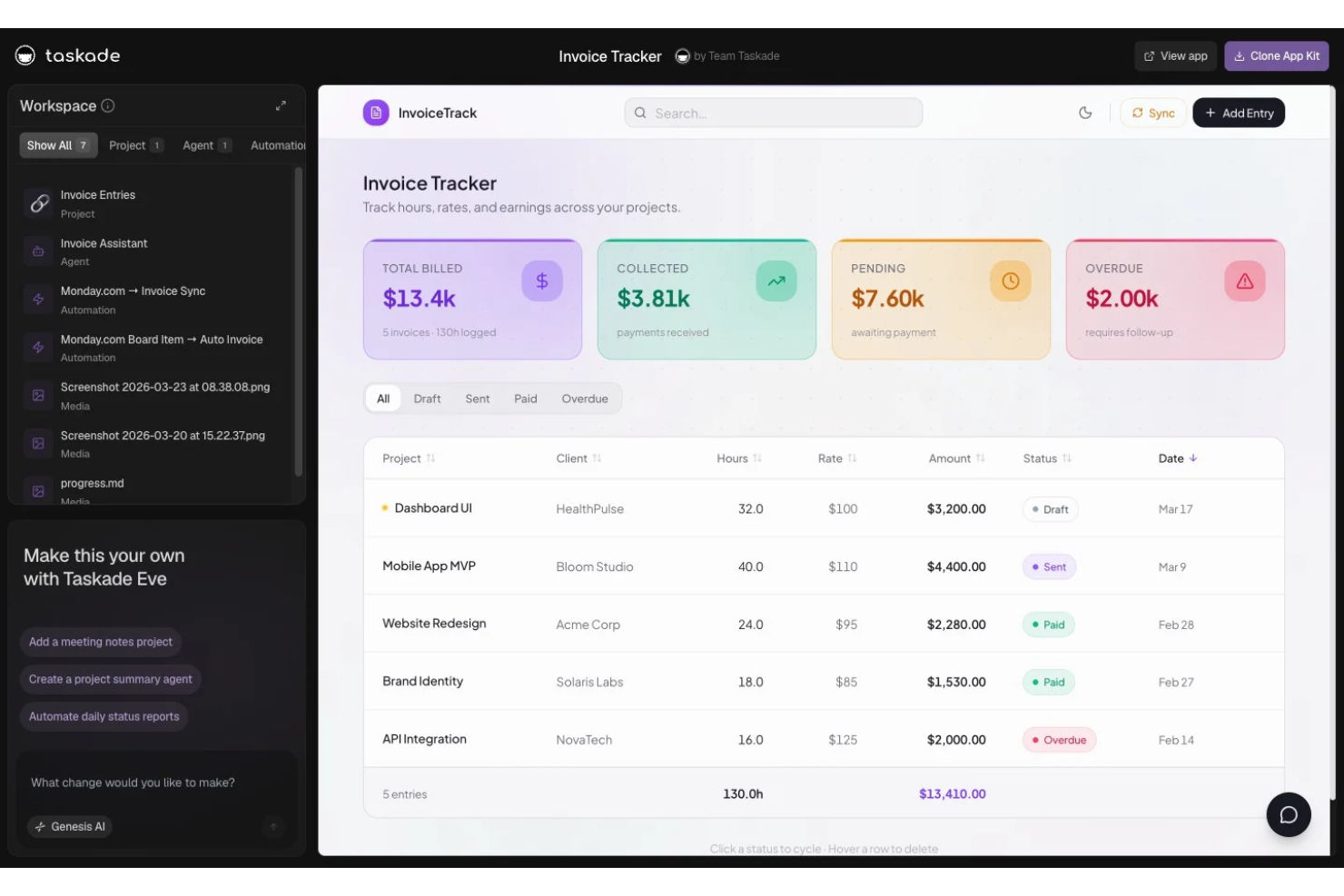
Taskade Genesis is an AI-powered invoice generator that offers customizable invoice templates, automated field population, and document creation tools designed for freelancers and small business owners.
Who Is Taskade Genesis Best For?
Freelancers and solo professionals who need to generate invoices from flexible AI-powered templates for a variety of projects or client types.
Why I Picked Taskade Genesis
I picked Taskade Genesis as one of the best because I can instantly generate AI-powered invoices using a wide range of customizable templates. I like being able to edit fields for each project and save reusable formats tailored to my freelancing work.
Taskade Genesis Key Features
- AI content generation: Automatically fills invoice fields based on prompts or project data.
- Template gallery: Access a library of invoice templates for different freelancing needs.
- Collaborative editing: Multiple users can edit and update invoices in real time.
- Multi-format export: Export completed invoices as PDF, DOCX, or markdown files.
Taskade Genesis Integrations
Integrations include Slack, Gmail, Stripe, GitHub, Shopify, HubSpot, Salesforce, Pipedrive, Discord, and Microsoft Teams.
Pros and Cons
Pros:
- Unlimited invoice generation for freelancers
- Large selection of editable invoice templates
- Supports AI-driven invoice text suggestions
Cons:
- Cannot schedule recurring invoices
- No automated payment tracking features
Andre AI-fakturageneratorer
Her er noen flere alternativer for AI-fakturageneratorer som ikke kom med på kortlisten, men som likevel er verdt å undersøke:
- Kantata
For project-based financial workflows
- FreshBooks
For expense tracking integration
- Invoice Ninja
For open-source customization
- Zoho Invoice
For automated payment reminders
- Hiveage
For team collaboration features
- Invoice Quickly
With integrated service library storage
- Bookipi
For mobile-first invoicing solutions


How I Evaluate AI Invoice Generators
Every tool on this list needs to do more than slap an AI label on a standard invoicing form—I look for platforms that actually turn project data, time logs, or SOWs into ready-to-send invoices. I split my evaluation into core functionality every tool must deliver and differentiating factors that separate the best fits from the rest.
Core Functionality (Table Stakes For This List)
When I'm selecting tools for my list, I rank each one on a scale from 0 (does not offer the functionality) to 5 (excels in this area) for each core functionality listed below. Then, I calculate the tool's total score into a percentage. Each tool needs to achieve a minimum total score of 55% to be considered for inclusion.
- AI-Driven Invoice Generation: I look for tools that draft invoices from real inputs—like a prompt describing a completed sprint or uploaded time logs—rather than just auto-filling a blank form.
- Project & Time Data Integration: The tool should pull billable hours, tasks, or milestones from PM and time-tracking tools so a completed project phase flows into an invoice draft.
- Line Item Extraction & Structuring: I evaluate whether the AI can parse an uploaded SOW or contract into structured line items with descriptions, quantities, and rates intact.
- Client & Rate Management: Each tool should store client profiles with per-project rates, currencies, and tax rules so a multi-client agency doesn't re-enter billing details every cycle.
- Customizable Invoice Templates: I check whether AI-populated invoices land in branded, editable templates that stay consistent whether you're billing a retainer client or a one-off engagement.
- Invoice Delivery & Export: Tools should let you send, export to PDF, or sync finalized invoices to accounting platforms like QuickBooks or Xero without leaving the interface.
Once I have a list of tools that meet this criteria, I consider what sets each platform apart.
Differentiating Factors (What Sets Vendors Apart)
Here's how I compare and contrast different vendors:
Standout Features
Smart data extraction is a major differentiator. I look for AI that pulls line items from uploaded contracts or timesheets via OCR and NLP, skipping manual re-entry. Recurring invoice intelligence also matters—tools that detect billing patterns and flag anomalies like a missing line item before a retainer invoice ships save real headaches. Automated payment follow-ups round things out, where AI personalizes reminder timing and tone based on each client's payment history to reduce DSO.
Beyond Features
I evaluate how well each tool connects to the accounting and payment stack your team already uses—syncing invoices to QuickBooks or Xero and collecting payments through Stripe or PayPal without a manual export step. The client-facing experience matters too, especially for agencies: branded portals and mobile-friendly views make it easier for clients to review and pay. I also consider onboarding speed. A project manager should be able to generate a first invoice within minutes, not after a week-long setup.
Slik velger du en AI-fakturagenerator
Det er lett å gå seg vill i lange funksjonslister og komplekse prismodeller. For å hjelpe deg med å holde fokus mens du går gjennom den unike prosessen med å velge programvare, har vi laget en sjekkliste over faktorer du bør ha i bakhodet:
| Faktor | Hva bør vurderes |
| Skalerbarhet | Kan plattformen håndtere virksomhetens vekst, flere brukere og større fakturavolumer uten avbrudd eller omfattende oppgraderinger? |
| Integrasjoner | Kan verktøyet kobles til regnskaps-, CRM- eller betalingsløsningene dine? Se etter innebygde tilkoblinger eller API-tilkoblinger. |
| Tilpasningsmuligheter | Kan du tilpasse fakturamalene, arbeidsflytene og automatiseringsreglene til dine unike faktureringsbehov og din merkevare? |
| Brukervennlighet | Vil brukere innen økonomi, salg og drift raskt kunne opprette fakturaer og løse problemer med minimal opplæring? |
| Implementering og oppstart | Hvor enkelt kan teamet ditt komme i gang, overføre eksisterende data og få tilgang til opplæringsressurser eller støtte under overgangen? |
| Kostnad | Vurder de totale kostnadene for forventet bruk, inkludert brukere og eventuelle gebyrer for ekstra funksjoner eller støtte på et høyere nivå. |
| Sikkerhetstiltak | Er sensitive økonomi- og kundedata kryptert både ved lagring og under overføring? Er brukertillatelser og tilgangskontroller detaljerte nok for kravene til etterlevelse? |
| Internasjonale funksjoner | Støtter systemet valutaene, skattereglene, de regionale formatene og språkene du trenger for fakturering på tvers av landegrenser? |
Hva er en AI-fakturagenerator?
En AI-fakturagenerator er en spesialisert type faktureringsprogramvare som bruker kunstig intelligens til å automatisere opprettingen av fakturaer. Den henter ut fakturadata, formaterer fakturaer og håndterer ofte oppgaver som beregninger, skatteregler eller feilkontroll. Disse plattformene kan spare tid ved å redusere manuell registrering, minimere feil og effektivisere gjentakende fakturering eller fakturering med høyt volum.
Funksjoner i AI-fakturageneratoren
Når du velger en AI-fakturagenerator, bør du se etter følgende viktige funksjoner:
- Automatisk oppretting av fakturaer: Genererer fakturaer umiddelbart ved å hente data fra tilbud, prosjektlogger eller kvitteringer uten manuell inntasting.
- Tilpassbare maler: Lar deg tilpasse fakturaformat, merkevareprofil, linjeelementer, valuta og avgiftsfelt slik at de samsvarer med virksomhetens behov.
- AI-drevet datauttrekking: Leser og konverterer informasjon fra opplastede dokumenter eller e-poster til fakturaklare felt med minimal inndata, slik at du kan bruke AI til å fylle ut detaljer.
- Støtte for flere valutaer: Håndterer fakturering for kunder i ulike land med automatisk valutavalg og håndtering av valutakurser.
- Automatiske betalingspåminnelser: Sender planlagte e-post- eller SMS-påminnelser til kunder om utestående eller forfalte betalinger før forfallsdatoen passeres.
- Motor for avgiftsberegning: Bruker riktige avgifter basert på geografisk plassering, avgiftsregler eller varekategorier uten manuell kobling.
- Gjentakende fakturering: Planlegger og sender automatisk fakturaer til kunder med regelmessige, gjentakende faktureringssykluser.
- Kontrollpanel for betalingssporing: Overvåker fakturastatus, registrerer mottatte betalinger som korttransaksjoner eller bankoverføringer og markerer utestående saldoer i én samlet visning.
- Brukertilgang basert på roller: Tildeler bestemte tillatelser for å opprette, godkjenne eller redigere fakturaer til ulike medlemmer av teamet.
- Loggføring av revisjonsspor: Oppbevarer en detaljert oversikt over hvem som opprettet, redigerte eller godkjente hver faktura, for interne kontroller eller behov knyttet til samsvar.
Fordeler med fakturageneratoren
Implementering av en AI-fakturagenerator gir flere fordeler for teamet og virksomheten din. Her er noen av fordelene du kan se frem til:
- Raskere faktureringssykluser: Automatiserte arbeidsflyter og AI-drevet datauttrekking reduserer manuell inntasting og fremskynder opprettingen av fakturaer, slik at faktureringen går raskere.
- Færre menneskelige feil: Innebygde valideringskontroller og gratis fakturamaler bidrar til å minimere feil i beregninger, avgiftsregler og kundeopplysninger.
- Bedre innkreving av betalinger: Automatiske påminnelser og funksjoner for betalingssporing gjør det enklere å følge opp, redusere forfalte fakturaer og la kunder laste ned fakturaer umiddelbart.
- Bedre samsvar med regelverket: Revisjonsspor, avgiftsberegninger og sikker oppbevaring av oppføringer forenkler samsvar med lokale lover og interne retningslinjer.
- Forbedret samarbeid: Rollebaserte tilgangskontroller gjør det mulig for team av alle størrelser å delegere oppgaver, godkjenne endringer og opprettholde oversikt uten forvirring.
- Skalerbar ved vekst: Støtte for flere valutaer, gjentakende fakturering og dataimport gjør at systemet kan vokse i takt med virksomhetens behov.
- Bedre innsikt: Kontrollpaneler i sanntid og sporing av betalingsstatus gir en tydelig oversikt over kontantstrøm og utestående fordringer.
Kostnader og priser for AI-fakturageneratoren
Valg av AI-fakturagenerator krever en forståelse av de ulike prismodellene og abonnementene som er tilgjengelige. Kostnadene varierer basert på funksjoner, teamstørrelse, tillegg og mer. Tabellen nedenfor oppsummerer vanlige abonnementer, gjennomsnittsprisene deres og typiske funksjoner som er inkludert i AI-fakturageneratorløsninger:
Sammenligningstabell for abonnementer for AI-fakturagenerator
| Abonnementstype | Gjennomsnittspris | Vanlige funksjoner |
| Gratisabonnement | $0 | Grunnleggende oppretting av fakturaer, begrenset antall maler, grunnleggende rapportering og tilgang for én bruker. |
| Personlig abonnement | $5-$15/bruker/måned | Tilpassede malalternativer, grunnleggende automatisering, begrensede integrasjoner, støtte for flere valutaer og prioritert kundestøtte via e-post. |
| Bedriftsabonnement | $20-$40/bruker/måned | Avansert automatisering, teamtillatelser, betalingspåminnelser, avansert analyse, flere integrasjoner og funksjon for gjentakende fakturering. |
| Virksomhetsabonnement | $50-$100/bruker/måned | Tilpasset merkevareprofil, rollebasert tilgang, API-tilgang, enkel pålogging, revisjonslogger, avansert sikkerhet og dedikert kontoadministrasjon. |
Vanlige spørsmål om AI-fakturageneratorer
Her er noen vanlige spørsmål om valg av en AI-fakturagenerator eller faktureringsprogramvare:
Kan AI-fakturageneratorer integreres med det eksisterende regnskapsprogrammet mitt?
Ja, mange AI-fakturageneratorer tilbyr integrasjoner med populære regnskapsplattformer. Dette hjelper deg med å automatisere dataoverføring, redusere doble registreringer og holde regnskapsopplysningene dine konsekvente på tvers av systemer. Hvis du for øyeblikket holder oversikt over regninger i Excel, kan du ofte eksportere disse dataene direkte. Bekreft alltid hvilke integrasjoner som støttes, før du velger et verktøy.
Hvor sikre er regnskapsopplysningene mine med en AI-fakturagenerator?
De fleste løsninger bruker kryptering og tilgangskontroller for å holde dataene dine sikre. Se etter plattformer som tilbyr databeskyttelse, for eksempel kryptering av data i hvile og under overføring, tillatelsesbaserte brukerroller og regelmessige sikkerhetsrevisjoner eller sertifiseringer. De sensitive bedriftsopplysningene dine og kontaktinformasjonen til kundene dine forblir beskyttet av disse sikkerhetslagene.
Fungerer AI-fakturageneratorer for frilansere og store team?
Ja, disse verktøyene er utviklet for både enkeltbrukere og team i vekst. Mange plattformer har fleksibel prising som tilpasses virksomhetens størrelse, teamtillatelser for samarbeid og funksjoner i ulike nivåer for forskjellige behov. Enten du sender én enkelt tjenestefaktura eller håndterer hundrevis, skalerer systemet med deg.
Hvilke AI-funksjoner hjelper faktisk med faktureringsprosessen?
AI driver funksjoner som automatisk datauttrekking fra kvitteringer, foreslåtte fakturalinjer, skatteberegninger og smarte betalingspåminnelser. Avanserte AI-verktøy kan fylle ut gjentakende felt automatisk, for eksempel firmanavnet ditt, fakturanummeret og kundens fakturaadresse. Dette kan spare deg for tid, redusere feil og fremskynde faktureringssyklusene.
Hvor vanskelig er det å sette opp en AI-fakturagenerator for teamet mitt?
Oppsettet innebærer vanligvis import av kundelister, valg av maler og tilkobling av kontoer. Du kan tilpasse fakturaformatet slik at det samsvarer med merkevarens farger og passer til virksomhetens profil. Mange verktøy tilbyr interaktiv introduksjon, hjelpeartikler og migreringsveivisere, slik at du kommer i gang på en dag eller to.
Kan jeg utstede fakturaer i ulike valutaer og på ulike språk?
Ja, de fleste AI-fakturageneratorer støtter fakturering i flere valutaer og tilbyr språkvalg. Systemet beregner automatisk delbeløpet, totalbeløpet og det endelige beløpet som skal betales, basert på lokale skatteregler. Dette er spesielt nyttig for team med internasjonale kunder eller behov for fakturering på tvers av landegrenser. Kontroller alltid dekningen før du bestemmer deg for en løsning.