

10 alternative verktøy til Hubstaff for sporing av arbeidsstyrken i 2026

De beste alternativene til Hubstaff – kortliste


Hvis du leder et fjern- eller hybridteam, vet du at det raskt kan bli utfordrende å registrere tid og følge med på produktiviteten, særlig når du håndterer flere prosjekter samtidig. Hubstaff er et populært valg for virksomheter som ønsker å effektivisere disse oppgavene, men det passer ikke for alle. Heldigvis finnes det mange alternativer som er verdt å vurdere.
I denne artikkelen har jeg samlet de beste alternativene til Hubstaff, basert på min praktiske testing av programvare for tidsregistrering og verktøy for arbeidsstyring. Jeg går gjennom alternativer som tilbyr omfattende medarbeiderovervåking, enkel tidsregistrering og kraftig rapportering – slik at du kan finne det som passer best for teamet ditt.
Hva er Hubstaff?
Hubstaff er et verktøy for tidsregistrering og produktivitetsstyring som er utviklet for å hjelpe fjernteam, frilansere og byråer med å følge med på arbeidstid og produktivitet. Det er laget for virksomheter som ønsker å registrere prosjekttid nøyaktig, administrere oppgaver og analysere arbeidsvaner for å øke effektiviteten. Hubstaff automatiserer administrative oppgaver som lønn, fakturering og planlegging, noe som sparer tid og forbedrer prosjektstyringen.
Why Trust Our Software Recommendations
Our team has been testing and reviewing software since 2012. As project managers ourselves, we know how difficult—and important—it is to choose the right software.
For this guide, we evaluated tools using hands-on testing and independent research, scoring tools using our selection criteria. We also draw on insights from industry thought leaders and practicing project management experts.
Our reviews reflect our human editorial judgment, not a sales pitch.
Expert reviewers:
Sammenligningstabell for priser
Bruk denne sammenligningstabellen til å se priser, gratis prøveperioder og tilgjengelighet for demoer side om side.
| Tool | Best For | Trial Info | Price | ||
|---|---|---|---|---|---|
| 1 | Best for customizable punch-in options | 14-day free trial + free demo available | From $4.99/user/month + $19/month base fee (billed annually) | Website | |
| 2 | Best for productivity management | Free trial available | From $7/user/month | Website | |
| 3 | Best for privacy-first workforce monitoring | 14-day free trial + free demo available | From $3.99/user/month (billed annually) | Website | |
| 4 | Best for PM-focused time tracking without monitoring | 30-day free trial + free plan available | From $9/user/month (billed annually) | Website | |
| 5 | Best for free-tier time tracking at scale | Free plan + 7-day free trial available | From $4.99/user/month | Website | |
| 6 | Best for invoicing from tracked project hours | 14-day free trial + free plan + free demo available | From $3.99/user/month (billed annually) | Website | |
| 7 | Best for project-budget time tracking | Free plan available; 14-day free trial | From $8.50/user/month (billed annually) | Website | |
| 8 | Best for AI-backed distributed team monitoring | 14-day free trial | Pricing upon request | Website | |
| 9 | Best for workforce intelligence beyond time tracking | Free plan available; 14-day free trial | From ₹300/user/month | Website | |
| 10 | Best for employee monitoring | Free demo + 7-day free trial available | From $8/user/month (billed annually) | Website |

Anmeldelser av de beste alternativene til Hubstaff
Basert på min omfattende erfaring vil jeg gi en detaljert analyse og oversikt over hvert alternativ til Hubstaff. Du får vite mer om fordeler og ulemper, viktige funksjoner, integrasjoner og de beste bruksområdene.

Best for customizable punch-in options
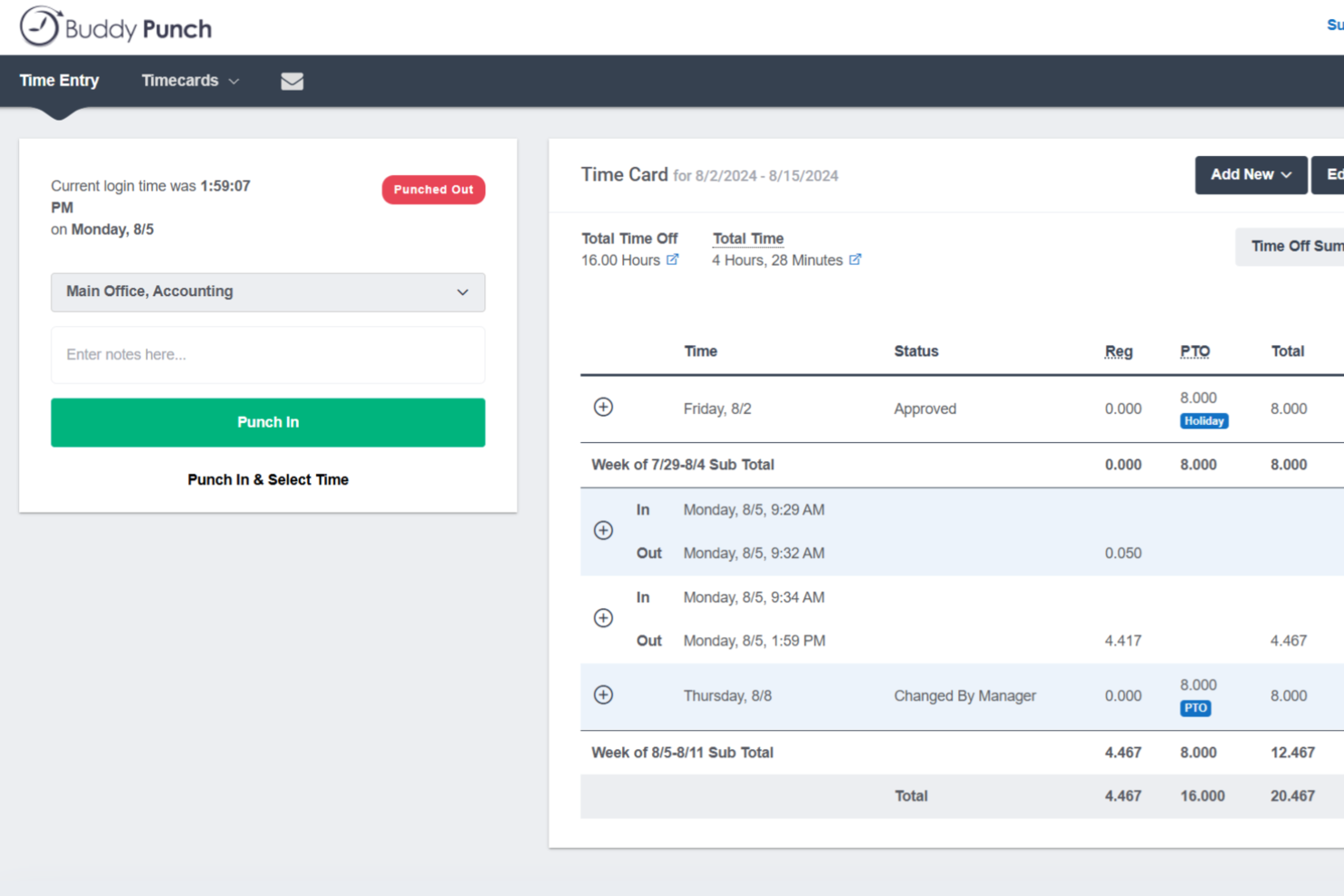
Buddy Punch is a time clock and attendance tracking platform that covers employee scheduling, GPS-based punch verification, PTO management, and payroll-ready timesheet exports.
Who Is Buddy Punch Best For?
Buddy Punch is a strong fit for operations managers and HR teams overseeing hourly or field-based workforces who need flexible clock-in options and payroll-ready timesheets.
Why I Picked Buddy Punch
I picked Buddy Punch as one of the best because of how many ways it lets employees clock in—web, mobile app, shared kiosk with PIN, QR code scan, or even text message. That variety matters when you're managing a field crew where no two workers have the same setup. I also like that GPS coordinates are captured at every punch event, so there's a location record tied to each clock-in without requiring real-time tracking overhead.
Buddy Punch Key Features
- Geofence-based punch blocking: Employers can define worksite boundaries and restrict employees from clocking in or out when outside those zones.
- Automatic timesheet compilation: The system pulls clock-in and clock-out data into timesheets and calculates regular hours, overtime, and configured pay types automatically.
- PTO accrual and request management: Employees can view their time-off balances and submit requests directly in the app, with approved PTO added to timesheets automatically.
- Payroll provider integrations: Buddy Punch connects natively with providers including Gusto, ADP Workforce Now, Paychex, Rippling, and Workday to transfer timesheet data for processing.
Buddy Punch Integrations
Buddy Punch offers nearly 20 native payroll integrations, including QuickBooks Online, QuickBooks Desktop, ADP Workforce Now, Gusto, Paychex, Paycor, Paylocity, Rippling, and Workday. It also supports Zapier, plus a REST API and webhooks for custom integrations.
Pros and Cons
Pros:
- Employees can check hours and PTO
- Location-stamped punches support field accountability
- Multiple punch methods suit varied field setups
Cons:
- Reviewers report missed punches and mobile glitches
- No app or website activity monitoring

Apploye
Best for productivity management
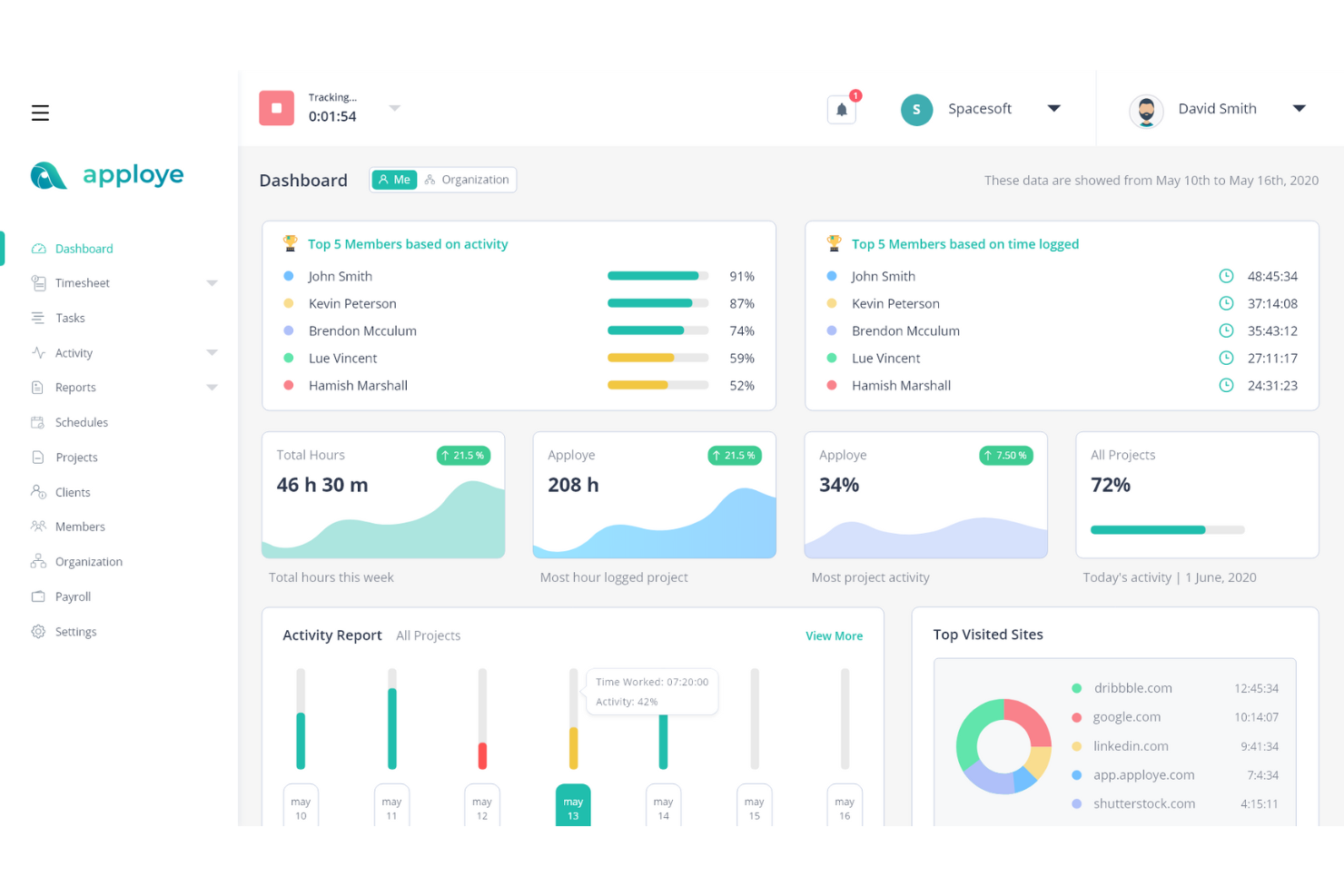
Apploye is a workforce productivity platform that combines time tracking, activity monitoring, screenshot capture, project budgeting, attendance management, and client invoicing.
Who Is Apploye Best For?
Apploye is a strong fit for agencies and freelance business owners who need to tie tracked hours directly to client billing and project budgets.
Why I Picked Apploye
I've included Apploye in my top picks because it goes further than basic time tracking by tying every logged hour directly to project budgets and client billing. I particularly like the budget-alert system, which notifies managers the moment a project hits a set spending threshold, so there's no scrambling after the fact. On top of that, the activity and productivity monitoring, including app and URL usage tracking and configurable screenshot capture, gives distributed teams real visibility without constant check-ins.
Apploye Key Features
- Timesheet approval: Managers can review and approve employee timesheets on a daily, weekly, or custom schedule before hours flow into payroll.
- Attendance and shift management: Administrators can create shifts, track clock-in and clock-out times, and compare required shift hours against actual hours worked.
- Multi-organization support: Users can manage multiple companies under a single account, each with separate settings and data.
- Idle time detection: Apploye flags inactive periods and lets employees or administrators decide whether to keep or discard idle time from timesheets.
Apploye Integrations
Apploye offers seven documented native integrations, including ClickUp, Asana, Jira, Monday.com, Trello Power-Ups, Zoho, and Deel. Its read-only REST API and MCP server support custom integrations.
Pros and Cons
Pros:
- Configurable screenshots add review context
- Project hours clarify client billing
- Activity reports reduce remote check-ins
Cons:
- Monitoring can feel invasive to employees
- Reports offer limited filtering and history

Best for privacy-first workforce monitoring
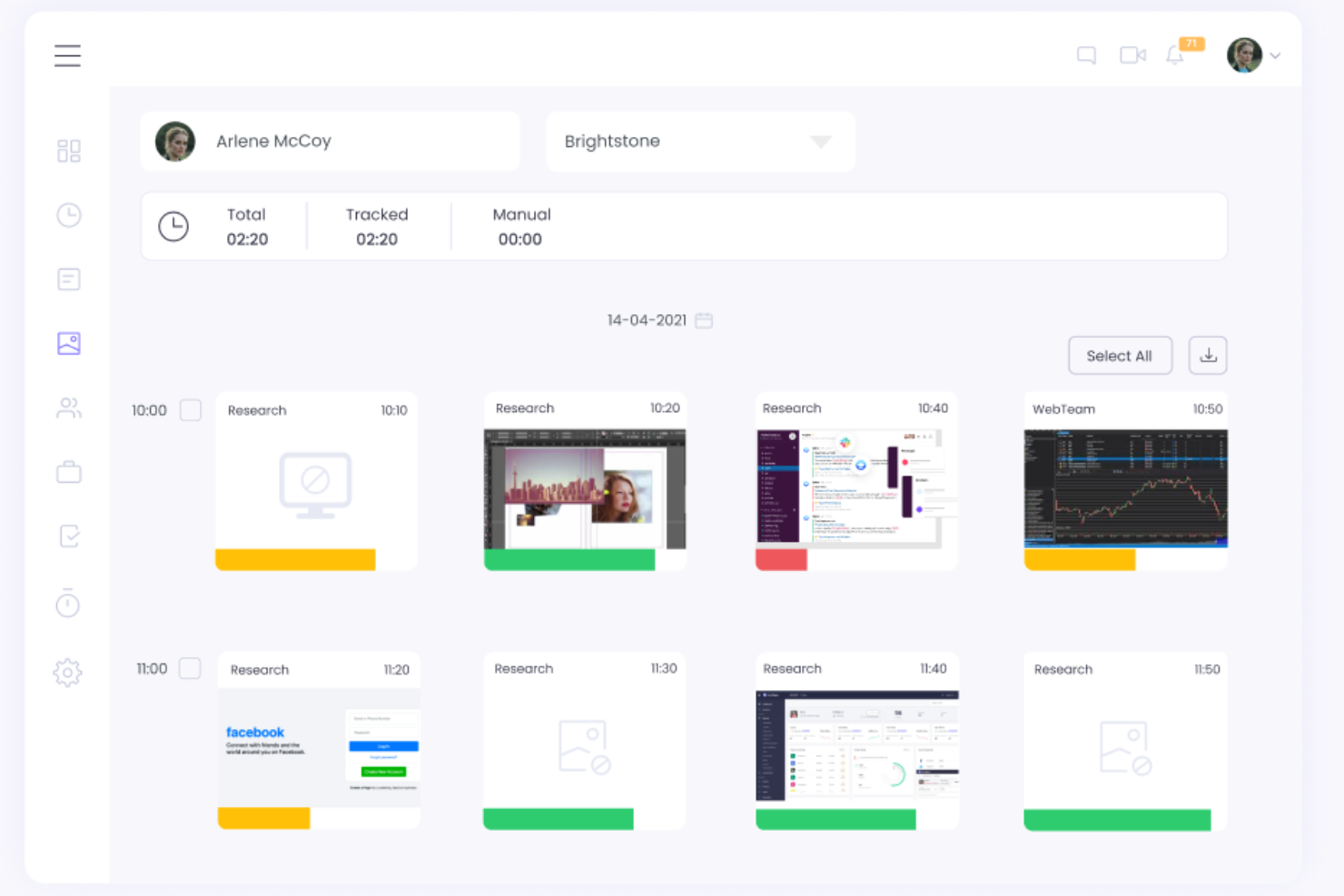
WebWork Time Tracker is a time tracking and employee monitoring tool that combines automatic time capture, activity-level reporting, screenshot monitoring, payroll calculation, and project budgeting across desktop, mobile, and web platforms.
Who Is WebWork Time Tracker Best For?
WebWork Time Tracker is a strong fit for distributed teams and remote-first businesses that need detailed workforce visibility without keylogging or invasive data collection.
Why I Picked WebWork Time Tracker
I've included WebWork Time Tracker in my top picks because it takes a deliberate stance on monitoring that most tools don't: no keylogging, configurable screenshot blur levels, and per-member screenshot overrides so you're not applying a blanket surveillance policy to your whole team. I particularly like that employees can view their own screenshots directly in the desktop app, which removes the "black box" feeling that makes monitoring contentious. The Silent Tracker is also restricted to company-owned devices by policy, which keeps personal privacy boundaries clear.
WebWork Time Tracker Key Features
- Offline time tracking: The desktop tracker records work hours without an internet connection and syncs data automatically once connectivity returns.
- Geofencing: Set job site locations and a defined radius that can trigger mobile tracking when field workers enter the area (Plus and above).
- Timesheet approvals: Managers can review and approve employee timesheets with configurable pay periods, autosubmit, and autoapproval options (Plus and above).
- Project budgeting: Set budgets for projects, track spending against them, and receive AI-generated alerts when time or budget thresholds are at risk of being exceeded (Plus and above).
WebWork Time Tracker Integrations
WebWork Time Tracker offers native integrations with Jira, Asana, ClickUp, Slack, QuickBooks, Xero, Gusto, Deel, GitHub, and Stripe. It supports REST API, webhooks, and marketplace integrations through Zapier, Make, and Zoho Flow.
Pros and Cons
Pros:
- Automatic tracking simplifies routine time capture
- Employees can review their own screenshots
- No keylogging, with adjustable screenshot blur
Cons:
- Some users report missed hours or interruptions
- Frequent screenshots can feel intrusive
Beebole
Best for PM-focused time tracking without monitoring
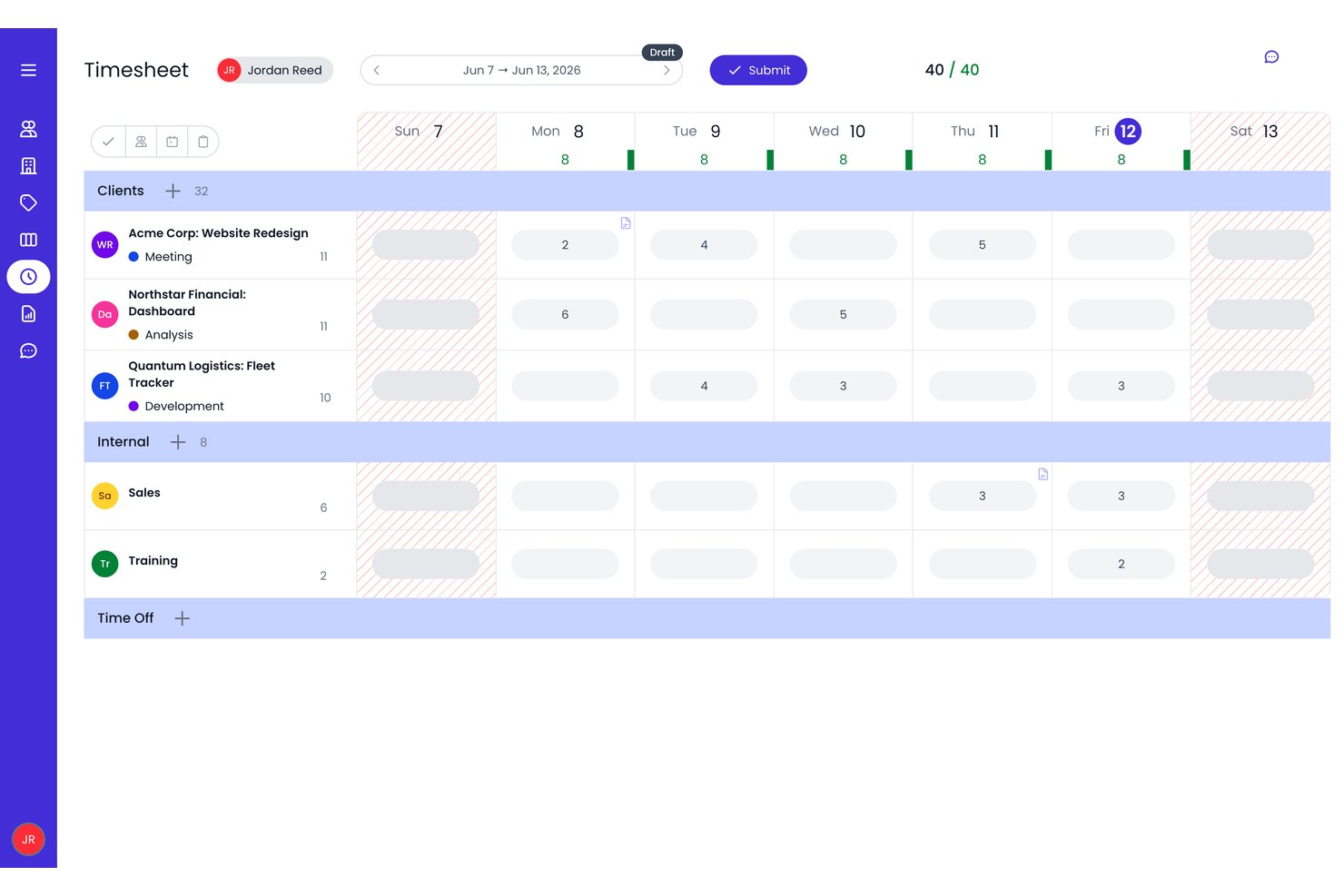
Beebole is a project time tracking and resource planning platform that combines timesheet management, project budgeting, and financial reporting across clients, projects, and tasks.
Who Is Beebole Best For?
Beebole suits project managers and agency leads who need detailed project budget tracking and financial reporting without employee monitoring.
Why I Picked Beebole
I've included Beebole in my top picks because it's built for project managers who need serious budget and financial visibility without any employee surveillance attached. I love that activity tracking is fully opt-in on the desktop app, meaning managers only see entries employees choose to accept, and nothing is recorded covertly. What makes it genuinely useful is the depth of project financials: you can split budgets by person or subproject, track costs against profitability, and report on margins across clients, all without a single screenshot in sight.
Beebole Key Features
- Multi-level timesheet approvals: Route submitted timesheets through configurable approval chains before time is locked or exported.
- Resource planning with Gantt heatmaps: View team availability, flag overbookings, and assign project bookings across Gantt, Kanban, and Staffing views.
- Time-off tracking and accruals: Manage absence requests, accrual policies, allowances, and public holidays, with approved time off reflected in resource planning.
- AI-assisted report creation: Describe a report in plain language and have Beebole generate it, with processing handled on Beebole-operated servers rather than third-party AI providers.
Beebole Integrations
Beebole offers native integrations with Asana, Linear, monday.com, Google Sheets, QuickBooks Online, Xero, BambooHR, Google Calendar, and Outlook Calendar. It also supports GraphQL, webhooks, and an MCP server for custom connections.
Pros and Cons
Pros:
- Simple time logging and timer use
- Custom reports support varied client needs
- Granular client, project, and task allocation
Cons:
- No screenshots, idle reports, or productivity categories
- Report filters and date selection take effort

Clockify
Best for free-tier time tracking at scale
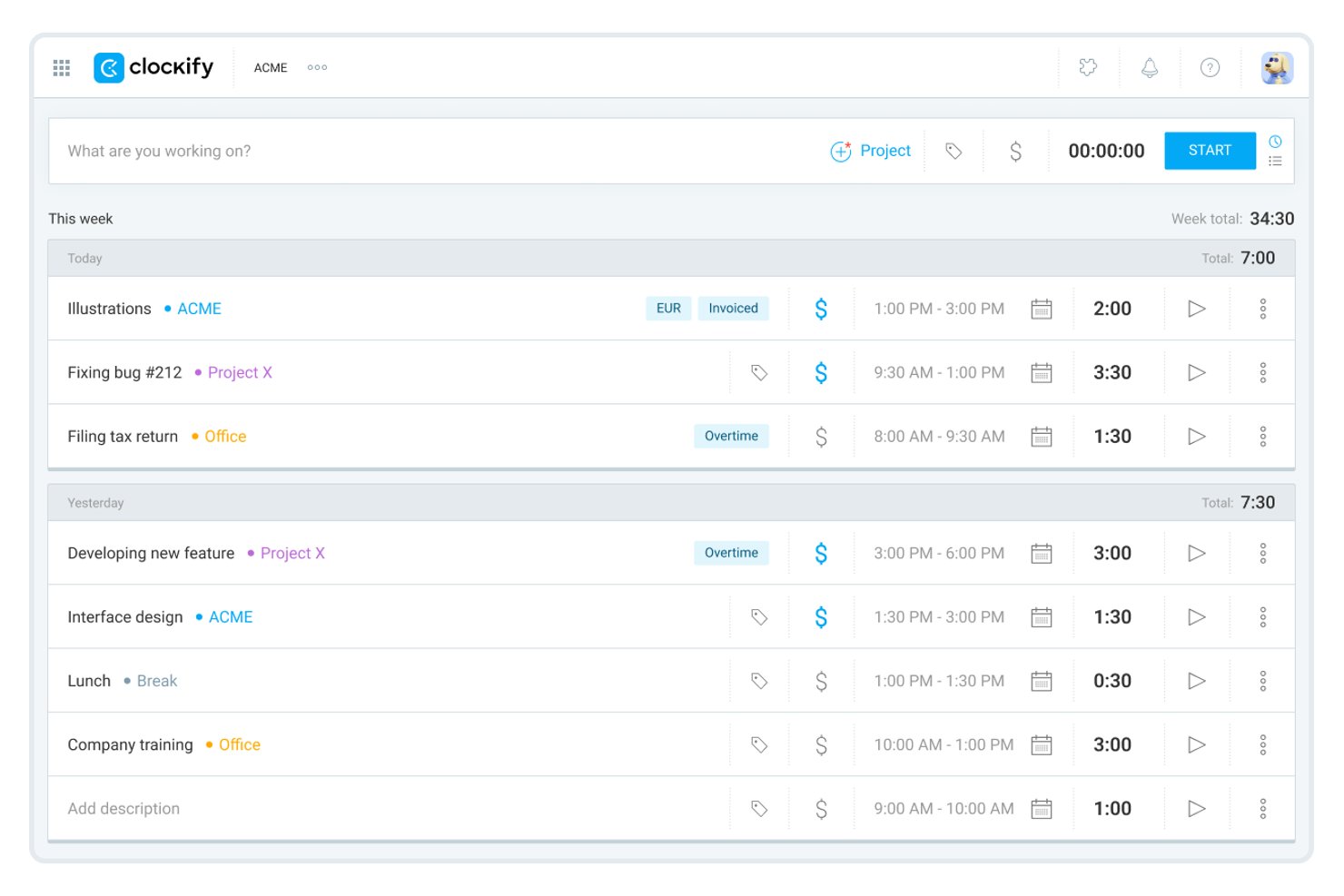
Clockify is a time tracking and timesheet app that covers timer-based and manual time entry, activity monitoring, GPS location tracking, project and task budgeting, invoicing, and timesheet approvals across web, desktop, mobile, and kiosk.
Who Is Clockify Best For?
Clockify is a strong fit for growing teams and agencies that need to track time across many users without immediately committing to a paid plan.
Why I Picked Clockify
I've included Clockify in my top picks because it's the only tool on this list where a large team can track time across unlimited projects without paying a cent. Its free tier covers timer-based and manual entry, Auto Tracker (which records time spent in apps and documents automatically), and team activity views. When you're ready to scale, GPS location tracking and configurable activity monitoring with screenshot capture are available on paid plans.
Clockify Key Features
- Timesheet approval workflows: Submit timesheets for manager review, with pending, approved, rejected, and withdrawn request tracking plus automated email reminders.
- Kiosk clock-in: Let team members clock in and out from a shared device using a PIN or QR code, with optional break tracking and photo capture.
- Time-off management: Create time-off policies and holidays, handle leave requests, and track balances across your team.
- Data region selection: Choose to host your workspace data in the EU, UK, USA, or Australia to meet regional data-residency requirements.
Clockify Integrations
Clockify offers 100+ native web app integrations, including QuickBooks, Xero, Jira, Google Calendar, Outlook, Asana, Trello, ClickUp, GitHub, and GitLab. It also supports REST API, webhooks, and Zapier.
Pros and Cons
Pros:
- Timesheet reports help prepare client billing
- Client and project entries clarify billable hours
- Auto Tracker captures app and document time
Cons:
- Complex reports offer limited flexibility
- Mobile syncing glitches disrupt time records

TimeCamp
Best for invoicing from tracked project hours

TimeCamp is a time tracking tool that combines automatic and manual time capture, project and task-level budgeting, attendance management, productivity monitoring, and built-in invoicing across web, desktop, and mobile apps.
Who Is TimeCamp Best For?
TimeCamp is a strong fit for freelancers and agency teams who need to turn tracked project hours directly into client invoices without juggling separate billing tools.
Why I Picked TimeCamp
I picked TimeCamp as one of the best because it closes the gap between tracking project hours and getting paid without making you jump between tools. I love how you can pull billable time directly from any project or task, generate an invoice inside the same platform, and push it straight to QuickBooks or Xero. Budget alerts at 80% and 100% of a project's estimated hours or fee mean you can catch scope creep before it hits the invoice.
TimeCamp Key Features
- Automatic time tracking: Uses keywords tied to app names, window titles, or URLs to assign tracked time to the correct project or task automatically.
- Attendance and time-off tracking: Records employee start and end times, absences, paid and unpaid leave, and overtime within the same platform.
- Geofencing: Starts and stops a mobile timer automatically when an employee enters or exits an assigned job site using GPS.
- Timesheet approvals: Lets employees submit daily or weekly timesheets to assigned managers for approval or rejection with comments.
TimeCamp Integrations
TimeCamp lists 100+ integrations, including Jira, Asana, ClickUp, Slack, Microsoft Teams, QuickBooks Online, Xero, and BambooHR. It also offers a REST API and Zapier integration.
Pros and Cons
Pros:
- GPS geofencing captures on-site time automatically
- Project budgets flag scope creep early
- Tracked hours translate into client-ready invoices
Cons:
- Mobile timers can feel clunky or glitchy
- Activity reports omit keyboard and mouse levels

Everhour
Best for project-budget time tracking
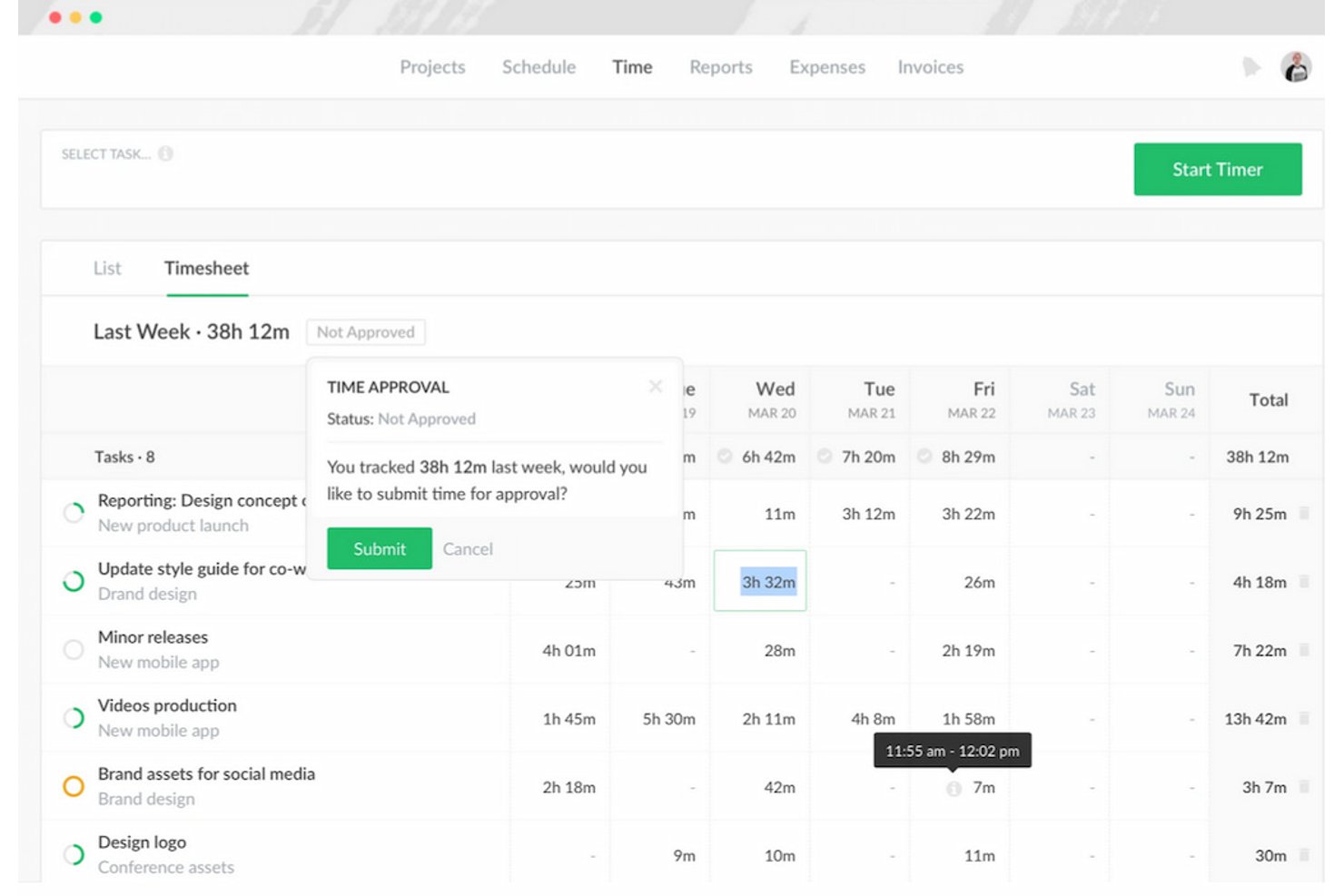
Everhour is a time tracking tool built around project and task structures, offering timers, timesheet approvals, project budgeting, invoicing, and native integrations with tools like Asana, Jira, ClickUp, and QuickBooks.
Who Is Everhour Best For?
Everhour is a strong fit for agencies and client-service teams that need time tracking tied directly to project budgets, billable rates, and invoicing workflows.
Why I Picked Everhour
I picked Everhour as one of the best because it treats time tracking as a budgeting tool, not just a clock. Where Hubstaff focuses on activity monitoring and GPS, Everhour ties every tracked hour to a project budget, so you can see exactly when a client engagement is burning through its allocation and set alerts before you go over. I especially like how teams can group multiple projects under a shared client budget and pull profitability reports that compare estimated versus actual hours.
Everhour Key Features
- Timesheet approvals: Managers can review, approve, or reject submitted timesheets and lock approved periods to prevent further edits.
- Time-off management: Team members can request time off, managers can approve requests, and teams can configure time-off types, balances, and public holidays by country.
- Live team dashboard: Shows active timers and which project or task each team member is currently working on in real time.
- Native integrations with PM tools: Everhour embeds directly into Asana, ClickUp, Jira, Trello, and other project management tools so users can track time without leaving their workflow.
Everhour Integrations
Everhour offers 10+ native integrations, including Asana, ClickUp, Jira, Linear, Trello, QuickBooks, Xero, GitHub, and Slack. It also supports Zapier and an API for custom integrations.
Pros and Cons
Pros:
- Filter reports for billing and project reviews
- Compare client work with project limits
- Track billable hours against task budgets
Cons:
- Mobile tracking offers fewer functions than web
- No documented idle-time or keystroke monitoring

Best for AI-backed distributed team monitoring
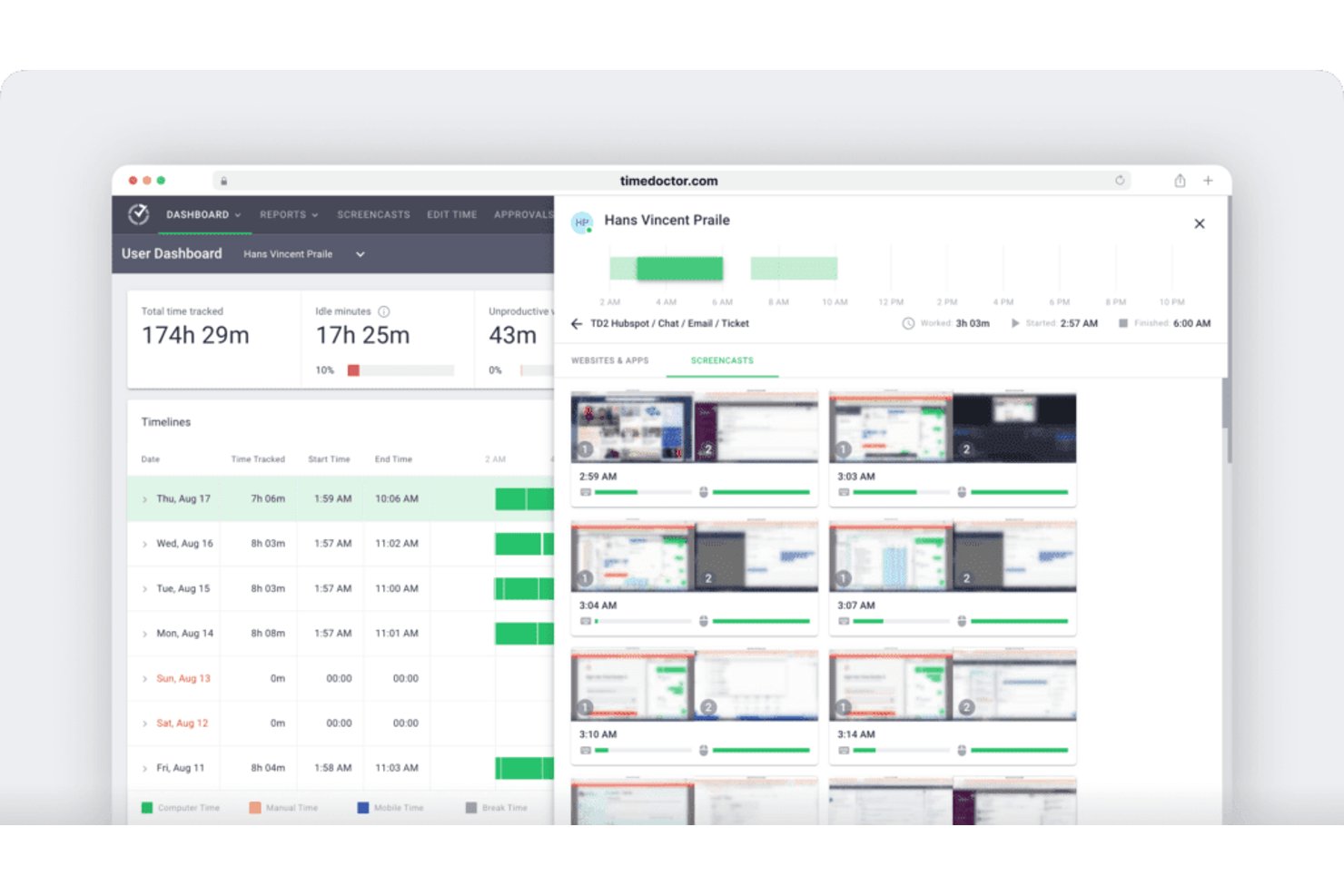
Time Doctor is an employee time tracking and workforce monitoring platform that combines automatic and manual time capture, web and app usage reporting, AI-powered productivity analytics, and attendance management across distributed teams.
Who Is Time Doctor Best For?
Time Doctor suits operations managers and people leaders who need deep visibility into distributed team activity, especially where AI-driven productivity insights and strong compliance credentials matter.
Why I Picked Time Doctor
I picked Time Doctor as one of the best because its AI-backed monitoring goes well beyond basic time capture. Benchmarks AI compares individual work patterns against AI-matched peer groups, so I can spot who's underperforming relative to comparable roles, not just raw hours. The Unusual Activity AI report flags suspicious time-entry patterns automatically, which is exactly the kind of signal a distributed team manager needs without manually auditing every timesheet.
Time Doctor Key Features
- Attendance and schedule tracking: Compares scheduled hours against actual hours worked and records missing hours across your distributed team.
- Web and app usage reporting: Logs time spent on specific websites and applications, with breakdowns by day, week, month, or custom date range.
- Work-life balance metrics: Surfaces patterns of overload or imbalance so you can spot burnout risk before it becomes a retention problem.
- 60+ native integrations: Connects with tools like Jira, ClickUp, Asana, Gusto, and ADP to fit into your existing project and payroll workflows.
Time Doctor Integrations
Time Doctor offers 60+ native integrations, including Jira, Asana, ClickUp, monday.com, ADP, Gusto, Payoneer, PayPal Payouts, Wise, and Xero AU Payroll. It also provides Open API access for custom integrations.
Pros and Cons
Pros:
- AI benchmarks flag unusual work patterns
- Clear attendance and project reports
- Accurate offline time capture
Cons:
- Payroll payments still require CSV uploads
- Close monitoring can feel intrusive

Best for workforce intelligence beyond time tracking
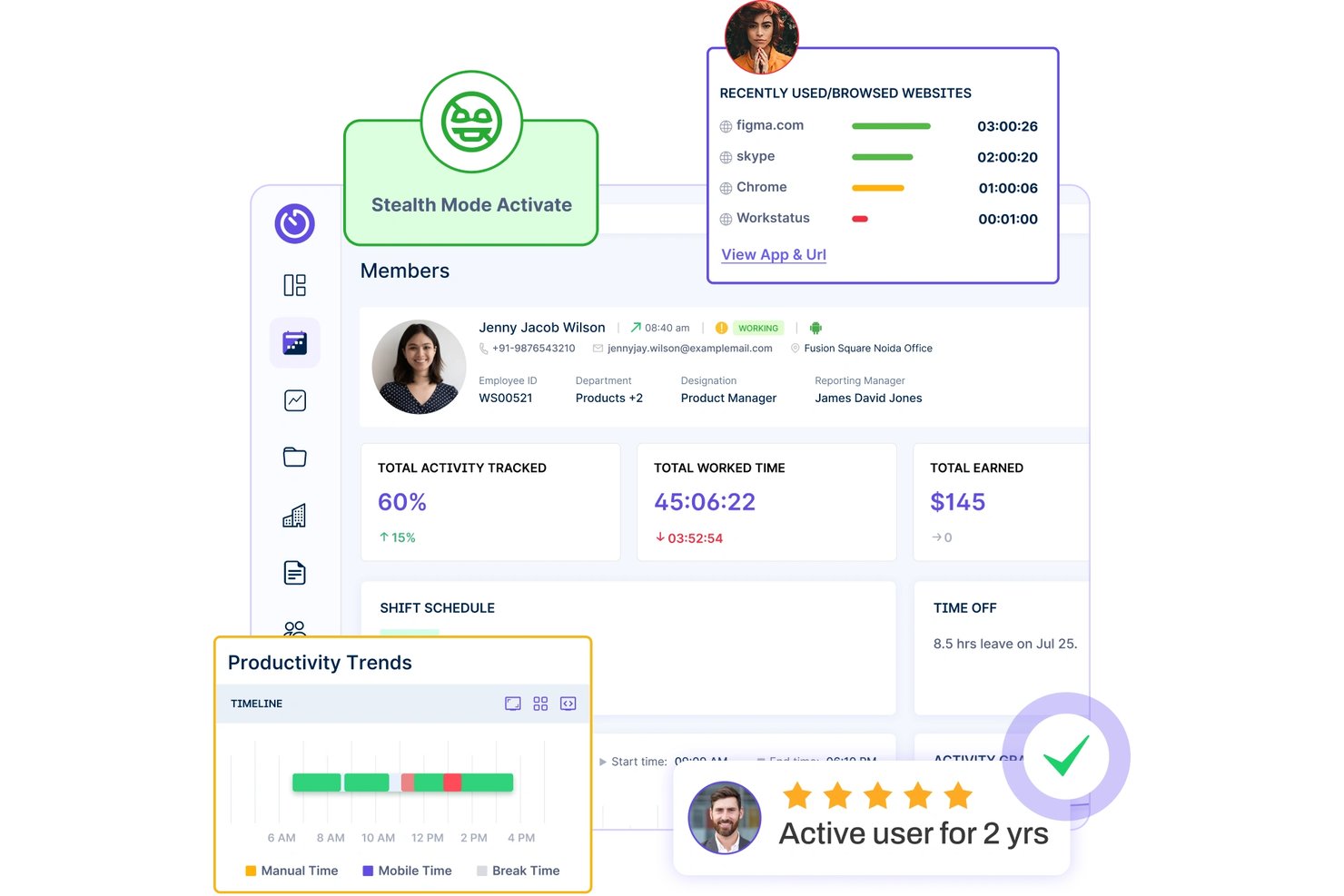
Workstatus is a time tracking and workforce intelligence platform that combines attendance management, activity monitoring, project budget tracking, and workforce analytics across desktop and mobile.
Who Is Workstatus Best For?
Workstatus is a strong fit for operations managers and agency leads who need workforce visibility that goes beyond basic time logs.
Why I Picked Workstatus
Workstatus earns its spot on my shortlist because it goes further than time logging to give you actual workforce intelligence. I'm particularly impressed by the Profit tier's burnout and workload signals, which flag imbalance before it becomes a retention problem, and its real-time budget-versus-actual tracking with drift alerts, which tell you when a project is slipping before it's too late to act. I also like that utilization forecasting connects current capacity to pipeline demand, so you're not scrambling when a new engagement lands.
Workstatus Key Features
- Geofenced job-site tracking: Automatically starts and stops the timer when a team member enters or exits a defined job-site location.
- Timesheet approval workflows: Team members submit timesheets for manager review, with filters by employee, project, task, and status.
- Scheduled reports: Set up recurring reports in CSV or PDF (daily, weekly, or monthly) delivered automatically to designated recipients.
- Role-based report visibility: Report access is scoped by role, so managers see org-wide data while team members see only their own.
Workstatus Integrations
Workstatus offers 25+ native integrations, including Jira, Asana, ClickUp, Trello, Slack, Microsoft Teams, GitHub, GitLab, Salesforce, and Stripe. It also provides API and webhook access for custom integrations.
Pros and Cons
Pros:
- Automated timesheets clarify where hours go
- Geofencing helps field teams verify site time
- Project budgets flag burn before overruns
Cons:
- Reports can feel hard to customize
- Mobile app offers less desktop activity detail

Insightful
Best for employee monitoring
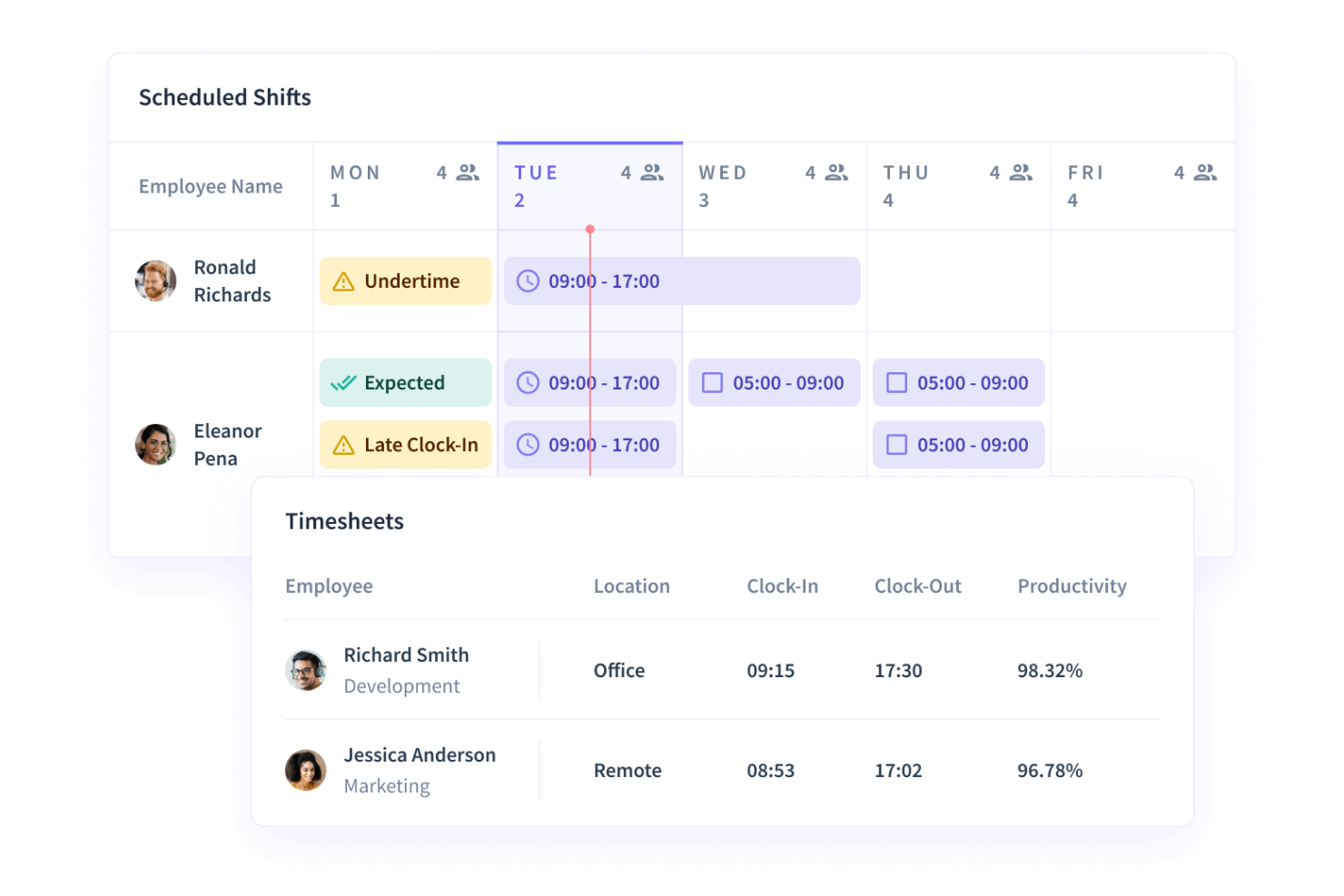
Insightful is a workforce analytics and employee monitoring platform that tracks time and attendance, captures screenshots, analyzes app and website usage, and measures team productivity and capacity across distributed teams.
Who Is Insightful Best For?
Insightful is a strong fit for operations and HR teams that need deep visibility into how distributed or hybrid workforces are actually spending their time.
Why I Picked Insightful
I picked Insightful as one of the best because it goes further than basic time tracking by showing exactly how distributed teams spend their working hours. I find the app and website usage categorization particularly useful: you can label specific tools as productive or unproductive per team, so a Slack notification for a sales team reads differently than it does for a developer. The AI Adoption report is also something I haven't seen done this way elsewhere, tracking daily AI tool usage, active tools, and team-level maturity segments using your own activity data.
Insightful Key Features
- Automatic attendance tracking: Captures clock-ins and clock-outs using Unlimited, Fixed, Network-Based, or VPN-based scenarios on company computers.
- Schedule adherence monitoring: Tracks late clock-ins, absences, overtime, and undertime against configured employee schedules.
- Configurable screenshot capture: Takes randomized-interval screenshots with default blurring of passwords, banking details, and private messages, at up to 30 captures per hour.
- AI Adoption report: Shows daily AI tool usage, adoption rates, team maturity segments, and cross-tool comparisons built from your organization's own activity data.
Insightful Integrations
Insightful offers 50+ native integrations, including Asana, Jira, ClickUp, Trello, Teamwork, Azure DevOps, BambooHR, Gusto, ADP Workforce Now, and Workday. It also provides a REST API with JSON responses for custom integrations.
Pros and Cons
Pros:
- Configurable screenshots include default sensitive-detail blurring
- Project time links to budgets and costs
- Reviewers value real-time activity visibility
Cons:
- App labeling and tracking setup takes time
- Reviewers find reports overwhelming or inflexible
New Product Updates from Insightful
Insightful Expands MCP and HRIS Integrations
Insightful adds OAuth connections for ChatGPT and Microsoft Copilot Studio through its MCP Server, while HRIS integrations gain manager scope syncing in Beta. These updates expand AI access and automate permission management. For more information, visit Insightful’s official site.
 .
.Andre alternativer til Hubstaff
Nedenfor finner du en liste over flere alternativer til Hubstaff som jeg vurderte, men som ikke kom med på topplisten.
- Monitask
For screenshot-based monitoring
- DeskTime
For automatic productivity efficiency analysis
- RescueTime
For automatic time tracking without surveillance
- Toggl
For trust-based project time tracking
- Teramind
For insider risk and DLP monitoring
- Jibble
For GPS-verified attendance tracking
- Timely
For privacy-first automatic timesheets
- Harvest
For billing clients from tracked time
- Controlio
For compliance-focused workforce monitoring
- Polaris PSA
For project financials and time visibility


Relaterte anmeldelser av programvare for prosjektstyring
Hvis du fortsatt ikke har funnet det du leter etter, kan du se nærmere på disse relaterte verktøyene for prosjektstyring som vi har testet og anmeldt.
- Programvare for prosjektstyring
- Programvare for ressursstyring
- Programvare for arbeidsflytautomatisering
- Verktøy for å lage Gantt-diagrammer
How I Evaluate Hubstaff Alternatives
I split my evaluation into baseline requirements—like time tracking, project attribution, and billing—and differentiators that separate the best fit from the rest.
Core Functionality (Table Stakes For This List)
When I'm selecting tools for my list, I rank each one on a scale from 0 (does not offer the functionality) to 5 (excels in this area) for each core functionality listed below. Then, I calculate the tool's total score into a percentage. Each tool needs to achieve a minimum total score of 65% to be considered for inclusion.
- Time Tracking: I look for tools that go beyond a basic timer—automatic tracking, idle detection, and the ability to attribute hours to specific projects and tasks matter when teams log time across multiple clients.
- Project & Task Management: Each tool should let you organize deliverables into projects with task assignments, deadlines, and progress views like Kanban boards or Gantt charts.
- Productivity Monitoring: I evaluate whether a tool offers activity-level tracking, screenshot capture, or app/URL logging—features remote team leads rely on for visibility into distributed workdays.
- Team & Workforce Management: Scheduling, attendance tracking, user roles, and workload views all factor in here, especially for agencies juggling shift-based and project-based workers on the same roster.
- Budgeting & Billing: Tools that connect billable rates to tracked hours and support budget caps, invoice generation, or payroll exports score higher—manual workarounds for billing defeat the purpose.
- Reporting & Integrations: I check for customizable time and project reports alongside native integrations with tools like Jira, QuickBooks, or Slack that most PM-oriented teams already use.
Once I have a list of tools that meet this criteria, I consider what sets each platform apart.
Differentiating Factors (What Sets Vendors Apart)
Here's how I compare and contrast different vendors:
Standout Features
Privacy controls are a big differentiator—I look for tools that let you configure screenshot frequency, blur sensitive content, or let employees pause tracking. For agency teams, client-facing dashboards where stakeholders can view logged hours and project status without a full license save a lot of back-and-forth reporting. Native payroll processing is another separator, especially for teams managing contractors across multiple regions who want to go from tracked hours to payment without exporting to a third-party tool.
Beyond Features
Platform coverage matters—I check whether a tool offers native desktop apps across Windows, Mac, and Linux, plus mobile apps for field or hybrid teams who track time on the go. Compliance is another factor I weigh carefully, since employee monitoring data raises real GDPR and privacy concerns. I look for SOC 2 compliance, role-based access, and clear data retention policies. Finally, I consider how easy it is to transition from Hubstaff, including whether a vendor supports data migration, in-app onboarding, and change management resources for teams adjusting to new monitoring workflows.
Hvorfor se etter et alternativ til Hubstaff?
Det kan hende du ser etter et alternativ til Hubstaff hvis du har noen av følgende utfordringer.
- Kostnadsbekymringer: Du kan oppleve at Hubstaffs prismodell er utenfor budsjettet ditt
- Funksjoner: Du kan ha behov for flere eller andre funksjoner enn dem Hubstaff tilbyr
- Brukeropplevelse: Du foretrekker kanskje et mer intuitivt eller brukervennlig grensesnitt
- Behov for integrasjoner: Du kan ha behov for bedre integrasjonsmuligheter med andre verktøy og tjenester.
- Støtte og ressurser: Du ønsker kanskje mer kundestøtte eller flere opplæringsressurser
Alternativer til Hubstaff kan tilby funksjoner og fordeler og dekke spesifikke behov som Hubstaff ikke gjør. De kan for eksempel passe bedre for enkelte virksomheter på grunn av kostnader, funksjonskrav, brukeropplevelse og brukerstøtte.
Hubstaffs viktigste funksjoner
Her er noen av Hubstaffs viktigste funksjoner, slik at du kan sammenligne hva alternative løsninger tilbyr:
- Tidsregistrering: Registrer arbeidstimer nøyaktig med GPS-funksjonalitet og skjermbilder for å bekrefte arbeidet, integrert med programvare for oppgavehåndtering for sømløs prosjektoppfølging.
- Produktivitetsinnsikt: Overvåk de ansattes produktivitet med sanntidsmålinger og innsikt i appbruk.
- Lønn & betalinger: Behandle lønn på nett, opprett egendefinerte fakturaer og registrer overtid for nøyaktige utbetalinger.
- Integrasjoner: Koble til over 35 populære verktøy som Jira, Slack og Google Kalender for å forbedre arbeidsflyten.
- Arbeidsstyring: Administrer ansattes timeplaner, fremmøte og teamstrukturer, samtidig som du integrerer med samarbeids verktøy for å forbedre kommunikasjonen.
- Prosjektstyring: Administrer prosjektkostnader, registrer fakturerbare timer og følg opp kundebudsjetter effektivt.
- Ansattoppfølging: Få innsikt i produktiviteten og oppretthold aktivitetslogger for bedre oversikt over prestasjoner.
- Fokus på personvern: Bruk alternativer for å gjøre sensitive data uskarpe, samtidig som du opprettholder produktivitetsregistreringen uten å gå på bekostning av personvernet.
- Ressurser: Få tilgang til et hjelpesenter, en blogg og en ressurssentral for støtte og veiledning.
- Gratis prøveperiode: Prøv programvaren med en gratis prøveperiode på 14 dager for å utforske funksjonene.