



Resource Guru vs. Float: Confronto e Recensioni degli Esperti 2026



Mantenere sotto controllo l'agenda del tuo team non è semplice, ed è qui che entra in gioco il software di gestione delle risorse. Resource Guru ti aiuta a gestire persone e progetti con semplicità, mentre Float offre chiarezza e controllo sulla pianificazione del team. Sebbene entrambi puntino a tenere il tuo calendario sotto controllo, Resource Guru adotta un approccio più semplice, mentre Float offre maggiore flessibilità per esigenze di pianificazione diversificate. In questo articolo confronterò gli strumenti e le loro funzionalità, vantaggi e svantaggi, prezzi e altro ancora, così potrai scegliere il software di gestione delle risorse giusto per il tuo team.
Resource Guru vs. Float.com: An Overview
Resource Guru
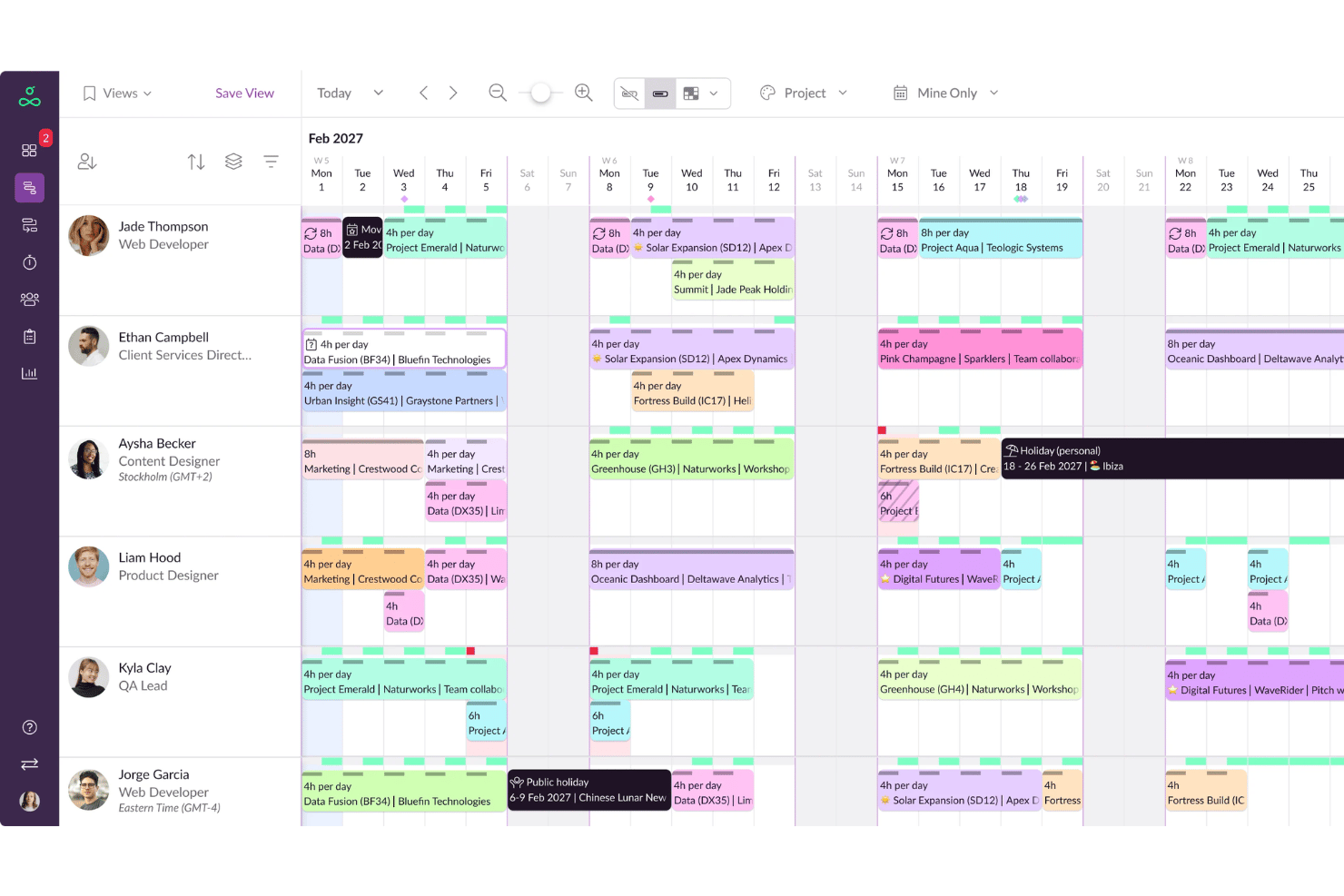


Float.com

Perché fidarsi dei nostri consigli sui software
Il nostro team testa e recensisce software dal 2012. In quanto project manager noi stessi, sappiamo quanto sia difficile — e importante — scegliere il software giusto.
Per questa guida, abbiamo valutato gli strumenti attraverso test pratici e ricerche indipendenti, assegnando un punteggio agli strumenti in base ai nostri criteri di selezione. Ci basiamo inoltre sulle competenze di leader di pensiero del settore e di professionisti attivi nella gestione dei progetti.
Le nostre recensioni riflettono il nostro giudizio editoriale umano, non un discorso di vendita.
Revisori esperti:
Resource Guru vs. Float.com Pricing Comparison
| Resource Guru | Float.com | |
|---|---|---|
| Free Trial | Free trial available | 30-day free trial available |
| Pricing | From $5/user/month (billed annually) | From $7/scheduled user/month |
Prezzi di Resource Guru vs. Float e Costi Nascosti
Il prezzo di Resource Guru è organizzato su un modello per utente, al mese, con costi aggiuntivi per funzionalità come spazio di archiviazione extra e assistenza prioritaria. Il prezzo di Float si basa sul numero di persone effettivamente pianificate, il che significa che paghi solo per i membri del team che sono realmente assegnati ai lavori. Per scegliere lo strumento giusto, i project manager e i responsabili delle risorse dovrebbero confrontare le funzionalità incluse in ciascun piano, stimare i costi in base al numero di utenti attivi e considerare la scalabilità man mano che cambiano le esigenze di gestione.
Resource Guru vs. Float.com Feature Comparison
Resource Guru si distingue per il suo calendario di pianificazione semplice che mostra la disponibilità a colpo d’occhio, permette di riorganizzare i compiti facilmente con drag-and-drop e considera le assenze così che i progetti restino in carreggiata. È ideale quando serve una visione chiara della capacità del team in lavori dinamici. Float, invece, è più potente nella pianificazione a lungo termine con strumenti di previsione che evidenziano il carico di lavoro futuro e l’impatto sul budget, oltre a report che tracciano ore fatturabili e non per i progetti dei clienti. Mentre Resource Guru mantiene la programmazione giornaliera immediata, Float offre una visibilità più approfondita su previsioni e aspetti finanziari.
| Resource Guru | Float.com | |
|---|---|---|
| API | ||
| Calendar Management | ||
| External Integrations | ||
| Multi-User | ||
| Notifications | ||
| Project Management | ||
| Resource Management | ||
| Scheduling |
Resource Guru vs. Float – Integrazioni
| Integrazione | Resource Guru | Float |
| Slack | ❌ | ✅ |
| Google Calendar | ✅ | ✅ |
| Asana | ❌ | ✅ |
| Jira | ❌ | ✅ |
| Teamwork | ❌ | ✅ |
| Trello | ❌ | ✅ |
| Outlook Calendar | ✅ | ✅ |
| Apple Calendar | ✅ | ❌ |
| API | ✅ | ✅ |
| Zapier | ✅ | ✅ |
Float offre numerose integrazioni dirette con software di project management come Asana, Jira, Teamwork e Trello, oltre a collegamenti già pronti con Slack, calendari e altre app. Resource Guru adotta invece un approccio più essenziale, concentrandosi sulla sincronizzazione dei calendari principali come Google, Outlook e Apple, più un'API aperta per configurazioni personalizzate. Mentre le integrazioni di Float facilitano il collegamento diretto con gli strumenti già usati per la gestione delle attività, Resource Guru si affida maggiormente a Zapier per estendere la compatibilità.
Resource Guru vs. Float – Sicurezza, Conformità e Affidabilità
| Fattore | Resource Guru | Float |
| Privacy dei dati | Resource Guru garantisce la privacy dei dati con conformità al GDPR e audit regolari. | Float mantiene la privacy dei dati con conformità al GDPR e offre residenza dei dati. |
| Crittografia | Resource Guru utilizza la crittografia TLS per la protezione dei dati in transito. | Float impiega la crittografia AES-256 per i dati sia a riposo che in transito. |
| Disponibilità | Resource Guru garantisce il 99,9% di disponibilità tramite sistemi di monitoraggio proattivo. | Float assicura il 99,9% di disponibilità grazie a una infrastruttura solida. |
Sia Resource Guru che Float pongono grande attenzione a sicurezza e conformità, ma le misure di crittografia offerte da Float sono particolarmente solide. Per valutare questi strumenti, concentrati su come ciascun fornitore gestisce la protezione dei dati e le garanzie di disponibilità, e verifica le certificazioni di conformità per assicurarti che siano adatte agli standard della tua organizzazione.
Resource Guru vs. Float Facilità d'Uso
| Fattore | Resource Guru | Float |
| Interfaccia utente | Resource Guru offre un'interfaccia pulita e semplice con minime distrazioni per una navigazione facile. | Float propone un'interfaccia visivamente accattivante con pianificazione drag-and-drop per rapide modifiche. |
| Onboarding | Resource Guru include un processo guidato di configurazione e tutorial utili per iniziare rapidamente. | Float offre un'esperienza di onboarding intuitiva con guide e suggerimenti integrati nell'app. |
| Configurazione | Resource Guru richiede una configurazione minima, permettendoti di pianificare le risorse immediatamente. | La configurazione di Float è rapida, con modelli personalizzabili per adattarsi al flusso di lavoro del tuo team. |
Resource Guru è semplice da configurare e navigare, rendendolo ideale per i team che desiderano iniziare senza complicazioni. L'interfaccia intuitiva di Float e la funzione drag-and-drop rendono più semplice gestire dinamicamente i compiti, anche se la personalizzazione può richiedere un po' più di tempo per essere padroneggiata.
Resource Guru vs Float.com: Pros & Cons
Resource Guru
- Fast drag-and-drop scheduling across people, projects, and resources
- Clear visibility into team availability and workload in real time
- Leave and time-off tracking integrated with project planning
- Reporting features offer only basic analysis and exports
- No built-in project budget or cost tracking capabilities
- Limited automation for complex recurring scheduling needs
Float.com
- Float offers built-in time tracking so you can track actuals and improve accuracy in future resource planning.
- Strong forecasting tools support long-term planning and resource allocation.
- Flexible dashboards make managing complex projects more organized.
- Interface can feel overwhelming for small or simple projects.
- Time tracking features require a higher plan
- New users might need time to navigate and understand the platform's full features.
Best Use Cases for Resource Guru and Float.com
Resource Guru
- Creative Agencies Works well for managing studio schedules, tracking client bookings, and balancing freelancers’ workloads as projects and priorities shift.
- IT Consultancies Eases multi-project scheduling with real-time availability, role-based filtering, and instant reassignment for dynamic client projects.
- Marketing Departments Coordinating campaigns, events, and resource pools is easy with visual scheduling and leave management integrated in one platform.
- Event Planners Helps allocate venues, staff, and contractors with timely updates and easy adjustments when plans or requirements change.
- Architecture Firms Manages specialist staff and equipment on overlapping projects, with capacity visibility to prevent double-booking or project overload.
- Small Agencies Affordable per-resource plans support lean teams who need strong workload visibility without the complexity of enterprise tools.
Float.com
- Creative agencies Float’s visual schedule helps you manage multiple projects and multiple client demands with ease.
- Tech startups Real-time updates keep your remote teams aligned and responsive to changes.
- Marketing departments You can quickly adjust schedules to accommodate new campaigns and priorities.
- Product development Clear reporting helps you make informed decisions for your development sprints.
- Remote teams Float's integrations with Slack and Google Calendar improve communication and coordination, which is vital for remote teams with varied schedules.
- Studios Studios benefit from Float's ability to track time and resources, and you can make sure projects stay on budget with the tool's real-time budget updates.
Chi dovrebbe usare Resource Guru e chi dovrebbe usare Float?
Vedo Resource Guru come una soluzione ideale per team piccoli o di medie dimensioni che desiderano uno strumento semplice per gestire i programmi senza complicazioni. Anche Float funziona per piccoli o medi team o agenzie, ma è più orientato a chi ha bisogno di funzioni di previsione, reportistica e integrazioni più avanzate per gestire progetti complessi con i clienti. Se il tuo team punta su velocità e semplicità, Resource Guru è perfetto, mentre se devi bilanciare più progetti e budget, Float ti offre la profondità necessaria.
Differences Between Resource Guru and Float.com
| Resource Guru | Float.com | |
|---|---|---|
| Automation | Resource Guru has basic automation for scheduling resources. | Float provides more advanced automation features for project budgeting and notifications. |
| Integrations | Resource Guru integrates well with calendar apps like Google and Outlook. | Float offers broader integrations, including Slack and project management tools like Asana. |
| Reporting | Basic visibility into team capacity and time off. | Advanced reporting on billable hours, budgets, and project health. |
| Resource Management | Resource Guru allows management of both people and equipment resources. | Float focuses primarily on managing people and project tasks. |
| User Interface | Clean and straightforward, easy to use for quick scheduling. | More detailed dashboards designed for complex client and project tracking. |
| Read Resource Guru ReviewOpens new window | Visit Float.comOpens new window |
Similarities Between Resource Guru and Float.com
| Cloud-Based | Both Resource Guru and Float are cloud-based, allowing you to access your team's schedules and resources from anywhere with an internet connection. |
|---|---|
| Customization | Resource Guru and Float let you customize views to suit your team's needs, whether it's daily, weekly, or monthly scheduling. |
| Multi-Platform Use | Resource Guru and Float support multiple platforms, including web and mobile, providing flexibility in how you manage resources. |
| Real-Time Insights | Both tools offer real-time updates, ensuring your team always has the latest information on resource availability and project changes. |
| User Permissions | Both platforms allow setting user permissions, so you can control who has access to what information and functionalities in your team's account. |
| Read Resource Guru ReviewOpens new window Visit Float.comOpens new window | |