10 migliori strumenti di comunicazione online per i team nel 2026

10 Elenco dei migliori strumenti di comunicazione


Esistono tantissimi strumenti diversi di comunicazione online per i team, quindi creare un elenco dei migliori può essere complicato. Vuoi facilitare la comunicazione e la collaborazione del tuo team, indipendentemente da dove si trovino i suoi membri, e hai bisogno dello strumento giusto. Ci penso io! In questo articolo condivido la mia esperienza personale nel rafforzare la comunicazione tra grandi team distribuiti e presento le mie scelte tra i migliori strumenti di comunicazione online per team.
Perché fidarsi dei nostri consigli sui software
Il nostro team testa e recensisce software dal 2012. In quanto project manager noi stessi, sappiamo quanto sia difficile — e importante — scegliere il software giusto.
Per questa guida, abbiamo valutato gli strumenti attraverso test pratici e ricerche indipendenti, assegnando un punteggio agli strumenti in base ai nostri criteri di selezione. Ci basiamo inoltre sulle competenze di leader di pensiero del settore e di professionisti attivi nella gestione dei progetti.
Le nostre recensioni riflettono il nostro giudizio editoriale umano, non un discorso di vendita.
Revisori esperti:
Tabella comparativa degli strumenti di comunicazione
Questa tabella comparativa riassume i dettagli sui prezzi degli strumenti di comunicazione che ho selezionato tra i migliori:
| Tool | Best For | Trial Info | Price | ||
|---|---|---|---|---|---|
| 1 | Ideale per aggiornamenti, chat di gruppo e sondaggi ai dipendenti | Prova gratuita di 14 giorni + demo gratuita disponibile | A partire da $29/mese (fatturazione annuale) | Website | |
| 2 | Ideale per la comunicazione nella gestione dei progetti | 14 giorni di prova gratuita | Da $6/utente/mese | Website | |
| 3 | La migliore lavagna collaborativa per team ibridi | Piano gratuito disponibile | A partire da $8/utente/mese | Website | |
| 4 | Miglior gamma di opzioni di comunicazione | Demo gratuita disponibile | Prezzo su richiesta | Website | |
| 5 | Ideale per combinare chat e lavoro | ClickUp è gratuito con spazio di archiviazione limitato per un numero illimitato di utenti. | Da $7/utente/mese (fatturato annualmente) | Website | |
| 6 | Ideale per cronologia di ricerca illimitata | 7 giorni di prova gratuita della versione enterprise senza condizioni | Da $1/utente/mese | Website | |
| 7 | Ideale per i dipendenti senza postazione fissa | Prova gratuita di 14 giorni | A partire da $3.40/utente/mese | Website | |
| 8 | Ideale per utenti e cronologia dei messaggi illimitati | Prova gratuita di 7 giorni + piano gratuito + demo gratuita disponibile | Da $2.49/postazione/mese (fatturato annualmente) | Website | |
| 9 | Ideale per organizzare la comunicazione tramite canali | 30 giorni di prova gratuita | Da $4.50/utente/mese | Website | |
| 10 | Ideale per ospitare eventi online | Piano gratuito + demo gratuita disponibile | Da € 89/mese | Website |


Panoramiche dei migliori strumenti di comunicazione
Entriamo nei dettagli più interessanti di ciascuna piattaforma di comunicazione e scopriamo cosa la rende una candidata valida per questa classifica dei 10 migliori strumenti.
Ideale per aggiornamenti, chat di gruppo e sondaggi ai dipendenti
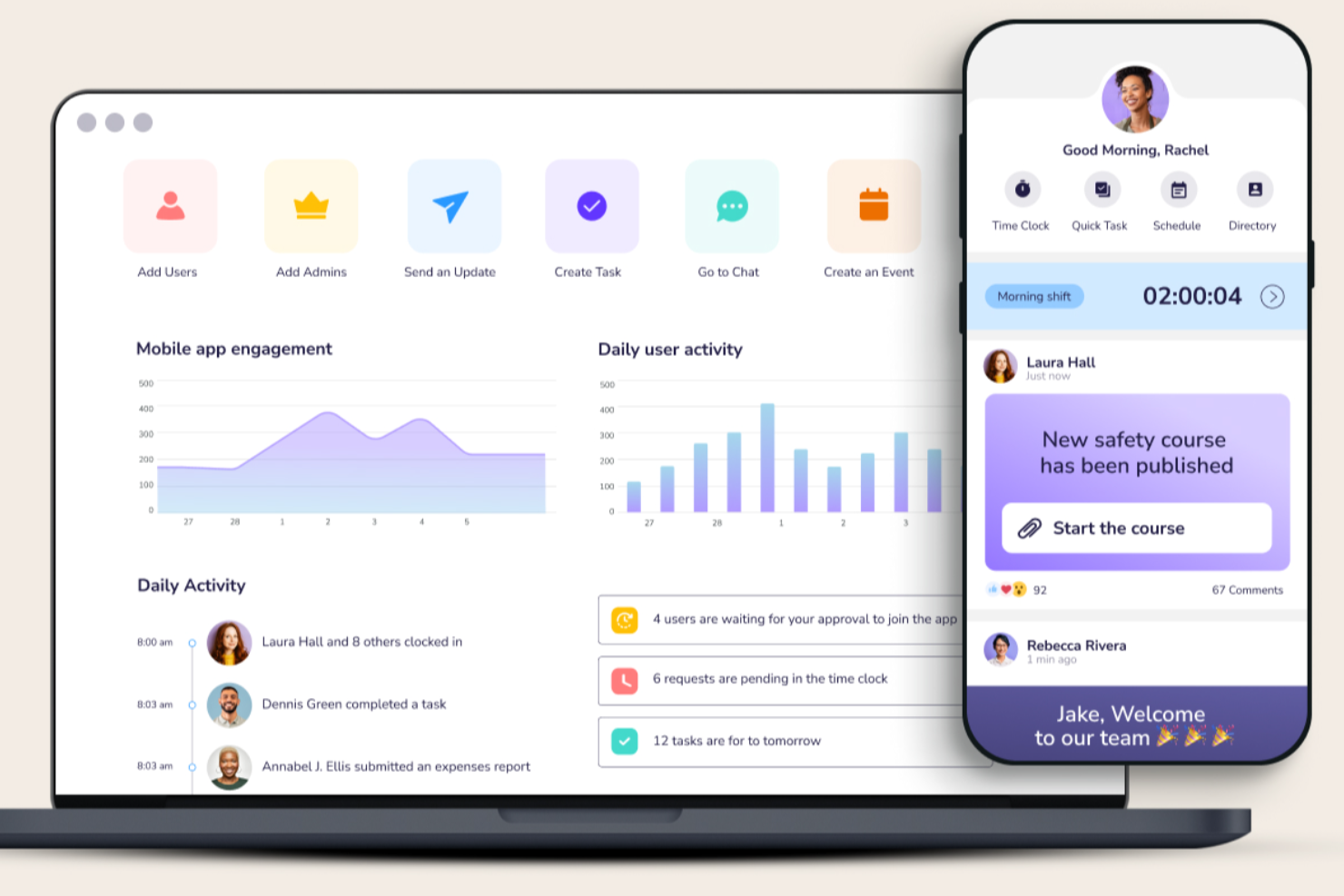
Connecteam offre una piattaforma di comunicazione per le aziende, oltre a una piattaforma operativa e una piattaforma per le risorse umane e la formazione. Il software di comunicazione facilita aggiornamenti e annunci aziendali, chat e messaggistica in tempo reale. Conserva inoltre una directory aziendale e una base di conoscenza per i tuoi dipendenti.
Puoi impostare chat di gruppo, chat individuali e canali di trasmissione nell'app per mantenere le comunicazioni segmentate come meglio si adatta alla tua azienda. Le persone possono condividere immagini e video, file e anche posizioni tramite il sistema, rendendolo uno strumento utile per i team remoti e ibridi.
La base di conoscenza è un'altra caratteristica interessante per garantire che tutto il personale abbia accesso a cose come politiche e procedure aziendali. Puoi inoltre aggiungere materiali di formazione, moduli e altri file di cui il personale potrebbe aver bisogno. Attraverso la piattaforma è anche possibile inviare sondaggi ai dipendenti, così puoi raccogliere feedback su argomenti importanti per la tua organizzazione.
Le integrazioni includono Paychex, Xero, Gusto, QuickBooks Payroll (online + desktop), Google Calendar e altri.
New Product Updates from Connecteam

Connecteam Expands Break and Timesheet Controls
Connecteam adds flexible break thresholds, personalized policies, auto-end options, a centralized exceptions report, and improved timesheet issue visibility to help teams manage breaks and timesheets more effectively. For more information, visit Connecteam’s official site.
 .
.
Ideale per la comunicazione nella gestione dei progetti
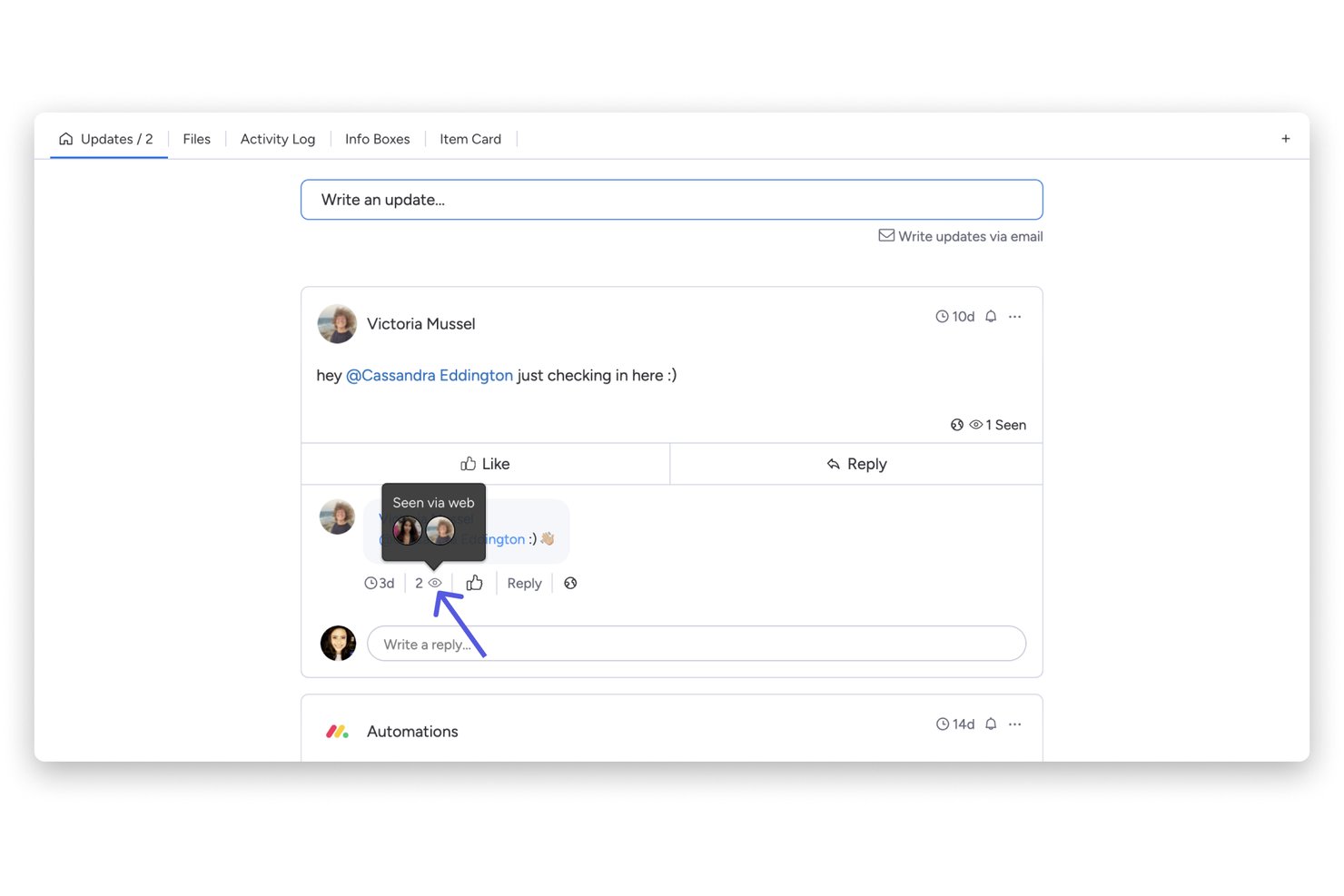
monday AI Workspace è una piattaforma di gestione del lavoro che integra la comunicazione del team direttamente nei flussi di lavoro di progetto tramite aggiornamenti a livello di attività, note di riunione assistite dall'IA, co-editing di documenti in tempo reale e integrazioni con strumenti come Slack e Microsoft Teams.
Per chi è pensato monday AI Workspace?
Responsabili di progetto e team interfunzionali in aziende di medie e grandi dimensioni che necessitano di comunicazione e monitoraggio dei progetti in un unico spazio di lavoro.
Perché ho scelto monday AI Workspace
Ho scelto monday AI Workspace perché collega la comunicazione direttamente al lavoro stesso, e non a una casella di posta o canale separato. Quando il mio team discute di un'attività, la discussione rimane associata a quell'elemento, quindi il contesto non si perde mai in una conversazione parallela. Inoltre, faccio affidamento sull'AI Notetaker, che cattura le discussioni delle riunioni e le trasforma automaticamente in attività, eliminando il passaggio manuale tra le note delle riunioni e la bacheca del progetto.
Funzionalità principali di monday AI Workspace
- Co-editing di documenti in tempo reale: Più utenti possono modificare contemporaneamente i monday Docs e incorporare bacheche all'interno dei documenti.
- Strumento di automazione: Configura flussi di lavoro personalizzati utilizzando trigger e azioni per attività, notifiche e promemoria.
- Opzioni di visualizzazione delle bacheche: Scegli tra viste Gantt, calendario, cronologia, Kanban e tabella per visualizzare le informazioni di progetto.
- Estese integrazioni: Collegati a oltre 200 app esterne come Zoom, Slack, GitHub, Google Workspace e Jira.
Integrazioni di monday AI Workspace
monday AI Workspace offre centinaia di integrazioni native attraverso le sue integrazioni integrate e il marketplace, tra cui Slack, Microsoft Teams, Google Workspace, Zoom, Jira, Salesforce, HubSpot, GitHub, Dropbox e OneDrive. Supporta anche Zapier e fornisce un'API per integrazioni personalizzate.
Pros and Cons
Pros:
- La comunicazione vive all'interno delle attività di progetto
- Le note delle riunioni AI generano automaticamente azioni da svolgere
- Gli aggiornamenti asincroni riducono le riunioni di team non necessarie
Cons:
- La funzionalità di chat è meno matura rispetto a Slack
- Sovraccarico di notifiche su bacheche di progetto molto attive
New Product Updates from monday AI Workspace
monday AI Workspace Adds Human Approval Routing
monday AI Workspace adds a human-in-the-loop approval block to AI Workflows, sending approval requests and routing workflow paths based on responses. For more information, visit monday AI Workspace's official site.

Miro
La migliore lavagna collaborativa per team ibridi
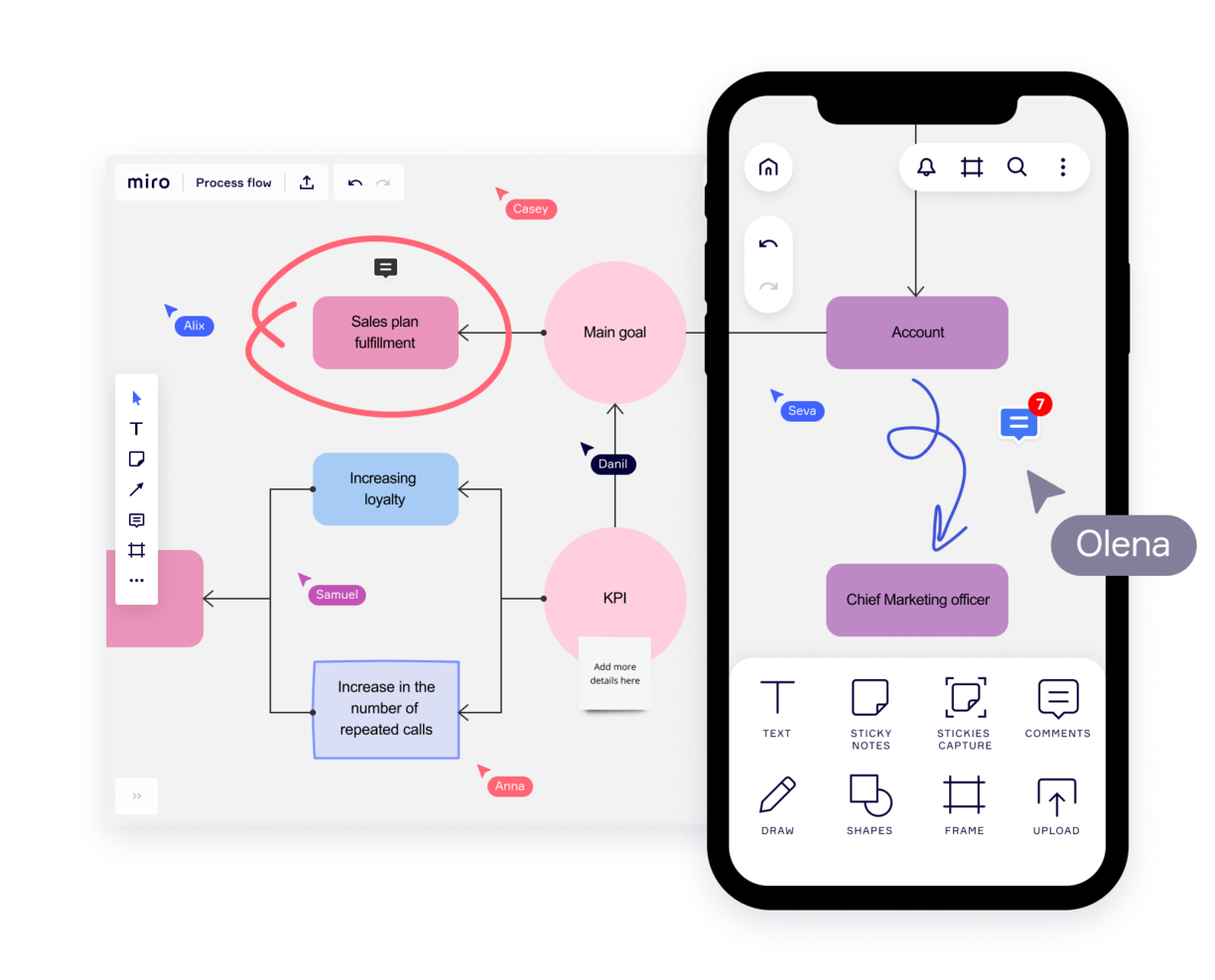
Miro è una lavagna collaborativa pensata per i team ibridi, che offre oltre 1.000 modelli per diverse esigenze di pianificazione e brainstorming. Apprezzata dalle principali aziende Fortune 100, supporta i team di organizzazioni come TransUnion e Cisco con una piattaforma adatta al modello di lavoro ibrido.
Le caratteristiche chiave di Miro includono una tela infinita per una mappatura senza limiti dei progetti e la flessibilità di esprimere idee attraverso diversi media. I suoi strumenti di collaborazione asincrona, come commenti e reazioni, permettono un lavoro di squadra produttivo tra fusi orari diversi. La funzionalità TalkTrack consente inoltre ai membri del team di registrare e condividere spiegazioni video delle mappe di processo, favorendo una comunicazione più chiara.
Grazie alle integrazioni con strumenti di project management come Jira e Asana, Miro collega tutti gli aspetti del progetto su un'unica piattaforma, rendendolo uno strumento completo per le moderne dinamiche di team.
Miro si integra anche con un'ampia suite di strumenti, tra cui Zoom, Figma, Monday.com, Microsoft Teams, Slack, Google Drive, Box, Airtable, Notion, Azure e Webex. Alcune integrazioni sono disponibili solo con i piani a pagamento.
Miro è gratuito per un numero illimitato di membri fino a 3 board modificabili. I piani a pagamento partono da $8/utente/mese (fatturato annualmente).
Pros and Cons
Pros:
- Funzionalità di comunicazione integrate per una collaborazione più fluida
- Impostazione intuitiva e semplice
- Piano gratuito disponibile per sempre
Cons:
- La versione gratuita non permette l'esportazione di alta qualità in pdf
- Lo zoom può essere irregolare su progetti di grandi dimensioni
- Account visitatore/ospite riservati solo ai piani a pagamento
New Product Updates from Miro
Miro Adds Japan Data Residency for Enterprise Customers
Miro has introduced Japan data residency for enterprise customers, offering in-region storage for production data, backups, and metadata, plus in-region compute infrastructure. For more information, visit Miro's official site.

Workvivo
Miglior gamma di opzioni di comunicazione

Workvivo è una piattaforma online di comunicazione per i dipendenti che consente alle squadre di comunicare e collaborare in tempo reale. Fornisce un unico luogo per i progetti, le attività e le conversazioni di ogni team, permettendo loro di restare in sincronia ovunque si trovino.
La piattaforma offre funzionalità come gruppi di chat, calendari di team, bacheche attività e integrazione con i social media, rendendo facile per le tue squadre restare connesse e aggiornate sui loro progetti in modo da procedere rapidamente ed efficientemente. Workvivo aiuta tutti a rimanere connessi fornendo un punto centrale per tutte le comunicazioni. Invece di avere più conversazioni tramite e-mail o messaggi, tutto rimane organizzato all’interno della piattaforma in modo che tutti i membri possano vedere cosa succede con il lavoro del loro team.
Le chat di gruppo di Workvivo consentono ai team di conversare senza dover passare tra diverse applicazioni o piattaforme. I membri del team possono facilmente unirsi alle chat di gruppo e condividere i loro pensieri in modo rapido ed efficiente. Questo aiuta a garantire che tutti siano allineati per quanto riguarda scadenze e obiettivi del progetto. Le notifiche forniscono agli utenti aggiornamenti rilevanti per loro, offrendo un punto di riferimento unico per le informazioni più aggiornate sull’avanzamento del lavoro.
Inoltre, i suoi strumenti di gestione dei progetti consentono agli utenti di creare attività, assegnarle ai membri del team, impostare scadenze, tracciare i progressi e monitorare il completamento dei compiti in un unico posto. Questo rende la gestione dei progetti più semplice per tutti i coinvolti fornendo visibilità su attività e progressi a tutti i livelli dell’organizzazione. Workvivo ti permette di tracciare facilmente le prestazioni dei dipendenti monitorando i log delle attività all’interno della piattaforma oppure generando report analitici avanzati che forniscono approfondimenti su quanto bene i dipendenti portano a termine i compiti o rispettano le scadenze.
Infine, le integrazioni con software come Slack, Zoom e MS Teams e le funzioni di video live consentono al tuo team di comunicare tramite un’ampia gamma di canali. Questi includono streaming, video, testo, podcast e aggiornamenti di notizie.

ClickUp
Ideale per combinare chat e lavoro
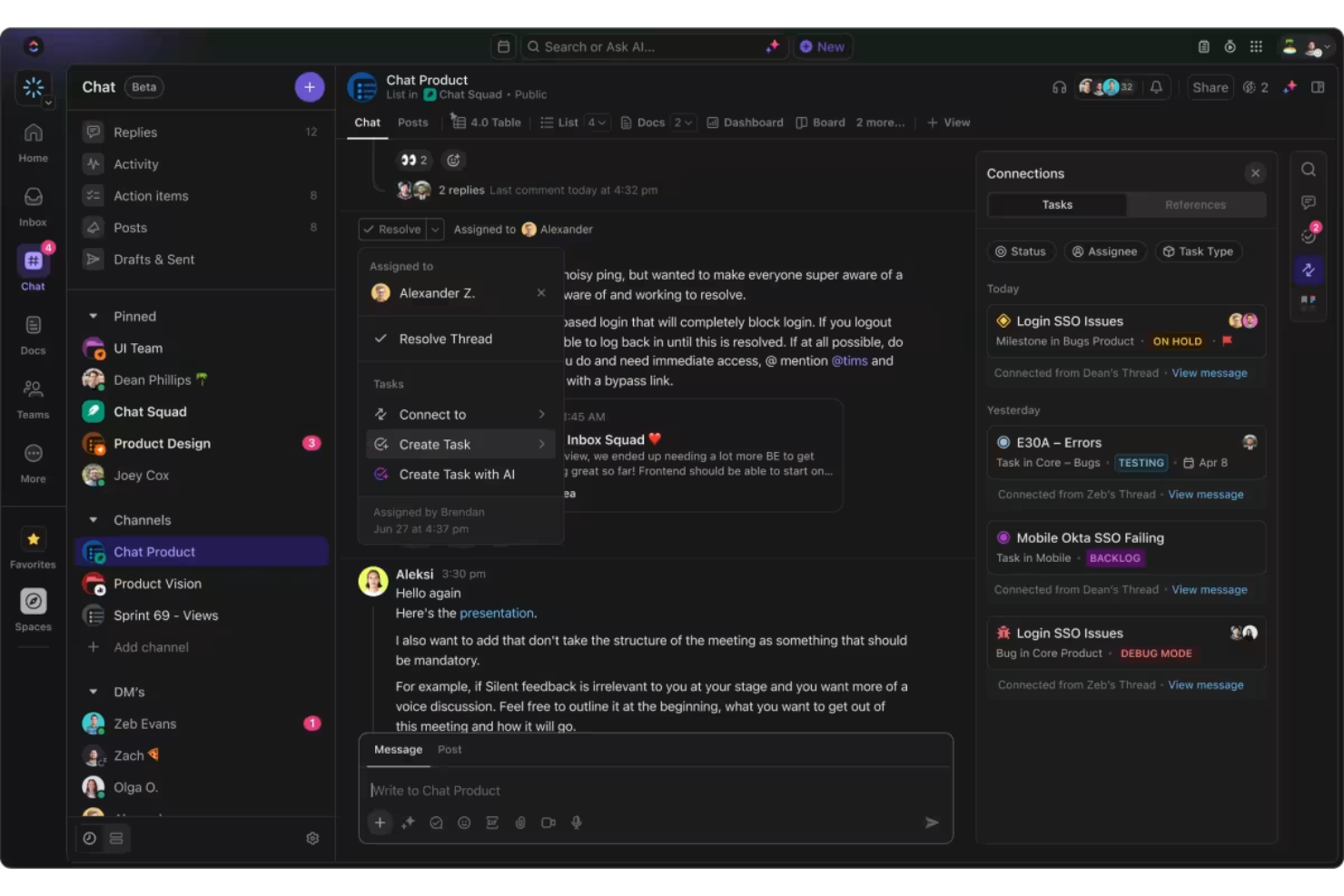
La funzione chat di ClickUp si distingue come uno strumento essenziale per la comunicazione online perché integra la messaggistica con il lavoro. Un aspetto unico è la possibilità di trasformare i messaggi in attività con un solo clic, consentendo di assegnare immediatamente elementi d'azione senza uscire dalla conversazione. Questa funzione assicura che idee e compiti non vadano persi all'interno dei thread di chat.
Un'altra caratteristica potente è il modo in cui le conversazioni vengono automaticamente collegate ad attività e documenti pertinenti. Questo garantisce che il contesto non venga mai perso e che tu possa rapidamente consultare materiali necessari all'interno della stessa finestra di chat.
Le funzionalità potenziate dall'intelligenza artificiale di ClickUp migliorano ulteriormente la comunicazione offrendo suggerimenti intelligenti e creando automaticamente attività dalle conversazioni. L'IA inoltre riassume i thread e mantiene la chat gestibile, assicurandoti di poter rimanere concentrato su ciò che è importante senza essere sopraffatto da un eccesso di informazioni.
La capacità della piattaforma di sincronizzare le conversazioni tra le attività è un'altra funzione degna di nota. Puoi facilmente seguire le discussioni in chat collegandole alle attività, garantendo responsabilità e che nessun dettaglio importante venga trascurato.
ClickUp offre integrazioni native con Slack, Google Workspace, Dropbox e moltissimi altri strumenti, oltre a più di 1.000 integrazioni tramite Zapier.
ClickUp è gratuito con spazio di archiviazione limitato per un numero illimitato di utenti. I piani a pagamento partono da $7/utente/mese e offrono una prova gratuita.
New Product Updates from ClickUp
ClickUp Adds Meetings Hub, Super Agent Templates, and ZoomInfo Integration
ClickUp adds a searchable Meetings Hub, new ways to clone and template Super Agents, and a ZoomInfo integration through the App Center. These updates improve meeting retrieval, agent reuse, and access to sales intelligence. For more information, visit ClickUp’s official site.
Ideale per cronologia di ricerca illimitata

Troop Messenger è molto più di una semplice interfaccia di chat. È stato progettato per migliorare la comunicazione dei team interni di tutte le dimensioni, dai piccoli gruppi alle grandi aziende, e offre un set di funzionalità robuste per fare proprio questo.
Nel complesso, questo strumento si distingue per la sua offerta di funzionalità e soddisfa tutti i criteri che cerco in uno strumento di comunicazione, e anche di più. Le funzionalità principali includono messaggistica istantanea, chiamate vocali e video, videoconferenze, condivisione di file e condivisione dello schermo desktop.
Ma ciò che trovo particolarmente utile in questo strumento sono le sue funzionalità di messaggistica avanzate. Mi piacciono sia l'opzione 'rispondi più tardi' sia l'opzione 'burnout', che consente di programmare l'invio di un messaggio in un secondo momento. Anche la funzione di auto-messaggistica è unica: una funzionalità semplice ma utile che permette di inviare promemoria e note a se stessi. Infine, esiste un modo per inviare messaggi di testo e file a più utenti contemporaneamente utilizzando la funzione 'forkout'. E la ricerca avanzata in questo strumento è davvero efficace.
Troop Messenger supporta molte integrazioni native e di terze parti, come applicazioni per il monitoraggio e il tracciamento dei dipendenti, sistemi di gestione delle presenze, Google Drive, Dropbox e LDAP. È disponibile su Windows, Linux, Mac, Android e iOS.
Troop Messenger costa a partire da $2.50/utente/mese. Vale la pena notare che, anche se si tratta di un modello SaaS, offre i modelli di distribuzione self-hosted, API e applicazione personalizzata.
Blink
Ideale per i dipendenti senza postazione fissa
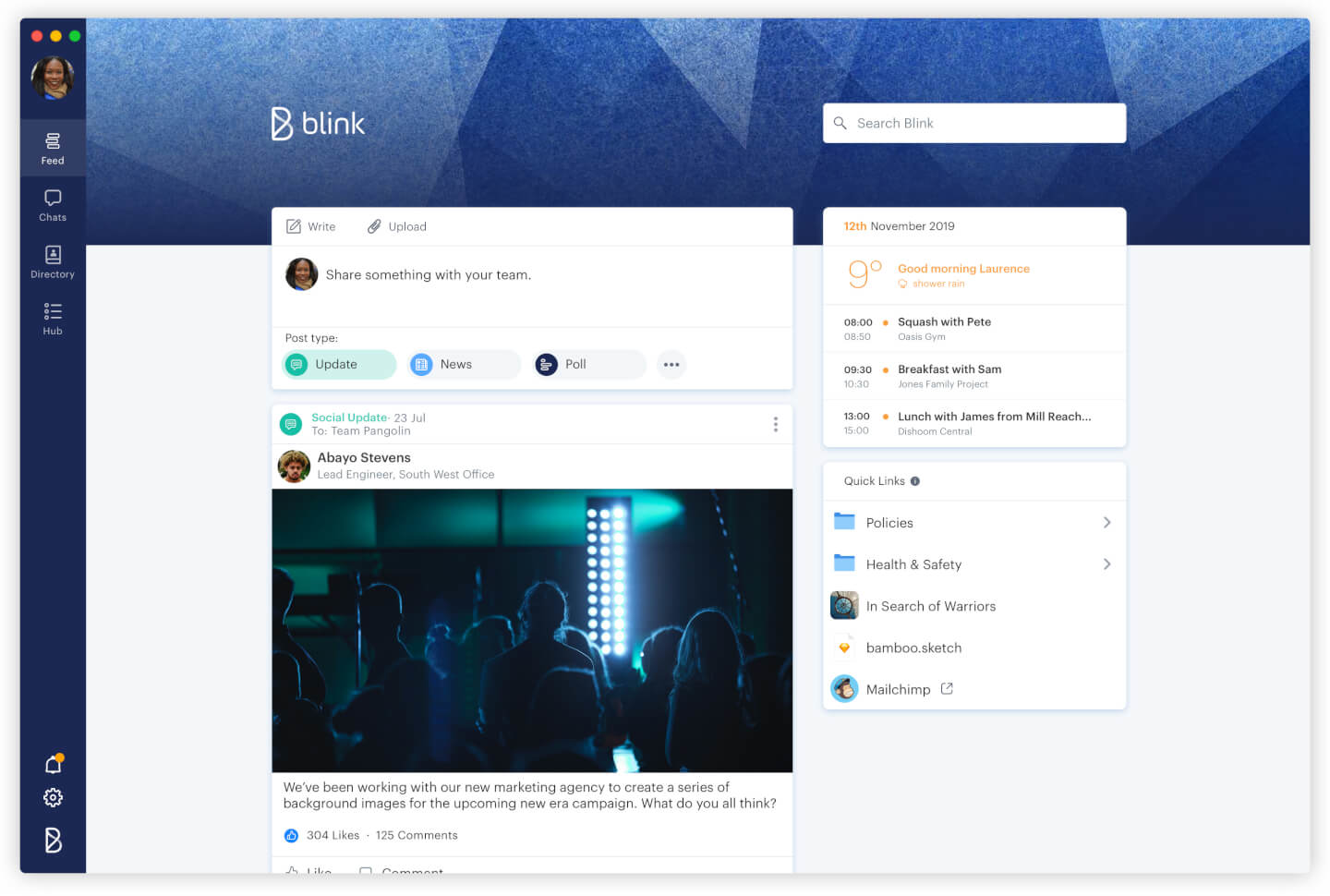
Blink è uno strumento di comunicazione pensato per le esigenze uniche dei lavoratori senza postazione fissa, che fino ad ora non disponevano della stessa tecnologia di qualità dei loro colleghi in sede. In un'unica app include messaggistica aziendale, un Feed aziendale in stile social media per le comunicazioni dall'alto verso il basso, rubrica, archiviazione cloud, analisi del luogo di lavoro, sondaggi e altro ancora.
Blink è costruito attorno al concetto di messaggistica aziendale come funzionalità centrale: la messaggistica diretta tra pari, le Chat di gruppo e le comunicazioni dall'alto verso il basso tramite il Feed aziendale giocano tutti un ruolo importante. Moderatori e amministratori che pubblicano nel Feed aziendale hanno anche l'opzione di attivare o disattivare le notifiche push per ogni post a seconda dell'importanza. Blink offre anche sondaggi, potenti integrazioni e moduli digitali per la segnalazione.
L'analisi per gli amministratori riveste un ruolo centrale nell'app: analisi post per post, analisi a livello di organizzazione e di team all'interno del Portale Amministratore e analisi dell'Hub che misura le interazioni e l'adozione nella sezione di archiviazione documenti e segnalazione dell'app.
Blink è un software di comunicazione SaaS pronto all'uso; non è richiesta alcuna conoscenza tecnica per iniziare e invitare i colleghi sulla piattaforma. La sua interfaccia intuitiva e personalizzabile è progettata con funzionalità familiari in stile social media (pensa alle emoji e ai pulsanti Mi piace) che incentivano il coinvolgimento dei dipendenti — anche di quelli meno esperti di tecnologia.
Puoi utilizzare le integrazioni già esistenti con sistemi di terze parti come Jira, Trello, Office 365 e G-suite oppure creare nuove integrazioni con i tuoi sistemi esistenti utilizzando le API pubbliche di Blink. Blink è compatibile con Android, iOS, Windows e Mac e puoi accedervi anche tramite browser.
Blink parte da $3.40 per utente/mese. È disponibile una prova gratuita di 14 giorni e puoi prenotare una demo direttamente dalla homepage.
Pumble
Ideale per utenti e cronologia dei messaggi illimitati

Pumble è uno strumento di collaborazione e comunicazione progettato per facilitare le interazioni tra i membri del team su piattaforme desktop, mobile e web. La piattaforma versatile è ideale per un’ampia gamma di squadre, tra cui vendite, marketing, risorse umane, pianificazione dei prodotti e team completamente remoti.
Questo strumento offre canali per discussioni organizzate, messaggi diretti per conversazioni individuali e thread per argomenti specifici all'interno di un canale. La piattaforma include anche chiamate video e vocali, condivisione dello schermo e condivisione di file per supportare tutte le esigenze comunicative.
Inoltre, Pumble consente la collaborazione con ospiti esterni invitandoli a partecipare a una riunione Pumble, anche se non possiedono un account. La piattaforma offre anche un piano gratuito con utenti e cronologia dei messaggi illimitati, garantendo che le informazioni importanti siano sempre recuperabili e ben organizzate, supportando aziende e team nella crescita.
Le integrazioni includono Clockify per il monitoraggio del tempo, Plaky per la gestione dei progetti e Zapier per collegarsi a oltre 3000 app. Altre integrazioni importanti includono Google Drive, OneDrive, Outlook, Trello e Zoom, oltre alla possibilità di creare integrazioni personalizzate utilizzando le API di Pumble.

Flock
Ideale per organizzare la comunicazione tramite canali

Flock è una delle app di comunicazione più robuste, andando ben oltre un semplice sistema di messaggistica. Questa app si distingue per il suo modulo chat progettato per semplificare e centralizzare la comunicazione tra diversi gruppi e team. Andando oltre la comunicazione “a doppio senso”, Flock permette di trasformare i messaggi in risorse utili con i segnalibri e di convertire le discussioni in attività.
Le funzionalità di Flock includono chiamate video e audio, chat di gruppo e individuali e un modulo intuitivo per la condivisione dello schermo. Include anche molti strumenti utili per la comunicazione, come la possibilità di creare un sondaggio anonimo, condividerlo con il team e scaricare i risultati. Puoi anche usare i tag nelle conversazioni per indicare informazioni di alta priorità. Un’altra funzione utile è la possibilità di generare automaticamente liste e-mail dei membri di una bacheca di discussione specifica, consentendoti di inviare rapidamente e-mail di gruppo alle persone giuste.
Le integrazioni di Flock includono Trello, Airtable, Paperform, Slack, Asana, GitHub, Facebook Lead Ads, Twitter, Reddit, Evernote, Dropbox, Google Doc e Google Calendar, Office 365 e molte altre ancora.
Flock ha prezzi da $6/utente/mese e offre una prova gratuita di 30 giorni. È anche disponibile un piano gratuito con funzionalità limitate per iniziare.

Livestorm
Ideale per ospitare eventi online

Livestorm è una piattaforma di comunicazione e videoconferenza basata sul web che consente ai team di creare una strategia completa di comunicazione video.
Lo strumento è pensato per team di marketing, vendite, customer success o risorse umane, e permette di organizzare eventi online per il proprio pubblico. Livestorm può ospitare riunioni, webinar, conferenze, corsi di formazione online, interviste per podcast, demo di prodotti e molto altro.
La piattaforma è accessibile via browser e i team possono utilizzarla da diversi dispositivi. Altre funzionalità rilevanti includono la possibilità di creare pagine di atterraggio personalizzate; inviare email promozionali e promemoria; ospitare eventi online coinvolgenti con chat integrata, sondaggi e funzionalità di domande e risposte; e analizzare le prestazioni degli eventi grazie a una dashboard di analisi avanzata.
Livestorm offre un piano gratuito con funzionalità limitate e piani a pagamento a partire da €89 (~$108 USD).
Pros and Cons
Pros:
- Si integra con numerose app tra cui HubSpot, Salesforce, Pipedrive e molte altre
- Dashboard avanzata con strumenti per promuovere, ospitare e analizzare eventi
- Può essere utilizzato su desktop e dispositivi mobili senza bisogno di download
Cons:
- Il costo è superiore rispetto ad altri presenti in questa lista
- Le prestazioni dipendono da una connessione internet stabile
Altri software di comunicazione che potrebbero esserti utili
Esistono tantissimi strumenti di comunicazione per la gestione dei progetti: ecco alcune valide opzioni che non abbiamo incluso in questa recensione. Scoprile!
- TalkRoute
Ideale per comunicazioni unificate su qualsiasi dispositivo
- Zoho Cliq
Ideale per piccole imprese
- Teamwork.com
Miglior strumento di comunicazione per il marketing
- FLEEP
Migliore interfaccia utente e UX
- Microsoft Teams
Ideale per la comunicazione in tempo reale su Microsoft
- MyHub
Ideale per l'accesso mobile all'intranet
- Nutcache
Ideale per la comunicazione interna del team
- Rocket.Chat
Il miglior software di comunicazione gratuito
- Workmates
Ideale grazie alla funzionalità di coinvolgimento nativa
- Slenke
Ideale per funzionalità di gestione delle attività integrate


Come valuto gli strumenti di comunicazione
Divido la mia valutazione in due livelli: capacità di base come canali con thread e integrazioni con strumenti di gestione progetti, e i fattori di differenziazione che rendono uno strumento più adatto al tuo team rispetto a un altro.
Funzionalità di base (Requisiti minimi per questa lista)
Quando seleziono gli strumenti per la mia lista, valuto ciascuno su una scala da 0 (la funzionalità non è presente) a 5 (eccelle in questa area) per ogni funzionalità di base riportata qui sotto. Poi calcolo il punteggio totale dello strumento in percentuale. Ogni strumento deve raggiungere un punteggio minimo totale del 65% per essere preso in considerazione.
- Messaggistica in tempo reale: Verifico la presenza di chat di gruppo e 1:1 affidabili con indicatori di presenza, menzioni e reazioni—le basi di cui il tuo team ha bisogno per decisioni rapide tra le riunioni.
- Canali e Thread: Canali organizzati per argomenti con risposte in thread tengono separate le discussioni di sprint dal chiacchiericcio generale, quindi valuto come ogni strumento struttura le conversazioni.
- Condivisione file e collaborazione: I team si scambiano continuamente specifiche, mockup e documenti, quindi cerco anteprime in linea, cronologia delle versioni e integrazioni con archiviazione cloud come Google Drive o OneDrive.
- Videoconferenza e chiamate vocali: Valuto la presenza di riunioni video integrate o profondamente collegate, con condivisione schermo e registrazione—funzionalità che sostituiscono la necessità di uno strumento separato durante le revisioni di sprint.
- Integrazioni con strumenti PM: Qui contano le connessioni native con strumenti come Jira, Asana e Monday. Cerco notifiche in canale, creazione di task e sincronizzazione bidirezionale dello stato.
- Cronologia dei messaggi ricercabile: Quando devi risalire a una decisione presa tre mesi fa, la ricerca deve essere efficace. Valuto le opzioni di filtro, la profondità dell'archivio e i limiti di cronologia per ciascun piano.
Una volta raccolti gli strumenti che soddisfano questi criteri, considero cosa distingue ciascuna piattaforma.
Fattori di differenziazione (Cosa distingue i fornitori)
Ecco come metto a confronto i diversi fornitori:
Funzionalità eccezionali
Le sintesi di canale alimentate dall’IA e i resoconti delle riunioni sono fondamentali per i responsabili di progetto che gestiscono più flussi di lavoro—cerco strumenti che estraggano automaticamente le attività da svolgere e le decisioni principali. L'automazione dei flussi di lavoro è un altro elemento differenziante; la possibilità di attivare promemoria, approvazioni o aggiornamenti di stato dagli eventi di progetto fa risparmiare tempo reale. Valuto anche le opzioni di accesso ospite, dato che molti progetti coinvolgono stakeholder esterni che necessitano di visibilità senza richiedere una licenza completa.
Oltre le funzionalità
Qui conta la profondità delle integrazioni. Verifico se uno strumento si collega in modo nativo alle piattaforme di project management già in uso nel tuo team e se la sua API supporta automazioni personalizzate. Anche la sicurezza e la conformità sono fondamentali—valuto il supporto SSO, gli standard di crittografia e certificazioni come SOC 2 Type II, specialmente per i team che gestiscono dati di progetto sensibili. Anche la struttura dei prezzi ha importanza; analizzo come i costi per gli utenti ospiti e i limiti della cronologia dei messaggi si adattino alla crescita del tuo team.
Cosa sono gli strumenti di comunicazione online?
Gli strumenti di comunicazione online nella gestione dei progetti sono software che aiutano le persone a interagire, condividere informazioni e collaborare efficacemente indipendentemente dalla loro posizione. Questi strumenti spesso includono messaggistica istantanea, videoconferenze, condivisione di file e collaborazione in tempo reale sui documenti.
I software di comunicazione online migliorano la collaborazione e la comunicazione tra i membri del team, elementi fondamentali per l'efficienza e il successo dei moderni ambienti di lavoro. Aiutano a superare le barriere geografiche, consentendo ai team remoti e distribuiti di lavorare insieme come se si trovassero nella stessa stanza. Questo non solo aumenta la produttività, ma favorisce anche modalità di lavoro flessibili.
Guida all'acquisto degli strumenti di comunicazione
Come scegli i migliori strumenti di comunicazione per il tuo team? Vediamo cosa considerare quando scegli tra diversi strumenti di comunicazione.
Per cosa ti serve il software di comunicazione?
Stai sostituendo un vecchio sistema di comunicazione e devi importare i dati esistenti, oppure stai iniziando da zero? Inoltre, quali sono le esigenze del tuo team? Valuta se stai cercando strumenti di comunicazione interna per i progetti o se hai bisogno di un software rivolto ai clienti. Se comunichi tramite video, prendi in considerazione Slack oppure alternative popolari a Slack come Flock o Ryver.
Qual è la dimensione del tuo team?
Convincere tutti a usare la stessa app può essere difficile, soprattutto quando il tuo team è numeroso e diversificato in termini di competenze tecniche, posizione, progetto e così via. Strumenti completi con diversi livelli di autorizzazioni degli utenti e accesso per gli ospiti, come Microsoft Teams, sono adatti ai team numerosi e distribuiti.
Come si integrerebbe nel tuo flusso di lavoro?
Spesso è una questione di integrazione. Fai un elenco degli strumenti che usi per portare a termine i progetti. Se disponi già di una raccolta di app per il monitoraggio del tempo, app per la fatturazione e altri strumenti, prendi in considerazione Fleep o Zoho Cliq, che dispongono di un'ampia raccolta di integrazioni preconfigurate. D'altra parte, se al momento il tuo insieme di strumenti è ridotto ma prevedi che le tue attività crescano, prova una soluzione come Slenke, che offre funzionalità di gestione dei progetti e delle attività per aiutarti durante la crescita. Fai un elenco dei requisiti di integrazione e controllalo due volte; inoltre, non fa male chiedere ai membri del team quali software aggiuntivi utilizzano e quali preferiscono.
Quanto tempo serve per configurarlo?
La maggior parte degli strumenti di comunicazione è intuitiva da usare e da configurare come app online. Tuttavia, se preferisci ospitarli sui tuoi server, la procedura richiede un po' più di tempo. Rocket Chat dispone di un team professionale pronto ad assisterti, mentre Slack è una scelta popolare con un buon supporto. In ogni caso, dipende dalla sensibilità dei dati e dalla quantità di traffico dati prevista dal tuo team.
Qual è la curva di apprendimento?
Che tu stia adottando un nuovo sistema di comunicazione o sostituendone uno vecchio, tutte le persone coinvolte devono abituarsi ai cambiamenti. La gestione del cambiamento è spesso più semplice con interfacce facili da usare.
Teamwork Chat è un esempio di strumento dall'aspetto semplice e facile da imparare. Tieni presente che il tuo team non è l'unico a utilizzarlo: potresti avere clienti o persone che non fanno parte dei tuoi processi quotidiani e che necessitano di accedere alle videoconferenze; in tal caso, assicurati che sia disponibile un portale clienti intuitivo.
Qual è il costo?
Qual è il tuo budget per uno strumento di comunicazione? Investire in un software di comunicazione per la gestione dei progetti è una buona idea, ma ricorda che spesso meno è meglio: la buona notizia è che molti strumenti di comunicazione offrono una versione “gratuita per sempre” con funzionalità limitate. La versione gratuita degli strumenti di comunicazione potrebbe soddisfare perfettamente le esigenze del tuo team, offrendo tutti gli elementi “indispensabili” senza complicazioni dovute a funzionalità “utili da avere ma non essenziali”.