

I 10 migliori software open source per la gestione delle risorse per il 2026



Il software open source per la gestione delle risorse offre un modo per gestire le risorse dei tuoi progetti in modo completamente personalizzabile. Esistono diversi strumenti, ma trovare quello più adatto alle tue esigenze è difficile.
Queste sono le mie scelte tra i migliori strumenti software open source per la gestione delle risorse, selezionati sulla base di test e valutazioni indipendenti e delle mie esperienze personali nell'utilizzo di decine di diversi strumenti di gestione delle risorse con aziende di vario tipo.
Perché fidarsi dei nostri consigli sui software
Il nostro team testa e recensisce software dal 2012. In quanto project manager noi stessi, sappiamo quanto sia difficile — e importante — scegliere il software giusto.
Per questa guida, abbiamo valutato gli strumenti attraverso test pratici e ricerche indipendenti, assegnando un punteggio agli strumenti in base ai nostri criteri di selezione. Ci basiamo inoltre sulle competenze di leader di pensiero del settore e di professionisti attivi nella gestione dei progetti.
Le nostre recensioni riflettono il nostro giudizio editoriale umano, non un discorso di vendita.
Revisori esperti:
Tabella comparativa dei software open source per la gestione delle risorse
Confronta nella tabella seguente i dettagli di ciascuna delle mie scelte tra i software open source per la gestione delle risorse.
| Tool | Best For | Trial Info | Price | ||
|---|---|---|---|---|---|
| 1 | Ideale per la personalizzazione tramite la sua API GraphQL aperta | Prova gratuita di 14 giorni | A partire da $6/utente/mese | Website | |
| 2 | Ideale per creare funzionalità personalizzate | Demo gratuita disponibile | Disponibile gratuitamente | Website | |
| 3 | Ideale per piccole e medie imprese | Utilizzo gratuito | Da $149/anno come tariffa fissa | Website | |
| 4 | Ideale per la gestione delle relazioni con i clienti (CRM) | Prova gratuita + piano gratuito disponibile | Da $20 - $25/utente/mese | Website | |
| 5 | Il miglior software di gestione delle risorse open source per semplicità | Piano gratuito disponibile (fino a 10 utenti) | Da $332/mese | Website | |
| 6 | Ideale per una partenza rapida | Not available | Da $1999/utente, pagamento una tantum. | Website | |
| 7 | Ideale per chi cerca flessibilità | Not available | Versione gratuita disponibile | Website | |
| 8 | Il miglior software open source per la gestione delle risorse per grandi team | 30 giorni di prova gratuita | Da $9/mese per 10 utenti | Website | |
| 9 | Il miglior software open source per la gestione delle risorse umane | Versione di prova gratuita | Gratuito | Website | |
| 10 | Miglior software open source di gestione delle risorse per liberi professionisti | 15 giorni di prova gratuita | $9.00/mese | Website |

Software open source per la gestione delle risorse
Ecco una breve descrizione di ciascuno strumento software open source per la gestione delle risorse presente nel mio elenco, con indicazioni su ciò che fa meglio, schermate, funzionalità e altro ancora.

Ideale per la personalizzazione tramite la sua API GraphQL aperta
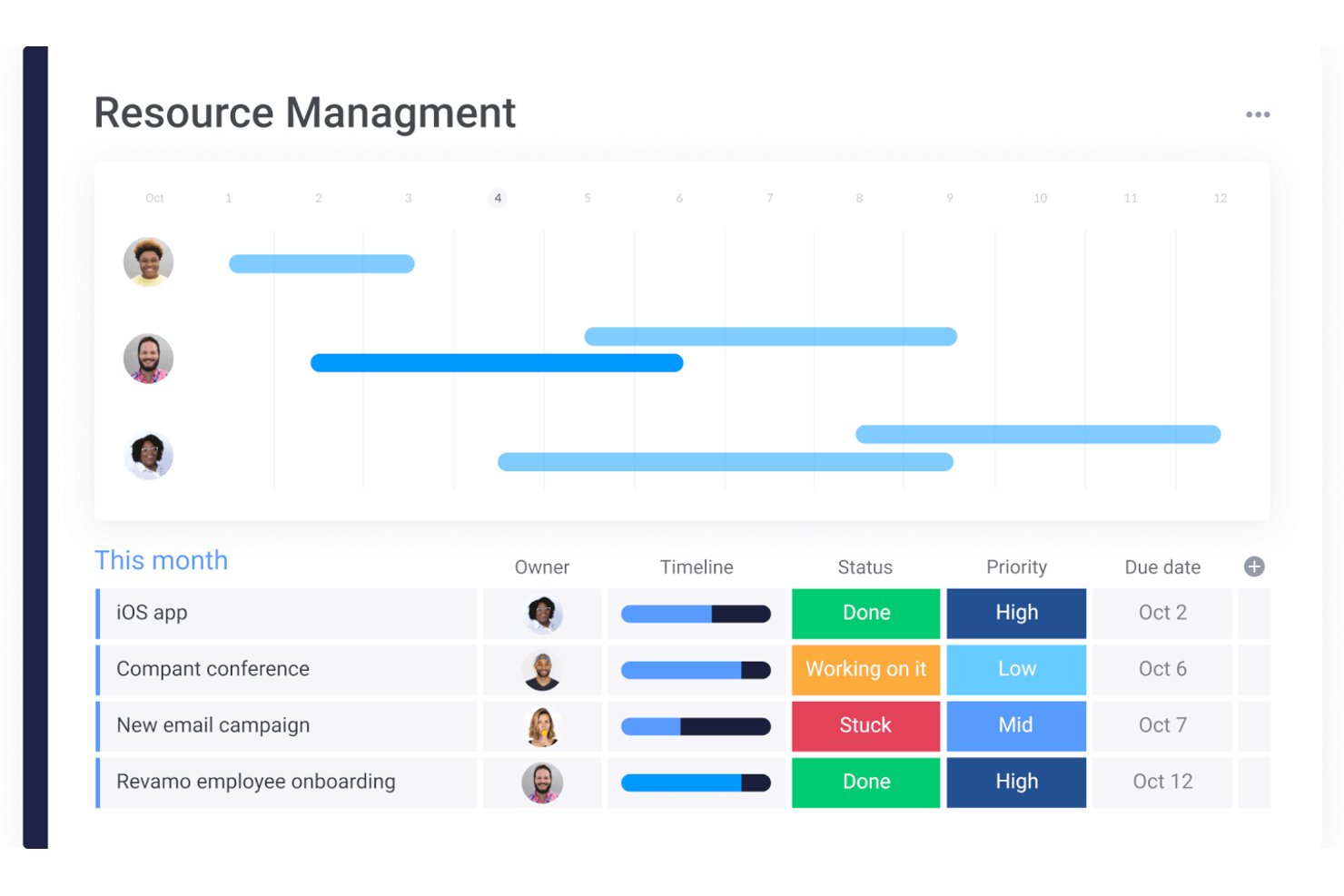
monday AI Workspace è una piattaforma proprietaria di gestione del lavoro che combina allocazione delle risorse, pianificazione dei progetti, pianificazione della capacità e automazione dei flussi di lavoro alimentata dall’IA in ambienti multi-progetto.
Per chi è ideale monday AI Workspace?
È particolarmente adatto a team aziendali e a direttori di PMO che gestiscono grandi portafogli trasversali con la necessità di un’ampia supervisione delle risorse integrata in un’unica piattaforma centralizzata.
Perché ho scelto monday AI Workspace
Ho scelto monday AI Workspace perché la sua API GraphQL aperta permette al mio team di creare realmente flussi di lavoro personalizzati per la gestione delle risorse sulla piattaforma. Posso interrogare dati live delle bacheche, attivare automazioni e visualizzare metriche di utilizzo su strumenti che già utilizziamo, senza essere vincolato alle visualizzazioni native di monday.com. La sincronizzazione bidirezionale dell’API con GitHub e la possibilità di integrare agenti AI personalizzati direttamente nei flussi dei dati delle risorse sono le funzionalità che reputo più utili quando adatto la piattaforma a strutture progettuali non standard.
Funzionalità chiave di monday AI Workspace
- Gestione carico di lavoro delle risorse: Monitora allocazioni, ferie e ore totali per ogni membro del team su diversi progetti.
- Dashboard di portafoglio: Visualizza allocazione delle risorse, avanzamento e utilizzo attraverso più filoni di lavoro in tempo reale.
- Azioni automatizzate sui flussi di lavoro: Imposta regole che attivano aggiornamenti di stato, notifiche o assegnazioni in base a dati delle risorse o del progetto.
- Pianificazione multi-vista: Accedi a modalità di visualizzazione Gantt, Kanban, calendario e carico di lavoro per pianificare e bilanciare le esigenze di personale.
Integrazioni di monday AI Workspace
monday AI Workspace offre centinaia di integrazioni native tramite il suo marketplace e le integrazioni incluse, tra cui Slack, Salesforce, HubSpot, Google Workspace, Jira, GitHub, Trello, Zendesk, Microsoft Teams e Dropbox. Supporta inoltre Zapier e fornisce un’API per integrazioni personalizzate.
Pros and Cons
Pros:
- Altamente personalizzabile tramite API GraphQL aperta
- Pianificazione multi-vista con visualizzazioni Gantt e carico di lavoro
- Automazione tramite IA che riduce gli aggiornamenti manuali delle risorse
Cons:
- Completamente proprietario, non concesso con licenza open source
- Non è supportato l’hosting autonomo
New Product Updates from monday AI Workspace
monday AI Workspace Adds Human Approval Routing
monday AI Workspace adds a human-in-the-loop approval block to AI Workflows, sending approval requests and routing workflow paths based on responses. For more information, visit monday AI Workspace's official site.

Ideale per creare funzionalità personalizzate
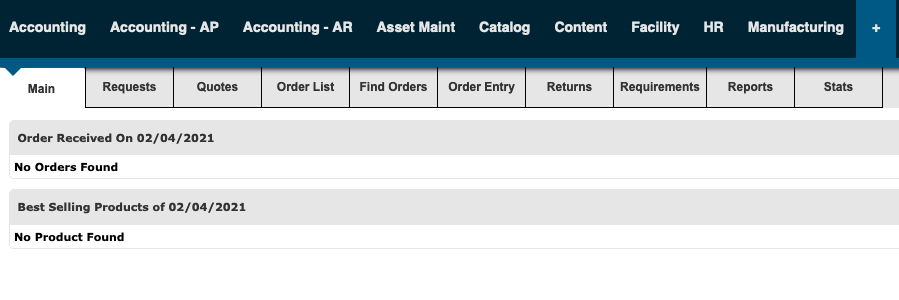
Apache OFBiz è un software di gestione delle risorse altamente flessibile e personalizzabile. Gli utenti possono facilmente arricchire il framework con funzionalità personalizzate—come quelle per la reportistica—per soddisfare le esigenze specifiche della propria azienda.
Apache OFBiz non è moderno quanto altri software presenti nell’elenco, ma compensa ampiamente con le sue funzionalità personalizzate.

WP ERP
Ideale per piccole e medie imprese

WP ERP ti consente di ottimizzare e gestire la tua attività direttamente dalla dashboard di WordPress. Lo strumento è facile da installare e utilizzare e offre accesso a estensioni e moduli per funzionalità e capacità aggiuntive.
Essendo uno strumento basato su WordPress—con il layout tradizionale di WordPress—la curva di apprendimento è minima.

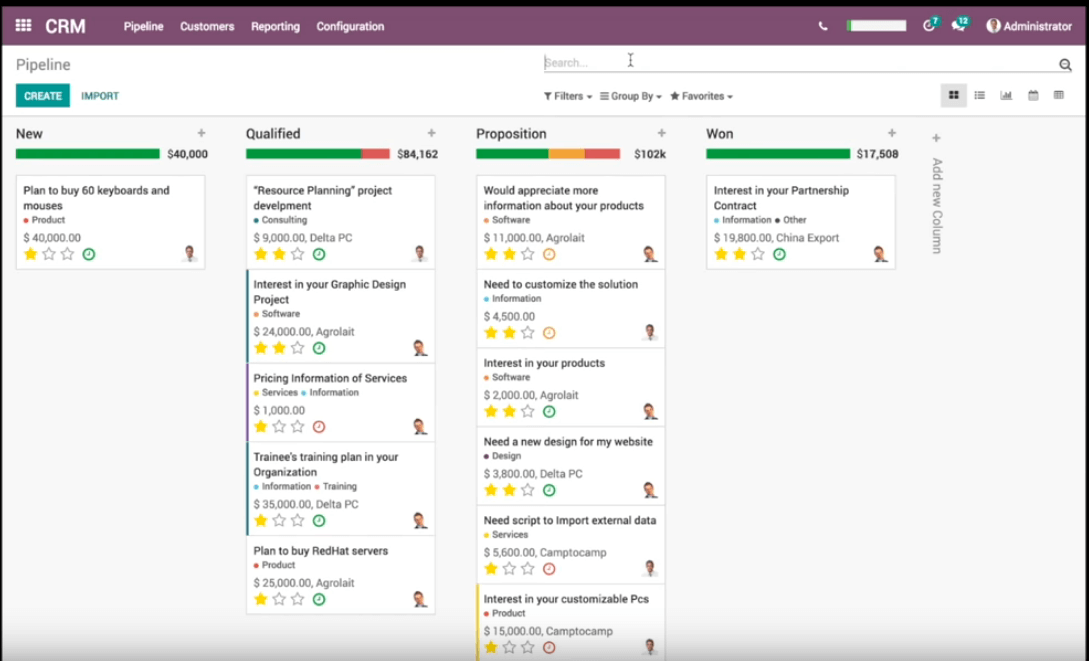
Odoo è un software open source di gestione delle risorse completo con uno strumento CRM integrato. Offre funzionalità avanzate come messaggistica in tempo reale, previsione, definizione degli obiettivi e molto altro.
Grazie a una vasta libreria di integrazioni, Odoo è personalizzabile per soddisfare le tue numerose esigenze di gestione delle risorse.

Il miglior software di gestione delle risorse open source per semplicità

ResourceSpace è un software di gestione delle risorse facile da usare e da comprendere. Lo strumento offre anche funzionalità di gestione delle risorse digitali e include funzioni di condivisione dei file, controllo delle versioni, privacy e controlli di accesso, e molto altro.
ResourceSpace consente inoltre una vasta gamma di integrazioni, tra cui l'integrazione con Microsoft Active Directory, Adobe Photoshop, Adobe InDesign, Twitter, Facebook, YouTube e altro ancora.

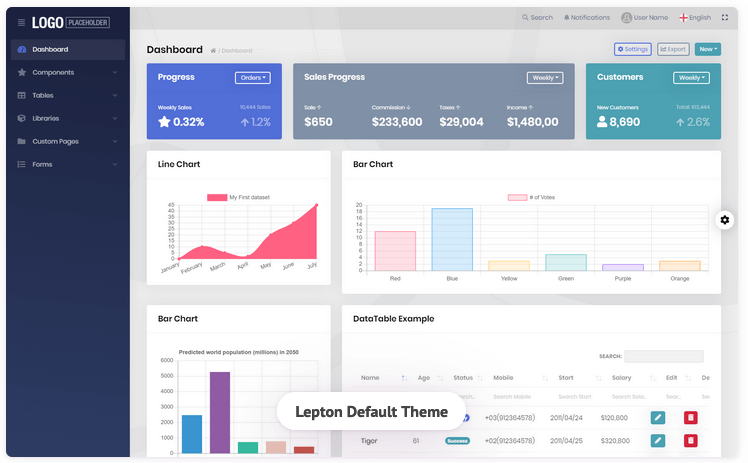
Con l'accesso a modelli e moduli applicativi predefiniti, ABP Commercial consente ai team di configurarsi e iniziare a gestire le risorse rapidamente. Lo strumento offre anche supporto premium e strumenti per lo sviluppo rapido di applicazioni.
Il layout moderno, codificato con colori e la navigazione intuitiva sono progettati per un apprendimento veloce.

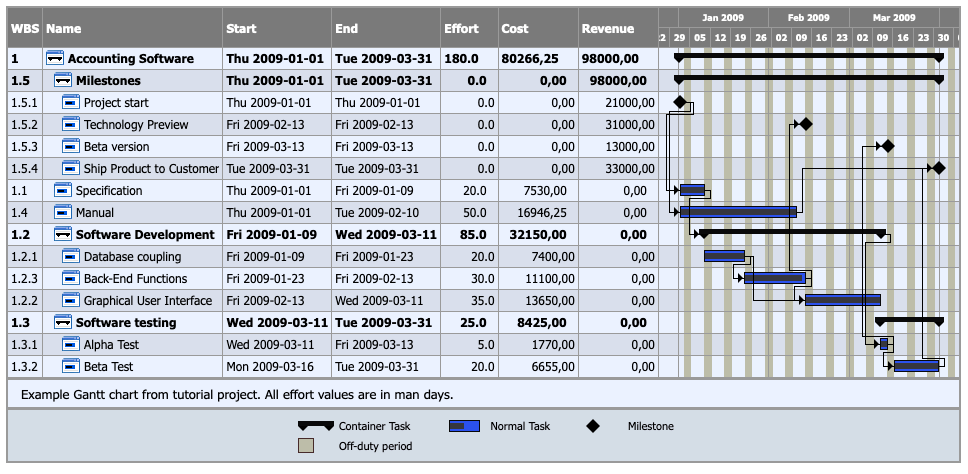
TaskJuggler è uno strumento flessibile di gestione delle risorse che assiste anche nella pianificazione e nel monitoraggio dei progetti. Copre un elenco completo di compiti di gestione delle risorse, come l’assegnazione delle risorse, la definizione dell’ambito del progetto, la gestione della comunicazione e la pianificazione dei ricavi.
Una caratteristica eccellente è la capacità di TaskJuggler di calcolare le tempistiche e le risorse in base al piano di progetto e a qualsiasi vincolo o dipendenza inseriti.

Il miglior software open source per la gestione delle risorse per grandi team
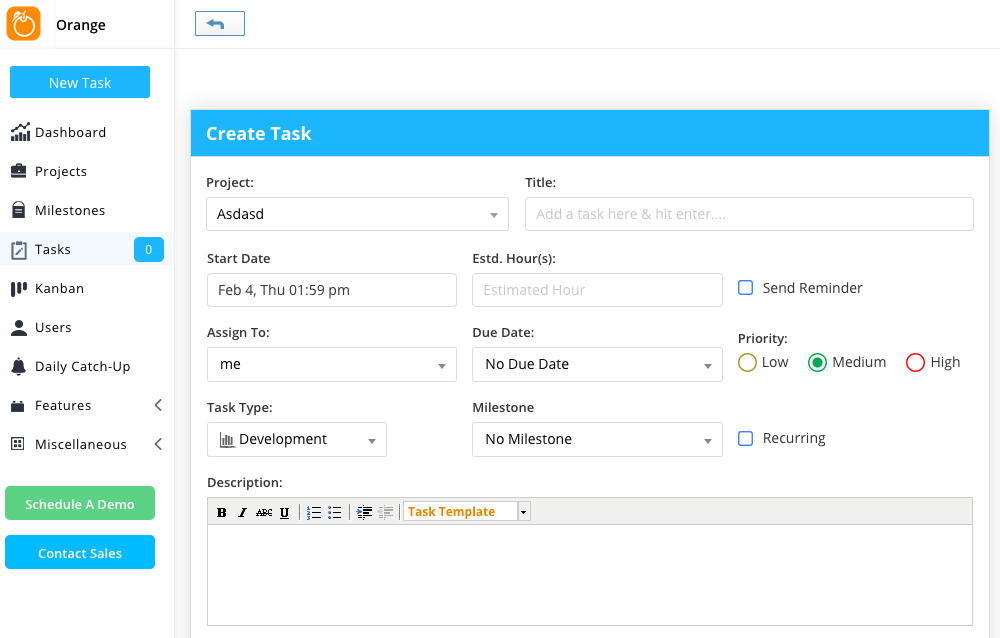
Orangescrum può essere utilizzato da team di tutte le dimensioni, ma è ideale per i team numerosi che cercano una soluzione di gestione dei progetti semplificata. Il pannello di controllo è semplice da usare e da comprendere, il che riduce i tempi di formazione.
Inoltre, a pagamento, Orangescrum offre l'accesso a diverse funzionalità avanzate, come la gestione dei documenti, la chat in-app e Invoice Pro.


Sentrifugo è una soluzione tutto-in-uno per i professionisti delle risorse umane. Lo strumento può gestire una varietà di processi HR, dalle valutazioni delle prestazioni alle verifiche dei precedenti.
Le analisi e le metriche avanzate di Sentrifugo consentono di visualizzare dati come lo stato dei dipendenti, il numero dei reparti e le attività recenti.

Dolibarr
Miglior software open source di gestione delle risorse per liberi professionisti

Anche senza dipendenti, i liberi professionisti e le startup possono beneficiare dell'uso di un software di gestione delle risorse. Dolibarr è progettato specificamente per i liberi professionisti che necessitano di una soluzione flessibile e funzioni avanzate in un pacchetto facile da usare.
Le funzionalità di marketing, finanza e fatturazione e vendite sono particolarmente utili per i liberi professionisti.
Altre opzioni di software open source per la gestione delle risorse
Ecco alcuni altri strumenti open source per la gestione delle risorse da esaminare se non hai trovato quello che cercavi sopra.
- EPESI CRM
Ideale per funzionalità BIM integrate
- WP-HR Manager Software
Ideale per l'integrazione con WordPress
- GanttProject
Il miglior software open source per la gestione delle risorse per principianti


Recensioni correlate
Se non hai ancora trovato qui quello che cerchi, dai un'occhiata a questi strumenti strettamente correlati al software di gestione dei progetti che abbiamo testato e valutato:
- Software per la gestione delle risorse
- Software per la gestione dei flussi di lavoro
- Software per il monitoraggio del tempo
- Software per la gestione delle attività
- Strumenti di collaborazione
- Strumenti per la produttività
- Alternative a Redmine
Come valuto il software di gestione delle risorse open source
Valuto questi strumenti su due livelli: se soddisfano i requisiti minimi per essere inseriti nella lista e cosa li distingue per i PM che gestiscono vincoli di capacità su più progetti.
Funzionalità principali (requisiti fondamentali per questa lista)
Quando seleziono gli strumenti per la mia lista, valuto ciascuno su una scala da 0 (non offre la funzionalità) a 5 (eccelle in quest'area) per ogni funzionalità principale elencata di seguito. Poi calcolo il punteggio totale dello strumento in percentuale. Ogni strumento deve raggiungere un punteggio minimo totale del 65% per essere considerato per l'inclusione.
- Licenza open source: Verifico che il progetto abbia una licenza riconosciuta dall'OSI e che offra la possibilità di self-hosting, così i team possono distribuirlo sulla propria infrastruttura.
- Allocazione e pianificazione delle risorse: Assegnare tre sviluppatori su due sprint dovrebbe essere semplice—cerco una pianificazione visiva e basata sul tempo per progetto.
- Monitoraggio della capacità e disponibilità: Valuto se lo strumento mostra in tempo reale il carico di lavoro, gli orari di lavoro e i dati sulle assenze per segnalare i membri del team sovraccarichi.
- Report sull'utilizzo: Qui sono importanti dashboard che mostrano l'utilizzo pianificato vs. quello effettivo su un portafoglio—cerco la possibilità di filtrare per team, ruolo o progetto.
- Integrazione con la gestione progetti: Che sia un modulo nativo per le attività o dei connettori a strumenti come Jira o GitLab, i dati sulle risorse devono rimanere collegati al lavoro di progetto.
- Timesheet e monitoraggio del tempo: Cerco ore registrate che si riflettono nelle viste di allocazione, permettendo di confrontare lo sforzo stimato con il tempo effettivamente speso sulle attività.
Una volta che ho una lista di strumenti che soddisfano i criteri, considero ciò che distingue ciascuna piattaforma.
Fattori differenzianti (cosa distingue i fornitori)
Ecco come confronto i diversi fornitori:
Funzionalità distintive
La pianificazione di scenari rappresenta un importante fattore distintivo—cerco strumenti che permettano di modellare un progetto ipotetico o una nuova assunzione prima di impegnare capacità reale. Anche l'assegnazione basata sulle competenze è importante quando si gestiscono risorse tra team; etichettare le risorse secondo l'expertise consente di trovare rapidamente la persona giusta invece di scorrere una lista piatta. Vale la pena valutare anche una API pubblica ben documentata con supporto webhook, soprattutto se il tuo team ha bisogno di integrare i dati sulle risorse in pipeline CI/CD o dashboard personalizzate.
Oltre le funzionalità
La salute della community dice molto sulla longevità di un progetto. Controllo l'attività su GitHub—frequenza dei commit, tempi di risposta ai ticket aperti e numero di contributori—per capire se uno strumento sarà ancora mantenuto fra un anno. Anche la flessibilità nel deployment è fondamentale; il supporto a Docker e Kubernetes rende realistico l'auto-hosting anche per team piccoli senza personale DevOps dedicato. Valuto anche i controlli di sicurezza come SSO/SAML e accessi basati sui ruoli nel tier gratuito, poiché i team regolamentati hanno bisogno di audit logging e residenza dei dati senza dover pagare una licenza enterprise.
Come scegliere un software open source per la gestione delle risorse
È facile perdersi in lunghi elenchi di funzionalità e strutture tariffarie complesse. Per aiutarti a rimanere concentrato mentre affronti il tuo personale processo di selezione del software, ecco una lista di controllo dei fattori da tenere a mente:
| Fattore | Cosa considerare |
|---|---|
| Scalabilità | Assicurati che il software possa crescere insieme al tuo team. Cerca soluzioni che supportino un aumento di utenti, progetti e dati senza causare significativi problemi di prestazioni. |
| Integrazioni | Verifica se il software si connette agli strumenti che già utilizzi, come piattaforme di gestione dei progetti, CRM o contabilità, per evitare interruzioni nei flussi di lavoro. |
| Personalizzazione | Le esigenze del tuo team sono uniche. Assicurati che lo strumento consenta di personalizzare flussi di lavoro, campi e dashboard, così da adattarsi al tuo modo di lavorare. |
| Semplicità d'uso | Un sistema complicato rallenterà il tuo team. Cerca interfacce intuitive, navigazione semplice e una curva di apprendimento minima. |
| Budget | Open source non significa sempre gratuito. Nel valutare il costo totale di proprietà, considera hosting, assistenza e componenti aggiuntivi. |
| Misure di sicurezza | I tuoi dati devono essere protetti. Dai priorità agli strumenti dotati di crittografia, controllo degli accessi basato sui ruoli e aggiornamenti di sicurezza regolari. |
| Funzionalità di collaborazione | Assicurati che il software offra strumenti per la comunicazione del team, l'assegnazione delle attività e la visibilità sulla disponibilità delle risorse. |
| Assistenza e comunità | Gli strumenti open source spesso si affidano al supporto della comunità. Verifica la disponibilità di forum attivi, documentazione e la reattività degli sviluppatori. |
Che cos'è il software open source per la gestione delle risorse?
Il software open source per la gestione delle risorse è uno strumento il cui codice sorgente è disponibile per essere esaminato, modificato e migliorato da chiunque. Aiuta a gestire risorse come dipendenti, attrezzature e tempo, fornendo strumenti per la pianificazione, il monitoraggio e la reportistica. Questo tipo di software è liberamente accessibile e può essere adattato alle diverse esigenze organizzative.
I principali vantaggi dell'utilizzo di un software open source per la gestione delle risorse includono la personalizzabilità e il rapporto costi-benefici. Puoi adattare il software alle tue esigenze specifiche e, di solito, è gratuito o ha un costo contenuto, risultando conveniente, soprattutto per le organizzazioni più piccole. Il software open source offre spesso anche un forte supporto da parte della comunità, oltre a una vasta quantità di conoscenze condivise e aggiornamenti regolari.
Funzionalità del software open source per la gestione delle risorse
Quando selezioni un software open source per la gestione delle risorse, presta attenzione alle seguenti funzionalità principali:
- Pianificazione delle risorse: consente di assegnare le attività e gestire i carichi di lavoro in modo efficiente, evitando un'assegnazione eccessiva o un sottoutilizzo delle risorse.
- Monitoraggio del tempo: aiuta a controllare le ore lavorate e la produttività, affinché i progetti rispettino le tempistiche e il budget.
- Accesso basato sui ruoli: consente di controllare l'accesso ai dati e alle funzionalità in base ai ruoli degli utenti, migliorando la sicurezza e l'efficienza del flusso di lavoro.
- Reportistica e analisi: fornisce informazioni sull'utilizzo delle risorse, sull'andamento delle prestazioni e sull'avanzamento dei progetti, supportando un processo decisionale basato sui dati.
- Strumenti di collaborazione: facilitano la comunicazione e il coordinamento tra i membri del team tramite pannelli di controllo condivisi, commenti e notifiche.
- Opzioni di personalizzazione: consentono di adattare flussi di lavoro, campi dati e pannelli di controllo alle esigenze specifiche della tua organizzazione.
- API e integrazioni: supportano le connessioni con altre soluzioni software, come gli strumenti di gestione dei progetti, per semplificare le operazioni.
- Budgeting e monitoraggio dei costi: aiutano a gestire le spese, prevedere i costi e mantenere il controllo finanziario durante l'intero ciclo di vita dei progetti.
- Accessibilità da dispositivi mobili: consente di gestire le risorse da remoto tramite interfacce ottimizzate per dispositivi mobili o app dedicate.
- Misure di sicurezza dei dati: proteggono le informazioni sensibili tramite crittografia, aggiornamenti regolari e conformità alle migliori pratiche di sicurezza.
Domande frequenti sul software open source per la gestione delle risorse
Trova le risposte alle domande più comuni su questo argomento.
Quali sono i vantaggi dell'utilizzo di un software open source per la gestione delle risorse?
\u003col\u003e
\t\u003cli\u003eIl software può contribuire a semplificare la gestione delle risorse e utilizzare l’automazione per aiutarti a lavorare in modo più efficiente ed efficace, oltre a farti risparmiare tempo e denaro.\u003c/li\u003e
\t\u003cli\u003eIl software open source è flessibile e adattabile e ti consente di apportare modifiche personalizzate in base alle tue esigenze specifiche.\u003c/li\u003e
\t\u003cli\u003eOffre una panoramica completa delle risorse e della capacità attuali per supportare il processo decisionale.\u003c/li\u003e
\u003c/ol\u003e
Qual è il modo migliore per confrontare i software open source per la gestione delle risorse?
\u003col\u003e
\t\u003cli\u003e\u003cstrong\u003eFunzionalità:\u003c/strong\u003e Le migliori applicazioni software offrono un lungo elenco di funzionalità progettate per soddisfare le tue numerose esigenze o il tuo caso d’uso, incluse alcune che potresti non aver considerato, come fatturazione, fogli presenze, \u003ca href=\u0022https://thedigitalprojectmanager.com/tools/gantt-chart-maker/\u0022\u003ediagrammi di Gantt\u003c/a\u003e, schede Kanban, funzionalità di trascinamento, roadmap dei progetti e monitoraggio del ciclo di vita, gestione del portafoglio progetti ed elenchi delle attività del team.\u003c/li\u003e
\t\u003cli\u003e\u003cstrong\u003eFacilità d’uso:\u003c/strong\u003e Anche se puoi adattare il software open source alle tue esigenze e metodologie, vuoi comunque che la tua applicazione sia facile da usare «appena installata».\u003c/li\u003e
\t\u003cli\u003e\u003cstrong\u003eSupporto tecnico:\u003c/strong\u003e Ci saranno momenti in cui avrai domande e/o dubbi. Trova un software che offra molte forme di assistenza, dagli agenti in tempo reale ai video di formazione e alla documentazione dettagliata. Questo ti consente di dedicare più tempo alla pianificazione delle risorse e meno tempo ad attività che non fanno davvero la differenza.\u003c/li\u003e
\t\u003cli\u003e\u003cstrong\u003eCompatibilità:\u003c/strong\u003e Scegli un software open source per la gestione delle risorse compatibile con il tuo sistema operativo preferito. Il tuo dispositivo mobile utilizza Android o iOS? Usi un computer Mac o Linux? Senza compatibilità, non hai nulla.\u003c/li\u003e
\u003c/ol\u003e