

I 10 migliori software di gestione dei progetti personali per il 2026

Miglior software per la gestione dei progetti personali: selezione


Il miglior software per la gestione dei progetti personali ti aiuta a pianificare, monitorare e completare le attività in modo efficiente, senza essere sopraffatto da funzioni pensate per i grandi team. Senza lo strumento giusto, farai fatica a pianificare i progetti, monitorare i progressi e rispettare le scadenze come squadra composta da una sola persona.
Ho utilizzato la mia esperienza nella gestione dei progetti per esaminare decine di strumenti e selezionare la mia lista dei migliori software di gestione dei progetti per singoli utenti. Ogni mia raccomandazione ti aiuterà a mantenere il controllo del tuo lavoro, rispettare l'ambito e il budget e ridurre il disordine e la confusione che derivano dall'essere l'unico membro del team di progetto.
Perché fidarsi dei nostri consigli sui software
Il nostro team testa e recensisce software dal 2012. In quanto project manager noi stessi, sappiamo quanto sia difficile — e importante — scegliere il software giusto.
Per questa guida, abbiamo valutato gli strumenti attraverso test pratici e ricerche indipendenti, assegnando un punteggio agli strumenti in base ai nostri criteri di selezione. Ci basiamo inoltre sulle competenze di leader di pensiero del settore e di professionisti attivi nella gestione dei progetti.
Le nostre recensioni riflettono il nostro giudizio editoriale umano, non un discorso di vendita.
Revisori esperti:
Tabella comparativa dei software per la gestione dei progetti personali
Questa tabella comparativa riassume i dettagli sui prezzi delle mie migliori selezioni di software per la gestione dei progetti personali:
| Tool | Best For | Trial Info | Price | ||
|---|---|---|---|---|---|
| 1 | Ideale per analisi di progetto potenziate dall’intelligenza artificiale | Prova gratuita di 14 giorni | Da $9/utente/mese (fatturazione annuale) | Website | |
| 2 | Ideale per la versatilità nella gestione | Prova gratuita di 15 giorni + piano gratuito + demo gratuita disponibile | Da $4/utente/mese (fatturato annualmente) | Website | |
| 3 | Ideale per unificare team e flussi di lavoro | Piano gratuito disponibile | Da $39/mese (fatturato annualmente) | Website | |
| 4 | Ideale per il monitoraggio visivo dei progetti | Piano gratuito disponibile | Da $5/utente/mese (fatturazione annuale) | Website | |
| 5 | Ideale per la sincronizzazione delle attività tra dispositivi | Piano gratuito disponibile | Gratis | Website | |
| 6 | Ideale per la gestione del lavoro con i clienti | Prova gratuita di 30 giorni + demo gratuita disponibile | A partire da $9.99/utente/mese (fatturazione annuale) | Website | |
| 7 | Ideale per flussi di lavoro personalizzati | Prova gratuita di 30 giorni + piano gratuito + demo gratuita disponibile | A partire da $11.20/utente/mese (fatturazione annuale) | Website | |
| 8 | Ideale per uno spazio di lavoro tutto-in-uno | Piano gratuito + demo gratuita disponibile | Da $10/membro/mese (fatturazione annuale) | Website | |
| 9 | Ideale per la pianificazione professionale dei progetti | Not available | Da $19.99/utente/mese (fatturazione annuale) | Website | |
| 10 | Ideale per bacheche Kanban | Prova gratuita di 14 giorni + piano gratuito disponibile | Da $5/utente/mese | Website |

Recensioni dei migliori software per la gestione dei progetti personali
Di seguito trovi i miei riepiloghi dettagliati dei migliori software per la gestione dei progetti personali inclusi nella mia selezione. Le mie recensioni offrono una panoramica dettagliata delle funzionalità principali, dei pro e dei contro, delle integrazioni e dei casi d’uso ideali di ogni strumento, per aiutarti a trovare quello più adatto a te.

Ideale per analisi di progetto potenziate dall’intelligenza artificiale
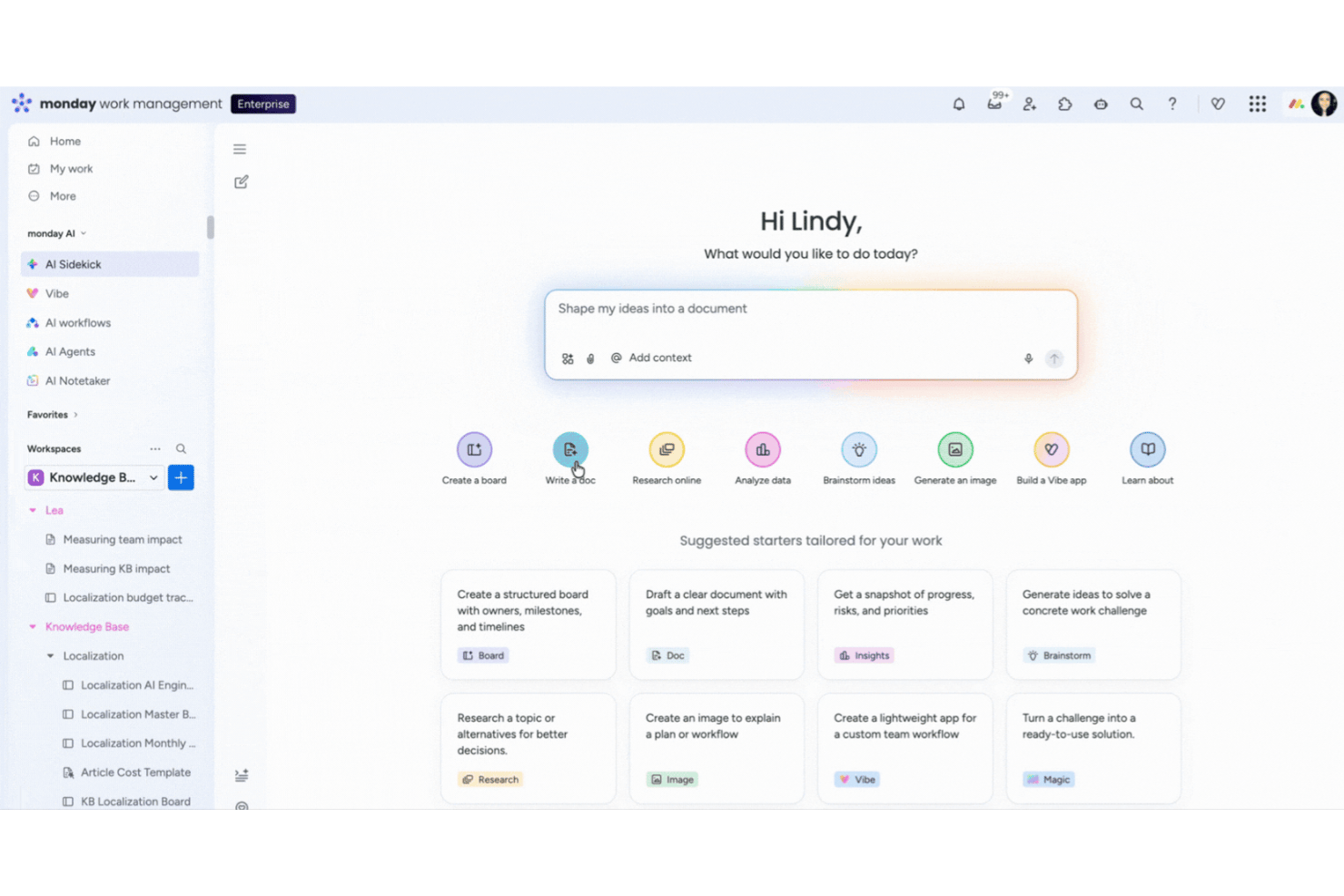
monday AI Workspace è una piattaforma di gestione progetti che combina il tracciamento delle attività tramite board, viste timeline e Gantt, automazione dei flussi di lavoro e strumenti AI integrati per aiutarti a pianificare, organizzare e monitorare il lavoro su più progetti.
Per chi è pensato monday AI Workspace?
Per liberi professionisti e consulenti indipendenti che gestiscono più progetti per clienti e cercano un sistema scalabile che possa crescere insieme a loro man mano che il carico di lavoro aumenta.
Perché ho scelto monday AI Workspace
Ho scelto monday AI Workspace perché le sue analisi di progetto potenziate dall’intelligenza artificiale cambiano davvero il modo in cui gestire carichi di lavoro da solista. L’assistente AI propone raccomandazioni contestuali sulle tue board, mentre la funzione di rilevamento dei rischi segnala problemi di dipendenza prima che compromettano le tue scadenze. Mi piacciono in particolare le dashboard generate dall’AI, che trasformano i dati sparsi delle board in uno snapshot chiaro della situazione di ogni progetto.
Funzionalità principali di monday AI Workspace
- Modelli di board personalizzabili: Avvia rapidamente i progetti con modelli pensati per freelance, flussi di lavoro personali e attività secondarie.
- Editor di documenti integrato: Crea, modifica e condividi note di progetto, riassunti di riunioni e piani direttamente nel tuo workspace.
- Strumenti per il monitoraggio del tempo: Registra le ore fatturabili o controlla quanto tempo dedichi ai task su ogni board.
- App mobili per iOS e Android: Gestisci i progetti e aggiorna lo stato delle attività da telefono o tablet, ovunque tu sia.
Integrazioni di monday AI Workspace
monday AI Workspace offre centinaia di integrazioni native tramite le sue integrazioni integrate e il marketplace, incluse Slack, Google Workspace, Microsoft 365, Trello, Zoom, HubSpot, Salesforce, Outlook, GitHub e Dropbox. Supporta anche Zapier e fornisce un’API per integrazioni personalizzate.
Pros and Cons
Pros:
- AI Sidekick automatizza riepiloghi e suddivisione delle attività
- Viste flessibili tra cui Gantt, calendario e timeline
- I modelli coprono flussi di lavoro da freelance e progetti individuali
Cons:
- Configurazione più complessa rispetto ad altri strumenti personali più semplici
- Interfaccia molto basata sulle board può essere dispersiva per chi lavora da solo
New Product Updates from monday AI Workspace
monday AI Workspace Adds Human Approval Routing
monday AI Workspace adds a human-in-the-loop approval block to AI Workflows, sending approval requests and routing workflow paths based on responses. For more information, visit monday AI Workspace's official site.

Ideale per la versatilità nella gestione

Zoho Projects è uno strumento di gestione dei progetti versatile, adatto a diverse esigenze aziendali. È ideale per la versatilità nella gestione grazie alla sua vasta gamma di funzionalità personalizzabili che si adattano a diversi tipi di progetti e stili di gestione.
Perché ho scelto Zoho Projects:
Ho scelto Zoho Projects per la sua eccezionale adattabilità in vari scenari di project management. Il suo set completo di funzionalità e le opzioni di personalizzazione lo fanno distinguere dagli altri strumenti di gestione dei progetti. Credo sia il migliore per la versatilità perché consente ai team di gestire il lavoro con un alto livello di flessibilità, adattandosi facilmente alle esigenze specifiche di ogni progetto.
Funzionalità e integrazioni di spicco:
Zoho Projects è noto per l'automazione delle attività, la rilevazione dei tempi e le avanzate capacità di reportistica. Offre anche la gestione dei problemi, fondamentale per identificare e risolvere rapidamente le criticità. La piattaforma supporta i diagrammi di Gantt per la pianificazione e il monitoraggio visivo dei progetti, oltre a fornire una serie di visualizzazioni delle attività, incluse le bacheche Kanban, secondo le preferenze organizzative.
Zoho Projects si integra nativamente con Zoho CRM, Zoho Desk, Zoho Analytics, Zoho Cliq, Zoho Books, Zoho Invoice, Zoho People, Google Drive, Google Calendar, Microsoft Office 365, Slack e altro ancora, facilitando un flusso di lavoro connesso e senza interruzioni.
Pros and Cons
Pros:
- Solide opzioni di personalizzazione e automazione
- Strumenti completi di reportistica e rilevazione dei tempi
- Ampia gamma di integrazioni con applicazioni Zoho e di terze parti
Cons:
- Può avere una curva di apprendimento ripida per i nuovi utenti
- Funzionalità limitate nel piano gratuito
- Alcune funzionalità avanzate disponibili solo nei piani superiori
New Product Updates from Zoho Projects
Zoho Projects Adds CodeX Scripts for Custom Modules
Zoho Projects now supports CodeX Scripts for custom modules, enabling conditional logic and rules for creating, updating, and deleting records. For more information, visit Zoho Projects' official site.
 .
.
Nifty
Ideale per unificare team e flussi di lavoro
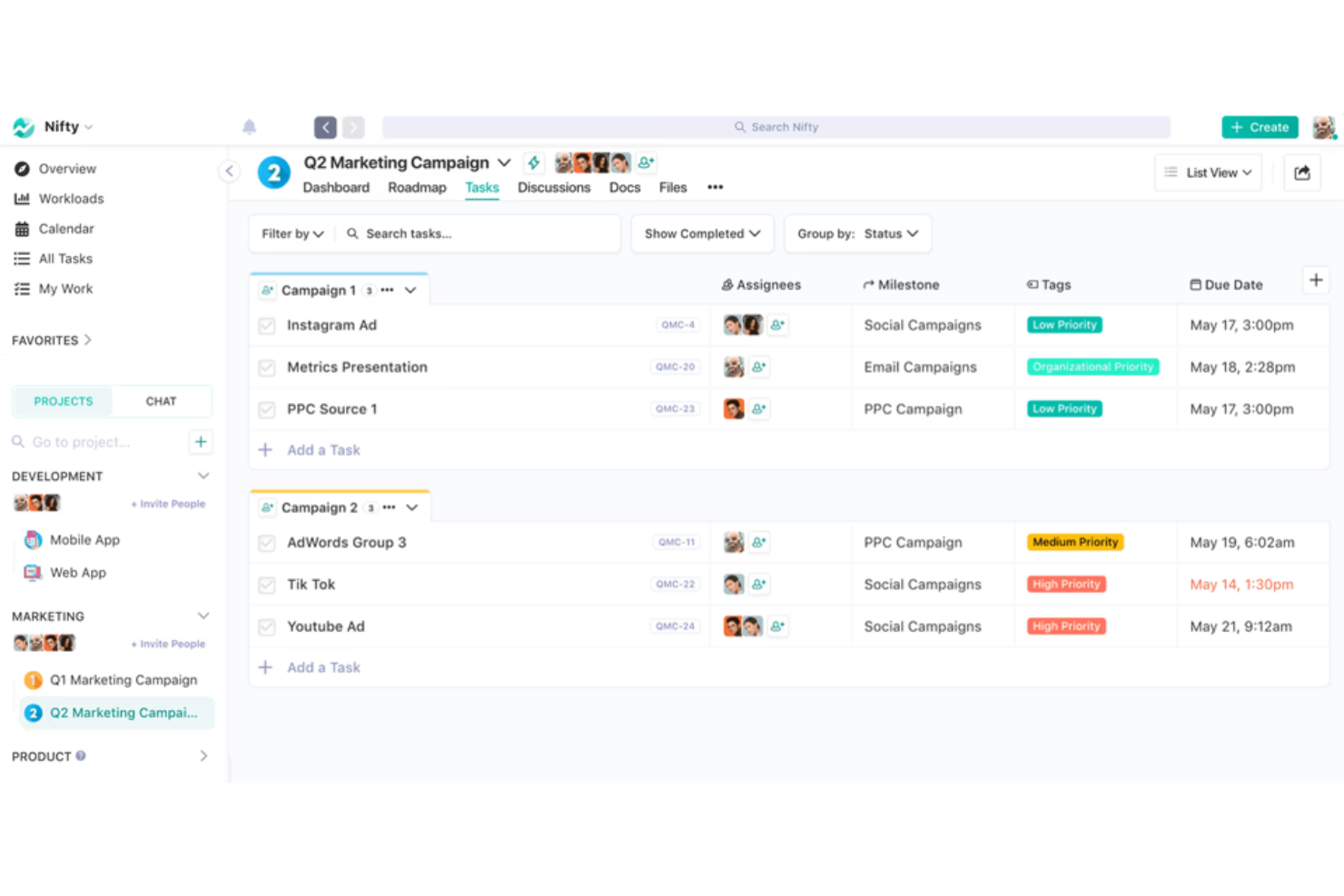
Nifty semplifica la gestione dei progetti e migliora la collaborazione del team in un unico hub digitale. È ideale per unificare team e flussi di lavoro, offrendo strumenti che favoriscono la comunicazione e centralizzano il monitoraggio dei progetti.
Perché ho scelto Nifty:
Ho scelto Nifty per il suo approccio solido alla gestione dei progetti, che lo distingue da altre piattaforme. La sua capacità di integrare varie dimensioni del lavoro di progetto—attività, scadenze, documenti e comunicazione—in un unico ambiente coeso è il motivo per cui lo considero il migliore per unificare team e flussi di lavoro. Questa integrazione garantisce che i membri del team siano allineati e possano lavorare in modo efficiente verso obiettivi comuni.
Caratteristiche distintive e integrazioni:
Nifty eccelle con funzionalità come la pianificazione dei progetti basata su traguardi, l'editing collaborativo dei documenti e un calendario integrato che si sincronizza con Google. Le sue capacità di monitoraggio dell'avanzamento e reporting offrono trasparenza e favoriscono la responsabilità all'interno dei team.
Nifty si integra nativamente con Google Drive, Slack, Zoom, Dropbox, Trello, Asana, GitHub, GitLab, Bitbucket e Jira, tra gli altri.
Pros and Cons
Pros:
- Piattaforma centralizzata per tutte le attività legate al progetto
- Il monitoraggio dei traguardi allinea gli sforzi del team agli obiettivi di progetto
- Le numerose integrazioni native semplificano il flusso di lavoro
Cons:
- La configurazione iniziale può richiedere un investimento di tempo
- Alcune funzionalità avanzate sono disponibili solo nei piani più costosi
- Il piano gratuito può essere troppo limitato per alcuni team

Trello
Ideale per il monitoraggio visivo dei progetti

Trello è un'applicazione di gestione progetti progettata per aiutare individui e team a monitorare visivamente i propri progetti. È ideale per il monitoraggio visivo dei progetti grazie al suo sistema intuitivo di bacheche e schede che consente agli utenti di vedere a colpo d'occhio l'avanzamento delle attività.
Perché ho scelto Trello:
Ho scelto Trello per questa lista perché offre un sistema visivo unico che si distingue dagli altri strumenti di gestione dei progetti. La sua semplicità e chiarezza nell'esposizione delle attività rende facile gestire i progetti senza sentirsi sopraffatti. Credo che Trello sia il migliore per il monitoraggio visivo dei progetti perché fornisce una panoramica immediata dei tuoi progetti, fondamentale per mantenere l'organizzazione e assicurarsi che nulla venga trascurato.
Caratteristiche distintive e integrazioni:
Le caratteristiche distintive di Trello includono il suo sistema di bacheche e schede, personalizzabile con etichette, checklist e date di scadenza. La funzionalità di trascinamento rende facile spostare le attività tra le diverse fasi di completamento. Inoltre, le opzioni Power-Up di Trello consentono agli utenti di arricchire le proprie bacheche con funzionalità e integrazioni aggiuntive.
Trello si integra nativamente con Slack, Google Drive, Dropbox, Box, OneDrive, Salesforce, Evernote, Mailchimp, GitHub, Google Hangouts e altri ancora, offrendo una piattaforma versatile che può adattarsi a diversi flussi di lavoro.
Pros and Cons
Pros:
- Sistema visivo di schede e bacheche per un facile monitoraggio
- Personalizzabile con etichette, checklist e Power-Ups
- Ampia gamma di integrazioni native
Cons:
- Funzionalità limitate nel piano gratuito
- Può diventare disordinato con troppe schede o bacheche
- Alcune funzionalità avanzate disponibili solo nei piani a pagamento

Ideale per la sincronizzazione delle attività tra dispositivi

Microsoft To Do è uno strumento di gestione delle attività che semplifica l'organizzazione delle attività su tutti i tuoi dispositivi. Si distingue come il migliore per la sincronizzazione delle attività tra dispositivi grazie alla sua integrazione perfetta con Microsoft 365 e Outlook, consentendo la sincronizzazione e la gestione delle attività ovunque ti trovi.
Perché ho scelto Microsoft To Do:
Ho scelto Microsoft To Do per questa lista per il suo design semplice e la potente integrazione con l'ecosistema Microsoft, che lo differenzia dagli altri strumenti di gestione delle attività. Lo considero il migliore per sincronizzare le attività tra dispositivi poiché offre aggiornamenti costanti e affidabili su tutte le piattaforme, assicurando che le tue attività siano sempre aggiornate, sia che tu stia usando il telefono, il tablet o il computer.
Funzionalità eccezionali e integrazioni:
Le caratteristiche più importanti di Microsoft To Do includono la personalizzazione delle liste, l'assegnazione di attività all'interno delle liste condivise e l'integrazione con Outlook per gestire le email contrassegnate come attività. Supporta inoltre gli allegati ai compiti, rendendo più facile tenere tutte le informazioni rilevanti in un unico posto.
Microsoft To Do si integra nativamente con Microsoft 365, Outlook, Planner, OneNote, Microsoft Teams e altri servizi Microsoft, offrendo un'esperienza coesa per gli utenti profondamente inseriti nell'ecosistema Microsoft.
Pros and Cons
Pros:
- Integrazione perfetta con Microsoft 365 e Outlook
- Sfondo e raggruppamenti delle liste personalizzabili per una migliore organizzazione
- Possibilità di assegnare attività all'interno delle liste condivise
Cons:
- Limitato a 25 MB per allegato
- Alcune funzionalità, come il supporto ai file nelle liste condivise, sono previste per futuri aggiornamenti
- Potrebbe non offrire tante funzionalità quanto strumenti di gestione progetti dedicati

Ideale per la gestione del lavoro con i clienti

Teamwork è una piattaforma completa di gestione dei progetti pensata per il lavoro con i clienti. Si distingue come la migliore per la gestione del lavoro con i clienti grazie al suo set robusto di funzionalità progettate per gestire tutti gli aspetti dei progetti, dalla pianificazione all’esecuzione fino a monitoraggio e reportistica.
Perché ho scelto Teamwork:
Ho inserito Teamwork nell’elenco perché offre una combinazione unica di strumenti e funzionalità pensate specificamente per i team che gestiscono il lavoro con i clienti. Credo che Teamwork sia la soluzione migliore per la gestione del lavoro con i clienti grazie a funzionalità specializzate come utenti cliente, gestione delle risorse e del carico di lavoro e monitoraggio del tempo, tutte fondamentali per gestire progetti orientati al cliente e garantire la soddisfazione del cliente.
Funzionalità principali & integrazioni:
Le funzionalità più importanti di Teamwork includono il monitoraggio del tempo, la gestione delle risorse, i modelli di pianificazione dei progetti e diversi tipi di visualizzazione come Liste, Kanban Board, Tabelle e Diagrammi di Gantt. Eccelle anche nella gestione del processo di revisione e approvazione del cliente, offre report completi sulla salute del progetto e opzioni di sicurezza avanzate.
Teamwork si integra nativamente con Slack, Zapier, MS Teams, Google Drive, le app Microsoft Office, QuickBooks, HubSpot, OneDrive, SharePoint e altro ancora, consentendo agli utenti di lavorare senza interruzioni con gli strumenti già in uso.
Pros and Cons
Pros:
- Pensato per il lavoro con i clienti con funzionalità specializzate
- Varie modalità di visualizzazione dei progetti per una gestione efficiente
- Si integra con un'ampia gamma di strumenti popolari
Cons:
- Numero minimo di utenti richiesto per i piani a pagamento
- La fatturazione annuale potrebbe non essere adatta a tutti i budget
- Spazio di archiviazione limitato nel piano gratuito
Podio
Ideale per flussi di lavoro personalizzati
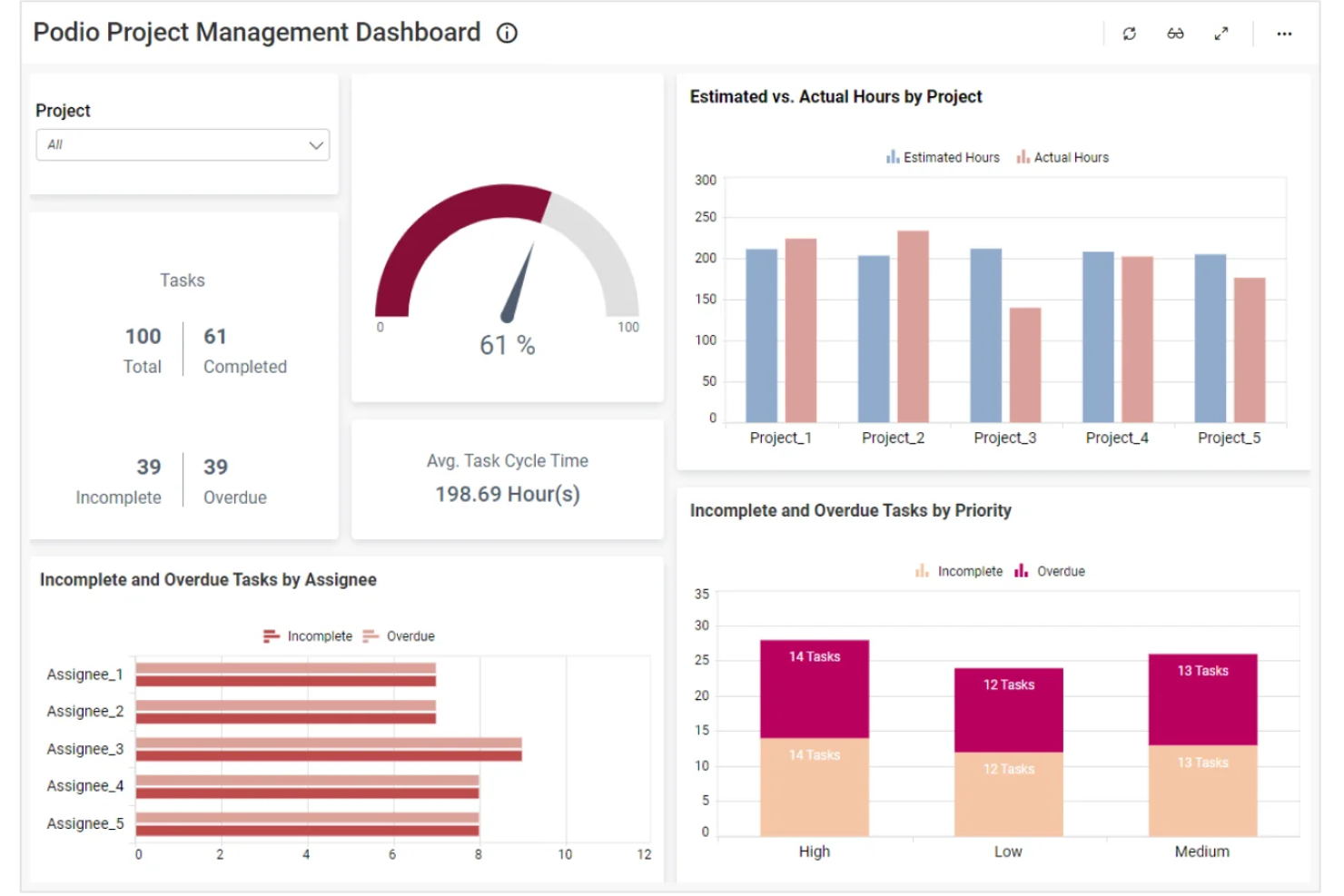
Podio è uno strumento di project management personalizzabile che ti consente di costruire e adattare i tuoi flussi di lavoro alle esigenze specifiche del tuo team. Creando app e spazi di lavoro personalizzati, puoi gestire progetti, attività e comunicazioni tutto in un unico luogo.
Perché ho scelto Podio:
Offre la possibilità di creare app personalizzate senza alcuna conoscenza di programmazione. Puoi progettare app che corrispondono ai requisiti del tuo progetto, consentendo un approccio personalizzato alla gestione di attività e progetti. Questo significa che puoi impostare i tuoi flussi di lavoro esattamente come desideri, rendendo i processi più efficienti. Un altro vantaggio è l’automazione avanzata dei flussi di lavoro offerta da Podio. Puoi automatizzare le attività ripetitive, impostare trigger e creare azioni che mantengono i tuoi progetti in movimento senza intoppi.
Funzionalità principali & integrazioni:
Le funzionalità includono dashboard personali, CRM integrato, gestione progetti, chat integrata, completa personalizzazione, accesso web e mobile, visualizzazione dati, collaborazione sociale, gestione delle attività e controllo dettagliato degli accessi.
Le integrazioni comprendono Salesforce, HubSpot, Slack, Google Sheets, Mailchimp, Trello, Gmail, Facebook Lead Ads, Typeform, MojoCRM, Gravity Forms e ActiveCampaign.
Pros and Cons
Pros:
- Chat integrata e stream di attività
- Altamente personalizzabile
- Offre automazione dei flussi di lavoro
Cons:
- La configurazione iniziale può richiedere tempo
- Molte funzionalità dei flussi di lavoro sono disponibili solo nei piani di livello superiore

Notion semplifica la gestione dei progetti integrando note, attività e wiki in un unico strumento. Si distingue come spazio di lavoro tutto-in-uno, offrendo un'estesa possibilità di personalizzazione per adattarsi a qualsiasi flusso di lavoro del team.
Perché ho scelto Notion:
Ho selezionato Notion per il suo approccio completo alla gestione dei progetti, spiccando per la capacità di unire diversi strumenti in un'unica piattaforma. Ritengo che Notion sia ideale come workspace all-in-one perché permette agli utenti di creare, collaborare e gestire tutto il lavoro in uno spazio unificato.
Funzionalità di spicco e integrazioni:
Le principali funzionalità di Notion includono un sistema modulare di costruzione delle pagine, spazi di lavoro collaborativi e database integrati.
Si integra nativamente con strumenti come Slack, Google Drive, Trello, GitHub, Figma, Asana, Jira, Evernote, Zoom e Twitter.
Pros and Cons
Pros:
- Unisce note, attività, database e wiki in un'unica piattaforma
- Interfaccia e modelli altamente personalizzabili
- Supporta collaborazione e condivisione in tempo reale
Cons:
- Può risultare inizialmente complesso per i nuovi utenti a causa del vasto numero di funzionalità
- L'esperienza dell'app mobile potrebbe non essere fluida come quella desktop
- Alcuni utenti potrebbero trovare il modello di prezzo costoso con la crescita del team


OmniPlan è uno strumento di gestione dei progetti pensato per affrontare progetti complessi con facilità. È ideale per la pianificazione professionale grazie alle sue funzionalità complete, pensate per una programmazione dettagliata e una gestione efficace delle risorse.
Perché ho scelto OmniPlan:
Ho incluso OmniPlan in questo elenco perché eccelle nel fornire capacità di pianificazione dettagliate, indispensabili per i professionisti. La sua capacità distintiva di gestire cronoprogrammi complessi e l'allocazione delle risorse lo differenziano dagli altri software di project management. Credo che OmniPlan sia la scelta migliore per la pianificazione professionale perché offre strumenti avanzati fondamentali per gestire con successo progetti di ampia portata.
Funzionalità distintive e integrazioni:
Le funzionalità più importanti di OmniPlan includono i diagrammi di Gantt interattivi, la simulazione Monte Carlo per la valutazione dei rischi e l'analisi del valore guadagnato per il monitoraggio delle performance. Lo strumento offre anche una gestione completa delle risorse, consentendo un controllo dettagliato sugli orari di lavoro e sull'allocazione delle risorse.
Le integrazioni di OmniPlan con altri strumenti sono limitate, ma permette la sincronizzazione tra dispositivi Apple, l'integrazione con applicazioni di calendario e altre come Apple Calendar, Apple Reminders, iCloud, OmniFocus, Microsoft Excel, Google Calendar, Zapier, Dropbox, Google Drive e Microsoft Project.
Pros and Cons
Pros:
- Programmazione avanzata e gestione delle risorse dei progetti
- Valutazione dei rischi tramite simulazione Monte Carlo
- Monitoraggio delle performance con analisi del valore guadagnato
Cons:
- Integrazioni limitate con strumenti di terze parti
- Ottimizzato principalmente per utenti dell'ecosistema Apple

KanbanFlow è uno strumento di gestione dei progetti lean che utilizza bacheche Kanban per aumentare la produttività personale e del team, gestendo visivamente le attività di lavoro.
Perché ho scelto KanbanFlow:
La sua bacheca Kanban personalizzabile permette agli utenti di visualizzare chiaramente le attività e i flussi di lavoro, consentendo una migliore gestione dei limiti di lavoro in corso e l'organizzazione delle attività in sotto-attività. L'uso delle swimlane per la categorizzazione aiuta a mantenere un approccio focalizzato alla gestione dei progetti, riducendo il sovraccarico di attività e garantendo una panoramica chiara dello stato dei progetti.
Funzionalità di spicco e integrazioni:
Altre funzionalità includono la possibilità di tracciare le attività completate per data, allegare documenti e applicare filtri per una navigazione più semplice. Inoltre, caratteristiche come attività ricorrenti e relazioni tra attività aiutano ad automatizzare i processi di routine e chiarire le dipendenze tra le attività.
Le integrazioni includono Dropbox, Google Drive, OneDrive, Box, Outlook e Gmail.
Pros and Cons
Pros:
- Ottima gestione visiva delle attività
- Monitoraggio integrato del tempo
- Accessibile da dispositivi mobili
Cons:
- Manca di funzionalità avanzate di project management
- L'interfaccia utente appare un po' datata
Altri software per la gestione dei progetti personali
Ecco alcune ulteriori opzioni di software per la gestione dei progetti personali che non sono state incluse nella mia selezione, ma che vale comunque la pena valutare:


Come valuto i software personali per la gestione dei progetti
Esamino due livelli: i requisiti di base, come la gestione delle attività e l'accesso da dispositivi mobili, che ogni strumento deve soddisfare, e gli elementi distintivi che mostrano quanto sia efficace per un libero professionista, un consulente o uno studente.
Funzionalità principali (requisiti minimi per questo elenco)
Quando seleziono gli strumenti per il mio elenco, assegno a ciascuno un punteggio su una scala da 0 (non offre la funzionalità) a 5 (eccelle in quest'area) per ogni funzionalità principale elencata di seguito. Poi calcolo il punteggio totale dello strumento in percentuale. Ogni strumento deve raggiungere un punteggio totale minimo del 65% per essere preso in considerazione.
- Gestione delle attività e delle cose da fare: valuto quanto bene ogni strumento gestisca la creazione delle attività, le sottoattività, le priorità e le attività ricorrenti, ad esempio per impostare un promemoria settimanale per la fattura di un cliente o suddividere la riprogettazione di un sito web in fasi.
- Organizzazione di più progetti: ogni strumento dovrebbe consentire di separare flussi di lavoro distinti, come tenere separato un portfolio di articoli da un piano personale di studio per una certificazione, utilizzando cartelle o spazi di lavoro.
- Scadenze e promemoria: verifico se lo strumento supporta date di scadenza, promemoria personalizzati e notifiche che aiutino gli utenti singoli a rimanere al passo, soprattutto quando devono gestire scadenze sovrapposte in progetti non correlati.
- Visualizzazioni multiple delle attività: strumenti come Todoist, Asana e ClickUp gestiscono le visualizzazioni in modo diverso, quindi verifico se offrono opzioni di elenco, bacheca, calendario e sequenza temporale per adattarsi al modo in cui preferisci pianificare la giornata.
- Prezzi gratuiti o per singoli utenti: il prezzo è importante in questo caso perché la maggior parte dei singoli utenti non dispone di un budget per il software; cerco quindi un piano gratuito utilizzabile o un piano conveniente per un singolo utente che sblocchi le funzionalità principali.
- Accessibilità su più dispositivi: verifico la disponibilità di app web, iOS e Android con una sincronizzazione affidabile, poiché gli utenti singoli spesso registrano le attività sul telefono durante gli spostamenti e pianificano il lavoro su un portatile in un secondo momento.
Una volta ottenuto un elenco di strumenti che soddisfano i criteri, considero ciò che distingue ogni piattaforma.
Elementi distintivi (ciò che differenzia i fornitori)
Ecco come confronto i diversi fornitori:
Funzionalità di spicco
L'inserimento in linguaggio naturale è un elemento importante: voglio poter digitare "terminare la proposta entro giovedì alle 15" e fare in modo che lo strumento lo interpreti automaticamente come un'attività programmata con una data. Anche il monitoraggio del tempo e i timer per la concentrazione sono importanti per i liberi professionisti che devono registrare le ore fatturabili o svolgere sessioni con la tecnica del Pomodoro senza un'app separata. Valuto inoltre l'assistenza dell'intelligenza artificiale per le attività, come la suddivisione automatica in sottoattività o i suggerimenti intelligenti per la pianificazione, che possono far risparmiare agli utenti singoli molto tempo di pianificazione nei progetti complessi.
Oltre le funzionalità
Le integrazioni con gli strumenti che già utilizzi sono molto importanti in questo caso: verifico se uno strumento si sincronizza con Google Calendar, Outlook o Slack, in modo che le attività non rimangano isolate. Anche la trasparenza dei prezzi è un fattore che valuto attentamente, poiché gli utenti singoli non dovrebbero dover contattare un team commerciale solo per capire quanto pagheranno. Considero inoltre la community e l'ecosistema attorno a ciascuno strumento, perché community attive di utenti che condividono modelli GTD o flussi di lavoro per piani di studio possono ampliare notevolmente l'utilità di una piattaforma per gli utenti singoli.
Come scegliere un software per la gestione dei progetti personali
È facile perdersi in lunghi elenchi di funzionalità e strutture tariffarie complesse. Per aiutarti a rimanere concentrato mentre affronti il tuo processo personale di selezione del software, ecco una lista di fattori da tenere a mente:
| Fattore | Cosa considerare |
|---|---|
| Semplicità d'uso | Non dovrebbe essere necessario consultare un manuale. Cerca uno strumento con una struttura pulita, funzioni di trascinamento e rilascio e un inserimento rapido delle attività, comprensibile fin da subito. |
| Personalizzazione | Assicurati di poter modificare visualizzazioni, etichette o flussi di lavoro per adattarli al tuo modo di lavorare, non il contrario. |
| Scalabilità | Scegli qualcosa che possa crescere insieme a te. Potresti iniziare da solo, ma in seguito avere bisogno di funzioni condivise o di passare a un piano per team. |
| Integrazioni | Se utilizzi già strumenti come Google Calendar o Gmail, cerca un software che si colleghi facilmente per evitare di svolgere lo stesso lavoro due volte. |
| Budget | Controlla cosa è incluso nel piano gratuito. Alcuni strumenti limitano le funzionalità principali se non paghi, anche per un solo utente. |
| Misure di sicurezza | Proteggi i tuoi dati con la crittografia e l'autenticazione a due fattori, soprattutto se gestisci informazioni sensibili o personali. |
| Accesso da dispositivi mobili | Se lavori in mobilità, l'app per dispositivi mobili dovrebbe essere reattiva, affidabile e offrire le stesse funzionalità principali della versione per computer. |
| Notifiche | Cerca strumenti che offrano avvisi flessibili per aiutarti a rimanere in carreggiata senza sovraccaricarti. |
Tendenze del software per la gestione dei progetti nel 2025
Nella mia ricerca, ho raccolto innumerevoli aggiornamenti sui prodotti, comunicati stampa e registri delle versioni di diversi fornitori di software per la gestione dei progetti. Ecco alcune delle tendenze emergenti che sto tenendo d'occhio:
- Pianificazione basata sull'intelligenza artificiale: i software stanno iniziando a utilizzare l'intelligenza artificiale per suggerire le scadenze delle attività, segnalare i colli di bottiglia e adattare i programmi in tempo reale in base ai cambiamenti del carico di lavoro o della disponibilità. Questo aiuta gli utenti a dedicare meno tempo alla riorganizzazione manuale dei piani.
- Monitoraggio degli obiettivi integrato: sempre più strumenti includono ora funzionalità per la definizione degli obiettivi che collegano progetti e attività a obiettivi più ampi. Questo aiuta le persone e i team a comprendere in che modo il loro lavoro contribuisce a risultati più importanti.
- Funzionalità per la pianificazione del tempo: alcune piattaforme consentono agli utenti di stimare quanto dovrebbero durare le attività e di confrontare la stima con il tempo effettivamente impiegato. Questo favorisce una pianificazione migliore e previene il sovraccarico.
- Strumenti per la concentrazione e la riduzione delle distrazioni: per supportare il lavoro concentrato, alcuni software includono funzionalità come timer per la concentrazione, modalità silenziose o promemoria per fare delle pause. Queste funzioni aiutano gli utenti a gestire l'attenzione e a ridurre il rischio di esaurimento.
- Strumenti più essenziali per i lavoratori autonomi: si è verificato uno spostamento verso la creazione di strumenti per la gestione dei progetti che supportano le attività individuali. Queste versioni eliminano le funzionalità incentrate sui team e danno invece priorità al monitoraggio personale delle attività, a visualizzazioni flessibili e a strumenti di pianificazione semplici.
Che cos'è il software per la gestione dei progetti personali?
Il software per la gestione dei progetti personali è uno strumento digitale progettato per aiutare un singolo utente a organizzare e gestire i progetti. Liberi professionisti, consulenti e imprenditori individuali lo utilizzano per ottimizzare i flussi di lavoro e aumentare la produttività.
Il software fornisce una piattaforma centralizzata per pianificare, monitorare ed eseguire le attività dei progetti e consente inoltre di gestire i progetti in modo efficiente senza un team. Offre un modo semplice per pianificare, tenere traccia del lavoro e assicurarsi che nulla venga trascurato.
Funzionalità
Quando scegli un software per la gestione dei progetti personali, presta attenzione alle seguenti funzionalità principali:
- Gestione delle attività: consente di creare, organizzare e stabilire la priorità delle attività per tenere sotto controllo il carico di lavoro.
- Integrazione con il calendario: si sincronizza con il calendario per mostrare scadenze e attività pianificate in un unico posto.
- Monitoraggio dei progressi: aiuta a controllare quali attività sono state completate e quali restano da svolgere, così da mantenere il lavoro in linea con i piani.
- Definizione degli obiettivi: consente di definire obiettivi personali e suddividerli in passaggi concreti.
- Promemoria e avvisi: invia notifiche per tenere presenti le attività imminenti o il lavoro in ritardo.
- Suddivisione del tempo: consente di pianificare intervalli di tempo dedicati al lavoro concentrato e di ridurre le distrazioni.
- Tag o etichette personalizzati: aiutano a ordinare e filtrare le attività in base a categorie, urgenza o tipo di lavoro.
- Accesso da dispositivi mobili: permette di visualizzare e modificare le attività dal telefono o dal tablet.
- Funzionalità offline: consente di continuare a lavorare anche senza una connessione a Internet.
- Backup e sincronizzazione dei dati: salva e sincronizza automaticamente il lavoro su più dispositivi per prevenire la perdita di dati.
Vantaggi
L'implementazione di un software per la gestione dei progetti personali può offrire diversi vantaggi al tuo team e alla tua attività. Ecco alcuni dei benefici che puoi aspettarti:
- Maggiore sicurezza nelle decisioni: i dati sui progressi e la cronologia delle attività forniscono un quadro più chiaro di ciò che funziona e di ciò che deve cambiare.
- Migliore gestione del tempo: funzionalità come la suddivisione del tempo e i promemoria aiutano a concentrarsi sul lavoro giusto al momento giusto.
- Minore stress: gli elenchi delle attività e il monitoraggio dei progressi rendono più facile rimanere organizzati ed evitare corse dell'ultimo minuto.
- Priorità chiare: tag ed etichette personalizzati aiutano a vedere rapidamente cosa richiede attenzione e cosa può aspettare.
- Meno scadenze mancate: le viste del calendario e gli avvisi mantengono visibili le date importanti, così nulla viene trascurato.
- Concretizzazione degli obiettivi: il monitoraggio degli obiettivi integrato aiuta a rispettare i piani a lungo termine suddividendoli in passaggi più piccoli.
- Equilibrio tra lavoro e vita privata: l'accesso da dispositivi mobili e offline permette di rimanere flessibili senza essere legati a una scrivania.
Costi e prezzi
La selezione di un software personale per la gestione dei progetti richiede la comprensione dei vari modelli e piani tariffari disponibili. I costi variano in base alle funzionalità, alle dimensioni del team, ai componenti aggiuntivi e ad altri fattori. La tabella seguente riassume i piani più comuni, i relativi prezzi medi e le funzionalità tipicamente incluse nelle soluzioni software personali per la gestione dei progetti:
Tabella di confronto dei piani
| Tipo di piano | Prezzo medio | Funzionalità comuni |
|---|---|---|
| Gratuito | $0 | Gestione di base delle attività, visualizzazioni limitate dei progetti e strumenti di livello base. |
| Standard | $7/utente/mese | Diagrammi di Gantt, dipendenze tra attività, modelli di progetto e integrazioni limitate. |
| Professionale | $12/utente/mese | Tutte le funzionalità standard, oltre a opzioni di automazione, integrazioni aggiuntive e monitoraggio dei progressi. |
| Avanzato | $20/utente/mese | Tutte le funzionalità professionali, oltre a flussi di lavoro personalizzati, analisi avanzate e gestione di più progetti. |
Domande frequenti sui software personali per la gestione dei progetti
È possibile utilizzare un software personale per la gestione dei progetti per la collaborazione di gruppo?
Sebbene i software per la gestione dei progetti destinati ai singoli utenti siano progettati principalmente per l’uso individuale, molti offrono funzionalità che consentono una collaborazione di base tra i membri del team. Queste possono includere la condivisione delle attività, l’assegnazione dei ruoli e talvolta anche strumenti di comunicazione come le funzioni di chat. Tuttavia, per esigenze di collaborazione di gruppo più complesse, potrebbe essere più adatto uno strumento di gestione dei progetti dedicato ai team.
Sono disponibili strumenti gratuiti personali per la gestione dei progetti?
Sono disponibili diversi strumenti gratuiti per la gestione dei progetti destinati ai singoli utenti, che spesso includono funzionalità di base sufficienti per gestire progetti e attività personali. Trello, Asana e Todoist offrono tutti versioni gratuite con le funzionalità essenziali. Tuttavia, per accedere a funzionalità più avanzate potrebbe essere necessario sottoscrivere un piano premium.
Quanto è sicuro un software personale per la gestione dei progetti?
I software per la gestione dei progetti destinati ai singoli utenti includono generalmente misure di sicurezza come la crittografia dei dati, centri dati sicuri e controlli di sicurezza regolari. Tuttavia, il livello di sicurezza può variare tra i diversi fornitori. È importante che gli utenti esaminino le politiche di sicurezza del software scelto per assicurarsi che i propri dati siano adeguatamente protetti.
È possibile accedere ai software personali per la gestione dei progetti dai dispositivi mobili?
La maggior parte dei software per la gestione dei progetti destinati ai singoli utenti offre applicazioni mobili per dispositivi iOS e Android, consentendo agli utenti di gestire attività e progetti mentre sono in movimento. Queste applicazioni mobili offrono generalmente la maggior parte delle funzionalità disponibili nelle versioni per desktop, garantendo agli utenti di poter mantenere la produttività anche lontano dalla propria postazione di lavoro principale.