

I 10 migliori software aziendali per i flussi di lavoro con IA recensiti nel 2026

Elenco dei migliori software per flussi di lavoro aziendali basati sull'IA


Gestire progetti a livello aziendale significa coordinare flussi di lavoro complessi, mantenere i team allineati e adattarsi rapidamente quando cambiano le priorità. I software per flussi di lavoro aziendali basati sull'IA supportano questo lavoro automatizzando le attività di routine, migliorando la visibilità e aiutando i team a lavorare in modo più efficiente all'interno di sistemi ampi e interconnessi.
Grazie a molti anni di esperienza nella valutazione di piattaforme per la gestione dei progetti e dei flussi di lavoro, mi concentro sull'identificazione degli strumenti che migliorano davvero le operazioni quotidiane, invece di aggiungere ulteriori livelli di complessità. Il mio obiettivo è offrire una recensione imparziale e approfondita delle soluzioni per flussi di lavoro basate sull'IA che producono un impatto concreto.
In questo articolo ti illustrerò le migliori opzioni disponibili oggi, evidenziando le funzionalità basate sull'IA e i vantaggi che distinguono ciascuno strumento. Troverai informazioni pensate per le esigenze dei team aziendali, che ti aiuteranno a scegliere la soluzione più adatta a ottimizzare il tuo flusso di lavoro e a sostenere gli obiettivi della tua organizzazione.
Perché fidarsi dei nostri consigli sui software
Il nostro team testa e recensisce software dal 2012. In quanto project manager noi stessi, sappiamo quanto sia difficile — e importante — scegliere il software giusto.
Per questa guida, abbiamo valutato gli strumenti attraverso test pratici e ricerche indipendenti, assegnando un punteggio agli strumenti in base ai nostri criteri di selezione. Ci basiamo inoltre sulle competenze di leader di pensiero del settore e di professionisti attivi nella gestione dei progetti.
Le nostre recensioni riflettono il nostro giudizio editoriale umano, non un discorso di vendita.
Revisori esperti:
Riepilogo dei migliori software per flussi di lavoro aziendali basati sull'IA
Questa tabella di confronto riassume i dettagli dei prezzi delle mie migliori selezioni di software per flussi di lavoro aziendali basati sull’IA, per aiutarti a trovare quello più adatto al tuo budget e alle esigenze della tua azienda.
| Tool | Best For | Trial Info | Price | ||
|---|---|---|---|---|---|
| 1 | Ideale per la gestione dei progetti basata sull'IA | Prova gratuita di 14 giorni + piano gratuito disponibile | A partire da $10/utente/mese (fatturazione annuale) | Website | |
| 2 | Ideale per portali rivolti ai clienti | Piano gratuito + prova gratuita + demo gratuita disponibile | A partire da $99/mese | Website | |
| 3 | Ideale per la governance no-code a livello enterprise | Demo gratuita disponibile | $40/user/month | Website | |
| 4 | Ideale per workflow aziendali potenziati dall'IA | Demo gratuita disponibile | Prezzo su richiesta | Website | |
| 5 | Il migliore con oltre 1.000 connettori predefiniti | Demo gratuita disponibile | Prezzo su richiesta | Website | |
| 6 | Ideale per l'elaborazione documentale | Prova gratuita disponibile + demo gratuita | Prezzo su richiesta | Website | |
| 7 | Ideale per flussi di lavoro personalizzati | Prova gratuita disponibile | Da $20/mese (fatturazione annuale) | Website | |
| 8 | Ideale per la visualizzazione dei dati | Prova gratuita di 30 giorni + demo gratuita disponibile | Prezzo su richiesta | Website | |
| 9 | Ideale per la condivisione sicura dei file | Prova gratuita di 14 giorni + piano gratuito + demo gratuita disponibile | A partire da $5/utente/mese (fatturazione annuale) | Website | |
| 10 | Ideale per orchestrazione e automazione AI | Piano gratuito disponibile | Da $19,99/mese (fatturato annualmente) | Website |


Recensioni dei migliori software per flussi di lavoro aziendali basati sull'IA
Di seguito trovi i miei riepiloghi dettagliati dei migliori software per flussi di lavoro aziendali basati sull’IA inclusi nel mio elenco. Le mie recensioni offrono un’analisi approfondita delle funzionalità principali, dei pro e dei contro, delle integrazioni e dei casi d’uso ideali di ogni strumento, per aiutarti a trovare quello più adatto a te.

Wrike
Ideale per la gestione dei progetti basata sull'IA
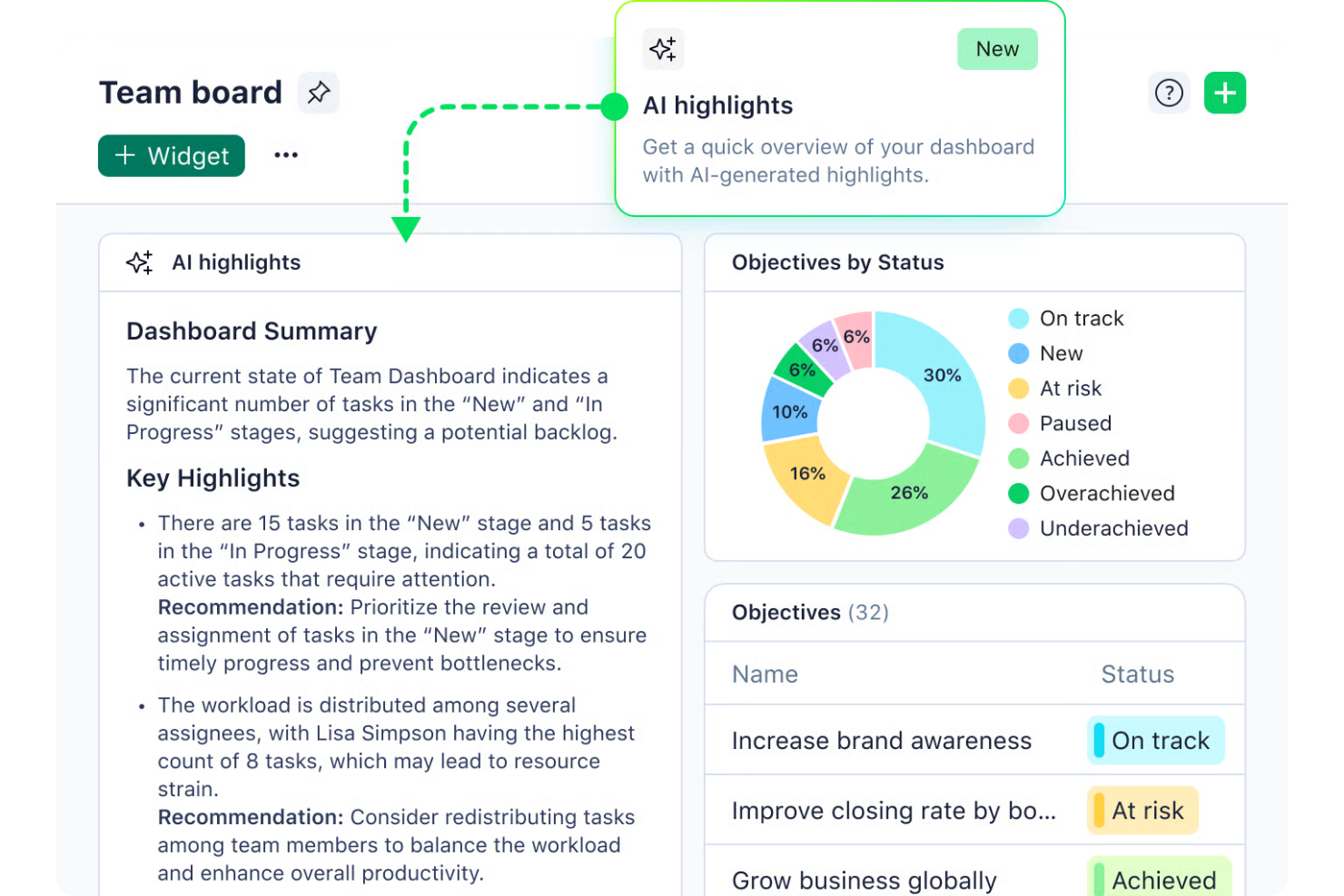
Wrike offre una soluzione versatile per la gestione dei progetti, pensata per i team che desiderano ottimizzare i flussi di lavoro e aumentare la produttività. Progettato per ridurre le attività ripetitive grazie ad automazione e intelligenza artificiale, si rivolge ad aziende di diversi settori, dai colossi del retail agli innovatori tecnologici, che cercano di ottimizzare le operazioni senza la complessità di configurazioni elaborate. Integrandosi perfettamente con gli strumenti già esistenti, Wrike risponde al bisogno di maggiore efficienza e collaborazione efficace nella gestione dei progetti.
Perché ho scelto Wrike
Ho scelto Wrike per la sua capacità unica di integrare intelligenza artificiale e automazione nella gestione dei progetti, rendendolo una scelta ideale per le imprese. Le funzionalità di intelligenza artificiale generativa della piattaforma, come la creazione di piani di progetto e la sintesi delle riunioni, rispondono direttamente all'esigenza di una gestione efficiente delle attività. Inoltre, le dashboard in tempo reale di Wrike rappresentano uno strumento prezioso per monitorare l'avanzamento dei progetti e garantire l'allineamento tra i team, fondamentale per la gestione delle operazioni su larga scala. Queste caratteristiche rendono Wrike un'opzione interessante per le aziende che vogliono migliorare i propri processi di lavoro.
Funzionalità principali di Wrike
Oltre alla pianificazione dei progetti guidata dall'IA e al monitoraggio in tempo reale, ho trovato utili anche le seguenti funzionalità:
- Moduli di richiesta personalizzabili: Consentono al tuo team di adattare i processi di avvio dei progetti alle esigenze specifiche, snellendo la creazione dei compiti.
- Diagrammi di Gantt: Offrono una timeline visiva delle attività di progetto, aiutando il tuo team a pianificare e adattare dinamicamente i programmi.
- Bacheche Kanban: Consentono al tuo team di visualizzare le fasi di lavoro, facilitando il monitoraggio dell'avanzamento e la gestione dei carichi di lavoro.
- Comunicazione integrata nella piattaforma: Favorisce la collaborazione fluida mantenendo tutte le discussioni legate ai progetti direttamente sulla piattaforma.
Integrazioni di Wrike
Le integrazioni includono NetSuite, QuickBooks, Jira, Microsoft Teams, Salesforce, Dropbox, Google Drive, Slack, Box e GitHub.
Pros and Cons
Pros:
- L'IA supporta la prioritizzazione dei progetti aziendali
- Flussi di lavoro altamente personalizzabili per i team
- L'IA supporta la prioritizzazione dei progetti aziendali
Cons:
- Le funzionalità avanzate di IA hanno un costo maggiore
- Curva di apprendimento iniziale ripida
New Product Updates from Wrike
Wrike Adds Klaxoon MCP Integration
Wrike’s Klaxoon MCP integration is now generally available, enabling AI agents to navigate between Wrike tasks and attached whiteboards, read task context, and manage whiteboard attachments via API. For more information, visit Wrike's official site.

Moxo
Ideale per portali rivolti ai clienti
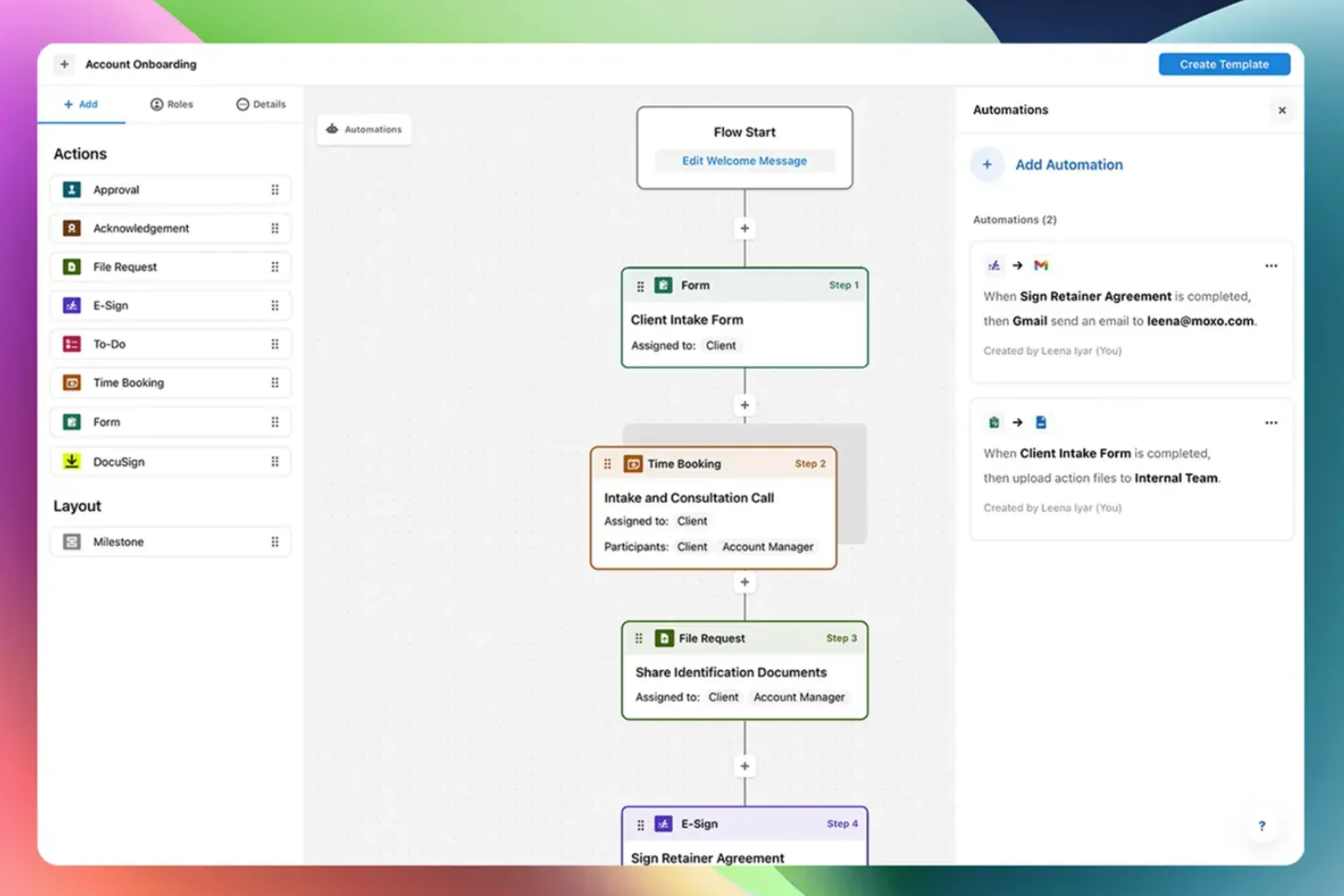
Moxo è una piattaforma di orchestrazione dei flussi di lavoro alimentata dall'IA che combina la costruzione visuale dei workflow, portali rivolti ai clienti, agenti AI e strumenti di comunicazione integrati per gestire processi aziendali multiparte.
Per chi è ideale Moxo?
Moxo è particolarmente adatto a team di medie e grandi dimensioni nei servizi finanziari, legali o professionali che gestiscono flussi di lavoro complessi, rivolti ai clienti, con molteplici stakeholder esterni.
Perché ho scelto Moxo
Moxo si guadagna un posto nella mia shortlist per come gestisce la partecipazione degli stakeholder esterni in un workflow in tempo reale. Quando un cliente deve approvare un documento, compilare un modulo o firmare un contratto, riceve una visualizzazione del portale focalizzata che mostra esattamente l'azione richiesta e il contesto, senza necessità di formazione e senza accesso alla logica interna dei processi. Apprezzo anche il fatto che questa esperienza del portale sia integrata direttamente nel motore del workflow: appena il cliente completa il proprio passaggio, la successiva azione interna viene attivata automaticamente, senza necessità di passaggi manuali.
Funzionalità principali di Moxo
- Framework di agenti AI: Distribuisci agenti Assist, Automate e Amplify per gestire compiti di preparazione, validazione e monitoraggio attorno ai punti decisionali umani di un workflow.
- Costruttore visuale di workflow: Progetta processi multi-step con diramazioni condizionali, percorsi paralleli, cicli e sottoprocessi usando una canvas drag-and-drop.
- Utility AI: Applica azioni AI integrate per estrarre, riassumere, tradurre o trascrivere contenuti in qualsiasi fase del workflow.
- Audit log: Accedi a un registro cronomarcato di ogni azione eseguita su un'istanza di workflow, per compliance e tracciamento della responsabilità.
Integrazioni Moxo
Moxo offre connettori di sincronizzazione dati con Salesforce, HubSpot, Microsoft Dynamics, Zoho, Wealthbox, Redtail, Filevine, Global Relay, Smarsh e Xero, insieme a integrazioni per strumenti come DocuSign, Jira, Slack, Stripe, QuickBooks e connessioni per il caricamento di file da Google Drive, Dropbox, Box e OneDrive. È disponibile su Zapier e offre una REST API e webhook per integrazioni personalizzate.
Pros and Cons
Pros:
- Portali white-label che preservano l'identità del tuo marchio
- Chat, video e condivisione schermo integrati
- Editor drag-and-drop con template riutilizzabili
Cons:
- Nessun timer integrato per il tracciamento della durata delle attività
- Nessuna annotazione integrata nei documenti

Ideale per la governance no-code a livello enterprise
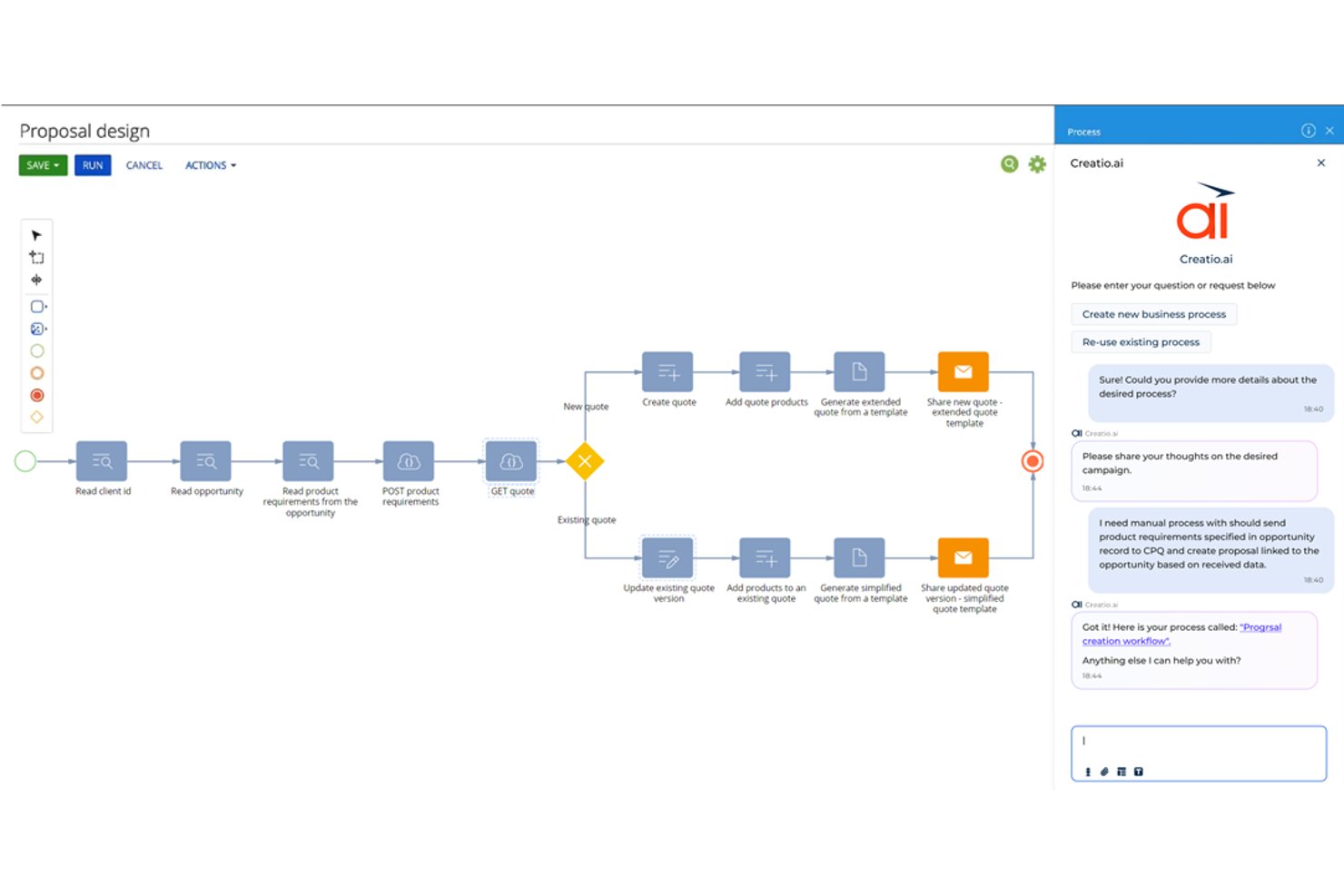
Creatio Studio è una piattaforma AI no-code per creare automazioni dei flussi di lavoro aziendali, applicazioni personalizzate e agenti AI per processi aziendali trasversali.
Per chi è ideale Creatio Studio?
Creatio Studio è particolarmente adatto a team di medie e grandi aziende in settori regolamentati come banche, assicurazioni e pubblica amministrazione che richiedono automazioni dei flussi di lavoro personalizzabili e con una forte governance.
Perché ho scelto Creatio Studio
Ho scelto Creatio Studio tra i migliori perché la governance no-code è veramente centrale nella sua progettazione, non un'aggiunta successiva. Fa rispettare la conformità a GDPR, HIPAA e SOC 2 a livello di flusso di lavoro e automatizza le verifiche di conformità interna per processi IT, operativi e gestionali. Questo significa che il mio team può creare e implementare flussi di lavoro automatici già conformi per progettazione, senza dover effettuare cicli di audit separati successivamente.
Funzionalità principali di Creatio Studio
- Designer di processi visuale: Builder drag-and-drop per progettare flussi di lavoro complessi e a più fasi tra i team.
- Creazione app guidata da IA: Crea applicazioni da prompt in linguaggio naturale grazie a strumenti di IA generativa.
- Libreria di componenti componibili: Accedi e riutilizza un'ampia gamma di blocchi predefiniti per la costruzione di flussi di lavoro.
- Integrazioni di marketplace: Collegati a una raccolta di componenti aggiuntivi per sistemi ERP, CRM, ITSM e di collaborazione.
Integrazioni di Creatio Studio
Creatio Studio offre integrazioni native con Power BI, Microsoft 365, Twilio, WhatsApp, Zoom, Formstack, Avaya e altri. È disponibile un'API per integrazioni personalizzate.
Pros and Cons
Pros:
- Builder per automazione dei flussi di lavoro completo
- Controlli di governance e compliance a livello enterprise
- Capacità di progettazione di processi e app potenziate dall'AI
Cons:
- Curva di apprendimento ripida per i principianti
- Tempi di implementazione lunghi per organizzazioni complesse
New Product Updates from Creatio AI Studio
Creatio Studio Expands AI App-Building Capabilities
Creatio Studio adds expanded AI coding agents, AI-generated pivot tables, and built-in analytics for generated apps. These updates let users build more UI, logic, and reporting components from natural-language prompts. For more information, visit Creatio Studio’s official site.

Ideale per workflow aziendali potenziati dall'IA
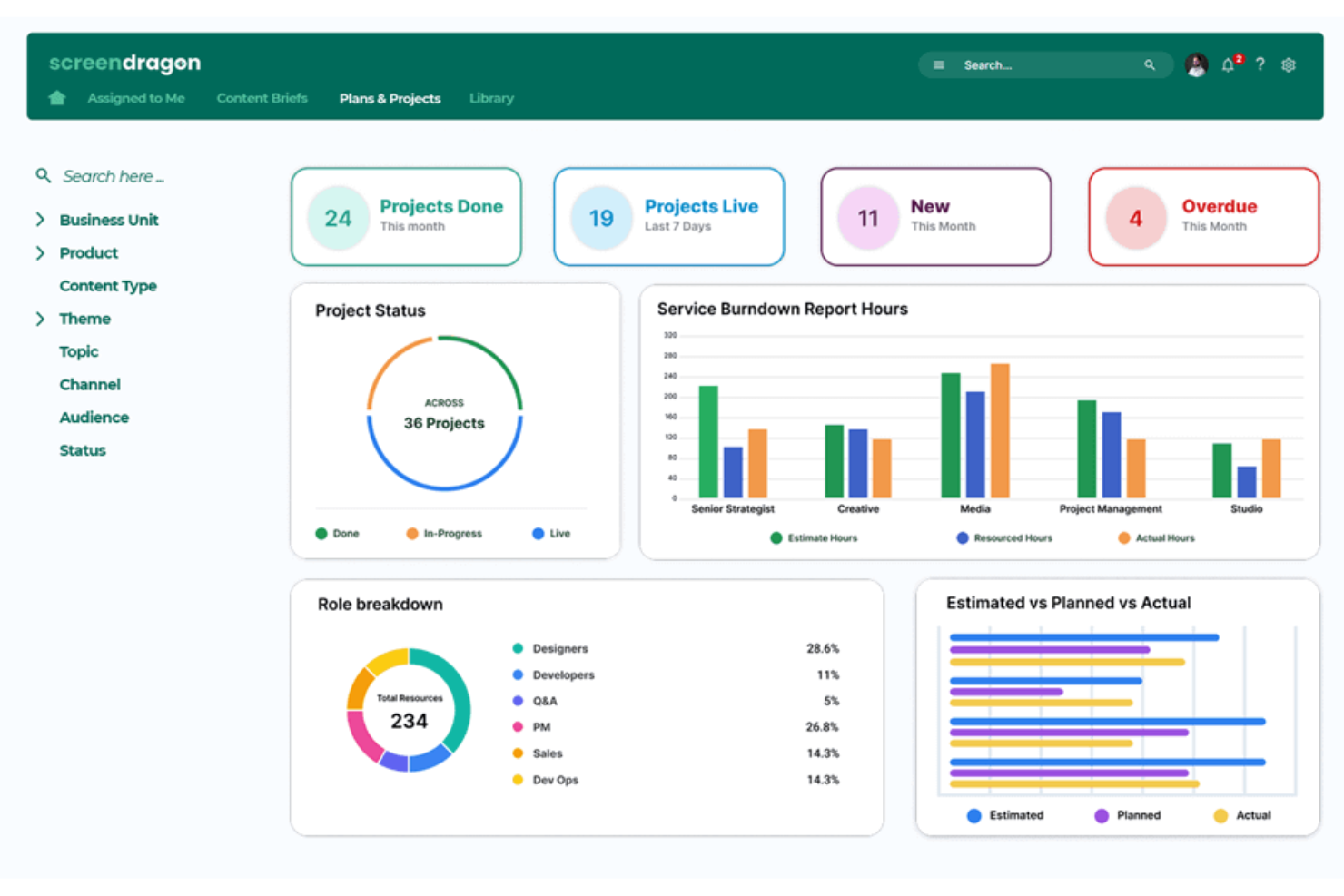
Per le organizzazioni alla ricerca di una soluzione di workflow aziendale guidata dall'IA, Screendragon offre una piattaforma adattabile progettata per trasformare operazioni complesse. Integrando agenti IA con personalizzazione dei workflow senza codice, si rivolge a team creativi e di marketing che desiderano automatizzare le attività ripetitive e concentrarsi su lavori ad alto impatto. Con funzionalità che migliorano l'allineamento del team e il processo decisionale, Screendragon affronta la sfida di gestire in modo efficiente workflow intricati.
Perché ho scelto Screendragon
Ho scelto Screendragon per la sua capacità unica di combinare automazione avanzata con un builder visivo di workflow senza codice, rendendolo estremamente adatto ai team aziendali. Gli agenti IA della piattaforma automatizzano le attività ripetitive, permettendo al tuo team di concentrarsi su iniziative strategiche. Inoltre, la gestione dei workflow di approvazione digitale centralizza dati e commenti, semplificando il processo di revisione e garantendo la conformità. Queste caratteristiche rendono Screendragon un'ottima scelta per chi desidera aumentare produttività e governance nella gestione dei flussi di lavoro.
Funzionalità principali di Screendragon
Oltre alle sue capacità di automazione d'eccellenza, Screendragon offre:
- Moduli dinamici personalizzati: Crea e collega moduli a passaggi automatizzati, personalizzando campi, lingua e layout in base alle esigenze del tuo team.
- Sistema di workflow sicuro con controlli avanzati sui permessi: Progetta workflow con permessi sofisticati per soddisfare requisiti decisionali e di conformità.
- Analisi del workflow con insight e report in tempo reale: Crea report automatizzati personalizzati e monitora aggiornamenti di stato o traguardi in tempo reale utilizzando dashboard personalizzati.
- Sicurezza di livello enterprise: Approfitta di elevati standard di sicurezza dei dati, scalabili per migliaia di utenti a livello globale.
Integrazioni Screendragon
Le integrazioni includono Microsoft Power BI, Slack, Microsoft Teams, HubSpot, Okta, Aprimo, SugarCRM e Adobe. Inoltre, Screendragon può connettersi con oltre 1.000 app tramite Zapier.
Pros and Cons
Pros:
- La piattaforma senza codice consente agli utenti di creare workflow senza programmare
- Le funzionalità di automazione semplificano i processi e migliorano l'efficienza
- Facile da adattare a diverse dimensioni di progetto ed esigenze organizzative
Cons:
- La console di amministrazione e le impostazioni possono essere confuse per i nuovi utenti
- La reportistica e la creazione manuale dei report possono risultare limitate o complesse
New Product Updates from Screendragon
Screendragon Unveils New AI Hub
Screendragon introduced AI Hub, a new capability that lets teams build and manage AI agents directly within workflows. The update helps marketing teams automate tasks, maintain governance controls, and scale AI-driven operations more efficiently. For more information, visit Screendragon's official site.

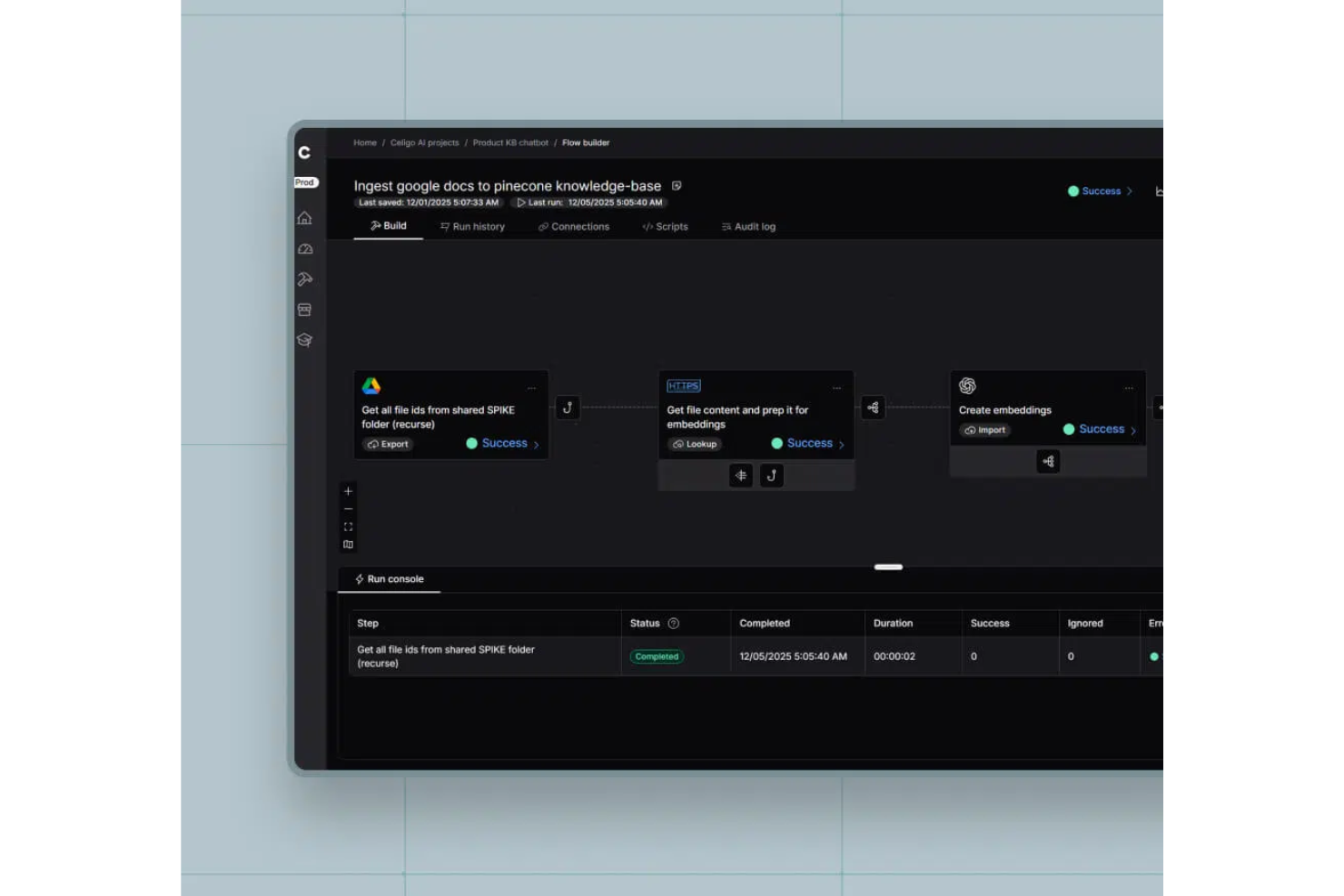
Celigo è una piattaforma software per workflow aziendali alimentata da AI che consente di automatizzare, integrare e orchestrare i processi aziendali tra applicazioni cloud e on-premises utilizzando strumenti basati su AI e connettori predefiniti.
Per chi è ideale Celigo?
Team IT aziendali e operativi che hanno bisogno di automatizzare e collegare workflow tra un'ampia gamma di applicazioni aziendali.
Perché ho scelto Celigo
Ho scelto Celigo come uno dei migliori perché la sua libreria di oltre 1.000 connettori predefiniti consente al mio team di collegare rapidamente i sistemi aziendali senza sviluppo personalizzato. Utilizzo questi connettori per automatizzare workflow tra ERP, CRM e piattaforme di ecommerce. In pratica, ciò significa che possiamo avviare nuove integrazioni in pochi giorni invece che settimane, anche quando lavoriamo con applicazioni legacy o di nicchia.
Funzionalità principali di Celigo
- Flow builder guidato dall'AI: Crea e ottimizza flussi di lavoro utilizzando raccomandazioni e automazioni basate su AI.
- Dashboard di gestione errori: Monitora, risolvi e gestisci errori di integrazione da un'interfaccia centralizzata.
- Controlli di accesso basati sui ruoli: Imposta permessi precisi per utenti e team per gestire la sicurezza dei workflow.
- Analisi dei workflow: Monitora metriche di performance ed efficienza dei processi grazie a strumenti di reportistica e analytics integrati.
Integrazioni Celigo
Celigo offre oltre 1.000 integrazioni native, tra cui Salesforce, NetSuite, Shopify, ServiceNow, Zendesk, Microsoft 365, Google Workspace, Amazon Redshift, Snowflake, Jira e Slack. È disponibile un'API per integrazioni personalizzate.
Pros and Cons
Pros:
- Controlli di conformità integrati per settori regolamentati
- Mappatura dei processi visiva con suggerimenti in tempo reale
- Supporta distribuzione in ambienti multipli e versionamento
Cons:
- La configurazione iniziale può essere complessa per grandi organizzazioni
- Opzioni limitate per la gestione dei workflow offline
New Product Updates from Celigo
Celigo Adds SuiteTax and Variant Publishing for Shopify–NetSuite
Celigo adds NetSuite SuiteTax support and variant-level sales channel publishing to its Shopify–NetSuite integration. These updates improve tax handling and give merchants more control over how product variants are published. For more information, visit Celigo’s official site.
 .
.
TrailHQ
Ideale per l'elaborazione documentale
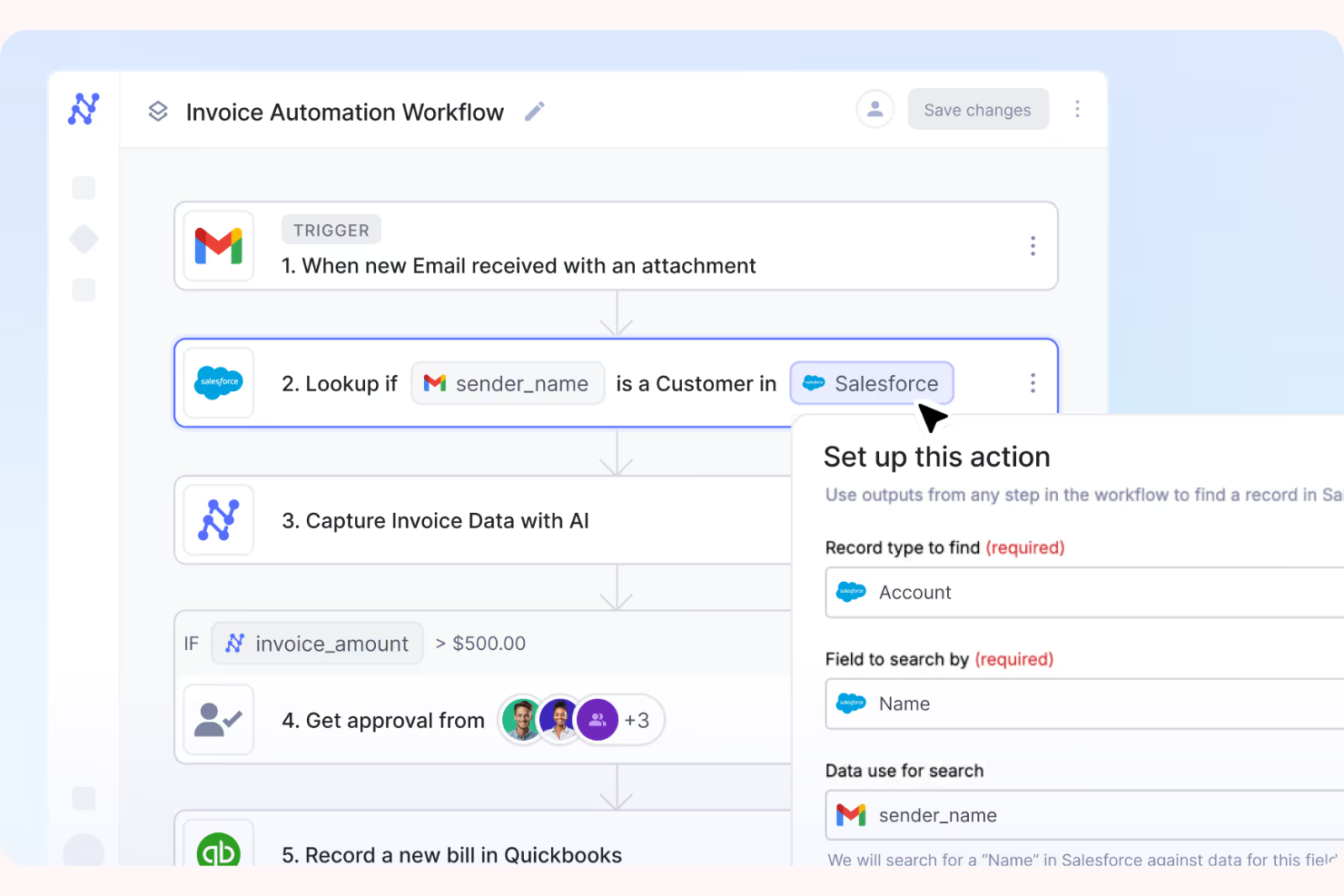
Nanonets è uno strumento di elaborazione documentale basato sull'intelligenza artificiale, progettato per le aziende che necessitano di automatizzare l'estrazione dei dati dai documenti. Serve principalmente settori come la finanza, la logistica e la sanità, dove è comune gestire grandi volumi di documenti.
Perché ho scelto Nanonets: Nanonets si distingue nell'elaborazione documentale, offrendo modelli di IA che apprendono e si adattano alle tue esigenze specifiche. Puoi automatizzare facilmente l'estrazione dei dati da fatture, ricevute e altri documenti. La piattaforma consente di addestrare modelli personalizzati, garantendo precisione ed efficienza. La sua scalabilità la rende adatta ad aziende di qualsiasi dimensione, gestendo efficacemente diversi tipi di documento.
Funzionalità e integrazioni principali:
Le funzionalità comprendono modelli di IA personalizzabili che si adattano ai tuoi documenti, estrazione automatizzata dei dati per risparmiare tempo e scalabilità per gestire volumi documentali variabili. Puoi inoltre beneficiare di un'interfaccia intuitiva che semplifica il processo di configurazione.
Le integrazioni includono Salesforce, QuickBooks, Google Drive, Dropbox, Slack, Microsoft Dynamics 365, SAP, Zoho CRM, HubSpot e Box.
Pros and Cons
Pros:
- Controllo granulare dei permessi e accesso basato sui ruoli
- Infrastruttura sicura conforme a SOC2
- SLA aziendali con supporto prioritario
Cons:
- Il tempo di addestramento varia in base alle prestazioni del sistema
- Controlli limitati per l'elaborazione dei file di dati

n8n
Ideale per flussi di lavoro personalizzati
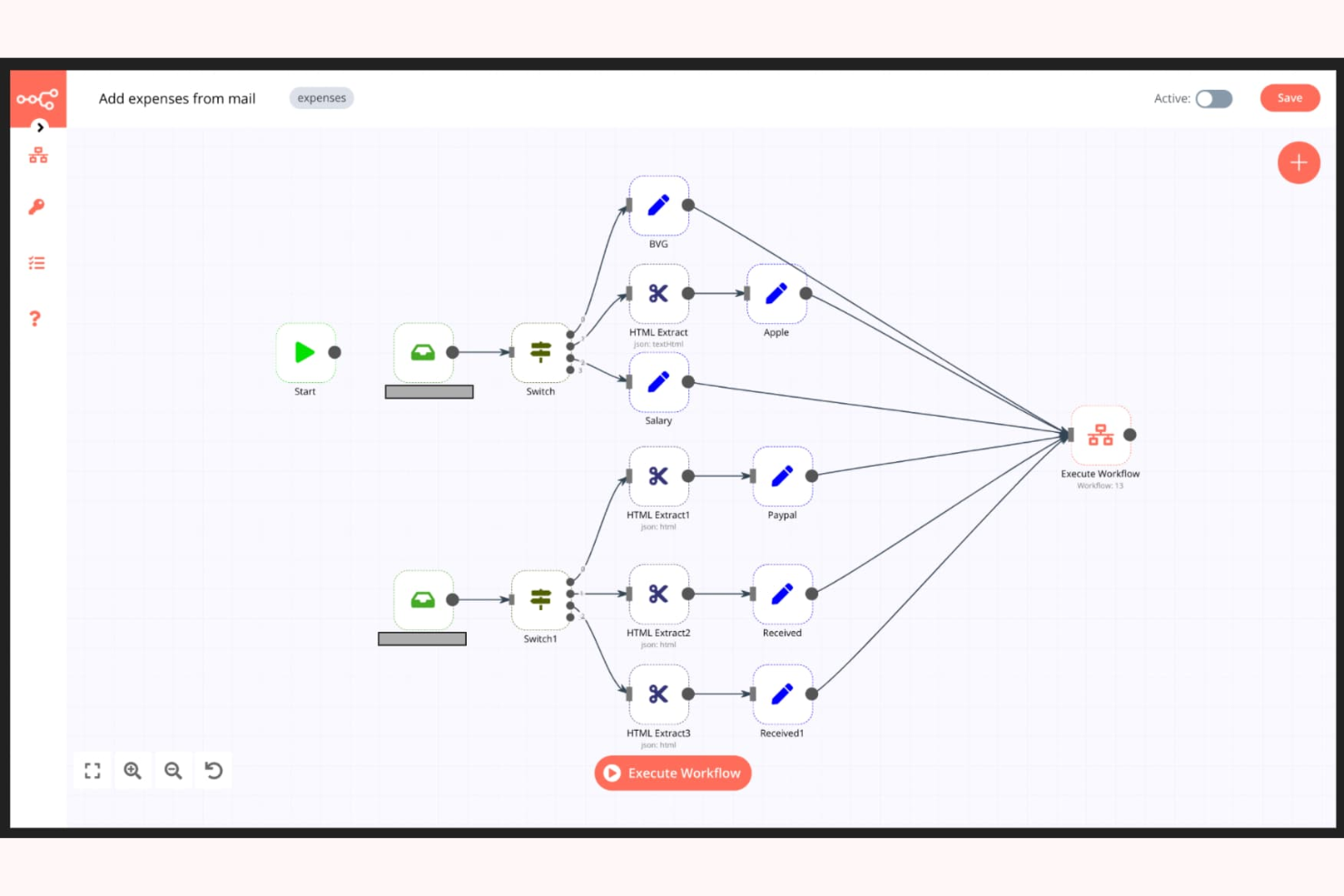
n8n è uno strumento open-source per l'automazione dei workflow che consente agli utenti di creare flussi di lavoro personalizzati senza bisogno di una programmazione complessa. È molto apprezzato da sviluppatori e utenti esperti che desiderano automatizzare attività ripetitive e processi di gestione dati.
Perché ho scelto n8n: n8n è perfetto per i flussi di lavoro personalizzati, offrendo una piattaforma flessibile ed espandibile. L'editor visuale dei workflow permette al tuo team di progettare processi su misura per le vostre esigenze. Grazie alla sua natura open-source, puoi modificare ed espandere le sue funzionalità per adattarle alle tue specifiche necessità. La piattaforma supporta anche logiche complesse, consentendo scenari di automazione sofisticati.
Funzionalità e integrazioni principali:
Le funzionalità includono un editor visuale dei workflow per semplificare la progettazione dei processi, supporto per logiche complesse per creare automazioni avanzate e la possibilità di eseguirlo sul proprio server per il massimo controllo. Puoi inoltre usufruire di una comunità attiva che contribuisce costantemente a miglioramenti continui.
Le integrazioni includono Slack, Google Sheets, GitHub, Trello, Airtable, Dropbox e Stripe.
Pros and Cons
Pros:
- Interfaccia intuitiva e facile da usare
- Sicurezza avanzata con SSO, supporto LDAP ed encriptazione
- Completamente on-premise con supporto al controllo di versione
Cons:
- Modello di prezzo basato sulle esecuzioni costoso
- Richiede capacità di programmazione per attività avanzate
Domo
Ideale per la visualizzazione dei dati
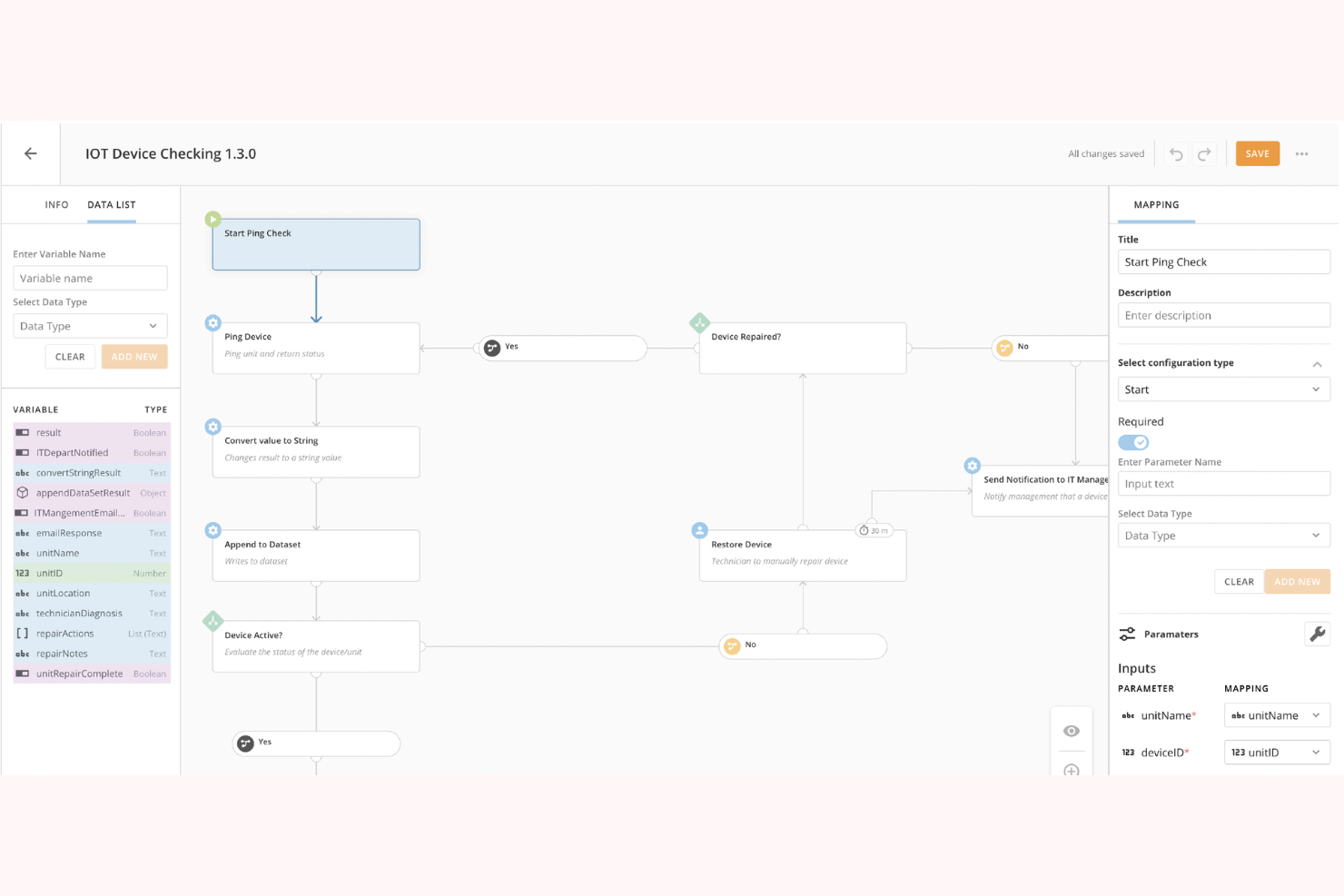
Domo è una piattaforma di business intelligence basata su cloud rivolta alle imprese guidate dai dati che desiderano visualizzare e analizzare i dati in modo efficace. I suoi principali utenti sono leader aziendali e analisti che hanno bisogno di prendere decisioni informate rapidamente.
Perché ho scelto Domo: Domo eccelle nella visualizzazione dei dati, offrendo dashboard interattive che forniscono al tuo team informazioni in tempo reale. La sua interfaccia drag-and-drop semplifica la creazione di visualizzazioni personalizzate senza la necessità di competenze tecniche avanzate. La capacità di Domo di gestire grandi quantità di dati permette al tuo team di individuare facilmente tendenze e schemi. La piattaforma include anche una governance dei dati integrata per garantire la qualità e la sicurezza dei dati.
Caratteristiche e integrazioni principali:
Le funzionalità includono dashboard interattive per approfondimenti in tempo reale, strumenti drag-and-drop per visualizzazioni personalizzate e governance dei dati integrata per mantenere la qualità dei dati. Puoi anche usufruire di funzionalità mobili per consultare le dashboard ovunque.
Le integrazioni includono Salesforce, Microsoft 365, Slack, Google Analytics, HubSpot, Shopify, Zendesk, QuickBooks, Marketo e Facebook.
Pros and Cons
Pros:
- Dashboard personalizzabili
- Gestione di grandi set di dati
- Aggiornamenti dei dati in tempo reale
Cons:
- Potrebbe essere necessario supporto tecnico
- Richiede una gestione costante dei dati

Box
Ideale per la condivisione sicura dei file
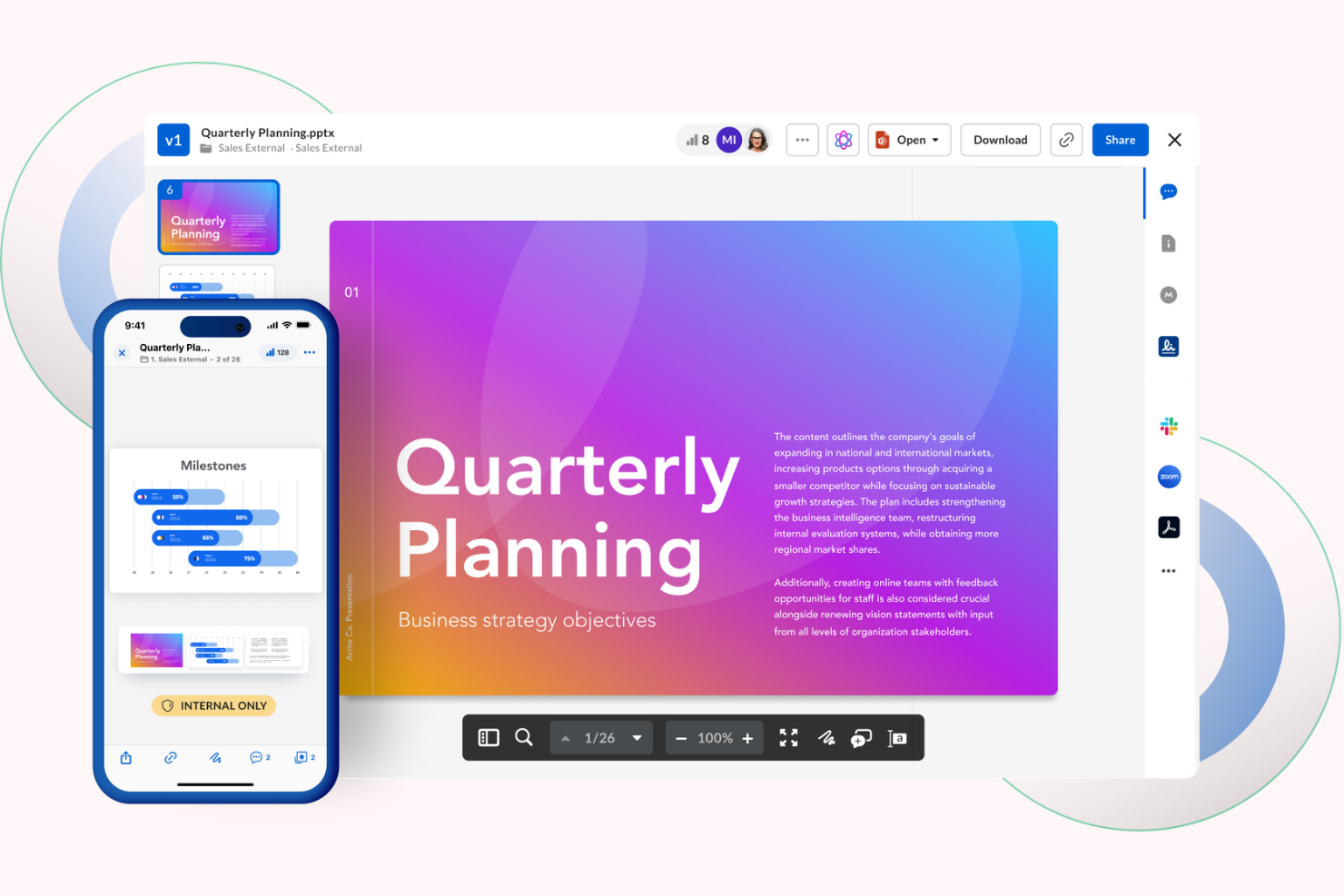
Box è una piattaforma di gestione dei contenuti e collaborazione basata su cloud, progettata per le aziende che necessitano di una condivisione e gestione sicura dei file. I suoi utenti principali sono le imprese che danno priorità alla protezione dei dati e all'automazione dei flussi di lavoro.
Perché ho scelto Box: Box offre un ambiente sicuro per la condivisione dei file con misure di sicurezza avanzate come la protezione dai ransomware. Si distingue per la gestione dei contenuti alimentata dall'IA e per le applicazioni no-code, che consentono di automatizzare i flussi di lavoro. L'accento posto sulla sicurezza rende la piattaforma ideale per i settori che richiedono una rigorosa conformità dei dati. Inoltre, Box fornisce approfondimenti intelligenti per gestire efficacemente i tuoi dati.
Funzionalità e integrazioni principali:
Funzionalità includono misure di sicurezza avanzate per proteggere i tuoi dati, gestione dei contenuti tramite IA per automatizzare i processi e applicazioni no-code per una facile personalizzazione dei flussi di lavoro.
Integrazioni disponibili con Microsoft 365, Google Workspace, Slack, Salesforce, IBM, Okta, Adobe, Zoom, Oracle e ServiceNow.
Pros and Cons
Pros:
- Solide funzionalità di sicurezza dei dati
- Approfondimenti sui contenuti tramite IA
- Automazione dei flussi di lavoro senza codice
Cons:
- Le limitazioni di archiviazione riducono l'efficienza
- Gli strumenti di collaborazione sui documenti sono insufficienti

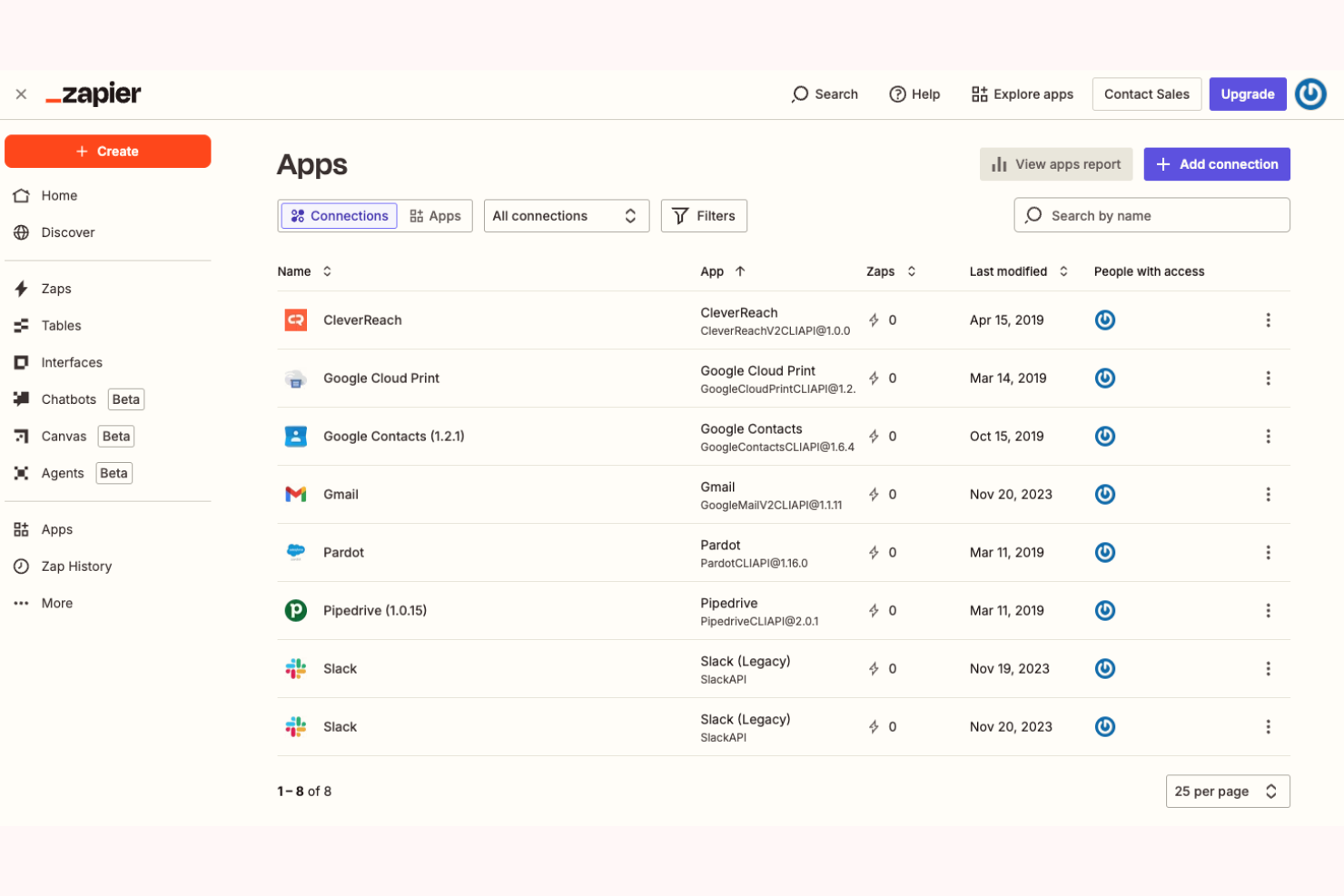
Zapier è una piattaforma di orchestrazione AI che consente ai team aziendali di connettere migliaia di app e creare flussi di lavoro automatizzati a più passaggi senza codice. Viene utilizzata da team di marketing, vendite, RevOps, IT, HR e operations per centralizzare i flussi di lavoro e ridurre le attività manuali in grandi ecosistemi tecnologici distribuiti.
Perché ho scelto Zapier: Zapier si distingue per le sue capacità di automazione avanzate combinate con un'esperienza accessibile senza codice. I team possono creare flussi di lavoro utilizzando il linguaggio naturale con Zapier Copilot, aggiungere passaggi alimentati dall'AI e gestire le automazioni su larga scala tramite controlli amministrativi, permessi e registri di controllo. Con migliaia di integrazioni disponibili, Zapier è particolarmente efficace per organizzazioni con ambienti complessi e multi-sistema.
Caratteristiche e integrazioni principali:
Funzionalità includono flussi di lavoro scalabili a più passaggi con logica e azioni AI, supportati da strumenti di gestione dati integrati come Zapier Tables e Forms. I piani Enterprise aggiungono amministrazione centralizzata, controlli di accesso e funzionalità di sicurezza per supportare grandi team.
Integrazioni includono Salesforce, HubSpot, Slack, Google Sheets, Gmail, Stripe, Airtable, ServiceNow, Shopify, OpenAI e altre ancora.
Pros and Cons
Pros:
- Sicurezza, governance e controlli amministrativi avanzati
- Ecosistema ampio di integrazioni app e AI
- Automazioni su scala enterprise con strumenti no-code e AI-first
Cons:
- Nessuna app mobile
- Il piano gratuito è limitato a flussi di lavoro a due passaggi
Altri software per flussi di lavoro aziendali basati sull'IA
Ecco alcune altre opzioni di software per flussi di lavoro aziendali basati sull’IA che non sono state incluse nel mio elenco, ma che vale comunque la pena valutare:
- Appian
Ideale per lo sviluppo low-code
- Jitterbit
Ideale per l'integrazione delle API
- Gumloop
Ideale per la pianificazione collaborativa
- Atomicwork
Ideale per i piccoli team
- Flowable
Ideale per soluzioni BPM
- AutoKitteh
Ideale per il testing automatico


Come Valuto il Software AI per Workflow Aziendali
Ogni strumento qui deve offrire un’IA che supporti realmente i team di delivery trasversali—non semplicemente un chatbot aggiunto a una bacheca di attività. Valuto tutto su due livelli: le funzionalità di base che uno strumento deve offrire per rientrare nella lista, e i fattori differenzianti che distinguono un fornitore dall'altro.
Funzionalità di Base (Requisiti Minimi per Questa Lista)
Quando seleziono gli strumenti per la mia lista, valuto ciascuno su una scala da 0 (non offre la funzionalità) a 5 (eccelle in quest'area) per ogni funzionalità di base elencata di seguito. Poi calcolo il punteggio totale dello strumento in percentuale. Ogni software deve raggiungere un punteggio totale minimo del 65% per essere considerato nell'elenco.
- Automazione del Workflow Guidata da AI: Cerco strumenti che vadano oltre semplici regole if/then—come il routing automatico delle richieste di approvazione, la riassegnazione dei compiti quando sorgono blocchi, o il trigger di passaggi successivi tra team.
- Orchestrazione di Processi Trasversali: Il software dovrebbe coordinare i workflow tra diversi reparti, ad esempio sincronizzando revisioni di design con sprint di ingegneria e approvazioni degli stakeholder in un flusso unificato.
- Analisi Predittiva dei Progetti: Valuto se la piattaforma può prevedere rischi di calendario, segnalare conflitti di risorse o evidenziare milestone a rischio utilizzando schemi ricavati dai dati dei progetti passati.
- Capacità di AI Generativa: Gli strumenti ottengono punteggi più alti se l’intelligenza artificiale redige aggiornamenti di stato, riassume note di riunione o risponde a domande in linguaggio naturale sulla salute e l’avanzamento del progetto.
- Integrazione con Sistemi Aziendali: Verifico la presenza di connessioni native e bidirezionali con le piattaforme già in uso dai team—come Jira, Salesforce, ServiceNow, SAP o Slack—affinché i workflow coprano l’intero stack tecnologico.
- Governance e Controlli di Sicurezza: Accesso basato sui ruoli, tracciamento delle attività, Single Sign-On e certificazioni di conformità come SOC 2 e ISO 27001, influiscono tutti su quanto uno strumento sia adatto alle esigenze aziendali.
Una volta selezionati gli strumenti che soddisfano questi criteri, considero cosa distingue ogni piattaforma.
Fattori Differenzianti (Cosa Distingue i Fornitori)
Ecco come confronto e metto a confronto i diversi fornitori:
Funzionalità Distintive
Cerco costruttori AI no-code che consentano ai responsabili delle operations di progettare workflow in modo visivo, senza attendere l’intervento degli sviluppatori. Agenti AI autonomi aggiungono un ulteriore livello—strumenti in cui gli agenti possono gestire autonomamente le richieste in arrivo, assegnare compiti e segnalare blocchi fanno risparmiare tempo reale ai team. Anche le capacità di process mining spiccano, soprattutto quando la piattaforma può analizzare i workflow esistenti e individuare dove si trovano ritardi o ridondanze prima ancora di automatizzare.
Oltre le Funzionalità
La trasparenza dell’AI è fondamentale in questo settore. Controllo se una piattaforma spiega perché ha fatto una raccomandazione o segnalato un rischio, così i responsabili di progetto possono giustificare le decisioni agli stakeholder. La prevedibilità dei costi è un altro fattore chiave—alcuni fornitori fanno pagare per ogni esecuzione di workflow, il che può far aumentare rapidamente i costi se si gestiscono centinaia di processi automatizzati ogni giorno. Valuto inoltre la rapidità con cui i team possono entrare in funzione, cercando modelli predefiniti e onboarding guidato che riducono il tempo tra l’acquisto e l’attivazione del primo workflow in produzione.
Come scegliere un software per flussi di lavoro aziendali basato sull'IA
È facile perdersi in lunghi elenchi di funzionalità e strutture tariffarie complesse. Per aiutarti a rimanere concentrato mentre affronti il tuo specifico processo di selezione del software, ecco una lista di controllo dei fattori da tenere a mente:
| Fattore | Cosa considerare |
|---|---|
| Scalabilità | Il software può crescere insieme alla tua azienda? Cerca opzioni che supportino l'aumento degli utenti e dei processi senza problemi. Valuta se lo strumento è in grado di gestire un carico di lavoro aggiuntivo o se richiederà costosi aggiornamenti. |
| Integrazioni | Si integra con gli strumenti che già utilizzi? Verifica la compatibilità con i sistemi attuali, come CRM, ERP o piattaforme di comunicazione. Evita gli strumenti che richiedono numerose soluzioni alternative o che non si sincronizzano con il software principale. |
| Personalizzazione | Quanto è flessibile lo strumento rispetto alle tue esigenze? Valuta se puoi adattare i flussi di lavoro e i pannelli di controllo ai tuoi processi. Fai attenzione ai sistemi eccessivamente rigidi che ti costringono a utilizzare strutture predefinite. |
| Facilità d'uso | L'interfaccia è intuitiva per la tua squadra? Verifica se gli utenti non tecnici possono navigare facilmente ed eseguire le attività senza frustrazione. Un'interfaccia complessa può portare a bassi tassi di adozione. |
| Implementazione e inserimento | Quanto tempo ci vorrà per essere operativi? Cerca fornitori che offrano un ampio supporto durante l'inserimento, inclusi materiali formativi e assistenza nella configurazione. Evita gli strumenti con processi di implementazione lunghi e complessi. |
| Costo | Il prezzo rientra nel tuo budget? Confronta i costi con quelli dei concorrenti e verifica la presenza di commissioni nascoste. Assicurati che le funzionalità di cui hai bisogno siano incluse nel prezzo base e considera il potenziale ROI. |
| Misure di sicurezza | I tuoi dati e processi sono sicuri? Verifica che il software sia conforme agli standard di sicurezza del settore e offra funzionalità come la crittografia e i controlli degli accessi. Considera lo storico del fornitore nella protezione dei dati. |
| Requisiti di conformità | Lo strumento soddisfa le esigenze di conformità del tuo settore? Verifica la presenza di funzionalità che supportino requisiti normativi come GDPR o HIPAA. La mancata conformità può comportare sanzioni e danneggiare la tua reputazione. |
Che cos'è il software AI per i flussi di lavoro aziendali?
Il software AI per i flussi di lavoro aziendali è uno strumento progettato per automatizzare e ottimizzare i processi aziendali all'interno di un'organizzazione. Viene generalmente utilizzato da professionisti come responsabili di progetto, specialisti IT e squadre operative per migliorare l'efficienza e la produttività. Le funzionalità di automazione, integrazione dei dati e analisi in tempo reale aiutano a gestire i flussi di lavoro, ridurre le attività manuali e garantire un flusso accurato dei dati. Nel complesso, questi strumenti offrono un valore significativo migliorando l'efficienza operativa e supportando processi decisionali informati.
Funzionalità
Quando scegli un software AI per i flussi di lavoro aziendali, presta attenzione alle seguenti funzionalità chiave:
- Automazione: automatizza le attività ripetitive per risparmiare tempo e ridurre gli errori umani.
- Integrazione dei dati: si connette a diverse fonti di dati per garantire un flusso ottimizzato dei dati tra i sistemi.
- Analisi in tempo reale: fornisce informazioni e analisi utili a supportare i processi decisionali e monitorare le prestazioni.
- Flussi di lavoro personalizzabili: consente di adattare i processi alle esigenze e agli obiettivi aziendali specifici.
- Interfaccia intuitiva: garantisce facilità d'uso per tutti i membri della squadra, riducendo la curva di apprendimento.
- Funzionalità di sicurezza: protegge i dati sensibili con crittografia e controlli degli accessi.
- Supporto alla conformità: aiuta a soddisfare le normative e gli standard del settore, riducendo i rischi.
- Scalabilità: si adatta alle esigenze aziendali in crescita, supportando l'aumento dei carichi di lavoro e degli utenti.
- Strumenti di collaborazione: facilitano la comunicazione e il lavoro di squadra tra i reparti.
- Accesso da dispositivi mobili: consente di gestire i flussi di lavoro ovunque ci si trovi, garantendo flessibilità e reattività.
Vantaggi
L'implementazione di un software AI per i flussi di lavoro aziendali offre diversi vantaggi alla tua squadra e alla tua azienda. Ecco alcuni dei vantaggi che puoi aspettarti:
- Maggiore efficienza: automatizza le attività ripetitive, consentendo alla tua squadra di concentrarsi su attività di maggiore valore.
- Maggiore accuratezza dei dati: integra i dati tra i sistemi, riducendo gli errori e garantendo un flusso coerente delle informazioni.
- Migliore processo decisionale: offre analisi e informazioni in tempo reale per supportare decisioni aziendali consapevoli.
- Maggiore flessibilità: i flussi di lavoro personalizzabili e le soluzioni scalabili si adattano alle esigenze e alla crescita della tua azienda.
- Conformità migliorata: supporta i requisiti normativi con funzionalità di conformità integrate, riducendo al minimo i rischi.
- Collaborazione più efficace: offre strumenti che facilitano il lavoro di squadra e la comunicazione tra i reparti.
- Risparmio sui costi: riduce il lavoro manuale e gli errori, portando nel tempo a una diminuzione dei costi operativi.
Costi e prezzi del software AI per i flussi di lavoro aziendali
La selezione di un software per i flussi di lavoro aziendali basato sull'IA richiede la comprensione dei vari modelli e piani tariffari disponibili. I costi variano in base alle funzionalità, alle dimensioni del team, ai componenti aggiuntivi e ad altri fattori. La tabella seguente riepiloga i piani comuni, i relativi prezzi medi e le funzionalità generalmente incluse nelle soluzioni software per i flussi di lavoro aziendali basate sull'IA:
Tabella di confronto dei piani per il software aziendale per i flussi di lavoro basato sull'IA
| Tipo di piano | Prezzo medio | Funzionalità comuni |
|---|---|---|
| Piano gratuito | $0 | Automazione di base delle attività, integrazioni limitate e assistenza della comunità. |
| Piano personale | $15-$2,347/utente/mese | Automazione delle attività, analisi di base, integrazione con le app più diffuse e personalizzazioni limitate. |
| Piano aziendale | $244-$3293/utente/mese | Automazione avanzata, analisi potenziate, un numero maggiore di integrazioni e flussi di lavoro personalizzati. |
| Piano per grandi aziende | $50-$15,000/utente/mese | Suite completa per l'automazione, analisi in tempo reale, integrazioni illimitate, funzionalità di sicurezza avanzate e assistenza dedicata. |
Domande frequenti sul software aziendale per i flussi di lavoro basato sull'IA
Ecco alcune risposte alle domande comuni sul software aziendale per i flussi di lavoro basato sull’IA:
Qual è la differenza tra il software basato sul cloud e quello in sede?
Il software basato sul cloud è ospitato sui server del fornitore e vi si accede online, mentre il software in sede è installato sui server della tua azienda. Le soluzioni basate sul cloud offrono un accesso e una scalabilità più semplici, mentre le soluzioni in sede garantiscono un maggiore controllo sui dati e sulla sicurezza. Quando decidi, considera le esigenze del tuo team e le capacità del reparto IT.
Come posso garantire la sicurezza dei dati con un software per i flussi di lavoro?
Sì, la sicurezza dei dati è essenziale. Cerca un software che offra crittografia, controlli degli accessi e conformità agli standard di settore come il GDPR o l’HIPAA. Esamina sempre le misure di sicurezza del fornitore e valuta la possibilità di condurre una verifica di sicurezza per assicurarti che soddisfino i requisiti della tua organizzazione.
Il software per i flussi di lavoro può essere personalizzato in base alle esigenze della mia azienda?
Sì, molte soluzioni software per i flussi di lavoro offrono funzionalità personalizzabili. Spesso puoi adattare flussi di lavoro, cruscotti e report per allinearli ai tuoi processi specifici. Cerca strumenti con opzioni di personalizzazione flessibili e considera la capacità del tuo team di gestire queste personalizzazioni senza assistenza esterna.
Quanto tempo richiede l'implementazione di un software per i flussi di lavoro?
Il tempo di implementazione varia in base alla complessità e alla portata del software. Alcuni strumenti offrono una configurazione rapida con personalizzazioni minime, mentre altri possono richiedere settimane o mesi per una piena integrazione. Pianifica le fasi di formazione e test e assegna le risorse necessarie per garantire una transizione fluida.
Cosa succede ora:
Se stai cercando un software aziendale per i flussi di lavoro basato sull'IA, contatta gratuitamente un consulente SoftwareSelect per ricevere consigli.
Compili un modulo e fai una breve conversazione durante la quale il consulente approfondirà le tue esigenze specifiche. Poi riceverai una selezione ristretta di software da esaminare. Ti assisterà inoltre durante l'intero processo di acquisto, comprese le negoziazioni sul prezzo.