

I 10 migliori software AI per il budget dei progetti recensiti nel 2026

10 Elenco dei migliori software per la gestione del budget dei progetti con IA


La gestione del budget di un progetto può diventare rapidamente complicata, soprattutto quando i costi cambiano o emergono nuove spese. Il software per la gestione del budget dei progetti con IA semplifica il processo fornendo numeri aggiornati, previsioni e informazioni affidabili. Offre una visione più chiara, così puoi intervenire prima che piccoli problemi si trasformino in sforamenti di budget.
Ho testato un'ampia gamma di strumenti e mi sono concentrato su quelli che offrono un valore concreto ai project manager. Le mie recensioni si focalizzano su efficienza, accuratezza e capacità di ogni soluzione di supportare le attività quotidiane di gestione del budget.
In questo articolo presenterò le mie migliori scelte e spiegherò come le loro funzionalità di IA possono aiutarti a tenere sotto controllo il budget dall'inizio alla fine.
Perché fidarsi dei nostri consigli sui software
Il nostro team testa e recensisce software dal 2012. In quanto project manager noi stessi, sappiamo quanto sia difficile — e importante — scegliere il software giusto.
Per questa guida, abbiamo valutato gli strumenti attraverso test pratici e ricerche indipendenti, assegnando un punteggio agli strumenti in base ai nostri criteri di selezione. Ci basiamo inoltre sulle competenze di leader di pensiero del settore e di professionisti attivi nella gestione dei progetti.
Le nostre recensioni riflettono il nostro giudizio editoriale umano, non un discorso di vendita.
Revisori esperti:
Tabella comparativa dei software per la gestione del budget dei progetti con IA
Questa tabella comparativa riassume i dettagli sui prezzi delle mie migliori selezioni di software per la gestione del budget dei progetti con IA.
| Tool | Best For | Trial Info | Price | ||
|---|---|---|---|---|---|
| 1 | Ideale per la gestione avanzata di tempo e fatturazione | Prova gratuita di 14 giorni + demo gratuita disponibile | Da $19.90/utente/mese (fatturazione annuale) | Website | |
| 2 | Ideale per la gestione progetti guidata dall’intelligenza artificiale | Prova gratuita di 14 giorni + piano gratuito disponibile | Da $10/utente/mese (fatturato annualmente) | Website | |
| 3 | Ideale per micro-budget | Demo gratuita disponibile | Prezzo su richiesta | Website | |
| 4 | Ideale per l'IA nella previsione dei progetti | Demo gratuita disponibile | Prezzo su richiesta | Website | |
| 5 | Ideale per funzionalità contabili integrate | Prova gratuita di 30 giorni | Da $38/mese | Website | |
| 6 | Ideale per strumenti di assistenza AI | Demo gratuita disponibile | Prezzo su richiesta | Website | |
| 7 | Ideale per l'ottimizzazione della pianificazione del team | Prova gratuita di 34 giorni | Da $14.99/mese | Website | |
| 8 | Ideale per l'automazione tramite IA | Prova gratuita di 30 giorni | A partire da $25/utente/mese (fatturato annualmente) | Website | |
| 9 | Ideale per la gestione delle risorse | Demo gratuita disponibile | Prezzo su richiesta | Website | |
| 10 | Ideale per la pianificazione degli scenari | Demo gratuita disponibile | Prezzo su richiesta | Website |


Recensione dei migliori software per la gestione del budget dei progetti con IA
Di seguito trovi i miei riepiloghi dettagliati dei migliori software per la gestione del budget dei progetti con IA inclusi nel mio elenco. Le mie recensioni offrono uno sguardo approfondito sulle funzionalità principali, sui vantaggi & svantaggi, sulle integrazioni e sui casi d’uso ideali di ogni strumento, per aiutarti a trovare quello più adatto a te.

Scoro
Ideale per la gestione avanzata di tempo e fatturazione
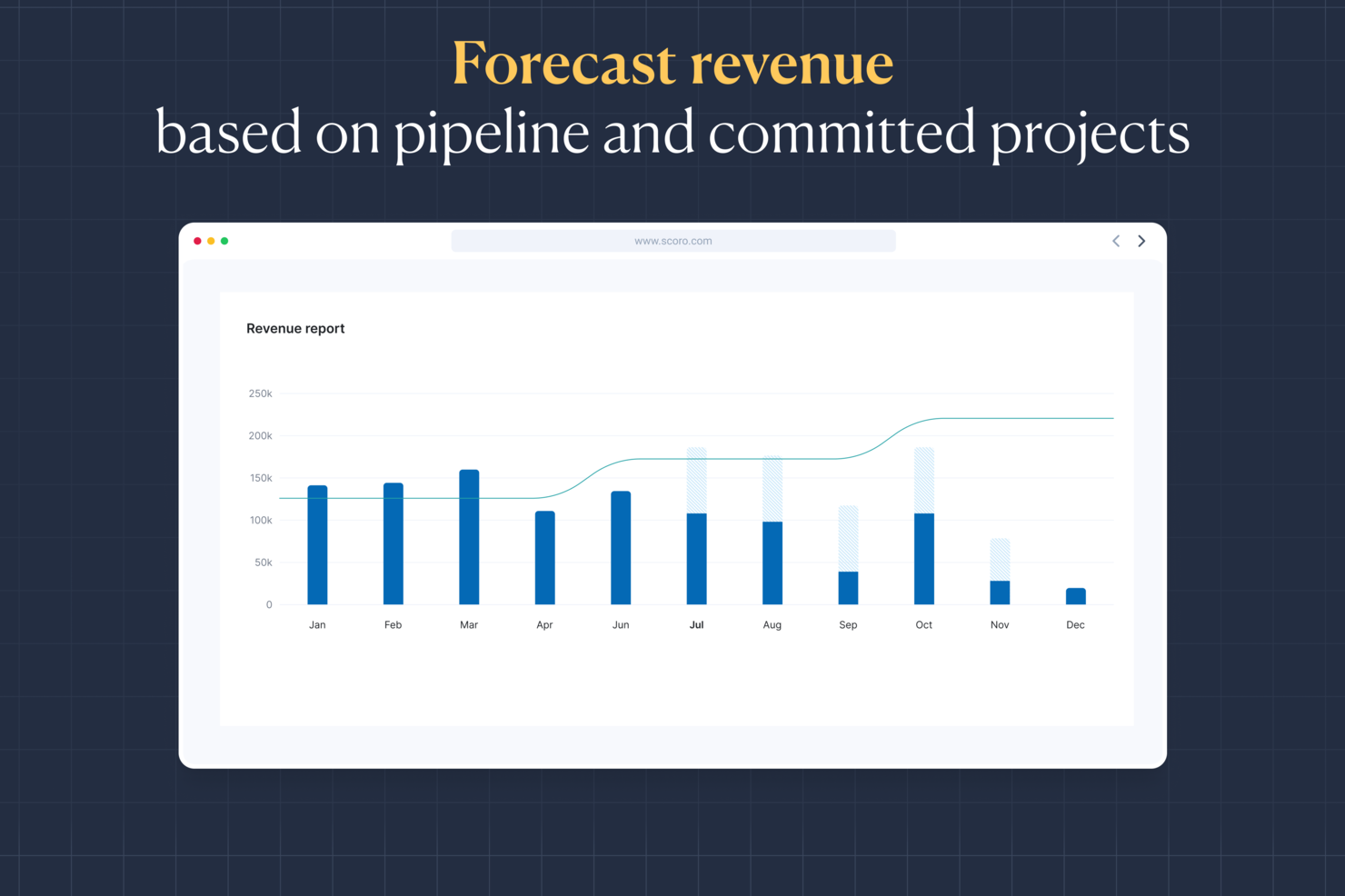
Per le aziende che cercano un software avanzato per la gestione del budget dei progetti AI, Scoro offre una soluzione interessante. Questo strumento è particolarmente indicato per piccole e medie imprese di diversi settori, come consulenze, IT e ingegneria, che necessitano di solide capacità di gestione dei progetti e finanziaria. Scoro aiuta a risolvere le comuni problematiche associate agli strumenti di gestione progetti frammentati offrendo una piattaforma unificata che migliora la visibilità e il controllo sulle finanze dei progetti.
Perché ho scelto Scoro
Ho scelto Scoro per la sua capacità unica di combinare analisi basate su AI con funzionalità complete di gestione finanziaria dei progetti. Con Scoro puoi monitorare in tempo reale i consumi del budget e prevedere la redditività, essenziale per mantenere il controllo finanziario. Inoltre, la sua interfaccia intuitiva, abbinata a funzionalità avanzate di monitoraggio delle ore e fatturazione, lo rende una scelta eccellente per chi desidera gestire i budget di progetto in modo più efficace.
Funzionalità principali di Scoro
Oltre alle analisi basate su AI, Scoro offre diverse altre funzioni per supportare la pianificazione del budget dei progetti:
- Monitoraggio del tempo: Questa funzionalità consente di controllare il tempo dedicato ai progetti, garantendo una fatturazione accurata e una gestione ottimale del tempo.
- Fatturazione: Crea e invia fatture direttamente dalla piattaforma, semplificando l’intero processo di fatturazione.
- Gestione dei costi: Tieni traccia delle spese e dei budget di progetto in un unico luogo, offrendo una chiara visibilità sulle prestazioni finanziarie.
- Strumenti di collaborazione: Favorisce il lavoro di squadra e la comunicazione all’interno dell’organizzazione per migliorare la consegna dei progetti.
Integrazioni Scoro
Le integrazioni includono Google Calendar, Microsoft Exchange, Xero, QuickBooks, Sage Intacct, Expensify, Stripe e Jira.
Pros and Cons
Pros:
- Insight aziendali alimentati da AI
- Funzionalità avanzate di pianificazione delle risorse
- Solidi strumenti di gestione finanziaria
Cons:
- Prezzi più alti per piccoli team
- Curva di apprendimento iniziale ripida
New Product Updates from Scoro

Scoro Adds Time Mobile App and ELI Improvements
Scoro adds the Scoro Time mobile app for iOS/Android to track time anywhere and expands ELI with attachments, smarter filtering, and trigger-based actions. For more information, visit Scoro's official site.

Wrike
Ideale per la gestione progetti guidata dall’intelligenza artificiale

Per la tua squadra alla ricerca di una soluzione software per il budget dei progetti AI, Wrike rappresenta una scelta convincente grazie alle sue complete capacità di gestione dei progetti. È particolarmente adatto per aziende e settori che necessitano di flussi di lavoro ottimizzati e riduzione delle attività ripetitive grazie ad automazione e intelligenza artificiale. Wrike affronta la sfida della gestione di progetti complessi offrendo strumenti che facilitano l’efficienza e permettono di concentrarsi sulle attività essenziali, consentendo di allocare le risorse in modo efficace e mantenere il controllo sui budget di progetto.
Perché ho scelto Wrike
Ho scelto Wrike perché si distingue per l’integrazione di capacità AI, particolarmente utili per la gestione del budget di progetto. Gli strumenti AI di Wrike aiutano a generare piani di progetto e valutazioni dei rischi, offrendo un vantaggio analitico che migliora il processo decisionale. Inoltre, le sue dashboard in tempo reale forniscono una visione trasparente delle allocazioni di budget e dell’avanzamento dei progetti, garantendo che il team possa adattarsi rapidamente ai cambiamenti. Queste funzionalità si adattano perfettamente alle esigenze dei professionisti che vogliono ottimizzare l’allocazione delle risorse e mantenere il controllo sul budget.
Caratteristiche principali di Wrike
Oltre alle capacità AI, Wrike offre diverse funzionalità che ne aumentano l’utilità come software per il budget di progetto:
- Flussi di lavoro personalizzabili: Adatta i flussi di lavoro ai processi specifici di gestione del budget del tuo team, garantendo un approccio su misura all’esecuzione dei progetti.
- AI generativa: Utilizza l’AI per generare piani di progetto e tradurre commenti, facilitando chiarezza e coerenza nella comunicazione del team.
- Dashboard in tempo reale: Accedi a informazioni aggiornate su budget e avanzamento dei progetti per prendere decisioni informate ed effettuare tempestivi aggiustamenti.
- Data Hub: Centralizza l’accesso alle informazioni per ottimizzare la gestione dei dati e migliorare la collaborazione tra diversi reparti e team.
Integrazioni di Wrike
Le integrazioni includono NetSuite, QuickBooks, Jira, Microsoft Teams, Salesforce, Slack, Google Drive, Dropbox, Box e GitHub; la piattaforma supporta anche integrazioni personalizzate tramite API.
Pros and Cons
Pros:
- Visibilità in tempo reale sul budget di progetto
- L’AI supporta le decisioni sull’allocazione delle risorse
- Si integra con strumenti di contabilità finanziaria
Cons:
- Non è un software di budgeting dedicato
- Le funzionalità di budget avanzate hanno un costo maggiore
New Product Updates from Wrike

Wrike Adds Quick Search to Table View
Wrike adds Quick Search to Table View with full-table search across titles, descriptions, and fields, plus highlighted matches. This helps users find tasks faster in large tables. For more information, visit Wrike’s official site.
Ideale per micro-budget

Datarails è una piattaforma di pianificazione e analisi finanziaria progettata per i professionisti della finanza, che offre funzionalità di budgeting, forecasting e reporting. I suoi insight guidati dall'IA ti aiutano a gestire micro-budget e ottimizzare la pianificazione finanziaria con precisione.
Perché ho scelto Datarails: Le capacità di intelligenza artificiale della piattaforma eccellono nella gestione dei micro-budget attraverso la consolidazione automatica dei dati e analisi in tempo reale. Puoi monitorare in modo efficiente i dati finanziari e generare report con un intervento manuale minimo. Le sue analisi predittive forniscono insight sui modelli di spesa, consentendoti di prendere decisioni informate. Datarails migliora la tua pianificazione finanziaria offrendo analisi dettagliate del budget e strumenti per la pianificazione di scenari.
Funzionalità e integrazioni di rilievo:
Funzionalità includono la consolidazione automatica dei dati da più fonti, dashboard personalizzabili che mostrano i principali indicatori finanziari e reportistica in tempo reale. La piattaforma offre strumenti per la pianificazione di scenari che consentono di anticipare i cambiamenti finanziari. Puoi beneficiare delle sue capacità dettagliate di analisi del budget che suddividono la spesa per categoria.
Integrazioni comprendono Microsoft Excel, Google Sheets, QuickBooks, Xero, NetSuite, SAP, Oracle, Salesforce, Power BI e Slack.
Pros and Cons
Pros:
- Automatizza la consolidazione dei dati
- Fornisce analisi dettagliata del budget
- Supporta la pianificazione di scenari
Cons:
- Curva di apprendimento per le funzionalità avanzate
- La configurazione richiede tempo

Anaplan
Ideale per l'IA nella previsione dei progetti

Anaplan è una piattaforma cloud per la pianificazione e la gestione delle performance rivolta alle grandi imprese, che offre soluzioni per la pianificazione di scenari, budgeting e previsione. Le sue capacità di intelligenza artificiale forniscono previsioni avanzate sui progetti, aiutando le aziende a ottimizzare i processi di pianificazione.
Perché ho scelto Anaplan: Le capacità di previsione basate su intelligenza artificiale della piattaforma permettono al tuo team di prevedere con precisione i risultati dei progetti. Gli strumenti di analisi predittiva e pianificazione degli scenari consentono di prendere decisioni guidate dai dati. La modellazione flessibile di Anaplan permette di adattare i piani in tempo reale all'arrivo di nuovi dati, assicurando agilità e capacità di risposta ai cambiamenti delle condizioni aziendali.
Funzionalità e integrazioni principali:
Funzionalità che includono strumenti di modellazione flessibili che si adattano alla struttura aziendale, elaborazione dati in tempo reale e capacità di pianificazione degli scenari. La piattaforma offre analisi avanzate a supporto delle decisioni strategiche. Le funzioni collaborative potenziano il lavoro di squadra consentendo a più utenti di lavorare contemporaneamente sui piani.
Integrazioni comprendono Salesforce, Workday, Microsoft Dynamics, SAP, Oracle, Google Cloud, AWS, Slack, Tableau e Power BI.
Pros and Cons
Pros:
- Offre previsioni avanzate
- Fornisce dati in tempo reale
- Supporta la pianificazione collaborativa
Cons:
- Le funzionalità complesse richiedono formazione
- Sono necessarie competenze tecniche per la configurazione

Ideale per funzionalità contabili integrate

QuickBooks è una soluzione software di contabilità pensata per le piccole e medie imprese, che offre strumenti per la fatturazione, la gestione delle buste paga e il monitoraggio delle spese. Le sue funzionalità AI migliorano la gestione finanziaria automatizzando le attività di routine e fornendo approfondimenti sulle prestazioni aziendali.
Perché ho scelto QuickBooks: Il software include funzionalità AI in tutti i suoi piani, rendendolo accessibile per qualsiasi dimensione di team. L'automazione basata sull'AI aiuta a gestire fatture e spese in modo efficiente. QuickBooks fornisce previsioni predittive, permettendoti di anticipare il flusso di cassa e le tendenze finanziarie. Questo ti consente di prendere decisioni informate senza necessità di competenze finanziarie approfondite.
Caratteristiche principali e integrazioni:
Le funzionalità includono la fatturazione automatica che invia promemoria ai clienti, strumenti per la gestione delle buste paga e monitoraggio delle spese. Il software offre report finanziari dettagliati per aiutarti a comprendere l'andamento aziendale. L'app mobile permette di gestire le finanze ovunque ti trovi, offrendo flessibilità al tuo team.
Le integrazioni includono PayPal, Shopify, Square, Stripe, HubSpot, Salesforce, Mailchimp, TSheets, Gusto e BILL.
Pros and Cons
Pros:
- Include AI in tutti i piani
- Fornisce report dettagliati
- Offre un'app mobile
Cons:
- Curva di apprendimento per i nuovi utenti
- La configurazione richiede tempo

Prophix
Ideale per strumenti di assistenza AI

Prophix è un software di gestione delle performance aziendali pensato per i team finanziari, che offre soluzioni per budgeting, forecasting e reportistica finanziaria. Le sue capacità di intelligenza artificiale migliorano il processo decisionale fornendo analisi predittive e approfondimenti automatizzati.
Perché ho scelto Prophix: Gli strumenti di assistenza AI del software aiutano il tuo team ad analizzare i dati finanziari con precisione. Le sue analisi predittive offrono intuizioni sulle tendenze future, permettendo di pianificare in modo efficace. La dashboard basata sull'AI fornisce reportistica automatizzata, facendoti risparmiare tempo sui compiti manuali. Puoi inoltre beneficiare della funzione di analisi degli scenari, che aiuta nella valutazione di diversi esiti finanziari.
Funzionalità principali e integrazioni:
Funzionalità includono dashboard personalizzabili che si adattano alle tue esigenze, reportistica finanziaria automatizzata che riduce il lavoro manuale e strumenti per l'analisi degli scenari. Il software consente di creare budget e previsioni dettagliate su misura per la tua azienda. La sua interfaccia semplifica la visualizzazione dei dati e migliora la collaborazione all'interno del team.
Integrazioni includono Microsoft Dynamics, NetSuite, Sage Intacct, QuickBooks, SAP, Oracle, Salesforce, Workday, Google Sheets e Slack.
Pros and Cons
Pros:
- Fornisce reportistica automatizzata
- Supporta l'analisi degli scenari
- Offre analisi predittive
Cons:
- Curva di apprendimento per i nuovi utenti
- L'implementazione richiede tempo

YNAB
Ideale per l'ottimizzazione della pianificazione del team

YNAB è un software di budgeting personale progettato per individui e piccoli team, che offre strumenti per gestire le finanze e monitorare le spese. Le sue capacità di intelligenza artificiale aiutano a ottimizzare la pianificazione del team fornendo approfondimenti sulle abitudini di spesa e le allocazioni di budget.
Perché ho scelto YNAB: L'attenzione del software sull'ottimizzazione della pianificazione del team consente di gestire il budget in modo efficace. Gli approfondimenti basati sull'IA aiutano a monitorare i modelli di spesa e ad adeguare il budget di conseguenza. L'interfaccia di YNAB facilita l'accesso ai dati finanziari e agli strumenti di pianificazione. Puoi fare affidamento sulle sue funzionalità di previsione per anticipare i bisogni finanziari futuri e prendere decisioni informate.
Caratteristiche principali & Integrazioni:
Caratteristiche includono monitoraggio del budget in tempo reale che si aggiorna mentre spendi, categorie di spesa personalizzabili che si adattano alle tue esigenze e la possibilità di impostare obiettivi. Il software offre dettagliati report finanziari per aiutarti a comprendere le tue abitudini di spesa. La sua app mobile ti assicura la possibilità di gestire il budget ovunque tu sia.
Integrazioni includono Plaid, Venmo, PayPal, Square, Stripe, Capital One, Chase, Wells Fargo, Bank of America e American Express.
Pros and Cons
Pros:
- Fornisce monitoraggio in tempo reale
- Offre categorie personalizzabili
- Favorisce la definizione degli obiettivi
Cons:
- Prova limitata disponibile
- Funzionalità aziendali limitate

PSOhub
Ideale per l'automazione tramite IA

PSOhub è una soluzione di gestione progetti progettata per le piccole e medie imprese, che offre funzionalità come il monitoraggio del tempo, la pianificazione dei progetti e la gestione dei contratti. Le sue capacità di intelligenza artificiale si concentrano sull'automazione delle attività ripetitive e sull'offerta di strumenti di pianificazione di scenari per migliorare l'efficienza.
Perché ho scelto PSOhub: L'automazione guidata dall'IA del software aiuta il team a risparmiare tempo riducendo l'inserimento manuale dei dati e le attività ripetitive. I suoi strumenti di pianificazione degli scenari permettono di visualizzare diversi risultati del progetto e di adattarsi di conseguenza. L'interfaccia rende più semplice gestire in modo efficiente progetti e risorse. Puoi fare affidamento sulle sue funzionalità di intelligenza artificiale per aumentare la produttività del team e facilitare i processi decisionali.
Funzionalità e integrazioni principali:
Funzionalità includono il monitoraggio automatico del tempo che rileva le ore di lavoro senza input manuale, strumenti per la gestione dei contratti e funzionalità di fatturazione. Il software offre strumenti di pianificazione dei progetti per aiutarti ad allocare efficacemente le risorse. I suoi dashboard forniscono approfondimenti in tempo reale sull'avanzamento e sulle prestazioni del progetto.
Integrazioni includono HubSpot, Salesforce, Microsoft Dynamics, QuickBooks, Xero, Slack, Google Calendar, Outlook, Zapier e Asana.
Pros and Cons
Pros:
- Automatizza le attività ripetitive
- Supporta la pianificazione di scenari
- Fornisce approfondimenti in tempo reale
Cons:
- Curva di apprendimento per le funzionalità avanzate
- I dashboard di reportistica sono poco approfonditi rispetto ad alcuni concorrenti

Ideale per la gestione delle risorse

Workday Adaptive Planning è un software di pianificazione aziendale basato su cloud per team finanziari, che offre funzionalità come budgeting, previsione e reportistica. Le sue analisi guidate dall'IA forniscono approfondimenti per migliorare la gestione delle risorse e ottimizzare la pianificazione finanziaria.
Perché ho scelto Workday Adaptive Planning: Le funzionalità di IA del software, come le analisi predittive e la modellazione di scenari, aiutano il tuo team a gestire in modo efficace le risorse. Questi strumenti ti permettono di anticipare i cambiamenti e allocare le risorse in modo efficiente. L'interfaccia della piattaforma facilita la visualizzazione dei dati e l'elaborazione di informazioni utili. Puoi fare affidamento sull’IA per migliorare la precisione della pianificazione e i processi decisionali.
Caratteristiche principali e integrazioni:
Caratteristiche includono dashboard personalizzabili per visualizzare metriche rilevanti, strumenti di reportistica per generare analisi finanziarie dettagliate e funzionalità di pianificazione collaborativa. Il software consente di creare budget e previsioni flessibili su misura per le tue esigenze. La sua interfaccia semplifica la visualizzazione dei dati e le attività di pianificazione.
Integrazioni includono Salesforce, NetSuite, Workday, Oracle, SAP, Microsoft Dynamics, Google Sheets, Slack, QuickBooks e Xero.
Pros and Cons
Pros:
- Migliora l’allocazione e la gestione delle risorse
- Offre report personalizzabili
- Favorisce la pianificazione collaborativa
Cons:
- Curva di apprendimento per le funzionalità avanzate
- La configurazione può richiedere tempo

Planful
Ideale per la pianificazione degli scenari

Planful è un software di budgeting basato sull'intelligenza artificiale progettato per i professionisti della finanza al fine di migliorare la gestione finanziaria. Supporta funzioni aziendali chiave come finanza, contabilità e operazioni con funzionalità come reportistica automatizzata e previsione dei dati.
Perché ho scelto Planful: Le funzionalità di intelligenza artificiale della piattaforma, come Analyst Assistant, offrono approfondimenti istantanei fondamentali per la pianificazione degli scenari. I suoi strumenti di IA rilevano anomalie e generano proiezioni di budget utilizzando dati storici. Tu e il tuo team potete utilizzare queste informazioni per prendere decisioni finanziarie informate rapidamente. La piattaforma si integra con i sistemi esistenti mantenendo la sicurezza dei dati.
Funzionalità e integrazioni principali:
Funzionalità includono strumenti di reportistica automatizzata che riducono il lavoro manuale, funzionalità di previsione che utilizzano schemi di dati storici e un sistema di assistenza integrato per la guida all'uso. Analyst Assistant offre approfondimenti istantanei e strumenti di pianificazione degli scenari che consentono di modellare diversi risultati finanziari. La piattaforma offre reportistica dinamica che si adatta alle vostre esigenze.
Integrazioni includono Salesforce, NetSuite, Microsoft Dynamics, Oracle, SAP, QuickBooks, Xero, Workday, Google Sheets e Slack.
Pros and Cons
Pros:
- Supporta la modellazione degli scenari
- Fornisce analisi predittiva
- Si integra con i principali ERP
Cons:
- La configurazione richiede conoscenze tecniche
- Curva di apprendimento per i nuovi utenti
Altri software per la gestione del budget dei progetti con IA
Ecco alcune altre opzioni di software per la gestione del budget dei progetti con IA che non sono state incluse nel mio elenco, ma che vale comunque la pena considerare:
- PlanGuru
Ideale per la modellazione finanziaria a lungo termine
- Cube Software
Ideale per fogli di calcolo precompilati
- Budgyt
Ideale per l’allocazione delle risorse tramite IA


Come valuto i software di budgeting per progetti AI
Cerco strumenti in cui l’IA cambia davvero il modo in cui gestisci i budget di progetto—per esempio, individuando un superamento dei costi settimane prima che rovini le tue previsioni. La mia valutazione è suddivisa tra le funzionalità fondamentali che uno strumento deve offrire per essere incluso e i fattori differenzianti che contraddistinguono le soluzioni migliori.
Funzionalità fondamentali (requisiti minimi per questa lista)
Quando seleziono gli strumenti per la mia lista, valuto ciascuno su una scala da 0 (assenza totale della funzionalità) a 5 (eccellenza in quest’area) per ognuna delle funzionalità fondamentali elencate qui sotto. Calcolo poi il punteggio totale dello strumento in percentuale. Ogni strumento deve raggiungere un punteggio minimo complessivo del 65% per essere considerato.
- Previsione del budget con IA: Valuto se lo strumento è in grado di generare proiezioni di budget future utilizzando i dati storici di progetto—ad esempio, prevedendo un superamento dei costi nella Fase 2 basandosi sui risultati reali della Fase 1.
- Monitoraggio automatico dei costi: Lo strumento dovrebbe registrare in tempo reale i costi di lavoro, spese e risorse rispetto al budget, invece di affidarsi ad aggiornamenti manuali su fogli di calcolo.
- Rilevamento delle variazioni tramite IA: Cerco avvisi proattivi quando la spesa si discosta dal piano, come la segnalazione di un picco nelle ore dei collaboratori esterni prima che comprometta il margine di progetto.
- Stime predittive: Un buon strumento attinge dai dati storici dei progetti per produrre stime assistite dall’IA, aiutando i team a pianificare nuovi progetti con maggiore precisione rispetto all'intuito.
- Reportistica finanziaria di progetto: Controllo la presenza di dashboard potenziate dall’IA che aggregano lo stato dei budget a livello di portafoglio, offrendo ai responsabili PMO una visione chiara senza ore di report manuali.
- Integrazione con strumenti di PM: La piattaforma dovrebbe sincronizzarsi con i tool di project management, contabilità o ERP già in uso nel team, così che i dati di budget rimangano collegati a compiti, tempi e deliverable.
Dopo aver individuato gli strumenti che soddisfano questi criteri, considero ciò che rende ogni piattaforma unica.
Fattori differenzianti (cosa distingue i fornitori)
Ecco come confronto e metto a paragone i diversi fornitori:
Funzionalità distintive
La simulazione di scenari è fondamentale—voglio poter vedere l’impatto a bilancio se una tariffa di un fornitore aumenta o se una scadenza slitta di tre settimane prima di confermare un cambiamento. Il punteggio di rischio tramite IA aggiunge un altro livello, segnalando i progetti più a rischio di sforare il budget in base a indicatori in tempo reale. Cerco inoltre strumenti che vadano oltre, generando raccomandazioni automatiche, come suggerire dove riallocare fondi non spesi all’interno di un portafoglio.
Oltre le funzionalità
La trasparenza dei modelli IA è cruciale. Quando uno strumento segnala uno sforamento di budget, voglio sapere quali dati hanno guidato quella previsione. Anche il tuo team finanziario vorrà le stesse risposte durante un audit. La profondità dell’integrazione è altrettanto importante: i dati di budget isolati perdono rapidamente valore. Controllo se lo strumento si sincronizza in modo bidirezionale con i sistemi di contabilità e ERP. La sicurezza è un altro fattore fondamentale, dato che le informazioni finanziarie di progetto sono sensibili e richiedono normalmente la conformità SOC 2 e controlli di accesso basati sui ruoli.
Come scegliere un software per la gestione del budget dei progetti con IA
È facile perdersi in lunghi elenchi di funzionalità e strutture tariffarie complesse. Per aiutarti a rimanere concentrato mentre affronti il tuo specifico processo di scelta del software, ecco un elenco di controllo dei fattori da tenere a mente:
| Fattore | Cosa considerare |
| Scalabilità | Il software può crescere insieme al tuo team? Verifica che supporti le dimensioni attuali e l'espansione futura senza costi o complicazioni aggiuntive. |
| Integrazioni | Funziona con gli strumenti che già utilizzi? Controlla la compatibilità con il tuo CRM, il software di contabilità e le altre piattaforme essenziali. |
| Personalizzazione | Puoi adattare lo strumento ai tuoi processi? Cerca opzioni per modificare i pannelli di controllo, i flussi di lavoro e i resoconti in base alle tue esigenze. |
| Facilità d'uso | L'interfaccia è intuitiva? Assicurati che i membri del team possano utilizzarla senza una formazione approfondita o frustrazioni. |
| Implementazione e avviamento | Quanto rapidamente puoi iniziare? Valuta i tempi di configurazione, la disponibilità di materiali formativi e il supporto durante il processo di avviamento. |
| Costo | Rientra nel tuo budget? Confronta i piani tariffari e assicurati che non ci siano costi nascosti che potrebbero gravare sulle tue finanze. |
| Misure di sicurezza | I tuoi dati sono protetti? Cerca la crittografia, la conformità agli standard del settore e aggiornamenti regolari per mantenere sicure le informazioni. |
| Disponibilità del supporto | Quali opzioni di supporto sono disponibili? Assicurati di poter accedere all'assistenza tramite chat dal vivo, email e telefono, soprattutto negli orari critici per le tue attività. |
Che cos'è un software per la gestione del budget dei progetti con IA?
Il software per la gestione dei budget dei progetti basato sull'IA è uno strumento che utilizza l'intelligenza artificiale per aiutare a gestire e ottimizzare i budget dei progetti. Analisti finanziari, project manager e dirigenti aziendali utilizzano generalmente questi strumenti per migliorare la gestione dei costi e il processo decisionale.
L'analisi predittiva, le previsioni automatizzate e le informazioni sui dati in tempo reale aiutano a pianificare accuratamente il budget e ad allocare le risorse. Questi strumenti offrono valore migliorando l'efficienza e l'accuratezza della pianificazione finanziaria.
Funzionalità
Quando selezioni un software per la gestione dei budget dei progetti basato sull'IA, presta attenzione alle seguenti funzionalità chiave:
- Analisi predittiva: utilizza l'IA per prevedere le tendenze finanziarie future, aiutandoti a pianificare i budget con maggiore accuratezza.
- Previsioni automatizzate: genera previsioni di budget con un intervento manuale minimo, facendo risparmiare tempo e riducendo gli errori.
- Informazioni sui dati in tempo reale: fornisce informazioni finanziarie aggiornate, consentendo di prendere decisioni rapidamente.
- Pianificazione degli scenari: consente di modellare diversi risultati finanziari, aiutandoti a prepararti a varie situazioni.
- Avvisi basati sull'IA: ti informa di anomalie o potenziali problemi di budget, consentendo una gestione proattiva.
- Pannelli di controllo personalizzabili: consentono di adattare le visualizzazioni dei dati a esigenze specifiche, migliorando usabilità e attenzione.
- Allocazione delle risorse: ottimizza la distribuzione delle risorse sulla base dell'analisi dell'IA, migliorando l'efficienza.
- Capacità di integrazione: si connette ad altri strumenti per garantire un flusso continuo di dati finanziari.
- Misure di sicurezza: protegge le informazioni finanziarie sensibili mediante crittografia e misure di conformità.
- Funzionalità collaborative: favoriscono il lavoro di squadra consentendo a più utenti di accedere ai budget e lavorarvi simultaneamente.
Vantaggi
L'implementazione di un software per la gestione dei budget dei progetti basato sull'IA offre diversi vantaggi al tuo team e alla tua azienda. Ecco alcuni dei vantaggi che puoi aspettarti:
- Maggiore accuratezza: l'analisi basata sull'IA riduce gli errori manuali nelle previsioni di budget, portando a piani finanziari più affidabili.
- Risparmio di tempo: le previsioni automatizzate e l'elaborazione dei dati liberano tempo per consentire al team di concentrarsi sulle attività strategiche.
- Miglioramento del processo decisionale: le informazioni in tempo reale e l'analisi predittiva forniscono le informazioni necessarie per prendere decisioni finanziarie consapevoli.
- Gestione proattiva: gli avvisi dell'IA notificano potenziali problemi di budget, consentendoti di affrontarli prima che si aggravino.
- Ottimizzazione delle risorse: le funzionalità dell'IA aiutano ad allocare le risorse in modo efficiente, garantendo un utilizzo ottimale del budget.
- Maggiore collaborazione: le funzionalità collaborative favoriscono il lavoro di squadra consentendo a più utenti di lavorare insieme sui budget.
- Scalabilità: il software cresce insieme alla tua azienda, adattandosi a una maggiore quantità di dati e a una complessità superiore senza difficoltà aggiuntive.
Costi e prezzi
La selezione di un software per la gestione dei budget dei progetti basato sull'IA richiede la comprensione dei vari modelli e piani tariffari disponibili. I costi variano in base alle funzionalità, alle dimensioni del team, ai componenti aggiuntivi e ad altri fattori. La tabella seguente riassume i piani più comuni, i relativi prezzi medi e le funzionalità tipicamente incluse nelle soluzioni software per la gestione dei budget dei progetti basate sull'IA:
Tabella comparativa dei piani per il software di gestione dei budget dei progetti basato sull'IA
| Tipo di piano | Prezzo medio | Funzionalità comuni |
| Piano gratuito | $0 | Strumenti di base per la gestione del budget, reportistica limitata e supporto della comunità. |
| Piano personale | $9-$83/utente/mese | Pannelli di controllo personalizzabili, previsioni di base, supporto via email e integrazioni limitate. |
| Piano aziendale | $45-$75/utente/mese | Analisi avanzata, avvisi automatizzati, accesso multiutente e funzionalità di sicurezza avanzate. |
| Piano per grandi aziende | $80-$5000/utente/mese | Capacità di integrazione completa, informazioni basate sull'IA, supporto prioritario e pianificazione degli scenari. |
Domande frequenti sul software per la gestione del budget dei progetti basato sull'IA
Ecco alcune risposte alle domande comuni sul software per la gestione del budget dei progetti basato sull’IA:
In che modo il software per la gestione del budget dei progetti basato sull'IA può migliorare l'accuratezza delle previsioni?
Il software per la gestione del budget dei progetti basato sull’IA migliora l’accuratezza delle previsioni utilizzando l’analisi predittiva per analizzare i dati storici e identificare le tendenze. Ciò consente di formulare previsioni più informate sulle future prestazioni finanziarie. Ad esempio, il software può evidenziare i modelli di spesa stagionali, aiutandoti ad allocare le risorse in modo più efficace. Automatizzando l’analisi dei dati, riduce gli errori umani e fornisce informazioni in tempo reale, garantendo che le previsioni siano il più accurate possibile.
È difficile integrare il software per la gestione del budget dei progetti basato sull'IA con gli strumenti esistenti?
No, la maggior parte delle soluzioni software per la gestione del budget dei progetti basate sull’IA è progettata per integrarsi facilmente con strumenti esistenti come CRM, software di contabilità e sistemi ERP. Prima di scegliere uno strumento, verifica la sua compatibilità con l’attuale insieme di software. Ciò garantisce un flusso di dati fluido tra i sistemi, contribuendo a mantenere l’accuratezza dei dati e a risparmiare tempo eliminando la necessità di inserire manualmente i dati.
Il software per la gestione del budget dei progetti basato sull'IA può supportare i team da remoto?
Sì, il software per la gestione del budget dei progetti basato sull’IA è particolarmente vantaggioso per i team da remoto, poiché offre accesso ai dati finanziari basato sul cloud. Ciò garantisce che tutti i membri del team abbiano accesso in tempo reale alle stesse informazioni, indipendentemente dalla loro posizione. Funzionalità come la pianificazione collaborativa e i cruscotti condivisi promuovono il lavoro di squadra e mantengono tutti allineati sugli obiettivi di budget, rendendo più efficiente la collaborazione da remoto.
Quali misure di sicurezza dovrei aspettarmi dal software per la gestione del budget dei progetti basato sull'IA?
Il software per la gestione del budget dei progetti basato sull’IA include generalmente misure di sicurezza come la crittografia dei dati, l’autenticazione degli utenti e la conformità agli standard di settore, come il GDPR. Prima di selezionare uno strumento, verifica che soddisfi i requisiti di sicurezza della tua organizzazione e che fornisca aggiornamenti regolari per proteggere dalle vulnerabilità. Ciò contribuirà a salvaguardare i tuoi dati finanziari da accessi non autorizzati e potenziali violazioni.
Come posso valutare il ROI del software per la gestione del budget dei progetti basato sull'IA?
Per valutare il ROI del software per la gestione del budget dei progetti basato sull’IA, considera sia i vantaggi quantitativi sia quelli qualitativi. Dal punto di vista quantitativo, considera il tempo risparmiato nelle attività manuali e i miglioramenti nell’accuratezza delle previsioni. Dal punto di vista qualitativo, valuta in che modo il software ha migliorato la collaborazione del team e il processo decisionale. Confronta questi vantaggi con i costi del software per determinare se offre valore alla tua organizzazione.