

I 10 migliori sistemi di gestione dei contenuti aziendali per il 2026

10 Elenco dei migliori sistemi di gestione dei contenuti aziendali


Con così tanti sistemi di gestione dei contenuti aziendali disponibili, capire quale sia quello giusto per te è difficile. Sai di voler migliorare i processi aziendali gestendo efficacemente il flusso di informazioni, ma devi capire quale strumento sia il migliore. Ci penso io! In questo post ti aiuterò a rendere semplice la tua scelta, condividendo le mie esperienze personali nell'utilizzo di decine di diversi strumenti di gestione dei contenuti con vari team e progetti, con le mie selezioni dei migliori sistemi di gestione dei contenuti aziendali.
Perché fidarsi dei nostri consigli sui software
Il nostro team testa e recensisce software dal 2012. In quanto project manager noi stessi, sappiamo quanto sia difficile — e importante — scegliere il software giusto.
Per questa guida, abbiamo valutato gli strumenti attraverso test pratici e ricerche indipendenti, assegnando un punteggio agli strumenti in base ai nostri criteri di selezione. Ci basiamo inoltre sulle competenze di leader di pensiero del settore e di professionisti attivi nella gestione dei progetti.
Le nostre recensioni riflettono il nostro giudizio editoriale umano, non un discorso di vendita.
Revisori esperti:
Tabella comparativa dei sistemi di gestione dei contenuti aziendali
Questa tabella comparativa riassume i dettagli sui prezzi delle mie migliori selezioni di sistemi di gestione dei contenuti aziendali:
| Tool | Best For | Trial Info | Price | ||
|---|---|---|---|---|---|
| 1 | Ideale per la gestione della produzione di contenuti | 14 giorni di prova gratuita | Da $6/utente/mese | Website | |
| 2 | Ideale per i team di content | Prova gratuita di 14 giorni + piano gratuito disponibile | Da $9,80/utente/mese | Website | |
| 3 | Ideale per architettura componibile | Piano gratuito disponibile per sempre | Da $15/postazione/mese | Website | |
| 4 | Ideale per la gestione multisito enterprise | Demo gratuita disponibile | Prezzo su richiesta | Website | |
| 5 | Il miglior software ECM per sicurezza e conformità | Prova gratuita di 14 giorni + piano gratuito + demo gratuita disponibile | Da $20/utente/mese | Website | |
| 6 | Ideale per il supporto multisito | Demo gratuita disponibile | Prezzo su richiesta | Website | |
| 7 | Migliore integrazione con strumenti enterprise | Demo gratuita disponibile | Prezzi su richiesta | Website | |
| 8 | Ideale per la gestione dei flussi di lavoro e gli strumenti di collaborazione | Prova gratuita di 14 giorni disponibile | Prezzo su richiesta | Website | |
| 9 | Ideale per il monitoraggio centralizzato dei progetti | Prova gratuita di 14 giorni | Prezzo su richiesta | Website | |
| 10 | Ideale per ECM cloud, on-premises o ibrido | Prova gratuita di 14 giorni della piattaforma cloud | Prezzo su richiesta | Website |


Recensioni dei migliori sistemi di gestione dei contenuti aziendali
Ecco una breve descrizione di ciascuna soluzione di gestione dei contenuti aziendali, per mostrare il caso d’uso migliore di ogni strumento, alcune funzionalità degne di nota e schermate che offrono un’istantanea dell’interfaccia.

Ideale per la gestione della produzione di contenuti
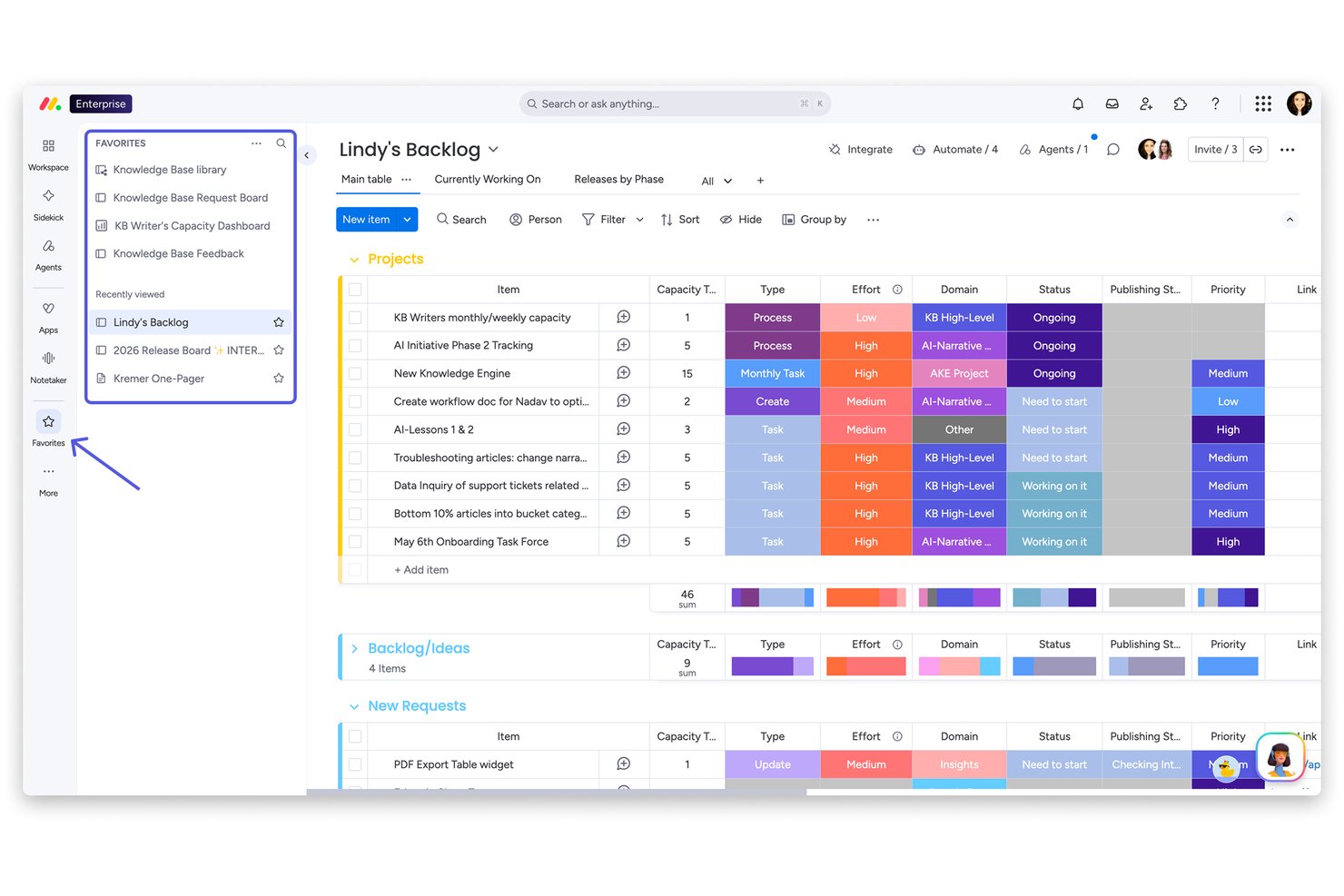
monday AI Workspace è una piattaforma di gestione del lavoro che collega l'esecuzione dei progetti alle operazioni sui contenuti, offrendo pianificazione assistita dall'AI, flussi di lavoro documentali, approvazioni automatizzate e visibilità sul portafoglio tra team distribuiti.
Per chi è ideale monday AI Workspace?
È particolarmente adatta a medie e grandi imprese in cui i responsabili PMO e i program manager devono coordinare i flussi di lavoro dei contenuti tra i team di marketing, design e operation.
Perché ho scelto monday AI Workspace
Ho scelto monday AI Workspace per la sua capacità di gestire la produzione di contenuti come un'operazione strutturata e tracciabile. La funzionalità di richieste e approvazioni fornisce al mio team un registro chiaro delle decisioni, così ogni revisione e approvazione ha una traccia documentata. Mi affido anche alla funzione di estrazione AI, che estrae informazioni da PDF e documenti direttamente nelle colonne delle board, eliminando il lavoro manuale di trasferimento dei dati che solitamente rallenta i cicli dei contenuti.
Caratteristiche principali di monday AI Workspace
- Permessi multilivello: Imposta controlli di accesso dettagliati per board, cartelle e documenti all'interno di strutture di team o dipartimenti.
- Dashboard di portafoglio: Visualizza l'avanzamento dei progetti e l'allocazione delle risorse su più progetti in viste di portafoglio personalizzabili.
- Automazioni personalizzate: Attiva flussi di lavoro automatizzati per azioni ricorrenti e gestione del ciclo di vita dei contenuti di progetto utilizzando regole senza codice, flessibili.
- Riepilogo potenziato dall'AI: Usa il machine learning per generare sintesi concise da ricerche, note di riunioni e thread di feedback.
Integrazioni di monday AI Workspace
monday AI Workspace offre centinaia di integrazioni native tramite le sue integrazioni integrate e marketplace, tra cui Slack, Google Workspace, Microsoft 365, Jira, Dropbox, Zoom, HubSpot, Salesforce, GitHub e Outlook. Supporta inoltre Zapier e offre una API per integrazioni personalizzate.
Pros and Cons
Pros:
- Estrazione AI che raccoglie dati dai documenti caricati
- Flussi di lavoro di approvazione strutturati con chiari audit trail
- Dashboard visuali del portafoglio su diversi flussi di lavoro di contenuti
Cons:
- Controlli nativi limitati su versioning e cronologia dei documenti
- Non progettato specificamente per la conformità alla conservazione dei record
New Product Updates from monday AI Workspace
monday AI Workspace Adds Human Approval Routing
monday AI Workspace adds a human-in-the-loop approval block to AI Workflows, sending approval requests and routing workflow paths based on responses. For more information, visit monday AI Workspace's official site.

Wrike
Ideale per i team di content

Wrike è uno strumento di gestione dei progetti che ti aiuta a creare flussi di lavoro per varie attività, inclusa la gestione dei contenuti. Lo strumento offre modelli pronti all'uso che puoi utilizzare come punto di partenza ed è facile adattarli alle tue esigenze.
Il modello di calendario editoriale è il più utile per gestire i contenuti. Usalo per pianificare i contenuti e poi definisci ogni fase del processo di creazione così che tutto il team possa vedere a che punto si trova ogni pubblicazione. Puoi visualizzare questi dati in diversi modi, incluso il calendario, che è perfetto per assicurarti di consegnare i contenuti puntualmente.
Wrike si integra con tanti altri strumenti che permettono una gestione avanzata dei contenuti. Un buon esempio è la possibilità di allegare direttamente i Google Docs a un'attività su Wrike, facilitando il lavoro collaborativo sui contenuti correlati.
Lo strumento si integra anche con MediaValet, OneDrive, Adobe Creative Cloud e molti altri strumenti aziendali.
New Product Updates from Wrike

Wrike Adds Quick Search to Table View
Wrike adds Quick Search to Table View with full-table search across titles, descriptions, and fields, plus highlighted matches. This helps users find tasks faster in large tables. For more information, visit Wrike’s official site.

Ideale per architettura componibile

Sanity.io si rivolge a team che necessitano di una piattaforma di gestione dei contenuti con reale flessibilità e portata — se sviluppi siti web, applicazioni web o esperienze digitali su diversi canali, Sanity ti offre un backend dove i contenuti vivono come dati strutturati (e non sono bloccati in rigidi template). È particolarmente interessante se il tuo team include sviluppatori o se prevedi che i tuoi contenuti alimentino siti web, app o diversi front-end ora e in futuro.
Perché ho scelto Sanity.io
Ho scelto Sanity.io per la sua architettura componibile, che consente alle imprese di gestire i contenuti in modo flessibile su vari canali. Il CMS headless della piattaforma separa i contenuti dalla presentazione, offrendo una maggiore adattabilità rispetto alle esigenze aziendali in evoluzione. Inoltre, le solide funzionalità di sicurezza di Sanity.io, compresi i controlli di accesso basati sui ruoli a livello di campo, garantiscono che i contenuti sensibili siano protetti, risolvendo una preoccupazione comune per le grandi organizzazioni.
Caratteristiche principali di Sanity.io
Oltre alla sua architettura componibile, Sanity.io offre diverse altre funzionalità preziose per i sistemi di gestione dei contenuti aziendali:
- Sanity Studio: Un'interfaccia utente personalizzabile che consente una rapida configurazione degli spazi di lavoro dei contenuti in base alle esigenze aziendali dinamiche.
- API per Sviluppatori: Offre API semplici e copertura completa TypeScript, facilitando l'integrazione e la personalizzazione della piattaforma da parte degli sviluppatori.
- Webhook Serverless: Consente l'automazione attivando azioni basate sulle modifiche dei contenuti, migliorando l'efficienza del flusso di lavoro.
- Database di Contenuti Condiviso: Facilita la collaborazione fornendo una fonte unica di verità per i contenuti, riducendo duplicazioni e incoerenze.
Integrazioni di Sanity.io
Le integrazioni includono Vercel, Shopify Hydrogen, Algolia, Cloudinary, Netlify, Slack, GitHub, AWS S3, Google Analytics e Salesforce. Sanity.io offre anche un'API per integrazioni personalizzate.
Pros and Cons
Pros:
- La collaborazione in tempo reale consente a più membri del team di modificare simultaneamente.
- I contenuti sono trattati come dati strutturati, consentendo il riutilizzo su più piattaforme (web, mobile, ecc.).
- Personalizzabile per adattarsi a flussi di lavoro e strutture di contenuto su misura.
Cons:
- Non viene fornito un front-end pronto all'uso — è necessario costruire il proprio front-end o integrarsi con framework.
- Richiede competenze di sviluppo e conoscenze di programmazione per la configurazione e la personalizzazione.

Ideale per la gestione multisito enterprise

Adobe Experience Manager è un sistema di gestione dei contenuti aziendale progettato per grandi organizzazioni che necessitano di gestire asset digitali, coordinare flussi di lavoro dei contenuti e offrire esperienze coerenti su più canali. Come parte di Adobe Experience Cloud, supporta la distribuzione strutturata dei contenuti e la governance sulle operazioni digitali globali.
Per chi è più adatto Adobe Experience Manager?
Adobe Experience Manager è ideale per grandi aziende e team digitali che gestiscono alti volumi di contenuti su più brand, regioni o canali.
Perché ho scelto Adobe Experience Manager
Ho scelto Adobe Experience Manager per la sua combinazione di capacità CMS aziendali e gestione degli asset digitali. Include il tagging automatico tramite Adobe Sensei e supporta flussi di lavoro strutturati dei contenuti all'interno di Adobe Experience Cloud. Le sue integrazioni con strumenti di analisi e personalizzazione permettono ai team di gestire e misurare le prestazioni dei contenuti su tutte le proprietà digitali.
Caratteristiche principali di Adobe Experience Manager
- Headless CMS: Distribuisci contenuti su qualsiasi canale o dispositivo utilizzando API e modelli di contenuto strutturato.
- Gestione degli asset digitali: Archivia, organizza e gestisci immagini, video e documenti in un repository centralizzato.
- Supporto alla personalizzazione: Abilita la consegna di contenuti mirati attraverso le integrazioni all'interno di Adobe Experience Cloud.
- Controllo delle versioni: Traccia le revisioni, gestisci gli aggiornamenti e ripristina versioni precedenti dei contenuti.
Integrazioni di Adobe Experience Manager
Le integrazioni includono Adobe Analytics, Adobe Commerce, Marketo Engage, Adobe Workfront, Adobe Creative Cloud e Real-Time CDP.
Pros and Cons
Pros:
- Integrazione nativa con la suite Adobe Creative Cloud
- Gestione avanzata multisito e multilingua
- Gestione integrata degli asset digitali
Cons:
- Costo elevato rispetto alla maggior parte dei concorrenti
- Configurazione iniziale complessa

Box
Il miglior software ECM per sicurezza e conformità
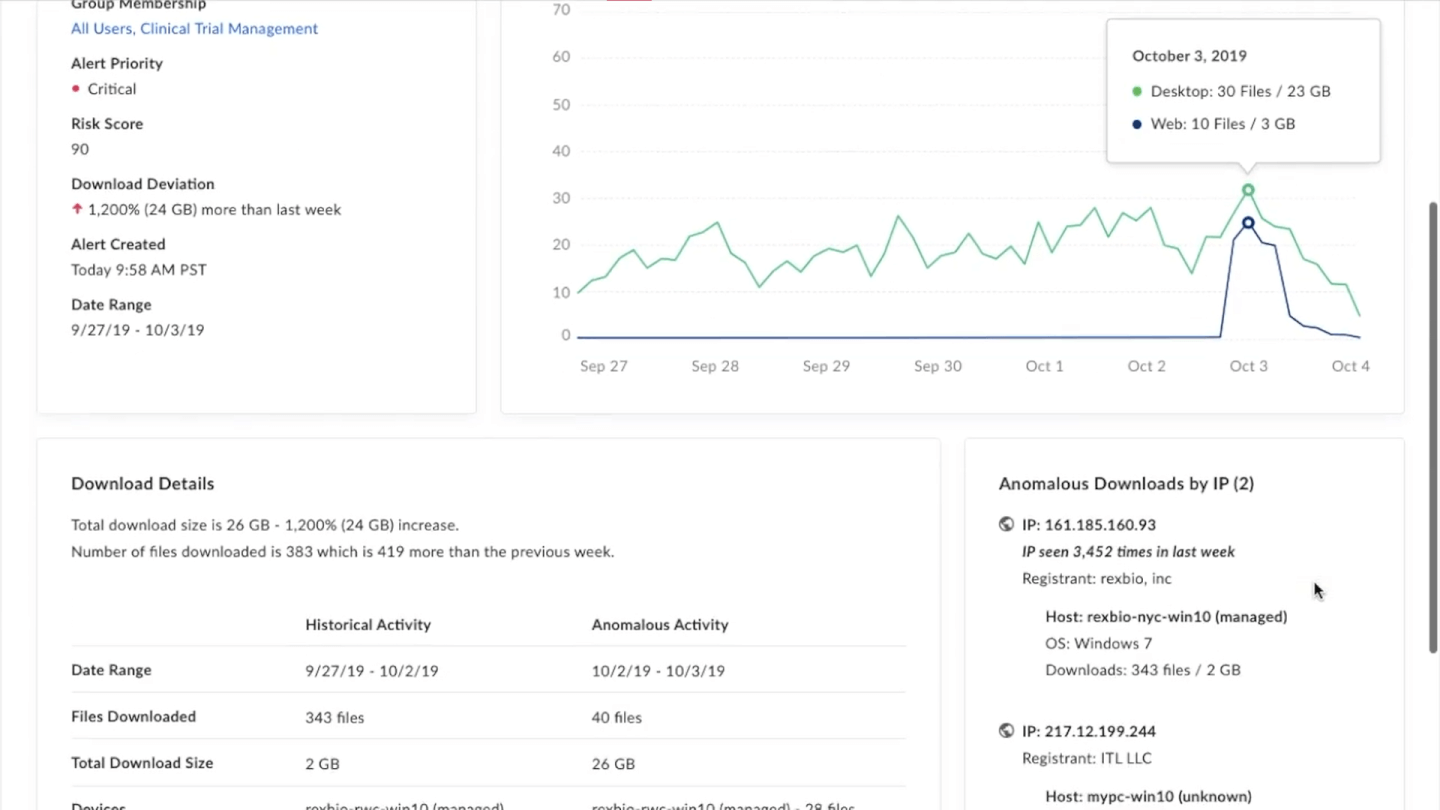
Box è una soluzione ECM che consente alle aziende di archiviare e condividere tutti i loro file: da elementi multimediali ai documenti. Dispone di funzionalità che abilitano la collaborazione in tempo reale e una potente ricerca che aiuta i membri del team ad accedere a ciò di cui hanno bisogno.
Lo strumento si distingue per le sue funzionalità di sicurezza e conformità. Hai accesso granulare ai controlli delle autorizzazioni per impostare precisamente chi può visualizzare ogni file. Puoi anche etichettare i file come riservati per limitare i download e aggiungere filigrane.
Box Shield è forse la funzionalità di sicurezza più potente. Si tratta di una piattaforma di sicurezza che offre rilevamento di malware, la capacità di individuare account compromessi e strumenti che classificano automaticamente i dati sensibili.
Box si integra con oltre 1.500 app, tra cui Office365, Google Workspace, Slack, Salesforce e Netsuite ERP. I prezzi partono da $20 per utente al mese e arrivano fino a $47 per utente al mese per l'offerta completa.

Ideale per il supporto multisito

Brightspot aiuta le aziende a gestire i loro contenuti digitali. È un sistema di gestione dei contenuti aziendale che offre agli utenti una suite completa di strumenti per creare, modificare, archiviare e distribuire contenuti. Il software consente alle organizzazioni di creare e pubblicare rapidamente esperienze digitali coinvolgenti per i propri clienti.
Brightspot dispone di una dashboard intuitiva che rende semplice organizzare, monitorare e pubblicare contenuti. Puoi utilizzare la piattaforma per personalizzare l'aspetto e la struttura dei tuoi siti web e blog, e creare landing page personalizzate o altri materiali di marketing. Brightspot offre funzionalità avanzate di analisi e reportistica che permettono agli utenti di monitorare metriche di prestazione come le visualizzazioni di pagina e i visitatori unici nel tempo. La sua dashboard di analisi consente di visualizzare report filtrati per intervallo di date o località geografica, facilitando così l'analisi delle prestazioni a livello dettagliato.
Inoltre, offre capacità di automazione dei flussi di lavoro che permettono a più utenti di collaborare ai progetti. Puoi assegnare compiti, stabilire scadenze, ricevere notifiche sull’avanzamento delle attività e commentare le bozze da un unico luogo centralizzato. Questo rende più semplice per i team rimanere organizzati e assicurare che ogni compito venga completato nei tempi previsti.
Brightspot include funzionalità integrate per la gestione delle versioni dei contenuti, così puoi rapidamente tornare a una versione precedente se necessario. La sua interfaccia intuitiva di editing dei contenuti rende facile creare, gestire e pubblicare contenuti in modo rapido. L’interfaccia comprende un editor di testo avanzato con supporto alla formattazione WYSIWYG e funzionalità drag-and-drop per caricare immagini e altri file multimediali. Puoi visualizzare l’anteprima del tuo lavoro prima di pubblicare le modifiche in diretta sul sito o sull’app, garantendo precisione e risparmiando tempo evitando di dover modificare nuovamente dopo la pubblicazione.
Le integrazioni includono Adobe Stock, AP Images, Apple News, AWS Elemental, Coral, Getty Images, FB, Google Drive, Hubspot, Marketo e Shopify.

OpenText
Migliore integrazione con strumenti enterprise

Il software OpenText Enterprise Content Management aiuta le aziende a conservare, organizzare, condividere e accedere a tutti i propri documenti.
Offre strumenti intuitivi per facilitare la creazione e la collaborazione sui contenuti. Ad esempio, l'integrazione con Microsoft permette agli utenti di lavorare e collaborare direttamente nelle app di Microsoft Office, mantenendo i file collegati alla piattaforma OpenText. Dispone anche di funzionalità di acquisizione documentale che consentono di archiviare sia documenti elettronici che cartacei.
La conformità è una questione fondamentale per le aziende che gestiscono contenuti e OpenText offre diverse funzionalità di supporto. Ad esempio, le politiche di governance e le migliori pratiche di gestione dei contenuti vengono applicate automaticamente alle informazioni mentre vengono create. Include anche funzionalità di gestione dei record per aiutarti a rispettare le normative esterne e le politiche aziendali interne.
OpenText si integra con molte altre applicazioni aziendali come Microsoft, Salesforce CRM e SAP. L'azienda non rende pubblici i prezzi, ma puoi contattare il team commerciale sul sito web per maggiori informazioni.
Ideale per la gestione dei flussi di lavoro e gli strumenti di collaborazione
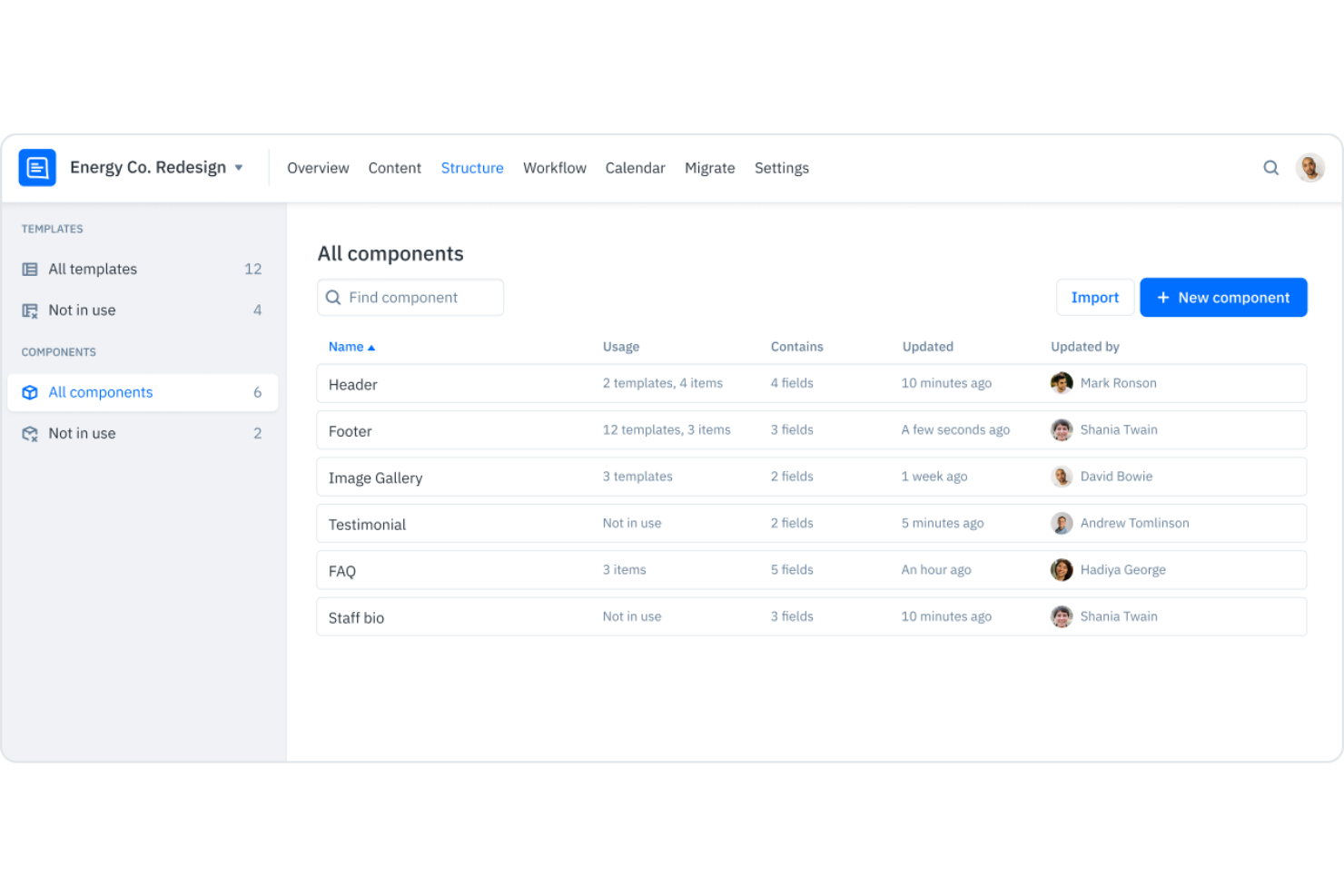
Content Workflow di Bynder è una piattaforma di gestione dei contenuti progettata per aiutarti a ottimizzare il processo di creazione dei contenuti e collaborare sui vari pezzi. Con essa puoi delineare diversi flussi di lavoro per la produzione dei contenuti e monitorare ogni elemento durante tutto il processo di sviluppo. È particolarmente adatta a team di marketing, agenzie, editori e aziende del settore media.
Gli strumenti di project management del software ti consentono di progettare flussi di lavoro multipli per rappresentare le diverse modalità di creazione dei contenuti all'interno della tua organizzazione. Utilizzando questi flussi di lavoro puoi mappare e monitorare i progetti attraverso le varie fasi di sviluppo tra team, dipartimenti o all'interno dell'intera organizzazione. Inoltre, puoi configurare il software per assegnare automaticamente le attività ai membri specifici del team e creare un calendario editoriale per avere una panoramica su cosa viene pubblicato e quando.
Oltre a gestire i progetti di contenuto, puoi anche creare e collaborare sui materiali utilizzando l'editor di contenuti integrato nel software. Questo include la possibilità di costruire una libreria di template per una produzione più rapida. Per garantire la conformità agli standard, puoi integrare la guida di stile e impostare linee guida e regole nei campi direttamente nell'editor. I membri del team possono scambiarsi feedback tramite i commenti in linea del sistema e viene mantenuta una cronologia delle revisioni per ogni documento.
Il software si integra con altri strumenti come Microsoft Word, Wordpress, Slack e Adobe Experience Manager, tra gli altri. I prezzi partono da $109/mese ed è disponibile una prova gratuita di 14 giorni.

Ideale per il monitoraggio centralizzato dei progetti

Artwork Flow di Bizongo è uno strumento cloud-based per la gestione dei progetti e l'automazione dei flussi di lavoro, progettato per facilitare il processo di gestione delle grafiche per i team. L'obiettivo dello strumento è ridurre il tempo impiegato nei processi di approvazione delle grafiche e migliorare la collaborazione tra le parti interessate, offrendo uno spazio centralizzato per il monitoraggio dei progetti e la comunicazione.
Artwork Flow di Bizongo offre una piattaforma centralizzata per la gestione e il monitoraggio della creazione, dell'approvazione e dell'archiviazione di contenuti di marketing e grafiche. Include funzionalità come la gestione delle risorse digitali, che consente alle aziende di archiviare, organizzare e recuperare in modo efficiente le risorse digitali.
Inoltre, le capacità di gestione del flusso di lavoro di Artwork Flow aiutano le aziende a definire e monitorare l'avanzamento dei contenuti attraverso le varie fasi di sviluppo e approvazione, assicurando che i progetti rispettino le scadenze e gli standard di qualità. Lo strumento supporta inoltre la collaborazione tra i membri del team permettendo loro di condividere feedback, annotazioni e approvazioni all'interno della piattaforma, facilitando così una comunicazione chiara e riducendo il rischio di errori.
Artwork Flow di Bizongo si integra con Slack, Google Calendar, Figma, Dropbox e Google Drive.
I prezzi partono da $30/utente/mese (fatturati annualmente). È inoltre disponibile una prova gratuita di 14 giorni e un piano gratuito.

Alfresco
Ideale per ECM cloud, on-premises o ibrido

Alfresco è un potente sistema ECM open-source. Consente a chiunque nella tua azienda di caricare e condividere file, inclusi immagini, video, PDF e documenti con altri utenti. Puoi persino scansionare e caricare file cartacei per creare un archivio di documenti non digitali.
Lo strumento offre potenti funzionalità di ricerca. Accedi alla barra di ricerca dall'interno dell'area di lavoro e poi filtra i risultati in base a diversi criteri per trovare esattamente il contenuto di cui hai bisogno. Inoltre, puoi facilmente impostare i permessi per documenti e cartelle per garantire che solo le persone autorizzate possano visualizzare file, librerie e cartelle.
Le integrazioni più utili dello strumento sono con Google Docs e Microsoft365. Queste ti permettono di utilizzare le potenti funzionalità di editing dei documenti di ciascun servizio mantenendo i contenuti archiviati in Alfresco. In questo modo la condivisione di file e la collaborazione sui contenuti in tempo reale diventano semplici.
Il prezzo dipende dalle tue esigenze e puoi contattare l'azienda per maggiori informazioni. Alfresco offre una prova gratuita di 14 giorni della piattaforma cloud o una prova di 30 giorni del software scaricabile.
Altri sistemi di gestione dei contenuti aziendali
Ecco alcune opzioni aggiuntive di sistemi di gestione dei contenuti aziendali che non sono entrate nel mio elenco, ma che vale comunque la pena prendere in considerazione:
- Contentful
Ideale per pubblicare contenuti su più canali
- Sanity
Ideale per creare un CMS personalizzato
- Kontent
Miglior CMS headless
- Bluescape
Migliore per la collaborazione sui contenuti
- Brandfolder
Ideale per il tagging automatico delle risorse
- MediaValet
Ideale per la potente funzione di ricerca
- Bynder
Migliore gestione delle risorse digitali per sistemi di contenuto
- Agility CMS
Ideale per la modellazione dei contenuti


Come Valuto i Sistemi di Gestione dei Contenuti Aziendali
Divido la mia valutazione in due livelli: le funzionalità fondamentali—come i registri delle attività e le autorizzazioni granulari—e i fattori di differenziazione che separano le soluzioni migliori per gli uffici di gestione progetti (PMO) e i team di portafoglio.
Funzionalità Principali (Requisiti Minimi per Questa Lista)
Quando seleziono gli strumenti per la mia lista, valuto ciascuno su una scala da 0 (non offre la funzionalità) a 5 (eccelle in quest'area) per ogni funzionalità principale elencata di seguito. Poi, calcolo il punteggio totale dello strumento in percentuale. Ogni strumento deve raggiungere un punteggio totale minimo del 65% per essere preso in considerazione.
- Archivio Centralizzato di Contenuti: Valuto se la piattaforma può organizzare e archiviare deliverable di progetto, contratti e specifiche in una libreria strutturata e scalabile su più portafogli.
- Controllo delle Versioni & Registri delle Attività: Ogni file di progetto subisce revisioni, quindi cerco versionamento automatico e registri delle attività che mostrino chi ha modificato cosa e quando.
- Controllo degli Accessi & Autorizzazioni: Le autorizzazioni basate sui ruoli sono fondamentali quando i PMO gestiscono contenuti sensibili, quindi verifico il controllo a livello di cartella e documento insieme al supporto per SSO.
- Automazione dei Flussi Documentali: L'indirizzamento per l'approvazione di ordini di modifica, documenti di ambito e validazioni deve essere configurabile con passaggi condizionali e notifiche basate su scadenze.
- Metadata & Ricerca Aziendale: Controllo l'efficacia con cui la piattaforma etichetta e indicizza i contenuti, così che un program manager possa trovare un deliverable specifico tra migliaia di file di progetto.
- Integrazioni & API: Lo strumento dovrebbe connettersi con le piattaforme già in uso dai team—come Jira, Microsoft 365 o Smartsheet—tramite connettori nativi o un’API ben documentata.
Una volta che ho una lista di strumenti che rispettano i criteri, considero ciò che distingue ciascuna piattaforma.
Fattori di Differenziazione (Cosa Distingue i Fornitori)
Ecco come confronto e metto a confronto i diversi fornitori:
Funzionalità di Spicco
L'intelligenza dei contenuti alimentata dall’IA è un grande fattore di differenziazione. Cerco piattaforme che classificano e taggano automaticamente i documenti, così che un PMO non debba categorizzare manualmente centinaia di deliverable per programma. Anche le funzionalità di co-authoring sono importanti—quando i team distribuiti devono modificare simultaneamente documenti di ambito o charter di progetto, la collaborazione in tempo reale elimina ritardi nei passaggi di consegna. Valuto inoltre la gestione dei record e della conservazione, specialmente per i team in settori regolamentati dove i file di progetto devono seguire rigide politiche di conservazione e blocco legale.
Oltre le Funzionalità
La flessibilità di implementazione è uno dei primi aspetti che valuto. Alcune organizzazioni di progetto necessitano di hosting on-premise per la residenza dei dati, mentre altre preferiscono soluzioni cloud-native—quindi verifico se una piattaforma supporta entrambe le opzioni. Le certificazioni di conformità come SOC 2 e ISO 27001 hanno anch’esse peso, specialmente per i team che gestiscono contenuti in settori regolamentati come le scienze della vita o gli appalti pubblici. Infine, considero la complessità dell’implementazione, poiché la migrazione di terabyte di file di progetto legacy da un sistema precedente può ostacolare l’adozione se il fornitore non offre solidi strumenti di migrazione e supporto all’onboarding.
Come scegliere un sistema di gestione dei contenuti aziendali
È facile perdersi in lunghi elenchi di funzionalità e strutture tariffarie complesse. Per aiutarti a rimanere concentrato mentre affronti il tuo processo unico di selezione del software, ecco un elenco di fattori da tenere a mente:
| Fattore | Cosa considerare |
|---|---|
| Scalabilità | Il sistema può crescere insieme alla tua azienda? Considera i limiti per gli utenti e la capacità di archiviazione. Gestirà una quantità maggiore di dati e utenti senza problemi di prestazioni? |
| Integrazioni | Si integra con gli strumenti che già utilizzi? Verifica la compatibilità con software come CRM, ERP e strumenti di produttività per garantire flussi di lavoro fluidi. |
| Personalizzazione | Puoi adattare il sistema alle tue esigenze? Cerca opzioni per personalizzare i flussi di lavoro e le interfacce in base ai processi del tuo team. |
| Facilità d'uso | È facile da usare per il tuo team? Considera la curva di apprendimento e se sarà necessaria una formazione. Quanto è intuitiva l'interfaccia? |
| Implementazione e avvio | Quanto tempo ci vorrà per iniziare? Valuta il processo di configurazione, la disponibilità di indicazioni e risorse come webinar o tutorial per i nuovi utenti. |
| Costo | Il prezzo rientra nel tuo budget? Confronta il costo totale di proprietà, incluse eventuali commissioni nascoste, con le funzionalità e i vantaggi che ricevi. |
| Misure di sicurezza | Quanto sono sicuri i tuoi dati? Verifica gli standard di crittografia, i controlli degli accessi e la conformità alle normative sulla protezione dei dati come il GDPR. |
| Requisiti di conformità | Rispetta gli standard del settore? Considera le normative specifiche a cui il tuo settore deve attenersi, come HIPAA per il settore sanitario o SOX per il settore finanziario. |
Cosa sono i sistemi di gestione dei contenuti aziendali?
I sistemi di gestione dei contenuti aziendali sono soluzioni software che aiutano le organizzazioni a gestire, archiviare e organizzare efficacemente i contenuti digitali. Professionisti come project manager, personale IT e responsabili della conformità utilizzano generalmente questi strumenti per garantire una gestione efficiente dei contenuti e il rispetto delle normative. Le funzionalità di archiviazione dei documenti, controllo delle versioni e automazione dei flussi di lavoro aiutano a organizzare le informazioni, mantenere l'integrità dei dati e migliorare la collaborazione. Nel complesso, questi strumenti offrono un valore significativo aumentando la produttività e garantendo una gestione sicura dei dati.
Funzionalità
Quando selezioni sistemi di gestione dei contenuti aziendali, presta attenzione alle seguenti funzionalità principali:
- Archiviazione dei documenti: Consente l'archiviazione centralizzata dei file digitali, rendendo più semplice organizzare e recuperare i documenti importanti.
- Controllo delle versioni: Tiene traccia delle modifiche apportate ai documenti nel tempo, garantendo ai team la possibilità di accedere alle versioni precedenti e ripristinarle quando necessario.
- Automazione dei flussi di lavoro: Semplifica i processi automatizzando le attività di routine, aumentando l'efficienza e riducendo il carico di lavoro manuale.
- Autorizzazioni di accesso: Consente di controllare chi può visualizzare o modificare i documenti, migliorando la sicurezza e mantenendo l'integrità dei dati.
- Strumenti di collaborazione: Facilitano la comunicazione e il lavoro di squadra consentendo a più utenti di lavorare contemporaneamente sui documenti.
- Gestione della conformità: Garantisce il rispetto delle normative di settore, aiutando le organizzazioni a evitare problemi legali relativi alla gestione dei dati.
- Funzionalità di integrazione: Si collega ai sistemi software esistenti per creare un flusso di lavoro unificato, migliorando la produttività.
- Misure di sicurezza: Proteggono i dati sensibili mediante crittografia e controlli di accesso, garantendo la riservatezza delle informazioni.
- Dashboard personalizzabili: Consentono agli utenti di adattare l'interfaccia alle proprie esigenze specifiche, migliorando usabilità e soddisfazione degli utenti.
- Modifica in tempo reale: Consente aggiornamenti e feedback immediati sui documenti, migliorando la collaborazione e accelerando i processi decisionali.
Vantaggi
L'implementazione di sistemi di gestione dei contenuti aziendali offre diversi vantaggi al tuo team e alla tua azienda. Ecco alcuni dei benefici che puoi aspettarti:
- Organizzazione migliorata: L'archiviazione centralizzata dei documenti aiuta a mantenere i file organizzati e facili da trovare, riducendo il tempo dedicato alla ricerca delle informazioni.
- Collaborazione potenziata: La modifica in tempo reale e gli strumenti di collaborazione consentono ai membri del team di lavorare insieme in modo più efficace, migliorando la comunicazione e i risultati dei progetti.
- Maggiore sicurezza: Le autorizzazioni di accesso e le misure di protezione tramite crittografia salvaguardano le informazioni sensibili, garantendo che solo gli utenti autorizzati possano accedere ai dati critici.
- Conformità normativa: Le funzionalità di gestione della conformità aiutano la tua organizzazione a rispettare le normative di settore, riducendo il rischio di problemi legali.
- Aumenti dell'efficienza: L'automazione dei flussi di lavoro semplifica le attività ripetitive, consentendo al tuo team di concentrarsi su attività più strategiche.
- Migliore processo decisionale: Il controllo delle versioni e gli aggiornamenti in tempo reale forniscono informazioni accurate e aggiornate, supportando decisioni consapevoli.
- Risparmio sui costi: Integrando i sistemi esistenti e automatizzando i processi, puoi ridurre i costi operativi e migliorare l'efficienza complessiva.
Costi e prezzi
La selezione di sistemi di gestione dei contenuti aziendali richiede la comprensione dei vari modelli e piani tariffari disponibili. I costi variano in base alle funzionalità, alle dimensioni del team, ai componenti aggiuntivi e ad altri fattori. La tabella seguente riepiloga i piani più comuni, i relativi prezzi medi e le funzionalità tipicamente incluse nelle soluzioni di sistemi di gestione dei contenuti aziendali:
Tabella comparativa dei piani per i sistemi di gestione dei contenuti aziendali
| Tipo di piano | Prezzo medio | Funzionalità comuni |
|---|---|---|
| Piano gratuito | $0 | Archiviazione di base dei documenti, collaborazione limitata e funzionalità di sicurezza essenziali. |
| Piano personale | $5-$15/user/month | Maggiore capacità di archiviazione, automazione di base dei flussi di lavoro e controllo delle versioni. |
| Piano aziendale | $20-$50/user/month | Strumenti di collaborazione avanzati, funzionalità di integrazione e dashboard personalizzabili. |
| Piano per grandi imprese | $60-$100/user/month | Misure di sicurezza complete, strumenti per la conformità normativa e ampie opzioni di personalizzazione. |
Domande frequenti sui sistemi di gestione dei contenuti aziendali
Ecco alcune risposte alle domande comuni sui sistemi aziendali di gestione dei contenuti
Qual è la differenza tra ECM e il software di gestione dei documenti?
I sistemi di gestione dei contenuti aziendali (ECM) offrono più della semplice gestione dei documenti. Mentre la gestione dei documenti si concentra sull’archiviazione e l’organizzazione dei documenti, i sistemi ECM gestiscono tutti i tipi di contenuti, incluse e-mail, video e contenuti web. ECM mette a disposizione strumenti per l’automazione dei flussi di lavoro, la conformità e la collaborazione, offrendo alle aziende una soluzione più completa.
Come posso garantire la sicurezza dei dati con i sistemi ECM?
Per garantire la sicurezza dei dati, scegli un sistema ECM con solide funzionalità di sicurezza, come la crittografia, i controlli degli accessi e la conformità alle normative sulla protezione dei dati. Aggiorna regolarmente il software e forma il tuo team sulle migliori pratiche di sicurezza. Valuta i sistemi che offrono registri di controllo per monitorare l’accesso ai dati e le modifiche apportate.
I sistemi ECM sono adatti alle piccole imprese?
Sì, i sistemi ECM possono essere adatti alle piccole imprese. Molti fornitori offrono soluzioni scalabili che possono crescere insieme alla tua azienda. Cerca opzioni con piani tariffari flessibili e funzionalità che soddisfino le tue esigenze attuali. Investire in un sistema ECM può migliorare la produttività e la gestione dei dati, anche per i team più piccoli.
Quanto tempo occorre per implementare un sistema ECM?
Il tempo di implementazione varia in base alla complessità del sistema e alle dimensioni della tua organizzazione. Può variare da alcune settimane a diversi mesi. Per garantire un’implementazione agevole, pianifica accuratamente, assegna risorse alla formazione e collabora strettamente con il fornitore per affrontare eventuali problemi durante il processo di configurazione.