

I 10 migliori strumenti alternativi a ProofHub per i progetti nel 2026

Le migliori alternative a ProofHub: selezione


ProofHub offre una suite di strumenti per la gestione dei progetti e la collaborazione tra team. Semplifica l'organizzazione dei progetti, migliora la comunicazione e supervisiona attività e scadenze. Tuttavia, alcuni team potrebbero cercare altre opzioni per preferenze relative a funzionalità, prezzi o esperienze utente differenti. In questo articolo condividerò i miei consigli sulle migliori alternative a ProofHub, per aiutarti a trovare quella più adatta al tuo team.
Che cos'è ProofHub?
ProofHub è un software per la gestione dei progetti e la collaborazione tra team, progettato per semplificare il lavoro di squadra. Viene utilizzato da responsabili, team e organizzazioni per pianificare, collaborare, organizzare e completare i progetti nei tempi previsti e rispettando il budget.
Il software è un punto centrale per la gestione del lavoro e combina pianificazione dei progetti, gestione delle attività, monitoraggio del tempo e comunicazione tra team per favorire una consegna efficiente dei progetti. ProofHub è pensato per gli utenti che devono mantenere il controllo sui progetti e collaborare efficacemente con i propri team e parti interessate.
Perché fidarsi dei nostri consigli sui software
Il nostro team testa e recensisce software dal 2012. In quanto project manager noi stessi, sappiamo quanto sia difficile — e importante — scegliere il software giusto.
Per questa guida, abbiamo valutato gli strumenti attraverso test pratici e ricerche indipendenti, assegnando un punteggio agli strumenti in base ai nostri criteri di selezione. Ci basiamo inoltre sulle competenze di leader di pensiero del settore e di professionisti attivi nella gestione dei progetti.
Le nostre recensioni riflettono il nostro giudizio editoriale umano, non un discorso di vendita.
Revisori esperti:
Tabella comparativa dei prezzi delle alternative a ProofHub
Questa tabella comparativa riassume i dettagli sui prezzi delle mie principali alternative a ProofHub, per aiutarti a trovare il software migliore per il tuo budget e le esigenze della tua azienda.
| Tool | Best For | Trial Info | Price | ||
|---|---|---|---|---|---|
| 1 | Ideale per integrazioni e personalizzazione | Prova gratuita di 15 giorni + piano gratuito + demo gratuita disponibile | A partire da $4/utente/mese (fatturato annualmente) | Website | |
| 2 | Ideale per la gestione flessibile dei progetti | Piano gratuito disponibile | Da $39/mese (fatturato annualmente) | Website | |
| 3 | Ideale per la collaborazione visiva sui progetti | Piano gratuito disponibile | Da $5/utente/mese (fatturazione annuale) | Website | |
| 4 | Ideale per flussi di lavoro personalizzabili | Garanzia soddisfatti o rimborsati di 14 giorni | A partire da $6/utente/mese (fatturazione annuale) | Website | |
| 5 | Ideale per la flessibilità dell'open source | Piano gratuito per sempre | Website | ||
| 6 | Ideale per l'agilità aziendale | Demo gratuita + prova gratuita di 14 giorni disponibile | Da $8/utente/mese (fatturazione annuale) | Website | |
| 7 | Ideale per la gestione di team creativi | Prova gratuita di 60 giorni | Da $49/utente/mese (minimo 5 utenti) | Website | |
| 8 | Ideale per la gestione ingegneristica guidata dall'IA | Prova gratuita di 14 giorni | Da $5/utente/mese (fatturazione annuale) | Website | |
| 9 | Ideale per una pianificazione dettagliata dei progetti | Prova gratuita di 14 giorni | A partire da $79/utente/mese (fatturazione trimestrale) | Website | |
| 10 | Ideale per suddividere progetti complessi | Prova gratuita di 30 giorni + piano gratuito disponibile | Da $7.65/membro/mese (fatturazione annuale) | Website |
Recensioni delle migliori alternative a ProofHub
Sulla base della mia vasta esperienza nella gestione dei progetti, fornirò un’analisi dettagliata e una panoramica di ciascuna alternativa a ProofHub. Scoprirai i vantaggi, gli svantaggi, le funzionalità e gli utilizzi ideali di ogni strumento.

Ideale per integrazioni e personalizzazione
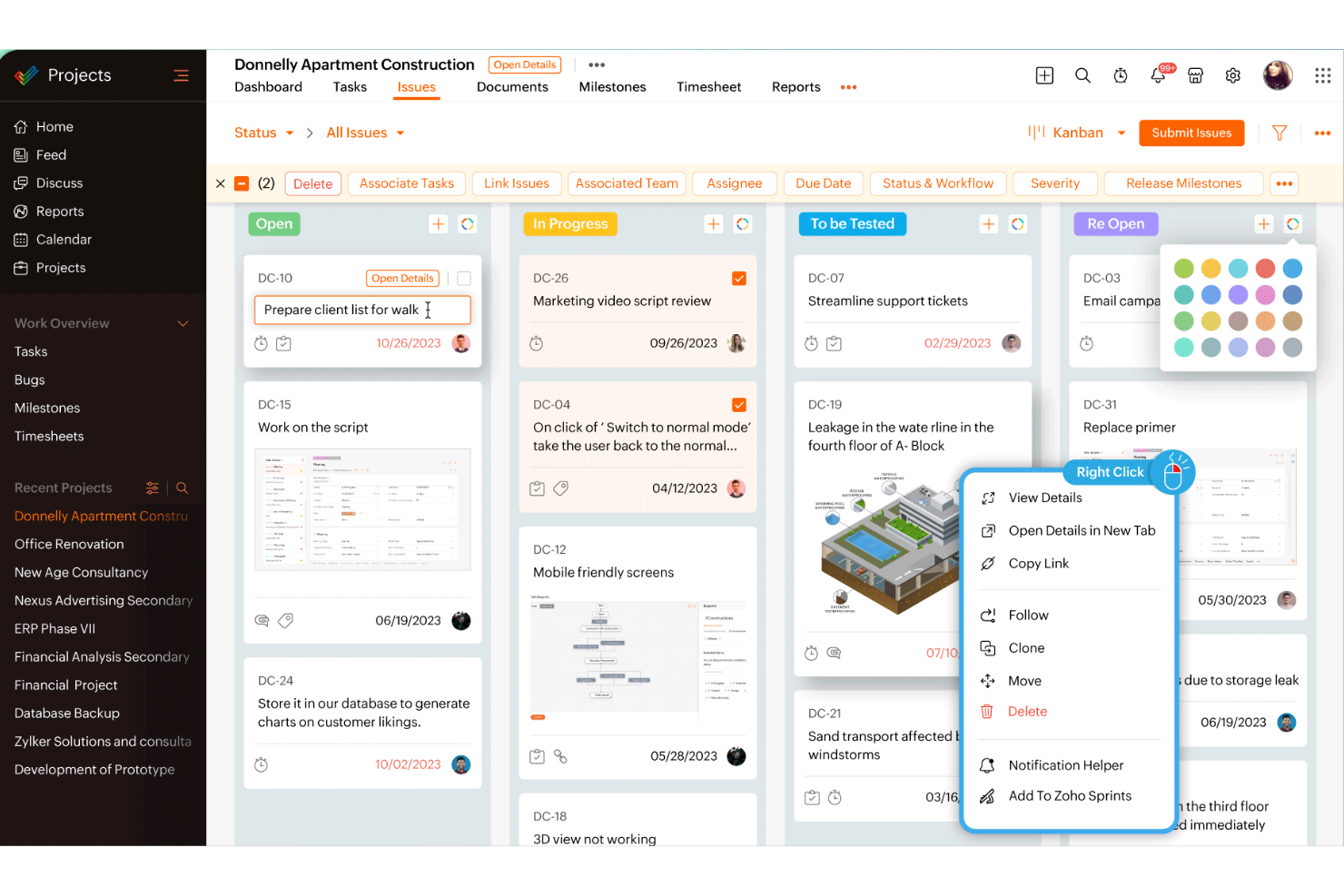
Zoho Projects è un software di gestione progetti basato su cloud pensato per aiutare i team a pianificare, monitorare e collaborare sui progetti.
Perché è una valida alternativa a ProofHub:
Zoho Projects si distingue come alternativa grazie alle sue ampie capacità di integrazione e alle opzioni avanzate di personalizzazione. Zoho Projects si integra perfettamente con altre applicazioni Zoho, come Zoho CRM e Zoho Books, oltre che con strumenti di terze parti come Slack, Google Drive e GitHub. Inoltre, offre una maggiore personalizzazione tramite automazione dei flussi di lavoro, campi personalizzati e modelli di progetto personalizzati, permettendo ai team di adattare la piattaforma alle loro esigenze specifiche. Queste caratteristiche rendono la soluzione più flessibile e scalabile rispetto a ProofHub.
Funzionalità e integrazioni principali:
Le funzionalità includono grafici Gantt, report di utilizzo, monitoraggio dei problemi, forum, chat, feed, gestione documentale, tracciamento del tempo lavorativo fatturabile e non fatturabile, creazione e assegnazione delle attività, automazione delle attività tramite drag-and-drop, allocazione delle risorse, gestione del budget e notifiche via email e all'interno della piattaforma.
Le integrazioni includono GitHub, Bitbucket, Zapier, Basecamp, Evernote, Slack, Microsoft Teams, Trello, Jira, Asana, Zendesk, Mailchimp, Google Drive, Dropbox, OneDrive, Microsoft Outlook, Google Calendar, Microsoft Project e altre app Zoho.
Pros and Cons
Pros:
- Ottime funzionalità di gestione progetti e comunicazione
- Dashboard personalizzabili per la visualizzazione dei flussi di lavoro
- Funzionalità di monitoraggio del tempo integrate
Cons:
- L'app mobile potrebbe essere più completa
- Molte opzioni di personalizzazione sono disponibili solo nel piano enterprise
New Product Updates from Zoho Projects
Zoho Projects Adds CodeX Scripts for Custom Modules
Zoho Projects now supports CodeX Scripts for custom modules, enabling conditional logic and rules for creating, updating, and deleting records. For more information, visit Zoho Projects' official site.
 .
.
Nifty
Ideale per la gestione flessibile dei progetti

Nifty è uno strumento che centralizza la pianificazione dei progetti e la collaborazione tra i membri del team. È riconosciuto come il migliore per la gestione flessibile dei progetti grazie alla sua adattabilità a diversi requisiti progettuali e dinamiche di squadra.
Perché è una valida alternativa a ProofHub:
Ho scelto Nifty per questo elenco perché può adattarsi a una vasta gamma di approcci alla gestione dei progetti, caratteristica essenziale per i team alla ricerca di un'alternativa a ProofHub. La sua versatilità nel gestire differenti tipologie di progetto e la sua interfaccia intuitiva sono motivi chiave della sua inclusione.
Funzionalità principali e integrazioni:
Funzionalità includono assegnazione e monitoraggio delle attività, definizione delle tappe fondamentali, condivisione di documenti e monitoraggio del tempo.
Integrazioni includono Harvest, Webex, Zoom, Slack, Github, Microsoft Suite, Google Drive, Miro, Typeform e Zapier.
Pros and Cons
Pros:
- Offre un piano gratuito per le esigenze di base della gestione dei progetti
- Adattabile a diversi tipi di progetto e dimensioni di team
- Si integra con un'ampia gamma di strumenti per una collaborazione migliorata
Cons:
- Alcuni utenti potrebbero trovare l'interfaccia complessa
- Memoria e funzionalità limitate nel piano gratuito

Trello
Ideale per la collaborazione visiva sui progetti
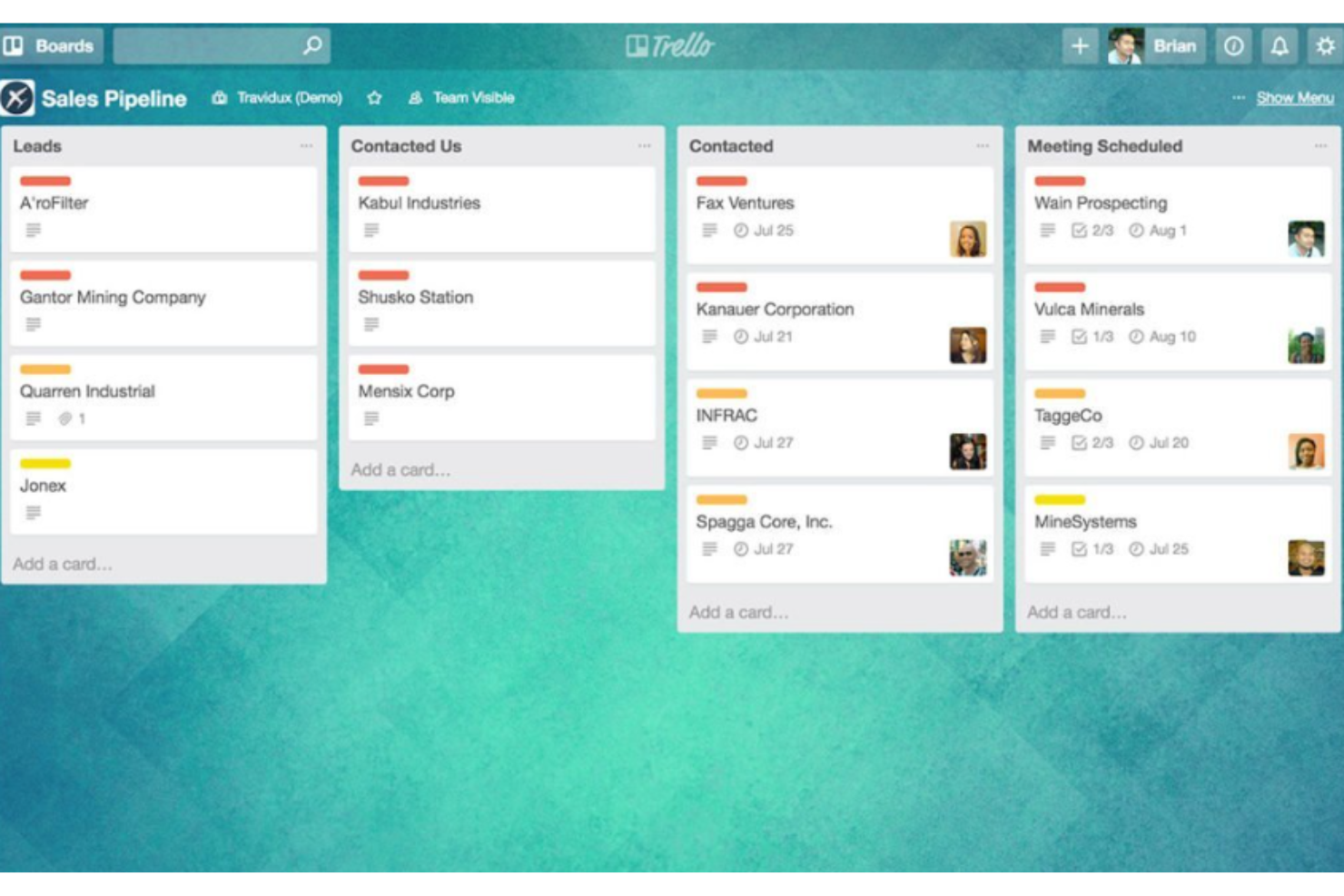
Trello è un'applicazione web basata sul sistema Kanban per la creazione di elenchi. Permette agli utenti di organizzare e dare priorità ai progetti in modo flessibile e gratificante.
Perché è una buona alternativa a ProofHub:
Ho scelto Trello per questa lista perché offre un'interfaccia altamente visiva e intuitiva che rende la collaborazione sui progetti semplice e accessibile. La sua semplicità e facilità d'uso la rendono una valida alternativa a ProofHub, specialmente per i team che prediligono l'organizzazione visiva.
Caratteristiche e integrazioni principali:
Le caratteristiche includono il sistema di bacheche, liste e schede che consente di organizzare e prioritizzare le attività con facilità. Offre inoltre automazione integrata con Butler per permettere ai team di automatizzare compiti e flussi di lavoro.
Le integrazioni includono Slack, Google Drive, Salesforce, Dropbox, Box, Evernote, GitHub, Mailchimp, Microsoft Teams, OneDrive e Zapier.
Pros and Cons
Pros:
- Interfaccia visiva intuitiva
- Organizzazione flessibile con bacheche, liste e schede
- Numerose opzioni di integrazione con altri strumenti
Cons:
- Può risultare caotico con un uso esteso
- Potrebbe non essere adatto per una gestione progetti altamente complessa

Infinity
Ideale per flussi di lavoro personalizzabili

Infinity è uno strumento di gestione dei progetti versatile. Si distingue per i flussi di lavoro personalizzabili, che permettono ai team di adattare la piattaforma alle proprie esigenze specifiche.
Perché è una valida alternativa a ProofHub:
Ho scelto Infinity per l'elenco grazie al suo approccio unico alla personalizzazione dei flussi di lavoro. A differenza di altri strumenti che possono imporre un sistema fisso, Infinity si adatta al flusso di lavoro dell'utente, diventando così un'alternativa solida a ProofHub per i team che cercano flessibilità.
Caratteristiche principali e integrazioni:
Le funzionalità includono una varietà di viste, come Tabelle, Colonne, Liste, Calendari, Diagrammi di Gantt e Grafici, per soddisfare diverse esigenze di gestione dei progetti. La piattaforma offre anche una serie di attributi, come Data, Etichette, Checkbox e Testo.
Le integrazioni includono Zapier, Trello, Clockify, API, Google Drive, Google Calendar, iCalendar, Pabbly, Slack, Everhour, Dropbox e Bitbucket.
Pros and Cons
Pros:
- Flussi di lavoro altamente personalizzabili
- Varietà di viste e attributi per un'organizzazione dettagliata
- Prezzi competitivi con garanzia soddisfatti o rimborsati di 14 giorni
Cons:
- Può presentare una curva di apprendimento a causa delle numerose opzioni di personalizzazione
- Informazioni limitate sulle funzionalità del piano gratuito
Redmine
Ideale per la flessibilità dell'open source

Redmine è uno strumento open source per la gestione dei progetti. È ideale per la flessibilità offerta dall'open source grazie alla sua natura personalizzabile e all'ampio ecosistema di plugin.
Perché è una buona alternativa a ProofHub:
Ho scelto Redmine per questo elenco perché offre una solida soluzione open source per la gestione dei progetti. La sua flessibilità e la possibilità di personalizzarlo con i plugin lo rendono un'alternativa valida a ProofHub.
Funzionalità e integrazioni principali:
Le funzionalità includono il supporto per più progetti, un controllo degli accessi flessibile basato sui ruoli e un sistema flessibile di monitoraggio delle problematiche. Offre inoltre diagrammi di Gantt e calendari per la pianificazione dei progetti, funzionalità di monitoraggio del tempo e campi personalizzati per problematiche, registrazioni del tempo, progetti e utenti.
Le integrazioni includono Subversion, CVS, Mercurial, Bazaar e Git. Supporta inoltre più autenticazioni LDAP, l'autoregistrazione degli utenti e il supporto multilingue, disponibile in quarantanove lingue.
Pros and Cons
Pros:
- Open source e altamente personalizzabile
- Supporta più progetti e sottoprogetti
- Controllo flessibile degli accessi basato sui ruoli
Cons:
- Le informazioni sui prezzi non sono facilmente disponibili
- Potrebbe richiedere competenze tecniche per la configurazione e la personalizzazione

Ideale per l'agilità aziendale

Businessmap è una piattaforma software progettata per migliorare l'agilità aziendale. È ideale per questo scopo grazie alle sue funzionalità complete, che supportano la flessibilità dei flussi di lavoro su larga scala, l'allineamento della strategia e degli OKR, e la gestione snella del portafoglio.
Perché è una buona alternativa a ProofHub:
Ho scelto Businessmap per questa lista perché offre una combinazione unica di funzionalità pensate per le esigenze delle grandi imprese che ricercano agilità nelle loro operazioni. Il focus sugli OKR e sull'allineamento della strategia, insieme alla gestione scalabile dei flussi di lavoro, lo rende una valida alternativa a ProofHub.
Funzionalità e integrazioni principali:
Le funzionalità includono bacheche di progetto Kanban personalizzabili, gestione dei flussi di lavoro, timeline per visualizzare le iniziative e dashboard di gestione per monitorare le metriche di performance. Offre anche la gestione delle dipendenze e integrazione con sistemi esterni per snellire i processi.
Le integrazioni includono email, REST API e strumenti di business intelligence come Power BI, Looker Studio e Tableau Software. Si integra inoltre con provider di storage cloud come Google Drive, OneDrive, Box e Dropbox, oltre che con strumenti di sviluppo come GitHub, GitLab e Bitbucket.
Pros and Cons
Pros:
- Strumenti completi per l'allineamento di OKR e strategia
- Gestione scalabile dei flussi di lavoro per uso aziendale
- Ampia gamma di integrazioni con altri strumenti e servizi
Cons:
- Il prezzo può risultare elevato per team più piccoli o startup
- La complessità delle funzionalità può richiedere una curva di apprendimento più ripida

Ideale per la gestione di team creativi

Copper Project è uno strumento di gestione progetti che eccelle nella gestione dei team creativi grazie alle sue funzionalità specializzate.
Perché è una buona alternativa a ProofHub:
Ho selezionato Copper Project per questa lista perché offre una soluzione mirata per i team creativi, mettendo a disposizione strumenti che facilitano il monitoraggio dei progetti e la collaborazione, elementi essenziali per i flussi di lavoro creativi.
Funzionalità e integrazioni principali:
Funzionalità includono monitoraggio del tempo, pianificazione delle risorse e programmazione dei progetti.
Integrazioni includono Google Drive, QuickBooks, Xero, Slack e Zapier.
Pros and Cons
Pros:
- Pensato per i flussi di lavoro dei team creativi
- Monitoraggio del tempo e pianificazione delle risorse completi
- Si integra con i principali strumenti aziendali
Cons:
- Prezzo di partenza più elevato
- Il requisito minimo di utenti può essere proibitivo per i team più piccoli

Tara AI
Ideale per la gestione ingegneristica guidata dall'IA

Tara AI è specializzata nell'ottimizzare lo sviluppo software. Si distingue per la gestione ingegneristica guidata dall'IA, che aiuta i team a dare priorità alle attività e a prevedere efficacemente le tempistiche.
Perché è una buona alternativa a ProofHub:
Ho scelto Tara AI per questa lista perché si concentra sul miglioramento del processo di sviluppo software grazie all'IA. Questo strumento è particolarmente efficace nella gestione delle attività di ingegneria, rendendolo un'alternativa adatta a ProofHub per i team che necessitano di funzionalità avanzate basate sull'IA per gestire i propri progetti software.
Funzionalità e integrazioni principali:
Le funzionalità includono la pianificazione degli sprint e il monitoraggio del progresso, elementi essenziali per i team Agile. Lo strumento offre anche la documentazione dei requisiti e l'assegnazione dei compiti.
Le integrazioni includono GitHub, GitLab, Bitbucket, Slack, Jira, Asana, Trello, Jenkins, CircleCI e Travis CI.
Pros and Cons
Pros:
- Prioritizzazione delle attività e previsione delle tempistiche grazie all'intelligenza artificiale
- Integrazione con i più diffusi strumenti di sviluppo
- Funzionalità mirate all'Agile come la pianificazione degli sprint
Cons:
- Limitato ai progetti di sviluppo software
- Nessuna menzione di un piano gratuito per piccoli team o singoli utenti


Savvy Planner è uno strumento per la pianificazione dettagliata dei progetti. È ideale a questo scopo perché offre un approccio strutturato e completo all'organizzazione dei progetti.
Perché è una buona alternativa a ProofHub:
Ho scelto Savvy Planner per questa lista perché fornisce una solida struttura per la pianificazione dei progetti, essenziale per i team che desiderano mantenere un elevato livello di dettaglio e controllo. La sua attenzione alla pianificazione dettagliata lo rende una valida alternativa a ProofHub, noto per le sue funzionalità di gestione dei progetti tutto-in-uno.
Caratteristiche principali e integrazioni:
Caratteristiche includono la pianificazione automatica dei progetti, l'analisi dei dati di progetto, stime accurate delle attività e dei tempi, e la previsione realistica delle scadenze.
Integrazioni non elencate.
Pros and Cons
Pros:
- Integrazioni no-code per una configurazione semplice
- Viaggi, sessioni e clienti illimitati per la scalabilità
- Integrazioni personalizzate e supporto dedicato per aziende di grandi dimensioni
Cons:
- Fatturazione trimestrale, che potrebbe non essere preferita da tutte le aziende
- Informazioni limitate sulle integrazioni native dai dati forniti

Quire
Ideale per suddividere progetti complessi

Quire è uno strumento di gestione dei progetti che suddivide i progetti complessi in attività gestibili. Migliora la collaborazione del team con funzionalità come l'assegnazione dei compiti, i commenti e gli aggiornamenti in tempo reale.
Perché è una buona alternativa a Proofhub:
Quire aiuta i team a suddividere i progetti complessi in attività e sottoattività nidificate, offrendo un approccio gerarchico unico che semplifica la gestione dei progetti. Le sue funzionalità di collaborazione in tempo reale e l'organizzazione intuitiva delle attività lo rendono particolarmente efficace per i team che necessitano di un monitoraggio dettagliato delle attività e di una comunicazione senza interruzioni.
Funzionalità principali & integrazioni:
Le funzionalità includono gestione delle attività, bacheche Kanban, collaborazione in tempo reale, monitoraggio dei progressi, diagrammi di Gantt, accessibilità mobile e notifiche personalizzate.
Le integrazioni includono Slack, Google Drive, Zapier, Google Calendar, Dropbox, Outlook e Microsoft Teams.
Pros and Cons
Pros:
- Liste di attività nidificate
- Workflow flessibili
- Modalità offline
Cons:
- Curva di apprendimento ripida
- Nessun monitoraggio del tempo integrato
New Product Updates from Quire

Quire Adds Task and Standalone Reminders
Quire adds task reminders and standalone reminders with shared notifications, recurring schedules, and automatic date tracking. These updates help teams stay ahead of deadlines and manage reminders that do not need a task. For more information, visit Quire’s official site.
 .
.Altre alternative a ProofHub
Di seguito è riportato un elenco di ulteriori alternative a ProofHub che ho selezionato, ma che non sono rientrate nella lista principale. Vale la pena dar loro un’occhiata.


Recensioni correlate sui software per la gestione dei progetti
Se non hai ancora trovato quello che cerchi, dai un'occhiata a queste altre recensioni di strumenti per la gestione dei progetti che abbiamo selezionato per te:
- Strumenti per la produttività
- Software per il monitoraggio dei progetti
- Software per la pianificazione dei progetti
- Software per la gestione dei progetti
- Software per la gestione delle risorse
- Software per l'automazione dei flussi di lavoro
Come Valuto le Alternative a ProofHub
Divido la mia valutazione in due livelli: la base che uno strumento deve soddisfare—programmazione multi-vista, monitoraggio del tempo, collaborazione di squadra—e i fattori differenzianti che separano davvero le opzioni migliori.
Funzionalità di Base (Requisiti Minimi per Questa Lista)
Quando seleziono gli strumenti per la mia lista, valuto ognuno su una scala da 0 (non offre la funzionalità) a 5 (eccelle in quest'area) per ciascuna delle funzionalità di base elencate di seguito. Poi calcolo il punteggio totale dello strumento in percentuale. Ogni strumento deve raggiungere un punteggio totale minimo del 75% per essere preso in considerazione.
- Gestione Attività & Progetti: Cerco sotto-attività, dipendenze, attività ricorrenti e supporto multi-progetto—come suddividere un lancio di prodotto in flussi di lavoro paralleli con responsabilità chiare.
- Viste Multiple per i Progetti: I team lavorano in modi diversi, quindi controllo che uno strumento offra viste Kanban, Gantt, calendario e lista che permettano di cambiare contesto senza perdere informazioni.
- Strumenti di Collaborazione per il Team: Valuto come uno strumento gestisce discussioni, @mention e chat in tempo reale—specialmente per i team asincroni che hanno bisogno di conversazioni in thread collegate a compiti specifici.
- Monitoraggio del Tempo & Reportistica: Qui contano timer integrati, schede attività e report di progetto. Vedo se si possono registrare ore fatturabili e ottenere riepiloghi del carico di lavoro senza esportare in un foglio di calcolo.
- Condivisione & Revisione File: La revisione creativa è un caso d'uso fondamentale per ProofHub, quindi verifico la presenza di annotazioni su file, controllo versione e flussi di approvazione su documenti e immagini.
- Workflow Personalizzati & Ruoli: Ogni team struttura il lavoro in modo diverso. Valuto se si possono definire fasi di progetto personalizzate, impostare permessi granulari e controllare la visibilità per ruolo o team.
Una volta che ho una lista di strumenti che soddisfano questi criteri, considero ciò che distingue ogni piattaforma.
Fattori Differenzianti (Cosa Distingue i Fornitori)
Ecco come confronto i vari fornitori:
Funzionalità Distintive
La gestione delle risorse e dei carichi di lavoro è un importante fattore di differenziazione. Cerco una pianificazione visiva della capacità che mostri chi è sovraccarico tra i progetti, così da poter ridistribuire il lavoro prima che le scadenze vengano mancate. Anche l’accesso per clienti e ospiti è importante—le agenzie hanno bisogno che revisori esterni possano approvare le consegne senza dover acquistare una licenza. L’automazione dei processi distingue gli strumenti buoni da quelli ottimi, soprattutto quando puoi assegnare automaticamente compiti o attivare aggiornamenti di stato in base agli avanzamenti di progetto invece che su controlli manuali.
Oltre le Funzionalità
Qui il modello di prezzo è un fattore importante. ProofHub è noto per il prezzo fisso, quindi valuto se le alternative fanno pagare a utente o offrono modelli altrettanto prevedibili—questo cambia completamente il calcolo per i team in crescita. Anche la profondità delle integrazioni influenza le mie raccomandazioni. Uno strumento che si collega in modo nativo a Slack, Google Workspace e GitHub si adatta alla maggior parte dei team tecnologici, ma verifico la presenza di un’API aperta o il supporto a Zapier quando sono necessarie automazioni personalizzate. Considero anche il tipo di team, perché una startup di 5 persone e un’agenzia di 50 persone hanno esigenze molto diverse nella stessa categoria.
Perché cercare un'alternativa a ProofHub
Potresti cercare un'alternativa a ProofHub se hai bisogno di:
- Costi inferiori: Ritenere che la struttura dei prezzi di ProofHub sia oltre il proprio budget.
- Funzionalità specifiche: Cercare funzionalità aggiuntive o diverse non disponibili in ProofHub.
- Esperienza utente diversa: Preferire un'interfaccia utente più intuitiva o facile da usare.
- Maggiore integrazione: Richiedere migliori capacità di integrazione con altri strumenti e software.
- Scalabilità: Avere bisogno di una soluzione che si adatti in modo più efficace alle esigenze crescenti della propria azienda.
Le alternative a ProofHub possono offrire modelli di prezzo diversi, funzionalità aggiuntive, esperienze utente migliorate, migliori opzioni di integrazione e una maggiore scalabilità. Queste alternative possono adattarsi meglio a requisiti aziendali e flussi di lavoro specifici, offrendo soluzioni che ProofHub non mette a disposizione.
Funzionalità da cercare nelle alternative a ProofHub
Quando si seleziona un'alternativa a ProofHub, è fondamentale considerare le funzionalità che si allineano alle proprie esigenze di gestione dei progetti. Ogni funzionalità svolge un ruolo significativo nel migliorare la collaborazione del team e l'efficienza del progetto. Di seguito illustro le funzionalità più importanti da cercare e spiego in che modo ciascuna supporta una gestione efficace dei progetti.
- Gestione delle attività: Centralizzare l'assegnazione e il monitoraggio delle attività. Questa funzionalità consente ai team di vedere chi fa cosa e entro quando, contribuendo a distribuire i carichi di lavoro in modo uniforme e a mantenere tutti sulla buona strada.
- Monitoraggio del tempo: Monitorare e registrare il tempo dedicato alle varie attività. Essenziale per la fatturazione, il miglioramento della produttività e la comprensione delle dinamiche di collaborazione, il monitoraggio del tempo aiuta a garantire che i progetti rispettino il budget e le scadenze.
- Condivisione e archiviazione dei file: Fornire una posizione centrale e sicura per tutti i documenti del progetto. Questa funzionalità supporta il controllo delle versioni e l'accesso rapido, riducendo gli errori e il tempo speso nella ricerca dei file.
- Strumenti di comunicazione in tempo reale: Consentire la messaggistica istantanea, le videochiamate e i forum di discussione all'interno dell'ambiente del progetto. Questi strumenti contribuiscono a ridurre il sovraccarico di email e garantiscono decisioni e risoluzione dei problemi più rapide.
- Diagrammi di Gantt: Offrire strumenti visivi per la pianificazione dei progetti che mostrino attività, dipendenze e avanzamento. I diagrammi di Gantt sono preziosi per pianificare le tempistiche dei progetti e allocare le risorse in modo efficace.
- Bacheche Kanban: Implementare la gestione visiva delle attività con un'interfaccia che consenta di trascinarle e rilasciarle. Questa funzionalità è ideale per gestire i flussi di lavoro, visualizzare l'avanzamento delle attività e adattarsi rapidamente ai cambiamenti.
- Integrazione del calendario: Sincronizzarsi con i calendari esterni per tenere traccia delle tappe fondamentali e delle scadenze del progetto. Questa integrazione garantisce che tutti i membri del team conoscano le date importanti e possano pianificare di conseguenza il proprio lavoro.
- Report e analisi: Generare report dettagliati sullo stato del progetto, sull'allocazione delle risorse e sulle metriche delle prestazioni. Le analisi aiutano i responsabili di progetto a prendere decisioni basate sui dati e a garantire la trasparenza nei confronti degli stakeholder.
- Personalizzazione: Lo strumento dovrebbe poter essere configurato in base alle esigenze specifiche del progetto e alle preferenze del team. La personalizzazione può includere la configurazione di flussi di lavoro unici, la creazione di campi personalizzati e l'adattamento dell'interfaccia allo stile del team.
- Accesso da dispositivi mobili: Fornire un'app mobile completamente funzionale per gestire i progetti da qualsiasi luogo. L'accesso da dispositivi mobili è fondamentale per i team che lavorano da remoto o che devono aggiornare le attività e controllare lo stato del progetto mentre sono in movimento.