

I 10 migliori strumenti alternativi a ClickTime per il monitoraggio del tempo nel 2026

Elenco delle migliori alternative a ClickTime


Se ritieni che ClickTime non sia lo strumento giusto per la gestione dei progetti e il monitoraggio del tempo del tuo team, sono disponibili numerose alternative a ClickTime che possono aiutarti con i fogli presenze, la definizione del budget dei progetti e la reportistica dei progetti.
ClickTime potrebbe non offrire funzionalità di analisi avanzate o integrazioni specifiche di cui hai bisogno per il tuo caso d'uso, quindi ho testato e recensito decine di alternative a ClickTime per aiutarti a trovare un sostituto. Ecco le mie raccomandazioni per le migliori alternative a ClickTime.
Che cos'è ClickTime?
ClickTime è un software per il monitoraggio del tempo e la gestione della forza lavoro che aziende e organizzazioni possono utilizzare per monitorare le ore dei dipendenti, gestire i costi dei progetti e migliorare la produttività della forza lavoro.
Tra gli utenti comuni ci sono responsabili di progetto, professionisti delle risorse umane e gruppi finanziari che devono monitorare il tempo per la fatturazione, le buste paga e la gestione dei progetti. Il software fornisce informazioni sulle abitudini lavorative dei dipendenti e sull'avanzamento dei progetti, aiutandoti a prendere decisioni consapevoli e ad allocare le risorse in modo efficiente.
Perché fidarsi dei nostri consigli sui software
Il nostro team testa e recensisce software dal 2012. In quanto project manager noi stessi, sappiamo quanto sia difficile — e importante — scegliere il software giusto.
Per questa guida, abbiamo valutato gli strumenti attraverso test pratici e ricerche indipendenti, assegnando un punteggio agli strumenti in base ai nostri criteri di selezione. Ci basiamo inoltre sulle competenze di leader di pensiero del settore e di professionisti attivi nella gestione dei progetti.
Le nostre recensioni riflettono il nostro giudizio editoriale umano, non un discorso di vendita.
Revisori esperti:
Tabella di confronto delle alternative a ClickTime
Questa tabella di confronto riassume i dettagli dei prezzi delle mie principali alternative a ClickTime:
| Tool | Best For | Trial Info | Price | ||
|---|---|---|---|---|---|
| 1 | Ideale per il monitoraggio flessibile del tempo | Piano gratuito + prova gratuita di 30 giorni + demo gratuita disponibile | A partire da $6/utente/mese (fatturato annualmente) | Website | |
| 2 | Ideale per monitorare la redditività dei progetti dei clienti | Prova gratuita di 30 giorni + piano gratuito disponibile | A partire da $9/utente/mese (fatturato annualmente) | Website | |
| 3 | Ideale per il monitoraggio del tempo multipiattaforma | Piano gratuito + prova gratuita di 7 giorni disponibile | A partire da $3.99/utente/mese (con fatturazione annuale) | Website | |
| 4 | Ideale per il monitoraggio del tempo dei team | Piano gratuito + prova gratuita di 14 giorni + demo gratuita disponibile | A partire da $4/utente/mese (con fatturazione annuale) | Website | |
| 5 | Ideale per il monitoraggio automatico del tempo | Prova gratuita di 14 giorni + piano gratuito + demo gratuita disponibile | Da $3,99/utente/mese (fatturato annualmente) | Website | |
| 6 | Ideale per il monitoraggio preciso del tempo | Prova gratuita di 14 giorni disponibile | Da $7/mese (fatturazione annuale) | Website | |
| 7 | Ideale per fatturazione integrata e monitoraggio del tempo | Prova gratuita di 30 giorni + piano gratuito + demo gratuita disponibile | Da $9/utente/mese (fatturato annualmente) | Website | |
| 8 | Ideale per il tracciamento delle ore alimentato da AI | Prova gratuita + demo disponibile | A partire da $6/utente/mese | Website | |
| 9 | Ideale per la contabilità dei costi di progetto | Not available | Prezzo su richiesta | Website | |
| 10 | Ideale per la gestione personale del tempo | Piano gratuito + demo gratuita disponibile | A partire da $2.99 costo una tantum per Android; $4.99 costo una tantum per iOS | Website |

Recensioni delle migliori alternative a ClickTime
Ecco la mia analisi dettagliata di ciascuna delle migliori alternative a ClickTime. Ogni panoramica illustra i punti di forza e di debolezza, le funzionalità principali e gli scenari ideali per l’utilizzo di questi strumenti.

actiTIME
Ideale per il monitoraggio flessibile del tempo
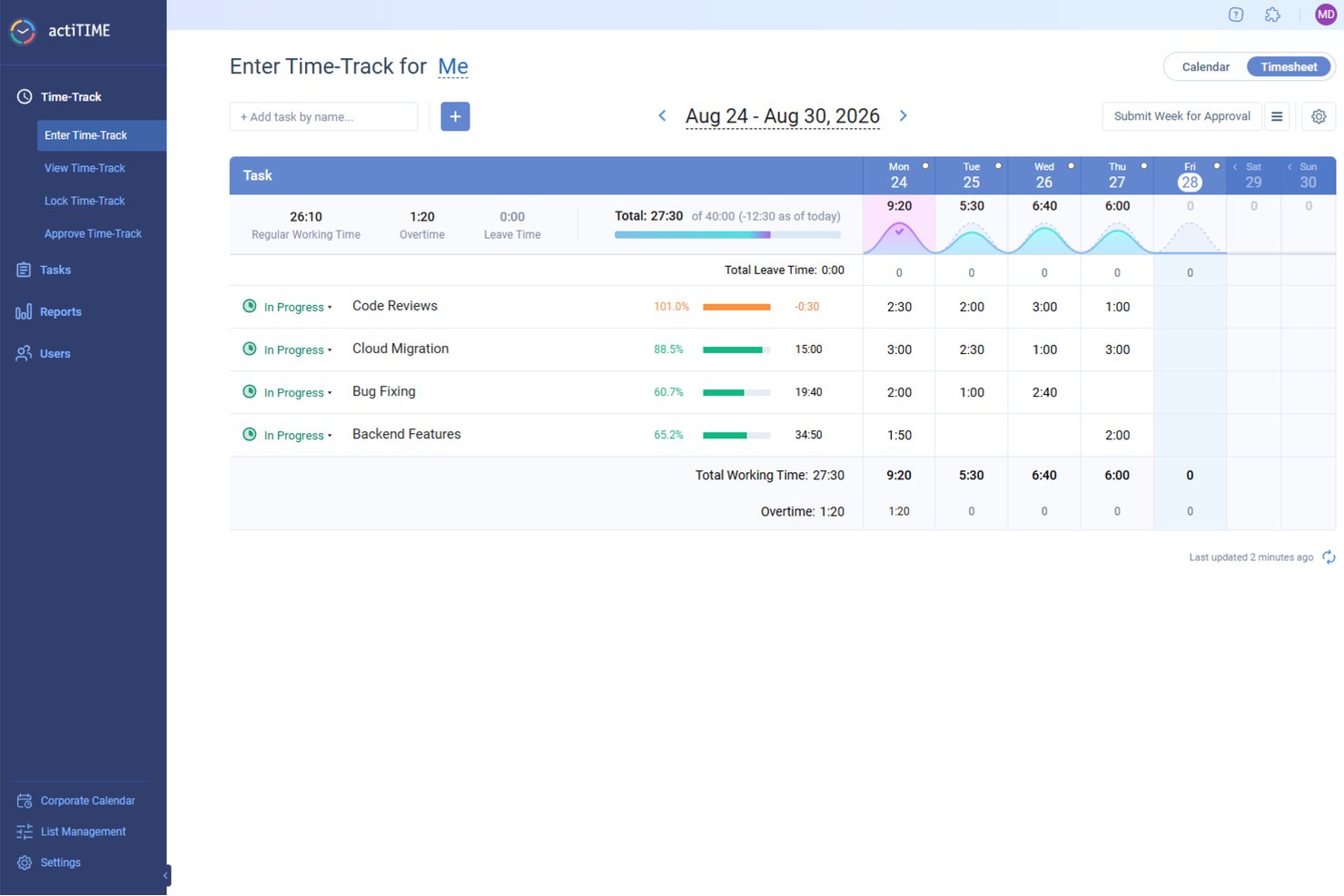
actiTIME è un software per il monitoraggio del tempo progettato per supportare la gestione dei progetti e il controllo finanziario in diversi settori.
Perché è una buona alternativa a ClickTime:
actiTIME è una valida alternativa a ClickTime perché offre funzionalità adatte a diverse esigenze di monitoraggio del tempo e gestione dei progetti. È possibile accedere a metodi flessibili per il monitoraggio del tempo, tra cui fogli presenze web, visualizzazioni del calendario e app mobili, che supportano un'elaborazione accurata delle paghe e della fatturazione. Le funzionalità di reportistica dello strumento offrono inoltre modelli per l'analisi delle prestazioni, il monitoraggio degli straordinari e la valutazione della redditività dei progetti, contribuendo a una migliore allocazione delle risorse e alla pianificazione del budget.
Funzionalità e integrazioni distintive:
Le funzionalità includono il calcolo degli straordinari, che contribuisce a garantire una retribuzione equa per i dipendenti da remoto che lavorano ore aggiuntive. Il blocco dei fogli presenze impedisce ai dipendenti di modificare le registrazioni delle ore passate una volta scaduto un termine, mantenendo i dati temporali accurati e affidabili. Inoltre, il monitoraggio delle ferie consente ai lavoratori da remoto di richiedere permessi direttamente nel sistema.
Le integrazioni includono QuickBooks, Zapier, actiPLANS, GitHub, Salesforce, Jira, Trello, Outlook, Evernote, Todoist e Bamboo HR.
Pros and Cons
Pros:
- Offre strumenti dettagliati per la reportistica
- Diversi modi per monitorare il tempo
- Gli aggiornamenti sullo stato aiutano i responsabili a monitorare i team da remoto
Cons:
- Nessun monitoraggio GPS per un controllo più dettagliato
- Nessuna funzionalità integrata per la gestione delle paghe
New Product Updates from actiTIME

actiTIME Visual Hour Indicator and Time-Track Report Redesign
actiTIME adds a wave-style hour indicator to the Timesheet and Calendar views and refreshes the Time-Track report for smoother navigation and clearer visuals. For more information, visit actiTIME's official site.
Beebole
Ideale per monitorare la redditività dei progetti dei clienti
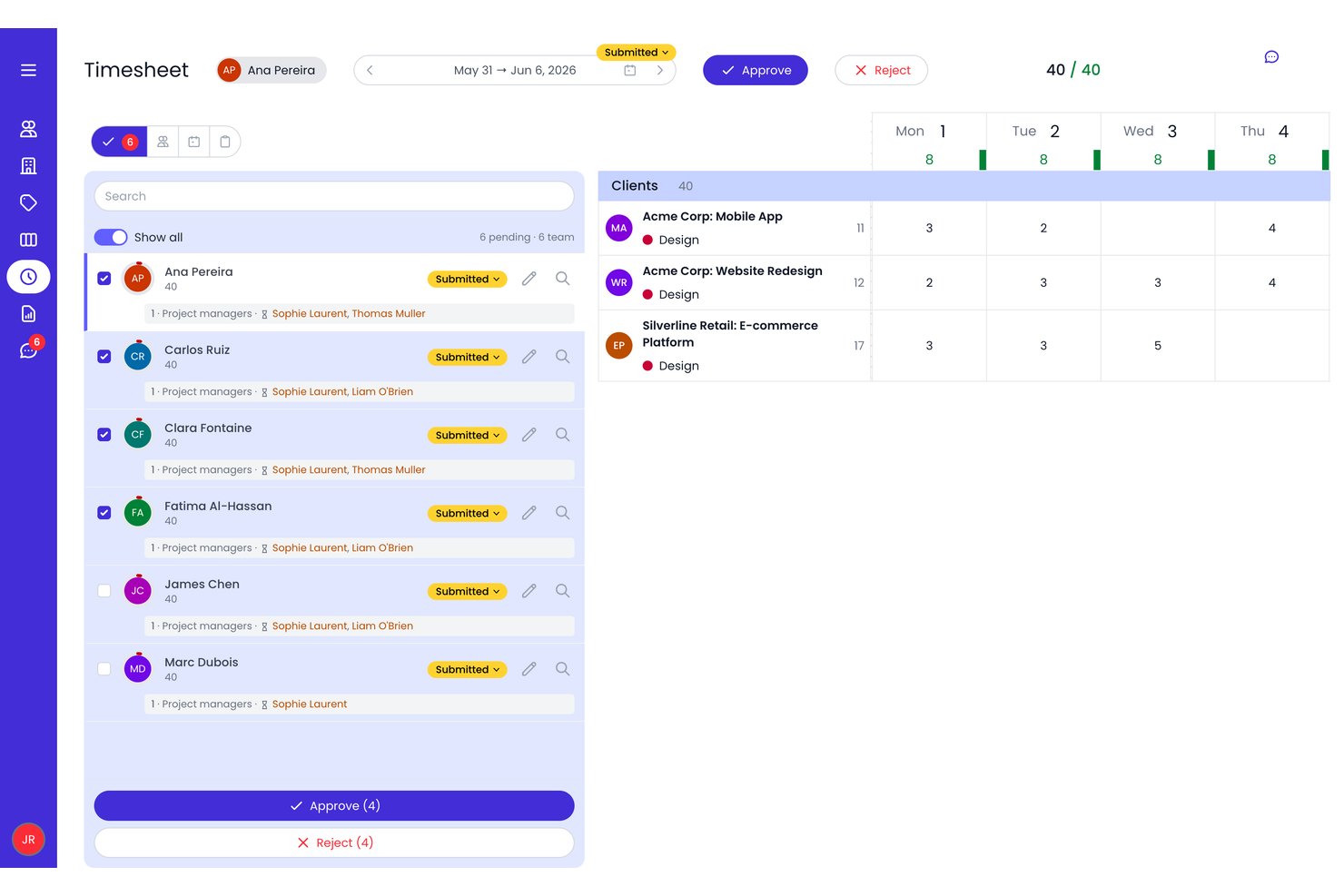
Beebole è una piattaforma per il monitoraggio del tempo e la gestione finanziaria dei progetti che combina la registrazione delle ore fatturabili e non fatturabili, la gestione dei budget su più livelli, la pianificazione della capacità delle risorse e report personalizzabili sulla redditività dei progetti dei clienti.
Per chi è più adatto Beebole?
Beebole è particolarmente adatto ad agenzie e società di consulenza che devono monitorare le ore fatturabili, gestire budget di progetto su più livelli e controllare la redditività di un portafoglio clienti.
Perché ho scelto Beebole
Beebole è entrato nella mia selezione per la precisione con cui applica le tariffe di fatturazione e i costi a ogni livello di un progetto cliente. Apprezzo la possibilità di impostare tariffe di fatturazione e costi separati a livello di persona, attività o sottoprogetto, così i report sui margini riflettono la realtà anziché valori medi. Il monitoraggio in tempo reale del budget rispetto ai dati effettivi, con avvisi in caso di superamento, rende facile individuare un progetto che sta andando fuori budget prima che intacchi i profitti.
Funzionalità principali di Beebole
- Registrazioni delle ore suggerite dall'AI: Beebole utilizza i modelli delle registrazioni passate e i dati sulle attività per suggerire le registrazioni delle ore, mentre gli eventi del calendario possono essere importati separatamente per aiutare a compilare i fogli presenze.
- Pianificazione delle risorse con competenze associate: Assegna e filtra le prenotazioni in base alle competenze nelle viste Gantt, Personale e Kanban, con la disponibilità calcolata sulla base dei permessi effettivi e degli orari di lavoro.
- Approvazioni dei fogli presenze su più livelli: Configura flussi di approvazione su più livelli manageriali, con promemoria automatici, blocco dei periodi e una traccia di controllo completa di ogni modifica.
- Invio in tempo reale dei dati a Google Sheets ed Excel: Collega un foglio di calcolo a un report Beebole salvato utilizzando il componente aggiuntivo Google Sheets o il componente aggiuntivo Excel, quindi aggiorna i dati del report direttamente dal foglio di calcolo.
Integrazioni di Beebole
Beebole offre integrazioni native con Google Calendar, Outlook Calendar, Google Sheets, Excel, Asana, Linear, monday.com, QuickBooks Online, Xero e BambooHR. La sua API aperta e le notifiche tramite webhook supportano connessioni personalizzate; Jira è indicato come disponibile prossimamente.
Pros and Cons
Pros:
- Monitora la redditività a ogni livello del progetto
- Confronto in tempo reale tra budget e dati effettivi con avvisi
- Pianificazione delle risorse con competenze associate e disponibilità in tempo reale
Cons:
- Nessuna funzionalità nativa per la fatturazione ai clienti
- La gestione avanzata dei budget richiede il piano di livello più alto

Clockify
Ideale per il monitoraggio del tempo multipiattaforma

Clockify è uno strumento per il monitoraggio del tempo e la gestione dei progetti. Si distingue come la scelta migliore per utenti e progetti illimitati, offrendo scalabilità senza costi aggiuntivi.
Perché è una buona alternativa a ClickTime:
Ho selezionato Clockify perché offre ai responsabili digitali dei progetti una visibilità continua sulla disponibilità della squadra e sulle ore registrate su tutti i principali sistemi operativi. Grazie alle applicazioni dedicate per web, desktop e dispositivi mobili, il tuo team di progetto distribuito può mantenere fogli ore accurati sia in ufficio sia in mobilità. I suoi cruscotti delle attività in tempo reale, il supporto al monitoraggio fuori linea e le impostazioni flessibili delle tariffe semplificano l'allineamento delle attività quotidiane con i risultati da consegnare ai clienti e le stime dei progetti.
Funzionalità e integrazioni principali:
Le funzionalità includono cronometro, foglio ore, chiosco, calendario e rilevatore automatico. Lo strumento offre inoltre strumenti dettagliati per la reportistica, funzionalità di gestione dei progetti e strumenti per la gestione delle squadre. È adatto a diversi settori e casi d'uso, risultando versatile per varie esigenze aziendali.
Le integrazioni includono Asana, Trello, Notion, QuickBooks, Google Calendar, Outlook, Slack, GitHub, GitLab, Basecamp, ClickUp e Zendesk.
Pros and Cons
Pros:
- Applicazioni native per dispositivi mobili e desktop
- Piano gratuito disponibile con funzionalità essenziali
- Opzioni di fatturazione flessibili con piani annuali e mensili
Cons:
- Opzioni di personalizzazione limitate per i report nel piano gratuito
- Nessuna modalità fuori linea per la versione web

My Hours
Ideale per il monitoraggio del tempo dei team

My Hours è un software di monitoraggio del tempo basato sul cloud, progettato per la collaborazione tra team. È ideale per il monitoraggio del tempo dei team perché offre una suite di funzionalità per gestire in modo efficiente più utenti e progetti.
Perché è una buona alternativa a ClickTime:
Ho scelto My Hours per questo elenco perché offre strumenti che consentono ai team di monitorare il tempo, gestire le attività e controllare i budget. La sua attenzione alle funzionalità per i team lo rende una buona alternativa a ClickTime, soprattutto per chi necessita di funzionalità collaborative di monitoraggio del tempo.
Funzionalità e integrazioni principali:
Le funzionalità includono avvisi sul budget, budget per le attività e la possibilità di assegnare attività ai membri del team, elementi essenziali per gestire i progetti di squadra e garantire la redditività. Lo strumento supporta inoltre la configurazione delle tariffe fatturabili per progetto o membro del team, semplificando il processo di fatturazione.
Le integrazioni includono QuickBooks, Zapier, Trello, Asana, Slack, Jira, GitHub, Basecamp, Todoist e Google Calendar.
Pros and Cons
Pros:
- Funzionalità complete per la gestione dei team
- Monitoraggio e avvisi sul budget
- Assistenza prioritaria per gli utenti Pro
Cons:
- Il piano gratuito è limitato a 5 utenti
- Alcuni utenti segnalano occasionali problemi tecnici del software

TimeCamp
Ideale per il monitoraggio automatico del tempo

TimeCamp è uno strumento di monitoraggio del tempo versatile che semplifica la registrazione delle ore di lavoro. È ideale per il monitoraggio automatico del tempo perché registra il tempo trascorso sui compiti senza input manuale.
Perché è una buona alternativa a ClickTime:
Ho scelto TimeCamp per questa lista grazie alle sue capacità di monitoraggio automatico del tempo, che lo rendono una valida alternativa a ClickTime. La possibilità di funzionare silenziosamente in background, registrando ogni minuto passato sui compiti, permette agli utenti di concentrarsi sul lavoro senza la distrazione delle registrazioni manuali del tempo.
Funzionalità e integrazioni principali:
Le funzionalità comprendono la capacità di monitoraggio del tempo, degna di nota perché consente agli utenti di tracciare il tempo senza intervento manuale. Lo strumento offre inoltre report dettagliati, essenziali per analizzare la produttività e gestire efficacemente i budget dei progetti.
Le integrazioni includono Trello, Asana, Jira, QuickBooks, Google Calendar, Slack, Xero, Microsoft Teams, Todoist e Salesforce.
Pros and Cons
Pros:
- Il monitoraggio automatico del tempo riduce l’impegno manuale
- Report dettagliati per l’analisi della produttività
- Si integra con una vasta gamma di strumenti popolari
Cons:
- Opzioni di personalizzazione limitate per i report
- Alcuni utenti possono trovare l’interfaccia meno intuitiva rispetto ai concorrenti

Ideale per il monitoraggio preciso del tempo

RescueTime è uno strumento che registra automaticamente il tempo trascorso sulle attività digitali. È ideale per un monitoraggio preciso e automatico del tempo poiché può acquisire dati senza input manuali, offrendo approfondimenti sulla produttività.
Perché è una buona alternativa a ClickTime:
Ho scelto RescueTime per questa lista perché la sua funzione di tracciamento automatico è particolarmente efficace per chi preferisce non interrompere il proprio flusso di lavoro per avviare o fermare timer. Questo strumento è una valida alternativa a ClickTime in quanto offre un approccio preciso e 'mani libere' al monitoraggio delle attività digitali e all'analisi dei modelli di produttività.
Caratteristiche principali e integrazioni:
Le caratteristiche includono il tracciamento automatico del tempo trascorso su applicazioni e siti web, report dettagliati sulla produttività e monitoraggio del tempo offline. Questa funzione è particolarmente utile per chi desidera ridurre al minimo le interruzioni e mantenere la concentrazione durante il lavoro.
Le integrazioni includono Slack, Google Calendar, Outlook, GitHub, Trello, Asana, Todoist, Evernote, Zapier, IFTTT.
Pros and Cons
Pros:
- Tracciamento automatico delle attività digitali
- Report approfonditi sulla produttività dell'utente
- La funzione FocusTime blocca le distrazioni
Cons:
- Non è previsto un piano gratuito oltre il periodo di prova
- Alcuni utenti possono trovare difficile adattarsi al tracciamento automatico

Harvest
Ideale per fatturazione integrata e monitoraggio del tempo
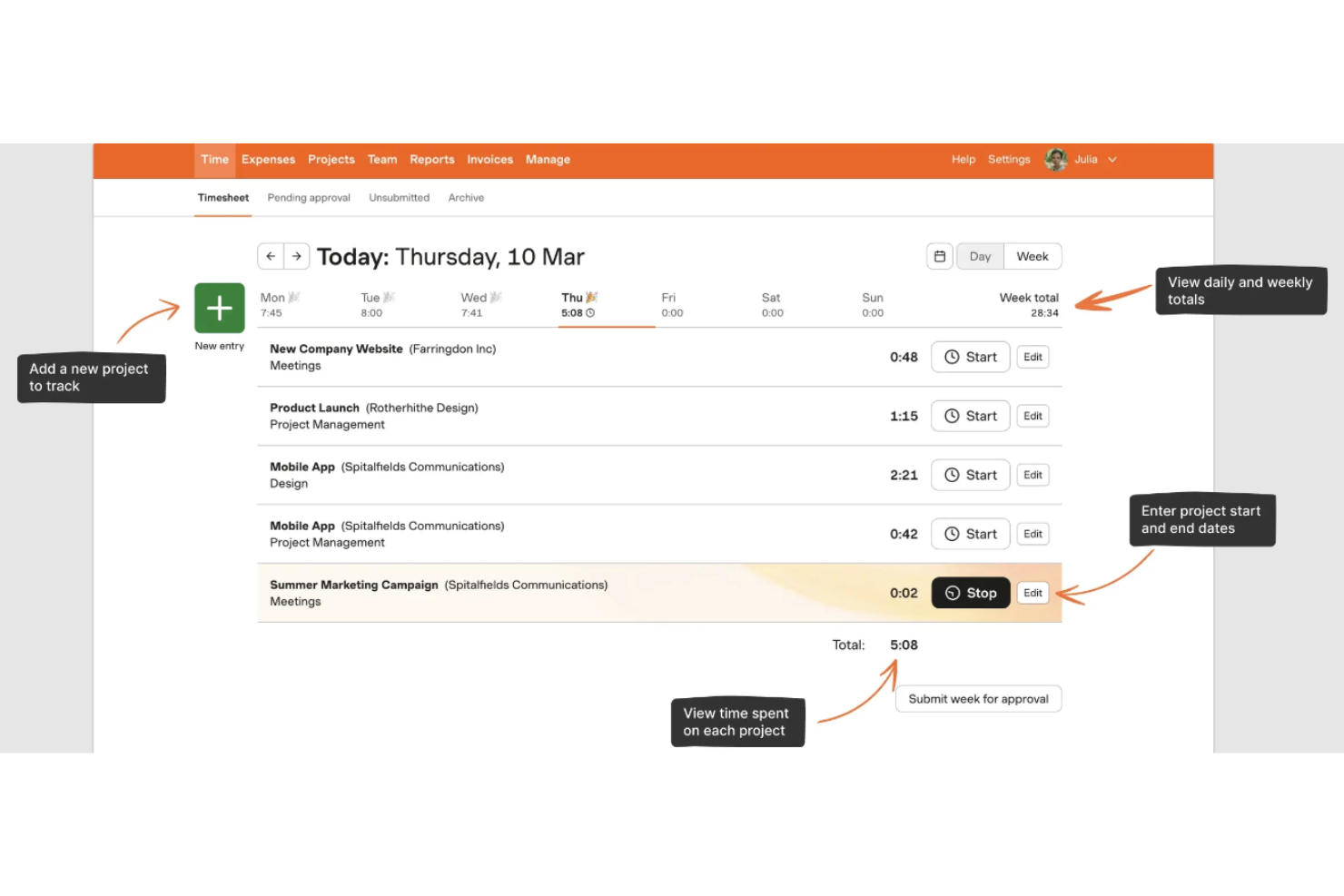
Harvest è uno strumento per semplificare il monitoraggio del tempo e la fatturazione. Gestisce entrambe le attività in modo efficiente, offrendo una soluzione unificata per professionisti e aziende.
Perché è una valida alternativa a ClickTime:
Ho selezionato Harvest per questa lista grazie alle sue solide funzionalità che combinano il monitoraggio del tempo e la fatturazione. Questa doppia funzionalità è particolarmente utile per chi gestisce ore di progetto e fatturazione dei clienti all'interno di un'unica piattaforma, rendendolo una valida alternativa a ClickTime.
Funzionalità e integrazioni principali:
Le funzionalità includono monitoraggio del tempo e un'elevata gestione dei progetti. Harvest consente una facile registrazione del tempo e fornisce report dettagliati per aiutare a monitorare l'avanzamento dei progetti e il carico di lavoro del team. Inoltre, lo strumento semplifica il processo di fatturazione, permettendo agli utenti di creare fatture dal tempo e dalle spese registrate.
Le integrazioni includono Asana, Slack, Stripe, Trello, QuickBooks, Xero, Basecamp, GitHub, Zendesk e Salesforce.
Pros and Cons
Pros:
- Monitoraggio del tempo e fatturazione integrati in un'unica piattaforma
- Report dettagliati per un migliore controllo dei progetti
- Creazione diretta di fatture da inserimenti di tempo e spese
Cons:
- Curva di apprendimento iniziale per i nuovi utenti
- Opzioni limitate per la personalizzazione di report e fatture

Ideale per il tracciamento delle ore alimentato da AI

Replicon offre tracciamento del tempo sui progetti e gestione dei fogli presenze. Grazie alla sua tecnologia ZeroTime, si distingue come la migliore soluzione per il rilevamento del tempo basato sull'intelligenza artificiale.
Perché è una buona alternativa a ClickTime:
Ho inserito Replicon in questa lista per le sue avanzate funzionalità di rilevamento del tempo con AI. Questo strumento è particolarmente efficace per le aziende che desiderano automatizzare il processo di rilevamento delle ore, riducendo così gli errori manuali e aumentando l'efficienza. La sua capacità di catturare dati relativi alle ore lavorate attraverso diverse app di lavoro lo rende un'ottima alternativa a ClickTime.
Funzionalità principali e integrazioni:
Le funzionalità includono la rilevazione delle ore, diversi formati di fogli presenze, monitoraggio delle ore ordinarie vs. straordinarie per il personale stipendiato e orario, tracciamento del tempo via mobile e chatbot basato su intelligenza artificiale. Replicon dispone anche di un modulo self-service per i dipendenti, funzionalità Face ID & Touch ID, sincronizzazione dati in tempo reale, una modalità chiosco su tablet e automazione dei flussi di lavoro. È disponibile anche una versione app mobile per iOS e Android, così i dipendenti che lavorano sul campo o da remoto possono registrare le ore dal proprio dispositivo mobile.
Le integrazioni includono Asana, BambooHR, FreshBooks, Microsoft Dynamics, Namely, Paychex, Salesforce, Slack, Workday, Xero e Zendesk.
Pros and Cons
Pros:
- Rilevamento delle ore automatico tramite AI
- Gestione della conformità alle normative lavorative internazionali
- Si integra con numerose app e strumenti di collaborazione
Cons:
- Funzionalità di project management avanzate limitate
- Il processo di configurazione risulta impegnativo per alcuni utenti

Journyx
Ideale per la contabilità dei costi di progetto

Journyx è una soluzione di rilevazione delle presenze che semplifica la contabilità dei costi di progetto e la fatturazione ai clienti. Si distingue per la contabilità dei costi di progetto grazie a funzionalità pensate per una tracciatura e una fatturazione precise.
Perché è una valida alternativa a ClickTime:
Ho scelto Journyx per questa lista perché offre una soluzione specializzata per la contabilità dei costi di progetto. Le sue capacità nel monitoraggio delle spese di progetto e nell'assicurare una fatturazione accurata lo rendono una valida alternativa a ClickTime.
Caratteristiche principali e integrazioni:
Le funzionalità includono fogli presenze personalizzabili, flussi di lavoro di approvazione, reportistica dettagliata e integrazioni con diversi sistemi contabili ed ERP. Questi strumenti sono essenziali per le aziende che necessitano di un tracciamento finanziario dettagliato e di gestione dei progetti.
Le integrazioni includono Microsoft Dynamics, Sage Intacct, Oracle NetSuite, QuickBooks, ADP, Greenshades, PrismHR, Primo Payday, Paychex e Dynamics.
Pros and Cons
Pros:
- Progettato su misura per la contabilità dei costi di progetto
- Reportistica e analisi complete
- Ampie opzioni di integrazione con sistemi contabili ed ERP
Cons:
- La personalizzazione può richiedere servizi professionali
- Alcuni utenti segnalano occasionali problemi di sincronizzazione

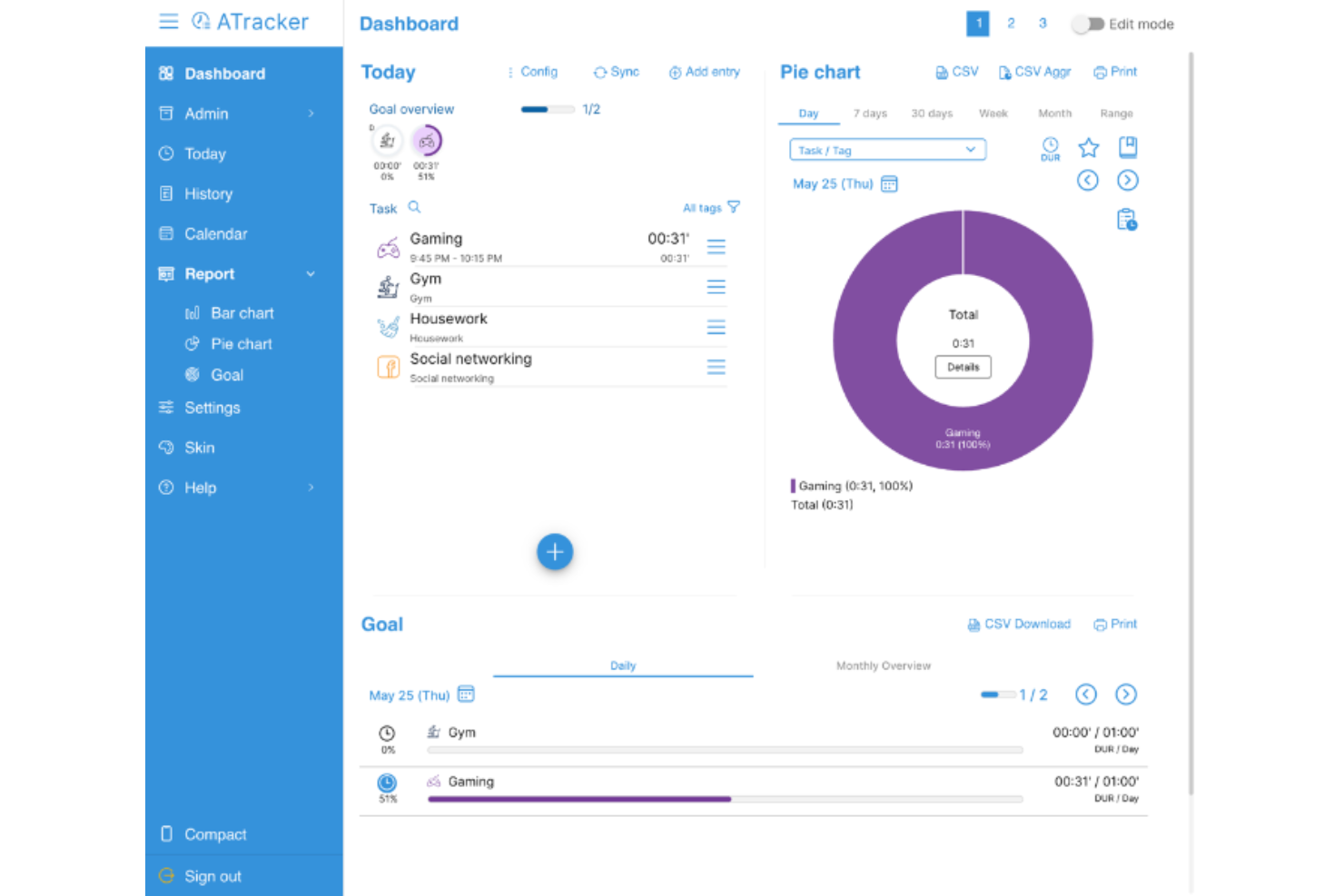
ATracker è un'applicazione per il monitoraggio del tempo progettata per la gestione personale del tempo. È ideale per chi desidera gestire il proprio tempo in modo efficace con una configurazione minima e facilità d'uso.
Perché è una valida alternativa a ClickTime:
Ho scelto ATracker per questa lista perché offre una soluzione semplice ma potente per la gestione personale del tempo. La sua interfaccia intuitiva e i requisiti minimi di configurazione la rendono un'eccellente alternativa a ClickTime per chi deve tracciare il proprio tempo senza la complessità degli strumenti pensati per le aziende.
Funzionalità e integrazioni principali:
Funzionalità includono tracciamento delle attività con un solo tocco, storico del tempo trascorso, reportistica e configurazione semplice. Altre funzionalità prevedono l'organizzazione delle attività con tag, impostazione di obiettivi per attività giornaliere e settimanali e aggiunta di note a ogni registrazione.
Le integrazioni non sono elencate sul sito web.
Pros and Cons
Pros:
- Interfaccia intuitiva con configurazione minima
- Elenco attività e attività personalizzabile
- Disponibile su vari dispositivi, inclusi smartphone, tablet e computer
Cons:
- Limitazioni al controllo della privacy
- Funzionalità limitate
Altre alternative a ClickTime
Di seguito è riportato un elenco di ulteriori alternative a ClickTime che ho selezionato, ma che non sono entrate nella lista principale. Vale la pena dare loro un’occhiata se non hai trovato quello che cercavi sopra.
- Insightful
Ideale per approfondimenti sulla produttività
- Toggl
Ideale per facilità d'uso e flessibilità
- Monitask
Ideale per il monitoraggio integrato della produttività
- Hubstaff
Ideale per il tracciamento GPS e la forza lavoro remota
- GoodDay
Ideale per il monitoraggio visivo di progetti Agile


Software correlati per la gestione dei progetti
Se non hai ancora trovato quello che cerchi, dai un'occhiata a questi strumenti correlati per la gestione dei progetti che abbiamo testato e recensito.
- Software di gestione dei progetti
- Software di gestione delle risorse
- Software di automazione dei flussi di lavoro
- Software di gestione delle attività
- Strumenti di collaborazione
- Creatore di diagrammi di Gantt
Come Valuto le Alternative a ClickTime
Valuto le alternative a ClickTime su due livelli: la base—come il monitoraggio del tempo dei progetti, il controllo dei budget e l’approvazione dei timesheet—e i fattori di differenziazione che distinguono le soluzioni ideali da quelle mediocri.
Funzionalità Fondamentali (Requisiti Minimi per Questa Lista)
Quando seleziono gli strumenti per la mia lista, assegno a ciascuno un punteggio da 0 (non offre la funzionalità) a 5 (eccelle in quest’area) per ogni funzionalità fondamentale elencata qui sotto. Poi, calcolo il punteggio totale dello strumento come percentuale. Ogni strumento deve ottenere un punteggio minimo totale del 65% per essere preso in considerazione.
- Monitoraggio del Tempo di Progetto: Verifico che sia possibile registrare le ore per specifici clienti, progetti e attività sia tramite timer sia tramite timesheet manuali, anche da mobile.
- Gestione di Budget e Costi: Ogni strumento dovrebbe permetterti di impostare budget di progetto, assegnare tariffe di fatturazione e di costo per ruolo, e monitorare i valori reali rispetto alle stime in tempo reale.
- Pianificazione delle Risorse e della Capacità: Valuto quanto bene una piattaforma evidenzia la disponibilità del team, i tassi di utilizzo e la distribuzione del carico di lavoro sulle attività in corso.
- Workflow di Approvazione dei Timesheet: Il routing delle approvazioni è importante—cerco catene configurabili in cui i manager possono revisionare, rifiutare e bloccare i timesheet con una frequenza predefinita.
- Tracciamento delle Spese: Lo strumento dovrebbe supportare l’inserimento di spese categorizzate legate ai progetti, con la possibilità di caricare ricevute e inviarle insieme alle rilevazioni orarie.
- Fatturazione e Reportistica: Verifico se tempo e spese tracciati confluiscono in fatture e report personalizzabili e condivisibili con clienti o con la direzione.
Una volta che ho una lista di strumenti che soddisfano questi criteri, considero cosa distingue ciascuna piattaforma.
Fattori Differenzianti (Cosa Distingue i Fornitori)
Ecco come confronto le varie soluzioni:
Funzionalità Distintive
La cattura automatica del tempo è un fattore di differenziazione importante. Gli strumenti che registrano passivamente le ore dai calendari e dalle app risparmiano ai consulenti il lavoro di ricostruire la settimana ogni venerdì. Valuto anche le analisi di redditività di progetto: le migliori piattaforme mostrano i margini in tempo reale per ogni attività così da poter intervenire prima che un progetto vada in perdita. La previsione basata su scenari completa il quadro, permettendo ai responsabili operativi di simulare l’impatto sull’utilizzo delle risorse in caso di chiusura di una nuova commessa o di assenza di un membro del team.
Oltre le Funzionalità
Le integrazioni sono molto importanti. Controllo se i dati del tempo confluiscono direttamente nella piattaforma contabile e negli strumenti di gestione progetti senza dover esportare manualmente, poiché una disconnessione tra il tool dei timesheet e QuickBooks o Jira crea fastidiose doppie registrazioni. Un altro fattore che considero è la conformità a DCAA e SOC 2, soprattutto per aziende con contratti governativi dove la rilevazione oraria pronta per l’audit è necessaria. Considero anche se lo strumento sia adatto a team di diverse dimensioni, perché le esigenze di un consulente singolo sono molto diverse da quelle di un PMO aziendale che gestisce centinaia di risorse fatturabili in più sedi.
Perché cercare un'alternativa a ClickTime?
Potresti cercare un'alternativa a ClickTime se riscontri una delle seguenti situazioni.
- Costi: Ritieni che il modello di prezzi di ClickTime sia troppo costoso per il tuo budget.
- Funzionalità: Le funzionalità offerte da ClickTime non soddisfano pienamente le tue esigenze di gestione dei progetti.
- Esperienza utente: Tu o il tuo team ritenete che l'interfaccia di ClickTime non sia intuitiva o sia difficile da navigare.
- Capacità di integrazione: Hai bisogno di uno strumento che si integri in modo più efficace con gli altri software che utilizzi.
- Assistenza clienti: Non sei soddisfatto del livello di assistenza clienti fornito da ClickTime.
Funzionalità principali di ClickTime
Ecco alcune delle funzionalità principali di ClickTime per aiutarti a mettere a confronto ciò che offrono le soluzioni alternative:
- Fogli presenze online: Raccolgono i dati essenziali e favoriscono report accurati
- Inserimento rapido del tempo: Consente ai membri del team di registrare le ore in modo semplice e veloce, con funzionalità per duplicare le voci precedenti
- Personalizzazione: Offre fogli presenze personalizzabili con diversi livelli di dettaglio e periodi di invio distinti
- Monitoraggio delle ore fatturabili e non fatturabili: Consente di contrassegnare il lavoro come fatturabile o non fatturabile
- Cronometro: Fornisce uno strumento preciso per il monitoraggio del tempo, con rilevamento automatico e promemoria per gli utenti
- Monitoraggio degli straordinari: Registra automaticamente gli straordinari, chi ha lavorato oltre l'orario e i costi associati
- Monitoraggio delle spese dei dipendenti: Semplifica il processo di monitoraggio e rimborso delle spese dei dipendenti
- Gestione delle assenze: Aiuta a gestire le assenze con tipologie di permesso personalizzate e processi di approvazione
- Pianificazione delle risorse: Aiuta ad assegnare le ore dei progetti e a gestire la disponibilità dei dipendenti
- Stima dei costi di progetto: Offre funzionalità per prevedere i costi dei progetti utilizzando le tariffe dei dipendenti e i dati storici
- Compatibilità con Jira: Potresti aver bisogno di uno strumento di gestione dei progetti compatibile con Jira per migliorare il monitoraggio dei problemi e delle attività