10 migliori concorrenti e alternative a ClickUp: recensione del 2026

10 Elenco delle migliori alternative a ClickUp


Le migliori alternative a ClickUp offrono interfacce più pulite, prestazioni più prevedibili e una configurazione più semplice, oltre a prezzi che spesso si adattano meglio ai team che non hanno bisogno dell’intero set di funzionalità di ClickUp. Che tu stia cercando tempi di caricamento più rapidi, un monitoraggio del tempo migliore o dashboard più intuitive, è probabile che esista una soluzione più adatta al tuo team.
ClickUp offre un’ampia gamma di funzionalità, ma per alcuni utenti la complessità diventa un ostacolo anziché un aiuto. Se devi affrontare prestazioni lente, una curva di apprendimento ripida o strumenti che il tuo team non utilizza, passare a una piattaforma più mirata può migliorare la produttività e ridurre gli ostacoli.
Negli ultimi anni ho testato e recensito strumenti per la gestione dei progetti, tra cui ClickUp e decine di suoi concorrenti. In questa guida analizzo le migliori alternative a ClickUp disponibili oggi, evidenziando i punti di forza di ciascuna piattaforma, le differenze e i tipi di team per cui è più adatta.
Perché fidarsi dei nostri consigli sui software
Il nostro team testa e recensisce software dal 2012. In quanto project manager noi stessi, sappiamo quanto sia difficile — e importante — scegliere il software giusto.
Per questa guida, abbiamo valutato gli strumenti attraverso test pratici e ricerche indipendenti, assegnando un punteggio agli strumenti in base ai nostri criteri di selezione. Ci basiamo inoltre sulle competenze di leader di pensiero del settore e di professionisti attivi nella gestione dei progetti.
Le nostre recensioni riflettono il nostro giudizio editoriale umano, non un discorso di vendita.
Revisori esperti:
Cosa sono le alternative a ClickUp?
Le alternative a ClickUp sono strumenti per la gestione dei progetti che offrono funzionalità simili per il monitoraggio delle attività, la collaborazione tra team e la gestione dei flussi di lavoro.
Questi strumenti vengono utilizzati dai team che cercano modelli di prezzo diversi, interfacce più semplici o funzionalità specifiche più adatte alle loro esigenze. Molte alternative offrono visualizzazioni personalizzabili, integrazioni e automazioni, aiutando le aziende a gestire i progetti in modo più efficiente e a crescere facilmente.
Tabella di confronto delle alternative a ClickUp
Ecco una tabella in cui puoi confrontare gli strumenti appena esaminati nelle panoramiche.
| Tool | Best For | Trial Info | Price | ||
|---|---|---|---|---|---|
| 1 | La soluzione migliore per i team agili di design e marketing | 14 giorni di prova gratuita | A partire da $9.80/utente/mese | Website | |
| 2 | Ideale per una configurazione rapida e un avvio iniziale semplice | Prova gratuita di 14 giorni | A partire da $6/utente/mese | Website | |
| 3 | Ideale per le operazioni di marketing e delle attività creative aziendali | Demo gratuita disponibile | Prezzi disponibili su richiesta | Website | |
| 4 | Ideale per l'automazione con trascinamento | Prova gratuita di 15 giorni + piano gratuito + demo gratuita disponibili | A partire da $4/utente/mese (con fatturazione annuale) | Website | |
| 5 | Ideale per gerarchie di attività profondamente nidificate | Piano gratuito disponibile | A partire da $7.65/utente/mese (con fatturazione annuale) | Website | |
| 6 | Ideale per strumenti di gestione dei clienti | Prova gratuita di 14 giorni + demo gratuita disponibile | Da $10/utente/mese (fatturato annualmente) | Website | |
| 7 | Ideale per la distribuzione agile e su larga scala dei team | Piano gratuito + prova gratuita di 14 giorni disponibile | A partire da $8.48/utente/mese | Website | |
| 8 | Ideale per ampie possibilità di personalizzazione | Piano gratuito disponibile | A partire da $6/utente/mese | Website | |
| 9 | Ideale per la gestione dell'intero ciclo di vita dei progetti | Prova gratuita di 10 giorni e demo gratuita | A partire da $19/utente/mese | Website | |
| 10 | La soluzione migliore per flessibilità e personalizzazione | Piano gratuito + prova gratuita di 14 giorni disponibile | A partire da $8/utente/mese (fatturato annualmente) | Website |


Confronto tra le 10 migliori alternative a ClickUp
In questa panoramica analizziamo i pro e i contro, i prezzi, le informazioni sulle prove e il parere degli esperti per ciascuno degli strumenti. Confronteremo inoltre ogni soluzione con ClickUp, così potrai capire se rappresenta una scelta migliore per i membri del tuo team e per le esigenze specifiche dei tuoi progetti.

Wrike
La soluzione migliore per i team agili di design e marketing
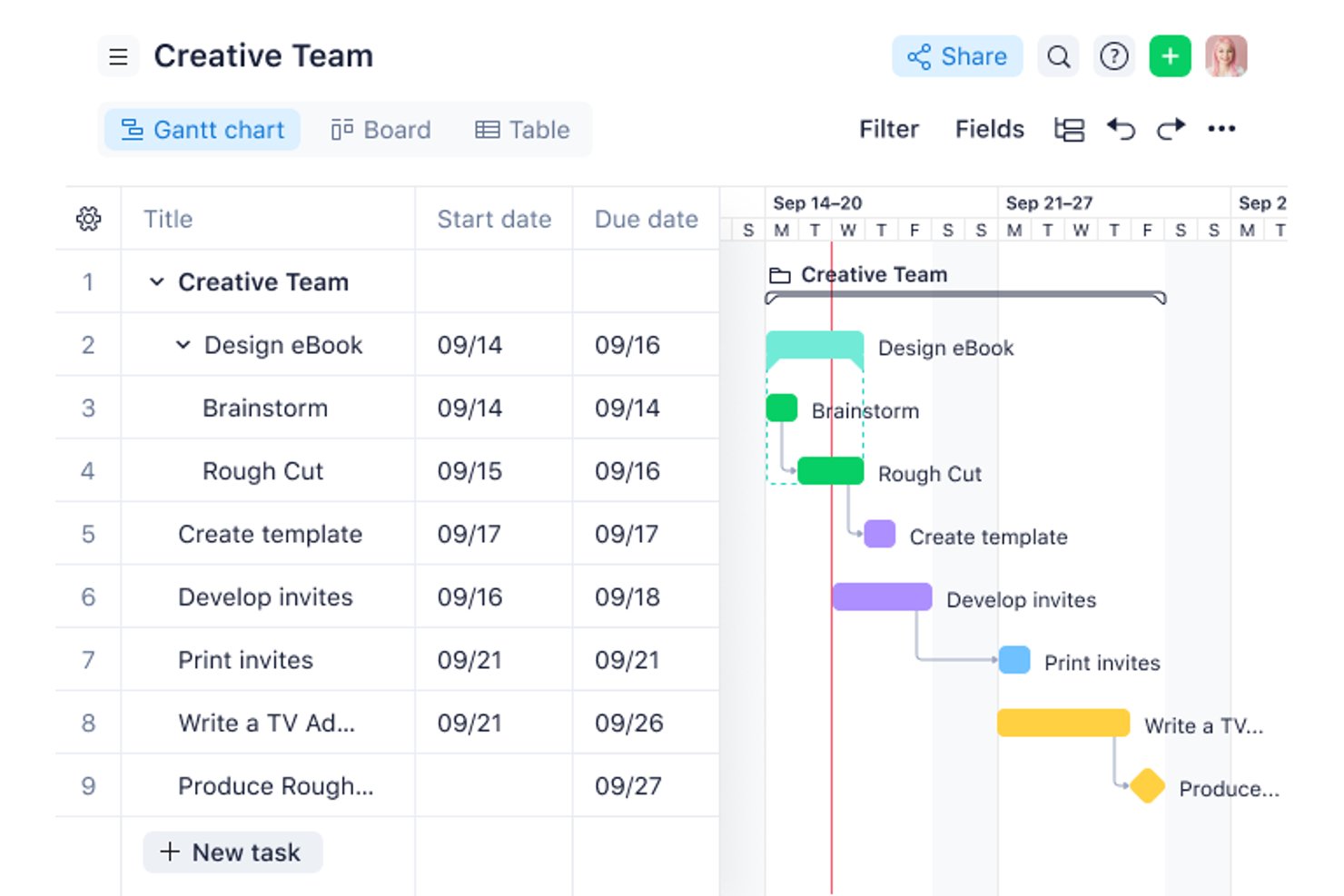
Wrike è un software di gestione dei progetti che aiuta i team di prodotto, design e marketing a coordinare le attività, gestire le tempistiche e mantenere visibile il lavoro interfunzionale quando le priorità cambiano.
Per chi è più adatto Wrike?
Wrike è una soluzione adatta ai team di design e marketing che gestiscono campagne iterative, revisioni creative e frequenti modifiche ai piani di consegna.
Perché ho scelto Wrike
Ho scelto Wrike come soluzione migliore per i team agili di design e marketing perché la revisione consente ai revisori di annotare i file creativi e mantenere i commenti collegati al lavoro. I moduli di richiesta trasformano i brief delle campagne in attività tracciabili, offrendo ai team un percorso chiaro dall'inserimento alla revisione.
Funzionalità principali di Wrike
- Diagrammi di Gantt: Mappa le tempistiche del progetto, le dipendenze tra le attività e le tappe fondamentali su un programma visivo.
- Dashboard: Crea visualizzazioni delle attività, dello stato e delle metriche del progetto utilizzando widget personalizzabili.
- Grafici del carico di lavoro: Visualizza il lavoro assegnato ai membri del team per valutare la capacità tra i diversi progetti.
- Monitoraggio del tempo: Registra il tempo dedicato alle attività e controlla le ore registrate nei fogli presenze.
Integrazioni di Wrike
La directory delle integrazioni di Wrike elenca 60 opzioni, tra cui Slack, Salesforce, Microsoft Teams, Office 365, Google Sheets, Google Drive e Miro. Supporta inoltre Zapier e offre un'API REST per le integrazioni personalizzate.
Pros and Cons
Pros:
- La revisione mantiene i commenti creativi collegati ai file
- Le dipendenze collegate tra le attività ricalcolano le date successive
- I moduli trasformano i brief in attività tracciabili
Cons:
- Le autorizzazioni complesse rendono più difficile gestire gli accessi
- Le prestazioni su dispositivi mobili possono rallentare nei progetti di grandi dimensioni
New Product Updates from Wrike

Wrike Adds Quick Search to Table View
Wrike adds Quick Search to Table View with full-table search across titles, descriptions, and fields, plus highlighted matches. This helps users find tasks faster in large tables. For more information, visit Wrike’s official site.

Ideale per una configurazione rapida e un avvio iniziale semplice
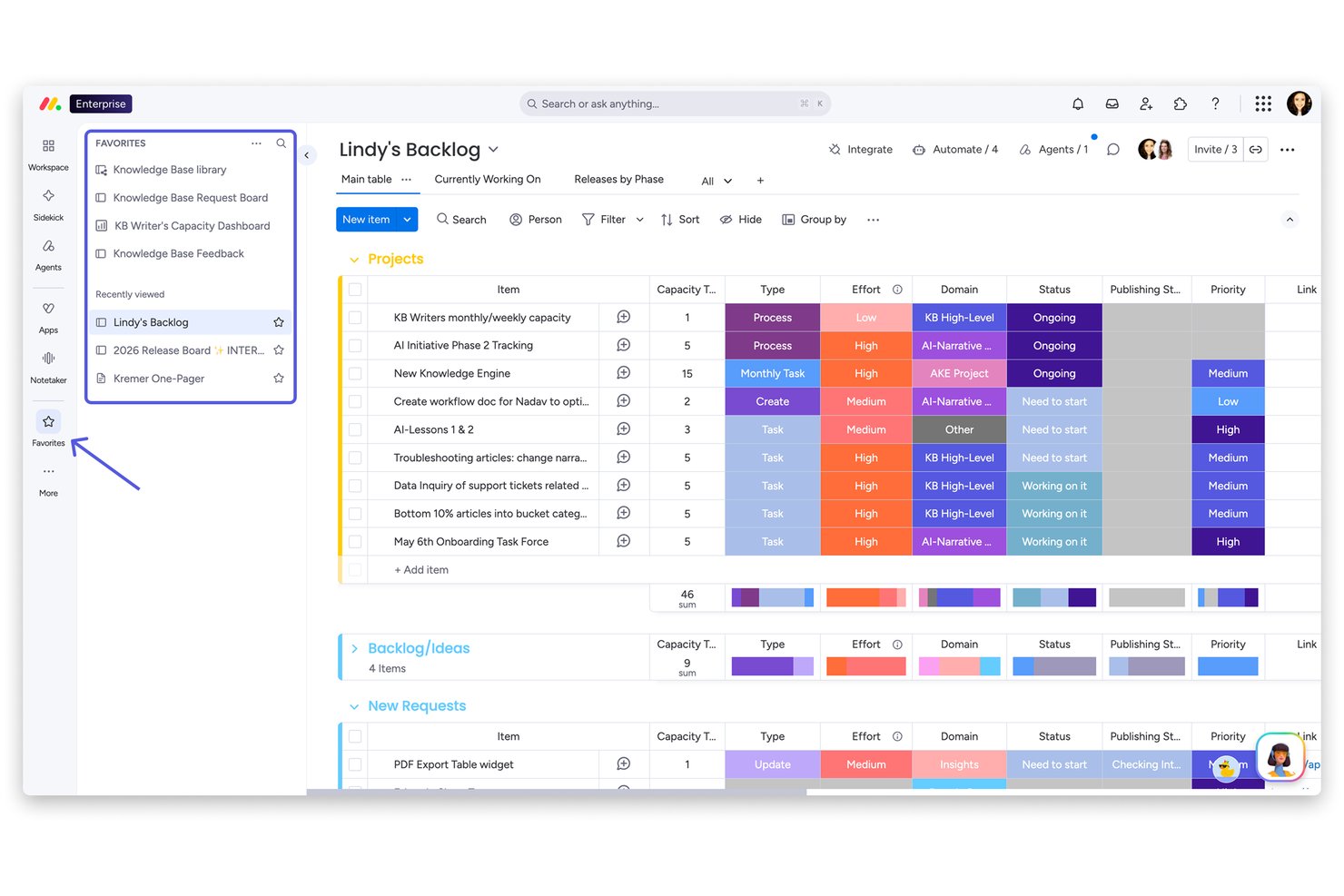
monday AI Workspace è una piattaforma visiva per la gestione del lavoro, progettata per gruppi interfunzionali di marketing, operazioni e prodotto che hanno bisogno di un modo strutturato per pianificare i progetti, automatizzare le attività ripetitive e mantenere allineate le parti interessate senza la complessità degli strumenti più pesanti.
Per chi è più adatto monday AI Workspace?
È una soluzione ideale per gruppi di medie dimensioni nei settori del marketing, delle operazioni o della gestione dei progetti, che necessitano di una piattaforma curata e intuitiva, implementabile rapidamente tra i vari reparti.
Perché monday AI Workspace è la migliore alternativa a ClickUp
monday AI Workspace si è guadagnato un posto nella mia lista ristretta perché la sua esperienza di avvio iniziale è una delle più rapide che abbia visto in questa categoria. Apprezzo il fatto che gli oltre 200 modelli predefiniti permettano al mio gruppo di implementare una bacheca di progetto funzionante in pochi minuti, dalla pianificazione degli sprint al monitoraggio delle campagne, senza dover creare nulla da zero. AI Sidekick rafforza ulteriormente questo vantaggio, proponendo suggerimenti contestuali direttamente all'interno delle bacheche, così i nuovi utenti non devono indovinare quale sia il passaggio successivo.
Funzionalità principali di monday AI Workspace
- AI Sidekick: Fornisce suggerimenti contestuali sulle attività, bozze di aggiornamento e automatizza il lavoro ripetitivo direttamente nel tuo spazio di lavoro.
- Documenti e lavagne integrate: Permette al tuo gruppo di creare documenti e fare brainstorming visivo senza uscire dalla piattaforma.
- Gestione avanzata delle risorse: Mostra in tempo reale la capacità di lavoro disponibile per aiutare a bilanciare le attività ed evitare di sovraccaricare il gruppo.
- Strumento personalizzato per la creazione di automazioni: Ti consente di automatizzare dinamicamente flussi di lavoro in più fasi usando la logica condizionale e gli eventi di attivazione, il tutto con un'interfaccia senza codice.
Integrazioni di monday AI Workspace
monday AI Workspace offre centinaia di integrazioni native tramite le integrazioni integrate e il marketplace, tra cui Slack, Google Workspace, Microsoft 365, Jira, Dropbox, Zoom, HubSpot, Salesforce, GitHub e Outlook. Supporta inoltre Zapier e fornisce un'API per integrazioni personalizzate.
Pros and Cons
Pros:
- Configurazione rapida con oltre 200 modelli pronti all'uso
- Le bacheche visive e ordinate sono adatte ai responsabili di progetto non tecnici
- AI Sidekick automatizza la gestione delle attività ripetitive
Cons:
- I piani di livello inferiore prevedono limiti per le automazioni
- Le viste Gantt sono disponibili solo nei piani tariffari più costosi
New Product Updates from monday AI Workspace
monday AI Workspace Adds Human Approval Routing
monday AI Workspace adds a human-in-the-loop approval block to AI Workflows, sending approval requests and routing workflow paths based on responses. For more information, visit monday AI Workspace's official site.

Ideale per le operazioni di marketing e delle attività creative aziendali
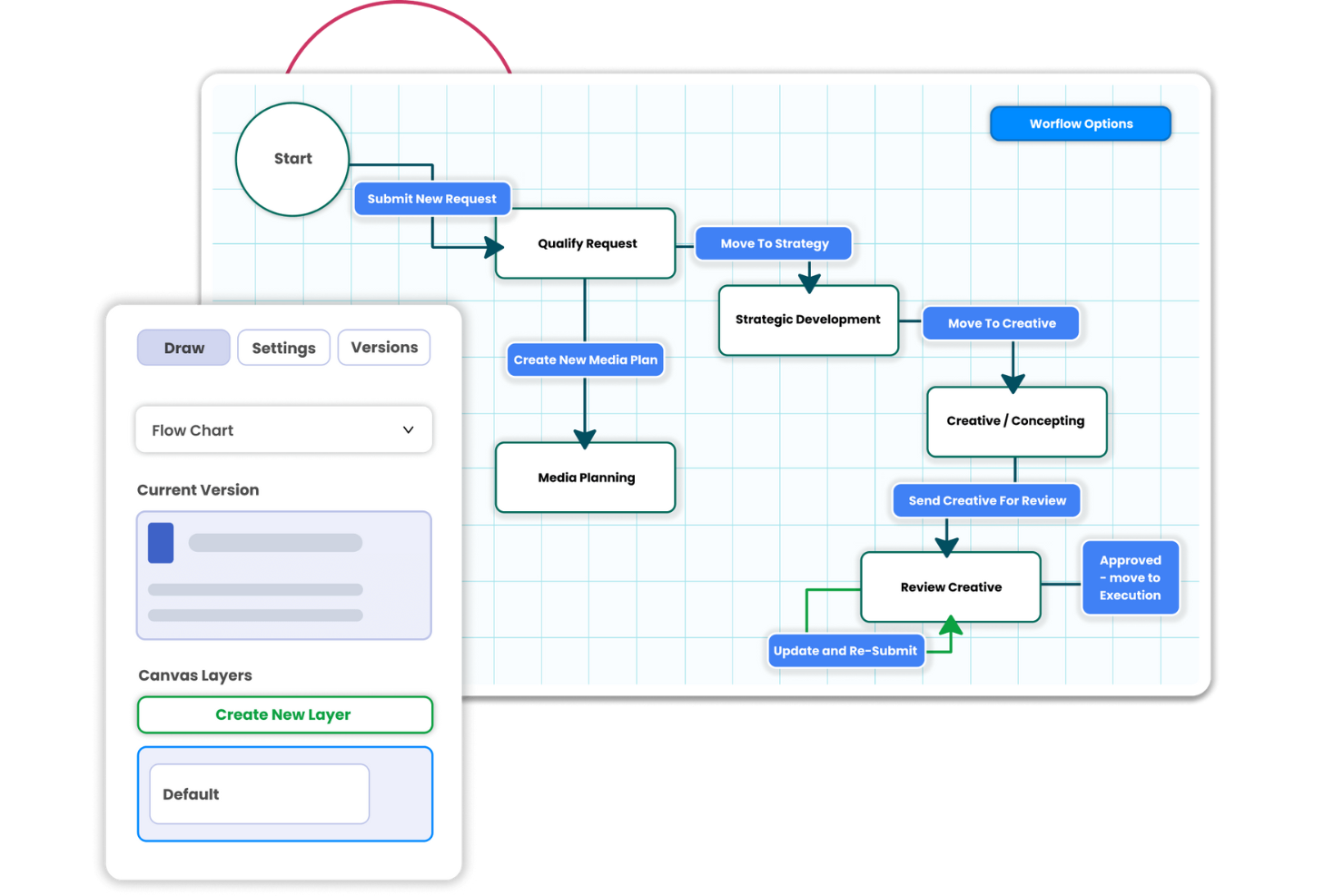
Screendragon è una piattaforma di gestione del lavoro che aiuta i team di marketing e creativi a coordinare i progetti delle campagne, gestire le approvazioni e monitorare il lavoro tra i vari reparti.
Per chi è più adatto Screendragon?
Screendragon è adatto ai responsabili delle operazioni di marketing e delle attività creative aziendali che gestiscono produzioni di campagne complesse all'interno di team grandi e interfunzionali.
Perché ho scelto Screendragon
Ho scelto Screendragon come alternativa a ClickUp per le operazioni di marketing e delle attività creative aziendali perché il suo generatore di flussi di lavoro senza codice instrada i brief delle campagne attraverso fasi condizionali e approvazioni sequenziali o parallele. Mi piace il fatto che i revisori possano annotare grafiche e video, confrontare le versioni affiancate e mantenere le decisioni associate a ogni risorsa, una soluzione adatta alle campagne multi-mercato con verifiche del marchio o di conformità.
Funzionalità principali di Screendragon
- Visualizzazioni dei progetti: Monitora il lavoro in diagrammi di Gantt, bacheche Kanban o visualizzazioni elenco.
- Pianificazione delle risorse: Assegna il lavoro in base alle competenze e alla disponibilità, con panoramiche sulla capacità del team.
- Monitoraggio del budget: Collega i budget e le spese delle campagne ai piani di progetto.
- Cruscotti analitici: Visualizza tempistiche, budget, utilizzo delle risorse e KPI delle campagne.
Integrazioni di Screendragon
Screendragon elenca integrazioni preconfigurate con Aprimo, Google Cloud Storage, Slack, HubSpot, Microsoft Teams, Microsoft Power BI, Amazon S3, Sitecore, Ziflow e Brandfolder. Il Gestore delle connessioni e l'API REST supportano connessioni personalizzate ad altri sistemi.
Pros and Cons
Pros:
- L'instradamento condizionale gestisce approvazioni complesse delle campagne
- La revisione delle risorse mantiene i commenti associati alle versioni
- Le visualizzazioni delle risorse e del budget collegano i piani alla realizzazione
Cons:
- La configurazione e l'impostazione dei flussi di lavoro richiedono tempo
- La navigazione nei progetti di grandi dimensioni può risultare lenta
New Product Updates from Screendragon
Screendragon Unveils New AI Hub
Screendragon introduced AI Hub, a new capability that lets teams build and manage AI agents directly within workflows. The update helps marketing teams automate tasks, maintain governance controls, and scale AI-driven operations more efficiently. For more information, visit Screendragon's official site.

Ideale per l'automazione con trascinamento

Zoho Projects è una valida alternativa a ClickUp per i team che desiderano un solido monitoraggio dei progetti senza una configurazione eccessivamente complessa. È una buona soluzione per aziende, istituti scolastici e team di settori come l'edilizia e lo sviluppo software, soprattutto quando servono funzionalità affidabili di gestione delle attività, monitoraggio del tempo e collaborazione in un'unica piattaforma. Zoho Projects supporta inoltre l'integrazione con altri strumenti, quindi può inserirsi in un flusso di lavoro esistente senza richiedere una riorganizzazione completa.
Perché ho scelto Zoho Projects
Ho scelto Zoho Projects come alternativa a ClickUp perché offre ai team un maggiore controllo sulla struttura dei progetti. È possibile automatizzare le fasi ripetitive utilizzando flussi di lavoro con trascinamento, contribuendo a ridurre i solleciti manuali man mano che il lavoro passa attraverso diverse fasi. Include inoltre solide opzioni di personalizzazione, che consentono di modificare campi, layout e flussi di lavoro per adattarli al processo del team, invece di costringere tutti a utilizzare la stessa configurazione.
Funzionalità principali di Zoho Projects
Oltre all'automazione e alla personalizzazione, Zoho Projects offre:
- Diagrammi di Gantt: Visualizza le tempistiche e le dipendenze dei progetti per pianificare e gestire meglio le attività.
- Monitoraggio dei problemi: Registra, monitora e risolvi rapidamente i problemi del progetto, assicurandoti che nulla venga trascurato.
- Gestione dei documenti: Organizza e condividi i documenti relativi ai progetti all'interno della piattaforma, per facilitarne l'accesso e la collaborazione.
- Strumenti di collaborazione del team: Utilizza funzionalità come chat integrata, forum e feed per favorire la comunicazione e il lavoro di squadra.
Integrazioni di Zoho Projects
Le integrazioni includono Google Drive, Slack, GitHub, Dropbox, Zapier, Microsoft Teams, Zoho CRM, Zoho Books, Zoho Desk e Zoho Analytics. È disponibile un'API per le integrazioni personalizzate.
Pros and Cons
Pros:
- Solide opzioni di automazione e personalizzazione dei flussi di lavoro
- Monitoraggio del tempo e fatturazione integrati
- Prezzi accessibili per i team in crescita
Cons:
- L'interfaccia presenta una curva di apprendimento più ripida
- Esperienza mobile con meno funzionalità
New Product Updates from Zoho Projects
Zoho Projects Adds CodeX Scripts for Custom Modules
Zoho Projects now supports CodeX Scripts for custom modules, enabling conditional logic and rules for creating, updating, and deleting records. For more information, visit Zoho Projects' official site.
 .
.
Quire
Ideale per gerarchie di attività profondamente nidificate
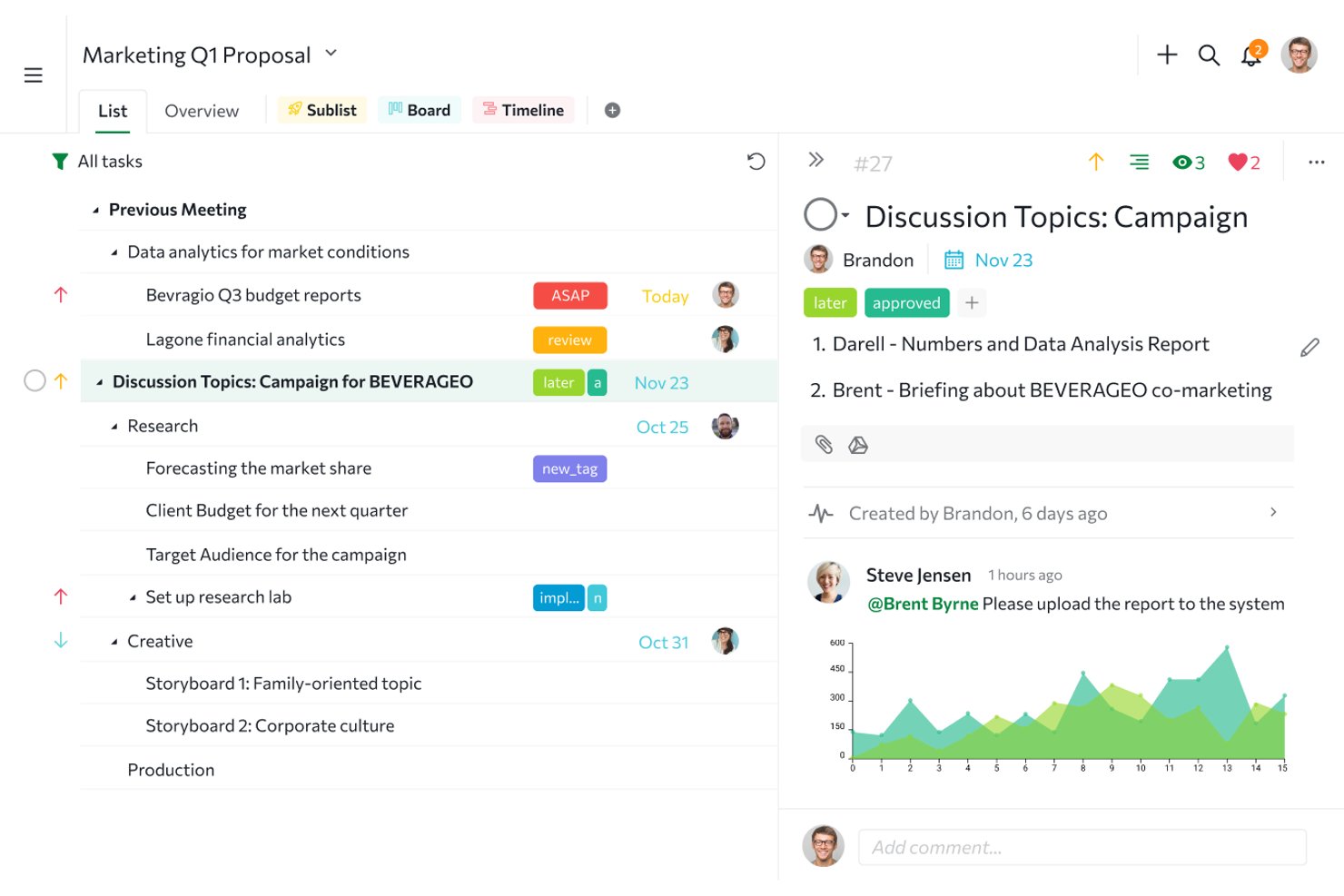
Quire è un software di gestione dei progetti per team interfunzionali che combina la pianificazione delle attività con le bacheche Kanban, aiutandoti a coordinare il lavoro quotidiano e a monitorare i progressi dei progetti.
Per chi è più adatto Quire?
Quire è adatto ai responsabili di progetto che coordinano il lavoro interfunzionale tra team di prodotto, ingegneria e design.
Perché ho scelto Quire
Includo Quire come alternativa a ClickUp perché è la soluzione migliore per gerarchie di attività profondamente nidificate. Le attività possono contenere sottoattività su più livelli, mentre la funzione Raggruppamento delle attività mantiene le attività figlie collegate alle schede principali sulla bacheca Kanban. Trovo questa funzione utile per suddividere il lancio di un prodotto in attività di design, ingegneria e controllo qualità senza perdere la struttura padre-figlio.
Funzionalità principali di Quire
- Visualizzazione della cronologia: Visualizza le pianificazioni delle attività e modifica le date su una cronologia in stile Gantt.
- Visualizzazione del calendario: Visualizza le attività con una data e riprogrammale trascinandole nel calendario.
- Monitoraggio del tempo: Registra il tempo dedicato alle attività con un cronometro, un timer Pomodoro o inserimenti manuali.
- Cartelle intelligenti: Raggruppa i progetti di più organizzazioni in un'unica cartella.
Integrazioni di Quire
Quire elenca integrazioni con Google Drive, OneDrive, Microsoft Teams, Slack, n8n, GitHub, Google Calendar, Dropbox e Box; Dropbox e Box sono disponibili nei piani a pagamento e Quire si collega a Zapier. Quire fornisce anche un'API per integrazioni personalizzate.
Pros and Cons
Pros:
- Le sottoattività nidificate preservano la struttura padre-figlio
- Passa dalla visualizzazione della struttura a quella Kanban e della cronologia
- I commenti sulle attività mantengono le discussioni del progetto collegate
Cons:
- La reportistica avanzata rimane limitata per i team più numerosi
- Le app mobili richiedono una connessione Internet per molte azioni
New Product Updates from Quire

Quire Adds Task and Standalone Reminders
Quire adds task reminders and standalone reminders with shared notifications, recurring schedules, and automatic date tracking. These updates help teams stay ahead of deadlines and manage reminders that do not need a task. For more information, visit Quire’s official site.
 .
.
Celoxis
Ideale per strumenti di gestione dei clienti
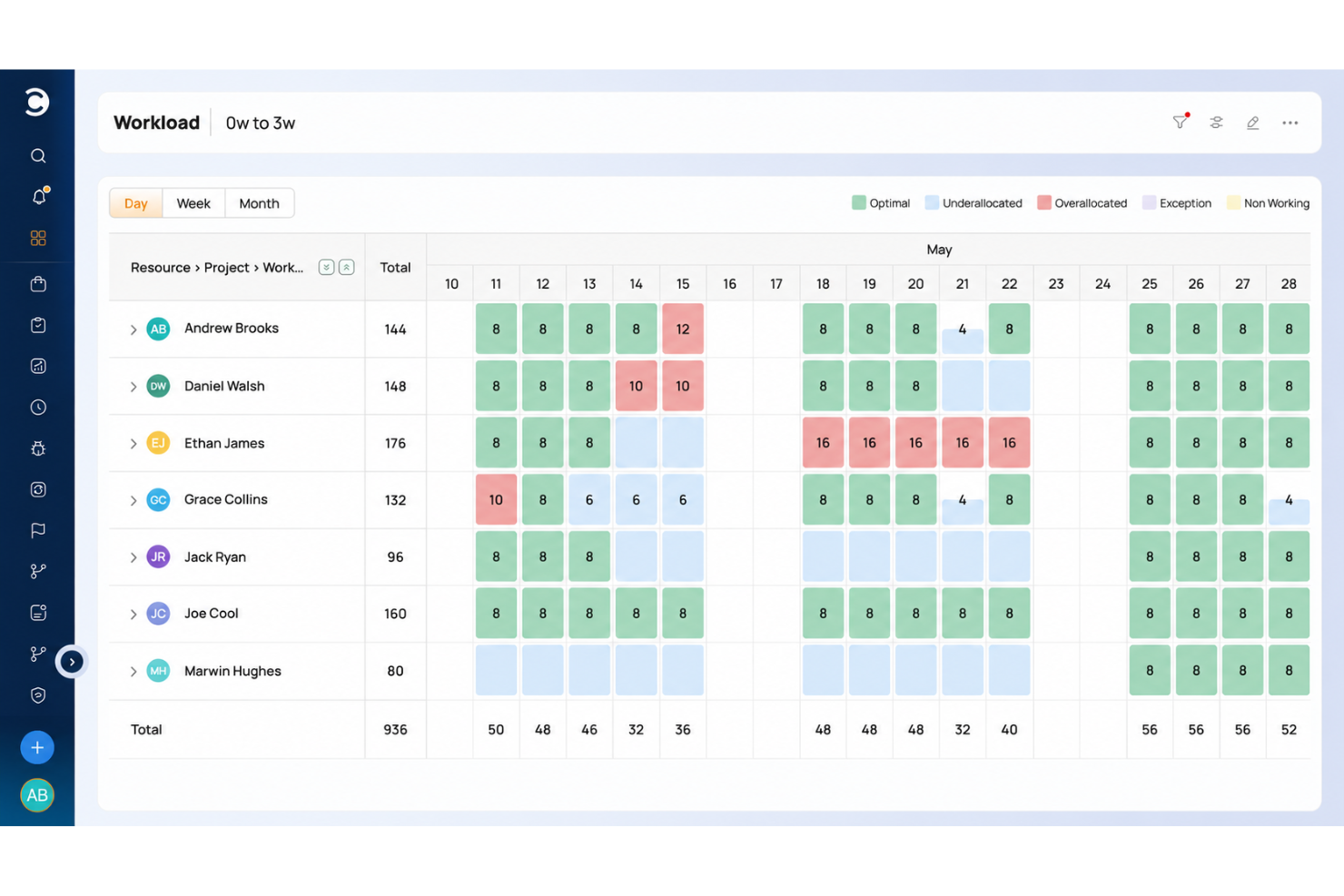
Celoxis è una piattaforma di gestione dei progetti per le aziende di servizi che devono pianificare il lavoro, allocare le risorse, monitorare i budget e coordinare i progetti dei clienti tra i team.
Per chi è più adatto Celoxis?
Celoxis è adatto ai responsabili di progetto delle aziende di servizi a contatto con i clienti che coordinano risultati, budget e risorse tra i progetti dei clienti.
Perché ho scelto Celoxis
Ho scelto Celoxis come alternativa a ClickUp per la gestione dei progetti a contatto con i clienti. Il suo portale clienti personalizzabile e con il marchio dell'azienda consente ai clienti di visualizzare e collaborare sui progetti e sulle attività autorizzati, con autorizzazioni che controllano ciò a cui possono accedere. Mi piace anche il fatto che i team possano condividere i progressi dei progetti e trasformare il tempo e le spese approvati in fatture.
Funzionalità principali di Celoxis
- Pianificazione con diagrammi di Gantt: pianifica le attività con dipendenze, percorsi critici e pianificazione automatica.
- Pianificazione della capacità delle risorse: assegna il lavoro in base a disponibilità, domanda e competenze tra i progetti.
- Flussi di lavoro personalizzati: configura campi, stati, instradamento e criteri di escalation per gli elementi di lavoro.
- Cruscotto del portafoglio: crea elementi grafici per i rapporti con grafici, filtri e possibilità di analisi dettagliata fino ai record.
Integrazioni di Celoxis
Celoxis offre 21 integrazioni native, tra cui Jira, GitHub, Azure DevOps, Slack, Salesforce, Microsoft 365 e Outlook, Google Drive, QuickBooks Online, Trello e Zendesk. Supporta inoltre Zapier e un'API REST per le integrazioni personalizzate.
Pros and Cons
Pros:
- Il portale clienti condivide aggiornamenti in tempo reale sui progetti
- Supporto alla fatturazione del tempo e delle spese approvati
- Visibilità sulla capacità e sui budget tra i progetti
Cons:
- I rapporti avanzati richiedono configurazione e impostazioni
- L'applicazione mobile è inferiore all'esperienza su computer

Jira
Ideale per la distribuzione agile e su larga scala dei team
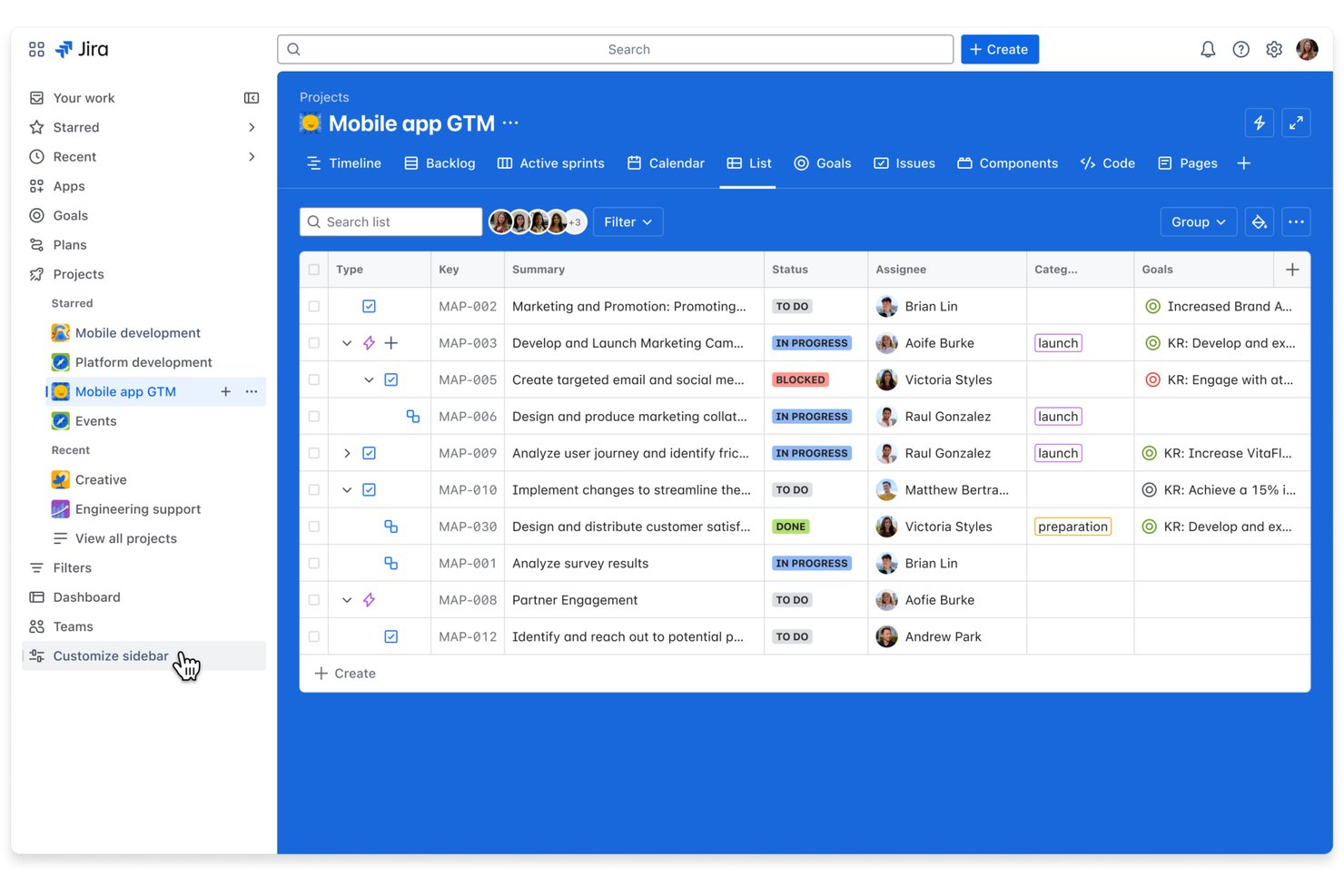
Jira è una piattaforma di gestione dei progetti per i team di prodotto e ingegneria che devono pianificare i rilasci, monitorare il lavoro e gestire le dipendenze variabili, rendendola la soluzione ideale per i flussi di lavoro dei team agili e degli sviluppatori.
Per chi è più indicato Jira?
I responsabili di prodotto e i responsabili dell'ingegneria che utilizzano Scrum o Kanban possono usare Jira per collegare i backlog del team al monitoraggio quotidiano delle attività.
Perché ho scelto Jira
Ho scelto Jira per questo elenco di alternative a ClickUp perché è l'ideale per i flussi di lavoro dei team agili e degli sviluppatori. Le bacheche Scrum e Kanban collegano i backlog degli sprint al monitoraggio delle attività, mentre la pianificazione dei rilasci e i collegamenti tra attività aiutano i responsabili dell'ingegneria a monitorare le dipendenze e individuare il lavoro bloccato prima del lancio.
Funzionalità principali di Jira
- Flussi di lavoro personalizzati: Configura stati e transizioni in base al processo del tuo team.
- Regole di automazione: Attiva azioni quando le attività soddisfano condizioni specifiche.
- Campi personalizzati: Aggiungi campi per acquisire informazioni specifiche del progetto nelle attività.
- Dashboard: Crea viste con gadget per monitorare le metriche e l'attività del progetto.
Integrazioni di Jira
Jira offre oltre 3.000 app installabili e integrazioni dell'Atlassian Marketplace con Slack, Microsoft Teams, GitHub, Bitbucket e Confluence. Fornisce inoltre API per integrazioni personalizzate.
Pros and Cons
Pros:
- Le bacheche degli sprint collegano i backlog alle attività
- I collegamenti tra attività evidenziano le dipendenze bloccanti dei rilasci
- Le dashboard monitorano responsabilità, priorità e avanzamento
Cons:
- La configurazione dei flussi di lavoro richiede molto tempo agli amministratori
- Le viste dettagliate delle attività affollano i progetti di grandi dimensioni

GoodDay
Ideale per ampie possibilità di personalizzazione
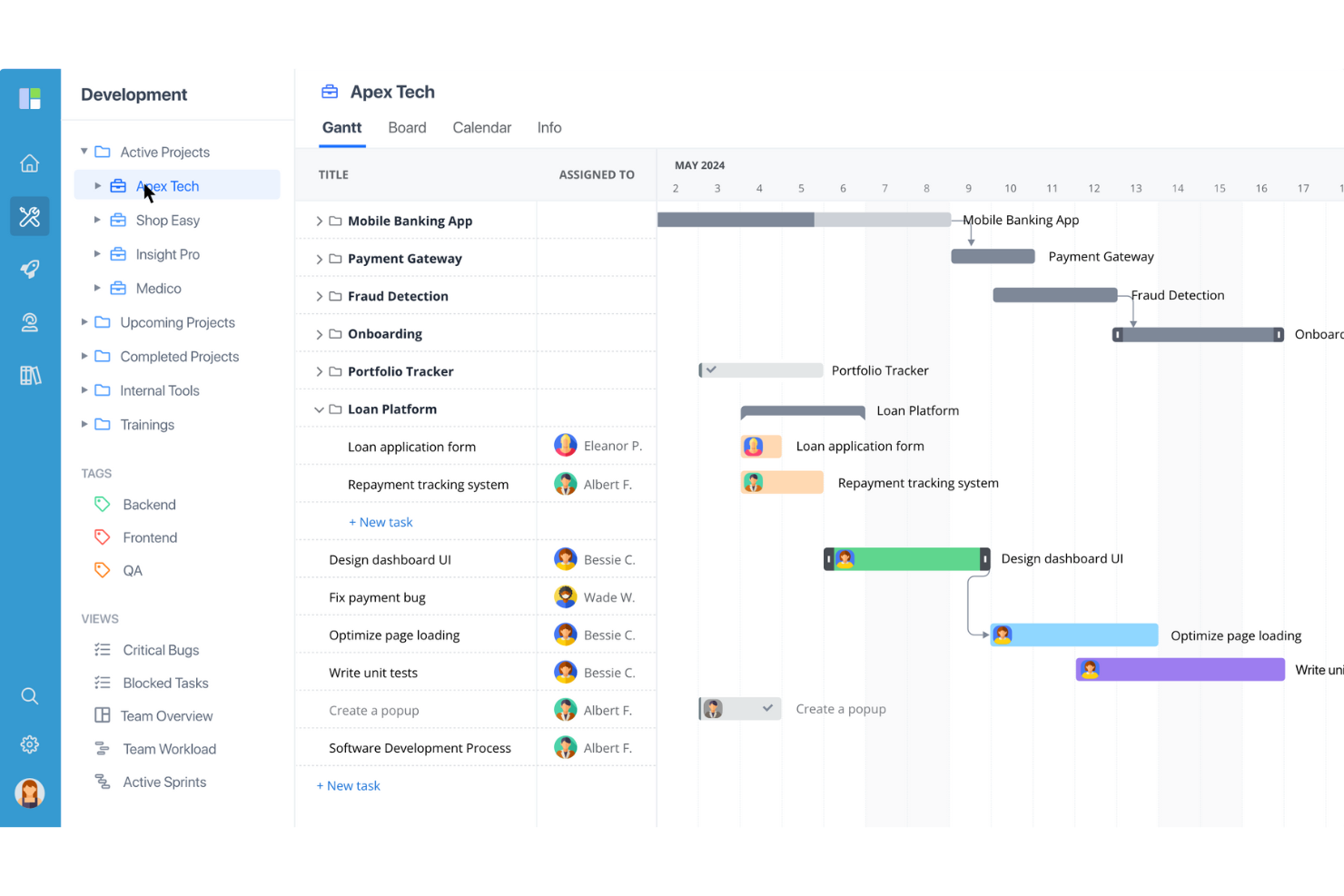
GoodDay è una piattaforma di gestione dei progetti per team tecnologici e digitali che riunisce la pianificazione delle attività, il monitoraggio dei progetti e la collaborazione in un unico spazio di lavoro, aiutando i team a coordinare le dipendenze e a mantenere visibili le attività in continua evoluzione.
Per chi è più adatto GoodDay?
GoodDay è adatto ai project manager di team tecnologici e digitali che hanno bisogno di adattare flussi di lavoro, visualizzazioni e strutture dei progetti ai diversi ambiti di lavoro.
Perché ho scelto GoodDay
GoodDay è la mia scelta come soluzione migliore per le ampie possibilità di personalizzazione, perché posso impostare tipi di attività con flussi di lavoro e campi personalizzati distinti. Posso quindi monitorare i bug di sviluppo su una bacheca e rappresentare le attività di lancio in un diagramma di Gantt, adattando le visualizzazioni dei progetti a ciascun ambito di lavoro.
Funzionalità principali di GoodDay
- Monitoraggio del tempo: Registra il tempo dedicato alle attività e ai progetti.
- Automazione dei flussi di lavoro: Imposta regole per attivare azioni quando il lavoro cambia.
- Obiettivi e OKR: Crea obiettivi e monitora i risultati chiave.
- Report e analisi: Genera report sulle attività dei progetti e dei team.
Integrazioni di GoodDay
GoodDay offre integrazioni native con Google Workspace, Slack, Dropbox, Box, GitHub e GitLab. Si connette anche a Zapier e fornisce un'API per integrazioni personalizzate.
Pros and Cons
Pros:
- I tipi di attività personalizzati si adattano a flussi di lavoro di sviluppo distinti
- Le visualizzazioni Gantt, a bacheca e del carico di lavoro condividono i piani
- Il monitoraggio del tempo integrato collega l'impegno alle attività
Cons:
- L'app mobile è meno avanzata nella gestione delle attività rispetto alla versione per computer
- I report non possono essere inviati via email dalla piattaforma

Kantata
Ideale per la gestione dell'intero ciclo di vita dei progetti
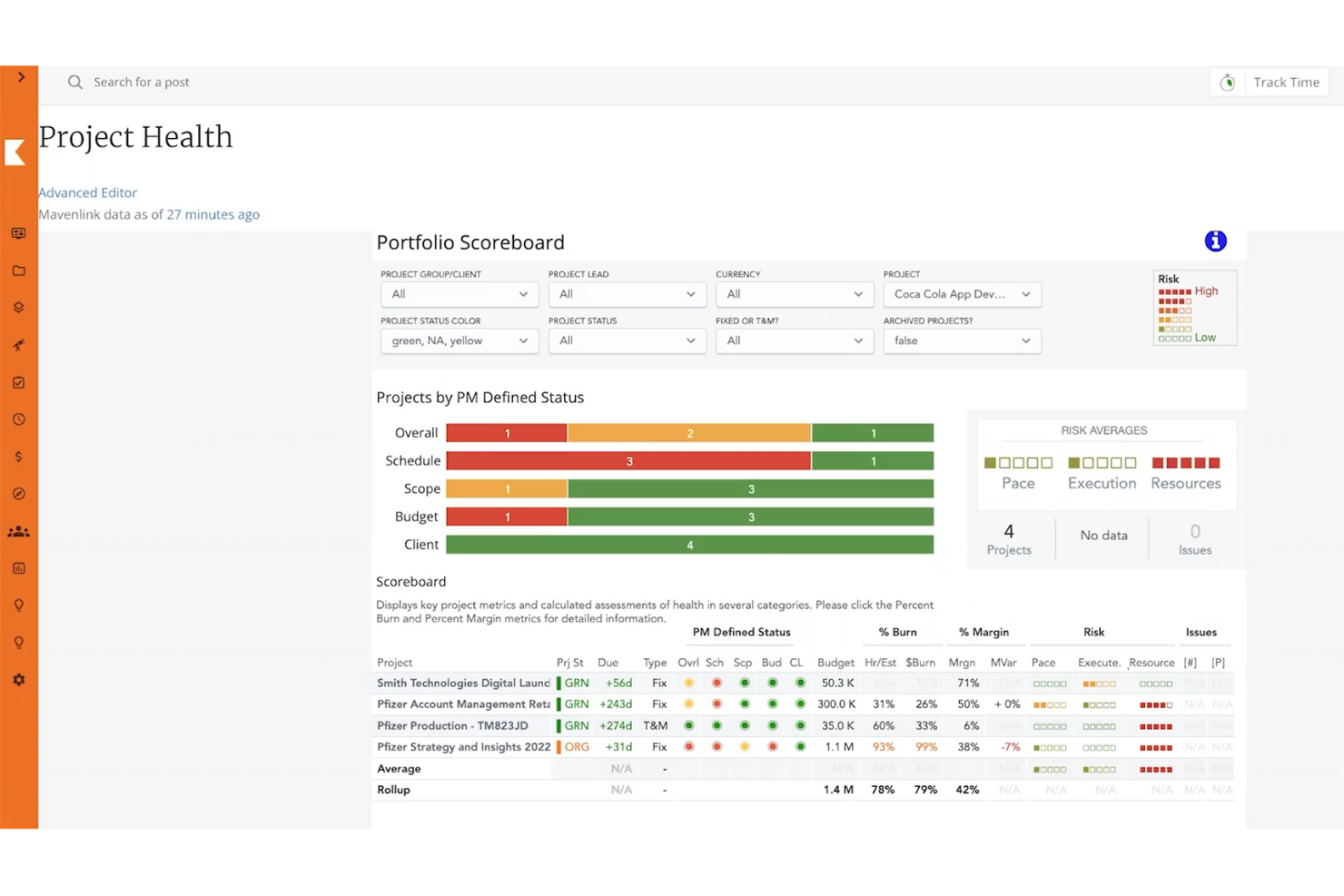
Kantata è una piattaforma di automazione per i servizi professionali destinata a società di consulenza e ad altri team di servizi, che collega il lavoro sui progetti alla gestione delle risorse e alla visibilità finanziaria per aiutare i manager a coordinare la fornitura dei servizi e a controllare i margini.
Per chi è più adatta Kantata?
Kantata è adatta ai project manager dei servizi professionali che devono coordinare la fornitura ai clienti, il personale e i risultati finanziari nell'ambito degli incarichi.
Perché ho scelto Kantata
Ho scelto Kantata come alternativa a ClickUp perché è adatta alla “gestione dell'intero ciclo di vita dei progetti”, collegando il lavoro sui progetti alla gestione delle risorse e alla visibilità finanziaria. Apprezzo il fatto che i manager possano coordinare gli incarichi dei clienti e monitorare i margini al variare delle esigenze di personale o di fornitura.
Funzionalità principali di Kantata
- Stima dei progetti: Utilizza i dati sulle prestazioni per stimare il lavoro e modificare i piani dei progetti.
- Monitoraggio del tempo: Registra le ore relative a clienti e progetti.
- Monitoraggio delle spese: Tieni traccia delle spese per i progetti dei clienti.
- Kantata Pulse: Raccoglie il feedback di clienti e dipendenti durante la fornitura dei servizi.
Integrazioni di Kantata
Kantata documenta le integrazioni con Salesforce, QuickBooks Online e Desktop, Google Workspace, Jira, Slack, Microsoft Teams, HubSpot, NetSuite e Sage Intacct, e indica Kantata OX su Zapier. Offre inoltre API sicure e oltre 1.200 connettori predefiniti per collegare i sistemi e creare flussi di lavoro.
Pros and Cons
Pros:
- Collega la fornitura dei servizi, il personale e i margini dei progetti
- Monitora l'utilizzo e la capacità nell'ambito degli incarichi
- Centralizza la collaborazione con i clienti e gli aggiornamenti sui progetti
Cons:
- Una configurazione complessa può sopraffare i team più piccoli
- La creazione di report personalizzati richiede competenze amministrative
New Product Updates from Kantata

Kantata Adds Access Group Change History
Kantata adds Access Groups History, letting account administrators track changes to group details, membership, and permissions in Recent History. The update also makes these events available through the Subscribed Events API for broader monitoring. For more information, visit Kantata’s official site.
 .
.
Miro
La soluzione migliore per flessibilità e personalizzazione
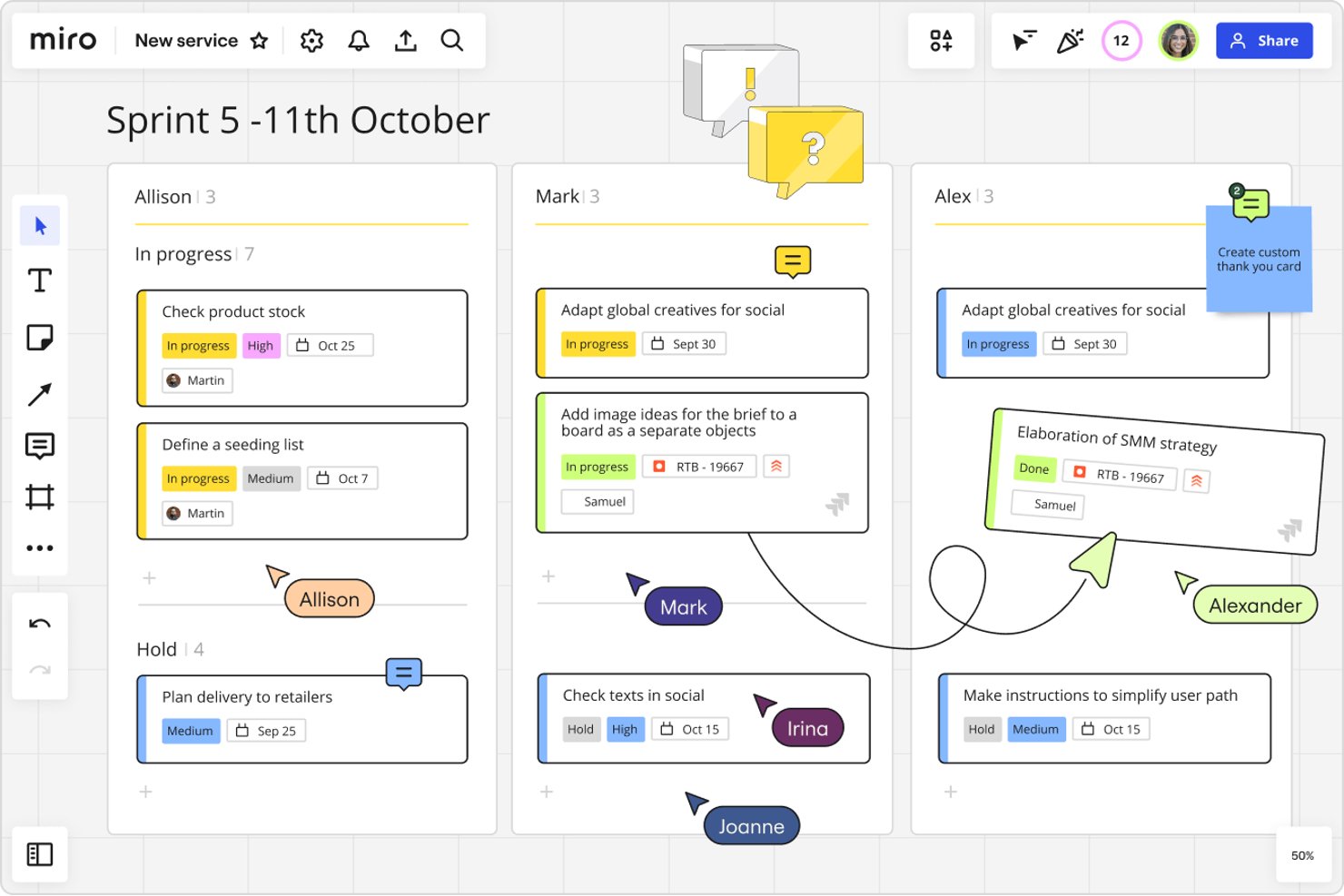
Miro offre ai team di prodotto, ingegneria e progettazione uno spazio di lavoro visivo per pianificare progetti, mappare i flussi di lavoro e mantenere allineato il lavoro interfunzionale al variare dei requisiti.
A chi è più adatto Miro?
Miro è adatto ai responsabili di progetto delle organizzazioni tecnologiche che devono personalizzare flussi di lavoro e modelli per team e metodi di distribuzione diversi.
Perché ho scelto Miro
Ho scelto Miro come “La soluzione migliore per flessibilità e personalizzazione” perché la sua lavagna visiva mi permette di strutturare i flussi di lavoro dei progetti in base alle modalità di consegna dei team. Utilizzo schede e modelli personalizzabili per mappare i piani degli sprint, le dipendenze e i passaggi di consegne, adattandoli poi al variare dei requisiti.
Funzionalità principali di Miro
- Integrazione con Jira: Aggiungi le schede Jira alle lavagne e visualizza i dettagli delle attività.
- Votazione: Consenti ai partecipanti di votare direttamente su una lavagna idee o opzioni.
- Commenti: Aggiungi commenti ai contenuti della lavagna per discussioni e riscontri sui progetti.
- Timer: Imposta un conto alla rovescia per laboratori, sessioni di pianificazione o esercizi di gruppo.
Integrazioni di Miro
Il Marketplace di Miro offre oltre 160 integrazioni con applicazioni, tra cui Jira, Confluence, Slack, Microsoft Teams, Trello, Asana, Google Drive e Zoom. Miro supporta anche Zapier e offre un'API per integrazioni personalizzate.
Pros and Cons
Pros:
- La lavagna infinita supporta la mappatura flessibile dei progetti
- I cursori e i commenti in tempo reale facilitano i workshop
- I modelli velocizzano le sessioni di pianificazione ripetibili
Cons:
- La gestione dei responsabili delle attività e la reportistica restano relativamente limitate
- Le lavagne di grandi dimensioni possono rallentare e diventare disordinate
New Product Updates from Miro
Miro Adds Japan Data Residency for Enterprise Customers
Miro has introduced Japan data residency for enterprise customers, offering in-region storage for production data, backups, and metadata, plus in-region compute infrastructure. For more information, visit Miro's official site.
Altre alternative a ClickUp
Ecco alcune alternative aggiuntive a ClickUp che non sono entrate nel mio elenco ristretto, ma che vale comunque la pena prendere in considerazione:
- Asana
Ideale per un elenco di cose da fare semplice e collaborativo
- Ravetree
Ideale per la gestione delle risorse
- Smartsheet
La soluzione migliore per il monitoraggio dei progetti in stile foglio di calcolo
- MeisterTask
Ideale per i team Kanban che si allontanano dalla complessità
- Scoro
Ideale per dashboard KPI relative al lavoro per i clienti
- Accelo
Ideale per la fatturazione e la gestione dei pagamenti del lavoro con i clienti
- Productive
Ideale per il monitoraggio del tempo e la fatturazione nelle agenzie
- Process Street
Ideale per le operazioni ricorrenti dei processi e di conformità
- Hive
Ideale per integrare email e chat nelle attività
- Workzone
Ideale per i team non tecnici che necessitano di moduli di raccolta delle richieste


Informazioni su ClickUp
ClickUp è un software per la gestione dei progetti con funzionalità avanzate per gestire e completare tutti i progetti del team su un’unica piattaforma. Gli utenti possono pianificare i progetti, utilizzare campi personalizzati, programmare le attività, impostare dipendenze tra attività, creare automazioni e gestire le risorse in uno spazio di lavoro centralizzato, oltre a comunicare e collaborare con membri del team e ospiti.
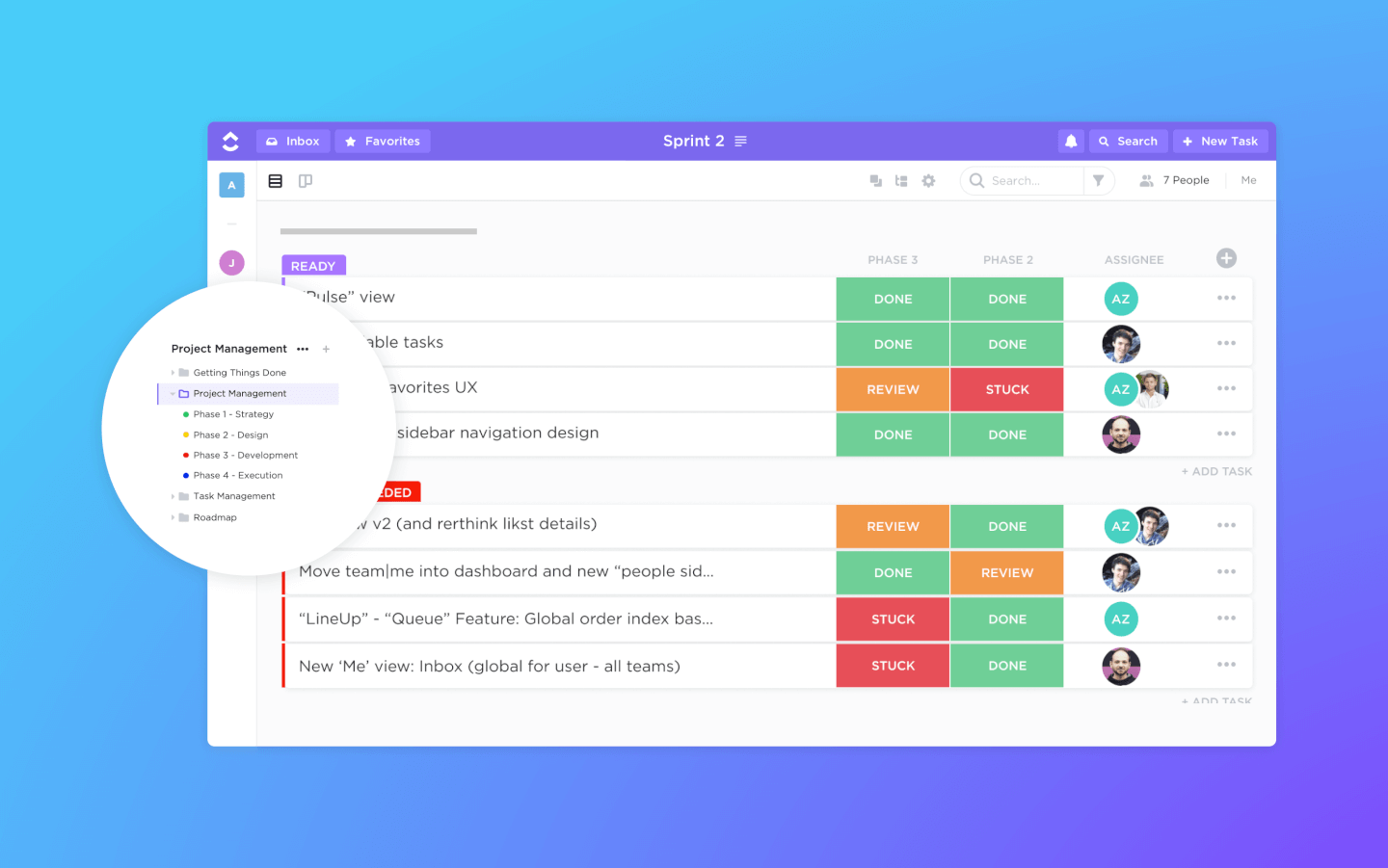
Le funzionalità di gestione delle attività includono elenchi di controllo delle attività, sottoattività e modelli di attività. Inoltre, puoi filtrare, ordinare, cercare, riordinare facilmente e visualizzare le attività nel modo più pratico per il team. Gli utenti possono anche creare diagrammi di Gantt e accedere alle visualizzazioni calendario, bacheca e a oltre 10 modalità aggiuntive per visualizzare le informazioni.
ClickUp include inoltre eccellenti funzionalità per la condivisione dei file e la modifica collaborativa di wiki e documenti online. Gli utenti possono commentare documenti e attività, menzionare i colleghi e chattare con gli altri membri del team per migliorare la comunicazione e la collaborazione. Le funzionalità di reporting includono la possibilità di creare dashboard personalizzate, oltre a sei tipi di report integrati per la reportistica del team.
ClickUp offre integrazioni native con Slack, G Suite, Airtable, Basecamp, Dropbox, Jira e molti altri strumenti, oltre a più di 1.000 integrazioni tramite Zapier.
Il piano gratuito per sempre di ClickUp è completo e include tutte le funzionalità principali. Tuttavia, questa versione gratuita presenta limiti di utilizzo e ti invita a effettuare l'upgrade una volta raggiunti. Il piano illimitato parte da $5/utente/mese e offre funzionalità aggiuntive.
Come valuto le alternative a ClickUp
Esamino due livelli: gli elementi imprescindibili di base che qualsiasi alternativa a ClickUp deve offrire—gerarchie delle attività, visualizzazioni multiple, automazioni—e poi gli elementi distintivi che indicano la soluzione più adatta al tuo team.
Funzionalità di base (elementi imprescindibili per questo elenco)
Quando seleziono gli strumenti per il mio elenco, assegno a ciascuno un punteggio su una scala da 0 (non offre la funzionalità) a 5 (eccelle in quest'area) per ogni funzionalità di base elencata di seguito. Poi calcolo il punteggio totale dello strumento sotto forma di percentuale. Ogni strumento deve raggiungere un punteggio totale minimo del 75% per essere preso in considerazione.
- Gestione delle attività e dei progetti: valuto come ogni strumento gestisce le gerarchie delle attività, le dipendenze e le assegnazioni—ad esempio il collegamento di un'attività di progettazione a un ticket di sviluppo, in modo che nessuno dei due team proceda nell'ordine sbagliato.
- Visualizzazioni multiple dei progetti: ogni team lavora in modo diverso, quindi verifico la presenza di bacheche Kanban, diagrammi di Gantt, calendari e sequenze temporali, per vedere se i responsabili di progetto possono cambiare visualizzazione senza perdere il contesto.
- Strumenti di collaborazione del team: osservo come i team comunicano all'interno dello strumento—commenti organizzati in thread sulle attività, @menzioni, condivisione di file e la possibilità di mantenere i feedback collegati al lavoro a cui fanno riferimento.
- Personalizzazione e automazione dei flussi di lavoro: qui sono importanti gli stati personalizzati, i campi e i trigger basati su regole. Ad esempio, verifico se è possibile assegnare automaticamente un revisore QA quando un'attività passa a "Pronta per la revisione".
- Report e dashboard: valuto se le dashboard mostrano lo stato del progetto a colpo d'occhio—velocità dello sprint, distribuzione del carico di lavoro, attività in ritardo—senza dover estrarre manualmente i dati ogni settimana.
- Integrazioni e accesso API: lo strumento deve integrarsi con lo stack già in uso. Verifico la presenza di connettori nativi per strumenti come Slack, GitHub, Google Workspace e Jira, oltre al supporto per API e webhook.
Dopo aver creato un elenco di strumenti che soddisfano questi criteri, valuto ciò che distingue ciascuna piattaforma.
Fattori distintivi (ciò che differenzia i fornitori)
Ecco come confronto i diversi fornitori:
Funzionalità distintive
Il monitoraggio integrato del tempo è un importante elemento distintivo: i team che fatturano i clienti o monitorano l'impegno dedicato agli sprint non dovrebbero aver bisogno di uno strumento separato per registrare le ore. Valuto anche se una piattaforma offre la gestione delle risorse e del carico di lavoro, poiché individuare un ingegnere sovraccarico prima della scadenza di uno sprint è molto più utile che scoprirlo dopo. Il monitoraggio degli obiettivi e degli OKR è importante per i team che devono collegare le attività quotidiane agli obiettivi trimestrali. Vale la pena considerare anche le funzionalità di intelligenza artificiale, come la sintesi delle attività e la generazione automatica delle sottoattività, poiché riducono il lavoro amministrativo di routine.
Oltre le funzionalità
La trasparenza dei prezzi è importante quando si confrontano le alternative: verifico se i piani aumentano in modo prevedibile con la crescita del team, poiché aumenti di costo imprevisti al raggiungimento di 50 o 100 utenti possono compromettere una migrazione. Anche la facilità di onboarding è un fattore che considero attentamente. Uno strumento con supporto all'importazione da ClickUp, modelli pronti all'uso e configurazione guidata può far risparmiare settimane di avviamento ai team distribuiti. Valuto inoltre la scalabilità: una piattaforma che funziona per una startup di 10 persone ma cede sotto il peso di un'organizzazione di 200 persone con più spazi di lavoro non è una vera alternativa.
Perché potresti aver bisogno di un'alternativa a ClickUp?
Vuoi uno strumento più semplice (e non vuoi sostituire gli altri strumenti)
Una semplice interfaccia con trascinamento può fare una grande differenza. ClickUp è una piattaforma di produttività ampia, complessa e potente. Ci sono buone ragioni per credere che potrebbe sostituire molti degli altri strumenti che utilizzi. Tuttavia, questo rende anche molto più difficile insegnarne l'utilizzo a una persona che stai inserendo nel team.
Inoltre, se possiedi già molti altri strumenti per la gestione dei progetti o del lavoro e ne sei soddisfatto, potresti non voler o non aver bisogno che ClickUp li sostituisca tutti. Potresti semplicemente volerli integrare con ciò che già utilizzi.
Invii molte fatture
ClickUp non è una piattaforma completa per la gestione dei progetti. L'assenza di funzionalità come le opzioni per la fatturazione e la gestione dei pagamenti significa che dovrai completare i tuoi progetti in un altro strumento di gestione dei progetti.
Hai bisogno di funzionalità di reportistica più avanzate
Sebbene ClickUp offra funzionalità di reportistica fino a un certo punto, tende a fornire informazioni di base anziché utilizzare la business intelligence o l'apprendimento automatico per migliorare l'output informativo.
Potresti volere un'interfaccia più semplice
L'enorme insieme di funzionalità offerto da questa app di gestione dei progetti implica che l'interfaccia potrebbe risultare disordinata e confusa per i nuovi utenti. Sono inoltre disponibili solo due piani di abbonamento, gratuito e a pagamento, il che significa che non puoi eliminare le funzionalità di cui non hai bisogno scegliendo un abbonamento di livello intermedio.
Funzionalità principali di ClickUp
Ecco alcune delle funzionalità principali di ClickUp, per aiutarti a mettere a confronto ciò che offrono le soluzioni alternative:
- Integrazioni: Collegati ad altri strumenti e piattaforme per migliorare le funzionalità e semplificare i flussi di lavoro tra diverse applicazioni. Sembra che il tuo messaggio fosse vuoto. Quando cerchi un’alternativa, assicurati che la funzione di gestione delle attività sia intuitiva, supporti descrizioni con formattazione avanzata e includa dipendenze tra attività efficaci per gestire in modo ottimale flussi di lavoro complessi.
- Gestione delle attività: Crea, assegna e monitora facilmente le attività con informazioni dettagliate, come scadenze e descrizioni, per mantenere organizzati i tuoi progetti. Un’alternativa dovrebbe offrire visualizzazioni flessibili che possano essere attivate o disattivate facilmente, consentendo ai team con preferenze diverse di lavorare in modo armonioso. Assicurati inoltre che supporti i diagrammi di Gantt o le visualizzazioni della sequenza temporale per una pianificazione avanzata.
- Visualizzazioni multiple delle attività: Scegli tra diverse visualizzazioni, come elenco, bacheca o calendario, per gestire le attività nel modo più adatto al flusso di lavoro del tuo team.
- Automazioni: Configura automazioni per gestire le attività ripetitive, risparmiando tempo e garantendo un’esecuzione coerente dei progetti. Cerca alternative con automazioni personalizzabili senza codice, che si integrino perfettamente nei tuoi flussi di lavoro riducendo al minimo la necessità di interventi manuali.
- Campi personalizzati: Utilizza campi personalizzati per aggiungere informazioni specifiche alle attività, adattando lo strumento alle esigenze uniche del tuo team. Assicurati che l’alternativa consenta di utilizzare un’ampia gamma di tipi di campo (ad esempio menu a discesa, date e numeri) e di filtrarli, ordinarli e inserirli nei report senza difficoltà.
- Pannelli di controllo: Crea pannelli di controllo per visualizzare i dati dei progetti e monitorare i progressi, ottenendo informazioni utili per mantenere tutti allineati. I pannelli di controllo degli strumenti alternativi dovrebbero supportare aggiornamenti in tempo reale, widget personalizzabili e la possibilità di recuperare dati da più progetti per una panoramica di alto livello.
- Modelli: Utilizza modelli per attività e progetti per iniziare rapidamente e mantenere la coerenza nel lavoro del tuo team. Una buona alternativa dovrebbe offrire una raccolta di modelli predefiniti e consentirti di crearne e salvarne di personali, garantendo l’adattabilità a diversi tipi di progetto.
- Lavagne: Collabora visivamente con i membri del team utilizzando le lavagne per fare brainstorming e pianificare i progetti in modo interattivo. Verifica se la funzione lavagna delle alternative consente la collaborazione in tempo reale, elementi trascinabili e una facile conversione delle idee in attività operative.
- Gestione delle risorse: Gestisci in modo efficace il carico di lavoro e le risorse del tuo team, garantendo un utilizzo ottimale della capacità disponibile. Cerca nelle alternative grafici dettagliati del carico di lavoro e strumenti di allocazione delle risorse, assicurandoti che forniscano informazioni sia sulla capacità attuale sia sulla pianificazione futura.
- Documenti condivisi: Crea e condividi documenti all’interno della piattaforma per mantenere tutte le informazioni relative ai progetti in un unico luogo accessibile.
- Un’alternativa dovrebbe offrire un editor di testo avanzato con controllo delle versioni e modifica collaborativa, così che i documenti possano fungere da fonte affidabile di informazioni.
- Integrazioni: Collegati ad altri strumenti e piattaforme per migliorare le funzionalità e semplificare i flussi di lavoro tra diverse applicazioni. Assicurati che l’alternativa supporti le integrazioni con gli strumenti che utilizzi più spesso o fornisca un’API aperta per connessioni personalizzate, così da adattarsi al tuo specifico ecosistema tecnologico.
Quando cerchi un’alternativa a ClickUp, dai priorità a uno strumento che offra flessibilità, personalizzazione e funzionalità in linea con le esigenze uniche del tuo team. Che si tratti di una gestione avanzata delle attività, di un’automazione intuitiva o di integrazioni fluide, l’alternativa giusta dovrebbe migliorare i tuoi flussi di lavoro, favorire la collaborazione e crescere insieme ai tuoi progetti.
Come scegliere un’alternativa a ClickUp
È facile perdersi in lunghi elenchi di funzionalità e strutture tariffarie complesse. Per aiutarti a rimanere concentrato mentre affronti il tuo processo di selezione del software, ecco una lista di fattori da tenere a mente:
| Fattore | Cosa considerare |
|---|---|
| Scalabilità | Assicurati che lo strumento possa crescere insieme al tuo team, supportando un numero maggiore di progetti e utenti. |
| Integrazioni | Cerca la compatibilità con gli strumenti che il tuo team utilizza già, per un flusso di lavoro senza interruzioni. |
| Personalizzazione | Scegli una piattaforma che ti consenta di adattare funzionalità e flussi di lavoro alle tue esigenze. |
| Semplicità d’uso | Scegli un software intuitivo per ridurre al minimo la curva di apprendimento del tuo team. |
| Budget | Trova una soluzione che offra le funzionalità migliori rispettando i tuoi vincoli finanziari. |
| Misure di sicurezza | Dai priorità alle piattaforme dotate di solide misure di sicurezza per proteggere i tuoi dati. |
| Funzionalità di collaborazione | Assicurati che gli strumenti supportino una comunicazione efficace del team e la collaborazione sui progetti. |
| Assistenza e formazione | Verifica la disponibilità di assistenza clienti e risorse formative per supportare il tuo team. |
Onestamente, c’è molto da assimilare e molta pressione per fare la scelta giusta, quindi ti suggerirei di utilizzare il nostro servizio di consulenza sui software di gestione dei progetti per aiutarti a selezionare una rosa di strumenti di gestione dei progetti adatti alle esigenze specifiche tue e della tua organizzazione.