

10 alternatives à Accelo pour les services professionnels en 2026

Sélection des meilleures alternatives à Accelo


Si vous vous sentez dépassé par la gestion de projets, vous n'êtes pas seul. De nombreux chefs de projet peinent à organiser les tâches et à maintenir leurs équipes sur la même longueur d'onde. Accelo ne répond peut-être pas parfaitement à vos besoins, et ce n'est pas un problème.
Les logiciels d'automatisation des services professionnels peuvent alléger ces difficultés en proposant des fonctionnalités adaptées à vos défis spécifiques. D'après mon expérience, trouver le bon outil peut faire une grande différence pour la productivité et le moral de votre équipe.
Dans cet article, je partagerai mes meilleures alternatives à Accelo. Je les ai testées en profondeur afin de m'assurer qu'elles répondent à des besoins variés. Vous trouverez des avis clairs et impartiaux pour vous aider à choisir la solution la mieux adaptée à votre entreprise.
Qu'est-ce qu'Accelo ?
Accelo est un logiciel d'automatisation des services professionnels (PSA) conçu pour aider les entreprises à gérer efficacement le travail client. Il est couramment utilisé par les consultants, les comptables et les agences numériques qui doivent organiser leurs projets, leurs clients et leurs finances. Les fonctionnalités de suivi des projets, de gestion des clients et de facturation contribuent à maintenir la productivité et à renforcer les relations avec les clients. Accelo apporte de la valeur en centralisant tous les aspects du travail client sur une seule plateforme, ce qui vous permet, à vous et à votre équipe, de gérer plus facilement les projets du début à la fin.
Résumé des meilleures alternatives à Accelo
Ce tableau comparatif résume les détails tarifaires de mes meilleures alternatives à Accelo afin de vous aider à trouver celle qui convient le mieux à votre budget et aux besoins de votre entreprise.
| Tool | Best For | Trial Info | Price | ||
|---|---|---|---|---|---|
| 1 | Meilleure solution tout-en-un pour les petites entreprises | Essai gratuit de 7 jours et forfait gratuit disponibles | À partir de $39/mois | Website | |
| 2 | Idéal pour la livraison de projets alimentée par l'AI | Essai gratuit de 14 jours + démonstration gratuite disponible | À partir de $19/utilisateur/mois (facturé annuellement) | Website | |
| 3 | Idéal pour les portails clients tout-en-un | Essai gratuit de 14 jours disponible | À partir de $19/mois | Website | |
| 4 | Idéal pour les flux de travail personnalisables | Essai gratuit de 30 jours + démo gratuite disponible | À partir de $24/utilisateur/mois | Website | |
| 5 | Idéal pour la collaboration en équipe et le suivi des objectifs | Formule gratuite disponible | À partir de $10.99/utilisateur/mois (facturé annuellement) | Website | |
| 6 | Idéal pour les flux de travail des MSP | Démonstration gratuite disponible | Tarifs sur demande | Website | |
| 7 | Idéal pour la gestion de projets tout-en-un | Formule gratuite + démo gratuite disponible | À partir de $11.95/mois | Website | |
| 8 | Idéal pour la prise de rendez-vous et la facturation des clients | Démo gratuite + essai gratuit de 14 jours disponible | À partir de $29/mois (facturé annuellement) | Website | |
| 9 | Idéal pour les cabinets d’architecture et d’ingénierie | Démo gratuite disponible. | Tarification sur demande | Website | |
| 10 | Idéal pour les professionnels de la création ayant besoin d'un CRM | Essai gratuit de 7 jours | À partir de $7/mois (facturé annuellement) | Website |
Pourquoi faire confiance à nos recommandations de logiciels
Notre équipe teste et évalue des logiciels depuis 2012. En tant que chefs de projet nous-mêmes, nous savons à quel point il est difficile — et important — de choisir le bon logiciel.
Pour ce guide, nous avons évalué les outils grâce à des tests pratiques et une recherche indépendante, en notant les outils selon nos critères de sélection. Nous nous appuyons également sur les enseignements de leaders d’opinion du secteur et de professionnels de la gestion de projet en activité.
Nos avis reflètent notre jugement éditorial humain, et non un argumentaire de vente.
Réviseurs experts:
Avis sur les meilleures alternatives à Accelo
Vous trouverez ci-dessous mes résumés détaillés des meilleures alternatives à Accelo qui ont intégré ma sélection. Mes avis présentent une analyse approfondie des principales fonctionnalités, des avantages et inconvénients, des intégrations et des cas d’utilisation idéaux de chaque outil afin de vous aider à trouver celui qui vous convient le mieux.

Flowlu
Meilleure solution tout-en-un pour les petites entreprises
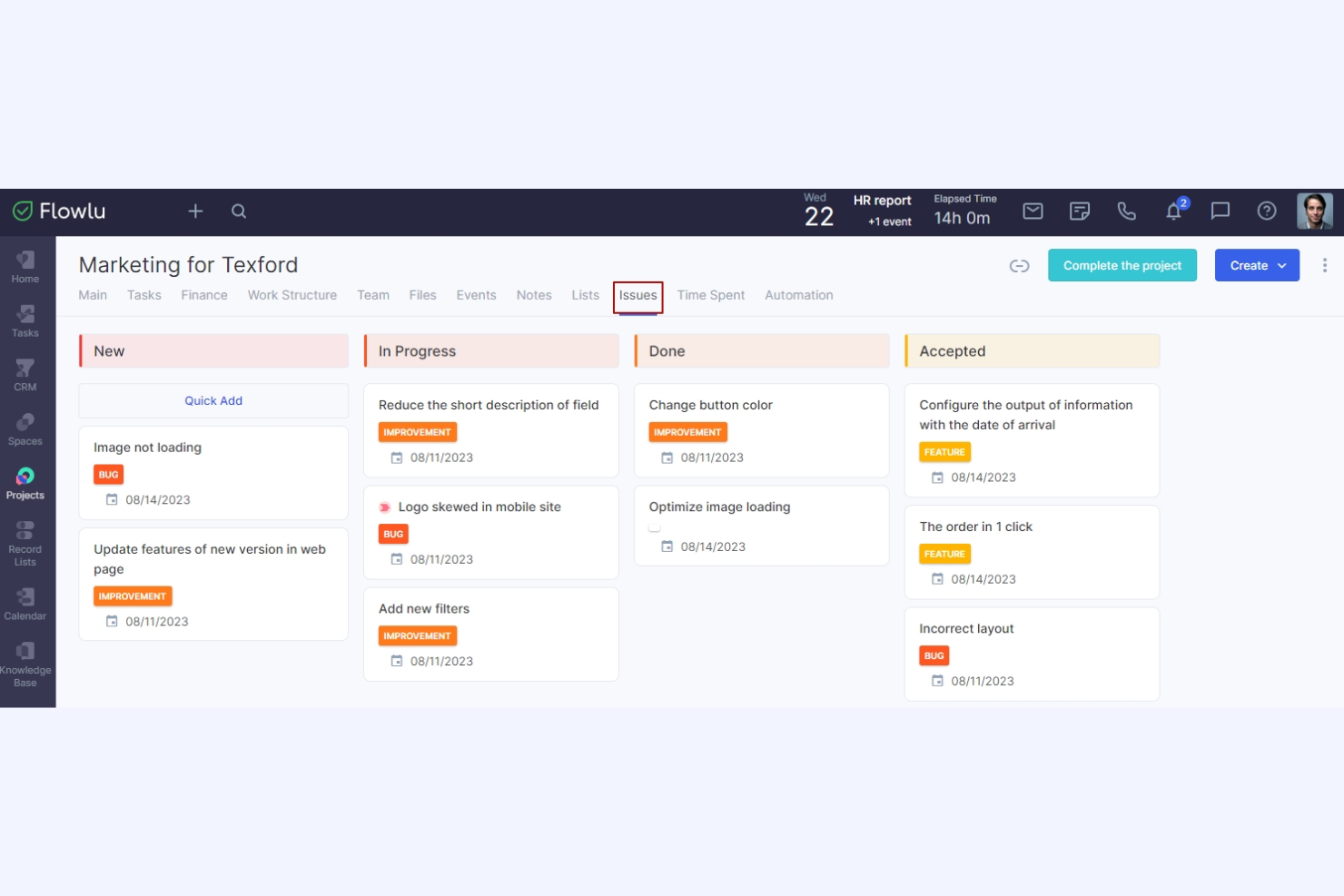
Flowlu est une plateforme tout-en-un de gestion du travail en ligne conçue pour les petites et moyennes entreprises. Ses principaux utilisateurs sont les agences de marketing, les services informatiques, les professionnels du droit, les établissements d’enseignement et les organisateurs d’événements. Elle fournit des outils de gestion de projets, de CRM, de facturation, de gestion financière et de collaboration.
Pourquoi c’est une bonne alternative à Accelo : Flowlu propose une suite complète d’outils, ce qui en fait une solution idéale pour les petites entreprises à la recherche d’une solution tout-en-un. Elle comprend des fonctionnalités de gestion des projets et des tâches, notamment des diagrammes de Gantt et des tableaux Kanban, qui vous aident à tout organiser. L’automatisation des flux de travail et le suivi financier vous offrent efficacité et contrôle sur vos opérations, tandis que ses outils de communication d’équipe favorisent la collaboration et permettent à chacun de rester informé.
Fonctionnalités et intégrations remarquables :
Les fonctionnalités comprennent des outils de gestion financière qui vous aident à suivre efficacement les dépenses et les revenus, ainsi que des fonctionnalités de CRM permettant à votre équipe de gérer efficacement les relations avec les clients. Les flux de travail automatisés vous aident à attribuer des tâches, à envoyer des notifications aux membres de l’équipe, à fournir des mises à jour sur les projets et à créer de nouveaux projets.
Les intégrations comprennent Slack, Google Calendar, Microsoft Outlook, QuickBooks, Xero, Dropbox, Mailchimp, Trello et bien plus encore.
Pros and Cons
Pros:
- Plateforme tout-en-un
- Prend en charge l’automatisation des flux de travail
- Facilite la communication au sein de l’équipe
Cons:
- Bugs occasionnels avec l’intégration de la messagerie électronique
- Le module de rapports manque de possibilités de personnalisation

Idéal pour la livraison de projets alimentée par l'AI
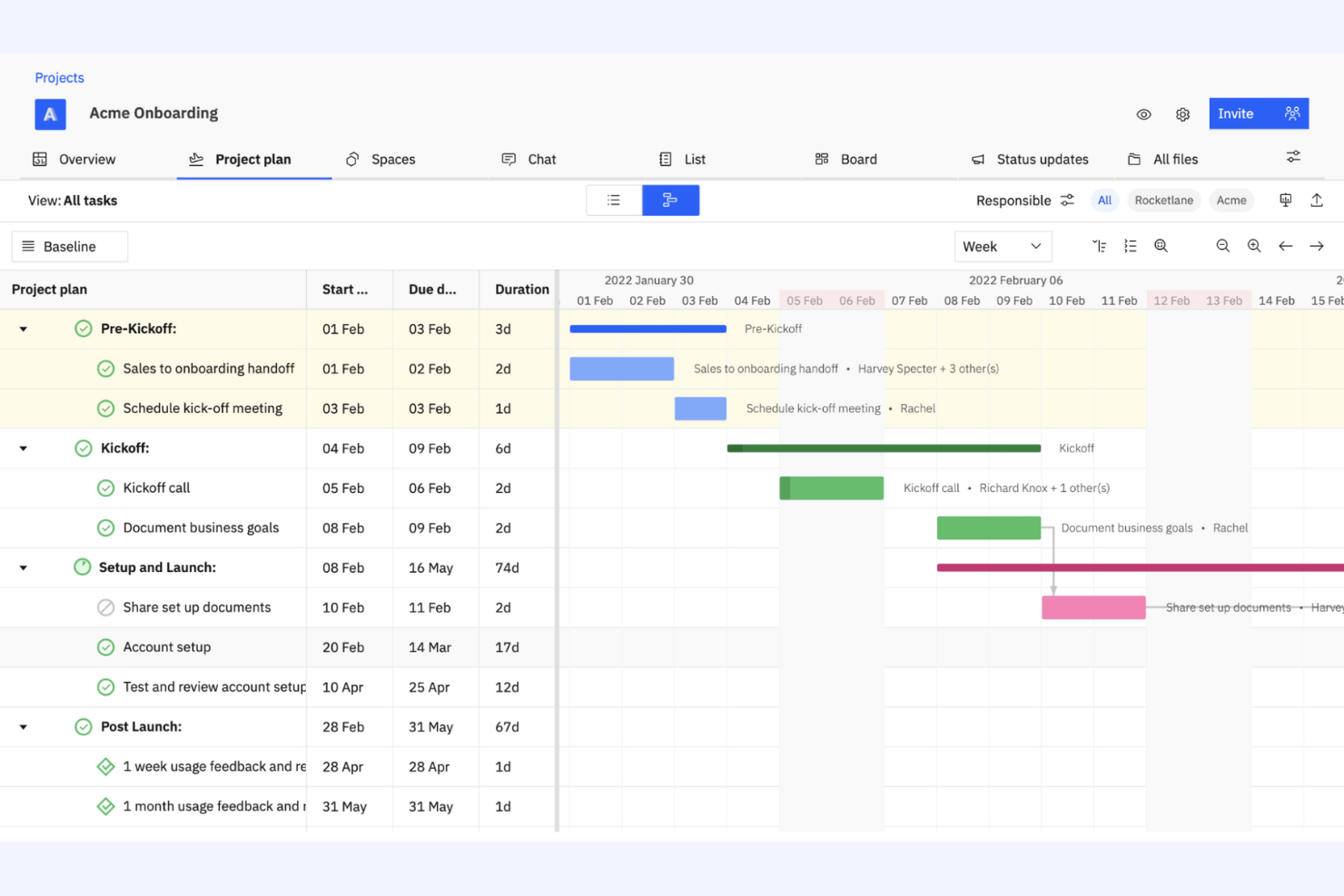
Rocketlane est une plateforme de gestion de projets tout-en-un et agentique, conçue pour les équipes qui doivent améliorer leurs processus de livraison de projets. Elle est utilisée par les entreprises souhaitant renforcer la collaboration, la transparence et l'efficacité dans l'exécution des projets.
Pourquoi c'est une bonne alternative à Accelo : Rocketlane fournit des outils de livraison de projets alimentés par l'AI qui conviennent aux entreprises souhaitant optimiser l'exécution de leurs projets, avec des agents AI qui prennent en charge une partie du travail opérationnel. Les modèles de projets aident votre équipe à standardiser les flux de travail et à gagner du temps, tandis que les outils de collaboration en temps réel de la plateforme garantissent que chacun reste aligné et informé tout au long du projet. L'accent mis par Rocketlane sur les informations issues de l'AI fournit à votre équipe des données précieuses pour affiner les stratégies et les résultats des projets.
Fonctionnalités et intégrations remarquables :
Les fonctionnalités comprennent la gestion des échéances, qui aide votre équipe à maintenir les projets dans les délais, ainsi que les outils de gestion des ressources de la plateforme, qui garantissent une allocation optimale des efforts de votre équipe. Les tableaux de bord personnalisables fournissent des informations sur l'avancement et les performances des projets.
Les intégrations comprennent Slack, Salesforce, Microsoft Teams, Google Calendar, Jira, GitLab, HubSpot, Asana, Zapier, monday.com, et bien plus encore.
Pros and Cons
Pros:
- Informations et automatisation pilotées par l'AI
- Favorise la standardisation des projets
- Fournit des données en temps réel
New Product Updates from Rocketlane

Rocketlane Introduces Governance and Workforce Agents
Rocketlane introduces Governance Agents and Workforce Agents to automate delivery processes and recurring tasks. These updates help teams enforce rules and streamline project execution. For more information, visit Rocketlane’s official site.
 .
.
Idéal pour les portails clients tout-en-un

SuiteDash est une plateforme complète de gestion d'entreprise conçue pour les petites et moyennes entreprises, qui fournit des outils de gestion de projets, de CRM et de portails clients. Elle est idéale pour les entreprises qui souhaitent intégrer plusieurs fonctions au sein d'une seule plateforme.
Pourquoi c'est une bonne alternative à Accelo : SuiteDash propose une solution tout-en-un qui associe la gestion de projets au CRM et aux portails clients, ce qui en fait une plateforme idéale pour centraliser les activités de l'entreprise. Ses fonctionnalités de gestion des clients aident votre équipe à entretenir de solides relations avec la clientèle. Les outils de suivi des projets de la plateforme permettent à votre équipe de gérer efficacement les tâches et les échéances. L'accent mis par SuiteDash sur l'intégration des principales fonctions de l'entreprise au sein d'une seule plateforme en fait un choix adapté à ceux qui cherchent à simplifier leurs opérations.
Fonctionnalités et intégrations remarquables :
Les fonctionnalités comprennent des tableaux de bord personnalisables et un partage sécurisé de fichiers, garantissant l'échange sécurisé des documents sensibles. La facturation et l'émission automatisées de factures contribuent à optimiser les processus financiers et à réduire le travail manuel.
Les intégrations comprennent QuickBooks, Stripe, PayPal, Zapier, Google Calendar, Microsoft Office 365, Plaid, Slack, Zoom, WordPress, et bien plus encore.
Pros and Cons
Pros:
- Nombre illimité d'utilisateurs à tous les niveaux tarifaires
- Prend en charge la gestion des clients
- Simplifie les processus financiers
Cons:
- La configuration initiale peut être complexe
- Personnalisation limitée pour les besoins avancés
Kintone
Idéal pour les flux de travail personnalisables
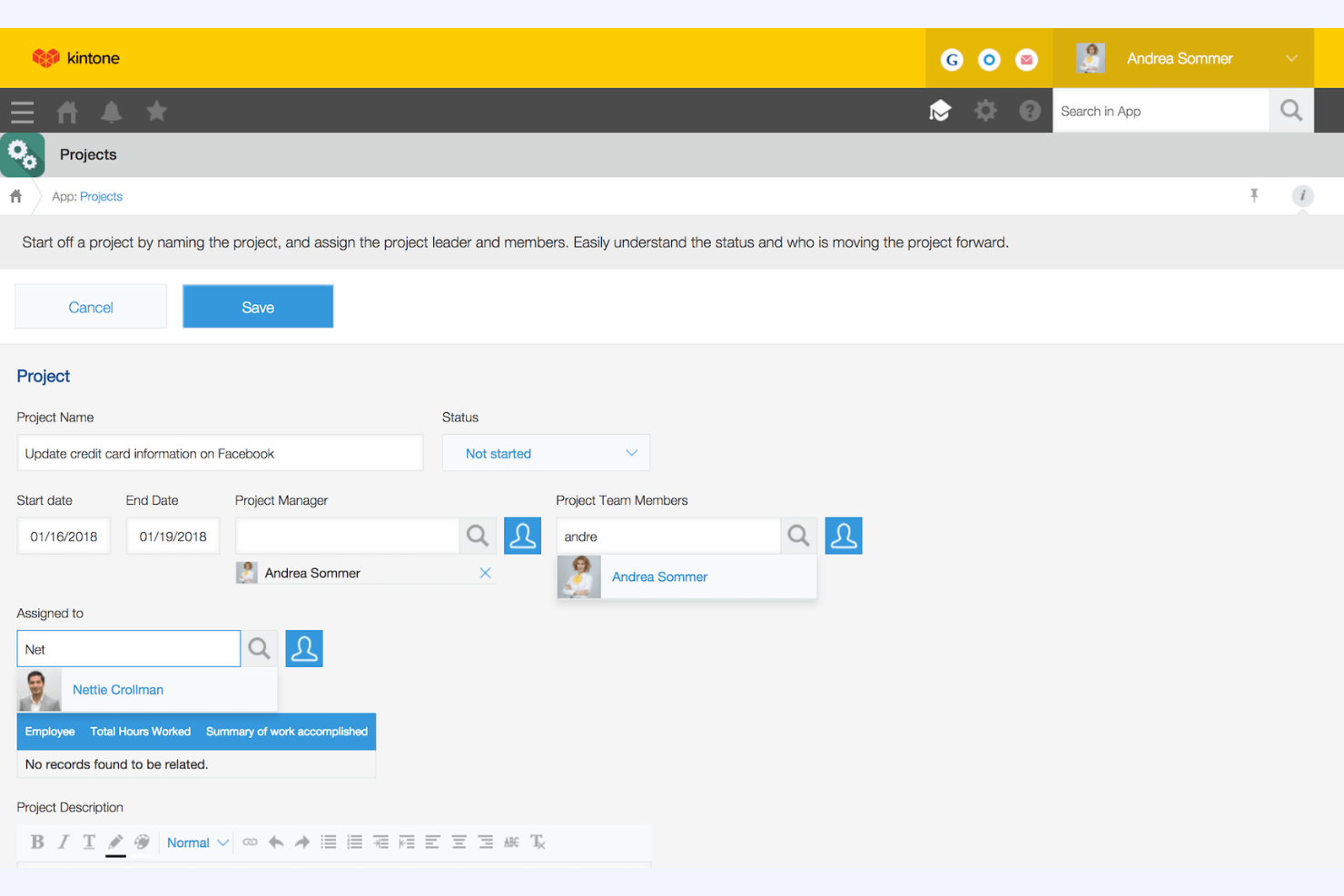
Kintone est une plateforme personnalisable de flux de travail et de collaboration utilisée par les équipes pour gérer les données et automatiser les processus. Elle est populaire auprès des entreprises qui ont besoin de solutions personnalisées pour la gestion de projets, la gestion des données et la collaboration.
Pourquoi c'est une bonne alternative à Accelo : Kintone propose des flux de travail personnalisables, ce qui en fait une solution idéale pour les équipes qui ont besoin de solutions de gestion de projets adaptées à leurs besoins. Vous pouvez créer des applications personnalisées adaptées à vos processus métier et gérer efficacement les données. La plateforme facilite également la collaboration en permettant à votre équipe de partager des informations et de suivre les tâches en temps réel. Sa flexibilité pour s'adapter aux différents besoins des entreprises en fait un choix approprié pour celles qui recherchent une approche personnalisée.
Fonctionnalités et intégrations remarquables :
Les fonctionnalités comprennent la création d'applications par glisser-déposer, qui permet à votre équipe de créer des applications personnalisées sans programmation. Les outils de reporting de la plateforme fournissent des informations sur les performances et facilitent les décisions fondées sur les données, tandis que ses fonctionnalités de gestion des tâches aident votre équipe à rester organisée et à respecter ses objectifs.
Les intégrations comprennent Slack, Zapier, Google Calendar, Dropbox, Salesforce, QuickBooks, Microsoft Office 365, HubSpot, Mailchimp, Box, et bien plus encore.
Pros and Cons
Pros:
- Flux de travail hautement personnalisables
- Facilite la collaboration entre les équipes
- Permet le suivi des tâches en temps réel
Cons:
- Cinq utilisateurs minimum
- Courbe d'apprentissage pour la personnalisation

Asana
Idéal pour la collaboration en équipe et le suivi des objectifs
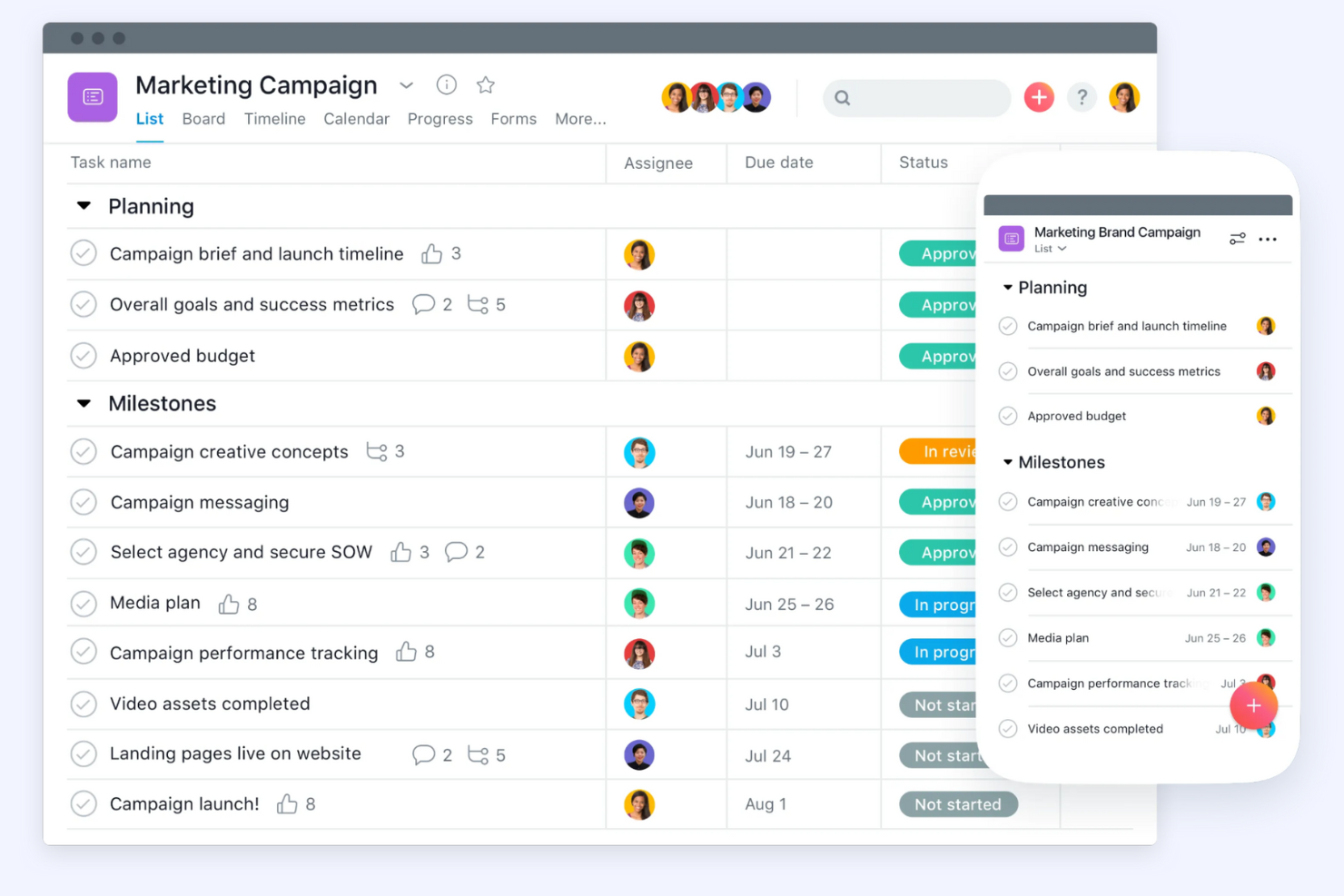
Asana est une plateforme de gestion de projets conçue pour aider les équipes à organiser et à suivre efficacement leur travail. Elle est principalement utilisée dans divers secteurs pour gérer des projets, automatiser les flux de travail et suivre les objectifs.
Pourquoi c'est une bonne alternative à Accelo : Asana met l'accent sur le travail d'équipe et le suivi efficace des objectifs. Elle offre des fonctionnalités de gestion de projets, d'automatisation des flux de travail et de suivi des objectifs, ce qui en fait une solution idéale pour les équipes qui doivent rester alignées sur leurs objectifs. La gestion des ressources et les fonctionnalités d'intelligence artificielle contribuent également à améliorer la productivité et la clarté. L'interface conviviale d'Asana et ses outils de collaboration en font un excellent choix pour améliorer la communication au sein des équipes.
Fonctionnalités et intégrations remarquables :
Les fonctionnalités comprennent des outils de gestion de projets qui vous permettent de créer, d'organiser et de hiérarchiser facilement les tâches. L'automatisation des flux de travail aide votre équipe à réduire le travail manuel et à se concentrer sur ce qui compte, tandis que le suivi des objectifs garantit que tout le monde est aligné et travaille vers les mêmes objectifs.
Les intégrations comprennent Slack, Microsoft Teams, Google Drive, Dropbox, Salesforce, Zoom, Jira, Adobe Creative Cloud, Trello, Microsoft Outlook, et bien plus encore.
Pros and Cons
Pros:
- Fonctionnalités étendues de collaboration en équipe
- Suivi facile des objectifs
- Interface conviviale
Cons:
- Nécessite une légère période d'apprentissage
- Peut être coûteux pour les équipes plus importantes

Idéal pour les flux de travail des MSP

Autotask est un logiciel d’automatisation des services professionnels conçu pour les fournisseurs de services gérés et les entreprises de services informatiques. Il contribue à la gestion de projets, à la prestation de services et à la facturation afin d’améliorer l’efficacité opérationnelle.
Pourquoi c’est une bonne alternative à Accelo : Autotask offre une gestion informatique intégrée, ce qui en fait une solution idéale pour les MSP ayant besoin d’une solution complète. Il comprend le suivi des projets et la gestion des tickets, vous aidant à fournir des services efficacement, tandis que les fonctionnalités de facturation et d’émission de factures du logiciel contribuent à garantir une gestion financière précise.
Fonctionnalités et intégrations remarquables :
Les fonctionnalités comprennent la gestion des tickets, qui aide votre équipe à traiter efficacement les demandes de service. Les outils de reporting fournissent des informations sur les performances de votre entreprise et facilitent la prise de décision, tandis que la gestion des ressources garantit une allocation optimale du temps et des compétences de votre équipe.
Les intégrations comprennent QuickBooks, Xero, ConnectWise, Salesforce, Slack, Zapier, Microsoft Teams, Google Workspace et bien plus encore.
Pros and Cons
Pros:
- Adapté aux MSP
- Gestion informatique intégrée
- Fonctionnalités de suivi de projet
Cons:
- Nécessite une configuration et un paramétrage
- Peut ne pas convenir aux secteurs autres que l’informatique
Avaza
Idéal pour la gestion de projets tout-en-un

Avaza est un outil tout-en-un de gestion de projets et de collaboration conçu pour les entreprises de toutes tailles. Il prend en charge la gestion de projets, le suivi du temps, la gestion des dépenses et la facturation, ce qui en fait une solution polyvalente pour diverses équipes.
Pourquoi c'est une bonne alternative à Accelo : Avaza offre des fonctionnalités détaillées de gestion de projets, ce qui en fait une solution idéale pour les entreprises qui ont besoin d'un outil tout-en-un. Il comprend notamment la gestion des tâches et le suivi du temps, qui aident votre équipe à rester organisée et efficace. Les outils de gestion des dépenses et de facturation du logiciel offrent une visibilité financière, tandis que son interface conviviale et ses fonctionnalités de collaboration sur les projets le rendent adapté aux équipes souhaitant améliorer leur productivité.
Fonctionnalités et intégrations remarquables :
Les fonctionnalités incluent la planification des ressources, qui aide votre équipe à répartir efficacement les ressources entre les projets. Les outils de reporting du logiciel vous permettent d'obtenir des informations sur les performances des projets et de prendre des décisions fondées sur les données, tandis que le partage de fichiers permet à votre équipe de stocker et d'accéder facilement aux documents des projets.
Les intégrations incluent Xero, QuickBooks, Slack, Google Drive, Dropbox, Zapier, Salesforce, Trello, Mailchimp, et bien plus encore.
Pros and Cons
Pros:
- Facturation et suivi des dépenses intégrés
- Convient aux entreprises de toutes tailles
- Inclut des fonctionnalités de suivi du temps
Cons:
- Peut manquer de fonctionnalités avancées
- Les options d'automatisation sont limitées

vCita
Idéal pour la prise de rendez-vous et la facturation des clients
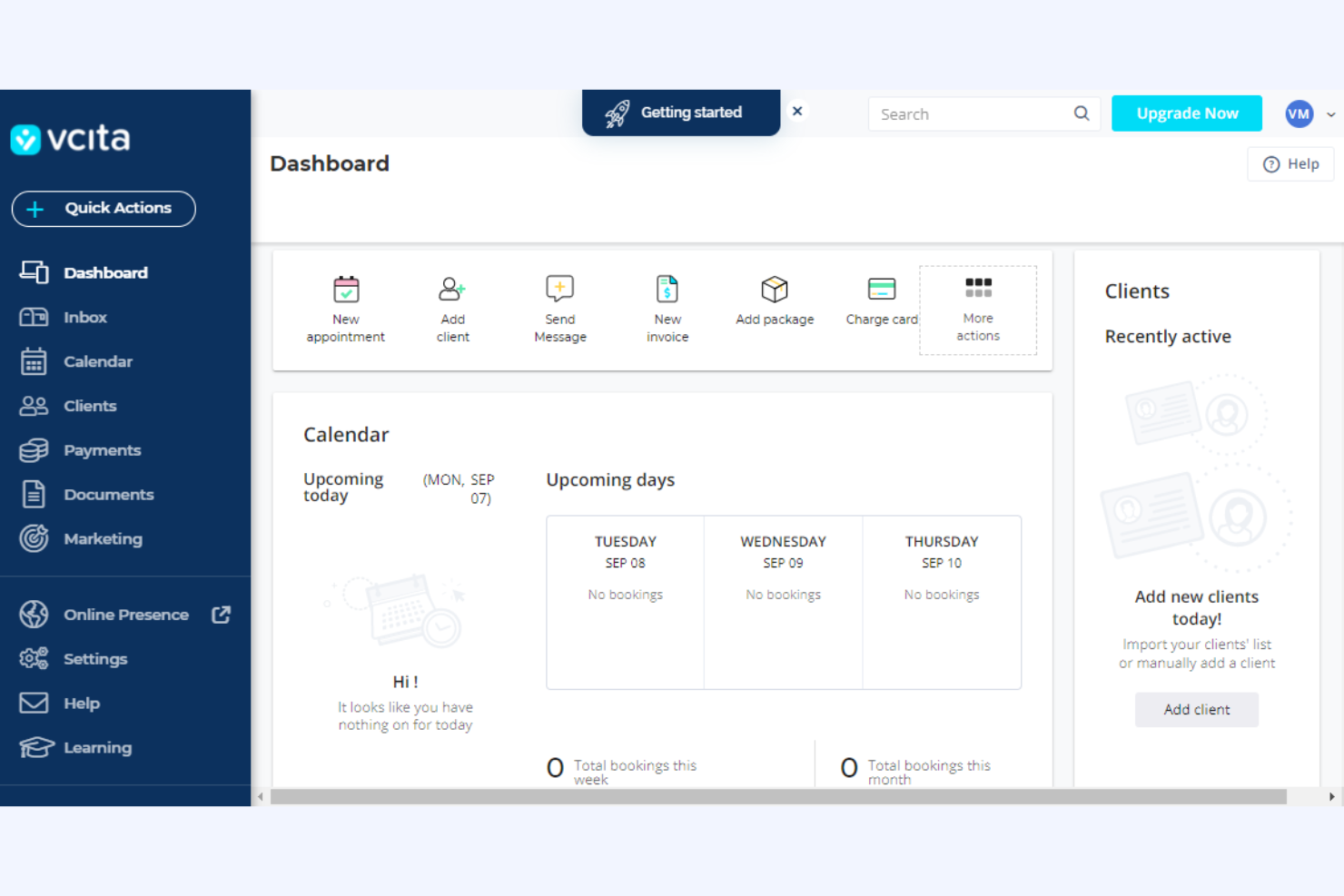
vcita est une plateforme de gestion d'entreprise conçue pour les petites entreprises et les prestataires de services, proposant des outils de gestion des clients, de facturation et de planification. Elle est utilisée par les professionnels qui souhaitent rationaliser les interactions avec leurs clients et gérer efficacement leurs activités.
Pourquoi il s'agit d'une bonne alternative à Accelo : vcita propose un portail client pour les agences avec une planification en ligne, permettant aux clients de prendre rendez-vous au moment qui leur convient. Les outils de facturation et d'émission de factures de la plateforme simplifient la gestion financière en automatisant les processus de paiement. L'accent mis par vcita sur la communication avec les clients et la gestion d'entreprise en fait un choix adapté aux agences qui souhaitent une solution intégrée.
Fonctionnalités et intégrations remarquables :
Les fonctionnalités comprennent des outils d'e-mail marketing qui aident votre équipe à échanger avec les clients et à promouvoir les services. La fonctionnalité CRM vous permet de gérer les relations avec les clients et de suivre les interactions, tandis que le partage de documents facilite l'échange sécurisé de fichiers importants avec les clients.
Les intégrations comprennent QuickBooks, PayPal, Stripe, Zoom, Mailchimp, Google Calendar, WordPress, Facebook Messenger, Square, Zapier, et bien plus encore.
Pros and Cons
Pros:
- Propose un portail client personnalisé pour le paiement intégré des factures
- Convient aux petites entreprises
- Prend en charge la planification et la facturation
Cons:
- Les automatisations sont limitées aux niveaux tarifaires supérieurs
- Peut ne pas convenir aux grandes organisations

Idéal pour les cabinets d’architecture et d’ingénierie
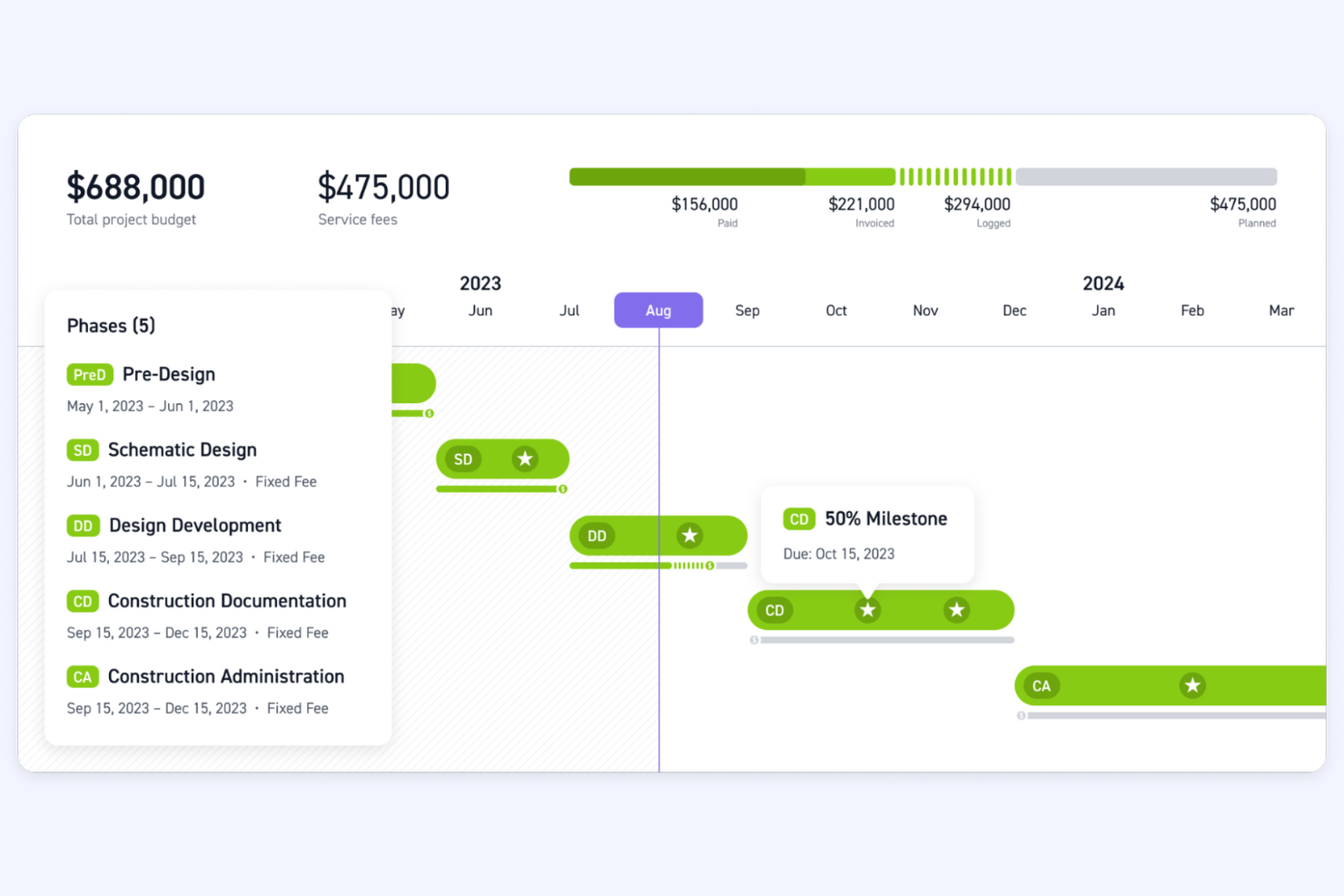
Monograph est un outil de gestion de projet spécialement conçu pour les cabinets d’architecture et d’ingénierie. Il facilite le suivi des projets, la gestion des ressources et la planification financière, ce qui en fait un atout précieux pour ces secteurs.
Pourquoi c’est une bonne alternative à Accelo : Monograph propose des outils spécialisés pour les cabinets d’architecture et d’ingénierie, axés sur la gestion des projets et des ressources. Ses nombreuses fonctionnalités vous aident à gérer efficacement les projets complexes et à garantir une utilisation optimale de votre équipe sur l’ensemble des projets. L’accent mis par Monograph sur la planification financière et les flux de travail propres au secteur en fait une solution idéale pour les cabinets qui ont besoin de capacités détaillées de supervision et de planification.
Fonctionnalités et intégrations remarquables :
Les fonctionnalités comprennent des calendriers de projet qui permettent à votre équipe de visualiser l’avancement des projets, un suivi budgétaire pour maintenir les projets dans les limites financières prévues, ainsi qu’une allocation des ressources pour garantir une utilisation efficace du temps et des compétences de votre équipe.
Les intégrations comprennent QuickBooks.
Pros and Cons
Pros:
- Adapté aux secteurs de l’ingénierie et de l’architecture
- Prend en charge la planification financière
- Allocation efficace des ressources
Cons:
- Peut ne pas convenir aux secteurs autres que l’ingénierie et l’architecture
- Ne constitue pas une solution tout-en-un

Bloom
Idéal pour les professionnels de la création ayant besoin d'un CRM

Bloom est une plateforme de gestion d'entreprise conçue pour les professionnels de la création, qui propose des outils de gestion des clients, de suivi des projets et de facturation. Elle est utilisée par des photographes, des designers et des freelances qui doivent gérer efficacement leurs activités professionnelles.
Pourquoi c'est une bonne alternative à Accelo : Bloom s'adresse aux professionnels de la création en proposant une suite d'outils qui simplifient la gestion des clients et le suivi des projets. La plateforme propose des flux de travail automatisés pour rationaliser les tâches répétitives et vous permettre de vous concentrer sur la créativité, tandis que son portail client facilite la communication et la collaboration. L'intégration du CRM et de la gestion de projets de Bloom en fait un choix adapté aux créatifs à la recherche d'une solution tout-en-un.
Fonctionnalités et intégrations remarquables :
Les fonctionnalités comprennent des contrats personnalisables permettant de rédiger et d'envoyer rapidement des accords professionnels, tandis que la fonctionnalité de facturation vous permet de facturer efficacement vos clients et de suivre les paiements. La gestion des réservations permet aux clients de planifier des rendez-vous, ce qui facilite l'organisation de votre calendrier.
Les intégrations comprennent Google Calendar, QuickBooks, Stripe, PayPal, Square, Zapier, Mailchimp, Slack, Zoom, Xero et bien plus encore.
Pros and Cons
Pros:
- Adapté aux professionnels de la création
- Prend en charge la gestion des clients
- Simplifie le suivi des projets
Cons:
- Peut ne pas convenir aux secteurs non créatifs
- Fonctionnalités avancées limitées
Autres alternatives à Accelo
Voici quelques alternatives supplémentaires à Accelo qui n’ont pas intégré ma sélection, mais qui méritent tout de même votre attention :
- Basecamp
Idéal pour une gestion de projets simple
- ConnectWise
Idéal pour les entreprises de services informatiques
- Function Point
Idéal pour la gestion des agences créatives
- Ravetree
Idéal pour la gestion intégrée des projets
- ManyRequests
Idéal pour les portails clients d'agences
- StartingPoint
Idéal pour l’automatisation des flux de travail
- BigTime
Idéal pour la PSA avec des informations basées sur l’IA
- Scoro
Idéal pour les finances de projet, de la proposition à l'encaissement


Comment j’évalue les alternatives à Accelo
J’évalue ces outils sur deux niveaux : les fonctionnalités essentielles — suivi du temps, facturation des clients, gestion des contrats de prestation — que tout remplacement d’Accelo doit maîtriser, et les éléments différenciateurs qui distinguent les bons outils des meilleurs.
Fonctionnalités essentielles (indispensables pour cette liste)
Lorsque je sélectionne les outils de ma liste, j’évalue chacun d’eux sur une échelle de 0 (ne propose pas la fonctionnalité) à 5 (excelle dans ce domaine) pour chacune des fonctionnalités essentielles indiquées ci-dessous. Je convertis ensuite le score total de l’outil en pourcentage. Chaque outil doit obtenir un score total minimum de 65 % pour être pris en compte.
- Gestion de projet : Je recherche l’attribution des tâches, les dépendances, les jalons et plusieurs vues, comme les diagrammes de Gantt et les tableaux Kanban, afin de gérer plusieurs projets clients simultanément.
- Suivi du temps et facturation : Chaque outil doit relier les heures enregistrées aux taux facturables et à la facturation, afin que les équipes n’aient pas à exporter leurs feuilles de temps vers un outil de facturation distinct.
- Gestion des clients et de la CRM : Je vérifie si la plateforme regroupe les coordonnées des clients, l’historique des communications et les étapes des opportunités au même endroit, plutôt que d’exiger une CRM autonome.
- Contrats de prestation et travail récurrent : Pour les agences qui gèrent des contrats de prestation continus, j’évalue la manière dont chaque outil prend en charge la facturation récurrente, le suivi du budget et le report des heures.
- Planification des ressources et de la capacité : Les vues de la charge de travail et les fonctionnalités de planification sont importantes ici, en particulier pour les entreprises qui gèrent plusieurs comptes clients avec une équipe partagée.
- Rapports financiers et rentabilité : Je vérifie s’il est possible d’obtenir des rapports sur la marge des projets, le taux d’utilisation et les écarts entre budget et réalisé sans exporter les données vers un tableur.
Une fois que j’ai établi une liste d’outils répondant à ces critères, j’examine ce qui distingue chaque plateforme.
Facteurs différenciateurs (ce qui distingue les fournisseurs)
Voici comment je compare les différents fournisseurs :
Fonctionnalités remarquables
Les portails clients constituent un facteur différenciateur majeur. Je recherche des outils qui permettent aux clients de consulter l’état d’avancement des projets, d’approuver les livrables et d’accéder aux factures sans saturer votre boîte de réception. L’automatisation du processus allant du devis à l’encaissement est également importante pour les entreprises qui souhaitent que les propositions se transforment directement en projets actifs et en cycles de facturation. La gestion intégrée des tickets mérite aussi d’être évaluée, car de nombreuses agences gèrent en parallèle des projets structurés et des demandes ponctuelles d’assistance client qui doivent malgré tout être suivies et facturées.
Au-delà des fonctionnalités
Les intégrations sont très importantes dans ce contexte. Je vérifie si un outil se connecte nativement à des plateformes comptables comme QuickBooks ou Xero, car la saisie répétée des factures va à l’encontre de l’objectif d’un système tout-en-un. La transparence des tarifs est un autre facteur que je prends en compte. Certains fournisseurs réservent la facturation ou les fonctionnalités de gestion des contrats de prestation aux niveaux supérieurs. J’évalue donc si le forfait dont vous avez réellement besoin est clairement tarifé. Je tiens également compte de l’accompagnement à l’intégration, notamment des possibilités de migration pour les équipes qui quittent Accelo avec leurs données clients et projets existantes.
Pourquoi chercher une alternative à Accelo ?
Bien qu'Accelo soit un bon choix de logiciel d'automatisation des services professionnels, plusieurs raisons peuvent pousser certains utilisateurs à rechercher d'autres solutions. Vous cherchez peut-être une alternative à Accelo parce que…
- Vous avez besoin de davantage d'options de personnalisation.
- Votre équipe a besoin de meilleures capacités d'intégration.
- Vous recherchez des tarifs plus compétitifs.
- Vous avez besoin d'une prise en charge pour une équipe plus importante.
- Votre entreprise exerce ses activités dans des régions où l'assistance Accelo est limitée.
- Vous souhaitez bénéficier de fonctionnalités améliorées de création de rapports.
Si vous vous reconnaissez dans l'une de ces situations, vous êtes au bon endroit. Ma liste comprend plusieurs solutions logicielles d'automatisation des services professionnels mieux adaptées aux équipes confrontées à ces difficultés avec Accelo et à la recherche d'autres solutions.
Principales fonctionnalités d'Accelo
Voici quelques-unes des principales fonctionnalités d'Accelo, afin de vous aider à comparer les offres des solutions alternatives :
- Flux de travail automatisés : automatisez les tâches répétitives afin de libérer du temps pour votre équipe, qui pourra ainsi se consacrer à des tâches plus importantes.
- Gestion centralisée des clients : gérez toutes les interactions et données relatives aux clients au même endroit pour y accéder et les organiser facilement.
- Suivi du temps : suivez le temps consacré aux tâches et aux projets afin d'améliorer la précision de la facturation et la gestion de projet.
- Suivi des projets : définissez et surveillez les calendriers et les échéances des projets afin de respecter le planning de votre équipe.
- Gestion des forfaits : créez et gérez des forfaits afin de garantir des revenus réguliers et prévisibles.
- Prévisions des ventes : prévoyez le chiffre d'affaires des ventes pour aider votre équipe à planifier et à affecter efficacement les ressources.
- Facturation : facturez vos clients en masse afin de simplifier votre processus de facturation et d'améliorer votre trésorerie.
- Suivi des KPI : générez et suivez les indicateurs clés de performance afin de mesurer la réussite de votre équipe et d'identifier les domaines à améliorer.
- Conversion des devis en projets : convertissez les prospects et les devis en projets afin d'organiser vos processus de vente et de gestion de projet.
- Communication avec les clients : collaborez et communiquez directement avec vos clients au sein de la plateforme afin d'améliorer la transparence et vos relations avec eux.
Et ensuite :
Si vous êtes en train d'étudier des logiciels d'automatisation des services professionnels, contactez gratuitement un conseiller SoftwareSelect pour obtenir des recommandations.
Vous remplissez un formulaire et échangez brièvement avec un conseiller, qui examine en détail vos besoins. Vous recevrez ensuite une liste restreinte de logiciels à évaluer. Il vous accompagnera même tout au long du processus d'achat, y compris lors des négociations tarifaires.