
20 meilleurs logiciels et outils de gestion des ressources 2026

10 Liste restreinte des meilleurs logiciels de gestion des ressources
Here's my pick of the 10 best software from the 20 tools reviewed.


Vous trouverez ci-dessous un aperçu de ces outils de gestion des ressources (OGR), avec des captures d’écran, un aperçu des fonctionnalités, et les prix.
Notions de base sur la gestion des ressources
Qu'est-ce qu'un logiciel de gestion des ressources?
Logiciel de gestion des ressources expliqué
En termes simples, les logiciels de gestion des ressources facilitent la planification, la programmation (et la reprogrammation) des projets. Parfois appelé logiciel de planification de la capacité des ressources, c’est un type d’outil de gestion de projet qui vous permet de planifier, d’attribuer, puis de suivre, qui travaille sur quel projet, quand et pour combien de temps. Le logiciel de gestion des ressources permet de voir facilement la capacité de l’organisation, les compétences disponibles, puis de planifier et de fournir des rapports pour montrer l’utilisation historique et prévue des ressources.
Quels sont les avantages d'utiliser un logiciel de gestion des ressources?
3 avantages des logiciels de gestion des ressources
- Déployer les ressources de manière aussi efficace et efficiente que possible, en réduisant les temps d’arrêt et en augmentant l’utilisation.
- Fournir une vue d’ensemble de la capacité organisationnelle pour prévenir la surréservation et appuyer les décisions d’embauche.
- Prévoir les revenus en fournissant des rapports sur les projets à venir et le déploiement prévu des ressources.
Qu'est-ce qu'un système efficace de gestion des ressources?
Gestion efficace des ressources
Un système de gestion des ressources efficace est un système qui fonctionne – il pourrait être aussi simple qu’un tableau Excel ou Google Sheet, mais il permet à une organisation de déployer les ressources à sa disposition, aussi efficacement que possible. C’est difficile à faire sans un logiciel dédié. Pour que le système de gestion des ressources soit efficace, il permet à l’organisation de maximiser l’utilisation des ressources disponibles et tient compte de la disponibilité du personnel, de ses compétences, de ses préférences, de son emplacement et de son fuseau horaire, et les compare aux projets et objectifs organisationnels. Le logiciel de gestion des ressources prend en charge la gestion du portefeuille de projets et fournit un moyen de gérer efficacement les ressources pour maximiser la productivité et la rentabilité. Consultez la liste des outils de gestion des ressources ci-dessous qui offrent un système de gestion des ressources efficace.
Comment créer un plan de ressources?
Le moyen le plus facile pour créer un plan de ressources
- Identifier les différents types de ressources nécessaires à la réalisation du projet.
Les ressources pourraient comprendre : les membres de l’équipe, l’équipement, les salles de réunion etc. - Quantifier la quantité de chaque type de ressources nécessaires.
Pour quantifier les ressources, vous devrez tenir compte de ces ressources et estimer leurs efforts dans le cadre du projet. - Planifier la consommation de chaque ressource au sein du projet.
Pour planifier les ressources, vous aurez besoin d’un calendrier de projet pour savoir qui réserver, quand et pour combien de temps.
Qu'est-ce que la gestion des ressources?
Un aperçu simple de la gestion des ressources
Dans la gestion de projet, la gestion des ressources fait référence à la pratique de la planification, du suivi et de l’optimisation de l’utilisation des ressources (comme le personnel, l’espace et l’équipement) afin de réaliser les projets. Ce processus implique la planification et la gestion : vérification de la disponibilité de la ressource, planification des dates de début et de fin, gestion des conflits de ressources ou des dépendances, et suivi dans le temps pour s’adapter aux changements.
Qu'est-ce qu'une prévision des ressources?
Explication de la prévision des ressources
La prévision des ressources est un plan des ressources nécessaires à la réalisation d’un projet. Cela se produit souvent dans les phases initiales d’un projet, même dès le processus de vente. Une prévision des ressources est une estimation des ressources et des efforts qui seront nécessaires pour le projet, ce qui aide à déterminer les heures et le budget du projet, ainsi que l’estimation du projet présentée au client.
Comment calculer les ressources nécessaires pour un projet?
Une façon simple de calculer les ressources du projet
Il est important de calculer les ressources nécessaires à la réalisation d’un projet afin que vous puissiez profiter au maximum de leur temps. Si les ressources sont insuffisantes, elles n’auront pas assez de temps pour terminer le travail, et si vous en avez trop, vous constaterez qu’elles perdent du temps ou qu’elles travaillent lentement pour remplir le temps.
Une façon simple de calculer le niveau d’effort requis consiste à examiner le rendement antérieur du projet et à le comparer au plan de projet actuel afin de déterminer la vitesse à laquelle l’équipe du projet évolue. Vous pouvez ensuite utiliser la formule : vitesse actuelle / estimation du projet = ressources nécessaires.
Vous venez de réaliser que vous ne recherchez pas un logiciel de gestion des ressources? Jetez un coup d’œil à d’autres outils utiles :
- Logiciel de planification de projet pour vous aider à planifier, suivre et analyser vos projets.
- Logiciel de planification des ressources pour vous aider à allouer l’équipement, les salles, le personnel et les autres ressources.
Consultez notre comparaison simple et facile des 10 meilleurs outils de gestion des ressources sur le marché en 2026. Dans cette revue complète du logiciel de gestion des ressources, vous découvrirez les meilleures options d’outils de gestion des ressources ainsi qu’une explication simple des critères de choix des outils les plus performants.
Vous y trouverez également un aperçu de chaque outil, des captures d’écran, des et un tableau comparatif qui vous aideront à affiner vos choix. De plus, nous répondons à toutes les questions fréquemment posées sur la gestion des ressources; vous apprendrez ce qu’est un logiciel de gestion des ressources et comment il peut changer votre façon de travailler pour être plus efficace et productif.
Comparez et évaluez rapidement les 10 meilleurs logiciels de gestion des ressources
The Digital Project Manager is reader-supported. We may earn a commission when you click through links on our site — learn more about how we aim to stay transparent.
Gérer votre équipe sans un plan ou un outil approprié peut être un véritable cauchemar. Et c’est probablement pour ça que vous êtes là. Vous savez qu’il doit y avoir une meilleure façon de gérer vos ressources et votre équipe, non?
Il y a les chefs de projet avec leurs demandes de ressources à la noix et les prima donnas qui ne travaillent que sur certains clients ou types de projets. Ajoutez à cela les projets concurrents, les indépendants, les tiers, les pigistes, les clients fous, les vacances et les congés de maladie et le respect des délais devient difficile. Vous savez que vous avez besoin d’un logiciel de gestion des ressources humaines pour élaborer un plan qui fonctionne – mais lequel? Et comment choisir?
Vidéo: Comment choisir le meilleur logiciel de gestion des ressources
Vous vous demandez ce que vous devez rechercher lorsque vous vérifiez les options du logiciel de gestion des ressources? Voici une vidéo qui couvre nos critères et vous donne une idée de ce à quoi ressemblent les différentes interfaces d’outils.
Critères de comparaison des logiciels de gestion des ressources
Pour figurer sur cette liste de logiciels de gestion des ressources, j’ai évalué les outils en fonction des critères suivants :
- Interface utilisateur (IU): Dans quelle mesure est-elle bien conçue? Offre-t-elle des affichages clairs et une navigation intuitive?
- Facilité d’utilisation : Ce système de gestion des ressources est-il facile à apprendre et à maîtriser? Y a-t-il des tutoriels et de la formation? L’entreprise offre-t-elle un bon soutien technique ainsi qu’un soutien pour les utilisateurs?
- Caractéristiques et fonctionnalités : Combien de fonctions et de fonctionnalités clés de gestion des ressources offre-t-il? Et quelle est leur puissance? Plus précisément, j’ai cherché :
- Outils de planification et d’allocation : est-il facile de mettre les bonnes personnes sur les bons projets? Comprend des calendriers simples, des grilles, la possibilité de fixer des échéances et des dépendances, et un simple glisser-déposer pour déplacer les ressources. Les fonctions d’ordonnancement automatique sont un grand plus.
- Suivi des compétences : pouvez-vous trouver certains employés en fonction de leurs compétences et de leur disponibilité? Comprend la possibilité de saisir les horaires des employés, de créer des profils énumérant leurs compétences et de faire une recherche facile par compétence. De plus, les meilleurs outils offrent une puissante fonctionnalité de recherche qui vous permet de filtrer n’importe quelle variable du projet : tag, département, client, etc.
- Prévisions : Comprend-elle la dotation en personnel ou la prévision de la demande pour vous aider à planifier pour l’avenir? Ceci implique que le logiciel recueille des données sur les ventes, le développement, les lancements, les calendriers (etc.) et fait des recommandations en matière de ressources pour vous aider à anticiper les demandes.
- Outils de gestion de l’utilisation : ils prennent généralement la forme de fonctions d’analyse et de reporting qui donnent un aperçu de la capacité, de l’utilisation et de la performance des projets, des clients et des individus. De nombreux outils vous permettent également d’analyser l’ensemble de votre portefeuille de projets.
- Intégrations : Est-il facile de se connecter avec d’autres outils? Des outils pré-intégrés?
- Valeur pour $ : Dans quelle mesure le prix est-il approprié pour ses caractéristiques, ses capacités et son cas d’utilisation? Les prix sont-ils clairs, transparents et flexibles?
Il vaut la peine de comparer différents outils logiciels de gestion des ressources car ils sont configurés à différents prix, différentes fonctionnalités (telles que les feuilles de temps, les dépenses, les workflows d’approbation, la gestion des tâches) et différentes intégrations de tierces parties.
DPM est sponsorisé par le lecteur. Lorsque vous cliquez sur les liens de notre site, nous pouvons gagner une commission. En Savoir Plus.
-

Insightful
Visit WebsiteThis is an aggregated rating for this tool including ratings from Crozdesk users and ratings from other sites.4.8 -
Accelo
Visit WebsiteThis is an aggregated rating for this tool including ratings from Crozdesk users and ratings from other sites.4.4 -
Wrike
Visit WebsiteThis is an aggregated rating for this tool including ratings from Crozdesk users and ratings from other sites.4.2




Aperçu des 10 meilleurs logiciels de gestion des ressources
Dans cet article, nous avons essayé de couvrir un large éventail d’outils logiciels de gestion des ressources, en tenant compte de la complexité, des prix et des fonctionnalités. Mais ce qui importe avant tout c’est le flux de travail de votre agence ou de votre studio en matière de ressources et des fonctionnalités dont vous avez besoin pour améliorer ce fonctionnement. Jetez un coup d’œil et inscrivez-vous à des essais pour tester et trouver le meilleur logiciel de gestion des ressources d’agence pour votre cas.


Float.com is a resource management software that helps professional services teams allocate, scope, and report on client work to improve their profitability. You get the context and data you need to match the right people to the right projects when resourcing client work.
Why I Picked Float.com
I picked Float for its fast, visual scheduling and profitability insights. You can see utilization, cost, and billable rates at a glance while planning work. Color-coded drag-and-drop allocations, keyboard shortcuts, and hour or percentage views make resource planning intuitive. It also flags conflicts like over-allocations, tentative work, or time off.
Float helps you forecast capacity and track the revenue, cost, and margin impact of every resourcing decision, making it ideal for teams who want clarity without the complexity of traditional PSA tools.
Float.com Key Features
In addition to its standout visual scheduling and real-time capacity tracking, Float offers several other features that can help you with resource management.
- Time Tracking: Your team can log hours directly into the platform, which provides accurate insights into time spent on various tasks and helps you improve project estimations.
- Project Forecasting: Float's forecasting tools let you predict project timelines and budgets, so you have a clear understanding of future resource needs and potential financial outcomes.
- Role and Skill Tracking: You can track the roles and skills of your team members, which makes it easier to allocate the right people to the right tasks and optimize your team’s capabilities.
- Financial Insights: You can manage project budgets, forecast revenue, and make informed decisions that help improve profitability.
Float.com Integrations
Integrations include Google Calendar, Outlook Calendar, Slack, Jira, Asana, Teamwork, and Trello. Float also has a Zapier app that lets connect to a library of 1,000+ apps like your favorite project management systems or your CRM.
Pros and Cons
Pros:
- 24-hour support
- Strong resourcing context and data
- Mobile app for iOS and Android
Cons:
- Time tracking requires you to get a higher plan
- Updating staff/personnel list takes time
New Product Updates from Float.com

Float Introduces Smart Assign for Faster Team Staffing
Float.com releases Smart Assign, powered by machine learning, to quickly suggest roles for team members. For more information, visit Float’s official site.
 .
.

Scoro is a resource management software that provides a suite of tools to assist businesses in managing their projects, finances, and resources within a single system.
Why I Picked Scoro
I like the platform's robust features that allow users to plan and prioritize work, distribute tasks with a drag-and-drop planner or Kanban task board, and manage time with shared calendars, timesheets, and a built-in time tracker. Scoro also enables monitoring of billable and non-billable hours and ensures accountability for time spent on client work.
Furthermore, the platform has comprehensive forecasting tools that allow managers to gain a clearer view of current capacity levels, shortages, deadlines, and planned events and vacations. This foresight helps avoid over or under-utilization of staff, leading to better workload balance and increased employee satisfaction.
Scoro Key Features
Scoro offers several other features that cater to your comprehensive resource management needs.
- Task Management: Assign and prioritize tasks based on team skills and availability to ensure the right people are on the right projects.
- Project Tracking: Monitor project progress in real time to keep deadlines and budgets under control.
- Reporting and Analytics: Generate detailed reports to track resource utilization and project performance.
- Collaboration Tools: Centralize team communication and file sharing to reduce back-and-forth emails.
Scoro Integrations
Integrations include HubSpot, Google Calendar, Microsoft Exchange, Xero, QuickBooks, Sage Intacct, Expensify, Stripe, Jira, Slack, Asana, Dropbox, PayPal, and Zapier.
Pros and Cons
Pros:
- AI-powered insights help decision-making
- Comprehensive view of team utilization
- Automated invoices
Cons:
- Limited support for languages other than English
- Learning curve for first time users
New Product Updates from Scoro

Scoro Introduces Subtasks for More Granular Work Planning
Scoro introduces subtasks and improved price list deletion warnings, enabling teams to break down work into smaller units for detailed planning while protecting pricing data from accidental changes. For more information, visit Scoro’s official site.
 .
.

monday.com is a flexible work platform that helps teams communicate in context and get a big picture outlook on outstanding projects, available resources, and projected timelines.
The tool also gives you tons of control over your projects via customization. I recently spoke with Ken Sarmadi, a consultant for both monday.com and Asana. "If you're a control freak and want to manage everything down to the finest detail, monday.com is your tool," he says.
Why I Picked monday.com
I chose monday.com primarily for its smart design and straightforward interface. In my opinion, even team members who are lacking resource management experience can quickly get started planning timelines, assigning project ownership, and managing projects. The monday.com app also gives you the flexibility and power to run your team on the go, which I think is a great feature for busy managers. You can organize your daily work, projects, and teams as well as establish workflow automations, share documents, and create Gantt charts for further clarity.
monday.com Key Features
In addition to exceptional workload management capabilities, monday.com offers several other resourcing features.
- Centralized Visibility: This provides a unified platform that provides clarity on resource allocation and helps improve team alignment and communication.
- Performance Tracking: This lets you monitor resource usage so you can refine future project estimates and improve operational efficiency.
- Resource Allocation: monday.com lets you assign resources based on availability and task requirements, as well as offers useful visual tools like Gantt charts.
- Automation: The platform helps improve your processes by letting you automate recurring tasks, notifications about delays, and reallocations for tasks when capacity changes.
monday.com Integrations
Integrations include Slack, Google Calendar, Jira, GitHub, Excel, Google Drive, Gmail, Trello, Dropbox, Typeform, and Zapier.
Pros and Cons
Pros:
- Highly visual dashboards for clear project oversight
- Easily create boards dedicated to operational resource tracking
- Color coded status great for resource overviews
Cons:
- Task filtering can be restrictive and confusing
- Gantt charts locked to mid-level plan
New Product Updates from monday.com

monday.com Adds Microsoft Teams Messaging In Workflows
monday.com introduces Microsoft Teams messaging within workflows. This update allows users to send messages to specific individuals directly from workflows, improving collaboration and communication. For more information, visit monday.com’s official site.
 .
.
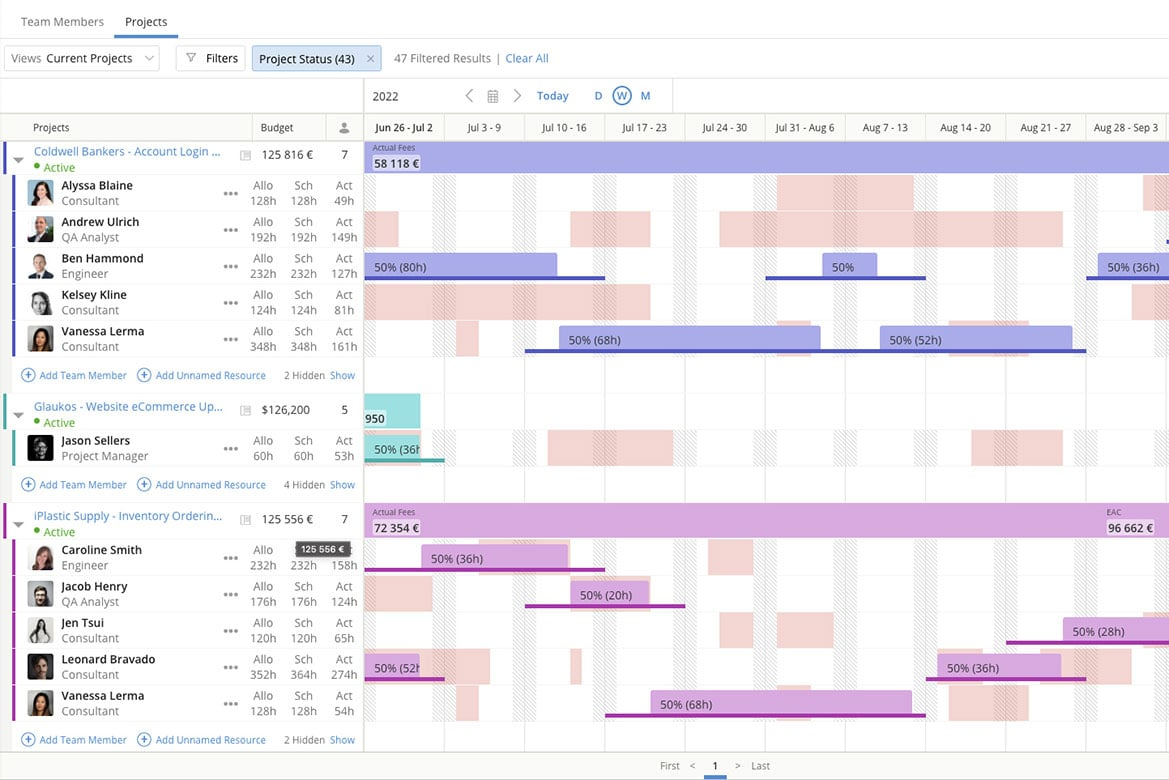
Kantata is a resource management platform built for professional services teams and agencies. Unlike generic tools, it unifies resourcing, financials, and project delivery while keeping people at the center of staffing decisions.
I recently spoke with Daniel Vasilevski, the director & owner of Pro Electrical, about how he uses Kantata with his team. He uses this tool because of the "resource planning dashboard that displays the availability of all team members for different jobs in one interface," he says. "During a large job...a sudden storm triggered 8 urgent callouts across different suburbs," he says. "Using the resource planning dashboard...I could see where each of my 14 electricians was and reassign 4 of them...without derailing the project," he explains. This had major benefits: "This...reduced client wait times from...more than a day down to under four hours. It also saved nearly $3,500 in overtime since the workload was evenly distributed," he says.
Why I Picked Kantata
What appeals to me about Kantata is how its resource management module helps leaders make staffing decisions that prioritize people as much as project needs. The platform provides real-time visibility into capacity and utilization, so you can balance workloads and ensure the right team members are assigned to the right tasks. Its skills-based resource planning also makes it easier to identify gaps, align talent with demand, and create opportunities for employee growth. This people-centric approach not only optimizes efficiency but also supports long-term team engagement.
Kantata Key Features
Kantata offers several other functionalities that make it a valuable tool for resource management.
- Project Time Tracking: This feature lets your team to accurately track time and resources so you can make informed adjustments to project plans.
- Team Collaboration Tools: These tools help improve communication among team members, coordination, and project outcomes.
- Business Intelligence Tools: You get real-time analysis and reporting so you can identify trends and make data-driven decisions.
- Visual Project Planning Tools: This features offers visual representations of tasks and timelines to improve understanding and engagement among your team.
Kantata Integrations
Integrations include Salesforce, SAP, Jira, Xero, BambooHR, Slack, Worday, QuickBooks, HubSpot, and NetSuite.
Pros and Cons
Pros:
- Resourcing fully integrated with master planning
- Good reporting functionality for resource data
- Easy capacity management
Cons:
- Advanced features available only in premier and enterprise plans
- Custom reports can be difficult to create without training
New Product Updates from Kantata
Kantata Integrates E-Invoicing With Avalara
Kantata introduces integrated e-invoicing through its partnership with Avalara, enabling compliant, automated invoicing across regions. For more information, visit Kantata's official site.
 .
.

If you want to boost project oversight and team collaboration, Smartsheet caters to a wide range of industries, including IT, finance, construction, and education. This tool helps you improve project management and provides real-time visibility and connected workflows to help you address the challenges of resource planning. AI-driven insights help you improve your processes and manage resources across diverse teams.
Why I Picked Smartsheet
I chose Smartsheet because of its workflow automation capabilities. You can set up automations and custom workflows that free up your team's time to focus on more strategic activities and improve overall productivity. Smartsheet offers a variety of customizable templates that you can use to set up automations quickly, or you can build your own from scratch.
I also admire Smartsheet's reporting capabilities, which let you visualize complex data in an easy to understand and organized format, identify project trends, and plan accordingly for the future. Users can also create project reports by filtering project data, get insight into historical data, and see forecasts on team utilization, actual vs. planned time reports, budget tracking, expense reports, and projects in the pipeline.
Smartsheet Key Features
Smartsheet also offers several other features that can help you better manage resources and teams.
- No-Code App Development: This lets your team develop custom applications without requiring coding skills, which helps streamline processes and improve productivity.
- Account Administration: Manage your team's access and permissions with ease and make sure the right people have the right level of access to project resources.
- Integrations: Connect Smartsheet with the other tools your team already uses to make your workflows more cohesive and reduce data silos.
- AI Capabilities: Smartsheet offers AI tools that can provide personalized insights and intelligent analysis to help your team make data-driven decisions.
Smartsheet Integrations
Integrations include apps like Slack, Brandfolder, Workplace, Microsoft Teams, and Facebook Ads. It has a flexible API you can use to build custom integrations with the tools you use, and you can also set up automations through Zapier to connect to 1000+ apps.
Pros and Cons
Pros:
- Intuitive for keeping timesheets and assigning hours
- Skills database helps resource allocation
- Able to forecast resource utilization
Cons:
- Resource features are an add-on to base plans
- Bulk project edits don’t apply to resource field
New Product Updates from Smartsheet

Smartsheet Adds Direct Data Import to Existing Sheets
Smartsheet introduces direct data import to existing sheets in table view. This update lets you import CSV, XLS, and XLSX files directly into sheets, reducing manual work and speeding up data setup. For more information, visit Smartsheet's official site.
 .
.

Wrike is an award-winning resource management software trusted by 20,000+ organizations worldwide. It's suitable for teams with anywhere from five members to an unlimited number of team members, making it easily scalable. It’s highly configurable and lets you customize workflows, dashboards, reports, request forms, and more.
According to Danilo Coviello, Founder of Espresso Translations, Wrike has been helpful in managing multiple projects at his translation agency, "We were juggling 15 projects and were always concerned with capacity allocation. Timelines that would be ruined by bottlenecks are now caught by me...project delays were reduced by 40% because I detect overloads in advance."
Why I Picked Wrike
Wrike has earned a spot on this list because of its interface and navigation with distinct spaces, folders, and tasks. This makes it useful for small and large organizations, and it can scale with you as your company grows. You can toggle quickly between the home screen and timesheets, dashboards, calendars, reports, and a stream for notifications and messages. I also like that it has a robust requests and approvals flow, which lets you standardize incoming work requests and track approval processes efficiently.
Additionally, the platform’s Datahub centralizes and consolidates data across multiple sources, so teams can make more informed, data-driven decisions. Timesheets also provide an easy way to track employee hours and project time allocation, which helps you optimize resource utilization and bill accurately.
Wrike Key Features
Wrike offers several other features that improve your ability to manage your team and resources.
- Time Tracking: This feature lets you monitor how much time your team spends on tasks, get insights into productivity, and help you manage deadlines more effectively.
- Project Templates: With customizable project templates, you can streamline your workflow and quickly set up new projects with predefined structures that suit your specific needs.
- Collaborative Proofing: This tool lets team members review and annotate documents and designs directly within Wrike, and it helps improve communication and speed up the approval process.
- Real-Time Reporting: You can generate real-time reports that give you a clear overview of project progress and resource allocation for better decision-making and strategic planning.
Wrike Integrations
Integrations include 400+ pre-built native integrations, including integrations with the most popular file management software from Microsoft, Google, and Dropbox, along with sales and marketing software from Salesforce and Marketo.
Pros and Cons
Pros:
- Building custom dashboards is great for highly specific resource tracking
- Good variety of dashboard views to accommodate different user needs
- Resource request and approvals are easy and well organized
Cons:
- Best resource tools limited to the higher level plans
- No time tracking with the free version of the tool
New Product Updates from Wrike

Streamlining Workspaces with New Updates
Wrike announces custom space templates, AI Agents in Wrike Labs, and a new Guage widget to improve project management. For more information, visit Wrike's official site.
 .
.

Adobe Workfront is a cloud-based work management platform that helps with project management and resource management across teams. It's designed to centralize workflows and make it easier for teams to collaborate and manage their tasks.
Mircea Dima, who manages engineering teams as the Founder, CEO, and CTO of AlgoCademy, uses Adobe Workfront regularly. "I liked the option to centralize documents, and approvals," he says. "To a small and growing engineering team such as ours, it has made it easier to work together and avoid bottlenecks, particularly when we are taking several courses, coding tutorials, and updating our platforms in parallel," he continues.
Why I Picked Adobe Workfront
The platform offers a resource planner that supports the initial stage of resource management and helps you budget project time for your resources according to scheduled availability. You can organize users into resource pools and assign multiple pools to a project in the planning stage. This feature allows for strategic allocation and utilization of your organization's resources, so that the right people are assigned to the right work at the right time. Additionally, Workfront's workload balancer lets you schedule or assign resources to tasks based on the number of hours needed to complete tasks and resource availability.
Adobe Workfront Key Features
Adobe Workfront offers several other features that can help you with resource management for your team.
- Workflow Automation: Workfront lets you automate repetitive tasks to boost productivity and efficiency and help your team focus on more strategic work rather than manual processes.
- Utilization Report: You can analyze budgeted, planned, and actual resource allocations across projects to understand their impact on project costs and revenues.
- Job Roles: This feature lets you define job roles, streamline resource assignments, and make sure the right skills are matched to the right tasks.
- Resource Forecasting: You can plan and balance resources across future projects, anticipate needs, and adjust allocations proactively.
Adobe Workfront Integrations
Integrations include Frame.io, Creative Cloud, Box, Dropbox, Google Workspace, Jira, Microsoft Calendars (Office 365/Outlook Live), Microsoft OneDrive, Microsoft Outlook, Microsoft Teams, and Salesforce.
Pros and Cons
Pros:
- Utilization reports help analyze resource allocations
- High-level scenario planning across multiple initiatives
- Workload balancer helps in assigning tasks based on resource availability
Cons:
- Could offer more advanced features, like intelligent resource forecasting
- Integration setup can be time-consuming

Saviom is a configurable and scalable resource management software built to combat the resourcing challenges across all industries. It can align resource capacity to changing demands for current and future projects in the pipeline.
Why I Picked Saviom
I chose Saviom for its suite of advanced features, such as multidimensional scheduling, capacity planning, real-time optimization, talent planning, time management, and business intelligence reports. Its configurable software architecture can be customized and scaled up to meet the specific business requirements. Role-specific dashboards also enable various stakeholders to fast-track decision-making across matrix boundaries.
Saviom Key Features
In addition to scheduling and forecasting capabilities, Saviom offers several other valuable features for resource management.
- Talent Planning: This lets you proactively address skill shortages, forecast demand, maintain an updated skill inventory, and make sure your team is always prepared for current and future projects.
- Time Management: With task scheduling and timesheet approvals, you can easily compare estimated versus actual time spent on projects and improve accuracy in project timelines and budgeting.
- Reports, Analytics, & Dashboards: Saviom offers real-time business intelligence through customizable reports and dashboards that help you make informed decisions based on data-driven insights.
- Professional Service Automation: This feature helps improve service delivery processes, boost efficiency, and make sure your team can focus on delivering quality results to clients.
Saviom Integrations
Integrations are available with popular business applications, although specific examples aren't mentioned.
Pros and Cons
Pros:
- Flexible real-time reports, analytics, & dashboards
- Highly configurable & customizable resource management
- Multidimensional forecasting and capacity planning
Cons:
- Extensive features mean steep learning curve
- Less suited for small companies


Resource Guru is a resource management software designed to help teams schedule, plan, and track time across projects and resources. It caters to industries like agencies, construction, engineering, and IT, offering a centralized platform for coordinating people, equipment, and meeting spaces.
I recently spoke with Trond Nyland, the CEO and owner of Todus.no AS, about his use of Resource Guru "to assign tasks to several e-commerce and real estate projects." To him, "what stood out was how easy it was to see who was available at a glance." This had a few benefits for his team. "It helped us meet deadlines without putting too much stress on the team," he says.
Why I Picked Resource Guru
I chose Resource Guru for its mix of flexibility and accuracy in scheduling. The platform handles people, equipment, and meeting rooms in a single view, making it easier to plan across different resource types without juggling multiple tools. Advanced custom fields and filters mean you can tailor the setup to reflect skills, locations, or other attributes, while approval workflows and clash management features reduce the risk of double-booking or overlooked requests.
What really sets Resource Guru apart for me is its focus on visibility. The heatmap views give you an instant read on availability, so you can see at a glance where capacity is tight or underused. Personalized dashboards and daily summary emails keep the right information in front of each team member so you can make quick, confident resourcing decisions without drowning in data.
Resource Guru Key Features
In addition to resource scheduling and time tracking, Resource Guru has several other features that can help with resource management efficiency.
- Calendar View: This feature provides a visual overview of all scheduled projects and tasks, so you can quickly assess team availability and project timelines.
- Custom Fields: You can tailor Resource Guru to fit your specific needs by adding custom fields to categorize and manage resources according to your unique criteria.
- Project Reporting: Get insights into project performance with detailed reports that help you analyze resource utilization and project progress.
- Leave Management: You can easily manage and track team members' time off and plan around absences without disrupting project workflows.
Resource Guru Integrations
Integrations include Google Sheets, Jira Software, Smartsheet, Asana, monday.com, Basecamp, Microsoft Outlook, Clockify, Google Calendar, Slack, Microsoft Teams, and Teamwork.
Pros and Cons
Pros:
- Heatmaps for quick capacity insights
- Daily resource summary emails
- Comprehensive resource usage reporting tools
Cons:
- Limited reporting depth compared to larger enterprise tools
- Unable to sort resources by experience level
New Product Updates from Resource Guru

Resource Guru Launches Asana Integration
Resource Guru now integrates with Asana to enhance task scheduling by providing insights into availability and skills. For more information, visit Resource Guru's official site.
 .
.

Productive is a versatile platform that offers tools to simplify planning and team collaboration for agencies. It helps businesses handle multiple workflows and enables efficient tracking and allocation of resources across projects. The platform also caters to teams in service-oriented industries who need precision in resource planning and project delivery.
Why I Picked Productive
Productive provides advanced forecasting tools that help your agency plan and allocate resources effectively. Its capacity planning feature lets you monitor workloads and team availability, helping you make better decisions about upcoming projects.
Moreover, the platform's time tracking and profitability insights give you a clear picture of where resources are being used. You can also adjust schedules and reallocate team members on the go to maintain productivity and balance.
Productive Key Features
There are also several other features that make Productive a strong choice for resource management.
- Time Tracking: This feature lets your team log work hours directly into the system and get precise data for billing and analysis.
- Budget Management: You can manage project budgets with ease, track expenses and revenue, and maintain financial oversight.
- Invoicing: You can create and send invoices directly from the platform, which streamlines the billing process for your projects.
- Task Management: This feature helps you organize tasks with deadlines and priorities and keep your team aligned with project goals.
Productive Integrations
Integrations include Slack, QuickBooks Online, Xero, Zapier, HubSpot, Jira, Microsoft Teams, Google Workspace, Asana, and Trello.
Pros and Cons
Pros:
- Built-in time management can bill multiple business entities
- Plenty of custom tags to choose from
- Quite easy to set up collaborative tasks
Cons:
- Invoicing and quotation features are limited
- Mobile app could be faster/more responsive
New Product Updates from Productive

Productive Introduces Resource Request Feature
Productive introduces a resource request feature that helps teams request and allocate resources more efficiently. For more information, visit Productive's official site.
 .
.Le tableau comparatif des meilleurs logiciels de gestion des ressources
Il est facile d’être submergé par la panoplie déconcertante de logiciels de planification des ressources qui existent sur le marché. Ci-dessous, nous avons résumé dans un tableau facile à lire les informations de base sur les outils décrits dans cet article.
| Tool | Best For | Trial Info | Price | ||
|---|---|---|---|---|---|
| 1 | Best for resourcing with financial visibility | 30-day free trial available | From $7/scheduled user/month | Website | |
| 2 | Best for forecasting team utilization | Free 14-day trial available + free demo available | From $19.90/user/month (billed annually) | Website | |
| 3 | Best for simple workload planning | Free plan available | From $9/user/month (billed annually) | Website | |
| 4 | Best for people-centric resourcing | Free demo available | Pricing upon request | Website | |
| 5 | Best for advanced and custom workflow automations | Free trial + free demo available | From $9/member/month (billed annually) | Website | |
| 6 | Best for scalability | Free plan + free demo + 14-day free trial available | From $10/user/month (billed annually) | Website | |
| 7 | Best for strategic resource allocation | Free demo available | Pricing upon request | Website | |
| 8 | Best for resource planning & capacity management | 60-day free trial | Pricing upon request | Website | |
| 9 | Best for resource visibility with heatmaps | Free 30-day trial available | From $4.16/user/month | Website | |
| 10 | Best resource planning and capacity forecasting | 14-day free trial + free demo available | From $9/user/month (billed annually) | Website |
Autres outils logiciels de gestion des ressources
Rien de ce qui précède ne fonctionne pour vous? Consultez la liste ci-dessous pour d’autres outils logiciels de gestion des ressources de projet:
- Polaris PSA By Replicon
For combined PSA and PPM functionality
- Hub Planner by Milient
For midsize and large companies
- Bonsai Agency Software
For workload optimization
- Celoxis
For AI-powered resourcing tools
- GanttPRO
For advanced resource workload calculation
- GoodDay
For project-based resource planning
- Microsoft Project
For Microsoft users
- Anaplan
For scenario planning
- Meisterplan
For role-based resource allocation
- ProjectManager
For resource monitoring via project dashboards


Vous voulez de l’aide pour réduire les options?
Cet outil est très utile. Nous nous sommes associés à Crozdesk pour vous donner accès à leur “Software Finder”.
Si vous saisissez certains détails sur votre projet et les fonctionnalités que vous recherchez dans un outil de gestion de projet, une liste d’outils correspondant à vos préférences sera générée. Vous fournissez votre email et ils vous envoient un beau guide PDF avec un résumé de vos meilleurs choix.
Avez-vous besoin d’un logiciel de gestion des ressources?
Vous êtes peut-être d’accord pour essayer de trouver le meilleur logiciel de gestion des ressources, mais il peut être difficile d’obtenir l’adhésion pour changer le statu quo et le remplacer par un logiciel de gestion des ressources, un outil de planification des ressources ou un logiciel de planification de projet pour votre agence, équipe ou studio.
Après tout, avez-vous vraiment besoin d’outils de gestion des ressources? Faites une recherche rapide sur google avec ‘outil de gestion des ressources excel’ ou ‘logiciel de gestion de ressources gratuit’ et vous trouverez toute une série de modèles de gestion des ressources qui font l’affaire, en quelque sorte. En fait, pas vraiment. Certes, c’est gratuit, mais ce n’est pas génial.
Lorsque les agences démarrent, c’est généralement avec une poignée de ressources et il n’y a donc pas de besoin urgent d’un logiciel de gestion des ressources ou d’un logiciel spécialisé de gestion de projet de ressources. Habituellement, tout le monde se réunit simplement pour un rassemblement rapide, s’entend sur les priorités en matière de gestion des ressources et détermine sur quoi tout le monde va travailler pour la journée – ou si les gens se sentent vraiment ambitieux, pour toute la semaine.
Au fur et à mesure que l’agence se développe, la gestion des ressources commence à devenir vraiment formelle et le planificateur des ressources devient un tableau blanc. Simples, c’est ça? Puis le désastre frappe quand quelqu’un essuie accidentellement le tableau blanc, ou quand le bureau s’agrandit tellement que les gens ne peuvent pas réellement voir le tableau blanc, et tout le monde réalise qu’il est temps pour une gestion plus avancée des ressources. Il est temps de passer la vitesse au-dessus, au terrible planificateur de ressources, la feuille de calcul des ressources
Google docs – l’outil gratuit de planification des ressources
En vérité, la feuille de calcul de gestion des ressources fonctionne relativement bien. La plupart des agences l’utilisent encore et en souffrent.
Tout le monde sait que la gestion des ressources par des feuilles de calcul ne fonctionne pas vraiment. Ce n’est pas vraiment conçu pour ce travail. C’est un peu fait à la louche, c’est inconfortable à utiliser et terriblement sujet aux erreurs. Les mois passent et la feuille des ressources parvient à peine à garder la tête hors de l’eau.
Tout le monde a l’impression de se noyer. Oui, ça permet de continuer à travailler et ça fonctionne, mais tout le monde sait qu’en dépit des bonnes intentions et de quelques formules fantaisistes, le planning continue à glisser et ce n’est pas du tout adapté à l’objectif. À moins d’avoir la nec plus ultra de la feuille de calcul de ressources (je ne l’ai jamais vu), il lui manque quelques caractéristiques clés et le désastre est parfois à deux doigts de se produire.
Le logiciel de gestion des ressources l’emporte sur les feuilles de calcul
D’un simple coup de pouce, votre feuille de calcul de gestion des ressources peut vous indiquer à quel point vos équipes manquent de ressources ou sont sous-utilisées, ou même inclure des prévisions, mais inclut-elle le suivi budgétaire, le suivi du temps, les rapports de projet, l’envoi de notifications au personnel, l’aide à collaborer ou un processus intégré pour demander des ressources et affecter les ressources aux projets?
Et surtout, dispose-t-elle d’un processus de changement quand les ressources sont déplacées par le chef de ressources ou votre collègue chef de projet malhonnête? C’est peut-être la raison pour laquelle personne ne la suit – c’est considéré plus comme un guide approximatif de gestion des ressources que comme une véritable source de vérité en matière de ressourcement.
Mais il y a de l’espoir. Un nombre croissant d’outils logiciels de gestion des ressources ont évolué ces dernières années pour résoudre le problème de la gestion des ressources dans Excel et ont même créé quelque chose de mieux que les outils gratuits de gestion des ressources. Ils ont créé un logiciel de gestion des ressources qui fonctionne!
Qu’en pensez-vous?
Que pensez-vous que nous ayons oublié? Quels autres outils logiciels de gestion des ressources recommandez-vous et qu’ajouteriez-vous à cette revue de logiciels de gestion des ressources? Nous aimerions savoir si vous avez des suggestions, des conseils ou des idées sur l’utilisation de ce type de logiciel – pourquoi ne pas les partager en utilisant les commentaires ci-dessous?