


Moxo Review: Pros, Cons, Features and Pricing Guide for 2026



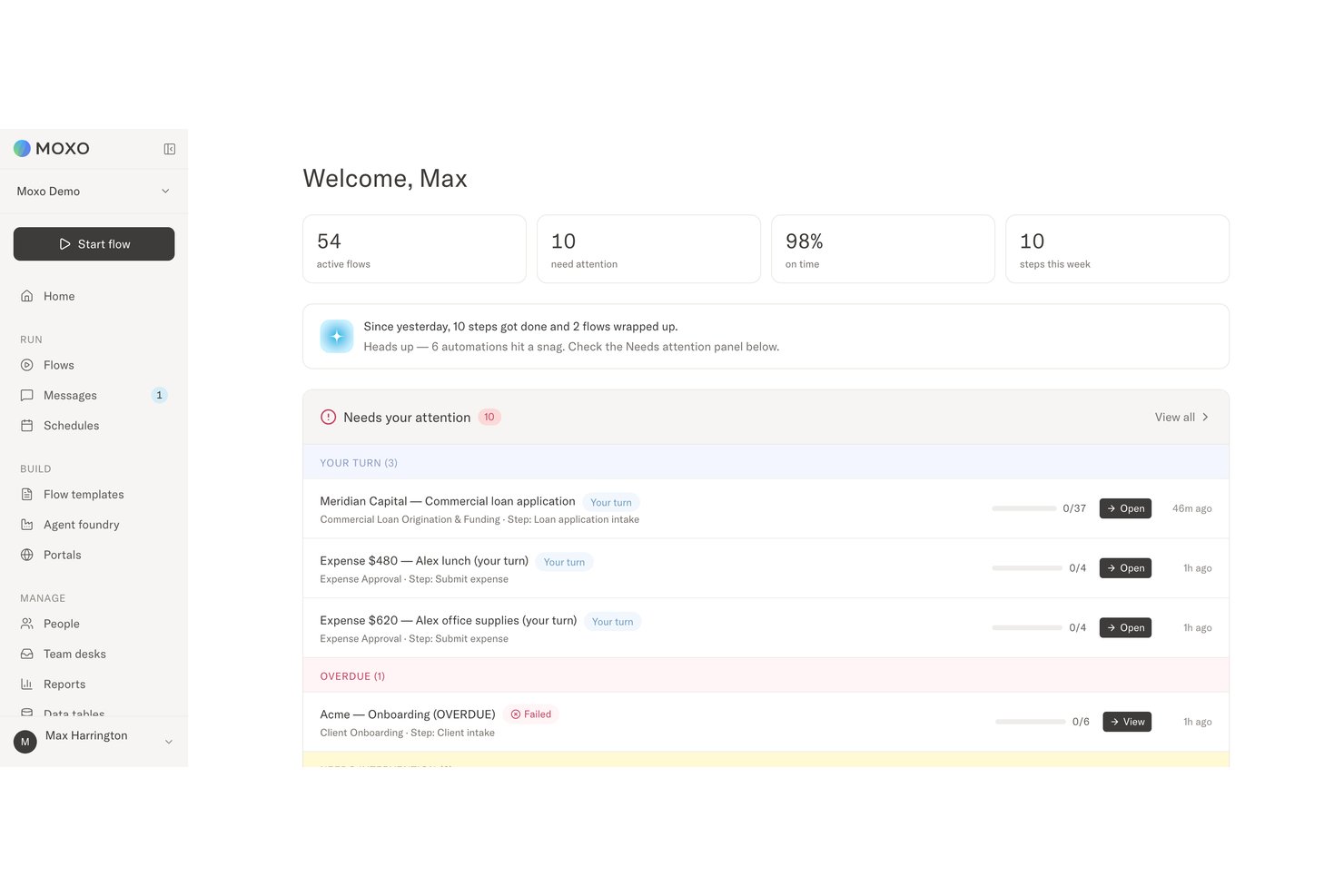
Moxo is a workflow automation software built for client-facing processes like onboarding, document collection, and approval workflows. I'd consider it if your team is coordinating these steps across email chains, shared drives, and scattered chat threads. It's a better fit than something like monday.com if your workflows involve external clients. Moxo gives those clients a dedicated workspace to participate directly, rather than treating them as an afterthought to an internal tool.
Moxo Evaluation Summary
- From $5,000/year (billed annually)
- Free trial available
Why Trust Our Software Recommendations
Our team has been testing and reviewing software since 2012. As project managers ourselves, we know how difficult—and important—it is to choose the right software.
For this guide, we evaluated tools using hands-on testing and independent research, scoring tools using our selection criteria. We also draw on insights from industry thought leaders and practicing project management experts.
Our reviews reflect our human editorial judgment, not a sales pitch.
Expert reviewers:
Moxo Overview
In my opinion, Moxo works best when automation needs to cross company boundaries without removing people from critical decisions. Its no-code builder, Agent Foundry, custom portals, SLA controls, and audit trails automate routine coordination while preserving accountability. Advanced flows can take time to configure, but the depth suits service-based and compliance-heavy organizations.
pros
-
Agentic AI handles preparation, validation, routing, and monitoring
-
Custom portals keep external participants aligned
-
Human-in-the-loop controls, SLA rules, and audit trails reinforce accountability
cons
-
Advanced workflow design requires an adjustment period
-
Less common integrations may require Zapier, Composio, or APIs
-
Reporting focuses on process operations rather than customizable BI
Is Moxo Right For Your Needs?
Who Would be a Good Fit for Moxo?
Moxo suits organizations automating repeatable processes across internal teams and external stakeholders. It is particularly useful when workflows involve several handoffs, client or vendor collaboration, compliance requirements, or decisions that need a traceable human owner.
-
Professional Services Firms
Accounting, legal, consulting, and marketing firms can manage client onboarding, document collection, approvals, and recurring service delivery.
-
Financial Services and Insurance
Banks, lenders, wealth managers, and insurers can coordinate applications, compliance checks, exception reviews, signatures, and client decisions.
-
Healthcare Administration
Healthcare organizations can manage provider credentialing, intake, document verification, acknowledgements, and approval-heavy processes.
-
B2B SaaS Customer Operations
Customer success and implementation teams can coordinate onboarding, account reviews, renewals, and service requests across customers and internal specialists.
-
Real Estate and Construction Firms
Moxo helps organize contracts, approvals, vendor requirements, project documentation, and communication between clients, brokers, contractors, and internal staff.
-
Manufacturing and Logistics Operations
Operations teams can use Moxo for vendor onboarding, order fulfillment, compliance checks, document requests, and other multi-party workflows.
Who Would be a Bad Fit for Moxo?
Moxo may be too much platform for simple, fully autonomous, or highly technical workflows. Businesses needing basic data sync, personal task management, developer-led BPMN modeling, or IT ticketing will likely get better value from a specialized tool.
-
Ecommerce and Retail Businesses
Online stores handling quick, one-off customer purchases may not need Moxo’s portals, structured handoffs, or long-running workflows. A commerce or customer support platform will usually be a better fit.
-
IT Service Management Departments
Internal IT teams managing incidents, service requests, and ticket queues will likely need dedicated ITSM features rather than Moxo’s client and stakeholder orchestration tools.
-
Developer-Led BPM Programs
Organizations that want engineers to build and maintain highly technical BPMN workflows may find Moxo too business-user focused. A developer-centric process engine will offer more control over complex process architecture.
-
Solo Consultants and Freelancers
Independent professionals managing personal tasks or a small number of clients may find Moxo more complex than necessary. Its strongest capabilities are designed for processes involving multiple participants, roles, and approvals.
-
Businesses Needing Basic Data Sync
Organizations that only need to move information between a form, CRM, and another application will likely be better served by a lightweight automation platform with more one-click connectors.
-
Fully Automated Back-Office Operations
Businesses aiming to run processes entirely through systems and AI, with no human approvals or exception handling, may not align with Moxo’s human-accountability model.
Our Review Methodology
How We Test & Score Tools
We’ve spent years building, refining, and improving our software testing and scoring system. The rubric is designed to capture the nuances of software selection and what makes a tool effective, focusing on critical aspects of the decision-making process.
Below, you can see exactly how our testing and scoring works across seven criteria. It allows us to provide an unbiased evaluation of the software based on core functionality, standout features, ease of use, onboarding, customer support, integrations, customer reviews, and value for money.
Core Functionality (25% of final scoring)
The starting point of our evaluation is always the core functionality of the tool. Does it have the basic features and functions that a user would expect to see? Are any of those core features locked to higher-tiered pricing plans? At its core, we expect a tool to stand up against the baseline capabilities of its competitors.
Standout Features (25% of final scoring)
Next, we evaluate uncommon standout features that go above and beyond the core functionality typically found in tools of its kind. A high score reflects specialized or unique features that make the product faster, more efficient, or offer additional value to the user.
We also evaluate how easy it is to integrate with other tools typically found in the tech stack to expand the functionality and utility of the software. Tools offering plentiful native integrations, 3rd party connections, and API access to build custom integrations score best.
Ease of Use (10% of final scoring)
We consider how quick and easy it is to execute the tasks defined in the core functionality using the tool. High scoring software is well designed, intuitive to use, offers mobile apps, provides templates, and makes relatively complex tasks seem simple.
Onboarding (10% of final scoring)
We know how important rapid team adoption is for a new platform, so we evaluate how easy it is to learn and use a tool with minimal training. We evaluate how quickly a team member can get set up and start using the tool with no experience. High scoring solutions indicate little or no support is required.
Customer Support (10% of final scoring)
We review how quick and easy it is to get unstuck and find help by phone, live chat, or knowledge base. Tools and companies that provide real-time support score best, while chatbots score worst.
Customer Reviews (10% of final scoring)
Beyond our own testing and evaluation, we consider the net promoter score from current and past customers. We review their likelihood, given the option, to choose the tool again for the core functionality. A high scoring software reflects a high net promoter score from current or past customers.
Value for Money (10% of final scoring)
Lastly, in consideration of all the other criteria, we review the average price of entry level plans against the core features and consider the value of the other evaluation criteria. Software that delivers more, for less, will score higher.
Core Features
No-Code Workflow Builder
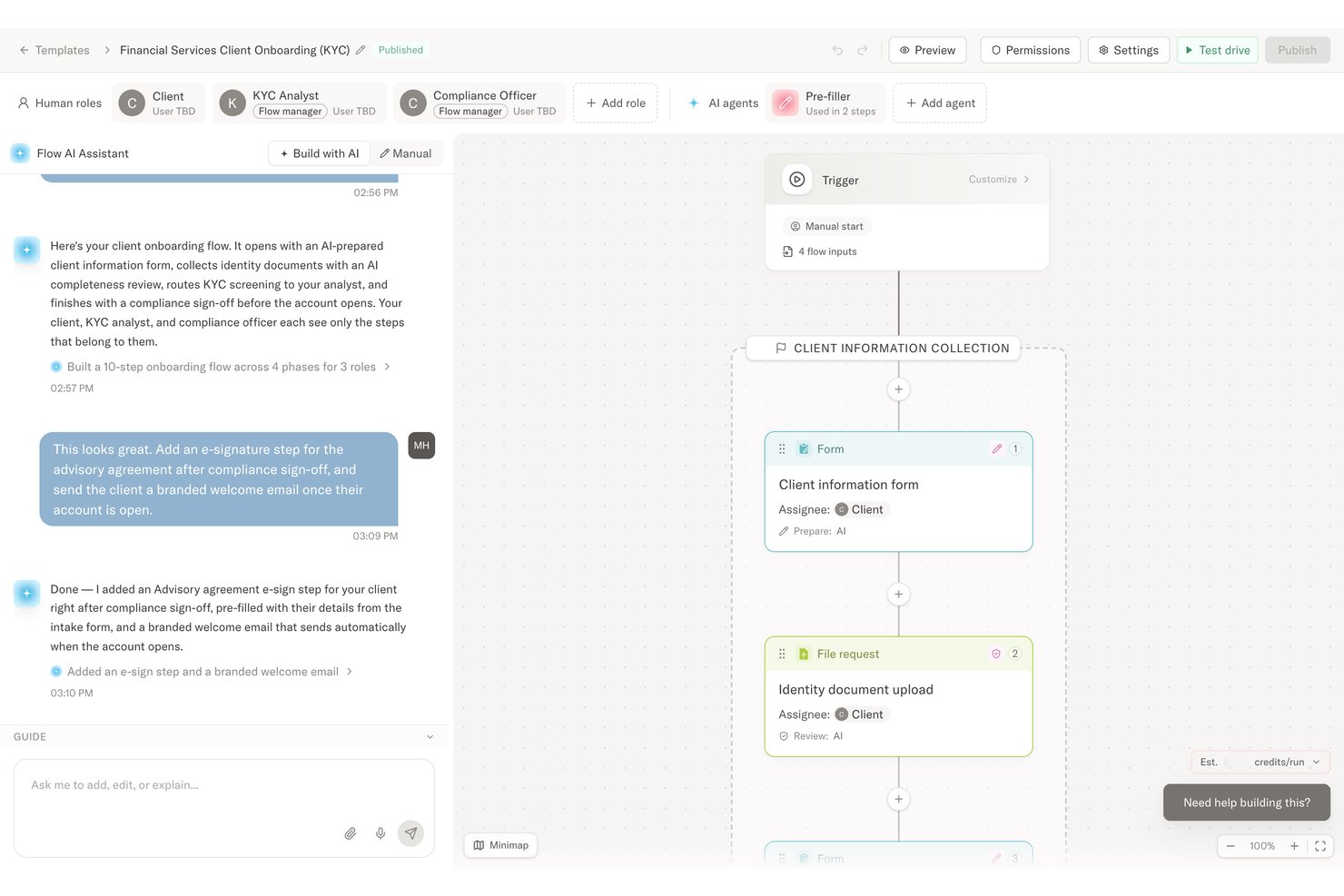
Teams can describe a process in plain language, upload a document or diagram, or start from a template. Moxo generates structured steps, roles, branching logic, data references, deadlines, and escalation rules without requiring code.
Business Process Orchestration
Moxo automates and coordinates workflows across employees, clients, vendors, partners, AI agents, and connected systems. It supports processes such as customer onboarding, implementations, service delivery, account management, order fulfillment, training, and vendor onboarding.
Agent Foundry
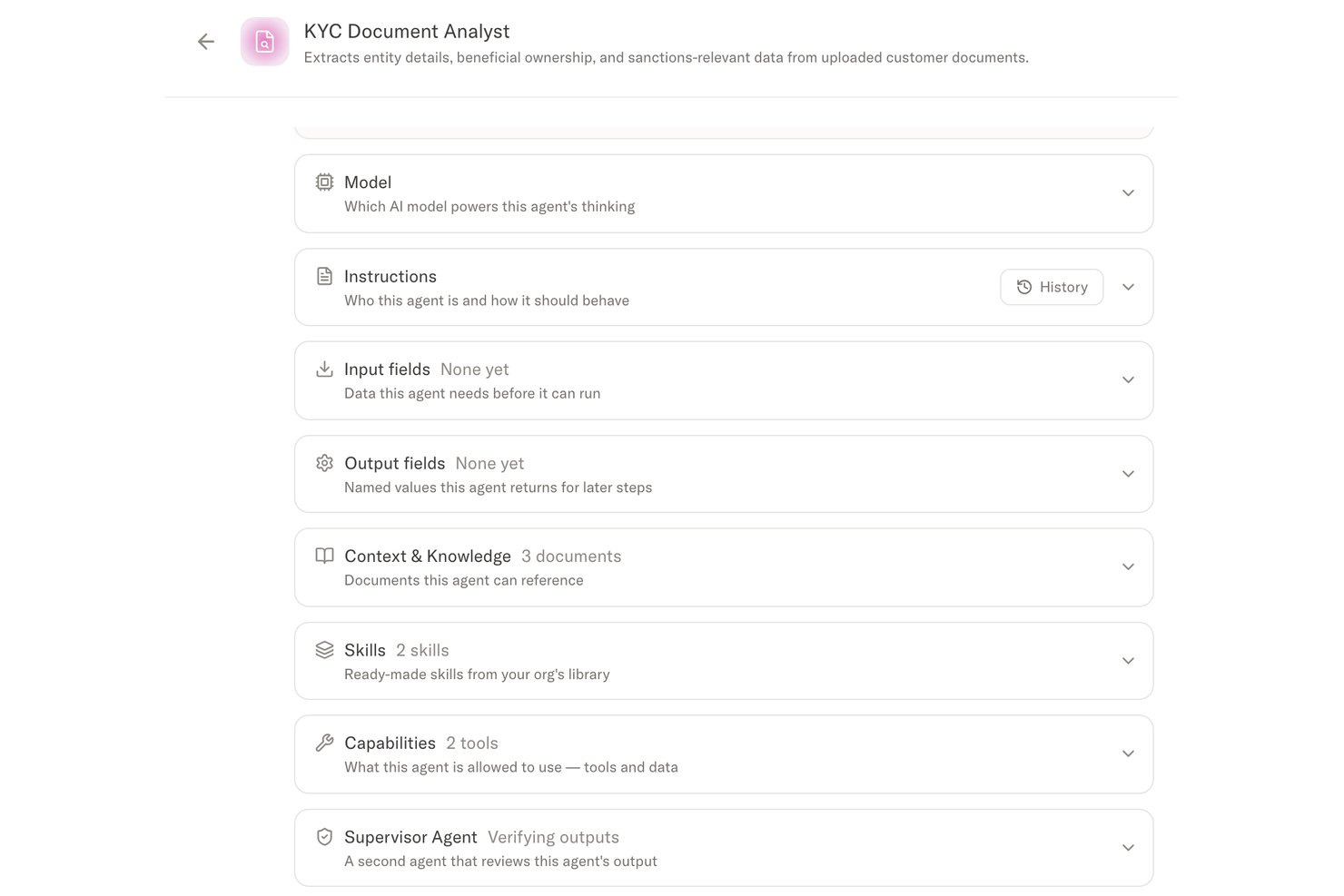
Agent Foundry lets teams build AI agents that prepare work, validate information, recommend actions, complete routine steps, and monitor progress. Agents follow workflow permissions and can escalate exceptions when human judgment is needed.
Workflow Actions and Approvals
Teams can add tasks, forms, questionnaires, file requests, acknowledgements, decisions, approvals, payments, and e-signatures. These actions keep submissions, reviews, and sign-offs moving in the correct order.
Custom Portals
Moxo provides branded portals that can also be configured for vendors, partners, franchisees, and other participants. Each person sees the messages, files, resources, and actions relevant to their role, while magic links allow access without an account, password, or app download.
Process Insights and Audit Trails
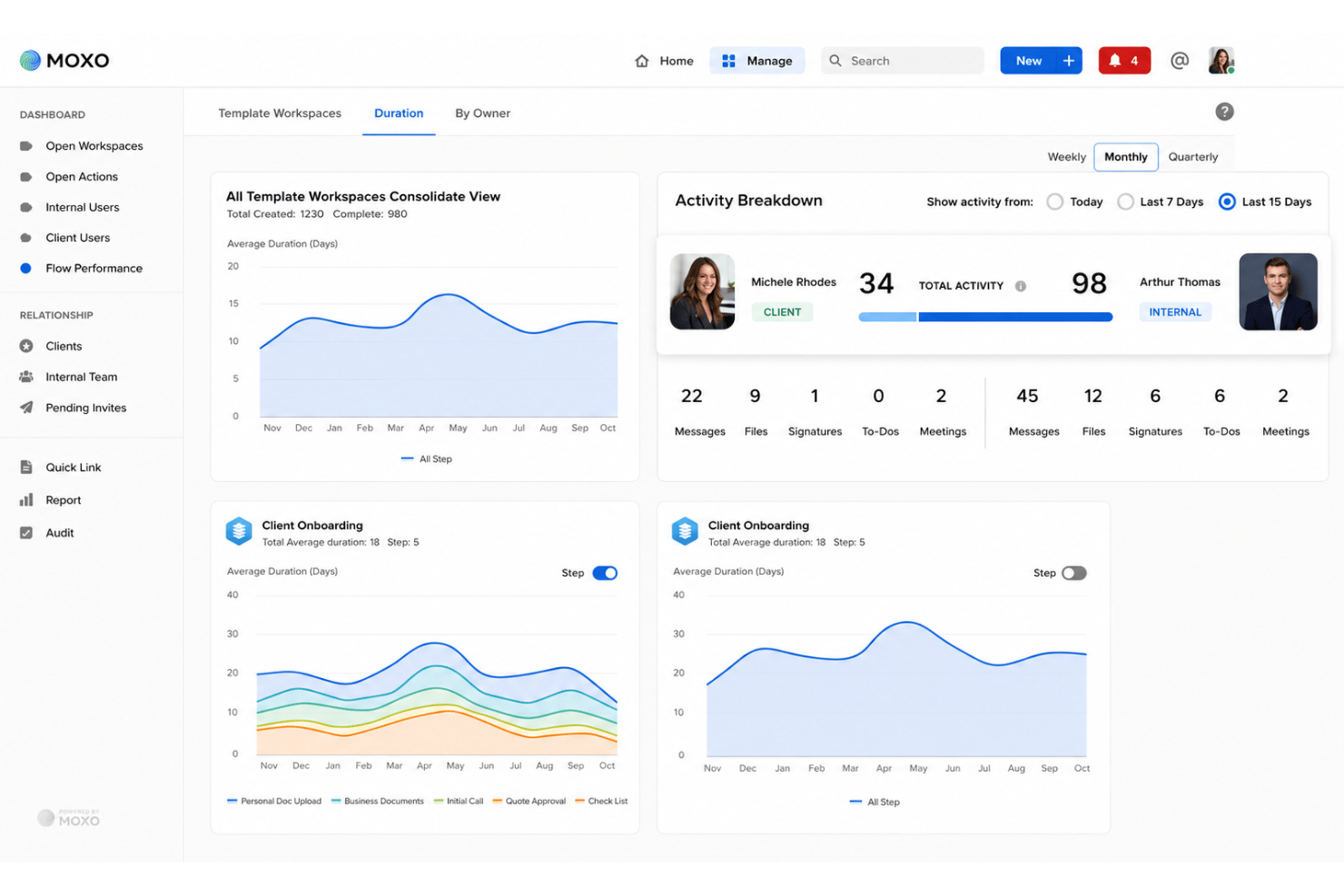
Moxo tracks status, ownership, delays, cycle times, throughput, and SLA performance. Dashboards, a Pulse Score, reports chat, and audit trails help teams identify bottlenecks and trace decisions to the responsible participant.
Standout Features
Human-in-the-Loop Decision Controls
AI agents can prepare, validate, route, and monitor work, while people remain responsible for approvals, exceptions, compliance sign-offs, and other judgment-based decisions.
Multi-Agent Supervision
Moxo allows one agent to review another agent’s output, flag anomalies, and escalate work that falls outside its assigned scope. This adds oversight to complex and regulated processes.
Ease of Use
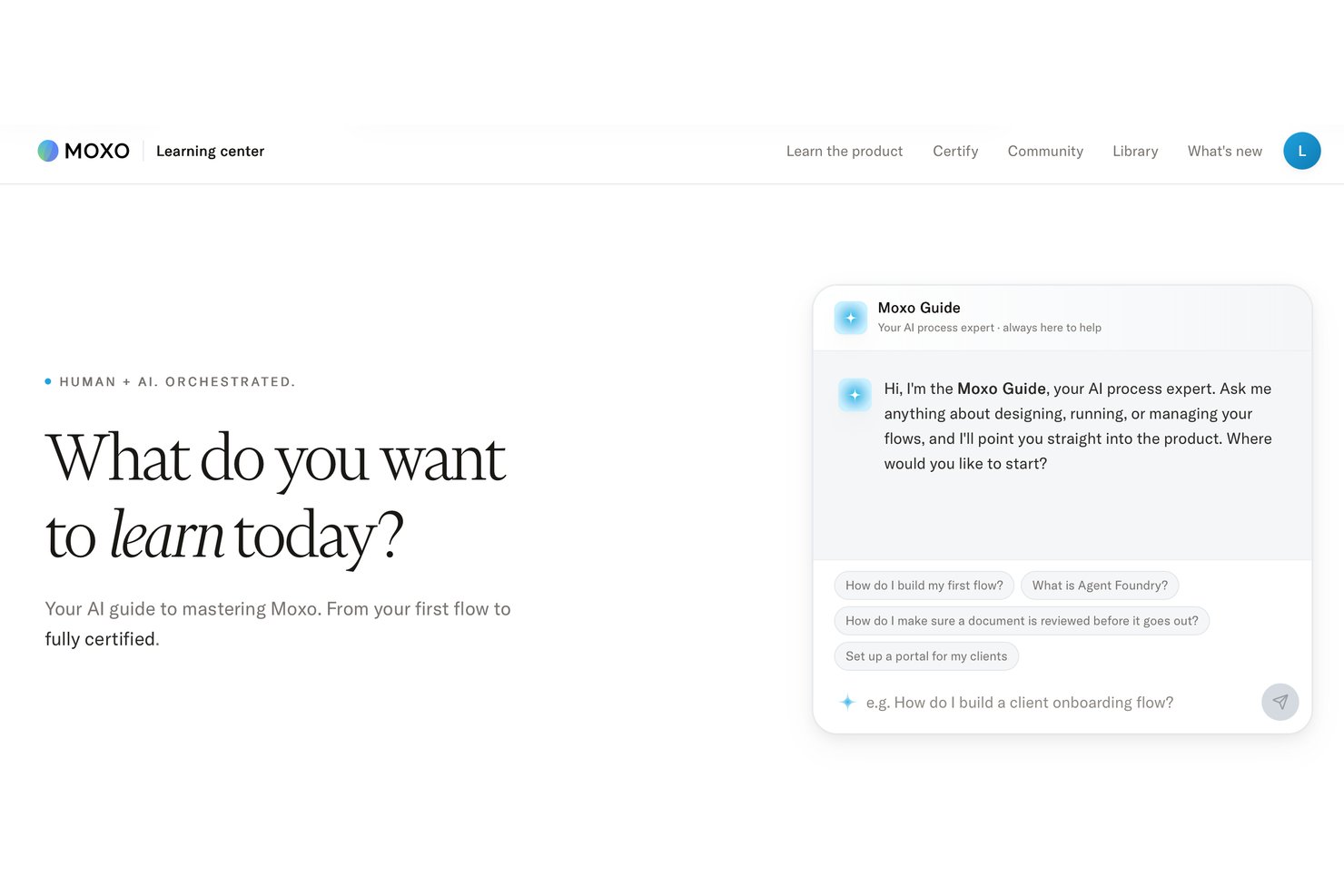
Moxo is easier to learn than its feature set might suggest. The no-code builder, templates, and conversational setup reduce reliance on IT, although advanced flows with branching, multiple roles, and supervised agents still require an adjustment period.
Onboarding
Moxo offers self-serve and guided onboarding. Coordinators can build and launch a flow from a prompt, template, document, or diagram the same day, while larger rollouts involving multiple workspaces and agents may take several weeks. Technical setup is mainly limited to optional APIs, webhooks, and SSO.
Customer Support
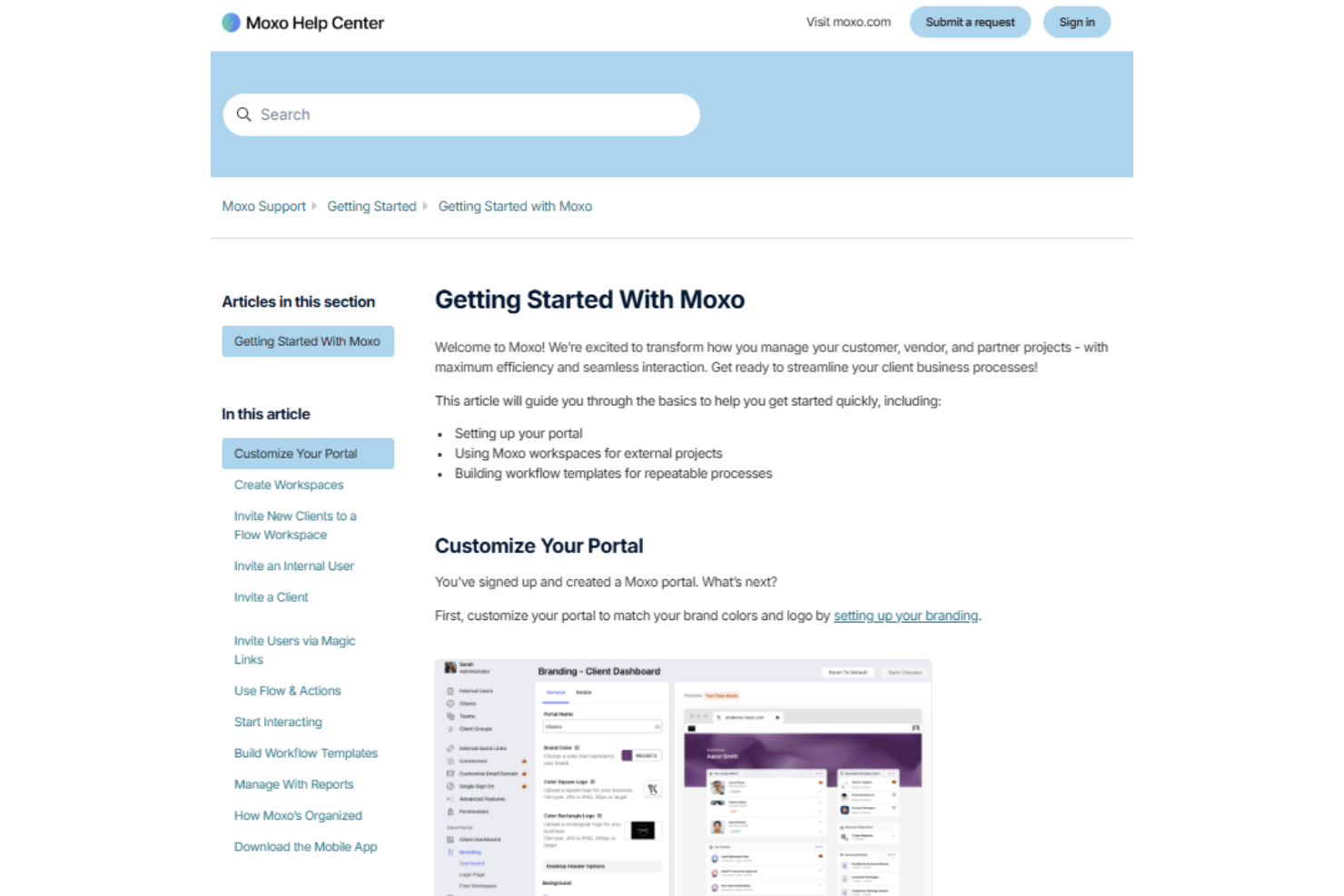
Moxo includes in-app support on Free and Business, a customer success manager on Pro, and a forward-deployed engineer on Enterprise. Users can also access a self-service Help Center with setup guides and documentation covering platform use, administration, Moxo AI, integrations, automations, and the mobile app, as well as a form for submitting technical support requests. Larger deployments can include process consulting and implementation assistance.
Integrations
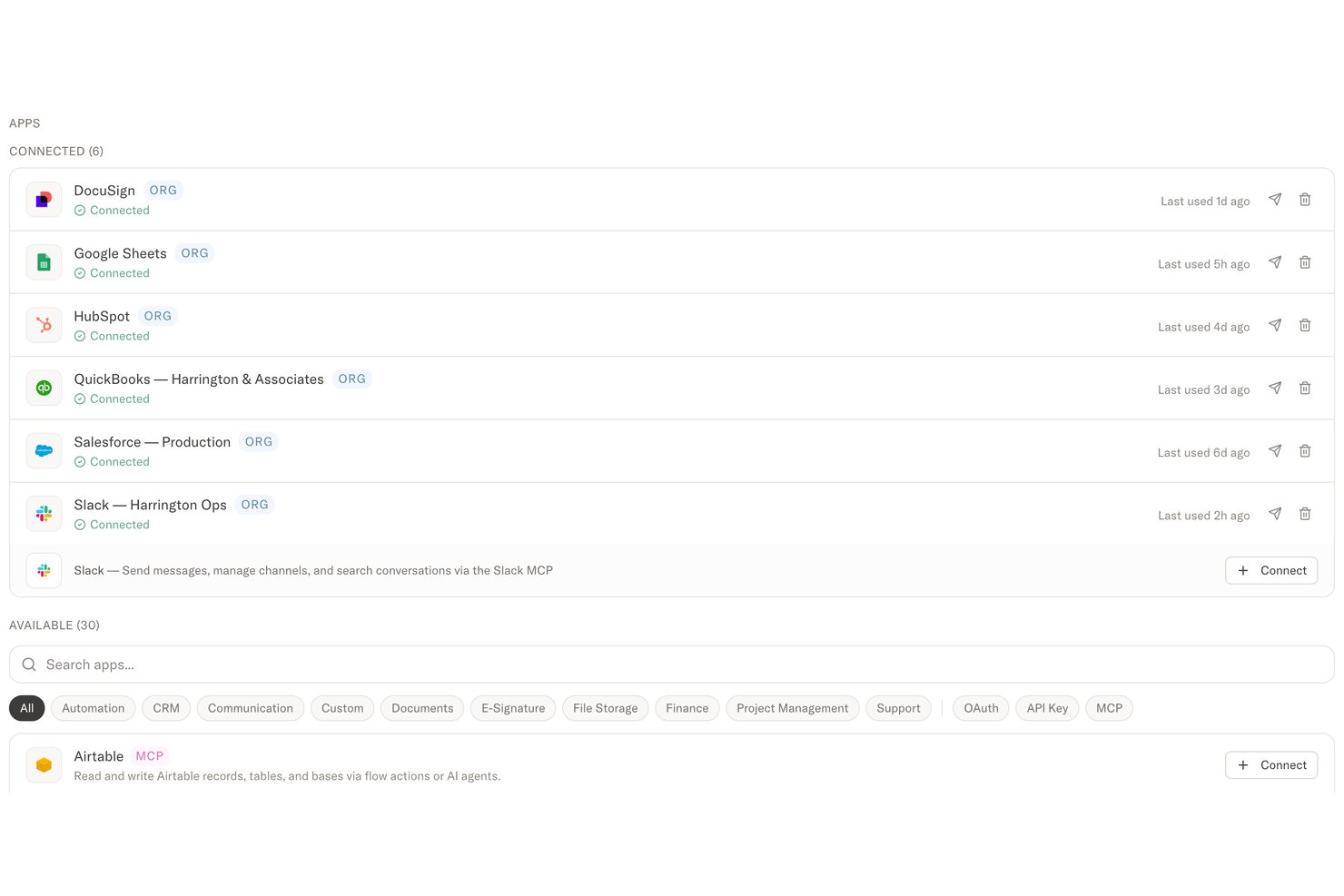
Integrations include DocuSign, Gmail, HubSpot, Slack, Jira, Salesforce, Box, QuickBooks, SAP, Stripe, Jotform, and Microsoft Dynamics 365. An API is available for building custom integrations and pushing or pulling data between Moxo and other systems, with webhooks and Zapier also supported for additional automation.
Value for Money
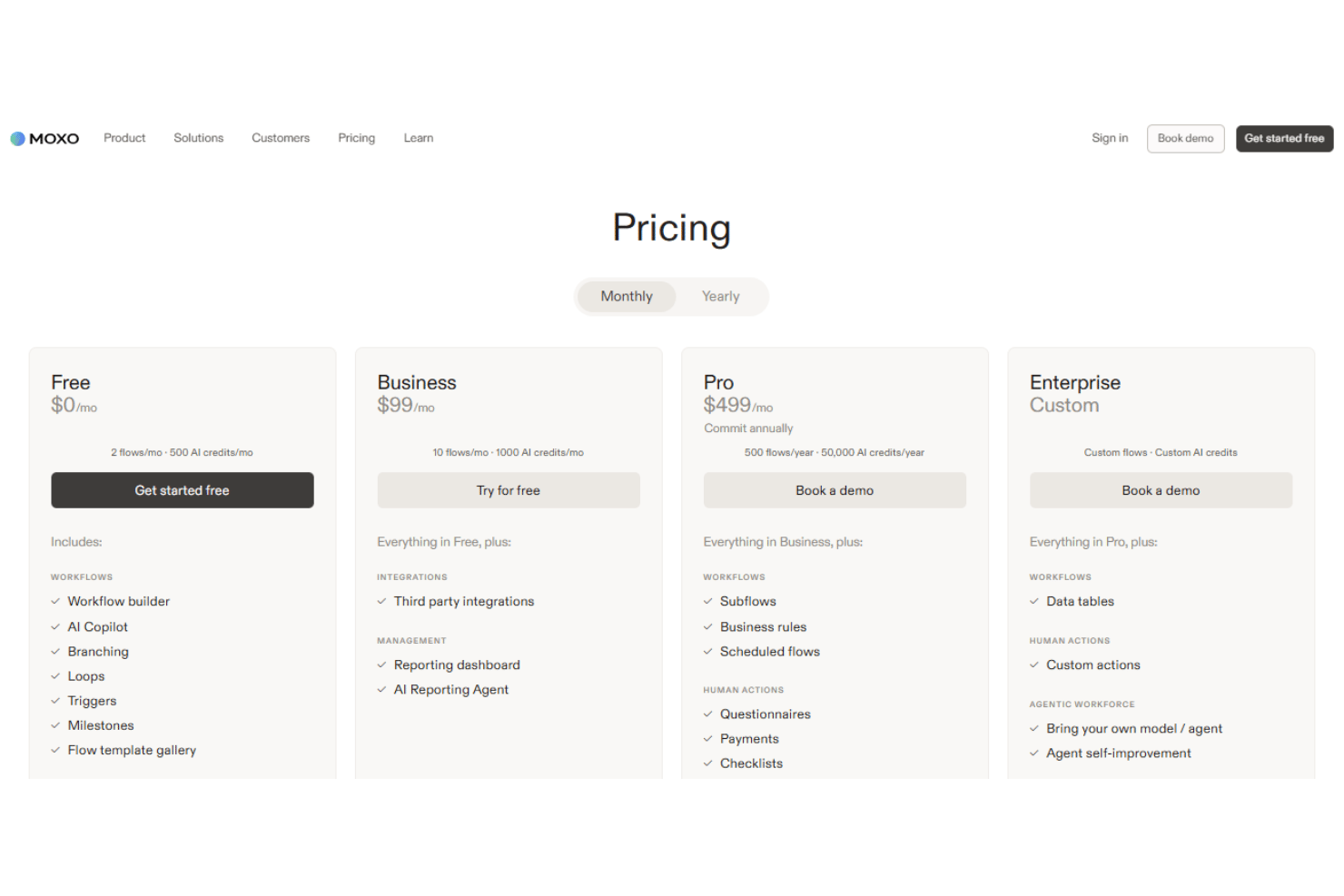
Moxo offers good value when automation involves multiple participants, approvals, AI agents, and connected systems. Free and Business are useful for getting started, but Pro contains many of its main capabilities, including custom portals, advanced agents, APIs, SSO, and audit logs. It is harder to justify for basic automation, but the cost makes more sense when missed handoffs or delayed approvals have real consequences.
- Free: Includes the no-code workflow builder, branching, loops, triggers, templates, approvals, forms, decisions, e-signatures, file requests, basic agents, AI utilities, magic links, and in-app support.
- Business: Adds higher workflow and AI limits, a reporting dashboard, and an AI Reporting Agent.
- Pro: Adds subflows, business rules, scheduled flows, payments, checklists, supervisor agents, advanced agent capabilities, custom portals, SMS notifications, custom domains, APIs, webhooks, MCP connections, SAML SSO, audit logs, and a customer success manager.
- Enterprise: Adds custom limits, data tables, custom actions, bring-your-own models or agents, custom workspace pages, embedded apps, custom code, and a forward-deployed engineer.
Moxo Specs
- Access Management
- Analytics
- API
- Approval Workflows
- Audit Trail
- Batch Permissions & Access
- Business Rules Mining
- Compliance Tracking
- Custom Reports
- Customer Management
- Data Export
- Data Import
- Document Management
- External Integrations
- Form Builder
- Multi-User
- Notifications
- Process Modeling
- Process Reporting
- Project Management
- Reports
- Risk Assessment
- Roadmapping
- White-label
- Workflow Management
Moxo FAQs
How long does it take to deploy Moxo?
Is Moxo only a client portal?
Does Moxo support custom branding?
What security features does Moxo provide?
Can Moxo automate approvals, reminders, and escalations?
Does human-in-the-loop mean a person must complete every step?
Is Moxo similar to Zapier?
Is Moxo easy for non-technical users?
How does Moxo handle e-signatures and document approvals?
Does Moxo require an IT team to manage it?
Moxo Company Overview & History
Moxo is a human-AI workflow automation and business process orchestration platform based in Cupertino, California. Founded in 2012 by Subrah Iyar, co-founder and former CEO of WebEx, and Stanley Huang, former Senior Director of Engineering at WebEx, the company originally operated as Moxtra.
It began as a mobile collaboration product before expanding into workflow automation across employees, external stakeholders, AI agents, and connected systems. Its current offering centers on no-code automation, agentic AI, process visibility, and auditable execution.
Moxo Major Milestones
- 2012: Moxtra was founded by Subrah Iyar and Stanley Huang in Cupertino, California.
- 2013: Moxtra officially launched its initial collaboration product for iPad and the web.
- 2020: Moxtra was named Best Digital Banking Solution Provider at the Banking Tech Awards.
- 2022: The company rebranded from Moxtra to Moxo as its offering expanded from collaboration into end-to-end client interaction workflows.
- 2024: Moxo won Best UX/UI Design in a SaaS Product at the Cloud SaaS Awards.