


Analyse de SAP Enterprise Portfolio and Project Management



SAP Enterprise Portfolio and Project Management is a PPM tool built for large enterprises that need to align project investments with strategic priorities across complex, multi-portfolio environments. I'd consider it specifically if your organization already runs on SAP, as the native integration with SAP S/4HANA and SAP Financials gives you financial governance and resource visibility that a standalone tool like Planview requires significant configuration to replicate.
SAP Enterprise Portfolio and Project Management Evaluation Summary
- Pricing upon request
Pourquoi faire confiance à nos recommandations de logiciels
Notre équipe teste et évalue des logiciels depuis 2012. En tant que chefs de projet nous-mêmes, nous savons à quel point il est difficile — et important — de choisir le bon logiciel.
Pour ce guide, nous avons évalué les outils grâce à des tests pratiques et une recherche indépendante, en notant les outils selon nos critères de sélection. Nous nous appuyons également sur les enseignements de leaders d’opinion du secteur et de professionnels de la gestion de projet en activité.
Nos avis reflètent notre jugement éditorial humain, et non un argumentaire de vente.
Réviseurs experts:
SAP Enterprise Portfolio and Project Management Overview
In my opinion, SAP Enterprise Portfolio and Project Management is best for large organizations that manage complex projects and resources. It works well with other SAP systems to give you a complete view of project data. While it may not feel as intuitive as newer tools, it’s a strong fit for companies in industries like manufacturing and technology that already rely on SAP.
pros
-
It integrates well with existing SAP systems to provide a unified project management experience.
-
You get comprehensive project tracking and resource allocation functionality that suit complex projects.
-
It's ideal for large enterprises in industries like manufacturing and technology where detailed project oversight is essential.
cons
-
The user interface can be less intuitive than newer tools, making it harder to navigate.
-
Onboarding can be challenging, particularly for teams not already familiar with SAP systems.
-
It may not suit smaller organizations or teams that need a more lightweight solution.
-

Smartsheet
Visit WebsiteThis rating combines scores from multiple user review sites to reflect overall customer sentiment about the product.4.5 -
Celoxis
Visit WebsiteThis rating combines scores from multiple user review sites to reflect overall customer sentiment about the product.4.5 -
Accelo
Visit WebsiteThis rating combines scores from multiple user review sites to reflect overall customer sentiment about the product.4.4





Notre méthodologie d'évaluation
Comment nous testons et notons les outils
Nous avons passé des années à construire, affiner et améliorer notre système de test et de notation de logiciels. Notre grille d’évaluation est conçue pour capturer les subtilités de la sélection de logiciels et ce qui rend un outil efficace, en mettant l’accent sur les aspects critiques de la prise de décision. Ci-dessous, vous pouvez voir exactement comment notre processus de test et de notation fonctionne sur sept critères. Cela nous permet de fournir une évaluation impartiale des logiciels selon leur fonctionnalité principale, leurs fonctionnalités remarquables, leur facilité d’utilisation, l’onboarding, le support client, les intégrations, les avis clients et le rapport qualité/prix.
Fonctionnalités principales (25 % du score final)
Le point de départ de notre évaluation est toujours la fonctionnalité principale de l’outil. Dispose-t-il des fonctionnalités et caractéristiques de base attendues par l’utilisateur ? Certaines de ces fonctionnalités de base sont-elles réservées aux formules tarifaires supérieures ? Nous nous attendons à ce qu’un outil soit à la hauteur des capacités de base de ses concurrents.
Fonctionnalités remarquables (25 % du score final)
Ensuite, nous évaluons les fonctionnalités remarquables et peu communes qui vont au-delà de la fonctionnalité de base habituellement retrouvée dans ce type d’outils. Un score élevé reflète des fonctionnalités spécialisées ou uniques qui rendent le produit plus rapide, plus efficace, ou offrent une valeur supplémentaire à l’utilisateur. Nous évaluons également la facilité d’intégration avec d’autres outils couramment présents dans l’environnement technique pour étendre la puissance et l’utilité du logiciel. Les outils offrant de nombreuses intégrations natives, des connexions tierces et un accès API pour créer des intégrations personnalisées obtiennent la meilleure note.
Facilité d’utilisation (10 % du score final)
Nous considérons la rapidité et la facilité d’exécution des tâches principales à l’aide de l’outil. Un logiciel bien noté est conçu intelligemment, intuitif à utiliser, propose des applications mobiles, fournit des modèles et simplifie les tâches relativement complexes.
Onboarding (10 % du score final)
Nous savons à quel point l’adoption rapide par l’équipe est cruciale lors de la mise en place d’une nouvelle plateforme. Nous évaluons donc la facilité avec laquelle un utilisateur peut apprendre et utiliser le logiciel avec un minimum de formation. Nous vérifions la rapidité avec laquelle un membre peut s’installer et démarrer sans expérience préalable. Les solutions ayant une note élevée nécessitent peu ou pas de support.
Support client (10 % du score final)
Nous examinons la rapidité et la facilité d’obtention d’une aide par téléphone, chat en direct ou base de connaissances. Les outils et sociétés proposant un support en temps réel obtiennent la meilleure note, tandis que les chatbots sont les moins bien notés.
Avis clients (10 % du score final)
Au-delà de nos propres tests et évaluations, nous tenons compte du net promoter score des clients actuels et passés. Nous étudions la probabilité, pour eux, de choisir à nouveau l’outil pour ses fonctionnalités principales. Un logiciel ayant une note élevée reflète un score NPS élevé de la part des utilisateurs actuels ou passés.
Rapport qualité/prix (10 % du score final)
Enfin, en tenant compte de tous les autres critères, nous comparons le prix moyen des forfaits d’entrée de gamme aux fonctionnalités principales et considérons la valeur des autres critères d’évaluation. Un logiciel qui en offre davantage pour moins cher sera mieux noté.
Core Features
Resource Management: SAP Portfolio and Project Management helps you optimize resource allocation and tracking across multiple projects to ensure your team is being deployed efficiently. It improves visibility into resource availability and workload distribution, to help you prevent over-commitment.
Procurement Management: SAP PPM improves project-based procurement and helps manage planning, orders, supplier negotiations, and contracts. It also helps with procurement visibility so you can make sure materials are delivered on time and manage suppliers effectively.
Budgeting: SAP Portfolio and Project Management supports detailed financial planning and monitoring with features for setting budgets and tracking expenditures. Its ability to integrate financial data across projects helps you maintain fiscal discipline and avoid budget overruns.
Risk Management: Identify potential risks early with its risk assessment tools. This helps your team plan contingencies and manage uncertainties effectively.
Agile Resource Management: SAP PPM lets you dynamically allocate human and financial resources and adjust workloads based on agile iterations and project needs. This gives you more visibility into resource availability and utilization for better planning.
Issues and Change Management: SAP PPM lets you track project issues and change requests throughout the project life cycle. It offers visibility into financial impacts and supports multi-level approvals to provide oversight and allow for controlled implementation.
Ease of Use
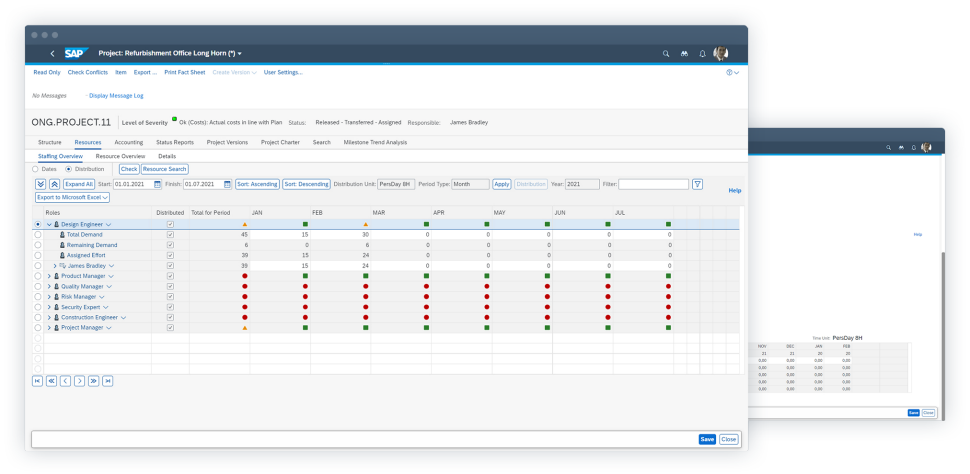
SAP Enterprise Portfolio and Project Management can be complex and less user-friendly than other tools. If your team isn’t familiar with SAP systems, expect a steep learning curve. The interface may be hard to navigate, especially for those new to project portfolio management.
However, once set up, its detailed features and data views can significantly improve how you manage projects.

SAP Enterprise Portfolio and Project Management Specs
- API
- Batch Permissions & Access
- Budgeting
- Calendar Management
- Collaboration Support
- Contact Management
- Contact Sharing
- Customer Management
- Dashboard
- Dashboards
- Data Export
- Data Import
- Data Visualization
- Dependency Tracking
- Document Sharing
- Expense Tracking
- External Integrations
- File Sharing
- Gantt Charts
- Kanban Boards
- Multi-User
- Notifications
- Project Management
- Resource Management
- Scheduling
- Task Scheduling/Tracking
- Third-Party Plugins/Add-Ons
- Time Management
- Travel Management
- Workflow Management
Alternatives to SAP Enterprise Portfolio and Project Management



SAP Enterprise Portfolio and Project Management FAQs
How does SAP Enterprise Portfolio and Project Management handle data security?
Is SAP Enterprise Portfolio and Project Management scalable for growing teams?
Can you customize workflows in SAP Enterprise Portfolio and Project Management?
What type of support can you expect during implementation?
How does SAP Enterprise Portfolio and Project Management support remote teams?
What kind of reporting capabilities are available?
How does SAP Enterprise Portfolio and Project Management handle project risk management?
Is training required to effectively use SAP Enterprise Portfolio and Project Management?
Et maintenant ?
Vous souhaitez entrer en contact avec d’autres chefs de projet digital pour partager des ressources et des bonnes pratiques ? Rejoignez notre communauté de membres et accédez à plus de 100 modèles, exemples et échantillons, et échangez avec des centaines d’autres chefs de projet digital sur Slack.