


Reseña de Buddy Punch: Ventajas, Desventajas, Funciones y Precios Explicados



Buddy Punch is a time tracking software built for teams that need to track employee hours, manage schedules, and handle PTO requests in one place. It's worth considering if you're overseeing hourly or field-based workers and want more built-in scheduling and punch management than Hubstaff offers, without the overhead of a full workforce management platform.
Buddy Punch Evaluation Summary
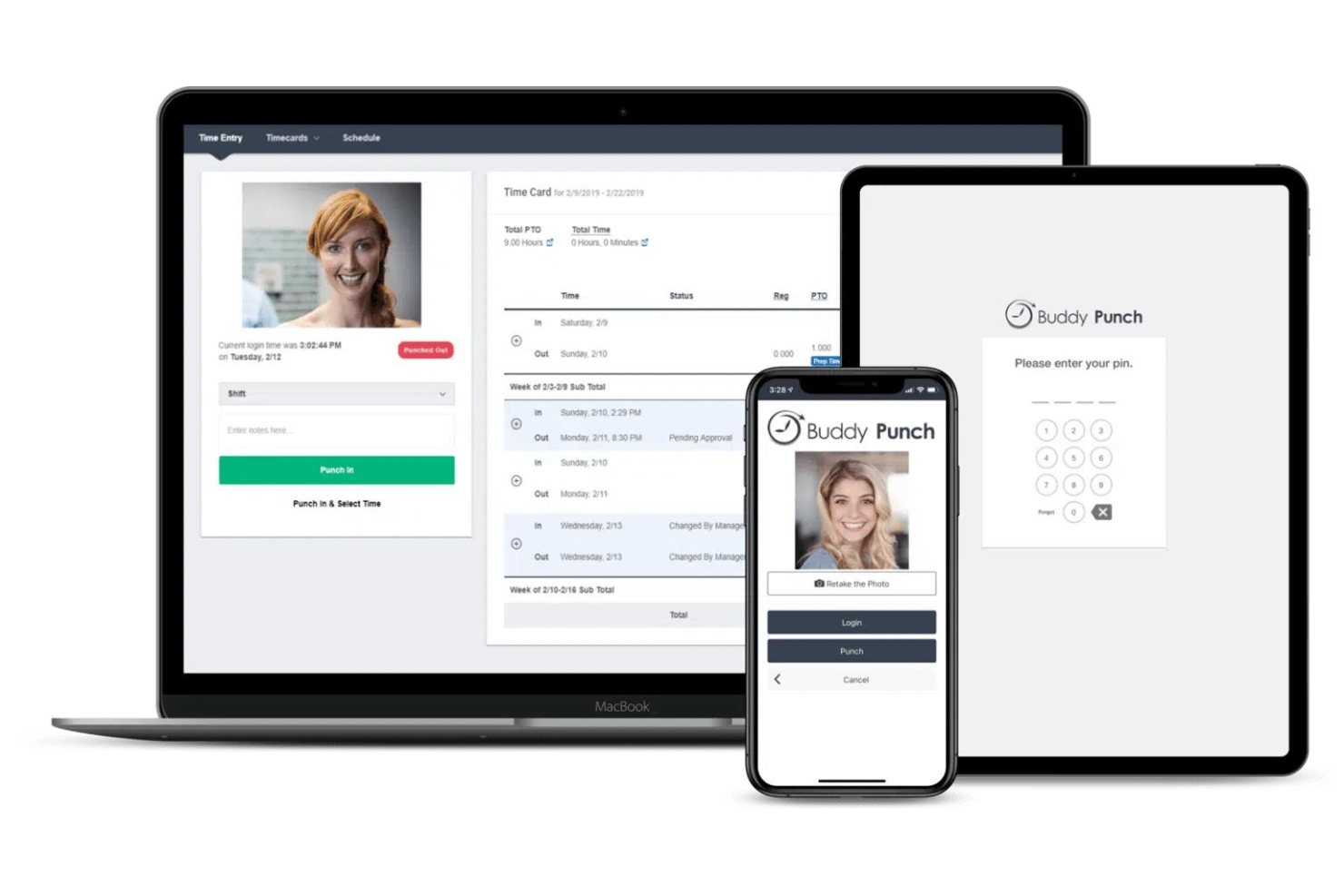
- From $4.99/user/month + $19/month base fee (billed annually)
- 14-day free trial + free demo available
Por qué confiar en nuestras recomendaciones de software
Nuestro equipo lleva probando y evaluando software desde 2012. Como gestores de proyectos, sabemos lo difícil —y lo importante— que es elegir el software adecuado.
Para esta guía, evaluamos las herramientas mediante pruebas prácticas e investigación independiente, puntuando las herramientas según nuestros criterios de selección. También nos basamos en la experiencia de líderes de opinión del sector y de profesionales en activo de la gestión de proyectos.
Nuestras reseñas reflejan nuestro criterio editorial humano, no un discurso de ventas.
Revisores expertos:
Buddy Punch Overview
When evaluating Buddy Punch as a time tracking tool, its intuitive interface and simple onboarding set it apart for teams new to digital time tracking. The platform's flexible punch-in options and customizable reports make it easy to adapt to different workflows, while its pricing remains accessible for small and mid-sized businesses. However, users needing advanced integrations or highly detailed project analytics may find it less competitive. In my opinion, Buddy Punch is best suited for organizations prioritizing ease of use and straightforward scheduling over complex automation or deep analytics. For example, retail and field service teams often select it for its mobile features and real-time visibility into where employees punch in from.
pros
-
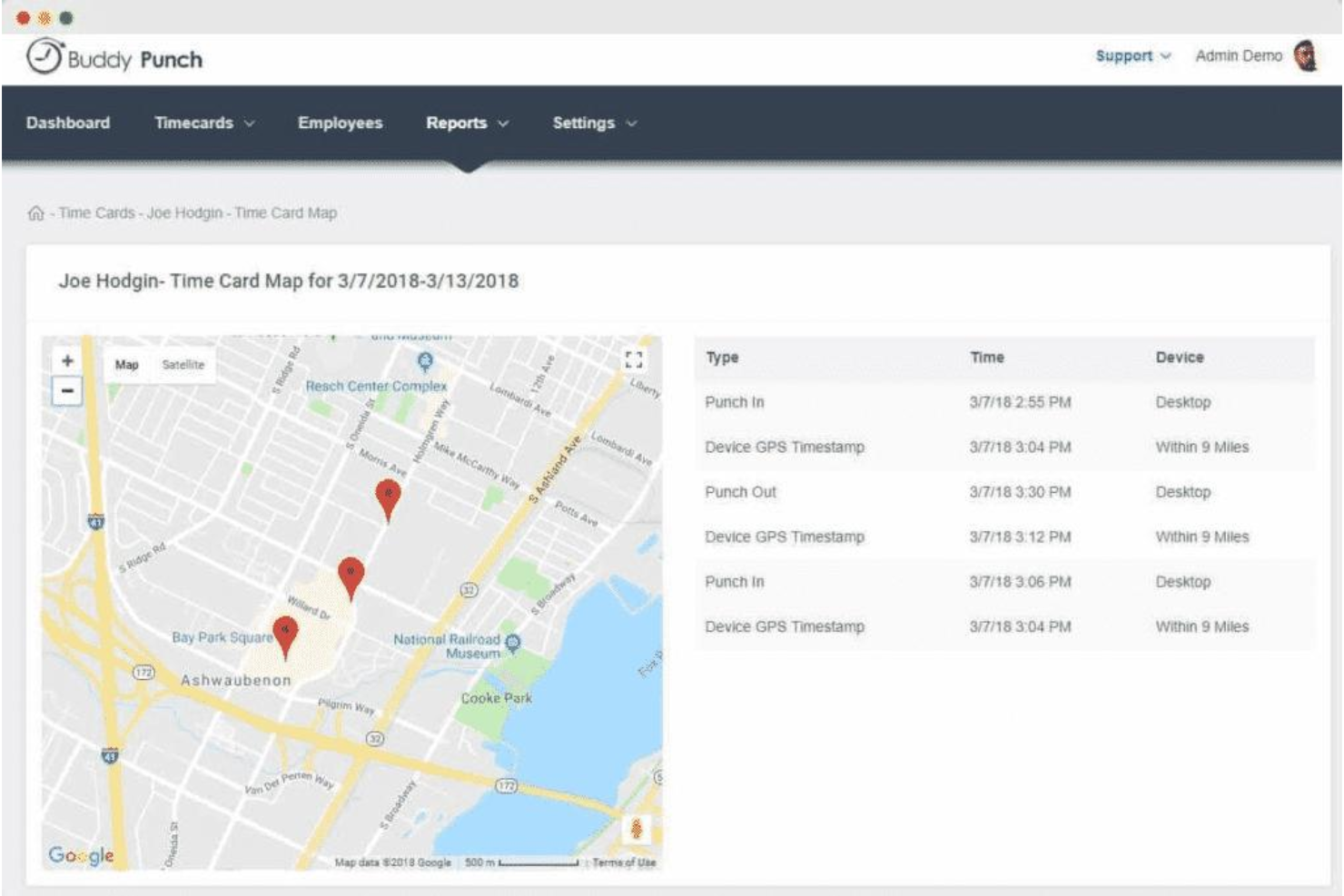
GPS tracking and geofencing prevent offsite punching.
-
Photo-on-punch and facial recognition reduce time theft.
-
PTO tracking and scheduling are built into the platform.
cons
-
Mobile app can be glitchy and limiting for some users.
-
Visual data representation in reports is limited.
-
Scheduling and payroll features cost extra as add-ons.
Is Buddy Punch Right For Your Needs?
Who Would be a Good Fit for Buddy Punch?
Buddy Punch works best for organizations that need straightforward time tracking, location verification, and simple scheduling without complex project management requirements. Its GPS tracking, PTO management, and mobile punch-in features make it a strong choice for teams with hourly workers, distributed staff, or field-based roles. Businesses that value built-in compliance tools and want to reduce time theft will find its photo-on-punch and facial recognition especially useful. These strengths make Buddy Punch a practical option for several specific industries and roles.
-
Construction Crews
GPS and geofencing confirm workers are on-site for every shift.
-
Retail Stores
Photo-on-punch helps prevent buddy punching among hourly staff.
-
Healthcare Clinics
PTO tracking and shift scheduling support rotating staff schedules.
-
Cleaning Services
Mobile punch-in and location tracking suit teams working offsite.
-
Small Businesses
Simple setup and affordable plans fit limited budgets and resources.
-
Franchise Operations
Centralized dashboard supports managing multiple locations and teams.
Who Would be a Bad Fit for Buddy Punch?
Buddy Punch is less suitable for organizations that need advanced project tracking, deep analytics, or highly customizable workflows. Its reporting and data visualization are basic compared to more specialized platforms, and some features require add-ons or higher-tier plans. Teams with complex integration needs or those managing large-scale, multi-phase projects may find Buddy Punch limiting. Here are some examples of where Buddy Punch may not be the best choice.
-
Software Development
Lacks detailed project tracking and task-level time allocation.
-
Large Enterprises
Limited reporting and analytics for enterprise-scale requirements.
-
Creative Agencies
No built-in client billing or granular project budgeting tools.
-
Finance Departments
Payroll integrations are limited and may require manual exports.
-
Consulting Firms
No native support for billable rates or multi-client invoicing.
-
Manufacturing Plants
Does not offer advanced shift planning or labor forecasting.
Nuestra Metodología de Revisión
Cómo probamos y puntuamos las herramientas
Llevamos años construyendo, refinando y mejorando nuestro sistema de prueba y puntuación de software. La rúbrica está diseñada para capturar los matices de la selección de software y los factores que hacen efectivo a un sistema, centrándose en los aspectos críticos del proceso de toma de decisiones.
A continuación, puedes ver exactamente cómo funciona nuestro proceso de prueba y puntuación en base a siete criterios. Esto nos permite proporcionar una evaluación imparcial del software basada en la funcionalidad principal, características destacadas, facilidad de uso, incorporación, soporte al cliente, integraciones, opiniones de clientes y valor por el dinero.
Funcionalidad principal (25% de la puntuación final)
El punto de partida de nuestra evaluación es siempre la funcionalidad principal de la herramienta. ¿Cuenta con las funciones y características básicas que un usuario esperaría ver? ¿Alguna de estas funciones principales está limitada a planes de precios superiores? Esperamos que la herramienta se mantenga a la par de las capacidades básicas de sus competidores.
Características destacadas (25% de la puntuación final)
A continuación, evaluamos las características destacadas poco comunes que van más allá de la funcionalidad principal normalmente encontrada en este tipo de herramientas. Una puntuación alta refleja funciones únicas o especializadas que hacen que el producto sea más rápido, eficiente, o aporte valor extra al usuario.
También evaluamos la facilidad de integración con otras herramientas habitualmente presentes en el ecosistema tecnológico para ampliar la funcionalidad y utilidad del software. Las herramientas que ofrecen muchas integraciones nativas, conexiones de terceros y acceso por API para integrar soluciones personalizadas obtienen la mejor puntuación.
Facilidad de uso (10% de la puntuación final)
Consideramos cuán rápido y fácil es ejecutar las tareas fundamentales usando la herramienta. El software con alta puntuación está bien diseñado, es intuitivo, ofrece aplicaciones móviles, proporciona plantillas y hace que tareas relativamente complejas parezcan sencillas.
Incorporación (10% de la puntuación final)
Sabemos lo importante que es una adopción rápida para un nuevo sistema, así que evaluamos cuán sencillo es aprender a usar la herramienta con una capacitación mínima. Analizamos cuán rápido un miembro del equipo puede configurarse y comenzar a usar la herramienta sin experiencia previa. Las soluciones mejor puntuadas indican que se requiere poco o ningún soporte.
Soporte al cliente (10% de la puntuación final)
Revisamos la rapidez y facilidad para obtener ayuda por teléfono, chat en vivo o base de conocimientos. Las empresas que ofrecen soporte en tiempo real obtienen las mejores puntuaciones, mientras que los chatbots obtienen las peores.
Opiniones de clientes (10% de la puntuación final)
Además de nuestras propias pruebas y valoraciones, consideramos la puntuación neta del promotor de clientes actuales y anteriores. Revisamos la probabilidad de que, ante la opción, quisieran elegir la herramienta de nuevo por su funcionalidad central. Un software con una puntuación alta refleja una gran satisfacción de sus usuarios actuales o pasados.
Valor por el dinero (10% de la puntuación final)
Por último, tomando en cuenta todos los criterios mencionados, comparamos el precio promedio de los planes básicos respecto a las funciones principales y el valor aportado por los otros criterios. El software que entrega más por menos recibirá una puntuación superior.
Core Features
GPS Tracking
Track employee locations during clock-in and clock-out using GPS data. This helps verify on-site attendance for field and remote teams.
Photo-on-Punch
Require employees to take a photo when punching in or out. This reduces buddy punching and supports compliance for hourly staff.
Facial Recognition
Use facial recognition to confirm employee identity at clock-in. This adds an extra layer of security for workplaces with shared devices.
PTO Management
Employees can request, approve, and track time off requests directly in the platform. Managers see all PTO requests in one dashboard for easy scheduling.
Customizable Overtime Rules
Set custom overtime rules based on your company's policies. The system automatically calculates overtime hours for payroll accuracy.
Employee Scheduling
Create, assign, and adjust shifts with a drag-and-drop scheduler. Employees receive notifications about their schedules and any changes.
Standout Features
Punch Rounding Rules
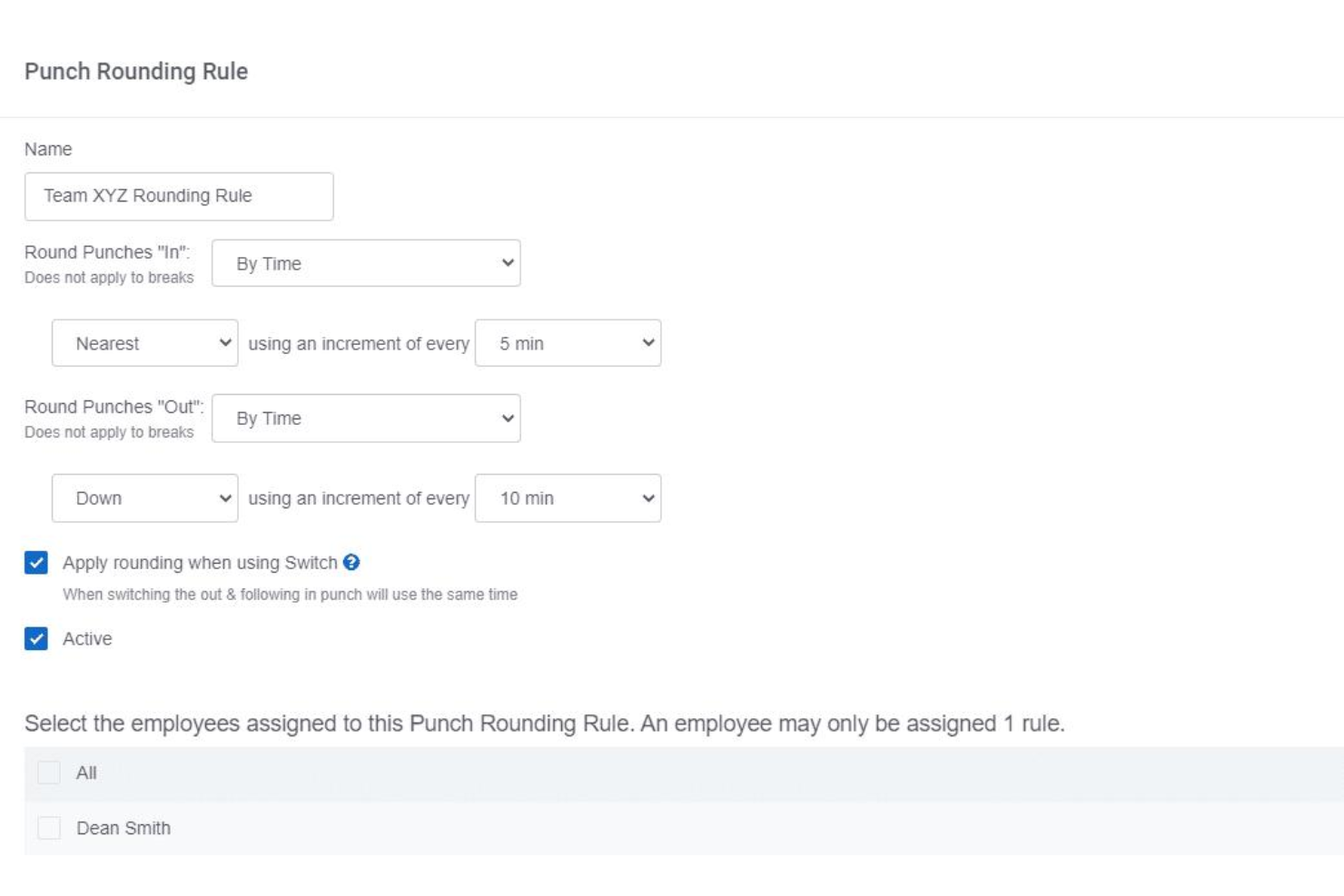
Set custom rounding rules for clock-in and clock-out times to match payroll policies. This helps standardize time entries and reduces disputes over a few minutes worked.
Automatic Breaks
Configure automatic unpaid or paid breaks based on shift length. The system deducts break time without manual input, ensuring compliance with labor regulations.
Ease of Use
Buddy Punch is widely recognized for its clean interface and straightforward navigation, making it accessible for both managers and hourly staff. Users often mention the quick onboarding process and intuitive punch-in options, such as mobile, web, and kiosk modes. The dashboard clearly displays schedules, PTO, and hours worked, reducing confusion. While some users report occasional mobile app glitches, most find daily tasks easy to complete without extensive training or support.

Onboarding
Buddy Punch offers a fast onboarding experience, with most users able to set up accounts, add employees, and configure schedules in under an hour. The platform provides step-by-step guides, video tutorials, and responsive live chat support, which users frequently praise for quick issue resolution.

Customer Support
Buddy Punch earns strong marks for its responsive customer support, with users frequently noting fast replies via live chat and email. Many reviewers mention that support staff are knowledgeable and proactive in resolving setup or technical issues. The platform also offers a detailed help center and video resources, which help users troubleshoot independently. This combination of accessible channels and helpful documentation makes Buddy Punch's support experience stand out for teams with limited IT resources.

Integrations
Buddy Punch integrates with QuickBooks Online, QuickBooks Desktop, ADP, Paychex, Gusto, Paylocity, SurePayroll, Workday, and PayPlus, among others.
Buddy Punch also offers an API and connects with third-party integration tools like Zapier for expanded automation options.

Value for Money
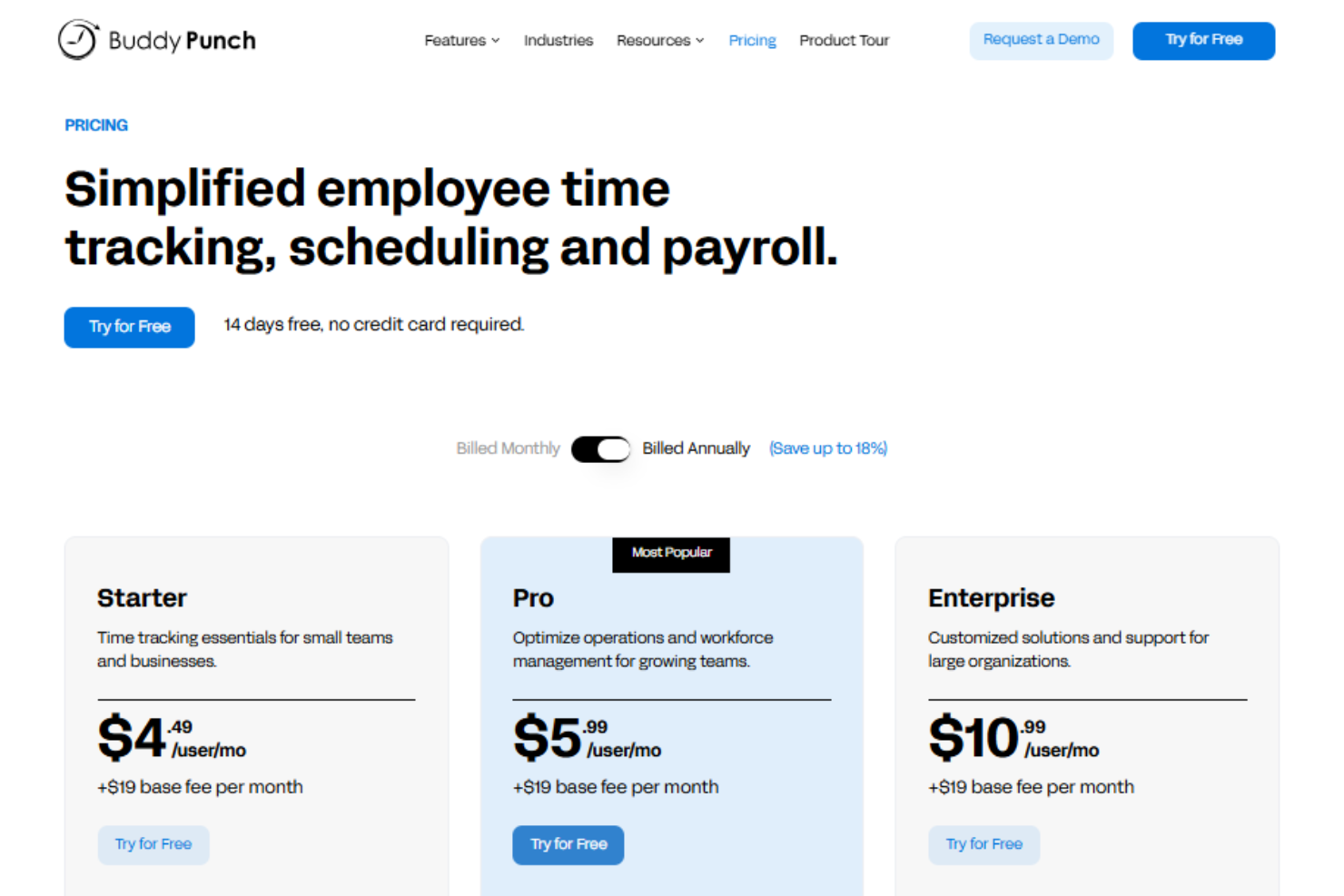
Buddy Punch’s pricing is often seen as affordable for small and mid-sized teams. Users appreciate the flexible pricing plans and the ability to pay only for needed features, though some note that advanced scheduling and payroll tools require higher tiers or add-ons. Note that there is no platform-wide base fee—you pay per user, which keeps labor costs predictable as your team scales. The platform's value is strongest for teams seeking core time tracking without complex extras.
- Standard: Includes time tracking, PTO management, payroll integrations, and reporting.
- Pro: Adds QR code scanning, webcam on punches, geofencing, and job codes.
- Enterprise: Offers advanced controls, API access, and priority support.
Buddy Punch Specs
- 360 Degree Feedback
- API
- Attendance Tracking
- Batch Permissions & Access
- Budgeting
- Calendar Management
- Dashboard
- Data Export
- Data Import
- Data Visualization
- Employee Database
- Employee Engagement
- Employee Onboarding
- External Integrations
- Feedback Management
- Forecasting
- Multi-User
- Notifications
- Project Management
- Scheduling
- Timesheets
- Travel Management
- Vacation & Absence Calendar
Buddy Punch FAQs
Can Buddy Punch handle multiple locations or job sites?
How does Buddy Punch prevent buddy punching or time theft?
Is Buddy Punch suitable for remote or field-based teams?
What data security and compliance measures does Buddy Punch offer?
Can I customize overtime and break rules to match my company policy?
How easy is it to export time data for payroll processing?
Does Buddy Punch support approval workflows for timecards and PTO?
What kind of customer support is available if I run into issues?
Buddy Punch Company Overview & History
Buddy Punch is a U.S.-based company headquartered in Appleton, Wisconsin, focused exclusively on time clock software and scheduling for businesses with hourly workers. The company serves over 10,000 businesses across industries like construction, healthcare, retail, and professional services. Buddy Punch is independently owned and does not appear to be affiliated with other products or parent companies. The company is known for its user-friendly platform, responsive U.S.-based support, and high customer ratings, but does not publicly share financial or workforce size details.
Buddy Punch Major Milestones
- 2013: Buddy Punch is founded and begins development of its time tracking software.
- 2014: Official product launch, offering cloud-based time tracking for small businesses.
- 2020: Surpasses 10,000 business customers using the platform.
- 2023: Launches built-in payroll service and expands scheduling features.
- 2025: Recognized with multiple industry awards for usability and customer satisfaction.