


Runn Bewertung: Vorteile, Nachteile, Funktionen und Preise erklärt für 2026



Capacity planning across projects can quickly descend into guesswork without the right tools. Demand changes, priorities shift, disconnected spreadsheets create conflicting versions of the truth, and leaders are left scrambling to answer a deceptively simple question: do we actually have the capacity to take this on?
Runn is a resource management and capacity planning software designed for organizations that need better visibility into how people are allocated across projects, combining resource scheduling, capacity planning, forecasting, and reporting in a single platform. Runn can help balance workloads, anticipate future resourcing needs, and make informed decisions about project delivery, giving teams a clearer picture of both current commitments and upcoming demand.
In this detailed review, I've evaluated and tested Runn using my expertise as a project manager to help you determine whether this tool is the right fit for your project needs and goals.
Runn Evaluation Summary
- From $7/user/month (billed annually)
- 30-day free trial
Warum Sie unseren Software-Empfehlungen vertrauen können
Unser Team testet und bewertet Software seit 2012. Als Projektmanager wissen wir selbst, wie schwierig – und wichtig – es ist, die richtige Software auszuwählen.
Für diesen Leitfaden haben wir Tools mithilfe von praktischen Tests und unabhängiger Recherche bewertet und dabei unsere Bewertungskriterien angewendet. Zudem greifen wir auf Erkenntnisse von Branchenvordenkern und praktizierenden Projektmanagement-Experten zurück.
Unsere Bewertungen spiegeln unser menschliches redaktionelles Urteilsvermögen wider, keine Verkaufsstrategie.
Expertenprüfer:
Runn Overview
In my opinion, Runn stands out as a capable tool for resource and capacity planning. Its real-time visual project visibility is appealing, especially for technical development teams balancing multiple deliverables. With features like forecasting, capacity planning, and financial reporting, Runn provides a comprehensive view of ongoing projects and resource allocation. The software's ease of use and intuitive onboarding experience set it apart from competitors.
pros
-
Accurate forecasting tools provide insights into project health and resource needs, and help make informed decisions about future projects.
-
Custom tags and fields make it easier to structure your data and make faster decisions.
-
Reusable project templates reduce manual setup and help maintain consistency across recurring projects.
cons
-
Teams with highly complex permission requirements should review whether Runn’s role-based permissions meet their needs
-
You may experience issues with managing over 1000 resources.
-
Timesheet functionality isn't as robust as dedicated timesheet solutions.
Is Runn Right For Your Needs?
Who Would be a Good Fit for Runn?
Runn is ideal for technical-facing outfits like IT departments and software development teams that need real-time resource management and capacity planning. Its clear visual timelines and intuitive interface make it perfect for creative agencies that juggle multiple projects. If your team needs quick onboarding and easy task reassignment, Runn can save you time and effort. It can also generate instant reports to help you make informed decisions.
-
IT Solutions
Runn's project forecasting and capacity planning features are tailored for IT teams and help you manage resources effectively.
-
Software Delivery
The intuitive timeline view helps with planning sprints and managing project phases seamlessly.
-
Digital Transformation Agencies
Runn helps manage specialist workloads, plan future projects, and allocate resources more effectively across client engagements.
-
Consulting firms
With Runn, you can quickly adapt to changing client needs through its flexible scheduling.
-
Marketing teams
Its visual timelines help you coordinate campaigns and track deliverables efficiently.
-
Cross-functional teams
The skills management feature helps you assign tasks based on expertise and improve collaboration across departments.
Who Would be a Bad Fit for Runn?
Runn may not be the best fit for very large organizations managing thousands of resources or companies that need a single platform for both workforce planning and detailed task management. It can also be less suitable for businesses with highly variable shift-based scheduling, multi-year project lifecycles, or very short-duration projects that require rapid day-to-day resource changes.
-
Large enterprises
Organizations managing thousands of resources across complex portfolios may find the platform less suited to their scale and operational requirements.
-
Organizations Without Project Management Software
Companies with more than 100 employees that lack a dedicated project management tool may need additional software to handle task tracking and project execution.
-
Shift-Based Work Environments
Businesses that rely on highly variable shift-based scheduling may struggle with frequent changes to staffing requirements and working hours.
-
Short-Duration Project Work
Teams running projects that last only a few days may find the platform's planning capabilities more robust than their workflows require.
Unsere Bewertungsmethodik
Wie wir Tools testen & bewerten
Wir haben jahrelang unser System zur Softwareüberprüfung und -bewertung aufgebaut, verfeinert und verbessert. Das Bewertungsschema wurde entwickelt, um die Feinheiten der Softwareauswahl und die Effektivität eines Tools einzufangen, wobei der Fokus auf den entscheidenden Aspekten des Entscheidungsprozesses liegt. Unten sehen Sie genau, wie unser Test- und Bewertungssystem über sieben Kriterien hinweg funktioniert. So können wir eine objektive Einschätzung der Software auf Grundlage von Kernfunktionen, herausragenden Merkmalen, Benutzerfreundlichkeit, Onboarding, Kundenservice, Integrationen, Kundenbewertungen und Preis-Leistungs-Verhältnis bieten.
Kernfunktionalität (25% der Gesamtbewertung)
Ausgangspunkt unserer Bewertung ist immer die Kernfunktionalität des Tools. Hat es die grundlegenden Funktionen, die ein Nutzer erwarten würde? Sind einige dieser Kernfunktionen nur in höherpreisigen Tarifen verfügbar? Wir erwarten, dass ein Tool mindestens den grundlegenden Leistungsumfang seiner Mitbewerber erfüllt.
Herausragende Funktionen (25% der Gesamtbewertung)
Anschließend bewerten wir außergewöhnliche Funktionen, die über die üblichen Kernfunktionen hinausgehen. Eine hohe Bewertung spiegelt spezialisierte oder einzigartige Eigenschaften wider, durch die das Produkt schneller, effizienter oder für den Nutzer besonders wertvoll wird. Wir bewerten auch, wie einfach sich das Tool in andere Tools integrieren lässt, die üblicherweise im Tech-Stack zu finden sind, um die Funktionalität zu erweitern. Lösungen mit vielen nativen Integrationen, Drittanbieter-Anbindungen und API-Zugang zur Erstellung individueller Verknüpfungen schneiden am besten ab.
Benutzerfreundlichkeit (10% der Gesamtbewertung)
Wir berücksichtigen, wie schnell und einfach sich die Aufgaben – basierend auf der Kernfunktionalität – mit dem Tool erledigen lassen. Eine hohe Bewertung erhalten Tools, die durchdacht gestaltet und intuitiv bedienbar sind, mobile Apps und Vorlagen bieten und sogar komplexe Aufgaben einfach erscheinen lassen.
Onboarding (10% der Gesamtbewertung)
Wir wissen, wie wichtig eine schnelle Einführung im Team ist, und bewerten deshalb, wie leicht ein Tool mit minimaler Schulung erlernt und genutzt werden kann. Wir prüfen, wie schnell neue Teammitglieder ohne Vorkenntnisse starten können. Lösungen, die wenig oder gar keine Unterstützung erfordern, erhalten die höchste Bewertung.
Kundenservice (10% der Gesamtbewertung)
Wir überprüfen, wie schnell und unkompliziert Hilfe per Telefon, Live-Chat oder Wissensdatenbank verfügbar ist. Tools und Unternehmen, die Echtzeit-Support bieten, schneiden am besten ab; Chatbots am schlechtesten.
Kundenbewertungen (10% der Gesamtbewertung)
Neben unseren eigenen Tests beziehen wir auch den Net Promoter Score aktueller und ehemaliger Nutzer ein. Wir prüfen die Wahrscheinlichkeit, mit der sie das Tool erneut für die Kernfunktionalitäten wählen würden. Ein hohes Ergebnis spiegelt einen hohen Net Promoter Score bei aktuellen oder früheren Kund:innen wider.
Preis-Leistungs-Verhältnis (10% der Gesamtbewertung)
Abschließend vergleichen wir – unter Berücksichtigung aller anderen Kriterien – den Durchschnittspreis der Einstiegstarife mit den Kernfunktionen und bewerten das Preis-Leistungs-Verhältnis. Software, die mehr Leistung für weniger Geld bietet, bekommt die höchsten Werte.
Core Features
Resource Management
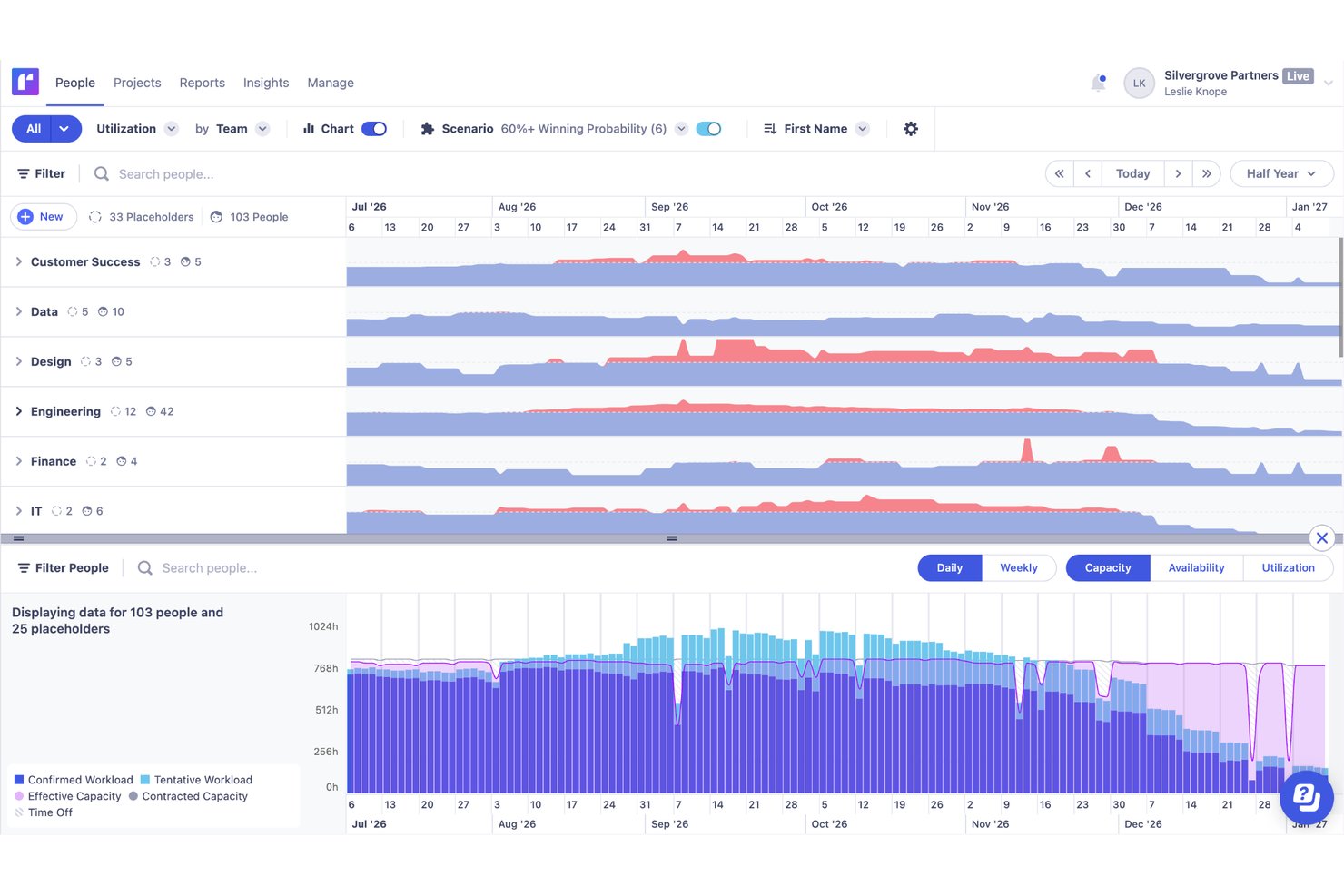
You can easily manage resources with Runn's drag-and-drop interface, which lets you quickly assign and reassign work. Live reports give you real-time insights into how your decisions impact resources.
Forecasting and Capacity Planning
Runn lets you forecast resources using placeholders and tentative work. This helps you understand team capacity and plan for potential hires or reallocations.
Resource Scheduling
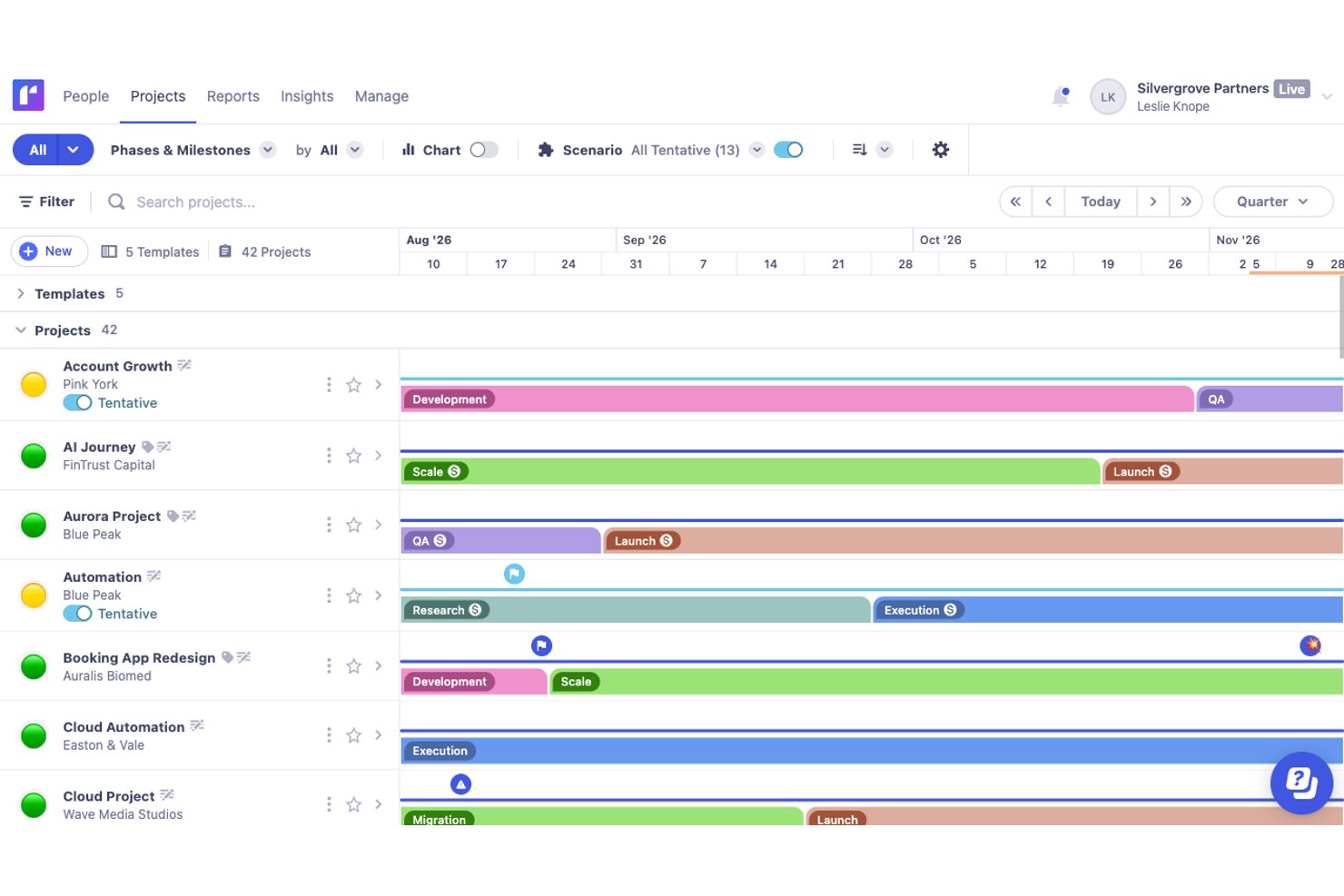
Assigning resources to projects is straightforward with Runn's intuitive drag-and-drop timeline. Multi-select mode allows for bulk actions and makes scheduling adjustments quick and efficient.
Scenario Planning
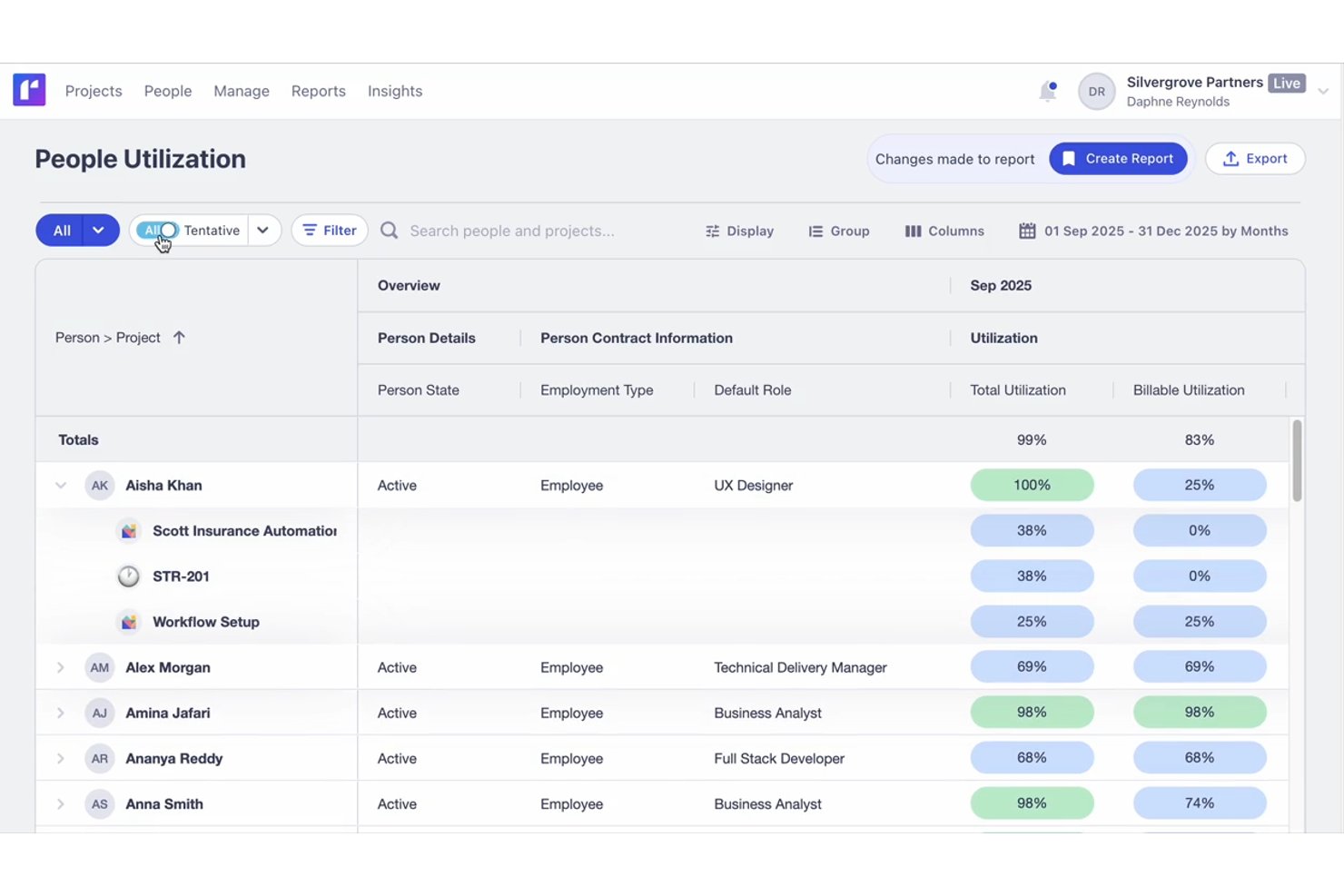
Runn's side-by-side reports let you see utilization and capacity in real-time and conduct scenario planning. You can adjust schedules and immediately see the impact on your team's resources.
Financial Reporting
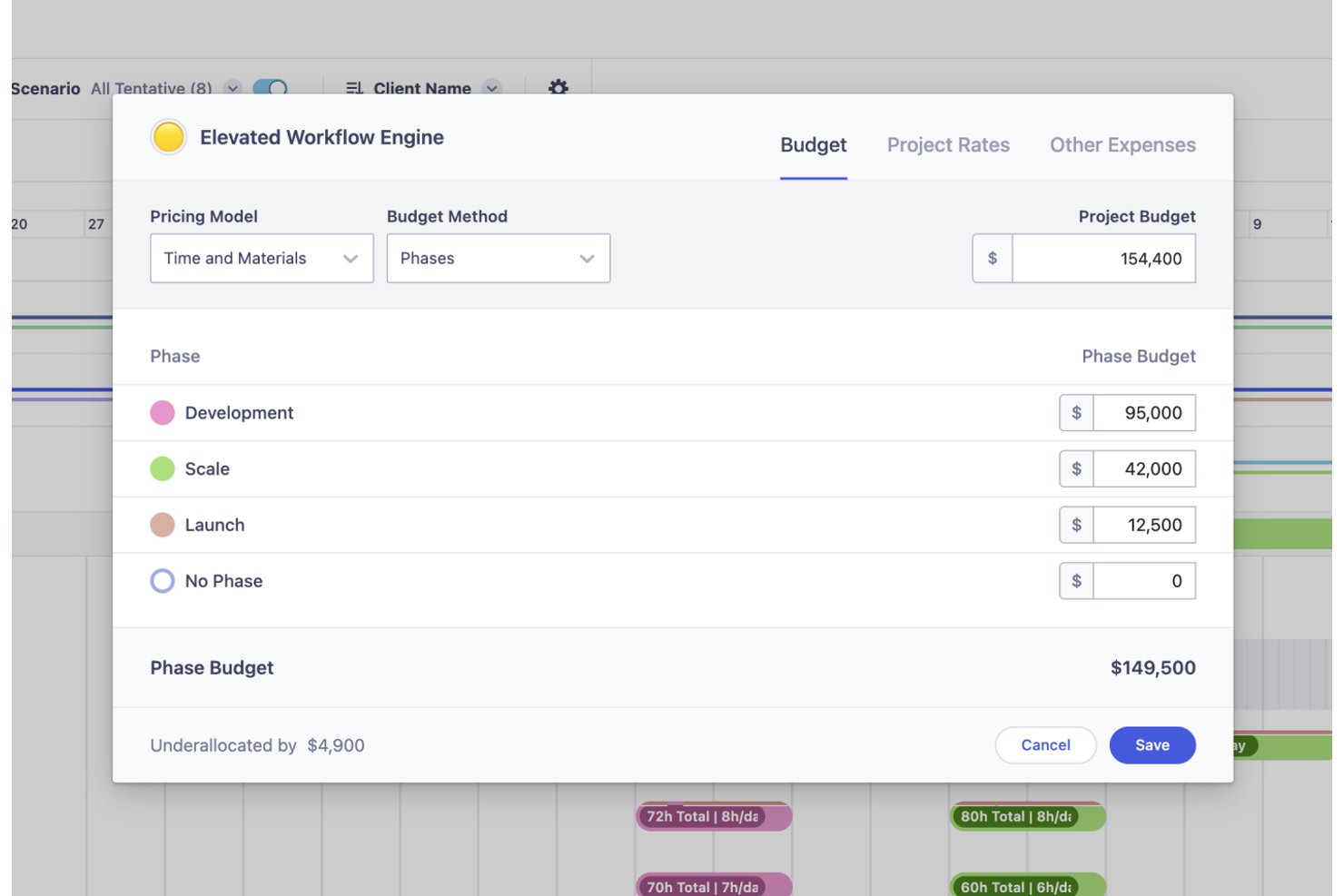
Runn’s financial tools help you track project budgets and costs, so you can meet financial goals. Its support for both fixed-price and time-and-materials billing models adds flexibility to budget management.
Standout Features
Milestones
Runn's milestone feature lets you add context to projects with categories like financial milestones and warning symbols. This helps in signaling important phases, payments, or potential issues to improve project clarity.
Skills Management:
Runn’s skill database lets you list and filter skills across your organization which helps with decision-making. You can assign expertise levels to team members to make it easier to form cross-functional teams for various projects.
Ease of Use
Runn stands out for making complex capacity questions easier to answer. Its visual planning interface helps teams see availability, forecast demand, and understand whether they have the right people to take on upcoming work. Instead of digging through disconnected spreadsheets or guessing at staffing needs, teams can quickly spot capacity gaps, compare future scenarios, and make more confident resourcing decisions.
Onboarding
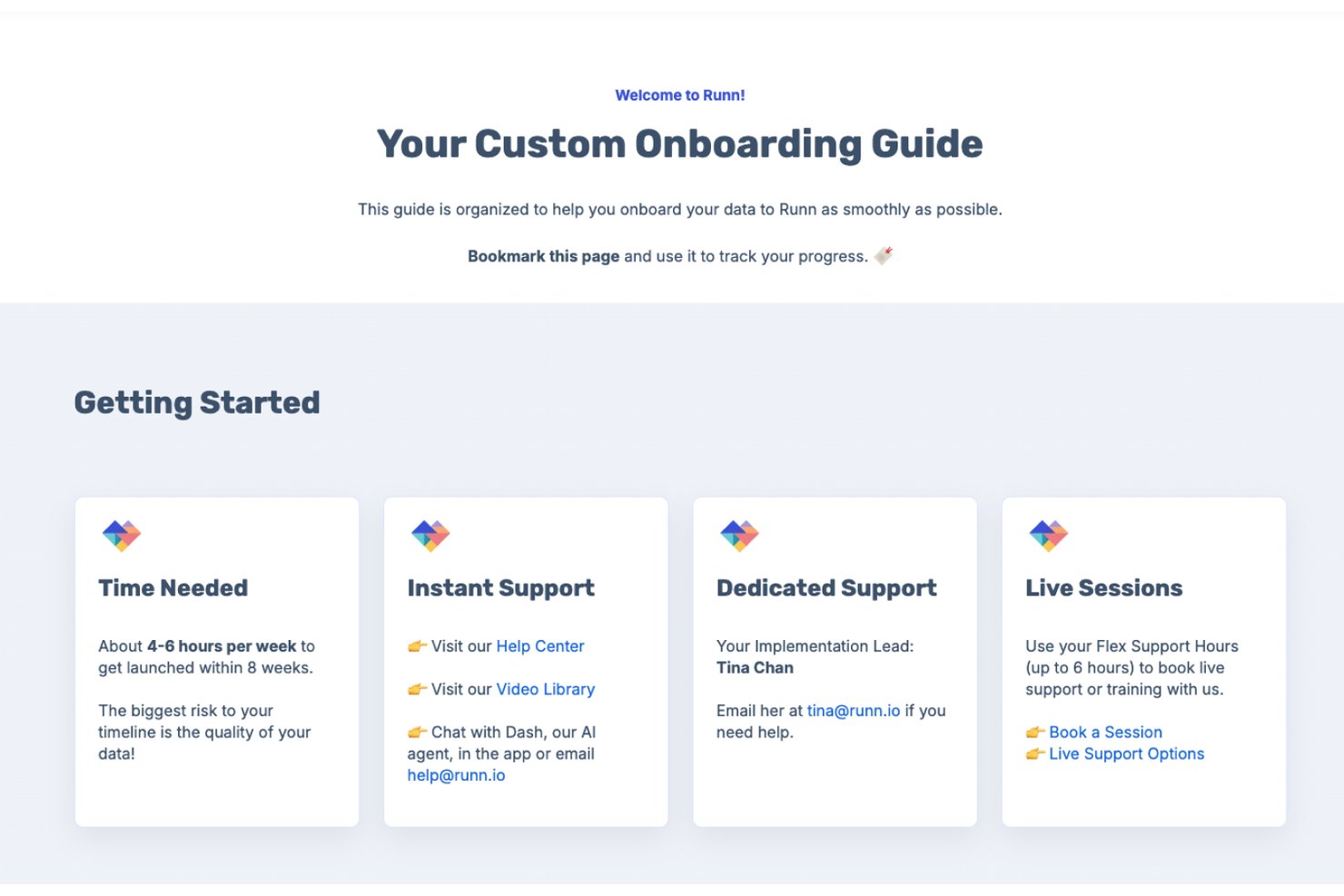
Runn offers flexible onboarding options to suit different team sizes and implementation needs. Organizations can get started quickly through a self-service free trial with guided in-app tutorials and walkthroughs, while those requiring a more hands-on approach can work directly with Runn's customer success team for tailored onboarding and data migration support. Depending on the complexity of the rollout, teams can be fully operational in a matter of days or follow a structured implementation process over several weeks. Users also benefit from ongoing support from resource management specialists who help ensure teams get the most value from the platform.
Customer Support
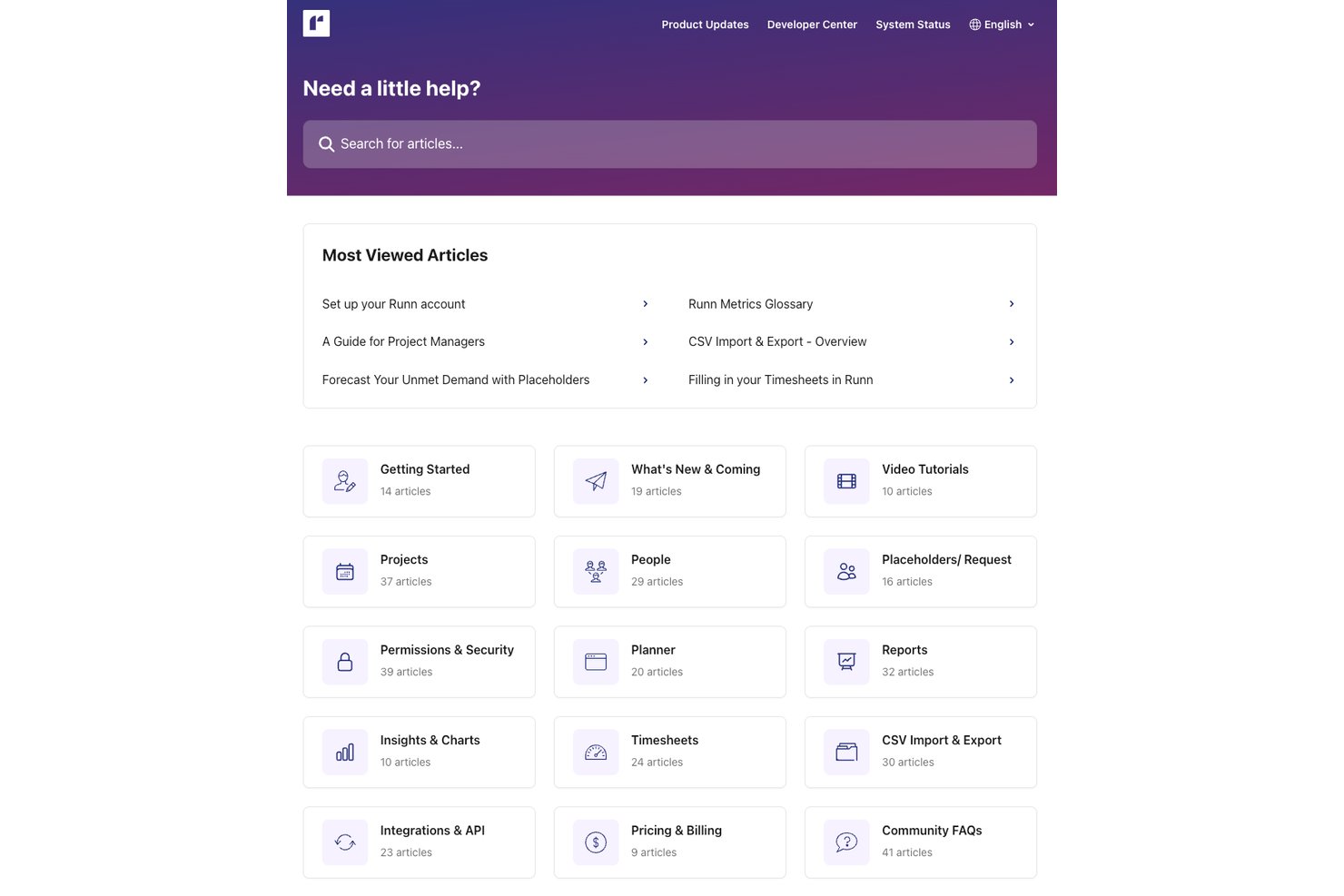
Runn provides reliable customer support from a knowledgeable and helpful team. You can also access guides, FAQs, and other resources through its extensive knowledge center.
Integrations
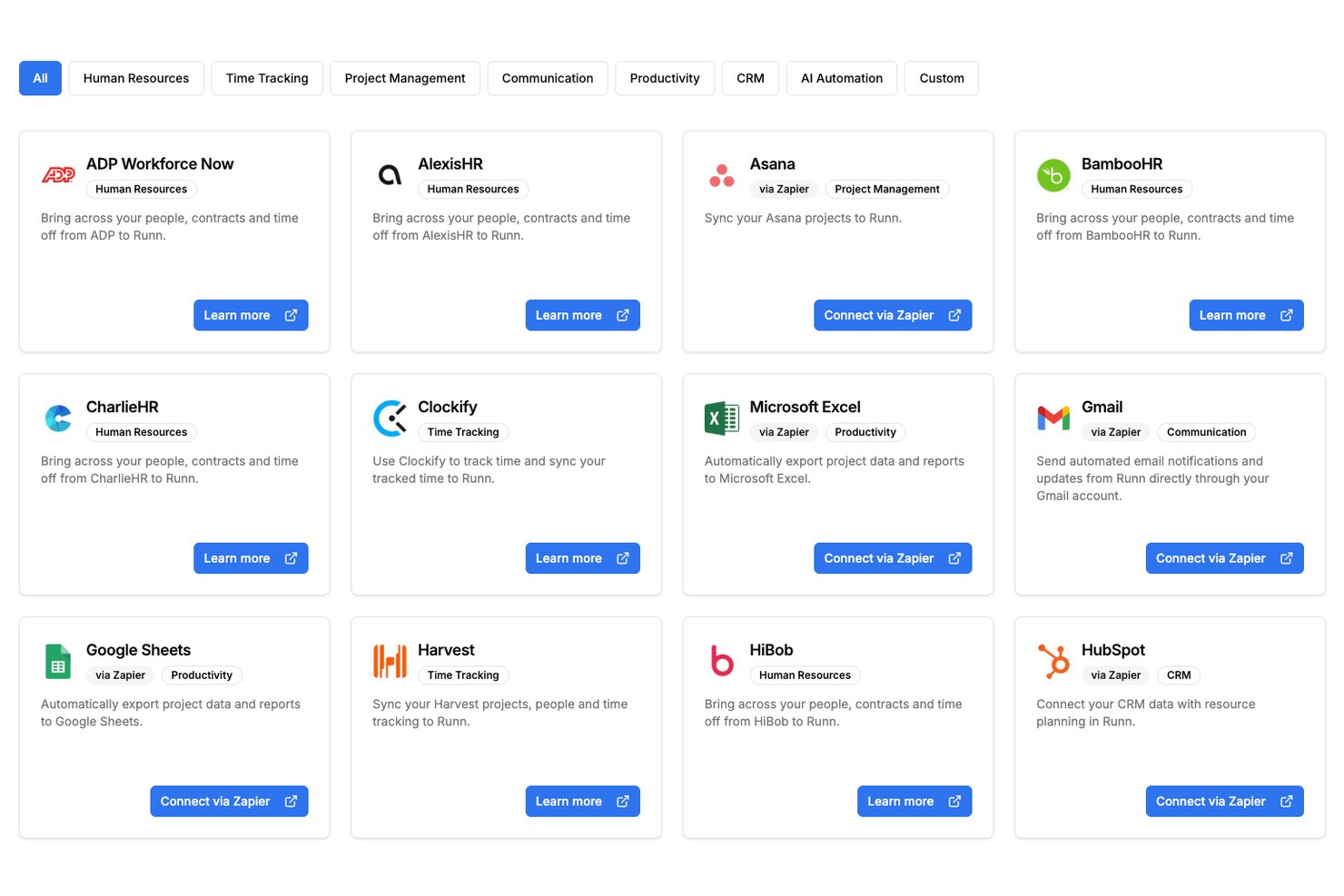
Runn offers native integrations with selected tools, plus API access and additional connections through Zapier and n8n.
Value for Money
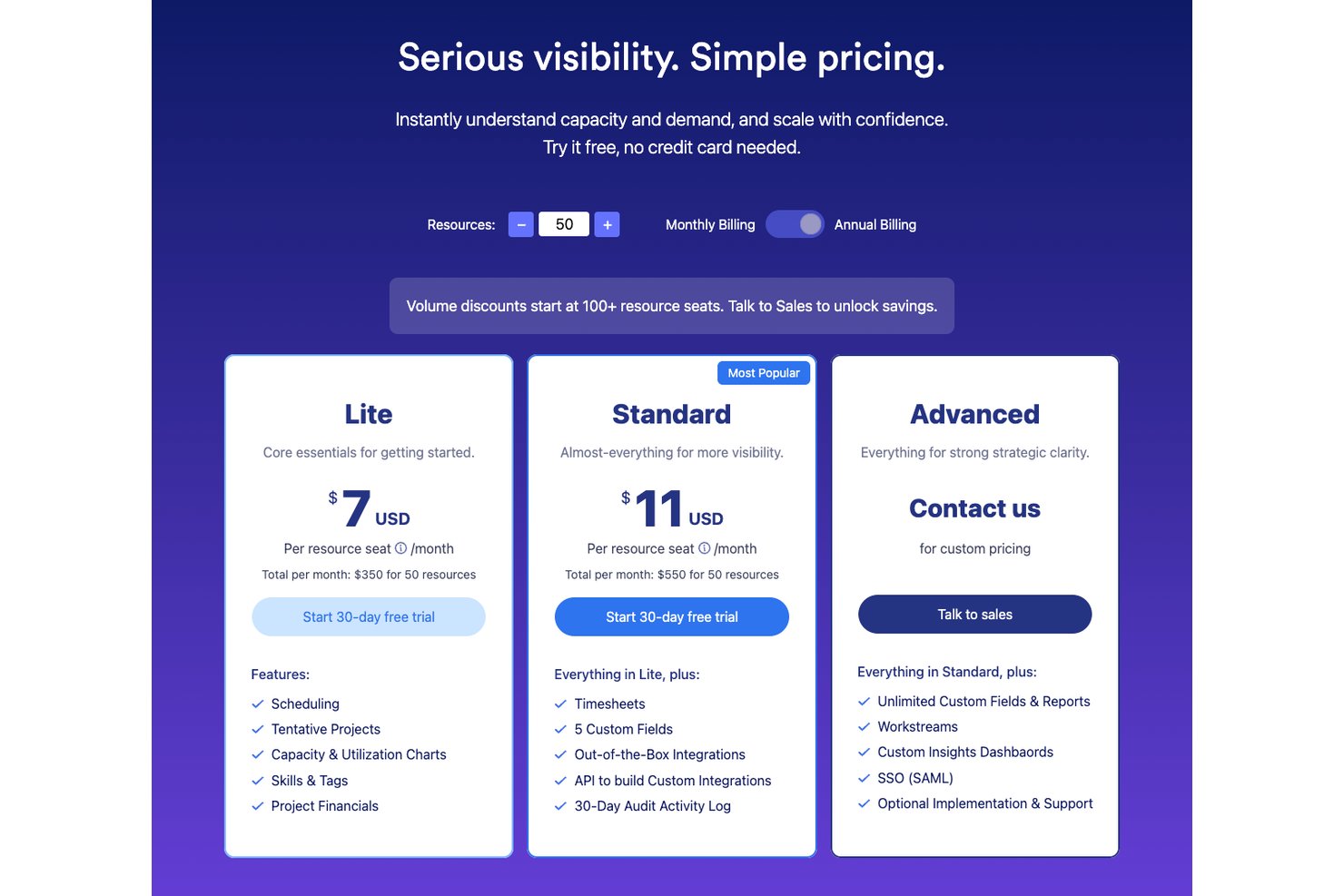
Runn's pricing is based on the number of resource seats and is split across three plans: Lite, Standard, and Advanced. The Lite and Standard plans are charged per resource seat and include progressively more advanced resource planning, reporting, and integration features. There is also an Advanced plan designed for organizations that need enterprise-grade capabilities, which requires contacting Runn for a custom quote. Larger teams can access volume discounts at higher seat counts. Users appreciate Runn's intuitive design, capacity planning tools, and project financial visibility, which help justify its cost compared to more general project management platforms.
- Lite: Includes capacity planning, scheduling, project planning, and advanced filtering.
- Standard: Adds timesheets, utilization insights, integrations, and API access.
- Advanced: Offers custom dashboards, SAML, SSO, resource requests, and workforce insights.
Runn Specs
- API
- Approval Workflows
- Audit Trail
- Budgeting
- Calendar Management
- Compliance Tracking
- Custom Reports
- Customer Management
- Dashboard
- Data Export
- Data Import
- Data Visualization
- Document Management
- Expense Tracking
- External Integrations
- Forecasting
- Inventory Tracking
- Multi-Currency
- Multi-User
- Notifications
- Prioritization
- Process Reporting
- Project Management
- Resource Management
- Risk Assessment
- Roadmapping
- Scheduling
- Supplier Management
- Third-Party Plugins/Add-Ons
- Workflow Management
Runn FAQs
How does Runn handle data security and compliance?
Is there a mobile app for Runn?
How often does Runn update its software?
What kind of training does Runn offer new users?
How does Runn facilitate resource planning?
Does Runn offer customer support on weekends?
Runn Company Overview & History
Runn was founded in 2018 and is headquartered in Wellington, New Zealand. The team is fully remote and operates across three continents. It specializes in resource scheduling and project management solutions for industries like IT and consulting. Runn aims to improve visibility and collaboration in project workflows has over 10,000 users worldwide.
Runn Major Milestones
- 2018: Founded in New Zealand.
- 2025: Reached $6.9 million ARR.