



monday.com vs. Jira: Vergleich & Expertenbewertungen für 2026



monday.com bietet eine flexible Plattform, die sich an die Projektmanagement-Bedürfnisse Ihres Teams anpasst, während Jira speziell für Softwareentwicklungsteams konzipiert ist, die Aufgaben und Probleme auf einer sehr detaillierten Ebene verfolgen müssen. Beide Tools können Ihren Arbeitsablauf verbessern, unterscheiden sich jedoch erheblich in ihrer Herangehensweise.
Ich habe beide Tools sowie deren Funktionen, Vor- und Nachteile sowie Preise anhand meiner umfassenden Projektmanagement-Erfahrung getestet und bewertet. Finden Sie heraus, welche Projektmanagement-Software am besten zu den Zielen Ihres Teams passt.
monday AI Workspace vs. Jira: An Overview
monday AI Workspace

Jira



Darum können Sie uns vertrauen
Wir testen und bewerten Projektmanagement-Software seit 2012. Als Projektmanager wissen wir, wie kritisch und schwierig die richtige Auswahl von Software sein kann. Wir investieren in tiefgehende Recherche, um unseren Lesern bessere Entscheidungen beim Softwarekauf zu ermöglichen. Wir haben über 2.000 Tools für verschiedene Projektmanagement-Anwendungsfälle getestet und mehr als 1.000 umfassende Software-Reviews geschrieben. Erfahren Sie, wie wir Transparenz gewährleisten & unsere Software-Bewertungsmethodik.
monday AI Workspace vs. Jira Pricing Comparison
| monday AI Workspace | Jira | |
|---|---|---|
| Free Trial | 14-day free trial | 7-day free trial |
| Pricing | From $9/user/month (billed annually) | From $8.15/user/month (billed annually) |
monday.com vs. Jira Preise & versteckte Kosten
Die Preisgestaltung von monday.com basiert auf einem gestaffelten Abonnementmodell, das auch einen kostenlosen Tarif beinhaltet. Die Kosten variieren je nach Anzahl der Nutzer und gewählten Funktionen. Die Preisgestaltung von Jira folgt ebenfalls einem gestaffelten Prinzip, wobei der Preis sich nach Nutzeranzahl und den benötigten Funktionen richtet, wobei fortgeschrittene Features in den Premium-Plänen verfügbar sind.
Um den richtigen Tarif für Ihr Team zu wählen, sollten Sie die Kernfunktionen, die Sie benötigen, evaluieren und zukünftige Wachstums- oder Zusatzanforderungen bedenken, damit Ihr Projektmanagement-Tool mit dem Projektumfang skalieren kann und Sie mögliche unerwartete Kosten vermeiden.
monday AI Workspace vs. Jira Feature Comparison
Die Automatisierungsfunktionen von monday.com ermöglichen es Ihnen, wiederkehrende Aufgaben zu vereinfachen. Damit eignet sich das Tool ideal für die Verwaltung von Marketingkampagnen mit vielen beweglichen Teilen. Jiras Aufgabenverwaltung ist hervorragend für Mitglieder von Softwareentwicklungsteams, die Fehler effizient priorisieren und abarbeiten müssen.
| monday AI Workspace | Jira | |
|---|---|---|
| API | ||
| Calendar Management | ||
| Collaboration Support | ||
| Dashboards | ||
| Data Export | ||
| Data Import | ||
| External Integrations | ||
| File Sharing | ||
| Gantt Charts | ||
| Kanban Boards | ||
| Multi-User | ||
| Notifications | ||
| Project Management | ||
| Task Scheduling/Tracking | ||
| Time Management |
monday.com vs. Jira-Integrationen
| Integration | monday.com | Jira |
|---|---|---|
| ✅ | ❌ | |
| HubSpot | ✅ | ✅ |
| Miro | ❌ | ✅ |
| Slack | ✅ | ✅ |
| GitHub | ✅ | ✅ |
| Figma | ❌ | ✅ |
| Adobe XD | ❌ | ✅ |
| Jenkins | ❌ | ✅ |
| API | ✅ | ✅ |
| Zapier | ✅ | ✅ |
Mit monday.com's HubSpot-Integration können Sie Updates im CRM automatisieren – besonders praktisch für Vertriebsteams, die Kundeninteraktionen nachverfolgen. Die Jira-Integration mit GitHub ist ideal für Entwicklerteams, die Code-Änderungen unmittelbar mit Projekttätigkeiten verknüpfen möchten.
monday.com vs. Jira Sicherheit, Compliance & Zuverlässigkeit
| Faktor | monday.com | Jira |
|---|---|---|
| Datenschutz | monday.com verwendet Datenverschlüsselung während der Übertragung und im Ruhezustand zum Schutz der Nutzerdaten. | Jira setzt Verschlüsselung ein und bietet anpassbare Berechtigungen zur Datenfreigabe. |
| Regulatorische Compliance | monday.com entspricht der DSGVO und kann Datenverarbeitungsverträge bereitstellen. | Jira ist DSGVO-konform und bietet Sicherheitsfunktionen auf Enterprise-Niveau. |
| Zuverlässigkeit (Uptime) | monday.com garantiert eine Verfügbarkeit von 99,9 % durch eine stabile Infrastruktur. | Jira bietet ein SLA mit 99,9 % Verfügbarkeit und nutzt redundante Systeme. |
monday.com und Jira bieten beide starke Sicherheits- und Compliance-Maßnahmen, unterscheiden sich aber in ihrem Ansatz in puncto Benutzerkontrolle und Anpassungsfähigkeit. Prüfen Sie, welche Sicherheitsfunktionen am besten zu den spezifischen regulatorischen Anforderungen und Datenschutzbedürfnissen Ihres Teams passen.
monday.com vs. Jira Benutzerfreundlichkeit
| Faktor | monday.com | Jira |
|---|---|---|
| Benutzeroberfläche | monday.com bietet eine visuell benutzerfreundliche Oberfläche mit Drag-and-Drop-Funktionen. | Jira verfügt über eine komplexere Oberfläche und erfordert Vertrautheit mit der Struktur. |
| Onboarding-Erlebnis | monday.com erleichtert das Onboarding mit geführten Tutorials und Vorlagen. | Das Onboarding bei Jira kann herausfordernd sein und erfordert oft eigenständiges Lernen. |
| Anpassung | monday.com bietet individuell anpassbare Workflows und Dashboards. | Jira bietet umfangreiche Anpassungsmöglichkeiten, setzt jedoch technisches Know-how voraus. |
monday.com ist dank des intuitiven Designs leichter zu bedienen; es lässt sich schnell erlernen und anwenden. Die Komplexität von Jira kann abschreckend wirken, doch für diejenigen, die Zeit investieren, bietet es leistungsstarke Anpassungsmöglichkeiten. Wer eine unkomplizierte Einrichtung sucht, ist mit monday.com gut beraten. Jira eignet sich besser für komplexes Projekt-Tracking, sofern Sie bereit sind, eine steilere Lernkurve in Kauf zu nehmen.
monday AI Workspace vs Jira: Pros & Cons
monday AI Workspace
- The interface is easy to use, with simple drag and drop timeline and charting mechanics.
- You can create forms that live within your project as a view.
- There is a long list of supported integrations
- The Gantt view isn't useful for building a project.
- Recurring tasks are considered automations and limited to higher tier plans.
- There is a steep learning curve for beginners.
Jira
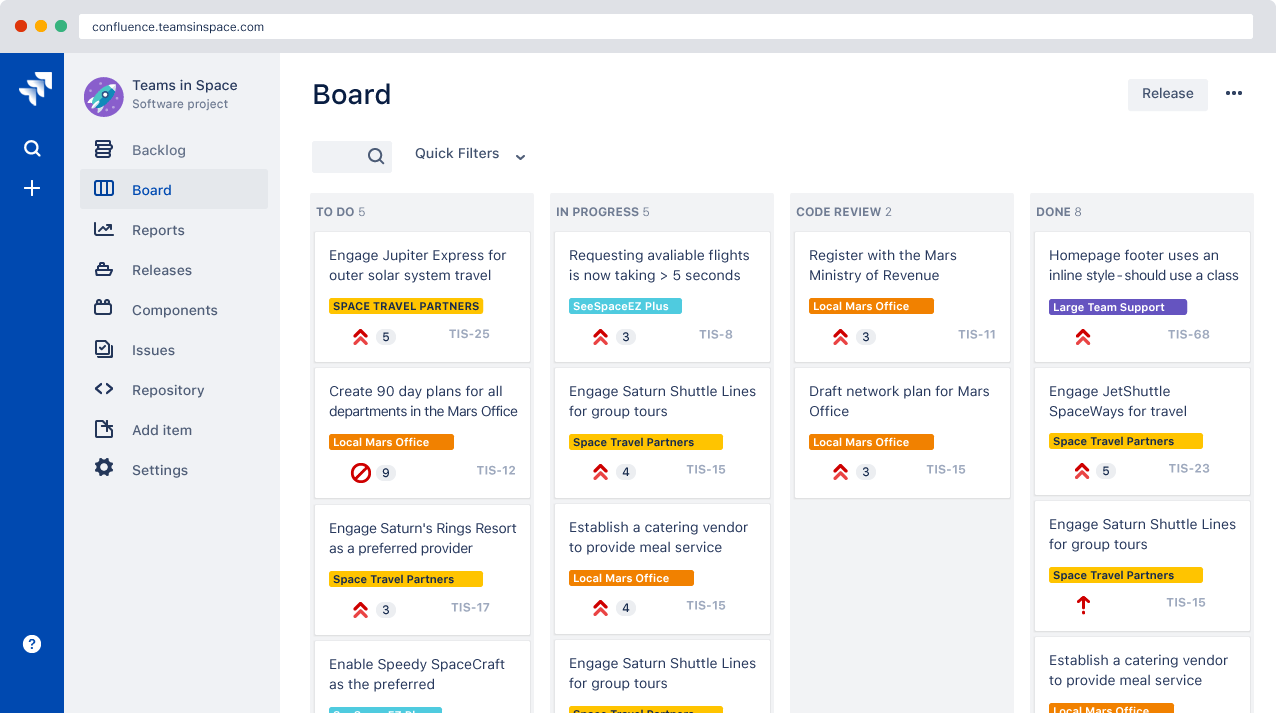
- Agile workflow management supports Scrum and Kanban and can improve your teams' productivity.
- Automation rules are easy to set up, which helps your team speed up their work.
- Custom filters can be created and accessed quickly, which improves your team's efficiency.
- Field names can be confusing, which might slow down your team's workflow.
- The interface can be too crowded in Scrum projects, which can make it hard for your team to navigate.
- There's a lack of resource management capabilities, which could limit your team's planning.
Best Use Cases for monday AI Workspace and Jira
monday AI Workspace
- Creative departments With features like collaborative docs and a proofing screen, creative teams can improve feedback loops and increase delivery speeds.
- Marketing teams Its customizable dashboards and automation features let you track campaigns and workflows efficiently.
- Content creation monday.com's file management and commenting capabilities let teams manage media files and improve collaboration.
- Event planners The platform’s timeline views and easy collaboration features make managing multiple events straightforward.
- Product development You can track progress and updates across teams to maintain alignment and meet deadlines.
- Remote teams With collaborative features and real-time updates, remote teams can maintain productivity and communication effortlessly.
Jira
- Software development Jira’s agile tools like Scrum and Kanban boards make it perfect for managing software projects.
- IT departments Its issue tracking capabilities help your team efficiently handle technical support and bug fixes.
- Tech startups Jira offers customization capabilities that allow your team to scale and adapt as your projects grow.
- Agile teams Sprint planning and backlog management features keep your agile processes organized and effective.
- Large enterprises Jira’s automation rules can streamline your complex workflows and improve team productivity.
- Project managers Its reporting and analytics provide insights that help you make informed decisions quickly.
Wer sollte monday.com und wer sollte Jira nutzen?
Meiner Meinung nach ist monday.com ideal für Kreativteams und Unternehmen, die Wert auf visuelles Projektmanagement legen und eine benutzerfreundliche Plattform für Zusammenarbeit benötigen. Es eignet sich für Teams, die Flexibilität und Einfachheit bei der Verwaltung verschiedener Projekte wünschen, ohne eine steile Lernkurve.
Ich finde, Jira ist am besten geeignet für Softwareentwicklungsteams und technische Branchen, die ein leistungsstarkes Aufgaben-Tracking benötigen und mit einer komplexeren Oberfläche zurechtkommen. Es ist eine ausgezeichnete Wahl für agile Teams, die umfangreiche Anpassungen benötigen und mit einer technisch geprägten Umgebung vertraut sind.
Differences Between monday AI Workspace and Jira
| monday AI Workspace | Jira | |
|---|---|---|
| Automation | monday.com offers strong automations for repetitive tasks within your custom workflows. | Jira offers advanced automations that are better for technical workflows. |
| Customization | monday.com allows easy dashboard customization without requiring technical skills. | Jira offers extensive customization, but requires technical expertise. |
| Onboarding | monday.com provides guided tutorials and templates for easy onboarding. | Jira's onboarding can be challenging and you might need to undertake some self-directed learning. |
| User Interface | monday.com has a visually intuitive interface with easy drag-and-drop features. | Jira's interface is more complex and requires more getting used to. |
| Read monday AI Workspace ReviewOpens new window | Read Jira ReviewOpens new window |
Similarities Between monday AI Workspace and Jira
| Cloud-Based Access | monday.com and Jira are cloud-based and offer mobile apps, so you and your team can access projects from anywhere, anytime. |
|---|---|
| Collaboration | Both monday.com and Jira offer robust collaboration features, like real-time updates and team messaging, to keep your team connected. |
| Integrations | They both provide extensive integration capabilities with tools like Slack and API. |
| Security | monday.com and Jira prioritize security, encryption, and compliance with standards like GDPR to keep your data protected. |
| Task Management | Both platforms excel in task management and include features for assigning, tracking, and managing tasks effectively. |
| Read monday AI Workspace ReviewOpens new window Read Jira ReviewOpens new window | |