



Jira vs. monday dev: Vergleich & Expertenbewertungen für 2026



Jira stattet Ihr Team mit leistungsstarken Projektmanagement-Lösungen aus, die speziell auf die Softwareentwicklung zugeschnitten sind. monday dev, ein Produkt von monday.com, bietet eine vielseitige Plattform, mit der sich unterschiedliche Projekte mühelos verwalten lassen. Während Jira bei der Abwicklung komplexer Entwicklungsprozesse punktet, überzeugt monday dev durch Flexibilität in verschiedensten Branchen.
In diesem Artikel vergleichen wir die Tools und deren Funktionen, Vor- und Nachteile, Preise und mehr, damit Sie die passende Projektmanagement-Software für Ihre Anforderungen finden.
Jira vs. monday dev: An Overview
Jira

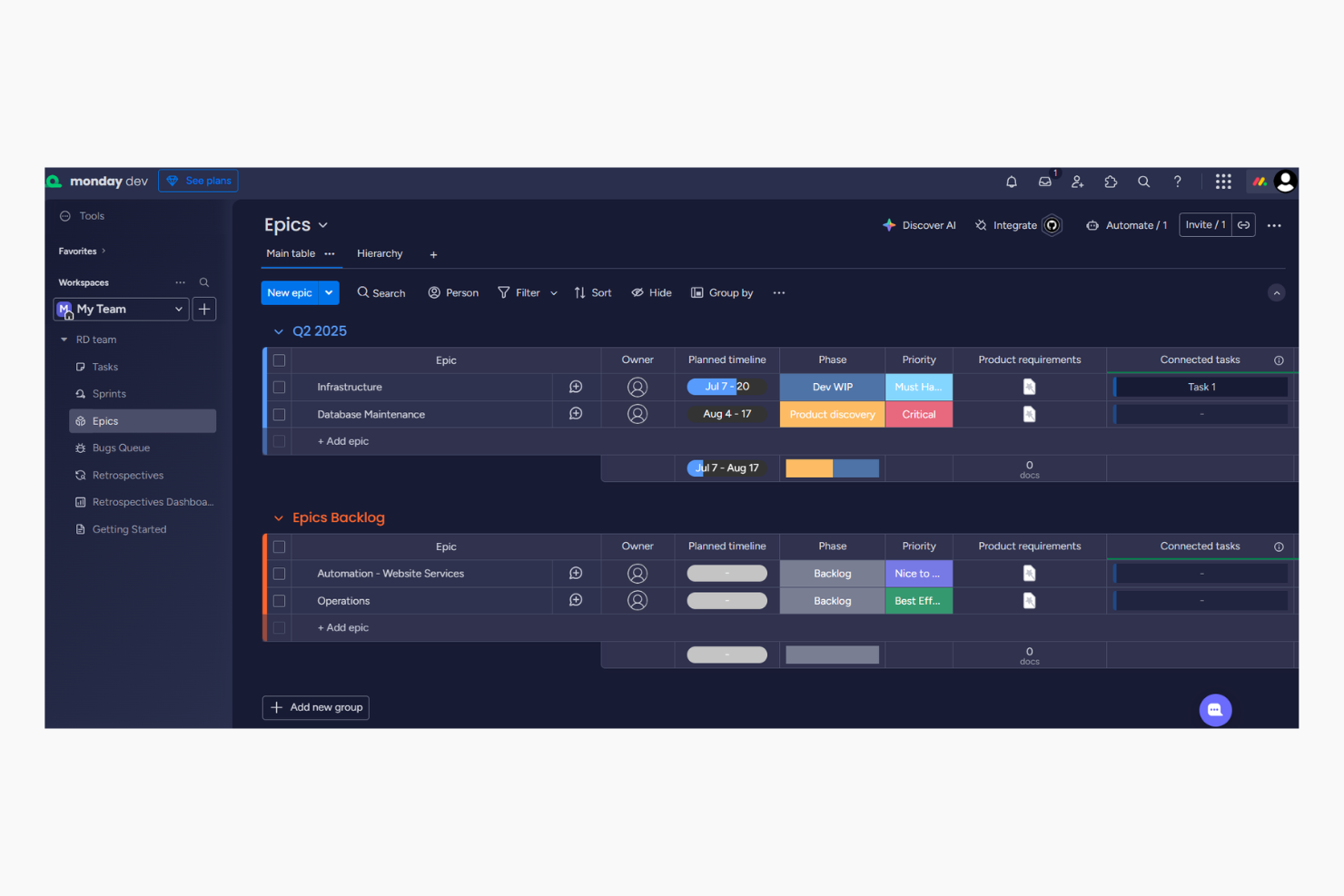
monday dev

Warum Sie unseren Software-Empfehlungen vertrauen können
Unser Team testet und bewertet Software seit 2012. Als Projektmanager wissen wir selbst, wie schwierig – und wichtig – es ist, die richtige Software auszuwählen.
Für diesen Leitfaden haben wir Tools mithilfe von praktischen Tests und unabhängiger Recherche bewertet und dabei unsere Bewertungskriterien angewendet. Zudem greifen wir auf Erkenntnisse von Branchenvordenkern und praktizierenden Projektmanagement-Experten zurück.
Unsere Bewertungen spiegeln unser menschliches redaktionelles Urteilsvermögen wider, keine Verkaufsstrategie.
Expertenprüfer:
Jira vs. monday dev Pricing Comparison
| Jira | monday dev | |
|---|---|---|
| Free Trial | Free plan + 14-day free trial available | Free trial available |
| Pricing | From $8.48/user/month | From $9/month (billed annually) |
Jira vs. monday dev: Preise & versteckte Kosten
Jiras Preisgestaltung folgt gestaffelten Abonnement-Plänen, die mit einer kostenlosen Version beginnen. Es können jedoch zusätzliche Kosten für Premium-Add-ons und erhöhten Speicherplatz anfallen. Auch bei monday dev werden Preisstaffelungen genutzt – achten Sie aber auf mögliche Zusatzgebühren für erweiterte Funktionen oder Integrationen. Um das passende Tool hinsichtlich der Kosten für Ihre Anforderungen auszuwählen, prüfen Sie Ihre benötigten Funktionen und denken Sie an eine mögliche Skalierung auf lange Sicht. Berücksichtigen Sie versteckte Kosten und stellen Sie sicher, dass die Lösung zu den Wachstumsplänen Ihres Teams passt.
Jira vs. monday dev Feature Comparison
Mit Jiras Unterstützung für agile Methoden sowie ausführlichen Berichten und Analysen behalten Sie den Projektfortschritt und die Nutzerakzeptanz auf Kanban-Boards und Gantt-Diagrammen im Blick – besonders wertvoll für Teams, die komplexe Softwareentwicklungsaufgaben bearbeiten. Gleichzeitig ist monday dev durch Automatisierungsfunktionen ideal, um wiederkehrende Aufgaben in scrum-basierten agilen Teams zu optimieren. Während Jira tiefe datengestützte Einblicke ermöglicht, sorgen die unkomplizierten Automationen von monday dev für einfache Workflows – jedes Tool erfüllt so ganz bestimmte Anforderungen im Projektmanagement.
| Jira | monday dev | |
|---|---|---|
| API | ||
| Collaboration Support | ||
| Data Export | ||
| Data Import | ||
| External Integrations | ||
| Multi-User | ||
| Notifications | ||
| Status Notifications |
Jira vs. monday dev Integrationen
| Integration | Jira | monday dev |
|---|---|---|
| GitHub | ✅ | ✅ |
| Figma | ✅ | ✅ |
| Slack | ✅ | ✅ |
| ❌ | ✅ | |
| HubSpot | ❌ | ✅ |
| Miro | ✅ | ✅ |
| Clockify | ✅ | ❌ |
| Jenkins | ✅ | ❌ |
| Sentry | ✅ | ❌ |
| Lucidchart | ✅ | ✅ |
| API | ✅ | ✅ |
| Zapier | ✅ | ✅ |
Durch die Integration von Jira mit GitHub können Sie Codeänderungen und Projektthemen nahtlos gemeinsam verfolgen – ideal für Softwareentwicklungsteams. Die LinkedIn-Integration von monday dev ist perfekt, um Social-Media-Aufgaben wie automatisches Posten von Updates bei Projektmeilensteinen zu automatisieren. Während Jira vor allem für die Verbindung von Entwicklungstools konzipiert ist, verbessert monday dev die Effizienz Ihrer Marketing- und Outreach-Prozesse.
Jira vs. monday dev Sicherheit, Compliance & Zuverlässigkeit
| Faktor | Jira | monday dev |
|---|---|---|
| Datenverschlüsselung | Jira verschlüsselt Daten sowohl bei der Übertragung als auch im Ruhezustand mit dem AES-256-Standard. | monday dev verwendet AES-256-Verschlüsselung zum Schutz der Daten sowohl bei der Übertragung als auch im Ruhezustand. |
| Regulatorische Compliance | Jira entspricht der DSGVO, HIPAA und weiteren Branchenstandards. | monday dev erfüllt die Anforderungen der DSGVO und verfügt über ISO-Zertifizierungen für den Datenschutz. |
| Zugriffskontrollen | Jira bietet anpassbare Zugriffsrechte für Benutzerrollen. | monday dev stellt rollenbasierte Zugriffskontrolle und Berechtigungen bereit. |
| Zuverlässigkeit | Jira gewährleistet eine 99,9 % Betriebszeit (SLA) für einen zuverlässigen Service. | monday dev sichert die Zuverlässigkeit mit einer 99,9 % Betriebszeit zu. |
Jira und monday dev bieten beide starke Sicherheits- und Compliance-Funktionen, aber Jiras breitere regulatorische Compliance kann insbesondere für stärker regulierte Branchen attraktiv sein. Bei der Bewertung dieser Tools sollte der Fokus auf den spezifischen Compliance-Anforderungen Ihrer Branche liegen und geprüft werden, wie sich die Sicherheitsmaßnahmen der jeweiligen Plattform an den Datenschutzschwerpunkten Ihres Teams ausrichten.
Jira vs. monday dev Benutzerfreundlichkeit
| Faktor | Jira | monday dev |
|---|---|---|
| Benutzeroberfläche | Die Benutzeroberfläche von Jira ist leistungsstark, kann aber mit ihren zahlreichen Funktionen und Einstellungsmöglichkeiten für neue Nutzer komplex wirken. | monday dev bietet eine übersichtliche, intuitive Oberfläche, die Navigation und Aufgabenmanagement erleichtert. |
| Onboarding-Erlebnis | Jira stellt ausführliche Tutorials und Dokumentationen zur Verfügung, um neuen Nutzern den Einstieg zu erleichtern. | monday dev bietet interaktive Tutorials und Schnellstart-Anleitungen für einen reibungslosen Onboarding-Prozess. |
| Einrichtung | Die Einrichtung von Jira kann aufgrund der umfangreichen Anpassungsmöglichkeiten zeitintensiv sein. | Die Einrichtung von monday dev ist schnell und unkompliziert, sodass Teams sofort starten können. |
| Support | Jira bietet umfangreichen Support über Community-Foren und umfassende Dokumentationen. | monday dev stellt einen reaktionsschnellen Kundensupport sowie eine solide Wissensdatenbank bereit. |
Die steile Lernkurve von Jira ist auf den großen Funktionsumfang zurückzuführen und kann anfangs überfordernd wirken. Gleichzeitig glänzt das Tool besonders beim detaillierten Projekt-Tracking und mit umfangreicher Unterstützung für agiles Projektmanagement. monday dev hingegen ist leichter zu bedienen und damit ideal für Teams, die Wert auf Einfachheit und eine schnelle Einrichtung legen.
Jira vs monday dev: Pros & Cons
Jira
- Agile workflow management supports Scrum and Kanban and can improve your teams' productivity.
- Automation rules are easy to set up, which helps your team speed up their work.
- Custom filters can be created and accessed quickly, which improves your team's efficiency.
- Field names can be confusing, which might slow down your team's workflow.
- The interface can be too crowded in Scrum projects, which can make it hard for your team to navigate.
- There's a lack of resource management capabilities, which could limit your team's planning.
monday dev
- Easily customize workflows, including sprint planning and Kanban board configurations
- Visual project tracking keeps your team aligned and focused
- Automation features save time on repetitive tasks
- Gantt chart view is less intuitive than other tools
- Mobile app lacks full functionality for managing product roadmap tasks.
- Initial setup might be overwhelming for teams new to agile tools
Best Use Cases for Jira and monday dev
Jira
- Software development Jira’s agile tools like Scrum and Kanban boards make it perfect for managing software projects.
- IT departments Its issue tracking capabilities help your team efficiently handle technical support and bug fixes.
- Tech startups Jira offers customization capabilities that allow your team to scale and adapt as your projects grow.
- Agile teams Sprint planning and backlog management features keep your agile processes organized and effective.
- Large enterprises Jira’s automation rules can streamline your complex workflows and improve team productivity.
- Project managers Its reporting and analytics provide insights that help you make informed decisions quickly.
monday dev
- Tech startups Customizable workflows help your team adapt and grow rapidly in a dynamic environment, especially during fast-paced product development cycles.
- Software development Automation features and bug tracking streamline repetitive tasks, allowing your developers to focus on coding.
- Product management teams Roadmapping tools and backlog prioritization help your team align stakeholders and deliver product updates on schedule.
- IT departments Efficient task tracking and automation improve your team's response to issues and requests, especially when managing technical dependencies.
- Remote teams Collaboration tools keep your team members connected, no matter where they are working.
- Creative agencies Customizable dashboards provide your team with the flexibility needed for unique projects, backed by a centralized knowledge base and shared docs.
- Local nonprofits The setup complexity and feature set might be more than what your team requires.
Wer sollte Jira nutzen und wer monday dev?
Meiner Meinung nach eignet sich Jira am besten für Softwareentwicklungsteams und Technologieunternehmen, die umfangreiche Funktionen für komplexes Issue Tracking, Sprint- und Backlog-Management sowie Code-Integration benötigen. Wer in einem schnelllebigen Tech-Umfeld mit komplexen Workflows arbeitet oder bereits andere Atlassian-Produkte wie Confluence einsetzt, profitiert von Jiras Funktionalität. Aus meiner Sicht ist monday dev optimal für Teams in unterschiedlichen Branchen, die eine flexible, benutzerfreundliche Plattform zur Projektverwaltung suchen, ohne sich mit technischen Details auseinandersetzen zu müssen. Wenn Ihr Team Wert auf Vorlagen, Einfachheit und schnelle Anpassbarkeit legt, ist monday dev die richtige Wahl.
Differences Between Jira and monday dev
| Jira | monday dev | |
|---|---|---|
| Automation | Jira supports complex automation for development workflows. | monday dev excels in automating repetitive tasks across various industries. |
| Compliance | Jira complies with numerous industry standards, ideal for regulated sectors. | monday dev focuses on GDPR and ISO certifications, suitable for general data protection needs. |
| Feature Depth | Jira offers advanced features for detailed project tracking and software development. | monday dev provides essential features with a focus on simplicity and ease of use. |
| Pricing | Jira uses a tiered subscription model with potential extra costs for add-ons. | monday dev also follows a tiered pricing approach with additional fees for premium features. |
| User Interface | Jira's interface is powerful but can be complex for beginners. | monday dev's interface is intuitive and easy to navigate for all users. |
| Read Jira ReviewOpens new window | Read monday dev ReviewOpens new window |
Similarities Between Jira and monday dev
| Collaboration | They both provide strong collaboration features like real-time updates and shared dashboards to keep your team aligned and informed. |
|---|---|
| Customization | Both platforms offer customization options to tailor workflows to your team's needs, whether you're in tech or marketing. |
| Integrations | Both Jira and monday dev integrate with popular tools like Slack and GitHub, allowing your team to connect existing workflows seamlessly. |
| Scalability | Both solutions are scalable, supporting growing teams and expanding projects with features that adapt to increasing demands. |
| Security | Jira and monday dev both use AES-256 encryption to protect data, ensuring your projects are secure and compliant with industry standards. |
| Read Jira ReviewOpens new window Read monday dev ReviewOpens new window | |